 QUICKGUIDE
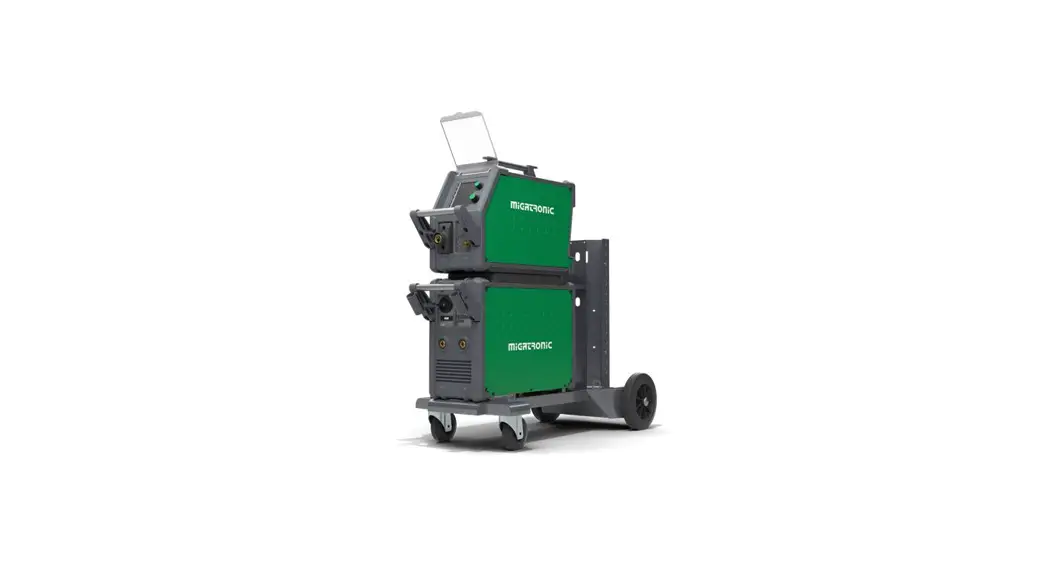
SIGMA CORE BASIC
50113820
Welding table (set value)
| Process | 1.0 mm | 1.5 mm | 2.0 mm | 3.0 mm | 4.0 mm | 6.0 mm | 10.0 mm | |||||||||
| Material | Wire | Gas | S (m/min) | UO (V) | S (m/min) | UO (V) | S (m/min) | L10 (V) | S (m/min) | UO (V) | S (m/min) | UO (V) | S (m/min) | UO (V) | S (m/min) | U0 (V) |
| Fe | 0.8 | CO2 | 2.5 | 19 | 4.5 | 19.5 | 7 | 21 | 11 | 27 | 13 | 29 | 18 | 30 | 24 | 37 |
| Fe | 1 | CO2 | 2 | 18 | 2.5 | 19 | 3 | 20 | 4.5 | 21 | 6 | 22.5 | 9 | 24.5 | 14 | 32 |
| Fe | 1.2 | CO2 | 1 | 18 | 2 | 20 | 2.5 | 21,0 | 3.5 | 22 | 4.5 | 23 | 7.5 | 28.5 | 11 | 36 |
| Process | 1.0 mm | 1.5 mm | 2.0 mm | 3.0 mm | 4.0 mm | 6.0 mm | 10.0 mm | |||||||||
| Material | Wire | Gas | S (m/min) | UO (V) | S (m/min) | UO (V) | S (m/m in) | UO (V) | S (m/min) | UO (V) | S (m/min) | UO (V) | S (m/m in) | L10 (V) | S (m/m in) | 110 (V) |
| Fe | 0.8 | ArCO2 | 3 | 16 | 6 | 18 | 7.5 | 19.5 | 11 | 20 | 14 | 26 | 18 | 31 | 24 | 33 |
| Fe | 1 | ArCO2 | 2 | 15 | 3 | 16 | 4 | 17 | 6 | 19 | 8 | 20 | 11.5 | 26.5 | 16 | 30 |
| Fe | 1.2 | ArCO2 | 1.5 | 16.5 | 2.5 | 17.5 | 3.5 | 18 | 4.5 | 20.5 | 5.5 | 20.5 | 8 | 29 | 10 | 32 |
| Fe | 1.6 | ArCO2 | 1 | 17 | 2 | 18 | 2.5 | 18.5 | 3 | 19.5 | 4 | 22 | 5.5 | 29 | ||
| FeFlux | 1.2 | ArCO2 | 6 | 21 | 8 | 25 | 11 | 28 | ||||||||
| CrNi | 1 | ArCO2 | 3 | 15 | 4 | 16 | 6 | 17 | 8.5 | 20 | 9 | 25 | 10 | 27 | ||
| CrNi | 1.2 | ArCO2 | 2 | 15 | 3 | 16 | 3.5 | 16.5 | 6 | 18 | 8 | 24 | 10 | 24 | 12 | 31 |
| Al | 1 | Ar | 4 | 14.5 | 6 | 15 | 7.5 | 16 | 9 | 19 | 11 | 22 | 13 | 25 | 15 | 27 |
| Al | 1.2 | Ar | 3.5 | 13 | 5 | 15 | 8 | 16 | 9 | 17 | 10 | 18 | 13 | 23 | 15 | 26 |
Table 1
Setting the welding process
Press and hold (11A) to open for setting the welding process. Choose parameter by turning (10).
Set the chosen value by turning (11). To close this function, press (11A) briefly.
Press (12) briefly to turn display of Fxx (F = function) parameter names on/off.
MIG/MAG parameters 

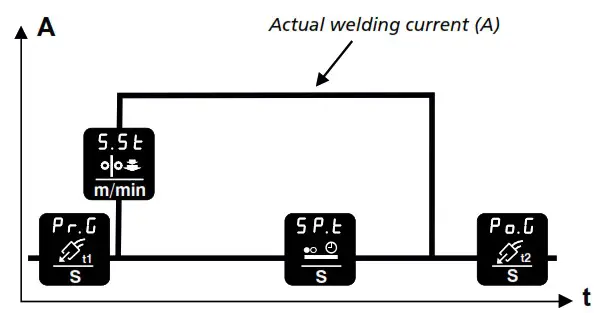
GS.F / F22 (gas flow) 0.5-27 l/min (only machines with IGC) (optional equipment)
| Pr.G / F31 | Pre-gas | (0.2 sec.) |
| S.St / F32 | Soft start | (1.0 m/min.) |
| Po.G / F38 | Post-gas | (3.0 sec.) |
| SP.t / F39 | Spot time | (0.0 sec.) |
MMA (electrode) parameters
When the MMA welding program is chosen, the operator is allowed access to the following parameters only
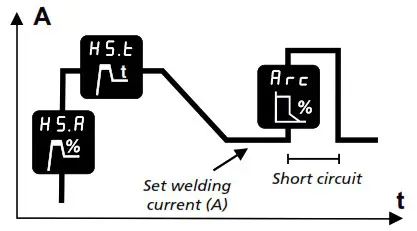
Figure 1
| HS.A / F11 | Hofstra | (25%) |
| HS.t / F12 Arc / F13 | Hofstra time | (0.5 sec.) |
| Arc / F13 | Arc power | (25%) |
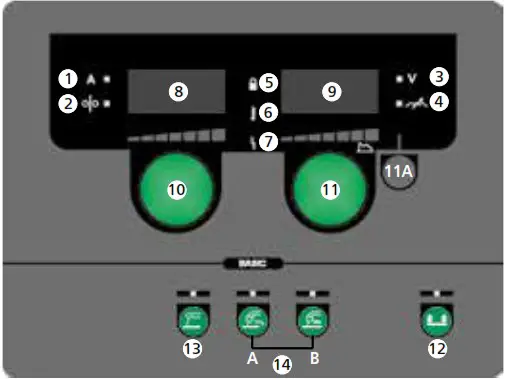
- Welding current, [A]
- Wire feed speed, [m/min]
- Welding voltage, [V]
- Arc adjust
- Lock symbol
Lock: Insert the SD lock card.
Unlock: Reinsert the SD lock card to unlock. - Warning – Overheating
- Fault indicator
See instruction manual - Display of wire feed speed or welding current
- Display of welding voltage or Arc adjust
- Setting wire feed speed or welding current
Turn the control knob to set the desired wire feed speed (MIG/MAG) (see table 1) or welding current (MMA). - Setting welding voltage, Arc adjust and welding process
Turn the control knob to set the desired welding voltage or Arc adjust (see table 1).
Short press (11A) (MIG/MAG): Change between display of welding voltage and Arc adjust.
Long press (11A): Opens for setting the welding process (see figure 1). - Selecting trigger mode
Change between 2-stroke (indicator off) and 4-stroke (indicator on).
2-stroke: The welding process starts when the torch trigger is activated and ends when the torch trigger is released.
4-stroke: The welding process starts when the torch trigger is activated and released and ends when the torch trigger is activated again.
Long press: Opens user menu. For detail information, see instruction manual. - MMA welding
Press the key to choose MMA welding.
Long press recalls factory settings if indicator is on. - MIG/MAG welding
Press the key to choose MIG/MAG welding (14A = CO2 / 14B = Mix).
Long press recalls factory settings if indicator is on.
For more information, please refer to the welding table. - Wire inching
Press the key to feed the wire and adjust the wire feed speed by turning (10) simultaneously.
50113820
 Migatronic - Lasapparaten en apparatuur