| Error Notification | Possible Cause | Remedies |
Bin Removed | Dirt Bin in not fully secure | Reinstall Dirt Bin until secure > Press START/PAUSE button |
| Robot Lifted | Robot has been lifted | Pick up robot and place robot on floor > Push Start/Pause to Resume cleaning |
| Brush Jam | Obstruction in the brush area | Turn robot OFF > Remove Brush Roll >Clear debris from Brush Roll > Turn Brush endcap, it should spin freely > Remove endcap & clear debris if needed > Rotate brush by hand after reinserting (should turn smoothly) See detailed instuctions HERE |
| Robot Stuck | Robot ran into obstacles | Reposition robot from obstacles/area > clear obstacles if possible > Press START/PAUSE button Please Note: The ICONpet Robot is not intended for use on plush, dense carpet or some rubber backed rugs |
| Check Airpath/Filter | Filter may be dirty – Airpath clogged | Turn robot OFF > Empty Dirt Bin > Clean filter > Remove Brush Roll > Clear debris from Brush Chamber > Reassemble > Turn On See detailed instructions HERE |
| Dock Impeded | Obstacles to close to Dock | There should be at least 40 inches of clear space in front of Dock |
| Wheel Stuck (Left or Right) | Turn robot OFF > Remove obstacles from wheels > Wheels should turn by hand > Turn On | |
| Bumper Jam | Bumper cannot move freely | Remove debris from Bumper > Compress Bumper several times to ensure it moves freely |
| Spot Impeded | Area is not unobstructed enough to use Spot Mode | When using Spot Mode the area must be large enough to navigate Please Note: The ICONpet Robot is not intended for use on plush, dense carpet or some rubber backed rugs |
| Clean Sensors | Sensors are dirty | Clean the Front 3 Lenses and 4 Front Sensors & the 2 Sensors on the back of robot, using a damp cloth (Do not use Alcohol) 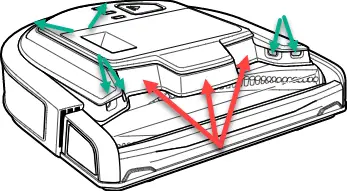 |
| Wheel Hanging | Cliff Sensors may be dirty | Turn robot OFF > Clean the 4 Cliff Sensors on the bottom of robot with a damp cloth (Do not use Alcohol) 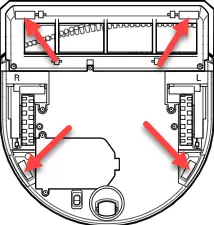 |
Dock Not Found (Error in App)
| Cord is not inserted completely | Check the back of the Dock, the green light must be on Check the connection to make sure cord is secure > unplug & plug back in |
| Dock plugged into an outlet controlled by a switch | Plug Dock into an outlet not controlled by a switch If using an outlet controlled by the switch, the switch must be in the On position | |
| Large, spread out floor plan | For large floor plan > Reposition Dock to a central location > May consider purchasing an additional Dock | |
| Fan Error | Turn robot OFF > Remove Dirt Bin > Clear debris from Suction Inlet (opening on outside of dirt bin), Filter & Separator Cone > Return Dirt Bin > Turn On | |
| System Error | Turn robot OFF > Wait a few seconds > Turn On | |
| Battery Error | Turn robot OFF > Wait a few seconds > Turn On |
If remedy does not resolve the issue, please Contact Us