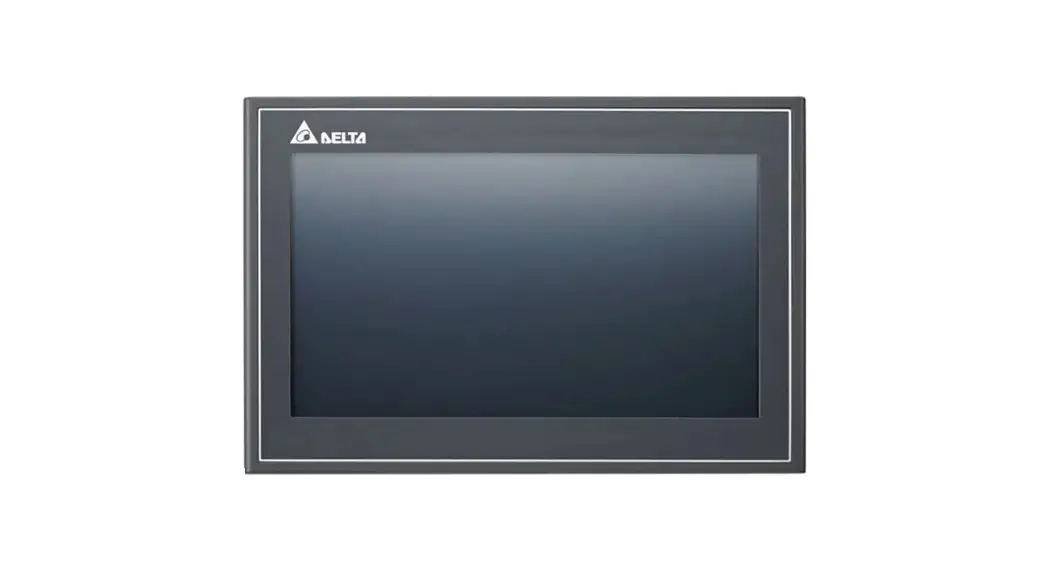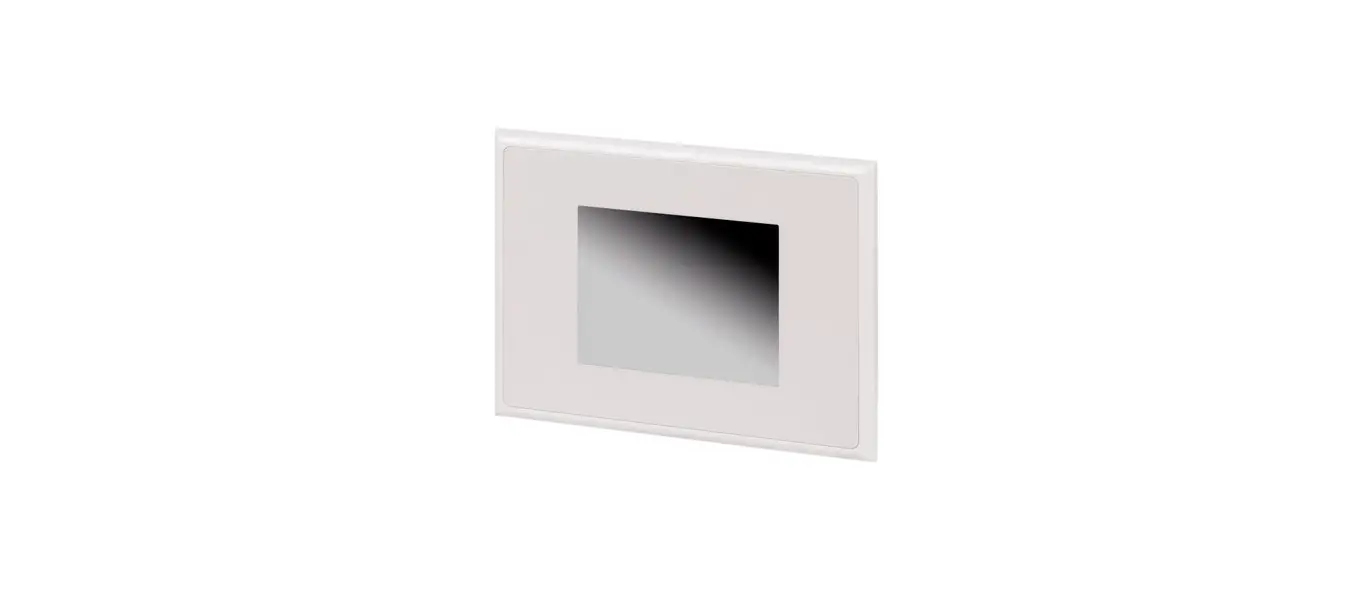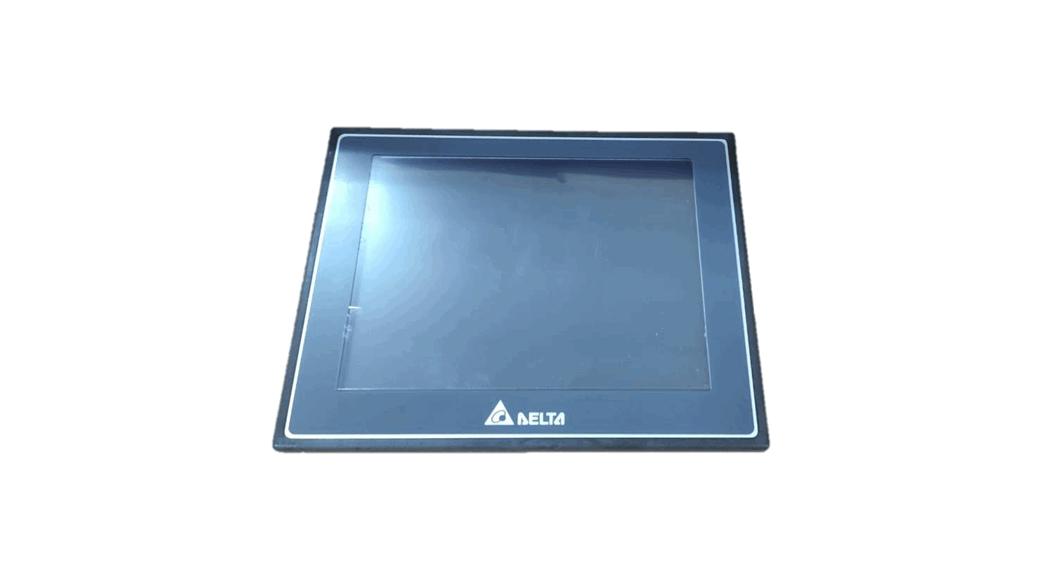
 DOP-107PV 7 Inch TFT LCD HMI Touch Panel Screen
Instruction Manual
General precautions
Thank you for purchasing this product. This instruction sheet provides information about the DOP-100 series HMI. Before using this product, please read through this instruction sheet carefully to ensure the correct use of the product. Please keep this sheet handy for quick reference whenever needed. Before finishing reading this sheet, please follow the instructions below:
- Install the product in an indoor location, which is free of vapor, corrosive and inflammable gas and liquids.
- Please refer to the wiring diagram when connecting the wires.
- Ensure your HMI is correctly grounded. The grounding method must comply with the national electrical standard (please refer to NFPA 70: National Electrical Code, 2005 Ed.).
- Do not disassemble the HMI or change the wiring when power is on.
- Do not touch the power supply when power is on, or it may cause electric shock.
- When the HMI displays a low power notification and requires a battery change, please contact your local distributor or Delta Customer Service Center for the replacement. Do not change the batteries by yourself.
- This product can be used with other industrial automation equipment. Please read through this sheet carefully and install the product according to the instructions to avoid danger. ◼ Cleaning method: please use a dry cloth to clean the product. ◼ This product must be used at an altitude below 2,000 m.
- If the equipment is used in a manner not specified by the manufacturer, the protection provided by the equipment may be impaired.
- For repair and maintenance, please contact Delta Electronics, Inc. Address: No.18, Xinglong Rd., Taoyuan City, Taiwan. TEL: +886-3-3626301.
If you have any inquiry during operation, please contact our local distributors or Delta sales representatives. The content of this instruction sheet may be revised without prior notice. Please consult our distributors or download the latest version at Delta’s website (https://www.deltaww.com/).
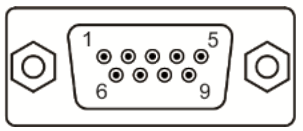
Communication port pin assignment
DOP-107PV COM1
| COM Port | Pin | MODE1 |
| RS-232 | ||
 | 1 | – |
| 2 | RXD | |
| 3 | TXD | |
| 4 | – | |
| 5 | GND | |
| 6 | – | |
| 7 | RTS | |
| 8 | CTS | |
| 9 | – |
DOP-107PV COM2
| COM Port | Pin | MODE1 | MODE2 | MODE3 | |||
| COM2 | COM3 | COM2 | COM3 | COM2 | COM3 | ||
| RS-232 | RS-485 | RS-485 | RS-485 | RS-232 | RS-422 | ||
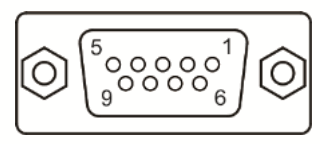 | 1 | D+ | TXD+ | ||||
| 2 | RXD | RXD | |||||
| 3 | TXD | TXD | |||||
| 4 | D+ | D+ | RXD+ | ||||
| 5 | GND | GND | GND | ||||
| 6 | D- | TXD- | |||||
| 7 | RTS | RTS | |||||
| 8 | CTS | CTS | |||||
| 9 | D- | D- | RXD- | ||||
Note: mark “-” means connection is not required.
Description of each part
DOP-107PV (front view) 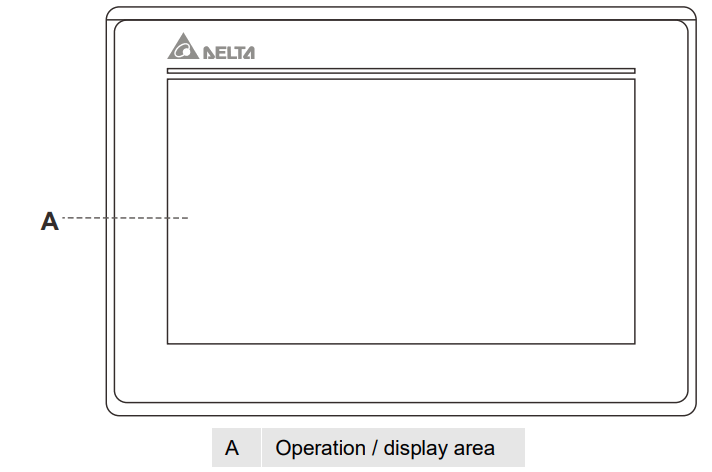 DOP-107PV (rear view)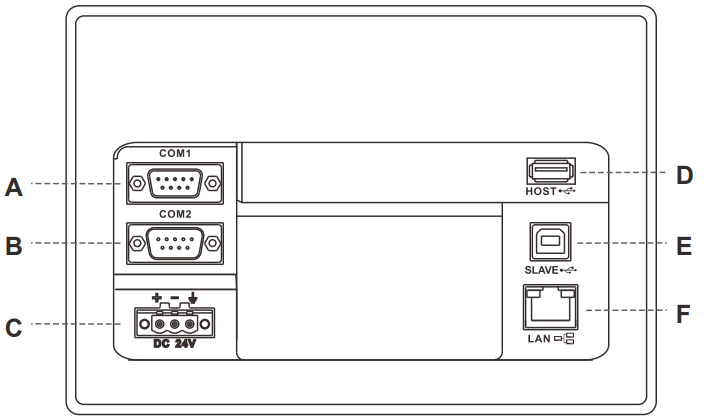
| A | COM1 | D | USB Host |
| B | COM2 | E | USB Slave |
| C | Power input terminal (24 AWG wire min.) | F | Network Port (LAN) |
Mounting dimensions
DOP-107PV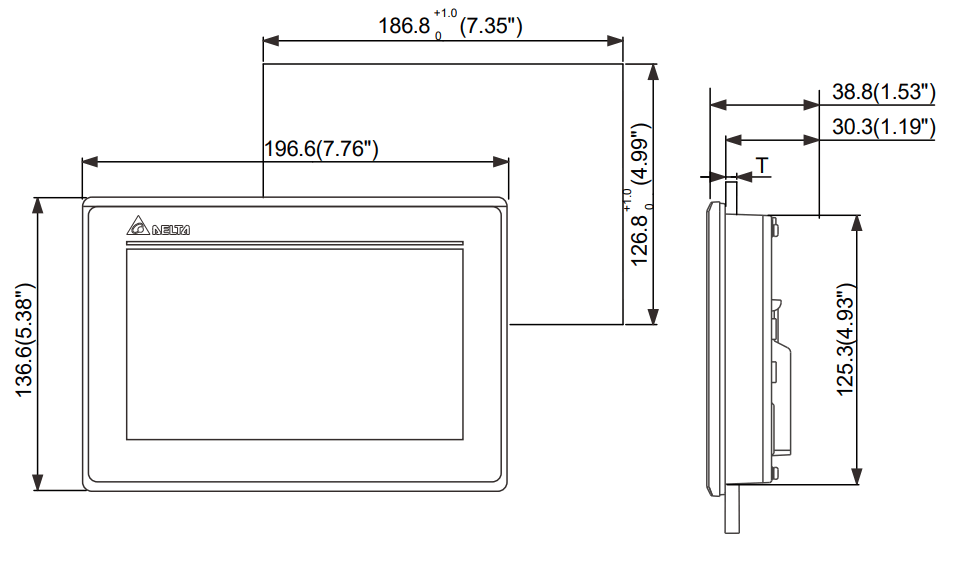 Note:
Note:
T=1.6 mm ~ 6 mm(0.063″ ~ 0.24″)
Operation temperature: 0°C to 50°C (32°F to 122°F) Storage temperature: -20°C to 60°C (-4° F to 140°F)
Installation and wiring
Precautions:
- Incorrect installation direction may result in malfunction.
- To ensure the HMI is well ventilated, make sure there is sufficient space between the HMI and the adjacent objects or walls.
- This product should be used on a case / platform which conforms to enclosure Type 4X standard (for indoor use only).
- The maximum panel thickness for mounting must be no greater than 5 mm. Copper conductor only.
Installation steps:
Step 1:
Put the waterproof gasket into the HMI and then insert the HMI into the panel cutout. 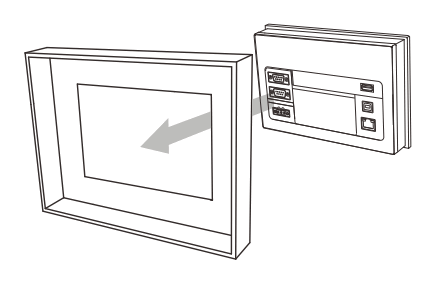 Step 2:
Place the fasteners into the slots and tighten the screws until reaching the panel cutouts. 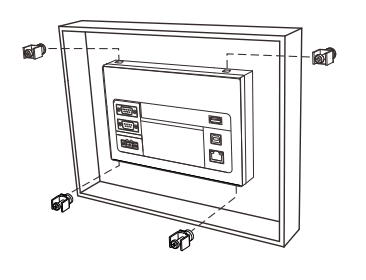 Step 3:
Tighten the screws with the torque less than 0.5 N-M / 0.7 N-M to avoid damage to the plastic case. DOP-107PV torque: 6.17 lb-inch (0.7 N-M) 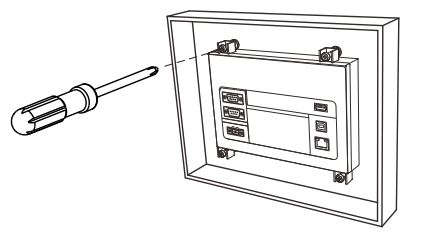
Step 4:
For heat dissipation, please keep a minimum clearance of 60 mm on the rear of the HMI. 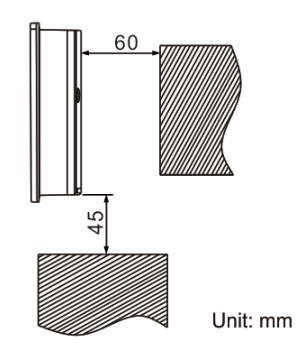 Wiring:
| Type | Wire gauge (AWG) | Stripped length | Torque |
| Solid | 24 – 12 | 7 – 8 mm | 5 kg-cm (4.3 lb-in) |
| Stranded | 24 – 12 | 7 – 8 mm | 5 kg-cm (4.3 lb-in) |
 Please refer to the following diagram when wiring the power connector. The temperature rating of the cable must be greater than 75°C (167°F).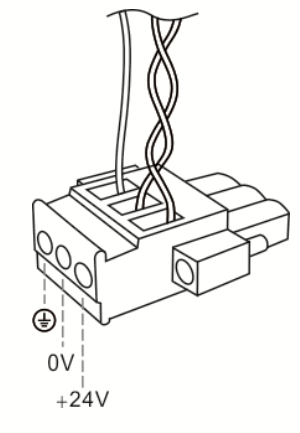
Hardware specifications
| Model | DOP-107PV | ||
| Display | Panel type | 7″ TFT LCD (24 Bits) | |
| Resolution | 800 x 480 pixels | ||
| Backlight | LED backlight (half-life under room temperature 25oC > 20,000 hours)*1 | ||
| Display range | 154.08 mm * 85.92 mm | ||
| Brightness | 400 cd / m² (Typ.) | ||
| CPU | ARM Cortex-A8 (800 MHz) | ||
| Flash ROM | 256 Mbytes | ||
| RAM | 256 Mbytes | ||
| Touchscreen | 4-wire resistive touchscreen > 1,000,000 operated | ||
| Buzzer | Multi-tone frequency (2 K – 4 KHz) / 80dB | ||
| Network interface | 10/100 Mbps Auto sensing (with built-in isolated power circuit) *2 | ||
| USB | 1 USB Slave Ver 2.0; 1 USB Host Ver 2.0 | ||
| Serial communication port | COM1 | RS-232 (supporting flow control) | |
| COM2 | RS-232 (supporting flow control) / RS-485 | ||
| COM3 | RS-422 / RS-485 | ||
| Auxiliary function key | N/A | ||
| Calendar | Built-in | ||
| Cooling method | Natural cooling | ||
| Approvals | CE / UL (please use shielding network cable and magnetic ring with the filter of 300 ohm / 100 MHz) | ||
| Panel waterproof level | IP65 / NEMA4 / UL TYPE 4X (indoor use only) | ||
| Operation voltage*2 | DC +24V (-15% to +15%) (please use an isolated power supply) Supplied by Class 2 or SELV circuit (isolated from MAINS by double insulation) | ||
| Leakage current | 500 VAC for 1 minute (between DC24V terminal and FG terminal) | ||
| Power consumption*2 | 8.3 W (Max)*3 | ||
| Backup battery | 3V lithium battery CR2032 × 1 | ||
| Backup battery life | About 3 years or more at 25oC (subject to operation temperature and condition) | ||
| Operation temperature | 0oC to 50oC (32oF to 122oF) | ||
| Storage temperature | -20oC to +60oC (-4oF to 140oF) | ||
| Operating environment | 10% – 90% RH [0oC – 40oC], 10% – 55% RH [41oC – 50oC]; pollution degree: 2 | ||
| Vibration resistance | Conforms to IEC61131-2: continuous vibration 5 Hz – 8.3 Hz with amplitude 3.5 mm; 8.3 Hz – 150 Hz with amplitude 1G | ||
| Shock resistance | Conforms to IEC60068-2-27: 11 ms, 15 G Peak, in X, Y, Z directions each for 6 times | ||
| Dimension (W) x (H) x (D) mm | 196.6 x 136.6 x 38.8 | ||
| Mounting dimension (W) x (H) mm | 186.8 x 126.8 | ||
| Weight | Approx. 650 g | ||
Note:
- The half-life of the backlight is defined as the maximum luminance being reduced by 50% when the maximum drive current is supplied to the HMI. The life of LED backlight shown here is estimated at the room temperature of 25°C with ambient humidity.
- The withstand voltage of the isolated power circuit is 1500V peak for 1 minute.
- The HMI power consumption is the power consumed when the HMI is not connecting with other peripheral devices. To ensure normal operation of the HMI, the recommended capacity of the power supply is 1.5 to 2 times of the specified power consumption.
- Isolated power supply is recommended.
- For DOPSoft programming software for the DOP-100 series and the user manual, you can download them at https://www.deltaww.com/.
- The DOP-100 series can be used with other industrial automation equipment. Please read through this sheet carefully and install the product according to the instructions to avoid danger.
 Welcome to Delta