Not Turning:
- Brush may automatically shut off if the brush is having a hard time spinning on high pile carpet
- Intended use is low pile carpet and bare floors
- Turn power switch off and turn the machine over so brush is facing up
- Remove the brush cover by lightly prying the thin side towards the front of the machine
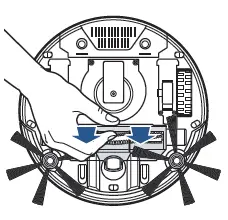
- Remove the brush from the housing by pushing to the left and pulling out of machine
- Clean any debris wrapped around the brush and intake area

- If center brush still does not spin, visit a BISSELL Authorized Service Center or Contact Us
Falling out:
- Turn power switch off and turn machine over so brush is facing up
- One end that holds the brush in machine is spring-loaded and the other end holds square end of brush
- The spring-loaded end should not be recessed
- If it’s recessed, try to push on the end with a small screwdriver to dislodge it as it could be stuck
If center brush continues to fall out, visit a BISSELL Authorized Service Center or Contact Us