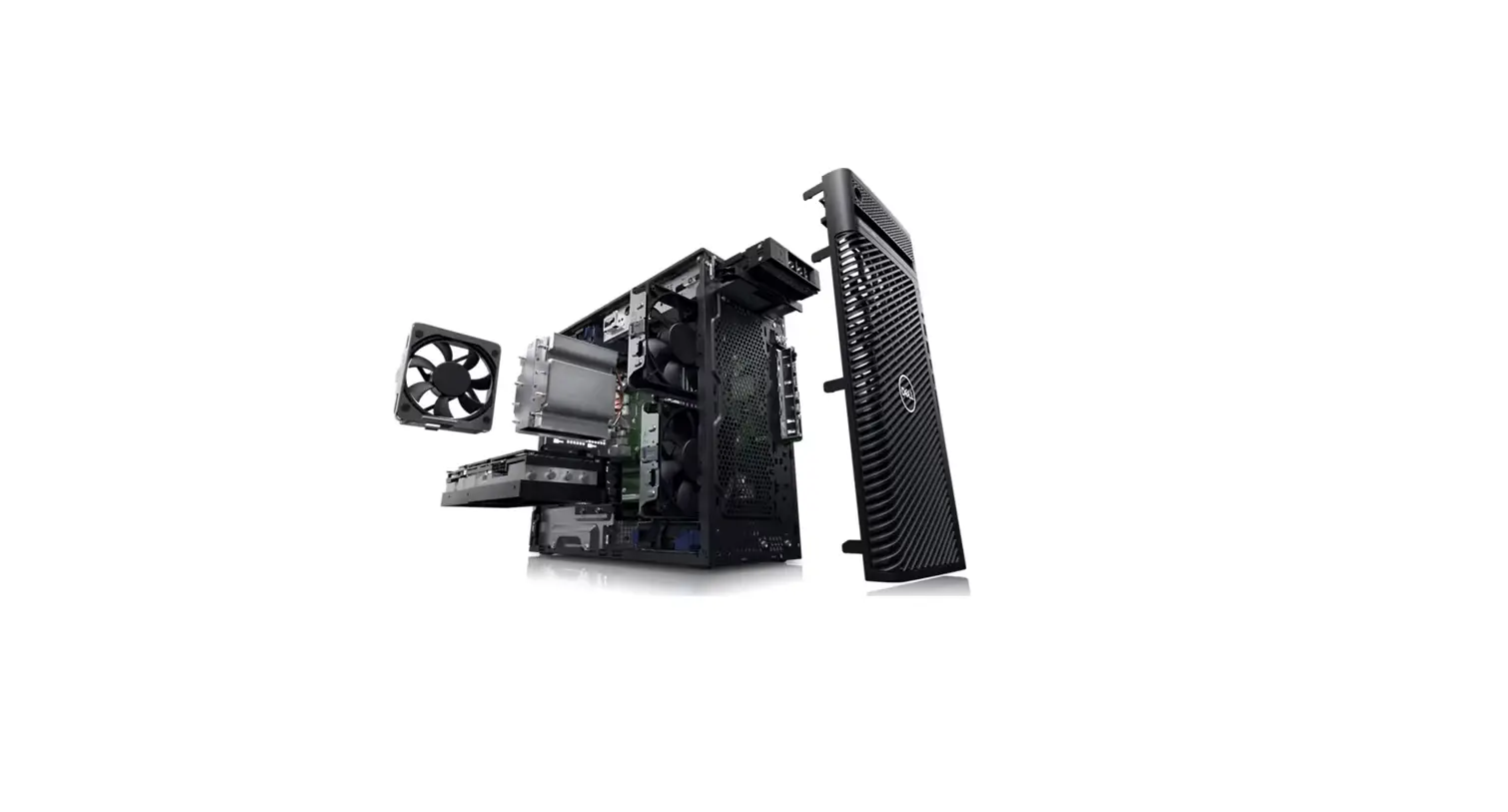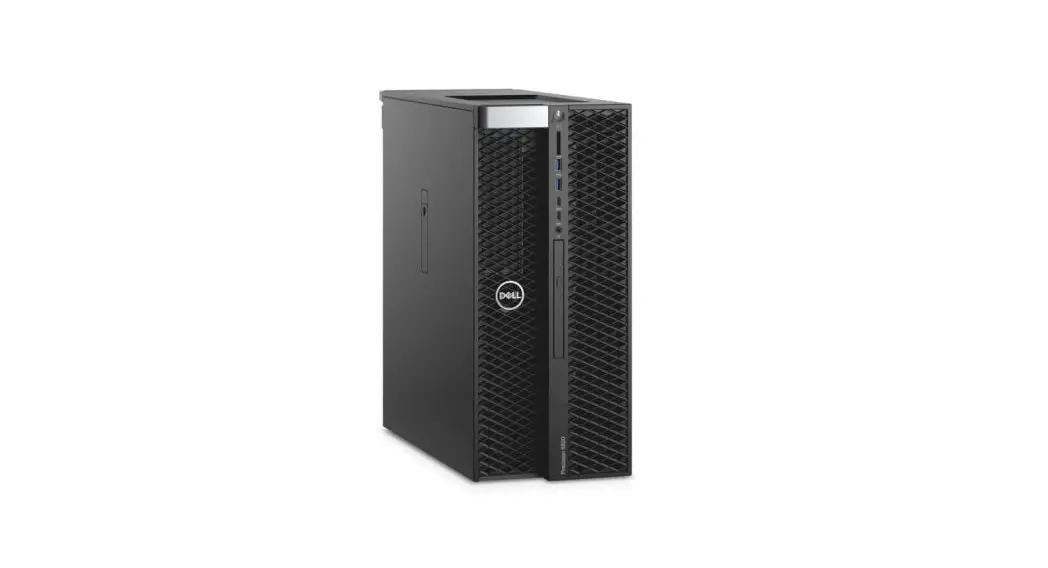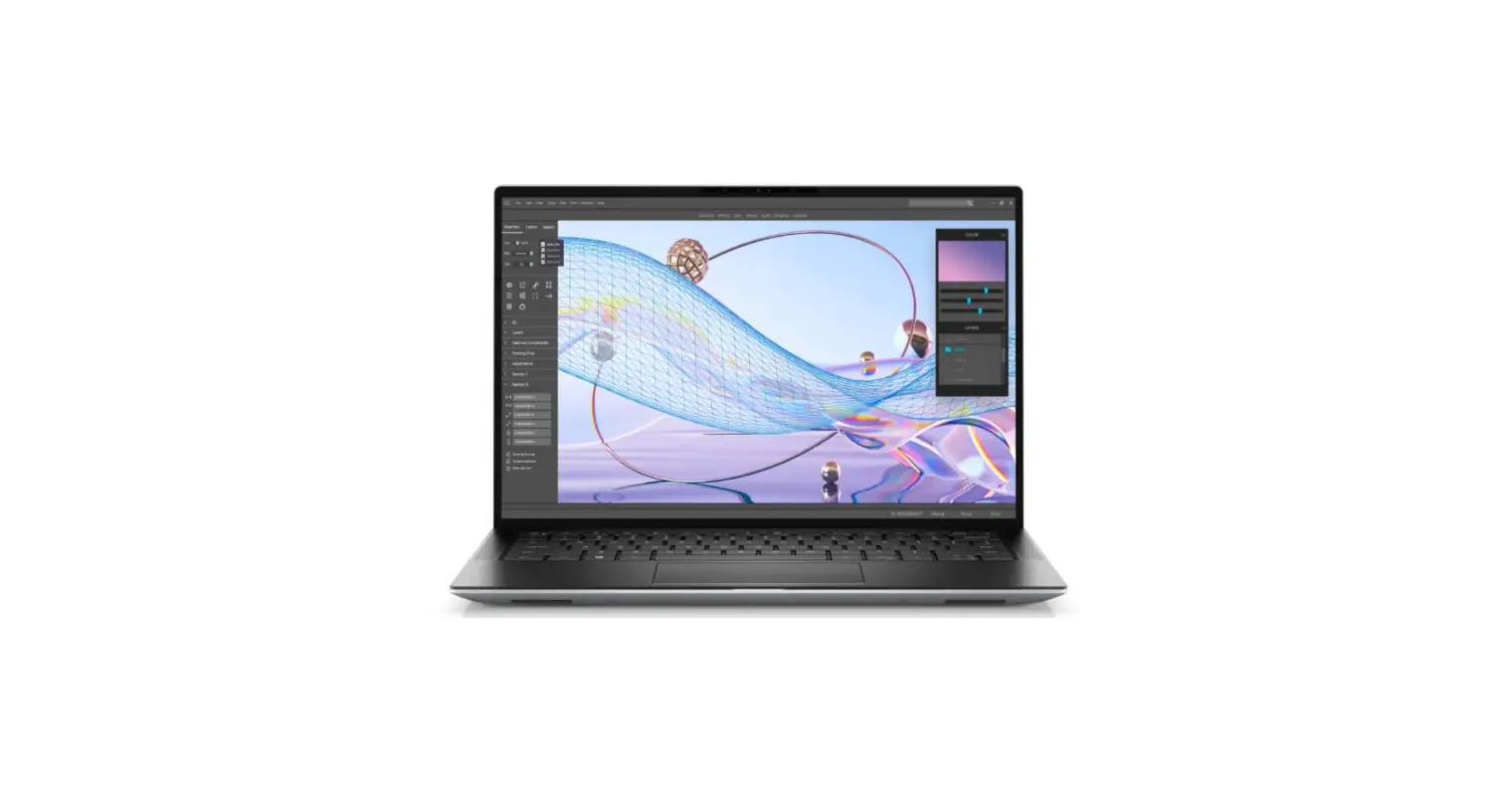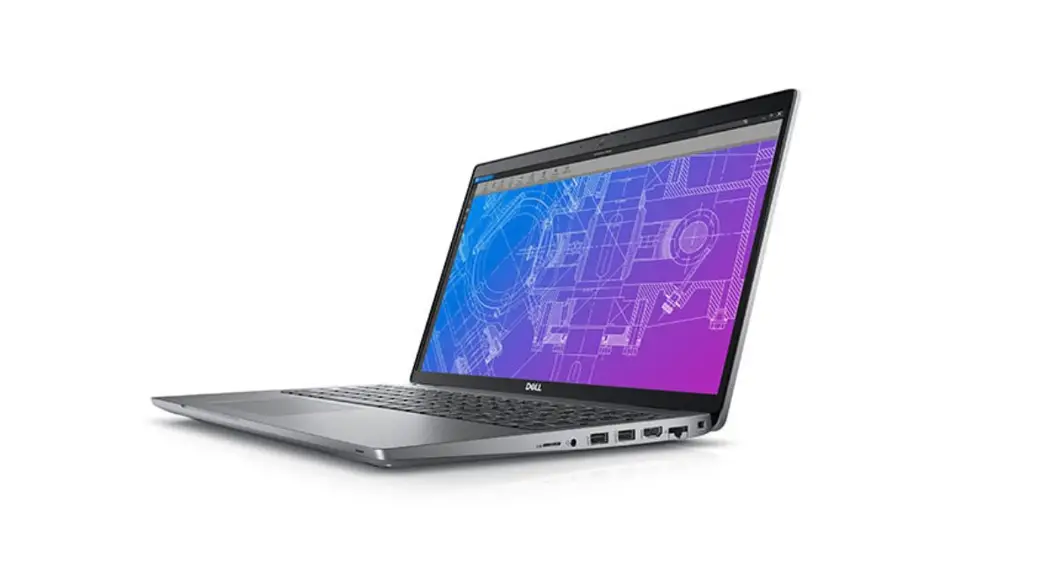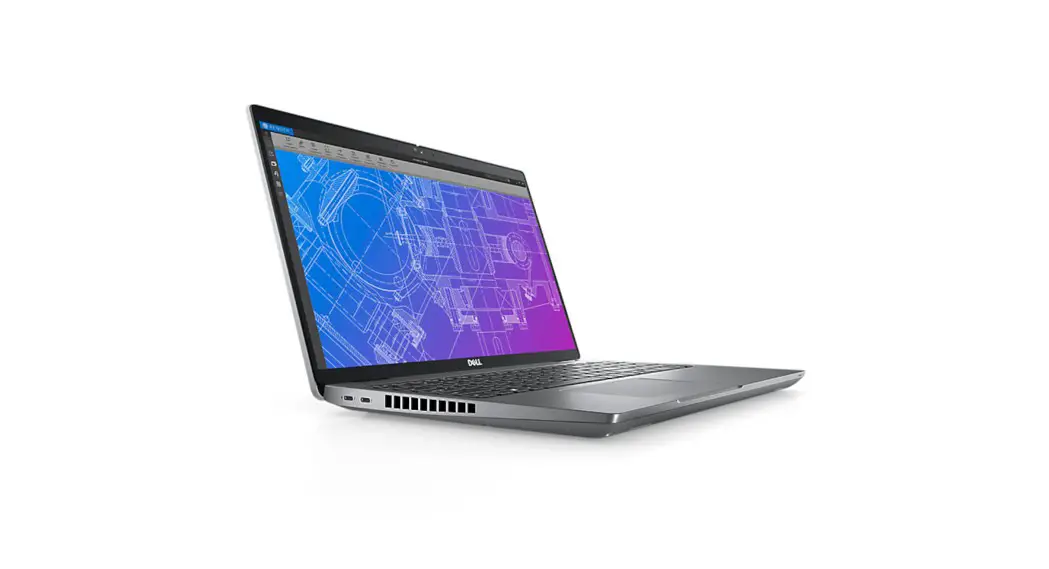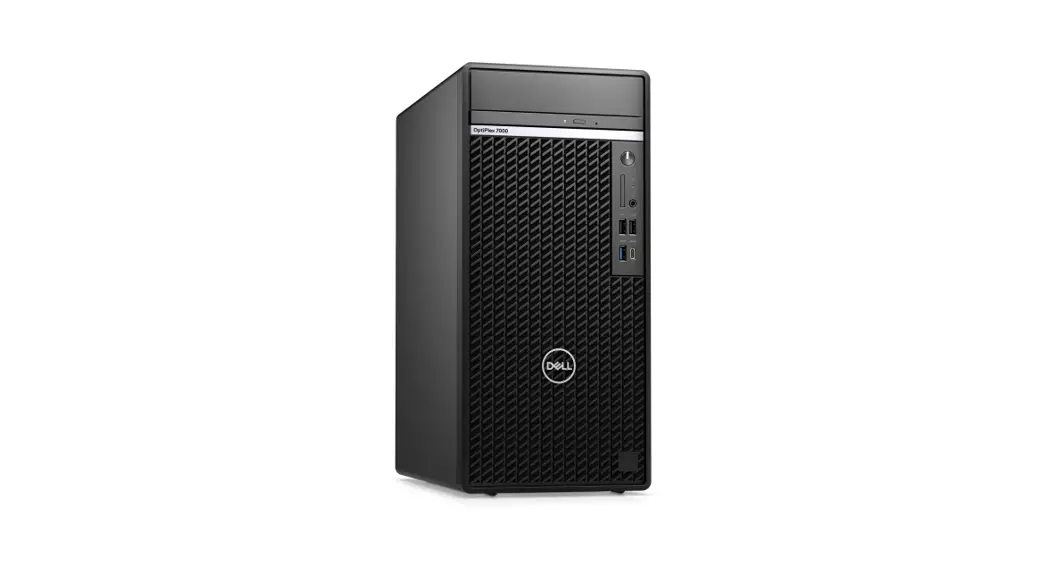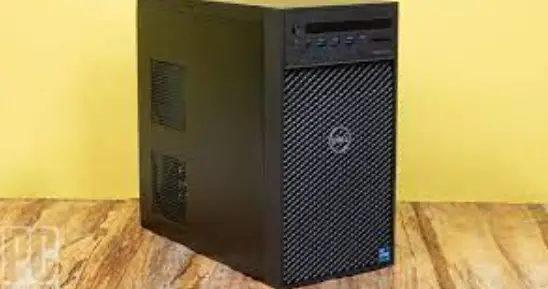

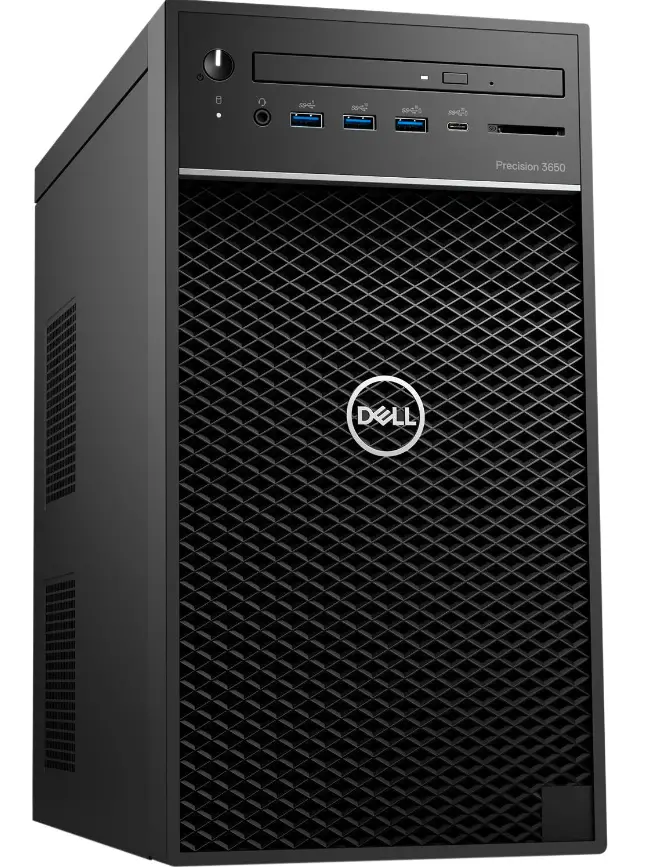
DELL Precision 3650 Tower Workstation Desktop
NOTE: A NOTE indicates important information that helps you make better use of your product.
CAUTION: A CAUTION indicates either potential damage to hardware or loss of data and tells you how to avoid the problem.
WARNING: A WARNING indicates a potential for property damage, personal injury, or death.
Set up your computer
Steps
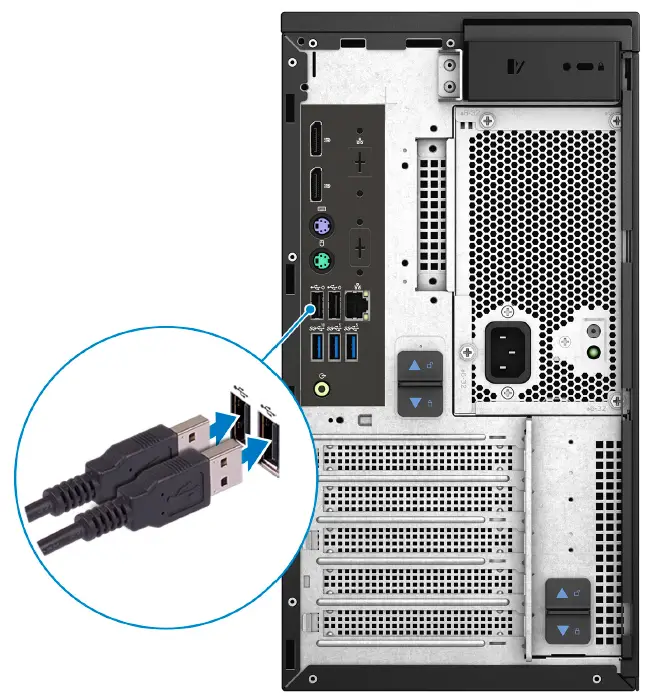
- Connect the keyboard and mouse.

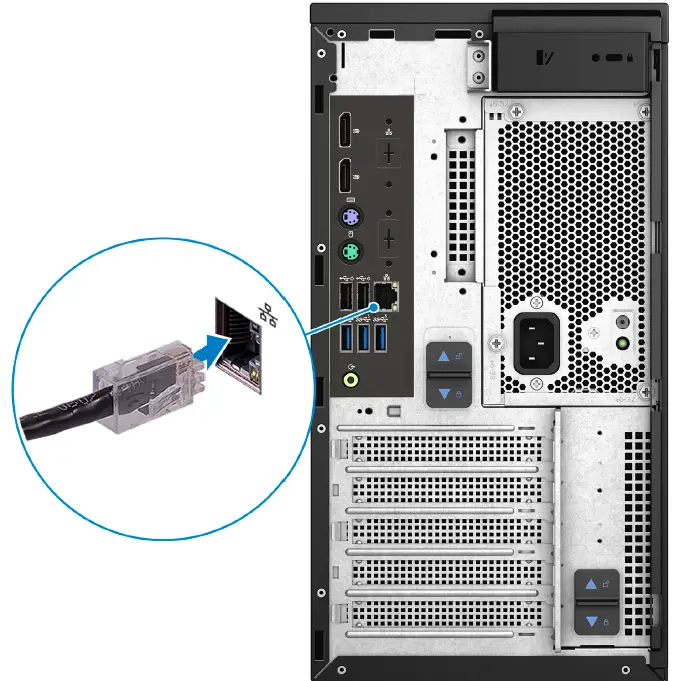
- Connect to your network using a cable, or connect to a wireless network.

- Connect the display.
 NOTE: If you ordered your computer with a discrete graphics card, connect the display cable to the discrete graphics card connectors.
 - Connect the power cable.|

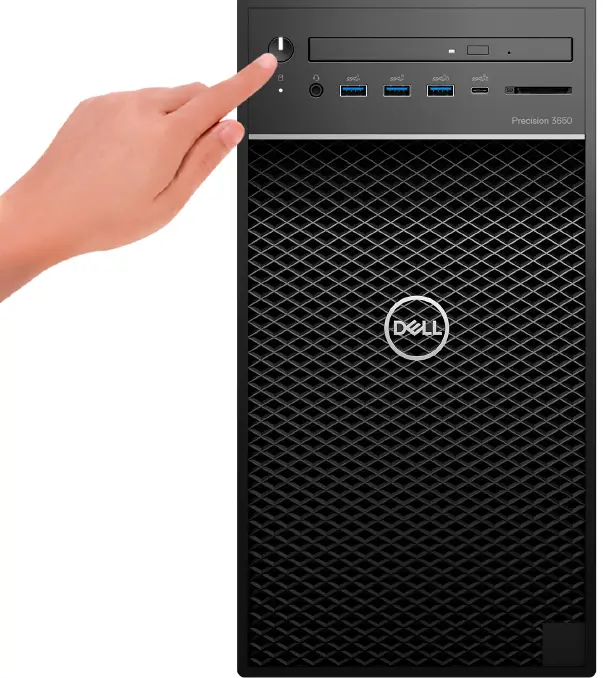
- Press the power button.

- Finish operating system setup.
For Windows: Follow the on-screen instructions to complete the setup. When setting up, Dell recommends that you:- Connect to a network for Windows updates.
NOTE: If connecting to a secured wireless network, enter the password for the wireless network access when prompted. - If connected to the internet, sign in with or create a Microsoft account. If not connected to the Internet, create an offline account.
- On the Support and Protection screen, enter your contact details.
- Connect to a network.
- Sign-in to your Microsoft account or create a new account.
- Connect to a network for Windows updates.
- Locate and use Dell apps from the Windows Start menu.


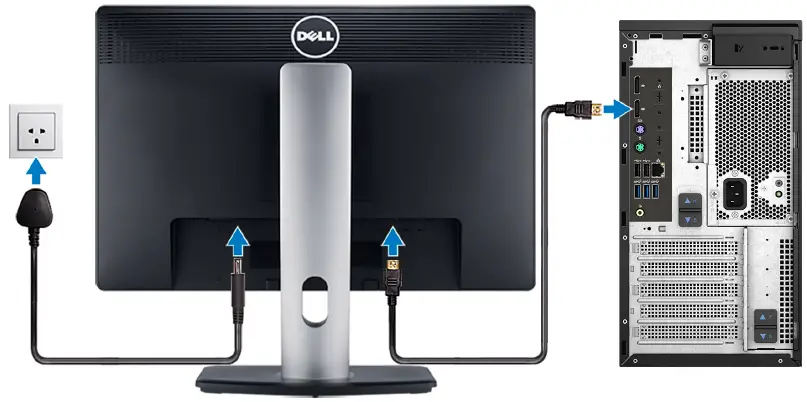 NOTE: If you ordered your computer with a discrete graphics card, connect the display cable to the discrete graphics card connectors.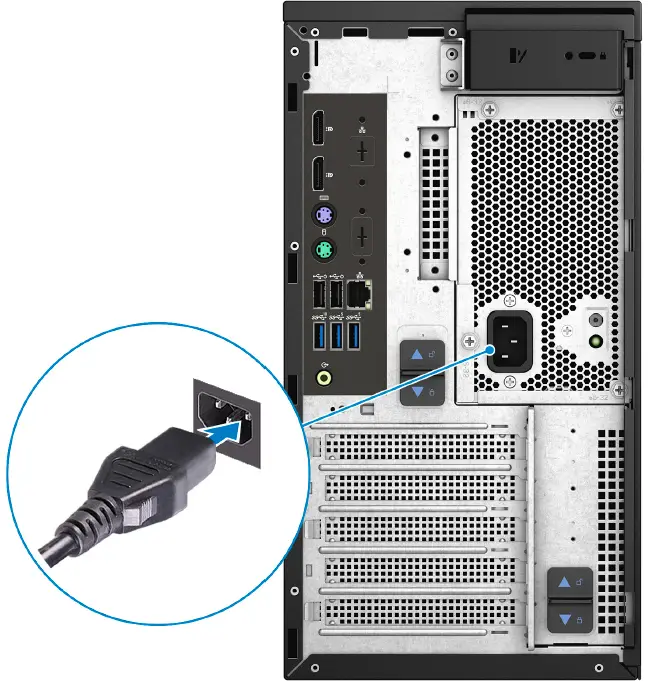
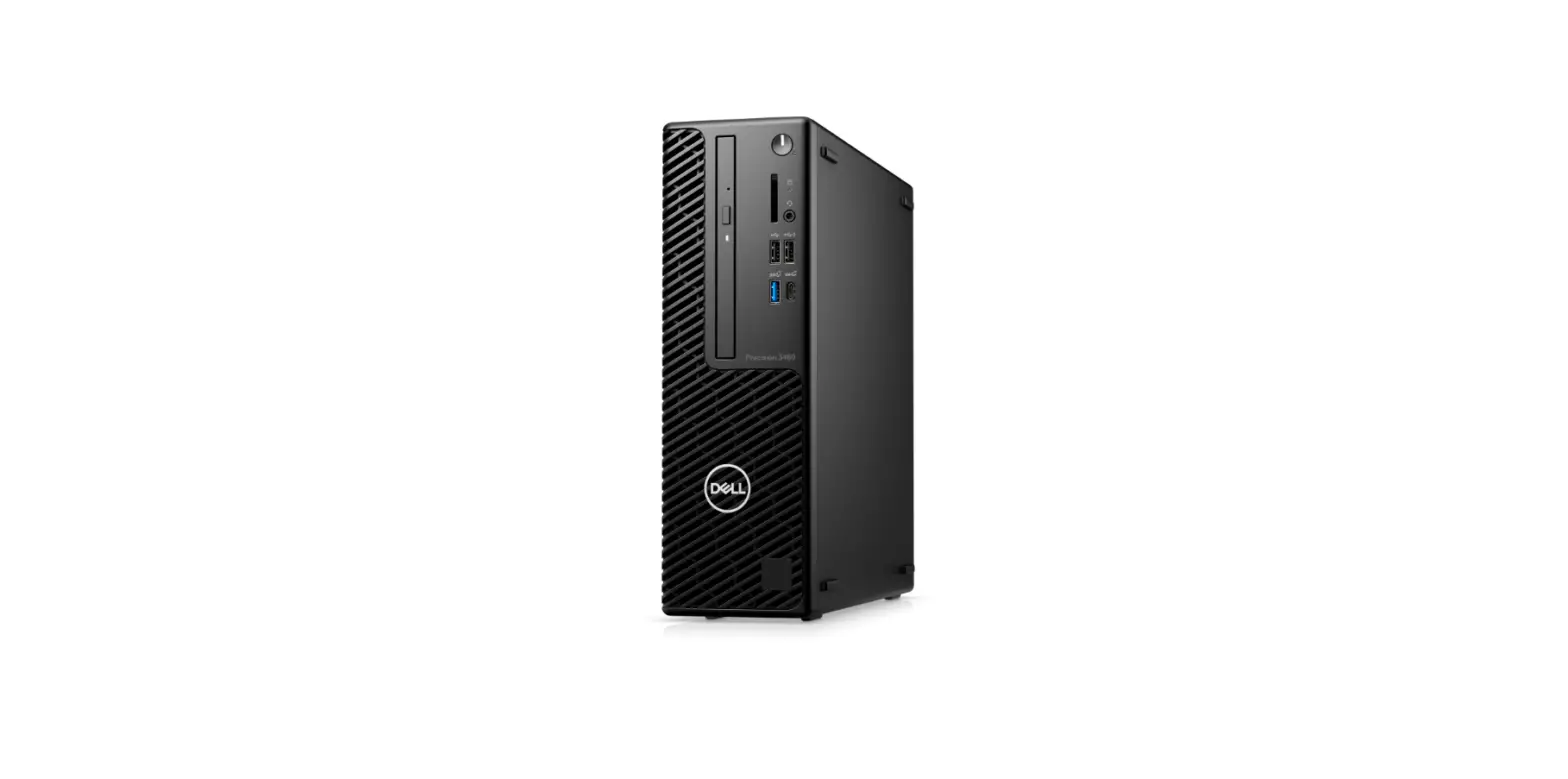
Views of Precision 3650 Tower
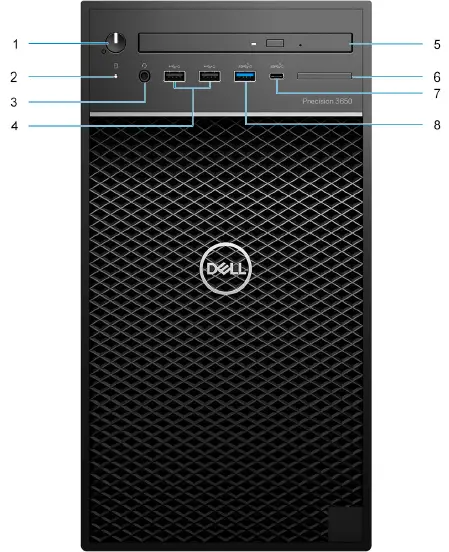
Front
Standard front I/O
- Power button with diagnostic LED
- Hard-disk drive activity light
- Universal audio jack port
- Two USB 2.0 Type-A ports
- Optical Disk Drive (optional)
- Bezel for SD card reader
NOTE: SD card reader is not included with Standard Front I/O - USB 3.2 Gen 2×1 Type-C port (10 Gbps)
- USB 3.2 Gen 1 Type-A port with Power Share (5 Gbps)
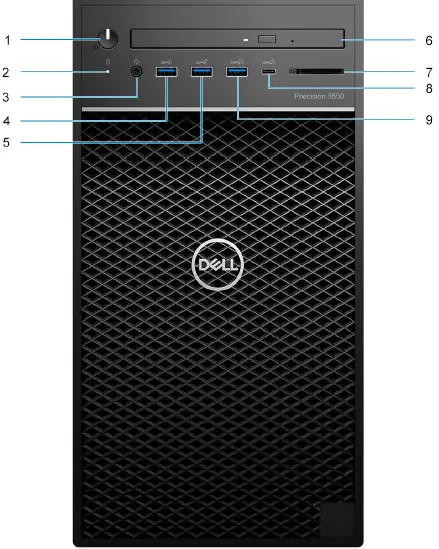
 Advanced front I/O
- Power button with diagnostic LED
- Hard-disk drive activity light
- Universal audio jack port
- One USB 3.2 Gen 1 Type-A port (5 Gbps)
- USB 3.2 Gen 2 Type-A port (10 Gbps)
- Optical disk drive (optional)
- SD 4.0 card reader included with Advanced Front I/O
NOTE: Systems with PSUs below 1000W built between November 2021 and February 2022 will have either Realtek SD3 or SD4 card reader based on available supply. - USB 3.2 Gen 2×2 Type-C port (20 Gbps)
- USB 3.2 Gen 2 port with Power Share (10 Gbps)

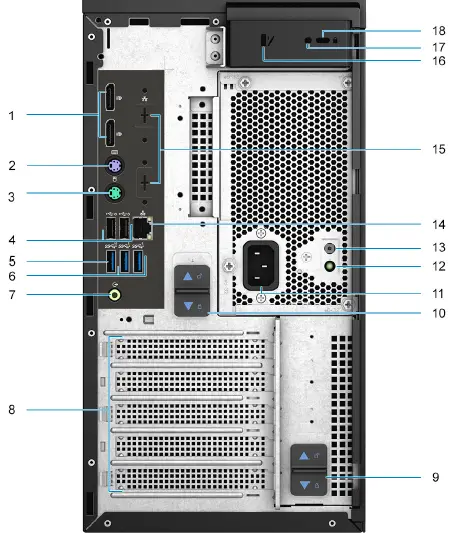
Back
- Two DisplayPort 1.4 ports
- PS/2 port for keyboard
- PS/2 port for mouse
- Two USB 2.0 Type-A ports with Smart Power On
- One USB 3.2 Gen 2 Type-A port (10 Gbps)
- Two USB 3.2 Gen 1 Type-A ports (5 Gbps)
- Line-out audio port
- Three expansion card slots
- PSU hinge release latch
- PSU release latch
- Power connector port
- Power supply diagnostic light
- Power supply diagnostic button
- RJ-45 port 10/100/1000 Mbps
- Optional 2.5 Gbe RJ-45 / VGA Port/DisplayPort 1.4a Port/HDMI 2.0b Port/ USB 3.2 Gen2 Type-C Port with Alt-mode slots
- Side cover release latch
- Security screw
- Kensington cable lock

Specifications of Precision 3650 Tower
Dimensions and weight
The following table lists the height, width, depth, and weight of your Precision 3650 Tower.
Description | Values | |
| Height: | ||
| Front | 355.00 mm (13.18 in.) | |
| Rear | 355.00 mm (13.18 in.) | |
| Width | 176.60 mm (6.95 in.) | |
| Depth | 345.00 mm (13.60 in.) | |
| Weight (minimum) | 8.50 kg (18.74 lb) | |
| Weight (maximum) | 10.22 kg (22.53 lb) NOTE: The weight of your computer depends on the configuration ordered and the manufacturing variability. | |
Processors
The following table lists the details of the processors supported by your Precision 3650 Tower
NOTE: Global Standard Products (GSP) are a subset of Dell’s relationship products that are managed for availability and synchronized transitions on a worldwide basis. They ensure the same platform is available for purchase globally. This allows customers to reduce the number of configurations managed on a worldwide basis, thereby reducing their costs. They also enable companies to implement global IT standards by locking in specific product configurations worldwide.
- Device Guard (DG) and Credential Guard (CG) are the new security features that are only available on Windows 10 Enterprise today.
- Device Guard is a combination of enterprise-related hardware and software security features that, when configured together, will lock a device down so that it can only run trusted applications. If it is not a trusted application, it cannot run.
- Credential Guard uses virtualization-based security to isolate secrets (credentials) so that only privileged system software can access them. Unauthorized access to these secrets can lead to credential theft attacks. Credential Guard prevents these attacks by protecting NTLM password hashes and Kerberos Ticket Granting Tickets.
NOTE: Processor numbers are not a measure of performance. Processor availability is subject to change and may vary by region/country. - When upgrading from a 65 W processor to a 80/125 W processor, a VR Heatsink specific to the wattage of the processor is required to be installed.
- VR Heatsink part numbers:
- 80 W VR heatsink (DPN : 47P6W)
- 125 W VR heatsink (DPN : 7NPYV)
NOTE: VR Heatsink is not included with the 65 W processor kit and needs to be ordered separately.
Processors | Wattage | Core count | Thread count | Speed | Cache | Integrated graphics | GSP | DG/CG Ready |
| 10th Generation Intel Core i3-10100 | 65 W | 4 | 8 | 3.6 GHz to 4.3 GHz | 6 MB | Intel UHD Graphics 630 | No | Yes |
| 10th Generation Intel Core i3-10105 | 65 W | 4 | 8 | 3.70 GHz to 4.40 GHz | 6 MB | Intel UHD Graphics 630 | No | Yes |
| 10th Generation Intel Core i5-10500 | 65 W | 6 | 12 | 3.1 GHz to 4.5 GHz | 12 MB | Intel UHD Graphics 630 | No | Yes |
| 10th Generation Intel Core i5-10600 | 65 W | 6 | 12 | 3.3 GHz to 4.8 GHz | 12 MB | Intel UHD Graphics 630 | No | Yes |
| 10th Generation Intel Core i5-10600K | 125 W | 6 | 12 | 4.1 GHz to 4.8 GHz | 12 MB | Intel UHD Graphics 630 | Yes | Yes |
| 10th Generation Intel Core i7-10700 | 65 W | 8 | 16 | 2.9 GHz to 4.8 GHz | 16 MB | Intel UHD Graphics 630 | Yes | Yes |
| 10th Generation Intel Core i7-10700K | 125 W | 8 | 16 | 3.8 GHz to 5.1 GHz | 16 MB | Intel UHD Graphics 630 | Yes | Yes |
| 10th Generation Intel Core i9-10900 | 65 W | 10 | 20 | 2.8 GHz to 5.2 GHz | 20 MB | Intel UHD Graphics 630 | Yes | Yes |
| 10th Generation Intel Core i9-10900K | 125 W | 10 | 20 | 3.7 GHz to 5.3 GHz | 20 MB | Intel UHD Graphics 630 | Yes | Yes |
| 10th Generation Intel Xeon W-1250 | 80 W | 6 | 12 | 3.3 GHz to 4.7 GHz | 12 MB | Intel UHD Graphics P630 | Yes | Yes |
| 10th Generation Intel Xeon W-1250P | 125 W | 6 | 12 | 4.1 GHz to 4.8 GHz | 12 MB | Intel UHD Graphics P630 | Yes | Yes |
| 10th Generation Intel Xeon W-1270 | 80 W | 8 | 16 | 3.4 GHz to 5.0 GHz | 16 MB | Intel UHD Graphics P630 | Yes | Yes |
| 10th Generation Intel Xeon W-1270P | 125 W | 8 | 16 | 3.8 GHz to 5.1 GHz | 16 MB | Intel UHD Graphics P630 | Yes | Yes |
| Processors | Wattage | Core count | Thread count | Speed | Cache | Integrated graphics | GSP | DG/CG Ready |
| 10th Generation Intel Xeon W-1290 | 80 W | 10 | 20 | 3.2 GHz to 5.2 GHz | 20 MB | Intel UHD Graphics P630 | Yes | Yes |
| 10th Generation Intel Xeon W-1290P | 125 W | 10 | 20 | 3.7 GHz to 5.3 GHz | 20 MB | Intel UHD Graphics P630 | Yes | Yes |
| 11th Generation Intel Core i5-11500 | 65 W | 6 | 12 | 2.70 GHz to 4.60 GHz | 12 MB | Intel UHD Graphics 750 | No | Yes |
| 11th Generation Intel Core i5-11600 | 65 W | 6 | 12 | 2.80 GHz to 4.80 GHz | 12 MB | Intel UHD Graphics 750 | No | Yes |
| 11th Generation Intel Core i5-11600K | 125 W | 6 | 12 | 3.90 GHz to 4.90 GHz | 12 MB | Intel UHD Graphics 750 | Yes | Yes |
| 11th Generation Intel Core i7-11700 | 65 W | 8 | 16 | 2.50 GHz to 4.90 GHz | 16 MB | Intel UHD Graphics 750 | Yes | Yes |
| 11th Generation Intel Core i9-11700K | 125 W | 8 | 16 | 3.60 GHz to 5.00 GHz | 16 MB | Intel UHD Graphics 750 | Yes | Yes |
| 11th Generation Intel Core i9-11900 | 65 W | 8 | 16 | 2.50 GHz to 5.20 GHz | 16 MB | Intel UHD Graphics 750 | Yes | Yes |
| 11th Generation Intel Core i9-11900K | 125 W | 8 | 16 | 3.50 GHz to 5.30 GHz | 16 MB | Intel UHD Graphics 750 | Yes | Yes |
| 11th Generation Intel Xeon W-1350 | 80 W | 6 | 12 | 3.30 GHz to 5.00 GHz | 12 MB | Intel UHD Graphics P750 | Yes | Yes |
| 11th Generation Intel Xeon W-1350P | 125 W | 6 | 12 | 4.00 GHz to 5.10 GHz | 16 MB | Intel UHD Graphics P750 | Yes | Yes |
| 11th Generation Intel Xenon W-1370 | 80 W | 8 | 16 | 2.9 GHz to 5.1 GHz | 16 MB | Intel UHD Graphics P750 | Yes | Yes |
| Processors | Wattage | Core count | Thread count | Speed | Cache | Integrated graphics | GSP | DG/CG Ready |
| 11th Generation Intel Xenon W-1370P | 125 W | 8 | 16 | 3.6 GHz to 5.2 GHz | 16 MB | Intel UHD Graphics P750 | Yes | Yes |
| 11th Generation Intel Xenon W-1390 | 80 W | 8 | 16 | 2.8 GHz to 5.2 GHz | 16 MB | Intel UHD Graphics P750 | Yes | Yes |
| 11th Generation Intel Xenon W-1390P | 125 W | 8 | 16 | 3.5 GHz to 5.3 GHz | 16 MB | Intel UHD Graphics P750 | Yes | Yes |
Chipset
The following table lists the details of the chipset supported by your Precision 3650 Tower.
Description | Values |
| Chipset | Intel W580 |
| Processor |
|
| DRAM bus width | 64 bit (for single channel) |
| Flash EPROM | 256 MB |
| PCIe bus | PCIe Gen3 |
Operating system
Your Precision 3650 Tower supports the following operating systems:
- Windows 11 Home, 64-bit
- Windows 11 Pro, 64-bit
- Windows 11 Pro National Academic, 64-bit
- Windows 11 Pro for Workstations, 64-bit
- Windows 10 Home, 64-bit
- Windows 10 Pro, 64-bit
- Windows 10 IoT Enterprise 2019 LTSC (OEM only)
- Windows 10 CMIT Government Edition, 64-bit (China only)
- Red Hate Enterprise Linux 4
- Ubuntu 04 LTS, 64-bit
- Kylan 1
Memory
The following table lists the memory specifications of your Precision 3650 Tower
| Description | Values |
| Memory slots | Four UDIMM |
| Memory type | DDR4 |
| Maximum Memory speed | 2666 MHz for 10th Generation Intel Core i3/i5/Xeon W-1250/W-1250P processors, 2933 MHz for 10th Generation Intel Core i7/i9/Xeon W-1270/W-1270P/W1290/W1290P processors ,3200 MHz for 11th Generation Intel Core i5/i7/i9/ Xeon W-1350/W-1350P/W-1370/W-1370P/W1390/W1390P processors |
| Maximum memory configuration | 128 GB |
| Minimum memory configuration | 8 GB |
| Memory size per slot | 8 GB, 16 GB, 32 GB |
| Memory configurations supported | ECC Memory
|
Description | Values |
|
Description | Values |
| processors ,2933 MHz for 11th Generation Intel Core i5/i7/i9/Xeon W-1350/W-1350P/W-1370/W-1370P/ W1390/W1390P processors |
Memory configuration matrix
DIMM configuration to avoid memory speed reduction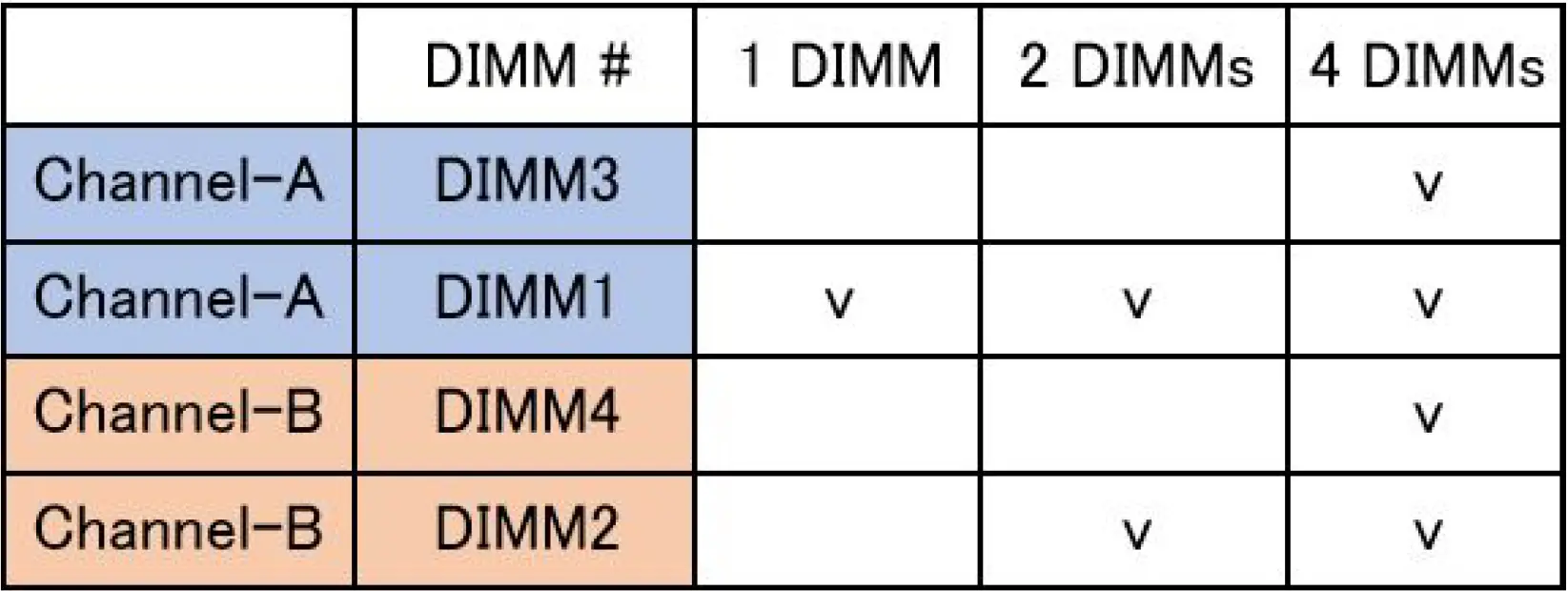 Following memory configurations are recommended from Dell to avoid memory speed reduction on 11th generation Rocket Lake processors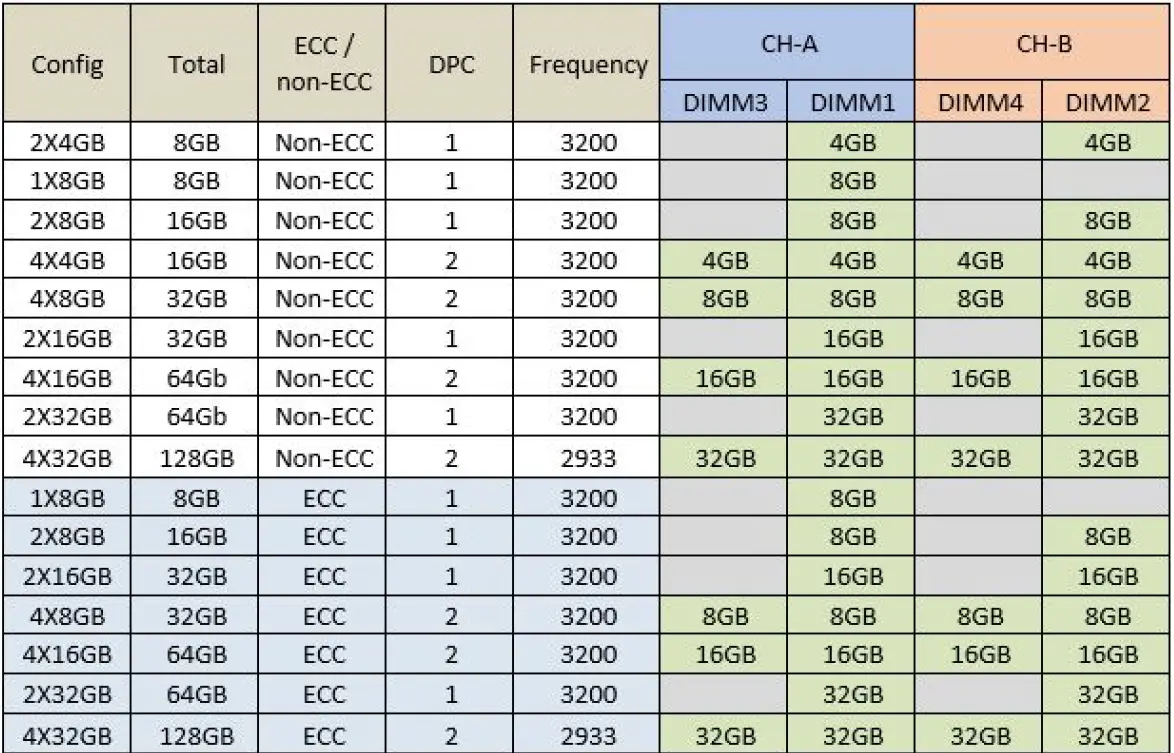
NOTE:
- Different processor and dual rank will cause memory speed down to 2933MHz or
- At least 2 memory modules are required for non-ECC 4GB memory in
- Different Memory Vendors mixing within a channel is not allowed and it would cause memory speed down to 2666Mhz or
- 128 GB configuration can only support up to 2933MHz on 11th Generation Intel Core i5/i7/i9/Xeon W-1350/ W-1350P/W-1370/W-1370P/W1390/W1390P processors
External ports
The following table lists the external ports of your Precision 3650 Tower
Description | Values |
| Network port |
|
| USB ports | Standard Front I/O:
Advanced Front I/O:
Rear I/O:
|
| Audio port |
|
| Video port |
NOTE: Download and install the latest Intel Graphics driver from www.dell.com/support to enable multiple displays. |
| Media-card reader | One SD-card slot NOTE: Advanced Front I/O only |
| Power-adapter port | NA |
| Security-cable slot | One Kensington cable lock |
Internal slots
The following table lists the internal slots of your Precision 3650 Tower.
| Description | Values |
| Expansion | For 10th Generation processors:
NOTE: CPU PCIe lanes are only validated for discrete graphics (x16), for other AIC types: Ethernet, USB, WLan, Serial, Parallel and TBT cards are not supported on PEG Slot. |
| Description | Values |
For 11th Generation processors:
NOTE: CPU PCIe lanes are only validated for discrete graphics (x16), for other AIC types: Ethernet, USB, WLan, Serial, Parallel and TBT cards are not supported on PEG Slot
| |
| SATA | Four SATA slots for 2.5-inch Hard disk drive/Solid-state drive/Optical Disk Drive |
| M.2 |
NOTE: To learn more about the features of different types of M.2 cards, see the knowledge base article 000144170 at www.dell.com/support. |
Communications
Ethernet
| Description | Values |
| Model number | Ethernet controller integrated on system board NOTE: Optional 2.5GbE RJ-45 available at the time of purchase |
| Transfer rate | 10/100/1000 Mbps NOTE: 2.5 Gbps speed available with the optional 2nd RJ-45 port. |
Wireless module
Description | Values | |
| Model number | Qualcomm QCA6174a | Intel Wi-Fi 6 AX210 |
| Transfer rate | Up to 867 Mbps | Up to 2402 Mbps |
| Frequency bands supported | 2.4 GHz/5 GHz | 2.4 GHz/5 GHz/6 GHz |
| Wireless standards | 802.11ac | 802.11ax |
| Description | Values | |
| Encryption |
|
|
| Bluetooth | 5.0 | 5.2 |
Audio and Speaker
The following table lists the audio specifications of your Precision 3650 Tower
Description | Values |
| Type | 4 Channel High Definition Audio |
| Controller | Realtek ALC3246 |
| Stereo conversion | 24-bit DAC (Digital-to-Analog) and ADC (Analog-to-Digital) |
| Internal interface | Intel HDA (high-definition audio) |
| External interface |
|
| Speakers | One (optional) |
| Internal speaker amplifier | Integrated in ALC3246 (Class-D 2 W) |
| External volume controls | Keyboard shortcut controls. |
| Speaker output average | 2 W |
| Speaker output peak | 2.5 W |
| Subwoofer output | Not supported |
| Microphone | Not supported |
Storage
This section lists the storage options on your Precision 3650 Tower. Your computer supports one of the following storage configurations:
- 2 solid-state drive Boot + Optional M.2 solid-state drive – This configuration enables boot on M.2 NV Me solid-state drive with up to three additional NV Me solid-state drives depending on the processor installed. No SATA HDDs are configured in this option.
- 5-inch SATA hard-disk drive Boot + Optional 2.5-inch SATA hard-disk drive – This configuration enables boot on 2.5-inch SATA hard-disk drive with up to three additional 2.5-inch SATA hard-disk drives.
- 5-inch hard-disk drive Boot + Optional 3.5-inch hard-disk drive – This configuration enables boot on 3.5-inch hard-disk drive with up to two additional 3.5-inch hard-disk drives.
- 2 solid-state drive Boot + Optional M.2 solid-state drive + 2.5-inch SATA hard-disk drive – This configuration enables boot on M.2 NV Me solid-state drive with up to three additional NV Me solid-state drives depending on the processor installed and up to four 2.5-inch SATA hard-disk drives.
- 2 SSD Boot + Optional M.2 SSD + 3.5-inch hard-disk drive – This configuration enabled boot on M.2 NVMe solid-state drive with up to three additional NVMe solid-state drives depending on the processor installed and up to three 3.5-inch hard-disk drives.
NOTE: M.2 solid-state drive in slot 1 cannot build RAID disk with M.2 slot 2 and slot 3 M.2 solid-state drive.
NOTE: M.2 solid-state drive cannot build RAID disk with any SATA drive.
The primary drive of your computer varies with the storage configuration. For computers:
- with a 2 solid-state drive, the M.2 solid-state drive is the primary drive
- without a 2 drive, either the 3.5-inch hard-disk drive or one of the 2.5-inch hard-disk drive is the primary drive
Storage type | Interface type | Capacity |
| 2.5-inch, 5400 RPM, hard-disk drive | SATA 3.0 | Up to 2 TB |
| 2.5-inch, 7200 RPM, hard-disk drive | SATA 3.0 | Up to 1 TB |
| 2.5-inch, 7200 RPM, FIPS Self Encrypting Opal 2.0, hard-disk drive | SATA 3.0 | Up to 500 GB |
| 3.5-inch, 5400 RPM, hard-disk drive | SATA 3.0 | 4 TB |
| 3.5-inch, 7200 RPM, hard-disk drive | SATA 3.0 | Up to 8 TB |
| M.2 2280 solid-state drive |
|
|
| M.2 2280 Opal Self-Encrypting solid- state drive | PCIe Gen 3 x 4 NV Me, Class 40 | Up to 1 TB |
Preloaded components included with storage drives
NOTE: Users/Customers would need to install thermal pad for M.2 NVMe drives, SATA cable and tray to install 2.5″ or 3.5″ SATA hard drives.
Following customer kits are sold separately for 3rd party storage drive installation:
- Thermal pad for 2 NV Me Solid state drive
- 5-inch SATA Tray and cable for 2.5-inch Hard drive
- 5-inch SATA Tray and cable for 3.5-inch Hard drive
Power supply ratings
| Description | Values | |||
| Type | 300 W typical 90% Efficient PSU, 80 Plus Gold | 460 W typical 90% Efficient PSU, 80 Plus Gold | 550 W typical 90% Efficient PSU, 80 Plus Gold | 1000 W typical 90% Efficient PSU, 80 Plus Gold |
| Input voltage | 90 VAC to 264 VAC | 90 VAC to 264 VAC | 90 VAC to 264 VAC | 90 VAC to 264 VAC |
| Input frequency | 47 Hz to 63 Hz | 47 Hz to 63 Hz | 47 Hz to 63 Hz | 47 Hz to 63 Hz |
| Input current (maximum) | 6 A | 8 A | 8 A | 14 A |
Description | Values | ||||
| Output current (continuous) |
|
|
|
| |
| Rated output voltage |
|
|
|
| |
| Temperature range: | |||||
| Operating | 5°C to 50°C (41°F to 122°F) | 5°C to 50°C (41°F to 122°F) | 5°C to 50°C (41°F to 122°F) | 5°C to 50°C (41°F to 122°F) | |
| Storage | -40°C to 70°C (-40°F to 158°F) | -40°C to 70°C (-40°F to 158°F) | -40°C to 70°C (-40°F to 158°F) | -40°C to 70°C (-40°F to 158°F) | |
GPU—Integrated
The following table lists the specifications of the integrated Graphics Processing Unit (GPU) supported by your Precision 3650 Tower.
Controller | External display support | Memory size | Processor |
| Intel UHD Graphics 630 |
| Shared system memory | 10th Generation Intel Core i3 |
| Intel UHD Graphics 750 |
| Shared system memory | 11th Generation Intel Core i5/i7/i9 |
| Intel UHD Graphics P750 |
| Shared system memory | 11th Generation Intel Xeon-W |
GPU — Discrete
The following table lists the specifications of the discrete graphics processing unit (GPU) supported by your Precision 3650 Tower.
| Controller | External display support | Memory size | Memory type |
| NVIDIA RTX A5000 | Four DisplayPort 1.4a ports | 24 GB | GDDR6X |
| NVIDIA RTX A4000 | Four DisplayPort 1.4a ports | 16 GB | GDDR6X |
| NVIDIA Quadro A2000 | Four mini DisplayPort (mDP) ports | 6 GB | GDDR6X |
| NVIDIA Quadro RTX 5000 |
| 16 GB | GDDR6 |
| NVIDIA Quadro RTX 4000 |
| 8 GB | GDDR6 |
| NVIDIA Quadro P2200 | Four DisplayPort 1.4 ports | 5 GB | GDDR5X |
| NVIDIA Quadro P1000 | Four mini DisplayPort (mDP) ports | 4 GB | GDDR5 |
| NVIDIA Quadro P620 | Four mini DisplayPort (mDP) ports | 2 GB | GDDR5 |
| NVIDIA Quadro P400 | Three mini DisplayPort (mDP) ports | 2 GB | GDDR5 |
| NVIDIA Quadro T1000 | Four mini DisplayPort (mDP) ports | 4 GB | GDDR6X |
| NVIDIA Quadro T600 | Four mini DisplayPort (mDP) ports | 4 GB | GDDR6 |
| NVIDIA Quadro T400 | Three mini DisplayPort (mDP) ports | 2 GB | GDDR6 |
| AMD Radeo Pro W5700 |
| 8 GB | GDDR6 |
| AMD Radeo Pro W5500 | Four DisplayPort 1.4 ports | 8 GB | GDDR6 |
| AMD Radeon Pro W3200 | Four mini DisplayPort (mDP) ports | 4 GB | GDDR6 |
| AMD Radeon Pro W6600 | Four DisplayPort 1.4 ports | 8 GB | GDDR6 |
| AMD Radeon Pro W6800 | Six mini DisplayPort (mDP) ports | 32 GB | GDDR6 |
Multiple display support matrix
Graphics Card | Intel 630 | Intel 750 | Intel P750 |
| Memory | UMA | UMA | UMA |
| Video Ports on Graphics Card |
|
|
|
| Max Displays (direct connect) |
|
|
|
| Max Displays (DP multi- stream) | 1 | 1 | 1 |
| Number of displays | 3 | 3 | 3 |
| Supported Resolution | DP: 4096 x 2304 @60 Hz, 24 bpp | DP: 5120 x 3200 @60 Hz, 24 bpp | DP: 5120 x 3200 @60 Hz, 24 bpp |
| Total Power | 65 W |
|
|
Environmental
The following table lists the environment specifications supported by your Precision 3650 Tower
| Feature | Precision 3650 Tower |
| Recyclable packaging | Yes |
| BFR/PVC—free chassis | No |
| Multi Pack packaging | Yes (US only) (optional) |
| Energy-Efficient Power Supply | Standard |
| ENV0424 compliant | Yes |
NOTE: Wood‐based fiber packaging contains a minimum of 35% recycled content by total weight of wood‐based fiber. Packaging that contains without wood‐based fiber can be claimed as Not Applicable
Energy Star, EPEAT and Trusted Platform Module (TPM)
| Features | Specifications |
| Energy Star 8.0 | Compliant configurations available |
| EPEAT | Gold compliant configurations worldwide (except India) |
| Features | Specifications |
| Silver compliant configurations available in India | |
| Trusted Platform Module (TPM) 2.01,2 | Integrated on system board |
| Firmware-TPM (Discrete TPM disabled) | Optional |
NOTE:
- 1TPM 2.0 is FIPS 140-2 certified
- 2TPM is not available in all countries.
Operating and storage environment
This table lists the operating and storage specifications of your Precision 3650 Tower.
Airborne contaminant level: G1 as defined by ISA-S71.04-1985
Description | Operating | Storage |
| Temperature range | 5°C–35°C (41°F–95°F) | -40°C-65°C (-40°F-149°F) |
| Relative humidity (maximum) | 20% to 80% (non-condensing, Max dew point temperature = 26°C) | 5% to 95% (non-condensing, Max dew point temperature = 33°C) |
| Vibration (maximum)* | 0.26 GRMS random at 5 Hz to 350 Hz | 1.37 GRMS random at 5 Hz to 350 Hz |
| Shock (maximum) | Bottom half-sine pulse with a change in velocity of 50.8 cm/sec (20 in./sec) | 105G half-sine pulse with a change in velocity of 133 cm/sec (52.5 in./sec) |
| Altitude range | 3048 m (10,000 ft) | 10,668 m (35,000 ft) |
CAUTION: Operating and storage temperature ranges may differ among components, so operating or storing the device outside these ranges may impact the performance of specific components.
- Measured using a random vibration spectrum that simulates user environment.
- Measured using a 2 ms half-sine pulse when the hard drive is in use.
Getting help and contacting Dell
Self-help resources
You can get information and help on Dell products and services using these self-help resources:
| Self-help resources | Resource location |
| Information about Dell products and services | www.dell.com |
| My Dell app |  |
| Tips |  |
| Contact Support | In Windows search, type Contact Support, and press Enter. |
| Online help for operating system | www.dell.com/support/windows |
| Access top solutions, diagnostics, drivers and downloads, and learn more about your computer through videos, manuals and documents. | Your Dell computer is uniquely identified by a Service Tag or Express Service Code. To view relevant support resources for your Dell computer, enter the Service Tag or Express Service Code at www.dell.com/support. For more information on how to find the Service Tag for your computer, see Locate the Service Tag on your computer. |
| Dell knowledge base articles for a variety of computer concerns |
|
Contacting Dell
To contact Dell for sales, technical support, or customer service issues, see www.dell.com/contactdell.
NOTE: Availability varies by country/region and product, and some services may not be available in your country/region.
NOTE: If you do not have an active Internet connection, you can find contact information about your purchase invoice, packing slip, bill, or Dell product catalog.
 Computers, Monitors & Technology Solutions | Dell USA
 DMTF Certification Registry
 Technical Library