T260-A Pick and Place Handle
Product Information
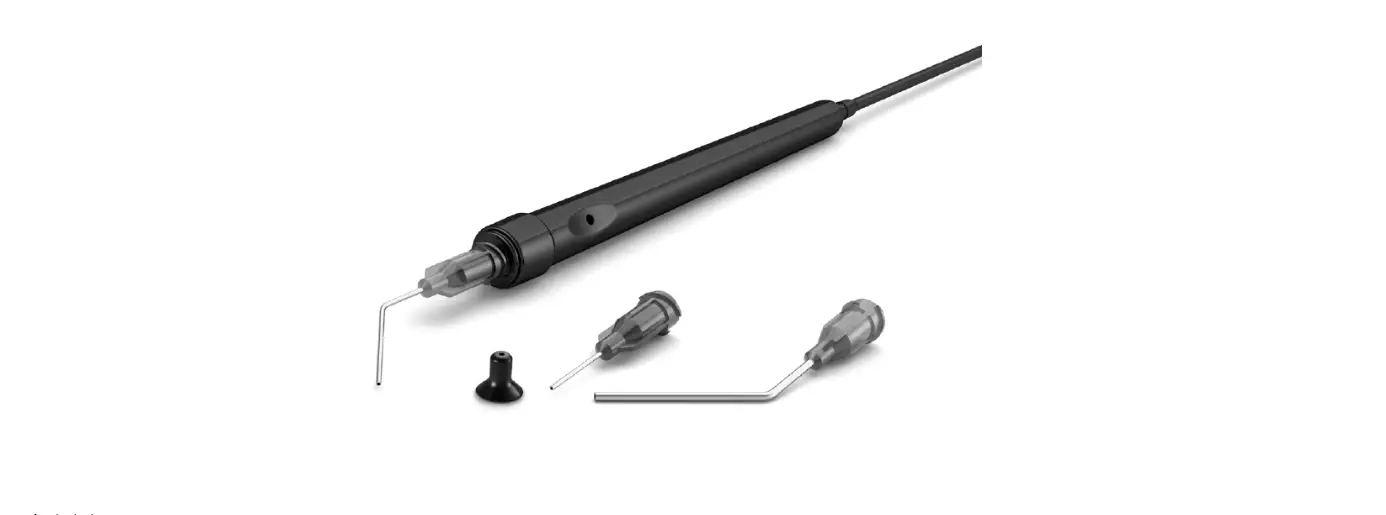
The T260 Pick & Place Handle is a tool designed for
efficient and precise component handling. It is accompanied by
various accessories, including the CU260 Cups Set, NS260 Straight
Needles Set, and NB260 Bent Needles Set. The product package also
includes a manual for reference.
The T260 Pick & Place Handle is compliant with CE standards
and is ESD safe, ensuring safe usage in electronic environments. It
comes with a 2-year warranty that covers manufacturing defects,
with the provision for replacement of defective parts and
labor.
Packing List
- Pick & Place Handle – 1 unit (Ref. T260-A)
- CU260 Cups Set – 1 unit (Ref. 0940163)
- Manual – 1 unit (Ref. 0028986)
- NS260 Straight Needles Set – 1 unit (Ref. 0901546)
- NB260 Bent Needles Set – 1 unit (Ref. 0861660)
Specifications
- Total Net Weight: 21 g / 0.046 lb
- Package Dimensions/Weight: 240 x 115 x 43 mm / 171 g
- Complies with CE standards
- ESD safe
Warranty
JBC’s 2-year warranty covers this equipment against
manufacturing defects, including the replacement of defective parts
and labor. The warranty does not cover product wear or misuse. To
avail the warranty, the equipment must be returned, postage paid,
to the dealer from where it was purchased.
Disposal
This product should not be thrown in the garbage. In compliance
with European directive 2012/19/EU, electronic equipment at the end
of its life must be collected and returned to an authorized
recycling facility.
Product Usage Instructions
- Choose the appropriate needle from the NS260 or NB260 set,
based on the component being handled. - If required, select the appropriate suction cup from the CU260
Cups Set. - Connect the tool to the station suction plug.
- For correct suction, insert the needle into the cup as shown in
the picture. Ensure the needle does not protrude from the cup. - To activate suction, cover the pen hole with your finger and
lift off the component. - To release the component, lift your finger from the pen
hole.
INSTRUCTION MANUAL
T260
Pick & Place Handle
This manual corresponds to the following references: T260-A
Packing List
The following items are included:
Pick & Place Handle ……. 1 unit CU260 Cups Set …………. 1 unit Ref. 0940163
Ø 4.3 mm – 0940112 (x2) Ø 7 mm – 0940111 (x2) Ø 10 mm – 0940110 (x2)
Manual …………………………. 1 unit Ref. 0028986
NS260 Straight Needles Set ………1 unit Ref. 0901546
NB260 Bent Needles Set ………… 1 unit Ref. 0861660
Ø 0.7 mm – 0901512 (x2) black Ø 0.9 mm – 0901520 (x2) yellow Ø 1.2 mm – 0901538 (x2) pink
Ø 0.8 mm – 0861540 (x2) green Ø 0.9 mm – 0861560 (x2) yellow Ø 1.2 mm – 0861580 (x2) pink
2
Connections
Choose the needle that best fits the component and the suction cup if needed.
Connected the tool to the station suction plug.
Needle
Working
Suction Cup
For a correct suction process insert the needle in the cup as shown in the picture.
Maximum working temp: 250ºC (482ºF)
Make sure the needle does not protrude from the cup.
Suction 1
Component
Release 2
Component
Once the suction is activated, cover the pen hole with your finger (1) and lift off the component. Lift your finger (2) from the pen hole to release the component.
3
Specifications
T260 Pick & Place Handle Ref.: T260-A
– Total Net Weight: – Package Dimensions/Weight:
(L x W x H)
21 g / 0.046 lb 240 x 115 x 43 mm / 171 g 9.45 x 4.53 x 1.69 in / 0.377 lb
Complies with CE standards. ESD safe.
Warranty JBC’s 2 year warranty covers this equipment against all manufacturing defects, including the replacement of defective parts and labour. Warranty does not cover product wear or misuse. In order for the warranty to be valid, equipment must be returned, postage paid, to the dealer where it was purchased.
This product should not be thrown in the garbage. In accordance with the European directive 2012/19/EU, electronic equipment at the end of its life must be collected and returned to an authorized recycling facility.
0028986-200922