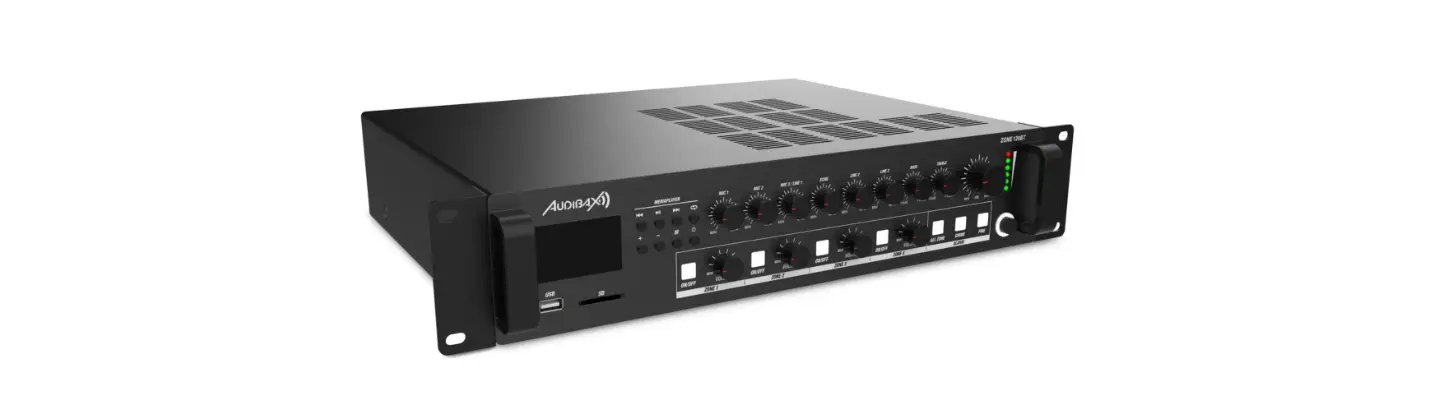
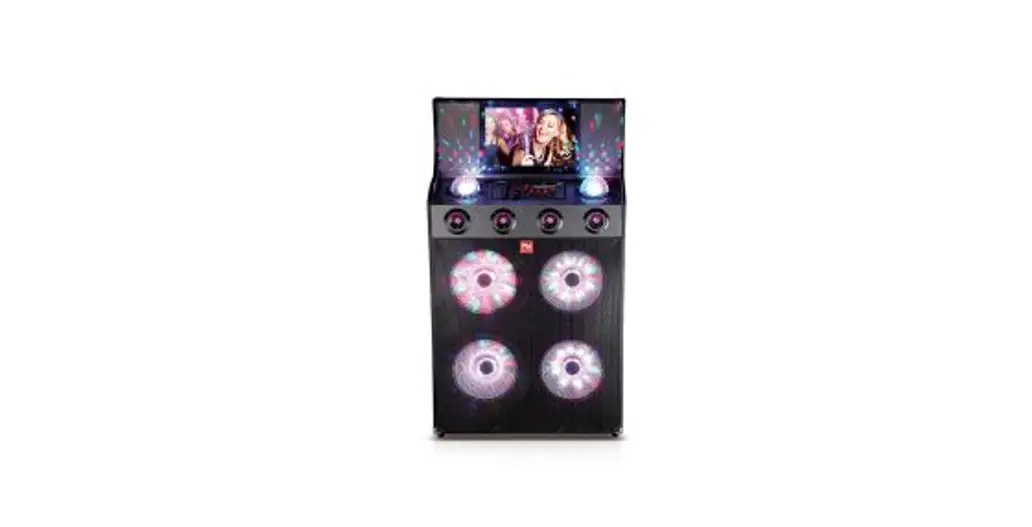
Zone 120 BT Amplificador 4 Zonas 120W
Product Information:
- Product Name: Zone 120BT / Zone 240BT / Zone 360BT
- Player Outputs:
- USB Type Connectors
- SD/MMC Connectors
- Version: Bluetooth Ver20+EOR
- Max Range: 10m (without interference)
- Transmission Frequencies: 2402-2480MHz
- Music Formats: MP3/WAW/WMA/FLAC (8/16/24bit)
- File System: FAT16 or FAT32
- FM Section:
- Tuning Range: 87.5MHz to 107.9MHz
- Antenna Input: 75 unbalanced
- Indicators: LED LCO Sound
- Protection: Player Protect DC-Short Circuit Over Healing Over
Load Limiter - Cooling System: Fan cooled
- Amplifier Technology: Class A/B
- Power Supply: AC230V-240V/50-60Hz DC24V
- Master Standby: 15
- OTG2.0 Full-speed Controller
- USB 2.0 Type-A Non-self-locking SD Card Slot
- RMS Output:
- Zone 120BT: 120 Watt
- Zone 240BT: 240 Watt
- Zone 360BT: 360 Watt
- Frequency Response: 20Hz-20KHz
- Signal to Noise Ratio: >90dB
- THD+N
- Common Mode Rejection
- Crosstalk
- Sensitivity:
- MiC1-2 Connectors
- Phantom Power
- Priority
- LINE 1/MIG3 Inputs
- LINE2-3 Connectors
- Type: Chime/Fire/TEL Connectors
Product Usage Instructions:
- Before using the product, please read the manual.
- The product has multiple player outputs, including USB and
SD/MMC connectors. You can connect your devices to these ports for
playback. - The product also supports Bluetooth connectivity. To pair your
Bluetooth-enabled device, ensure it is within a maximum range of
10m (without interference) and enable Bluetooth on both devices.
Follow the instructions on your device to connect to the
product. - The FM section of the product allows you to tune in to FM radio
stations. Use the tuning range of 87.5MHz to 107.9MHz and connect
an antenna input with a 75 unbalanced connector for optimal
reception. - The product features LED indicators for various functions and
offers protection against DC short circuit, over heating, and
overload. The cooling system includes a fan for efficient
cooling. - The amplifier technology used in the product is Class A/B,
providing high-quality audio output. - The power supply for the product is AC230V-240V/50-60Hz DC24V.
Ensure the product is connected to a compatible power source. - Use the provided OTG2.0 full-speed controller and USB 2.0
Type-A non-self-locking SD card slot for additional
functionalities. - The product offers different power outputs depending on the
model: Zone 120BT (120 Watt), Zone 240BT (240 Watt), and Zone 360BT
(360 Watt). - Enjoy a wide frequency response of 20Hz-20KHz and a signal to
noise ratio of >90dB for clear audio playback. - For input connections, the product provides multiple connectors
with different sensitivities and priority options. Refer to the
manual for detailed instructions on connecting various
devices.
Zone 120BT / Zone 240BT / Zone 360BT
Player Outputs
USB
Type
Connectors
SD/MMC
Connectors
Version
Bluetooth
Max range
Trans Frequencies
Music formats
File system
FM Section
Tuning range Antenna input
Low impedance
Constant Voltage impedance
Indicators
LED LCO Sound
Protection
Cooling system
Amplifier technology
Power supply
Master Standby
OTG2.0 full-speed controller
USB 2.0 Type-A Non-self-locking so card
slot Bluetooth Ver20+EOR
10m (without interference)
2402-2480MHz
MP3/WAW/WMA/FLAC (8/16/24bit)
FAT16 or FAT32 87.5MHz to 107.9MHz
75 unbalanced 4
167-Zone 60BT 84-Zone 120BT 42-Zone 240BT 28-Zone 360BT Power/Zone/Output
Player Protect DC-Short Circuit Over Healing Over Load Limiter Fan cooled Class A/B AC230V-240V/50-60Hz DC24V
15
USER´S MANUAL
Zone 120 BT Zone 240 BT Zone 360 BT
Please read the manual before using the product
Zone 120BT / Zone 240BT / Zone 360BT
Index Introduction……………………………………………………………………………………………………2 System Black Diagram……………………………………………………………………………………2 Precautions…………………………………………………………………………………………………….2 Safety requirements…………………………………………………………………………………………2 Caution servicing…………………………………………………………………………………………….3 EC Declaration of Conformity………………………………………………………………………….3 Caution…………………………………………………………………………………………………………..4 Chapter 1: Pin connections and connectors……………………………………………………4 Connection standards…………………………………………………………………………………….4 Chapter 2: Front & rear panel………………………………………………………………………….5 Front panel overview……………………………………………………………………………………….5 Front panel description…………………………………………………………………………………….5 Rear panel overview………………………………………………………………………………………..8 Rear panel description…………………………………………………………………………………….8 Chapter 3: Setting up the system……………………………………………………………………10 Connection the loudspeakers………………………………………………………………………..11 Connection the audio sources……………………………………………………………………….12 Phantom power…………………………………………………………………………………………….13 To start playing music form MP3……………………………………………………………………..13 To start playing music via Bluetooth ……………………………………………………………….13 Chapter 4: Additional information………………………………………………………………….14 Technical specifications…………………………………………………………………………………14
USER´S MANUAL
ATTENTION
· Do not operate the amplifier or disconnect power cable during firmwave update Firmware update takes about10seconds · No files other than firmware in USB storage device or SD card. · Do not perform this procedure unless firmware update is necessary Also make sure you read the information supplied with updates before updating the firmware.
Chapter 4
Additional information
Technical specifications
RMS Output
Zone 120BT
Power
Zone 240BT
1 kdiE.TriD %o
Zone 360BT
Frequency response
Signal to Noise Ratio
THD+N
Common Mode Rejection
Crosstalk
Type
Sensitivity
MiC1-2
Connectors
Phantom power
Priority
Type
Inputs
LINE 1/MIG3
Sensitivity Connectors
Priority
Type
LINE2-3
Sensitivity
Connectors
Type
Chime/Fire/TEL Connectors
120 Watt 240 Watt 360 Watt 20Hz-20KHz
>90dB <0.5% <0.5% >70dB 2x Balanced mic / Une -50dB 2xXLR/6.3mmJack combo 15VDO
Yes Balanced mic/line
-50dB XLBi6.3mm Jack combo
YES 2x Stereo ling
-30dB 2x RCA Priority mic inputs Euro terminal block5.08mm
1
14
Zone 120BT / Zone 240BT / Zone 360BT
3)Phantom power
MlC input 1&2contain the possibility for supplying 15Volts phantom power for powering condenser microphones. Enabling of the phantom power can be done by the switches located between MIC 1&2 connections. Switch 2 will enable phantom power to Mic input 1while switch 1 enables phantom power to Mic input 2.
4)To start playing music form MP3
Insert a USB storage device or SD/MMC memory card to the slots on front of the device. The MP3 player can play such as MP3WMAWAVFLAC. AAC audio formats When the media is inserted the device will detect automatically and will start playing You can select the playing tracks using the control buttons on front of the device. For switching to settings of another media source, press the M button on front (The variable audio output will switch automatically to this media source)
5)To start playing music via Bluetooth
Adjust the bluetooth antenna to a vertical position then press the M button on
front to switch the operation mode to Bluetooth. Turn on the bluetooth on your
device(phone computer, Ipad, mace or other music playback devices with
bluetooth) and search for bluetooth device, you’ll find a device named
”
“Bluetooth” in the list, select and connect it. Then you can
play music on your device. pressing the to control the music track previous,
next or pause.
6)Update the player’s firmware
New firmware that provides additional features or product improvements will be released as needed. You can download the type MVA of firmware from our website.
Format the USB storage device or SD card for upgrade firs. Insert a USB storage device or SD card with firmware on the front if the player detects firmware, it will automatically extinguish the LCD screen and start to upgrade the firmware, it will restart about 10 seconds later.
13
USER´S MANUAL
Introduction
Public address amplifiers
The Zone series public address amplifier was developed as an easy to use, flexible solution for multifunctional use
During the development of the Zone series amplifiers, our engineers wanted to achieve four goals:
-Delivering a flexible audio solution to control multiple functions – Easy to use -Excellent sound quality -Modern and advanced design
The Zone series amplifiers has 2 stereo unbalanced line level inputs, 1 mono balanced line level inputs, 2 mono balanced line level inputs with phantom power, 4 high impedance 100V mono output zones, 1 low impedance 4ohm mono output zone a link output a telephone signal input, a chime and fire signal input, an 100V emergency input with 24V control, a lossless music player with screen, including FM tuner, the model with a “+BT” version also has bluetooth.
The Zone series amplifiers can be used in commercial applications such as restaurants, hotels, shops, warehouses, professional offices, public buildings….. A simple example: when installed in a shop you could connect a tuner to play your favorite radio station, microphone to make announcements, a telephone pager. and off course the doorbell of the shop.
Precautions
READ FOLLOWINGINSTRUCTIONS FOR YOUR OWN SAFETY
ALWAYS KEEP THESE INSTRUCTIONS NEVER THROW THEM AWAY
ALWAYS HANDLE THIS UNIT WITH CARE
HEED ALL WARNINGS
FOLLOW ALLINSTRUCTIONS
NEVER EXPOSE THIS EQUIPMENT TO RAINMOISTUREANY DRIPPING ORSPLASHING
LIQUID.AND NEVER PLACE AN OBJECT FILLED WITH LIQUID ON TOP OF THIS
DEVICE
2
Zone 120BT / Zone 240BT / Zone 360BT
DO NOT PLACE THIS UNIT IN AN ENCLOSED ENVIRONMENT SUCH AS A BOOKSHELF OR CLOSET ENSURE THERE IS ADEQUATE VENTILATION TO COOL THEUNITDO NOTBLOCK THE VENTILATION OPENINGS
DO NOT STICK ANY OBJECTS THROUGH THE VENTILATION OPENINGS
DO NOT INSTALL THIS UNIT NEAR ANY HEAT SOURCES SUCH AS RADIATORS OR OTHER APPARATUS THAT PRODUCE HEAT
DO NOT PLACE THIS UNIT IN ENVIRONMENTS WHICH CONTAIN HIGHLEVELS OF DUST HEATMOISTURE ORVIBRATION
THIS UNIT IS DEVELOPED FOR INDOORUSE ONLYDONOT USEITOUTDOORS
PLACE THE UNIT ON A STABLE BASE OR MOUNTITIN A STABLE RACK
ONLY USE ATTACHMENTS & ACCESSORIES SPECIFIED BY THE MANUFACTURER
UNPLUG THIS APPARATUS DURING LIGHTNING STORMS ORWHEN UNUSED FORLONG PERIODS OF TIME
ONLY CONNECT THIS UNIT TO A MAINS SOCKET OUTLET WITH PROTECTIVE EARTHING CONNECTION
CAUTION-SERVICING This product contains no user serviceable parts. Refer all servicing to qualified service personnel. Do not perform any servicing (unless you are qualified to) EC DECLARATION OF CONFORMITY This product conforms to all the essential requirements and further relevant specifications described in following directives: 2004/108/EC(EMC) and 2006/95/EC(LVD) WASTE ELECTRICAL AND ELECTRONIC EQUIPMENT(WEEE) The WEEE marking indicates that this product should not be disposed with regular household waste at the end of its life cycle. This regulation is created to prevent any possible harm to the environment or human health. This product is developed and manufactured with high quality materials and components which can be recycled and/or reused Please dispose this product at your local collection point or recycling center for electrical and electronic waste. This will make sure that it will be recycled on an environmentally friendly manner, and will help to protect the environment in which we all live.
3
USER´S MANUAL
2) Connecting the audio sources The next step is making the signal input connections. Depending of the type connection and output level of the available audio sources they should be plugged into the matching channel/connection. Before connecting, turn all the channel input and master volume controls on the front panel of the amplifier fully counter clockwise (to their minimum setting) and put the gain control trimmers on the rear panel in a central position. Then connect all the available sources to their corresponding channels and switch on the power of the amplifier and al the connected audio sources the green light around the power button will illuminate after powering on. The buzzer inside will ring three times and then the output protection relay will be switched on (a click will be heard when this occurs) that mean the amplifier is ready. Apply a signal to the inputs as it will be used in normal operation circumstances and turn the channel input level control up about 50%Slowlyraise the master volume control till a certain level until the desired sound level is achieved Depending of the output level of the connected music sources the input gain might need adjustment Adjust these trimmers on the rear panel until the desired level is achieved. For the best signal to noise ratio, the amplifier should run in normal circumstances with the master level control near maximum position and the peak indicator (0 dB) of the VU meter on front should light occasionally (but not frequently during peak levels. If the signal is too loud or distorted use the input level controls to attenuate as necessary to achieve the desired speaker level.
12
Zone 120BT / Zone 240BT / Zone 360BT
1) Connecting the loudspeakers The loudspeakers should be connected to the euro terminal block connectors on the back panel of the device. First the decision should be made which kind of loudspeakers will be used between low impedance (4 Ohm) or constant voltage(100V/70V/) depending on the project requirements. It is only possible to use one (either constant voltage or low impedance) of both options at a time For operating using the low impedance (4 ohm) output any loudspeaker with a minimum impedance load of 4 ohms (that is 4 ohms or greater) can be used.
For operating using constant voltage (100V/70V/…) audio distribution systems, the positive output should be connected to the positive terminal of the loudspeakers, while the negative terminal of the speaker should be connected to the COM (ground) terminal of the amplifier.
11
USER´S MANUAL
CAUTION
The symbols shown are internationally recognized symbols that warn about protentional hazards of electrical products. The lightning flash with arrow point in an equilateral triangle means that the unit contains dangerous voltages. The exclamation point in an equilateral triangle indicates that it is necessary for the user to refer to the user manual.
These symbols warn that there are no user serviceable parts inside the unit. Do not open the unit Do not attempt to service the unit yourself. Refer all servicing to qualified personnel. Opening the chassis for any reason will void the manufacturer’s warranty. Do not get the unit wet. If liquid is spilled on the unit shut it off immediately and take it to a dealer for service. Disconnect the unit during storms to prevent damage.
Chapter 1
Pin connections and connectors
CONNECTION STANDARDS The in and output connections for our audio equipment are performed corresponding to international wiring standards for professional audio equipment.
RCA(Cinch): For unbalanced line input
Tip: Signal Sleeve: Ground
White: Left Red: Right
XLR: For balanced signal input connections
Pin 1: Ground Pin 2: Signal+ Pin 3: Signal-
4
Zone 120BT / Zone 240BT / Zone 360BT
6.3mm (1/4) balanced Jack: For balanced line in & output connections.
Tip: Signal+ Ring: SignalSleeve: Ground
6.3 mm (1/4″) unbalanced Jack: For unbalanced line in & output
Chapter 2
Front & rear panel Front panel overview
Tip: Signal Sleeve: Ground
Front panel description
The front panel for Zone series amplifiers is identical and enables you to control the level for every input and the overall output volume. A two band tone control is provided for the main output, allowing adjustment of the overall system frequency response while zone (output) switches allows enabling/disabling of the different speaker zone outputs each zone output has a separate volume control. The music player can play such as MP3,WMA,WAV,FLAC AAC and other formats of digital music the model with “+BT” also lets you can play music from your smartphone or computer via bluetooth 2.0.
Input level controls
Using the input level controls, the individual level for each connected input can be set This way, multiple inputs can be mixed with each other between zero and maximum level.
5
USER´S MANUAL
Unbalanced line inputs 2 & 3 (RCA jack):
Line inputs 2 and 3 are implemented using RCA jack connections it can be made a stereo line input red for right channel white for left channel.
Chime &Fire inputs (Terminal block):
Chime &Fire inputs can be connected to any external source, such as call station, signal matrix, fire alarm system. These channels have priority over other inputs.
Tel input (Terminal block):
The amplifier can be connected to any business telecom system using the tel input, allowing announcements to be made from any handset. It is a line level input with priority to be connected to the line output of the telecom system. Unalanced input connections should be made to the ‘CH’ (Hot or Signal) and GND (Ground) terminals.
Emergency input (Terminal block):
The amplifier can be connected to any100Vconstantvoltage amplifier output of alarm system with DC 24V remote control using the emergency input. When the DC 24V is input the amplifier will switch the all connected speakers (just constant voltage output) to the alarm input.
Chapter 3
Setting up the system
ATTENTION Make sure the power of the device is turned OFF before any connections or wiring adjustments are made. Disregarding this rule can lead to permanent damage of the equipment.
10
Zone 120BT / Zone 240BT / Zone 360BT
DC Power inlet:
The main DC power supply (24V) has to be applied to the connector on the left of the AC power inlet. This is a standby power inlet to connect a24V battery. A fuse holder with main fuse is located on the top of the DC power inlet. When replace the fuse make sure the replacement matches the specifications of the original fuse.
Loudspeaker output connections (Terminal block connectors)
Output connections for both low impedance and constant voltage distributed audio systems are provided The low impedance loudspeaker and 100Vconstant voltage output share a 4-PIN terminal block, the two on the left are used to connect low impedance speakers the two on the right are used to connect high impedance (iust100V constant voltage) speakers. While different zone (1-4) outputs are provided on a8-pin terminal block connector More information about loudspeaker output connections is described in a further chapter of this instruction manual.
Link out connections (RCA jack connectors):
These connections can be used when expanding your system by adding a second amplifier in your system. Connect LINE2 or LINE3 input of the second amplifier with the OUT of the master amplifier in your setup.
Balanced line1/mic inputs12&3(combination63mmjack&XLR):
Channels1, 2 & 3areimplemented using combination connectors accepting both XLR and 6.3 mm jack plugs. Both inputs will mute all other channels when a signal is present on the connected microphones / inputs / Mic input 1 & 2 can be used for capacitive microphones phantom power switches enable 24Vots phantom power supply for 12V-48V capacitive microphone. Switch 2 will enable phantom power to Mic input 1while switch 1 enables phantom power to Mic input 2. 9
USER´S MANUAL
Chime:
When the chime button is pressed the selected chime tone as pre-announcement for paging will be played once.
Fire:
When the fire button is pressed the fire alarm goes through the loop until the fire button is pressed again.
Two band tone control:
Using the bass and treble rotary dials, the overall system frequency response can be adjusted within a range of+12dB. The level will be increased while clockwise rotating. while counter-clockwise will result in a level decrease. In center position, both dials are set to neutral level.
Microphone echo control:
Articulated echo effect suitable for microphone channel
Master volume control:
Using the master volume control the overall system volume will be adjusted in a range between minimum and maximum level
Digital Music player:
This is an Al-In-One Digital audio source device accommodates three different kinds of audio sources into one single device. It including a lossless MP3plaverFM tuner Bluetooth (+BT model only), the MP3 player can play such as MP3,WMA,WAV,FLAC ,AAC audio formats on the front side is a graphic LCD display screen, an USB slot a SD/MMC memory card slot and 8 control buttons provided.
Button Function
Press: Turn on the player Press & Hold: Turn off the player Switch the operation mode between USBSD/MMC Bluetooth
6
Zone 120BT / Zone 240BT / Zone 360BT
Press: Started and paused for track when in USB/SD/MMC/Bluetooth Mode Press & Hold: Automatically scanning FM radio, store it when in FM tuner Mode Previous track when in USB/SD/MMC/Bluetooth Mode Previous stored FM radio station when in FM tuner Mode Next track when in USB/SD/MMC/Bluetooth Mode Next stored FM radio station when in FM tuner Mode Increase player volume Reduce player volume Switch the repeat mode between Repeat One. Repeat Folder, Repeat All and Repeat Off
USB connection port &SD/MMC card slot:
An USB storage device and/or an SD/MMC memory card can be inserted to these slots. Tracks stored on here can be played through the player and it will automatically start to play when the medium is inserted.
LED indicators:
The current system operation is indicated on the 6digit LED bar graph The LED’s monitor the current output eve within a range of-18 dB and 0 dB while the upper LED (red) illuminates when the output is clipping you need to reduce the channel or master volume.
Zone 1-4(output)switches:
The different connected loudspeaker lines (1-4) can be switched on and off by pressing the switches with the corresponding numbers when the zone (1-4) is enabled the green light on the corresponding switch will be illuminated. When the ‘All switch is pressed, all zone (1-4) outputs will be enabled
Zone 1-4 (output) level control:
The output level of different zone (1-4) can be adjust within a range of-15dB and 0dB by the band switches with the corresponding numbers.
7
USER´S MANUAL
Power switch:
The device can be switched ON and Off using the power switch. When the device is switched ON, the green light around the power button will illuminate. After powering on the buzzer inside will ring three times and then the output protection relay will be switched on (a click will be heard when this occurs) that mean the amplifier is ready.
Rear Panel Overview
Rear panel description
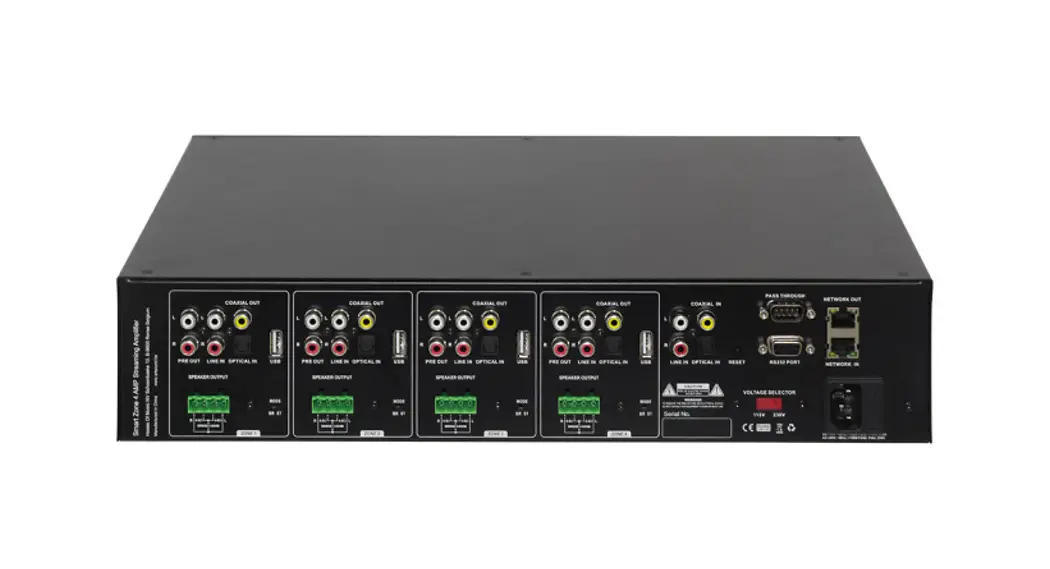
The rear panel for amplifiers is identical and contains all connection and configuration controls (the model without “+BT” has no bluetooth antenna). Configuration controls include the settings which should be made once when setting up the system and doesn’t have to be changed by the user afterwards.
AC Power inlet:
The main AC power supply (230~240VAC/50~60 Hz) has to be applied to this AC power inlet. The connection is made by an IEC C14 power connector A fuse holder with main fuse is located on the right of the AC power inlet. When replace the fuse make sure the replacement matches the specifications of the original fuse.
FM antenna:
When using an FM radio, pull out the FM antenna to ensure a good FM reception.
Bluetooth antenna:
When connecting the bluetooth adjust the bluetooth antenna to a vertical position to ensure a good wireless signals and longer distance.
**Only the model with ‘+BT has a bluetooth antenna**
8
Zone 120BT / Zone 240BT / Zone 360BT
Reproductores Salidas
USB
Tipo
Conectores
SD/MMC
Conectores
Bluetooth
Versión Rango máximo Frecuencias Trans
Formatos de música
Sistema de archivos
Rango de sintonía
Sección FM
Entrada de
antena
baja impedancia
Impedancia de voltaje constante
Indicadores
LED LCO Sonido
Proteccion
Sistema de refrigeración
Tecnología de amplificador
Fuente de
Maestro
alimentación
Apoyar
Controlador de velocidad completa OTG2.0 USB 2.0 tipo A
Ranura para tarjeta sin autobloqueo
Bluetooth Ver20+EOR 10m (sin interferencia)
2402-2480MHz MP3/WAW/WMA/FLAC
(8/16/24bit) FAT16 or FAT32 87.5MHz to 107.9MHz
75 no balanceado
4 167-Zone 60BT 84-Zone 120BT 42-Zone 240BT 28-Zone 360BT Potencia/Zona/Salida
Jugador Proteger DC-Short: circuit Over Healing Over Load
Limiter
Refrigerado por ventilador Clase A/B
AC230V-240V/50-60Hz DC24V
MANUAL DE USUARIO
Zone 120 BT Zone 240 BT Zone 360 BT
Por favor, lea el manual antes de usar el producto
15
Zone 120BT / Zone 240BT / Zone 360BT
Índice Introducción…………………………………………………………………………………………………..2 Diagrama negro del sistema…………………………………………………………………………..2 Precauciones…………………………………………………………………………………………………2 Requisitos de seguridad…………………………………………………………………………………..2 Precaución servicio…………………………………………………………………………………………3 Declaración CE de conformidad…………………………………………………………………….3 Precaución……………………………………………………………………………………………………..4 Capítulo 1: Conexiones de clavijas y conectores…………………………………………….4 Estándares de conexión…………………………………………………………………………………..4 Capítulo 2: Panel frontal y posterior………………………………………………………………….5 Resumen del panel frontal……………………………………………………………………………….5 Descripción del panel frontal…………………………………………………………………………..5 Vista general del panel trasero………………………………………………………………………..8 Descripción del panel trasero………………………………………………………………………….8 Capítulo 3: Configuración del sistema……………………………………………………………10 Conexión de los altavoces…………………………………………………………………………….11 Conexión de las fuentes de audio………………………………………………………………….12 Poder fantasma…………………………………………………………………………………………….13 Para comenzar a reproducir música desde MP3…………………………………………….13 Para empezar a reproducir música a través de Bluetooth………………………………13 Capítulo 4: Información adicional…………………………………………………………………14 Especificaciones técnicas……………………………………………………………………………..14
1
MANUAL DE USUARIO
ATENCIÓN · No utilice el amplificador ni desconecte el cable de alimentación durante la actualización de Firmware. La actualización del firmware tarda unos 10 segundos. · No hay archivos que no sean firmware en el dispositivo de almacenamiento USB o tarjeta SD. · No realice este procedimiento a menos que sea necesaria una actualización de firmware. También asegúrese de leer la información proporcionada con las actualizaciones antes de actualizar el firmware.
Capítulo 4
Información Adicional Especificaciones técnicas
Potencia de
Zone 120BT
120 Vatios
salida RMS
Zone 240BT
240 Vatios
1 kdiE.TriD %o
Zone 360BT
360 Vatios
Respuesta de frecuencia
20Hz-20KHz
Signal to Noise Ratio
>90dB
THD+N
<0.5%
Common Mode Rejection
<0.5%
Diafonía
>70dB
Tipo
2x micrófono balanceado / Une
Sensibilidad
-50dB
MiC1-2
Conectores
Combinación de 2xXLR/Jack de 6,3 mm
Potencia Phantonm
15VDO
Prioridad
Sí
Tipo
Línea/micrófono balanceado
Entradas
LINE 1/MIG3
Sensibilidad Conectores
-50dB Conector combinado
XLBi6.3mm
Prioridad
SÍ
Tipo
2x audio estéreo
LINE2-3
Sensibilidad
-30dB
Conectores
2x RCA
Chime/Fire/TEL
Tipo Conectores
Entradas de micrófono prioritarias
Bloque de terminales euro5.08mm
14
Zone 120BT / Zone 240BT / Zone 360BT
3) Alimentación Phantom Las entradas MlC 1 y 2 contienen la posibilidad de suministrar alimentación phantom de 15 voltios para alimentar micrófonos de condensador. La activación de la alimentación phantom se puede realizar mediante los interruptores ubicados entre las conexiones MIC 1 y 2. El interruptor 2 activará la alimentación phantom en la entrada de micrófono 1, mientras que el interruptor 1 activará la alimentación phantom en la entrada de micrófono 2.
4) Para comenzar a reproducir música desde MP3 Inserte un dispositivo de almacenamiento USB o una tarjeta de memoria SD/MMC en las ranuras de la parte frontal del dispositivo. El reproductor de MP3 puede reproducir como MP3WMAWAVFLAC. Formatos de audio AAC Cuando se inserta el medio, el dispositivo lo detectará automáticamente y comenzará a reproducir. Puede seleccionar las pistas de reproducción usando los botones de control en la parte frontal del dispositivo. Para cambiar a la configuración de otra fuente de medios, presione el botón M en el frente (la salida de audio variable cambiará automáticamente a esta fuente de medios)
5) Para comenzar a reproducir música a través de Bluetooth
Ajuste la antena bluetooth a una posición vertical y luego presione el botón M
en el frente para cambiar el modo de operación a Bluetooth. Encienda el
bluetooth en su dispositivo (computadora telefónica, iPad, Mace u otros
dispositivos de reproducción de música con bluetooth) y busque un dispositivo
bluetooth, encontrará un dispositivo llamado
“Bluetooth” en
la lista, selecciónelo y conéctelo. Luego puede Reproduzca música en su
dispositivo. Presione para controlar la pista de música anterior, siguiente o
pausa.
6) Actualizar el firmware del reproductor Se lanzará nuevo firmware que proporcione funciones adicionales o mejoras del producto según sea necesario. Puede descargar el tipo MVA de firmware desde nuestro sitio web. Formatee el dispositivo de almacenamiento USB o la tarjeta SD para actualizar primero. Inserte un dispositivo de almacenamiento USB o una tarjeta SD con firmware en la parte frontal si el reproductor detecta firmware, apagará automáticamente la pantalla LCD y comenzará a actualizar el firmware, se reiniciará unos 10 segundos después.
13
MANUAL DE USUARIO
Introducción
Durante el desarrollo de los amplificadores de la serie Zone, nuestros ingenieros querían lograr cuatro objetivos: -Ofrecer una solución de audio flexible para controlar múltiples funciones – Fácil de usar -Excelente calidad de sonido -Diseño moderno y avanzado
Los amplificadores de la serie Zone tienen 2 entradas de nivel de línea no balanceadas estéreo, 1 entrada de nivel de línea balanceada mono, 2 entradas de nivel de línea balanceada mono con alimentación phantom, 4 zonas de salida mono de 100 V de alta impedancia 1 zona de salida mono de 4 ohmios de baja impedancia, una salida de enlace, una entrada de señal telefónica, un timbre y entrada de señal de fuego, una entrada de emergencia de 100V con control de 24V, un reproductor de música sin pérdidas con pantalla, incluye sintonizador de FM, también tiene bluetooth.
Los amplificadores de la serie Zone se pueden utilizar en aplicaciones comerciales como restaurantes, hoteles, tiendas, almacenes, oficinas profesionales, edificios públicos… Un ejemplo simple: cuando se instala en una tienda, puede conectar un sintonizador para reproducir su estación de radio favorita, un micrófono para hacer anuncios, un localizador de teléfono. y por supuesto el timbre de la tienda.
Precauciones LEA LAS SIGUIENTES INSTRUCCIONES POR SU PROPIA SEGURIDAD
CONSERVE SIEMPRE ESTAS INSTRUCCIONES
MANEJE SIEMPRE ESTA UNIDAD CON CUIDADO
TENGA EN CUENTA TODAS LAS ADVERTENCIAS
SIGA TODAS LAS INSTRUCCIONES
NUNCA EXPONGA ESTE EQUIPO A LA LLUVIA, LA HUMEDAD, GOTEO O SALPICADURAS DE LÍQUIDO. Y NUNCA COLOQUE UN OBJETO LLENO DE LÍQUIDO ENCIMA DE ESTE DISPOSITIVO.
2
Zone 120BT / Zone 240BT / Zone 360BT
NO COLOQUE ESTA UNIDAD EN UN AMBIENTE CERRADO COMO UNA ESTANTERÍA O ARMARIO ASEGÚRESE DE QUE HAYA VENTILACIÓN ADECUADA PARA ENFRIAR LA UNIDAD NO OBSTRUYA LAS ABERTURAS DE VENTILACIÓN
NO PEGUE OBJETOS POR LAS ABERTURAS DE VENTILACIÓN
NO INSTALE ESTA UNIDAD CERCA DE FUENTES DE CALOR COMO RADIADORES U OTROS APARATOS QUE PRODUZCAN CALOR
NO COLOQUE ESTA UNIDAD EN AMBIENTES QUE CONTENGAN ALTOS NIVELES DE POLVO, CALOR HUMEDAD O VIBRACIONES
ESTA UNIDAD ESTÁ DESARROLLADA SÓLO PARA USO EN INTERIORES NO LA UTILICE EN EXTERIORES
COLOQUE LA UNIDAD SOBRE UNA BASE ESTABLE O MONTE EN UNA RACK ESTABLE
USE ÚNICAMENTE ACCESORIOS Y ACCESORIOS ESPECIFICADOS POR EL FABRICANTE
DESENCHUFE ESTE APARATO DURANTE TORMENTAS ELÉCTRICAS O CUANDO NO SE UTILICE POR PERÍODOS DE TIEMPO PROLONGADOS
SÓLO CONECTE ESTA UNIDAD A UNA TOMA DE CORRIENTE CON PROTECCIÓN DE CONEXIÓN A TIERRA
PRECAUCIÓN-MANTENIMIENTO Este producto no contiene piezas reparables por el usuario. Remita todo el servicio a personal de servicio calificado. No realice ningún servicio (a menos que esté calificado para hacerlo) DECLARACIÓN DE CONFORMIDAD CE Este producto cumple con todos los requisitos esenciales y otras especificaciones relevantes descritas en las siguientes directivas: 2004/108/EC (EMC) y 2006/95/EC (LVD) RESIDUOS DE APARATOS ELÉCTRICOS Y ELECTRÓNICOS (RAEE) La marca WEEE indica que este producto no debe desecharse con los residuos domésticos habituales al final de su ciclo de vida. Este reglamento se crea para prevenir cualquier posible daño al medio ambiente o a la salud humana. Este producto está desarrollado y fabricado con materiales y componentes de alta calidad que se pueden reciclar y/o reutilizar. Deseche este producto en su punto de recogida o centro de reciclaje local para residuos eléctricos y electrónicos. Esto asegurará que se recicle de manera respetuosa con el medio ambiente y ayudará a proteger el medio ambiente en el que todos vivimos.
3
MANUAL DE USUARIO
2) Conexión de las fuentes de audio
El siguiente paso es hacer las conexiones de entrada de señal. Según el tipo de conexión y el nivel de salida de las fuentes de audio disponibles, deben conectarse al canal/conexión correspondiente.
Antes de conectar, gire todos los controles de entrada de canal y volumen maestro en el panel frontal del amplificador completamente en el sentido contrario a las agujas del reloj (hasta su configuración mínima) y coloque los potenciómetros de control de ganancia en el panel trasero en una posición central. Luego, conecte todas las fuentes disponibles a sus canales correspondientes y encienda el amplificador y todas las fuentes de audio conectadas. La luz verde alrededor del botón de encendido se iluminará después de encender. el zumbador en el interior sonará tres veces y luego se encenderá el relé de protección de salida (se escuchará un clic cuando esto ocurra), lo que significa que el amplificador está listo.
Aplique una señal a las entradas tal como se usará en circunstancias normales de funcionamiento y suba el control de nivel de entrada del canal aproximadamente un 50 %. Suba lentamente el control de volumen maestro hasta cierto nivel hasta lograr el nivel de sonido deseado. Dependiendo del nivel de salida del conectado. fuentes de música, es posible que sea necesario ajustar la ganancia de entrada Ajuste estos potenciómetros en el panel posterior hasta que se logre el nivel deseado.
Para la mejor relación señal/ruido. el amplificador debe funcionar en circunstancias normales con el control de nivel maestro cerca de la posición máxima y el indicador de pico (0 dB) del medidor VU en el frente debe encenderse ocasionalmente (pero no con frecuencia durante los niveles pico. Si la señal es demasiado alta o distorsionada, use los controles de nivel de entrada para atenuar según sea necesario para lograr el nivel de altavoz deseado.
12
Zone 120BT / Zone 240BT / Zone 360BT
1) Conexión de los altavoces Los altavoces deben conectarse a los conectores del bloque de terminales euro en el panel posterior del dispositivo. Primero se debe decidir qué tipo de altavoces se utilizarán entre baja impedancia (4 ohmios) o voltaje constante (100 V/70 V/) según los requisitos del proyecto. Solo es posible usar una (ya sea de voltaje constante o de baja impedancia) de ambas opciones a la vez Para operar usando la salida de baja impedancia (4 ohmios), se puede usar cualquier altavoz con una carga de impedancia mínima de 4 ohmios (es decir, 4 ohmios o más).
Para operar con sistemas de distribución de audio de voltaje constante (100 V/70 V/…), la salida positiva debe conectarse al terminal positivo de los altavoces, mientras que el terminal negativo del altavoz debe conectarse al terminal COM (tierra) del amplificador.
11
MANUAL DE USUARIO
PRECAUCIÓN
Los símbolos que se muestran son símbolos reconocidos internacionalmente que advierten sobre los peligros de protección de los productos eléctricos. El relámpago con punta de flecha en un triángulo equilátero significa que la unidad contiene voltajes peligrosos. El signo de exclamación en un triángulo equilátero indica que es necesario que el usuario consulte el manual del usuario.
Estos símbolos advierten que no hay piezas reparables por el usuario dentro de la unidad. No abra la unidad. No intente reparar la unidad usted mismo. Remita todo el servicio a personal calificado. Abrir el chasis por cualquier motivo anulará la garantía del fabricante. No moje la unidad. Si se derrama líquido sobre la unidad, apáguela inmediatamente y llévela a un distribuidor para que la reparen. Desconecte la unidad durante las tormentas para evitar daños.
Capítulo 1 Conexiones de clavijas y conectores
NORMAS DE CONEXIÓN Las conexiones de entrada y salida de nuestros equipos de audio se realizan de acuerdo con los estándares internacionales de cableado para equipos de audio profesionales.
RCA (cincha): Para entrada de línea no balanceada
Punta: Manguito Blanco: Izquierda
Señal: Tierra Rojo: Derecha
XLR: Para conexiones de entrada de señal balanceada
Pin 1: Tierra Pin 2: Señal + Pin 3: Señal –
4
Zone 120BT / Zone 240BT / Zone 360BT
Conector balanceado de 6,3 mm (1/4): Para conexiones balanceadas de entrada y salida de línea.
Punta: Señal + Anillo: Señal Enchufe: Tierra
Conector no balanceado de 6,3 mm (1/4″): Para entrada y salida de línea no balanceada
Capitulo 2 Panel frontal y trasero Resumen del panel frontal
Punta: Señal Enchufe: Tierra
Descripción del panel frontal
El panel frontal de los amplificadores de la serie es idéntico y le permite controlar el nivel de cada entrada y el volumen de salida general. Se proporciona un control de tono de dos bandas para la salida principal, lo que permite el ajuste de la respuesta de frecuencia general del sistema, mientras que los interruptores de zona (salida) permiten habilitar/deshabilitar las diferentes salidas de zona del altavoz, cada salida de zona tiene un control de volumen separado. El reproductor de música puede reproducir MP3, WMA, WAV, FLAC AAC y otros formatos de música digital. El modelo con “+BT” también le permite reproducir música desde su teléfono inteligente o computadora a través de bluetooth 2.0.
Controles de nivel de entrada
Usando los controles de nivel de entrada, se puede configurar el nivel individual para cada entrada conectada. De esta manera, se pueden mezclar varias entradas entre sí entre cero y el nivel máximo. 5
MANUAL DE USUARIO
Entradas de línea no balanceadas 2 y 3 (conector RCA): Las entradas de línea 2 y 3 se implementan mediante conexiones jack RCA; se puede convertir en una entrada de línea estéreo roja para el canal derecho y blanca para el canal izquierdo.
Entradas Chime & Fire (Bloque de terminales): Las entradas Chime & Fire se pueden conectar a cualquier fuente externa, como estación de llamada, matriz de señal, sistema de alarma contra incendios. Estos canales tienen prioridad sobre otras entradas.
Entrada de teléfono (bloque de terminales): El amplificador se puede conectar a cualquier sistema de telecomunicaciones empresarial mediante la entrada de teléfono, lo que permite realizar anuncios desde cualquier teléfono. Es una entrada de nivel de línea con prioridad para conectarse a la salida de línea del sistema de telecomunicaciones. Las conexiones de entrada no balanceadas deben hacerse a los terminales ‘CH’ (vivo o señal) y GND (tierra).
Entrada de emergencia (Bloque de terminales): El amplificador se puede conectar a cualquier salida de amplificador de voltaje constante de 100 V del sistema de alarma con control remoto de 24 V CC usando la entrada de emergencia. Cuando se ingresa la CC de 24 V, el amplificador cambiará todos los altavoces conectados (solo salida de voltaje constante) a la entrada de alarma.
Capítulo 3
Configuración del sistema
ATENCIÓN Asegúrese de que la alimentación del dispositivo esté APAGADA antes de realizar cualquier conexión o ajuste de cableado. El incumplimiento de esta regla puede provocar daños permanentes en el equipo.
10
Zone 120BT / Zone 240BT / Zone 360BT
Entrada de alimentación de CC: La fuente de alimentación principal de CC (24 V) debe aplicarse al conector a la izquierda de la entrada de alimentación de CA. Esta es una entrada de energía de reserva para conectar una batería de 24V. Un portafusibles con fusible principal se encuentra en la parte superior de la entrada de alimentación de CC. Cuando reemplace el fusible, asegúrese de que el reemplazo coincida con las especificaciones del fusible original.
Conexiones de salida de altavoz (Conectores de bloque de terminales) Se proporcionan conexiones de salida para sistemas de audio distribuidos de voltaje constante y baja impedancia. El altavoz de baja impedancia y la salida de voltaje constante de 100 V comparten un bloque de terminales de 4 pines, los dos de la izquierda se usan para conectar altavoces de baja impedancia, los dos de la derecha se usan para conectar altavoces de alta impedancia (voltaje constante iust100V). Mientras que las diferentes salidas de zona (1-4) se proporcionan en un conector de bloque de terminales de 8 pines. En otro capítulo de este manual de instrucciones se describe más información sobre las conexiones de salida de los altavoces.
Conexiones de salida de enlace (conectores jack RCA): Estas conexiones se pueden usar al expandir su sistema agregando un segundo amplificador en su sistema. Conecte la entrada LINE2 o LINE3 del segundo amplificador con la SALIDA del amplificador maestro en su configuración. Línea balanceada 1/entradas de micrófono 12 y 3 (combinación de conector de 63 mm y XLR): Los canales 1, 2 y 3 se implementan mediante conectores combinados que aceptan conectores XLR y jack de 6,3 mm. Ambas entradas silenciarán todos los demás canales cuando haya una señal presente en los micrófonos / entradas conectados / La entrada de micrófono 1 y 2 se puede usar para micrófonos capacitivos Los interruptores de alimentación fantasma permiten una fuente de alimentación phanton de 24 V para micrófono capacitivo de 12 V-48 V El interruptor 2 habilitará la alimentación phantom en la entrada de micrófono 1, mientras que el interruptor 1 habilitará la alimentación phanton en la entrada de micrófono 2. 9
MANUAL DE USUARIO
Repicar:
Cuando se presiona el botón de timbre, se reproducirá una vez el tono de timbre seleccionado como anuncio previo para megafonía.
Fuego:
Cuando se presiona el botón de disparo, la alarma de incendio pasa por el bucle hasta que se vuelve a presionar el botón de disparo.
Control de tono de dos bandas:
Usando los diales giratorios de graves y agudos, la respuesta de frecuencia general del sistema se puede ajustar dentro de un rango de +12dB. El nivel aumentará mientras gira en el sentido de las agujas del reloj. mientras que en el sentido contrario a las agujas del reloj se producirá una disminución del nivel. En la posición central, ambos diales se establecen en el nivel neutral.
Control de eco del micrófono:
Efecto de eco articulado apto para canal de micrófono
Control de volumen maestro:
Usando el control de volumen maestro, el volumen general del sistema se ajustará en un rango entre el nivel mínimo y máximo.
Reproductor de música digital:
Este es un dispositivo de fuente de audio digital Al-In-One que admite tres tipos diferentes de fuentes de audio en un solo dispositivo. Incluye un sintonizador MP3plaverFM sin pérdidas Bluetooth (+solo modelo BT), el reproductor de MP3 puede reproducir formatos de audio como MP3, WMA, WAV, FLAC, AAC en la parte frontal es una pantalla LCD gráfica, una ranura USB SD/MMC Ranura para tarjeta de memoria y 8 botones de control provistos.
Botón Función Presione: Encienda el reproductor
Mantener pulsado: apagar el reproductor Cambiar el modo de operación entre USBSD/MMC Bluetooth
6
Zone 120BT / Zone 240BT / Zone 360BT
Presione: Iniciado y pausado para la pista cuando está en modo USB/SD/MMC/Bluetooth Mantenga presionado: escanea automáticamente la radio FM, guárdela cuando esté en el modo de sintonizador FM Pista anterior cuando está en modo USB/SD/MMC/Bluetooth Estación de radio FM almacenada anteriormente cuando está en modo de sintonizador FM
Pista siguiente cuando está en modo USB/SD/MMC/Bluetooth Siguiente estación de radio FM almacenada cuando está en modo de sintonizador FM
Aumentar el volumen del reproductor
Reducir el volumen del reproductor
Cambia el modo de repetición entre Repetir uno. Repetir carpeta, Repetir todo y Repetir desactivado
Puerto de conexión USB Ranura para tarjeta SD/MMC:
Se puede insertar un dispositivo de almacenamiento USB y/o una tarjeta de memoria SD/MMC en estas ranuras. Las pistas almacenadas aquí se pueden reproducir a través del reproductor y comenzará a reproducirse automáticamente cuando se inserte el medio.
Indicadores LED:
El funcionamiento actual del sistema se indica en el gráfico de barras LED de 6 dígitos. Los LED monitorean la salida actual dentro de un rango de -18 dB y 0 dB, mientras que el LED superior (rojo) se ilumina cuando la salida se está saturando y necesita reducir el canal o el volumen maestro.
Interruptores de zona 1-4 (salida):
Las diferentes líneas de altavoces conectadas (1-4) se pueden encender y apagar pulsando los interruptores con los números correspondientes cuando la zona (1-4) esté habilitada se encenderá la luz verde del interruptor correspondiente. Cuando se presiona el interruptor ‘All’, todas las salidas de zona (1-4) se habilitarán
Control de nivel de zona 1-4 (salida):
El nivel de salida de las diferentes zonas (1-4) se puede ajustar dentro de un rango de -15dB y 0dB mediante los interruptores de banda con los números correspondientes. 7
MANUAL DE USUARIO
Interruptor de alimentación:
El dispositivo se puede encender y apagar con el interruptor de encendido. Cuando el dispositivo está encendido, la luz verde alrededor del botón de encendido se iluminará. Después de encender, el zumbador interno sonará tres veces y luego se encenderá el relé de protección de salida (se escuchará un clic cuando esto ocurra), lo que significa que el amplificador está listo.
Vista general del panel trasero
Descripción del panel trasero
El panel posterior de los amplificadores de la serie son idénticos y contienen todos los controles de conexión y configuración (el modelo sin “+BT” no tiene antena bluetooth). Los controles de configuración incluyen los ajustes que deben realizarse una vez al configurar el sistema y no t tiene que ser cambiado por el usuario después.
Entrada de alimentación de CA:
La fuente de alimentación de CA principal (230~240 VCA/50~60 Hz) debe aplicarse a esta entrada de alimentación de CA. La conexión se realiza mediante un conector de alimentación IEC C14. Un portafusibles con fusible principal se encuentra a la derecha de la entrada de alimentación de CA. Cuando reemplace el fusible, asegúrese de que el reemplazo coincida con las especificaciones del fusible original.
Antena FM:
Cuando utilice una radio FM, extraiga la antena FM para garantizar una buena recepción de FM
Antena Bluetooth:
Al conectar el bluetooth, ajuste la antena bluetooth a una posición vertical para garantizar una buena señal inalámbrica y una mayor distancia
**Solo el modelo con ‘+BT tiene antena bluetooth** 8