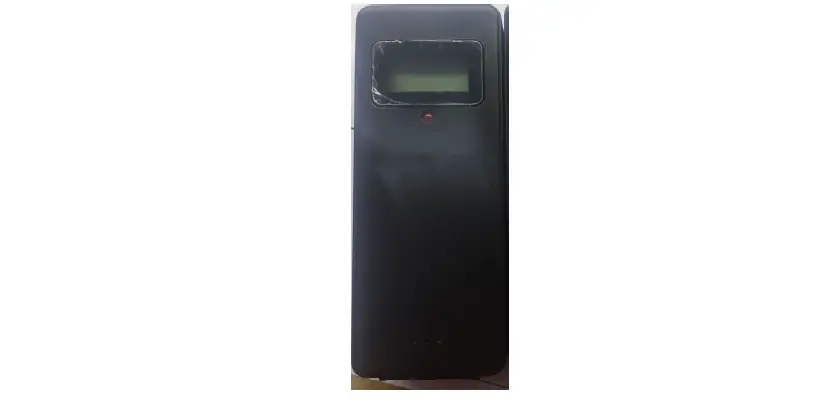

NOVO H12022 Transmitter
Transmitter Operating Manual
Button function and battery Install specification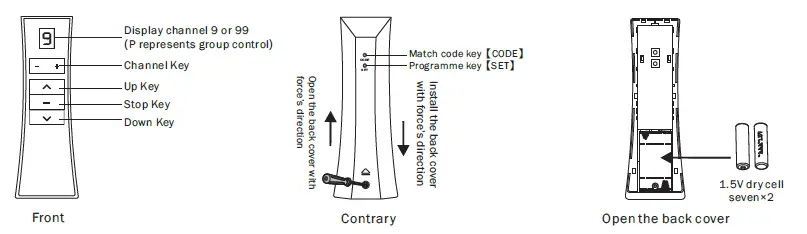
Instructions
Repeat the pairing operation once to eliminate the current pairing。Motor stores up to 10 transmitter channels, Adding a new transmitter channel will cover the earliest channel。 For example, current paired channels are 1~10。 If you add channel 11, paired channels will be 2~11。
- Select the channel that will be paired
- Press【Set】button on motor
- Within 10s after motor stops, press 【Code】 button
Clear pairing
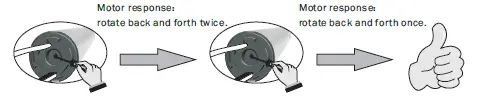
- Press & Hold Set button on motor about 10s
- Press【Set】button on motor again
Speed setting
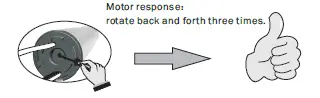
Press & Hold Set button on motor about 15s
Lock channel:

- Keep press transmitter key about 10s
- Within 6s, press Select-button to choose the channel you want to lock
- Press the【Stop key 】 to save the currently locked channel
- Display channel P
Inching / Continuous moving interchange

- Select the channel that will be interchanged
- Press & Hold【Set】button on transmitter about 10s
- Within 10s after motor stops, press【Up】button about 5s
Copy

- Select the channel that will be copied
- transmitter about 10s ON Press & Hold【Code】button
- Within 10s after motor stops, pair on the new channel
Reset direction

- Select the channel that will be reset the direction
- Press & Hold【Set】button on transmitter about 10s
- Within 10s after motor stops, press【Stop】button the about 5s
Adjusting Limits
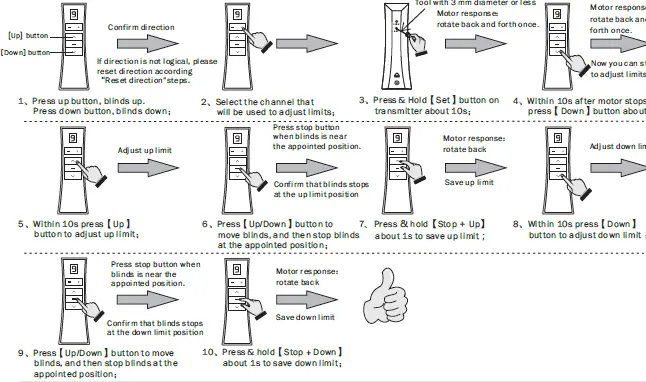
- Press the up button, blinds up. Press down button blinds down
- Select the channel that will be used to adjust limits
- Press & Hold【Set】button on transmitter about 10s
- Within 10s after motor stops, press【Down】button the about 5s
- Within 10s press【Up】 button to adjust up limit
- Press【Up/Down】button to move blinds, and then stop blinds at the appointed position
- Press & hold【Stop + Up】 about 1s to save up limit
- Within 10s press【Down】 button to adjust the down limit
- Press【Up/Down】button to move blinds, and then stop blinds at the appointed position
- Press & hold【Stop + Down】 about 1s to save down limit
Adjust the third limit
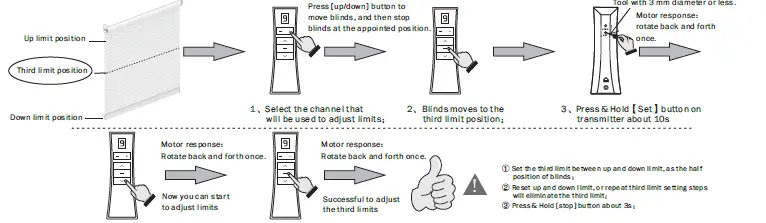
- Within 10s after the motor stops, press【Down】button the about 5s
- Within 10s after motor stops, press【Stop】button the about 5s
Set the third limit between up and down limit, as the half position of blinds Reset up and down limit, or repeat the third limit setting steps will eliminate the third limit Press & Hold [stop] button about 3S
FCC Caution
This device complies with part 15 of the FCC Rules. Operation is subject to the following two conditions: (1) This device may not cause harmful interference, and (2) this device must accept any interference received, including interference that may cause undesired operation. Any Changes o modifications not expressly approved by the party responsible for compliance could void the user’s authority to operate the equipment.
Note: This equipment has been tested and found to comply with the limits for a Class B digital device, pursuant to part 15 of the FCC Rules. These limits are designed to provide reasonable protection against harmful interference in a residential installation. This equipment generates uses and can radiate radio frequency energy and, if not installed and used in accordance with the instructions, may cause harmful interference to radio communications. However, there is no guarantee that interference will not occur in a particular installation. If this equipment does cause harmful interference to radio or television reception, which can be determined by turning the equipment off and on, the user is encouraged to try to correct the interference by one or more of the following measures:
- Reorient or relocate the receiving antenna.
- Increase the separation between the equipment and receiver.
- Connect the equipment into an outlet on a circuit different from that to which the receiver is connected.
- Consult the dealer or an experienced radio/TV technician for help.