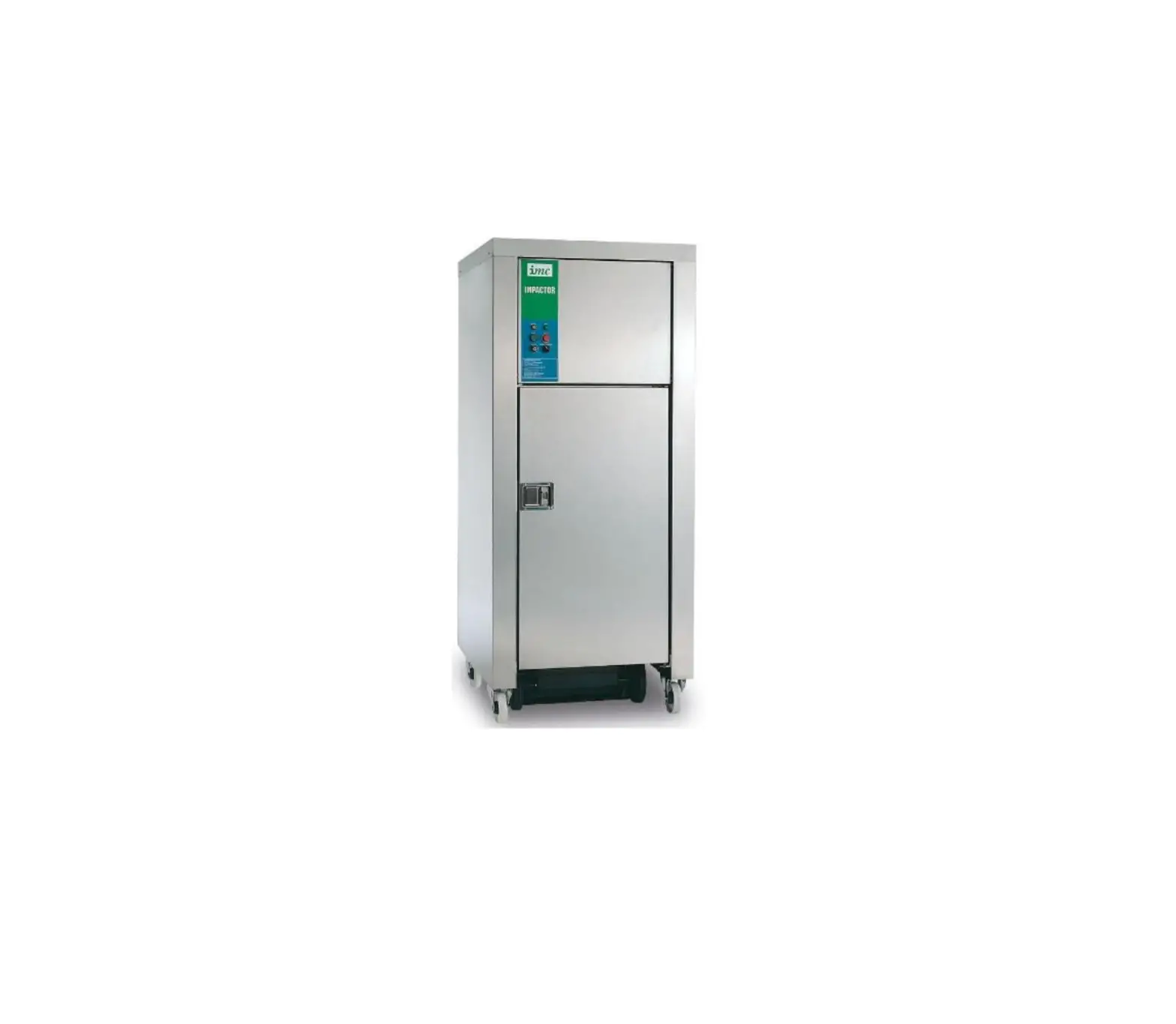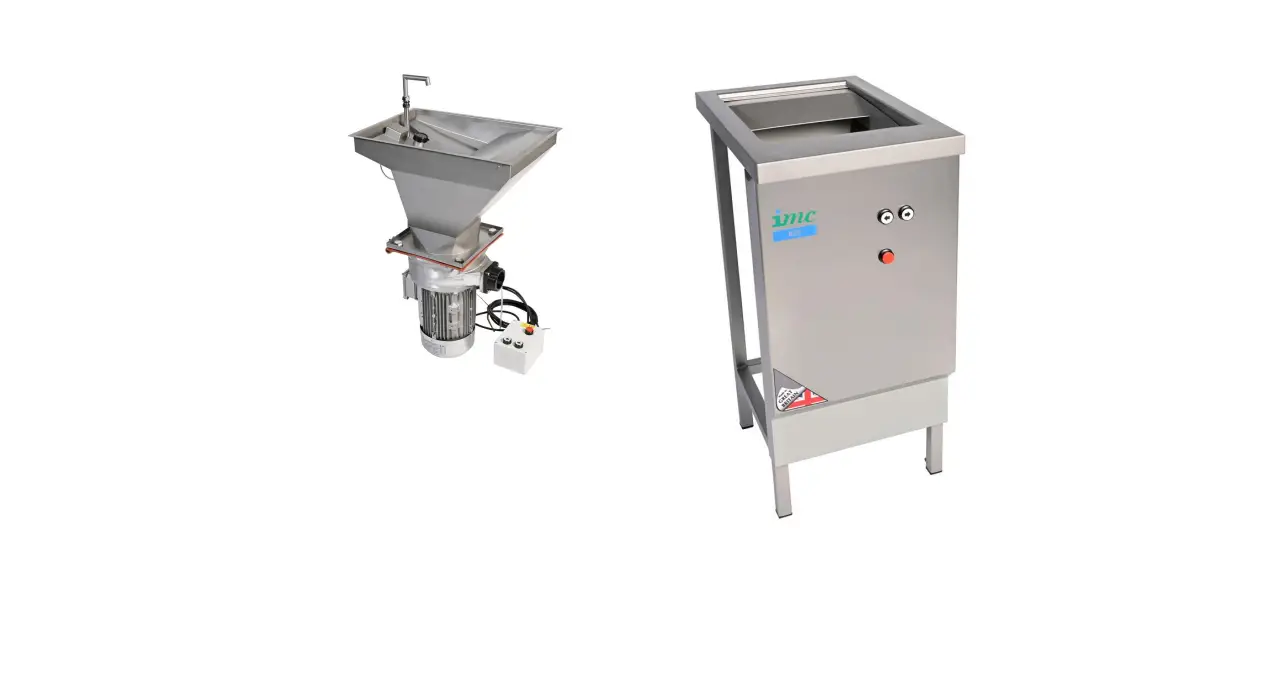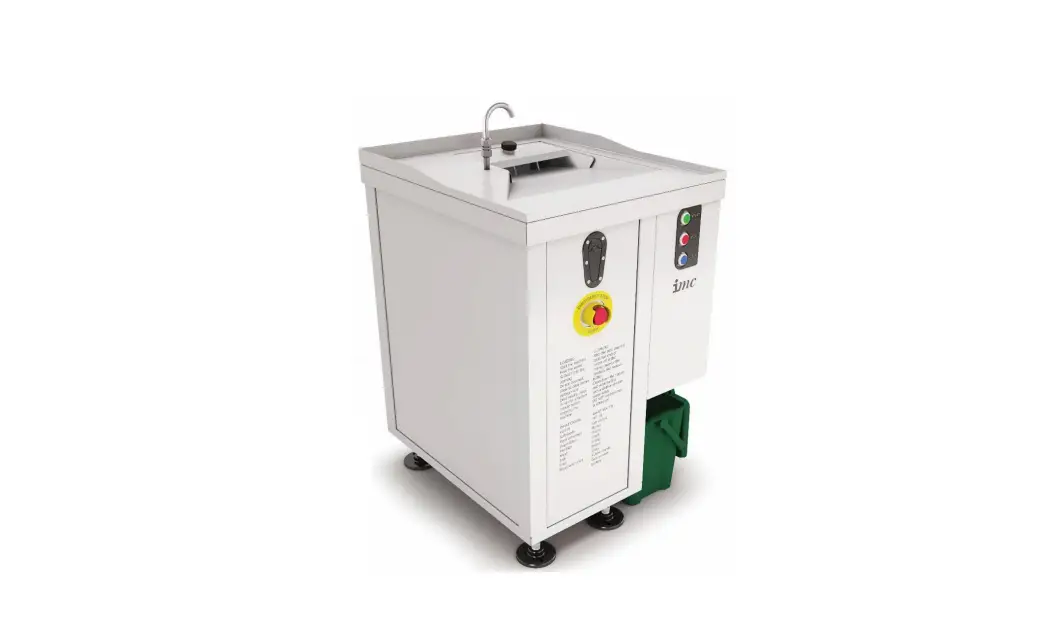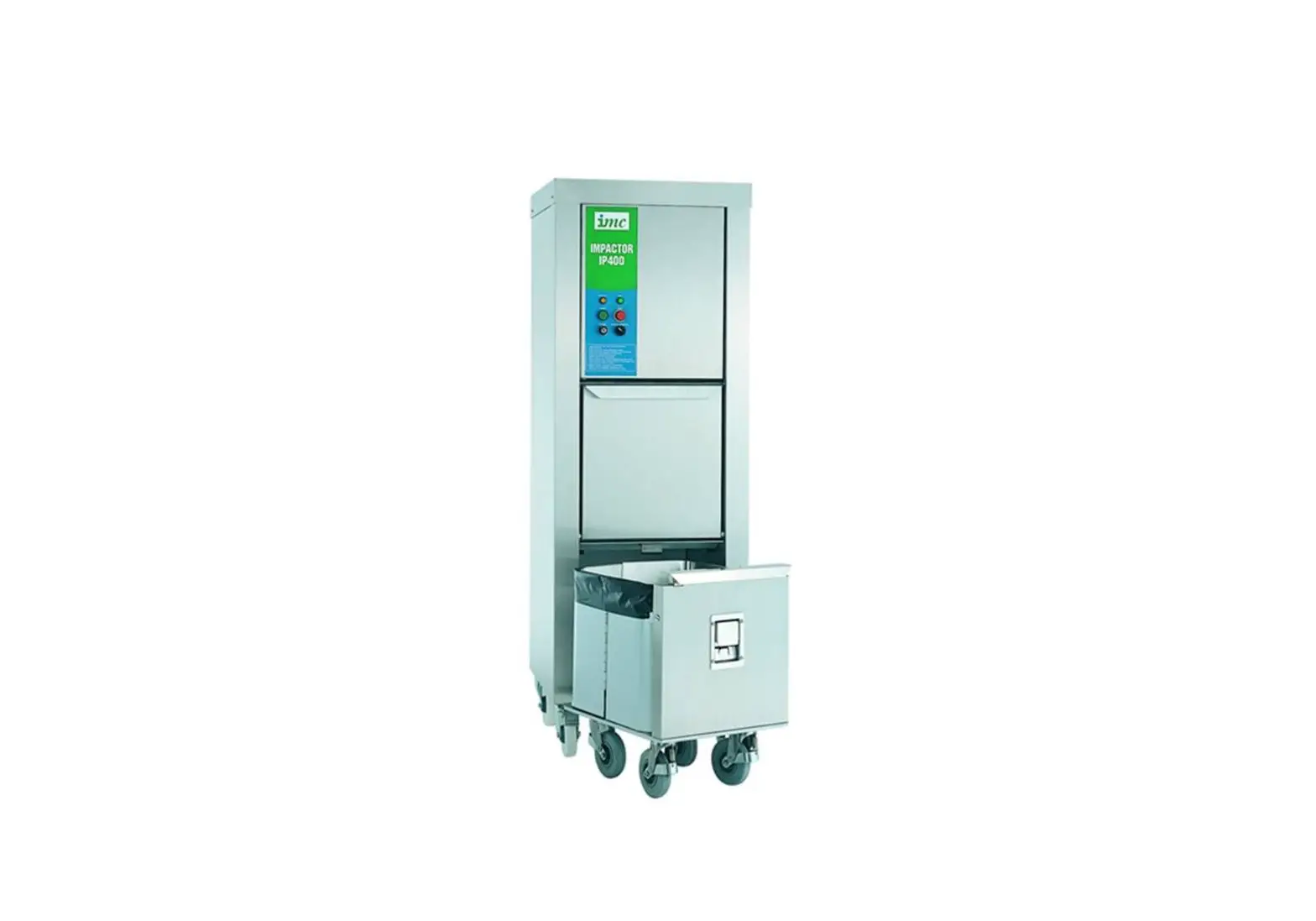
imc A34 024 IP400 Waste Compactor User Manual
INTRODUCTION
IMC Compactors are designed to reduce the bulk of waste by compression into a plastic bag within a purpose-designed trolley. The recommended type of waste is cardboard boxes, plastic containers, bottles, cans and dry food waste. It is important that these recommendations are adhered to. Any other use is against the manufacture’s advice and is beyond the design limitations of the unit. No legal liability can be deemed to attach to the manufacturer in respect of such misuse or wrongful application.
GUARANTEE
Each Impactor is guaranteed by Lincat for 2 Years from the date of its purchase from
Lincat, or from one of its stockists, dealers or distributors. The guarantee is limited to the replacement of faulty parts or products and excludes any consequential loss or expense incurred by purchasers. Defects which arise from faulty installation, inadequate maintenance, incorrect use or fair wear and tear are not covered by the guarantee.
Please observe these instructions carefully.
The guarantee applies in this form to installations within the United Kingdom. Contact your Impactor supplier first.
RECEIVING THE UNIT / UNPACKING INSTRUCTIONS
- Prior to unpacking check that there is no transit damage.
- Stand the carton or crate on the end marked ‘bottom’.
- Remove the outer carton or crate panels.
- Knock away the wooden blocks around the machine.
- Lift latch handle on the truck and pull the truck out.
- Remove all the packaging materials from inside the truck and remove the following items:
Set of keys
User manual
Pair of truck liners
100 bags with 100 wire ties (1 box) and tie twisting tool
Truck handle – not fitted
IP500 and IP600 machines are delivered with the truck part-assembled. To assemble the truck handle remove the four fixing screws in the truck front. Slide the handle in place and refit the four fixing screws. (See fig. A)
- IP400 machines are delivered assembled with the following loose items inside the truck:
Set of keys
User manual
Pair of truck liners
100 bags with 100 wire ties (1 box) and tie twisting tool
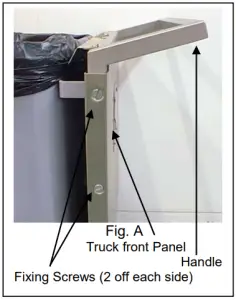
To manoeuvre the IP400 truck: lift truck latch handle, raise the truck handle to the high position, lift the latch handle and lower the truck handle to fit truck into machine.
- Wheel the machine off its packing base.
- Inspect the machine carefully before disposing of the packing materials, and check that the machine and any accessories have been delivered undamaged.
If anything is missing or damaged, please notify both the carrier and the supplier within 24 hours of receipt.
Warning: This machine has a high centre of gravity, take care when manhandling it
| Model | Weight/kg | Dimensions | Cube | |
| Gross | Net | Cm | m³ | |
| IP400 | 223 | 193 | 176x60x73 | 0.770 |
| IP500 | 373 | 298 | 187x77x90 | 1.296 |
| IP600 | 474 | 377 | 210x96x110 | 2.218 |
PREPARATION
Strip off the protective vinyl covering from the stainless steel sheeting. If appearance is not an important factor it does no harm to leave this protection in place.
SITING AND INSTALLATION
For the installer:
These instructions contain important information designed to help the user obtain the maximum benefit from the investment in an IMC Waste Compactor.
Please read them carefully before starting work, and consult with the supplier in the event of any queries.
Please leave this Instruction Manual with the user after installation.
Procedure:
The Compactor is designed to reduce the volume of rubbish. The maximum advantage is gained if compaction is carried out at the point at which the waste arises. This results in minimum movement, reduced handling, and maximum cost savings. Alternatively, it is possible to order extra trucks for larger establishments or waste segregation.
Ensure that the Compactor is located on a flat and level floor. Ensure that sufficient additional space is available to allow the truck to be withdrawn. The front pair of castors are fitted with brakes, which can be locked into position by depressing the pedal. Push truck into machine, and ensure it is latched in.
ELECTRICAL CONNECTION
Standard machines are supplied as single phase units. 3 phase machines are supplied as variation to specification.
Before making the electrical connection check that the voltage of the supply is suitable for the machine. The details of the machine are on a rating label located on the rear panel.
All machines should be connected to a switched outlet.
Machine Type | Machine termination | Supply termination |
| Single phase machines 230-1-50 220/240-1-60 110-1-60 | Mains lead terminated with a moulded plug, fitted with 10 Amp fuse | 13 Amp switched socket |
| 3 phase, 4 wire 220-3-60 440-3-60 | Mains lead free end, wires marked: L1 (black) L2 (black) L3 (black) E (green / yellow) | Fused isolator switch rated at 10 Amps per phase. |
| 3 phase, 5 wire 415-3-50 220-3-50 360/440-3-50 380/415-3-50 | Mains lead free end, wires marked: L1 (black) L2 (black) L3 (black) N (blue) E (green / yellow) | Fused isolator rated at 10 Amps per phase |
Note: On 3 phase machines to ensure that the Power Pack Motor rotates in the correct direction, connect the leads of the mains cable to the corresponding wires of the mains supply fused isolator switch. After connection to the isolator switch, switch on the isolator and press the green start button on the machine. If the hydraulic power pack runs but the ram does not operate the machine must be stopped immediately. Switch off at the isolator and exchange any two incoming phase wires.
 WARNING – THIS MACHINE MUST BE EARTHED
OPERATING
Preparing for Use
- Remove the truck by lifting the truck latch and pulling on the truck handle.
- Place an IMC bag into the truck and arrange for the bottom of the bag to cover the base of the truck. Then fold the top edges of the bag over and around the rim of the truck.
- Position the truck liners inside the bag.
- Push the truck back into the machine.
It is recommended that only IMC Impactor bags are used to achieve best results. Additional bags are available from Lincat or its distributors.
Operation
- Turn the key switch to select the ON position.
- Select NORMAL or CONSTANT operation.
If NORMAL is selected the unit will cycle once only: the ram will move to the down
position, pause for four seconds and return to the fully up position where it will stop.
CONSTANT leaves the ram in the down position until released by turning the switch from constant to normal. Use this mode for resilient material which has resistance to compaction.
- Open the flap and place waste material into the truck. Waste may also be placed into the truck before is pushed into the machine. (A useful tip is to commence with some cardboard which then forms a solid base in the bag. There is no need to sort waste, but it is not recommended to compact large amounts of glass).
- Close the flap fully and press the START button, the run indicator will light while the ram is moving or in the down position.
- The machine will not operate unless the truck is properly locked into position and the safety flap is closed.
- To stop the machine at any point in its cycle press the STOP button.
To restart press the START button – the machine will continue its cycle. - Continue compacting until the bag full light comes on. Bag full levels are dependent on the type of waste being processed. Do not overfill the truck as this makes it difficult to withdraw.
- When the truck is full, lift the truck latch handle and pull the truck out of the machine by its handle.
- Unlock the toggle clips at the front of the truck.
- Withdraw the truck liners by lifting vertically.
- Unfold the rolled over edges of the plastic bag and pull together.
- Twist the neck of the bag and fold a wire tie round the neck of the bag so that the two loops on the tie come together. Then insert the hook of the tying tool into both loops. Pull the handle and the tool will twist the wire tight, sealing the bag.
- Fasten the toggle clips on the truck.
- Wheel the truck to the garbage storage area. Unfasten the toggle clips, open the two truck doors and slide the bag out.
- Take care to re-engage the two doors correctly into the slots, close the toggle clips and return the truck to the machine.
- It is recommended that if the machine is not in use for long periods it is switched off at the key switch.
OVERLOAD PROTECTION
Under extreme load circumstances the Compactor might overheat. The switchgear contains an overload to prevent any damage to the motor. This device will automatically reset itself when cool, and it will only be necessary to wait a few minutes before the machine can be restarted.
Press the START button to reset and start the machine.
If any difficulty is encountered, please contact the supplier or the manufacturer.
MAINTENANCE
Keep the Compactor and the area around it clean at all times.
Remove the truck and then, by releasing the castor brakes, the unit may easily be moved to clean the floor beneath and behind it. (NB. Switch off the electricity supply at the isolator or unplug the unit before moving or cleaning).
It is advisable to clean the exterior stainless steel finish periodically with a stainless steel cleaning agent or a soapy cloth.
Once a year the hydraulic oil level must be checked by a Service Technician. This is done by removing the top and back panel, and checking the hydraulic oil level in the Power Pack reservoir. The Power Pack reservoir has a label showing maximum and minimum oil levels. These should be adhered to when checking levels. Replace with SOLENT VG68 oil, or equivalent.
A Service Contract for regular maintenance is recommended. Please contact Lincat Service Desk (01522 875520) for information.
FAULT FINDING
- Pressing the green START button has no effect:
- Check that the key switch is switched on.
- Check the NORMAL/CONSTANT switch is set on normal.
- Check flap is fully closed.
- Check the truck is in the machine and fully latched in.
- Check electricity supply is on.
- Check the fuse in the plug.
- Check the electrical socket is functional.
- The machine stops with the ram in the down position and RUN indicator light on.
- Check that the machine NORMAL/CONSTANT switch is set on normal.
- The machine stops during its cycle and RUN indicator light is not lit:
- Check flap is fully closed.
- Check that the truck is fully home and latched in.
- Under extreme load condition the compactor might overheat. The switchgear contains an overload to prevent damage to the motor, this device will automatically reset when cool. Wait a few minutes then press the START button to reset and start the machine.
- Check electricity supply is on.
- Check the fuse in the plug.
- Check the electrical socket is functional.
- Check that the flap interlock switch is functioning by metering to check that with the flap closed, the switch contacts are made.
- Check that the truck switch is functioning by metering to check that with the truck latched in, the contacts are made.
For help with the installation, maintenance and use of your Lincat equipment, please contact our service department:
 UK: 01522 875520
For non-UK customers, please contact your local Lincat dealer
All service work, other than routine cleaning should be carried out by one of our authorised service agents. We cannot accept responsibility for work carried out by other persons.
To ensure your service enquiry is handled as efficiently as possible, please tell us:
- Brief details of the problem
- Product code
- Type number
- Serial number
- All available on serial plate
Lincat reserve the right to carry out any work under warranty, given reasonable access to the appliance, during normal working hours, Monday to Friday, 08:30 to 17:00.
ORDERING SPARE PARTS
In the event that spare parts or accessories need to be ordered, please always quote the SERIES AND SERIAL NUMBER of the machine. This is to be found on the rating plate located near the supply cable.
For installations outside the UK please contact your supplier.
Wiring Diagram –
400, IP500 & IP600
110 – 240V – 1 phase, 50/60Hz
Fig. 1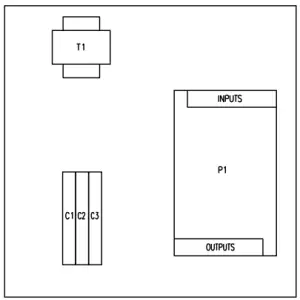
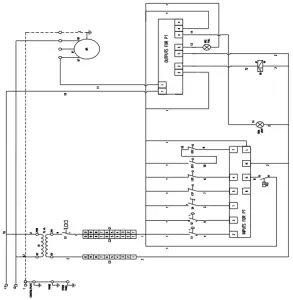
| ITEM | PART No. | DESCRIPTION |
| T1 | G30/376 | 15VA TRANSFORMER |
| LS1 | LS1 | BAG FULL SWITCH |
| LS2 | LS2 | RAM TOP SWITCH |
| GS1 | GS1 | TRUCH SWITCH |
| GS2 | GS2 | DOOR SWITCH |
| M1 | M1 | HYDRAULIC POWER PACK MOTOR |
| P1 | G30/412 | PLC (CROUZET CB12) |
| PS1 | PS1 | PRESSURE SWITCH — POWER PACK |
| Si | S1 | START SWITCH |
| S2 | S2 | STOP SWITCH |
| S3 | S3 | KEY SWITCH |
| S4 | S4 | RUN/CONSTANT SWITCH |
| DV | DV | DIRECTIONAL VALVE — POWER PACK |
| Cl | G65/037 | COMMONING BLOCK 1 |
| C2 | G65/037 | COMMONING BLOCK 2 |
| C3 | G65/037 | COMMONING BLOCK 3 |
Parts Illustration – IP400
Fig.2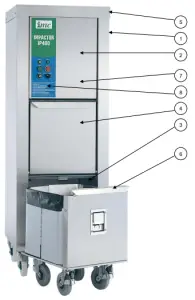
| PARTS LIST IMPACTOR IP400, JANUARY 2021 To be read in conjunction with Figs 1-4. NB Before ordering please read the note on page 9 | |||||
Item | Part No. | Description | Item | Part No. | Description |
| 1 | 38540 | Frame Welded Assy | 856164 | Latch Arm | |
| A19/007 | Fixed Castors | K08/186 | Carton wire ties, bags | ||
| A19/008 | Swivel Castors | K03/005B | Bag tying tool | ||
| 856069 | Plate locking | 856136 | Lever arm, RH | ||
| K11/015 | Patio slab | ||||
| 856114 | Strut (ballast) | 7 | 856051 | Front panel top | |
| L56/027 | Plunger, male | 856093 | Hinge bracket upper | ||
| L56/028 | Plunger, female | 856096 | Hinge bracket lower | ||
| L56/029 | Guide | ||||
| A18/012 | Spring, compression | 8 | A10/224 | M20 Gland Locknut | |
| G80/029 | M20 Cable Gland | ||||
| 2 | A16/025 | Hydraulic Ram | 856174 | Enclosure backing plate | |
| A16/026 | Hydraulic Power Pack | G227A | Key Switch (head only) | ||
| A16/047 | IP Pressure Switch | G30/414 | Transformer | ||
| C56/001M | Ram Plate Machining | G30/412 M1 | CD12 PLC 24VAC | ||
| L56/009 | Ram Guide Bearing | G90/147 | Terminal block | ||
| L56/011 | Guide Rod | G76/030 M1 | Control box enclosure | ||
| 856178 | Bracket | G45/015 | Pushbutton green flush | ||
| J06/055 | Hydraulic Hose Assy | G45/033 | Pushbutton red | ||
| J08/010 | Sealing Washer | G45/056 | Lever roller limit switch | ||
| J08/022 | 3/8” BSP Male/Male Fitting | G45/057 | Push roller limit switch | ||
| K07/057 | Lts SOLENT VG68 Oil | G45/059 | Selector switch 2-position | ||
| G50/044 | Bulb holder | ||||
| 3 | A21/012 | Catch | G50/046 | Bulb 28V A16-24 | |
| G50/051 | Green Lens | ||||
| 4 | 856043 | Access flap | G60/101 M14 | Mains Cable assy | |
| L56/018 | Spacer | ||||
| L56/017 | Spacer shouldered Nylon | ||||
| L56/016 | Modified screw | ||||
| 5 | 856047 | Side Panel R/H | |||
| 856048 | Back Panel | Wiring Diagram reference | |||
| 856038 | Side Panel L/H | ||||
| 856041 | Top Cap | G30/414 | T1 | ||
| A27/189 | Sound barrier mat | G45/056 | LS1 and LS2 | ||
| G45/057 | GS1 | ||||
| 6 | S56/049 | Truck Assy | G45/056 | GS2 | |
| 856036 | Handle | A16/026 | M1 and PS1 | ||
| A21/022 | End latch | G30/412 | P1 | ||
| S56/069 | Truck Castor Assembly | G45/015 and | S1 | ||
| A21/023 | Paddle latch – 2 way | G45/016 | |||
| 856084 | Latch arm, LH | G45/016 and | S2 | ||
| 856057 | Truck liner | G45/033 | |||
| D12/074 | 3/32”x ½” Split Pin | G227A | S3 | ||
| G45/016 and | S4 | ||||
| G45/059 | |||||
| G65/037 | C1, C2 and C3 | ||||
Parts Illustration – IP500
Fig.3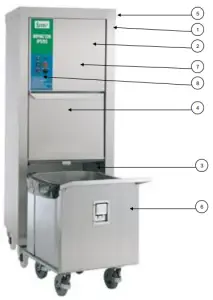
| PARTS LIST IMPACTOR IP500, JANUARY 2021 To be read in conjunction with Figs 1-4. NB Before ordering please read the note on page 9 | |||||
| Item | Part No. | Description | Item | Part No. | Description |
| 1 | 856119 | Frame Welded Assy | 7 | S56/055 | Carton wire ties, bags |
| A19/007 | Fixed Castors | K03/005B | Bag tying tool | ||
| A19/008 | Swivel Castors | ||||
| 856069 | Plate locking | 856127 | Front panel top | ||
| L56/027 | Plunger, male | 856094 | Hinge bracket upper | ||
| L56/028 | Plunger, female | 856095 | Hinge bracket lower | ||
| L56/029 | Guide | ||||
| A18/012 | Spring, compression | 8 | A10/224 | M20 Gland Locknut | |
| G80/029 | M20 Cable Gland | ||||
| 2 | A16/027 | Hydraulic Ram | E56/174 | Enclosure backing plate | |
| A16/026 | Hydraulic Power Pack | G227A | Key Switch (head only) | ||
| A16/047 | IP Pressure Switch | G30/414 | Transformer | ||
| C56/003M | Ram Plate Machining | G30/412 M1 | CD12 PLC 24VAC | ||
| L56/009 | Ram Guide Bearing | G90/147 | Terminal block | ||
| L56/011 | Guide Rod | G76/030 M1 | Control box enclosure | ||
| 856179 | Bracket | G45/015 | Pushbutton green flush | ||
| J06/055 | Hydraulic Hose Assy | G45/033 | Pushbutton red | ||
| J08/010 | Sealing Washer | G45/056 | Lever roller limit switch | ||
| J08/022 | 3/8” BSP Male/Male Fitting | G45/057 | Push roller limit switch | ||
| K07/057 | Lts SOLENT VG68 Oil | G45/059 | Selector switch 2-position | ||
| G50/044 | Bulb holder | ||||
| 3 | A21/012 | Catch | G50/046 | Bulb 28V A16-24 | |
| G50/051 | Green Lens | ||||
| 4 | 856128 | Access flap | G60/101 M14 | Mains Cable assy | |
| L56/018 | Spacer | ||||
| L56/017 | Spacer shouldered Nylon | ||||
| L56/016 | Modified screw | ||||
| 5 | 856126 | Side Panel R/H | |||
| 856132 | Back Panel | Wiring Diagram reference | |||
| 856125 | Side Panel L/H | ||||
| 856133 | Top Cap | G30/414 | T1 | ||
| A27/189 | Sound barrier mat | G45/056 | LS1 and LS2 | ||
| G45/057 | GS1 | ||||
| 6 | S56/054 | Truck Assy | G45/056 | GS2 | |
| 856135 | Handle | A16/026 | M1 and PS1 | ||
| A21/022 | End latch | G30/412 | P1 | ||
| S56/069 | Truck Castor Assembly | G45/015 and | S1 | ||
| A21/023 | Paddle latch – 2 way | G45/016 | |||
| 856164 | Latch arm | G45/016 and | S2 | ||
| E56/145 | Truck liner | G45/033 | |||
| 856145 | Cover plate | G227A | S3 | ||
| G45/016 and | S4 | ||||
| G45/059 | |||||
| G65/037 | C1, C2 and C3 | ||||
Parts Illustration – IP600
Fig. 4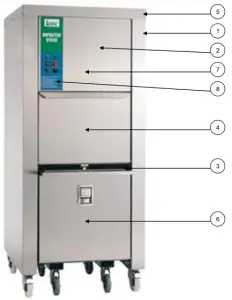
| PARTS LIST IMPACTOR IP600, JANUARY 2021 To be read in conjunction with Figs 1-4. NB Before ordering please read the note on page 9 | |||||
| Item | Part No. | Description | Item | Part No. | Description |
| 1 | 38545 | Frame Welded Assy | S56/052 | Carton wire ties, bags | |
| A19/007 | Fixed Castors | K03/005B | Bag tying tool | ||
| A19/008 | Swivel Castors | ||||
| 856069 | Plate Locking | 7 | 856090 | Front panel top | |
| 856094 | Hinge bracket upper | ||||
| 2 | A16/027 | Hydraulic Ram | 856095 | Hinge bracket lower | |
| A16/026 | Hydraulic Power Pack | ||||
| A16/047 | IP Pressure Switch | ||||
| C56/002M | Ram Plate Machining | 8 | A10/224 | M20 Gland Locknut | |
| L56/009 | Ram Guide Bearing | G80/029 | M20 Cable Gland | ||
| L56/011 | Guide Rod | E56/174 | Enclosure backing plate | ||
| 856179 | Bracket | G227A | Key Switch (head only) | ||
| J06/055 | Hydraulic Hose Assy | G30/414 | Transformer | ||
| J08/010 | Sealing Washer | G30/412 M1 | CD12 PLC 24VAC | ||
| J08/022 | 3/8” BSP Male/Male Fitting | G90/147 | Terminal block | ||
| K07/057 | Lts SOLENT VG68 Oil | G76/030 M1 | Control box enclosure | ||
| G45/015 | Pushbutton green flush | ||||
| 3 | A21/012 | Catch | G45/033 | Pushbutton red | |
| G45/056 | Lever roller limit switch | ||||
| 4 | 856075 | Access flap | G45/057 | Push roller limit switch | |
| L56/018 | Spacer | G45/059 | Selector switch 2-position | ||
| L56/017 | Spacer shouldered Nylon | G50/044 | Bulb holder | ||
| L56/016 | Modified screw | G50/046 | Bulb 28V A16-24 | ||
| G50/051 | Green Lens | ||||
| 5 | 856071 | Side Panel R/H | G60/101 M14 | Mains Cable assy | |
| 856074 | Back Panel | ||||
| 856072 | Side Panel L/H | ||||
| 856073 | Top Cap | ||||
| A27/189 | Sound barrier mat | ||||
| 6 | S56/051 | Truck Assy | Wiring Diagram | ||
| 856109 | Handle | reference | |||
| A21/022 | End latch | G30/414 | T1 | ||
| S56/069 | Truck Castor Assembly | G45/056 | LS1 and LS2 | ||
| A21/023 | Paddle latch – 2 way | G45/057 | GS1 | ||
| 856164 | Latch arm | G45/056 | GS2 | ||
| 856099 | Truck liner | A16/026 | M1 and PS1 | ||
| G30/412 | P1 | ||||
| G45/015 and | S1 | ||||
| G45/016 | |||||
| G45/016 and | S2 | ||||
| G45/033 | |||||
| G227A | S3 | ||||
| G45/016 and | S4 | ||||
| G45/059 | |||||
| G65/037 | C1, C2 and C3 | ||||