Cell2 SAF205H Electronic Handheld Siren
GENERAL DESCRIPTION
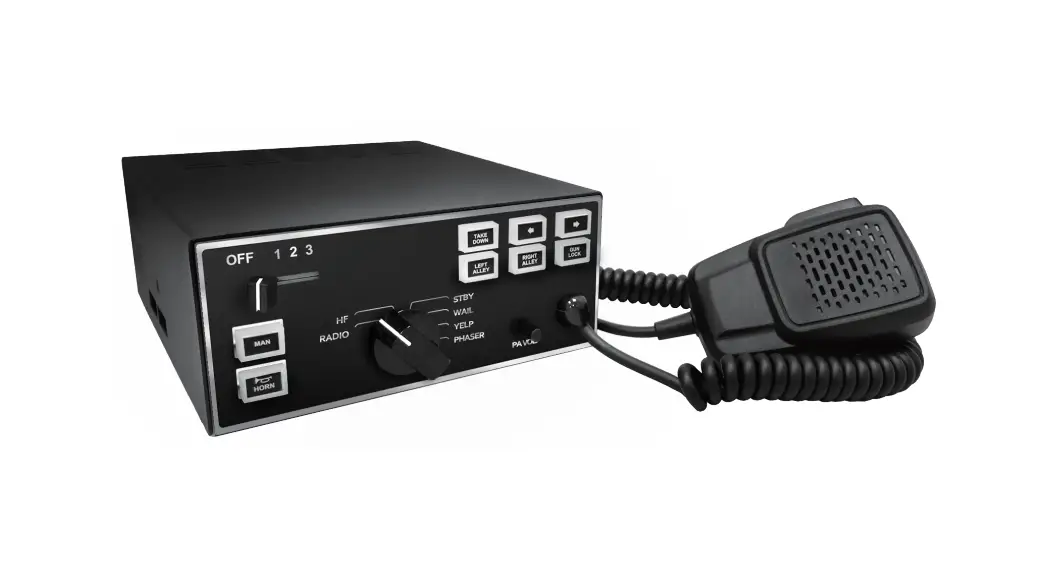
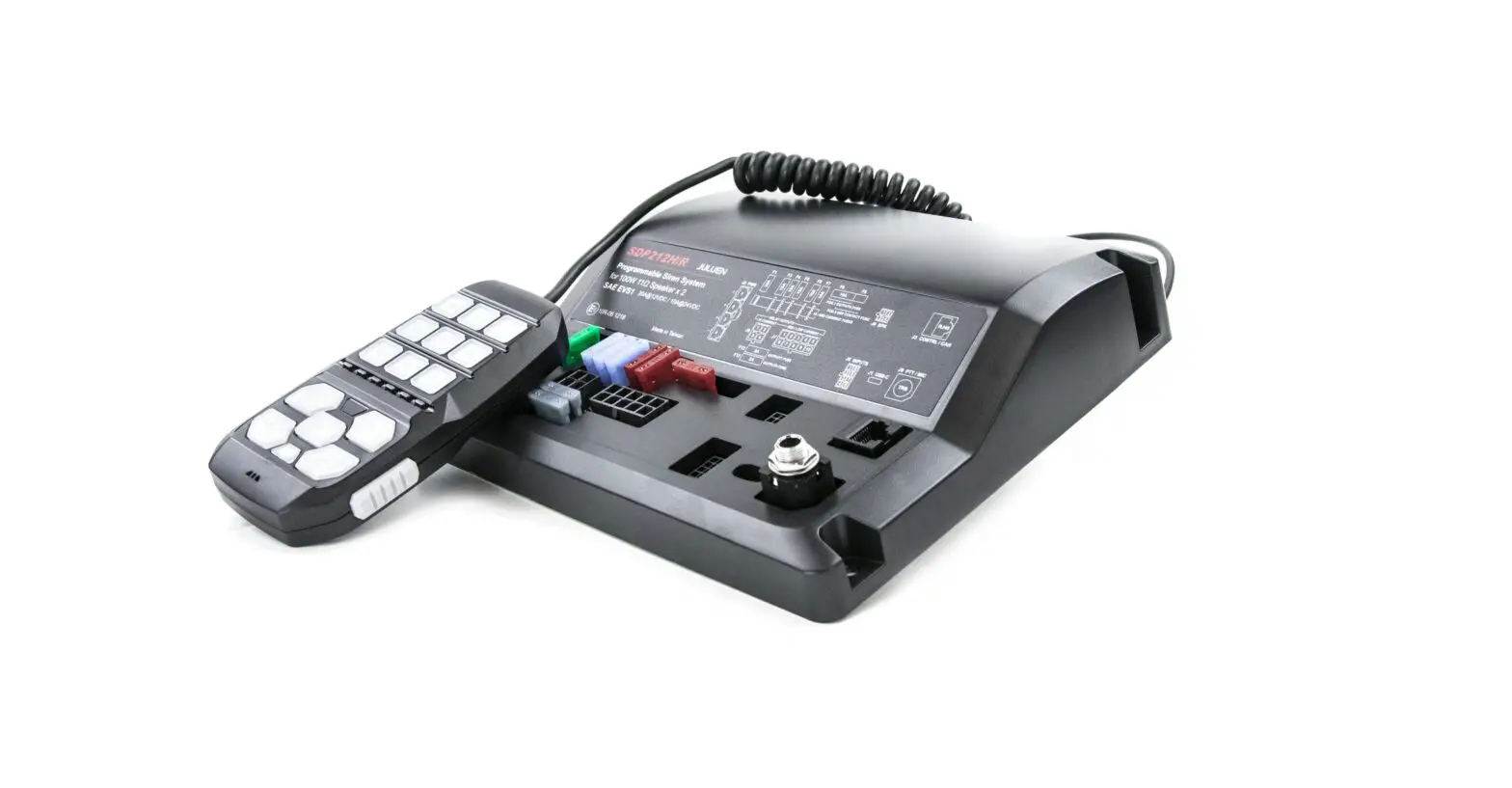
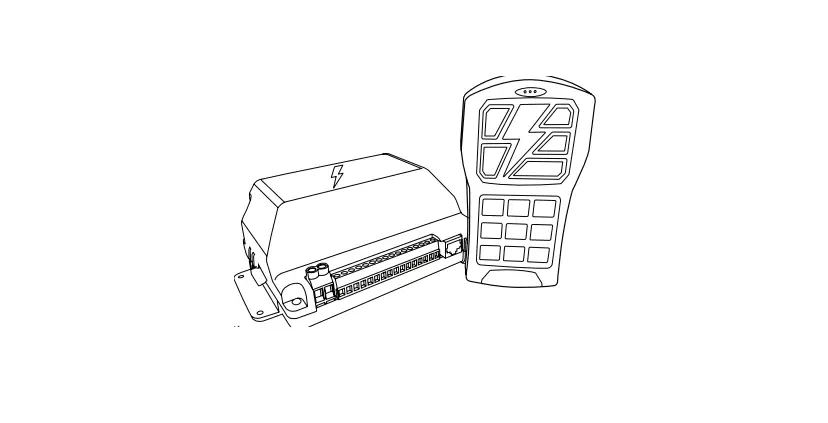
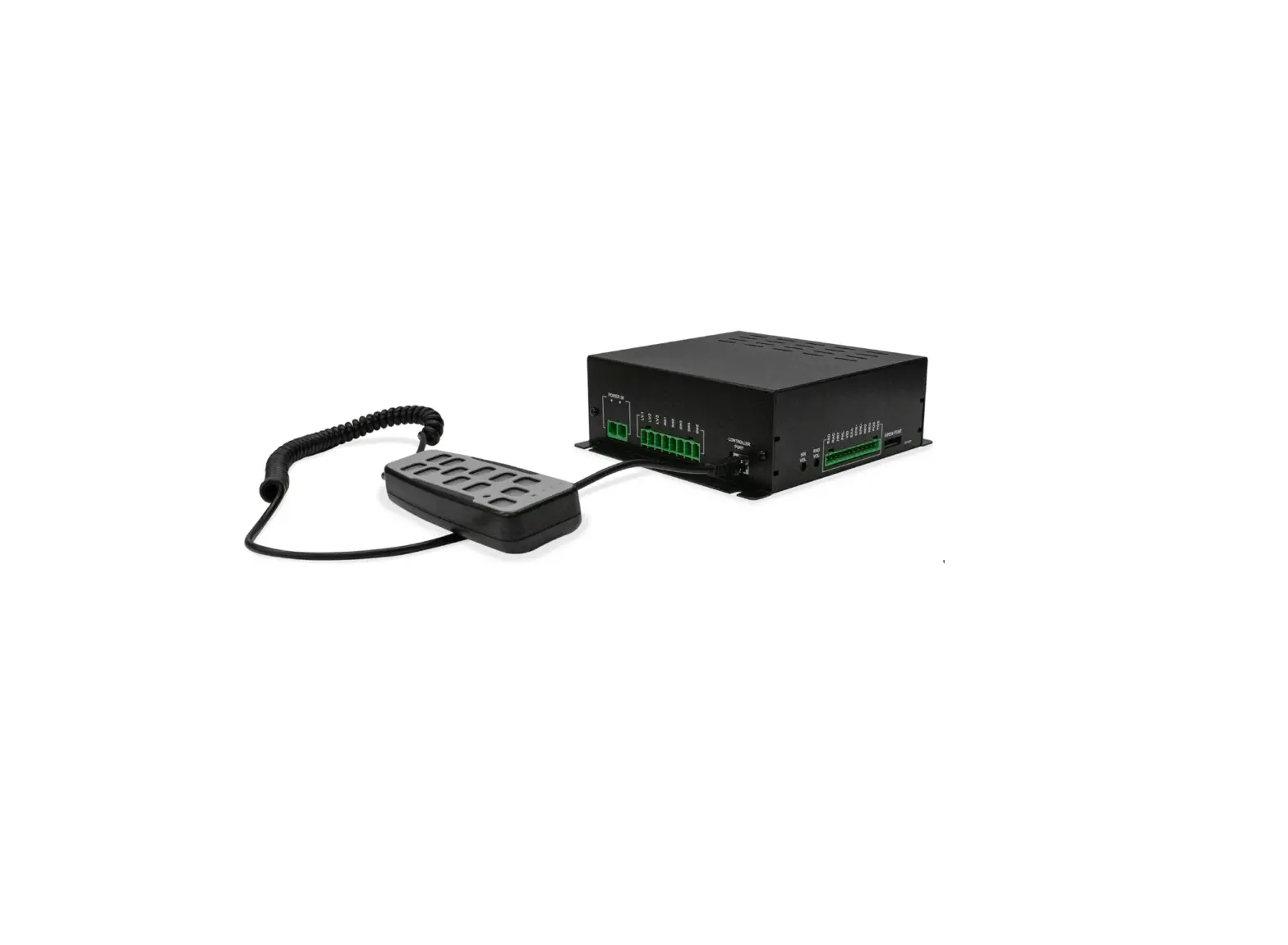
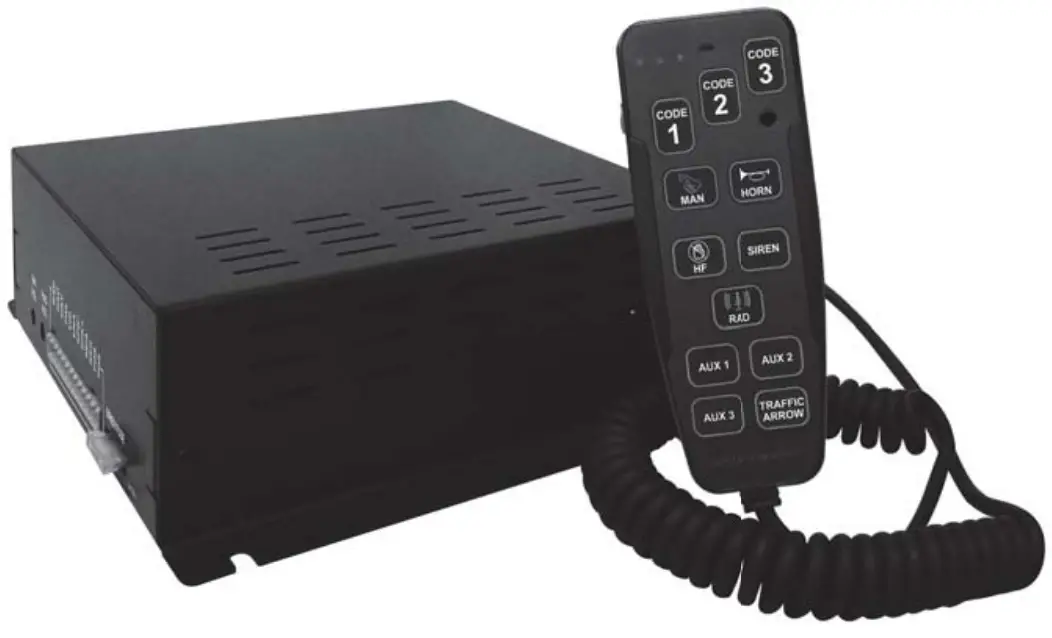
The SAF205H Handheld Siren Amplifier is a premium 200W unit designed for single or dual 100W speaker use with full lighting control. A remote handheld controller is connected to the amplifier with a thin cable. The control head comes with a noise-canceling microphone for PA use and push-button override in all modes. It contains illuminated buttons that change color to indicate status. A potentialmeter is also provided on the controller to adjust PA volume. The SAF205H also includes 3 push buttons for primary lighting system control and 4 auxiliary output push buttons; each button is capable of 10 amps current. There are 3 primary operation modes: HandsFree, Siren, and Radio with a Horn button Override and a Manual button Override. The Radio and Siren volume can be adjusted on the side of the siren amplifier.
A Horn Ring Transfer input is available for the connection to vehicle horn ring or remote switch for hands-free siren operation. A Park Kill input is available for connection to a door switch, etc. to stop siren tones when exiting the vehicle. A 16-position DIP switch on the amplifier allows selection of various options. The handheld controller is backlighted with LED’s for night visibility.
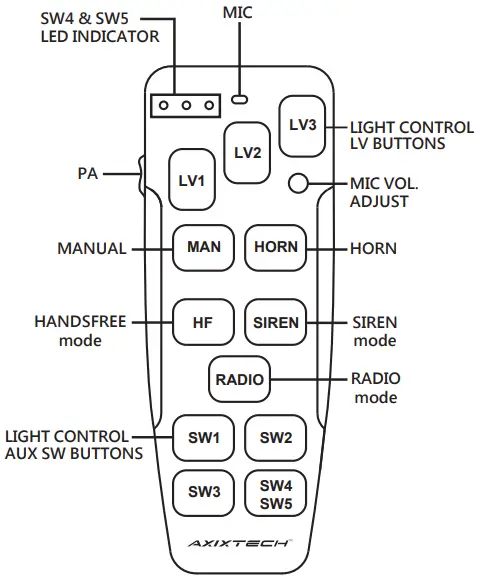
- front view Handheld controller

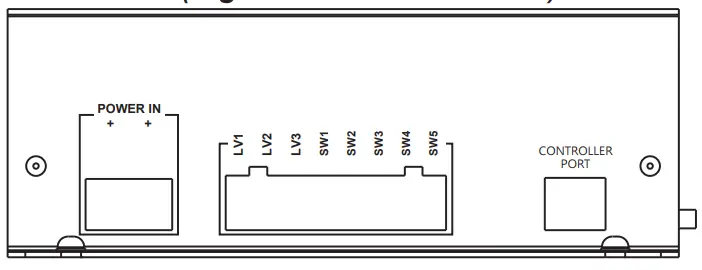
- front view (Light control connector)

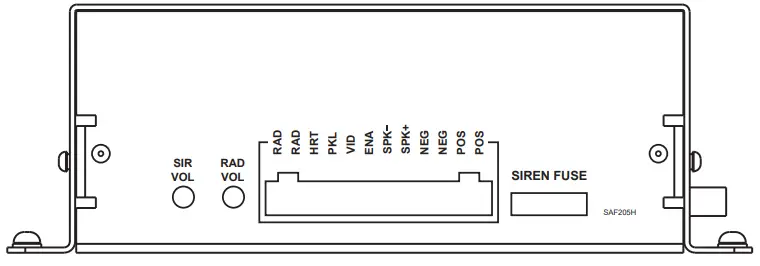
- side view (12-Pin Siren Connector)

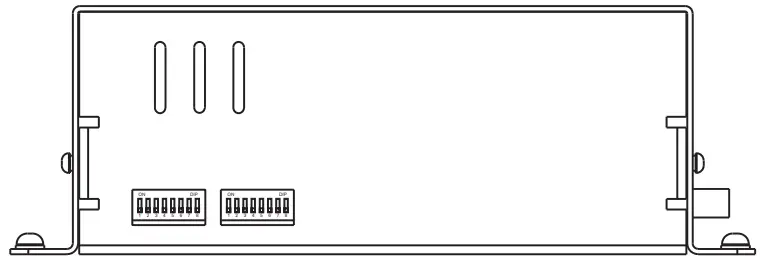
- side view (DIP switches)
SPECIFICATIONS
| Input Voltage | 10-16VDC (negative ground) | ||||
| Siren Input Current | 8.5Amps (@13.6VDC – single 100W speaker) | ||||
| 16Amps (@13.6VDC – dual 100W speakers) | |||||
| Siren Standby Current | Less than 150mA | ||||
| Audio Frequency | 200Hz – 10kHz ± 3db | ||||
| Siren Output Power | 40 watts (@13.6VDC-single 100W speaker) | ||||
| Siren Output Power | 100 Watts RMS MAX. (14VDC – single 100W speaker) | ||||
| 200 Watts RMS MAX. (14VDC – dual 100W speakers) | |||||
| Siren Frequency | 725Hz – 1465Hz | ||||
| Tones/ Cycle Rates | HORN | WAIL | YELP | PHASER | HILO |
| Cycle Rates | Composite (Constant) | 12CPM | 190CPM | 650CPM | 60CPM |
| Operating Temp | -25° C to +60° C (-15° F to +140° F) | ||||
| Siren Controls | 3 push-button Mode switch (SIREN, HF, RADIO). | ||||
| Momentary push-button Horn switch. | |||||
| Momentary push-button Manual/Tone toggle switch. | |||||
| ENA input (positive) to turn on unit. | |||||
| HRT input programmable for positive or negative operation. | |||||
| PKL input programmable for positive or negative latching operation. | |||||
| Side DIP switch option selectors. | |||||
| Light Controls | 3 push-button switch with position 3 siren activation and LED indicators. | ||||
| 4 – on/off lighted push-button switches with replaceable legends. | |||||
| Light Output Ragings | 10A fuse on each of the 8 outputs. (LV – 3 push buttons & SW – 4 push buttons) | ||||
| Siren Connections (Removable 12-P Terminal Block) | Positive x 2, Negative x 2, Speaker x 2, Radio x 2, Enable, Park Kill, Horn Ring Transfer, Park Kill. | ||||
| Light Control Connections | Power In 2-position screw terminal inputs. | ||||
| LV1, LV2, LV3 (push buttons) 3-position screw terminal outputs. | |||||
| SW1, SW2, SW3, SW4 (push buttons) 5-position screw terminal outputs. | |||||
| Size | Siren Amplifier 20.8cm x 18.8cm x 6.9cm Controller: 5.6cm x 14cm x 3.3cm | ||||
| Boxed Weight | 2.5kg | ||||
INSTALLATION
It is essential to install the unit properly to ensure safe and reliable operation. Please read through all instructions thoroughly and carefully before installing the unit. Failure to follow these instructions could result in serious damage to the unit or vehicle and may void warranties.
The correct mounting and wiring is key to the effectiveness of SAF205H siren. Installers must read and follow installation instructions and warnings in the manual from original manufacturer. The vehicle operator should verify the siren system is fastened to the vehicle securely and is functioning properly. Failure to follow all safety precautions and instructions may cause property damage, injury, or death.
WARNING: The installer must have good knowledge of electricity, vehicle electrical systems and emergency equipment. Always seek professional assistance if in doubt.
 WARNING Sound Hazard – Sound level from siren speaker (>120dBA @ 10 feet) may cause hearing damage. Do not operate siren without adequate hearing protection for you and anyone in immediate vicinity.
(Ref. OSHA 1910.95 for occupational noise exposure guidelines)
CONTENTS
Inspect the product contents carefully to see if there is shipping damage or missing content. Contents include:
- 1pc – Siren (Amplifier)
- 1pc – Handheld Controller with Coil Cord
- 1pc – Handheld Controller Mounting Bracket
- 1pc – 12-Pin Siren Input Connector
- 1pc – 2-Pin Light Control Power Input Connector
- 1pc – 8-Pin Light Control Output Connector
- 1pc – 6’ Extension Cable
- 1pc – Extension Cable Connector
- 1pc – 15 Button Plate
- 1pc – Button Decals
- 1pc – User Manual
- 1pc – Operation Warning Label
Please contact supplier immediately if any component is missing or damaged.
MOUNTING
Mount the siren unit in a location that is not exposed directly to weather elements such as the driver compartment firewall, below the seat, or in the trunk; and away from any air bag deployment areas. Mount the handheld controller in an area where it can be easily accessed by the vehicle operator, and not affect the vehicle the air bag. Be sure that all wiring harness connections are made prior to connecting the harness to the amplifier unit.
WARNING: Do not interfere with the proper operation of the vehicle airbag deployment system. Ensure to install “Operation Warning Label” in the vehicle in an area that is clearly visible to operators and passengers.
WIRING
Use wires that are capable of handling the required current. Route the wires properly to prevent wear, overheating and interference with air bag deployment. Ensure that all connections are tight and double check wiring before connecting to the vehicle battery.
ELECTRICAL CONNECTIONS
Electrical connections to the unit are made by using block plugs and screw terminals. Route all wiring to the siren and secure onto block plug terminals, then plug onto the siren. The plug can be easily removed without unwiring when the unit requires servicing. The power supply for the fused amplifier (12-P plug) must be capable of delivering peak currents up to 50A for adequate short circuit protection and proper operation. It is recommended to wire directly to the vehicle battery.
WARNING: ensure that all wires are firmly secured onto the block plug, and plug is firmly secured onto the siren.
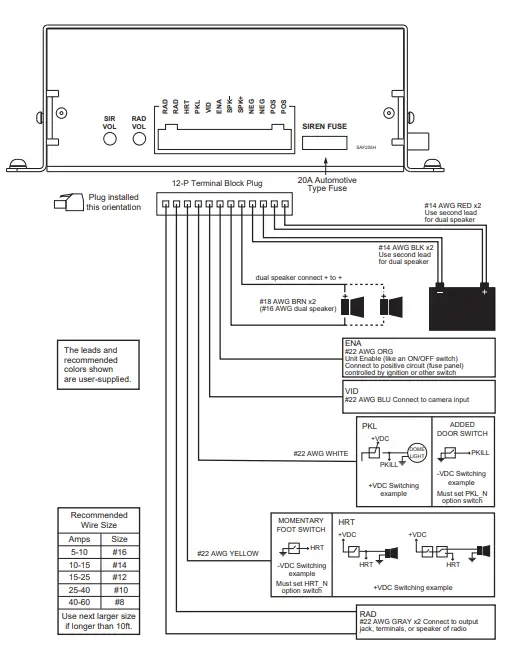
Wire Size and Termination – The “AMPLIFIER CONNECTIONS” diagram shows the minimum size of the wires used for each connection, along with recommended lead color. If the wire is longer than 10 ft., use the next larger size.
ENA Input Connection – This serves as the power switch for the entire unit. Connect to a positive circuit controlled by the vehicle ignition switch, usually a terminal at the vehicle fuse panel. It is not recommended to make permanent power connection as this may drain battery.
HRT Input Connection – The Horn Ring Transfer input allows activation by an external source of either the Horn or other function. It can be set for positive or negative switching, see DIP-SW1-1 (HRT_N) under OPTION SWITCHES section.
PKL Input Connection – The Park Kill input may be connected to the vehicle door switch or other switching device to turn off any siren tone when activated. It can be set for positive or negative switching, see DIP-SW1-2 (PKL_N) under OPTION SWITCHES section.
RAD Input Connection – Connect to radio output terminals or its speaker. The Radio volume can be adjusted by using a small flat blade screwdriver.
Speaker Output Connection – Both connections must be used. Two speakers may be connected in parallel.
VID Output Connection (Option) – A Video Camera trigger output is activated when ever the unit is in SIREN or HF mode. (Not available in this model).
- AMPLIFIER CONNECTIONS

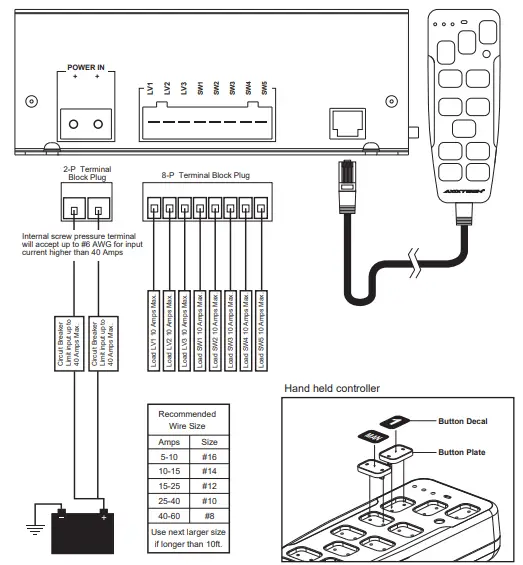
- LIGHT CONTROL CONNECTIONS

NOTE: The controller is shipped without any button plates or decals installed. Place decal onto button plates, then install plates onto each button.
LIGHT CONTROL CONNECTIONS
Power – The power input for the light controls (the three LV switches and the four auxiliary control switches) are separate from the power inputs for siren. This design helps prevent a fault in one main circuit from affecting another main circuit.
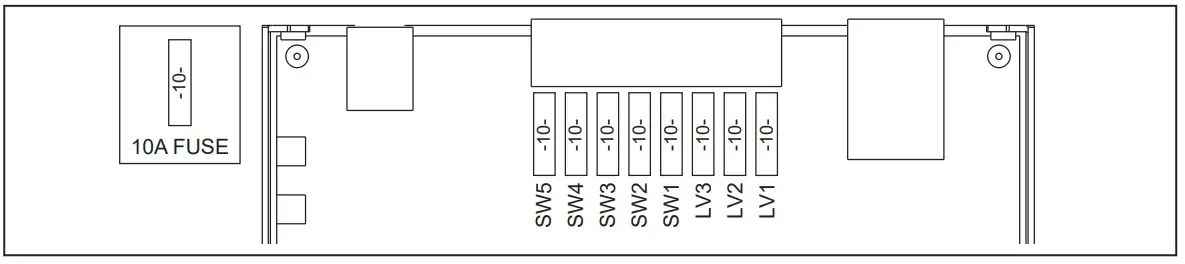
Fuses/Breakers – Each light control output is fused and should be limited to 10 Amps. Proper rated circuit breakers should be connected between the power source and light control power inputs. Refer to “FUSE LOCATION” diagram for proper fuse location below.
WARNING: Improper circuit breakers or fuses can result in damage to the unit and/or vehicle.
FUSE LOCATION
- (open siren top view)

PROGRAMMING
Once the electrical connections are made and the power is available to the unit, each of the three LV buttons and four auxiliary control buttons are ready to be programmed. The programming mode is entered by changing the DIP switch.
Follow these steps to program the unit:
Get into program mode.
- Turn unit on with enable input.
- Enter the program mode by turning DIP-SW2-8 (PRG) switch on.
Set Auxiliary Control Buttons Operation (all LV buttons off)
- With all LV buttons off, each auxiliary switch current operation program status is indicated on each push button. See the table below for switch status definition.
- Change button operation by momentarily pushing the auxiliary button.
LED showing AUXILIARY button setting Red Steady PUSH on / PUSH off (default) Red Flashing MOMENTARY Red off TIMED MOMENTARY (10 seconds)
NOTE: The Timed Momentary operation, typically used as a Gun Lock Timer, must begin with push button 3. If push button 3 is programmed as timed momentary, only then push button 2 may be programmed also as a timed momentary and so on.
Each LV button (LV1, LV2, LV3) may be programmed to automatically turn on any of the auxiliary button controls (SW1~SW3) except Timed Momentary. These auxiliary button controls may still be operated manually even if they were turned on automatically. Each time the LV button changes position, the combined auxiliary button controls are turned on or off. When the LV button is turned off, the entire auxiliary button controls tied to a position on the LV button is turned off while the other auxiliary buttons are unaffected.
Set LV buttons (LV1, LV2, LV3) and Auxiliary buttons Combination
- Activate desired LV button to program.
- Press the desired auxiliary button to change LED color to Red. Press the auxiliary button again to change LED color to Green to remove from combination.
- Once the LV buttons are programmed as desired, save and exit programming mode by turning DIP-SW2-8 (PRG) switch off.
NOTE: If the unit is turned off before the DIP-SW2-8 (PRG) switch is turned off, the new programming will not be saved.
OPTION SWITCHES
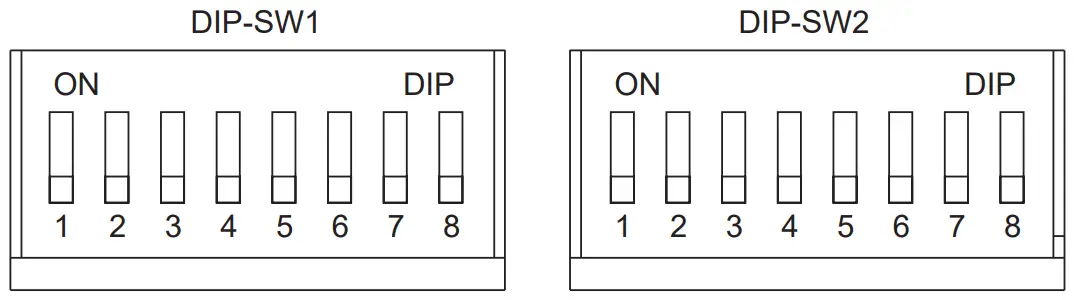
Various options can be selected by turning on or off DIP switches located on the side of the siren. The DIP SWITCH functions are described below. (see Appendix 1 for quick reference)
- DIP-SW1-1 (HRT_N) HRT Input Polarity – The HRT input is normally activated by a positive voltage. Set switch on to activate with negative.
- DIP-SW1-2 (PKL_N) PKL Input Polarity – The PKL input is normally activated by a positive voltage. Set switch on to activate with negative.
- DIP-SW1-3 (HILO) – HiLo tone replaces Phaser tone by setting this switch on.
- DIP-SW1-4 (PHASER_D) – Phaser/HiLo tones are disabled by setting this switch on.
- DIP-SW1-5 (HORN_D) – Horn tone is disabled by setting this switch on.hart.
- DIP-SW1-6 (SIREN_SW1) – See “Siren Mode settings” chart.
- DIP-SW1-7 (SIREN_SW2) – See “Siren Mode settings” chart

- DIP-SW1-8 (TA_D) – With this switch off, the handheld LED indicator operates in Traffic Arrow mode. With this switch on, the Traffic Arrow mode is disabled.
Press SW4 button: Handheld controller LED Indicator With DIP-SW1-8 off (Traffic Arrow mode) With DIP-SW1-8 on (Regular mode) 1st Press LED flashes right to left Left LED on 2nd Press LED flashes left to right Right LED on 3rd Press LED flashes center out Left and Right LEDs on 4th Press all LEDs off all LEDs off - DIP-SW2-1 (HRT_HF_HORN) – With this switch off, when in HF mode, Horn Ring will not produce Horn tone. With this switch on, when in HF mode, pressing Horn Ring for more than 0.5 seconds produces Horn tone.
- DIP-SW2-2 (HRT_STBY_D) – With this switch off, when in standby (ie. no modes selected), pressing Horn Ring or RAD button produces Horn tone. With this switch on, Horn Ring will not produce Horn tone.
- DIP-SW2-3 (MAN_CHANGE) – With this switch off, pressing MAN button momentarily produces next tone. With this switch on, pressing MAN button changes to next tone.
- DIP-SW2-4 (SHORT _MAN) – With this switch off, MAN Siren tone slowly winds down when released. With this switch on, MAN Siren tone stops immediately when released.
- DIP-SW2-5 (LV_SW1) – See LIGHT CONTROLS section.
- DIP-SW2-6 (LV_SW2) – See LIGHT CONTROLS section.
- DIP-SW2-7 (AUTSR_D) – With this switch off, Siren tone is automatically activated when LV3 button is activated. With this switch on, Automatic Siren tone is disabled.
- DIP-SW2-8 (PRG) –Turn this switch on to enter Programming mode; see PROGRAMMING section.
OPERATIONS
POWER (ON/OFF)
The unit can be activated by applying positive voltage to the ENA terminal in the amplifier. Normally, this is wired to the ignition switch of the vehicle; it can also be wired to another switch to act as ON/OFF. See “AMPLIFIER CONNECTIONS” diagram.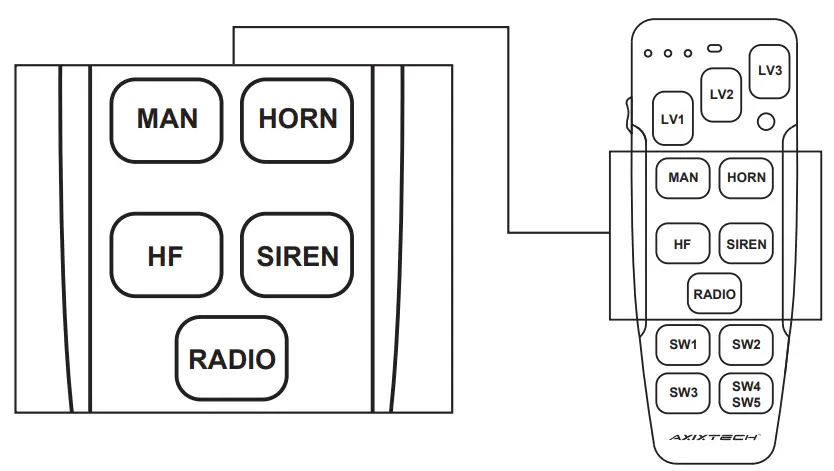
Function modes
| Modes | Standard | + MAN button | + HRT trigger |
| Standby (no mode selected) | SILENT | MANUAL / SHORT MANUAL see DIP-SW2-4 SHORT_MAN | HORN / SILENT see DIP-SW2-2 HRT_STBY_D |
| RADIO | RADIO | RADIO | HORN / RADIO see DIP-SW2-2 HRT_STBY_D |
| HF | SILENT | CYCLER (see HF settings) | CYCLER (see HF settings) |
| SIREN | WAIL (see Siren Mode) | YELP (see Siren Mode) | YELP (see Siren Modes) |
HF – This is a standby mode dedicated for HRT (Horn Ring Transfer). When installing the unit, the auxiliary input must be connected to the horn ring or other switching device. Tap the horn ring or MAN button once to activate Wail tone, then tap again to activate Yelp tone, and quickly tap the horn ring twice to shut off siren tone. By setting DIP-SW2-1 on, pressing and holding the horn ring will produce Horn tone until released, then the siren will return to its previous siren tone.
HF settings
| Press Horn Ring: | PHASER_D off | PHASER_D on | ||
| HILO off | HILO on | HILO off | HILO on | |
| HRT tap once (MAN press once) | SILENT-> WAIL-> YELP-> PHASER | SILENT-> WAIL-> YELP-> HILO | SILENT -> WAIL -> YELP | |
| HRT quickly tap twice (MAN quickly tap twice) | SILENT | |||
| HRT press +0.5 secs | SILENT (with DIP-SW2-1 off) HORN (with DIP-SW2-1 on) | |||
SIREN – This button will activate Wail tone. When pressing with MAN button together, it will produce Yelp tone. See Siren Modes chart.
Siren Modes
| MODE | SIREN_SW1 off | SIREN_SW1 off | SIREN_SW1 on |
| SIREN_SW2 off | SIREN_SW2 on | SIREN_SW2 — | |
| SIREN | WAIL | YELP | PHASER (see PHASER settings) |
| SIREN + MAN (or HRT) (w/ MAN_ CHANGE off) | YELP | PHASER (see PHASER settings) | YELP |
| SIREN + MAN (or HRT) | WAIL / YELP | YELP / PHASER (see PHASER settings) | PHASER / YELP (see PHASER settings) |
RADIO – This function amplifies the radio speaker input for re-broadcast outside the vehicle. It is also known as Radio Re-broadcaster, and no siren tones are available in this position. The Radio Volume can be adjusted via potentiometer on the siren amplifier unit.
MAN – It provides manual control of siren tone rise and fall while in Standby, HF or SIREN modes. See “Function Modes” chart.
HORN – It provides a simulated air-horn tone when pressed, and overrides all siren tones. The
Horn tone may be disabled entirely by setting the DIP-SW1-5 (HORN_D) option on. See OPTION
SWITCHES section.
PA – The noise-canceling microphone is used for public address operation. It will override any siren mode when the button on the side is pressed. The volume can be adjusted through a pot switch located in the upper right corner of the control head. Insert a small, flat-blade screwdriver into the pot switch; turn clockwise direction to increase the sound level.
HRT Input (optional) – The Horn Ring Transfer input may be connected to the horn ring or other switching devices. Activating this input will produce Horn tone or other functions depending on the push button position.
PKL Input (optional) – The Park Kill input may be connected to the vehicle door switch or other switching device to turn off any siren tone when activated. The siren will remain deactivated until the vehicle is shifted into gear or the door is closed and the siren is automatically restarted.
LIGHT CONTROLS
The 3 LV buttons (LV1, LV2, LV3) in the top area of the handheld controller are dedicated for primary lighting functions. There are additional 4 programmable on/off buttons for auxiliary lighting or other devices.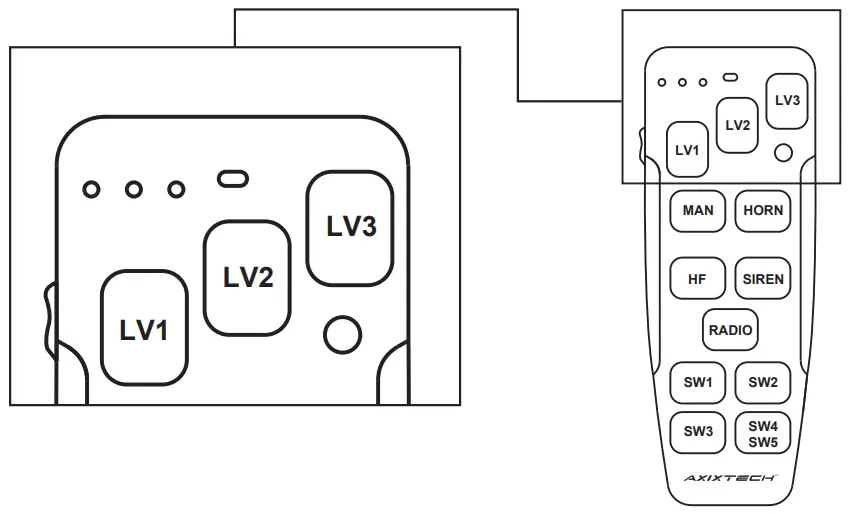
LV buttons – The LV buttons can be set to operate as a Progressive or Non progressive switching. There are four modes available.
LV Button Modes
| LV Button Modes: | MODE1 LV_SW1 off LV_SW2 off | MODE2 LV_SW1 off LV_SW2 on | MODE3 LV_SW1 on LV_SW2 off | MODE4 LV_SW1 on LV_SW2 on |
| LV1 | LV1 | LV1 | LV1、LV3 | LV1 |
| LV2 | LV2 | LV2 | LV2、LV3 | LV1、LV2 |
| LV3 | LV1、LV2、LV3 | LV3 | LV1、LV2、LV3 | LV1、LV2、LV3 |
Progressive/Non-progressive Switch – There are 4 different combination modes available. This is configured by setting the DIP-SW 2-5 (LV_SW1) and DIP-SW 2-6 (LV_SW2) option. At each of the LV switches, it is possible to program the additional AUX on/off buttons to be activated together.
LV3 Button – When LV3 is switched on, the siren tone is automatically activated. This function can be disabled by setting the DIP-SW2-7 (AUTSR_D) option; see OPTION SWITCHES section.
VID Output Option – The VID output is activated whenever the unit is in SIREN or HF modes.
(Available in future models).
AUXILIARY Buttons – The 4 lighted on/off buttons are for controlling other lighting functions or devices. SW1~SW3 buttons can be programmed for three operating modes such as Push On/Off, Momentary, or Timed momentary; see PROGRAMMING section. SW4 button is designed to control SW4 and SW5 outputs, which is mainly used to control the traffic arrow functions.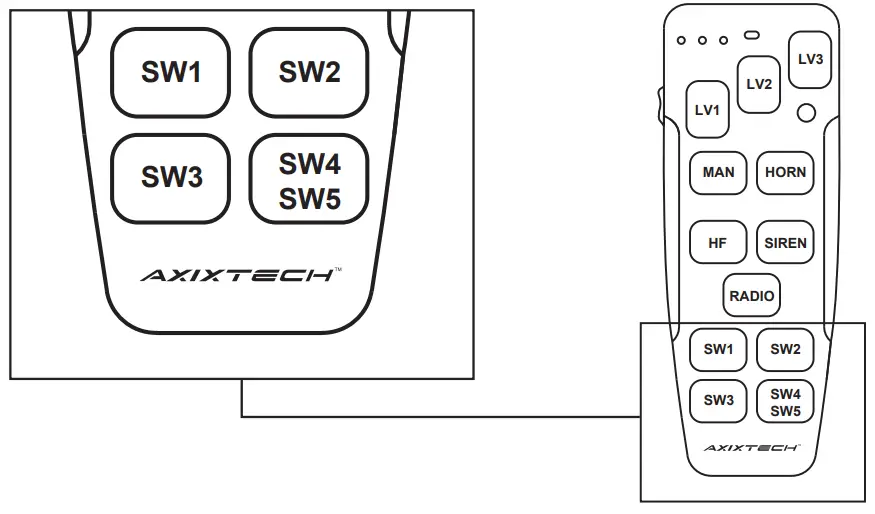
| 1st Press | Activates output SW4 |
| 2nd Press | Activates output SW5 |
| 3rd Press | Activates outputs SW4 & SW5 |
| 4th Press | Deactivates outputs SW4 & SW5 |
See DIP-SW1-8 (TA_D) for corresponding Handheld controller LED indicator.
TROUBLESHOOTING
SAF205H Siren has been designed to provide reliable quality service under the worst conditions. If encounter any difficulties, check its installation or speakers. The following table represents problems and probable causes.
| PROBLEM | POSSIBLE CAUSE |
| NO SOUND | Loose wires or connectors Bad speaker or speaker wiring Siren fuse down PA volume in the lowest sound level |
| NO SIREN TONE-PA WORKS | High input voltage (greater than 16V) PKL activated PA button pressed Speaker not connected Defective speaker |
| DISTORTED SIREN SOUND | Bad speaker Damaged or loose speaker housing or tip Low voltage to siren amplifier Loose wires or connectors at ENA or SPKR |
| SIREN VOLUME LOW | Speaker connected to wrong tap Low voltage to siren amplifier High resistance in speaker wiring PA volume in low position |
| WEAK PA | Microphone no held close to mouth Defective microphone Microphone loose connection |
| INTERMITTENT | High input voltage (greater than 16V) Bad speaker driver Unused wires touching vehicle ground or supply |
Appendix 1
DIP-SW1 Options
| PORT | DIP-SW1 | FUNCTIONS | |
| OFF | ON | ||
| 1-1 | HRT_N | HRT activate with positive | HRT activate with negative |
| 1-2 | PKL_N | PKL activate with positive | PKL activate with negative |
| 1-3 | HILO | PHASER normal operation | PHASER replaced by HILO |
| 1-4 | PHASER_D | PHASER and HILO normal operation | PHASER and HILO disabled |
| 1-5 | HORN_D | HORN normal operation | HORN disabled (replaced by PHASER/HILO/YELP) |
| 1-6 | SIREN_SW1 | for configuration of Siren tone (see “Siren Modes” chart) | |
| 1-7 | SIREN_SW2 | ||
| 1-8 | TA_D | LED Indicator as Traffic Arrow | LED Indicator Constant |
DIP-SW2 Options
| PORT | DIP-SW2 | FUNCTIONS | |
| 2-1 | HRT_HF_HORN | OFF | ON |
| During HF, HORN is disabled for HRT | During HF, press HRT for more than 0.5 secs produces Horn tone | ||
| 2-2 | HRT_STBY_D | During Standby, HRT and RADIO produces HORN tone. | During Standby and RADIO, HRT is disabled |
| 2-3 | MAN_CHANGE | During SIREN, press MAN produces next tone when pressed | During SIREN, press MAN skips to next tone when pressed |
| 2-4 | SHORT_MAN | MAN Siren tone slowly winds down when released | MAN Siren tone stops immediately when released |
| 2-5 | LV_SW1 | for configuration of Progressive or Non-Progressive switching (see “LV Button Modes” chart) | |
| 2-6 | LV_SW2 | ||
| 2-7 | AUTSR_D | Automatic Siren at LV3 | Automatic Siren Disabled at LV3 |
| 2-8 | PRG | Operation Mode | Light Control Program Mode |