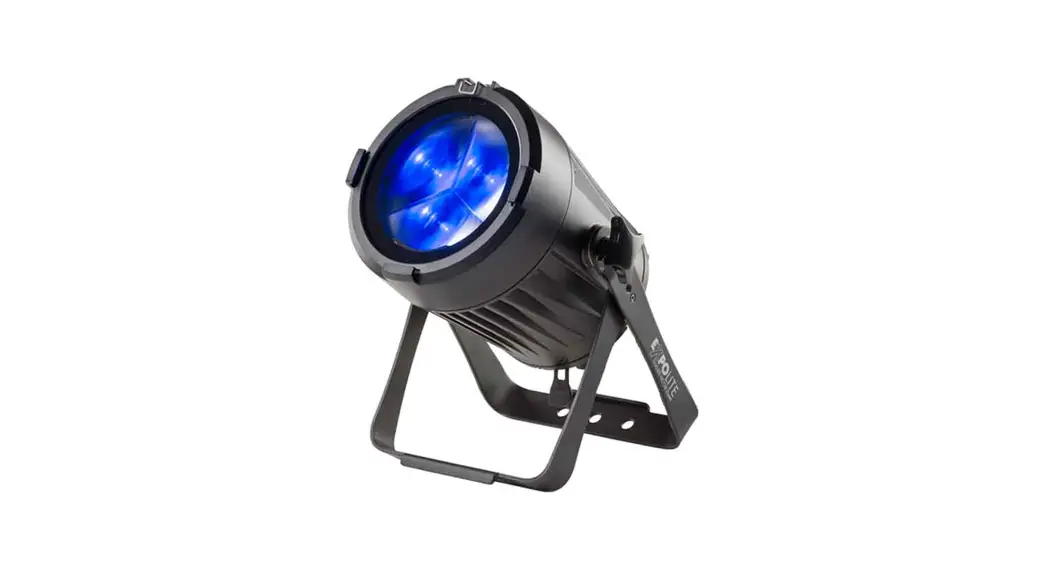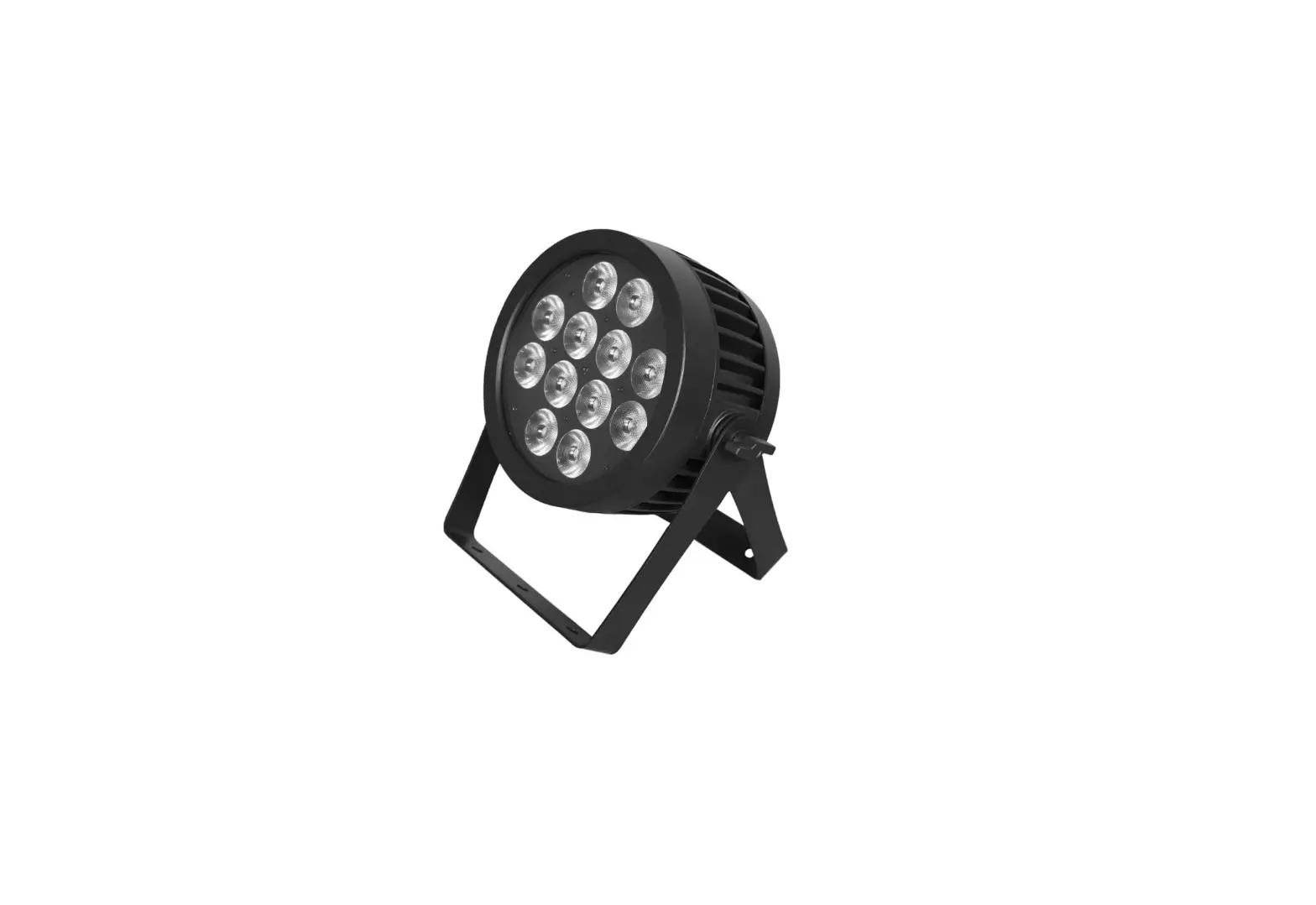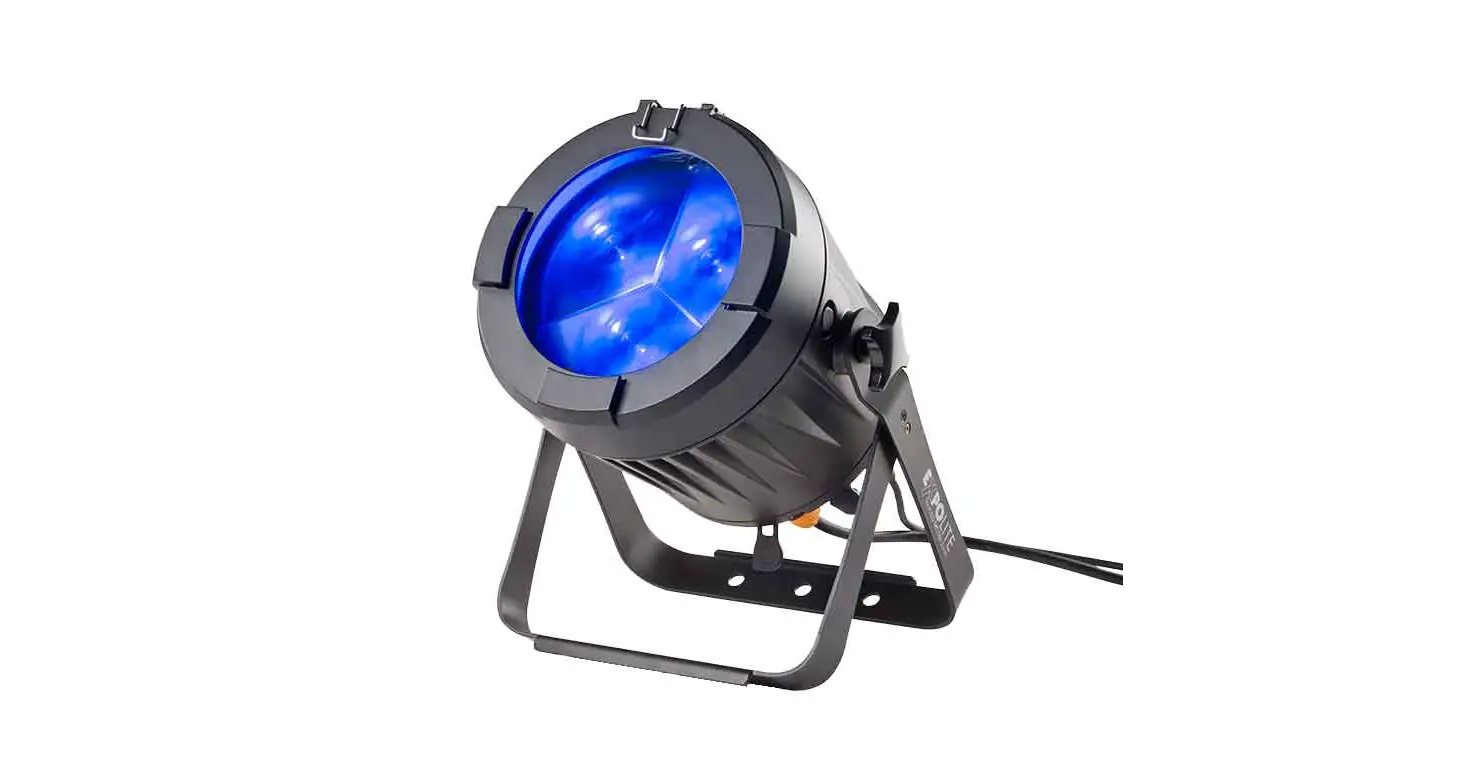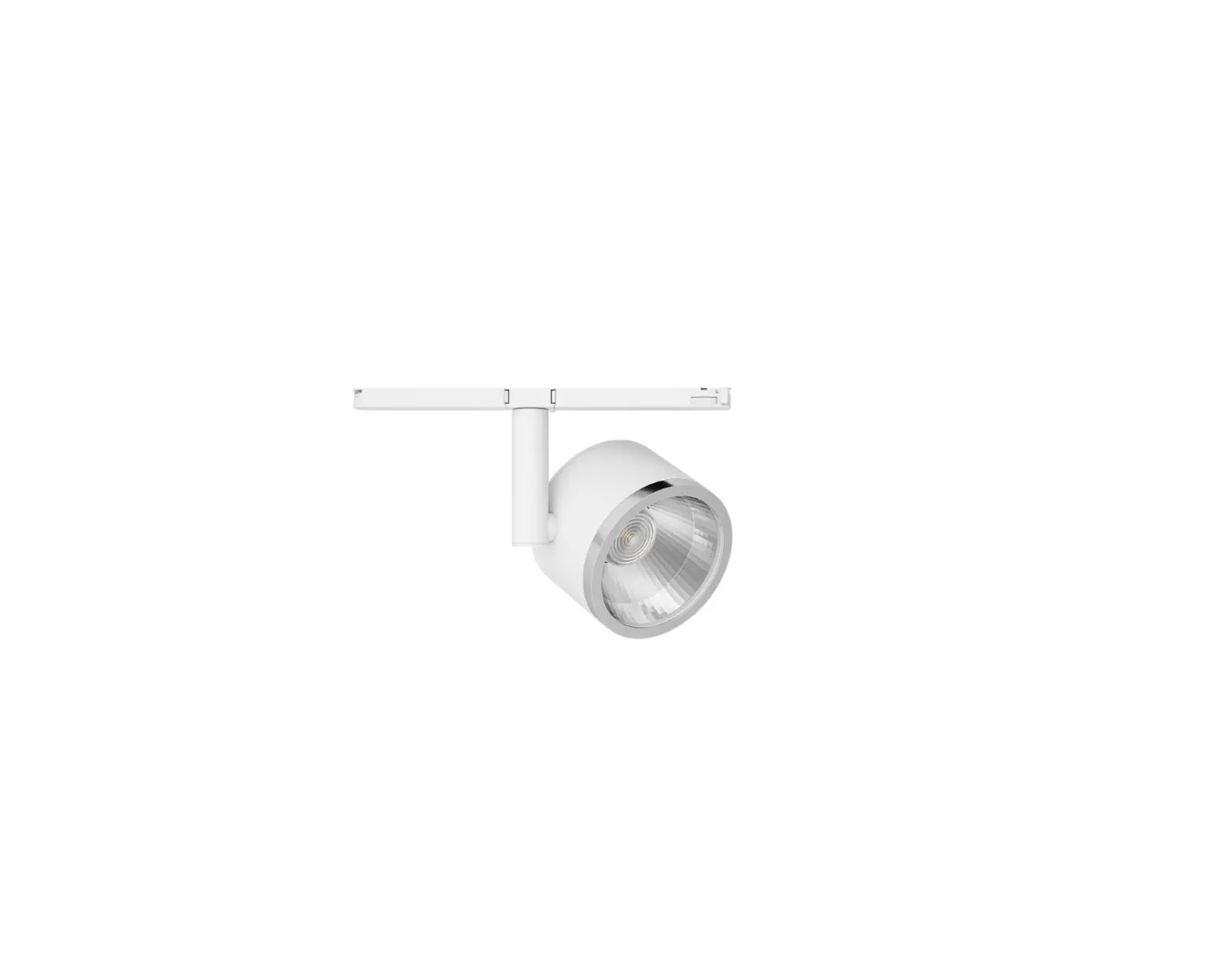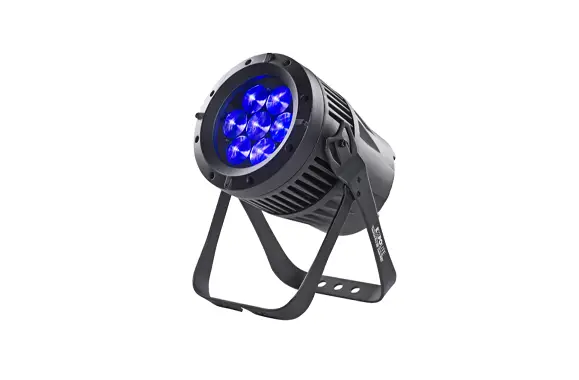

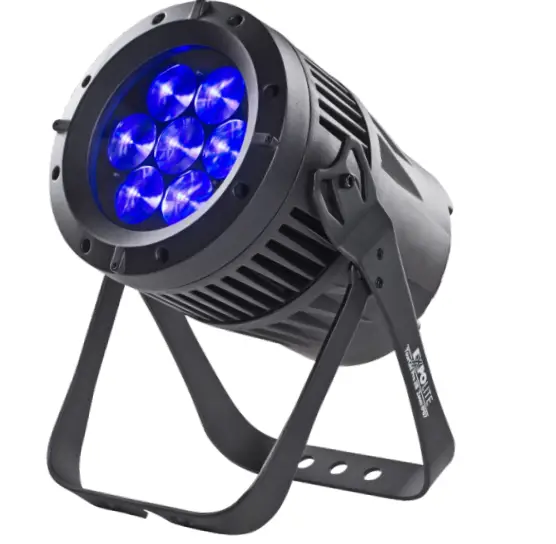
EXPOLITE 518572 TourLED 28 MKIII Outdoor LED Spotlight
Specifications
- Art.No.: led28426
- Voltage: 100V – 240V AC 50/60Hz
- Power consumption: 128W
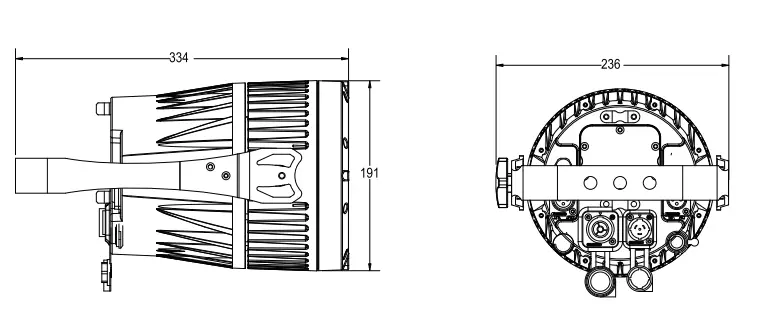
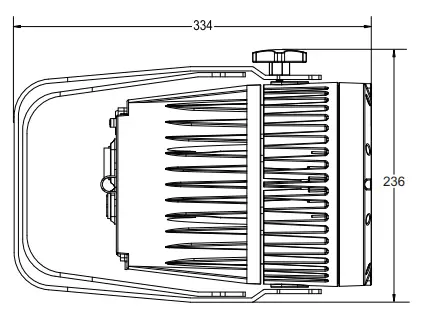
- Dimensions: 334 x 191 x 236 mm
- Weight: 6.6 kg
- Connectors: Power In/Out | DMX In/Out
- Temperature: -20°C – 45°C
- Humidity*: < 80%
- IP rated: IP 65
- Housing: Die-cast aluminum, black
- LEDs: 7 x 20W 4in1 RGBW
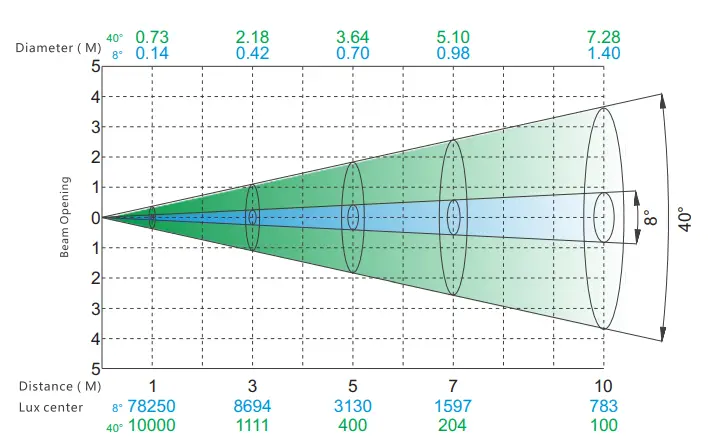
- Angle: 8°- 40°
- Control: Stand-Alone / Master-Slave / DMX512
- DMX-Channels: 3 – 25 (3/4/5/6/7/12/17/25)
Dimensions
INSTALLATION
MOUNTING
HANGING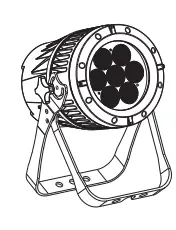
The fixture can be mounted in a hanging position using the supporting bracket. The bracket should be secured to the mounting truss or structure using a standard mounting clamp. Please note that when hanging the unit a safety cable should also be used.
UPRIGHT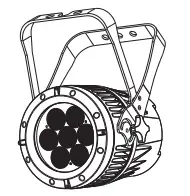
The fixture can be mounted in an upright or sitting position using the supporting brackets.
POWER CONNECTIONS
- @220V: 12 units may be connected in series
- @110V: 6 units may be connected in series
Note: If the signal cable is over 60m between the DMX512 controller and fixture or between two fixtures, then a DMX signal amplifier is needed as well.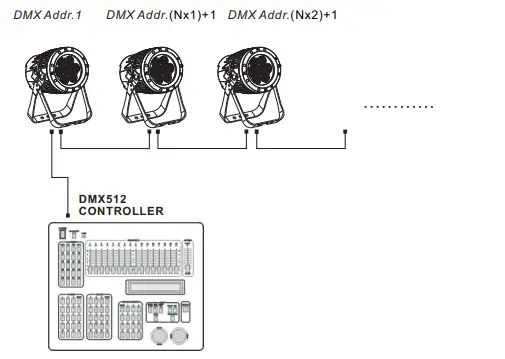
Display Panel operation
Display operation 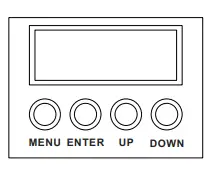
- MENU: Back
- ENTER: Enter or Save
- UP: Up
- DOWN: Down
Menu map 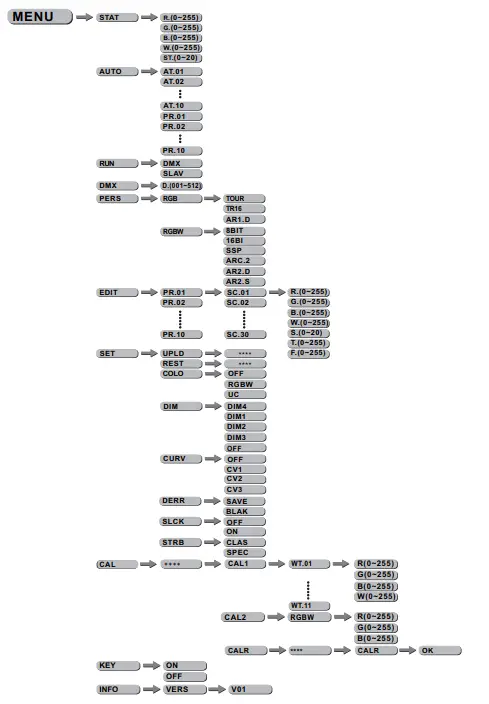
Edit static color 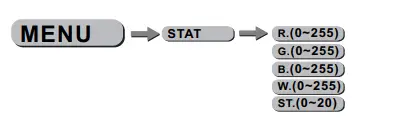
In the Menu „STAT“ values of each function for Stand-Alone operation can be set. Set and combine the range (0-255) for Red, Green, Blue, White an Zoom for 0-100%, also Strobe for 0-20Hz.
Activate auto programs 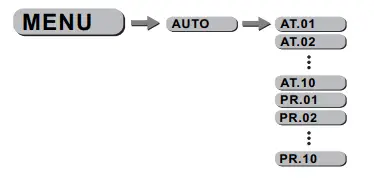
In the Menu, „AUTO“ pre-programmed programs can be activated. The programs „AT01″ to „AT10″ can not be edited. The programs „PR01″ to „PR10″ are editable. For further explanation see „Edit custom programs“ Auto programs will be sent to connected devices. For the Master-Slave operation, Signals will be sent via DMX-Cable. This may cause disturbance on other devices.
Run mode 
In the Menu „Run“ the Run mode will be set.. For operation with a DMX-controller select „DMX“. For use as Slave select „SLAV“. In Slave-mode the unit recives static color or auto-program from the master unit.
Set DMX-Adress 
Set the DMX-Adress of the unit in the „DMX“ menu.
Personality 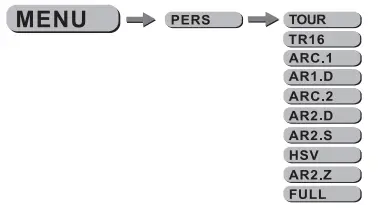
In the Menu „PERS“ the DMX-Personality will be set. Choose and select the personality.
Benutzerprogramme editieren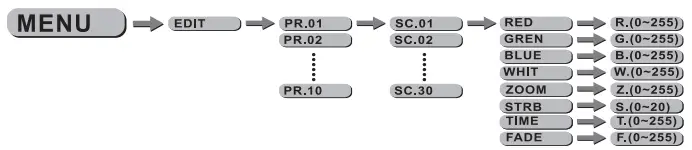
In the Manu „EDIT“ custom auto programs „PR01″ to „PR10″ can be edited. Each program has 30 steps that can be edited. Each step contains the values for RGBW, Zoom, Strobe (0-20Hz), step-time and fade-time. Custom programs can be uploaded from a master device. See „special settings“
Special settings 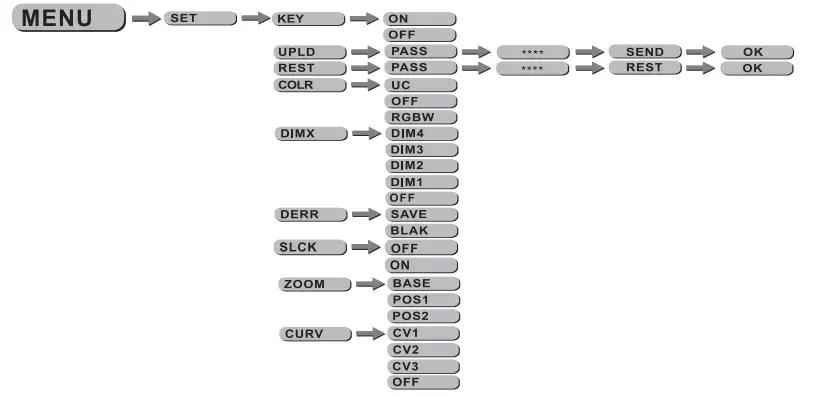
- „KEY“: enables(ON) or disables(OFF) automatic lock-out with password protection. Password to re-enter is „UP“-“DOWN“-“UP“-“DOWN“-“ENTER“ and can`t be changed.
- „UPLD“: Select to upload custom programs from a master device. Run-mode needs to be set to „SLAVE“
- „REST“: Triggers factory-reset.
- COLO“: In the Menu Color the color calibration can be selected or deactivated. If „RGBW“ is selected the maximum DMX-value (255) will be limited to the stored value in „CAL2″. If „UC“ (Uniform-Color) is selected the factory calibration will be used. RGBW output is balanced to different generations of units. If „OFF“ is selected the calibration is disabled. RGBW reaches maximum power without limit by calibration.
- DIM“: Different dimming speeds can be selected from fast (DIM1) to slow (DIM4). DIM4 acts as halogen simulation.
- „DERR“: Select reaktion of losing DMX signal. Select „SAVE“ to keep the last recived signal or „BLAK“ to change to blackout.
- SLCK“: Enable or disable password protection for „SET“-menu. If „ON“ is slected the user needs to enter the password (UP+DOWN+UP+DOWN) to enter the „SET“-menu. „OFF“ disables password protection.
- „ZOOM“: Calibrates the position of POS1 and POS2. Set position to 0 for the smallest position. „BASE“ calibrates to default zoom position.
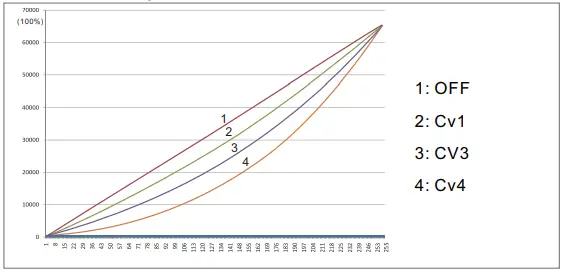
- „CURV“: In the Curve menu different dimming curves,as shown below, can be selected.

Calibration and white balance
Password „UP“-“DOWN“-“UP“-“DOWN“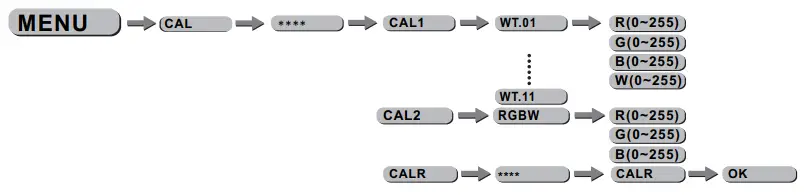
- CAL1″ select WH.01 to WH.1 to calibrate the pre-programmed white colors. RGBW is used to mix pre-programmed colors.
- „CAL2″ adjusts the output when the DMX-controller sends 255 on RGBW.
- „CALR“ sets all calibrations to factory default.
Zoom range 
In the menu „ZOOM“ the limit of the zoom channel can be edited. If using a DMX controller you are only able to access to the range between „POS1″ and „POS2″.
Using DMX512
CHANNEL ASSIGNMENT
This unit has different DMX Personalities with different amounts of DMX channels. 10 DMX-Personalities with 3, 4, 5, 6, 7, 12, 17 und 25 channels are available.
TOUR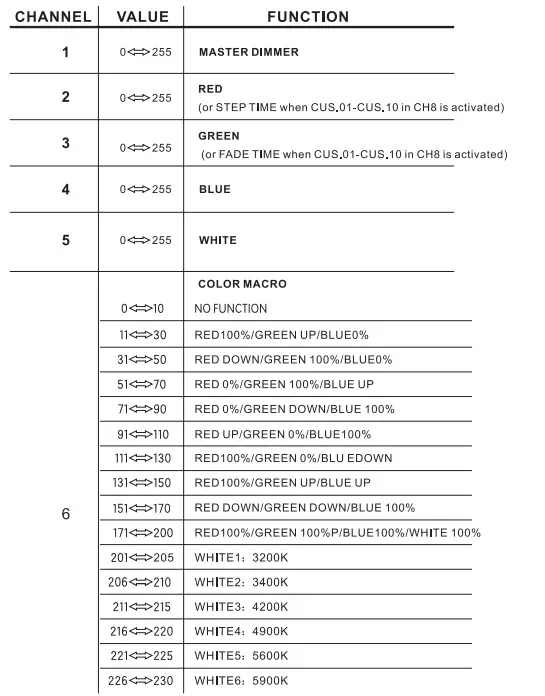
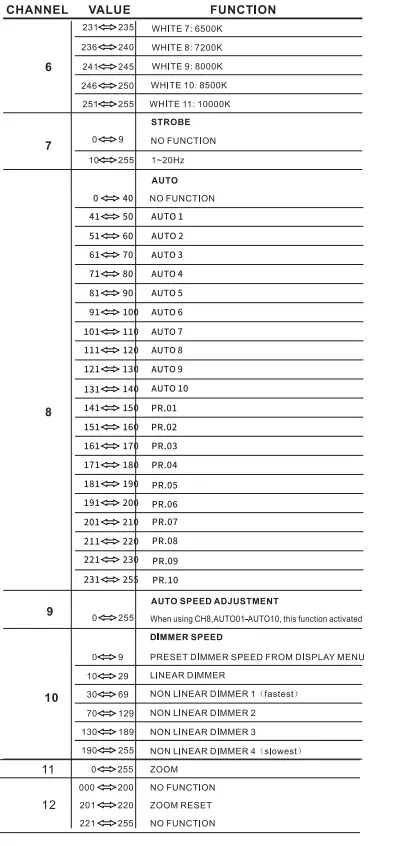
TR16
| 1 | 0<=>255 | MASTER DIMMER | |
| 2 | 0<=>255 | MASTER DIMMER FINE | |
| 3 | 0<=>255 | RED | |
| 4 | 0<=>255 | RED FINE | |
| 5 | 0<=>255 | GREEN | |
| 6 | 0<=>255 | GREEN FINE | |
| 7 | 0<=>255 | BLUE | |
| 8 | 0<=>255 | BLUE FINE | |
| 9 | 0<=>255 | WHITE | |
| 10 | 0<=>255 | WHITE FINE | |
|
11 |
0<=>10 | COLOR MACRO NO FUNCTION | |
| 11<=>30 | RED100%/GREEN UP/BLUED% | ||
| 31<=>50 | RED DOWN/GREEN 100%/BLUE0¾ | ||
| 51<=>70 | RED 0%/GREEN 100%/BLUE UP | ||
| 71<=>90 | RED 0%/GREEN DOWN/BLUE 100% | ||
| 91<=>110 | RED UP/GREEN 0%/BLUE100% | ||
| 111<=>130 | RED100%/GREEN 0%/BLU EDOWN | ||
| 131<=>150 | RED100%/GREEN UP/BLUE UP | ||
| 151<=>170 | RED DOWN/GREEN DOWN/BLUE 100% | ||
| 171<=>200 | RED100%/GREEN 100%P/BLUE100%/WHITE 100 | ||
| 201<=>205 | WHITE1: 3200K | ||
| 206<=>210 | WHITE2: 3400K | ||
| 211<=>215 | WHITE3: 4200K | ||
| 216<=>220 | WHITE4: 4900K | ||
| 221<=>225 | WHITES: 5600K | ||
| 226<=>230 | WHITE6: 5900K | ||
| 231<=>235 | WHITE 7: 6500K | ||
| 236<=>240 | WHITE 8: 7200K | ||
| 241<=>245 | WHITE 9: 8000K | ||
| 246<=>250 | WHITE 10: 8500K | ||
| 251<=>255 | WHITE 11: 10000K | ||
| CHANNEL | VALUE | FUNCTION |
|
12 |
0<=>9 | STROBE
NO FUNCTION |
| 10<=>255 | 1-20Hz | |
|
13 |
0 <=> 40 | AUTO NO FUNCTION |
| 41<=> so | AUTO 1 | |
| 51<=> 60 | AUTO2 | |
| 61<=> 70 | AUT03 | |
| 71<=> 80 | AUT04 | |
| 81<=> 90 | AUTOS | |
| 91<=> 100 | AUT06 | |
| 101<=> 110 | AUT07 | |
| 111<=> 120 | AUTOS | |
| 121<=> 130 | AUT09 | |
| 131<=> 140 | AUTO 10 | |
| 141<=> 150 | PR.01 | |
| 151<=> 160 | PR.02 | |
| 161<=> 170 | PR.03 | |
| 171<=> 180 | PR.04 | |
| 181<=> 190 | PR.OS | |
| 191<=> 200 | PR.06 | |
| 201<=> 210 | PR.07 | |
| 211<=> 220 | PR.08 | |
| 221<=> 230 | PR.09 | |
| 231<=> 255 | PR.10 | |
| 14 |
0<=>255 | AUTO SPEED ADJUSTMENT When using CH13,AUT001-AUT010, this function activate |
|
15 |
0<=>9 | DIMMER SPEED
PRESET DIMMER SPEED FROM DISPLAY MENU |
| 10<=>29 | LINEAR DIMMER | |
| 30<=>69 | NON LINEAR DIMMER 1 (fastest) | |
| 70<=> 129 | NON LINEAR DIMMER 2 | |
| 130<=> 189 | NON LINEAR DIMMER 3 | |
| 190<=>255 | NON LINEAR DIMMER 4 (slowest) | |
| 16 | 0<=>255 | ZOOM |
| 17 | 000 <=>200 201 <=>220 221 <=>255 | NO FUNCTION ZOOM RESET NO FUNCTION |
ARC.1
| CHANNEL | VALUE | FUNCTION |
| 1 | 0<=>255 | RED |
| 2 | 0<=>255 | GREEN |
| 3 | 0<=>255 | BLUE |
AR1.D
| CHANNEL | VALUE | FUNCTION |
| 1 | 0<=>255 | MASTER DIMMER |
| 2 | 0<=>255 | RED |
| 3 | 0<=>255 | GREEN |
| 4 | 0<=>255 | BLUE |
ARC.2
| CHANNEL | VALUE | FUNCTION |
| 1 | 0<=>255 | RED |
| 2 | 0<=>255 | GREEN |
| 3 | 0<=>255 | BLUE |
| 4 | 0<=>255 | WHITE |
AR2.D
| CHANNEL | VALUE | FUNCTION |
| 1 | 0<:=:>255 | MASTER DIMMER |
| 2 | 0<:=:>255 | RED |
| 3 | 0<:=:>255 | GREEN |
| 4 | 0<:=:>255 | BLUE |
| 5 | 0<=>255 | WHITE |
AR2.S
| CHANNEL | VALUE | FUNCTION |
| 1 | 0<:=:>255 | MASTER DIMMER |
| 2 | 0<:=:>255 | RED |
| 3 | 0<:=:>255 | GREEN |
| 4 | 0<:=:>255 | BLUE |
| 5 | 0<:=:>255 | WHITE |
| 6 | 0<:=:>255 | STROBE |
HSV
| CHANNEL | VALUE | FUNCTION |
| 1 | 0<:=:>255 | HUE(0-100%) |
| 2 | 0<:=:>255 | SATURATION(0-100%) |
| 3 | 0<:=:>255 | VALUE(0-100%) |
AR2.Z
| CHANNEL | VALUE | FUNCTION |
| 1 | 0<:=>255 | MASTER DIMMER |
| 2 | 0<:=>255 | RED |
| 3 | 0<=>255 | GREEN |
| 4 | 0<:=>255 | BLUE |
| 5 | 0<:=>255 | WHITE |
| 6 | 0<:=>255 | ZOOM |
| 7 | 000<=>200 201 <=>220 | NO FUNCTION ZOOM RESET |
| 221 <=>255 | NO FUNCTION |
FULL
| CHANNEL | VALUE | FUNCTION |
| 1 | 0 <=>255 | MASTER DIMMER |
| 2 | 0 <=>255 | MASTER DIMMER FINE |
| 3 | 0 <=>255 | RED1 |
| 4 | 0 <=>255 | RED FINE1 |
| 5 | 0 <=>255 | GREEN1 |
| 6 | 0 <=>255 | GREEN FINE1 |
| 7 | 0 <=>255 | BLUE1 |
| 8 | 0 <=>255 | BLUE FINE1 |
| 9 | 0 <=>255 | WHITE1 |
| 10 | 0 <=>255 | WHITE FINE1 |
| 11 | 0 <=>255 | RED2 |
| 12 | 0 <=>255 | RED FINE2 |
| 13 | 0 <=>255 | GREEN2 |
| 14 | 0 <=>255 | GREEN FINE2 |
| 15 | 0 <=>255 | BLUE2 |
| 16 | 0 <=>255 | BLUE FINE2 |
| 17 | 0 <=>255 | WHITE2 |
| 18 | 0 <=>255 | WHITE FINE2 |
|
19 | 0 <=>10 | NO FUNCTION |
| 11 <=>30 | RED100%/GREEN UP/BLUED% | |
| 31 <=>SO | RED DOWN/GREEN 100%/BLUE0O/o | |
| 51 <=>70 | RED 0%/GREEN 100%/BLUE UP | |
| 71 <=>90 | RED 0%/GREEN DOWN/BLUE 100% | |
| 91 <=>110 | RED UP/GREEN 0%/BLUE100% | |
| 111 <=> 130 | RED100%/GREEN 0%/BLU EDOWN | |
| 131 <=> 150 | RED100%/GREEN UP/BLUE UP | |
| 151 <=> 170 | RED DOWN/GREEN DOWN/BLUE100% | |
| 171 <=>200 | RED100%/GREEN 100%P/BLUE100%/WHITE100% | |
| 201 <=> 205 | WHITE!: 3200K | |
| 206 <=>210 | WHITE2: 3400K |
| CHANNEL | VALUE | FUNCTION |
|
19 | 211 <=>215 | WHITE3: 4200K |
| 216 <:=:> 220 | WHITE4: 4900K | |
| 221 <:=:> 225 | WHITES: 5600K | |
| 226 <:=:> 230 | WHITE6: 5900K | |
| 231 <:=:> 235 | WHITE7: 6500K | |
| 236 <:=:> 240 | WHITES: 7200K | |
| 241 <:=:> 245 | WHITE9: 8000K | |
| 246 <:=:> 250 | WHITElO: 8500K | |
| 251 <:=:> 255 | WHITEll: 10000K | |
| 20 |
O<:=:> 9 | STROBE NO FUNCTION |
| 10<:=:> 255 | 1-20Hz | |
|
21 |
0<:=:>40 | AUTO NO FUNCTION |
| 41 <:=:> 50 | AUTO 1 | |
| 51 <:=:> 60 | AUT02 | |
| 61 <:=:> 70 | AUT03 | |
| 71<:=:> 80 | AUT04 | |
| 81<:=:> 90 | AUTOS | |
| 91 <:=:> 100 | AUT06 | |
| 101<:=:>110 | AUT07 | |
| 111<:=:> 120 | AUTOS | |
| 121<:=:>130 | AUT09 | |
| 131<:=:> 140 | AUTO 10 | |
| 141 <:=:> 150 | PR.01 | |
| 151 <:=:> 160 | PR.02 | |
| 161<:=:> 170 | PR.03 | |
| 171<:=:> 180 | PR.04 | |
| 181 <:=:> 190 | PR.OS | |
| 191<:=:> 200 | PR.06 | |
| 201<:=:> 210 | PR.07 | |
| 211 <:=:> 220 | PR.OS | |
| 221<:=:> 230 | PR.09 | |
| 231 <:=:> 255 | PR.10 | |
| 22 |
0<:=:>255 | AUTO SPEED ADJUSTMENT When using CH13,AUT001-AUT010, this function activated |
|
23 | DIMMER SPEED | |
| O<:=:> 9 | PRESET DIMMER SPEED FROM DISPLAY MENU | |
| 10<:=:> 29 | LINEAR DIMMER | |
| 30<:=:> 69 | NON LINEAR DIMMER 1 (fastest) | |
| 70<:=:>129 | NON LINEAR DIMMER 2 | |
| 130<:=:>189 | NON LINEAR DIMMER 3 | |
| 190<:=:>255 | NON LINEAR DIMMER 4 (slowest) | |
| 24 | O<:=:>255 | ZOOM |
| 25 | 000 <=>200 201 <=>220 221 <=>255 | NO FUNCTION ZOOM RESET NO FUNCTION |
 showtechnic.com - This website is for sale! - showtechnic Resources and Information.
 Home
Home