
LG Energy Solution LGES-5048 Resu Home App
Product Information: LG RESU HOME User Manual
The LG RESU HOME is a product that allows users to monitor and manage their plants through a mobile application. This product is designed for trained and knowledgeable technical professionals who are familiar with the product, local standards, and electric systems. The user manual provides detailed instructions on how to create plants and monitor plant status through the LG RESU HOME App.
Copyright Statement and Trademarks
LG Energy Solution and other LG Energy Solution trademarks are owned by LG Energy Solution Australia Pty Ltd. All other trademarks or registered trademarks mentioned in this manual are also owned by LG Energy Solution Australia Pty Ltd.
Target Audience and Updates
This manual applies to trained and knowledgeable technical professionals who are familiar with the product, local standards, and electric systems. The information in this user manual is subject to change due to product updates or other reasons. This guide cannot replace the product labels or the safety precautions in the user manual unless otherwise specified. All descriptions in the manual are for guidance only.
Product Introduction
The LG RESU HOME App allows users to create plants and monitor plant status. Follow the instructions below to get started:
Obtain an Account
Contact the supplier to obtain an organization account and password. Alternatively, contact the after-sales service to obtain the account and password if you purchased directly from the manufacturer. You can also register an account by following the steps below:
- Go to the LG RESU HOME App login page.
- Click on “Register”.
- Enter your homeowner’s email and homeowner’s name.
- Select your currency and add a photo of the battery serial number.
- Complete the registration process by clicking “Test”.
Create a Plant
Once you have obtained an account, you can create a plant by following the instructions below:
- Log in to the LG RESU HOME App.
- Click on “Create Plant”.
- Enter the required information, such as the plant name, location, and plant capacity.
- Upload a photo of the plant.
- Click “Save” to complete the process.
Monitor Plant
To monitor your plant status, follow the instructions below:
- Log in to the LG RESU HOME App.
- Select the plant you want to monitor from the list of plants.
- You can view your plant’s status, such as power usage and battery level, on the dashboard.
Contact Information
If you have any questions or concerns about the LG RESU HOME, you can contact LG Energy Solution Australia Pty Ltd at:
- Address: Unit 12,35 Dunlop Rd, Mulgrave, VIC 3170
- Phone: 1300 178 064 [AEST Business hours]
- Website: www.lghomebattery.com/au.
- Email: [email protected].
Copyright ©LG Energy Solution Ltd., 2021. All rights reserved
No part of this manual can be reproduced or transmitted to the public platform in any form or by any means without the prior written authorization of LG Energy Solution.
Trademarks
LG Energy Solution and other LG Energy Solution trademarks are trademarks of LG Energy Solution Australia Pty Ltd. All other trademarks or registered trademarks mentioned in this manual are owned by LG Energy Solution Australia Pty Ltd.
Notice
The information in this user manual is subject to change due to product updates or other reasons. This guide cannot replace the product labels or the safety precautions in the user manual unless otherwise specified. All descriptions in the manual are for guidance only.
About This Manual
- This manual introduces commonly used operations in LG RESU HOME App.
- Before setting any parameters, read through the app and the inverter user manual to learn the product functions and features. When the inverter parameters are set improperly, the inverter may fail to connect to the utility grid or fail to connect to the grid in compliance with related requirements and damage the battery, which will affect the inverter’s power generation.
- This manual is subject to update without notice. For more product details and the latest documents, please visit https://www.lgessbattery.com/au/home-battery/product-info.lg?sn=362 for PC, https://www.lgessbattery.com#mmm_au/home-battery/product-info.lg?sn=362 for mobile.
Target Audience
This manual applies to trained and knowledgeable technical professionals. The technical personnel has to be familiar with the product, local standards, and electric systems.
Updates
The latest document contains all the updates made in earlier issues. V1.0 2021-11-20
- First Issue
Product Introduction
This manual introduces how to create plants and monitor plant status via the LG RESU HOME App.
Obtain an Account
Contact the supplier to obtain an organization account and password. Or contact the after-sales service to obtain the account and password if you purchased directly from the manufacturer. Or register an account following the steps below.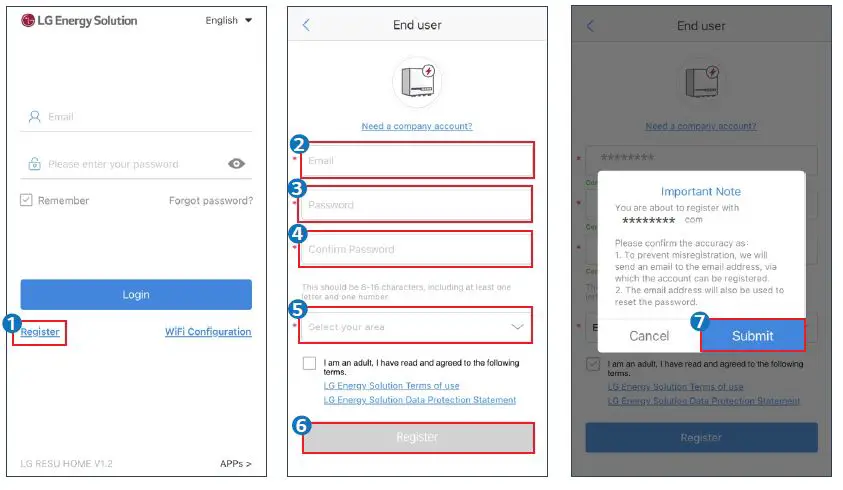
Create a Plant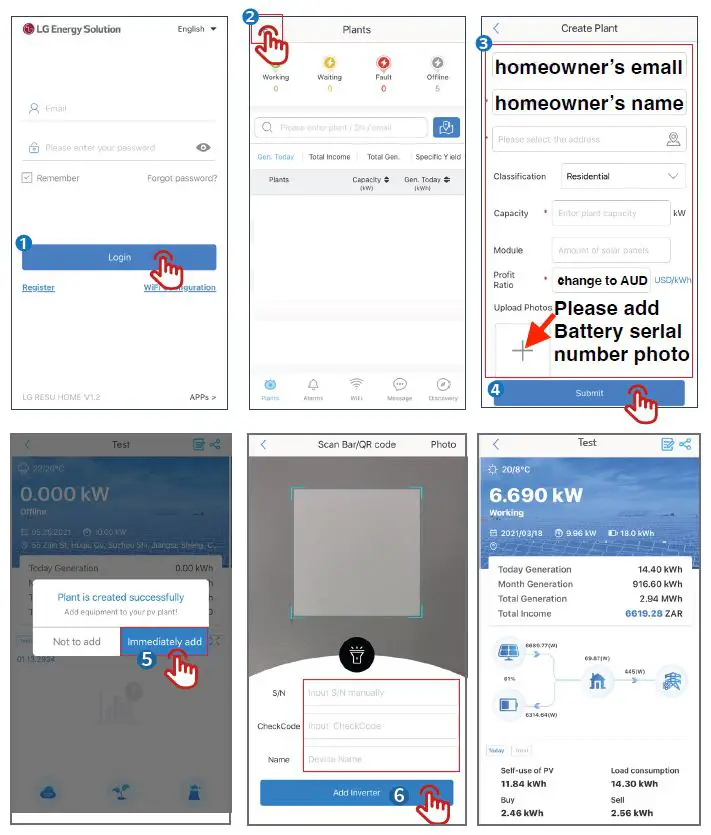
Monitor Plant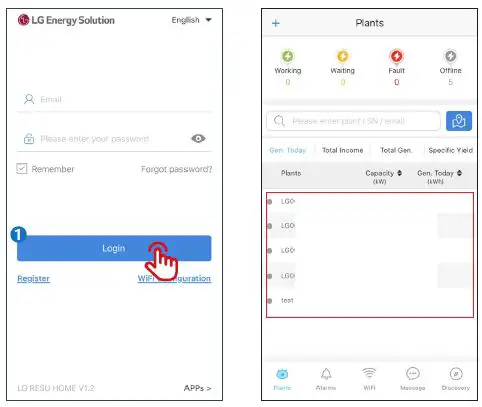
LG Energy Solution Australia Pty Ltd
- Unit 12,35 Dunlop Rd, Mulgrave, VIC 3170
- T: 1300 178 064 [AEST Business hours]
- www.lghomebattery.com/au .
- [email protected].
 LG ESS Battery|USA
 Product Info|LG Home Battery