Pro Home 2.0 Lite Energy Monitoring System
Product Information
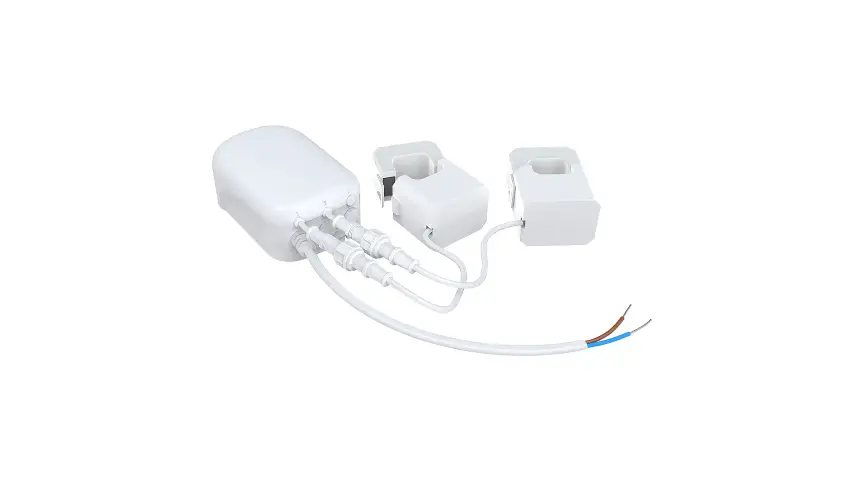
The TED Pro Home 2.0 Lite is a complete system designed to
monitor energy consumption. It includes the following
components:
- Measuring Transmitting Unit (MTU) – 1 unit
- 200A Split-Core Current Transformers – 2 units
- MTU Power Cable – 1 unit
- Cable Tie Wraps – 3 units
- Self-Drilling Screws – 2 units
- Breaker Panel Sticker – 1 unit
- USB Type-C Cable – 1 unit
- Quick Start Guide – 1 unit
Safety Instructions
It is important to follow these safety instructions during
installation:
- The installation of the TED Pro Home 2.0 Lite must be performed
by a professional electrician. - Before installation, ensure that the circuit breaker panel
cover has been removed. - Be aware of the potential hazards of shock, burn, or
electrocution when working with the circuit breaker panel. - Even when the main circuit breaker is turned off, certain areas
within the panel may still be electrified. Do not attempt
installation unless you know where these electrified areas
are. - Only qualified personnel should perform any servicing beyond
what is contained in the operational instructions. - The MTU must be connected to a switch or circuit breaker in
close proximity to the equipment and within easy reach of the
operator. It must be marked as the disconnecting device for the
MTU. - Always open or disconnect the circuit from the
power-distribution system before installing or servicing current
sensors or metering equipment to reduce the risk of electric
shock.
Product Specifications
Here are the specifications for the TED Pro Home 2.0 Lite
components:
- Measuring Transmitting Unit (MTU):
- Voltage Range: 100-240V
- Frequency: 50/60Hz
- Maximum Current (Per Phase): 200A
- Power Supply: Single-Phase (3-Wire)
- Power Supply Cable Length: 4.1′ (1.25m)
- Current Transformer (CT) (Model T20200A):
- Range: 15 to 200A
- Accuracy:
- Maximum Wire Size: 24mm OD (up to 500 MCM)
- Cable Length: 3.5′ (1.06m)
- Overvoltage Category: CAT. III 300V
Contact Information
If you have any questions or need further assistance, you can
contact the manufacturer:
Address: 20800 Boulevard Industriel, Sainte-Anne-de-Bellevue, QC
H9X 0A1, Canada
Phone: (800) 959-5833
Email: [email protected]
Product Usage Instructions
Follow these steps to use the TED Pro Home 2.0 Lite:
- Ensure that the circuit breaker panel cover has been removed
and the main circuit breaker is turned off. - Connect the Measuring Transmitting Unit (MTU) to a switch or
circuit breaker in close proximity to the equipment. Mark it as the
disconnecting device for the MTU. - Install the 200A Split-Core Current Transformers at the
appropriate locations. - Secure the components using the provided Cable Tie Wraps and
Self-Drilling Screws. - Connect the MTU Power Cable to the power supply.
- Use the USB Type-C Cable to connect the MTU to a compatible
device for data monitoring. - Refer to the Quick Start Guide for further instructions on
configuring and monitoring your energy consumption.
TED Pro Home 2.0 Lite Manual
Introduction
Thank you for purchasing the TED Pro Home 2.0 Lite. Our mission is to guide and support you in getting everything installed and up and running as smoothly as possible. Let’s get started so you can start monitoring your energy consumption.
The TED Pro Home 2.0 Lite is a complete system that provides you with everything needed in order to get started. Here’s a summary of what’s included with your system.
Package Contents
Description Measuring Transmitting Unit (MTU) 200A Split-Core Current Transformers MTU Power Cable Cable Tie Wraps Self-Drilling Screws Breaker Panel Sticker USB Type-C Cable Quick Start Guide
Quantity 1 2 1 3 2 1 1 1
Safety
The installation of this device must be performed by a professional electrician. After the circuit breaker panel cover has been removed, the potential hazard of shock, burn, or even electrocution now exists. Even when the main circuit breaker has been turned to the “OFF” position, certain areas within the circuit breaker panel may still be electrified. Do not attempt
installation unless you know where these electrified areas are.
WARNING – These servicing instructions are for use by qualified personnel only. To reduce the risk of electric shock, DO NOT perform any servicing other than that contained in these operational instructions unless you are qualified to do so.
Address: 20800 Boulevard Industriel, Sainte-Anne-de-Bellevue, QC H9X 0A1, Canada Phone: (800) 959-5833 Email: [email protected]
WARNING – The MTU must be connected to a switch or circuit breaker in close proximity to the equipment and within easy reach of the operator. It must be marked as the disconnecting device for the MTU.
WARNING – If the equipment is used in a manner not specified in these instructions, the protection provided by the equipment may be impaired.
WARNING – To reduce the risk of electric shock, always open or disconnect circuit from power-distribution system (or service) of building before installing or servicing current sensors or metering equipment.
FCC Compliance Statement – This device complies with Part 15 of the FCC Rules. Operation is subject to the following two conditions: (1) This device may not cause harmful interference, and (2) this device must accept any interference received, including interference that may cause undesired operation.
ISED Regulatory Compliance Statement – This device contains licence-exempt transmitter(s)/receiver(s) that comply with Innovation, Science and Economic Development Canada’s licence-exempt RSS(s). Operation is subject to the following two conditions: (1) This device may not cause interference. (2) This device must accept any interference, including interference that may cause undesired operation of the device.
Specifications
Measuring Transmitting Unit (MTU)
Voltage Range
100-240V
Frequency
50/60Hz
Maximum Current (Per Phase)
200A
Power Supply
Single-Phase (3-Wire)
Power Supply Cable Length
4.1′ (1.25m)
Current Transformer (CT) (Model T20200A)
Range
15 to 200A
Accuracy
±1.5% rdg.
Maximum Wire Size
24mm OD (up to 500 MCM)
Cable Length
3.5′ (1.06m)
Overvoltage Category
CAT. III 300V
Product Certification
ETL
General Specifications
Service
Single-Phase
LED Status Indicator
Yes
Sampling Rate
1x/2 secs.
System Power Consumption
1W, 0.2A
ETL
Product Certifications
Conforms to / Certified to ANSI/CAN/ UL STD 2808
FCC Part 15 Subpart B EU/EN 61326-1
IEC 61010-1
Pollution Degree 2
Address: 20800 Boulevard Industriel, Sainte-Anne-de-Bellevue, QC H9X 0A1, Canada Phone: (800) 959-5833 Email: [email protected]
Operating Temperature Storage Temperature Operating Humidity Range Maximum Operating Altitude Dimensions
Weight
Instrument Dimensions
0 to 104°F (0 to 40°C) -4 to 140°F (-20 to 60°C) 10-85% 6561′ (2000m) MTU: 4.3 x 2.4 x 1.6″ (102 x 60 x 40 mm) CT: 45 x 35 x 65″ (111 x 111 x 111 mm) MTU: 5.00oz (142g) Without antenna CT: 6.06oz (172g) CT302
Address: 20800 Boulevard Industriel, Sainte-Anne-de-Bellevue, QC H9X 0A1, Canada Phone: (800) 959-5833 Email: [email protected]
Installation Procedure
Step 1 – Locating the electrical service When the electrical panel has been located, turn off the main power and remove breaker panel cover.
WARNING – To reduce the risk of electric shock, always open or disconnect circuit from powerdistribution system (or service) of building before installing or servicing current sensors or metering equipment.
Address: 20800 Boulevard Industriel, Sainte-Anne-de-Bellevue, QC H9X 0A1, Canada Phone: (800) 959-5833 Email: [email protected]
Step 2 Installing the MTU Please make sure to follow the guidelines highlighted below to correctly mount the TED 2.0 Measuring Transmitting Unit (MTU) inside the breaker panel. The included self-drilling screws can be used to mount the MTU directly in the breaker box. 1) Submetering equipment shall not be mounted within 50.8 mm (2 in) in of any live parts including primary conductors, primary terminals, primary lugs. This requirement excludes insulated cables. 2) Submeters attached to the enclosure shall not contact the panel interior insulation. 3) Mounting provisions shall not be attached to any live part. 4) Voltage sensing and power supply connections to the primary voltage shall have overcurrent protection. 5) Do not install submetering equipment in any area where breaker arc venting exhaust gasses could be redirected as a result of submetering equipment installation.
Step 3 Installing the Current Transformers (CTs) Please make sure to follow the guidelines highlighted below to correctly install the Current Transformers (CTs).
Address: 20800 Boulevard Industriel, Sainte-Anne-de-Bellevue, QC H9X 0A1, Canada Phone: (800) 959-5833 Email: [email protected]
1) Always open or disconnect circuit from power-distribution system (or service) of building before installing of servicing current sensors; 2) The current sensors may not be field installed in the wiring space of enclosures for switches or overcurrent devices if the area of all current sensors, conductors, splices, taps and equipment at any cross section of the wiring space does not exceed 75 percent of the cross-sectional area of that space; 3) Restrict installation of current sensor in an area where it would block ventilation openings; 4) Restrict installation of current sensor in area of breaker arc venting; 5) “Not suitable for Class 2 wiring methods” and “Not intended for connection to Class 2 equipment”; 6) Secure current sensor and route conductors so that the conductors do not directly contact live terminals or bus. This instruction may be considered optional if integral field wiring lead or associated cable insulation is rated 105°C (221°F) or greater. Current sensors with terminals where the conductors are supplied during installation shall still include this instruction; and 7) WARNING – To reduce the risk of electric shock, always open or disconnect circuit from power-distribution system (or service) of building before installing or servicing current sensors or metering equipment. 8) BASIC INSULATION, use only on insulated conductor, secured from contacting live parts. Start by connecting the terminal connectors of the Current Transformers (CTs) to the port “A” and port “B” on the MTU. Once connected, open the CT by lifting the locking tab on the side of the CT, over the restraining clip. Place the CTs) around the main conductors so that the red dots are pointing towards the utility power source. Once the sensors are in the correct orientation, clip the sensor covers into place.
Address: 20800 Boulevard Industriel, Sainte-Anne-de-Bellevue, QC H9X 0A1, Canada Phone: (800) 959-5833 Email: [email protected]
Step 4- Installing the MTU Power Cable Connect the black wire and the red wire to an empty 240V breaker and the white wire (shown as gray in the image below) to the neutral bus bar. Once the voltage cable has been installed, insert the power connector to the “PWR” port on the MTU. NOTE: Do not connect the Power Cable to the MTU until you have the CTs connected. The MTU must sense the CT connections on power up.
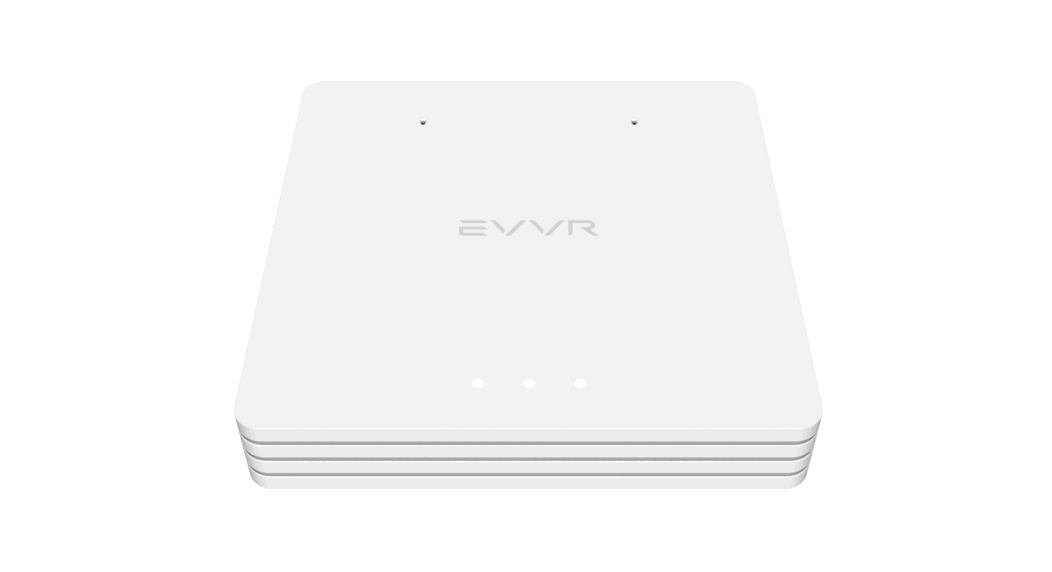
Step 5- Installing the Extension Cable Punch out a knockout cover, plug the provided extension cable to the MTU and secure it though the side of the breaker box. (Please see the Wi-Fi module user guide to complete the installation outside the breaker panel)
Address: 20800 Boulevard Industriel, Sainte-Anne-de-Bellevue, QC H9X 0A1, Canada Phone: (800) 959-5833 Email: [email protected]
Step 6- Turning the main power back ON Replace panel cover, add TED Sticker next to the breaker where the unit has been installed and turn the main power back on.
Need Further Assistance?
If you have questions related to the install, setup or configuration of your new TED device please visit our website (www.theenergydetective.com ) for troubleshooting, tips and to contact our technical team.
Address: 20800 Boulevard Industriel, Sainte-Anne-de-Bellevue, QC H9X 0A1, Canada Phone: (800) 959-5833 Email: [email protected]
Wi-Fi Module User Guide
Package Contents
Description Antenna Antenna Mount
Quantity 1 1
General Specifications Antenna Extension Cable Length
Communication Interface
Supported Wi-Fi Protocols Operating Wi-Fi Frequency XTAL APP APP Supported Languages APP OS Device Compatibility Product Certifications
17.7″ (45cm ) Bluetooth 4.2 Wi-Fi 802.11 b/g/n WEP, WPA/WPA2, WPA/WPA2 PSK (AES) 2.400-2500MHz 26M TED 2.0 Energy Monitoring APP English Android / Apple iOS FCC Part 15 Subpart B EU/EN 61326-1
Wi-Fi Module Installation
1. Turn off the main power 2. Install the Wi-Fi module and antenna on the side of the breaker box using the extension cable secured
on the side of the breaker panel.
Address: 20800 Boulevard Industriel, Sainte-Anne-de-Bellevue, QC H9X 0A1, Canada Phone: (800) 959-5833 Email: [email protected]
3. Turn the main power back on.
Download the APP
Once the hardware has been installed the next step is to download the TED Energy Monitor App from the Apple Store (iOS) or Google Play Store (Android). Depending on device type scan the QR codes below to download the appropriate APP.
(Insert QR Code here to go directly to Apple Download) (Insert QR Code here to go directly to Android Download)
Need Further Assistance?
If you have questions related to the install, setup or configuration of your new TED device please visit our website (www.theenergydetective.com ) for troubleshooting, tips and to contact our technical team.
Address: 20800 Boulevard Industriel, Sainte-Anne-de-Bellevue, QC H9X 0A1, Canada Phone: (800) 959-5833 Email: [email protected]
FCC Statement
This equipment has been tested and found to comply with the limits for a Class B digital device, pursuant to part 15 of the FCC Rules. These limits are designed to provide reasonable protection against harmful interference in a residential installation. This equipment generates, uses and can radiate radio frequency energy and, if not installed and used in accordance with the instructions, may cause harmful interference to radio communications. However, there is no guarantee that interference will not occur in a particular installation. If this equipment does cause harmful interference to radio or television reception, which can be determined by turning the equipment off and on, the user is encouraged to try to correct the interference by one or more of the following measures: · Reorient or relocate the receiving antenna. · Increase the separation between the equipment and receiver. · Connect the equipment into an outlet on a circuit different from that to which the receiver is connected. · Consult the dealer or an experienced radio/TV technician for help. Caution: Any changes or modifications to this device not explicitly approved by manufacturer could void your authority to operate this equipment. This device complies with part 15 of the FCC Rules. Operation is subject to the following two conditions: (1) This device may not cause harmful interference, and (2) this device must accept any interference received, including interference that may cause undesired operation. RF Exposure Information This equipment complies with FCC radiation exposure limits set forth for an uncontrolled environment. This equipment should be installed and operated with minimum distance 20cm between the radiator and your body.
Address: 20800 Boulevard Industriel, Sainte-Anne-de-Bellevue, QC H9X 0A1, Canada Phone: (800) 959-5833 Email: [email protected]
ISED Statement
English:This device contains licence-exempt transmitter(s)/receiver(s) that comply with Innovation, Science and Economic Development Canada’s licence-exempt RSS(s). Operation is subject to the following two conditions: (1) This device may not cause interference. (2) This device must accept any interference, including interference that may cause undesired operation of the device. The digital apparatus complies with Canadian CAN ICES-3 (B)/NMB-3(B). French: Cet appareil contient des émetteurs/récepteurs exempts de licence qui sont conformes aux RSS exemptés de licence d’Innovation, Sciences et Développement économique Canada. L’exploitation est soumise aux deux conditions suivantes : (1) Cet appareil ne doit pas provoquer d’interférences. (2) Cet appareil doit accepter toute interférence, y compris les interférences susceptibles de provoquer un fonctionnement indésirable de l’appareil. l’appareil numérique du ciem conforme canadien peut – 3 (b) / nmb – 3 (b). This device meets the exemption from the routine evaluation limits in section 2.5 of RSS 102 and compliance with RSS 102 RF exposure, users can obtain Canadian information on RF exposure and compliance. cet appareil est conforme à l’exemption des limites d’évaluation courante dans la section 2.5 du cnr – 102 et conformité avec rss 102 de l’exposition aux rf, les utilisateurs peuvent obtenir des données canadiennes sur l’exposition aux champs rf et la conformité. This equipment complies with Canada radiation exposure limits set forth for an uncontrolled environment. Cet équipement est conforme aux limites d’exposition aux rayonnements du Canada établies pour un environnement non contrôlé. This equipment should be installed and operated with minimum distance 20cm between the radiator & your body. Cet équipement doit être installé et utilisé à une distance minimale de 20 cm entre le radiateur et votre corps.
Address: 20800 Boulevard Industriel, Sainte-Anne-de-Bellevue, QC H9X 0A1, Canada Phone: (800) 959-5833 Email: [email protected]
 TED-The-Energy-Detective.com - The Energy Detective Home Energy Monitoring