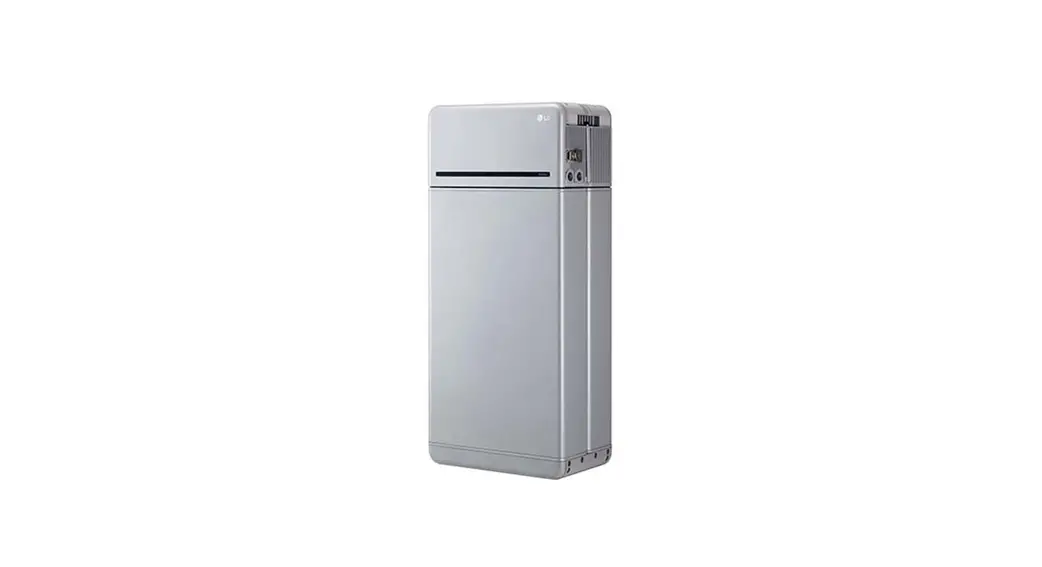

 Installation Manual for RESU16H Prime
Version 1.21
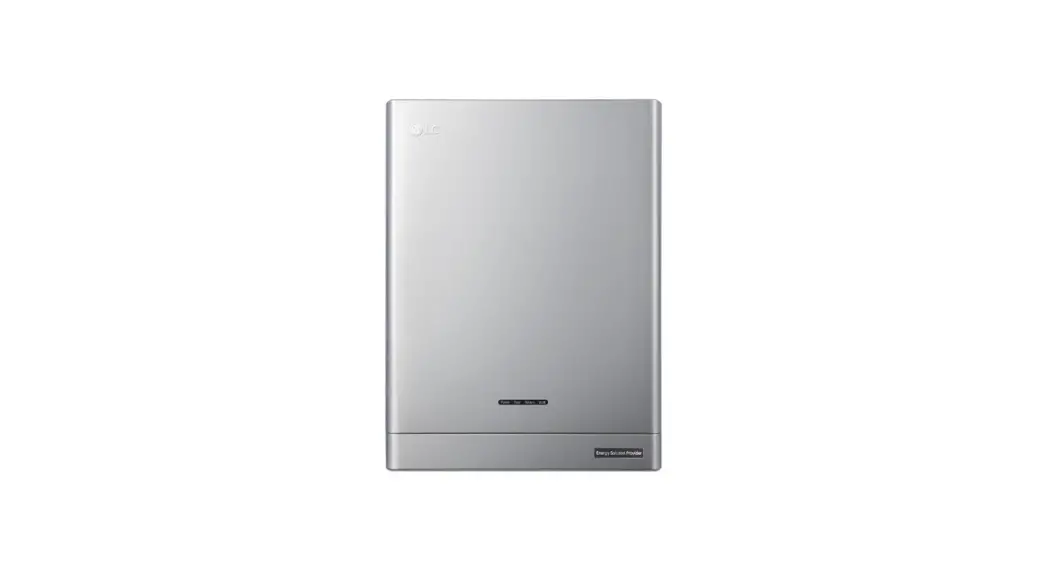
RESU16H Prime High Voltage Storage
LG Energy Solution strongly advises users to exercise due care in following LG Energy Solution’s product installation manual. Warranty claims are invalid if damage is caused
by human error in a manner inconsistent with the installation manual’s instructions.
Scan QR code to view [Installation Manual PDF File]
 https://drive.google.com/drive/folders/1NCBMWh5za10k_g34q_thKUjBW7Cli3JF?usp=sharing
Scan QR code to view [Installation Video Guide]
 https://drive.google.com/drive/folders/1ghZ9I4K6cwik6UfIEI3-MvKcFJqszEU5?usp=sharing
The information included in this manual is accurate at the time of publication.
However, this manual is subject to change without prior notice. In addition, the illustrations instructions.
Please note the images shown are for illustration purposes only.
Safety
1.1 Symbols
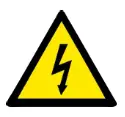 | Caution, risk of electric shock |
 | Do not place or install near flammable or explosive materials |
 | Install the product out of reach of children |
 | Read the instruction manual, in its entirety, before starting installation and operation |
 | Heavy weight may cause serious back injuries |
 | Do not dispose of the product with household waste |
 | Recyclable |
 | Disconnect the equipment before carrying out maintenance or repair |
 | Observe precautions for handling electrostatic-sensitive devices |
 | Protective Class 1 |
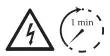 | Caution, risk of electric shock, energy storage timed discharge. |
1.2 Safety Instructions
For safety reasons, installers are responsible for familiarizing themselves with the contents of this document and all warnings before performing installation and servicing.
1.2.1 General Safety Precautions
Over-voltages or wrong wiring can damage the battery pack and cause combustion which can be extremely dangerous.
where explosive gas or chemicals are present.
During installation of the battery, the utility grid and solar input must be disconnected from the The electronics inside the battery pack are vulnerable to electrostatic discharge.
Be sure to be grounded before handling the battery pack.
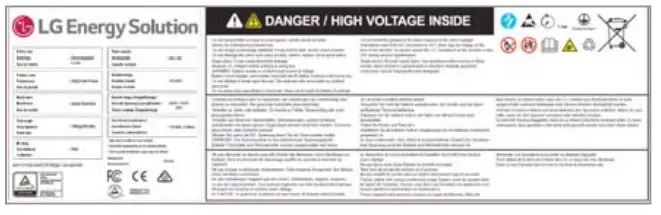
Read the label with Warning Symbols and Precautions, which are visible under the Battery
Cover (see Section 1.3 Warning Label).
1.2.2 Battery Handling Guide
- Do not expose or place near water sources such as downspouts or sprinklers.
- Do not store or install the product in direct sunlight.
- Do not install the product in an airtight enclosure or in an area without ventilation.
- Do not install the product in living area of dwelling units or in sleeping units other than within utility closets and storage or utility spaces.
- Store in a cool and dry place. (Do not store in greenhouses or storage areas for
- Store the product out of reach of children and animals.
- Store the product in clean environment, free of dust, dirt and debris.
- Do not damage the Product by dropping, deforming, impacting, cutting or electrolytes.
- Do not touch the product if liquid spills on it. There is a risk of electric shock.
- Handle the battery wearing insulated gloves.
- Do not step on the product or the product’s packaging since the product may be damaged.
- Do not place any foreign objects on top of the Battery Pack and on the cooling fin.
- Do not put the battery pack upside down on the ground.
- Do not connect the power cables at terminal the block in the opposite direction.
- Do not charge or discharge a damaged battery.
- If the Product is installed in a garage or carport, ensure there is adequate clearance from vehicles.
- The battery pack has been certified IP55 and can be installed indoors as well as outdoors. However, if installed outdoors, do not allow the battery pack to be exposed to direct sunlight or water sources, as they may cause:
– Power limitation phenomena in the battery (with a resulting decrease in energy production by the system).
– Premature wear of the electrica Uelectro mechanical and mechanical components.
– Reduction in performance, performance warranty and possible damage of the battery - Only use the product with a LGES-authorized inverter.
For a list of compatible inverters, visit the LG ESS Battery Website by the URL below and check the ‘Home Battery’ > ‘Product Info’ menu. haps://wvAvIgessbattery.com/us (in case of North America)
https://www.lgessbattery.comfau (in case of Australia)
haps://www.lgessbattery.com/eu (in case of all EU-countries in general)
https://wvAdgessbattery.com/de (in case of Germany)
haps://www.lgessbattery.comfit (in case of Italy)
https://www.lgessbattery.comfes (in case of Spain) - Do not connect any AC conductors or photovoltaic conductors directly to the battery pack. These are only to be connected to the inverter.
1.2.3 Response to Emergency Situations
The Product includes internal fault mechanisms designed to prevent failures and subsequent risk hazards. However, LG Energy Solution cannot guarantee safety performance of the
Product is ever exposed to abuse, damage or negligence.
If a user happens to be exposed to the internal materials of the battery cell due to damage on the outer casing, the following actions are recommended.
In case of inhalation: Leave the contaminated area immediately and seek medical attention.
In case of contact with eyes: Rinse eyes with running water for 15 minutes and seek medical attention.
In case of contact with skin: Wash the contacted area with soap thoroughly and seek medical attention.
In case of ingestion: Induce vomiting and seek medical attention.
countermeasures.
- Utilize fire-extinguishing media
A respirator is not required during normal operation. Use an FM-200 or CO2 extinguisher for battery fires. Use an ABC fire extinguisher if the fire is not from the battery and has not yet spread to it. - Follow proper fire-fighting instructions
1. If a fire occurs when charging batteries, provided it is safe to do so, disconnect the battery pack circuit breaker to shut off the power charge.
2. If the battery pack is not on fire yet, extinguish the fire before the battery pack catches fire preferably with water.
3. If the battery pack is on fire, do not try to extinguish it, and evacuate people from the premises immediately. WARNING
There may be a possible explosion when batteries are heated above I50°C. When a battery pack is burning, it will leak poisonous gases. Do not approach it. - Effective ways to deal with accidents
On land: Place the damaged battery into a segregated place and call your local fire department or service engineer. In water: Stay out of the water and do not touch anything if any part of the battery, inverter, or wiring is submerged. Do not use the submerged battery again. Contact your service engineer for assistance.
 WARNING
1.3 Warning Label
Product/warning label and Battery Control Unit’s traceability label are behind the front cover.
The front cover opens by turning the front cover handle counterclockwise. Battery Modules’ traceability labels are attached to the side of the Battery Modules.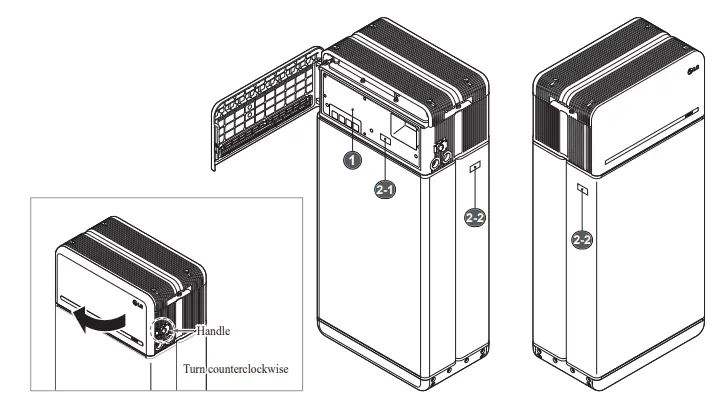
- Product/Warning Label
- Traceability label
2-1. Battery Control Unit 2-2. Battery Module

1.4 Qualified Personnel
This guide for the tasks and procedures described herein is intended for use by skilled staff only. A skilled staff is defined as a trained and qualified electrician or installer who has all of the following skills and experience:
- Knowledge of the functional principles and operation of on-grid and off-grid (backup) systems
- Knowledge of the dangers and risks associated with installing and using electrical devices and acceptable mitigation methods
- Knowledge of the installation of electrical devices
- Knowledge of and adherence to this guide and all safety precautions and best practices
- Qualification specified in battery warranty file : RESU-certification in the battery website : Knowledge of local installation standards : Electrical license for battery installation required by the country or state
- Repair the battery by disassembly is possible only at the LG Service Center or by a person who is specially authorized separately from the installation qualification
Product Introduction
2.1 Technical Data
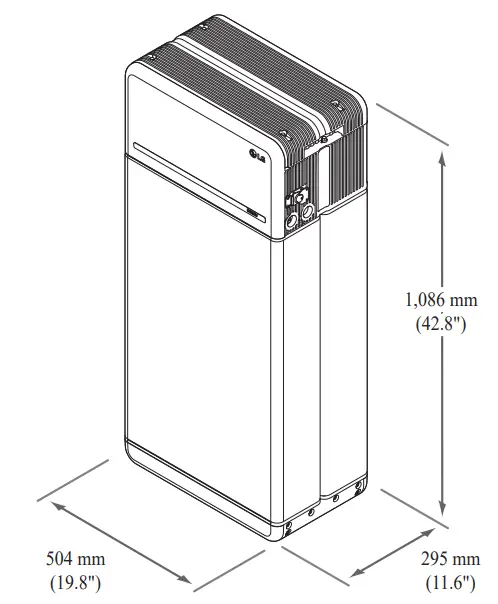
2.1.1 Dimensions and Weight
RESU16H Prime
| Part Number | EH257064P8S1 |
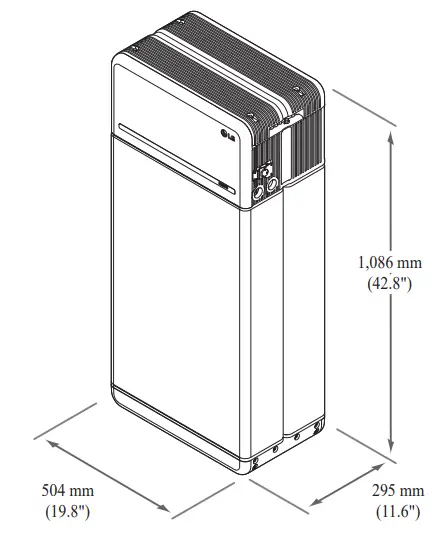
| Width | 504 mm (19.8”) |
| Height | 1,086 mm (42.8”) |
| Depth | 295 mm (11.6”) |
| Weight ¹ | 159 kg (351 lbs) |
- Battery pack weights may vary slightly.
2.1.2 Performance
Electrical Characteristics
| Usable Energy 1) | 16 kWh |
| Battery Capacity | 64.1 Ah |
| Voltage Range | 350 to 450 VDC |
| Absolute Max. Voltage | 595 VDC |
| Max. Current (charging/discharging) Max. Power (charging/discharging) | 20A @ 350V |
| Max. Power (charging/discharging) | 7 kW |
| Peak Power 2) (only ischarging) | 11 kW for 10 sec. |
| Peak Current (only discharging) | 32.8A for 10 sec. |
| Communication Interface | RS485/ CAN |
| DC Disconnect | Circuit Breaker |
| Connection Method | Spring Type Connector |
| User Interface | LEDs for Normal and Fault Operation |
Operating Conditions
| Installation Location | Indoor/Outdoor (Standing Only) |
| Operating Temperature | charge 14°F to 122°F (-10°C to 50°C) discharge -4°F to 122°F (-20°C to 50°C) |
| Operating Temperature (Recommended) | 59°F to 86°F (15°C to 30°C) |
| Storage Temperature | I61i to J55 (-30°C to 60°C), acceptable for 7 days in total -4°F to 113°F (-20°C to 45°C), acceptable for the -4°F to 86°F (-20°C to 30°C), acceptable for months 7~12 |
| Humidity | 5% to 95% |
| Altitude | Max. 6,562 ft (2,000 m) |
| Cooling Strategy | Natural Convection |
Certification
| Safety | Cell UL1642 Battery CE / RCM / IEC 62619 / UL1973 / PackIEC62477-1 |
| Emissions | FCC |
| Transportation | Class 9 |
| Ingress Rating | UN38.3 |
| IP55 |
 Test Conditions: Temperature 25°C/77°F, at the beginning of life. Energy is measured under specific conditions from LG Energy Solution (0.3CPCV/0.3CP).
- Value for battery pack only. Maximal usable energy at the AC output may vary by condition, such as inverter efficiency, configuration and temperature.
- Peak current excludes repeated short duration (less than 10 sec. of current pattern).
Short Circuit Current/Duration
| Short Circuit Current | 1.616 kA |
| Duration | 0.44 ms |
Arc Flash Protection Calculations
In order to protect personnel from the possibility of getting injured by an arc flash hazard, Arc flash calculation of the battery system is estimated with the Incident Energy Calculations refer to Annex D of NFPA 70E.
| Battery System Voltage | 288.4V |
| Battery System Internal Resistance | 0.06 |
| Bolted Fault Current | 1.616 kA |
| Arcing Current | 0.808 kA |
| Clearing Time | 371 us |
| Arc Flash Incident Energy | 0.000132 Cal/cm ² |
| Working Distance | 450 mm (18inches) |
Battery system installers must wear PPE (Personal Protective Equipment) according to NFPA 70E Article 130. WARNING
- When installing the battery system, the worker shall wear arc-rated clothing in every occasions and places to protect him/her from any possible exposure to an electric are flash.
- The arc-rated clothing worn by the worker must assure the worker’s movement and visibility while covering all ignitable clothing.
- The worker shall always wear the non-conductive safety helmet every occasions and places to protect him/her from any danger of head injury from electric shock or burns due to the contact with energized electrical conductors or circuit parts resulting from electrical explosion.
- The worker shall wear non-conductive protective equipment for the face, neck, and chin at every occasion and location to protect him/her from danger of injury from exposure to electric arcs or flashes resulting from an electrical explosion.
- The worker shall wear non-conductive protective equipment for the eyes at every occasion and location to protect him/her from any danger of injury from electric arcs or flashes resulting from an electrical explosion.
- The worker shall wear hearing protection within the arc flash boundary.
- The worker shall wear heavy-duty leather gloves or arc-rated gloves, satisfying the following regulation level, for arc flash protection. In the case of wearing the rubber gloves for the shock protection, he/she shall wear additional leather protectors above the gloves.
- The worker shall wear heavy-duty leather footwear or dielectric footwear or both to provide some arc flash protection.
- The worker shall inspect arc-rated apparel before every use. Work clothing or arc flash suits that are contaminated or damaged to the extent, impairing the protective qualities, shall not be used. Protective items that become contaminated with grease, oil, flammable liquids or combustible materials shall not be used.
- The garment manufacturer’s instructions for care and maintenance of arc-rated apparel shall be followed.
- Arc-rated apparel shall be stored in a manner that prevents physical damage; damage from moisture, dust, or other deteriorating agents; or contamination from flammable or combustible materials.
2.2 Features
- Compact energy storage unit for domestic photovoltaic system compatibility
- Residential 400V DC battery pack system: Daily cycle and emergency back up capability.

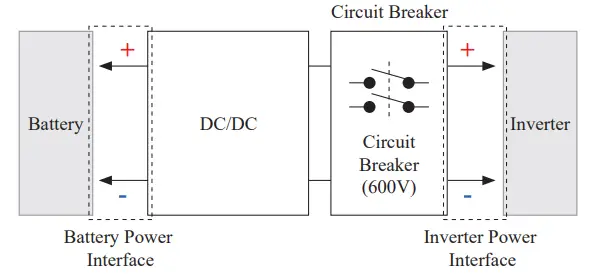
- Protection devices included as follows:
– Inverter Power Interface for protection against overvoltage, overcurrent, external short-circuit, reverse polarity, inrush current and over temp.
– Battery Power Interface for protection against internal short-circuit, overvoltage, overcurrent, over temp and undervoltage. - Flexible installation: Indoors or Outdoors
2.3 Maintenance
RESU16H Prime does not require maintenance during normal operation if properly installed per the installation manual. In the event of fault, contact the regional service center.
| Category | Contents | ||
| Size (L×W×H) | 750 mm (29.5″) 985 mm (38.8″) 885 mm (34.8″) | Outer Size | |
| Qty/Box (ea) | 1 | ||
| Packaging Materials | Box Inner Pallet | Corrugated Cardboard EPS Wood | Disposable Disposable Disposable |
| Weight | Product Packaging Gross | 159 kg (350.5 lbs) 30 kg (66.1 lbs) 189 kg (416.7 lbs) | 1 pack/box (Battery Module (x2)+Battery Control Unit +enclosed items) Pallet (8.7kg) + Box (21.3kg) Product + Packaging |
Installation
3.1 Mechanical Requirements
3.1.1 Package Contents
The following items are included in the package: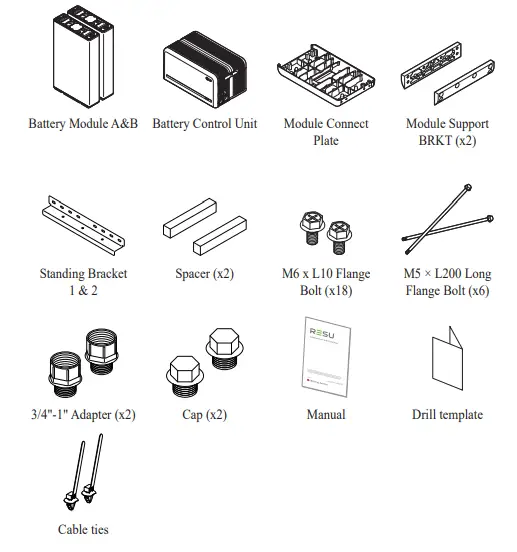
3.1.2 Basic lifting guide
Refer to below guide for lifting and carrying the Battery Control Unit and Battery Modules during installation.
Handling position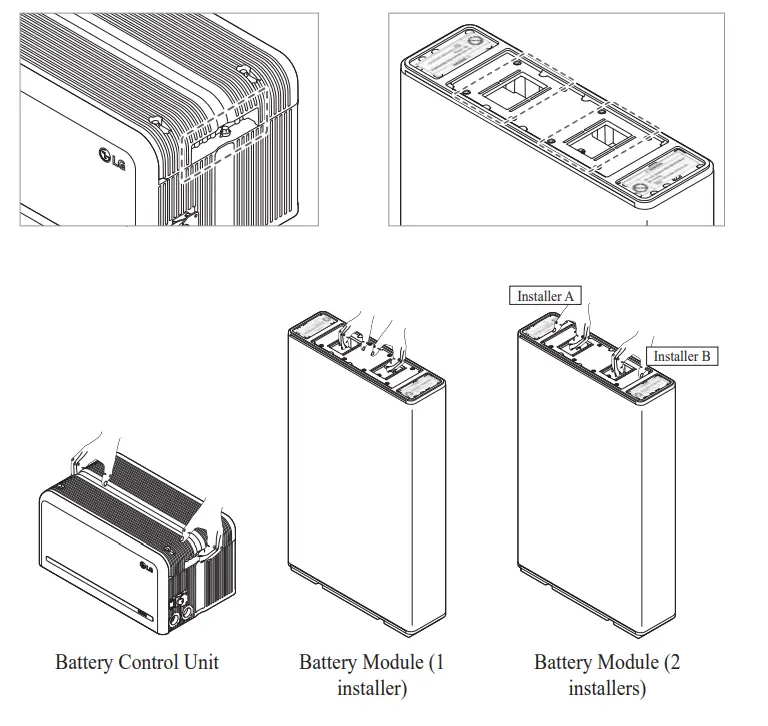
3.1.3 Unboxing the Package
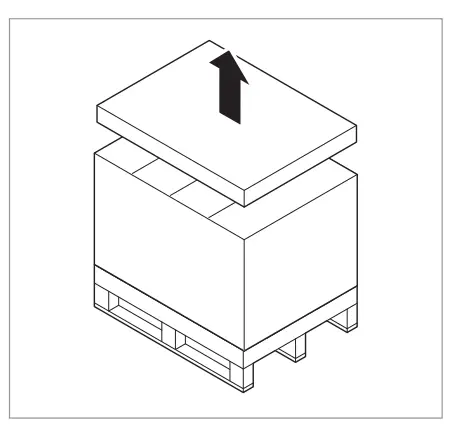 Cut the packing strap and remove the top lid.
- Remove the sleeve.

- Pull out the Battery Control Unit. and the Spacers (x2).
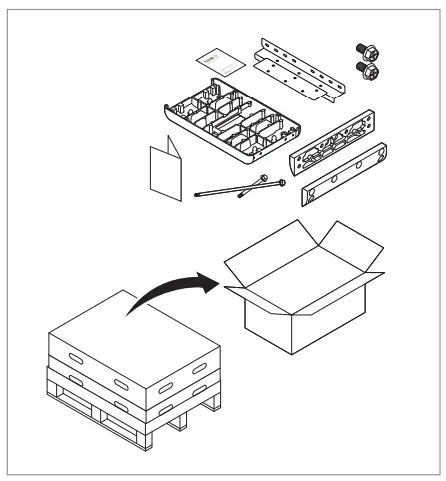
- Pull out the bundled items, including the Module Connecting Plate.
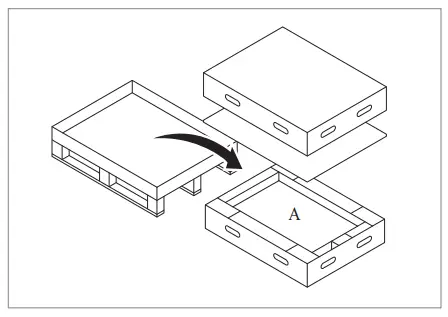
- Pull out Battery Module B.
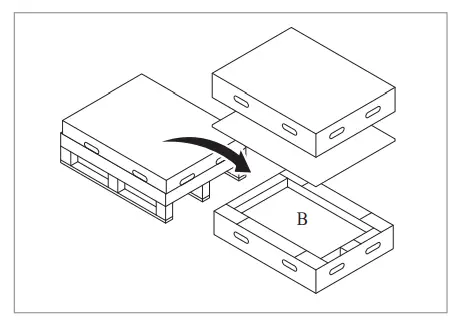
- Pull out Battery Module A.
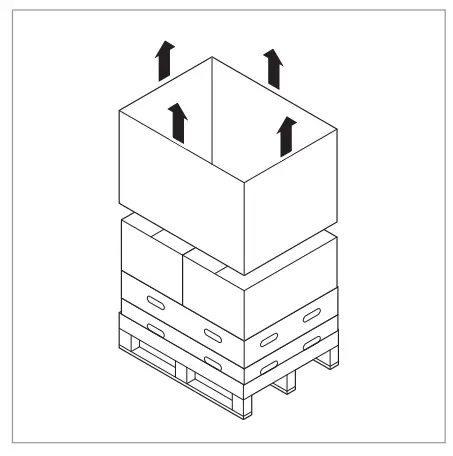
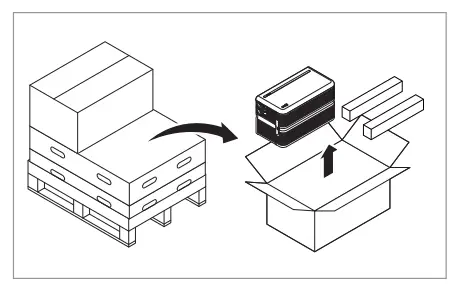
CAUTION
According to regional regulations, several people may be required for moving equipment.
3.1.4 Installation Location
Requirements:
- The ambient temperature should be within the range of -4°F to 122°F (-20°C to 50°C). weight.
- Product shall be installed indoors (ex. in a basement or a garage) or outdoors under an eave and out of direct sunlight.
Recommendations:
- The building should be designed to withstand earthquakes.
- The area should be waterproof and properly ventilated. (IP55)
- The product should be installed out of reach of children and animals.
CAUTION
If the ambient temperature is outside operating range, the battery pack will stop operating to protect itself. The optimal temperature range for the battery pack to operate Frequent exposure to harsh temperatures may deteriorate the performance and life of the battery pack.
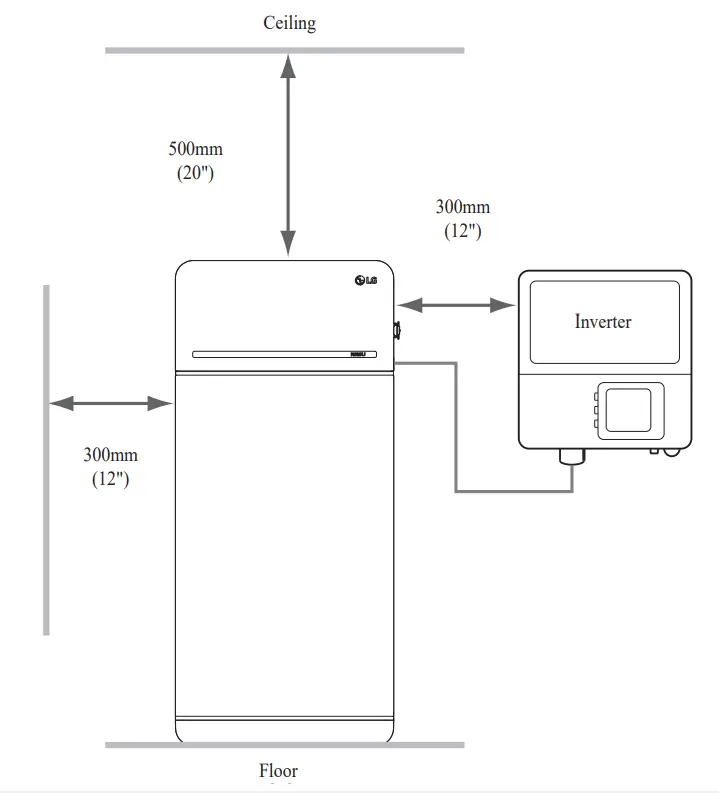
3.1.5 Clearance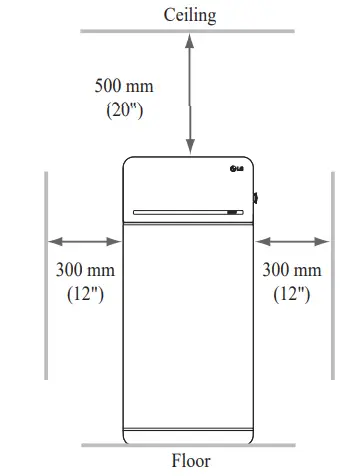
- Recommended clearances for the left, right and top of the product are shown in installer convenience.
3.1.6 Tools & Safety Gear Required
- Tools
The following tools are required to install the battery pack :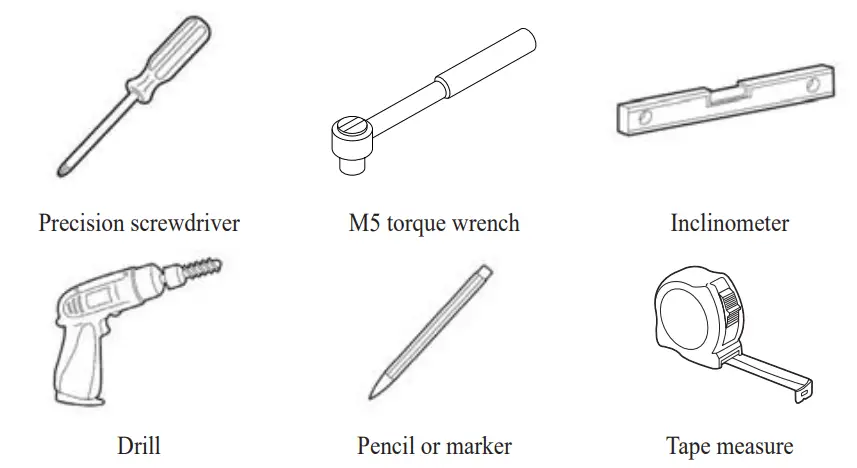 (min. diameter 10 mm, 0.4″)
* The fasteners are needed for fixing the bracket on the wall - Safety Gear for Personal Protection It is required to wear the following safety gears when handling the battery pack.

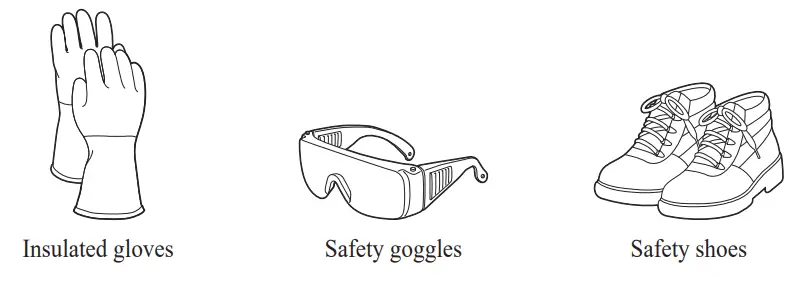
3.1.7 Appearance and Dimensions
- Appearance
Proper handling and care are recommended as disassembly, change of color, battery pack. - Pack appearance and dimensions

- Color and materials
– Battery Module front/rear case:
metallic gray, steel
– Battery Control Unit cover & Module Connect Plate: metallic grayaluminum
– LED cover: black, plastic
3.1.8 System Clearance
The battery requires adequate clearance for installation, cabling, and airflow. The minimum clearance for system configuration is provided below. The cable connecting between battery pack and inverter should be in accordance with the installation guide manual of the inverter.
3.1.9 Installing the Battery Pack CAUTION
Make sure that the inverter AC and DC disconnects are turned off before connecting the power cable to the battery pack.
Install the battery pack through the following steps:
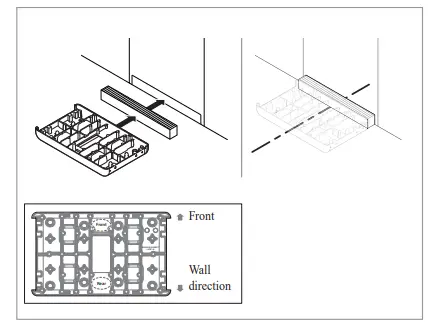
- Place the Drill template to the wall where the battery pack will be installed. After that, drill holes on the position marked on the Drill template.
* Recommended fastener count:
1(Area1)/1(Area2)
* Recommended fastener diameter/ length: 10mm/40mm Min.
* Fastener separation should observe the regional building code.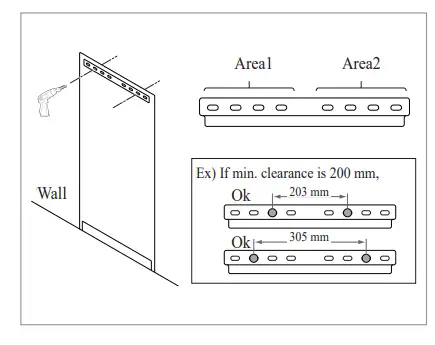
- Place a spacer to the position marked on the Drill template. After that, place the Module connect plate in contact with the Spacer and align center lines.
* Pay attention to the direction of the Spacer. Refer to left image for correct orientation.
* Be careful not to damage the aluminum foil attached on the bottom of Module connect plate during handling.
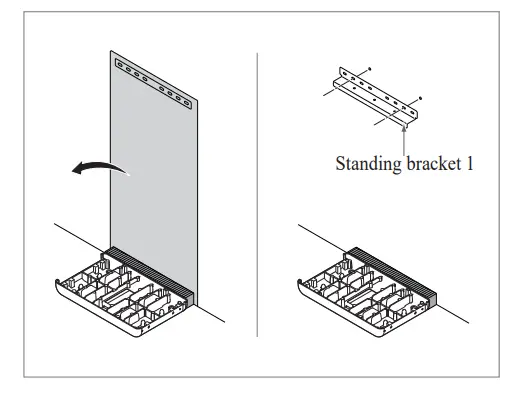
- Remove the Drill template. Then retighten the fasteners on the Standing Bracket 1.
*The fasteners will be fully tightened in a later step.
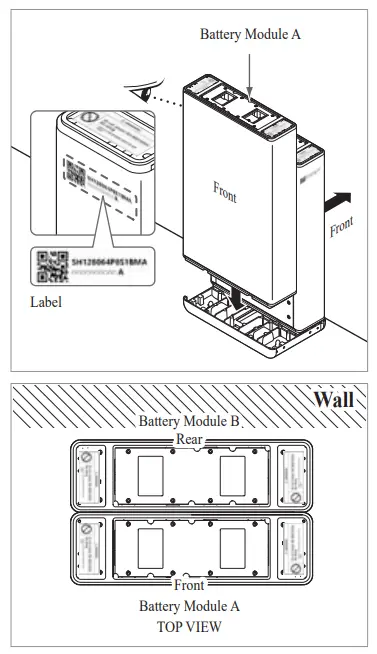
- Place Battery Module B on the rear side of Module Connect plate.
* The side without bolts is the front of the Battery Module.
* battery pack is of B. Label is attached on the left side of Battery Module.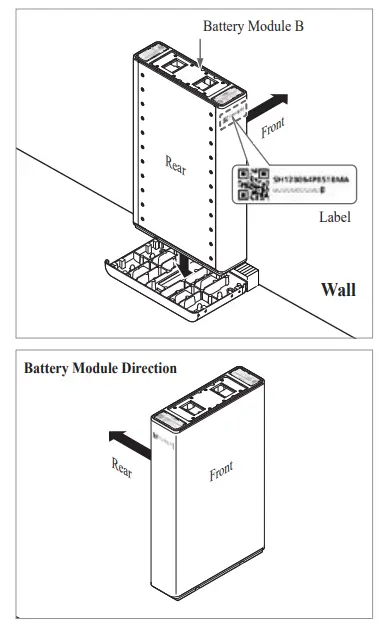
- Place Battery Module A on the front side of Module Connect plate. The Rear side of each Battery Module should face each other. After that, remove the Spacer between the wall and Battery Module.
* Battery pack is of A. Label is attached on the left side of Battery Module.
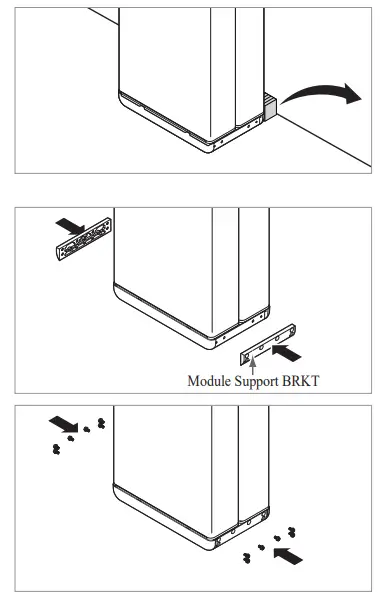
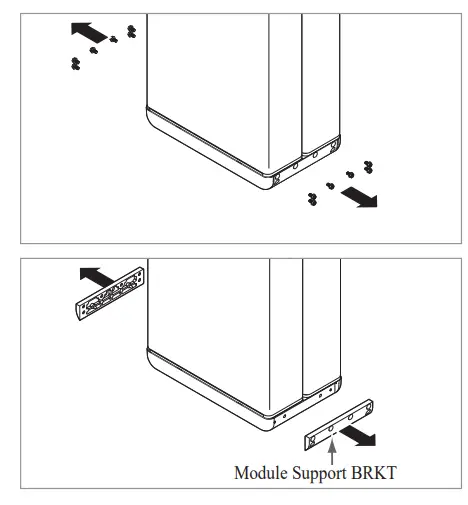
- Assemble Module Support BRKTs using 6 bolts each.
* Tighten the M6 Flange Bolts (x12) with a torque of 5N·m.
- Place Battery Module A on the front side of Module Connect plate. The Rear side of each Battery Module should face each other. After that, remove the Spacer between the wall and Battery Module. *
Battery pack is of A. Label is attached on the left side of Battery Module.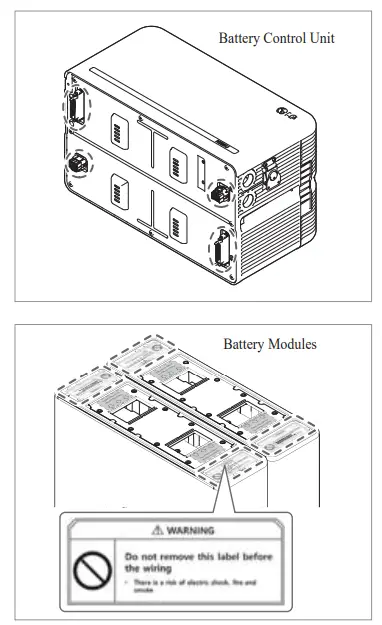
- Place the spacers on the position marked with label on Battery Modules.
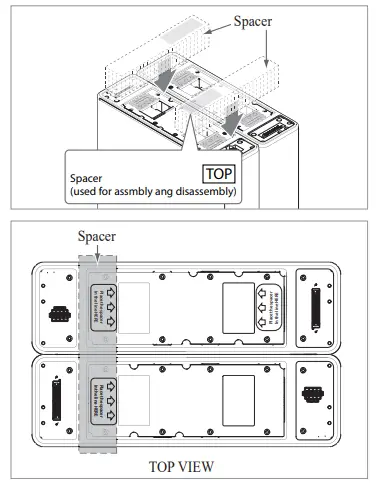
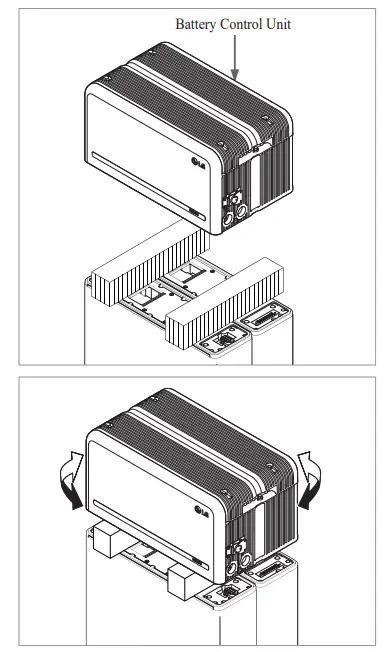
- Place the Battery Control Unit on top of the spacers, and align with the Battery Module.
* Be careful not to break the connector between the spacers and the Battery Control Unit.
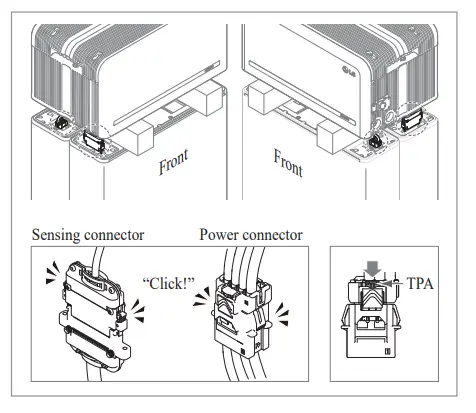
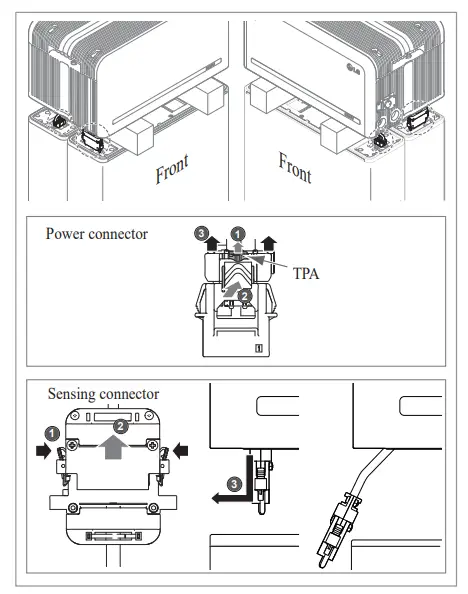
- Connect the power and sensor connectors on the right and left sides (2 each). Assemble the connectors until you hear a “Click”. After that, lock the power connector by pressing TPA (Terminal Position Assurance).
- Check the operation of the battery pack by following the steps below.
1) Hold and turn the handle counterclockwise.
2) Open the front cover and turn on the circuit breaker switch.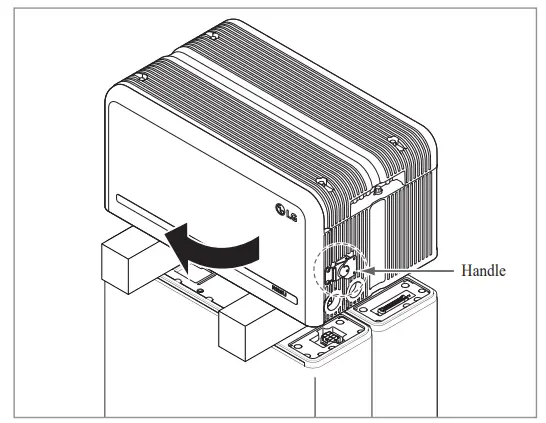 3) If there are no problems with the assembly process or the product itself, the LED power indicator will turn on. Sixty (60) seconds later, the LED fault indicator will blink (due to a lack of communication with the inverter, not due to a product defect).
 4)Then, close the front cover and turn the handle counterclockwise.
* If you experience any problems at this stage, go to Section 5 Troubleshooting. - Double-check the alignment of the Battery Control Unit.
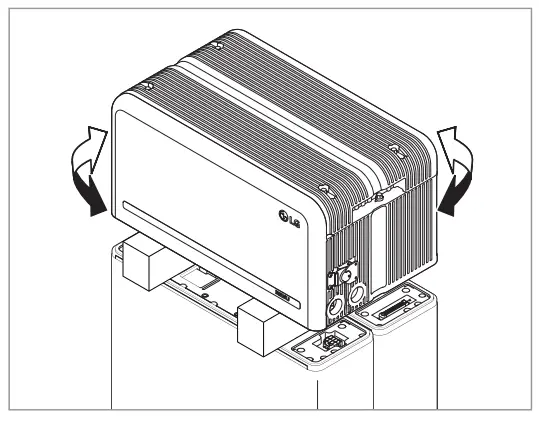
- Remove one spacer by lifting one side of the Battery Control Unit. After that, remove the other spacer in the same way.
* Be careful not to pull on the cables by lifting the Battery Control Unit too high. Doing so may cause damage to the cables or cause the unit to disconnect.
* Before setting down the Battery Control Unit, the cable connection should be checked once more.
- Realign the Battery Control Unit.
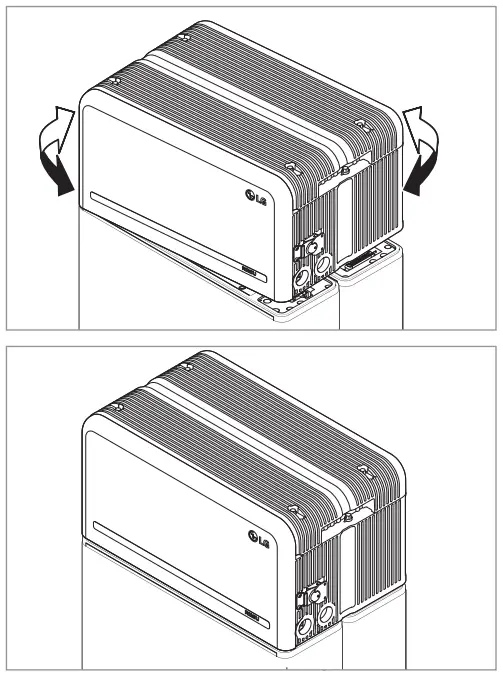
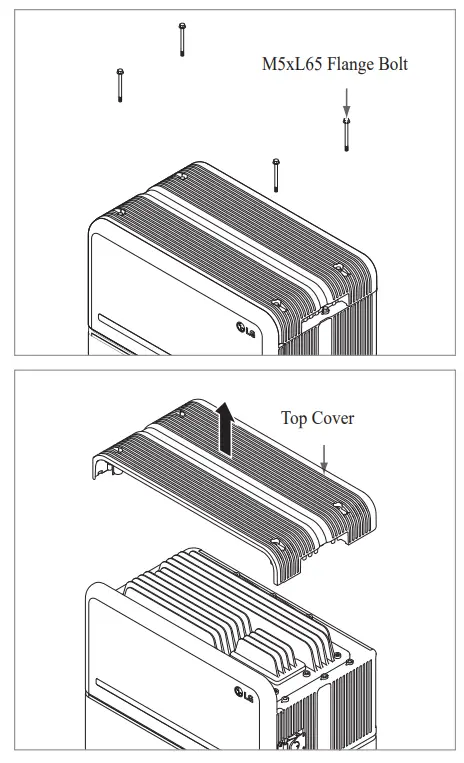
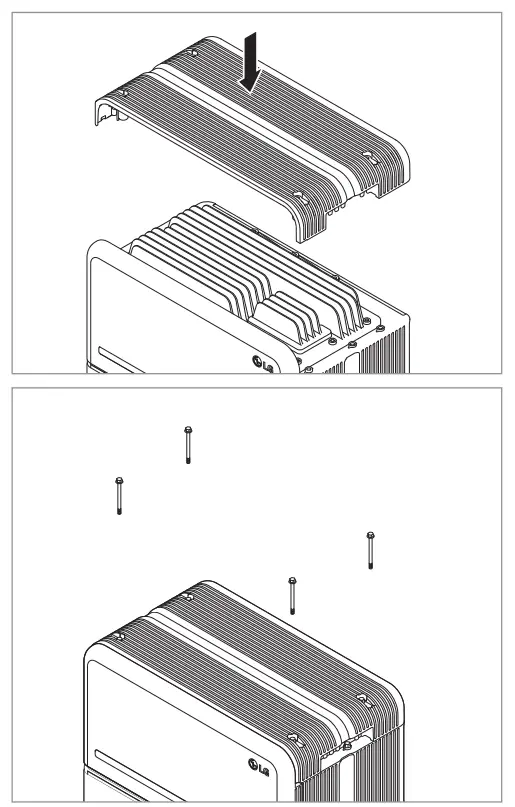
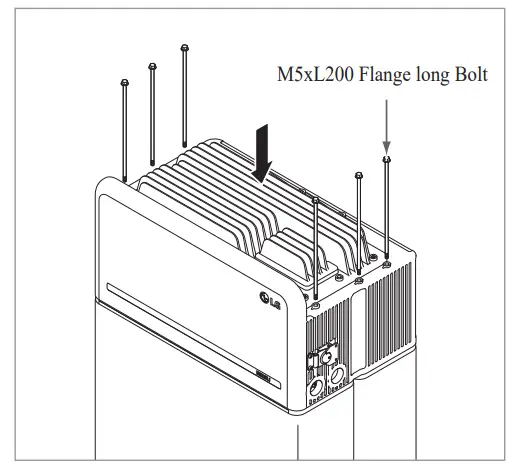
- Loosen 4 bolts and remove the Top Cover.

- a torque of 5N·m.
* While assembling, open the front cover and check that all M5 Flange long bolts are placed accordingly.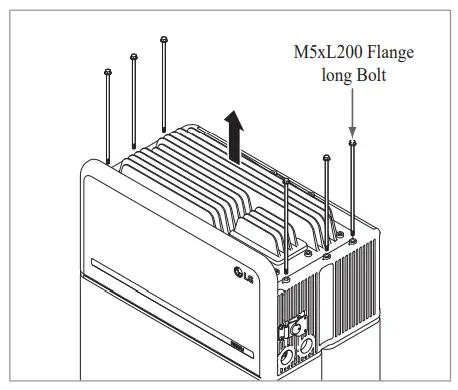
- Move the Battery pack to set the right position for assembly of the Standing bracket.
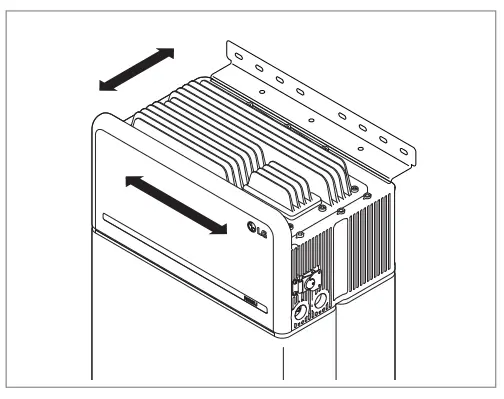
- Pre-tighten six (6) M6 bolts to assemble the Standing Bracket 2 on Battery Control Unit and the Standing Bracket 1. After that, fully tighten all bolts and fasteners on the Standing Bracket 1 and the Standing Bracket 2. * Tightening torque for the M6 bolts is 5N·m.
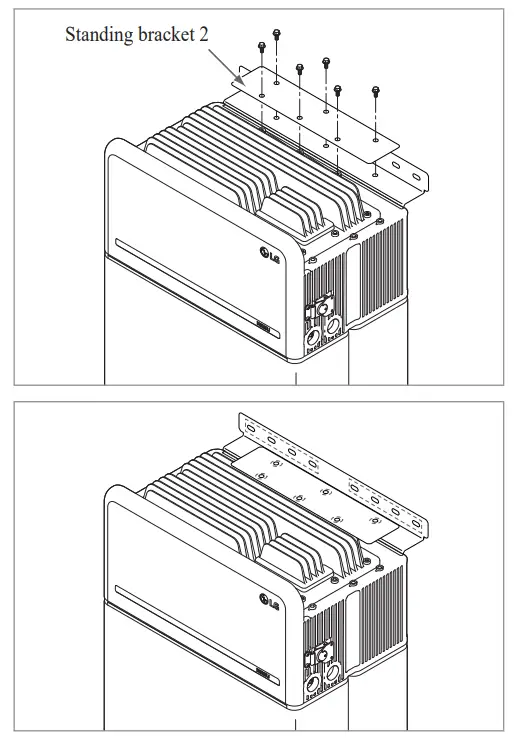
- Re-attach the top cover.
* Tighten the M5xL65 Flange Bolt (4ea) with a torque of 5N·m.
- Open the front cover.
* Hold the handle and turn it counterclockwise.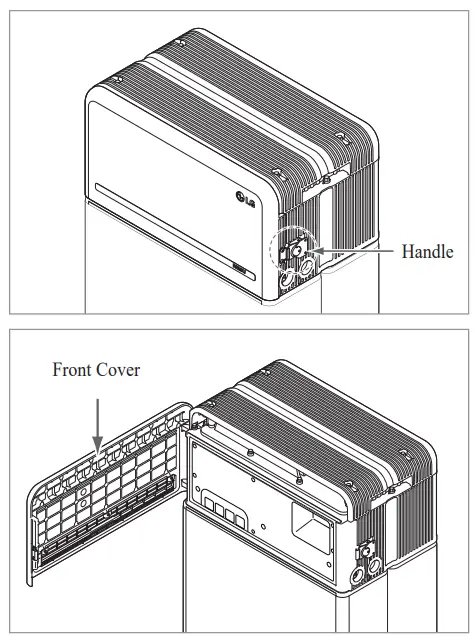
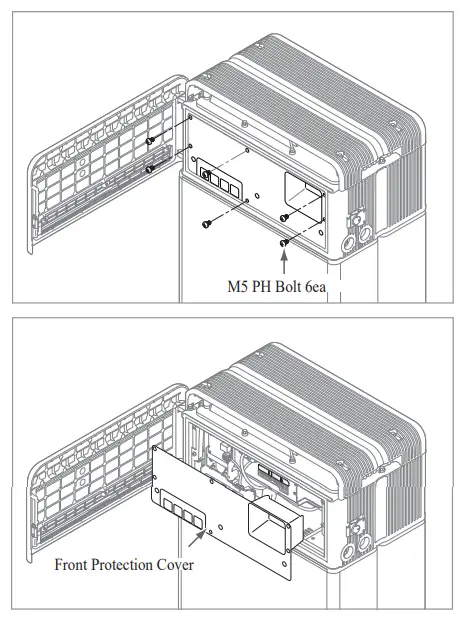
- Loosen 6 bolts and remove the Front Protection Cover.
* Be careful not to drop the bolts into the pack at this stage.
- Assemble the adapter or cap according to regional regulations.
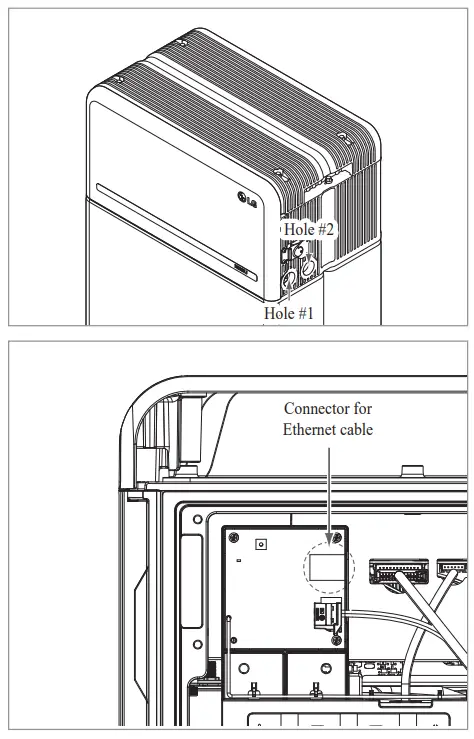
Insert the RMD ethernet cable through Hole #2 and connect the cable. Then proceed to Section 3.2
Installation for Remote Monitoring
- Assemble the adapter or cap according to regional regulations.
Then insert the power and communication cables through the holes from outside of the pack.
* Arrange the internal cable as required to avoid blocking the holes for external cables.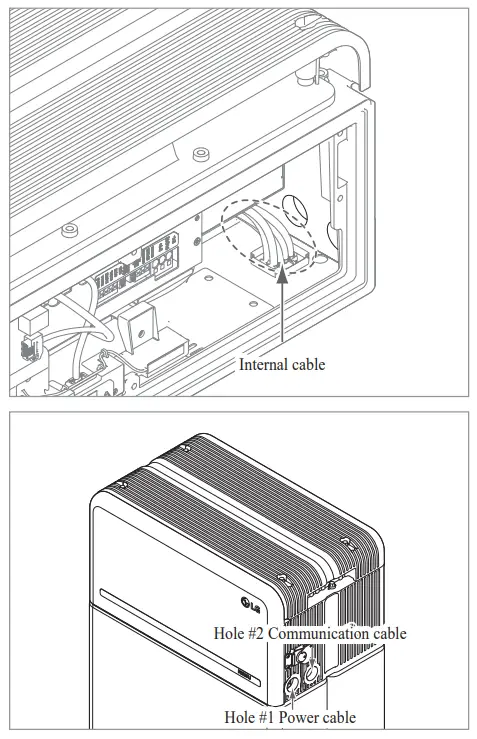
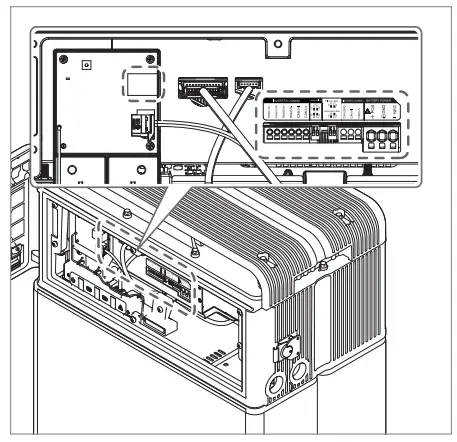
- Connect the cables according to their application.
* Refer to Section 3.3 Cable Connections.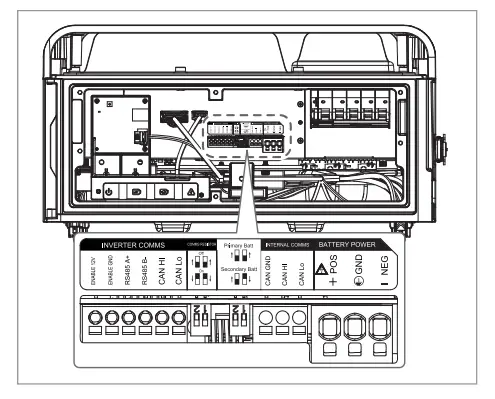
- Arrange the power cables and communication cables separately using cable ties.
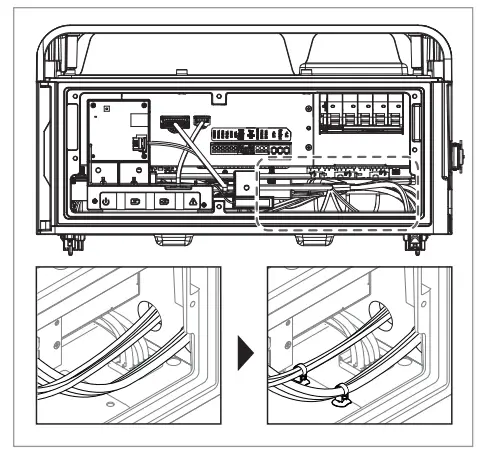
- Re-attach the Front Protection Cover with M5 PH bolt 6ea.
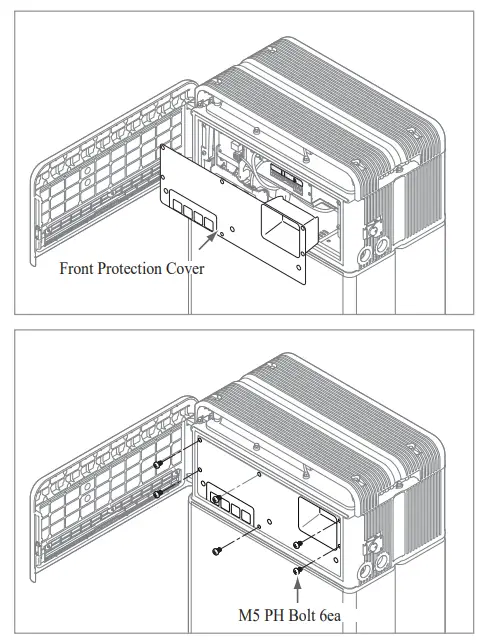
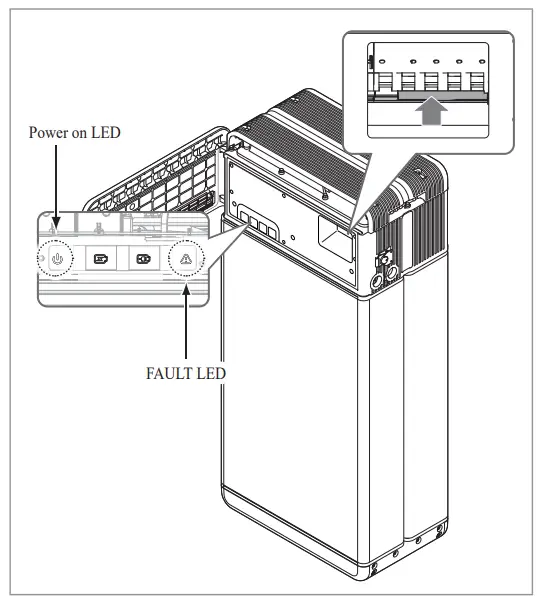 4)Then, close the front cover and turn the handle counterclockwise.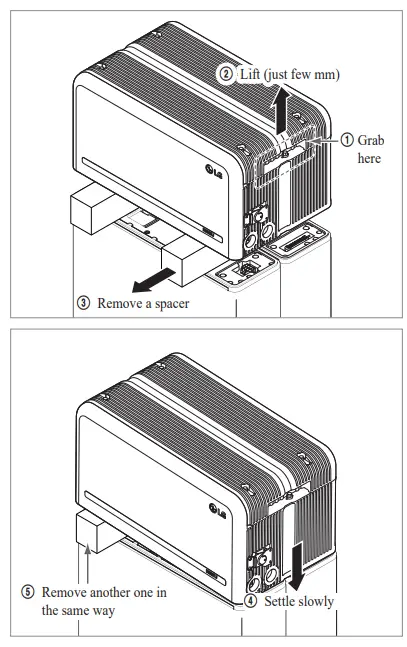
Close the front cover.
* Hold the handle and turn it clockwise.
* Make sure the Front Cover is closed.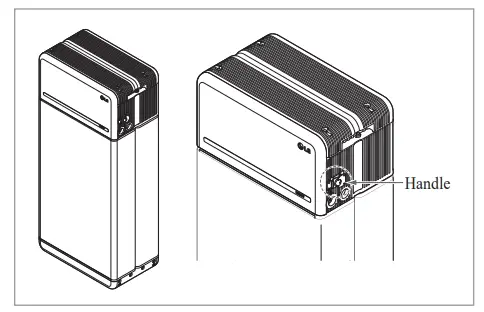
3.2 Installation process for Remote Monitoring Device (RMD)
Remote monitoring device (RMD) is a remote device that can install and monitor a battery pack through App. and web.
3.2.1 Prepare for installation using RMD
3.2.1.1 Installer Sign In
3.2.1.1.1 Visit https://resumonitor.lgensol.com
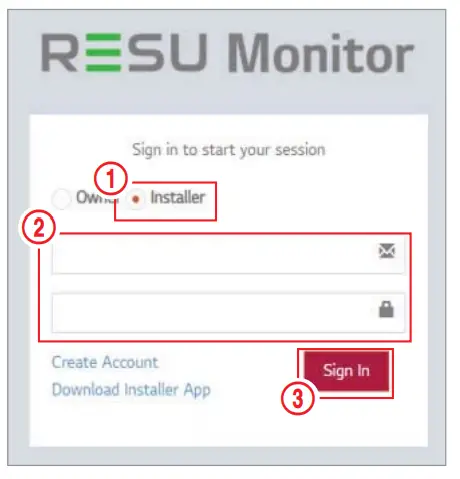
- Select the “Installer “option.
- Enter your ID and Password.
- Click the “Sign In” button.
https://www.lgessbattery.com/us (in case of North America)
https://www.lgessbattery.com/au (in case of Australia)
https://www.lgessbattery.com/eu (in case of all EU-countries in general)
https://www.lgessbattery.com/de (in case of Germany)
https://www.lgessbattery.com/it (in case of Italy)
https://www.lgessbattery.com/es (in case of Spain)
3.2.1.2 Obtaining IoT Hub String
 access the commissioning information creation screen.
- Select a continent (ex. Europe, North America, Oceania).
- Click the “+” button to the right of “Country”, and double-click the appropriate country from the drop-down list.
- Click the “+” button to the right of “City”, and enter two (2) or more letters in the
- Select the appropriate RESU Model.
- Click the “Execute” button to complete product registration. The device connection string information will sent to the account e-mail address.
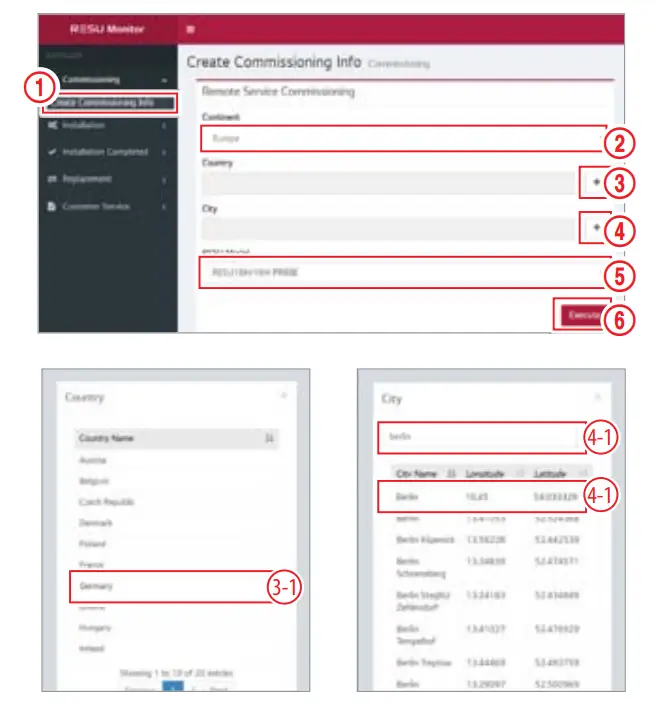 access the commissioning information creation screen.
3.2.1.3 User Registration
3.2.1.3.1 Visit https://resumonitor.lgensol.com
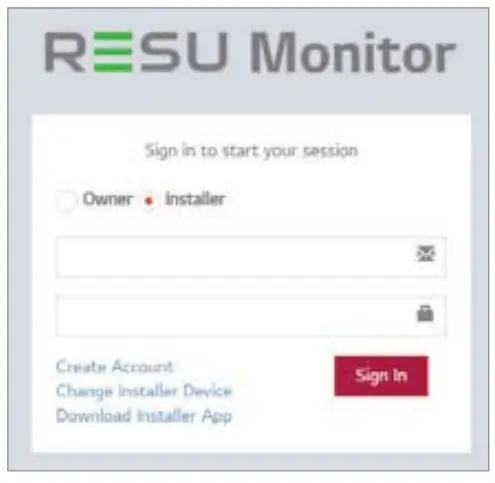
3.2.1.3.2 Create an Owner account.
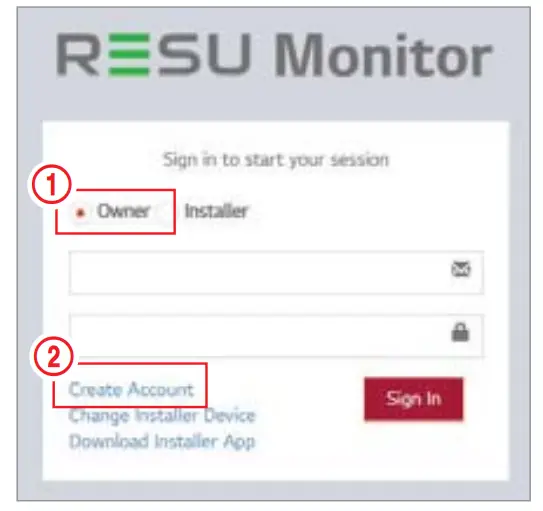
- Select the “Owner” option.
- Select “Create Account”.
- Review the General Data Protection Regulation (Privacy Policy) and check “I Agree” to indicate consent. Click the “Next” button to proceed to the next step.
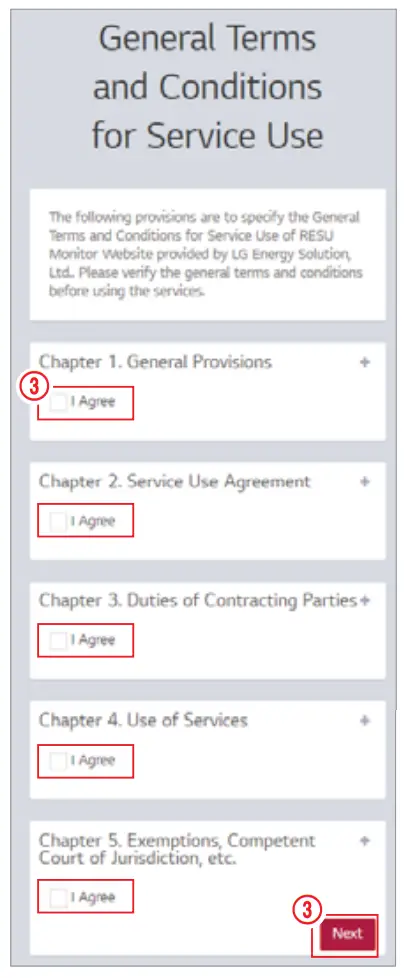
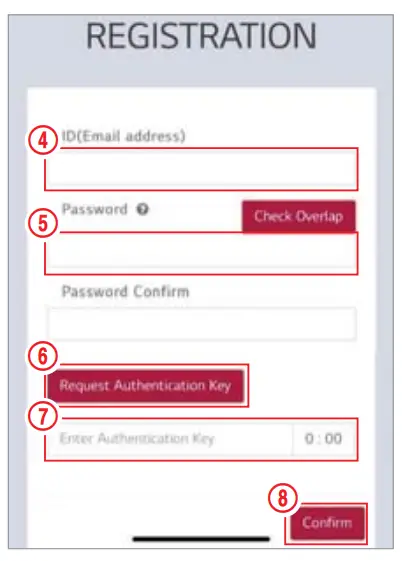
- After entering your ID (e-mail address), click the “Check Overlap” button to check for duplicates.
- Password requirements: 10 to 25 characters long, including letters, numbers, and special characters (!, #, $, %, ^, &, +, =).
- Click the “Request Authentication Key” button to receive your authentication key at the e-mail address you provided.
- Enter your authentication key within 3 minutes to verify your account.
- click the confirm button
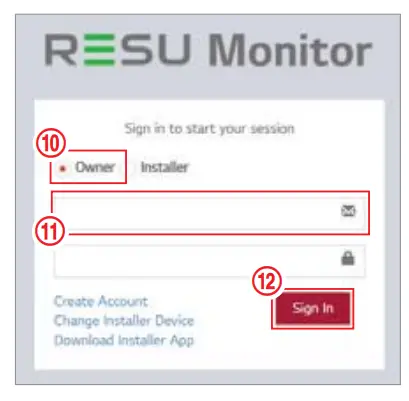
- Select the “Owner” option.
- Enter your ID and Password.
- Click the “Sign In” button.

3.2.2 Installation via RMD
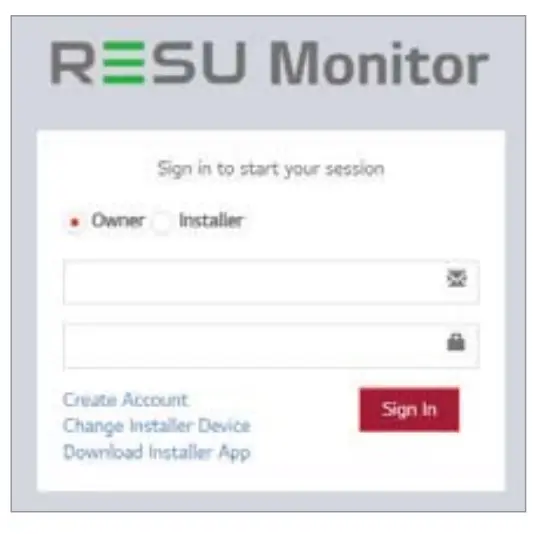
Click the link on the RESU Monitor website to download the APK file of the `RESU Installer’ App.
NOTE
Depending on the device, ‘RESU Installer’ App may not work.
‘RESU Installer’ App is available in the version of the software as follows;
– Android OS: Pie(9.0) or higher
For iOS users, please Refer to Section 7.2.3. Installation via RMD for web user.
3.2.2.1 Powering On the Product
To proceed with product installation, turn on the product.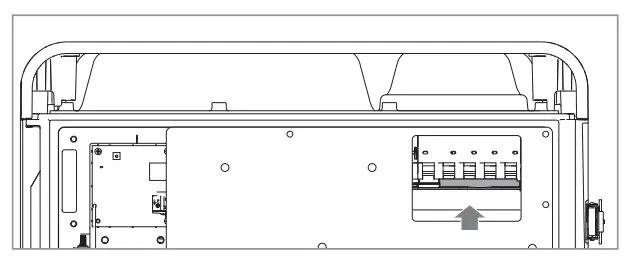 * Open the front cover and turn on the circuit breaker switch.
3.2.2.2 RMD App Log-in
When you run the app, you are the first to log in. (It is assumed that you have created an account in advance.)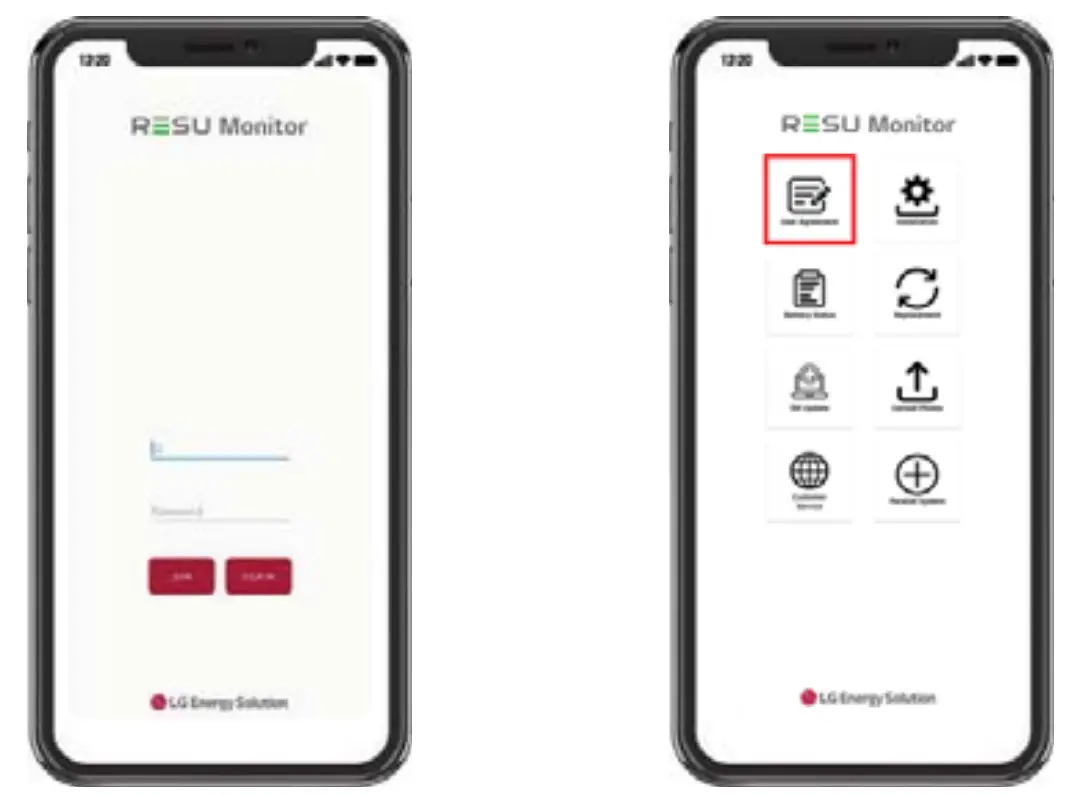
3.2.2.3 User Agreement
- Search the product which you will install.
- Get the agreement of privacy policy for the customer.
- If the customer agrees the privacy policy, have customer’s personal information.
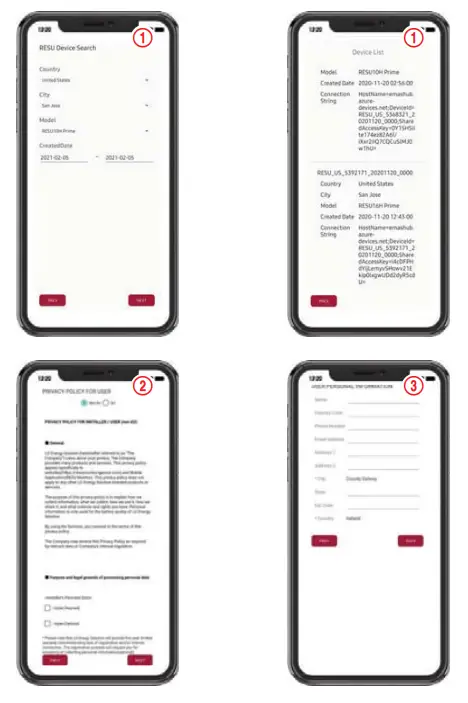
3.2.2.4 RMD Wi-Fi Direct Connection
In order to install using RMD, you must first use RMD’s Wi-Fi direct connection.
For the RMD’s Wi-Fi direct connection, see below.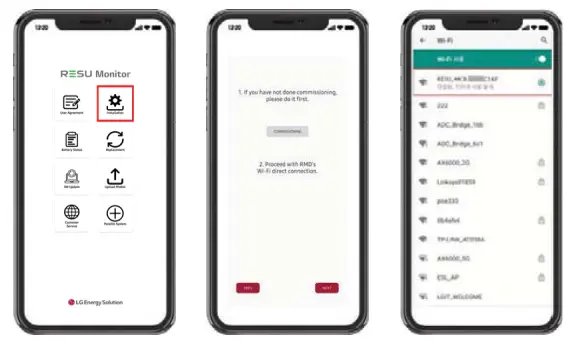 Search and access the SSID of the RMD AP from a device capable of supporting WLAN Station functions (ex. smartphone).
RMD SSID has a structure of “RESU_(or RMD) + RMD WLAN STM MAC ADDRESS”.
For the devices below, the SSID of the RMD Sofa is . The password is 12345678(changeable).
When Wi-Fi connection is complete, click the “Next” button.
3.2.2.5 QR Code Scan
The QR code scanning method is as follows.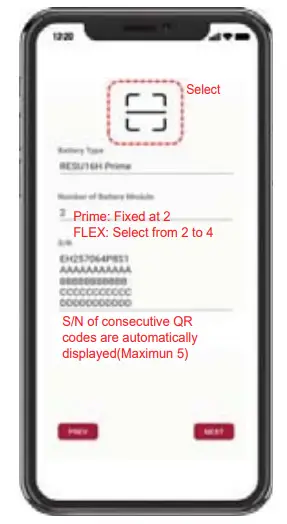 When the QR code registration is complete, click the “Next” button.
If the scanned serial number matches the actual serial number, it will proceed to the next section.
There are three (3) QR codes: Battery Control Unit, Battery Module A, and Battery Module B.
- Battery Control Unit QR Code
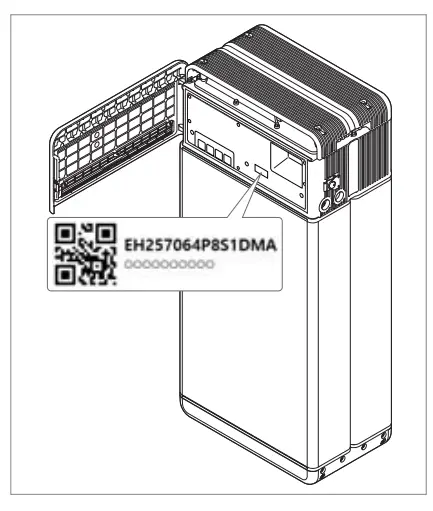
- Battery Module QR Code

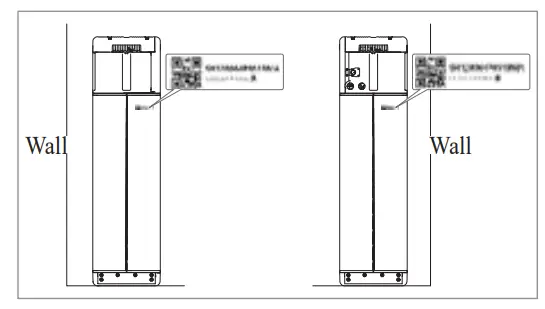
3.2.2.6 External Internet Connection
( If the end user does not wish to use an external intend connection, simply press the “Next” button.)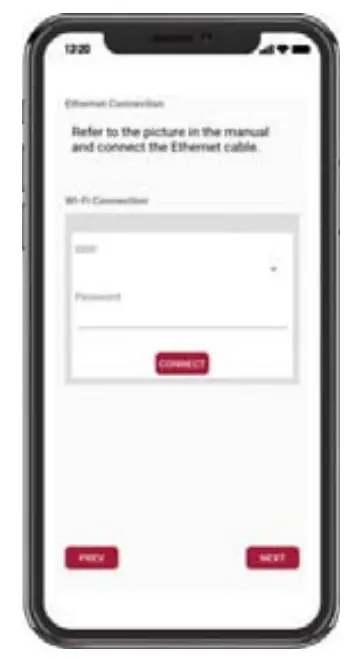 3.2.2.6.1 Ethernet Connection (primary)
Connect the ethernet cable to a router with internet access.
For Ethernet use, it is enough to connect the cable. Since you have already connected the
3.2.2.6.2 Wi-Fi Connection
If you are using an ethernet connection and do not wish to use Wi-Fi, simply click the “Next” button.Scan AP(1): Wi-Fi-network currently available for connection is displayed in 2.
SSID(2): Enter the name of the Wi-Fi-network to connect(You can enter it manually without going through 1.).
Password: Enter the password of the Wi-Fi-network to connect.
When internet connection is successful, click the “Next” button.
* In case the WLAN connection is unstable, enhance the signal by using a WLAN repeater.
3.2.2.7 RMD Configuration Setup
Proceed with the below RMD configuration settings.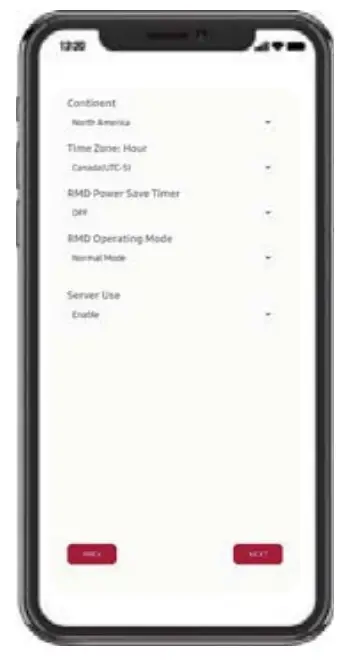
Continent : Select your continent
Time Zone: Hour: Select your time zone.
RMD Power Save Timer: OFF(default)
RMD Operation Mode: Normal Mode(default)
Server Use: Choose whether the cloud server (external internet) will be used.
3.2.2.8 Server Connection and Battery Status Check
IoT Hub Connection String: Enter the unique string provided to you in order to access the Azure IoT Hub (cloud server).
The string format is as follows:
HostName=emashub.azure-devices.net;DeviceId=XXXX;SharedAccessKey=OOOO=
* For more information on how to obtain strings, refer to Section
3.2.1.2 Obtaining IoT Hub String.
Server Connection Check: Check the server connection.
Battery Status: Check if the product has diagnosed any issues.
When the server connection is complete, click the “Next” button.
3.2.2.9 !MD Wi-Fi Disconnection
Disable Wi-Fi in the same way that you connected Wi-Fi in Section Connection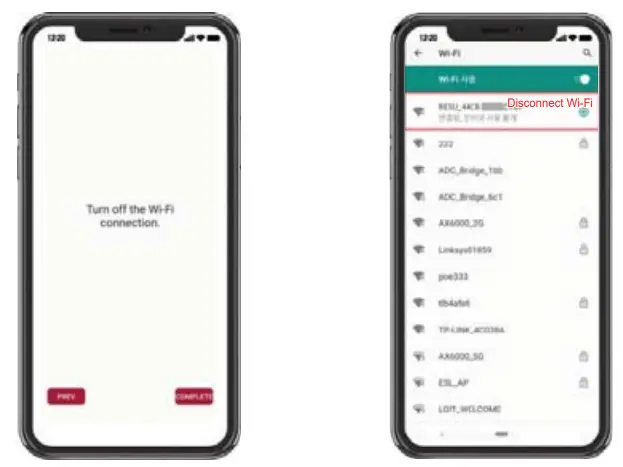 When the server connection is complete, click the “Complete” button.
3.2.2.10 Connect to RESU Monitor to Check Product Registration
After product installation via RMD is complete, check if the product has been registered on the server by selecting “RESU Monitor” below. (https://resumonitor.lgensol.com)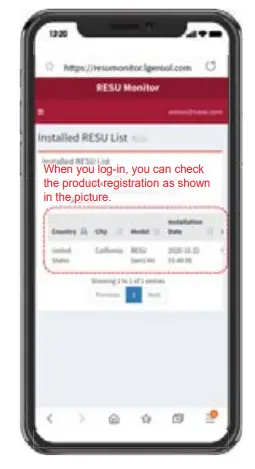
3.3 Cable Connections
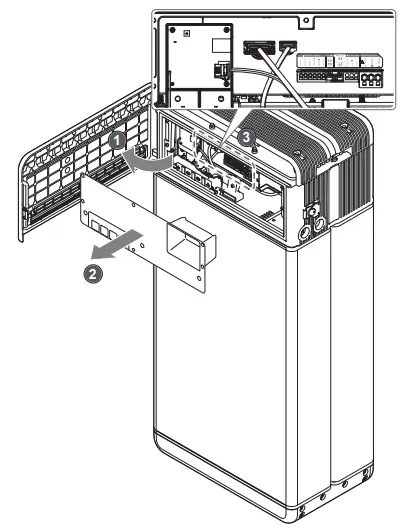
3.3.1 Cable Configuration
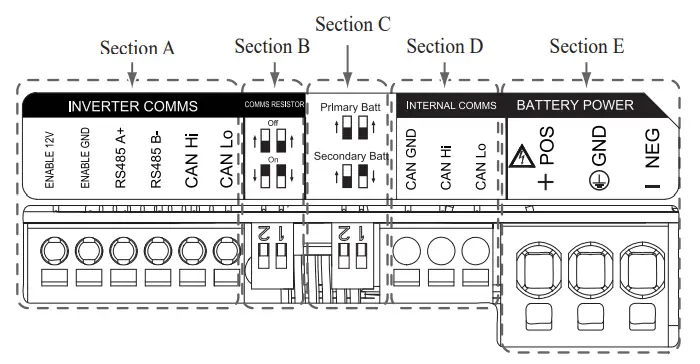
- Section A: Inverter communication ports including CAN/RS485 and enable lines
- Section B: DIP switch for setting communication termination resistor.
- Section C: DIP switch for setting primary/secondary packs.
- Section D: Do not connect the internal communication ports
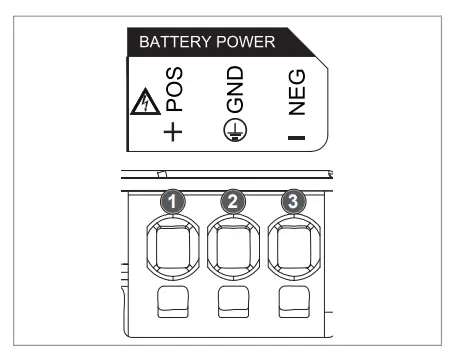
- Section E: Battery power ports including positive/negative pole and ground (POS: power terminal plus, NEG: power terminal minus, GND: ground)
3.3.2 Guide for cable connection and setting the DIP switch
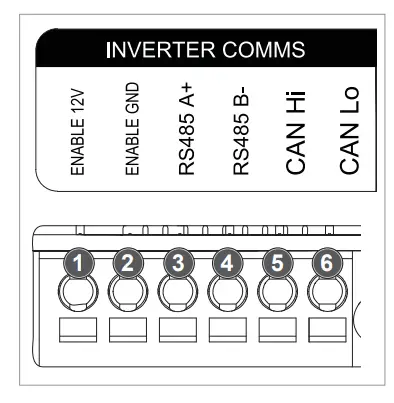
- Section A: Inverter communication ports
a) First, connect the enable ground wire to Terminal 2.
b) Connect the enable 12V positive line to Terminal 1.
c) Select the method that matches the inverter communication method in the part marked. If the inverter uses RS485, connect the RS485 (A+, B-) lines to Terminals 3 and 4.
If inverter uses the CAN method, connect the CAN (high, low) lines to Terminals 5 and 6.
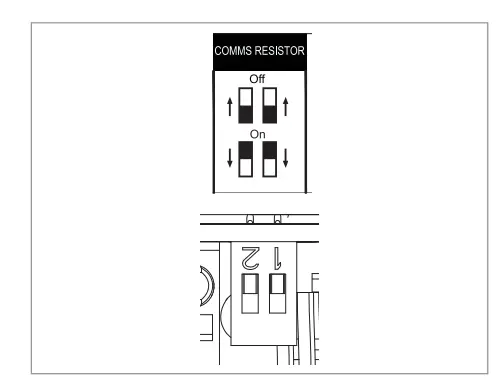
3.3.3 Spring Terminal Blocks, when choosing the communication cable and cable sheath for peeling. - Section B: DIP switch for setting communication termination resistor of primary/secondary packs Lower the DIP switch (Communication Termination resistor) all downwards for single pack.
When you install two packs, refer to the appendix about setting for communication termination resistor.
- Section C: DIP switch for setting primary/secondary packs
Raise all DIP switch upward when you want to use as a primary pack.
And also, when you want to use as a secondary pack, lower the switch on the right side only when viewed from the front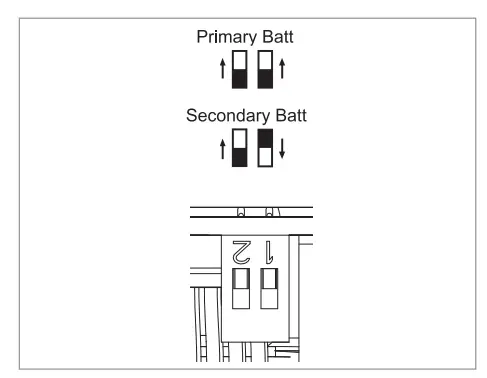
- Section E: Battery power port a) Connect the ground wire to Terminal 2.
b) Connect the negative line of the power cable to Terminal 3.
c) Connect the positive line of the power cable to Terminal 1.
3.3.3 Spring Terminal
Blocks when choosing the battery power cable and cable sheath for peeling.
When you install two packs, refer to the appendix about power cable.
3.3.3 Spring Terminal Blocks
- Power terminal block
Max. cable length: 10 m (35 ft)
Cable type: 8mm² (8 AWG)
DC 600V insulated
Pinning
Phoenix contact
PCB terminal block SPT 5/3-H-7,5-ZB
P/N: 1719202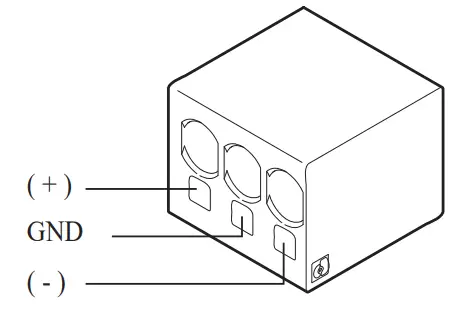
- Communication terminal block
Max. cable length: 10 m (35 ft)
Cable type: 0.2~1.5mm² (18~22AWG)
Pinning
Phoenix contact
PCB terminal block SPT 2,5/6-H-5,0
P/N: 1991011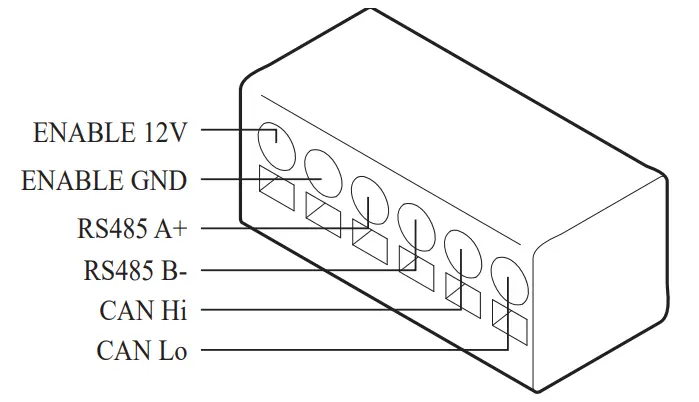
Peel cable sheaths (15 mm for the power terminal cable and 10 mm for the communication terminal cable).
NOTE
Check all cable are firmly in place. Loose power cables can cause arcing and may damage the battery and/or inverter.
Commissioning
4.1 LED Indicators
The LED indicators on the front of the battery pack show its operational state as follows:
| LED I (Power) | LED 2 (Charge) | LED 3 (Discharge) | LED 4 (Fault) | Status | |
 |  |  |  | Power on Unit) | |
| – | – | – | Ready | Normal |
| | – | – | Charge | |
| – | | – | Discharge | |
| – | – |  | Fault 1 | |
| – | – | | Fault 2 | |
 (Every 10 s) (Every 10 s) | – | Power-saving | |||
| – | – | – | – | Power Off | |
| (Quickly) | – | – | – | Updating | FW Update |
| | | _ | Update Complete | |
| – | | | | Update Failed | |
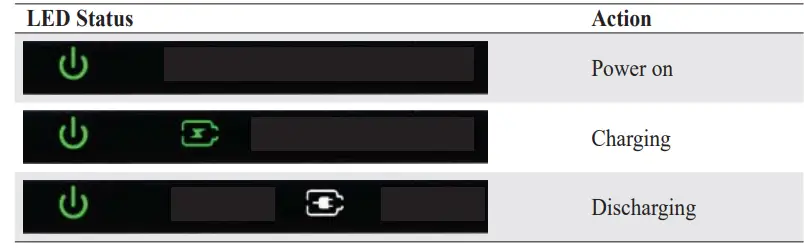
There are four LED indicators on the front of the battery packs to show its operating status.
- Power On(Init) : Initialization for operating the battery
- Ready : Battery is ready for operating normally.
- Charge : Battery pack is charging.
- Discharge :Battery pack is discharging.
- Fault : Battery pack is warning state. Fault1 is blinking. Fault 2 is continuous. See Section 5 Troubleshooting guide for detail condition.
- Power saving : Battery stay in minimum self consumption power mode.
- FW update : Battery is in update sequence. See the detail LED indication about Updating, Update complete, Update failed.
4.2 Powering On the Battery Pack
Power on the battery through the following steps:
- Open the front cover.
- Ensure the circuit breaker switch is in the OFF position.
- Turn on the circuit breaker.
- Seconds after the circuit breaker switch is ON, four (4) LED indicators will light up.
- successfully initialized. The LED power indicator on the front should be green.
- Close the front cover.
- Turn on the inverter.
CAUTION
If it stays off, indicates FAULT or fails to operate, do not use the battery pack and contact LG Energy Solution or your distributor.
4.3 Shutting Off the Battery Pack
Shut off the battery pack through the following steps:
- Turn off the inverter.
- Open the front cover.
- Turn off the battery pack by moving the circuit breaker switch to the OFF position.
- Make sure that every LED indicator on the battery pack is OFF. (After 10 seconds, the LED lights will turn off and the battery will shut down completely.)
- Close the front cover.
Troubleshooting
5.1 Troubleshooting Overview
Check the LED indicators on the front to determine the state of the battery pack. A fault state is triggered when certain conditions like voltage or temperature are beyond design limitations.
The battery pack’s BMS periodically reports its operating state to the inverter.
When the battery pack falls outside of prescribed limits, it enters a fault state. When a fault is reported, the inverter immediately terminates operation.
Use the monitoring software on the inverter to identify what caused the fault state. The possible warning messages are as follows:
- Battery Overvoltage
- Battery Undervoltage
- Battery Over Temperature
- Battery Under Temperature
- Battery Discharge Overcurrent
- Battery Charge Overcurrent
- Battery Overcharge Power Limit
- Battery Over discharge Power Limit
- BMS Internal Error
- External Communication Error
- Internal Communication Error
- Battery Cell Deviation Voltage
- Battery Pack Undervoltage
- Battery Urgent Undervoltage
The fault state is cleared when the battery pack resumes normal operation. If battery pack is Solution regional contact service point.
NOTE
For serious warnings, if no proper corrective action is taken by the inverter, the battery pack’s circuit breaker will automatically trip to protect itself.CAUTION
If the battery pack or the inverter indicates FAULT or fails to operate, contact LG Energy Solution regional contact point or your distributor immediately.
5.1.1 Post-Installation Checklist
| 1. Visually check if the wiring matches the installation manual. (Section 3.3 Cable Connections.) | Yes | No |
| 2. The circuit breaker is ON. |  | |
| 3. The battery LED power indicator is ON. | | |
| 4. The inverter power is ON. | | |
| 5. The inverter has the latest firmware installed. 1) | | |
| 6. The inverter recognizes the battery. 2) | | |
| 7. The battery is operational after installation. 7-1. The AC grid is connected. 7-2. The meter is installed. 7-3. Government approval is complete. | | |
| 8. IF ANY ITEM IN #7 IS CHECKED AS “NO” OR IF THE INVERTER NEEDS TO BE TURNED OFF, TURN OFF THE CIRCUIT BREAKER.’) | | |
5.1.2 Troubleshooting Guidelines
If the battery LED power indicator is OFF
- Turn off the circuit breaker.
- Turn off the inverter. Verify there is no power at the battery connection.
- Unplug all the wires and reconnect. Check that the wiring on the battery has been done correctly. Refer to Section 3.3 Cable Connections.
- Turn on the circuit breaker.
- Turn on the inverter.
- If the LED power indicator is still OFF, turn off the circuit breaker.
- Disconnect the power cable connector.
- Contact LG Energy Solution regional contact point.
1) Contact the inverter manufacturer.
2) Refer to the inverter installation manual or troubleshooting guidelines.
3) Refer to the Installation manual (33 Cable Connections) for the location of the battery. and the Circuit Breaker.
If the LED power indicator is ON, but the battery is not charging or discharging
- Update both the inverter and battery firmware versions. Refer to the inverter’s troubleshooting guide for instructions.
- Check the inverter’s battery settings. Refer to the inverter’s troubleshooting guide for battery setup instructions.
- If the battery is recognized, inverter setup has been completed successfully.
- If the issue persists:
4-1. Turn off the circuit breaker.
4-2. Turn off the inverter. Verify there is no power at the battery connection.
4-3. Unplug all wires and reconnect. Check that the wiring on the battery has been done correctly. Refer to Section 3.3 Cable Connections.
4-4. Turn on the circuit breaker. - If the battery setup is correct, but the battery is still non-operational, turn off the circuit breaker
- Contact LG Energy Solution regional service contact point.

If the LED fault indicator is ON
- Check if the inverter recognizes the battery. Refer to the inverter’s troubleshooting guide for battery setup instructions.
- If the inverter is connected to the internet, collect the log files from the inverter company.
2-1. Send the fault ID to LG Energy Solution regional contact point.
2-3. Wait further instruction from LG Energy Solution. - If the inverter is not connected to the internet, check the inverter LCD to read the
battery’s fault ID. Refer to the inverter’s troubleshooting guide for instructions.
3-1. Send the fault ID to LG Energy Solution regional contact point.
3-3. Wait further instruction from LG Energy Solution.
Uninstallation & Return
6.1 Return/Replacement Instructions
6.1.1 Uninstallation
Uninstall the battery pack in the following order:
- Switch the inverter OFF before beginning uninstallation of the battery pack.
- Switch circuit breaker OFF and make sure it is in the OFF position.
- Open the front cover, loosen 6 bolts and remove the Front Protection Cover.
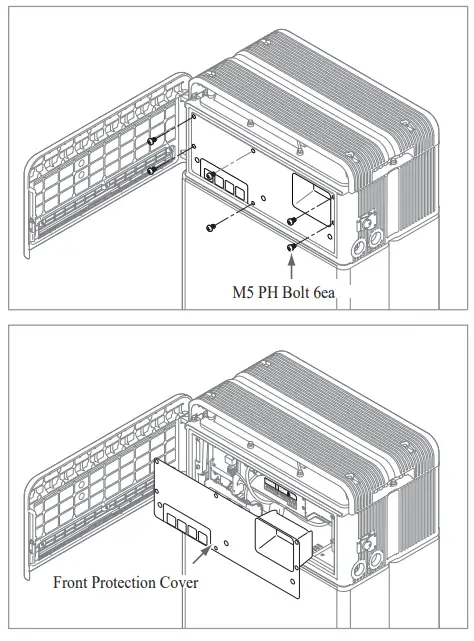
- Disconnect the cables.
- Re-attach the Front Protection Cover with M5 PH bolt 6ea.
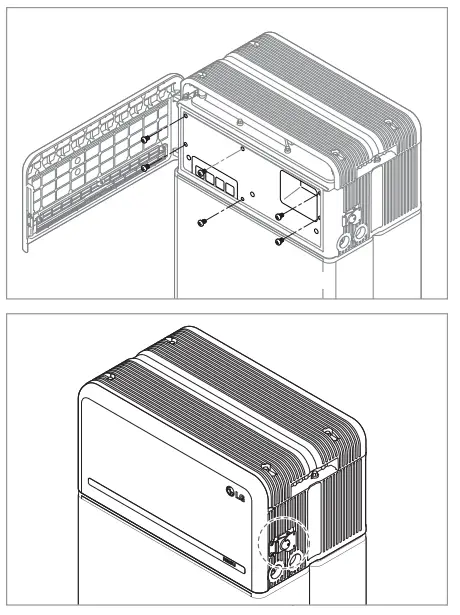
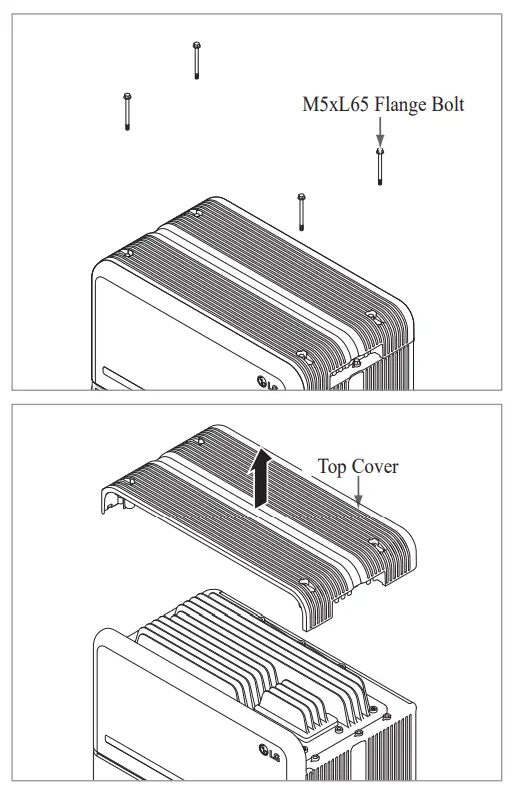
- Loosen 4 bolts and remove the Top Cover.

- Loosen six (6) M6 bolts and disassemble Standing Bracket #2 Bracket #1 from the wall.
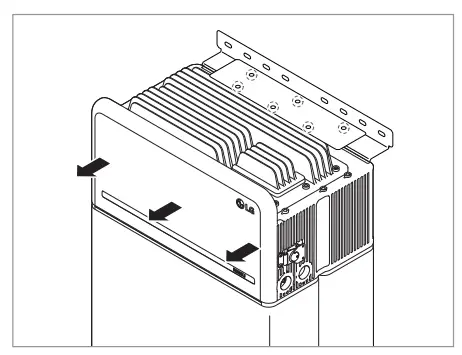
- Loosen six (6) long bolts.

- Re-attach the top cover.
* Tighten the M5xL65 Flange Bolt (4ea) with a torque of 5N·m.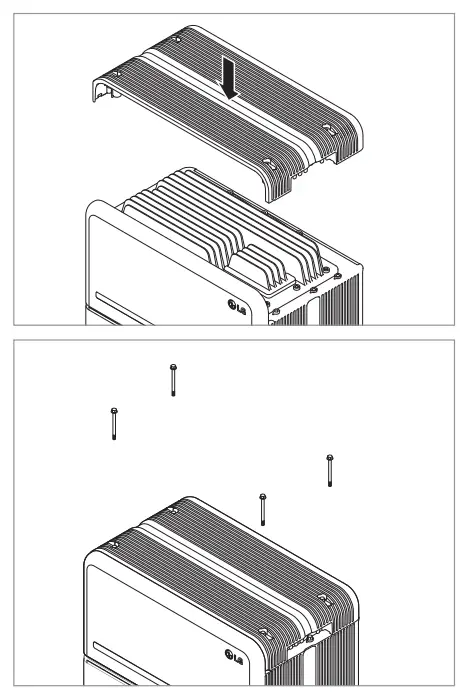
- Place the first spacer on top of the Battery Modules
• Be careful not to pull the cables tight by lifting the Battery Control Unit excessively. It may damage the cables or disassembly of connector.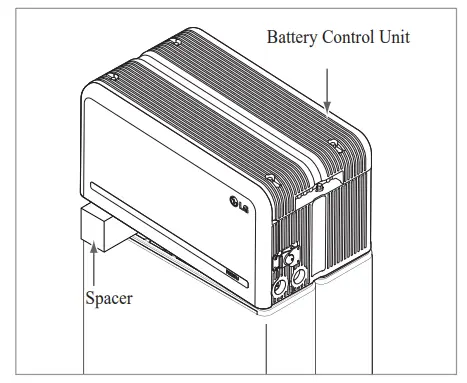
- After that, place the second spacer on top of the Battery Modules.
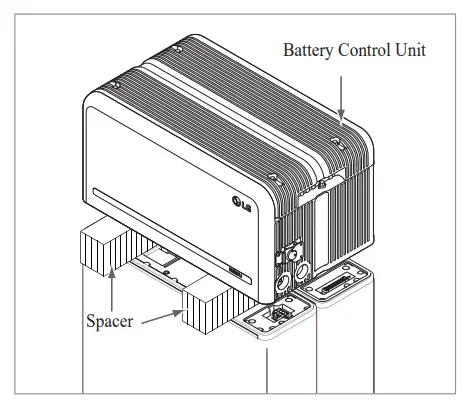
- Disconnect the power and sensor connectors on the right and left sides (2 each). This step should undergo a deliberate visual inspection by the installer before proceeding.
1) Power connector: 1 Pull the TPA and 2 press the button at the center of the connector. Then 3 pull out the connector vertically.
2) Sensor connector: 1 Push in the sides of the connector and 2 pull out the connector vertically. Then 3 pull the connector out to the side of the Battery Module.
* Be careful of damage to the sensor connector’s guide pins during disassembly.
* At this stage, DO NOT lift the Battery Control Unit until all connectors are disassembled.
- Disassemble Module Support Brathwaite six (6) bolts each.
* Loosen the M6 Flange Bolts (x12) - Repack in the box.

6.1.2 Contact Information
for use and may pose a danger to people or property. If the battery pack seems to be damaged, contact LG Energy Solution regional contact point or your distributor. Use the contacts below for technical assistance. These phone numbers are available only during business hours on weekdays.
Service Contacts
US
Address: 19481 San Jose Ave City of Industry, CA 91748, U.SA
Telephone: +1 888 375 8044
Email: [email protected]
Appendix
7.1 Connection in RESU16H Prime parallel battery system CAUTION
Parallel battery system can only be applied between products of the same energy.
7.1.1 Setting for communication termination resistor (About Section B)
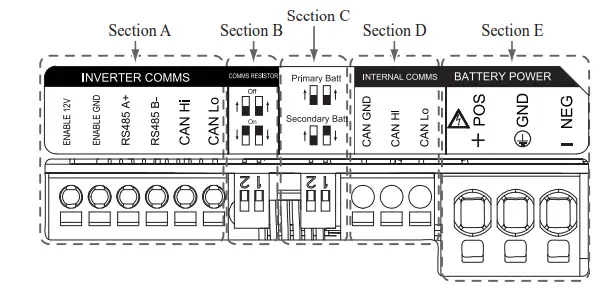
When you install the pack as primary, Turn ON the DIP switch for communication termination resistor.
When you install the pack as secondary, Turn OFF the DIP switch for communication termination resistor.
- Case 1 : When installing one battery pack, Turn ON the DIP switch for communication termination resistor.
(It is ON when switches are lowered.)
- Case 2-1 : When installing two battery packs, and inverter has two communication ports separately for each battery pack, Turn ON the all DIP switches for communication termination resistor of both packs.
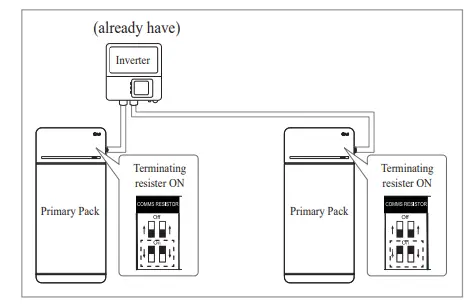
- Case 2-2 : When you install the two battery packs and inverter has only one communication port for both battery packs, Install the secondary pack with the termination
side. Install the primary pack with the termination resistor turned on in the last side. Middle side means that it is connected two number of communication pairs, (1st: from inverter to Secondary pack, 2 Nd: from Secondary pack to Primary pack),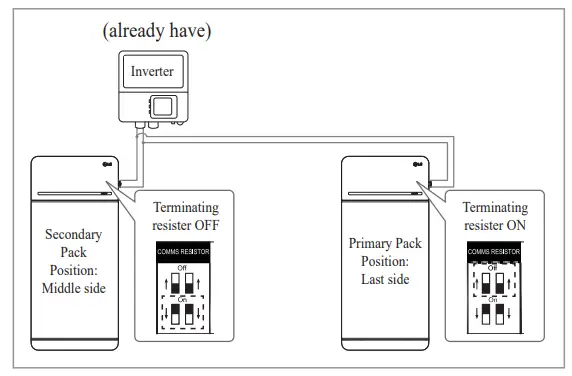
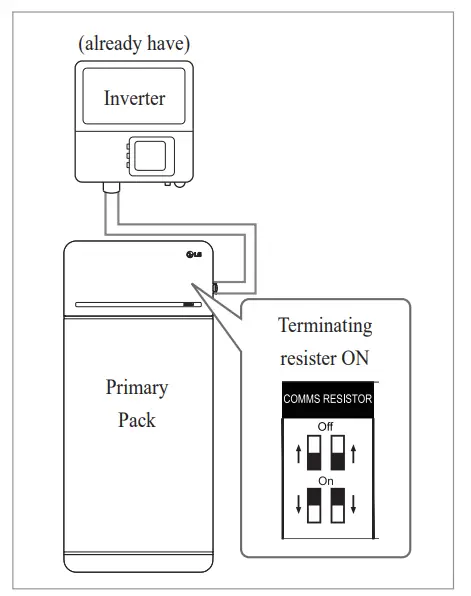
Last side means that it is connected one communication pair (from Secondary pack to Primary pack) In Case 2-2, Communication cable is connected by daisy chain. Communication line from inverter should be connected secondary battery pack. And the additional communication line is connected from secondary battery pack to Primary battery pack. Secondary communication battery pack. 2nd line is connected between Primary and secondary. If installed incorrectly, the battery pack will not operate normally.
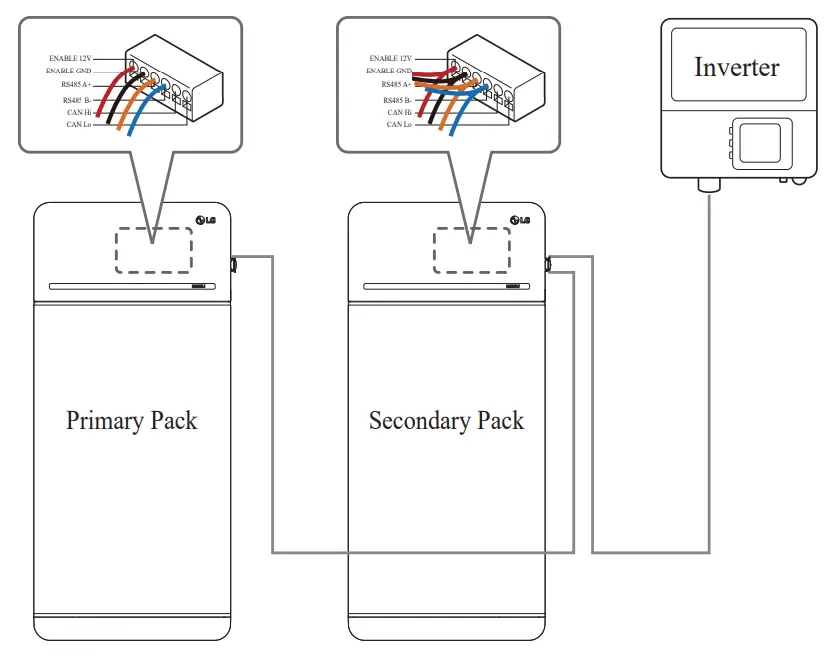
In the case of products using a combiner box, communication lines can also be connected through the combiner box.
The communication termination resistor can be changed depending on the inverter model, not the battery’s own condition. Therefore, you must refer to the battery communication connection description in the inverter installation guide. Below are some examples according to the inverter model.
[When only 1 pack is installed]
| Inverter model | SN1A | SolarEdge | Other models (Case 1) | ||
| SUNNY BOY STORAGE 2.5/3.7/5.0/6.0 (Case 1) | Energy Hub (Case 1) | ||||
| Primary / Secondary | Primary | Primary | Primary | ||
| Communication resistor | ON | ON | ON | ||
| W hen installing 2 packs] | |||||
| Inverter model | SMA | SolarEdge | |||
| SUNNY BOY STORAGE 2.5/3.7/5.0/6.0 (Case 2-1) | Energy Hub (Case 2-2) | Other models | |||
| Primary / Secondary | Primary | Primary | Primary | Secondary | Refer to the inverter |
| Communication resistor | ON | ON | ON | OFF | installation manual. |
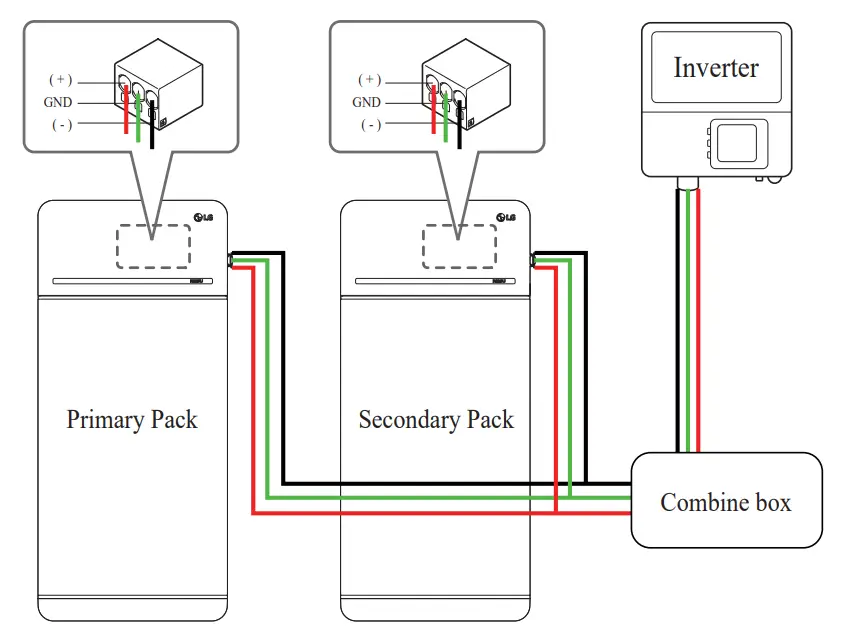
7.1.2 Poker cable (When using a combiner box)
Power cable is connected by combiner Box. Positive and negative line should be connected same polarity line by combiner box. Joint connection is in the combiner box. If installer connected reverse polarity position of the power line, the battery system is not normally operated.
7.2 RMD Applications
7.2.1 Battery Status check via RMD
How to check the battery status is as follows.
1) RMD Wi-Fi direct connection
First, proceed with RMD Wi-Fi direct connection as shown below.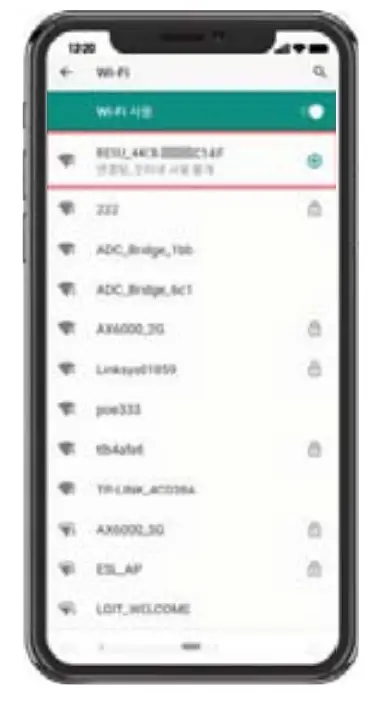 Search and access the SSID of the RMD AP from a device (hereinafter referred to as a device) supporting WLAN Station functions such as a smartphone.
RMD SSID has a structure of “RESU_ (or RMD) + RMD WLAN STM MAC ADDRESS”. For the devices below, the SSID of the RMD SoftAP is “ ”. The password is 12345678(changeable)
2) RMD Web page access
- Start a web browser on the device and enter 192.168.4.1 in the address bar. If the following screen is displayed after input, you have successfully connected to the
RMD web server.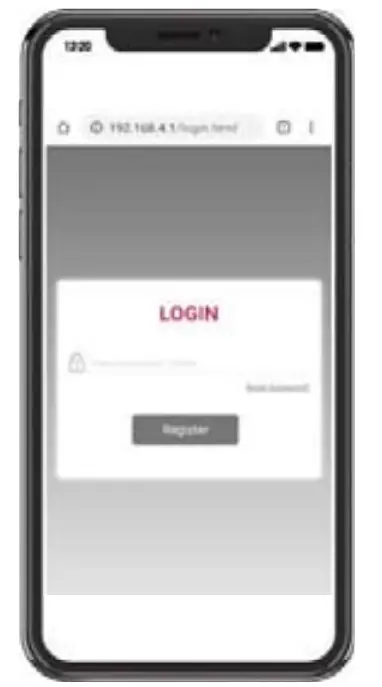
- Enter the password and click ‘Register’ to go to the home screen.
- The default password is set to 123456 and can be changed in the Web UI.
3) Battery Status Check
Go to ‘Monitoring’ – ‘BMS’ tab of RMD Web page and check the value in the red box. If the value is not ‘0x0000(or 0x00)’, refer to the Trouble shooting table below and take action.
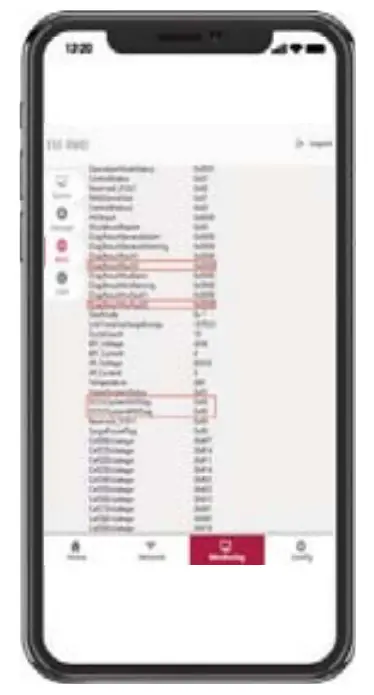
| Fault Name | error code | Support action required |
| Over Voltage Fault2 | DiagResultFault2 0x0001 | Return the battery to LG Energy Solution. |
| Under Voltage Fault2 | DiagResultFault2 0x0002 | Battery pack On and check additional errors. In case of normal operation, Charge the Battery pack to over SoC 5% with inverter. Retrieve pack if issue occurs repeatedly. |
| Over Temperature Fault2 | DiagResultFault2 0x0400 | 1. If there is a heat source nearby or the wind of the air conditioner is directly hitting it, remove the heat source. 2. Lower the temperature down to room temperature. Rest until Battery temperature matches room temperature, then turn on the CB. Retrieve pack if issue occurs repeatedly. |
| Under Temperature Fault2 | DiagResultFault2 0x0800 | 1. If ice built up on the battery surface. Remove ice. 2. Increase the temperature up to room temperature. Rest until Battery temperature matches ambient temperature, then turn on the CB. Retrieve pack if issue occurs repeatedly. |
| Over Charge Current Fault2 Over Discharge Current Fault2 Over Charge Power Limit Fault2 Over Discharge Power Limit Fault2 | DiagResultFault2 0x0020 DiagResultFault2 0x0040 DiagResultFault2 0x0080 DiagResultFault2 0x0100 | Check if the setup/wiring is connect properly and inverter turn on the CB. Retrieve pack if issue occurs repeatedly. |
| External Communication Failed (BMS-DC/DC LOC) | DiagResultFault2 0x4000 | Check the communication line. If there is no abnormality in the communication line, battery pack on and check additional errors. Retrieve pack if issue occurs repeatedly. |
| Internal Communication Failed (MCU-BMIC Comm. In BMS) | DiagResultFault2 0x2000 | Reconnect the cable between Top cover assy and BMA. Retrieve pack if issue occurs repeatedly. |
| BMS Internal Fault2 | DiagResultHwFault2 0x0004 DiagResultHwFault2 0x1000 DiagResultFault2 0x10000 DiagResultHwFault2 0x0001 DiagResultHwFault2 0x0008 DiagResultHwFault2 0x0200 DiagResultHwFault2 0x0100 DiagResultHwFault2 0x0040 DiagResultHwFault2 0x0002 DiagResultHwFault2 0x2000 | Try restarting the battery. Retrieve pack if issue occurs repeatedly. |
| Pack Under Voltage Fault2 | DiagResultFault2 0x0008 | Battery pack On and check additional errors. In case of normal operation, Charge the Battery pack to over SoC 5% with inverter. Retrieve pack if issue occurs repeatedly. |
| Urgent Under Voltage Fault2 | DiagResultFault2 0x0004 | Return the battery to LG Energy Solution. |
| Sudden Voltage Drop Fault2 | DiagResultFault2 0x80000 | Return the battery to LG Energy Solution. |
| Cell Deviation Voltage Fault2 | DiagResultFault2 0x4000000 | Return the battery to LG Energy Solution. |
7.2.2 BMS, DC/DC and RAID Update via RMD
Have to download the firmware before starting the update. visit the LG ESS Battery Website and check the ‘Home Battery Partner’ > ‘Technical Support’ menu.
- RMD Wi-Fl direct connection
First, proceed with RMD Wi-Fi direct connection as shown below. Search and access the SSID of the RMD AP from a device (hereinafter referred to as a device) supposing WLAN Station functions such as a smalphones.
RMD SSID has a structure of “RESU(or RMD)+ RMD WLAN STM MAC ADDRESS”. For the devices below, the SSID of the RMD SollAP is “RESU_44CBXXXCI4F(or RNID44CIDOOCCI4F)”. The password is 12345678(changeable). - RMD Web page access
1. Stan a web browser on the device and enter 192.168.4.1 in the address bar. If the following screen is displayed after input, you have successfully connected to the RMD web server.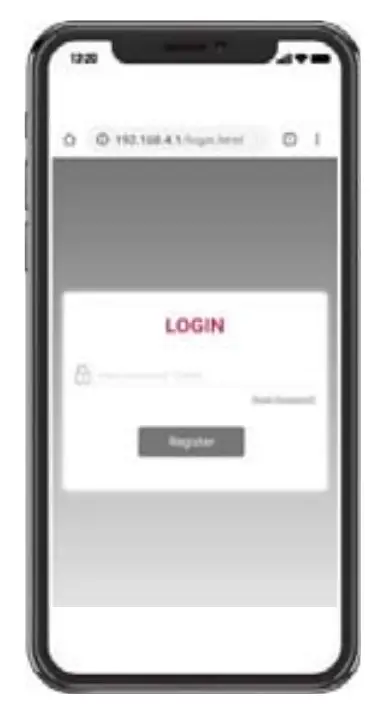 2. Enter the password and click ‘Register’ to go to the home screen.
3. The default password is set to 123456 and can be changed in the Web UI. - BMS, DC/DC and RMD Update
Can upgrade F/W. Upgrade is performed on the following three targets.
– RMD
– BMS
– DC/DC 1.Click the ‘Update’ button
2.Click the ‘Update’ button
3. According to the target you want to update, click the ‘Choose File’ button.
4. Select a update file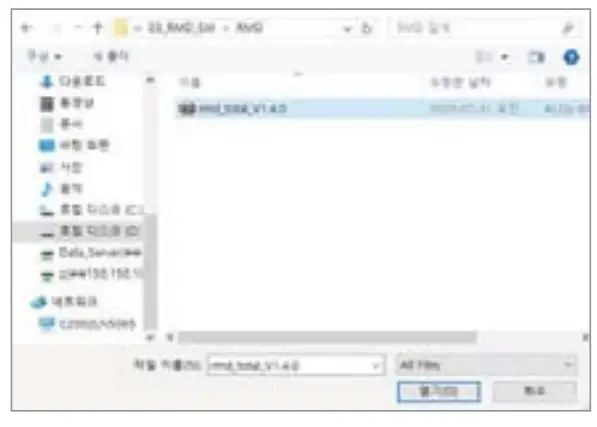 5. After checking if the file is selected correctly, click the Send button.
 6. If you check the success message in the upper right corner, the update was Successful.
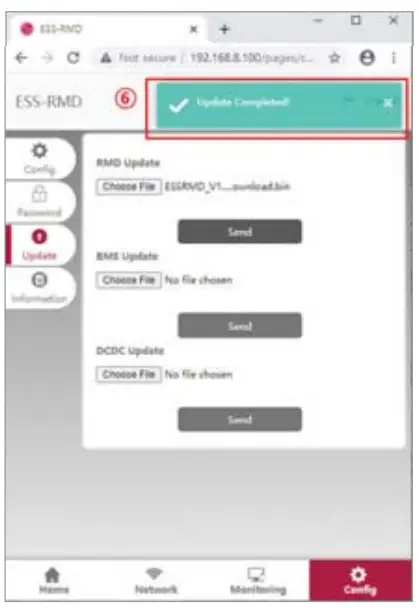 7.2.3 Installation via RMD for web user
7.2.3.1 User Agreement
Visit hupsifresumonitorlgensol.com and Sign in.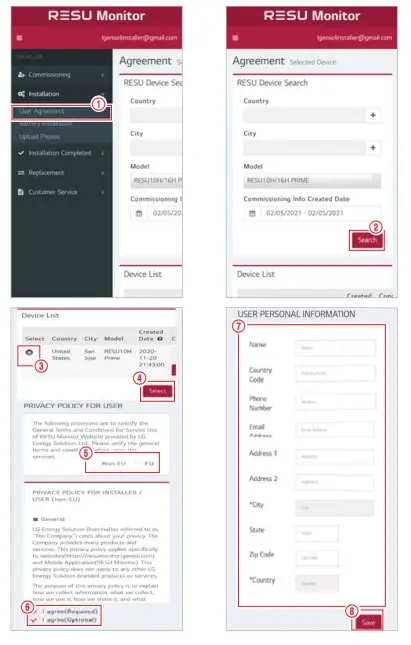
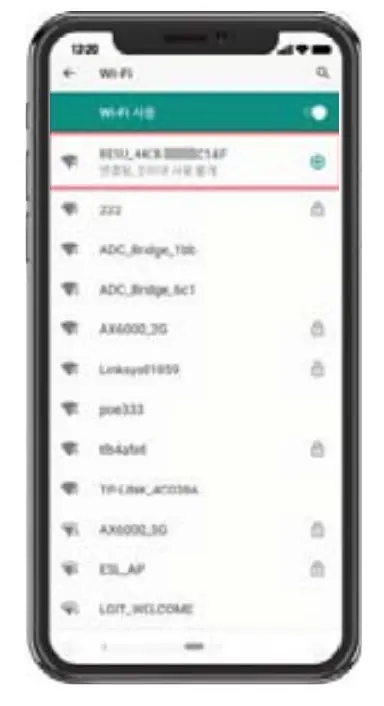 Search and access the SSID of the RMD AP from a device (hereinafter referred to as a device) supposing WLAN Station functions such as a smalphones.
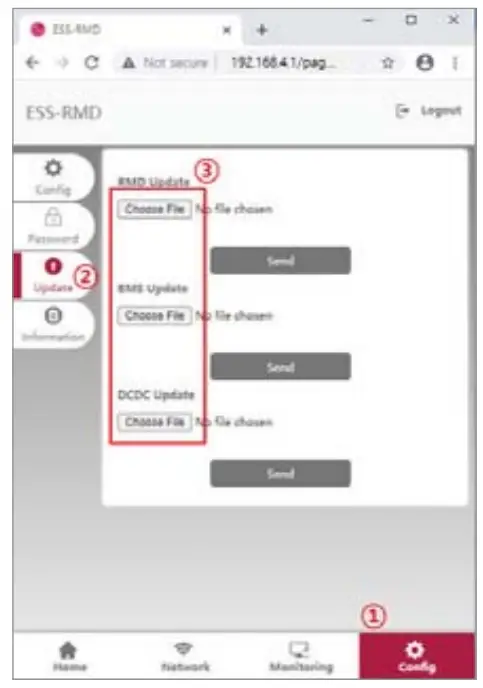 1.Click the ‘Update’ button
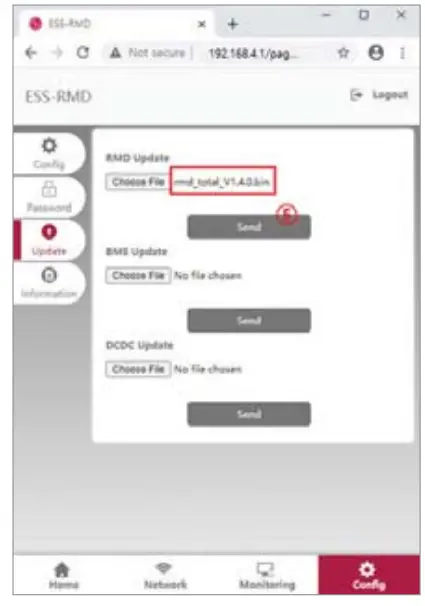 6. If you check the success message in the upper right corner, the update was Successful.
Click Installation -> User Agreement and search the product which you will install. Select your region (Non EU/EU).
Get the agreement of privacy policy for the customer. If the customer agrees the privacy policy, have customer’s personal information.
7.2.3.2 Battery Installation (RMD Setup)
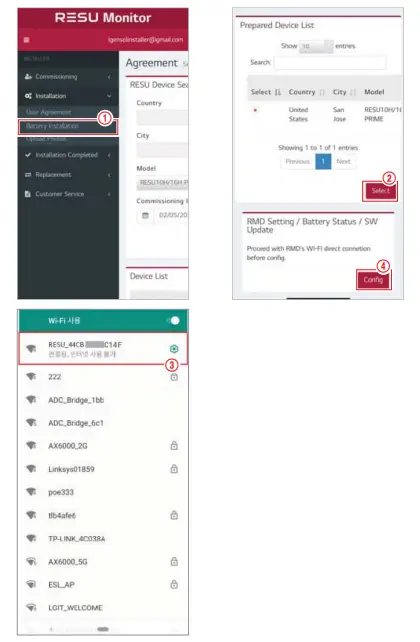
Click Installation → Battery Installation and select the device the prepared device list. Search and access the SSID of the RMD AP from a device (hereinafter referred to as a device) supporting WLAN Station functions such as a smartphone.
RMD SSID has a structure of “Reseller RMD) + RMD WLAN STM MAC ADDRESS”. For the devices below, the SSID of the RMD Sofa is “RESU 44CBXXXCl4F(or RMD44CBXXXCI4F)”. The password is 12345678(changeable).
Click “Config” button for RMD setting on the RMD web. (The web browser will be re-directed to RMD web address 192.168.4.1)
7.2.3.3 RMD Web Log-in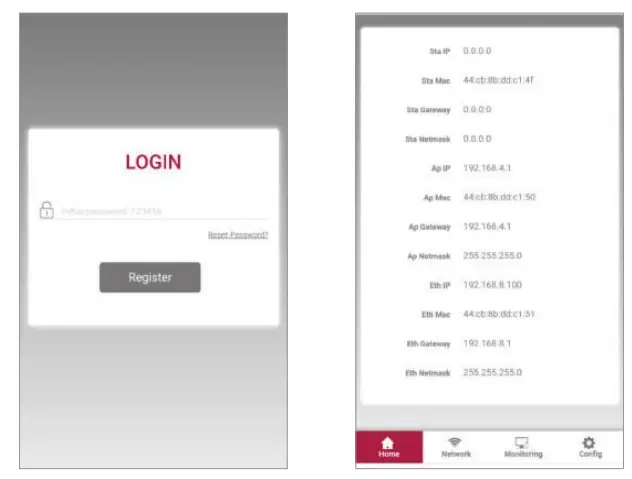
Enter the password and click ‘Register’ to go to the home screen. The default password is set to 123456 and can be changed in the Web UI.
7.2.3.4 Config setting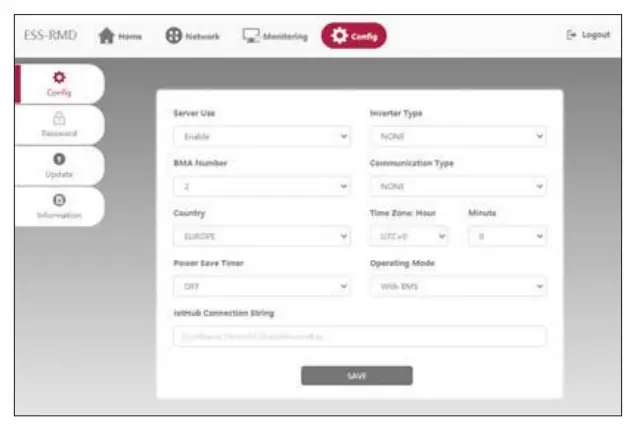
- Server Use: Decide whether to use (connect) to the cloud server.
- Inverter Type: N/A
- BMA Number : Select number of Modules: Select 2
- Communication Type: N/A
- Country: Select country.
- Time Zone: Hour: Option to display ±1hour in UTC.
- Time Zone: Minute: Option to display 15-minute unit.
- Power Save Timer: N/A
- Operating Mode: Must select ‘With BMS’
- GitHub Connection String: Enter a unique String used to access the Azure
Io Hub(Cloud Server). String format is as follows: Hostname=emashub.azure-devices.net;DeviceId= XXXX;SharedAccessKey=OOOO=
* For more information on how to obtain strings, refer to Section 3.2.1.2
Obtaining IoT Hub String - After completing all settings, click the Save button.
7.233 Server Connection(WI-Fl setting)
(If you have an Ethernet connection and don’t want to use Wifi. skip this pan) Enter the Network Wi-Fi tab.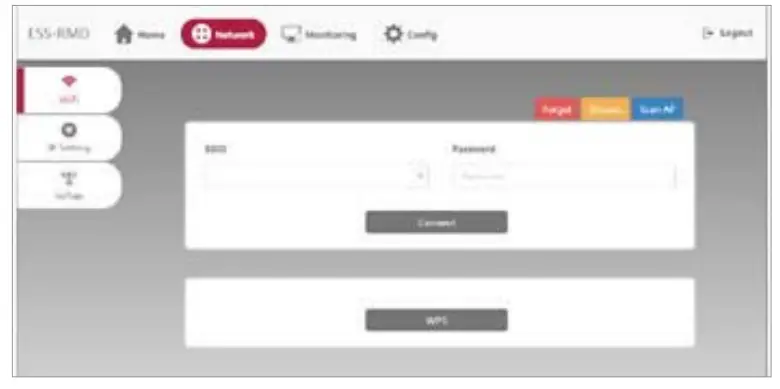
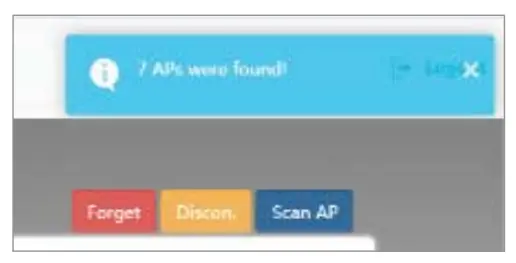
- Click the Scan AP button on the top right of the Web UI.
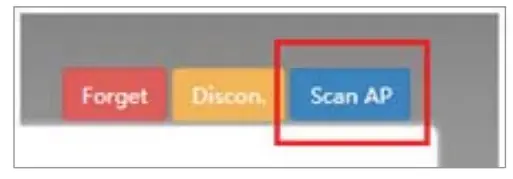
- The number of APs available is displayed in a pop-up window.

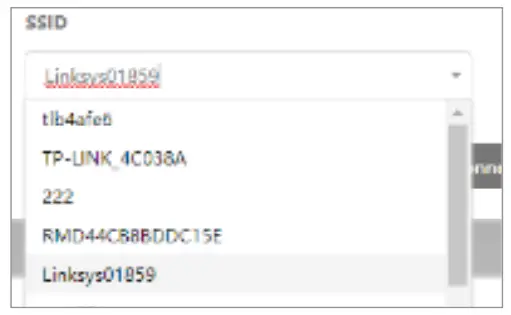
- Select the AP to access from the SSID combo box, enter the password and click the Connect button(Manual input is possible).

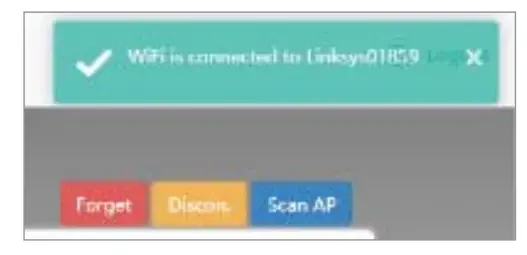
- If the connection to the AP is successful, a pop-up window informs whether the connection was successful as follows:
7.2.3.6 Check the Installation Status
Enter the Monitoring Server Tab. Check the Status values are ‘OK’. Whether the Ethernet connection or Wi-Fi connection ‘OK’ depends on the server connection method. An example is the case of Wi-Fi connection.)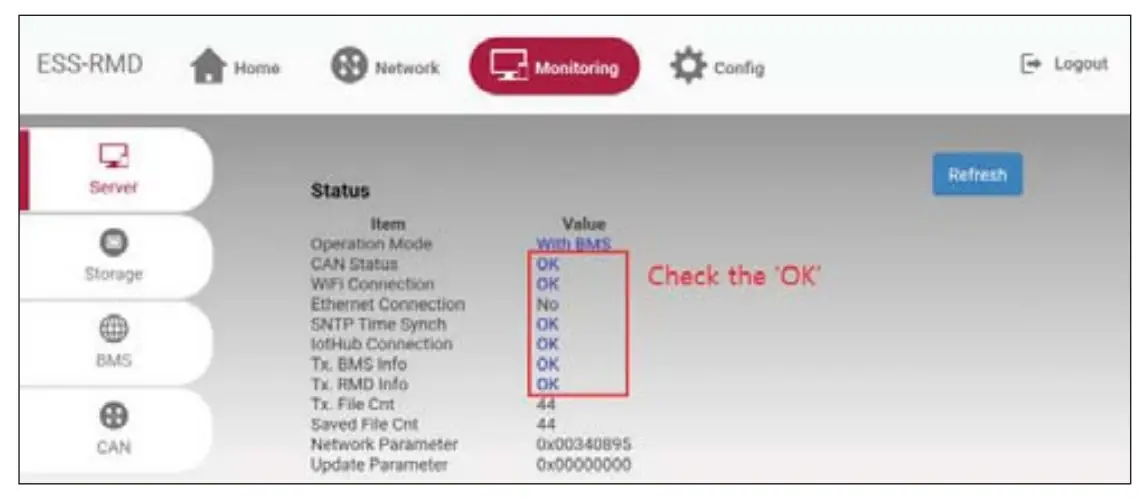
 RESU16H Prime
Keep this manual for later use.
© 2021 LG Energy Solution ESS Battery Division
PARC1, 108, Yoginder, Yeongdeungpo-gu, Seoul, Republic of Korea, 07335
https://www.lghomebattery.com http://www.lgensol.com
 Website im Aufbau
 LG Energy Solution
 resumonitor.lgensol.com
 LG ESS Battery|Australia
 LG ESS Battery|USA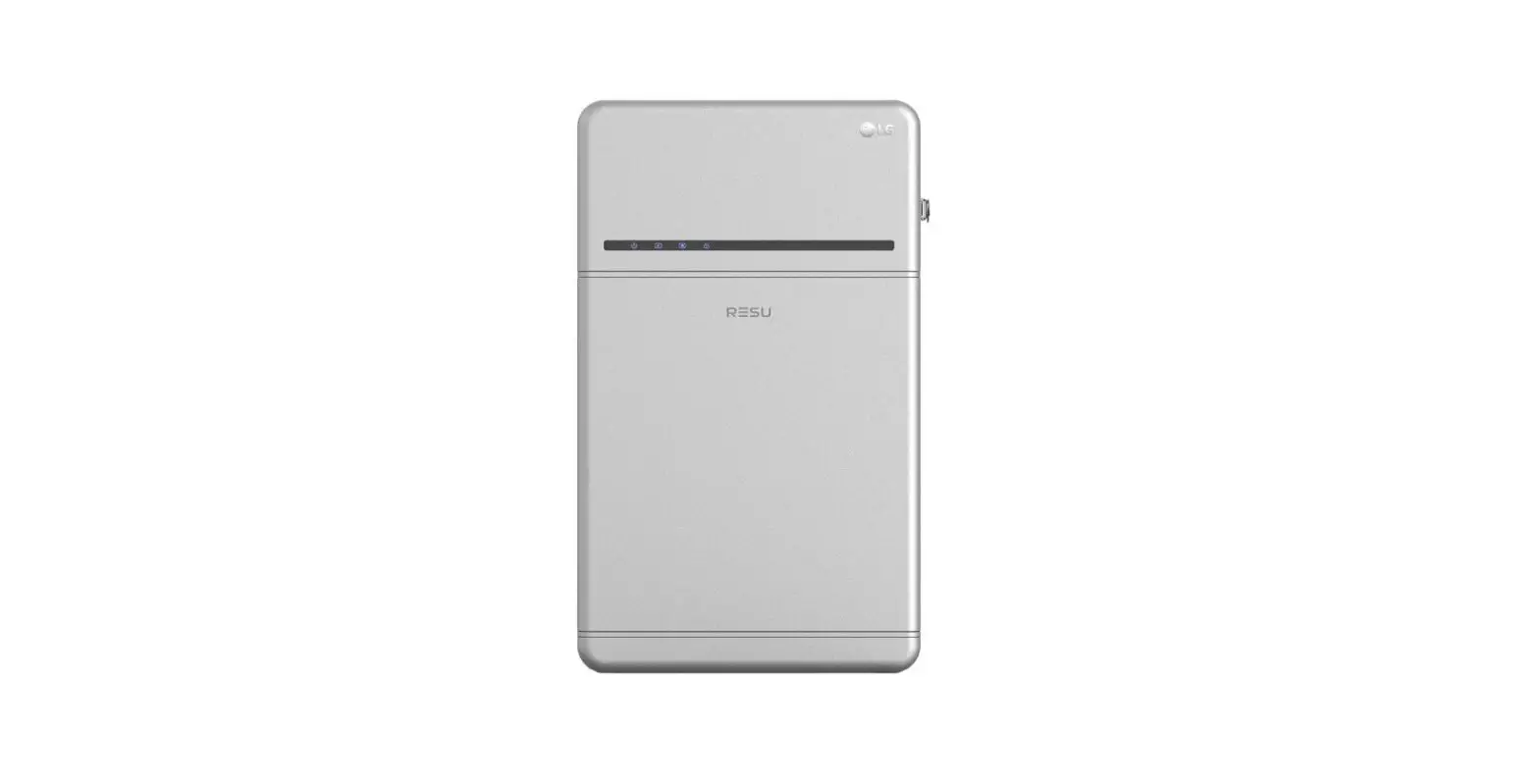


![Lg V10 Setup Guide [battery/sim/microsd]](https://static-data1.manualsee.com/1/img/77/20003/2020/12/LG-V10.png "Lg V10 Setup Guide [battery/sim/microsd]")