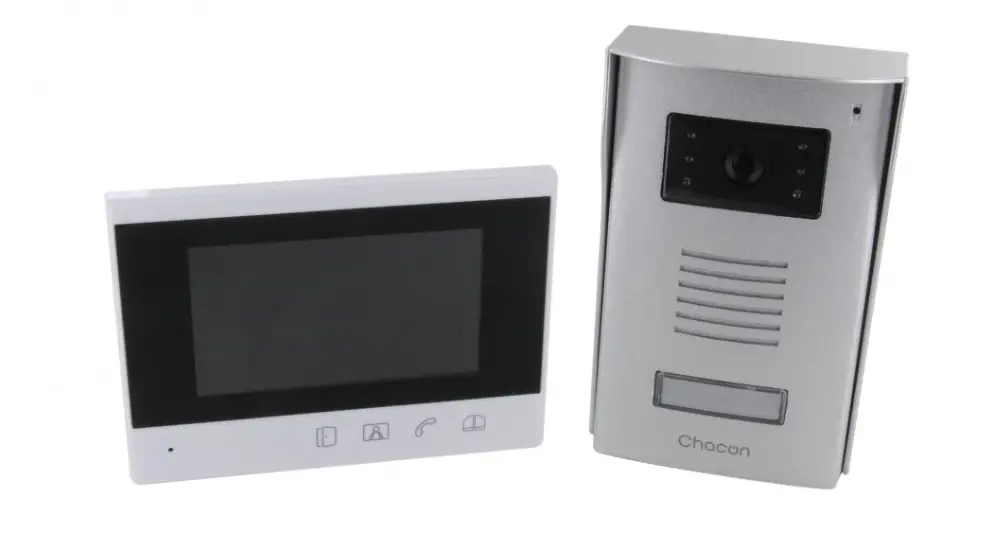
1760 5 Inch 2Voice Handsfree Videophone
Product Information
| Model | DS1760-008A |
|---|---|
| Product Name | VIDEOCITOFONO 7 |
| Product Type | Video Door Phone |
| Display Type | 7″ Touchscreen Display |
| Color | Nero / Black / Noire / Negro / Schwarz / Zwart |
| Language Options | Italiano, English, Deutsch, Nederlands |
Product Usage Instructions
1. Quick User’s Guide:
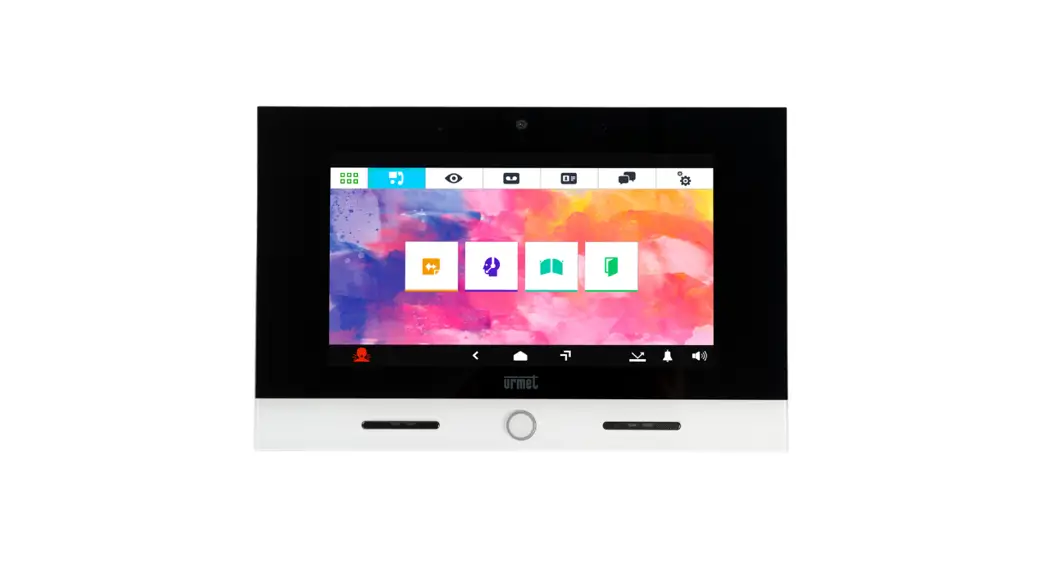
- To change the default application, touch the icon in the top
left corner to access the Top Page, then touch the Configuration
icon. The other navigation icons on the top bar allow you to:- View images captured by the cameras in the system.
- View recorded audio-video messages (Video Secretary).
- View the Contacts List and call log.
- Adjust the Videophone settings and/or language.
- The icons on the bottom bar allow you to:
- Go back to the previous page.
- Go to the Home Page.
- Access the list of recently opened applications.
- Adjust the call volume.
- Set the following device states: In house / Secretary / Remote
(alternatively).
2. Interpreting the Indications:
- The top bar of the screen shows the status information:
- Micro SD Card inserted.
- New contact request.
- Unplayed Post-it message.
- Missed call.
- Unread video message.
- Panic alarm sent/canceled.
- Gesture or voice commands enabled.
- Door open indication.
- In house / Secretary / Remote states (alternatively).
- Active WiFi connection.
3. Navigating between Applications:
- The various applications can be accessed from the Top Page by
touching the respective icon:- Browser Firefox
- Yokis
- MIFARE
- Galleria
- YnO
- Videocitofonia
- App Urmet Secure
- Lettore multimediale
- App iUVS
- Esempio di Top Page
- CallMe
- To return to the Home Page from any displayed page, touch the
bottom bar icon in the center.
4. Main Functions:
- Answer a call and start a conversation with the built-in
speakerphone. - Open the door.
- Open the gate for vehicle access.
- Activate an auxiliary function, such as turning on staircase
lights (if available in the 2Voice system with a Sch. 1083/80
device and appropriate configuration). - View the image captured by the next camera in the system. This
icon only appears when receiving a video call from a calling
station. - Take a snapshot of the displayed external image.
- Zoom in or out on the image, changing its aspect ratio from 4:3
to 16:9. - Adjust the audio volume from the calling station to the
videophone (videophone speaker).
5. Activating a Yokis Command:
- From the Top Page, press the button to access Yokis Home
Automation:- Select the desired command(s) or access the scheduling
page.
- Select the desired command(s) or access the scheduling
DS1760-008A
VIDEOCITOFONO 7″
VIDEO DOOR PHONE 7″ MONITEUR 7″
VIDEOINTERFONO 7″ 7″ VIDEOSPRECHANLAGE
7″ BEELDINTERCOM
Mod. 1760
LBT21057
Sch./Ref. 1760/31 1760/31A
(bianco / white / blanc / blanco / weiß / wit)
Sch./Ref. 1760/33 1760/33A
(nero / black / noire / negro / schwarz / zwart)
GUIDA RAPIDA PER L’UTILIZZO QUICK USER’S GUIDE
GUIDE RAPIDE D’UTILISATION GUÍA RÁPIDA DE USO KURZANLEITUNG SNELGIDS
Indice / Index / Sommaire / Índice / Inhalt / Inhoudsopgave
ITALIANO
3
ENGLISH
9
FRANÇAIS
15
ESPAÑOL
21
DEUTSCH
27
NEDERLANDS
33
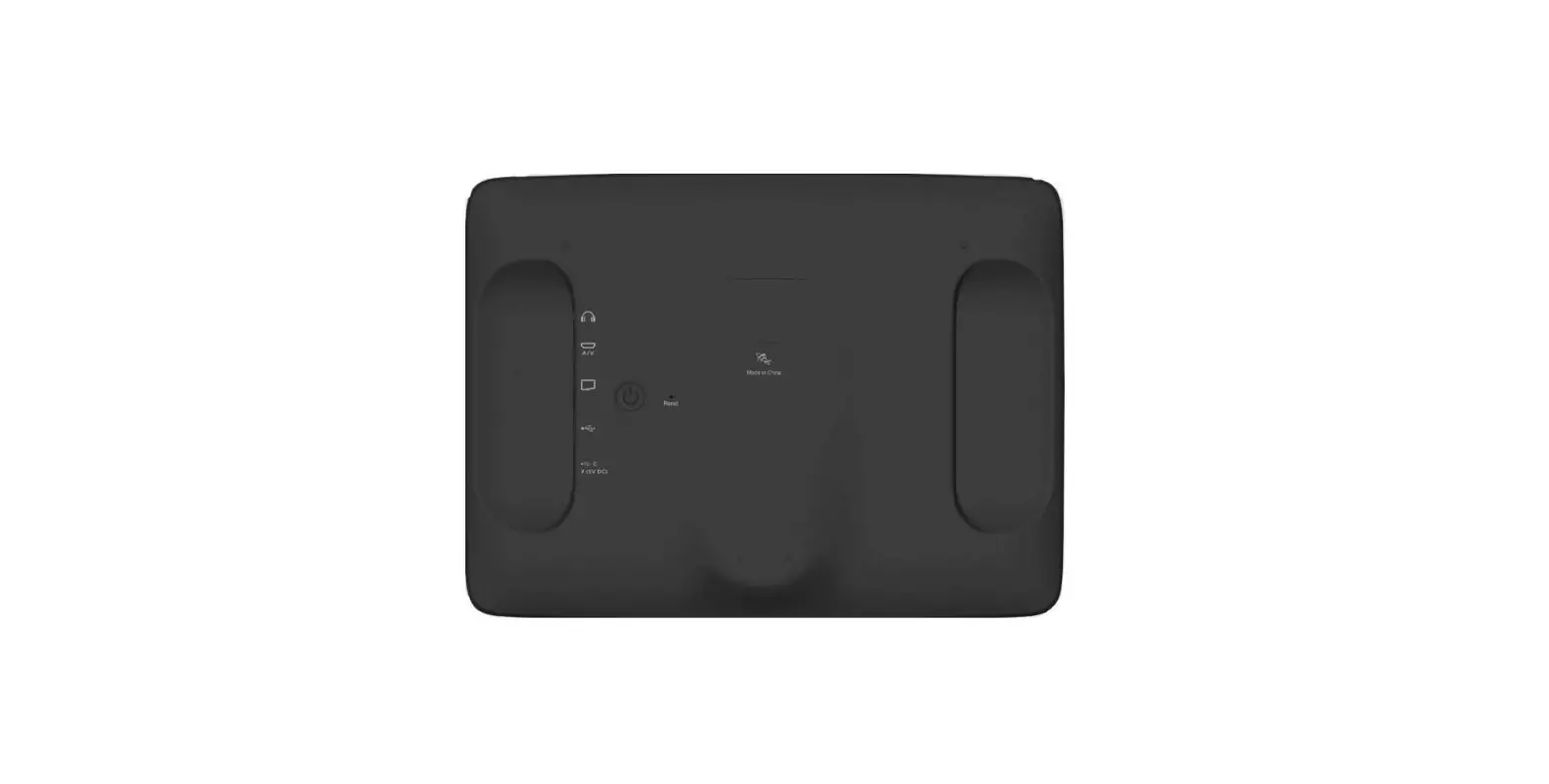
DESCRIZIONE DEI COMPONENTI DESCRIPTION OF COMPONENTS DESCRIPTION DES COMPOSANTS DESCRIPCIÓN DE LOS COMPONENTES BESCHREIBUNG DER KOMPONENTEN OMSCHRIJVING VAN DE ONDERDELEN
1. Pulsante Home retroilluminato di colore blu / Backlit blue Home button / Bouton Home à rétroéclairage de couleur bleue / Tecla de Inicio de color azul retro iluminada / Blau hinterleuchtete Home-Taste / Home-toets met blauw achtergrondlicht
2. Altoparlanti / Speakers / Haut-parleurs / Altavoces / Lautsprecher / Luidsprekers 3. Display touchscreen 7″ / 7″ touchscreen display / Écran tactile 7″ / Pantalla táctil 7″ / 7″-
Touchscreen-Display / 7″ Touchscreen-display 4. Sensore IR per comandi gestuali / IR sensor for gesture commands / Capteur IR pour
commandes gestuelles / Sensor IR para mandos gestuales / IR-Sensor für Gestensteuerungen /
IR-sensor voor gebarenherkenning 5. Microfono / Microphone / Micro / Micrófono / Mikrofon / Microfoon 6. Micro SD Card / Micro SD Card / Micro-carte SD / Tarjeta micro SD / Mikro-SD-Karte / Micro SD-
kaart
2
DS1760-008A
ITALIANO FUNZIONALITÀ
COME ACCENDERE LO SCHERMO E ACCEDERE ALLE VARIE FUNZIONI Toccare lo schermo in un punto qualsiasi, oppure Premere il pulsante centrale (1) in basso sul videocitofono, che farà apparire la Home Page.
La Homepage di default è l’applicazione Videocitofonia,
In basso a destra è possibile visualizzare il codice utente e il codice ID (1/0) configurati sul dispositivo.
1:
Indica il codice utente (numero di appartamento) in cui è presente il videocitofono.
0:
Indica il codice ID del videocitofono.
Dalla pagina Videocitofonia è possibile accedere alle seguenti funzioni videocitofoniche:
Registrare brevi messaggi audio (Post-It).
Chiamare il centralino. Attivare una funzione ausiliaria, ad esempio l’attivazione di un relè (se presente nell’impianto 2Voice un dispositivo Sch. 1083/80 e la funzione opportunamente configurata). Attivare una funzione ausiliaria, ad esempio l’accensione delle luci scala (se presente nell’impianto 2Voice un dispositivo Sch. 1083/80 e la funzione opportunamente configurata) Aprire il cancello dell’eventuale passo carraio.
Aprire la porta.
DS1760-008A
3
Per cambiare l’applicazione di default toccare l’icona
, posizionata in alto a sinistra, che consente
di accedere alla Top Page, quindi toccare l’icona Configurazione Le altre icone di navigazione della barra superiore permettono di :
e infine il menù Home Page.
Visualizzare le immagini riprese dalle telecamere presenti nell’impianto.
Visualizzare i messaggi audio-video registrati (Segreteria videocitofonica).
Visualizzare la Rubrica dei Contatti e il registro delle chiamate.
Variare le impostazioni del Videocitofono e/o la lingua di funzionamento.
Le icone della barra inferiore permettono di : Tornare alla pagina precedente.
Tornare alla Home Page.
Andare alla pagina che elenca le applicazioni aperte di recente.
Inviare una segnalazione di allarme panico (funzione possibile se nell’impianto 2Voice è presente un centralino). Silenziare la chiamata (Mute) al Videocitofono per un periodo di tempo impostabile a piacere.
Modificare il volume della chiamata.
Impostare i seguenti stati del dispositivo: In casa / Segreteria / Remoto (alternativi fra loro).
COME INTERPRETARE LE SEGNALAZIONI La barra superiore dello schermo mostra le informazioni di stato.
Micro SD Card inserita.
Richiesta di nuovo contatto.
Presenza di un Post-it non ascoltato.
Chiamata persa.
4
DS1760-008A
Presenza di un videomessaggio non letto.
Allarme panico inviato/annullato.
Comandi gestuali (Gesture) o comandi vocali abilitati
Presenza porta aperta
Apertura automatica della porta (se la funzione è attivata).
In casa / Segreteria / Remoto (alternativi fra loro).
Collegamento WiFi attivo Ora.
COME NAVIGARE TRA LE APPLICAZIONI Le varie applicazioni sono accessibili dalla Top Page, toccando la relativa icona.
Browser Firefox
Yokis
MIFARE
Galleria
YnO
Videocitofonia
App Urmet Secure Lettore multimediale App iUVS Esempio di Top Page
CallMe
Per tornare alla Home Page da qualsiasi pagina visualizzata toccare l’icona barra inferiore.
posta al centro della
DS1760-008A
5
COME SPEGNERE LO SCHERMO Per spegnere lo schermo premere il pulsante Home (1) sul videocitofono oppure attendere il timeout impostato nel menù Configurazione.
COME RISPONDERE A UNA CHIAMATA PROVENIENTE DALL’ESTERNO Quando il videocitofono riceve una chiamata videocitofonica esterna squilla e accende lo schermo, che è normalmente spento. Il videocitofono visualizzerà sul display l’immagine del chiamante. Se nell’appartamento sono presenti uno o più videocitofoni Slave alimentati tramite un alimentatore locale e con il parametro video “Accensione contemporanea” abilitato su tutti i videocitofoni, quando si riceve una chiamata tutti i videocitofoni visualizzeranno l’immagine del chiamante (per tutti i dettagli fare riferimento al “Libretto di installazione” presente a corredo del prodotto). Se sono presenti dei videocitofoni Slave alimentati tramite Bus di sistema, solo il videocitofono Master visualizzerà l’immagine del chiamante. Per visualizzare l’immagine del chiamante su un videocitofono Slave premere il relativo pulsante.
Principale
Toccando le varie icone si può: Rifiutare la chiamata.
Rispondere alla chiamata e iniziare la conversazione in viva voce.
Aprire la porta.
Aprire il cancello dell’eventuale passo carraio.
Attivare una funzione ausiliaria, ad esempio l’accensione delle luci scala (se presente nell’impianto 2Voice un dispositivo Sch. 1083/80 e la funzione opportunamente configurata).
Accesso al menu OSD per la regolazione dei parametri video (luminosità, contrasto e colore). L’icona appare solo se si riceve una chiamata da una postazione di chiamata video.
Visualizzare l’immagine ripresa dalla eventuale telecamera successiva presente nell’impianto. L’icona appare solo se si riceve una chiamata da una postazione di chiamata video.
6
DS1760-008A
Memorizzare un’istantanea dell’immagine esterna visualizzata sullo schermo.
Ingrandire o rimpicciolire l’immagine, cambiandone anche l’aspetto da 4:3 a 16:9.
Escludere o riattivare il microfono del videocitofono, per evitare che chi chiama possa sentire ciò che si dice. Quando il microfono è escluso l’icona è barrata. L’icona è attiva solo dopo aver risposto.
Chiudere la chiamata. Lo schermo si spegne. L’icona è attiva solo dopo aver risposto.
Modificare il volume dell’audio dal posto di chiamata verso il videocitofono (altoparlante videocitofono). COME ATTIVARE UN COMANDO YOKIS
Dalla Top Page premere il pulsante
per raggiungere la Domotica Yokis:
Da qui selezionare il comando o i comandi desiderati, oppure accedere alla pagina delle schedulazioni.
Per schedulare un comando in una o più occorrenze settimanali premere
.
Nella nuova videata il pulsante
permette di creare una nuova schedulazione.
Si apre la videata seguente nella quale è possibile impostare l’ora e i giorni di attivazione (scheduling):
DS1760-008A
7
8
DS1760-008A
ENGLISH FUNCTIONS
HOW TO TURN ON THE SCREEN AND ACCESS THE VARIOUS FUNCTIONS
Tap the screen anywhere or press the Home button (1) at the bottom of the video door phone to open the Home Page. The default Home Page is the video door phone application,
The user code and ID code (1/0) configured on the device can be displayed at the bottom right side.
1:
It indicates the user code (apartment number) in which the video door phone is installed.
0:
It indicates the video door phone ID code.
From the Video Door Phone System page, the following video door phone functions can be accessed:
Recording short audio messages (Post-It).
Calling the switchboard.
Activate an auxiliary function, e.g. a relay (if a device Ref. 1083/80 with the appropriately configured function is available in the 2Voice system). Activating an auxiliary function, e.g. turning on the stair lights (if a device Ref. 1083/80 with the appropriately configured function is available in the 2Voice system)
Activating an auxiliary function, e.g. turning on the stair lights.
Opening the door.
DS1760-008A
9
To change the default application tap the icon
, provided in the top left corner, to access the Top
Page, then tap the Set-up icon and
finally the Home Page menu.
The other navigation icons in the top bar can be used to:
View footage from the cameras present in the system.
View recorded audio-video messages (video door phone messaging system).
Display the Phone Book and the call log.
Change the screen settings and/or operation language.
The navigation icons in the bottom bar can be used to: Return to the previous page.
Return to the Home Page.
Go to the page that lists the recently opened applications.
Send a panic alarm signal (function possible if a switchboard is available in the 2Voice system). Mute the call (Mute) to the IP video door phone for a user-settable period of time.
Change the volume of the call.
Set the following device states: At home / Recording / Remote / (only one active at a time).
HOW TO INTERPRET THE REPORTS The bar at the top of the screen shows status information
Micro SD Card in.
Presence of an unread text message (Chat).
New Post-it not yet listened to
Missed Call. 10
DS1760-008A
Video message not yet viewed.
Panic Alarm sent/cancelled.
Gesture detection or voice commands.
Presence of open door.
Automatic door opening (if this feature is enabled).
At Home / Recording / Remote / (only one active at a time).
WiFi connection active
Time.
HOW TO NAVIGATE BETWEEN APPLICATIONS The various applications are accessible from the Top Page, by tapping the special icon.
Browser Firefox
Yokis
MIFARE
Gallery
YnO
Video Door Phone Applications
App Urmet Secure Multimedia player Example of Top Page
App iUVS CallMe
To return to the Home Page from any screen page, tap the icon
in the middle of the bottom bar..
DS1760-008A
11
HOW TO TURN OFF THE SCREEN To turn the screen off, press the Home button (1) on the video door phone Ref. 1760/31 or /33 or wait for the timeout set in the Configuration menu.
HOW TO ANSWER AN EXTERNAL CALL When the video door phone receives an external video door phone call, it rings and the screen lights up from its default switched-off state The caller’s image will appear on the video door phone display. If in the apartment there are one or more Slave video door phones powered by a local power supply unit and the “Simultaneous ignition” video parameter is enabled on all video door phones, when a call is received, all the video door phones will display an image of the caller (for all details, refer to the “Installation handbook” included with the product). If there are Slave video door phones powered by system Bus, only the Master video door phone will display the caller’s image. To display the caller’s image on a Slave video door phone, press the relevant button.
Primary
By tapping the various icons you can: Reject the call.
Answer the call and begin a hands-free conversation.
Open the door.
Open a driveway or garage gate.
Activate an auxiliary function, e.g. turning on the stair lights (if a device Ref. 1083/80 with the appropriately configured function is available in the 2Voice system). Access to the OSD menu for adjusting video parameters (brightness, contrast and colour). The icon only appears if a call is received from a video call station. Display the image taken by the next camera in the system, if present. The icon only appears if a call is received from a video call station.
12
DS1760-008A
Store a snapshot of the outdoor image displayed on the screen.
Enlarge or shrink the image, also changing its format from 4:3 to 16:9.
Turn the Video door phone microphone off and then back on, to prevent the caller hearing what you are saying. When the microphone is turned off, the corresponding icon is crossed out. The icon will only be active after the call has been answered.
Close the call. The screen goes off. The icon will only be active after the call has been answered.
Change the audio volume in the calling point-to-Video door phone direction (video door phone speaker).
HOW TO ACTIVATE A YOKIS CONTROL
From the Top Page press the button
to reach Yokis Home Automation:
From here, select your required control or controls, or access the scheduling page.
To schedule a control for one or more weekly occurrences press
.
New
In the new screen the button
can be used to create a new scheduling.
The next screen will open where you can set the activation times and days (scheduling):
DS1760-008A
13
14
DS1760-008A
FRANÇAIS FONCTIONNEMENT
ALLUMAGE DE L’ÉCRAN ET ACCÈS AUX DIFFÉRENTES FONCTIONS Toucher l’écran à n’importe quel endroit ou bien Appuyer sur le bouton central Home (1), en bas sur le moniteur, qui fera apparaître la Home Page.
La Home Page par défaut correspond à l’application de Vidéophonie,
Le code utilisateur et le code ID (1/0) configurés sur le dispositif sont affichés en bas à droite.
1:
Indique le code utilisateur (numéro de l’appartement) où se trouve le moniteur.
0:
Indique le code ID du moniteur.
Depuis la page Vidéophonie, il est possible d’accéder aux fonctions vidéophoniques suivantes :
Enregistrer de brefs messages audio (Post-It).
Appeler le standard.
Activer une fonction auxiliaire, par exemple l’activation d’un relais (si le système 2Voice comporte un dispositif Réf. 1083/80 et la fonction dûment configurée). Activer une fonction auxiliaire, par exemple l’allumage des lumières des escaliers scala (si le système 2Voice comporte un dispositif Réf. 1083/80 et la fonction dûment configurée).
Ouvrir la grille de l’éventuel accès voiture.
Ouvrir la porte.
DS1760-008A
15
Pour modifier l’application par défaut, toucher l’icône
, située en haut à gauche, qui permet
d’accéder à la Top Page, puis toucher l’icône Configuration
et pour finir le menu Home Page.
Les autres icônes de navigation de la barre supérieure permettent d’effectuer les opérations suivantes :
:
Visualiser les images filmées par les caméras présentes sur l’installation.
Visualiser les messages audio-vidéo enregistrés (Répondeur vidéophonique).
Visualiser le Répertoire des contacts et le registre des appels.
Modifier les réglages de l’écran et/ou la langue de fonctionnement
Les icônes de la barre inférieure permettent d’effectuer les opérations suivantes: Revenir à la page précédente.
Aller à la Home Page.
Accéder à la page indiquant les applications récemment ouvertes.
Envoyer une notification d’alarme panique (fonction possible si le système 2Voice comporte un standard).
Mettre l’appel du dispositif en mode silencieux (Mute) pendant une durée librement programmable.
Modifier le volume de l’appel
Sélectionner les états suivants du dispositif : Chez soi / Répondeur / Distant / (les options s’excluent les unes les autres).
INTERPRÉTATION DES NOTIFICATIONS La barre supérieure de l’écran affiche les informations d’état
Micro-carte SD en place.
Demande de nouveau contact.
Présence d’un Post-it non écouté.
16
DS1760-008A
Appel en absence.
Présence d’un message vidéo non regardé.
Alarme panique envoyée/annulée.
Détection de geste (Gesture) ou commandes vocales.
Présence porte ouverte.
Apert Ouverture automatique de la porte (si la fonction est active).
A la maison / Répondeur / Distant / (les options s’excluent les unes les autres).
Connexion WiFi activée
Heure.
NAVIGUER D’UNE APPLICATION À L’AUTRE Les différentes applications sont accessibles depuis la Top Page en touchant l’icône correspondante.
Browser Firefox
Yokis
MIFARE
Galerie
YnO
Vidéophonie
App Urmet Secure Lecteur multimédia Exemple de Top Page
App iUVS
CallMe
DS1760-008A
17
Pour revenir à la Home Page depuis toute page visualisée, toucher l’icône barre inférieure.
située au centre de la
ÉTEINDRE L’ÉCRAN Pour éteindre l’écran, appuyer sur le bouton Home (1) du moniteur Réf. 1760/31 ou /33 ou bien attendre que la durée de timeout, réglée dans le menu Configuration, se soit écoulée
REPONDRE A UNE APPEL EXTERIEUR
Lorsque le moniteur reçoit un appel vidéophonique extérieur, il sonne et allume l’écran (qui est normalement éteint). Le moniteur affichera l’image de l’appelant à l’écran. En présence, dans l’appartement, d’un ou plusieurs vidéophones esclaves alimentés par une alimentation locale et avec le paramètre vidéo « Allumage simultané » activé sur tous les vidéophones, lors de la réception d’un appel, tous les vidéophones afficheront l’image de l’appelant (pour tous les détails, se référer au « Notice d’ installation » inclus avec le produit). En présence de vidéophones esclaves alimentés par le bus du système, seul le vidéophone maître affichera l’image de l’appelant. Pour afficher l’image de l’appelant sur un vidéophone esclave, appuyer sur le bouton correspondant.
Principal
En touchant les icônes correspondantes, il est possible de: Refuser l’appel.
Répondre à l’appel et entamer la conservation en mode mains libres.
Ouvrir la porte..
Ouvrir la grille de l’éventuel accès voiture.
Activer une fonction auxiliaire, par exemple l’allumage des lumières des escaliers (si le système 2Voice comporte un dispositif Réf. 1083/80 et la fonction dûment configurée).
Accès au menu OSD pour le réglage des paramètres vidéo (luminosité, contraste et couleur). L’icône ne s’affiche que lors de la réception d’un appel depuis un poste d’appel vidéo.
18
DS1760-008A
Visualiser l’image prise par la caméra successive éventuellement présente dans le système. L’icône ne s’affiche que lors de la réception d’un appel depuis un poste d’appel vidéo.
Mémoriser une capture de l’image visualisée sur l’écran.
Agrandir et réduire l’image, en en modifiant également le format (de 4:3 à 16:9).
Désactiver ou réactiver le micro du moniteur pour éviter que l’appelant ne puisse entendre ce qui est dit. Quand le micro est désactivé, l’icône est barrée. L’icône n’est active qu’après avoir répondu.
Mettre fin à l’appel. L’écran s’éteint. L’icône n’est active qu’après avoir répondu..
Modifier le volume audio, du poste d’appel au moniteur (haut-parleur moniteur). ACTIVATION D’UNE COMMANDE YOKIS
Depuis la Top Page, appuyer sur le bouton
our accéder à la Domotique Yokis:
Ensuite, sélectionner la ou les commandes voulues ou accéder à la page des programmations.
Pour programmer une commande en une ou plusieurs occasions hebdomadaires, appuyer sur
.
New
Sur la page qui s’affiche, le bouton
permet de créer une nouvelle programmation.
La page suivante s’affiche qui permet de régler l’heure et les jours d’activation (programmation):
DS1760-008A
19
20
DS1760-008A
ESPAÑOL FUNCIONES
CÓMO ENCENDER LA PANTALLA Y ACCEDER A LAS DIFERENTES FUNCIONES Tocar un punto cualquiera de la pantalla o Accionar el pulsador central Home (1) presente en la parte inferior del videointerfono, que hará que aparezca la Página principal..
La página de inicio predeterminada es la aplicación del Videocitófono,
Abajo a la derecha se pueden ver el código de usuario y el código ID (1/0) configurados en el dispositivo.
1:
Indica el código de usuario (número de apartamento) donde se encuentra el videointerfono.
0:
Indica el código ID del videointerfono.
Desde la página Videointerfono se puede acceder a las funciones siguientes del dispositivo:
Grabar mensajes de audio cortos (Post-It).
Llamar al conmutador.
Activar una función auxiliar, por ejemplo: la activación de un relé (si el sistema 2Voice incluye un dispositivo Ref. 1083/80 y la función debidamente configurada).
Activar una función auxiliar, por ejemplo encender las luces (si el sistema 2Voice incluye un dispositivo Ref. 1083/80 y la función debidamente configurada).
Abrir la puerta de cualquier entrada.
Abrir la puerta.
DS1760-008A
21
Para cambiar la aplicación predeterminada pulse el icono,
, situado en la parte superior izquierda,
que le da acceso a la página de la parte superior, a continuación, pulse el icono de configuración y por último el menú de la página de inicio.
Los otros iconos en la barra de navegación en la parte superior le permiten:
Ver las imágenes que se filman en las cámaras de vídeo presentes en el sistema.
Ver los mensajes grabados de audio y video (portería).
Mostrar la libreta de contactos y el historial de llamadas.
Cambiar la configuración del Videocitòfono y/o idioma de funcionamiento..
Los iconos de barra inferior le permiten: Volver a la página anterior.
Volver a la página de inicio.
Ir a la página que enumera las aplicaciones recientemente abiertas.
Enviar una alarma de pánico (función posible si el sistema 2Voice incluye un conmutador). Silenciar la llamada (Mute) del Videocitòfono por un período de tiempo que se puede establecer como lo desee.
Cambiar el volumen de la llamada.
Configurar los siguientes estados del dispositivo: En casa / Contestador / A distancia / (una opción a elección). CÓMO INTERPRETAR LAS ALARMAS La barra superior de la pantalla muestra la información del estado. Tarjeta micro SD insertada.
Solicitud de un nuevo contacto.
Post-it no escuchado.
22
DS1760-008A
Llamada pérdida.
Mensaje de vídeo no visto.
Alarma de pánico enviada/cancelada.
Detección de gesto (Gesture) o comandos de voz.
Presencia de puerta abierta
Apertura de puerta automática (si la función está habilitada).
En casa / Contestador / A distancia / (una opción a elección).
Conexión WiFi activa
Hora.
CÓMO NAVEGAR ENTRE LAS APLICACIONES Se pueden acceder a las diversas aplicaciones desde la página de la parte superior, pulsando el icono
Browser Firefox
Yokis
MIFARE
Galería
YnO
Videocitófono App Urmet Secure Lector multimedia Ejemplo de página superior
App iUVS
CallMe
DS1760-008A
23
Para volver a la página de inicio desde cualquier página que visualice pulse el en el centro de la barra inferior.
de correspondencia
CÓMO APAGAR LA PANTALLA
Para apagar la pantalla, accionar el pulsador Home (1) del videointerfono Ref. 1760/31 o /33, o esperar el timeout programado en el menú Configuración.
CÓMO CONTESTAR UNA LLAMADA EXTERNA Cuando el videointerfono recibe una llamada videointerfónica externa, suena y enciende la pantalla, que normalmente está apagada. El videointerfono muestra en la pantalla la imagen de la persona que llama. Si en el apartamento hay uno o más videoporteros Slave alimentados mediante un alimentador local y con el parámetro vídeo “Encendido simultáneo” habilitado en todos los videoporteros, al recibir una llamada todos los videoporteros visualizarán la imagen de quien llama (para más información consultar el “Manual de installación” incluido con el producto). Si hay videoporteros Slave alimentados mediante Bus de sistema, solo el videoportero Master visualizará la imagen de quien llama. Para visualizar la imagen de quien llama en un videoportero Slave presionar el relativo pulsador.
Principal
Al pulsar los iconos se puede: Rechazar llamada.
Responder a la llamada y hablar en altavoz.
Abrir la puerta.
Abrir la puerta de cualquier entrada.
Activar una función auxiliar, por ejemplo encender las luces (si el sistema 2Voice incluye un dispositivo Ref. 1083/80 y la función debidamente configurada).
Acceso al menú OSD para el ajuste de los parámetros de vídeo (brillo, contraste y color). El icono solo aparece si se recibe una llamada de un puesto de videollamada.
24
DS1760-008A
Ver la imagen filmada por la cámara siguiente del sistema, si la hay. El icono solo aparece si se recibe una llamada de un puesto de videollamada.
Guardar una instantánea de la imagen externa que se muestra en la pantalla.
Ampliar o reducir la imagen, cambiando el aspecto de 4:3 a 16:9.
Silenciar o activar el micrófono del Videocitòfono para evitar que las personas que llamen puedan escuchar lo que se dice. Cuando el micrófono está silenciado, el icono se tacha. El icono se activa solo después de responder.
Rechazar la llamada. La pantalla se apaga. El icono se activa solo después de responder.
Cambiar el volumen del audio del puesto de llamada al Videocitòfono (altavoz del videocitòfono). CÓMO ACTIVAR UN COMANDO YOKIS
Desde la página de la parte superior pulse la tecla
para llegar a la domótica Yokis:
Desde aquí, seleccione el comando o comandos deseados, o ir a la página de horarios.
Para programar un comando en uno o más eventos semanales presionar
New
En la nueva pantalla la tecla
permite crear una nueva programación.
Si abre la siguiente pantalla, en esta es posible configurar la hora y los días de activación (programación):
DS1760-008A
25
26
DS1760-008A
DEUTSCH FUNKTIONEN
EINSCHALTEN DES BILDSCHIRMS UND ZUGRIFF AUF DIE VERSCHIEDENEN FUNKTIONEN
Auf einen beliebigen Punkt im Bildschirm tippen oder Auf die mittlere Taste Home (1) unten auf der Videosprechanlage drücken, um die Homepage
aufzurufen.
Die Standard-Homepage ist die Videosprechanlagen-Anwendung,
Unten rechts können der Benutzer-Code sowie der ID-Nummer (1/0) angezeigt werden, die im Gerät konfiguriert wurden.
1:
Awnugrdaeb.e des Benutzer-Codes (Zugehörigkeitsnummer) der in der Videosprechanlage gespeichert
0:
Angabe der ID-Nummer der Videosprechanlage.
Aus der Seite der Videosprechanlage kann auf folgende folgenden Videosprechfunktionen zugegriffen werden kann:
Aufzeichnung kurzer Audionachrichten (Post-It).
Ruf der Zentrale.
Eine Hilfsfunktion aktivieren, zum Beispiel die Aktivierung eines Relais (wenn in der Anlage 2Voice ein Gerät BN 1083/80 vorhanden ist und die Funktion entsprechend konfiguriert wurde).
Aktivierung einer Hilfsfunktion, beispielsweise des Einschaltens der Treppenbeleuchtung (wenn in der Anlage 2Voice ein Gerät BN 1083/80 vorhanden ist und die Funktion entsprechend konfiguriert wurde).
Toröffnung einer eventuellen Toreinfahrt.
Türöffnung.
DS1760-008A
27
Zum Ändern der Standardanwendung das links oben positionierte Symbol
antippen, um Zugriff
auf die Startseite zu erhalten. Dann das Konfigurationssymbol
und schließlich das Homepage-
Menü antippen. Die anderen Navigationssymbole der oberen Leiste ermöglichen Folgendes:
Anzeigen der von der zur Anlage gehörigen Kameras aufgenommenen Bilder.
Anzeigen
von
aufgezeichneten
(Videosprechanlagebeantworter).
Audio-/Videonachrichten
Anzeige der Kontaktliste und Rufaufzeichnung.
Ändern des videosprechanlage und/oder Betriebssprache.
Die Symbole der oberen Leiste ermöglichen Folgendes: Rückkehr zur vorherigen Seite.
Rückkehr zur Hompage.
Zugriff auf die Seite mit der Auflistung der zuletzt aufgerufenen Anwendungen.
Senden einer Panikalarm-Nachricht (mögliche Funktion, wenn in der Anlage 2Voice eine Zentrale vorhanden ist).
Stummschalten des Anufs (Mute) auf dem videosprechanlage für einen nach Belieben einstellbaren Zeitraum.
Ändern der Ruflautstärke.
Einstellung der folgenden Gerätestatus: Zu Hause / Anrufbeantworter / Erneut senden / Fernzugriff / (alternativ zueinander).
RICHTIGE DEUTUNG DER NACHRICHTEN Die obere Leiste die Bildschirms zeigt die Statusinformationen.
Mikro-SD-Karte eingesteckt.
Anforderung eines neuen Kontakts.
Ungehörtes Post-It vorhanden.
Entgangener Anruf. 28
DS1760-008A
Ungelesene Videonachricht vorhanden.
Panikalarm gesendet/aufgehoben.
Gestenerkennung (Gesture) oder sprachbefehle.
Geöffnete Tür vorhanden.
Automatische Türöffnung (falls die Funktion aktiviert ist).
Zu Hause / Anrufbeantworter / Fernzugriff (alternativ zueinander).
WiFi-Verbindung aktiv geschaltet
Uhrzeit.
WECHSELN ZWISCHEN DEN ANWENDUNGEN
Die verschiedenen Anwendungen sind über die Startseite durch Antippen des entsprechenden Symbols erreichbar.
Browser Firefox
Yokis
MIFARE
Galleria
YnO
Videosprechanlage
App Urmet Secure Multimediales Lesegerät Beispiel einer Startseite
App iUVS
CallMe
DS1760-008A
29
Für die Rückkehr zur Homepage von jeder beliebig angezeigten Seite das in der Mitte der unteren Leiste
befindliche Symbol
antippen.
BILDSCHIRM AUSSCHALTEN
Zum Ausschalten des Bildschirms die Taste Home (1) auf der Videosprechanlage BN 1760/31 oder /33 drücken oder den Ablauf der im Konfigurationsmenü eingestellten Timeout-Zeit abwarten.
ANNAHME EINES EXTERNEN ANRUFS
Wenn auf der Videosprechanlage ein externer Anruf eingeht, ertönt der Klingelton und der normalerweise ausgeschaltete Bildschirm schaltet sich ein. Auf dem Bildschirm der Videosprechanlage erscheint das Bild des Anrufers. Wenn in der Wohnung eine oder mehrere Slave-Videosprechanlagen vorhanden sind, die über ein lokales Netzgerät versorgt werden, und der Videoparameter ,,Gleichzeitiges Zündung” an allen Videosprechanlagen aktiviert ist, zeigen bei einem eingehenden Anruf alle Videosprechanlagen das Bild des Anrufers (für alle Einzelheiten Bezug auf die ,, Installationsanleitung” im Produkt enthalten). Sind Slave-Videosprechanlagen vorhanden, die über einen Systembus versorgt werden, zeigt nur die MasterVideosprechanlage das Bild des Anrufers an. Um das Bild des Anrufers an einer Slave-Videosprechstelle anzuzeigen, die entsprechende Taste drücken.
Primär
Durch Antippen der verschiedenen Symbole kann man Folgendes: Einen Anruf ablehnen.
Enen Anruf annehmen und das Gespräch im Freisprechmodus beginnen.
Die Tür öffnen.
Das Tor einer eventuellen Toreinfahrt öffnen.
Eine Hilfsfunktion aktivieren, beispielsweise das Einschalten der Treppenbeleuchtung (wenn in der Anlage 2Voice ein Gerät BN 1083/80 vorhanden ist und die Funktion entsprechend konfiguriert wurde).
30
DS1760-008A
Zugriff auf das Menü OSD für das Eingeben der Bildschirmparameter (Helligkeit, Kontrast und Farbe). Das Symbol erscheint nur, wenn ein Anruf von einer Video-Türstation eingeht.
Die Aufnahme der eventuell nächsten, in der Anlage vorhandenen Kamera zur Anzeige bringen. Das Symbol erscheint nur, wenn ein Anruf von einer Video-Türstation eingeht.
Einen Schnappschuss des auf dem Bildschirm angezeigten externen Bildes speichern.
Das Bild vergrößern oder verkleinern und dessen Aussehen ebenfalls von 4:3 auf 16:9 ändern.
Das Mikrofon des Videosprechanlage aus- bzw. wieder einzuschalten, um zu verhindern, dass der Anrufer mithören kann. Bei ausgeschaltetem Mikrofon ist das Symbol durchgestrichen. Das Symbol ist erst aktiv, nachdem geantwortet wird.
Den Anruf beenden. Der Bildschirm schaltet sich aus. Das Symbol ist erst aktiv, nachdem geantwortet wird..
Die Lautstärke von der Rufstelle zum Videosprechanlage ändern (Lautsprecher videosprechanlage).
AKTIVIERUNG EINES YOKIS-BEFEHLS
Auf der Startseite die Taste
drücken, um zur Yokis-Domotik zu gelangen:
Von dort aus den gewünschten Befehl bzw. die gewünschten Befehle erteilen oder auf die Seite der Planungen zugreifen. Um einen bestimmten Befehl einmal oder mehrmals pro Woche einzuplanen, die
Taste
drücken.
New
In der neuen Bildschirmansicht kann über die Taste
eine neue Planung erstellt
werden. Es öffnet sich die folgende Bildschirmansicht, in der man die Uhrzeit und die Tage, die für
Aktivierung vorgesehen sind, einstellen kann (scheduling.
DS1760-008A
31
32
DS1760-008A
NEDERLANDS FUNCTIES
TOEGANG TOT HET SCHERM EN TOT DE VERSCHILLENDE FUNCTIES Raak het scherm aan op een willekeurig punt of druk op de middelste knop (1) onderaan op de beeldintercom om de homepagina te openen.
De standaard Home Page is de beeldintercom-toepassing,
Rechtsonder kunnen de gebruikerscode en de ID-code (1/0) worden weergegeven die op het apparaat zijn geconfigureerd.
1:
Geeft de gebruikerscode (appartementnummer) aan waarin de video-intercom is geïnstalleerd.
0:
Geeft de ID-code van de video-intercom aan.
Vanaf de pagina Video-intercom kunt u naar de volgende video-intercomfuncties:
Opnemen van korte audioberichten (Post-It).
De centrale oproepen.
Activeer een secundaire functie, bijvoorbeeld een relais (indien aanwezig in de installatie 2Voice een apparaat Ref. 1083/80 en de functie naar behoren geconfigureerd).
Een extra functie activeren, bijvoorbeeld het inschakelen van de trapverlichting (indien aanwezig in de installatie 2Voice een apparaat Ref. 1083/80 en de functie naar behoren geconfigureerd).
Het openen van het hek van de eventuele uitrit.
De deur openen.
DS1760-008A
33
Om de standaard toepassing te wijzigen, raakt u het symbool
linksboven aan, dat toegang geeft
tot de Top Page, daarna raakt u het symbool Configuratie Met de overige navigatiesymbolen in de bovenste balk kunt u:
aan en tenslotte het Home page-menu.
De beelden weergeven die door de camera’s van het systeem zijn opgenomen.
De geregistreerde audio-videoberichten weergeven (Video-voicemail).
De lijst met contactpersonen en de oproepgeschiedenis weergeven.
De instellingen van de IP Beeldintercom wijzigen en/of de interfacetaal.
Met de symbolen in de onderste balk, kunt u: Terugkeren naar de vorige pagina.
Terugkeren naar de Home Page.
Naar de pagina gaan met de lijst met onlangs geopende toepassingen.
Een signalering voor paniekalarm versturen (functie mogelijk indien er een bedieningspost aanwezig is in de installatie 2Voice). De oproep op de IP Beeldintercom op stil (Mute) zetten voor een gewenste, instelbare periode.
Het oproepvolume wijzigen.
De volgende statussen van het toestel instellen: Thuis / Voicemail / Remote / (elkaar afwisselend).
DE SIGNALERINGEN INTERPRETEREN De bovenste balk in het scherm toont de statusinformatie.
Micro SD-kaart ingestoken.
Nieuw contactpersoonverzoek.
Er is een onbeluisterd audiobericht.
Oproep gemist.
34
DS1760-008A
Er is een nog niet bekeken videobericht.
Paniekalarm verzonden/geannuleerd.
Gebarendetectie (Gesture) of spraakopdrachten.
Open deur aanwezig.
Automatische deuropening (als de functie actief is).
Thuis / Voicemail / Remote / (elkaar afwisselend).
Wifi-verbinding actief
Tijd.
DOOR DE TOEPASSINGEN NAVIGEREN Verschillende toepassingen zijn toegankelijk via de Top Page, door het betreffende symbool aan te raken.
Browser Firefox
Yokis
MIFARE
GalERIJ
YnO
Beeldintercom App Urmet Secure
Multimedialezer
Voorbeeld van Top Page
App iUVS
CallMe
Om vanuit een weergegeven pagina terug te keren naar de Home Page drukt u op het symbool
in
het midden van de onderste balk.
DS1760-008A
35
HET SCHERM UITSCHAKELEN Om het scherm uit te zetten, drukt u op de knop Home (1) op de beeldintercom Sch. 1760/31 of /33, of wacht u op de timeout die is geprogrammeerd met het Configuratiemenu.
EEN OPROEP AFKOMSTIG UIT HET BUITENLAND BEANTWOORDEN Als de beeldintercom een externe beeldintercomoproep ontvangt, gaat de bel en wordt het scherm dat normaalgesproken uitgeschakeld is, ingeschakeld. Op het display van de beeldintercom verschijnt het beeld van de oproeper. Als er in het appartement één of meer Slave video-intercoms zijn die worden gevoed door een lokale adapter en met de videoparameter “Gelijktijdige ontsteking” geactiveerd op alle video-intercoms, zullen bij ontvangst van een oproep alle video-intercoms het beeld van de beller weergeven (raadpleeg voor alle details de ” Installatiehandleiding” inbegrepen bij het product). Als er Slave video-intercoms zijn die via het Bus-systeem worden gevoed, zal alleen de Master video-intercom het beeld van de beller weergeven. Om het beeld van de beller op een Slave video-intercom weer te geven, moet op de betreffende knop worden gedrukt.
Primair
Door de verschillende symbolen aan te raken, kunt u: De oproep weigeren.
De oproep beantwoorden en een handsfree gesprek beginnen.
De deur openen.
Het hek van de eventuele uitrit openen.
Een extra functie activeren, bijvoorbeeld het inschakelen van de trapverlichting (indien aanwezig in de installatie 2Voice een apparaat Ref. 1083/80 en de functie naar behoren geconfigureerd).
Toegang tot OSD-menu voor aanpassing van de videoparameters (helderheid, contrast en kleur). Het icoon verschijnt alleen als er een oproep wordt ontvangen vanaf een videooproeppost.
Geef het beeld weer van de eventueel aanwezige volgende camera in de installatie. Het icoon verschijnt alleen als er een oproep wordt ontvangen vanaf een video-oproeppost.
36
DS1760-008A
Een momentopname maken van het externe beeld dat op het scherm wordt getoond.
Het beeld vergroten of verkleinen en de weergave veranderen van 4:3 tot 16:9.
De microfoon van de Beeldintercom uitschakelen en opnieuw activeren, om te voorkomen dat degene die belt hoort wat er gezegd wordt. Als de microfoon gedeactiveerd is, staat er een streep door het symbool. Het symbool is alleen actief nadat u heeft opgenomen.
De oproep afsluiten. Het scherm schakelt uit. Het symbool is alleen actief nadat u heeft opgenomen.
Het audiovolume wijzigen vanaf de plaats van de oproep naar de IP Beeldintercom (Beeldintercom luidspreker).
EEN YOKIS-COMMANDO ACTIVEREN
Vanaf de Top Page drukt u op de toets
voor toegang tot de Yokis huisautomatisering:
Hier kunt de gewenste commando of commando’s selecteren of kunt naar de pagina gaan met de planningen.
Om een commando één of meerdere keren per week in te plannen, drukt u op
.
Nieuwe
In het nieuwe scherm kan met de toets
een nieuwe planning worden aangemaakt.
Het volgende scherm wordt geopend waarin het mogelijk is de tijd en de dag van activering in te stellen
(planning):
DS1760-008A
37
38
DS1760-008A
DS1760-008A
39
LIBRETTO UTENTE COMPLETO Per tutte le informazioni sull’utilizzo del videocitofono, scaricare il libretto utente completo scansionando il seguente QR Code con la fotocamera del proprio smartphone o tablet.
COMPLETE INSTRUCTION MANUAL / NOTICE UTILISATEUR INTÉGRALE / MANUAL DEL USUARIO COMPLETO / VOLLSTÄNDIGES BENUTZERHANDBUCH / VOLLEDIGE GEBRUIKERSHANDLEIDING For complete information on how to use the video door phone, download the complete instruction booklet by scanning the following QR Code with the camera of your smartphone or tablet. Pour toutes les informations sur l’utilisation du moniteur, télécharger la notice utilisateur intégrale suite à la lecture du code QR ci-dessous à l’aide de la caméra d’un smartphone ou d’une tablette. Para toda la información sobre el uso del videointerfono, descargar el manual del usuario completo escaneando el siguiente Código QR con la cámara del smartphone o de la tableta. Für sämtliche Informationen zur Verwendung der Videosprechanlage laden Sie bitte das vollständige Benutzerhandbuch durch Einscannen des folgenden QR-Codes mit der Kamera Ihres Smartphones oder Tablets herunter. Voor alle informatie over het gebruik van de beeldintercom downloadt u de volledige gebruikershandleiding met de volgende QR-code die u scant met de camera van uw smartphone of tablet.
DS1760-008A
URMET S.p.A.
10154 TORINO (ITALY)
VIA BOLOGNA 188/C
T4e0lef.
+39. 011.24.00.000 (RIC.AUT.)
Fax
+39. 011.24.00.300 – 323
LBT21057
Area tecnica servizio clienti +39. 011.23.39.810 http://www.urmet.com
e-mail: [email protected]
 Urmet > Home