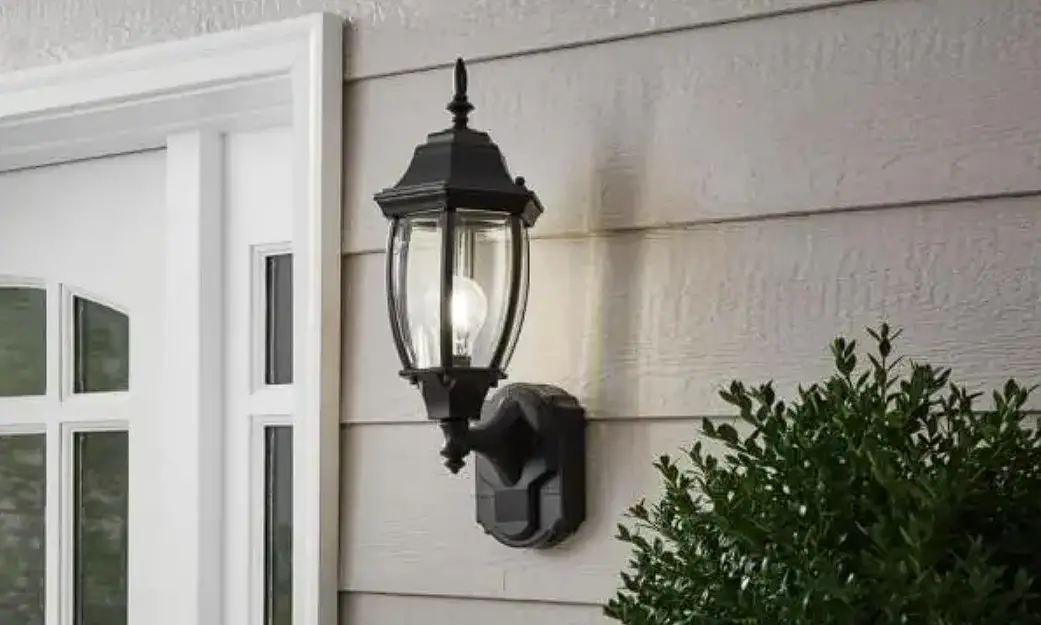
CA2289-2W Black Motion Sensor Dusk to Dawn Hardwired Outdoor Barn Light Sconce
Product Information: CA2289-2W Fixture
The CA2289-2W Fixture is an outdoor lighting fixture that
operates in different modes – Stand-by mode, Test mode, Auto mode,
and Manual override mode. The fixture has a motion sensor that
detects motion across its detection range of 220 degrees. The
fixture has a Dusk-to-Dawn sensor that automatically turns on the
light in Auto mode at night and turns it off during the day. The
fixture has a low-brightness operating diagram that starts low
brightness and cancels low brightness. The fixture should be
installed at least 6 feet above the ground for best performance,
providing a detection distance of up to 40 feet at 77 degrees
Fahrenheit.
Assembly and Installation Instructions
- Consult local electrical codes for wiring and grounding
requirements before installing the fixture. - Shut off power while installing or servicing the fixture to
avoid the risk of electrical shock. - Attach the mounting plate to the outlet box using two mounting
screws. - Pull out the wires and grounding wire from the outlet box and
make wire connections using wire nuts. - Caulk completely around where the back plate meets with the
wall surface using silicone caulking compound to prevent water from
seeping into the outlet box. - Turn on the power at the fuse or circuit box.
Modes of Operation
| Mode | Works at | Explanation |
|---|---|---|
| Stand-by mode | Day & Night | The fixture is on standby mode and will not turn on unless motion is detected or in Manual override mode. |
| Test mode | Day & Night | The fixture is on test mode and will turn on for 20 seconds as motion exists. |
| Auto mode | Night only | The fixture automatically turns on at night and turns off during the day using the Dusk-to-Dawn sensor. The fixture operates in low brightness and turns on to full brightness when motion is detected. |
| Manual override mode | Night only | The fixture operates in low brightness and turns on to full brightness for 2 minutes when motion exists. The fixture can be turned off after 5 seconds of Manual override operate or reset automatically after 8 hours or at dawn. |
Troubleshooting
| Symptom | Possible Cause | Solution |
|---|---|---|
| The light doesn’t work in Test Mode | Wall switch or circuit breaker is off or wiring is incorrect. | Turn on the wall switch or circuit breaker and check wire connections. |
| In Auto mode, the lighting fixture does not turn on when there is motion. | Light bulb is loose, incorrect or loose wire connections, or too much sunlight is shining into the Dusk-to-Dawn sensor in the early evening. | Tighten the light bulb in the socket, check wire connections, or relocate the fixture away from a western facing wall. |
ASSEMBLY AND INSTALLATION INSTRUCTIONS
CA2289-2W
WARNING: TO AVOID RISK OF ELECTRICAL SHOCK, BE SURE TO SHUT OFF POWER WHILE INSTALLING OR SERVICING THIS FIXTURE
NOTES: 1. Before installing, consult local electrical codes for wiring and grounding requirements. 2. READ AND SAVE THESE INSTRUCTIONS.
To work properly.you should install this fixture NOT confront any jets of air conditions or strong airflow
Machine Screw
Ground Wire
CAULK
Black Wire
GND
Outlet Box Negative Wire Live Wire White Wire Rubber Washers Decorative Nuts
Socket
Lampshade
Stationary ring
Bulb(bulb is not included)
1. Attach the mounting plate to the outlet box by using two mounting screws. 2. Pull out the wires and grounding wire from the outlet box. Make wire connections using the wire nuts, as follow:
—Connect the hot wire(usually black insulation)from the fixture to the black wire from the power source. —Connect the neutral wire(usually white insulation)from the fixture to the white wire from the power source. —Attach the fixture grounding wire(usually green insulation or bare wire)to the mounting strap with the green grounding screw.Then connect it to the house grounding wire with the wire nut. Carefully put the wires back into the outlet box. 3. Attachthebackplatetothemountingplatebyinsertingthescrews,thensecureitwithtwonuts. 4. Align the shade onto socket cup , and secure with socket Ring . 5.Installlightbulbs(60WA19).(Bulbsnotincluded,Pleasedonotexceedthemaximumcapacity recommended on the socket.
CAUTION: With silicone caulking compound, caulk completely around where the back plate meets with the wall surface to prevent water from seeping into the outlet box.
Turn on the power at fuse or circuit box.
Function and Operation
MODES OF OPERATION
Mode
Works at
Stand-by mode
Day & Night
Test mode
Day & Night
Auto mode
Night only
Manual override
mode
Night only
ON time 20 Sec
As motion existing
As motion existing
Manual override operate
Shut off delay time
/
5 Sec
2 Min.
8Hrs or Turn off at
dawn
Explanation
Turn on the power at the main fuse or circuit breaker box, the light will turn on immediately .Wait for about 20 seconds to allow the sensor to warm up, then the light will automatically enter into the TEST mode. The light will turn on at low-level brightness (30% brightness) in test mode. When motion is detected ,the light will turn to high-level brightness (100% brightness), and stay on as long as the motion is continuing. The light will revert to low-level brightness about 5 seconds after motion is no longer detected. There is one red LED on motion sensor flashing 3 times when motion is detected. Note: The time of TEST mode is approximately 120 seconds, then light will automatically enter into the AUTO mode. At dusk, the light will turn on at low-level brightness (30% brightness). When motion is detected, ,the light will turn to high-level brightness (100% brightness), and stay on as long as the motion is continuing. The light will revert to low-level brightness about 120 seconds after motion is no longer detected. There is one red LED on motion sensor flashing 3 times when motion is detected. Until dawn, the lights will turn off in about 120 seconds after the motion is no longer detected. Note: If you don’t want low brightness, turn off and turn on the wall switch twice within 2 seconds when the fixture is running. If you want to restart the low brightness, operate the wall switch again in the same method. (See FIG.1) In “AUTO” mode, to shift to the manual override mode, turn the wall switch “OFF”, and turn it “ON” within 2 seconds. The light will turn on and stay on for approximately 8 hours, or until the Dusk-to-Dawn sensor detects light in the morning. Once the Dusk-to-Dawn sensor detects light for more than 60 seconds, the manual override mode will automatically go back to the AUTO mode. (See FIG.2) Note: 1. To make sure the above functions operate properly, always keep the wall switch in the “ON” position (including the daytime). 2. Turn the wall switch “OFF”, wait over 10 seconds and then switch it “ON” again, the light will revert to warm-up period again.
FIG.1 Low Brightness Operating Diagram
Start low brightness
Turn wall switch OFF-ONOFF-ON within 0.5~2sec.
Turn wall switch OFF-ONOFF-ON within 0.5~2sec.
Cancel low
brightnes s
FIG.2 Manual Override Operating Diagram
Turn wall switch OFF-ON
within 0.5~2sec.
Manual
Auto Mode
Turn wall switch
Override Mode
OFF-ON within 0.5~2sec.
or reset automatically after 8hours or at dawn
NOTE:
1. The sensitivity of the motion sensor will increase as the
FIG.2
environmental temperature gets cooler. For best
performance, gently clean the lens with a soft cloth every
1 or 2 months to assure maximum sensitivity.
2. For best performance, install fixture at least 6 feet above
The ground. At such a height, the lantern will provide a
detection distance of up to 40 feet at 77 degrees
Fahrenheit.(See Fig.2)
FIG.3
3. The sensor detects across a detection range of 220
degrees.(See Fig.3)
4. The sensor will be more sensitive to motion across its
detection path than motion directly towards it. (See Fig.4)
5. To reduce possible nuisances, do not mount the fixture
near a heat source like an air conditioner, vent or furnace
FIG.4
exhaust, or in a direction facing any reflecting object or
other light source.
Troubleshooting
SYMPTOM
Possible Cause
Solution
The light doesn’t work in Test Wall switch or circuit breaker is off
Mode
The wiring is mistake
Turn on a switch or circuit breaker. Check wire connections.
Wall switch or circuit breaker is off
Turn on a switch or circuit breaker.
Light bulb may be dead.
Test the light bulb in a known working light fixture
In Auto mode, the lighting fixture does not turn on when
there is motion
Light bulb is loose.
Incorrect or loose wire connections.
Too much sunlight is shining into the Dusk-to-Dawn sensor in the early evening.
Tighten the light bulb in the socket.
Check wire connections.
Relocate fixture away from a western facing wall.
Too much light is shining onto the Dusk-to-Dawn sensor due to another light source, such as a street lamp or other light fixture.
Eliminate or turn off other light source, block other light source from shining onto Dusk-to-Dawn sensor, or relocate fixture.
In Auto mode, the lighting fixture stays on at 100% brightness continuously.
False triggering caused by a heat source, such as a heater or dryer vent, or air conditioning vent ,or heated swimming pool.
Eliminate heat source or relocate fixture
The lighting fixture comes on at 100% brightness for no apparent reason
alse triggering caused by a heat source, such as a heater or dryer vent,or air conditioning vent ,or heated swimming pool.
Eliminate heat source or relocate fixture
The lighting fixture comes on during the daytime or too early in the evening
The LED bulb or fluorescent bulb flickers when the lighting fixture is dimmed down to the
stand-by dimming level .
In Manual override, the light stays on after dawn
The fixture may be installed in a shaded area, such as under a porch or eave, preventing daylight from shining onto the photocell sensor. Non-dimmable LED bulb or fluorescent bulb is used on the lighting fixture.
the ambient light level is too low
Relocate the fixture
Replace dimmable LED bulb or fluorescent bulb, or incandescent bulb
Relocate the fixture