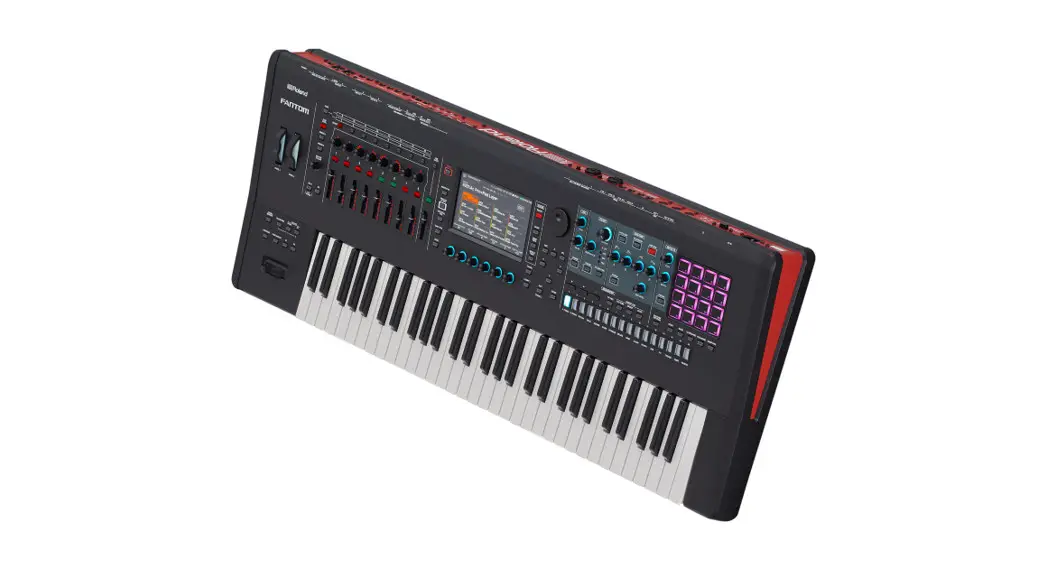
FANTOM Version 2.50 Supplementary Manual
This manual explains the new features that were added in FANTOM version 2.50. Read this along with the FANTOM Owner’s Manual, Reference Manual (PDF), and the previous FANTOM Supplementary Manuals through version 2.10.
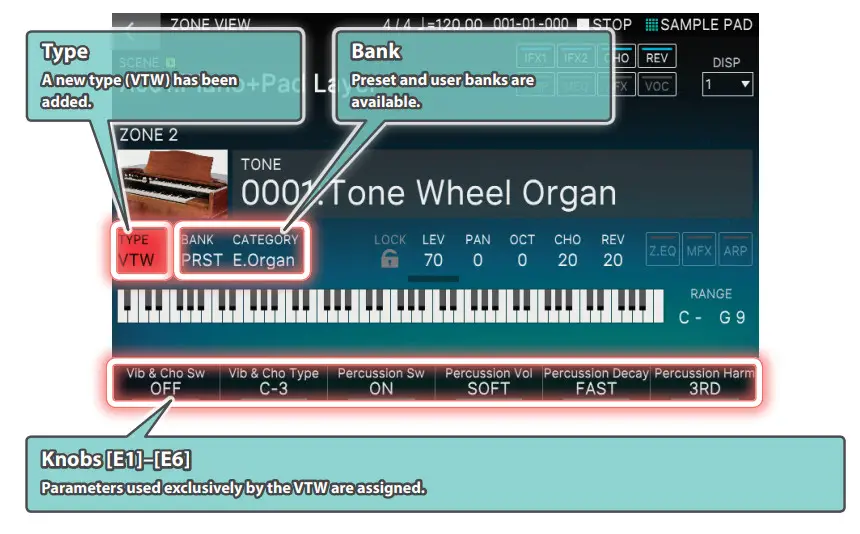
New VTW Organ Available
You can select the VTW (Virtual Tone Wheel) type only for zone 2.
* The Tone Remain function is disabled.
What’s the virtual tonewheel sound generator?
Traditional tonewheel organs generate sound using 91 toothed wheels called “tonewheels.”
Each tonewheel is a toothed, gear-like wheel with a different number of teeth that make it produce a specific pitch. A motor spins these wheels past magnetic coils which generate audio signals at the corresponding pitches. The settings of the harmonic bars in conjunction with the keys played on the keyboard determine which of these pitches are combined to produce the sound of the organ.
The virtual tonewheel sound generator uses digital technology to faithfully recreate the sounds produced by a tonewheel organ. The 91 “gears” are digitally rotated to instantly produce sound when you play the keyboard. This method of instantly producing sound is quite effective when you’re playing organ parts like glissandos.
The way in which you can use different harmonic bar combinations and how the sound is generated when you play the keys works the same as a traditional tonewheel organ.
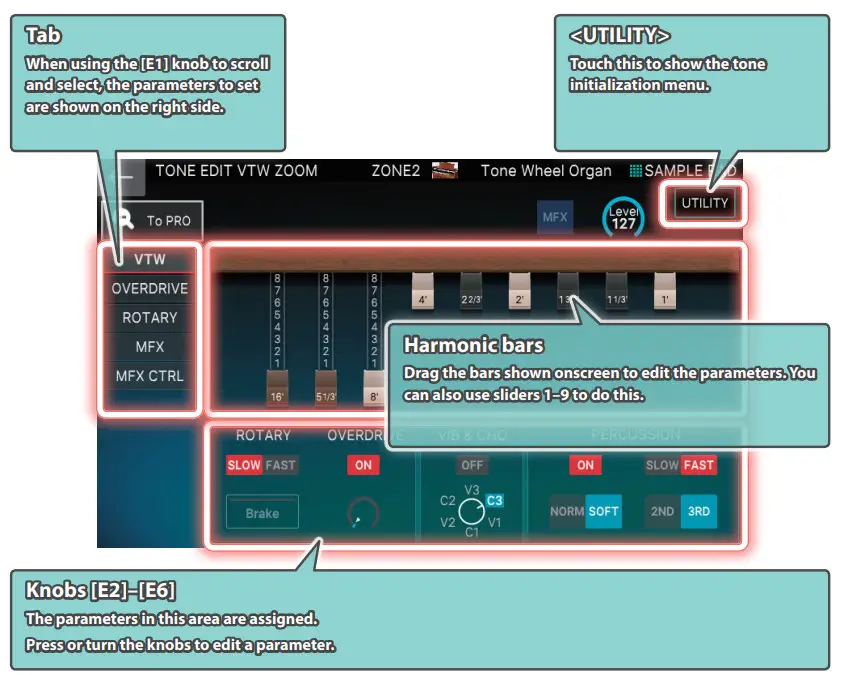
The organ sound consists of a base sound and eight harmonics, which are combined using the nine harmonic bars. Use the harmonic bars while you play to create tonal changes for a highly expressive performance.
With FANTOM v2.5, although you are limited to using just one part of the keyboard (for ZONE 2 only), this feature lets you use the latest in modeling technology to recreate the sounds of the most highly acclaimed tonewheel organs.
Editing the VTW
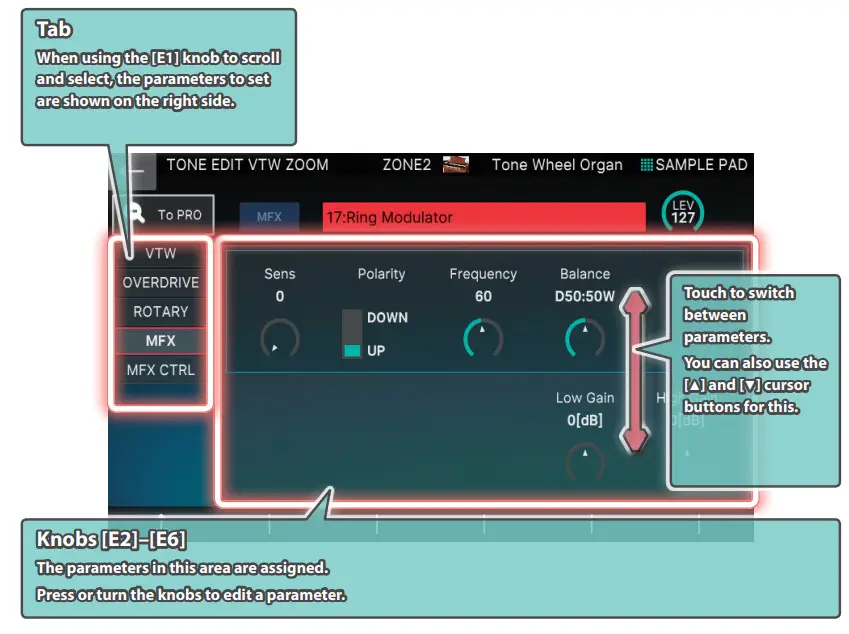
Use TONE EDIT or the [PARAM] buttons to edit the VTW.
ZOOM EDIT (WHEEL) screen
 Harmonic bars and the pitch of the sound When the middle C (C4) note is pressed, each harmonic bar will sound the following notes.
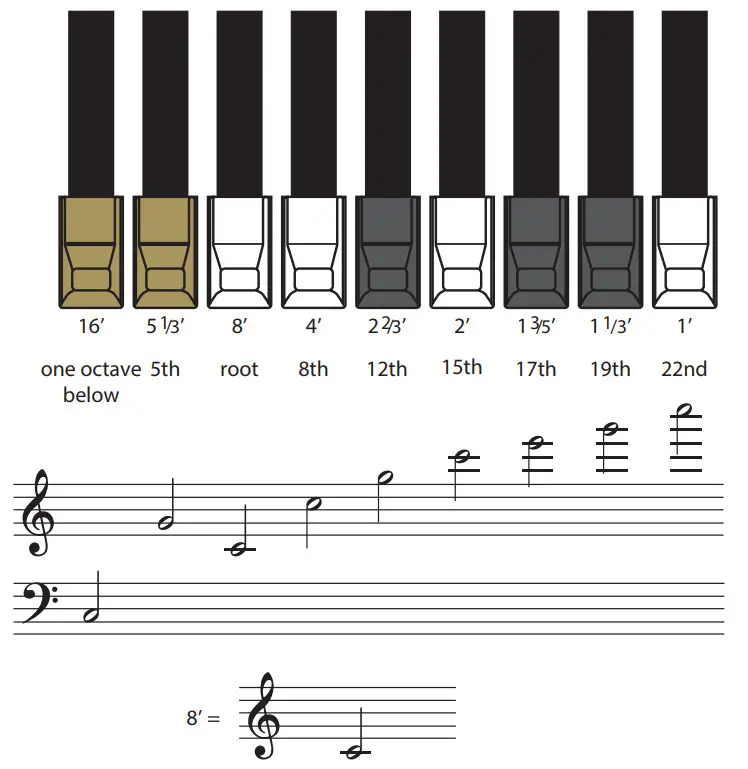
There are three different colors of harmonic bars. The octave bars are shown in white, centered around the 8’ stop. The bars for non-octave harmonics are shown in black, and the bars for the low range are shown in brown.
ZOOM EDIT (OVERDRIVE) screen
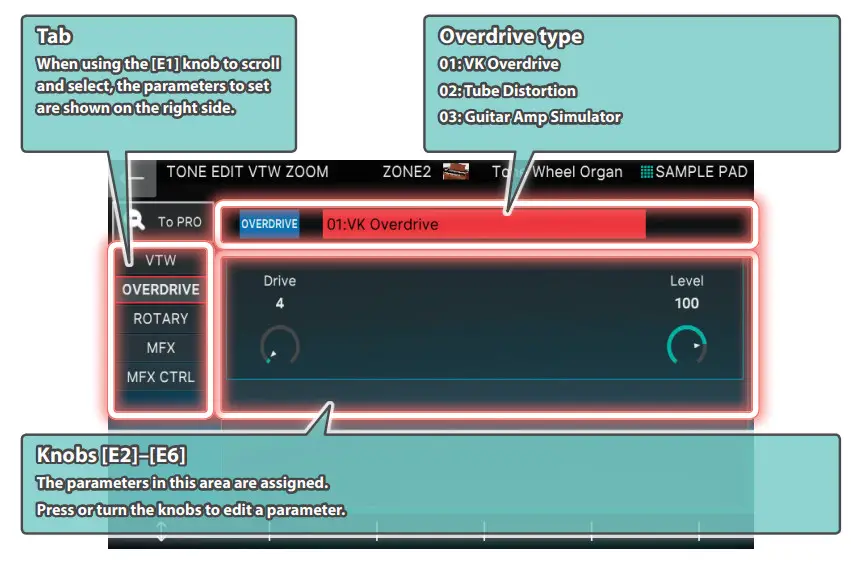
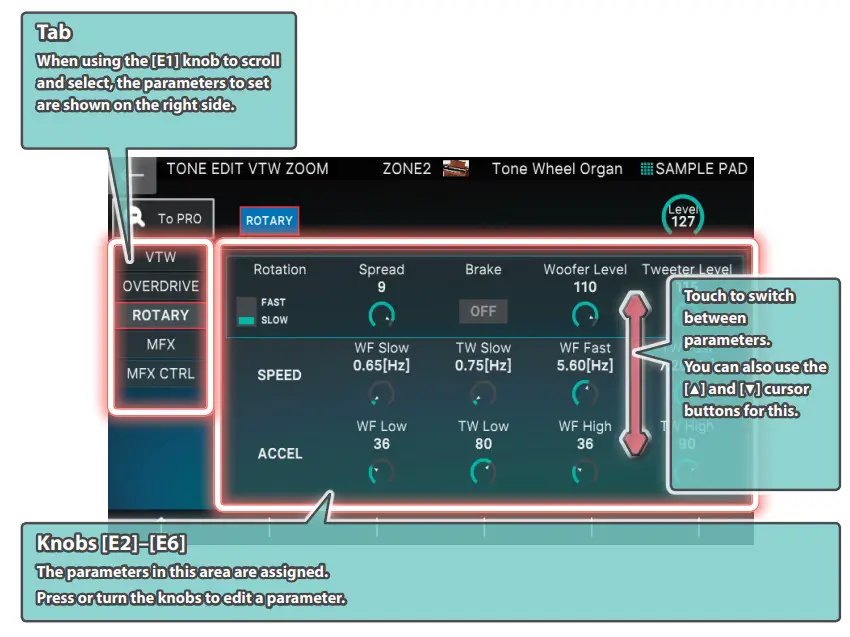
ZOOM EDIT (ROTARY) screen
 ZOOM EDIT (MFX) screen
VTW (Assigning to the Right-side Panel)
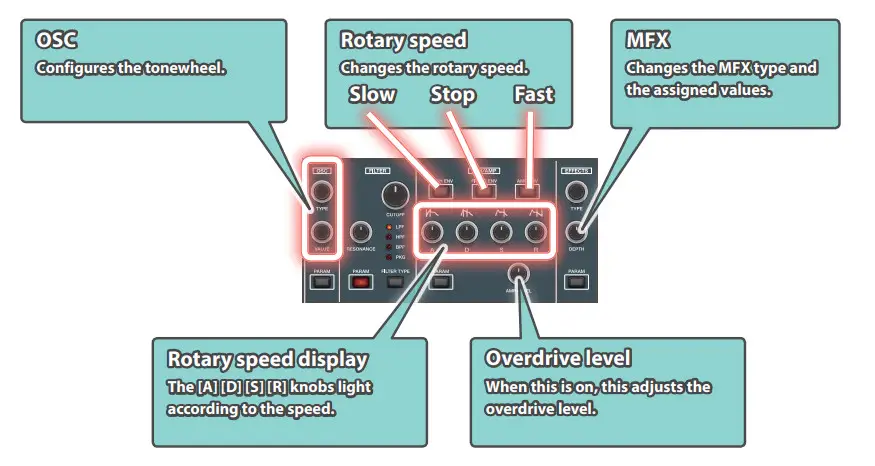
Use SYNTHCTRL to adjust even more parameters.
| Knob | Operation | Parameter | Explanation |
| TYPE | Turn | TW TYPE | Tonewheel types 1. (VINTAGE-1): A tonewheel used in the tonewheel organs of the 1970s. |
| Push | WHEEL BRAKE | SPIN: The tonewheel spins. STOP: The tonewheel stops spinning. * When stopped, the tonewheel makes no sound. Switch between STOP and SPIN to create unique changes in the tone. | |
| VALUE | Turn | LEAKAGE LEVEL | 0–63 This specifies the amount of leakage noise (distinctive noise produced by a tonewheel organ). |
| Push | TW SPEED UP | OFF, ON When this is ON, the tonewheel spins faster, changing the pitch. |
Leakage noise
With traditional tonewheel organs, you can hear a slight but unique high-pitched noise when you play the keys, due to the influence of the surrounding electrical circuits. This is called “leakage noise.” This noise was originally seen as a defect in the sound, but has since become accepted as part of the overall sound, and is now considered to be part of the characteristic “flavor” of the sound of the tonewheel organ. The FANTOM v2.5 recreates a number of different tonewheel types, each with different amounts of noise for their character. You can adjust the amount of this leakage noise.
VTW (Assigning to the Left-side Panel)
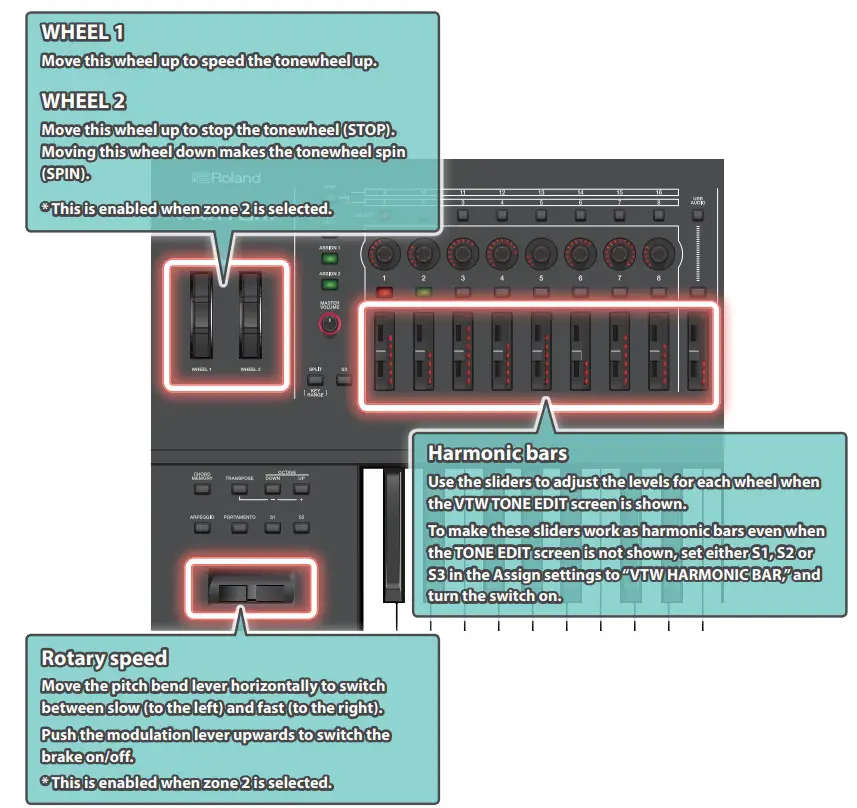
You can use a controller to adjust even more parameters.
Assigning the VTW Controllers
Use S1–3 Sw Assign and Pedal 1–3 Assign to control the VTW parameters that are assigned.
| Parameter | Explanation |
| VTW ROTARY SPEED | Alternates between SLOW and FAST. |
| VTW ROTARY BRAKE | Alternately switches the brake on/off for the rotary effect. |
| VTW ROTARY SW | Turns the rotary effect ON/OFF. |
| VTW OVERDRIVE SW | Turns the overdrive ON/OFF. |
| VTW WHEEL BRAKE | Alternately switches the brake on/off for the tonewheel. |
| VTW VIB/CHO SW | Turns the vibrato/chorus ON/OFF. |
| VTW HARMONIC BAR | You can also use the sliders as harmonic bars on other screens besides the edit screen. Settings can be made for only the [S1]–[S3] buttons. |
FANTOM VTW Control for SW/Pedal
Common
| Parameter | Value | Explanation |
| Category | 0–N | Tone category |
| Level | 0–127 | Overall level of the VTW tones |
| Wheel Brake | SPIN, STOP | The tonewheel spins when this is set to SPIN. The tonewheel stops spinning when this is set to STOP. |
| MEMO When stopped, no sound is made. Switch between STOP and SPIN to create unique changes in the tone. | ||
| Tone Wheel Speed Up | OFF, ON | When this is ON, the tonewheel spins faster, changing the pitch. |
VTW
| Parameter | Value | Explanation |
| Tone Wheel Type | VINTAGE-1, VINTAGE-2, SOLID, CLEAN | Tonewheel types 1. (VINTAGE-1): A tonewheel used in the tonewheel organs of the 1970s. |
| Leakage Level | 0–63 | This specifies the amount of leakage noise (distinctive noise produced by a tonewheel organ). |
| Vibrato Chorus Switch | OFF, ON | Vibrato/chorus on/off |
| Vibrato Chorus Type | V-1, C-1, V-2, C-2, V-3, C-3 | V-1: applies a slight vibrato effect. V-2: applies a medium vibrato effect. V-3: applies a strong vibrato effect. C-1: applies a slight chorus effect. C-2: applies a medium chorus effect. C-3: applies a strong chorus effect. |
| Percussion Switch | OFF, ON | Percussion sound on/off |
| Percussion Harmonic | 2ND, 3RD | 2ND: produces a percussion sound at the same pitch as the 4’ harmonic bar. 3RD: produces a percussion sound at the same pitch as the 2 2/3’ harmonic bar. |
| Percussion Decay | SLOW, FAST | SLOW: The percussion sound will decay slowly, producing a softer attack. FAST: The percussion sound will decay immediately, producing a sharper attack. |
| Percussion Volume | NORM, SOFT | NORM: The percussion will be at its normal volume, and the sound of the harmonic bars will be decreased. SOFT: The percussion sound will be decreased, and the harmonic bars will be at their normal volume. |
| Percussion Soft Level | 0–15 | Volume of percussion sound when PERCUSSION [SOFT] is on |
| Percussion Norm Level | 0–15 | Volume of percussion sound when PERCUSSION [SOFT] is off |
| Percussion Slow Time | 0–127 | Volume of percussion sound when PERCUSSION [SLOW] is on |
| Percussion Fast Time | 0–127 | Volume of percussion sound when PERCUSSION [SLOW] is off |
| Percussion Recharge Time | 0–10 | Percussion recharge time |
| Percussion H. Bar Level | 0–127 | Volume of harmonic bars when PERCUSSION [SOFT] is off |
| Upper Harmonic Bar 16’ | 0.. 8 | Sets the volume of each harmonic bar. |
| Upper Harmonic Bar 5-1/3’ | 0.. 8 | |
| Upper Harmonic Bar 8’ | 0.. 8 | |
| Upper Harmonic Bar 4’ | 0.. 8 | |
| Upper Harmonic Bar 2-2/3’ | 0.. 8 | |
| Upper Harmonic Bar 2’ | 0.. 8 | |
| Upper Harmonic Bar 1-3/5’’ | 0.. 8 | |
| Upper Harmonic Bar 1-1/3’ | 0.. 8 | |
| Upper Harmonic Bar 1’ | 0.. 8 | |
| Key On Click Level | 0–63 | This specifies the level of the click sound heard when you press a key. |
| Key-Off Click Level | 0–63 | This specifies the level of the click sound heard when you release a key. |
Parameter | Value | Explanation |
| Organ Expression Curve | NORMAL, SOFT | Sets the expression pedal depth for the VTW tone. NORMAL: Since the volume will change significantly as you vary the angle of the expression pedal, this setting is appropriate for songs with significant and clear-cut dynamics. |
FANTOM VTW Overdrive Parameter List
01: VK Overdrive
| Parameter | Value | Explanation |
| Dry Mix Level | 0–127 | Sets the volume of the direct sound mixed with the overdrive. |
| Drive | 0–127 | Degree of distortion. Also changes the volume. |
| Level | 0–127 | Output Level |
02: Tube Distortion
| Parameter | Value | Explanation |
| Dry Mix Level | 0–127 | Sets the volume of the direct sound mixed with the overdrive. |
| Distortion | 0–127 | Degree of distortion. Also changes the volume. |
| LPF Freq | 2000Hz, 2500Hz, 3150Hz, 4000Hz, 5000Hz, 6300Hz, 8000Hz, 10000Hz, BYPASS | Sets the center frequency at which the high range is attenuated. |
| Level | 0–127 | Output Level |
03: Guitar Amp Simulator
| Parameter | Value | Explanation |
| Dry Mix Level | 0–127 | Sets the volume of the direct sound mixed with the overdrive. |
| Pre Amp Sw | OFF/ON | Turns the amp switch on/off. |
| Pre Amp Type | JC-120, CLEAN TWIN, MATCH DRIVE, BG LEAD, MS1959I, MS1959II, MS1959I+II, SLDN LEAD, METAL 5150, METAL LEAD, OD-1, OD-2 TURBO, DISTORTION, FUZZ | Type of guitar amp |
| Pre Amp Drive | 0–127 | Volume and amount of distortion of the amp |
| Pre Amp Master | 0–127 | The volume of the entire pre-amp |
| Pre Amp Gain | LOW, MIDDLE, HIGH | Amount of pre-amp distortion |
| Parameter | Value | Explanation |
| Pre Amp Bass | 0–127 | Tone of the bass/mid/treble frequency range |
| Pre Amp Middle | 0–127 | |
| Pre Amp Treble | 0–127 | |
| Pre Amp Presence | 0–127 | Tone for the ultra-high frequency range |
| Pre Amp Bright | OFF/ON | Turning this “On” produces a sharper and brighter sound. * This parameter applies to the “JC-120,” “CLEAN TWIN,” “MATCH DRIVE,” and “BG LEAD” Pre Amp Types. |
| Speaker Sw | OFF, ON | Selects whether the sound will be sent through the speaker simulation (ON) or not (OFF) |
| Cabinet | Speaker | Microphone | |||
| Speaker Type (0–15) | SMALL 1 | small open-back enclosure | 10 | dynamic | |
| SMALL 2 | small open-back enclosure | 10 | dynamic | ||
| MIDDLE | open back enclosure | 12 x 1 | dynamic | ||
| JC-120 | open back enclosure | 12 x 2 | dynamic | ||
| BUILT-IN 1 | open back enclosure | 12 x 2 | dynamic | ||
| BUILT-IN 2 | open back enclosure | 12 x 2 | condenser | ||
| BUILT-IN 3 | open back enclosure | 12 x 2 | condenser | ||
| BUILT-IN 4 | open back enclosure | 12 x 2 | condenser | ||
| BUILT-IN 5 | open back enclosure | 12 x 2 | condenser | ||
| BG STACK 1 | sealed enclosure | 12 x 2 | condenser | ||
| BG STACK 2 | large sealed enclosure | 12 x 2 | condenser | ||
| MS STACK 1 | large sealed enclosure | 12 x 4 | condenser | ||
| MS STACK 2 | large sealed enclosure | 12 x 4 | condenser | ||
| METAL STACK | large double stack | 12 x 4 | condenser | ||
| 2-STACK | large double stack | 12 x 4 | condenser | ||
| 3-STACK | large triple stack | 12 x 4 | condenser | ||
| Mic Setting | 1–3 | Adjusts the location of the mic that is recording the sound of the speaker. This can be adjusted in three steps, with the mic becoming more distant in the order of 1, 2, and 3. | |||
| Mic Level | 0–127 | The volume of the microphone | |||
| Direct Level | 0–127 | The volume of the direct sound | |||
| Level | 0–127 | Output Level | |||
| Rotary | ||
| Parameter | Value | Explanation |
| Rotary Switch | OFF, ON | Turns the Rotary on/off. |
| MFX | ||
| Paramet | Value | Explanation |
| Type | 00: THRU– 90: Script 100 | Select the MFX type. The default value is “17:Ring Modulator.” |
| Switch | OFF, ON | Turns the tone MFX on/off. |
FANTOM VTW Rotary Parameter List
| Parameter | Value | Explanation |
| Rotation | SLOW, FAST | Rotational speed of the rotating speaker. |
| Brake | OFF, ON | Stops the speaker rotation. (When this is turned on, the rotation will gradually stop. When it is turned off, the rotation will gradually resume.) |
| Woofer Slow Speed | 0.05–10.00 [Hz] (1–200) | Low-speed rotation speed of the woofer |
| Woofer Fast Speed | 0.05–10.00 [Hz] (1–200) | High-speed rotation speed of the woofer |
| Woofer Acceleration High | 0–127 | Adjusts the rate at which the woofer rotation speeds up when the rotation is switched from Slow to Fast. |
| Woofer Acceleration Low | 0–127 | Adjusts the rate at which the woofer rotation speeds up when the rotation is switched from Fast to Slow. |
| Woofer Level | 0–127 | Volume of the woofer |
| Tweeter Slow Speed | 0.05–10.00 [Hz] (1–200) | Low-speed rotation speed of the tweeter |
| Tweeter Fast Speed | 0.05–10.00 [Hz] (1–200) | High-speed rotation speed of the tweeter |
| Tweeter Acceleration High | 0–127 | Adjusts the rate at which the tweeter rotation speeds up when the rotation is switched from Slow to Fast. |
| Tweeter Acceleration Low | 0–127 | Adjusts the rate at which the tweeter rotation speeds up when the rotation is switched from Fast to Slow. |
| Tweeter Level | 0–127 | Volume of the tweeter |
| Spread | 0–10 | Sets the rotary speaker stereo image. ?The higher the value set, the wider the sound is spread out. |
| Level | 0–127 | Output Level |
FANTOM VTW Control
VTW Control
| Category | Parameter | Value | MIDI | Explanation |
| ROTARY | Rotary Speed | SLOW, FAST | CC#80 | Alternates between SLOW and FAST. |
| Rotary Brake | OFF, ON | CC#81 | Alternately switches the brake on/off for the rotary effect. | |
| TONEWHEEL | Tone Wheel Brake | OFF, ON | CC#17 | Alternately switches the brake on/off for the tonewheel. |
| Tone Wheel Speed Up | OFF, ON | CC#18 | Speeds up the tonewheel. | |
| HARMONIC BAR | 0-8 | CC#70–78 | Use this to edit the harmonic bar value. | |
| EXPRESSION | 0-127 | CC#11 | Use this to edit the expression value. |
NOTE
When VTW is selected, the zone offset parameters (Cutoff/ Reso/Atk/Dcy/Rel/Vib: CC#70–78) are disabled.
About the keyboard action (quick-firing)
One of the characteristics of the keyboard on a traditional tonewheel organ is that the instrument makes a sound just by playing the keys with a small amount of force (a light key touch). This kind of action makes it easy to string notes together smoothly when playing glissandos, or to play ghost notes in faster passages, giving you that unique organ groove.
Although the form of the keyboard on the FANTOM v2.5 hasn’t physically changed, we’ve made it possible to achieve the unique playability and groove of an organ by focusing on the key depth at which the instrument generates its sound when the keys are pressed, to simulate the extremely light touch (quick-firing) of an organ.
Expression pedal
The expression pedal of an organ is called “expression,” as it is not only for controlling the volume but is an integral part of performing expressively with the instrument.
This is used to adjust not only the volume but also to change the tone and the changes in tonal curves. For this reason, the instrument still produces sound even when the pedal is at a minimum position. The FANTOM v2.5 also models how the expression pedal behaves with the organ sound.
Controlling Ableton Live
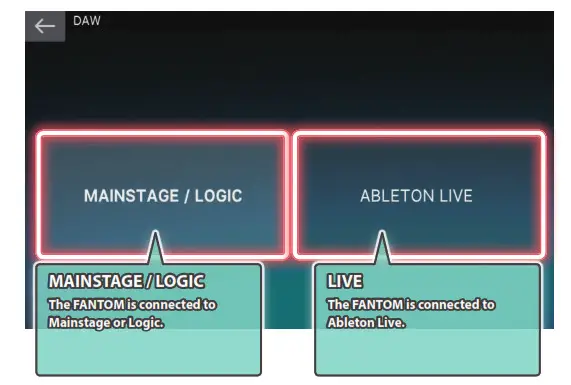
Connecting
Select the “type” to connect using DAW CTRL.
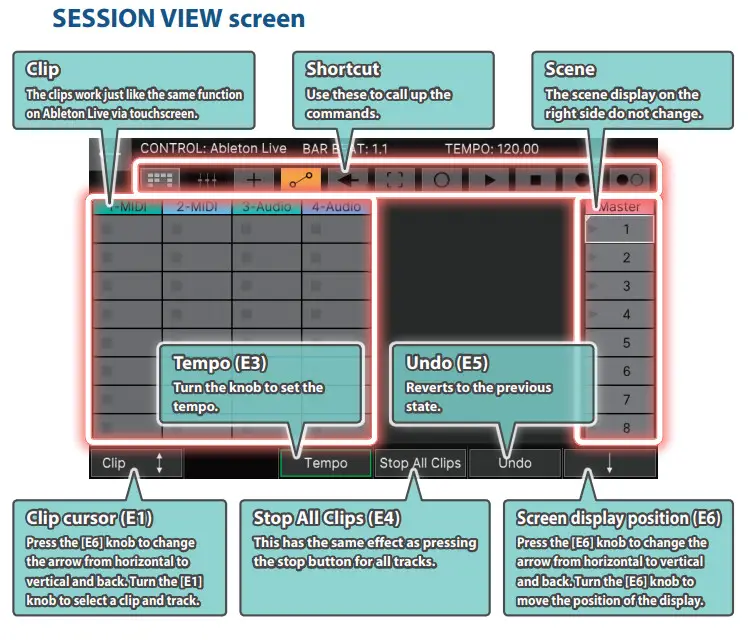
Session View
SESSION VIEW screen
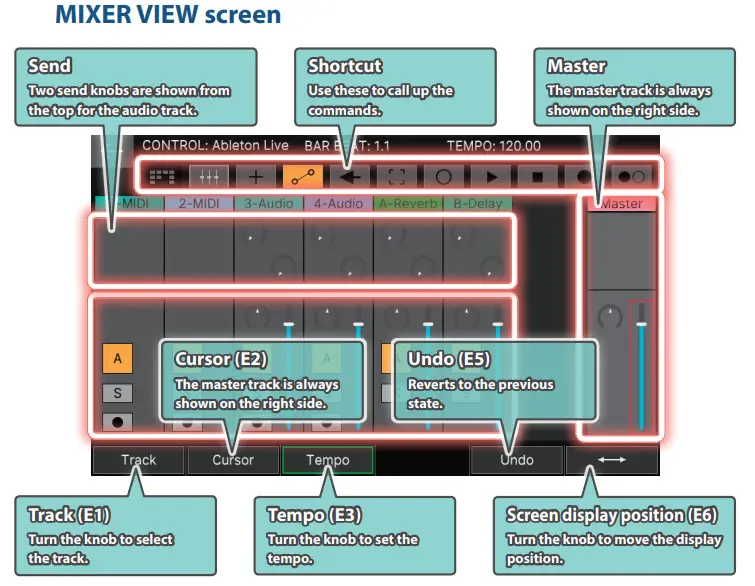
Mixer View
MIXER VIEW screen
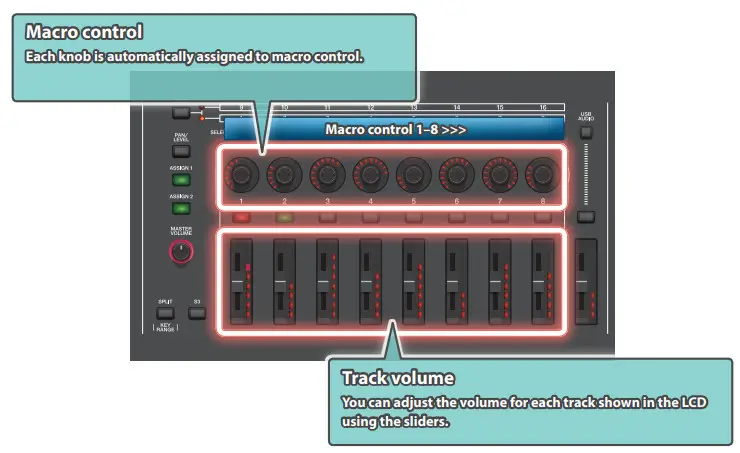
DAW CTRL (ASSIGN1+ASSIGN2)
You can use a DAW CTRL controller to adjust even more parameters
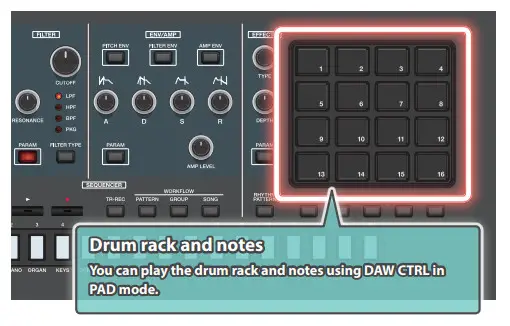
 PAD MODE (DAW CTRL)
The drum rack can be played using DAW CTRL in PAD mode.
Other Changes
- The zone for playing the rhythm pattern is now selectable.
- USB IN and USB OUT parameters have been added to MIXER.
- On the MIXER screen, you can now switch between three screens by pressing the buttons: “16 VIEW,” “8 VIEW” and “OUT/USB.”