LW550 AC Slide Motor
LW550 AC Slide Motor
WARNING: THIS PRODUCT MUST BE INSTALLED BY A
QUALIFIED ELECTRICIAN
The LW550 AC Slide Motor comes with two types of limit setups –
Magnetic and Spring. Follow the instructions that suit your current
LW550 motor.
LW550 Control Board – Magnetic limit setup
To install the new control board:
- Remove the old control board and reattach the new board.
- Connect the two clear connectors (each with 3 colored cables)
to the main control board as required. - Set dip switch 8 UP for High Magnet or DOWN for Low
Magnet. - Follow the image below showing where the colored cables connect
to the orange connector block. - For High Magnet and Low Magnet, the M Gate slides OPEN to the
left and right, respectively. - The earth cable MUST BE INSTALLED BY A QUALIFIED
ELECTRICIAN.
LW550 Control Board – Limit Spring setup
The Limit Spring setup MUST BE INSTALLED BY A QUALIFIED
ELECTRICIAN. The earth cable must also be installed by a qualified
electrician.
Wiring up the KP Receiver
To tune a remote to the KP Receiver:
- Press P1 on the receiver board (red LED will go solid).
- Press and hold the remote button for 3 seconds (red LED will
flash to indicate that the remote and receiver are paired).
To delete remotes from the KP Receiver:
- Press P2 on the receiver board for 8 seconds (red LED will go
solid). Please note that this will remove all remotes from the KP
receiver.
Servicing Your Gate and Motor
Regular maintenance is required to keep your gate and gate motor
in good condition. The following MUST be done at regular intervals
(3-4 months):
- Check for insects, snakes and geckos in and around the PC
Board. - Lift the gate and check the wheels that run on the rail.
Warranty
The LW550 AC Slide Motor comes with a 12-month warranty from the
date of purchase. The warranty does not cover incorrect
installation or damage by fusion and other insects. Warranty
replacement and repairs are back to base. You can view our full
terms and conditions at www.bmgi.com.au. The product must be
installed with a surge protector to protect the main control board
from power surges. Warranty will be voided as power surges are not
covered under warranty.
Wireless Receiver Wiring Diagram
The wireless receiver wiring diagram shows the different
functions that the product can perform, such as remote control
single three key functions, half-open function (non-standard),
automatic closing function, soft stop function, full power to
start, and programmable state. After the gate is installed, turn to
max. force (clockwise) to adjust the motor’s power. Clockwise is
bigger for slow thrust force torque. The product also includes an
infrared safety electric eye input terminal, a single key
circulation stop input, close input, open input, limit switch input
terminal (closing direction), motor phase line, motor common line,
220V AV 60W flashing lamp output, and earth. IMPORTANT: 240 Volt
power supply must be safely secured inside the motor housing to
prevent the power supply from being disconnected from the main
board. If not secured correctly, this may cause the LW550 to become
an electrical hazard.
LW550 AC Slide Motor
WARNING THIS PRODUCT MUST BE INSTALLED BY A
QUALIFIED ELECTRICIAN
There are 2 types of LW550 limit setups –
Magnetic and Spring Following the instructions that suit
your current LW550 motor
LW550 Control Board – Magnetic limit setup
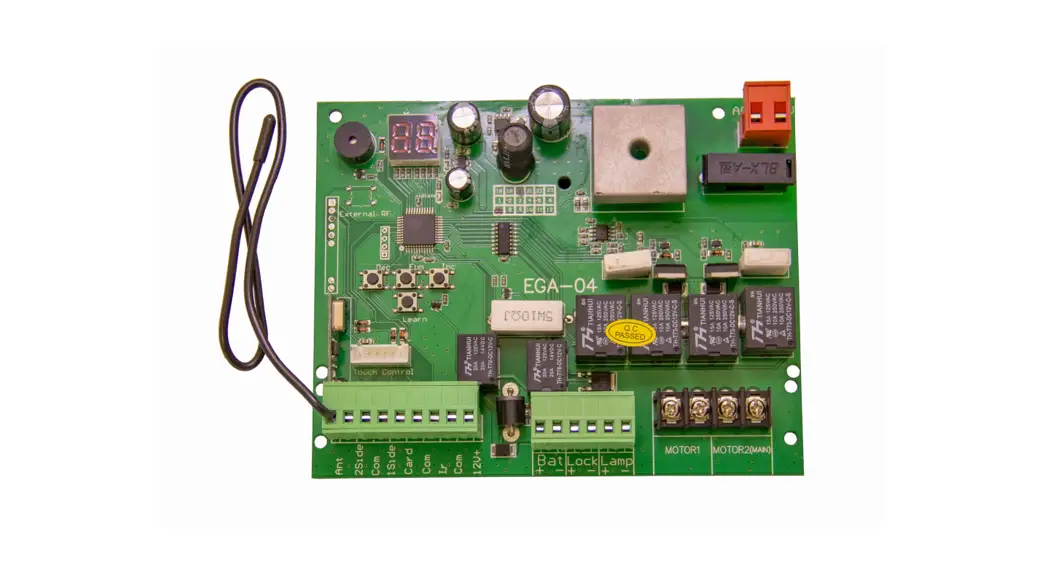
Remove old control board and re attach new board. Connect the 2 clear connectors (each with 3 coloured cables) to the main control board as required. Follow the image below showing where the coloured cables connect to the orange connector block.
Setting the travel direction After connecting all the wires as stated above you will now be required to set the travel direction. For this step, you should have the gate in the full closed position, standing on the inside of your property at the motor (looking out to the road). Find the dip switches on the main control board (top left corner, 1-8) now set as required below: If your gate slides OPEN to the right = Set dip switch 8 DOWN If your gate slides OPEN to the left = Set dip switch 8 UP Now your travel direction has been set
High Magnet
Set dip switch 8 UP
Low Magnet
M Gate slides OPEN to the left
Set dip switch 8 DOWN
High Magnet
Low Magnet
M Gate slides OPEN to the right
Earth cable
MUST BE INSTALLED BY A QUALIFIED ELECTRICIAN
LW550 Control Board – Limit Spring setup
Remove old control board and re attach new board. Connect the 2 clear connectors (each with 3 coloured cables) to the main control board as required. Follow the image below showing where the coloured cables connect to the orange connector block. Setting the travel direction After connecting all the wires as stated above you will now be required to set the travel direction. For this step, you should have the gate in the full closed position, standing on the inside of your property at the motor (looking out to the road). Find the dip switches on the main control board (top left corner, 1-8) now set as required below If your gate slides OPEN to the right = Set dip switch 8 DOWN If your gate slides OPEN to the left = Set dip switch 8 UP Now your travel direction has been set
MUST BE INSTALLED BY A QUALIFIED ELECTRICIAN
Earth cable
Wiring up the KP Receiver
Tuning a remote to the KP Receiver
1. Press P1 on the receiver board (red LED will go solid) 2. Press and hold the remote button for 3 seconds (red LED will flash
to say remote and receiver are paired)
Deleting remotes from the KP Receiver
1. Press P2 on the receiver board for 8 seconds (red LED will go solid). Please note this will remove all remotes from the KP receiver.
Servicing Your Gate and Motor
Your gate and gate motor are both very important pieces of equipment. This equipment is like a vehicle, which requires preventative maintenance especially on the coast where corrosion is a big factor.
The following MUST be done at regular intervals: (3-4 months)
1. Check for insects, snakes and geckos in and around the PC Board. 2. The gate must be lifted and the wheels that run on the rail must be
checked to see that they spin freely and that the bearings haven’t collapsed, this is very important to ensure the life span of your gate motor. 3. The gate guide wheels must be checked to see that they spin freely and ensure that they are not worn and the lock nuts are tight. 4. Over time the gate wheels tend to bed themselves in, as a result the gate’s gear rack now rides directly on the motor’s main drive pinion gear. There should ordinarily be a 2 mm gap between the gear rack and the pinion gear. Another indication of this “binding” situation is when the motor vibrates excessively while the gate is running. This fault causes unnecessary wear and tear and will reduce the life of the operator and it must be rectified without delay. The rack can also become too loose and the gap becomes too big, which causes the pinion gear to skip the teeth on the gear rack causing a malfunction. 5. If safety beams are fitted, check for any insects and ensure that there are no loose or broken wires inside the beams. 6. Remove any plants, trees or branches that may cause an obstruction to the wheels and a blockage to the beams. 7. Check that the operator’s foundation plate bolts are still secure. 8. Check that the ends stops are still secure.
Warranty 1. 12 months warranty from date of purchase, warranty does not cover incorrect
installation or damage by fusion and other insects. 2. Warranty replacement and repairs are back to base. 3. You can view our full terms of conditions at www.bmgi.com.au 4. Must be installed with a surge protector to protect the main control board from
power surges. Warranty will be voided as power surges are not covered under warranty.
wireless receiver
Wiring diagram
ON
1.Remote control single three key functions.
2.Half-open function (non standard).
3.Automatic closing function.
4.Soft stop function.
5.Full power to start. 6.Programmable State.
A(cdlojucsktwmisoetoisr’sbitghgruesr)t after the gate is installed.
Rtoecbaonucnedl trheissisfutanncctieonfu. nction,turn to max. force (clockwise)
Adjust motor’s power.(clockwise is bigger)
SLOW THRUST FORCE
TORQUE
LED9
Motor direction
Learning key F
Function key L1 L2 L3 L4 L5 L6
LED8 L7
Limit swicth
K3
11 12 13
+15V COM FSW ONE STP CL OP C.L COM O.P
L1 COM L2
14 15 Light
16 17 18
I —
N L
AC220V
15V 100mA max. Power output Common terminal
Infrared safety electric eye (Closing direction) input terminal A single key circulation Stop input Close input Open input
Limist switch input terminal(Closing direction) Common terminal
Limist switch input terminal(Open direction) Motor phase line
Motor common line Motor phase line
220V AV 60W flashing lamp output. Earth
220V Power supply (null line) 220V Power supply (live line)
IMPORTANT 240 Volt power supply must be safely secured inside the motor housing to prevent the power supply from being disconnected from the main board. If not secured correctly this may cause the LW550 to become an electrical hazard.
 Automatic Gate Opener -Electric Gates - Solar Gates