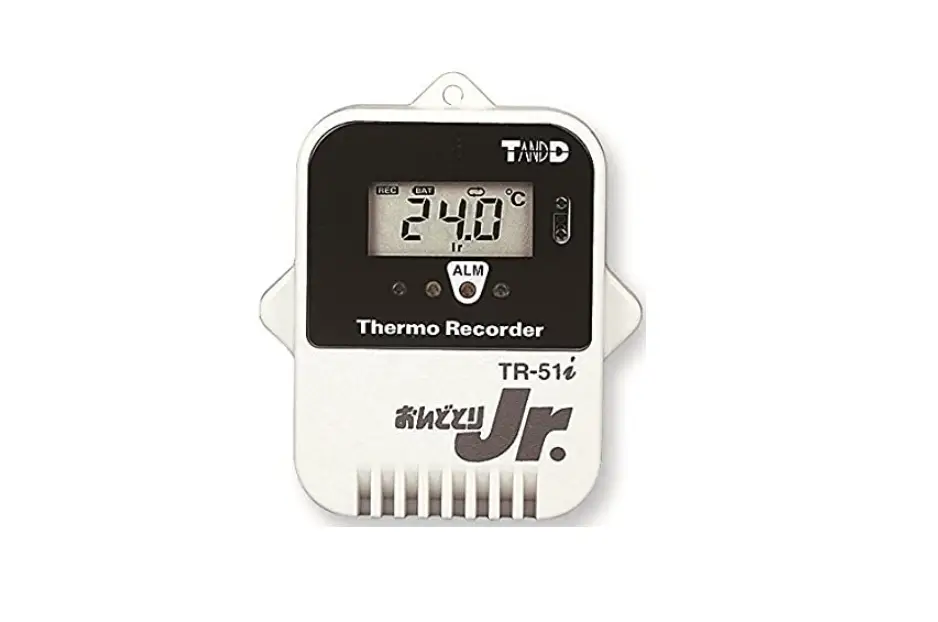
TandD TR-51i Thermo Recorder Instruction Manual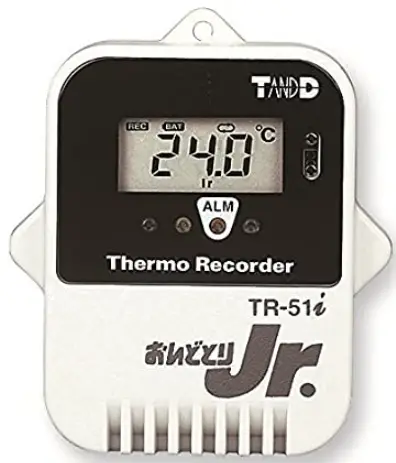
Introduction
Thank you for purchasing this product.
Please carefully read and fully understand these instructions before using this unit.
tandd.com
Copyright T&D Corporation. All rights reserved. 2022. 10 16504710018 (9th Edition)
TR-51i
Internal Temperature Sensor Type
Immersion proof
Package Contents:
Data Logger and Common Accessories for TR-51i and TR-52i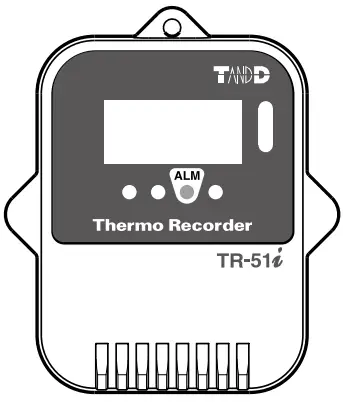
TR-52i
External Temperature Sensor Type
Splash proof
Package Contents:
Data Logger, Temperature Sensor TR-5106, and Common Accessories for TR-51i and TR-52i.

Common Accessories for TR-51i and TR-52i :
Lithium Battery LS14250 with Tube, Strap and Introductory Manual (including Warranty)
Appearance Diagram and Part Names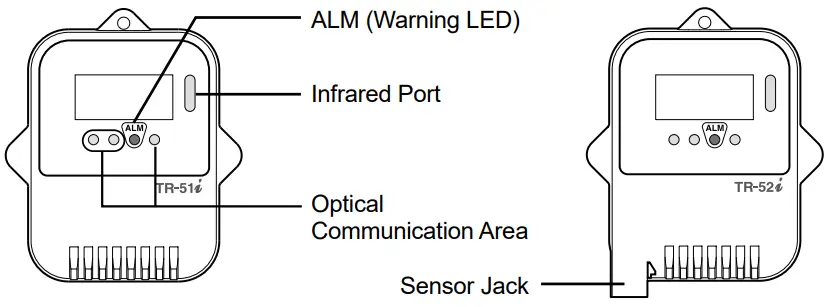
 Thermo Recorder TR-51i/52i will be referred to as the “Unit” in this manua
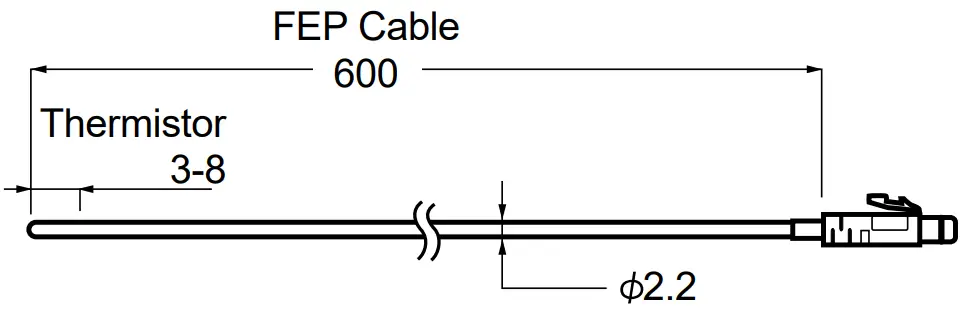
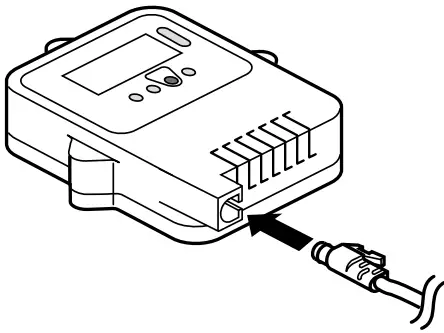
Temperature Sensor TR-5106 (Supplied with TR-52i)
- Waterproof Capacity: Submersible
- Temperature Durability: -70 to 180˚C

- Make sure that the sensor is completely inserted until you hear a “click” sound.

Specifications
| TR-51i | TR-52i | |
| Measurement Channels | Temperature 1ch (Internal) | Temperature 1ch (External) |
| Sensor | Thermistor | |
| Measurement Units | °C, °F | |
| Measurement Range | -40 to 80°C | -60 to 155°C |
| Accuracy | Avg.±0.5°C | Avg.±0.3°C at -20 to 80°C Avg.±0.5 °C at -40 to -20°C, 80 to 110°C Avg.±1.0 °C at -60 to -40°C, 110 to 155°C |
| Measurement Resolution | 0.1°C | |
| Responsiveness | Response Time (90%): Approx. 35 min. | Response Time (90%): Approx. 80 sec. (in air) Approx. 7 sec. (in agitated water) |
| Logging Capacity | Up to 16,000 readings | |
| Recording Interval | Select from 15 choices: 1, 2, 5, 10, 15, 20, 30 sec. or 1, 2, 5, 10, 15, 20, 30, 60 min. | |
| Recording Modes | Endless / One Time | |
| Communication Interfaces | Optical Communication Infrared Communication: IrPHY 1.2 low power | |
| Power | Lithium Battery LS14250 x 1 | |
| Battery Life(*1) | Approx. 4 years (2 years with Infrared Communication Enabled) | |
| Dimensions | H 62 mm x W 47 mm x D 19 mm (excluding protrusions and sensor) | |
| Weight | Approx. 45 g | |
| Operating Environment | -40 to 80°C | |
| Waterproof Capacity | IP67: Immersion proof | IP64: Splash proof (rated for use in daily life) (*2) |
| Data Collection Devices | Communication Ports: TR-50U2 (Discontinued TR-50U / 50C) Data Collectors: TR-57DCi (Discontinued TR-57U, RTR-57U) | |
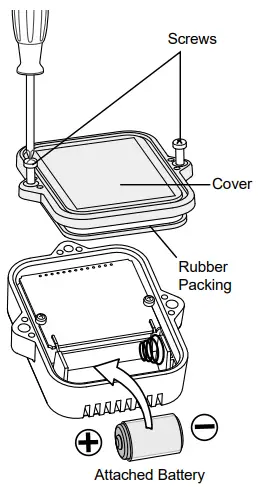
Installing the Battery
Recording will start after the battery is inserted.
- Remove the screws and open the cover.
Make sure to use the proper size and type of screwdriver.
(Phillips head #1 screwdriver) - Insert the attached Battery.
Do not remove the battery from its tube casing. (Tube is not necessary for CR2.) - Check the rubber packing condition and close the cover
- If dirt or scratches are present on the rubber packing, water resistance will be reduced.
Please remove the dirt or replace the rubber packing if there’re any cuts or scratches. - Be sure to completely close the cover.
- Make sure not to over tighten the screws. (Appropriate torque: 20 to 30 N/cm [ 2 to 3 Kgf/cm])

- If dirt or scratches are present on the rubber packing, water resistance will be reduced.
Notes about Battery Installation
- After inserting the battery, it may occur that nothing appears in the display for about 10 seconds; this is not a malfunction.
- If a new battery has been installed and nothing appears in the display, please remove and re-insert the battery.
- When inserting a battery, make sure no water or foreign objects get inside the case.
- Make sure that + and – are in the correct direction.
About Lithium Batteries
- When using lithium batteries other than LS14250 produced by SAFT, such as CR2, product specifications cannot be guaranteed nor can the performance of some functions, such as the battery warning function.
- Please avoid using the CR2 in the following situations:
Using the unit in an environment below 0°C or above 60°C.
Exposing the CR2 to continuous vibration such as in transportation. - Please store the lithium battery LS14250 in a place that is 20°C or less.
- To maintain waterproof capacity, when changing batteries also change the optional
Maintenance Set (TR-00P1) to replace the rubber packing and silica gel.
Cautions for Using at Low Temperature (below -20°C)
When using in an environment below –20°C:
- The battery life will be halved.
- The Unit may not operate or a battery replacement mark may appear even if it works fine at normal temperature; we suggest replacing the battery as early as possible.
Reading the LCD
Basic LCD Display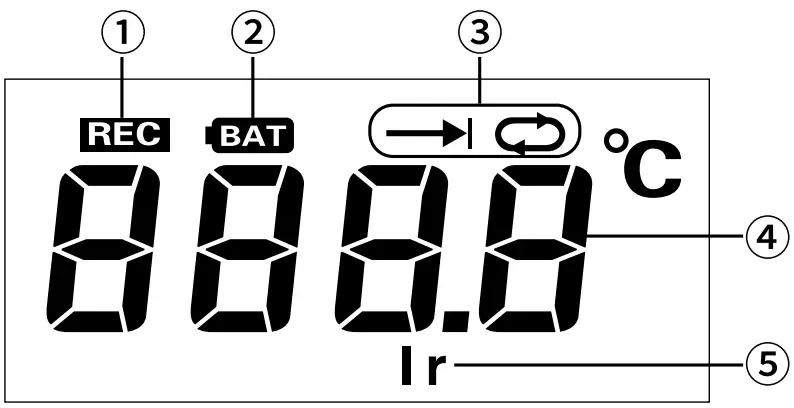
When being used in very hot or cold environments, the display may become difficult to read. This is not a malfunction.
| 1 | [REC] Mark | The recording status is shown here. ON: Recording in progress or Storage Capacity FULL. BLINKING: Waiting for programmed start. |
| 2 | [BAT] Mark | When it is time for the battery to be replaced, this mark will appear. |
| 3 | Recording Mode |  One-Time One-Time Endless Endless |
| 4 | Measurements or operational messages are shown here | |
| 5 | [ Ir ] Mark | The infrared communication status is shown here. ON: Permitting infrared communication. OFF: Forbidding infrared communication. |
Battery Replacement Mark
When it is time for the battery to be replaced, the [BAT] mark will appear.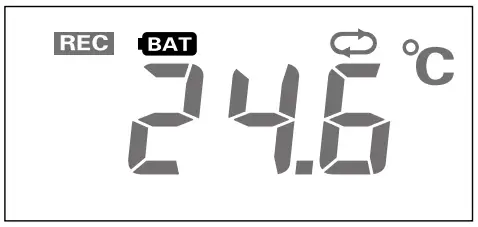
The battery mark will appear based upon the calculation of battery use. This mark may not appear correctly if the same battery is taken out and put in, therefore do not remove the battery until it can be replaced with a new one. Please make sure to download any necessary data before replacing a battery.
- Remove the battery.
- Wait for about three seconds until the display shows “bAtt”. Once this appears, please insert the new battery as quickly as possible.
If the battery is replaced before “bAtt” appears, the battery replacement mark (BAT) may remain even after the replacement.
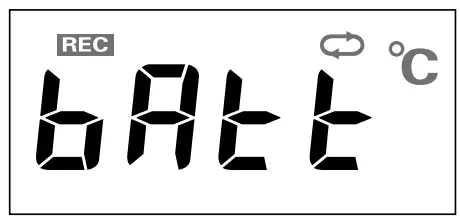
If the battery is left unchanged, the display automatically shut off and all previously recorded data will be lost. When using the CR2, even though a new battery has been inserted the battery replacement mark may remain on for a while. In this case, after removing the battery, wait until the LCD display turns off and then insert a new battery.
Estimated Battery Life
When communication frequency is 4 times a month
| Operational Environment | 10°C | 10°C | 20°C | 30°C |
| Battery Life | About 4 years | About 33 months | About 2 years | About 14 months |
Battery life will be shortened if used under the following conditions:
- Downloading data very often.
- Setting the recording interval at less than 10 seconds.
- If infrared communication is set to be permitted.
- Leaving the Unit with the warning LED blinking.
- Measuring in an environment below 10°C or above 60°C
- Leaving the Unit unconnected to the sensor for several months (TR-52i)
Operational Messages
Storage Capacity FULL
When the Unit reaches its storage capacity of 16,000 readings, recording will automatically stop and in the LCD the measurement reading and the word “FULL” will alternately appear. (When Recording Mode has been set to “One Time” )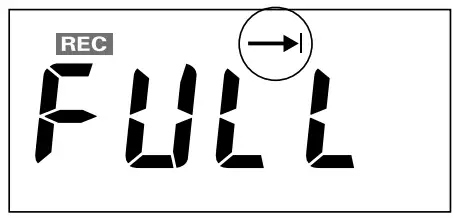
Recording Intervals & Estimated Time until Logging Capacity is Reached
| Recording Interval | 1 second | 30 seconds | 1 minute | 10 minutes | 60 minutes |
| Period | About 4 hours | About 5 days | About 11 days | About 111 days | About 1 year and 10 months |
[Check]
If this appears, all data that was stored in the Unit will have been erased.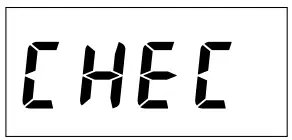
This will be displayed under the following conditions:
- The first time a battery was inserted after purchase
- If the battery is replaced after having been taken out for a long period
- If the battery is replaced after the battery power has been lost.
Warning (set limit exceeded)
Using the Software for the Communication Port or Data Collector, you can make settings for the Upper / Lower Limits and Judgment Time. If a measurement exceeds one of the set limits, the warning LED and a message will be displayed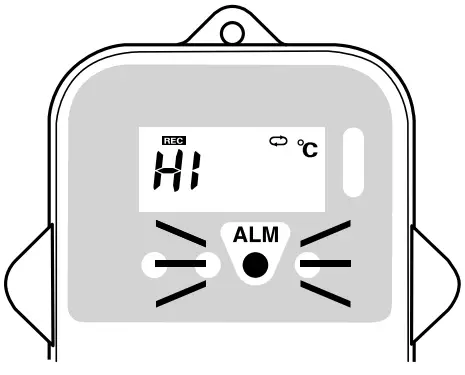
Upper Limit Exceeded
If a measured temperature exceeds the set upper limit, the Logger LED will alternately flash between [Hi] and the measurement.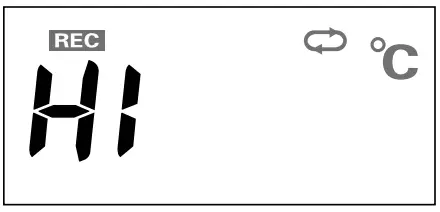
Lower Limit Exceeded
If a measured temperature exceeds the set lower limit, the Logger LED will alternately flash between [Lo] and the measurement.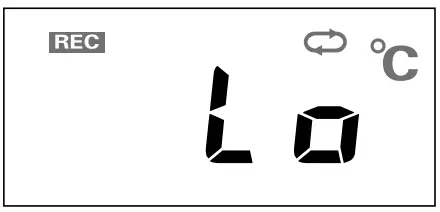
About Warning Monitoring Function
If warning settings (upper/lower limits) are made in an environment where one of the limits is being exceeded and recording is started, the monitoring function will enter “wait” mode. Once a measurement returns to within the set limits, the monitoring function will begin to operate.
If you wish to turn off the warning, do one of the following:
- Restart recording from the software.
- Download the recorded data (only when successfully completed).
- Produce a condition so that “CHEC” is displayed. (see [Check] above).
Operational Messages for TR-52i only
Measurement Range Exceeded
The temperature display blinks when the temperature exceeds the measurement range (-60°C or below / 155°C or above).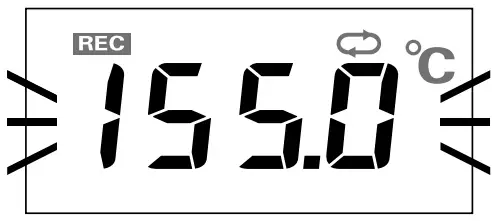
Sensor Unconnected
This will be displayed when a sensor has not been connected or the wire has been broken.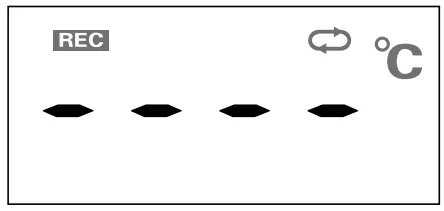
- Measurement and recording will continue so battery power will be consumed.
- If after re-connecting the sensor and measurements can still not be displayed, it is very possible that the sensor or the Unit are defective or have been damaged.
Recording Settings / Downloading Recorded Data
You will need a Communication Port or a Data Collector and the software “T&D Recorder for Windows” in order to change the recording settings and download recorded data. For details, please see the User’s Manual that comes with the Communication Port or Data Collector.
Communicate with a Computer
- Start “T&D Recorder for Windows”.
- Connect the Communication Port or Data Collector to your computer using the provided communication cable.
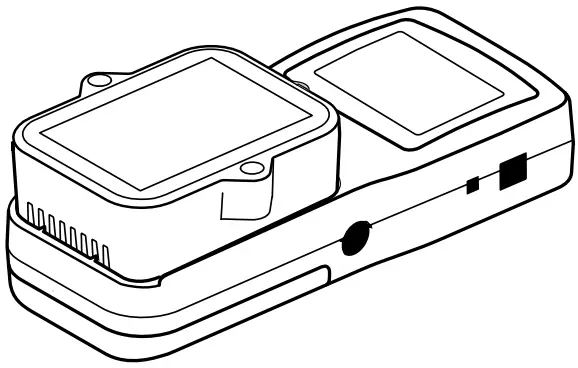
- Place the Unit face down on the Data Collector or Communication Port, making sure that the optical communication areas are aligned properly.
Communication Port: TR-50U2 (Discontinued TR-50U / 50C)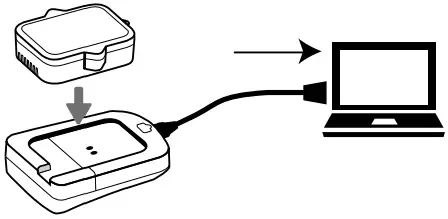
Data Collector: TR-57DCi (Discontinued TR-57U, RTR-57U)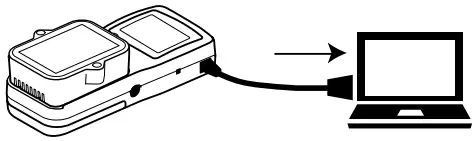
Recording Settings for the Unit
| Recording Intervals | 1, 2, 5, 10, 15, 20, 30 sec. 1, 2, 5, 10, 15, 20, 30, 60 min. |
| Recording Start Method | Immediate Start: Recording starts immediately upon battery installation. Programmed Start: Recording starts on the set date and time. |
| Recording Modes | One-Time: Upon reaching storage capacity of 16,000 readings, recording automatically stops (Measurements and the word “FULL” will alternately appear in the LCD). Endless: Upon reaching the storage capacity of 16,000 readings, the oldest data is overwritten and recording continues. |
| Infrared Common Function | Permit: Infrared Communication will be possible. Forbid: Infrared Communication will not be possible. |
The factory default settings are as follows:
10-Min Recording Interval, Immediate Start, Endless Mode, Infrared Communication Forbidden
It is possible to carry out the following data processing by using the software.
View and Print: View and print graphs and lists of recorded data.
Save: Create and save recorded data files and text files.
Communicate with a Data Collector
By using a Data Collector, you can download recorded data, view the data in graph form, and make recording settings without connecting to a PC.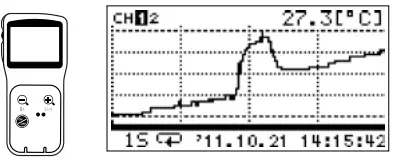
Via Optical Communication
Place the Unit face down on the Data Collector, making sure that the optical communication areas are aligned properly.
Proper communication may not be possible in the following situations:
- Where temperatures are very high or very low, in an environment with intense brightness (higher than 5,000lx),
- When the remaining battery life for the Unit is very low.

Via Infrared Communication
Place the Unit and the Data Collector face-to-face, with about 5 to 20cm of space between them.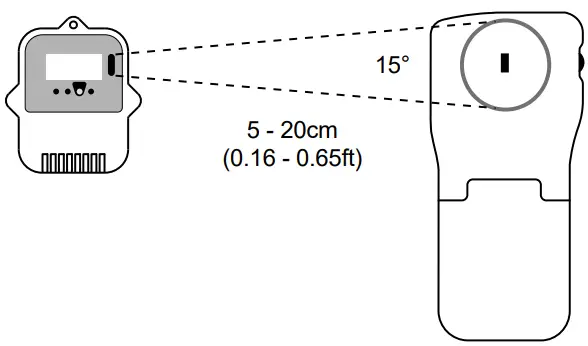
Cautions about the Infrared Communication Sensor
- Do not place the Unit in areas exposed to direct sunlight, directly below an incandescent lamp, or near other infrared devices. Placing in such an area may cause infrared communication to not work properly.
- Infrared communication may not be carried out properly in a low-temperature environment (below -20°C).
- Proper communication may not be possible if the infrared port is dirty.
- During the infrared communication, do not touch the infrared port or interrupt the communication.
Notices about this Introductory Manual
In order to properly use this product, please carefully read this manual before using.
T&D Corporation accepts no responsibility for any malfunction of and/or trouble with this product or with your computer that is caused by the improper handling of this product and will deem such trouble or malfunction as falling outside the conditions for free repair outlined in the attached warranty
- All rights of this Introductory Manual belong to T&D Corporation. It is prohibited to use, duplicate and/ or arrange a part or whole of the manual without the permission of T&D Corporation.
- All registered trademarks, company names, product names and logos mentioned herein or for products being used are the property of T&D Corporation or of their respective owners. “TANDD”, “T&D”, and the logo of T&D Corporation are all registered property of T&D Corporation.
- Specifications, design and other contents outlined in the manual are subject to change without notice due to continual improvements.
- Please follow the safety precautions outlined in the manual carefully. We cannot guarantee nor are we responsible for safety if this product is used in any manner other than was intended.
- On-screen messages in this manual may vary slightly from the actual messages.
- Please notify the distributor from which you purchased this product or T&D Corporation of any mistakes, errors or unclear explanations in this manual. T&D Corporation accepts no responsibility for any damage or loss of income caused by the use of our product.
- This Introductory Manual cannot be reissued, so please keep it in a safe place.
Safety Precautions and Instructions
The following items should be strictly obeyed for the safe usage of this product, and for protecting yourself and other people from bodily harm and/or damage to property.
To ensure the proper use of this product, we ask that before us
Explanation of Symbols
 DANGER DANGERThese entries are actions that, if taken, may cause serious personal physical damage or death. | ||
| CAUTION These entries are actions that if taken may lead to physical injury or damage to persons or things. | ||
 Denotes an important warning or caution. Denotes an important warning or caution. |  Denotes a forbidden action Denotes a forbidden action |  Denotes an action that should be a carried out. Denotes an action that should be a carried out. |
DANGER
| We are not responsible for any damage, malfunction or trouble, whether direct or indirect, caused by the use of the Unit. Please be fully aware of this before using our product. |
| This Unit has been designed for private and/or industrial use only. It is not for use in situations where strict precautions are necessary |
| Do not use the Unit in any environment that is exposed to chemicals and harmful gases. Also, coming in contact with hazardous substances may cause bodily harm to the user or people nearby. |
| Do not take apart, repair or modify the Unit. It may result in malfunction or unexpected accidents. |
| If water or a foreign object enters into the Unit, immediately remove the battery and stop using. It may result in malfunction or unexpected accidents. |
| If the Unit is subjected to significant temperature change while wet, it may cause condensation inside the case. Especially be careful with temperature changes from high to low; if the Unit has condensation on the inside, it may cause malfunction, damage, and/or unexpected accidents. |
| Store the Unit and accessories out of the reach of children. Touching them may result in unexpected accidents. Touching them may result in unexpected accidents. |
| If any smoke, strange smells or sounds are emitted from the Unit, immediately remove the battery and stop using. Continued use may cause fire or electrocution. |
| Please be careful not to touch the Unit during or after use in overly hot or cold environments; it may cause burns or frostbite. |
CAUTION
| To prevent damage to the Unit from static electricity, remove static electricity from your body by touching metal around you (such as a door knob and window frame) before touching the Unit. |
| Contact with oil may cause cracks to appear in the casing of the Unit. When using the Unit in such an environment, protect the Unit by placing it inside a polyethylene bag. |
| Do not drop or expose the Unit to a strong impact. It may cause damage. |
| If the Unit is not to be used for a long period of time, store it in a place where it is not exposed to high temperature and high humidity. If the Unit has condensation on the inside, it may cause malfunction and damage. |
| To maintain waterproof capacity, we suggest periodically changing the parts inside the case. If the rubber packing should be damaged or deteriorated, please replace it along with the drying agent. |
| Do not remove or reinsert the battery once it has been set; continue using until battery power is depleted. Always use a new battery for replacement. Not doing so may result in improper operation. |
| Do not use or store the Unit in such places as listed below; it may cause electrocution, fire or damage to the Unit or to your computer.
|
Cautions about the Infrared Communication
| Do not place the Unit in areas exposed to direct sunlight, directly below an incandescent lamp, or near other infrared devices. Placing in such an area may cause infrared communication to not work properly |
| Proper communication may not be possible if the infrared port is dirty. |
| During the infrared communication, do not touch the infrared port or interrupt the communication. |
| If infrared communication is set to be permitted, battery life will be shortened. |
Cautions about the Battery
Improper handling of the battery could lead to leakage, overheating, explosion or fire.
| Do not use any batteries other than those specified. |
| Do not charge it. |
| Do not drop or expose the Unit to a strong impact. It may cause damage. |
| Do not peel off or scratch the battery resin film (label), as it prevents the battery from shorting. Avoid using batteries with scratched labels. |
| If battery fluid gets on your eyes, skin or clothes, wash thoroughly with clean water. See a doctor immediately if it gets in your eyes. |
| Use a new battery within the recommended usage period, and do not leave it in the Unit when it runs out of power. |
| When mixing with other batteries for disposal, etc., insulate the battery terminals. Make sure not to mix with metal products such as necklaces, hairpins, coins and keys |
Cautions about the Temperature Sensor
When using the included Sensor TR-5106, please take note of the following:
| ng the included Sensor TR-5106, please take note of the following: Make sure the sensor is inserted fully, so as not to cause an improper connection. Also, when unplugging the sensor from the unit, hold the connector to disconnect. |
| Do not cut or process the sensor cables. Also, do not twist, pull on or swing them |
| Do not bend or press the last 5 cm to the tip of the sensor, as this may damage it. This may cause trouble or break the wire |
| f the fluoropolymer-coated section of the sensor and/or the cable has adefect or tear, the waterproof capacity will be lost. |
| Insert the sensor tip to about 5cm or more to obtain on accurate temperature measurement. |
| Only use the sensor within the sensor temperature durability range. |
| If the Unit is not to be used for a long period of time, store it without removing the sensor. Battery life will be shortened if the Unit has been left unconnected from the sensor for several months. |
| The TR-52i becomes waterproof (splash proof) only after the temperature sensor has been connected. Without the sensor connected, neither the sensor jack of the Unit nor the connector part of the temperature sensor is waterproof; make sure not to get wet. |
Compliance Information
Radio, EMC and Safety Regulations
This device complies with Part 15 of the Federal Communications Commission (FCC) rules.
Operation is subject to the following two conditions: (1)This device may not cause harmful interference, and (2)this device must accept any interference received, including interference that may cause undesired operation.
FCC Statement
This equipment has been tested and found to comply with the limits for a Class B digital device, pursuant to Part 15 of the FCC Rules. These limits are designed to provide reasonable protection against harmful interference in a residential installation.
This equipment generates, uses and can radiate radio frequency energy and, if not installed and used in accordance with the instructions, may cause harmful interference to radio communications. However, there is no guarantee that interference will not occur in a particular installation. If this equipment does cause harmful interference to radio or television reception, which can be determined by turning the equipment off and on, the user is encouraged to try to correct the interference by one or more of the following measures:
- Reorient or relocate the receiving antenna.
- Increase the separation between the equipment and receiver.
- Connect the equipment into an outlet on a circuit different from that to which the receiver is connected.
- Consult the dealer or an experienced radio/TV technician for help.
To comply with the limits for the Class B digital device, pursuant to Part 15 of the FCC Rules, this device must be installed in computer equipment certified to comply with the Class B limits.
All cables used to connect the computer and peripherals must be shielded and grounded.
Operation with non-certified computers or non-shielded cables may result in interference to radio or television reception.
Caution: Changes or modifications not expressly approved by the party responsible for compliance could void the user’s authority to operate the equipment.
Provisions for Free Repair
Object of Repair : Main Unit (excluding Sensor and any other options) Method of Repair: Send in for Repa
- If the unit does not work properly despite the fact that the customer used it properly and in line with the manual, the unit shall be repaired free of charge through the distributor which sold the unit.
- If the customer requests free repair because of trouble within the warranty period, bring or send the unit along with the warranty to the distributor.
- If you have moved after purchasing, or there are difficulties contacting the distributor from which you purchased the unit, please contact T&D directly for service.
- Free repair is not available in the following cases even though it is within the warranty period:
- Trouble or damage was caused by careless operation, natural disaster, fire, public pollution, or use of a power source other than specified.
- If repair, adjustment, disassembly or modification of the unit has been carried out by a person other than a T&D authorized engineer.
- Trouble or damage was caused by transportation, movement or dropping of the unit after purchase.
- Failure to submit the warranty or failure to fill in all items required in the warranty.
- The warranty cannot be reissued.
This warranty only promises customers free repair within the period and conditions clarified in this warranty. Therefore, the customer’s legal rights will not be limited by this warranty. For further information on repair and other service questions after the termination of the warranty period, contact your distributor

 Data Management Solutions | T&D Corporation