SHENZHEN SURENOO TECHNOLOGY CO.,LTD.
Model No.: SSP0096A3A-80160
SSP0096A-80160 Series
SPI TFT LCD Module USER MANUAL
Please click the following image to buy the sample
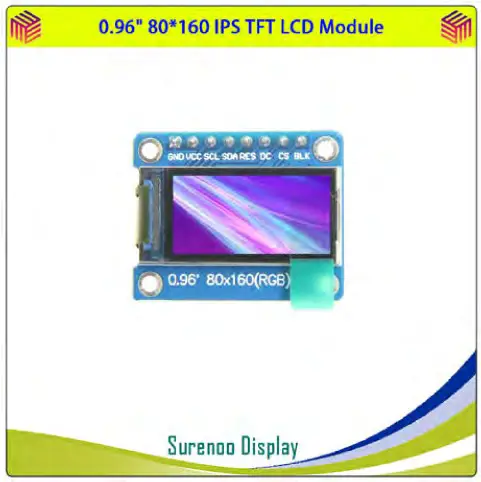
SSP0096A-80160 Series SPI TFT LCD Module
 |  |  |
| MECARD:TEL:0086-17820607849; URL:http://www.surenoo.com; EMAIL:[email protected]; N:PotterHao;ORG:Surenoo Technology; | https://wa.me/qr/4GGOIDYZ2PXXN1 | |
 |  | |
| https://line.me/ti/p/oas8BmVLVd | https://u.wechat.com/EAK0B_l2YfPLwx3tRqiKkf4 |
Shenzhen Surenoo Technology Co.,Ltd.
www.surenoo.com
Skype: Surenoo365
Reference Controller Datasheet
SPI TFT LCD Module Selection Guide
ST7735S
Product Description
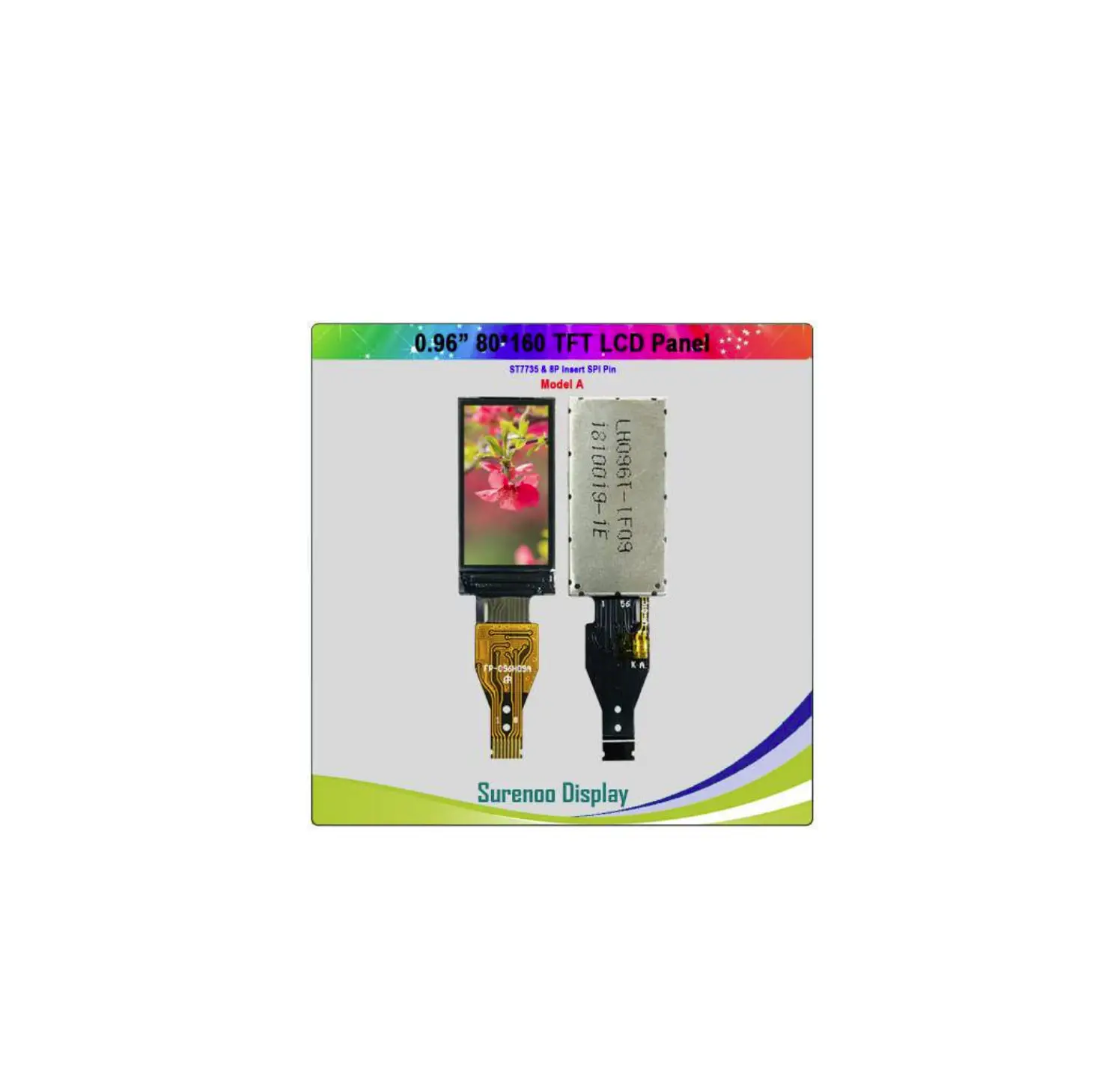
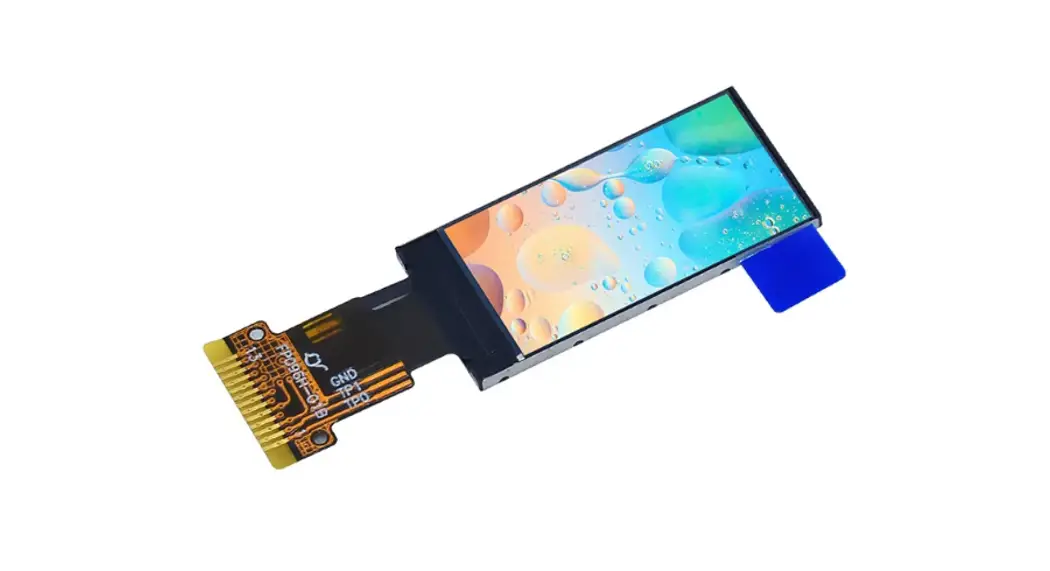
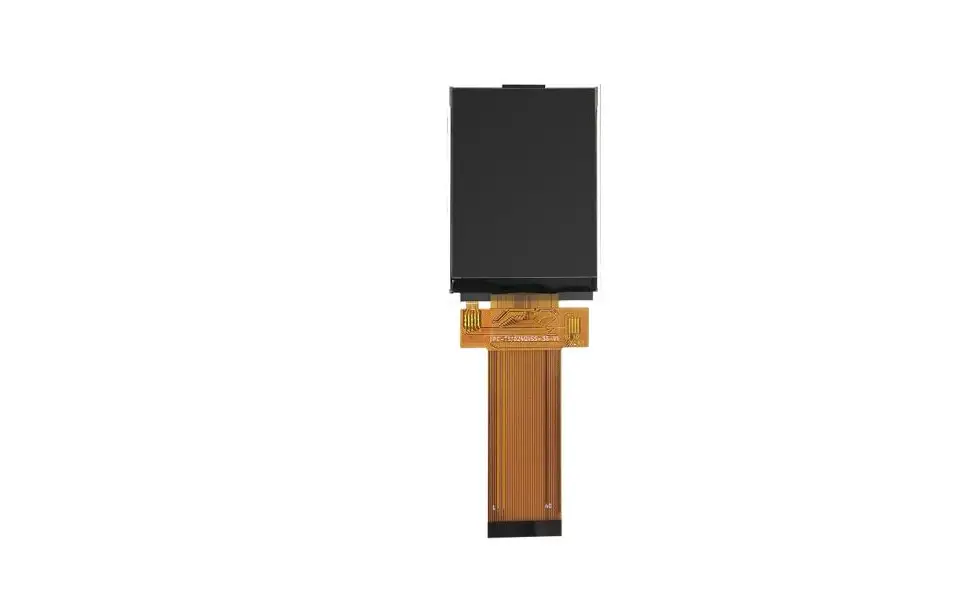
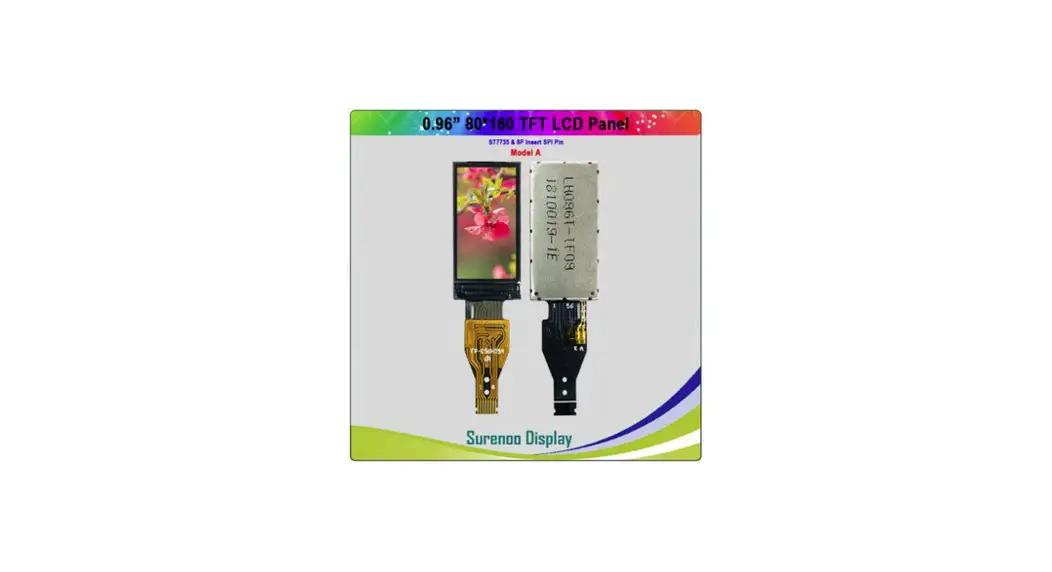
This product is a 0.96inch IPS display module, it has a resolution of 80×160.it uses a 4-wire SPI communication method and the inner IC is ST7735S.The module contains an LCD display and PCB backboard.
Product Features
- 0.96-inch color screen, support 65K color display, display rich colors
- 80X160 resolution, clear display
- Large viewing angle(full angle),display color undistorted.
- Using the 4-line-SPI serial bus, it only takes a few IOs to illuminate the display
- Provide a rich STM32 and C51 sample program
- Military-grade process standards, long-term stable work
- Provide underlying driver technical support
Product Parameters
| Name | Description |
| Display Color | RGB 65K color |
| SKU | MSP0961 |
| Screen Size | 0.96(inch) |
| Type | TFT |
| Driver IC | ST7735S |
| Resolution | 80*160 (Pixel) |
| Module Interface | 4-line SPI interface |
| Active Area | 10.80×21.70 (mm) |
| Touch Screen Type | have no touch screen |
| Touch IC | have no touch IC |
| Module PCB Size | 30.00×24.04 (mm) |
| Angle of view | all angle |
| Operating Temperature | -10℃~60℃ |
| Storage Temperature | -20℃~70℃ |
| Operating Voltage | 3.3V |
| Power Consumption | TBD |
| Product Weight(With packaging) | 8(g) |
Interface Description
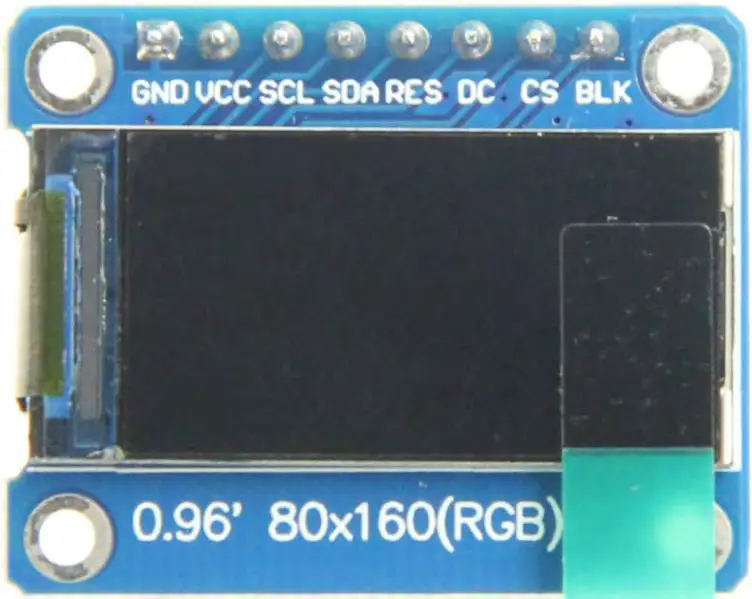
Picture1. Module pin Label picture
important:
- The following pin numbers 1~8 refer to the module pin numbers of our company with PCB backplane. If you are buying a bare screen, please refer to the pin definition of the bare screen specification, refer to the wiring according to the signal type instead of directly according to the following. The module pin number is used for wiring. For example: CS is 7 feet on our module. It may be x pin on different size bare screen.
- About VCC supply voltage: The IPS display module can only be connected to 3.3V.
- About backlight voltage: The module with PCB backplane has integrated triode backlight control circuit, only need to input high level or PWM wave on BL pin to backlight. If you are buying a bare screen, the LEDAx is connected to 3.0V-3.3V, and the LEDKx can be grounded.
Number Module Pin Pin Description 1 GND LCD Power ground 2 VCC LCD power supply is positive (3.3V) 3 SCL LCD SPI bus clock signal 4 SDA LCD SPI bus write data signal 5 RES LCD reset control signal(Low level reset) 6 DC LCD register / data selection control signal (Low level: register, high level: data) 7 CS LCD selection control signal(Low level enable) 8 BLK LCD backlight control signal (high level lighting, if you do not need control, please connect 3.3V)
Hardware Configuration
The LCD module hardware circuit comprises two parts: an LCD display control circuit and a backlight control circuit.
The LCD display control circuit is used to control the pins of the LCD, including control pins and data transfer pins.
The backlight control circuit is used to control the backlight to be on and off. Of course, if the backlight is not required to be be on and off, can be directly connected to the 3.3V power supply.
working principle
- Introduction to ST7735S Controller
The ST7735S controller supports a maximum resolution of 132*162 and a 48114-byte GRAM. It also supports 8-bit, 9-bit, 16-bit, and 18-bit parallel port data buses. It also supports 3-wire and 4-wire SPI serial ports. Since parallel control requires a large number of IO ports, the most common one is SPI serial port control. The ST7735S also supports 65K, 262K RGB color display, display color is very rich, while supporting rotating display and scroll display and video playback, display in a variety of ways.
The ST7735S controller uses 16bit (RGB565) to control a pixel display, so it can display up to 65K colors per pixel. The pixel address setting is performed in the order of rows and columns, and the incrementing and decreasing direction is determined by the scanning mode. The ST7735S display method is performed by setting the address and then setting the color value. - Introduction to SPI communication protocol
The 4-wire SPI bus write mode timing is shown in the following figure: CSX is a slave chip select, and the chip is enabled only when CSX is low. D/CX is the data/command control pin of the chip. When DCX is low, the command is written. When it is high, the data is written.
SCL is the SPI bus clock, and each rising edge transmits 1 bit of data;
SDA is the data transmitted by SPI, and it transmits 8-bit data at a time. The data format is as shown below: The high position is in front and transmitted first.
For SPI communication, the data has a transmission timing, that is, a combination of clock phase (CPHA) and clock polarity (CPOL):
The CPOL level determines the idle state level of the serial synchronous clock, CPOL = 0, which is low. CPOL does not have a lot of impact on the transport protocol; The level of CPHA determines whether the serial synchronous clock is acquired on the first clock transition edge or the second clock transition edge.
When CPHL = 0, data acquisition is performed on the first edge of the transition;
The combination of the two becomes the four SPI communication methods. SPI0 is usually used in China, that is, CPHL = 0, CPOL = 0.
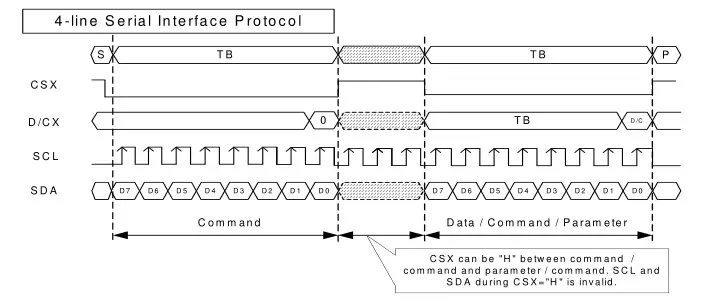 CSX is a slave chip select, and the chip is enabled only when CSX is low. D/CX is the data/command control pin of the chip. When DCX is low, the command is written. When it is high, the data is written.
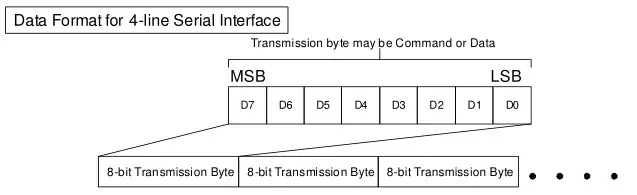 The high position is in front and transmitted first.
Instructions for use
- STM32 instructions
Wiring instructions:
See the interface description for pin assignments.Number Module Pin Corresponding to MiniSTM32 development board wiring pin 1 GND GND 2 VCC 3.3V 3 SCL PB13 4 SDA PB15 5 RES PB12 6 DC PB10 7 CS PB11 8 BLK PB9 STM32F103ZET6 microcontroller test program wiring instructions
Number Module Pin Corresponding to Elite STM32 development board wiring pin 1 GND GND 2 VCC 3.3V 3 SCL PB13 4 SDA PB15 5 RES PB12 6 DC PB10 7 CS PB11 8 BLK PB9 STM32F407ZGT6 microcontroller test program wiring instructions
Number Module Pin Corresponding to Explorer STM32F4 development board wiring pin 1 GND GND 2 VCC 3.3V 3 SCL PB3 4 SDA PB5 5 RES PB12 6 DC PB14 7 CS PB15 8 BLK PB13 STM32F429IGT6 microcontroller test program wiring instructions
Number Module Pin Corresponding to Apollo STM32F4/F7 development board wiring pin 1 GND GND 2 VCC 3.3V 3 SCL PF7 4 SDA PF9 5 RES PD12 6 DC PD5 7 CS PD11 8 BLK PD6 STM32F767IGT6 and STM32H743IIT6 microcontroller test program wiring instructions
Number Module Pin Corresponding to Apollo STM32F4/F7 development board wiring pin 1 GND GND 2 VCC 3.3V 3 SCL PB13 4 SDA PB15 5 RES PD12 6 DC PD5 7 CS PD11 8 BLK PD6 Operating Steps
A. Connect the IPS module and the STM32 MCU according to the above wiring instructions, and power on;
B. Select the test example according to the model of the microcontroller, as shown in the following figure: (Please refer to the test program description document in the test package for the test program description) C. Open the selected test program project, compile and download; detailed description of the STM32 test program compilation and download can be found in the following document: http://www.lcdwiki.com/res/PublicFile/STM32_Keil_Use_Illustration_EN.pdf
D. If the IPS module displays characters and graphics normally, the program runs successfully - C51 instructions
Wiring instructions:
See the interface description for pin assignments.
STC89C52RC and STC12C5A60S2 microcontroller test program wiring instructionsNumber Module Pin Corresponding to STC89/STC12 development board wiring pin 1 GND GND 2 VCC 3.3V 3 SCL P17 4 SDA P15 5 RES P33 6 DC P12 7 CS P13 8 BLK P32 Operating Steps
A. Connect the IPS module and the C51 MCU according to the above wiring instructions, and power on;
B. Select the C51 test program to be tested, as shown below: (Please refer to the test program description document in the test package for the test program description) C. Open the selected test program project, compile and download; detailed description of the C51 test program compilation and download can be found in the following document: http://www.lcdwiki.com/res/PublicFile/C51_Keil%26stc-isp_Use_Illustration_EN.pdf
D. If the IPS module displays characters and graphics normally, the program runs
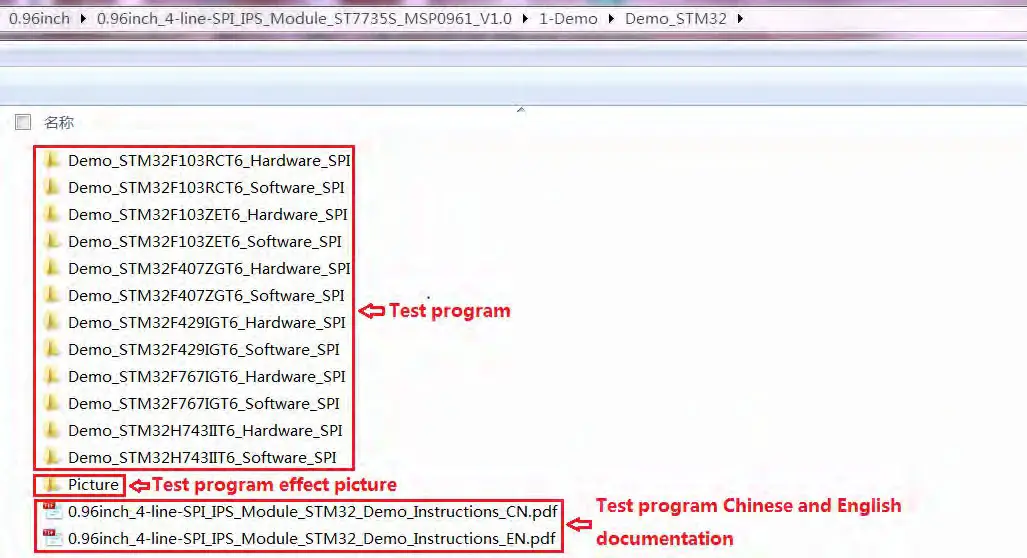 C. Open the selected test program project, compile and download; detailed description of the STM32 test program compilation and download can be found in the following document:
 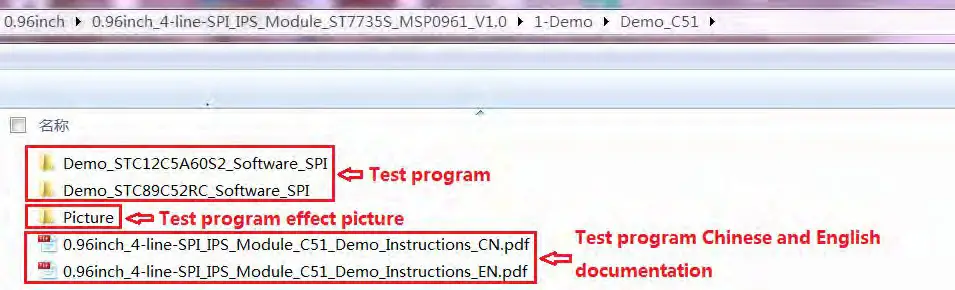 C. Open the selected test program project, compile and download; detailed description of the C51 test program compilation and download can be found in the following document:
 Software Description
- Code Architecture
A. C51 and STM32 code architecture description
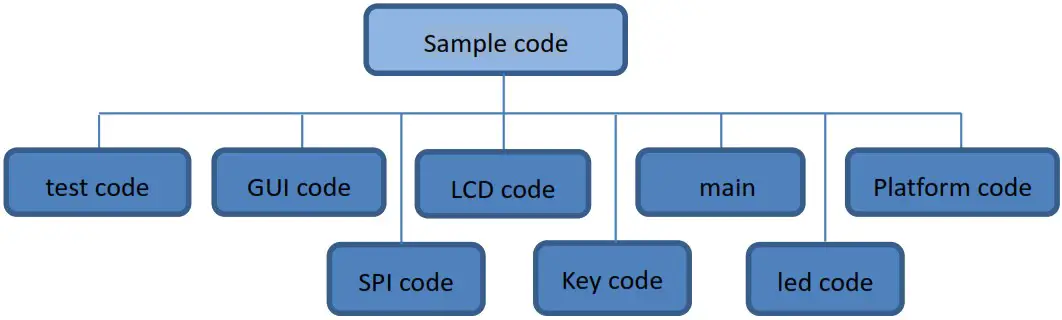
The code architecture is shown below: Sample code The Demo API code of the main program runtime is included in the test code; LCD initialization and related operations are included in the LCD code; Drawing points, lines, graphics, and Chinese and English character display related operations are included in the GUI code;
The main function implements the application to run;
Platform code varies by platform;
SPI initialization and configuration related operations are included in the SPI code; The key processing related code is included in the key code (the C51 platform does not have a button processing code);
The code related to the led configuration operation is included in the led code; - software SPI and hardware SPI description
The IPS module provides software SPI and hardware SPI sample code (except STC89C52RC, because it does not have hardware SPI function, the hardware SPI function of STC12C5A60S2 is error for testing and need to be connected a level conversion module,so the program isn’t support), the two sample code does not make any difference in the display content, but the following aspects are different:
A. display speed
The hardware SPI is significantly faster than the software SPI, which is determined by the hardware.
B. GPIO definition
The software SPI all control pins must be defined, any idle pin can be used, the hardware SPI data and clock signal pins are fixed (depending on the platform), other control pins should be defined by themselves, or any idle reference can be used. foot.
C. initialization
When the software SPI is initialized, only the GPIO for pin definition needs to be initialized (not required by the C51 platform). When the hardware SPI is initialized, the relevant control registers and data registers need to be initialized. - GPIO definition description
A. STM32 test program GPIO definition description
The STM32’s LCD non-SPI GPIO definition is placed in lcd.h as shown below(take STM32F407ZGT6 microcontroller FSMC test program as an example): All pin definitions can be modified and can be defined as any other free GPIO. The GPIO definition of the STM32 LCD SPI is placed in spi.h as shown below(take STM32F407ZGT6 microcontroller FSMC test program as an example):
 If the software SPI is used, all pin definitions can be modified and can be defined as any other free GPIO.
If hardware SPI is used, these pins do not need to be defined. At the same time, the SCLK, MISO and MOSI pins need to be initialized and removed in the LCD_ GPIO Init function in the lcd.c file, as shown in the following figure(take STM32F407ZGT6 microcontroller FSMC test program as an example): The contents of the red circle must be removed.
B. C51 test program GPIO definition description
C51 test program GPIO definition is placed in the lcd.h file, as shown below: If the software SPI is used, all pin definitions can be modified and can be defined as any other free GPIO.
If hardware SPI is used, the LCD_BL, LCD_RS, LCD_CS, and LCD_RST pin definitions can be modified and can be defined as any other free GPIO. LCD_CLK and LCD_SDI do not need to be defined. - SPI communication code implementation
A. STM32 test program SPI communication code implementation
Hardware SPI communication is implemented by the system. We only need to operate the register and call the relevant function. For details, please refer to the MCU related documentation.
The software SPI communication code is implemented in spi.c ,as shown in the following figure: If the transmitted data bit is 1, the SPI data pin is pulled high. When it is 0, the SPI data pin is pulled low, one byte of data is transferred each time, the upper bit is first, and one bit of data is transmitted on each rising edge of the clock.
B. C51 test program SPI communication code implementation
The software SPI communication code is implemented in lcd.c ,as shown in the following figure: If the transmitted data bit is 1, the SPI data pin is pulled high. When it is 0, the SPI data pin is pulled low, one byte of data is transferred each time, the upper bit is first, and one bit of data is transmitted on each rising edge of the clock.
 The Demo API code of the main program runtime is included in the test code; LCD initialization and related operations are included in the LCD code; Drawing points, lines, graphics, and Chinese and English character display related operations are included in the GUI code;
 All pin definitions can be modified and can be defined as any other free GPIO. The GPIO definition of the STM32 LCD SPI is placed in spi.h as shown below(take STM32F407ZGT6 microcontroller FSMC test program as an example):
 If the software SPI is used, all pin definitions can be modified and can be defined as any other free GPIO.
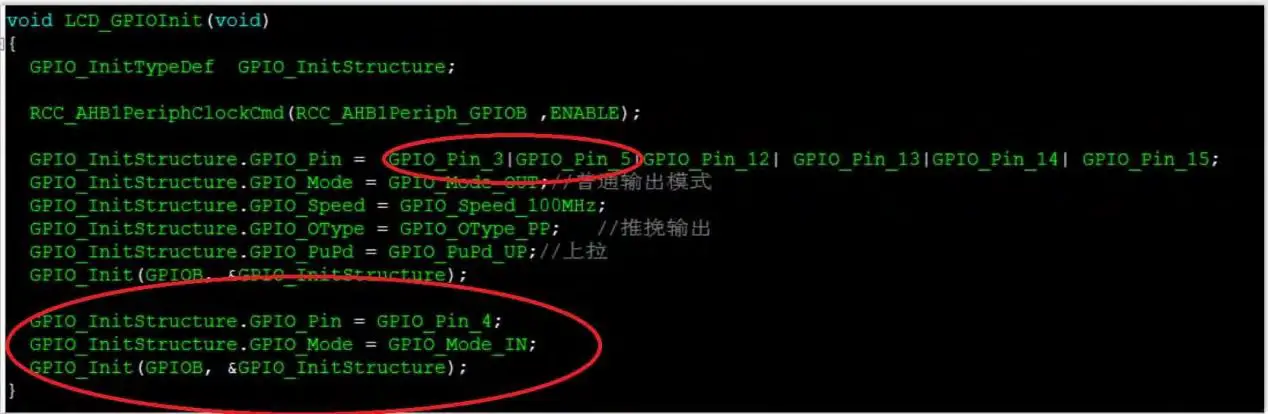 The contents of the red circle must be removed.
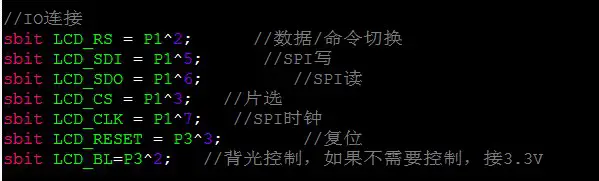 If the software SPI is used, all pin definitions can be modified and can be defined as any other free GPIO.
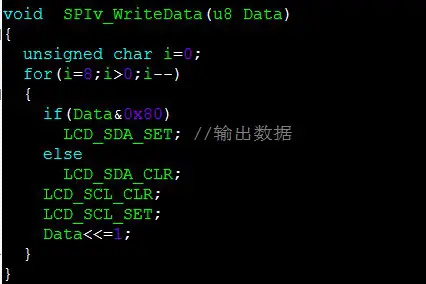 If the transmitted data bit is 1, the SPI data pin is pulled high. When it is 0, the SPI data pin is pulled low, one byte of data is transferred each time, the upper bit is first, and one bit of data is transmitted on each rising edge of the clock.
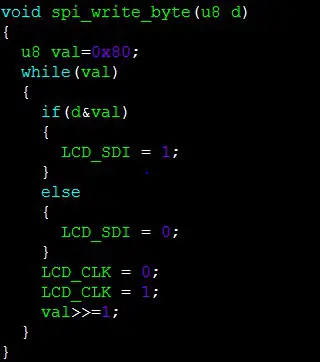 If the transmitted data bit is 1, the SPI data pin is pulled high. When it is 0, the SPI data pin is pulled low, one byte of data is transferred each time, the upper bit is first, and one bit of data is transmitted on each rising edge of the clock.
Common software
This set of test examples requires the display of Chinese and English, symbols and pictures, so the modulo software is used. There are two types of modulo software: Image2Lcd and PCtoLCD2002. Here is only the setting of the modulo software for the test program.
The PCtoLCD2002 modulo software settings are as follows:
Dot matrix format select Dark code the modulo mode select the progressive mode
Take the model to choose the direction (high position first)
Output number system selects hexadecimal number
Custom format selection C51 format
The specific setting method is as follows: http://www.lcdwiki.com/Chinese_and_English_display_modulo_settings
Image2Lcd modulo software settings are shown below:
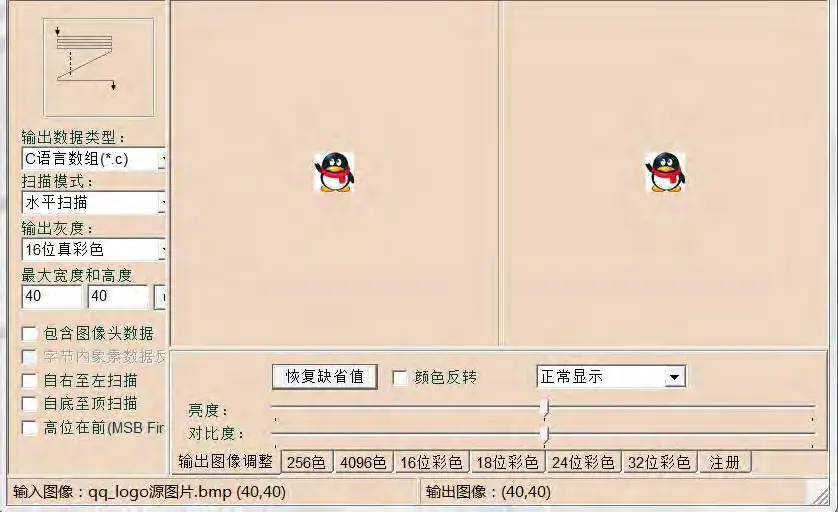
The Image2Lcd software needs to be set to horizontal, left to right, top to bottom, and low position to the front scan mode.
 Chinese and English display modulo settings - LCD wiki
 Surenoo Tech: Professional LCD Module Supplier Since 2005