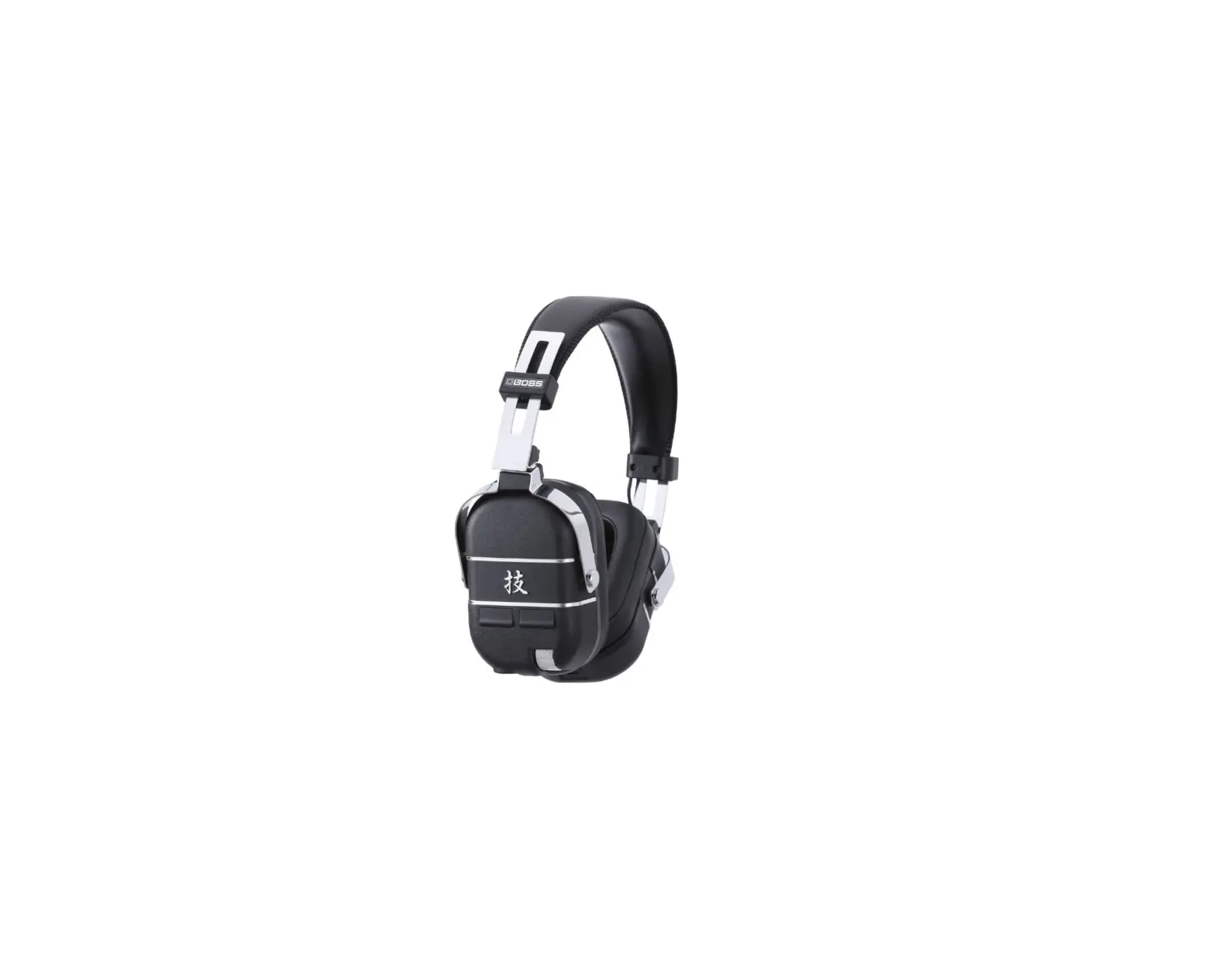

BOSS WAZA-AIR Wireless Personal Guitar Amplification System

Before using this unit, carefully read “USING THE UNIT SAFELY” and “IMPORTANT NOTES” (the leaflet “Read Me First”). After reading, keep the document(s) where it will be available for immediate reference.
How to Use
- Turn the unit’s power switch ON.
The power/battery indicator is lit. - Connect the transmitter (WL-T) to your guitar (or other instrument).
The transmitter’s power turns on, and the WL-T battery indicator is lit. - Verify that the guitar wireless indicator is lit, and play your guitar (or other instrument).
Your performance is heard from this unit.
If the wireless indicator is not lit, perform the steps in “Wirelessly Connecting This Unit with Your Guitar (Auto Wireless Connection).
The ear pads are consumable items and can be removed (replaced).
About This Unit (WAZA-AIR)
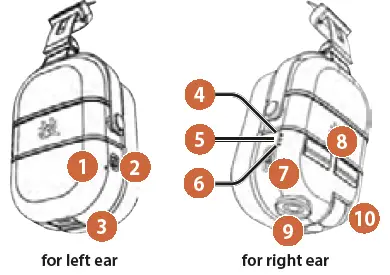
- Charge indicator
Lit orange Charging. Unlit Charging is completed. Or, power not supplied. Blinking orange A charging error occurred. Contact your dealer or a Roland customer service center. - Power switch (On/Charge)
- CHARGE port (DC IN 5 V)
Connect a commercially available USB AC adaptor and charge this unit.
Charge the device using the included USB cable. Do not use the included USB cable with any other device. - Guitar wireless indicator
Lit white Connected with the transmitter Unlit Not connected with the transmitter - Bluetooth indicator
Lit blue Connected Blinking blue Reconnecting Rapid blinking blue Pairing Unlit Not connected - Power/battery indicator
Lit green Power On
Sufficient capacity remains. Lit red
Battery will be exhausted in less than 30 minutes. Please recharge. Blinking green Standby mode. Unlit Power off - Bluetooth multi function button
Use this to operate the Bluetooth devicePress once Play/Stop Long-press Pair with a Bluetooth device Tilt toward “+” The Bluetooth Audio volume increases. Tilt toward “-” The Bluetooth Audio volume decreases. Tilt toward “+” two seconds or longer Fast-forward Tilt toward “-” two seconds or longer Rewind - Up/Down buttons
Use these to switch effect patches, or to turn the tuner function on/off. - Transmitter in jack
When you connect the transmitter (WL-T), the “Auto
Wireless Connection function” operates. - Volume knob (Guitar)
Adjusts the volume of the guitar (instrument) to which the transmitter is connected.
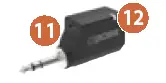
About the Transmitter (WL-T)
- CHARGE port (DC IN 5 V)
Connect a commercially available USB AC adaptor and charge this unit. - WL-T battery indicator
When inserted in the guitar (indicates the remaining battery capacity of the WL-T)
Lit green Sufficient capacity remains. Lit orange Battery will be exhausted in less than two hours. Lit red Battery will be exhausted in less than 30 minutes. Please recharge. Unlit There is no remaining battery capacity. When inserted in the WAZA-AIR’s transmitter in jack (indicates the status of the transmitter) Blinking orange Auto Wireless Connection is operating. When a commercially available USB AC adaptor is connected (indicates the charging status) Lit orange
Charging. * The charging time differs depending on the remaining battery charge and on the charging environment.
Unlit (lit green at 8-second intervals)
Charging is completed. * If you have not used the transmitter for a long time, one charge might not be sufficient.
In this case, charge again.
Lit green
Charging was halted. * When five hours have passed since charging started, charging automatically stops in order to
protect the rechargeable lithium-ion battery, even if charging was not completed.
To complete charging, charge again.
Blinking red A charging error occurred. & “Troubleshooting.”
Charging This Unit (WAZA-AIR)
- Set this unit’s power switch to CHARGE.
- This unit is not charged while the unit’s power is on.
- Use the included USB cable to connect a commercially available USB AC adaptor (5 V / 0.5 A or more) to this unit’s CHARGE port.
Charging the Transmitter (WL-T)
- Use the included USB cable to connect a commercially available USB AC adaptor (5 V / 0.5 A or more) to the transmitter’s
- CHARGE port.
At this time, the WL-T battery indicator is lit orange.
When the indicator goes dark, charging is complete.
When charging from the CHARGE port, the wireless connection does not operate.
- CHARGE port.
About standby mode
- If this unit or the transmitter are left powered-on in a silent state or without being operated, they enter “standby mode” to prevent the battery from running down.
- When you resume playing, or if physical vibration is applied to this unit or the transmitter, they return from standby mode after approximately two seconds.
When not using the system for an extended time
Unplug the transmitter and receiver. Standby mode does consume battery power, although only very slightly.
Even if you do not use this product for an extended period of time, you should charge it once every three months to prevent the internal lithiumion battery from degrading.
Wirelessly Connecting This Unit with Your
Guitar (Auto Wireless Connection)
Here’s how to make initial settings for wirelessly connecting this unit with your guitar (transmitter).
- Turn the unit’s power switch ON.
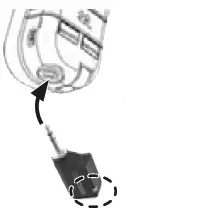
- Insert the transmitter into the transmitter in jack.
This blinks orange while Auto Wireless
Connection settings are being made. The process completes in approximately 10 seconds.
When the orange blinking stops, remove the transmitter.
NOTE
Insert only the BOSS WL-T transmitter into the transmitter in jack.
If you insert any other device, loud sound might be output, or this unit or the connected device might malfunction.
Advanced Operation
Switching Patches (CH) You can switch between different effect patches (six types). The effect is applied to the sound of the guitar (instrument).
- Press the Up/Down buttons.
The effect is switched.
MEMO
- The position setting of the guitar sound is remembered for each patch.
You can use the “BOSS TONE STUDIO” app to modify the sound or edit the sound library. For details about BOSS - TONE STUDIO, refer to the BOSS website. https://www.boss.info/global/
Using the Tuner
Here’s how to determine the pitch of your guitar (instrument) using regular tuning (A = 440 Hz).
- Hold down the up and down buttons simultaneously (for three seconds or longer).
- Play a string on your guitar (a single note).
Electronic tone heard Explanation High tone / Low tone 
When the target pitch is low (the guitar’s pitch is high) Same tone twice When the pitch is correct Low tone / High tone When the target pitch is high (the guitar’s pitch is low) An electronic tone is heard from this device.
- When you finish using the tuner, once again hold down the up and down buttons simultaneously (for three seconds or longer).

Pairing with a Mobile Device (Bluetooth® Audio)
Here’s how you can use this unit to hear audio that’s played back from your mobile device.
- Long-press the Bluetooth multi-function button (for three seconds or longer).
The Bluetooth indicator blinks rapidly. - Turn on the Bluetooth switch of your mobile device (e.g., smartphone).
- In the Bluetooth screen of your mobile device, tap “WAZA-AIR Audio.”
Your mobile device is paired with this unit.
MEMO
- The sound image positioning function of this unit might position the sound of the Bluetooth audio toward the rear. The position can be memorized for each patch.
- For details on how to use the Bluetooth audio function, download and refer to the “WAZA-AIR Reference Manual” PDF.
Reading a Detailed Explanation of This Unit
A more detailed explanation of this unit’s functionality is provided in the “Using BOSS TONE STUDIO for WAZA-AIR” PDF. Here’s how to download the PDF.
- From your smartphone or computer, access the following URL.
- Download the “Using BOSS TONE STUDIO for WAZA-AIR” PDF. http://roland.cm/waza-air_om
Troubleshooting
| Problem | Items to check/Action |
| No sound when you play the guitar (musical instrument) in which the transmitter is inserted | Remove and reinsert the transmitter in the guitar (musical instrument). |
| Could you be recharging transmitter from the CHARGE port? Disconnect the USB cable when you’re playing. | |
| Is the transmitter’s battery indicator lit? If it is unlit, recharge the transmitter. | |
| Is this unit’s wireless indicator lit? If it is unlit, execute the Auto Wireless Connection procedure. | |
|
The battery indicator blinks red | A charging error occurred. 5 If the transmitter’s internal temperature rises, charging might pause. This occurs in order to protect the rechargeable lithium-ion battery. When the internal temperature falls, the WL-T battery indicator changes to be lit orange, and charging resumes. Could the ambient temperature be above 35 °C (95 °F)? 5 Charging might stop for a while in order to protect the rechargeable lithium-ion battery. Use the unit in the recommended ambient temperature range of 10–30 °C (50–86 °F). 5 If the indicator continues blinking red even though you are charging in the recommended temperature range. Contact your dealer or a Roland customer service center. |
Main Specifications
BOSS Wireless System: WAZA-AIR
| Type | Digital wireless (2.4 GHz) using a proprietary BOSS digital system One-piece Bluetooth headphones | ||
| Driver | 50 mm in diameter | ||
| WAZA-AIR | Transmitter (WL-T) | ||
| Battery charging time | Approximately 3 hours | Approximately 3 hours | |
| Expected battery life under continuous use | Approximately 5 hours | Approximately 12 hours | |
| Power Supply | Supplied from lithium-ion battery or CHARGE port | ||
| Current Draw | When charging: 470 mA | When charging: 350 mA | |
| Weight | 340 g, 12 oz | 43 g, 2 oz | |
|
Accessories | Owner’s Manual, Leaflet “USING THE UNIT SAFELY,” Transmitter (WL-T), Micro USB cable for charging (*1) *1: Use a standard USB AC adaptor (5 V, over 0.5 A) for charging. | ||
This document explains the specifications of the product at the time that the document was issued. For the latest information, refer to the Roland website.
https://tm.by
 BOSS - Support - WAZA-AIR - Owner's Manuals
 BOSS - Global