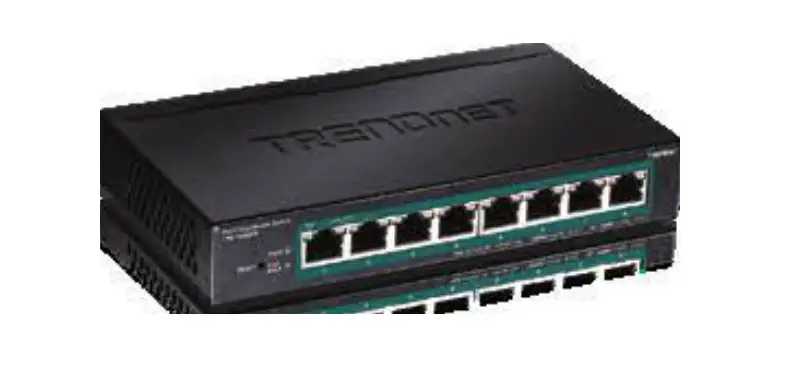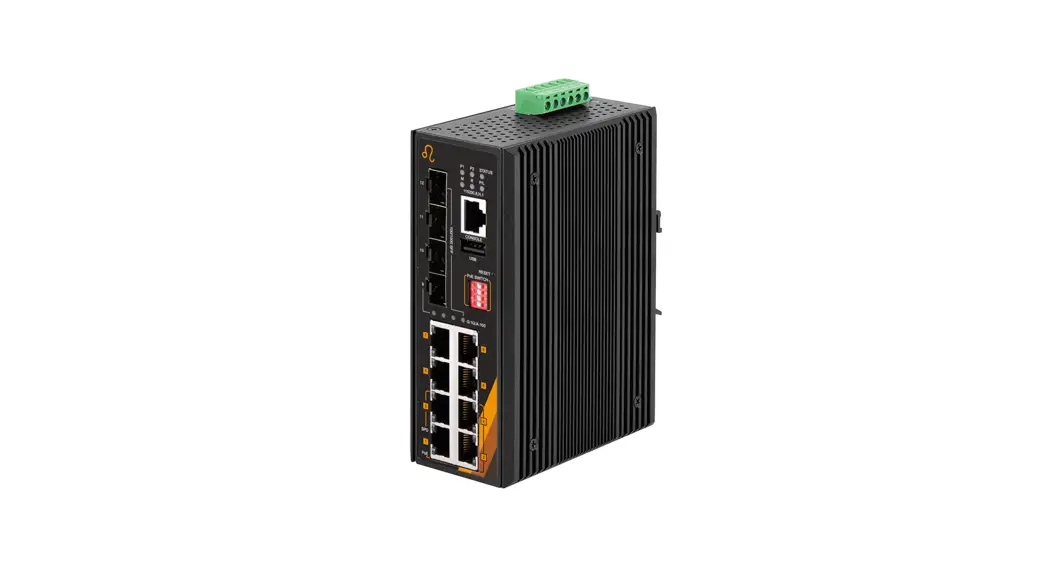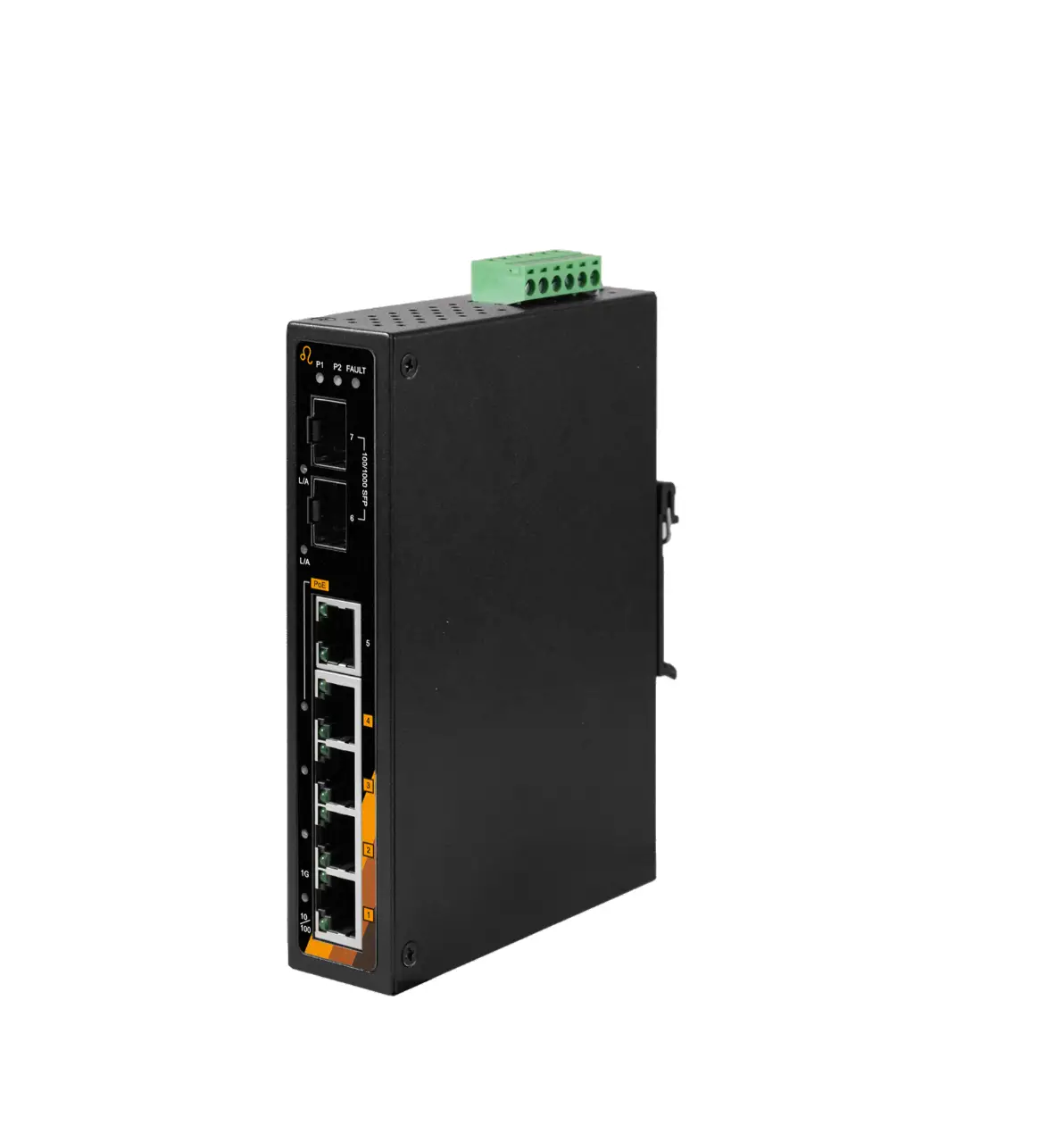
Industrial
Managed Switch
User Manual
Industrial PoE Switches
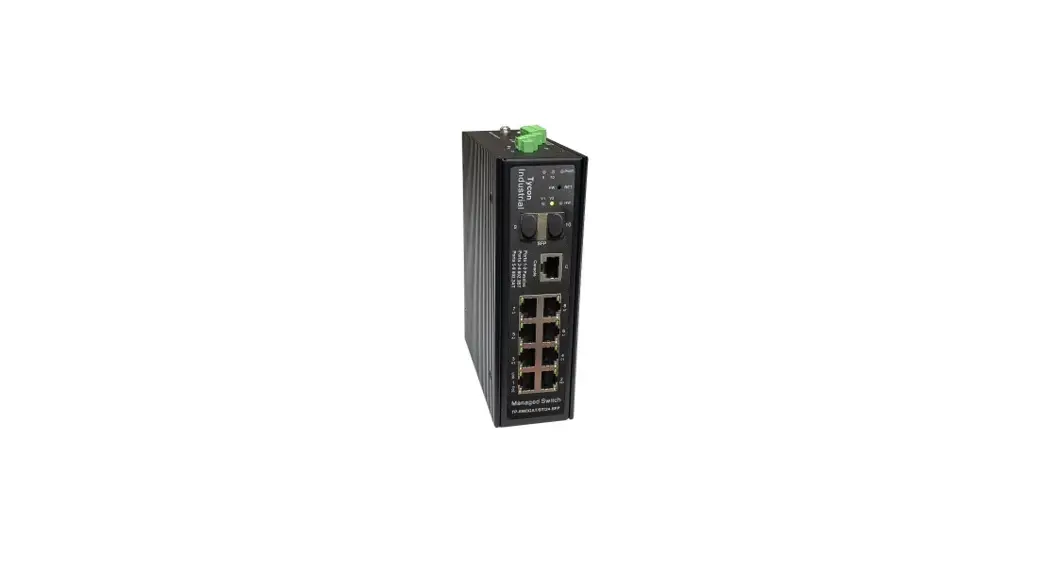
TP-SW8GAT/24-SFP
&
TP-SW8GAT/BT/24-SFP
Overview
Tyson’s Industrial managed PoE switch series features industrial performance, which can operate in severe working environments. With multiple PoE port configurations, settable in the console or web-based user interface, the switches are suitable for many different industrial applications. Featuring an advanced management interface, the switches provide comprehensive security, easy ring network application, QOS strategy, and rich VLAN functionality. The switches are easy to manage and maintain which makes them suitable for complex, high-density environments such as in factories, mines, industry automation, broadband systems, security applications, transportation, infrastructure, port, and farmlands. In addition to the High-power PoE power supply and intelligent management functions, the unique ability to supply 802.3AT (35W), 802.3BT(90W), Passive 24V PoE from the same 8 port switch provides unsurpassed flexibility.
Features
- Unique industrial management interface, achieving high-efficiency network management.
- Lightning protection: up to 6KV.
- ESD static protection: up to 8KV.
- Supports Industrial temperature range: -40℃~80℃;
- Supports Industrial humidity range: 10%~90% RH non-condensing.
- 802.3at (bt) or 24V Passive PoE Output (Configurable in the user interface).
- 802.3bt power supply up to 90W.
- Dual voltage inputs for primary and backup power sources.
- Wide input voltage range: 12-37VDC(Switch Only) / 37-57VDC(PoE Enabled).
- Unique one-button ring network creation.
- Unique advanced PoE watchdog function.
Display & Description
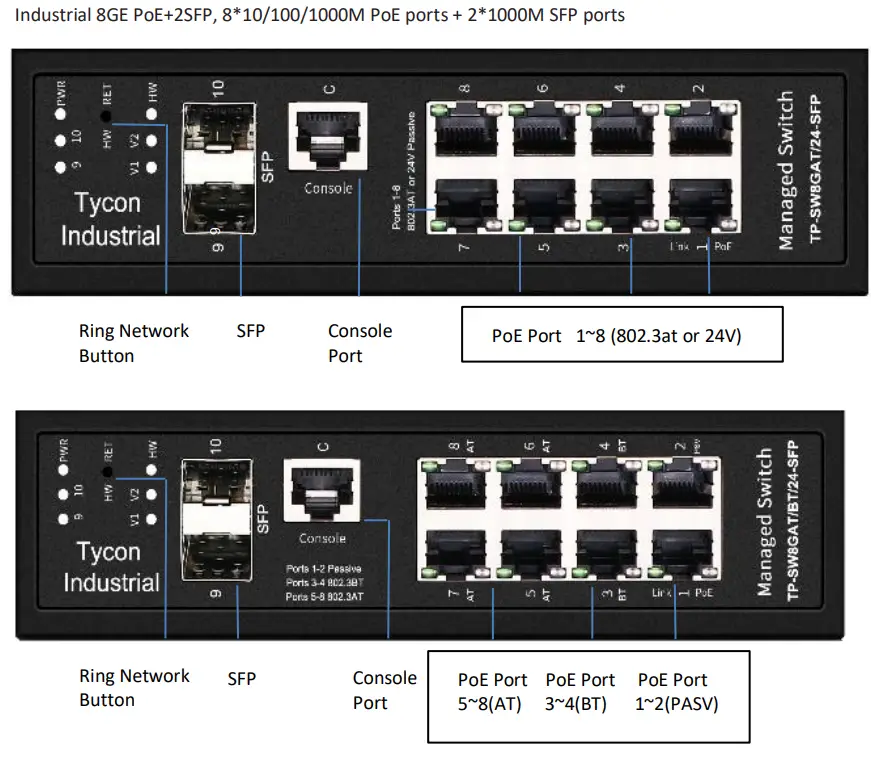
| Item | PoE Port |
| TP-SWEIGAT/24-SFP | PoE 1–8 (802.3at or 24V Passive) |
| TP-SW8GAVEIT/24-SFP | Port 1-2 (24V Passive), Port 3-4 (802.3bt), Port 5-8 (802.3at) |
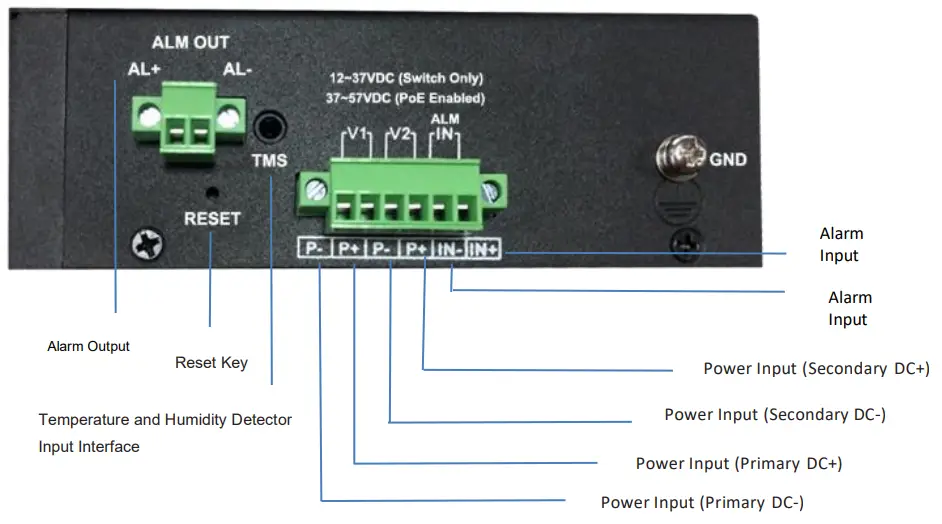
| Indicator (Front) | Status | Description | |||
| PWR: Power/system LED | Always-ON | System loading(<30S) / System crashed(>30S) | |||
| Always OFF | Power Disconnected | ||||
| Flashing (1Sec Interval) | System normal operation | ||||
| Port Link Indicator | Link–Green | Flashing ON | Port is connected and passing data | ||
| Always OFF | Network signal not communicated | ||||
| TP-SW8GAT/24-SFP | PoE Port Indicator (Port 1-8) | PoE | Orange | Always-ON | 24V Passive PoE is configured |
| Always OFF | PoE is OFF | ||||
| Green | Always-ON | 48V PoE is configured (802.3af/at) | |||
| Always OFF | PoE is OFF | ||||
| TP-SW8GAT/BT/24-SFP | PoE Port Indicator(Port 1-2) | PoE | Orange | Always-ON | 24V Passive PoE is configured |
| Always OFF | PoE is OFF | ||||
| Green | Always-ON | 48V PoE is configured (802.3af/at) | |||
| Always OFF | PoE is OFF | ||||
| PoE Port Indicator(Port 3–8) | PoE-Green | Always-ON | PoE Detection is successful and PoE is ON | ||
| Always OFF | PoE is OFF | ||||
| Function Indicators | Status | Description | Function Indicators | Status | Description |
| HW: Ring network LED | Always-ON | Ring network active | 9–10 SFP LED | Always-ON | SIP connected |
| Always OFF | Ring network not active | Always OFF | SFP not connected or abnormal | ||
| V1. Primary power LED | Always-ON | Primary power is normal and is master power | V2: Secondary power LED | Always-ON | Secondary power is normal and is master power |
| Always OFF | No primary power input | Always OFF | No secondary power input | ||
| Flash (1/4s) | Power and voltage abnormal | Flash (1/4s) | Power and voltage abnormal | ||
| Flash (1s) | Primary power is normal and is backup power | Flash (1s) | Secondary power is normal and is backup power |
Installation
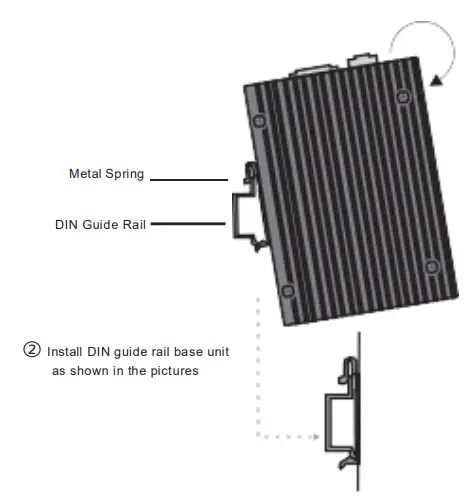
DIN Guide Rail
- Insert the top of the DIN guide rail into the groove at the bottom of the rigid metallic spring.
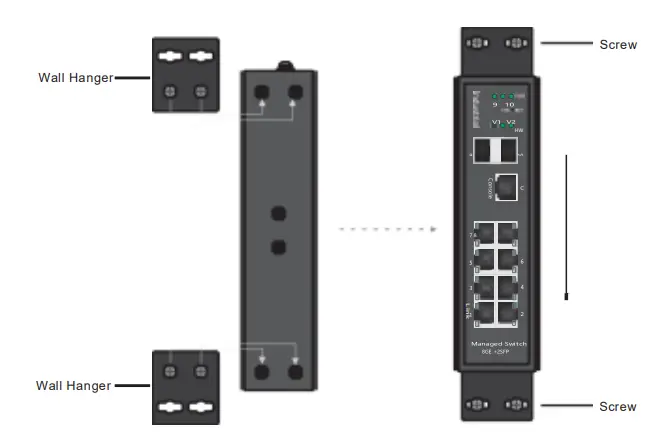
Wall-mounting
- Install the wall hangers onto the switch.
- Secure the switch length onto the wall by using screws.
Attentions
- Please read the user manual before using the switch, or improper operation could cause damage to switch components.
- Do not use it near a fire source.
- Do not submerge it into water or allow water to wet the inner switch components.
- Do not short circuit the positive and negative poles of the various connections as this may damage the switch.
- Do not open the enclosure or disassemble inner components. You will void the warranty.
Product List

- Typical PoE Network Application – 24V/48V PoE and High Power
90W PoE maximum supported.
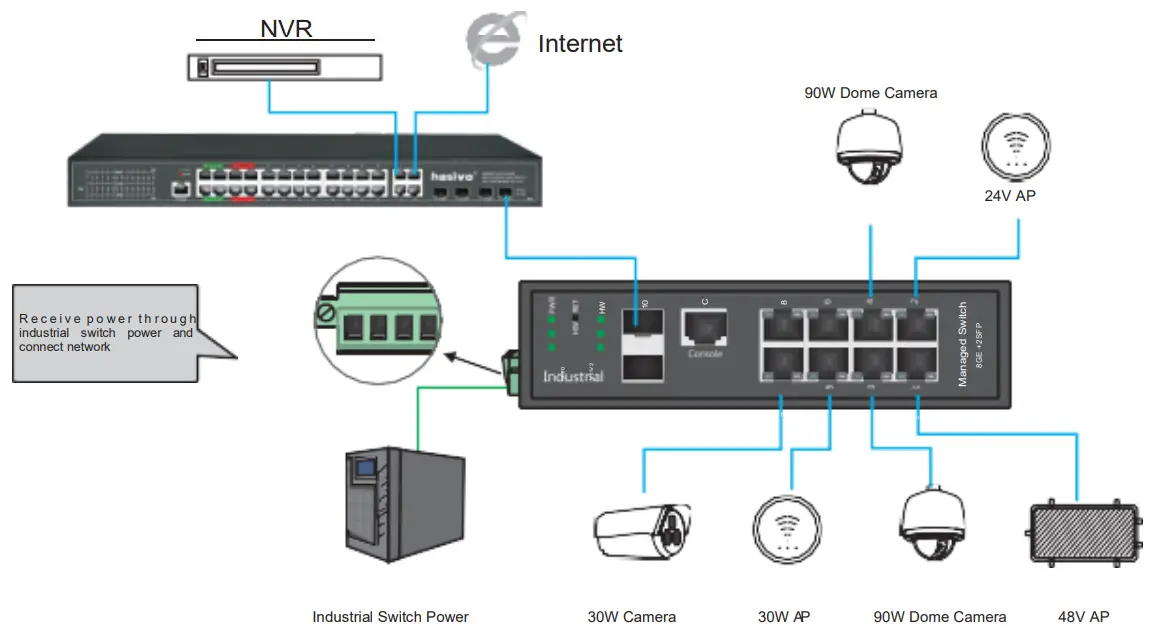
Hardware Parameter
| Model | TP-SW8GAT/24-SFP & TP-SW8GAT/BT/24-SFP | |
| Product | Industrial 8+2 Managed PoE Switch | |
| Console Port | 38400 Baud, 8 Bit, N parity, 1 stop bit, N flow control | |
| Reset Button | Press for <lsec to reset the switch, press for >5sec to reset to factory defaults | |
| PoE Ports | TP-SW8GAT/24-SFP 8″10/100/1000M Port 1–8 supports 24V Passive PoE or 802.3at PoE (MAX 30W per port) | |
| TP-SW8GAT/8T/24-SFP 8.10/100/1000M Port 1–2 supports 24V Passive PoE or 802.3at PoE (MAX 30W per port) Port 3–4 supports 802.3bt PoE (MAX 90W per port) Port 5–8 supports 802.3at PoE (MAX 30W per port) | ||
| Uplink Ports | 2″10/100/1000M SFP | |
| Function Interface | 1: HW RET Button for the quick formation of the ring network. Needs to be enabled in the User Interface of a master switch. 2: Dual independent power inputs with over/under voltage protection. 3: Alarm input with a range of 5-S7VDC 0.5mA Detects alarm input voltage changes. 4: Alarm/Relay output (<60V <3A), can define various custom condition triggers. 5: TMS Environmental temperature and humidity detection. 6: Real-time system of crucial voltage monitoring using alarm output function. 7: Real-time system temperature, environment temperature, humidity using alarm output function. 8: Real-time detection and display of input voltage, current, power. 9: Multiple custom port control and intelligent management. | |
| Network protocol | IEEE 802.3x IEEE 802.3, IEEE 802.3u, IEEE 802.3ab, IEEE 802.3z IEEE 802.3ad IEEE 802.3q, IEEE 802.3q/p IEEE 802.1w, IEEE 802.1d, IEEE 802.15 IEEE 802.3z 1000BASE-X STP (Spanning Tree Protocol) RSTP/MSTP (Rapid Spanning Tree Protocol) EPPS ring network protocol EAPS ring network protocol IEEE 802.3af, 802.3at, 802.3bt AUTO/24V Passive PoE PSE | |
| Environment Detection | TMS temperature and humidity sensor | |
| Port Specification | 1-8 port 10/100/10008a seT(X)auto-detection, AUTO-MDI/MDI-X | |
| Transmission Mode | Store and Forward (full wire speed) | |
| Bandwidth | 56Gb ps | |
| Packet Forwarding | 14.44Mpps | |
| MAC | 8K | |
| Buffer | 4.1M | |
| Transmission Distance | 10BASE-T: Cat3,4,5 UTP (5250 meter) 100BASE-TX: CatS or later UTP (5100 meter) 1000BASE-TX: Cat6 or later UTP (51030 meter) 1000BASE-SX: 62.5pm/50pm MMF(2m–550m) 1000BASE-LX: 62.5pm/50pm MM(2m–550m) or 10pm SMF(2m–5000m) BID! supported | |
| FLASH | 16M | |
| RAM | 128M | |
| Power | Standby power consumption 55w Network full-load power consumption 515W Whole device full-load powerconsumption 5360W | |
| LED Indicator | Port 9-10: (SFP LED) TP-SW8GAT/BT/24-SFP: PoE Port 1-2:(Green=48V; Orange=24V) TP-SW8GAT/24-SFP: PoE Port 1-8:(Green=48V; Orange=24V) Link port:(Green=Link LED ) PWR:( Power/system LED), Flashing means Normal Power Vl: (Master power LED) V2: (Slave power LED) HW:(Ring network ON LED) | |
| Power Input | Dual independent power inputs: Switch Only: 12-3NDC / PoE Enabled: 37-57VDC | |
| Operating Temp/Humidity | -40 —+80°C, 10% —90% RH Non-condensing | |
| Storage Temp/Humidity | -40—+85°C, 5%–-95% RH Non-condensing | |
| Lightning Protection Level 6KV 8/20us, 8KV ESD | Environmental Protection LevelI P40 | |
| Product Size(L*WH) | 160mm”130mm”45mm | |
| N.W(kg) | 1kg | |
| Installation | DIN rail or Wall Mount | |
| Certificate | 3C; CE mark, commercial; CE/LVD En60950; FCC Part 15 Class B; RoHS; | |
| Warranty | 3 Years | |
Software Parameter
| Model | TP-SW8GAT/24-SFP & TP-SW8GAT/BT/24-SFP |
| Monitoring Platform | Quick formation of ring network with one button. System temperature monitoring and alarm. External temperature and humidity monitoring and alarm. Input power monitoring and alarm. System each channel key voltage monitoring and alarm. System total current, total power monitoring, and alarm. All-Port network monitoring and alarm. Support one group input and output signal monitoring and alarm. |
| Network Protocol | IEEE 802.3x IEEE 802.3, IEEE 802.3u, IEEE 802.3ab, IEEE 802.3z IEEE 802.3ad IEEE 802.3q, IEEE 802.3q/p IEEE 802.1w, IEEE 802.1d, IEEE 802.1S, IEEE 802.1X |
| MAC | Support 16K MAC address, auto aging, and learning |
| VLAN Configuration | Support port-based VLAN Up to 4096 VLANs; Support Voice VLAN can configure Qos for voice data 802.1Q VLAN |
| Spanning Tree | STP (Spanning tree protocol); RSTP/MSTP (Rapid spanning tree protocol); EPPS/EAPS (Ring network protocol); 802.1x |
| Port Aggregation | Support 8 groups of aggregation, each group supports up to 8 ports |
| Port Mirroring | Support many-to-one port mirroring |
| Loop Guard | Support loop protection, real-time detection, quick alarm, concise location, Intelligent blocking, automatic recovery |
| Port Isolation | Support downlink ports isolated from each other and communicate with the uplink port as well |
| Flow Control | Half-duplex based on Backpressure; Full duplex based on PAUSE frame |
| Speed Limitation | Bandwidth management based on port input and output |
| Multicast Control | IGMPv1/2/3 and MLDv1/2 Snooping GMRP protocol registration; Multicast address management, multicast VLAN, multicast routing port, static multicast address |
| DHCP | DHCP Snooping |
| Storm Suppression | Supports unknown unicast, multicast, unknown multicast, broadcast-type storm suppression; Storm suppression based on bandwidth adjustment and storm filtering |
| Security | Supports User port +IP address +MAC address; ACL based on IP, MAC; Support security properties of a number of MAC addresses based on port |
| QUOTES | 802.1p port queue priority algorithm; Cos/Tos, Q0S remark; WRR (Weighted Round Robin), weighted priority rotation algorithm; WRR, SP, WFQ priority scheduling modes |
| Cable Sequence | Auto-MDIX; auto-detection on straight-through and a cross-over cable |
| System Maintenance | Upgrade package upload, System log viewing, WEB recovery factory configuration |
| PoE Function | 8 Port PoE switch; Individual PoE port on/off recurring scheduling; Display of PoE Voltage, Current Power’, System total power display and configuration; PoE watchdog: supports auto-reset when Port power fails or PD device becomes unresponsive; PoE configuration can be set to 802.3af, 802.3at or passive 24V; also 802.3bt on the BT model Indication of over-power |
| Network Management | WEB interface; CLI Command Line Interface based on Telnet, TFTP, Console; SNMP V1/V2/V3; RMON V1/V2 |
8000109 Rev 1 14 July 2021 Combined
Quick Start Guide