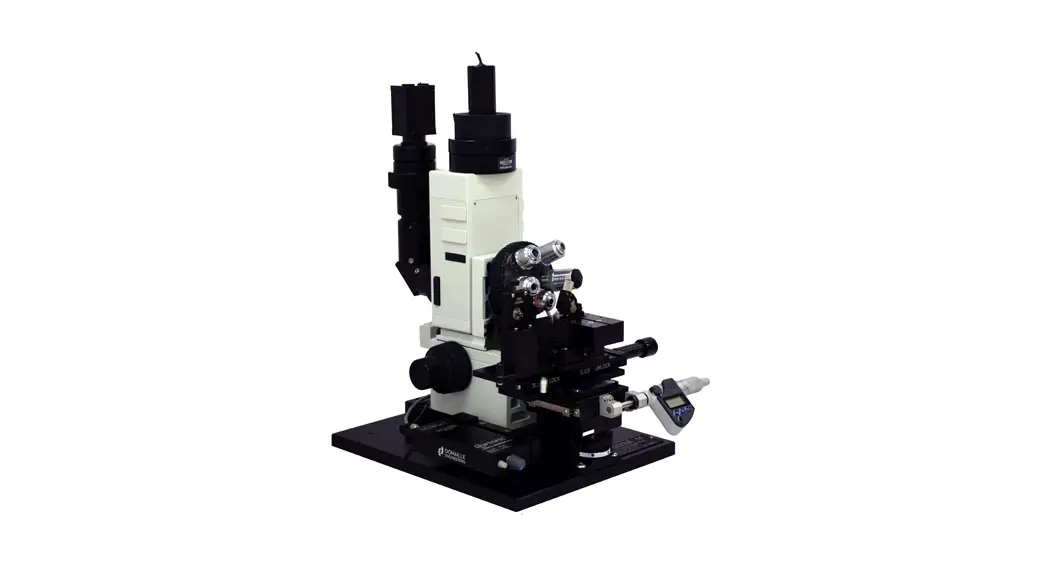
DE2510 Series Video Microscope
DE2510 Series Video Microscope
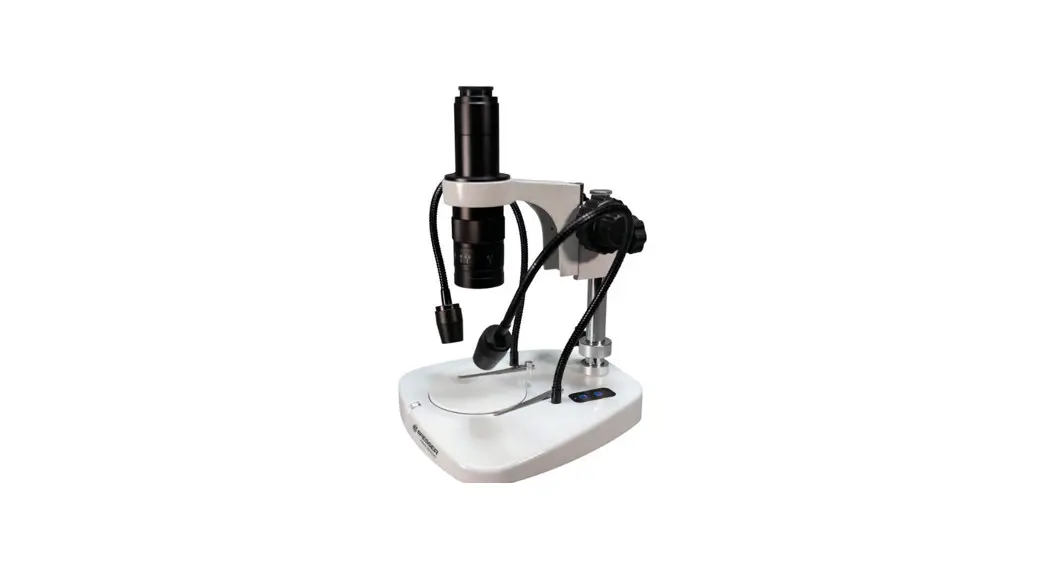
The DE2510 Series Video Microscope is a high-resolution video
and CCD camera microscope that features a 20x non-contact
interferometer and a pitch-yaw stage for fiber alignment. This
product is designed for visual end-face inspection of fiber optic
connectors in a production environment. Manufactured by Domaille
Engineering LLC, this product is developed to provide precision and
control during the inspection process.
Features:
- High resolution video and CCD camera
- 20x non-contact interferometer
- Pitch- Yaw stage for fiber alignment
Parts & Functions:
The product comes with a chart and image, which depicts the
different parts and their respective functions. The product has a
focus adjustment knob, lighting feature, and three objective
lenses: 5x, 10x, and 40x.
Initial Setup:
The DE2510 Series Video Microscope can be connected to a monitor
or computer for capturing images. It is recommended to use a
high-resolution monitor or contact Domaille Engineering for more
information on digital camera options or video frame grabbers.
Usage Instructions:
Focusing:
The focus adjustment knob on the DE2510 series is located next
to the stage. Turning the knob adjusts the contrast of the image
with precision and control. Clockwise focuses the stage in, and
counter-clockwise focuses the stage out.
Lighting:
The product comes with a lighting feature that provides
sufficient illumination for inspection of connector end-faces.
Changing Magnifications:
The DE2510 is equipped with three objective lenses: 5x, 10x, and
a 40x. The operator can quickly change magnifications when
inspecting connectors by mounting the lenses to a typical
microscope turret or nosepiece. Optional 3.3x and 40x objectives
are available.
Using the Scope:
The DE2510 Series Video Microscope has a pitch-yaw stage that
allows for fiber alignment. The following are the stage
adjustments:
- Focus or Y-axis adjustment moves the entire stage assembly
forward and back to focus the fiber. - Horizontal or X-axis adjustment moves the bare fiber holder
left to right, along the horizontal plane. - Vertical or Z-axis adjustment moves the bare fiber holder up
and down along the vertical plane. - Pitch adjustment tilts the angle of the bare fiber holder from
the fore to aft. - Yaw adjustment rotates the bare fiber holder from left to
right.
Adjusting Bare Fiber Holder:
Depending on the diameter of the bare fiber, it may be necessary
to adjust the set screws to apply the correct amount of tension to
secure the fiber. The following are the steps:
- Place the fiber into the fiber holder and close the door.
- Slowly tighten the set screw closest to the objectives until
the fiber will NOT slide in and out. - Tighten the 2nd set of screws for added support.
- When the fiber needs to be rotated, simply lift the door before
rotating.
Alignment of Stage:
The bare fiber holder must be perpendicular to the optics for a
correct cleave angle calculation using the interferometer. The
following are the steps:
- Place the calibration pin in the bare fiber holder, making sure
the pin is secure at the bottom of the V. - Using the 5x objective lens, focus on the calibration pin and
center the image using the X and Z axis adjustments. - Repeat the process using the 10x and 20x objectives to make
sure the pin is visible on the monitor. - Using the interferometer, focus on the calibration pin
fringes. - Using the Pitch and Yaw adjustments on the stage, tilt the
stage until only 1 fringe is visible.
DE2510 Series User’s Guide Bare fiber Interferometer
Features:
High resolution video and CCD camera 20x non-contact interferometer Pitch- Yaw stage for fiber alignment Manufactured by Domaille Engineering LLC, the DE2510 Series Video Microscope are designed for visual end-face inspection of fiber optic connectors in a production environment.
DE2510: Equipped with a ±20° tilting goniometer and interferometer, this model is primarily used for bare fiber inspection.
Within this manual is all the information needed to operate and maintain the DE2510 Series Video Microscope. Domaille Engineering LLC, is always designing innovative new products while maintaining and further developing existing ones.
Printing History
Edition 2, April 2014
©Copyright 2014 by Domaille Engineering LLC
Parts & Functions
(Chart & Image)
Initial Setup
After unpacking the ME2510 series microscope and accessories, set up can be quickly achieved through a few simple connections. There are three main components to the microscope system, the microscope, power supply, and monitor (or computer using a frame grabber). The ME-12013 LED Controller operates from a 24 volt DC output power adapter (ME-12015) with switching transformer to accept AC voltage 90-240 volt, 50-60Hz for domestic or international use. This unit is used to power both the CCD Camera and the illumination of the microscope. Currently we provide two different manufacturer’s model monitors, in several different sizes. These monitors are high resolution monitors specifically chosen to provide the best solution for
inspecting connector end-faces. We do not recommend any of the lower priced security type monitors as the resolution and image quality are not sufficient. A computer may also be used to capture images, contact Domaille Engineering for more information on digital camera options or video frame grabbers.
Focusing
The focus adjustment knob on the DE2510 series is conveniently located next to the stage. Turning the knob adjusts the contrast of the image with precision and control. Clockwise = Focuses the stage in Counter-Clockwise = Focuses the stage out
Lighting
The illumination can be controlled using the intensity control knob located on the ME-12013 LED Controller. This allows the operator to control the brightness of the image when inspecting the dark fiber cladding highly reflective metal or ceramic ferrules. For greater amount of control over the lighting, the ME-12013 LED Controller is equipped with a 3 turn electronic rheostat. Older analog models may be upgraded by contacting Domaille Engineering. Clockwise = Increases Illumination Counter-Clockwise = Decreases Illumination
Changing Magnifications
The DE2510 is equipped with three objectives lenses: 5x, 10x, and a 40x. Mounted to a typical microscope turret or nosepiece allows the operator to quickly change magnifications when inspecting connectors. Optional 3.3x and 40x objectives are available. For more information on magnification or calibration see our website at www.DomailleEngineering.com
Using the Scope
Stage Adjustments
1. Focus or Y-axis adjustment moves the entire stage assembly forward and back to focus the fiber.
2. Horizontal or X-axis adjustment moves the bare fiber holder left to right, along the horizontal plane.
3. Vertical or Z-axis adjustment moves the bare fiber holder up and down along the vertical plane.
4. Pitch adjustment tilts the angle of the bare fiber holder from the fore to aft. 5. Yaw adjustment rotates the bare fiber holder from left to right.
Adjusting Bare Fiber Holder
Depending on the diameter of the bare fiber, it may be necessary to adjust the set screws to apply the correct amount of tension to secure the fiber.
1. Place the fiber into the fiber holder and close the door. 2. Slowly tighten the set screw closest to the objectives until the fiber will NOT slide in and
out. 3. Tighten the 2nd set of screws for added support. 4. When the fiber needs to be rotated, simply lift the door before rotating.
Alignment of Stage
It is necessary to make sure that the bare fiber holder is perpendicular to the optics in order to get a correct cleave angle calculation using the interferometer.
1. Place the calibration pin in the bare fiber holder, making sure the pin is secure at the bottom of the “V”
2. Using the 5x objective lens focus on the calibration pin and center the image using the X and Z axis adjustments.
3. Repeat the process using the 10x and 20x objectives to make sure the pin is visible on the monitor.
4. Using the interferometer, focus in on the calibration pin fringes. 5. Using the Pitch and Yaw adjustments on the stage, tilt the stage until only 1 fringe is
visible. 6. Rotate the calibration pin and check the fringes again. Once the calibration pin can be
rotated at any degree and 1 fringe is maintained the stage is perpendicular to the optics.
Procedure for checking bare fiber cleave
The non-contact interferometer lens provides valuable information about the topography of the fiber end face. This pattern of the surface also offers information about the quality of the cleaving tool, break point, and any stress that may have occurred during the break.
1. Place the bare fiber in the holder, making sure the pin is secure at the bottom of the “V”. It is recommended to leave approx. 3mm of fiber sticking out beyond the holder.
2. Using the 5x objective lens focus on the calibration pin and center the image using the X and Z axis adjustments.
3. Repeat the process using the 10x and 20x objectives. Use the 20x objective to check the surface quality of the cleave for chips/debris and/or hackle (rough surface area).
4. Using the interferometer, adjust the focus carefully until the fringes come into clear view.
5. Once you have a clear image with the interferometer. Rotate the fiber (simply lift the door on the fiber holder to rotate) and focus the interferometer again. The same fringe pattern should be maintained. If not the stage may need to be re-aligned.
6. Count the number of DARK fringes to calculate cleave angle. Refer to the chart on the (next page).
Interferometric Analysis of Cleaved Fiber
The fringe count will vary according to different fiber diameters
Please note: The margin of error as result of fixtures or misalignment of the holder can be ± 1.5 fringes.
FRINGES PER DEGREE FOR VARIOUS FIBER DIAMETERS
Fiber Diameter
Fringe Count Per Degree
80 µm
5.8
125 µm
8.9
140 µm
10.1
230 µm
16.7
The angle of the fiber can be calculated by counting the number of DARK fringes on the fiber end face and divide by the appropriate count of fringes per degree. Typical cleave angles are 1 degree or less.
Calculations behind the analysis:
Tangent of 1 degree = H ÷ D = N ÷2D Tangent of 1 degree = 0.01745 H = Height of the fiber away from the reference mirror inside of the micrometer D = Diameter of the fiber in microns N= Number of fringes per degree = Wavelength of light ( blue LED is approx. .480 microns)
÷2 = Height of 1 fringe
Using a 125 micron fiber as an example: 0.01745 = (N x .480) ÷ (2 x 125) N = 8.9
Using a 80 micron fiber as an example: 0.01745 = (N x .480) ÷ (2 x 80) N = 5.8
Interferograms Representing Individual and Combinations of Aberrations
Preventive Maintenance
Caution:
The following instructions should only be performed by qualified service personnel.
If equipment is used in a manner not specified by the manufacturer, the protection provided by the equipment may be impaired.
There is NO SERVICEABLE EQUIPMENT inside the ME-12013 LED Controller. All equipment requiring repair should be sent back to the manufacturer or an authorized dealer.
Note: The DE2510 series microscope is relatively low in maintenance. Basic care and precaution in using the instrument is required. Depending upon the cleanliness of the general working area as well as the age of the equipment, we would suggest at least semi-annual service and maintenance.
General Cleaning Harsh solvents are not recommended on a regular basis. Typical safe de greaser solvents can be used to clean old grease or grime from mechanical parts. Lens cleaner is safe to use on the optics of our microscopes. Lens cleaner can be used with a soft lens tissue/ cloth to remove any soil, fingerprints, etc. From the front of the objectives.
Centering the illumination Centering the illumination of the DE2510 is critical in order to maximize performance of the microscope. All scopes are set up from the factory, but replacing lamps or periodic cleaning of the beam splitter may require the operator to re-center the illumination.
1. Using a 3/32″ hex wrench, loosen the four socket head screws surrounding the light block.
2. While viewing a fiber on the monitor, slide the light block around until the greatest amount of light is over the cladding area of the fiber.
3. Re-tighten the four screws.
Incorrect Illumination: Notice how the light is towards the bottom of the screen.
Correct Illumination: Not ice how t he light surrounds t he cladding. Light scrat ches can now be easily det ect ed.
Cleaning objective lenses Oils, dirt, and finger prints may reduce the resolving power of the objective lenses. To ensure maximum levels of performance of the DE2510 series, wipe the lens of the objectives with a lint-free tissue and lens cleaner. Ordinary lens cleaner, available at most photography supply stores works the best. Perform this procedure weekly or as needed, depending on the type of environment inspection is being held.
Cleaning the CCD Camera Use extreme caution when attempting to clean the camera. Any scratches, solvent, streaks or dirt left on the IR filter of the CCD will show up in the field of view of the microscopes.
Before attempting to clean the IR filter on the CCD camera, first confirm that the visible dirt on the monitor is actually on the camera. While viewing the suspected dirt on the video monitor, slowly rotate the CCD camera on the Microscope.
Due to the orientation of the CCD, if the dirt remains in the same spot and does not rotate with the camera, then it most likely is on the camera itself.
1. Carefully unscrew the camera from the camera mount. 2. Using clean, compressed air, blow across the surface of the IR filter. 3. Recheck the camera for dirt. 4. If the dirt is still there, use plastic tweezers, soft lens cloth and lens cleaner to carefully
wipe the surface of the IR filter. Use a wiping spiral pattern from center of filter out to edges, to remove debris. 5. Re-check the camera for dirt. 6. Repeat this process until the camera is clean.
Blow air across and not directly at the CCD sensor of the camera.
Determining actual magnification The best method to calculate the exact “total” magnification used on the DE2500 series is to measure the cladding on the video display. Take the measurement in millimeters and divide that amount by the 125 micron cladding. The result is the “total” optical and video magnification being used.
For example: taking a set of calipers, we measured the diameter or the ferrule viewed through DE2510 on a monitor to be approximately
Actual size on display/ cladding diameter in mm = total magnification 53.49mm / .125mm = 427.92X
Lubricating the focus micrometer Occasional lubrication of the focus micrometer will ensure accurate and repeatable results.
1. Unscrew the focus knob and carefully remove the micrometer drum 2. Clean the micrometer drum with de greaser 3. Lubricate the drum and threads with a light grease 4. Carefully replace the micrometer drum by screwing it back into the housing.