Support and E-Warranty Certificate
https://www.vevor.com/support
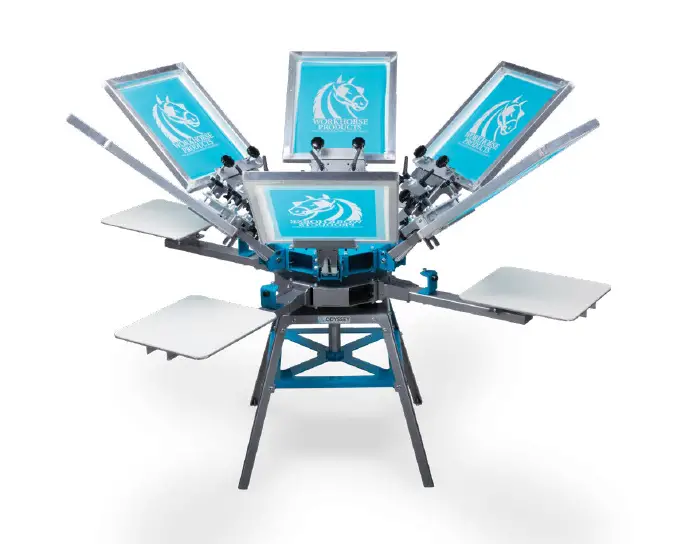
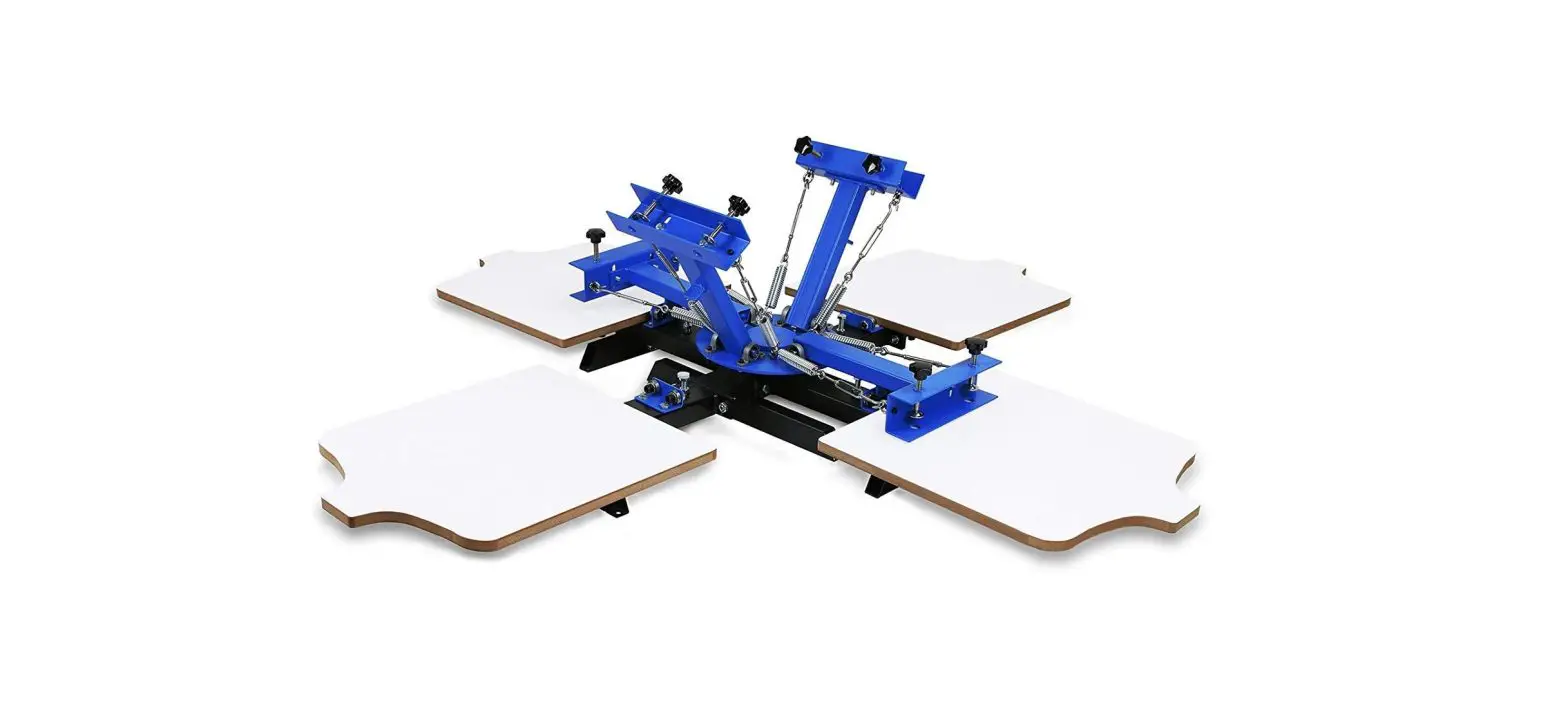
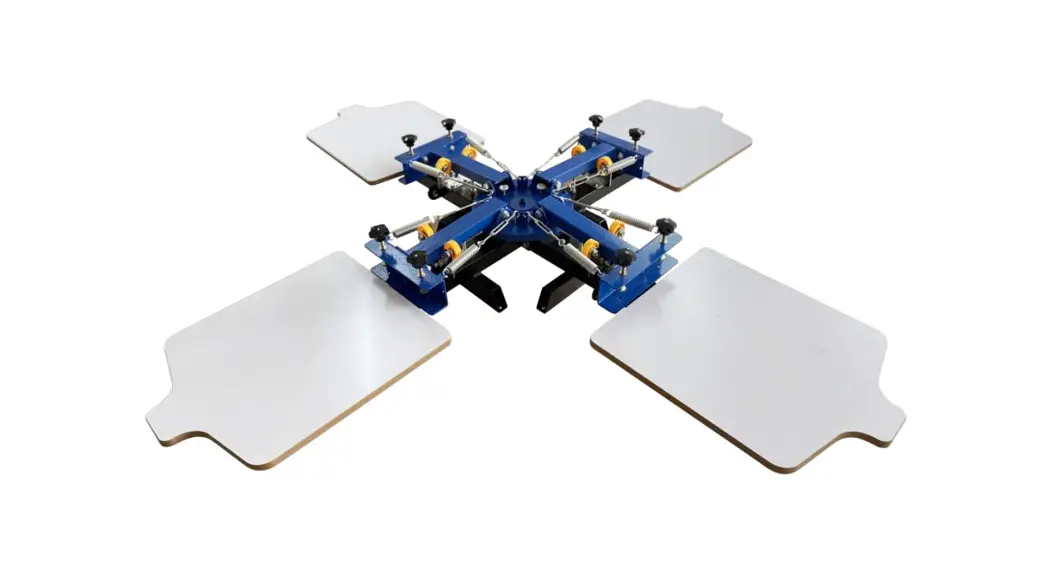
SCREEN PRINTING MACHINE
NS404-S
USER MANUAL
NS404-S Screen Printing Machine
We continue to be committed to provide you tools with competitive price. “Save Half”, “Half Price” or any other similar expressions used by us only represents an estimate of savings you might benefit from buying certain tools with us compared to the major top brands and doses not necessarily mean to cover all categories of tools offered by us. You are kindly reminded to verify carefully when you are placing an order with us if you are actually saving half in comparison with the top major brands.
NEED HELP? CONTACT US!
Have product questions? Need technical support? Please feel free to contact us:
 [email protected]
This is the original instruction, please read all manual instructions carefully before operating. VEVOR reserves a clear interpretation of our user manual. The appearance of the product shall be subject to the product you received. Please forgive us that we won’t inform you again if there are any technology or software updates on our product.
 This symbol, placed before a safety comment, indicates a kind of precaution, warning, or danger. Ignoring this warning may lead to an accident. To reduce the risk of injury, fire, or electrocution, please always follow the recommendation shown below.
WARNING:Read all safety warnings, instructions, illustrations and specifications provided with this machine. Failure to follow all instructions listed below may result in electric shock, fire and/or serious injury.
Save all warnings and instructions for future reference.
- Keep work area clean. Cluttered areas invite injuries.
- Observe work area conditions. Do not use machine in damp or wet locations. Don’t expose to rain. Keep work area well lighted. Do not use machine in the presence of flammable gases or liquids.
- Keep children away. Children must never be allowed in the work area. Do not let them handle machines, tools, or extension cords. This machine can be used by children aged from 8 years and above and persons with reduced physical, sensory or mental capabilities or lack of experience and knowledge if they have been given supervision or instruction concerning use of the appliance in a safe way and understand the hazards involved. Children shall not play with the appliance. Cleaning and user maintenance shall not be made by children without supervision.
- Store idle equipment. When not in use, machine must be stored in a dry location to inhibit rust. Always lock up machines and keep out of reach of children.
- Use the right machine for the job. Do not attempt to force a small machine or attachment to do the work of a larger industrial machine. There are certain applications for which this machine was designed. Do not modify this machine and do not use this machine for a purpose for which it was not intended.
- Dress properly. Do not wear loose clothing or jewelry as they can be caught in moving parts. Protective, electrically non-conductive clothes and non-skid footwear are recommended when working. Wear restrictive hair covering to contain long hair.
- Maintain machines with care. Keep mahine clean for better and safer performance. Follow instructions for lubricating and changing accessories. Inspect machine periodically and, if damaged, have them repaired by an authorized technician. The handles must be kept clean, dry, and free from oil and grease at all times.
- Stay alert. Watch what you are doing, use common sense. Do not operate any machine when you are tired.
- Check for damaged parts. Before using any machine, any part that appears damaged should be carefully checked to determine that it will operate properly and perform its intended function. Check for alignment and binding of moving parts; any broken parts or mounting fixtures; and any other condition that may affect proper operation. Any part that is damaged should be properly repaired or replaced by a qualified technician. Do not use the machine if any switch does not turn On and Off properly.
- Replacement parts and accessories. When servicing, use only identical replacement parts. Use of any other parts will void the warranty. Only use accessories intended for use with this machine. Approved accessories are available from VEVOR.
- Do not operate machine if under the influence of alcohol or drugs. Read warning labels on prescriptions to determine if your judgment or reflexes are impaired while taking drugs. If there is any doubt, do not operate the machine.
Warning: The warnings, cautions, and instructions discussed in this instruction manual cannot cover all possible conditions and situations that may occur. It must be understood by the operator that common sense and caution are factors which cannot be built into this product, but must be supplied by the operator.
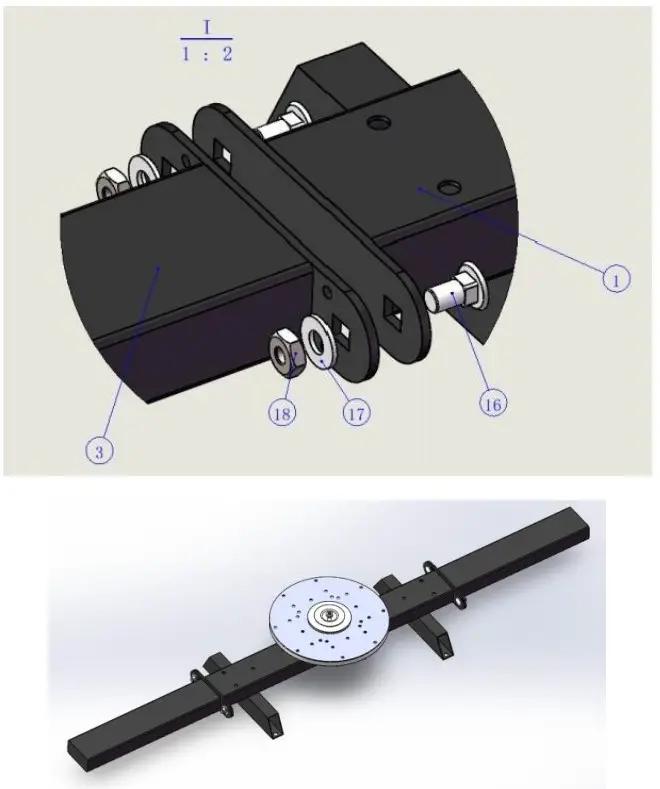
1.Take out the base(1)and put it on the table, then take out the table support bar(3)and put it on the base(1),and lock the locking tool wrench 17-17(I)with square neck bolt square(16),gasket M10(17)and external hexagon nut M10(18).
| Serial No | Name of accessories | Quantity |
| 16 | square neck bolt M10X20 | 4 |
| 18 | Gasket M10 | 4 |
| 19 | Outer hexagon nut M10 | 4 |
| Serial No | Tool name | Picture |
| I | Wrench 14-17 |  |
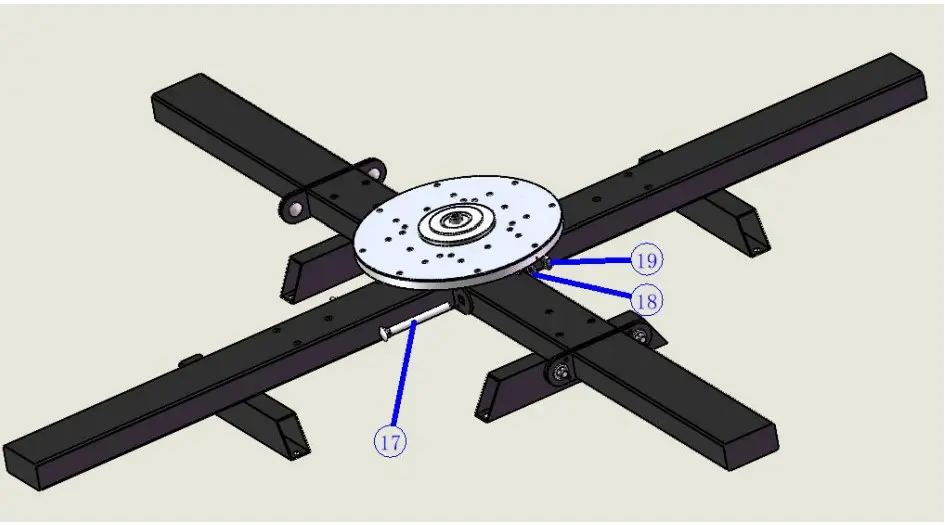
 2.Take out the long table support bar (25), put it on the base (1), and lock it with square neck bolt square (17), gasket M10 (18) and external hexagon nut M10 (19).
Locking tool wrench 17-17 (I)
| Serial No | Name of accessories | Quantity |
| 16 | square neck bolt M10X100 | 2 |
| 18 | Gasket M10 | 2 |
| 19 | Outer hexagon nut M10 | 2 |
| Serial No | Tool name | Picture |
| I | Wrench 14-17 | |
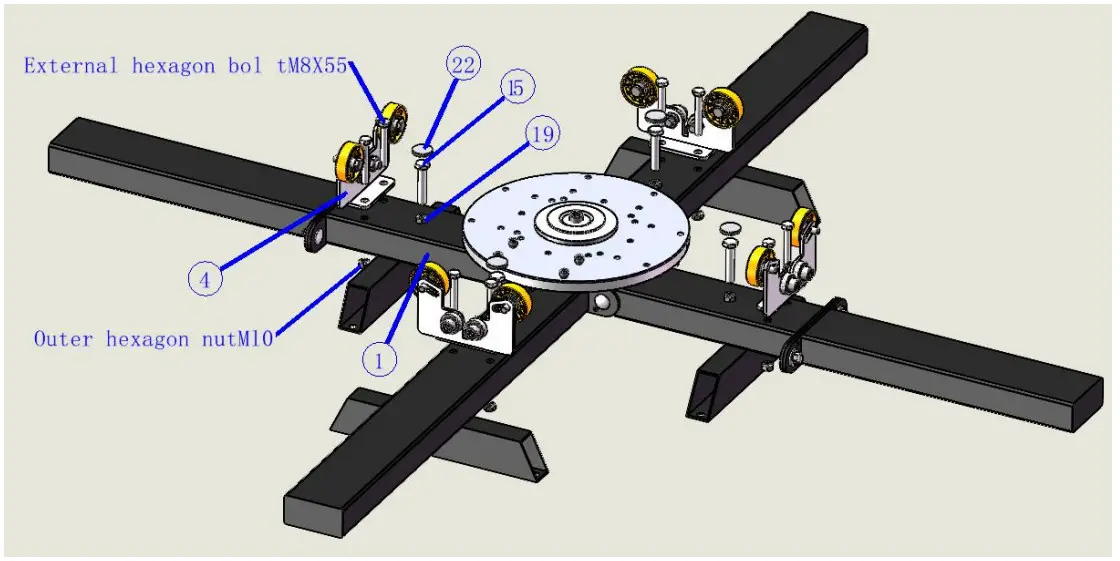
 3.Put the positioning seat(4)on the square tube of the base(1),thread it from top to bottom with the external hexagon screw M8X55,and lock the other end with the external hexagon nut M8. Put the outer hexagon screw M10X55(15) onto the outer hexagon nut M10(18)and thread the screw head 40 mm from the base square tube from top to bottom, then lock the outer hexagon nut M10 (18)onto the base square tube in reverse.
| Serial No | Name of accessories | Quantity |
| 15 | External hexagon screw M10X55 | 4 |
| 19 | Outer hexagon nut M10 | 4 |
| 22 | felt pad | 4 |
| Serial No | Tool name | Picture |
| I | Wrench 14-17 | |
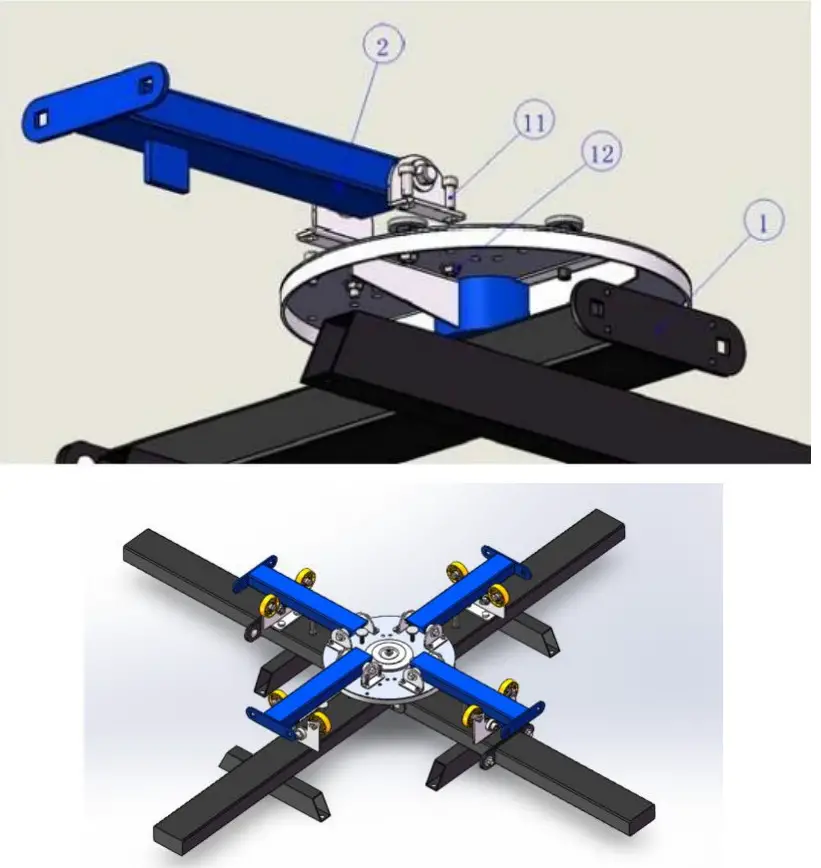
 4.Put the printing arm(2)on the disc of the base(1),and lock it with the hexagonal socket screw M6X16(11)and flange nut M6
| Serial No | Name of accessories | Quantity |
| 11 | Socket head cap screw M6X16 | 16 |
| 12 | Flange nut M6 | 16 |
| Serial No | Tool name | Picture |
| I | Wrench 14-17 | |
| VI | Hexagon socket wrench M6 |  |
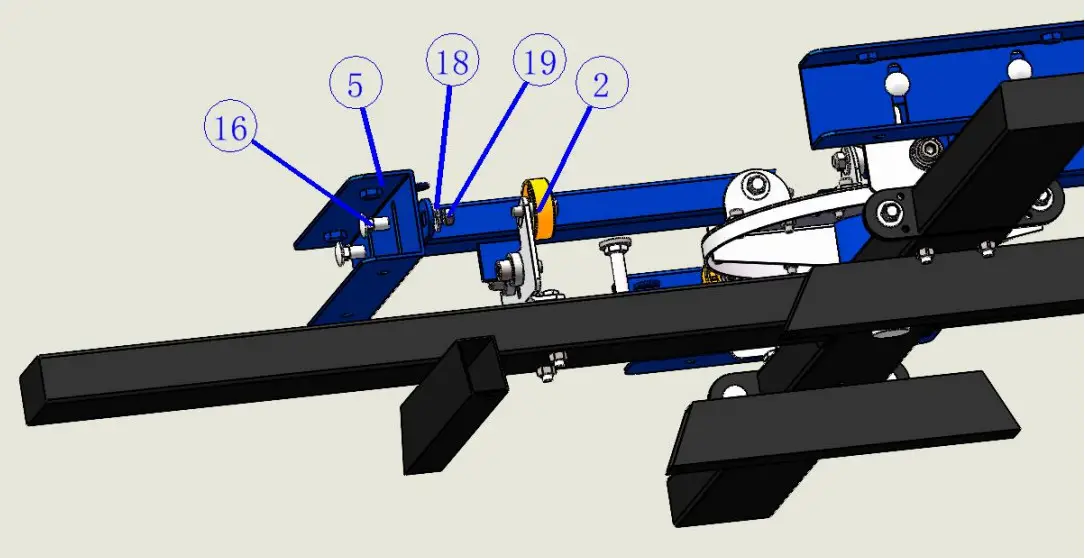
 5.Take the screen clamp(5)and stick it to the printing arm(2),insert it into the printing arm(2)hole from the screen clamp(5) with square neck bolt M10X20(16), cover the other end with gasket M10 (17),then lock the outer hexagon nut M10(18), and then lock it with wrench 14- 17(一)
| Serial No | Name of accessories | Quantity |
| 16 | square neck bolt M10X20 | 8 |
| 18 | Gasket M10 | 8 |
| 19 | Outer hexagon nut M10 | 8 |
| Serial No | Tool name | Picture |
| I | Wrench 14-17 | |
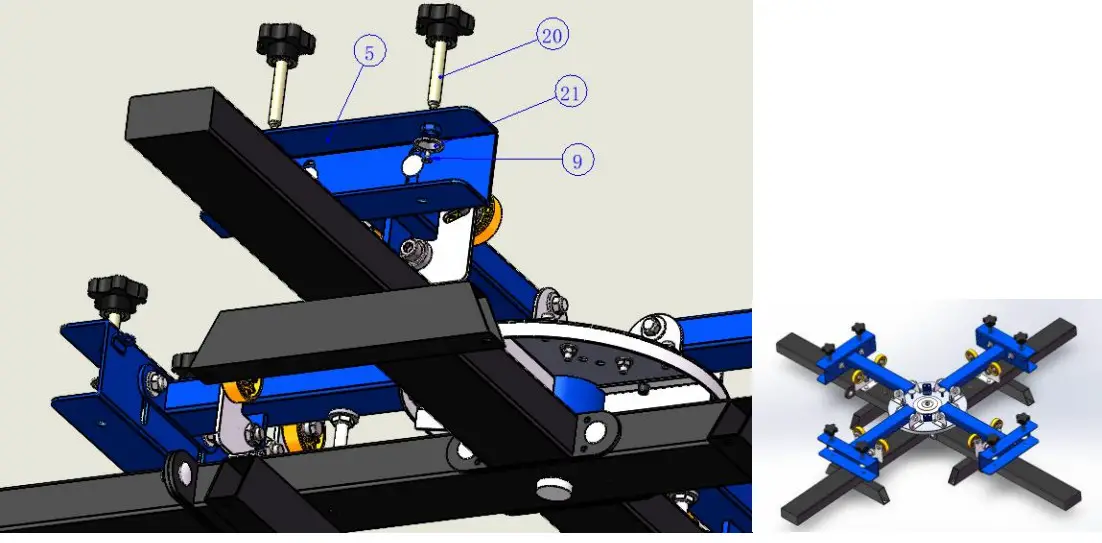
 6.Lock the five-star handle(19)into the screen clamp(5)with a depth of 20mm, cover the tabletting(20),and then use a cross screwdriver(2) to lock the tabletting(20) on the five-star handle(19)with a cross countersunk screw M4X8(9) from the small hole at the lower end of the screen clamp(5)
| Serial No | Name of accessories | Quantity |
| 9 | Cross countersunk head screw M4X8 | 8 |
| 20 | Five star handle | 8 |
| 21 | Tabletting | 8 |
| Serial No | Tool name | Picture |
| I | Cross screwdriver |  |
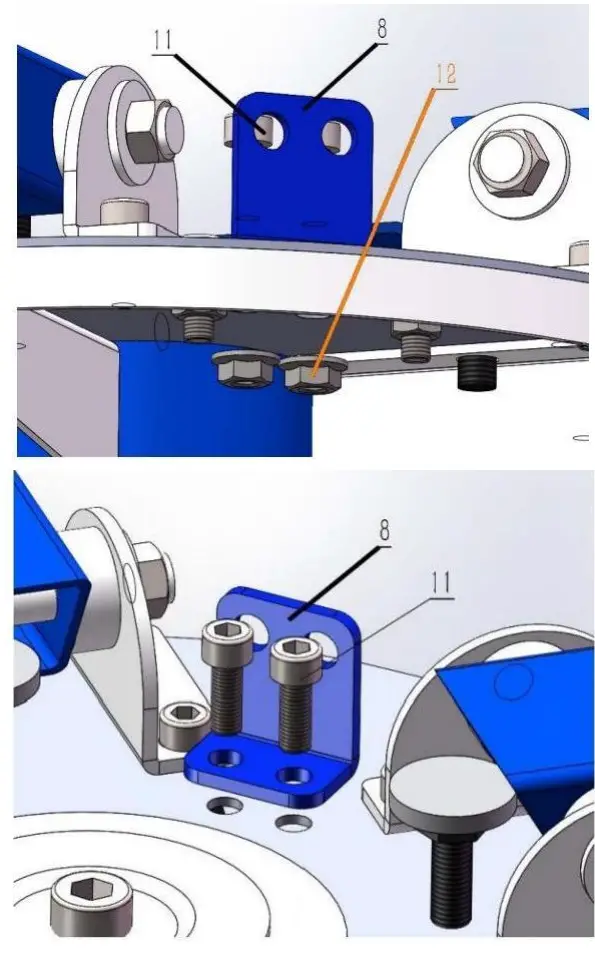
 7.Put the spring hook plate(8)on the base disc,and lock it with the hexagonal socket screw M6X16 and flange nut M6
| Serial No | Name of accessories | Quantity |
| 11 | Socket head cap screw M6X16 | 8 |
| 12 | Flange nut M6 | 8 |
| Serial No | Tool name | Picture |
| I | Wrench 14-17 | |
| VI | Hexagon socket wrench M6 | |
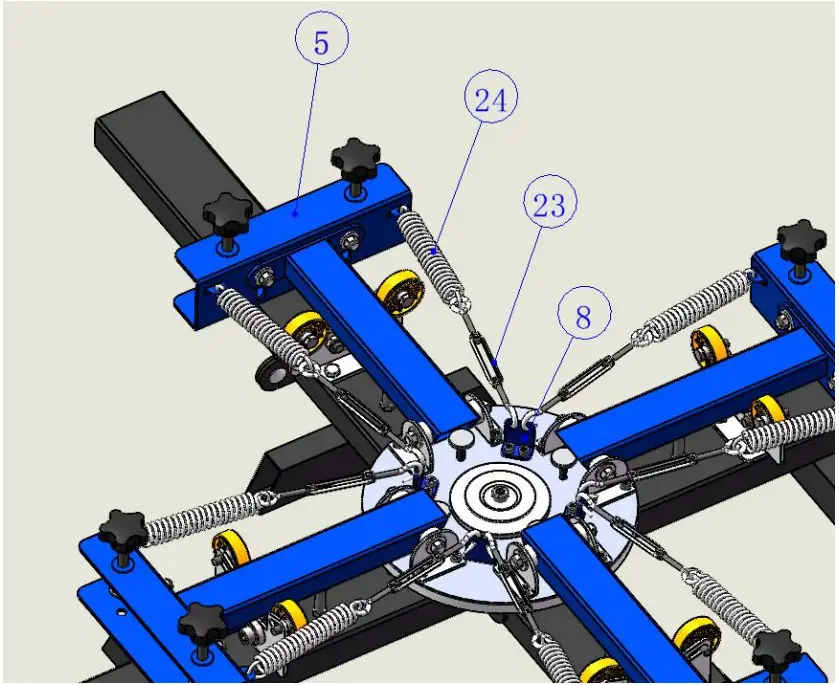
 8.Hang the spring(23)on the screen clamp(5),hang the hooked end of the hook(22) on the spring hook plate(8),hook the looped end of hook(22)with the spring(23), and then level the arm support
| Serial No | Name of accessories | Quantity |
| 23 | hook | 8 |
| 24 | Spring | 8 |
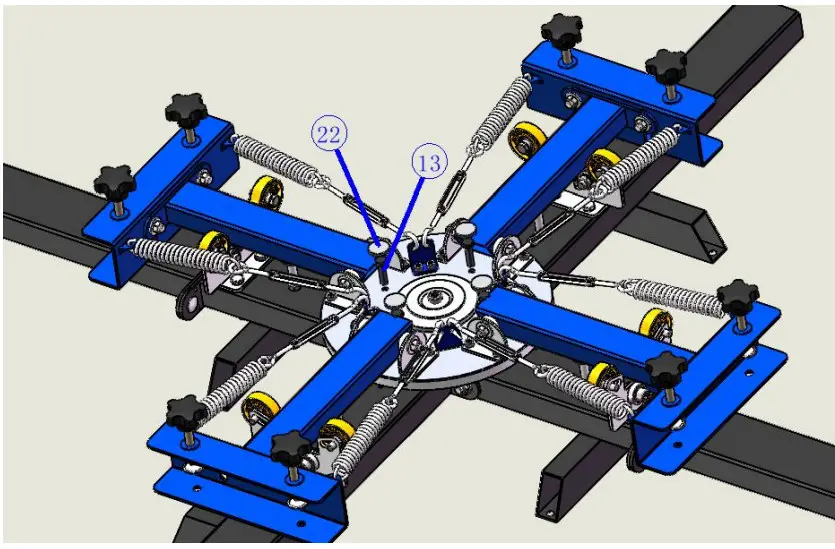
 9.Lock the socket head cap screw(13)on the base disc(as shown in the figure),and stick the felt pad(21) to the head end of the socket head cap screw(13). Use tool wrench 14- 17(I)
| Serial No | Name of accessories | Quantity |
| 13 | Socket head cap screw M8X30 | 4 |
| 22 | felt pad | 4 |
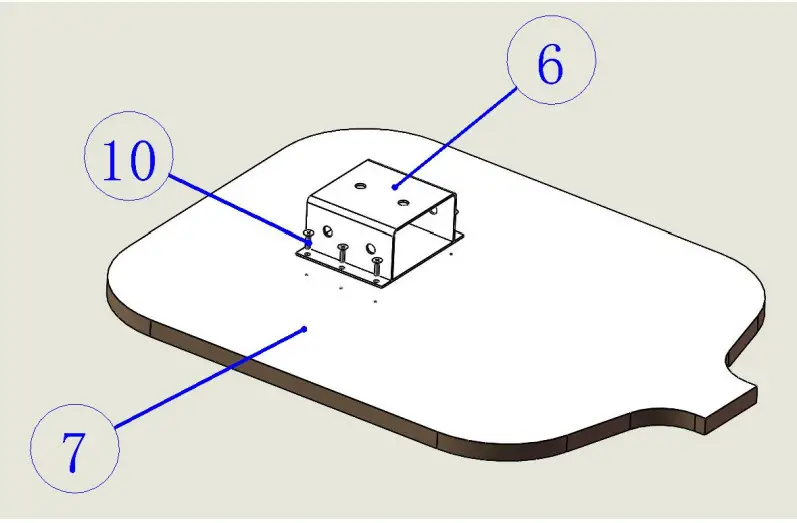
 10.Take the wooden plate(7)and put it on the table with the hole facing up,then take the metal bracket(6)and put it on the wooden plate(7) and face the hole, then take the cross screwdriver(2)and put the cross countersunk head tapping screw M4X12(11)face the hole,and lock the metal bracket(6)on the wooden plate(7).
| Serial No | Name of accessories | Quantity |
| 11 | Cross countersunk head tapping screw M4X16 | 6 |
| Serial No | Tool name | Picture |
| II | Cross screwdriver | |
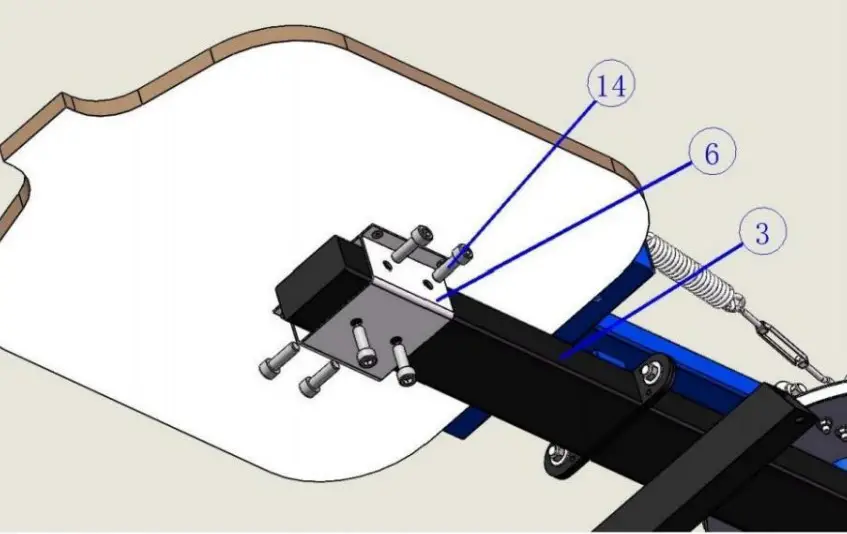
 11.Insert the metal bracket(6)in the metal bracket of the wooden platform plate assembled in step 8 into the table support bar(3),and then insert the socket head screw M10X30(14)into the tooth hole of the metal bracket(6),and then use the socket head wrench M10(five)to lock the socket head screw M10X25(14)
| Serial No | Name of accessories | Quantity |
| 14 | Hexagon socket screw M10X25 | 24 |
| Serial No | Tool name | Picture |
| V | Hexagon socket wrench M10 | |
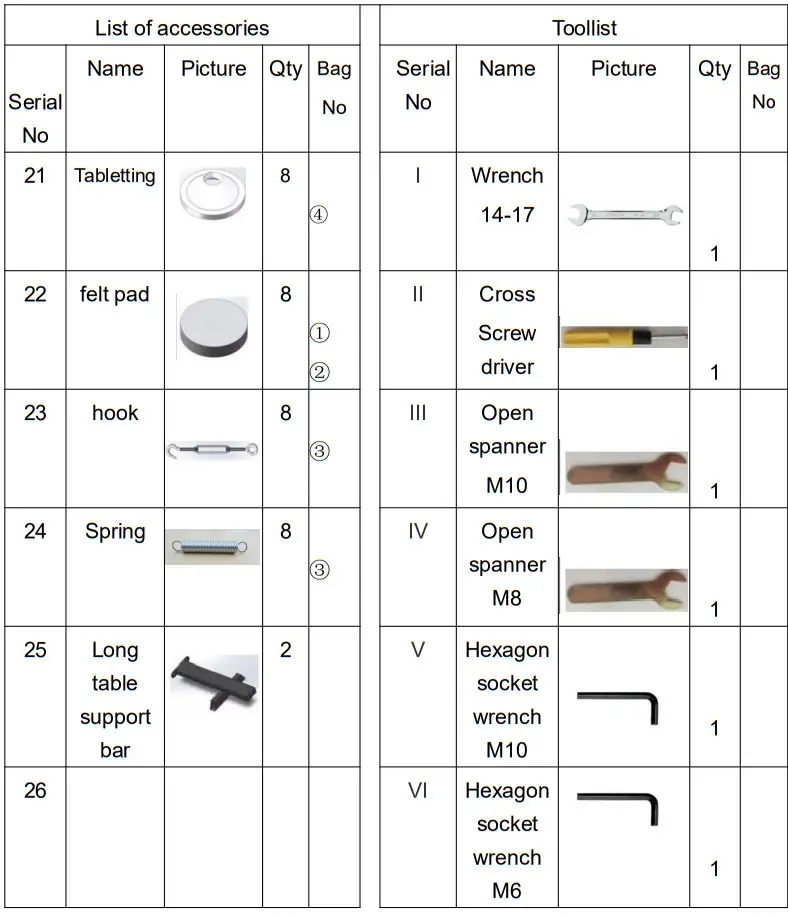
 List of accessories


| items | Description |
| 1 | Name | Screen printing machine |
| 2 | Model | NS404-S |
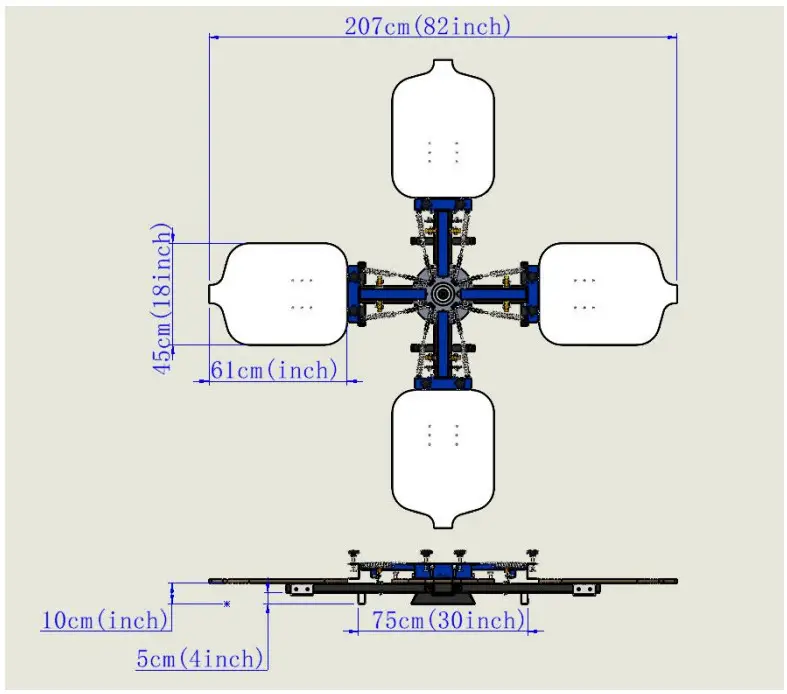
| 3 | Product parameter | Printing color:4,Working Position:4 |
| 4 | Package Size | 710x630x275mm |
| 5 | G.W. | 37.7kg |

 Warning-To reduce the risk of injury, user must read instructions manual carefully.
 HOUSEHOLD USE ONLY
Manufacturer:Dongguan Ruiling Printing Equipment Co.,Ltd
Address:Ruida Building, No 2 Lane 1, West of Xintang road, Huangcun Community, Humen Town, Dongguan City, China.
EU Importer: WAITCHX, 250 bis boulevard Saint-Germain 75007 Paris.
UK Importer: FREE MOOD LTD, 2 Holywell Lane, London, England, EC2A 3ET
 EUREP GmbH
Unterlettenweg 1 a, 85051 Ingolstadt, Germany
 EUREP UK LTD
UNIT 2264, 100 OCK STREET, ABINGDON
OXFORDSHIRE ENGLAND OX14 5DH
Support and E-Warranty Certificate
https://www.vevor.com/support
References

 Support and E-Warranty Certificate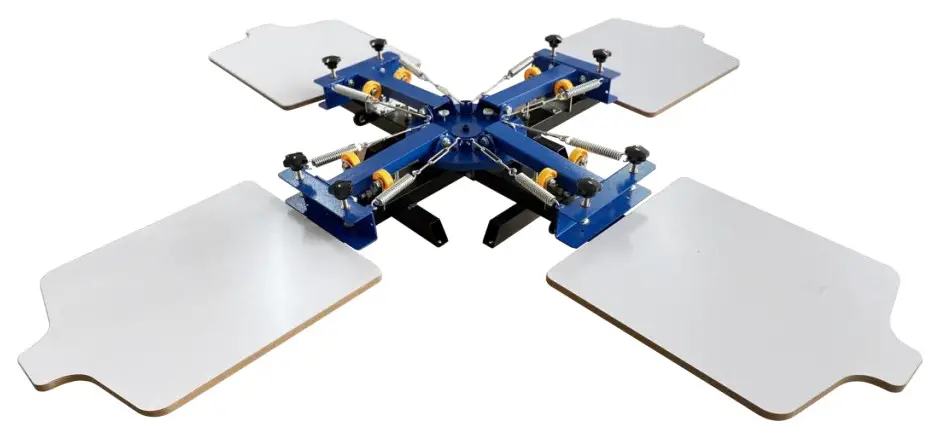
 [email protected]
 This symbol, placed before a safety comment, indicates a kind of precaution, warning, or danger. Ignoring this warning may lead to an accident. To reduce the risk of injury, fire, or electrocution, please always follow the recommendation shown below.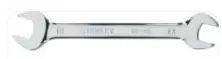
 2.Take out the long table support bar (25), put it on the base (1), and lock it with square neck bolt square (17), gasket M10 (18) and external hexagon nut M10 (19).
 3.Put the positioning seat(4)on the square tube of the base(1),thread it from top to bottom with the external hexagon screw M8X55,and lock the other end with the external hexagon nut M8. Put the outer hexagon screw M10X55(15) onto the outer hexagon nut M10(18)and thread the screw head 40 mm from the base square tube from top to bottom, then lock the outer hexagon nut M10 (18)onto the base square tube in reverse.
 4.Put the printing arm(2)on the disc of the base(1),and lock it with the hexagonal socket screw M6X16(11)and flange nut M6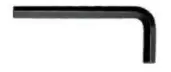
 5.Take the screen clamp(5)and stick it to the printing arm(2),insert it into the printing arm(2)hole from the screen clamp(5) with square neck bolt M10X20(16), cover the other end with gasket M10 (17),then lock the outer hexagon nut M10(18), and then lock it with wrench 14- 17(一)
 6.Lock the five-star handle(19)into the screen clamp(5)with a depth of 20mm, cover the tabletting(20),and then use a cross screwdriver(2) to lock the tabletting(20) on the five-star handle(19)with a cross countersunk screw M4X8(9) from the small hole at the lower end of the screen clamp(5)
 7.Put the spring hook plate(8)on the base disc,and lock it with the hexagonal socket screw M6X16 and flange nut M6
 8.Hang the spring(23)on the screen clamp(5),hang the hooked end of the hook(22) on the spring hook plate(8),hook the looped end of hook(22)with the spring(23), and then level the arm support
 9.Lock the socket head cap screw(13)on the base disc(as shown in the figure),and stick the felt pad(21) to the head end of the socket head cap screw(13). Use tool wrench 14- 17(I)
 10.Take the wooden plate(7)and put it on the table with the hole facing up,then take the metal bracket(6)and put it on the wooden plate(7) and face the hole, then take the cross screwdriver(2)and put the cross countersunk head tapping screw M4X12(11)face the hole,and lock the metal bracket(6)on the wooden plate(7).
 11.Insert the metal bracket(6)in the metal bracket of the wooden platform plate assembled in step 8 into the table support bar(3),and then insert the socket head screw M10X30(14)into the tooth hole of the metal bracket(6),and then use the socket head wrench M10(five)to lock the socket head screw M10X25(14)
 List of accessories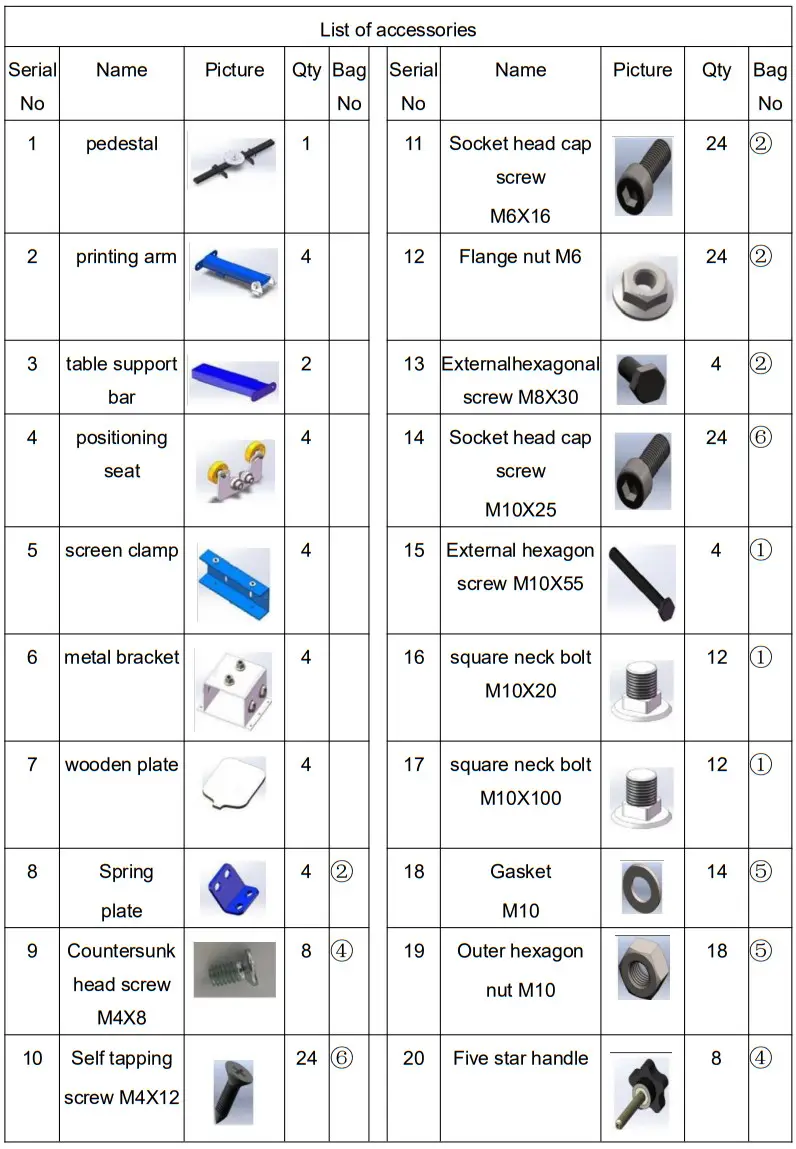
 HOUSEHOLD USE ONLY
 EUREP GmbH
 EUREP UK LTD
 vevor.com/support