PmodOLEDrgb Organic RGB LED Module
PmodOLEDrgbTM Reference Manual
Revised April 26, 2016. This manual applies to the PmodOLEDrgb
rev. B.
Overview:
The PmodOLEDrgb is a graphical display interface that utilizes a
Solomon Systech SSD1331 display controller to receive information
from the host board and display the desired information on the OLED
screen. It features a 12-pin Pmod connector with SPI interface and
comes with a library and example code available in the resource
center.
Functional Description:
As a graphical display interface, users can light up any
individual pixel on the OLED, display predefined characters, or
load bitmaps onto the screen. Each pixel can be set to one of the
65,535 available colors. The OLED display has a specific power-up
and power-down sequence to ensure device longevity. The PmodOLEDrgb
communicates with the host board via the SPI protocol, and users
can send commands and data streams to the display controller based
on the state of the Data/Command (D/C) pin.
Power-on Sequence:
- Apply power to VCC.
- Send Display Off command.
- Initialize display to default settings.
- Clear screen.
- Apply power to VCCEN.
- Delay 100ms.
- Send Display On command.
Power-off Sequence:
- Send Display Off command.
- Power off VCCEN.
- Delay 100ms.
- Power off VCC.
Pinout Table:
| Pin | Signal | Description |
|---|---|---|
| 1 | CS | Chip Select |
| 2 | MOSI | Master-Out-Slave-In |
| 3 | NC | Not Connected |
| 4 | SCK | Serial Clock |
| 5 | GND | Power Supply Ground |
| 6 | VCC | Power Supply (3.3V) |
| 7 | D/C | Data/Command Control |
| 8 | RES | Power Reset |
| 9 | VCCEN | Vcc Enable |
| 10 | PMODEN | Vdd Logic Voltage Control |
| 11 | GND | Power Supply Ground |
| 12 | VCC | Power Supply (3.3V) |
Physical Dimensions:
The pins on the pin header are spaced 100 mil apart. The PCB is
1.4 inches long on the sides parallel to the pins on the pin header
and 1 inch long on the sides perpendicular to the pin header.
PmodOLEDrgbTM Reference Manual
Revised April 26, 2016 This manual applies to the PmodOLEDrgb rev. B
1300 Henley Court Pullman, WA 99163
509.334.6306 www.digilentinc.com
Overview
The Digilent PmodOLEDrgb is an organic RGB LED module with a 96×64 pixel display capable of 16-bit color resolution.
Features include:
96×64 pixel RGB OLED screen 0.8″ x 0.5″ graphical display 16-bit color resolution Two low-power display shutdown modes Small PCB size for flexible designs (1.4″ x
1.0″) 12-pin Pmod connector with SPI interface Library and example code available in
resource center
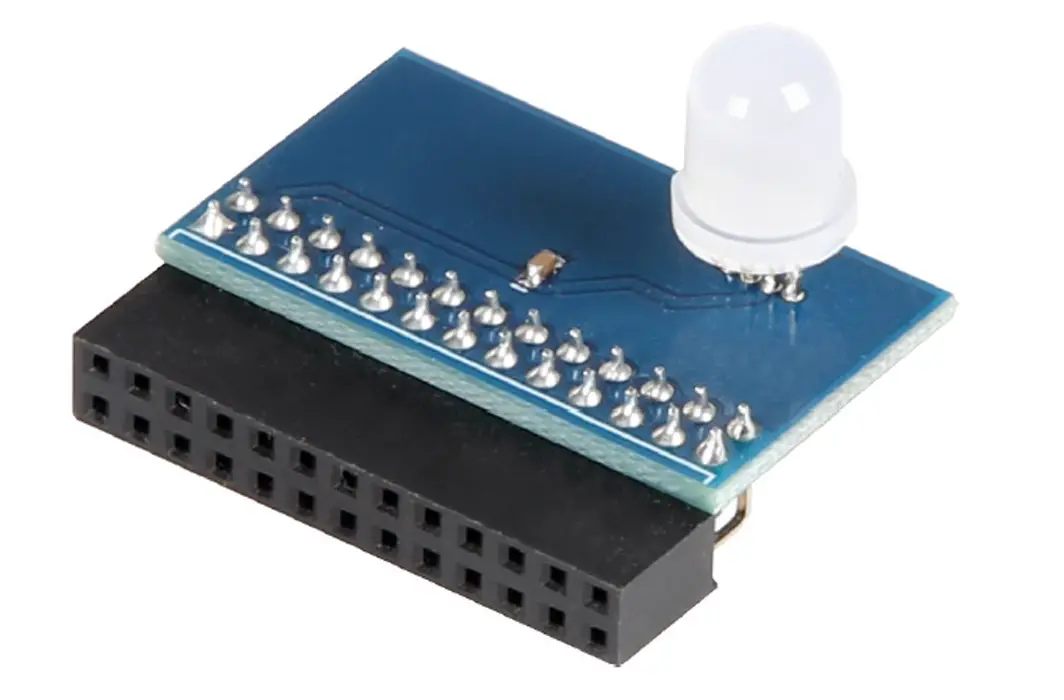
The PmodOLEDrgb.
1 Functional Description
The PmodOLEDrgb utilizes a Solomon Systech SSD1331 display controller to receive information from the host board and display the desired information on the OLED screen.
2 Interfacing with the Pmod
The PmodOLEDrgb communicates with the host board via the SPI protocol. By driving and keeping the Chip Select (CS) line at a logic level low, users may send both commands and data streams to the display controller based on the state of the Data/Command (D/C) pin.
DOC#: 410-323
Downloaded from Arrow.com.
Copyright Digilent, Inc. All rights reserved. Other product and company names mentioned may be trademarks of their respective owners.
Page 1 of 3
PmodOLEDrgbTM Reference Manual
As a graphical display interface, users may light up any individual pixel on the OLED, display predefined characters, or even load bitmaps onto the screen. Each pixel can be set to one of the 65,535 colors that are available. The OLED display has a specific power-up and power-down sequence to ensure the longevity of the device.
There are two field-effect transistors (FETs) that control the display’s two power supplies. The VCCEN control toggles the positive voltage supply to the screen itself and the PMODEN control toggles the power supply ground to the display. Users may turn off either one of these controls to reduce the power consumption of the PmodOLEDrgb to approximately 200 nA.
2.1 Power-on Sequence
1. Apply power to VCC. 2. Send Display Off command. 3. Initialize display to default settings. 4. Clear screen. 5. Apply power to VCCEN. 6. Delay 100ms. 7. Send Display On command.
2.2 Power-off Sequence
1. Send Display Off command 2. Power off VCCEN 3. Delay 100ms 4. Power off VCC
A pinout table of the PmodOLEDrgb is provided below.
Pin
Signal
Description
1
CS
Chip Select
2
MOSI
Master-Out-Slave-In
3
NC
Not Connected
4
SCK
Serial Clock
5
GND
Power Supply Ground
6
VCC
Power Supply (3.3V)
7
D/C
Data/Command Control
8
RES
Power Reset
9
VCCEN
Vcc Enable
10
PMODEN
Vdd Logic Voltage Control
11
GND
Power Supply Ground
12
VCC
Power Supply (3.3V)
Table 1. Header J1 pinout descriptions.
Copyright Digilent, Inc. All rights reserved. Other product and company names mentioned may be trademarks of their respective owners.
Downloaded from Arrow.com.
Page 2 of 3
PmodOLEDrgbTM Reference Manual
Although users are welcome to create their own interface code for the PmodOLEDrgb if they so desire, preconstructed libraries that provide functions for initializing the display and rendering simple text and graphics onto the screen exist. They are available on the PmodOLEDrgb example code page and can be used as-is or as a starting point for a more sophisticated graphics library. Any external power applied to the PmodOLEDrgb must be within 2.7V and 5V; however, it is recommended that Pmod is operated at 3.3V.
3 Physical Dimensions
The pins on the pin header are spaced 100 mil apart. The PCB is 1.4 inches long on the sides parallel to the pins on the pin header and 1 inch long on the sides perpendicular to the pin header.
Copyright Digilent, Inc. All rights reserved. Other product and company names mentioned may be trademarks of their respective owners.
Downloaded from Arrow.com.
Page 3 of 3
 Digilent – Start Smart, Build Brilliant.