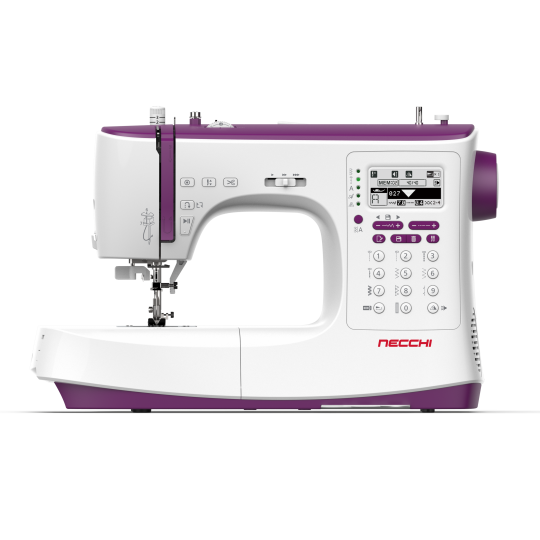
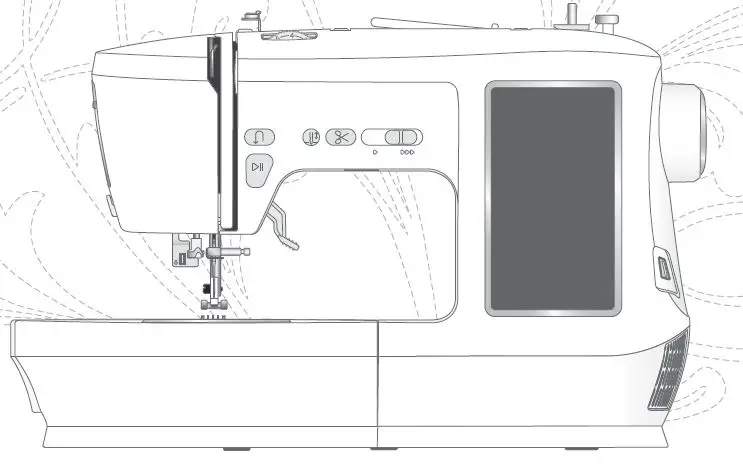
C2000 Creator Series Sewing and Embroidery Combo Machine
Product Information:
The C2000 is a versatile sewing and embroidery machine that
allows you to unleash your creativity. With advanced features and
functions, this machine is designed to make your sewing and
embroidery projects easier and more enjoyable.
- Advanced Auto Threader: The advanced auto threader feature
allows you to start sewing quickly and easily. - Extension Table Included: The included extension table provides
a larger working area when working with larger projects. - Large Working Space: The machine offers a great 230mm (9″)
working space, perfect for larger projects. - Auto/Manual Presser Foot Lifter: You can select either
automatic or manual presser foot lifter according to your
preference. - Bright Illumination: The machine is equipped with 5 ultra
bright LED lights for optimal visibility while sewing. - Knee Lifter: The knee lifter allows you to raise the presser
foot, keeping your hands free to focus on your project. - Electronic Buttonhole Foot: This feature provides fine tuning
adjustment of the buttonhole length and width for perfect
buttonholes. - Dual Feed System: The dual feed system helps to feed your
fabric from the top to bottom simultaneously, resulting in better
feeding capability. - Pivot Function: At the end of every seam, the presser foot will
raise with the needle in the down position, making it easier to
pivot your fabric. - Box Feeding System: The feed dogs move in a square pattern,
ensuring better feeding capability. - Multi-function Foot Controller: You can control up to 4
different programs by simply pressing your foot controller. - Large Embroidery Area: The machine offers an embroidery area of
up to 160 x 260mm (6.3 x 10.2″), allowing you to unleash your
creativity. - 5 TFT LCD Color Touch Screen, OS System Installed: The machine
features a 5 TFT LCD color touch screen for easy control and
adjustment of various features. It also allows you to check your
designs in color before starting. - Multiple-spool Holder Stand: This feature allows you to line up
several spools of threads, making your sewing and embroidery more
convenient. - Independent Bobbin Winding System: The machine has an
independent bobbin winding system, eliminating the need to
re-thread when winding the bobbin and saving time. - ArtistTool: The Artist Tool App and built-in Wi-Fi feature
allow you to create or edit designs, monitor embroidery progress,
and transfer files from your mobile device or computer to the
machine. - Artist Toolkit: The Artist Toolkit is an easy-to-use but
multi-function embroidery software compatible with both Windows and
MAC OS. It offers various editing tools, embroidery patterns,
letterings, monogram creation, and drawing capabilities.
Product Usage Instructions:
To use the C2000 sewing and embroidery machine effectively,
follow these instructions:
- Prepare your machine by setting up the extension table if
needed and ensuring it is plugged into a power source. - Choose the desired sewing or embroidery function on the
machine’s TFT LCD color touch screen. - For sewing, select the stitch pattern, stitch length, and
stitch width using the controls on the machine. Adjust other
settings such as mirror function, memory function, auto stop/auto
lock function, speed control slider, and sewing speed as
needed. - Thread the machine using the advanced auto threader feature,
following the instructions in the user manual. - Position your fabric under the presser foot and lower the
presser foot. - Start sewing by pressing the foot controller or using the
start/stop button on the machine. - For embroidery, select the desired embroidery design, lettering
font, or monogram using the controls on the machine. Adjust
settings such as pattern rotation, pattern mirror, resizing, memory
function, embroidery speed, thread trim setting, and hoop detection
as needed. - Prepare your fabric for embroidery by hooping it securely.
- Thread the machine using the advanced auto threader feature,
following the instructions in the user manual. - Place the hoop with the fabric under the needle and lower the
presser foot. - Start embroidery by pressing the foot controller or using the
start/stop button on the machine. - Monitor and control your sewing or embroidery progress using
the TFT LCD color touch screen and adjust settings as needed. - After completing your project, turn off the machine and unplug
it from the power source.
For more detailed instructions on specific functions and
features, refer to the user manual provided with the machine. You
can also visit the official website at https://www.mynecchi.com/ for
additional information and support.
C2000
Realiz Your Creativit
Realize your creativity
Advanced Auto Threader
Advanced auto threader allows you to start sewing quickly
Extension Table Included
The included extension table provides a larger working area when working with larger projects
Large Working Space
The great 230mm (9″) working space for larger projects
230mm
Auto/Manual Presser Foot Lifter
Available to select either automatic or manual presser foot lifter
Bright Illumination
With 5 ultra bright LED lights
Knee Lifter
Raise the presser foot by knee lifter which keeps your hands free to focus on your project
Electronic Buttonhole Foot
Provide the fine tuning adjustment of the buttonhole length and width to achieve a perfect buttonhole
Dual Feed System
Help to feed your fabric from the top to bottom at the same time, which results in better feeding capability
https://www.mynecchi.com/
Pivot Function
At the end of every seam, the presser foot will raise, with the needle in the down position
Box Feeding System
The feed dogs move in a square which results in better feeding capability
Multi-function Foot Controller
Control up to 4 different programs by simply press your foot controller
https://www.mynecchi.com/
Large Embroidery Area
Up to 160 x 260mm (6.3″ x 10.2″) embroidery area unleash your creativity
5″ TFT LCD Color Touch Screen, OS System Installed
5″ TFT LCD color touch screen allows you to control and adjust lots of features on your machine easily, and it helps to check your designs in color before starting
Multiple-spool Holder Stand
Allow to line up for several spools of threads, and it will make your sewing and embroidery more convenient
Independent Bobbin Winding System
There is no longer need to re-thread when winding the bobbin. And it will save time by winding bobbin while sewing or embroidering
https://www.mynecchi.com/
ArtistTool
Artist Tool App
With Artist Tool App, you can leave your machine and create or edit your designs and monitor embroidery progress anywhere
Built-in Wi-Fi
It is easy to send embroidery designs from mobile device or computer to the machine
Edit Embroidery Designs
Transfer Files
Stitch Monitoring
Artist Toolkit
Artist Toolkit is an easy to use but multi-function embroidery software. It works on both Windows and MAC OS
Edit Mode
70 Embroidery patterns included. Free to rotate, align, array and edit your designs
Text Manager
Manage and create letterings by 11 built-in fonts
Monogram
Create your personal monogram ideas by different selection of fonts and frames
Paint Mode
Draw different graphics and line to create your own design easily
https://www.mynecchi.com/
C2000
Basic Features
g WiFi function g Knee lifter g Auto/Manual presser foot lifter g Auto pivot function g Extension table included g Multifunctional foot controller g Accessory box with storage function gLarger working space 230mm gDrop-in (Horizontal) hook system g5″ inch color LCD display gTouch screen g5 LEDs illumination gAdvanced auto threader gAuto thread cutter gUSB port gIndependent bobbin winding system gPresser foot detection gAuto thread tension gUpper/Lower thread sensor gDual feed system gBox feeding
Sewing Features
g 746 built-in stitch patterns g 5mm stitch length g 7mm stitch width g 4 sewing alphabets g Mirror function in sewing mode g Memory function in sewing mode g Auto stop/ Auto lock function g Speed control slider g Sewing speed up to 1,000 stitch per minute g Creating custom stitches
Embroidery Features
g Transferring embroidery designs between machine, App and software
g Artist Tool App g Artist Toolkit embroidery software g 1270 built-in embroidery designs g 7 built-in embroidery lettering fonts g Monograms g Pattern rotation function g Pattern mirror function g Resizing function g Memory function g Embroidery speed up to 850 stitch per minute g Embroidery unit detection g Hoop detection g Thread trim setting function g Max. embroidery area: 160 x 260mm (6.3″ x 10.2″)
Contact
Useful accessories
g All purpose foot g Zipper foot g Satin stitch foot g Button sewing foot g Blind hem foot g Overcasting foot g Gathering foot g 1/4″ Quilting foot g Quilting foot g Hemmer foot g Cording foot g Open toe foot g Non-stick foot g Invisible zipper foot g Darning/embroidery foot g Electronic buttonhole foot g Embroidery foot g Thread net g Needle set (#11/75*2, #14/90*3) g Twin needle ( #12/80, 2.5mm) g Bobbin (3x) g Edge/quilting guide g Touchscreen pen g Second spool pin g Spool pin felt g Spool holder (S) g Spool holder (M) g Spool holder (L) g Spool holder (For spool stand) g Cone holder (For spool stand) g Spool stand set g Embroidery hoop (160*260mm
with embroidery sheet) g Embroidery hoop (120*180mm
with embroidery sheet) g Embroidery hoop (50*70mm
with embroidery sheet) g Embroidery bobbin case g Straight stitch needle plate g Extension table g Knee lifter g Seam ripper/brush g Screwdriver g L-screwdriver
www.mynecchi.com
 Necchi sewing machine