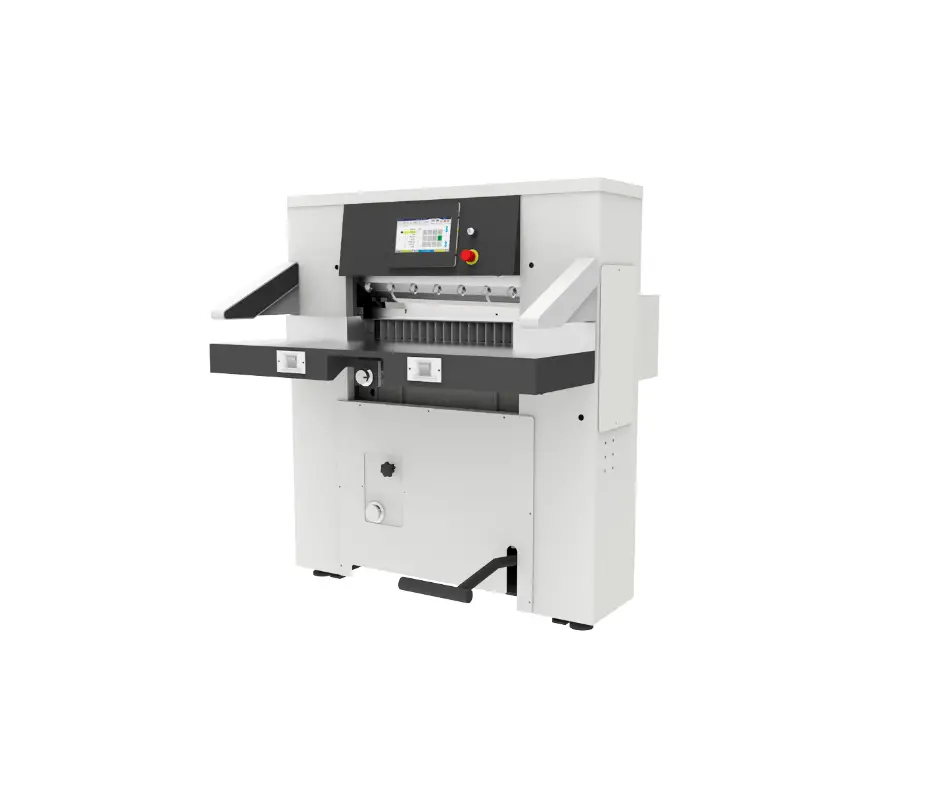
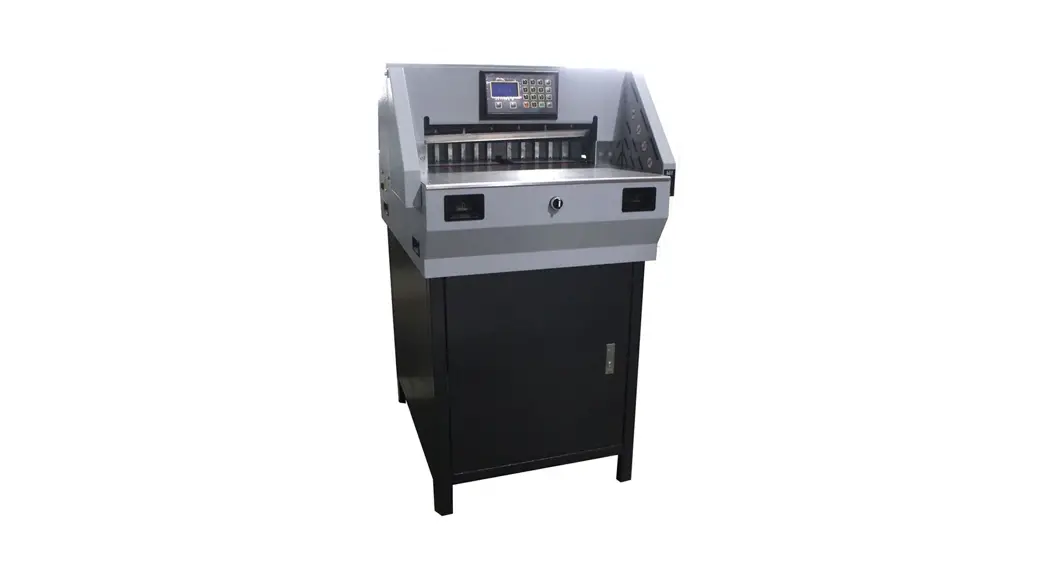
68E Paper Cutter
68E PAPER CUTTER
The 68E Paper Cutter is a hydraulic-driven machine used for
cutting small-sized paper, printed matters, and other soft
materials similar to paper. It is popularly applied in offices and
light industries of printing. The machine features a double guide
rail and slotless working table which ensures that the running
process is smooth and easy. The vertical and parallel adjustment of
the paper impeller is achieved independently, making accurate
adjustment simple and workable. The core part in the electrical
control system adopts a programmable logic controller (PLC) which
makes the machine more stable and prolongs its service life. A
photoelectric safety protector is also included in this machine,
making the operation more safe.
Main Technical Specification
- Max. cutting width: 680mm (27in)
- Max. cutting length: 680mm (27in)
- Max. cutting height: 80mm (3-5/32in)
- Cutting speed: 20 times/min
- Height from the floor to working table: 920mm (36-7/32in)
- Front extended length of working table: 530mm (20-55/64in)
- Max. Cutting pressure: 10000N
- Main motor: 1.5Kw
- Motor for paper feeding: 0.4Kw
- Total electric current: 10A
- Input Voltage: 3Phases/220V
- Dimension of package: N/A
- N.W.of machine: 700KGS (1543lbs)
Structure, Operation, and Adjustment of Machine
1. Structure (diagram 1)
The machine is composed of an electrical control cabinet,
hydraulic control cabinet, main part, and working table. It
includes a clamping bar system, cutting drive system, paper feeding
system, and safety system.
2. Adjustment of Machine
It is important for operators to read the service manual
carefully to protect the working precision of the machine and
prolong its service life. Additionally, the following special
warnings should be noted:
- It is important to use the original fittings for paper
cutters. - Detailed directions are provided in the service manual for the
use of the machine fittings that the user is concerned about. It is
important for the user to install and operate the machine
correctly; otherwise, the use of the machine will be affected, even
body safety. - This machine is used for one person to operate. Do not put
hands under the knife and the clamping bar; otherwise, severe
injury may occur.
Electrical Control Principle
The electrical control system of the machine adopts a
programmable logic controller (PLC) which makes the machine more
stable and prolongs its service life.
Note: The dimension of package is not available in the user
manual provided.
Product Usage Instructions
To use the 68E Paper Cutter correctly and safely, follow these
steps:
- Read the service manual carefully before operating the
machine. - Use only original fittings for paper cutters.
- Install and operate the machine correctly to avoid affecting
its use. - Do not put hands under the knife and clamping bar; otherwise,
severe injury may occur. - Ensure that the height from the floor to working table is at
920mm (36-7/32in) and the front extended length of the working
table is at 530mm (20-55/64in). - Adjust the machine vertically and parallel to make accurate
adjustments simple and workable. - Use the machine for one person to operate only.
- Ensure that the cutting pressure does not exceed 10000N.
- After use, turn off the machine and unplug it from the power
source.
68E PAPER CUTTER
double guide rail and slotless working table
SERVICE MANUAL
Contents
. Brief Introduction ………………………………………………………………………………………………3 .Main Technical Specification……………………………………………………………………………………3 .Structureoperation and adjustment of machine……………………………………………………………3
1. Structure ……………………………………………………………………………………………………… 4 2. Adjustment of Machine……………………………………………………………………… ………………4
1)The adjustment of cutting stick ……………………………………………………………………4 2) Knife adjustment …………… ……………………………………………………………………………4 3) Adjustment of paper impeller ……………………………………………………………………………5 4) Adjustment of main motor …………………………………………………………………………………6 5) The adjustment of the compression spring …………………………………………………………6 3.The use of the machine ………………………………………………………………………………………6
Encls computer manual . Electrical control principle …………………………………………………………………………………7
1. Introduction of power …………………………………………………………………………………………7 2. Working principle of program controller…………………………………………………………………7 3. IR photoelectric protection device ………………………………………………………………………7 . LubricationMaintenance and care……………………………………………………………………………7 1. Lubrication………………………………………………………………………………………………………7 2. Maintenance and care …………………………………………………………………………………………8 3. Choice of hydraulic oil………………………………………………………………………………………8 Encls Safety check routine after everyday shift and knife replacement…………………………………………9 Safety check record after a quarter or half a year for paper cutter …………………………………10 . Attached diagrams
1
! SPECIAL WARNING
1. It is typically important for paper cutters to use the original fittings. 2. In this service manual, detailed directions are made for the use of the machine fittings
user is concerned about, therefore, it is important for user to install and operate the machine correctly. Otherwise, the use of the machine will be effected, even body safety. 3. This machine is used for one person to operate, do not put hands under the knife and the clamping bar, otherwise, possible severe injury will occur.
2
. Brief Introduction
The paper pressing and cutting of machine is driven by hydraulic,it is good machine for cutting.It is used to cut small size paper, printed matters and other soft materials similar to paper,it is popular applied to office and light industry of printing.
Paper impeller is driven by the lead screw in the middle under the working table, transmitted by the two guides fixed under the working table in whose system the stiffness is strong, running process is easy. Vertical and parallel adjustment of paper impeller is achieved independently to make the accurate adjustment simple and workable.
The core part in the electrical control system adopts programmable logic controller(PLC) so that making the machine more stable and prolong its service life.
Photoelectric safety protector is adopted in this machine making the operation more safe. In order to protect the working precision of the machine and prolong its service life, it is important for operators to read this service manual carefully.
.Main Technical Specification
1. Max. cutting width (mm) (in)
680mm 27″
2.Max. cutting length (mm) (in)
680mm 27″
3. Max. cutting height (mm) (in)
80mm 3-5/32″
4. Cutting speed (times/ min)
20time/min
5.Height from the floor to working table (mm) (in)
920mm 36-7/32″
6. Front extended length of working table(mm) (in)
530mm 20-55/64″
7.Max. Cutting pressure ( N )
10000N
8.Main motor
1.5Kw
9.Motor for paper feeding
0.4Kw
10. Total electric current
10A
11.Input Voltage
3Phases/220V
12.Dimension of package
1670×1370×1720mm 65-3/4″ L × 54″ W × 67-3/4″ H
13.N.W.of machine
700KGS 1543 lbs
3
.Structureoperation and adjustment of machine
1. Structure (diagram 1)
This machine is composed of electrical control cabinethydraulic control cabinetmain part and working
table, and includes clamping bar system cutting drive system paper feeding system safety system
digit-display systemhydraulic system and electrical control system etc.
12
34
21
22
5
7
6
8
9 10
11
12 13
14
15
16 17 18 19
Diagram 1 schematics of paper cutter
20
17
1 machine body
2 photoelectric protective emission box 3 working table
4 full touch computer 5 eccentric shaft for adjusting knife 6 photoelectric protective receive box
7 knife bed 8 clamping bar 9 Paper impeller 10 cutting button 11 Servo motor
12 Support screw 13 Air switch 14 electrical box 15 hydraulic system
16 Foot support 17 side worktable 18 pressure hand wheel 19 Lock knife handle
20 foot pedal 21. power supply 22.Emergency stop
Eject rod of cutting stick
2. Adjustment of Machine
1). The adjustment of cutting stick
The cutting stick can be used in both sides for four times.
Diagram 2 Ejecting device of cutting stick
When the cutting stick is badly worn, you need to adjust the side of cutting stick or change it.
Using eject rod to push-out the cutting stick.(As shown in
Picture 2)
After finished the replacement of knife, put the cutting stick
into the groove from the front table.In that process the two
ends of cutting stick should be put flat and then press cutting stick firmly into the groove.
3 21
2). Knife adjustment
1.1)Knife replacement (shown diagram 3)
Diagram 3 schematics of knife dismently
Switch off the air(diagram 1.13), first dismantle the
1.handle 2.knife 3.knife changer
4
second and forth screw,insert the handle (diagram 3.1) into the second and sixth hole and screw down,then
dismantle other screws,then rotate the handle (diagram 3.1) anticlockwise, take down the knife, please note:
buttress the knife to prevent hurting operator.
1.2)Knife installation (shown in the diagram 4)
Switch off the air,first wipe the grinded knife by the
cloth, (if the knife edge is rolled up, please grind it by
whetstone).Screw the handle into the second and sixth
hole,then install the knife grinded well on the wood knife
changer (provided by the factory), push the wood knife
changer and the knife together to knife installation position in
front of clamping bar, make sure that the hook hole of the
3 21
knife is put onto the hook board, loosen the two handles on
the knife, then rotate the wrench, insert the knife onto the
knife bed and align with the screw hole, then install the screw Diagram 4 schematics of knife installation
and tighten. Take down the wood knife changer and wrench.
1.handle 2.knife 3.knife changer
Note:Do not put your arms under knife bed and clamping bar.
1.3)Knife adjustment
Every time install the new knife, or old knife grinded, adjust the
height of knife bed by manual in order to adjust the cutting depth of the
knife. To avoid the new knife replaced causing accidents because of
deep cut due to big height.
Adjusting nut
To determine the depth of cutting: Lock knife handle (Diagram 19). The clockwise rotation to the end, press the two hands cutting button,and stop the knife bed in the lowest position after one circle of cutting , Then observe if the cutting depth is normal(the normal cutting depth is about 0.5~1mm) 0-1/64″~0-3/64″) . If the blade and the blade end contact, only can be adjusted through the eccentric shaft end knife in front of the machine bed outside hexagonal (Diagram 1. 5) solution; If can not meet the requirement Knife adjustment
Diagram 5
of the cutting blade wear later, should loosen the install knife screw straight long hole direction along the blade knife bed down, until completely cut off the paper.
When the blade wears about 12 to 15 mm(0-15/32″ to 0-19/32″), you should use the second row of screws
hole in the blade. If the blade is worn and unusable after using the second row of screw hole , the blade should be
changed. When changing the new blade, Install new blade should be adjusting nut (Diagram 5) transferred
to the largest position.
Note :After adjusting the knife, the knife locking handle should be adjusted to the original position.
3).Adjustment of paper impeller (shown in the diagram 6)) The adjustment of the verticality between the paper push side and working table surface is achieved by adjusting the screw(diagram 6.3).Before adjusting, please little loosen the bolt (6) and screw (8), then rotate the screw clockwise to lift the end of paper impeller, the angle between the paper push side and working table surface reduces; anti-clockwise rotates,the angle expands.After adjustment, you should hold the screw first and fix the bolt (6) firmly, and then lock the two screws (8).
5
6543 2 1 9 10
14 16
87
83
11
12
13 15
Diagram 6 Structure of paper impeller 1.Paper impeller 2.Paper shelf 3.screw for adjustment 4.conic gasket 5.ball gasket 6.Screw M10*60 7.Support shaft 8.Screw M10*40 9.Adjust block (left) 10. left support of paper impeller 11.adjust block (right) 12. right support of paper impeller 13 bottom frame plate 14.baffle 15.Cylindrical pin 16.Screw M8*35 Regulation on paper and blade parallelism is by adjusting the adjusting screw (Diagram 6 side view 3), before the adjustment should be slightly loosen the screw (8) and two screws (16), then adjust the adjusting screw (Diagram 6 side view 3), and test paper with blade parallelism is qualified. After adjusted the need to hold the screw (8) and will tighten up the two screws (16). The back limit of paper impeller is controlled by limit switch,front limit is controlled by PLC. 4).Adjustment of main motor When adjusting the tension of synchronization belt on working table,first loose the M8 × 25,move the bottom board of motor right,the synchronization belt will tighten,otherwise,it will loose.when adjust to the position needed,tighten the M8×25. 5). The adjustment of the compression spring
This machine consists of three location with compression spring, Adjust the compression spring after easing tight degree directly affect the reset of knife bed and paper weightAdjust the tight, Reset the better, Machine load is heavier(Should be properly adjusted). Note: the compression spring can adjust the minimal size If beyond the limit of size, the machine will directly damage)
A) knife on the left side of the bed, compression spring on both ends of the smallest distance is not less than 160 mm(6-19/64″)
B) knife on the right side of bed, compression spring on both ends of the smallest distance is not less than 230 mm(9-1/16″)
C) paper weight ,compression spring on both ends of the smallest distance is not less than 270 mm(10-5/8″)
3.The use of the machine
Encls computer manual
6
1. Power directions
. Electrical control principle
The power supply is three-phase three-wiring 220V, 60HZ.Electrical current 10A, the voltage of electromagnetic clutch is DC 24V, photoelectric protective voltage is AC 15V.
2. Working principle of program controller
The machine adopts advanced alternating digit servo control technology, liquid crystal display screen, data
resolution factor 0.01mm(0″), with self disturbance-diagnosis and running pattern display, dynamic cutting
display, running situation, dynamic follow-up, and memory. 3. IR photoelectric protection device
The minimum distance between light beams in photoelectric protection device38mm(1-1/2″) Resolution factor of photoelectric protection device: 50mm(1-31/32″)
In front of paper cutter installed IR photoelectric protection device, there are two photoelectric boxes, the left one sends out light beams to the right one which senses the left light beam, cutting control system runs normally. If the light beam is stopped, the power for control system will be cut off, the electromagnetic clutch switches off, worm brakes to stop the knife base running.
! Note: photoelectric protector is installed in the box where there are not parts available for user checking, so please do not dismantle or adjust it.
! Warning: before running the machine and knife replace or after knife replacement in every shift, the
efficiency of the photoelectric protector must be checked and make a report for that at a regular time.
. LubricationMaintenance and care
Be careful:In order to ensure the paper cutter run well, keep the working precision and prolong its service life, you should lubricate it and clean it very often, this is very important. 1. Lubrication of paper cutter Each lubricating position and method refer to attached diagram 78
Diagram 7 schematics of lubrication (front view)
Diagram 8 schematics of lubrication (back)
add 3# lithium lubrication twice time everyday
add 3# lithium lubrication one time each week
add N32# hydraulic oil to oil scale level,replace each year
1) adopt N46 mechanical oil in oil lubricating points 2) 3# lithium grease for grease lubricating points
7
2. Maintenance and care 1) before every shift (shift change or stop in midway then go on working), main parts in paper cutter
should be checked and lubricated. 2) after every shift, do some cleaning to the machine, wipe its friction surface and lubricate them. 3) normally, complete cleaning and check should be made every two weeks. 4) if the paper cutter is not used for a long time, bright surfaces must be wiped clean, use some rusty oil,
cover the machine with plastic cover 5) if the paper cutter is not used for more than three months, the rusty oil should be covered by
moisture-proof paper. 6) when dismantling the paper cutter for checking and repairing, forbid to adopt unsuitable tools and
operating methods. 3. Choice of hydraulic oil
1) suitable working temperature for this machine: 5~35(41~95ºF) adoptL-HM46 abrasion-proof hydraulic oil.
2) oil temperature: 10~65(50~149ºF) if conditions do not meet the requirements, hydraulic oil used in hydraulic box is varied by the surrounding temperature and hydraulic oil of different viscosity is chosen.The volume of hydraulic box is 8 L, hydraulic oil should be changed regularly, at the first time, it should be changed after 200 hours, in future it is changed every half a year. When pouring oil, the oil tank and hydraulic components in it should be cleaned, the oil must be clean. Remarks: because of continuous improvement on this machine, all the technical parameters are subject to change without any additional notice.
8
Safety check routine after everyday shift and knife replacement
Date: year month day
Machine and its model Manufacturer’s name User’s name User’s address Safety establishments Photo-electric protective device Cutting brake clutch device Cutting device operated by double hands Safety cover Single acted protective function
Serial No. Checking information and measures to be taken
Operator:
managed by
Note: 1.The qualified operator who should be trained before can do this work. 2. If in the above safety check any of one establishment can not obtain the requirement, the
operator must report it to the person who is in charge and stop using this machine immediately. 3. The operator must finish safety check after everyday shift and knife replacement to keep
the machine be a good state and avoid it damaged when it is working. 4. The above list must be signed by the person who is in charge for this work in order to
monitor the working done successfully.
P.S: The two lists are drafted for your reference, and they can be designed by yourselves for your file.
9
Safety check record after a quarter or half a year for paper cutter
Date: year month day
Machine and its model
Serial No.
Manufacturer’s name
User’s name
User’s address
Safety establishments
Checking information and measures to be taken
Photo-electric protective device
Cuttingclutchbrake and driving device
Safety device of knife bed and testing switches
Cutting device operated by double hands
The pressure of pressing paper (including Max or Min.)
Time-relay knife replacement
Single-run protection
Other mechanical, pneumatic and hydraulic parts
Other electrical parts
Checked by the engineer: mechanical: Electrical:
department:
functionary in facility
Note: 1.The engineer for this paper cutter should be qualified, who play an vital important role in using the machine checked. So his check and test must be serious-minded and strict. He must prevent there is any defect causing danger.
2. After the engineer who is in charge of this machine check it in the round, except he fills in the record, and makes a detailed written report to all the possible defects. He should urge to settle the problem and draw a conclude and keep the safety record.
3. The recorder should be signed and confirmed by the person who is in charge for the machine.
10
5
38 L32
L22
2 L12
L10 L03
L01 L01
L02
Wiring Diagram
2 3 29 30 24V 0V X0 X1 X2 0V 0V X3 X4 X5 X6 X7 24V 0V Y2 Y3 X8 X9 XF 0V 38 24V 0V PE L03L10
11
Three-phase protection
L1 L2 L3 1.5mm
SR1 L01 L02 L03
KM
SA1
SJ1
L03
L10
L01
KM
control main motor protection on
L12 FU1
3
lamp lamp for knife
KA1
KA
5
29 30
switding
power
supply
solenoid valve for cutting
24V
SR3 35
L12 L22 L32 1.5mm
KM1 1.5mm
L14 L24 L34 FR1 1.5mm
L12
0.75mm
SR2
L15
L32
servo motor 0.75mm
FR1 2
KM1
KM1 38
YU1
U1 V1 W1
1M
1.5KW
UVW
3M
400W
MDMA
HA1 HA2
JKcolor of wire brown 24V+
black OUT blue 0V
12