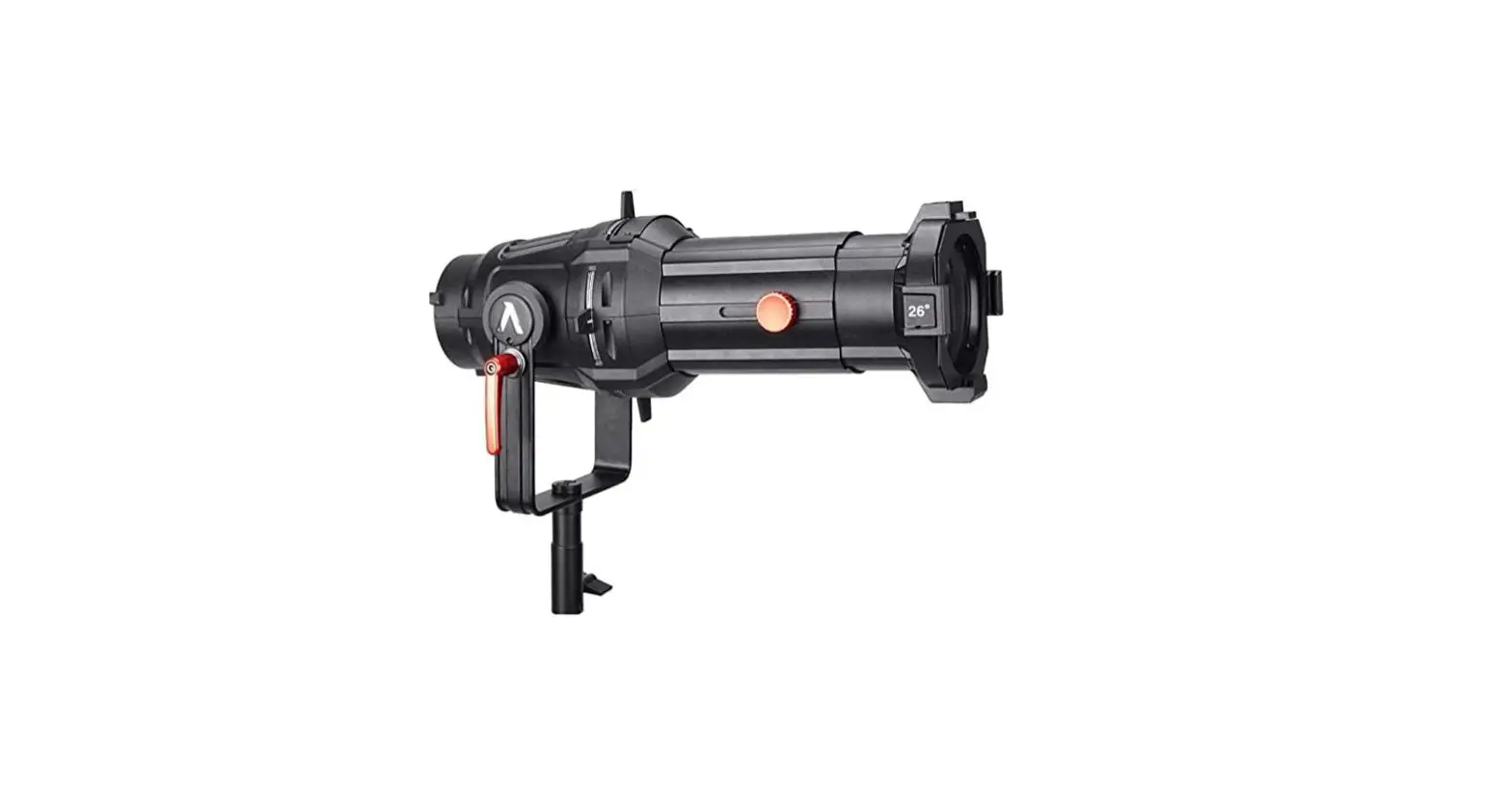
SPOTLIGHT Mark-II Mount Set 26 Degree Lens User Manual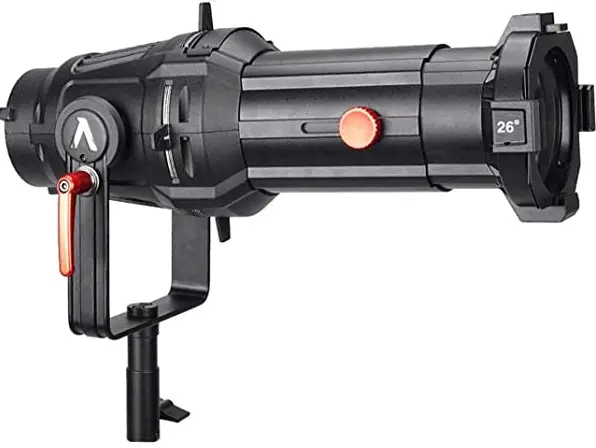
Safety instructions
This manual contains all the safety information required for the appropriate use of the fixture. It shall be carefully read it and stored for future requirements.
Spotlight sc will not be responsible for any damage to the fixture itself, to other objects or people due to improper installation or use of the fixture either than hereinafter specified. Additionally, you are required to download the User Manual from www.spotlight.it for a comprehensive knowledge al each and all functions.
UNPACKING
Remove the fixture from its package and make sure no damage incurred during transport. In the event of damages, a report or claim shall be issued to the transport agent and the seller to start the repair or replacement process.
PRINTED NOTES ON THE FIXTURES
A label of the fixture’ side displays the following information:
- Model part number
- Mains a.c.~ voltage (V)
- Power (W)
- Frequency (Hz)
- Protection rate (IP 20)
- a max: maximum ambient temperature allowed (°C)
max: external surface temperature at thermal regime (°C)  X m minimum recommended distance between the fixture and the lighted object (m)
 Risk Group 2, in compliance with EN62471. Do not face directly the light source as it might damage your eyesight.
 Photo-Biological safety: do not stare at the light source while functioning
 Dispose of waste: in compliance to 2012/19/EU, this fixture shall be disposed according to proper waste-class regulation.
 X m minimum recommended distance between the fixture and the lighted object (m)
 Risk Group 2, in compliance with EN62471. Do not face directly the light source as it might damage your eyesight.
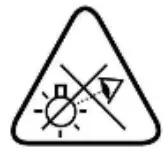 Photo-Biological safety: do not stare at the light source while functioning
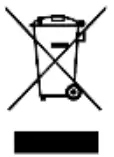 Dispose of waste: in compliance to 2012/19/EU, this fixture shall be disposed according to proper waste-class regulation.
INSTALLATION
- This fixture is designed only for professional use, not for domestic use or handling
- This fixture can be either hung from top or fitted onto a tripod
- Make sure the hanging point is safe and stable. Additionally add a safety rope if required by local safety regulation
- Do not focus the light beam straight onto somebody’s eyes
ELECTRICAL CONNECTION
Electrical wiring, plugging and cabling shall be made by professional or qualified technicians. Before and during installation, attend to the following procedures:
- Check that Mains Voltage and Frequency comply with what printed on the fisture’s label
- Always check the Mains line is properly grounded
- Check the working power of the fixture, as printed on its label, to prevent from line overload
- This fixtures is foreseen for indoor use: it shall be protected from rain and humidity if used under different conditions (IP 20)
MAINTENANCE
Do not open the fixture before disconnecting from the mains: an electrical shock might occur. A complete inspection shall be made once a year to check the electrical and mechanical parts’ integrity and the software upgrades. Repairs shall be made by the manufacturer only or its appointed after-sale service center. After cleaning, the lenses shall be re-assembled and, if scratched or ruined, they shall be replaced with original parts.
COMPLIANCE
This products complies with the European Directives:
- 2014/35/EU: Safety on Low Voltage Directive LVD
2014/30/EU: Electromagnetic Compatibility EMC
- 2011/65/EU: Restriction of Hazardous Substances Directive RoHS
General info
All Spotlight lights, depending on the LED source installed and power, can be grouped into 6 groups (represented by 6 colours).
| LEDPower | Powercon daisy chain | Cold start Inrush current | Type | LED Source | ||||
| White | Tunable White | RGBW | 6C | 8C | ||||
| 50W | Total load max16A – 3,5KW | 60A/230VAC | Fresnel PCProfile | 1AMark-II Firmware 1.01 DMX chart 1A | ||||
| 85W | Downlight | |||||||
| 100W | Fresnel PCProfile | |||||||
| 200W | Fresnel PCProfile | 3Firmware 1.01 DMX chart 3 | ||||||
300W | 80A/230VAC | Cyclorama | ||||||
| Fresnel PCProfile Followspot | 1BMark-II Firmware 1.03 DMX chart 1B | 2Mark-II Firmware 1.01 DMX chart 2 | 4Mark-II Firmware 1.01 DMX chart 4 | |||||
700W | 40A/230VAC | Fresnel PCProfile Followspot | 5Mark-II Firmware 1.07 DMX chart 5 | |||||
HARDWARE
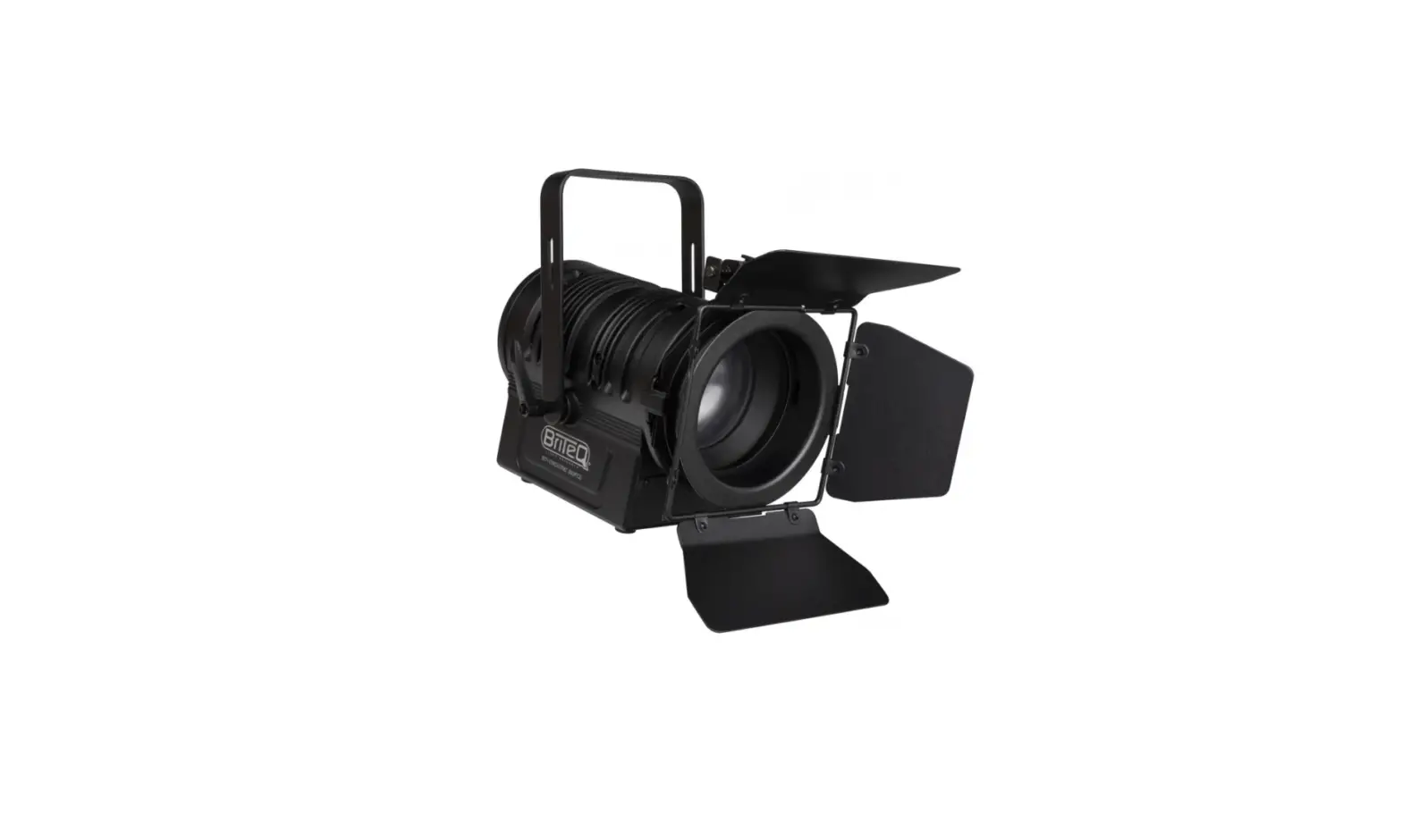
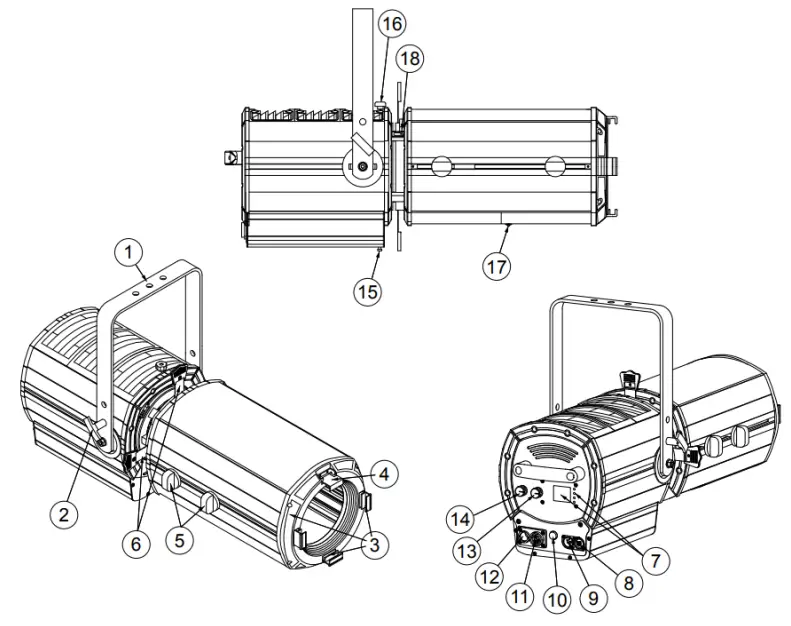
Fresnel and PC:
- Suspension yoke
- Handle for tilt regulation
- Accessory slot
- Accessory locking and releasing guide
- Display and menu buttons
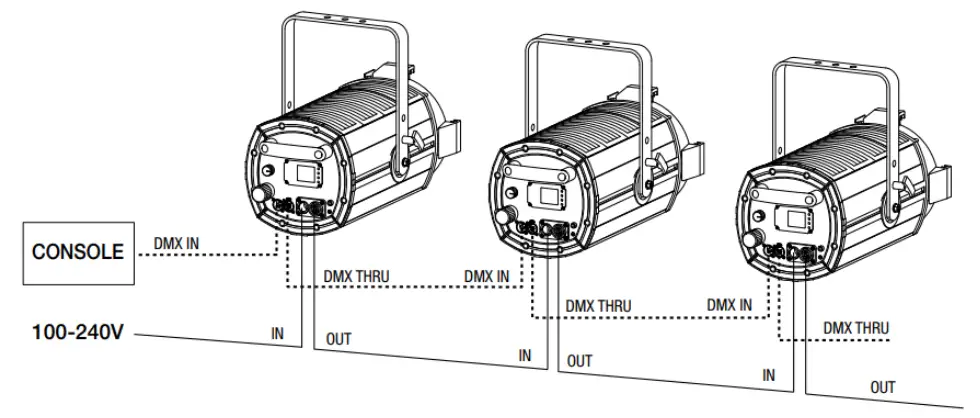
- DMX IN connector
- DMX THRU connector
- Fuse
- Power IN (Powercon connector)
- Power OUT (Powercon connector)
- Light intensity adjustment knob
- CCT / Colour wheel adjustment knob

Profile and Followspot have also: - Handles for lens adjustment (zoom and focus)
- Levers for framing shutters adjustment
- Screw for front housing removal
- Front housing rotation stop knob
- Front housing access door screw for lenses cleaning
- Gobo slot sliding cover

DISPLAY
When switched on, the installed software version is displayed, followed by the display of the default settings, ie the currently set operating mode.
| White | White | TW | RGBW | 6C | 8C | |
| If the luminaire is DMX controlled, after 3 seconds the display will show the mode and DMX address. Otherwise it will show the potentiometers status. By pressing the ENTER (or SETUP) button you access the SETTINGS.With the PREV and NEXT buttons you can scroll the items list which in case of value type entries will have the function of increasing (+) or decreasing (-) the values.The ENTER button allows to access the submenu and change the values which can be confirmed by pressing ENTER or canceled with the BACK button, which can be used also to exit the submenu and go back to the main menu. | 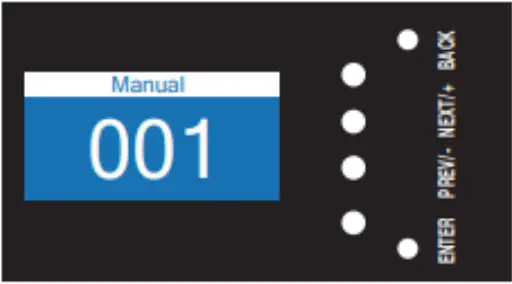 | 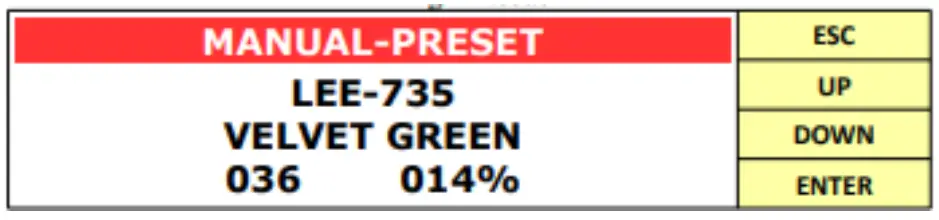 | ||||
| Display Mark-II – Red band: the working list of presets. There are 3 lists:o MANUAL PRESET: LEE filters + CCTo MANUAL COLOUR: LEE filterso MANUAL CCT: CCT (1500K – 20000K)To move from one list of presets to another use the arrows – Filter name + filter code- CCT – Dimmer value 0 – 100%- Dimmer value 0 – 255When switched on, the fixture recalls the last saved dimmer and preset value. How to save a preset:1. select the desired dimmer and preset values2. press and hold the red encoder (CCT/COLOUR WHEEL) for 3 seconds3. saving will be confirmed by the red color of the text Note:- if you change the dimmer, the color goes from red to yellow (and when you go back to the saved value it goes back to red)- if you change the preset, the color goes from red to white If the fixture is connected to a DMX console, the encoders are automatically disabled. If you need to activate the encoders without disconnecting the fixture from the console, press and hold the first button from the top for 2 seconds. To exit this mode, just hold down the same button for 2 seconds. | 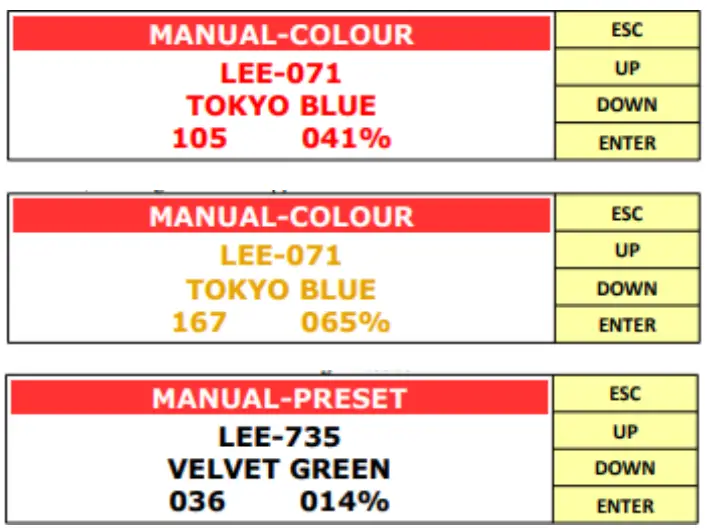 | |||||
All the luminaires are designed to be used in different operating modes:
- LOCAL ENCODER
- DMX
- RDM
- STAND ALONE (only for RGBW, 6C, 8C)
Input priority is given:
- in absence of the DMX signal the value set with the potentiometer will be active
- when there is the DMX signal the relevant signal is followed and the potentiometer will be ignored
- if the DMX signal is eliminated or lost, the DMX set level is kept until you act on the potentiometer, which will set the new value.
All the fixtures are equipped with a temperature control of the LED and of the driver motherboard, which, to avoid an early deterioration in case of overtemperature, regulates the light intensity.
Some parameters can be modified directly into the fixture by using the SETTINGS menu or by using a consolle thanks to the DMX PERSONALITIES and related channels.
Settings
This section lists all the menu functions, highlighting, for each of them, in which group they are present.
| Values | White 50-200 | White 300-700 | TW | RGBW | 6C | 8C | How to… | |||
| DMX SETTINGS | DMX ADDRESS | 1 (default) – … – xxx | YES | YES | YES | YES | YES | YES | How to set the DMX address and DMX personality | |
| DMX PERSONALITY | See related table | DMXchart 1A | DMX chart 1B | DMXchart 2 | DMXchart 3 | DMX chart 4 | DMXchart 5 | |||
| WIRELESS DMXMark-II | ACTIVATION | ONOFF (default) | YES | YES | YES | – | YES | YES | ||
| SHoW ID | 24100 – …- 24300 (default) – … -24359 | YES | YES | YES | – | YES | YES | |||
| SHoW KEY | 000 (default) – … – 500 | YES | YES | YES | – | YES | YES | |||
| STAND ALONE | STA ALONE | DISABLED (default) STDALONE MANUAL STDALONE AUTO SCENE MASTER MANUAL MASTER AUTO SCENESLAVE | – | – | – | YES | YES | YES | How to set the stand alone function | |
| MANUAL MODE | ||||||||||
| AUTO SCENE MODE | ||||||||||
| CUSTOM PRESETS | ||||||||||
OPTIONS | LED DELAY | OFF – 50 – … -1000 (default) – … – 2000ms | YES | YES | YES | YES | YES | YES | How to emulate the performance of halogen lamp | |
| DIMMING CURVE | LINEAR (1)HALO (2)QUADRATIC (default) (3)GAMMA 2.6 (4) Mark-IIGAMMA 2.8 (5) Mark-IIS (6) Mark-II | YES | YES | YES | YES 1-2-3 | YES | YES | |||
| AMBER SHIFT | ONOFF (default) | – | – | – | – | YES | YES | |||
| OUTPUT FREQUENCY | 500 – 501 – … – 1200 (default) – …- 20000 Hz | YES | YES | YES | YES | YES | YES | How to remove flickering | ||
| LED BOOST | ONOFF (default) | YES | – | YES | YES | YES | YES | How to increase +20% light output | ||
| FAN MODE | AUTO (default) STANDARDSILENT | YES | YES | YES | YES | YES | YES | How to set the silent mode | ||
| DISPLAY ROTATION | STANDARD (default) ROTATED | YES | YES | YES | YES | YES | YES | How to set the display | ||
| DISPLAY ON/OFF | ON (default) OFF | YES | YES | YES | YES | YES | YES | |||
| MANUAL CONTROL Mark-II | ON (default) OFF | YES | YES | YES | – | YES | YES | Abilita/disabilita ilfunzionamento degli encoder | ||
| LED CALIBRATION | RED | 0..255 (default) | – | – | – | YES | YES | YES | How to set LED calibration | |
| GREEN | 0..255 (default) | – | – | – | YES | YES | YES | |||
| BLU | 0..255 (default) | – | – | – | YES | YES | YES | |||
| WHITE | 0..255 (default) | – | – | – | YES | – | – | |||
| AMBER | 0..255 (default) | – | – | – | – | YES | YES | |||
| CYAN | 0..255 (default) | – | – | – | – | YES | YES | |||
| LIME | 0..255 (default) | – | – | – | – | YES | YES | |||
| DEFAULT SET* | YES | YES | YES | YES | YES | YES | ||||
| FACTORY SETTINGS** | YES | YES | YES | YES | YES | YES | ||||
| INFO | LED TEMPERATURE | °C | YES | YES | YES | YES | YES | YES | ||
| BOARD TEMPERATURE Mark-II | YES | YES | YES | – | YES | YES | ||||
| CHIP TEMPEARURE Mark-II | – | YES | YES | – | YES | YES | ||||
| LED TIME | YES | YES | – | – | – | – | ||||
| RED LED TIME | hr – min | – | – | – | YES | YES | YES | |||
| GREEN LED TIME | hr – min | – | – | – | YES | YES | YES | |||
| BLU LED TIME | hr – min | – | – | – | YES | YES | YES | |||
| WHITE LED TIME | hr – min | – | – | – | YES | – | – | |||
| AMBER LED TIME | hr – min | – | – | – | – | YES | YES | |||
| CYAN LED TIME | hr – min | – | – | – | – | YES | YES | |||
| LIME LED TIME | hr – min | – | – | – | – | YES | YES | |||
| WARM WHITE TIME | hr – min | – | – | YES | – | – | YES | |||
| COLD WHITE TIME | hr – min | – | – | YES | – | – | YES | |||
| UNIT TIME | hr – min | YES | YES | YES | YES | YES | YES | |||
| SOFTWARE VERSION | V……. Release date | YES | YES | YES | YES | YES | YES | |||
DEFAULT SET: It brings the parameters back to the “original built-in settings” (i.e. fan speed, dimming curve, delay…) as they came out from factory
FACTORY SETTINGS: Password-protected menu, used by Spotlight Tech. Dept to apply special settings (limit the current, working hours reset, limit thePower consumption, …). These parameters do NOT affect the “default settings” NOTE: Not for fina users.
DMX personalities
The following sections present the Personalities, called also DMX charts, available for each group to allow the lighting designer to choose which mode to operate the fixture in based on the parameters he decides to control and the number of channels available on the console he is using.
WHITE 50-100-200W
| 8 bit | 1CH | ||
| Function | DMX value | Description | |
| 1 ch | DIMMER | 0..255 | from OFF (0) to full (255) |
| 8 bit | 2CH | ||
| Function | DMX value | Description | |
| 1 ch | DIMMER | 0..255 | from OFF (0) to full (255) |
| 2 ch | STROBO | 0 | OFF |
| 1..255 | from slow (3,86 s) to fast (30 ms) | ||
| 16 bit | 3CH | ||
| Function | DMX value | Description | |
| 1 ch | DIMMER | 0..255 | from OFF (0) to full (255) |
| 2 ch | DIMMER FINE | 0..255 | from OFF (0) to full (255) |
| 3 ch | STROBO | 0 | OFF |
| 1..255 | from slow (3,86 s) to fast (30 ms) | ||
CURRENT MODULATION Mark-II
This is an operating mode to eliminate flickering disturbances, caused by PWM driving of the LED, and acoustic disturbances, generated by electronic components. This mode is specifically indicated for applications in TV Studios or acoustic sheels where maximum silence of the devices and the absence of flicker are required.
WHITE 300-700W
| 8 bit | 1CH | ||
| Function | DMX value | Description | |
| 1 ch | DIMMER | 0..255 | from OFF (0) to full (255) |
| 8 bit | 3CH | ||
| Function | DMX value | Description | |
| 1 ch | DIMMER | 0..255 | from OFF (0) to full (255) |
| 2 ch | STROBO & STORE | See related table | |
| 3 ch | SERVICE | 0..255 | See related table |
| 16 bit | 6CH | ||
| Function | DMX value | Description | |
| 1 ch | DIMMER | 0..255 | from OFF (0) to full (255) |
| 2 ch | DIMMER FINE | 0..255 | from OFF (0) to full (255) |
| 3 ch | DELAY | See related table | |
| 4 ch | FAN | 0..255 | from minimum to maximum |
| 5 ch | STROBO & STORE | See related table | |
| 6 ch | SERVICE | See related table | |
TUNABLE WHITE
| 8 bit | EASY | ||
| Function | DMX value | Description | |
| 1 ch | DIMMER | 0..255 | from OFF (0) to full (255) |
| 2 ch | CCT LINEAR | See related table | |
| 8 bit | SPLIT | ||
| Function | DMX value | Description | |
| 1 ch | DIMMER | 0..255 | GM – GENERAL MASTER |
| 2 ch | WARM WHITE | 0..255 | from OFF (0) to full (255) |
| 3 ch | COLD WHITE | 0..255 | from OFF (0) to full (255) |
| 4 ch | STROBO & STORE | See related table | |
| 5 ch | SERVICE | See related table | |
| 16 bit | STUDIO | ||
| Function | DMX value | Description | |
| 1 ch | DIMMER | 0..255 | from OFF (0) to full (255) |
| 2 ch | DIMMER FINE | 0..255 | from OFF (0) to full (255) |
| 3 ch | CCT PRESET | See related table | |
4 ch | WW +/-correzione live del CCT STEP selezionato (= “zero point”) | 0..15 | OFF |
| 6..111 | from minimum to standard | ||
| 112..144 | CCT STEP | ||
| 145..239 | from standard to maximum | ||
| 240..255 | OFF | ||
5 ch | CW +/-correzione live del CCT STEP selezionato (= “zero point”) | 0..15 | OFF |
| 6..111 | from minimum to standard | ||
| 112..144 | CCT STEP | ||
| 145..239 | from standard to maximum | ||
| 240..255 | OFF | ||
| 6 ch | DELAY | See related table | |
| 7 ch | FAN | 0..255 | from minimum to maximum |
| 8 ch | STROBO & STORE | See related table | |
| 9 ch | SERVICE | See related table | |
| 16 bit | SPLIT | ||
| Function | DMX value | Description | |
| 1 ch | DIMMER | 0..255 | from OFF (0) to full (255) |
| 2 ch | DIMMER FINE | 0..255 | from OFF (0) to full (255) |
| 3 ch | WARM WHITE | 0..255 | from OFF (0) to full (255) |
| 4 ch | WARM WHITE FINE | 0..255 | from OFF (0) to full (255) |
| 5 ch | COLD WHITE | 0..255 | from OFF (0) to full (255) |
| 6 ch | COLD WHITE FINE | 0..255 | from OFF (0) to full (255) |
| 7 ch | DELAY | See related table | |
| 8 ch | FAN | 0..255 | from minimum to maximum |
| 9 ch | STROBO & STORE | See related table | |
| 10 ch | SERVICE | See related table | |
| 16 bit | THEATRE FULL | ||
| Function | DMX value | Description | |
| 1 ch | DIMMER | 0..255 | from OFF (0) to full (255) |
| 2 ch | DIMMER FINE | 0..255 | from OFF (0) to full (255) |
| 3 ch | CCT LINEAR | See related table | |
| 4 ch | DELAY | See related table | |
| 5 ch | FAN | 0..255 | from minimum to maximum |
| 6 ch | STROBO & STORE | See related table | |
| 7 ch | SERVICE | See related table | |
RGBW
| 8 bit | EASY | ||
| Function | DMX value | Description | |
| 1 ch | DIMMER | 0..255 | from OFF (0) to full (255) |
| 2 ch | CCT PRESET | See related table | |
| 3 ch | COLOUR PRESET | See related table | |
Note: CCT PRESET has priority over COLOUR PRESET
| 8 bit | HSI | ||
| Function | DMX value | Description | |
| 1 ch | DIMMER | 0..255 | from OFF (0) to full (255) |
| 2 ch | HUE | 0..255 | Sequence: R, R+G, G, G+B, B, B+R, R |
| 3 ch | HUE FINE | 0..255 | Selection of the colour – fine |
| 4 ch | SATURATION | 0..255 | from OFF (0) to full (255) à to dim the channel of CCT LINEAR |
| 6 ch | STROBO & STORE | See related table | |
| 7 ch | SERVICE | See related table | |
| 8 bit | CMY | ||
| Function | DMX value | Description | |
| 1 ch | DIMMER | 0..255 | from OFF (0) to full (255) |
| 2 ch | CYAN | 0..255 | from OFF (0) to full (255) |
| 3 ch | MAGENTA | 0..255 | from OFF (0) to full (255) |
| 4 ch | YELLOW | 0..255 | from OFF (0) to full (255) |
| 5 ch | STROBO & STORE | See related table | |
| 6 ch | SERVICE | See related table | |
| 8 bit | RGBW | ||
| Function | DMX value | Description | |
| 1 ch | DIMMER | 0..255 | from OFF (0) to full (255) |
| 2 ch | RED | 0..255 | from OFF (0) to full (255) |
| 3 ch | GREEN | 0..255 | from OFF (0) to full (255) |
| 4 ch | BLUE | 0..255 | from OFF (0) to full (255) |
| 5 ch | WHITE | 0..255 | from OFF (0) to full (255) |
| 6 ch | CCT PRESET | See related table | |
| 7 ch | COLOUR PRESET | See related table | |
| 8 ch | STROBO & STORE | See related table | |
| 9 ch | SERVICE | See related table | |
| 16 bit | FULL | ||
| Function | DMX value | Description | |
| 1 ch | DIMMER | 0..255 | from OFF (0) to full (255) |
| 2 ch | DIMMER FINE | 0..255 | from OFF (0) to full (255) |
| 3 ch | RED | 0..255 | from OFF (0) to full (255) |
| 4 ch | RED FINE | 0..255 | from OFF (0) to full (255) |
| 5 ch | GREEN | 0..255 | from OFF (0) to full (255) |
| 6 ch | GREEN FINE | 0..255 | from OFF (0) to full (255) |
| 7 ch | BLUE | 0..255 | from OFF (0) to full (255) |
| 8 ch | BLUE FINE | 0..255 | from OFF (0) to full (255) |
| 9 ch | WHITE | 0..255 | from OFF (0) to full (255) |
| 10 ch | WHITE FINE | 0..255 | from OFF (0) to full (255) |
| 11 ch | COLOUR PRESET | See related table | |
| 12 ch | CCT PRESET | See related table | |
| 13 ch | DELAY | See related table | |
| 14 ch | FAN | 0..255 | from minimum to maximum |
| 15 ch | STROBO & STORE | See related table | |
| 16 ch | SERVICE | See related table | |
6 COLOURS
| 8 bit | EASY | ||
| Function | DMX value | Description | |
| 1 ch | DIMMER | 0..255 | from OFF (0) to full (255) |
| 2 ch | ROSCO FILTERS Mark-II | See related table | |
| 3 ch | LEE FILTERS Mark-II | See related table | |
| 4 ch | CCT PRESET | See related table | |
Note: CCT PRESET has priority over COLOUR PRESET
| 8 bit | HSIC | ||
| Function | DMX value | Description | |
| 1 ch | DIMMER | 0..255 | from OFF (0) to full (255) |
| 2 ch | HUE | 0..255 | Sequence: R, R+L, R+G+L,G+L, G, G+C, G+B+C, B+C, B, B+A, R+B+A, R+A, R |
| 3 ch | HUE FINE | 0..255 | Selection of the colour – fine |
| 4 ch | SATURATION | 0..255 | from OFF (0) to full (255) àto dim the channel of CCT LINEAR |
| 5 ch | CCT LINEAR | See related table | |
| 6 ch | STROBO & STORE | See related table | |
| 7 ch | SERVICE | See related table | |
| 8 bit | RGBACL | ||
| Function | DMX value | Description | |
| 1 ch | DIMMER | 0..255 | from OFF (0) to full (255) |
| 2 ch | RED | 0..255 | from OFF (0) to full (255) |
| 3 ch | GREEN | 0..255 | from OFF (0) to full (255) |
| 4 ch | BLUE | 0..255 | from OFF (0) to full (255) |
| 5 ch | AMBER | 0..255 | from OFF (0) to full (255) |
| 6 ch | CYAN | 0..255 | from OFF (0) to full (255) |
| 7 ch | LIME | 0..255 | from OFF (0) to full (255) |
| 8 ch | STROBO & STORE | See related table | |
| 9 ch | SERVICE | See related table | |
| 16 bit | STUDIO | ||
| Function | DMX value | Description | |
| 1 ch | DIMMER | 0..255 | from OFF (0) to full (255) |
| 2 ch | DIMMER FINE | 0..255 | from OFF (0) to full (255) |
| 3 ch | RED | 0..255 | from OFF (0) to full (255) |
| 4 ch | RED FINE | 0..255 | from OFF (0) to full (255) |
| 5 ch | GREEN | 0..255 | from OFF (0) to full (255) |
| 6 ch | GREEN FINE | 0..255 | from OFF (0) to full (255) |
| 7 ch | BLUE | 0..255 | from OFF (0) to full (255) |
| 8 ch | BLUE FINE | 0..255 | from OFF (0) to full (255) |
| 9 ch | AMBER | 0..255 | from OFF (0) to full (255) |
| 10 ch | AMBER FINE | 0..255 | from OFF (0) to full (255) |
| 11 ch | CYAN | 0..255 | from OFF (0) to full (255) |
| 12 ch | CYAN FINE | 0..255 | from OFF (0) to full (255) |
| 13 ch | LIME | 0..255 | from OFF (0) to full (255) |
| 14 ch | LIME FINE | 0..255 | from OFF (0) to full (255) |
| 15 ch | ROSCO FILTERS Mark-II | See related table | |
| 16 ch | LEE FILTERS Mark-II | See related table | |
| 17 ch | CCT STEPS | See related table | |
| 18 ch | GREEN +/- | 0..15 | OFF |
| 16..126 | MINUS GREEN – | ||
| 127..144 | ZERO POINT-CENTER | ||
| 145..255 | PLUS GREEN + | ||
| 19 ch | DELAY | See related table | |
| 20 ch | FAN | 0..255 | from minimum to maximum |
| 21 ch | STROBO & STORE | See related table | |
| 22 ch | SERVICE | See related table | |
| 23 ch | FREE 1 Mark-II | (for future use) | |
| 24ch | FREE 2 Mark-II | (for future use) | |
| 16 bit | THEATRE | ||
| Function | DMX value | Description | |
| 1 ch | DIMMER | 0..255 | from OFF (0) to full (255) |
| 2 ch | DIMMER FINE | 0..255 | from OFF (0) to full (255) |
| 3 ch | RED | 0..255 | from OFF (0) to full (255) |
| 4 ch | RED FINE | 0..255 | from OFF (0) to full (255) |
| 5 ch | GREEN | 0..255 | from OFF (0) to full (255) |
| 6 ch | GREEN FINE | 0..255 | from OFF (0) to full (255) |
| 7 ch | BLUE | 0..255 | from OFF (0) to full (255) |
| 8 ch | BLUE FINE | 0..255 | from OFF (0) to full (255) |
| 9 ch | AMBER | 0..255 | from OFF (0) to full (255) |
| 10 ch | AMBER FINE | 0..255 | from OFF (0) to full (255) |
| 11 ch | CYAN | 0..255 | from OFF (0) to full (255) |
| 12 ch | CYAN FINE | 0..255 | from OFF (0) to full (255) |
| 13 ch | LIME | 0..255 | from OFF (0) to full (255) |
| 14 ch | LIME FINE | 0..255 | from OFF (0) to full (255) |
| 15 ch | ROSCO FILTERS Mark-II | See related table | |
| 16 ch | LEE FILTERS Mark-II | See related table | |
| 17 ch | SATURATION | 0..255 | from OFF (0) to full (255) à to dim the channel of CCT LINEAR |
| 18 ch | CCT LINEAR | See related table | |
| 19 ch | GREEN +/- | 0..15 | OFF |
| 16..126 | MINUS GREEN – | ||
| 127..144 | ZERO POINT – CENTER | ||
| 145..255 | PLUS GREEN + | ||
| 20 ch | DELAY | See related table | |
| 21 ch | FAN | 0..255 | from minimum to maximum |
| 22 ch | STROBO & STORE | See related table | |
| 23 ch | SERVICE | See related table | |
| 24 ch | FREE 1 Mark-II | (for future use) | |
| 25 ch | FREE 2 Mark-II | (for future use) | |
Note: CCT LINEAR has priority over COLOUR PRESET has priority over manual selected colours (from channel 3 to 14)
| 16 bit | RGBACL Mark-II | ||
| Function | DMX value | Description | |
| 1 ch | DIMMER | 0..255 | from OFF (0) to full (255) |
| 2 ch | DIMMER FINE | 0..255 | from OFF (0) to full (255) |
| 3 ch | RED | 0..255 | from OFF (0) to full (255) |
| 4 ch | RED FINE | 0..255 | from OFF (0) to full (255) |
| 5 ch | GREEN | 0..255 | from OFF (0) to full (255) |
| 6 ch | GREEN FINE | 0..255 | from OFF (0) to full (255) |
| 7 ch | BLUE | 0..255 | from OFF (0) to full (255) |
| 8 ch | BLUE FINE | 0..255 | from OFF (0) to full (255) |
| 9 ch | AMBER | 0..255 | from OFF (0) to full (255) |
| 10 ch | AMBER FINE | 0..255 | from OFF (0) to full (255) |
| 11 ch | CYAN | 0..255 | from OFF (0) to full (255) |
| 12 ch | CYAN FINE | 0..255 | from OFF (0) to full (255) |
| 13 ch | LIME | 0..255 | from OFF (0) to full (255) |
| 14 ch | LIME FINE | 0..255 | from OFF (0) to full (255) |
8 COLOURS
| 8 bit | EASY | ||
| Function | DMX value | Description | |
| 1 ch | DIMMER | 0..255 | from OFF (0) to full (255) |
| 2 ch | ROSCO FILTERS Mark-II | See related table | |
| 3 ch | LEE FILTERS Mark-II | See related table | |
| 4 ch | CCT PRESET | See related table | |
Note: CCT PRESET has priority over COLOUR PRESET
| 8 bit | HSIC | ||
| Function | DMX value | Description | |
| 1 ch | DIMMER | 0..255 | from OFF (0) to full (255) |
| 2 ch | HUE | 0..255 | Sequence: R, R+L, R+G+L, G+L, G, G+C, G+B+C, B+C, B, B+A, R+B+A, R+A, R |
| 3 ch | HUE FINE | 0..255 | Selection of the colour – fine |
| 4 ch | SATURATION | 0..255 | from OFF (0) to full (255) àto dim the channel of CCT LINEAR |
| 5 ch | CCT LINEAR | See related table | |
| 6 ch | STROBO & STORE | See related table | |
| 7 ch | SERVICE | See related table | |
| 8 bit | RGBACL+WW+CW | ||
| Function | DMX value | Description | |
| 1 ch | DIMMER | 0..255 | from OFF (0) to full (255) |
| 2 ch | RED | 0..255 | from OFF (0) to full (255) |
| 3 ch | GREEN | 0..255 | from OFF (0) to full (255) |
| 4 ch | BLUE | 0..255 | from OFF (0) to full (255) |
| 5 ch | AMBER | 0..255 | from OFF (0) to full (255) |
| 6 ch | CYAN | 0..255 | from OFF (0) to full (255) |
| 7 ch | LIME | 0..255 | from OFF (0) to full (255) |
| 8 ch | WARM WHITE | 0..255 | from OFF (0) to full (255) |
| 9 ch | COLD WHITE | 0..255 | from OFF (0) to full (255) |
| 10 ch | STROBO & STORE | See related table | |
| 11 ch | SERVICE | See related table | |
| 16 bit | RGBACL+WW+CW | ||
| Function | DMX value | Description | |
| 1 ch | DIMMER | 0..255 | from OFF (0) to full (255) |
| 2 ch | DIMMER FINE | 0..255 | from OFF (0) to full (255) |
| 3 ch | RED | 0..255 | from OFF (0) to full (255) |
| 4 ch | RED FINE | 0..255 | from OFF (0) to full (255) |
| 5 ch | GREEN | 0..255 | from OFF (0) to full (255) |
| 6 ch | GREEN FINE | 0..255 | from OFF (0) to full (255) |
| 7 ch | BLUE | 0..255 | from OFF (0) to full (255) |
| 8 ch | BLUE FINE | 0..255 | from OFF (0) to full (255) |
| 9 ch | AMBER | 0..255 | from OFF (0) to full (255) |
| 10 ch | AMBER FINE | 0..255 | from OFF (0) to full (255) |
| 11 ch | CYAN | 0..255 | from OFF (0) to full (255) |
| 12 ch | CYAN FINE | 0..255 | from OFF (0) to full (255) |
| 13 ch | LIME | 0..255 | from OFF (0) to full (255) |
| 14 ch | LIME FINE | 0..255 | from OFF (0) to full (255) |
| 15 ch | WARM WHITE | 0..255 | from OFF (0) to full (255) |
| 16 ch | WARM WHITE FINE | 0..255 | from OFF (0) to full (255) |
| 17 ch | COLD WHITE | 0..255 | from OFF (0) to full (255) |
| 18 ch | COLD WHITE FINE | 0..255 | from OFF (0) to full (255) |
| 16 bit | STUDIO | ||
| Function | DMX value | Description | |
| 1 ch | DIMMER | 0..255 | from OFF (0) to full (255) |
| 2 ch | DIMMER FINE | 0..255 | from OFF (0) to full (255) |
| 3 ch | RED | 0..255 | from OFF (0) to full (255) |
| 4 ch | RED FINE | 0..255 | from OFF (0) to full (255) |
| 5 ch | GREEN | 0..255 | from OFF (0) to full (255) |
| 6 ch | GREEN FINE | 0..255 | from OFF (0) to full (255) |
| 7 ch | BLUE | 0..255 | from OFF (0) to full (255) |
| 8 ch | BLUE FINE | 0..255 | from OFF (0) to full (255) |
| 9 ch | AMBER | 0..255 | from OFF (0) to full (255) |
| 10 ch | AMBER FINE | 0..255 | from OFF (0) to full (255) |
| 11 ch | CYAN | 0..255 | from OFF (0) to full (255) |
| 12 ch | CYAN FINE | 0..255 | from OFF (0) to full (255) |
| 13 ch | LIME | 0..255 | from OFF (0) to full (255) |
| 14 ch | LIME FINE | 0..255 | from OFF (0) to full (255) |
| 15 ch | WARM WHITE | 0..255 | from OFF (0) to full (255) |
| 16 ch | WARM WHITE FINE | 0..255 | from OFF (0) to full (255) |
| 17 ch | COLD WHITE | 0..255 | from OFF (0) to full (255) |
| 18 ch | COLD WHITE FINE | 0..255 | from OFF (0) to full (255) |
| 19 ch | ROSCO FILTERS Mark-II | See related table | |
| 20 ch | LEE FILTERS Mark-II | See related table | |
| 21 ch | CCT STEPS | See related table | |
| 22 ch | GREEN +/- | 0..15 | OFF |
| 16..126 | MINUS GREEN – | ||
| 127..144 | ZERO POINT – CENTER | ||
| 145..255 | PLUS GREEN + | ||
| 23 ch | DELAY | See related table | |
| 24 ch | FAN | 0..255 | from minimum to maximum |
| 25 ch | STROBO & STORE | See related table | |
| 26 ch | SERVICE | See related table | |
| 27 ch | FREE 1 Mark-II | (for future use) | |
| 28 ch | FREE 2 Mark-II | (for future use) | |
| 16 bit | THEATRE | ||
| Function | DMX value | Description | |
| 1 ch | DIMMER | 0..255 | from OFF (0) to full (255) |
| 2 ch | DIMMER FINE | 0..255 | from OFF (0) to full (255) |
| 3 ch | RED | 0..255 | from OFF (0) to full (255) |
| 4 ch | RED FINE | 0..255 | from OFF (0) to full (255) |
| 5 ch | GREEN | 0..255 | from OFF (0) to full (255) |
| 6 ch | GREEN FINE | 0..255 | from OFF (0) to full (255) |
| 7 ch | BLUE | 0..255 | from OFF (0) to full (255) |
| 8 ch | BLUE FINE | 0..255 | from OFF (0) to full (255) |
| 9 ch | AMBER | 0..255 | from OFF (0) to full (255) |
| 10 ch | AMBER FINE | 0..255 | from OFF (0) to full (255) |
| 11 ch | CYAN | 0..255 | from OFF (0) to full (255) |
| 12 ch | CYAN FINE | 0..255 | from OFF (0) to full (255) |
| 13 ch | LIME | 0..255 | from OFF (0) to full (255) |
| 14 ch | LIME FINE | 0..255 | from OFF (0) to full (255) |
| 15 ch | WARM WHITE | 0..255 | from OFF (0) to full (255) |
| 16 ch | WARM WHITE FINE | 0..255 | from OFF (0) to full (255) |
| 17 ch | COLD WHITE | 0..255 | from OFF (0) to full (255) |
| 18 ch | COLD WHITE FINE | 0..255 | from OFF (0) to full (255) |
| 19 ch | ROSCO FILTERS Mark-II | See related table | |
| 20 ch | LEE FILTERS Mark-II | See related table | |
| 21 ch | SATURATION | 0..255 | from OFF (0) to full (255) àto dim the channel of CCT LINEAR |
| 22 ch | CCT LINEAR | See related table | |
| 23 ch | GREEN +/- | 0..15 | OFF |
| 16..126 | MINUS GREEN – | ||
| 127..144 | ZERO POINT – CENTER | ||
| 145..255 | PLUS GREEN + | ||
| 24 ch | DELAY | See related table | |
| 25 ch | FAN | 0..255 | from minimum to maximum |
| 26 ch | STROBO & STORE | See related table | |
| 27 ch | SERVICE | See related table | |
| 28 ch | FREE 1 Mark-II | (for future use) | |
| 29 ch | FREE 2 Mark-II | (for future use) | |
Note: CCT LINEAR has priority over COLOUR PRESET has priority over manual selected colours (from channel 3 to 14)
SERVICE CHANNEL
This channel allows to change via console all the settings that are normally set manually from the STAND ALONE and OPTIONS menu of the fixture.
White | White | TW | RGBW | 6C | 8C | |||||
| SERVICE 1 (RGBW, 6C, 8C) | STAND ALONE(here you create) | CUSTOM PRESETS | 0..56..1819..3132..4445..5758..7071..8384..9697..109110..122123..135136..148149..161162..174175..187188..200201..213214..226227..239240..255 | OFFCUSTOM PRESET 1CUSTOM PRESET 2CUSTOM PRESET 3CUSTOM PRESET 4CUSTOM PRESET 5CUSTOM PRESET 6CUSTOM PRESET 7CUSTOM PRESET 8CUSTOM PRESET 9CUSTOM PRESET 10 CUSTOM PRESET 11 Mark-II CUSTOM PRESET 12 Mark-II CUSTOM PRESET 13 Mark-II CUSTOM PRESET 14 Mark-II CUSTOM PRESET 15 Mark-II CUSTOM PRESET 16 Mark-II CUSTOM PRESET 17 Mark-II CUSTOM PRESET 18 Mark-II CUSTOM PRESET 19 Mark-II | – | – | – | YES | YES | YES |
| 0..5 | INACTIVE | – | – | – | YES | YES | YES | |||
| 6..11 | OFF | |||||||||
| 12..17 | 50 ms | |||||||||
| 18..23 | 100 ms | |||||||||
| 24..29 | 240 ms | |||||||||
| 30..35 | 400 ms | |||||||||
| LED DELAY | 36..41 | 600 ms | – | YES | YES | YES | YES | YES | ||
| 42..47 | 800 ms | |||||||||
| 48..53 | 1000 ms (default) | |||||||||
| 54..59 | 1200 ms | |||||||||
| 60..65 | 1600 ms | |||||||||
| 66..71 | 2000 ms | |||||||||
| 72..77 | LINEAR | |||||||||
| 78..81 | QUADRATIC | |||||||||
| DIMMING CURVE | 82..8384..85 | S Mark-IIHALO (default) | – | YES | YES | YES | YES | YES | ||
| SERIVCE(White, TW) | 86..8788.89 | GAMMA 2.6 Mark-IIGAMMA 2.8 Mark-II | ||||||||
| 90..95 | 600 Hz | |||||||||
| or | OPTIONS(here you set) | 96..101 | 900 Hz | |||||||
| 102..107 | 1200 Hz (default) | |||||||||
| SERVICE 2 (RGBW, 6C, 8C) | OUTPUT FREQUENCY | 108..113 | 2100 Hz | – | YES | YES | YES | YES | YES | |
| 114..119 | 4200 Hz | |||||||||
| 120..125 | 6000 Hz | |||||||||
| 126..131 | 10200 Hz | |||||||||
| 132..137 | 15600 Hz | |||||||||
| 138..143 | 19800 Hz | |||||||||
| LED BOOST | 144..149 | ON | – | YES | YES | YES | YES | YES | ||
| 150..155 | OFF (default) | |||||||||
| 156..161 | AUTO (default) | |||||||||
| FAN MODE | 162..167 | STANDARD | – | YES | YES | YES | YES | YES | ||
| 168..173 | SILENT | |||||||||
| 174..179 | STANDARD (default) | |||||||||
| DISPLAY ROTATION DISPLAY ON/FF | 180..185 | ROTATED | – | YES | YES | YES | YES | YES | ||
| 186..191 | OFF | |||||||||
| 192..197 | ON (default) | |||||||||
| LED CALIBRATION | 198..203 | COLOUR CALIBRATION (for all) | – | YES | YES | YES | YES | YES | ||
| NO FUNCTION (for White 300-700) | ||||||||||
| DEFAULT SETTINGS | 204..209 | DEFAULT SETTINGS | – | YES | YES | YES | YES | YES | ||
| (for future use) | 210..255 | FREE | – | YES | YES | YES | YES | YES | ||
STROBE & STORE CHANNEL
This channel allows to save what has been created/set in the related SERVICE channel.
| White | White | TW | RGBW | 6C | 8C | ||||
| 0 | OFF | ||||||||
| STROBE | 1..150 | from slow (3,86 s) to fast (30 ms) | – | YES | YES | YES | YES | YES | |
| 151..200 | OFF | ||||||||
| 201..210 | Once created the desired CUSTOM | ||||||||
| STROBE & STORE | STORE 1 | PRESET, keep on hold for 5 seconds to store the new value. | – | – | – | YES | YES | YES | |
| 211..230 | OFF | ||||||||
| 231..240 | Once set the desired OPTION, keep on | ||||||||
| STORE 2 | 241..255 | hold for 5 seconds to store the new value. OFF | – | YES | YES | YES | YES | YES | |
CCT CHANNEL
| TW | RGBW | 6C | 8C | |||||||
| LINEAR | PRESET | PRESET | LINEAR | STEP | PRESET | LINEAR | STEP | PRESET | ||
| NONE | – | – | 0..15 | – | 0.. 4 | 0..4 | – | 0.. 4 | 0..4 | |
| 1500K | – | 0.. 0.. | 5.. 7 | 5.. 11 | 0.. 0.. | 5.. 7 | 5.. 11 | |||
| 1500K-1600K | 1.. 7.. | 8.. 11 | – | 1.. 7.. | 8.. 11 | – | ||||
| 1600K | 8.. 8.. | 12.. 14 | 12.. 18 | 8.. 8.. | 12.. 14 | 12.. 18 | ||||
| 1600K-1700K | 9.. 15 | 15.. 18 | – | 9.. 15 | 15.. 18 | – | ||||
| 1700K | 16.. 16 | 19.. 21 | 19.. 25 | 16.. 16 | 19.. 21 | 19.. 25 | ||||
| 1700K-1800K | 17.. 23 | 22.. 25 | – | 17.. 23 | 22.. 25 | – | ||||
| 1800K | 24.. 24 | 26.. 28 | 26.. 32 | 24.. 24 | 26.. 28 | 26.. 32 | ||||
| 1800K-1900K | 25.. 31 | 29.. 32 | – | 25.. 31 | 29.. 32 | – | ||||
| 1900K | 32.. 32 | 33.. 35 | 33.. 39 | 32.. 32 | 33.. 35 | 33.. 39 | ||||
| 1900K-2000K | 33.. 39 | 36.. 39 | – | 33.. 39 | 36.. 39 | – | ||||
| 2000K | 40.. 40 | 40.. 42 | 40.. 46 | 40.. 40 | 40.. 42 | 40.. 46 | ||||
| 2000K-2100K | 41.. 47 | 43.. 46 | – | 41.. 47 | 43.. 46 | – | ||||
| 2100K | 48.. 48 | 47.. 49 | 47.. 53 | 48.. 48 | 47.. 49 | 47.. 53 | ||||
| 2100K-2200K | 49.. 55 | 50.. 53 | – | 49.. 55 | 50.. 53 | – | ||||
| 2200K | 56.. 56 | 54.. 56 | 54.. 60 | 56.. 56 | 54.. 56 | 54.. 60 | ||||
| 2200K-2300K | 57.. 63 | 57.. 60 | – | 57.. 63 | 57.. 60 | – | ||||
| 2300K | 64.. 64 | 61.. 63 | 61.. 67 | 64.. 64 | 61.. 63 | 61.. 67 | ||||
| 2300K-2400K | 65.. 71 | 64.. 67 | – | 65.. 71 | 64.. 67 | – | ||||
| 2400K | 72.. 72 | 68.. 70 | 68.. 74 | 72.. 72 | 68.. 70 | 68.. 74 | ||||
| 2400K-2500K | 73.. 79 | 71.. 74 | – | 73.. 79 | 71.. 74 | – | ||||
| 2500K | 80.. 80 | 75.. 77 | 75.. 81 | 80.. 80 | 75.. 77 | 75.. 81 | ||||
| 2500K-2600K | 81.. 86 | 78.. 81 | – | 81.. 86 | 78.. 81 | – | ||||
| 2600K | 87.. 87 | 82.. 84 | 82.. 88 | 87.. 87 | 82.. 84 | 82.. 88 | ||||
| 2600K-2700K | 88.. 93 | 85.. 88 | – | 88.. 93 | 85.. 88 | – | ||||
| 2700K | 0 | 0..35 | 16..45 | 94.. 94 | 89.. 91 | 89.. 95 | 94.. 94 | 89.. 91 | 89.. 95 | |
| 2700K-3000K | 2700K-2800K | 1..41 | – | – | 95.. 100.. | 92.. 95 | – | 95.. 100.. | 92.. 95 | – |
| 2800K | 101.. 101 | 96.. 98 | 96.. 102 | 101.. 101 | 96.. 98 | 96.. 102 | ||||
| 2800K-2900K | 102.. 107 | 99.. 102 | – | 102.. 107 | 99.. 102 | – | ||||
| 2900K | 108.. 108 | 103.. 105 | 103.. 109 | 108.. 108 | 103.. 105 | 103.. 109 | ||||
| 2900K-3000K | 109.. 114 | 106.. 109 | – | 109.. 114 | 106.. 109 | – | ||||
| 3000K | 42 | 36..70 | 46..75 | 115.. 115 | 110.. 112 | 110.. 116 | 115.. 115 | 110.. 112 | 110.. 116 | |
| 3000K-3200K | 3000K-3100K | 43..83 | – | – | 116.. 121 | 113.. 116 | – | 116.. 121 | 113.. 116 | – |
| 3100K | 122.. 122 | 117.. 119 | 117.. 123 | 122.. 122 | 117.. 119 | 117.. 123 | ||||
| 3100K-3200K | 123.. 128 | 120.. 123 | – | 123.. 128 | 120.. 123 | – | ||||
| 3200K (default) | 84 | 71..105 | 76..105 | 129.. 129 | 124.. 126 | 124.. 130 | 129.. 129 | 124.. 126 | 124.. 130 | |
| 3200K-3500K | 3200K-3300K | 85..125 | – | – | 130.. 135 | 127.. 130 | – | 130.. 135 | 127.. 130 | – |
| 3300K | 136.. 136 | 131.. 133 | 131.. 137 | 136.. 136 | 131.. 133 | 131.. 137 | ||||
| 3300K-3400K | 137.. 142 | 134.. 137 | – | 137.. 142 | 134.. 137 | – | ||||
| 3400K | 143.. 143 | 138.. 140 | 138.. 144 | 143.. 143 | 138.. 140 | 138.. 144 | ||||
| 3400K-3500K | 144.. 149 | 141.. 144 | – | 144.. 149 | 141.. 144 | – | ||||
| 3500K | 126 | 106..140 | 106..135 | 150.. 150 | 145.. 147 | 145.. 151 | 150.. 150 | 145.. 147 | 145.. 151 | |
| 3500K-4000K | 127..168 | – | – | 151.. 156 | 148.. 151 | – | 151.. 156 | 148.. 151 | – | |
| 4000K | 169 | 141..175 | 136..165 | 157.. 157 | 152.. 154 | 152.. 158 | 157.. 157 | 152.. 154 | 152.. 158 | |
| 4000K-5600K | 4000K-5000K | 170..211 | – | – | 158.. 163 | 155.. 158 | – | 158.. 163 | 155.. 158 | – |
| 5000K | 164.. 164 | 159.. 161 | 159.. 165 | 164.. 164 | 159.. 161 | 159.. 165 | ||||
| 5000K-5600K | 165.. 170 | 162.. 165 | – | 165.. 170 | 162.. 165 | – | ||||
| 5600K | 212 | 176..210 | 166..195 | 171.. 171 | 166.. 168 | 166.. 172 | 171.. 171 | 166.. 168 | 166.. 172 | |
| 5600K-6500K | 5600K-6000K | 213..254 | – | – | 172.. 177 | 169.. 172 | – | 172.. 177 | 169.. 172 | – |
| 6000K | 178.. 178 | 173.. 175 | 173.. 179 | 178.. 178 | 173.. 175 | 173.. 179 | ||||
| 6000K-6500K | 179.. 184 | 176.. 179 | – | 179.. 184 | 176.. 179 | – | ||||
| 6500K | 255 | 211..225 | 196..225 | 185.. 185 | 180.. 182 | 180.. 186 | 185.. 185 | 180.. 182 | 180.. 186 | |
| 6500K-8000K | – | – | – | 186.. 191 | 183.. 186 | – | 186.. 191 | 183.. 186 | – | |
| 8000K | 226..255 | 192.. 192 | 187.. 189 | 187.. 193 | 192.. 192 | 187.. 189 | 187.. 193 | |||
| 8000K-10000K | – | 193.. 198 | 190.. 193 | – | 193.. 198 | 190.. 193 | – | |||
| 10000K | 199.. 199 | 194.. 196 | 194.. 200 | 199.. 199 | 194.. 196 | 194.. 200 | ||||
| 10000K-12000K | 200.. 205 | 197.. 200 | – | 200.. 205 | 197.. 200 | – | ||||
| 12000K | 206.. 206 | 201.. 203 | 201.. 207 | 206.. 206 | 201.. 203 | 201.. 207 | ||||
| 12000K-14000K | 207.. 212 | 204.. 207 | – | 207.. 212 | 204.. 207 | – | ||||
| 14000K | 213.. 213 | 208.. 210 | 208.. 214 | 213.. 213 | 208.. 210 | 208.. 214 | ||||
| 14000K-15000K | 214.. 219 | 211.. 214 | – | 214.. 219 | 211.. 214 | – | ||||
| 15000K | 220.. 220 | 215.. 217 | 215.. 221 | 220.. 220 | 215.. 217 | 215.. 221 | ||||
| 15000K-16000K | 221.. 226 | 218.. 221 | – | 221.. 226 | 218.. 221 | – | ||||
| 16000K | 227.. 227 | 222.. 224 | 222.. 228 | 227.. 227 | 222.. 224 | 222.. 228 | ||||
| 16000K-17000K | 228.. 233 | 225.. 228 | – | 228.. 233 | 225.. 228 | – | ||||
| 17000K | 234.. 234 | 229.. 231 | 229.. 235 | 234.. 234 | 229.. 231 | 229.. 235 | ||||
| 17000K-180000K | 235.. 240 | 232.. 235 | – | 235.. 240 | 232.. 235 | – | ||||
| 18000K | 241.. 241 | 236.. 239 | 236.. 242 | 241.. 241 | 236.. 239 | 236.. 242 | ||||
| 18000K-190000K | 242.. 247 | 240.. 243 | – | 242.. 247 | 240.. 243 | – | ||||
| 19000K | 248.. 248 | 244.. 247 | 243.. 249 | 248.. 248 | 244.. 247 | 243.. 249 | ||||
| 19000K-20000K | 249.. 254 | 248.. 251 | – | 249.. 254 | 248.. 251 | – | ||||
| 20000K | 255.. 255 | 252.. 255 | 250.. 255 | 255.. 255 | 252.. 255 | 250.. 255 | ||||
ROSCO FILTERS CHANNEL MARK-II
| White | White | TW | RGBW | 6C | 8C | |||||||||
|
STANDARD | 000 | NONE ROSCO R0384 ROSCO R0383 ROSCO R0085 ROSCO R0083 ROSCO R0079 ROSCO R0080 ROSCO R2006 ROSCO R3220 ROSCO R2007 ROSCO R0084 ROSCO R0078 ROSCO R0081 ROSCO R0068 ROSCO R0368 ROSCO R0069 ROSCO R0065 ROSCO R0067 ROSCO R0367 ROSCO R0064 ROSCO R0375 ROSCO R0370 ROSCO R0366 ROSCO R0369 ROSCO R0072 ROSCO R0062 ROSCO R0063 ROSCO R0060 ROSCO R3206 ROSCO R0372 ROSCO R0373 ROSCO R3208 ROSCO R4315 ROSCO R3216 ROSCO R0053 ROSCO R3204 ROSCO R0360 ROSCO R4215 ROSCO R3203 ROSCO R0362 ROSCO R0371 ROSCO R0364 ROSCO R3202 ROSCO R3218 ROSCO R0365 ROSCO R0061 ROSCO R4330 ROSCO R0363 ROSCO R0066 ROSCO R0070 ROSCO R4360 ROSCO R4390 ROSCO R0073 ROSCO R2005 ROSCO R0374 ROSCO R0093 ROSCO R0392 ROSCO R0095 ROSCO R0395 ROSCO R0076 | 060 | ROSCO R0077 ROSCO R0075 ROSCO R0376 ROSCO R0071 ROSCO R0092 ROSCO R3316 ROSCO R3315 ROSCO R0087 ROSCO R3304 ROSCO R0088 ROSCO R4415 ROSCO R0388 ROSCO R4430 ROSCO R0086 ROSCO R0089 ROSCO R0389 ROSCO R0386 ROSCO R4460 ROSCO R4490 ROSCO R2004 ROSCO R0090 ROSCO R0091 ROSCO R0122 ROSCO R0126 ROSCO R0393 ROSCO R0094 ROSCO R3406 ROSCO R3405 ROSCO R0099 ROSCO R0017 ROSCO R0321 ROSCO R0018 ROSCO R0303 ROSCO R0030 ROSCO R4660 ROSCO R3310 ROSCO R0031 ROSCO R0034 ROSCO R0331 ROSCO R4630 ROSCO R0304 ROSCO R0003 ROSCO R4615 ROSCO R0305 ROSCO R0005 ROSCO R0016 ROSCO R3408 ROSCO R0009 ROSCO R0002 ROSCO R0013 ROSCO R3442 ROSCO R0008 ROSCO R3409 ROSCO R3443 ROSCO R0302 ROSCO R3444 ROSCO R3317 ROSCO R0006 ROSCO R3410 ROSCO R0007 | 120 | ROSCO R4515 ROSCO R4530 ROSCO R4560 ROSCO R0096 ROSCO R0012 ROSCO R4590 ROSCO R0010 ROSCO R0310 ROSCO R0313 ROSCO R0312 ROSCO R0014 ROSCO R0011 ROSCO R2003 ROSCO R0015 ROSCO R3441 ROSCO R3411 ROSCO R0316 ROSCO R3401 ROSCO R3407 ROSCO R0020 ROSCO R2002 ROSCO R0317 ROSCO R0318 ROSCO R0021 ROSCO R0023 ROSCO R0041 ROSCO R0040 ROSCO R0022 ROSCO R0019 ROSCO R0032 ROSCO R4690 ROSCO R0042 ROSCO R0127 ROSCO R0024 ROSCO R0325 ROSCO R0025 ROSCO R2001 ROSCO R0324 ROSCO R0026 ROSCO R0120 ROSCO R0124 ROSCO R0027 ROSCO R0050 ROSCO R4890 ROSCO R0332 ROSCO R0342 ROSCO R0045 ROSCO R0046 ROSCO R0339 ROSCO R2010 ROSCO R4790 ROSCO R0043 ROSCO R343 ROSCO R0036 ROSCO R4860 ROSCO R4830 ROSCO R0035 ROSCO R0337 ROSCO R4815 ROSCO R0033 | 180 | ROSCO R4730 ROSCO R0037 ROSCO R3308 ROSCO R3309 ROSCO R4715 ROSCO R0038 ROSCO R3313 ROSCO R0333 ROSCO R3314 ROSCO R3318 ROSCO R0351 ROSCO R0054 ROSCO R0051 ROSCO R0052 ROSCO R4915 ROSCO R4930 ROSCO R0356 ROSCO R0057 ROSCO R4960 ROSCO R0058 ROSCO R0357 ROSCO R0059 ROSCO R0336 ROSCO R4760 ROSCO R0044 ROSCO R0346 ROSCO R0349 ROSCO R0344 ROSCO R0039 ROSCO R0047 ROSCO R0348 ROSCO R0049 ROSCO R0048 ROSCO R0347 ROSCO R4990 ROSCO R0358 ROSCO R0056 ROSCO R0377 ROSCO R0385 ROSCO R2009 ROSCO R0353 ROSCO R0055 ROSCO R4230 ROSCO R0355 ROSCO R0378 ROSCO R4260 ROSCO R0359 ROSCO R4290 ROSCO R0082 ROSCO R0074 ROSCO R0381 ROSCO R2008 ROSCO R0121 ROSCO R0125 ROSCO R0382 ROSCO R0397 ROSCO R3114 |
– |
– |
– |
– |
YES |
YES |
| 001 | 061 | 121 | 181 | |||||||||||
| 002 | 062 | 122 | 182 | |||||||||||
| 003 | 063 | 123 | 183 | |||||||||||
| 004 | 064 | 124 | 184 | |||||||||||
| 005 | 065 | 125 | 185 | |||||||||||
| 006 | 066 | 126 | 186 | |||||||||||
| 007 | 067 | 127 | 187 | |||||||||||
| 008 | 068 | 128 | 188 | |||||||||||
| 009 | 069 | 129 | 189 | |||||||||||
| 010 | 070 | 130 | 190 | |||||||||||
| 011 | 071 | 131 | 191 | |||||||||||
| 012 | 072 | 132 | 192 | |||||||||||
| 013 | 073 | 133 | 193 | |||||||||||
| 014 | 074 | 134 | 194 | |||||||||||
| 015 | 075 | 135 | 195 | |||||||||||
| 016 | 076 | 136 | 196 | |||||||||||
| 017 | 077 | 137 | 197 | |||||||||||
| 018 | 078 | 138 | 198 | |||||||||||
| 019 | 079 | 139 | 199 | |||||||||||
| 020 | 080 | 140 | 200 | |||||||||||
| 021 | 081 | 141 | 201 | |||||||||||
| 022 | 082 | 142 | 202 | |||||||||||
| 023 | 083 | 143 | 203 | |||||||||||
| 024 | 084 | 144 | 204 | |||||||||||
| 025 | 085 | 145 | 205 | |||||||||||
| 026 | 086 | 146 | 206 | |||||||||||
| 027 | 087 | 147 | 207 | |||||||||||
| 028 | 088 | 148 | 208 | |||||||||||
| 029 | 089 | 149 | 209 | |||||||||||
| 030 | 090 | 150 | 210 | |||||||||||
| 031 | 091 | 151 | 211 | |||||||||||
| 032 | 092 | 152 | 212 | |||||||||||
| 033 | 093 | 153 | 213 | |||||||||||
| 034 | 094 | 154 | 214 | |||||||||||
| 035 | 095 | 155 | 215 | |||||||||||
| 036 | 096 | 156 | 216 | |||||||||||
| 037 | 097 | 157 | 217 | |||||||||||
| 038 | 098 | 158 | 218 | |||||||||||
| 039 | 099 | 159 | 219 | |||||||||||
| 040 | 100 | 160 | 220 | |||||||||||
| 041 | 101 | 161 | 221 | |||||||||||
| 042 | 102 | 162 | 222 | |||||||||||
| 043 | 103 | 163 | 223 | |||||||||||
| 044 | 104 | 164 | 224 | |||||||||||
| 045 | 105 | 165 | 225 | |||||||||||
| 046 | 106 | 166 | 226 | |||||||||||
| 047 | 107 | 167 | 227 | |||||||||||
| 048 | 108 | 168 | 228 | |||||||||||
| 049 | 109 | 169 | 229 | |||||||||||
| 050 | 110 | 170 | 230 | |||||||||||
| 051 | 111 | 171 | 231 | |||||||||||
| 052 | 112 | 172 | 232 | |||||||||||
| 053 | 113 | 173 | 233 | |||||||||||
| 054 | 114 | 174 | 234 | |||||||||||
| 055 | 115 | 175 | 235 | |||||||||||
| 056 | 116 | 176 | 236 | |||||||||||
| 057 | 117 | 177 | ||||||||||||
| 058 | 118 | 178 | ||||||||||||
| 059 | 119 | 179 | ||||||||||||
|
CUSTOM | 237 | CUSTOM 1 CUSTOM 2 CUSTOM 3 CUSTOM 4 CUSTOM 5 | 242 | CUSTOM 6 CUSTOM 7 CUSTOM 8 CUSTOM 9 CUSTOM 10 | 247 | CUSTOM 11 CUSTOM 12 CUSTOM 13 CUSTOM 14 CUSTOM 15 | 252 | CUSTOM 16 CUSTOM 17 CUSTOM 18 CUSTOM 19 |
– |
– |
– |
– |
YES |
YES |
| 238 | 243 | 248 | 253 | |||||||||||
| 239 | 244 | 249 | 254 | |||||||||||
| 240 | 245 | 250 | 255 | |||||||||||
| 241 | 246 | 251 | ||||||||||||
LEE FILTERS CHANNEL MARK-II
| White | White | TW | RGBW | 6C | 8C | |||||||||
| STANDARD | 000 | NONE | 061 | LEE 131 | 122 | LEE 232 | 183 | LEE 787 | – | – | – | – | YES | YES |
| 001 | LEE 071 | 062 | LEE 219 | 123 | LEE 147 | 184 | LEE 046 | |||||||
| 002 | LEE 713 | 063 | LEE 241 | 124 | LEE 776 | 185 | LEE 113 | |||||||
| 003 | LEE 120 | 064 | LEE 242 | 125 | LEE 604 | 186 | LEE 332 | |||||||
| 004 | LEE 363 | 065 | LEE 728 | 126 | LEE 207 | 187 | LEE 748 | |||||||
| 005 | LEE 085 | 066 | LEE 504 | 127 | LEE 441 | 188 | LEE 127 | |||||||
| 006 | LEE 119 | 067 | LEE 730 | 128 | LEE 204 | 189 | LEE 148 | |||||||
| 007 | LEE 716 | 068 | LEE 731 | 129 | LEE 236 | 190 | LEE 157 | |||||||
| 008 | LEE 195 | 069 | LEE 213 | 130 | LEE 744 | 191 | LEE 192 | |||||||
| 009 | LEE 715 | 070 | LEE 245 | 131 | LEE 285 | 192 | LEE 111 | |||||||
| 010 | LEE 723 | 071 | LEE 733 | 132 | LEE 013 | 193 | LEE 036 | |||||||
| 011 | LEE 721 | 072 | LEE 244 | 133 | LEE 009 | 194 | LEE 107 | |||||||
| 012 | LEE 722 | 073 | LEE 138 | 134 | LEE 205 | 195 | LEE 110 | |||||||
| 013 | LEE 079 | 074 | LEE 088 | 135 | LEE 442 | 196 | LEE 035 | |||||||
| 014 | LEE 714 | 075 | LEE 505 | 136 | LEE 764 | 197 | LEE 247 | |||||||
| 015 | LEE 132 | 076 | LEE 243 | 137 | LEE 103 | 198 | LEE 248 | |||||||
| 016 | LEE 068 | 077 | LEE 121 | 138 | LEE 206 | 199 | LEE 249 | |||||||
| 017 | LEE 075 | 078 | LEE 738 | 139 | LEE 763 | 200 | LEE 169 | |||||||
| 018 | LEE 197 | 079 | LEE 122 | 140 | LEE 443 | 201 | LEE 136 | |||||||
| 019 | LEE 712 | 080 | LEE 089 | 141 | LEE 223 | 202 | LEE 794 | |||||||
| 020 | LEE 525 | 081 | LEE 139 | 142 | LEE 279 | 203 | LEE 170 | |||||||
| 021 | LEE 200 | 082 | LEE 090 | 143 | LEE 003 | 204 | LEE 704 | |||||||
| 022 | LEE 719 | 083 | LEE 736 | 144 | LEE 444 | 205 | LEE 052 | |||||||
| 023 | LEE 500 | 084 | LEE 124 | 145 | LEE 246 | 206 | LEE 702 | |||||||
| 024 | LEE 366 | 085 | LEE 735 | 146 | LEE 007 | 207 | LEE 137 | |||||||
| 025 | LEE 283 | 086 | LEE 327 | 147 | LEE 513 | 208 | LEE 194 | |||||||
| 026 | LEE 174 | 087 | LEE 740 | 148 | LEE 514 | 209 | LEE 058 | |||||||
| 027 | LEE 201 | 088 | LEE 643 | 149 | LEE 010 | 210 | LEE 180 | |||||||
| 028 | LEE 281 | 089 | LEE 642 | 150 | LEE 100 | 211 | LEE 701 | |||||||
| 029 | LEE 501 | 090 | LEE 741 | 151 | LEE 101 | 212 | LEE 345 | |||||||
| 030 | LEE 708 | 091 | LEE 746 | 152 | LEE 767 | 213 | LEE 703 | |||||||
| 031 | LEE 502 | 092 | LEE 511 | 153 | LEE 104 | 214 | LEE 002 | |||||||
| 032 | LEE 503 | 093 | LEE 653 | 154 | LEE 765 | 215 | LEE 795 | |||||||
| 033 | LEE 218 | 094 | LEE 789 | 155 | LEE 102 | 216 | LEE 328 | |||||||
| 034 | LEE 278 | 095 | LEE 512 | 156 | LEE 550 | 217 | LEE 048 | |||||||
| 035 | LEE 203 | 096 | LEE 024 | 157 | LEE 015 | 218 | LEE 128 | |||||||
| 036 | LEE 202 | 097 | LEE 025 | 158 | LEE 768 | 219 | LEE 793 | |||||||
| 037 | LEE 061 | 098 | LEE 652 | 159 | LEE 179 | 220 | LEE 049 | |||||||
| 038 | LEE 063 | 099 | LEE 017 | 160 | LEE 770 | 221 | LEE 126 | |||||||
| 039 | LEE 725 | 100 | LEE 651 | 161 | LEE 020 | 222 | LEE 797 | |||||||
| 040 | LEE 117 | 101 | LEE 134 | 162 | LEE 286 | 223 | LEE 798 | |||||||
| 041 | LEE 140 | 102 | LEE 008 | 163 | LEE 208 | 224 | LEE 343 | |||||||
| 042 | LEE 353 | 103 | LEE 779 | 164 | LEE 742 | 225 | LEE 700 | |||||||
| 043 | LEE 144 | 104 | LEE 237 | 165 | LEE 287 | 226 | LEE 707 | |||||||
| 044 | LEE 724 | 105 | LEE 747 | 166 | LEE 105 | 227 | LEE 181 | |||||||
| 045 | LEE 118 | 106 | LEE 238 | 167 | LEE 021 | 228 | LEE 799 | |||||||
| 046 | LEE 172 | 107 | LEE 176 | 168 | LEE 158 | 229 | LEE 508 | |||||||
| 047 | LEE 183 | 108 | LEE 109 | 169 | LEE 777 | 230 | LEE 706 | |||||||
| 048 | LEE 141 | 109 | LEE 790 | 170 | LEE 778 | 231 | LEE 199 | |||||||
| 049 | LEE 161 | 110 | LEE 108 | 171 | LEE 780 | 232 | LEE 198 | |||||||
| 050 | LEE 196 | 111 | LEE 773 | 172 | LEE 022 | 233 | LEE 710 | |||||||
| 051 | LEE 165 | 112 | LEE 004 | 173 | LEE 135 | 234 | LEE 711 | |||||||
| 052 | LEE 352 | 113 | LEE 152 | 174 | LEE 507 | 235 | LEE 142 | |||||||
| 053 | LEE 143 | 114 | LEE 151 | 175 | LEE 781 | 236 | LEE 709 | |||||||
| 054 | LEE 727 | 115 | LEE 153 | 176 | LEE 019 | 237 | LEE 053 | |||||||
| 055 | LEE 729 | 116 | LEE 154 | 177 | LEE 164 | 238 | LEE 603 | |||||||
| 056 | LEE 116 | 117 | LEE 506 | 178 | LEE 182 | 239 | LEE 602 | |||||||
| 057 | LEE 354 | 118 | LEE 162 | 179 | LEE 106 | 240 | LEE 600 | |||||||
| 058 | LEE 115 | 119 | LEE 650 | 180 | LEE 029 | 241 | LEE 601 | |||||||
| 059 | LEE 323 | 120 | LEE 230 | 181 | LEE 026 | |||||||||
| 060 | LEE 322 | 121 | LEE 156 | 182 | LEE 027 | |||||||||
| CUSTOM | 242 | CUSTOM 1 | 247 | CUSTOM 6 | 252 | CUSTOM 11 | – | – | – | – | YES | YES | ||
| 243 | CUSTOM 2 | 248 | CUSTOM 7 | 253 | CUSTOM 12 | |||||||||
| 244 | CUSTOM 3 | 249 | CUSTOM 8 | 254 | CUSTOM 13 | |||||||||
| 245 | CUSTOM 4 | 250 | CUSTOM 9 | 255 | CUSTOM 14 | |||||||||
| 246 | CUSTOM 5 | 251 | CUSTOM 10 | |||||||||||
MANUAL PRESET / COLOUR / CCT MARK-II
| White | White | TW | RGBW | 6C | 8C | ||||||||||
| MANUAL PRESET | MANUAL COLOR | MANUAL CCT | MANUAL PRESET | MANUAL COLOR | MANUAL CCT | ||||||||||
| NONE | – | – | – | – | 000..000 | 000..000 | 0..4 | 000..000 | 000..000 | 0..4 | |||||
| 1500 K | – | – | – | – | – | 5..11 | – | 5..11 | |||||||
| 1600 K | 12..18 | 12..18 | |||||||||||||
| 1700 K | 19..25 | 19..25 | |||||||||||||
| 1800 K | 26..32 | 26..32 | |||||||||||||
| 1900 K | 33..39 | 33..39 | |||||||||||||
| 2000 K | 40..46 | 40..46 | |||||||||||||
| 2100 K | 47..53 | 47..53 | |||||||||||||
| 2200 K | 54..60 | 54..60 | |||||||||||||
| 2300 K | 61..67 | 61..67 | |||||||||||||
| 2400 K | 68..74 | 68..74 | |||||||||||||
| 2500 K | 75..81 | 75..81 | |||||||||||||
| 2600 K | 82..88 | 82..88 | |||||||||||||
| 2700K | 001..003 | 89..95 | 001..003 | 89..95 | |||||||||||
| 2800 K | 96..102 | 96..102 | |||||||||||||
| 2900 K | 103..109 | 103..109 | |||||||||||||
| 3000K | 004..006 | 110..116 | 004..006 | 110..116 | |||||||||||
| 3100 K | 117..123 | 117..123 | |||||||||||||
| 3200K | 007..009 | 124..130 | 007..009 | 124..130 | |||||||||||
| 3300 K | 131..137 | 131..137 | |||||||||||||
| 3400 K | 138..144 | 138..144 | |||||||||||||
| 3500K | 010..012 | 145..151 | 010..012 | 145..151 | |||||||||||
| 4000K | 013..015 | 152..158 | 013..015 | 152..158 | |||||||||||
| 5000 K | 159..165 | 159..165 | |||||||||||||
| 5600K | 016..018 | 166..172 | 016..018 | 166..172 | |||||||||||
| 6000 K | 173..179 | 173..179 | |||||||||||||
| 6500K | 019..021 | 180..186 | 019..021 | 180..186 | |||||||||||
| 8000K | 022..024 | 187..193 | 022..024 | 187..193 | |||||||||||
| 10000 K | 194..200 | 194..200 | |||||||||||||
| 12000 K | 201..207 | 201..207 | |||||||||||||
| 14000 K | 208..214 | 208..214 | |||||||||||||
| 15000 K | 215..221 | 215..221 | |||||||||||||
| 16000 K | 222..228 | 222..228 | |||||||||||||
| 17000 K | 229..235 | 229..235 | |||||||||||||
| 18000 K | 236..242 | 236..242 | |||||||||||||
| 19000 K | 243..249 | 243..249 | |||||||||||||
| 20000 K | 250..255 | 250..255 | |||||||||||||
| FULL WHITE | – | – | – | – | 025..027 | – | – | 025..027 | – | – | |||||
| LEE 063 | LEE 179 | – | – | – | – | 028..030 | 127..129 | 001..003 | 100..102 | – | 028..030 | 127..129 | 001..003 | 100..102 | – |
| LEE 117 | LEE 105 | 031..033 | 130..132 | 004..006 | 103..105 | 031..033 | 130..132 | 004..006 | 103..105 | ||||||
| LEE 353 | LEE 158 | 034..036 | 133..135 | 007..009 | 106..108 | 034..036 | 133..135 | 007..009 | 106..108 | ||||||
| LEE 172 | LEE 778 | 037..039 | 136..138 | 010..012 | 109..111 | 037..039 | 136..138 | 010..012 | 109..111 | ||||||
| LEE 118 | LEE 135 | 040..042 | 139..141 | 013..015 | 112..114 | 040..042 | 139..141 | 013..015 | 112..114 | ||||||
| LEE 141 | LEE 019 | 043..045 | 142..144 | 016..018 | 115..117 | 043..045 | 142..144 | 016..018 | 115..117 | ||||||
| LEE 165 | LEE 164 | 046..048 | 145..147 | 019..021 | 118..120 | 046..048 | 145..147 | 019..021 | 118..120 | ||||||
| LEE 068 | LEE 106 | 049..051 | 148..150 | 022..024 | 121..123 | 049..051 | 148..150 | 022..024 | 121..123 | ||||||
| LEE 197 | LEE 026 | 052..054 | 151..153 | 025..027 | 124..126 | 052..054 | 151..153 | 025..027 | 124..126 | ||||||
| LEE 132 | LEE 046 | 055..057 | 154..156 | 028..030 | 127..129 | 055..057 | 154..156 | 028..030 | 127..129 | ||||||
| LEE 079 | LEE 332 | 058..060 | 157..159 | 031..033 | 130..132 | 058..060 | 157..159 | 031..033 | 130..132 | ||||||
| LEE 715 | LEE 793 | 061..063 | 160..162 | 034..036 | 133..135 | 061..063 | 160..162 | 034..036 | 133..135 | ||||||
| LEE 119 | LEE 128 | 064..066 | 163..165 | 037..039 | 136..138 | 064..066 | 163..165 | 037..039 | 136..138 | ||||||
| LEE 120 | LEE 111 | 067..069 | 166..168 | 040..042 | 139..141 | 067..069 | 166..168 | 040..042 | 139..141 | ||||||
| LEE 713 | LEE 157 | 070..072 | 169..171 | 043..045 | 142..144 | 070..072 | 169..171 | 043..045 | 142..144 | ||||||
| LEE 071 | LEE 148 | 073..075 | 172..174 | 046..048 | 145..147 | 073..075 | 172..174 | 046..048 | 145..147 | ||||||
| LEE 729 | LEE 024 | 076..078 | 175..177 | 049..051 | 148..150 | 076..078 | 175..177 | 049..051 | 148..150 | ||||||
| LEE 116 | LEE 008 | 079..081 | 178..180 | 052..054 | 151..153 | 079..081 | 178..180 | 052..054 | 151..153 | ||||||
| LEE 115 | LEE 134 | 082..084 | 181..183 | 055..057 | 154..156 | 082..084 | 181..183 | 055..057 | 154..156 | ||||||
| LEE 131 | LEE 147 | 085..087 | 184..186 | 058..060 | 157..159 | 085..087 | 184..186 | 058..060 | 157..159 | ||||||
| LEE 323 | LEE 004 | 088..090 | 187..189 | 061..063 | 160..162 | 088..090 | 187..189 | 061..063 | 160..162 | ||||||
| LEE 735 | LEE 154 | 091..093 | 190..192 | 064..066 | 163..165 | 091..093 | 190..192 | 064..066 | 163..165 | ||||||
| LEE 090 | LEE 169 | 094..096 | 193..195 | 067..069 | 166..168 | 094..096 | 193..195 | 067..069 | 166..168 | ||||||
| LEE 139 | LEE 136 | 097..099 | 196..198 | 070..072 | 169..171 | 097..099 | 196..198 | 070..072 | 169..171 | ||||||
| LEE 089 | LEE 170 | 100..102 | 199..201 | 073..075 | 172..174 | 100..102 | 199..201 | 073..075 | 172..174 | ||||||
| LEE 122 | LEE 137 | 103..105 | 202..204 | 076..078 | 175..177 | 103..105 | 202..204 | 076..078 | 175..177 | ||||||
| LEE 738 | LEE 058 | 106..108 | 205..207 | 079..081 | 178..180 | 106..108 | 205..207 | 079..081 | 178..180 | ||||||
| LEE 088 | LEE 180 | 109..111 | 208..210 | 082..084 | 181..183 | 109..111 | 208..210 | 082..084 | 181..183 | ||||||
| LEE 138 | LEE 126 | 112..114 | 211..213 | 085..087 | 184..186 | 112..114 | 211..213 | 085..087 | 184..186 | ||||||
| LEE 100 | LEE 797 | 115..117 | 214..216 | 088..090 | 187..189 | 115..117 | 214..216 | 088..090 | 187..189 | ||||||
| LEE 010 | LEE 798 | 118..120 | 217..219 | 091..093 | 190..192 | 118..120 | 217..219 | 091..093 | 190..192 | ||||||
| LEE 101 | LEE 707 | 121..123 | 220..222 | 094..096 | 193..195 | 121..123 | 220..222 | 094..096 | 193..195 | ||||||
| LEE 104 | LEE 181 | 124..126 | 223..225 | 097..099 | 196..198 | 124..126 | 223..225 | 097..099 | 196..198 | ||||||
| CUSTOM 1 | CUSTOM 11 | – | – | – | – | 226..228 | – | 199..201 | 229..231 | – | 226..228 | – | 199..201 | 229..231 | – |
| CUSTOM 2 | CUSTOM 12 | 229..231 | 202..204 | 232..234 | 229..231 | 202..204 | 232..234 | ||||||||
| CUSTOM 3 | CUSTOM 13 | 232..234 | 205..207 | 235..237 | 232..234 | 205..207 | 235..237 | ||||||||
| CUSTOM 4 | CUSTOM 14 | 235..237 | 208..210 | 238..240 | 235..237 | 208..210 | 238..240 | ||||||||
| CUSTOM 5 | CUSTOM 15 | 238..240 | 211..213 | 241..243 | 238..240 | 211..213 | 241..243 | ||||||||
| CUSTOM 6 | CUSTOM 16 | 241..243 | 214..216 | 244..246 | 241..243 | 214..216 | 244..246 | ||||||||
| CUSTOM 7 | CUSTOM 17 | 244..246 | 217..219 | 247..249 | 244..246 | 217..219 | 247..249 | ||||||||
| CUSTOM 8 | CUSTOM 18 | 247..249 | 220..222 | 250..252 | 247..249 | 220..222 | 250..252 | ||||||||
| CUSTOM 9 | CUSTOM 19 | 250..252 | 223..225 | 253..255 | 250..252 | 223..225 | 253..255 | ||||||||
| CUSTOM 10 | 253..255 | 226..228 | 253..255 | 226..228 | |||||||||||
DELAY CHANNEL
| White | White | TW | RGBW | 6C | 8C | |||
| DELAY | 0..45 | NONE (The LED delay follows the set on the menu display) | – | YES | YES | YES | YES | YES |
| 46..55 | 0 ms | |||||||
| 56..65 | 50 ms | |||||||
| 66..75 | 100 ms | |||||||
| 76..85 | 150 ms | |||||||
| 86..95 | 200 ms | |||||||
| 96..105 | 240 ms | |||||||
| 106..115 | 300 ms | |||||||
| 116..125 | 350 ms | |||||||
| 126..135 | 400 ms | |||||||
| 136..145 | 450 ms | |||||||
| 146..155 | 500 ms | |||||||
| 156..165 | 330 ms | |||||||
| 166..175 | 600 ms | |||||||
| 176..185 | 800 ms | |||||||
| 186..195 | 900 ms | |||||||
| 196..205 | 1000 ms | |||||||
| 206..215 | 1200 ms | |||||||
| 216..225 | 1400 ms | |||||||
| 226..235 | 1600 ms | |||||||
| 236..245 | 1800 ms | |||||||
| 246..255 | 2000 ms | |||||||
RDM (Remote Device Management)
This section shows the values that can be queried remotely through the RDM console.
| Plasa/ESTA Denomination | Number of Channels |
DEVICE_INFO | Reading of the following parameters:- RDM protocol version- Device Model ID- Product category- ID version sw- Number of DMX channels- DMX mode index- DMX address- Number of sub-devices- Number of sensors |
| IDENTIFY_DEVICE | LED power on – allowing fixture identification |
| DMX_START_ADDRESS | DMX address setting/reading |
| SOFTWARE_VERSION_LABEL | Text description version sw |
| SUPPORTED_PARAMETERS | List of supported parameters |
| DMX_PERSONALITY | DMX mode setting |
| DMX_PERSONALITY_DESCRIPTION | Obtaining textual description of DMX mode |
| DEVICE_MODEL_DESCRIPTION | Text description of the device model |
| MANUFACTURER_LABEL | Text description manufacturer |
| SENSOR_DEFINITION SENSOR_VALUE | Display of the values read by the temperature sensor, expressed in tenths of Celsius degree |
Error list (Mark-II)
| Errore message | What does it mean? | White | White | TW | RGBW | 6C | 8C |
| LED NTC SENSOR ERROR | Incorrect sensor operation NTC LED |
– |
YES |
YES |
– |
YES |
YES |
| LED NTC OVERTEMPERAURE | Overheating of the sensor working temperature NTC LED | ||||||
| MICRO NTC SENSOR ERROR | Incorrect sensor operation NTC MICRO | ||||||
| MICRO NTC OVERTEMPERAURE | Overheating of the sensor working temperature NTC MICRO | ||||||
| DRIVER1 NTC SENSOR ERROR | Incorrect sensor operation NTC DRIVER1 | ||||||
| DRIVER1 NTC VERTEMPERAURE | Overheating of the sensor working temperature NTC DRIVER1 | ||||||
| DRIVER2 NTC SENSOR ERROR | Incorrect sensor operation NTC DRIVER2 | ||||||
| DRIVER2 NTC VERTEMPERAURE | Overheating of the sensor working temperature NTC DRIVER2 | ||||||
| LOW SUPPLY VOLTAGE | The measured main voltage is below the threshold | ||||||
| HIGH SUPPLY VOLTAGE | The measured main voltage is above the threshold | ||||||
| OUT LED1 ERROR | Incorrect chain operation LED OUT 1 | ||||||
| OUT LED.. ERROR | Incorrect chain operation LED OUT .. | ||||||
| OUT LED8 ERROR | Incorrect chain operation LED OUT 8 | ||||||
| ENCODER BUS ERROR | Communication error with encoder board |
How to
This section shows the most common needs of a lighting designer and how to set the main functions.
HOW TO SET DMX ADDRESS AND TO CHOOSE DMX PERSONALITY (DMX CHART)
In order to control one or more fixtures via console, it is necessary to assign each one a DMX address and choose a DMX chart based on the parameters of the luminaire you want to control and the channels available on the console. At the first fixture, channel 1 is allocated and occupies as many channels as indicated in the chosen DMX chart.
DMX SETTINGS => DMX ADDRESS = 001
DMX SETTINGS => DMX PERSONALITY = 3ch (example)
If the second fixture is given the same channel and the same personality, it will behave like the first luminaire; otherwise it is necessary to give it the first free channel as an address and choose how to work it.
DMX SETTINGS => DMX ADDRESS = 004
DMX SETTINGS => DMX PERSONALITY = xxx
HOW TO EMULATE THE PERFORMANCE OF HALOGEN LAMP
To satisfy the most “nostalgic” light designers of halogen light and to approach the natural perception that the human eye has of an LED illuminated object, it is not enough that static light simulates halogen light, but that it is also in its dynamic regulation.
For an LED luminaire to behave like a halogen lamp 3 are the points to consider:
- the dimmer curve must be set as HALO
OPTIONS →AMBER SHIFT = ON - the delay should be adjusted to 1000 ms
OPTIONS →LED DELAY = 1000ms - the amber shift function must be activated (typical change to which an halogen lamp tends when dimmed decreasing the emission)
OPTIONS →DIMMING CURVE = HALO - mandatory:
DMX PERSONALITY / CCT PRESET = 3200K
HOW TO INCREASE THE LIGHT OUTPUT +20%
All the fixtures are designed to work in a context of balance between luminous efficiency and optimal thermal regime so as not to cause the LED to work under stress. Where available, thanks to the LED BOOST function, the algorithm favors luminous efficiency (+20% in light output) to the detriment of thermal efficiency, giving more current to the LED, but it is exclusively compatible with FAN MODE = AUTO (= the fans are automatically adjusted based on the LED temperature). That means that, even with this function active, the LED TEMPERATURE function regulates the light intensity in case of overtemperature to avoid an early deterioration of the source.
It may happen that you need a light emission of the individual channels higher than the factory settings, without however exceeding the maximum power of the spotlight. When a tint or a CCT value is selected in which not all channels are at full, an algorithm increases the light output to achieve maximum efficiency. A microprocessor monitors the working temperature of the LED and updates the source control parameters in real time.
OPTIONS -> FAN MODE = AUTO
OPTIONS -> LED BOOST = ON
HOW TO SET THE FAN MODE
In order to function properly, the LED requires a cooling system, which can be passive (dissipation of heat by natural convection) or active (forced dissipation of heat using a fan).
FAN MODE:
- AUTO: the fans are automatically adjusted based on the LED temperature.(where variable fan noise is not a critical parameter)
- STANDARD: the fans are always kept at the default value (where a constant background noise is required without varying brightness)
- 11SILENT: the fans are always kept at the minimum value and in case of critical temperatures of the LED it automatically reduces the brightness.
The silent mode function allows to intervene on the speed and therefore on the noise of the fans based on the internal temperatures of work detected by a thermostate.
HOW TO SET THE DISPLAY
To avoid unwanted light emission of the display you can turn it off.
OPTIONS → DISPLAY = OFF
If the fixture is mounted “upside down” it is also possible to rotate the display to make it easier to read.
OPTIONS → DISPLAY ROTATION = ROTATED
HOW TO REMOVE FLICKERING EFFECT IN CAMERAS
The flickering effect is manifested in the shooting when the emission frequency of the LED conflicts with the camera brush scan and can be solved by acting on the camera parameters or on the fixture parameters.
OPTIONS → OUTPUT FREQUENCY = xxx (find by trial and error – fine adjustment – the value that removes the flicker in the camera)
HOW TO HOW TO CALIBRATE LED COLORS
When using a group of fixtures it may happen that one or more of them, with the same DMX values, has a color component (eg: red) to be corrected to align the tint to the other luminaires. Simply enter the fixture menu and adjust the DMX value until the tint aligns with that of the other luminaires of the group.
LED CALIBRATION → RED CALIBRATION
HOW TO SET THE COLOUR CUSTOM PRESETES
In each color Hyperion series fixture there are two libraries:
- the first factory (STANDARD PRESETS) and
- the second customizable by the operator (CUSTOM PRESETS) which includes a storage phase and a playback. Both of these presets can be recalled by selecting the relevant DMX value or by turning the potentiometer.
There are two ways to customize the CUSTOM PRESET:
with fixture display:
- SETTINGS –> STAND ALONE –> CUSTOM PRESETS –> CUSTOM PRESET 1
- set the desired color by changing the values of the individual colors by turning the dimmer
- click on the CONFIRM button for the final save
- wait 5 seconds and the 5 flashes confirming that saving has taken place.
with DMX consolle:
- modify the DMX value of the SERVICE 1 channel until reaching the range of the parameter to be modified (e.g. CUSTOM PRESET 1) and leave the channel on this value
- set the desired tint by acting on the individual color channels
- save the tint by setting the DMX value of the STROBE & STORE channel in the range corresponding to STORE 1
- wait 5 seconds and the 5 flashes confirming that saving has taken place.
HOW TO SET STAND-ALONE AND MASTER-SLAVE FUNCTIONS
May happen the need to control one or more fixtures without using a console. The software allows you to create one or more static colors and define the duration and sequence of each.
- to create a single static tint
STANDALONE => STANDALONE = MANUAL - create multiple static colors with customizable duration and sequence
STANDALONE => STANDALONE = AUTO SCENE
The function can be set on a single fixture or on a group of fixtures. In this second case it is necessary to define the headlight “master” (MASTER, MANUAL or AUTO SCENE) and the headlights “slave” (SLAVE).
To disable these control modes in the absence of consoles simply reconnect the DMX cable and the fixtures will be controllable directly from remote.
- DISABLED: The luminaire is controlled by the DMX input and by the potenziometer.
- STDALONE MANUAL: The luminaire ignores the DMX signal and the potenziometer. The colour can be set from the STANDALONE →MANUAL MODE
- STDALONE AUTO SCENE: The luminaire ignores the DMX signal and the potenziometer and performs the memorised scenes sequence (max 10 scenes) selectable from
the STANDALONE →AUTO SCENE MODE - MASTER MANUAL: The luminaire ignores the DMX signal, turns to a fix colour selectable from the STANDALONE →MANUAL MODE
Being MASTER the luminaire sends via DMX the command to control the SLbAVE luminaires connected in line - MASTER AUTO SCENE: The luminaire ignores the DMX signal and the potenziometer and performs the memorised scenes sequence (max 10 scenes) selectable from the STANDALONE →AUTO SCENE MODE
Being MASTER the luminaire sends via DMX the command to control the SLAVE luminaires connected in line - SLAVE: The luminaire ignores the DMX signal and the potentiometer, and follows the MASTER luminaire via DMX line.
| MANUAL MODE | AUTO SCENE MODE | CUSTOM PRESETS | ||||||||||||||||||||||||||||||||
Push UP or DOWN to select which item to edit (RED, GREEN,..)Press ENTER to proceed with the editing: the value next to the item lights up. Use the dimmer potentiometer to edit the valuePress ENTER to confirm the editing, ESC to go back Once all the desired items are edited:- move to CONFIRM and press ENTER to confirm or move to ABORT and press ENTER to cancel the changes- press ESC on any entry to exit without saving the changes.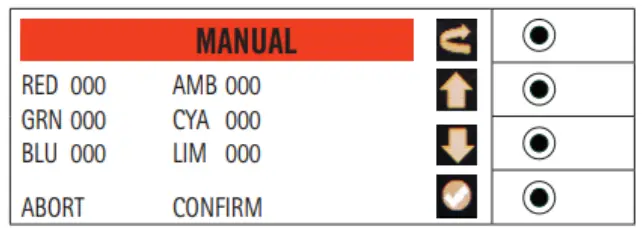 | Push UP or DOWN to select which item to edit (RED, GREEN,. )Press ENTER to proceed with the editing: the value next to the item lights up. Use the dimmer potentiometer to edit the valuePress ENTER to confirm the editing, ESC to go back Once all the desired items are edited:- move to CONFIRM and press ENTER to confirm or move to ABORT and press ENTER to cancel the changes- press ESC on any entry to exit without saving the changes.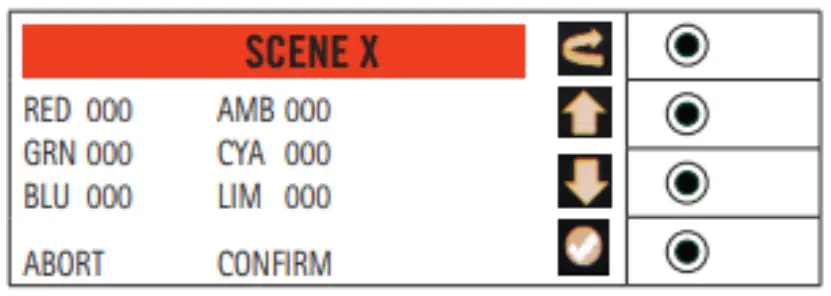
| Push UP or DOWN to select which item to edit (RED, GREEN,..)Press ENTER to proceed with the editing: the value next to the item lights up. Use the dimmer potentiometer to edit the valuePress ENTER to confirm the editing, ESC to go back Once all the desired items are edited:- move to CONFIRM and press ENTER to confirm or move to ABORT and press ENTER to cancel the changes- press ESC on any entry to exit without saving the changesRead How to set the colour custom presets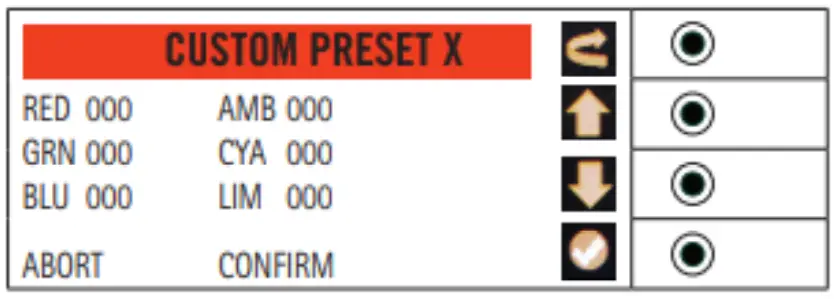 |
Logistics
The following table shows the weights and dimensions of the fixtures and the relative packaging.
| Fixture | Packing | Code | |||||||||
| Power | Type | Code | Weight (kg) | Dimensions (cm) | Weight (kg) | Dimensions (cm) | |||||
| Length | Width | Height | Length | Width | Height | ||||||
50W | Fresnel | FN LED 50 CW / WW | 3 | 25 | 16 | 27 | 3,5 | 40 | 22 | 22 | 94054210 |
| FN LED 50 RGBW | |||||||||||
| PC | PC LED 50 CW / WW | 29 | 51 | 26 | 26 | ||||||
| Profile | PR LED 50 ZS WW / RGBW | 4 | 5 | ||||||||
| Accessories | TC MINI | 0,1 | 10 | 0,4 | 10 | 0,1 | 10 | 0,4 | 10 | 94059900 | |
| PL 4 MIN | 0,4 | 15,5 | 11,5 | 3,3 | 0,5 | 18 | 13 | 4,4 | |||
| PGM MIZO | 0,1 | 15,3 | 6,7 | 5 | 0,1 | 15,3 | 6,7 | 5 | |||
100W | Fresnel | FN HY LED 100 CW / WW | 3,5 | 31 | 22 | 29 | 4,1 | 38,5 | 22,5 | 18,5 | 94054210 |
| PC | PC HY LED 100 CW / WW | ||||||||||
| Profile | PR HY LED 100 ZS CW / WW | 6,2 | 54 | 34 | 40 | 7,6 | 57 | 27,5 | 27,5 | ||
| PR HY LED 100 ZW CW / WW | 6 | 45 | 7,4 | ||||||||
Accessories | TC S05 | 0,1 | 14 | 0,4 | 14 | 0,1 | 14 | 0,4 | 14 | 94059900 | |
| PL 4 U05 | 0,8 | 22,5 | 17 | 3,5 | 0,9 | 24,5 | 19 | 5,5 | |||
| DIA 05 | 0,3 | 8,5 | 10,5 | 2,5 | 0,3 | 21 | 13 | 5 | |||
| PGB R 100 | 0,1 | 21 | 10 | 0,5 | 0,1 | 10 | 0,5 | ||||
200W | Fresnel | FN HY LED 200 CW / WW | 6 | 36 | 30 | 35 | 6,7 | 46,5 | 31,5 | 38 | 94054210 |
| FN HY LED 200 TW / RGBW / 6C | 7,5 | 45 | 39 | 8,7 | |||||||
| PC | PC HY LED 200 CW / WW | 6 | 36 | 35 | 6,7 | ||||||
| PC HY LED 200 TW / RGBW / 6C | 7,5 | 45 | 39 | 8,7 | |||||||
| Profile | PR HY LED 200 ZS CW / WW / TW / RGBW / 6C | 11,5 | 76 | 34 | 47 | 13,5 | 92 | 36 | 40 | ||
| PR HY LED 200 ZW CW / WW / TW / RGBW / 6C | 11 | 64 | 12,5 | 82 | 34 | 37 | |||||
Accessories | TC HY 200 | 0,1 | 18,5 | 0,4 | 18,5 | 0,1 | 18,5 | 0,4 | 18,5 | 94059900 | |
| PL 4 HY 200 | 1 | 28,5 | 21 | 4 | 1,1 | 34 | 23 | 5,5 | |||
| DIA HY | 0,2 | 21,7 | 12 | 1,3 | 0,3 | 25 | 18 | 1,5 | |||
| PGB HY | 0,1 | 24 | 9,5 | 0,4 | 0,1 | 24 | 9,5 | 0,4 | |||
| PR HY OP ZS | 6,2 | 48 | 25,5 | 23 | 7,6 | 71 | 36 | 40 | |||
| PR HY OP ZW | 5,2 | 36 | 6,5 | 46,5 | 31,5 | 38 | |||||
300W | Fresnel | FN HY LED 300 CW / WW / TW / 6C | 9,5 | 48 | 30 | 43 | 10,9 | 71 | 36 | 40 | 94054210 |
| PC | PC HY LED 300 CW / WW / TW / 6C | 12,5 | 57 | 47 | 13,5 | ||||||
| Profile | PR HY LED 300 ZS CW / WW / TW / 6C | 15 | 76 | 34 | 18,5 | 92 | |||||
| PR HY LED 300 ZW CW / WW / TW / 6C | 14 | 64 | 18 | ||||||||
| Followspot | FS HY LED 300 CW | 19 | 100 | 35 | 35 | 22 | 115 | 40 | |||
| Cyclorama | CYC LED 300 RGBW | 15 | 57 | 43 | 25 | 18,2 | 61 | 57 | 33 | ||
Accessories | TC S25 | 0,3 | 25 | 0,4 | 25 | 0,3 | 25 | 0,4 | 25 | 94059900 | |
| PL 4 U25 | 1,7 | 38 | 27 | 3,5 | 1,7 | 42 | 29 | 5,5 | |||
| PL 8 U25 | 2 | 2 | |||||||||
| PL 4 HY3 PLUS | |||||||||||
700W | Fresnel | FN HY LED 700 CW / WW / TW / 8C | 18 | 60 | 40 | 50 | 94054210 | ||||
| PC | PC HY LED 700 CW / WW / TW / 8C | 20 | 69 | ||||||||
| Profile | PR HY LED 700 ZS CW / WW / TW / 8C | 31 | 127 | 47 | |||||||
| PR HY LED 700 ZW CW / WW / TW / 8C | 28 | 92 | |||||||||
| Followspot | FS HY LED 700 CW | 36 | 144 | 42 | |||||||
Accessories | TC HY 700 | 0,4 | 30 | 30 | 0,4 | 0,4 | 30 | 30 | 0,4 | 94059900 | |
| PL 4 HY 700 | |||||||||||
| DIA HY 700 | |||||||||||
| PGB HY 700 | |||||||||||
 Spotlight – Official site