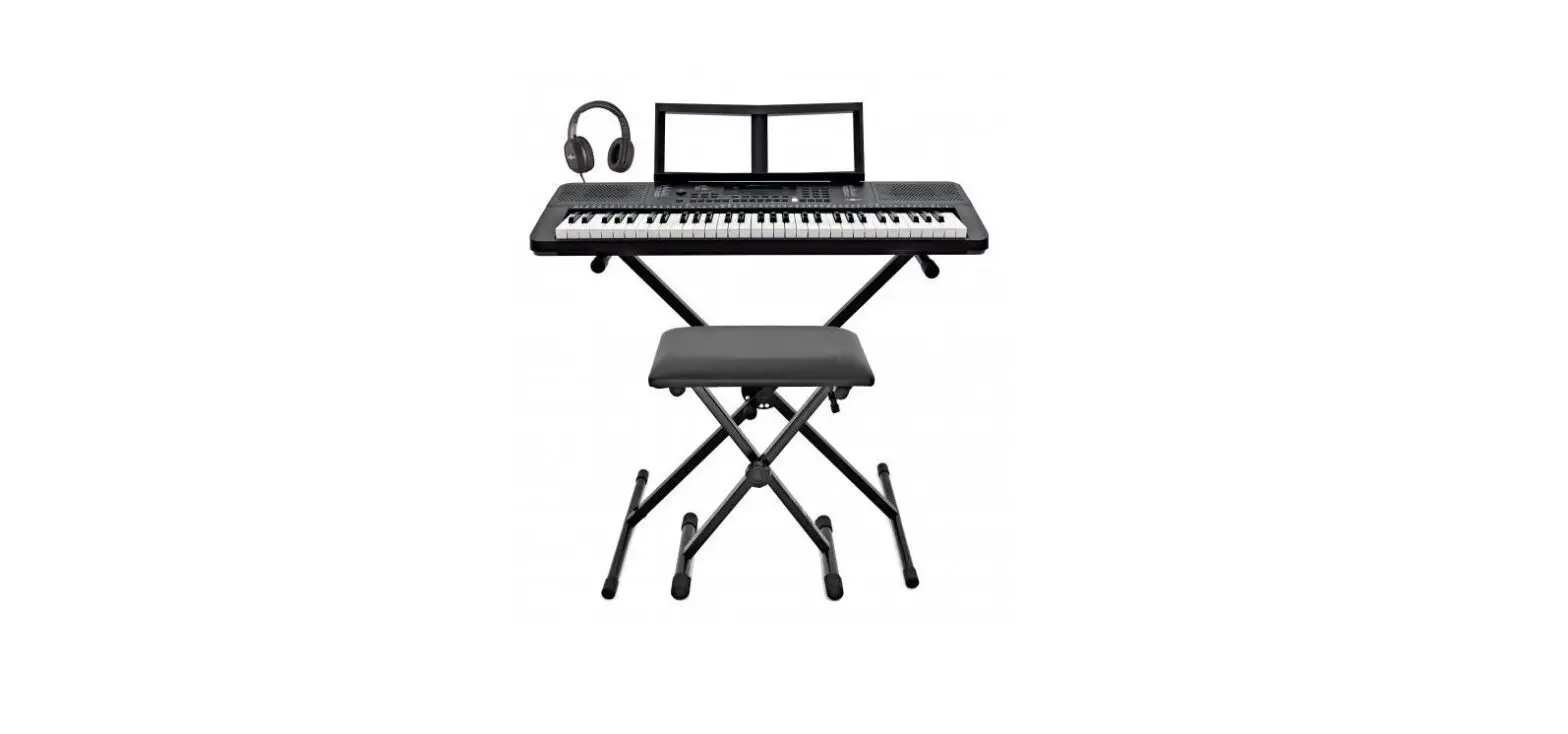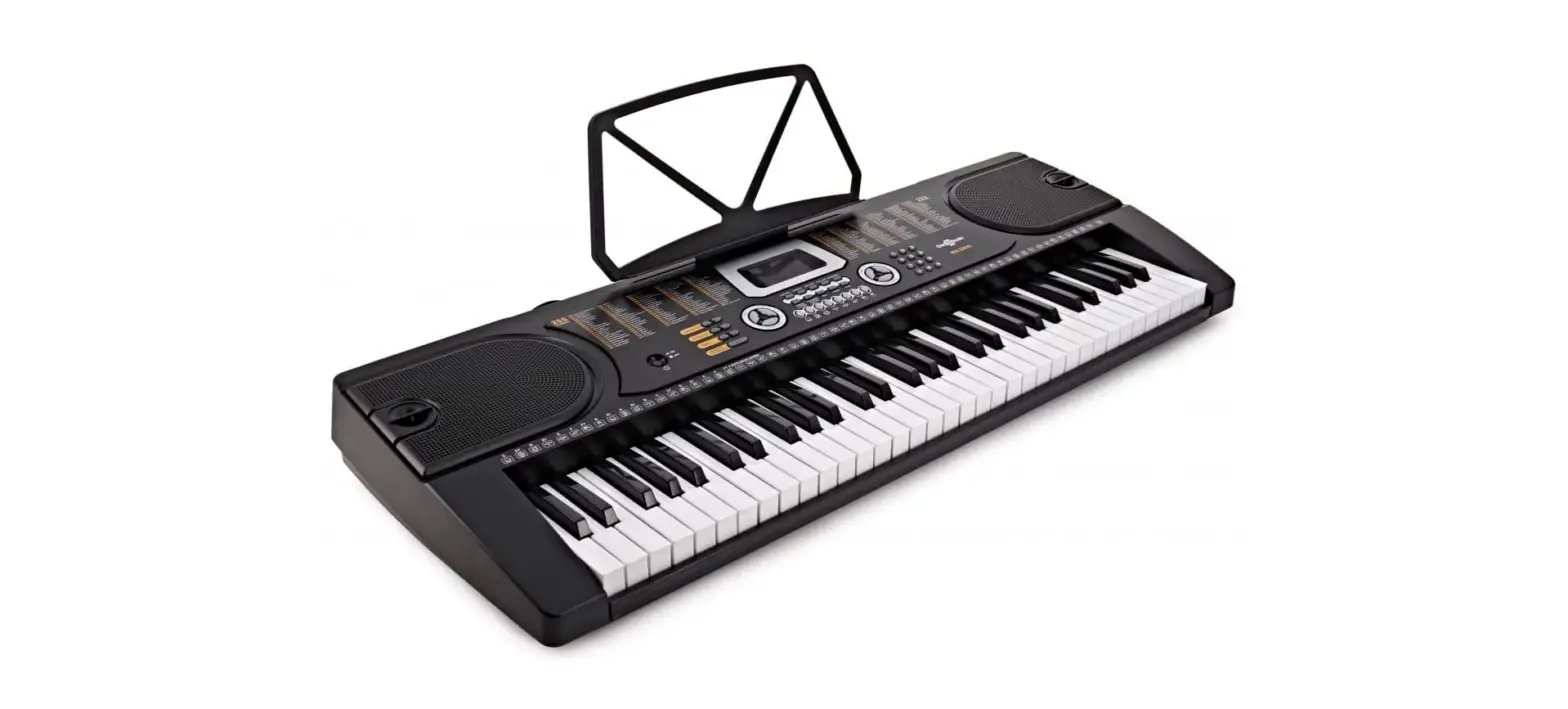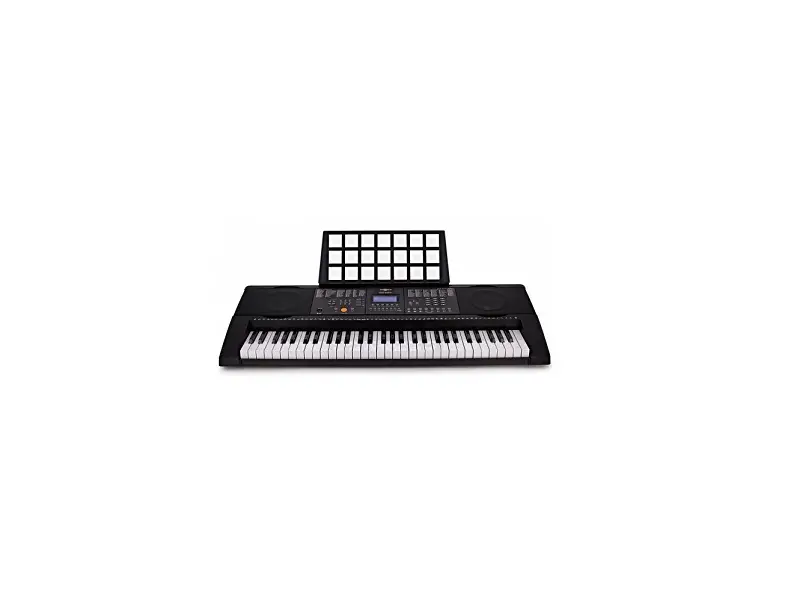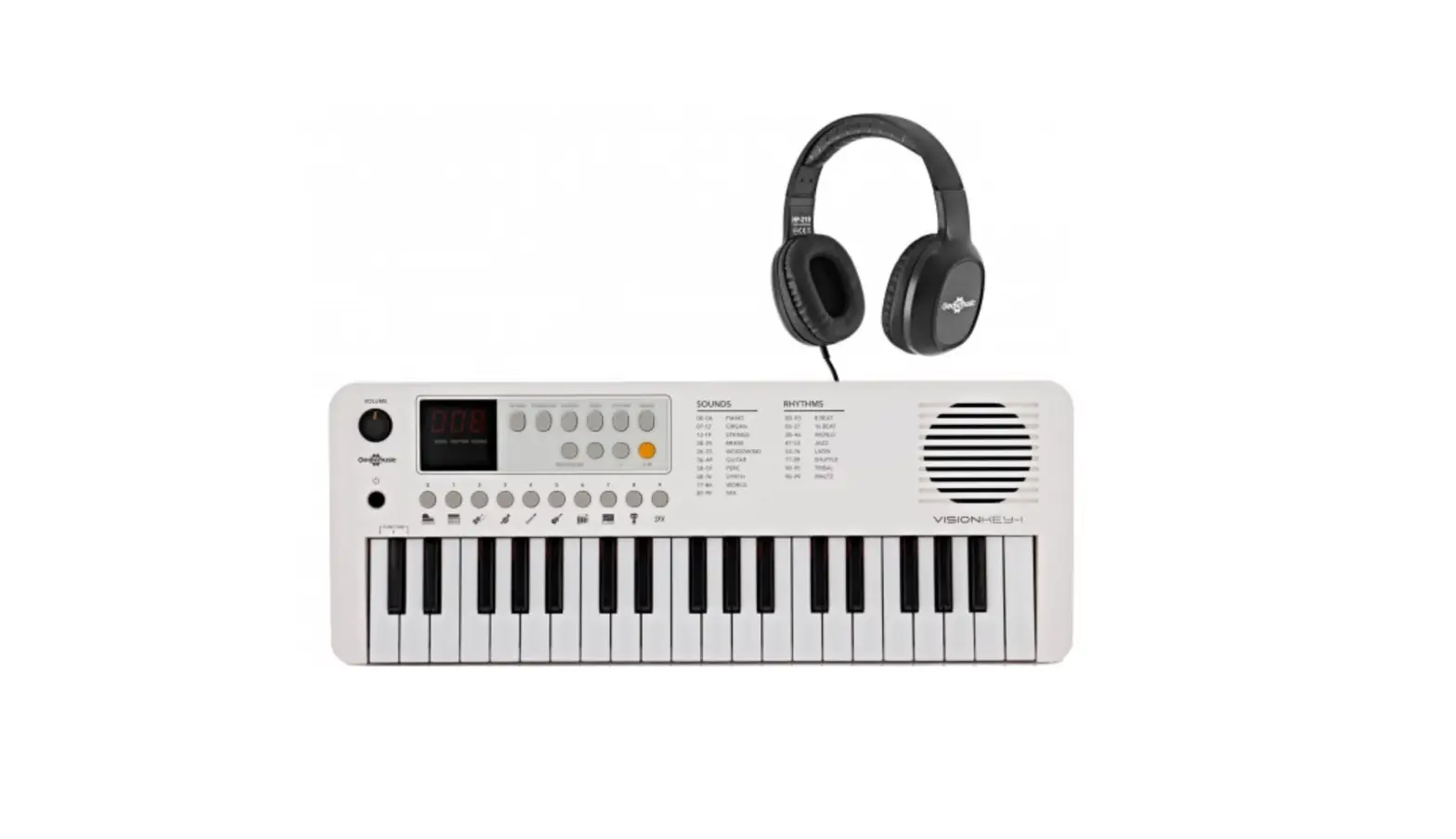
Gear4music VISIONKEY-1 37 KEY MINI KEYBOARD User Manual
WARNING!
- Do not open cover. No user-serviceable parts inside. Refer servicing to qualified service personnel
- Do not place the product in a location near a heat source such as a radiator, or in an area subject to direct sunlight, excessive dust, mechanical vibration or shock
- The product must not be exposed to dripping or splashing and no objects filled with liquids, such as vases, shall be placed on the product
- No naked flame sources, such as lighted candles, should be placed on the product
- Allow adequate air circulation and avoid obstructing vents (if present) to prevent internal heat build-up. The ventillation must not be impeded by covering the appliance with items such as newspapers, table-cloths, curtains etc.
- If used improperly, batteries may explode or leak and cause damage or injury. In the interest of safety:
- Make sure you observe the correct polarity when replacing batteries
- Avoid using new batteries together with used ones
- Avoid mixing different types of batteries
- Remove batteries if the appliance is to remain unused for an extended period of time
- Never keep batteries together with metallic objects such as ballpoint pens, necklaces, hairpins, etc.
- Used batteries must be disposed of in compliance with whatever regulations for their safe disposal that may be observed in the region in which you live.
- Batteries must not be exposed to excessive heat such as sunshine, fire or the like.
- Danger of explosion if battery is incorrectly replaced. Replace only with the same or equivalent type.
INTRODUCTION
Thank you for purchasing the VISIONKEY-1. To get the most out of your product, please read this manual carefully.
BOX CONTENTS
- VISIONKEY-1 Keyboard
- USB-C Cable
- User Manual
FEATURES
- 37 Mini Keys
- 100 Sounds
- 100 Rhythms
- 30 Songs
- 32 Note Polyphony
- Stereo 3.5mm Headphones Output
FUNCTIONS
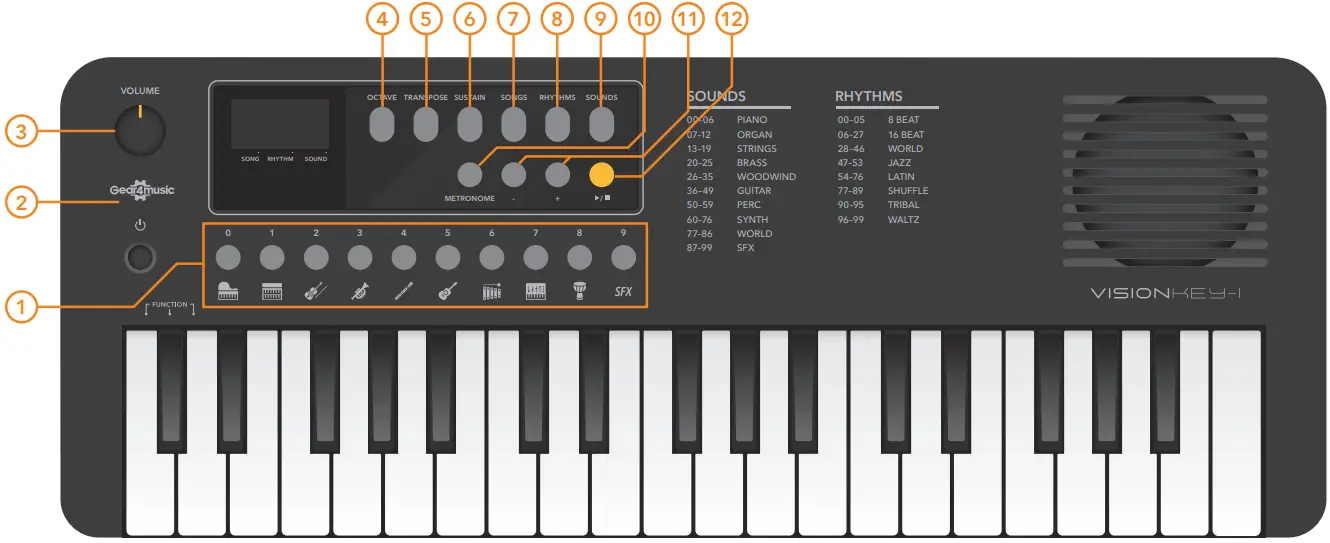
FRONT PANEL
- SOUND SELECT
In Sound select mode, press these buttons repeatedly to select and scroll through the instrument sound banks. In Rhythm and Song select modes, these buttons function as 0-9 and allow rhythms or songs to be selected by number.
When inputting both 1-digit or 2-digit numbers, allow a second after selecting for the instruction to be recognised. - POWER
Press to turn the keyboard on/off.
For energy saving, the keyboard will automatically power off after 30mins of not being used. This setting can be turned off in the function menu. - VOLUME
Adjusts the master volume. Turn clockwise to increase the volume and anti-clockwise to decrease the volume. - OCTAVE
Press the OCTAVE button and then use the +/- SELECT buttons to the desired octave range (+/- 1 octave). - TRANSPOSE
Press the TRANSPOSE button and then use the +/- SELECT buttons to the desired transpose amount (+/- 12 semitones). - SUSTAIN
Press the SUSTAIN button to add a sustain effect to all notes played. Press the button again to turn off this effect. - SONGS
Press SONGS to enter song select mode. The SELECT +/- buttons can now be used to select the previous or next song. - RHYTHMS
Press RHYTHMS to enter rhythm select mode.
The SELECT +/- buttons can now be used to select the previous or next rhythm. - SOUNDS
Press SOUNDS to enter sound select mode. The SELECT +/- buttons can now be used to select the previous or next sound. - METRONOME
Press METRONOME to start/stop metronome playback. The metronome tempo and type can be adjusted from 30-280bpm via the function menu. Default tempo is 95bpm. - SELECT
Use the SELECT +/- buttons to select the previous or next Sound, Rhythm or Song or edit function parameters, depending on the mode selected. - START/STOP
Press to start/stop the currently selected rhythm or song.
BACK PANEL
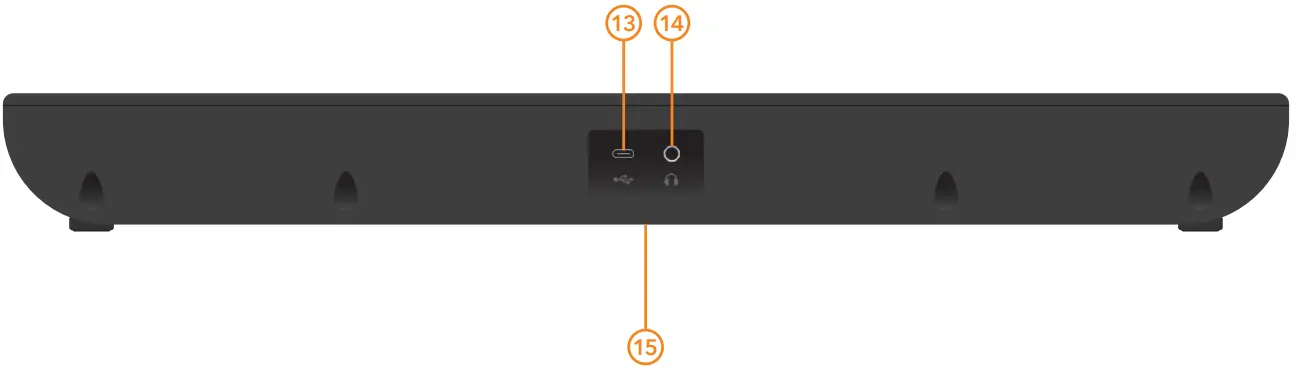
- USB POWER INPUT
Connect the supplied USB-C cable to a compatible adaptor (not supplied) or device to power the keyboard. - HEADPHONES OUTPUT
3.5mm output for connecting standard stereo headphones, ideal for quiet practice. - BATTERY COMPARTMENT
Remove this compartment to install 4 x AA batteries (not supplied) to power the keyboard, paying attention to the polarity markings when installing. Remove carefully and replace when batteries run low. Always remove the batteries if the instrument will not be used for a long period.
To adjust parameters via the FUNCTION menu, press and hold the three left-hand keyboard keys followed by the corresponding key of the required function to adjust (as indicated on the diagram).
“Eng” (Function Engaged) will be shown on the display. Now use the +/- SELECT keys to adjust the chosen parameter as required. Holding down both the +/- SELECT buttons simultaneously will return the selected parameter to its default setting.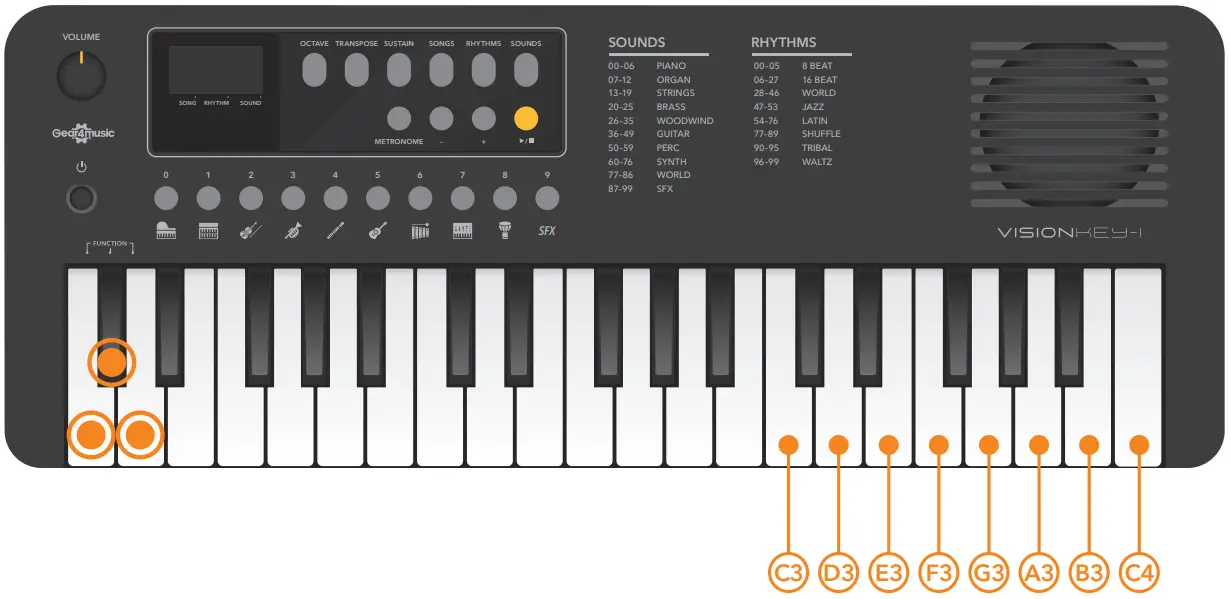
KEY | PARAMETER | RANGE | DEFAULT | DESCRIPTION |
| C3 | TEMPO (BPM) | 30-280 | 95 | Press this key and then use the +/- SELECT buttons to adjust the tempo for Metronome, Rhythms and Songs. |
| D3 | ACCOMPANIMENT VOLUME | 0-15 | 14 | Press this key and then use the +/- SELECT buttons to adjust the volume for Metronome, Rhythms and Songs. |
| E3 | METRONOME ACCENT | 0-16 | 04 | Press this key and then use the +/- SELECT buttons to adjust the time signature of the metronome. |
| F3 | SONG MELODY | ON/OFF | ON | Press this key to turn the main melody of the songs on/off, for practising purposes. |
| G3 | RHYTHM SYNC-START | ON/OFF | OFF | Press this key to turn the sync-start on/off. When sync-start is on, the selected rhythm automatically starts playing once any keyboard key is played. |
| A3 | AUTO POWER OFF TIME | 5,10,15,30,60,120 MINUTES | 30 | Press this key to adjust the amount of time before the auto power off occurs when not using the keyboard. |
| B3 | AUTO POWER OFF | ON/OFF | ON | Press this key to turn the auto power off function on/off. |
| C4 | TUNING | -50/+50 CENTS | 00 | Press this key and then use the +/- SELECT buttons to |
SOUNDS LIST
| No. | Name |
| PIANO | |
| 0 | Acoustic Grand Piano |
| 1 | Bright Acoustic Piano |
| 2 | Honky-Tonk Piano |
| 3 | Chorus Piano |
| 4 | Harpsichord |
| 5 | Clavichord |
| 6 | Electric Piano |
| ORGAN | |
| 7 | Hammond Organ |
| 8 | Percussive Organ |
| 9 | Church Organ |
| 10 | Reed Organ |
| 11 | Accordion |
| 12 | Harmonica |
| STRINGS | |
| 13 | Violin |
| 14 | Viola |
| 15 | Cello |
| 16 | Contrabass |
| 17 | Pizzicato Strings |
| 18 | Orchestral Harp |
| 19 | Electronic String Ensemble |
| BRASS | |
| 20 | Trumpet |
| 21 | Trombone |
| 22 | Tuba |
| 23 | Muted Trumpet |
| 24 | French Horn |
| 25 | Synth Brass |
| WOODWIND | |
| 26 | Saxophone |
| 27 | Oboe |
| 28 | Cor Anglais |
| 29 | Bassoon |
| 30 | Clarinet |
| 31 | Piccolo |
| 32 | Flute |
| 33 | Bottle Blow |
| 34 | Ocarina |
| 35 | Bass Oboe |
| GUITAR | |
| 36 | Acoustic Guitar (nylon) |
| 37 | Acoustic Guitar (steel) |
| 38 | Electric Guitar (jazz) |
| 39 | Electric Guitar (clean) |
| 40 | Overdrive Guitar |
| 41 | Guitar Harmonics |
| 42 | Acoustic Bass |
| 43 | Electric Bass (finger) |
| 44 | Electric Bass (pick) |
| 45 | Fretless Bass |
| 46 | Slap Bass 1 |
| 47 | Slap Bass 2 |
| 48 | Synth Bass 1 |
| 49 | Synth Bass 2 |
| TUNED PERCUSSION | |
| 50 | Celesta |
| 51 | Glockenspiel |
| 52 | Music Box |
| 53 | Vibraphone |
| 54 | Marimba |
| 55 | Xylophone |
| 56 | Tubular Bells |
| 59 | 16 Beat Latin 6 |
| 60 | Bossa Nova 1 |
| 61 | Bossa Nova 2 |
| 62 | Heavy Latin 1 |
| 63 | Heavy Latin 2 |
| 64 | Heavy Latin 3 |
| 65 | Heavy Latin 4 |
| 66 | Heavy Latin 5 |
| 67 | Pop Samba |
| 68 | Power Latin |
| 69 | Power Samba 1 |
| 70 | Power Samba 2 |
| 71 | Power Samba 3 |
| 72 | Rock Latin 1 |
| 73 | Rock Latin 2 |
| 74 | Salsa |
| 75 | Samba |
| 76 | Soft Bossa Nova |
| SHUFFLE | |
| 77 | 6/8 Beat |
| 78 | 6/8 Rock |
| 79 | Shuffle 1 |
| 80 | Shuffle 2 |
| 81 | Shuffle 3 |
| 82 | Shuffle 4 |
| 83 | Chamber Pop |
| 84 | World Shuffle 1 |
| 85 | World Shuffle 2 |
| 86 | World Shuffle 3 |
| 87 | World Shuffle 4 |
| 88 | World Shuffle 5 |
| 89 | Latin Shuffle |
| TRIBAL | |
| 90 | 8 Beat Tribal |
| 91 | 16 Beat Tribal 1 |
| 92 | 16 Beat Tribal 2 |
| 93 | 16 Beat Tribal 3 |
| 94 | 16 Beat Tribal 4 |
| 95 | 16 Beat Tribal 5 |
| WALTZ | |
| 96 | Waltz Ride |
| 97 | Power Waltz 1 |
| 98 | Power Waltz 2 |
| 99 | Power Waltz 3 |
RHYTHMS LIST
| No. | Name |
| 8 BEAT | |
| 0 | 8 Beat 1 |
| 1 | 8 Beat 2 |
| 2 | 8 Beat 3 |
| 3 | 8 Beat 4 |
| 4 | Dance |
| 5 | Rock Dance |
| 16 BEAT | |
| 6 | 16 Beat 1 |
| 7 | 16 Beat 2 |
| 8 | 16 Beat 3 |
| 9 | 16 Beat 4 |
| 10 | 16 Beat 5 |
| 11 | 16 Beat 6 |
| 12 | 16 Beat 7 |
| 13 | 16 Beat Accent 1 |
| 14 | 16 Beat Accent 2 |
| 15 | 16 Beat Ballad 1 |
| 16 | 16 Beat Ballad 2 |
| 17 | 16 Beat Funk |
| 18 | 16 Beat Ride |
| 19 | 16 Beat Rock 1 |
| 20 | 16 Beat Rock 2 |
| 21 | 16 Beat Rock 3 |
| 22 | Funk |
| 23 | Heavy Ballad |
| 24 | Power Funk |
| 25 | R&B 1 |
| 26 | R&B 2 |
| 27 | R&B 3 |
| WORLD | |
| 28 | Bolero |
| 29 | UK Rumba 1 |
| 30 | UK Rumba 2 |
| 31 | Calypso |
| 32 | World Rock |
| 33 | Joropo |
| 34 | Lambada |
| 35 | Mambo 1 |
| 36 | Mambo2 |
| 37 | March 1 |
| 38 | March 2 |
| 39 | Merengue |
| 40 | Oriental 1 |
| 41 | Oriental 2 |
| 42 | Polka |
| 43 | Power Polka |
| 44 | Rumba 1 |
| 45 | Rumba 2 |
| 46 | Tango |
| JAZZ | |
| 47 | Jazz Ride 1 |
| 48 | Jazz Ride 2 |
| 49 | Jazz Ride 3 |
| 50 | Jazz Shuffle 1 |
| 51 | Jazz Shuffle 2 |
| 52 | Jazz Waltz 1 |
| 53 | Jazz Waltz 2 |
| LATIN | |
| 54 | 8 Beat Latin |
| 55 | 16 Beat Latin 1 |
| 56 | 16 Beat Latin 2 |
| 57 | 16 Beat Latin 3 |
| 58 | 16 Beat Latin 5 |
| 59 | 16 Beat Latin 6 |
| 60 | Bossa Nova 1 |
| 61 | Bossa Nova 2 |
| 62 | Heavy Latin 1 |
| 63 | Heavy Latin 2 |
| 64 | Heavy Latin 3 |
| 65 | Heavy Latin 4 |
| 66 | Heavy Latin 5 |
| 67 | Pop Samba |
| 68 | Power Latin |
| 69 | Power Samba 1 |
| 70 | Power Samba 2 |
| 71 | Power Samba 3 |
| 72 | Rock Latin 1 |
| 73 | Rock Latin 2 |
| 74 | Salsa |
| 75 | Samba |
| 76 | Soft Bossa Nova |
| SHUFFLE | |
| 77 | 6/8 Beat |
| 78 | 6/8 Rock |
| 79 | Shuffle 1 |
| 80 | Shuffle 2 |
| 81 | Shuffle 3 |
| 82 | Shuffle 4 |
| 83 | Chamber Pop |
| 84 | World Shuffle 1 |
| 85 | World Shuffle 2 |
| 86 | World Shuffle 3 |
| 87 | World Shuffle 4 |
| 88 | World Shuffle 5 |
| 89 | Latin Shuffle |
| TRIBAL | |
| 90 | 8 Beat Tribal |
| 91 | 16 Beat Tribal 1 |
| 92 | 16 Beat Tribal 2 |
| 93 | 16 Beat Tribal 3 |
| 94 | 16 Beat Tribal 4 |
| 95 | 16 Beat Tribal 5 |
| WALTZ | |
| 96 | Waltz Ride |
| 97 | Power Waltz 1 |
| 98 | Power Waltz 2 |
| 99 | Power Waltz 3 |
SONG LIST
| No. | Name |
| 0 | Turkish March |
| 1 | Red River Valley |
| 2 | American Patrol |
| 3 | Susanna |
| 4 | Mozart Piano Sonata |
| 5 | Polka |
| 6 | Jingle Bells |
| 7 | Radetzky March |
| 8 | Mozart Symphony No. 40 |
| 9 | Clap Your Hands |
| 10 | Fur Elise |
| 11 | Katyusha |
| 12 | Minuet in G Major |
| 13 | Espana Gani |
| 14 | Serenade |
| 15 | Yankee Doodle |
| 16 | Rhythm of the Rain |
| 17 | Frosty the Snowman |
| 18 | The Blue Danube |
| 19 | Little Brown Jug |
| 20 | Babylon River |
| 21 | Polly Wolly Doodle |
| 22 | Long Ago |
| 23 | Christmas Eve |
| 24 | Hungarian Dance |
| 25 | Fountain |
| 26 | Mary Had a Little Lamb |
| 27 | Music Box Dancer Spring of the Four Seasons 29 Destinies |
| 28 | Spring |
| 29 | Destinies |
SPECIFICATIONS
- Keys: 37 Mini
- Polyphony: 32
- Sounds: 100
- Rhythms: 100
- Songs: 30
- Dimensions (H x W x D): 60 x 490 x 186 mm
- Weight: 1.0kg
- Power: USB-C
- Output: 3.5mm Headphones Output
- Amplifier: 2W
- Speaker: 1 x 8cm
Contact Us
KETTLESTRING LANE YORK YO30 4XF UNITED KINGDOM
METALLVÄGEN 45A | 195 72 ROSERSBERG | STOCKHOLM | SVERIGE
LAHNSTRAßE 27 | 45478 MÜLHEIM AN DER RUHR | DEUTSCHLAND
If you have any more questions about this product, please do not hesitate to contact the Gear4music Customer Service
Team on: +44 (0) 330 365 4444 or
[email protected]