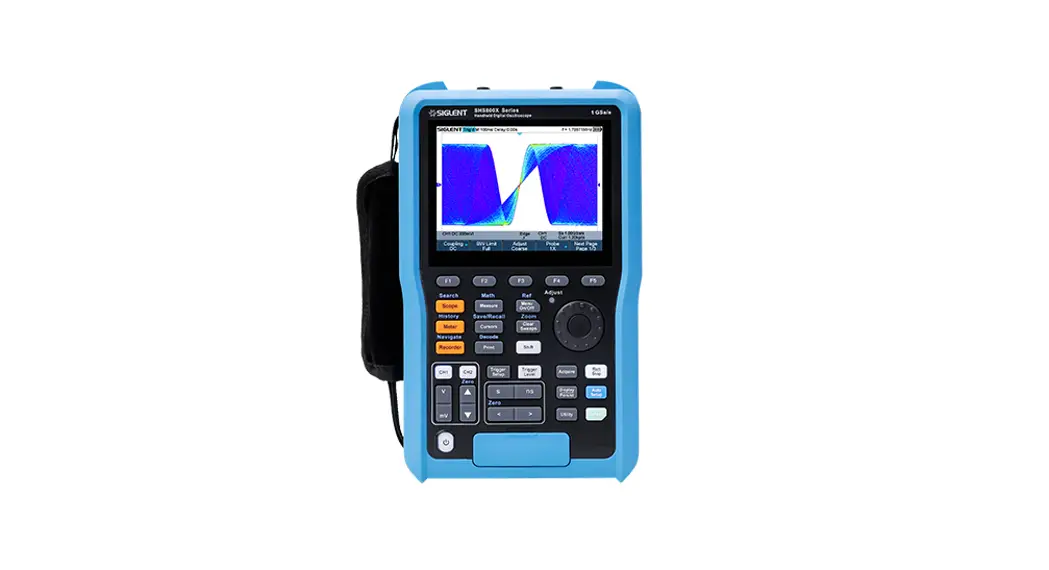

SHS800X
SHS1000X
Handheld Digital
Oscilloscope Quick Start QS_EN01D 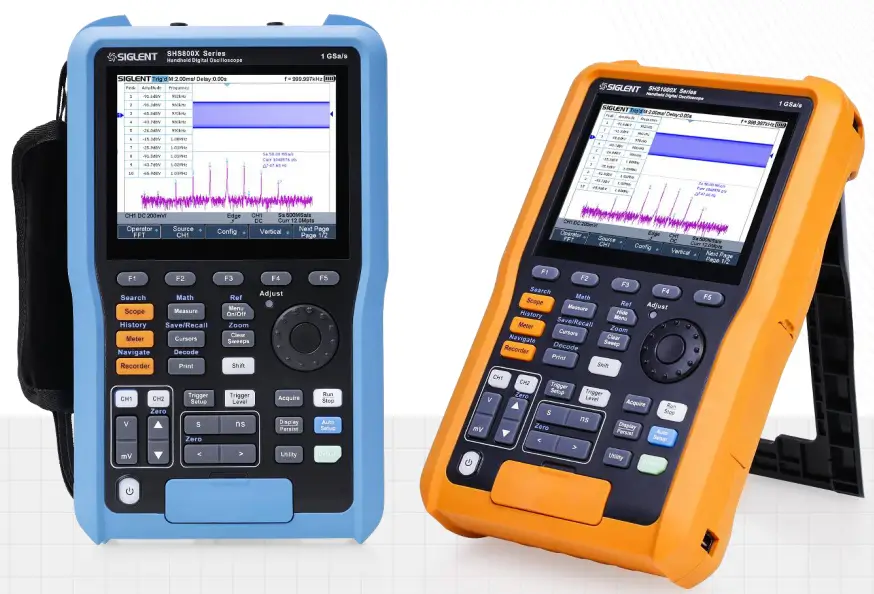
SIGLENT TECHNOLOGIES CO.,LTD
Copyright Information
Declaration
SIGLENT products are protected by patent law in and outside of P.R.C.
SIGLENT reserves the right to modify or change parts of or all the specifications or pricing policies at the company’s sole decision.
Information in this publication replaces all previously corresponding material.
Any method of copying, extracting or translating the contents of this manual is not allowed without the permission of SIGLENT.
Note: SIGLENT is the registered trademark of SIGLENT TECHNOLOGIES CO., LTD.
General Safety Summary
Carefully read the safety precautions in the user’s manual to avoid any personal injury or damage to the instrument and avoid any products connected to it. To avoid potential hazards, please use the instrument as specified.
Safety Terms and Symbols
The meaning of symbols
| symbol | meaning | symbol | meaning |
 | Warning |  | Power Switch |
 | Hazardous Voltage |  | Equipment meeting double insulation or reinforced insulation |
 | EarthGround |  | Indoor use only |
 | Lithium battery failure |  | EU label for separately recycled electrical and electronic equipment |
Cue and its meaning
DANGER Indicates direct injury or hazards that may happen.
WARNING Indicates potential injury or hazards that may happen.
CAUTION Indicates potential damage to the instrument or other property that may happen.
Measurement Category
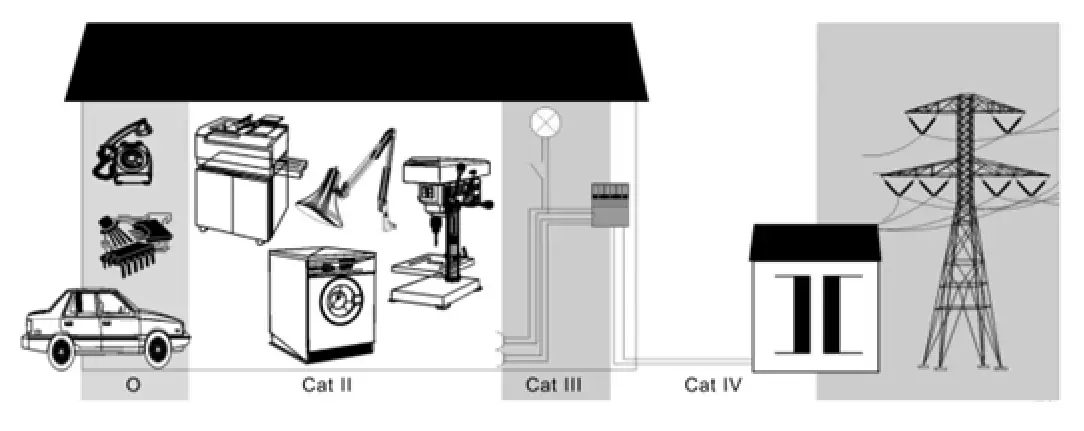
IEC61010-2-030 defines the measurement category to rate the ability to measure instruments to withstand short-term transient overvoltage outside of the working voltage. This product and its accessories can only be used in the environment of the nominal measurement category.
- 0-An instrument with no rated measurement category is used to measure circuits that are not directly connected to the mains, such as a circuit board powered by a battery or a secondary circuit with special protection. This measurement category is also called CATⅠ.
- CAT II: For measurements installed in buildings, such as junction boxes, circuit breakers, distribution boards and equipment permanently connected to fixed installations.
- CAT III: Used for measurements installed in buildings, such as junction boxes, circuit breakers, distribution boards and equipment that are permanently connected to fixed installations.
- CAT IV: It is used for measuring at the source of low-voltage devices, such as electricity meters and primary overcurrent protection devices.
Quick Start
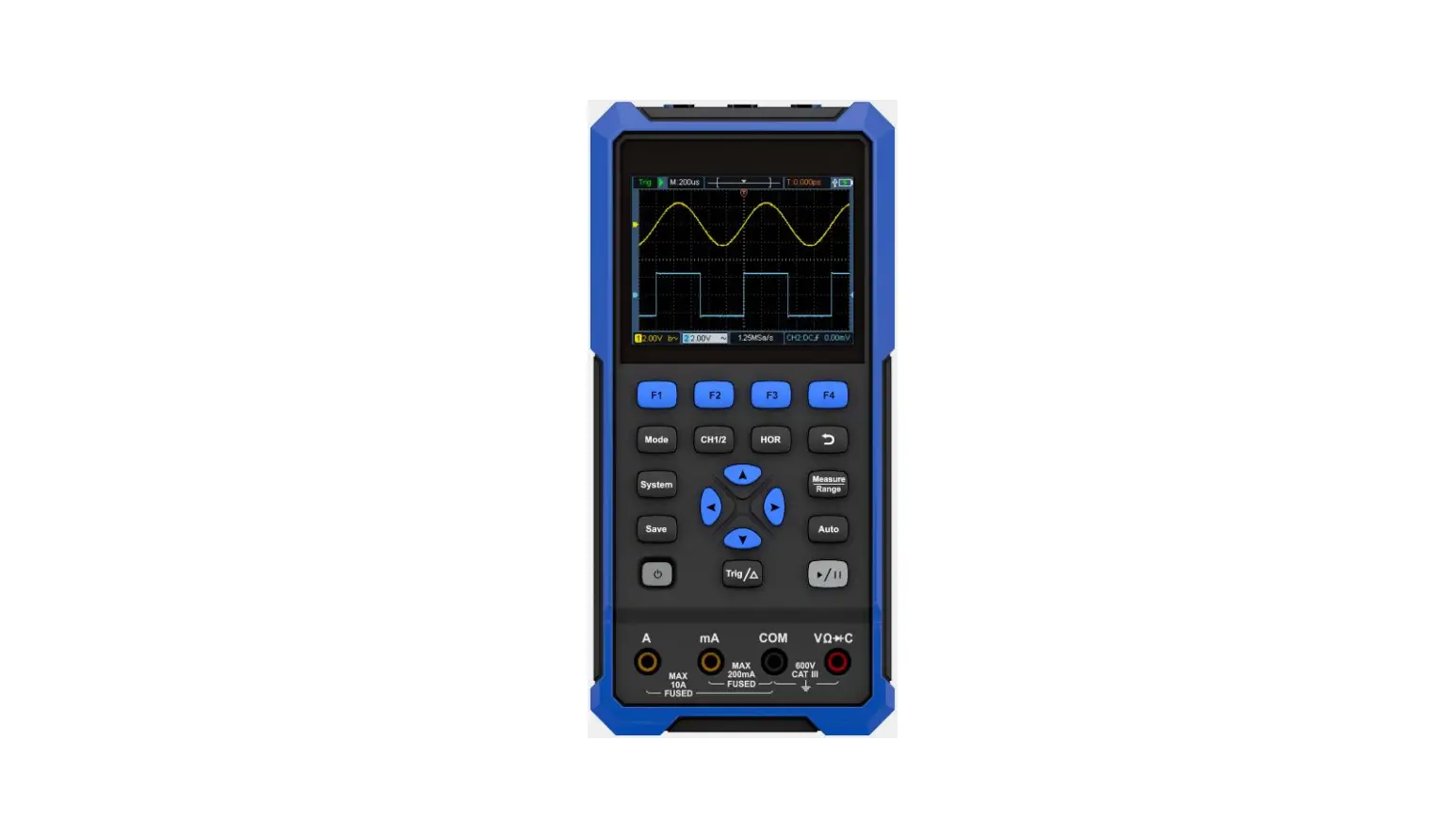
Product Appearance 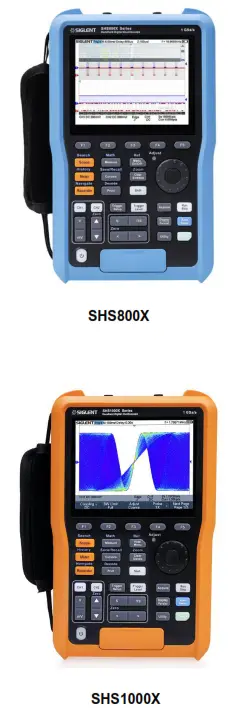
Battery Installation
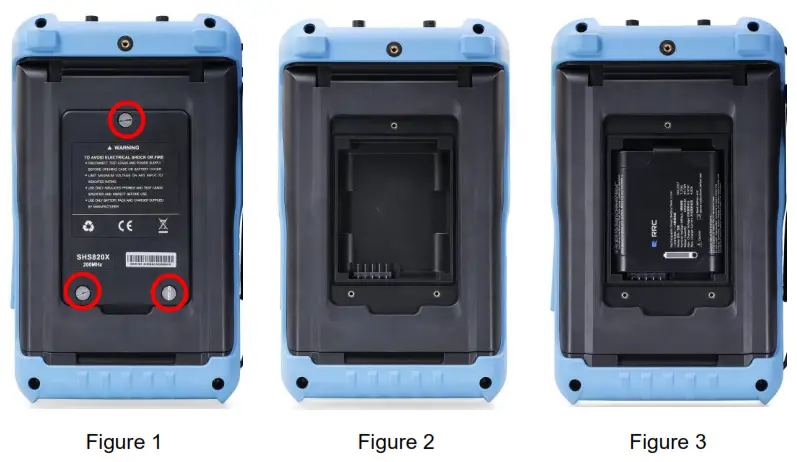
To protect the battery from over-discharging, the battery may be delivered separately. Please install the battery before use as follows:
- Remove the three screws on the battery cover with a screwdriver, as shown in Figure 1.
- Remove the battery cover, as shown in Figure2.
- Put the battery into the battery slot, as shown in Figure3.
- Lock the screws with the screwdriver, as shown in Figure 1, and then turn on the oscilloscope to check whether the battery is installed successfully.
- Connect the DC-DC adapter to the connector on the left side (top view) of the oscilloscope and charge the battery to a full state the first time power on.
Measurement Connection
The SHS800X and SHS1000X series handheld oscilloscope measurement accessories include oscilloscope probes, multimeter probes, current adapters. 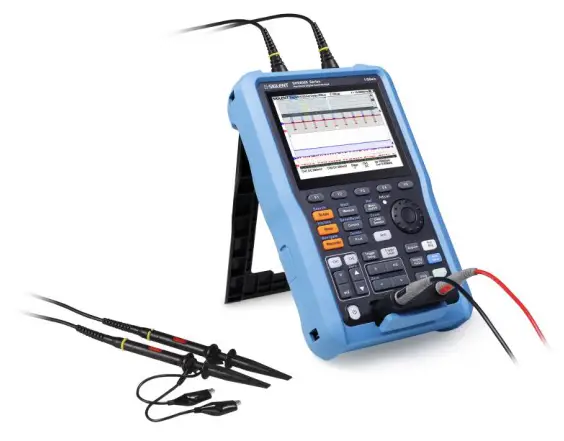
- Oscilloscope probe
All oscilloscope probes should be properly compensated before their first use with the oscilloscope.
The following steps illustrate the proper probe compensation procedure.
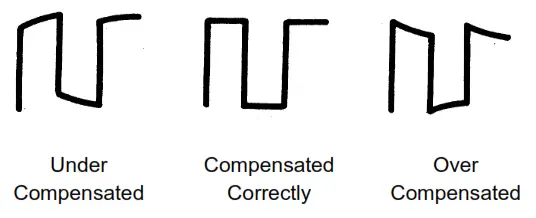
1) Connect the probe to the CH1 Input Terminal and the Compensation Signal Output Terminal on the right side panel. - Check the displayed waveforms and compare them with the following figure.

- Adjust the probe until the waveform matches the “Compensated Correctly” waveform above.
2. Multimeter probe
Before using the multimeter probe,please select the measuring range of the multimeter first, then plug the red probe and black ( grounding terminal ) probe into the corresponding input terminals according to the marking prompt of the front panel. When measuring the current, please select the correct accessories according to the current.
3. Current Adapter
To test current, insert a current adapter between the meter input and the meter probe. There are two different adapters, SCD600MA and SCD10A, which have built-in sampling resistors and fuses, can be used with the multimeter’s mA meter and A meter respectively. 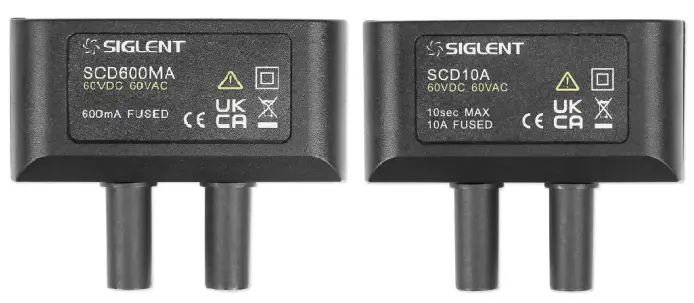
Introduction of Scope Panel
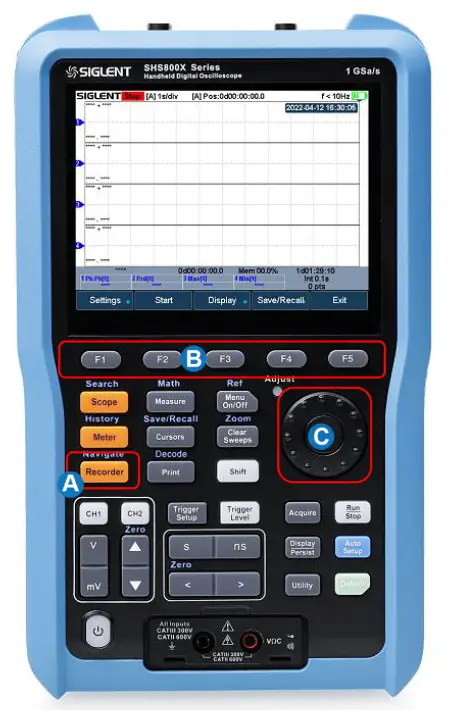
| A | LCD Display | G | Trigger Control |
| B | Menu Softkey | H | Single function Control Buttons |
| C | Multifunction Control Buttons | I | Power Button |
| D | Universal Knob | J | Multimeter Inputs |
| E | Vertical Control | K | Oscilloscope Analog Inputs |
| F | Horizontal Control |
 Vertical Control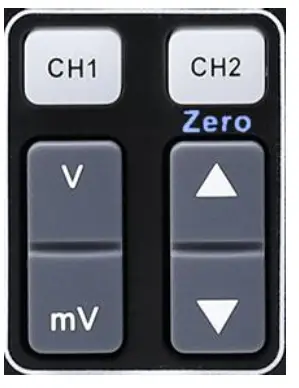
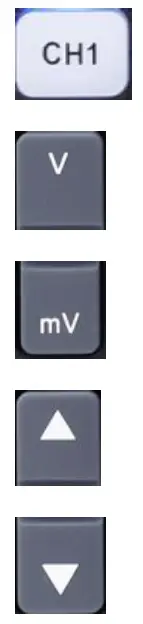 | Analog channel on/off or channel is selected to change. |
| Push to increase the vertical scale of the selected channel | |
| Push to decrease. | |
| Push to increase the vertical offset of the selected channel | |
| Push to decrease. |
When is lit, press
 to set offset to zero quickly?
Horizontal Control 
 | Push to increase the timebase |
| Push to decrease | |
| Push to move the waveform to left | |
| Push to move to right. |
When is lit, press  to set delay to zero quickly?
Trigger Control
 | Push to open trigger menu. This oscilloscope provides various trigger types. Detailed usage of trigger control is described in the user manual. |
| Push to light up the button light, adjusting the universal knob can change the trigger level |
Universal Knob
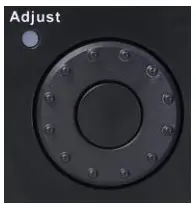 During menu operation, when the light in the upper left corner of the knob is on, you can turn the knob to select among the submenus under the current menu, and press down to select the current submenu. Additionally, it can also be used to modify parameters and input filenames.
For more detailed usage information, please refer to the user manual.
Introduction of Multifunction Menu 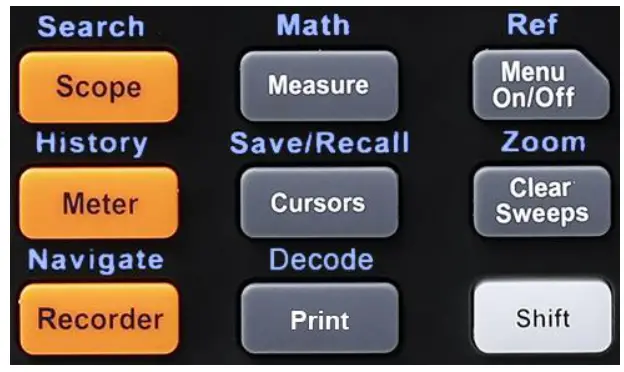
| Button | Description |
| Shift | Press it to light up the button light, and then by pressing the multifunction button one can active the alternate function shown above the function button. |
| When the shift light is off. press these buttons to enter/exit the following functions. | |
| Scope | Push this button can enter to the scope mode. |
| Meter | Push this button can enter to the meter mode. It provides eight measurement types. |
| Recorder | Push this button can enter to the recorder mode. It provides two modes, Sample Logger and Measurement Logger. |
| Measure | This menu provides various measurement types and measurement statistics functions. |
| Cursors | This menu provides manual and track cursor mode. |
| Quick print picture. It is preferentially stored in USB flash disk or local path | |
| Menu On/Off | Controls the hiding and display of the screen menu. |
| Clear Sweeps | Press this button to clear the measurement statistics, clear the persistence, refresh the waveform and other clear functions. |
| When the shift light is on, press these buttons to enter/exit the following functions. | |
| Search | This button can open the search function. It can search the acquired data for a user-specified event, which is displayed with a black triangle symbol. |
| History | This button can open the history function. In history mode, It can record up to 80000 frames of waves. |
| Navigate | This button can open navigate function. It supports three navigation types: time, search event, and history frame. |
| Math | This menu provides various math operation which includes adding, subtracting, multiplying, dividing, FFT, integral, differential and square root. |
| Save/Recall | Save and recall function. The storable file types include Setups, Reference Waveforms, Picture, CSV and FileConverter tool. Recallable file types include setup and reference waveform files. |
| Decode | Supports two serial buses including 1 and 2 for analog signal decoding. The protocols include IIC, SPI, UART, CAN and LIN. |
| Ref | Save the reference waveform. |
| Zoom | This button can open the zoom window. |
Introduction of Singlefunction Menus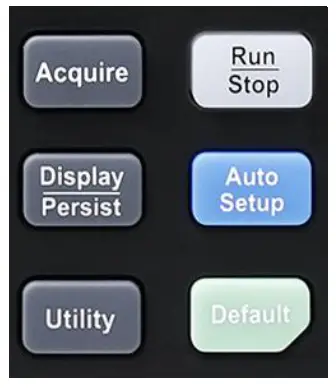
| Button | Description |
| Acquire | Push this button to open the acquire menu. You can set the acquisition mode ( Normal / Peak-Detect / Average / Eres ), interpolation mode ( SinxJX or linear )and memory depth. You could enable the XY function and sequence function |
| Display / Persist | This button can quickly enable the persist function. User can set the grid, intensity, graticule, and transparency. |
| Utility | This menu can set system functions or parameters, such as sound, language, Pass / Fail, Do Self Calibration, and Update firmware. |
| Auto Setup | Push the button can automatically set the waveform to adapt the display according to its frequency and amplitude. |
| Default | Push the button can reset the oscilloscope to the default configuration. |
| Run / Stop | This button provides the ability to enable or stop waveform acquisition. |
Scope User Interface 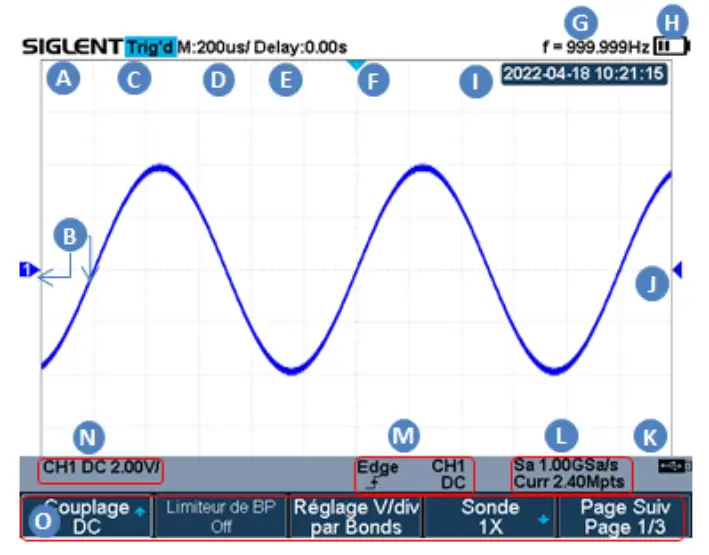
A Company Logo.
B Channel label/waveform, different channels are marked with different colors, the color of the waveform is consistent with the color of the channel.
C Working state, including Arm, Ready, Trig’d, Stop, stop, Auto and Roll.
D Horizontal time base, indicating the duration of each grid is 200us.
E Delay, the time of the screen center position relative to the waveform trigger position.
F The waveform trigger position, press to move to the left or right.
G The frequency meter indicates the frequency of the trigger source.
H Power icon. When the icon is green, it indicates that the battery is charging, and when it is red, it indicates that the battery is low.
I Real-time display.
J Trigger level position, press,  and adjust the universal knob to modify the trigger level.
K Indicates the USB flash drive is connected.
L Indicates the current sample rate and memory depth of the oscilloscope.
MCH1: Indicates the trigger source selected, different labels are displayed when the different trigger sources are selected and the color of the trigger parameter area will change accordingly.
NCH1: Indicates the current trigger coupling mode is DC coupling,  Indicates the current trigger type is rising edge trigger.
DC : Indicates CH1 is open, Indicates the channel is in DC coupling mode, and Indicates  the voltage of each grid is 2V.
O Softkey function menu.
Introduction of Meter Panel
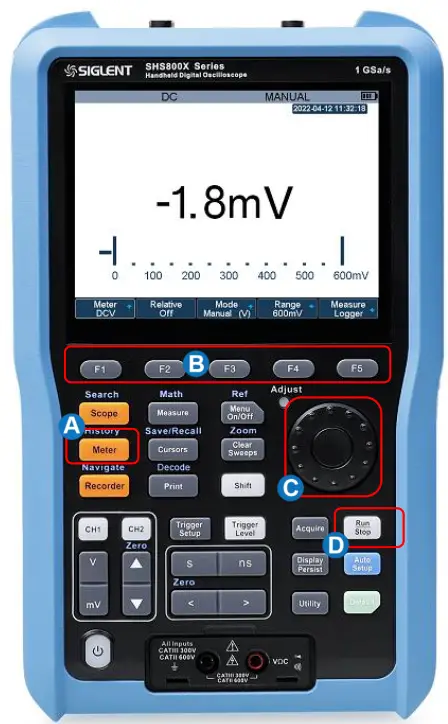
| A | Meter Button | C | Universal Knob |
| B | Menu Softkey | D | Hold Button |
 Introduction of Function Menus
| Button | Description |
| Meter Button | Press to enter multimeter mode. |
| F1—F5 | Press to active Relative, Auto Range, Manual Range, Measurement logger function. |
| Universal Knob | Press to switch measurement ranges in manual mode. Use the knob to quickly switch between ranges and meter functions. |
| Run/Stop Button | Press the Run/Stop button to stop the meter measurement. The status ‘HOLD’ will be displayed on the upper left of the screen. |
Meter User Interface
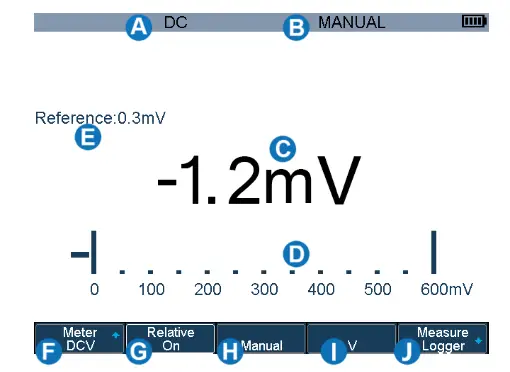
A The coupling type of the meter is DC.
B The measurement range is set in manual mode.
C Measurement value.
D Measurement range.
E Relative measurement value.
F Measurement type menu.
G Relative function menu. When the status is on, it takes a transient input value as a reference value E and then measures based on it. The actual input value = relative value + measured value; When off, actual input value = measured value.
H Auto / manual selection menu.
I Measurement range selection menu.
J Measurement Logger function menu.
Introduction of Recorder Panel
A Recorder Button
B Menu Softkey
C Universal Knob
| Button | Description |
| Recorder Button | Press to enter Recorder mode. |
| F1~F5 | Press to active sample logger or measurement logger. |
| Universal Knob | Use the knob to quickly select the recorder interval in the measurement logger and sample logger mode. |
Sample Logger User Interface 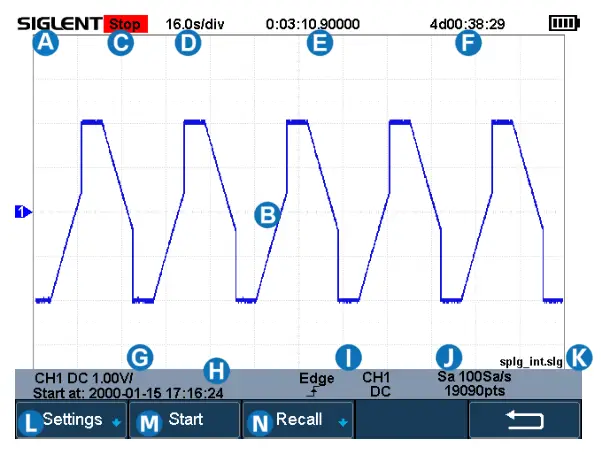
A Company Logo.
B The waveform of samples.
C Recorder status. Stop indicates stop recording run indicates it is recording.
D Indicate that each time grid is 16s.
E Indicates how long it took to record data.
F Indicates how long the data can be recorded in the remaining storage space at the current sampling rate. If it is in the playback mode, it indicates the total time of the data.
G Indicate the status of the data source.
H Indicates the time that recorder starts working.
I Indicate the trigger status of the data source.
J Sampling rate and total number of samples.
K Indicates the file name of the saved or recalled data.
L Setup menu. Including sampling rate setting, data storage mode selection. Read the user manual for details.
M Start/Stop recorder menu.
N Recall data menu.
Measure Logger User Interface
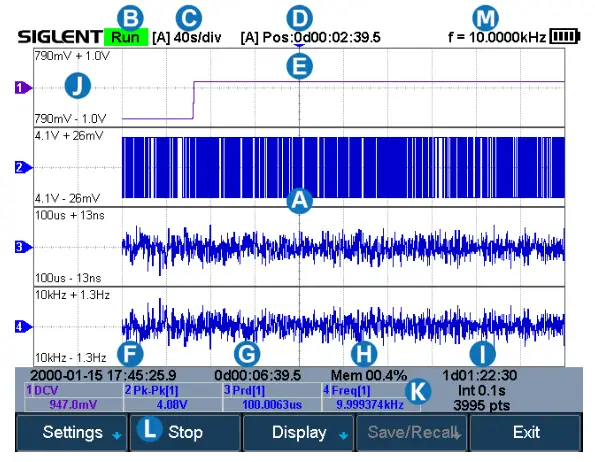
A Trend chart display area: Four parameters can be recorded at the same time.
B The current status of the recorder: Stop means stop recording, and Run means recording.
C Indicates that the length of each grid is 10s.
D The length of time the starting point is relative to the reference position.
E Horizontal reference position.
F Indicates the time that the recorder starts working.
G Indicates how long it took to record data.
H Indicates memory usage.
I The first line represents the total available time of the remaining storage space, the second line represents the recording interval, and the third line represents the total number of recorded samples.
J The display area of the measurement trend chart. 790mV is the value corresponding to the vertical center of the trend label. ±1V is the display range relative to the center position.
K Measurement parameters.
L Measurement Logger function menu, read the user manual for details.
Interface Glance
The Right Side Panel 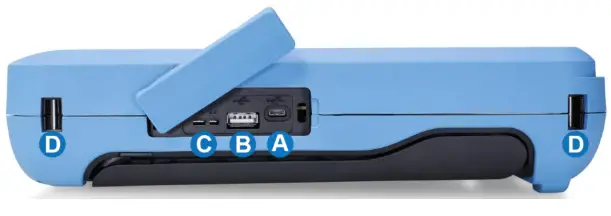
A USB Device: Connects with a PC for remote control
B USB Host Port
C Probe Compensation / Ground Terminal
D Hand strap installation slot
The Left Side Panel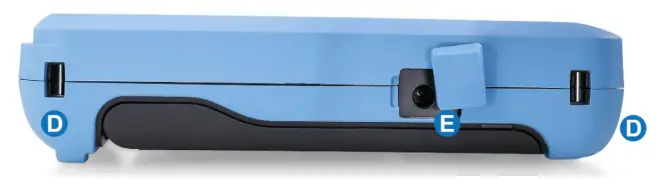
D Hand strap installation slot
E Charging Interface
Trouble Shooting
The general failures and consequential solutions are listed below. When you find them, please deal with them in the following corresponding ways. If the problem roves to be unsolvable, please contact SIGLENT as soon as possible.
- The screen remains dark after power on:
(1) Check if the battery/adapter is correctly connected.
(2) Check if the power switch is faulted.
(3) Check whether the fuse is burned out. If the fuse needs to be changed, please contact SIGLENT as soon as possible, return the instrument to the factory, and repair it by service personnel authorized by SIGLENT.
(4) Restart the instrument after completing the inspections above.
(5) If it still does not work normally, please contact SIGLENT. - After the signal is sampled, there is no corresponding waveform displaying:
(1) Check if the probe is correctly connected to the signal connecting cord.
(2) Check if the signal connecting cord is correctly connected to BNC.
(3) Check if the probe is correctly connected to the item under test.
(4) Check if there are signal generated from the item under test.
(5) Resample the signal. - The voltage amplitude measured is higher or lower than the actual value (the error usually occurs in use of the probe):
Check if the attenuation coefficient of the current channel matches the probe’s attenuation ratio. - There is waveform displaying but not stable:
(1) Check the trigger source: check whether the “Source” in the menu of “TRIG” is the actual operating channel.
(2) Check if the waveform is wrong: it is easy to regard the wrong waveform as the real when a high-frequency signal is connected to the instrument. You’d better make sure that the current time base is correct.
(3) Check the trigger type: “Edge” trigger suits to general signal and the “Video” trigger suits to the video signal. Only in the correct trigger type can the waveform stably display.
(4) Change the setting of trigger hold-off. - No display after pressing
 :
:
Check whether the trigger Mode is “Normal” or “Single”, and if the trigger level exceeds the waveform range. If yes, set the trigger level to the middle or change the trigger Mode to “Auto”.
Note: press “Auto Setup” could automatically replace the above setting. - The waveform displays like ladder:
(1) The horizontal time scale may be too low, you can increase it to improve the horizontal resolution to make a good waveform displaying.
(2) The lines between the sample points may also cause ladder-like displaying if the ” Type ” in menu of ” DISPLAY ” is “Vectors”. Please turn the ” Type ” to ” Dots ” to solve the problem. - USB storage can’t be recognized:
(1) Check if the USB flash disk can work normally.
(2) Check if the USB Device Host can work normally.
(3) Make sure the USB disk being used is of flash type, the instrument does not support USB of hardware type.
(4) Restart the instrument and then insert the USB to check it.
(5) If it is still in abnormal use, please contact with SIGLENT.
 :
:About SIGLENT
SIGLENT is an international high-tech company, concentrating on R&D, sales, production and services of electronic test & measurement instruments.
SIGLENT first began developing digital oscilloscopes independently in 2002.
After more than a decade of continuous development, SIGLENT has extended its product line to include digital oscilloscopes, isolated handheld oscilloscopes, function/arbitrary waveform generators, RF/MW signal generators, spectrum analyzers, vector network analyzers, digital multimeters, DC power supplies, electronic loads and other general purpose test instrumentation. Since its first oscilloscope was launched in 2005, SIGLENT has become the fastest-growing manufacturer of digital oscilloscopes. We firmly believe that today SIGLENT is the best value in electronic test & measurements.
Follow us on
Facebook: SiglentTech https://www.facebook.com/SiglentTech
| Headquarters: SIGLENT Technologies Co., Ltd Add: Bldg No.4 & No.5, Antongda Industrial Zone, 3rd Liuxian Road, Baoan District, Shenzhen, 518101, China Tel: + 86 755 3688 7876 Fax: + 86 755 3359 1582 Email: [email protected] Website: int.siglent.com | North America: SIGLENT Technologies America, Inc 6557 Cochran Rd Solon, Ohio 44139 Tel: 440-398-5800 Toll-Free: 877-515-5551 Fax: 440-399-1211 Email: [email protected] Website: www.siglentna.com | Europe: SIGLENT Technologies Germany GmbH Add: Staetzlinger Str. 70 86165 Augsburg, Germany Tel: +49(0)-821-666 0 111 0 Fax: +49(0)-821-666 0 111 22 Email: [email protected] Website: www.siglenteu.com |
 SIGLENT Technologies
 SIGLENT Technologies - Electronic Test and Measurement Instruments
 SIGLENT Technologies | Electronic Test & Measurement Systems