 ZENITAIR MONO
Installation manual
ZenitAir Mono Mechanical Ventilation Unit
Read this manual carefully before using the product and keep it in a safe place for reference.
This product was constructed up to standard and in compliance with regulations relating to electrical equipment and must be installed by technically qualified personnel.
The manufacturer assumes no responsibility for damage to persons or property resulting from failure to observe the regulations contained in this booklet.
PRECAUTIONS
1 1.1 PRECAUTIONS FOR INSTALLATION, USE, AND MAINTENANCE
For the correct installation of the product, follow the instructions contained in the “Instructions for installation” paragraph.
- The device should not be used for applications other than those specified in this manual.
- After removing the product from its packaging, verify its condition. In case of doubt, contact a qualified technician. Do not leave packaging within the reach of small children or people with disabilities.
- Do not touch the appliance with wet or damp hands/feet.
- This appliance can be used by children aged 8 years and above and persons with reduced physical, sensory or mental capabilities or lack of experience and knowledge if they have been given supervision or instruction concerning the use of the appliance in a safe way and understand the hazards involved. Children shall not play with the appliance. Cleaning and user maintenance shall not be made by children without supervision.
- Do not use the product in the presence of inflammable vapors, such as alcohol, insecticides, gasoline, etc.
- If any abnormalities in operation are detected, disconnect the device from the mains supply and contact a qualified technician immediately. Use original spare parts only for repairs.
- The electrical system to which the device is connected must comply with regulations
- Before connecting the product to the power supply or the power outlet, ensure that: – the data plate (voltage and frequency) correspond to those of the electrical mains – the electrical power supply/socket is adequate for maximum device power. If not, contact a qualified technician.
- The device should not be used as an activator for water heaters, stoves, etc., nor should it discharge into hot air/fume vent ducts deriving from any type of combustion unit. It must expel air outside via its own special duct.
- Operating temperature: -20°C up to +50°C.
- The device is designed to extract clean air only, i.e. without grease, soot, chemical or corrosive agents, or flammable or explosive mixtures.
- Do not leave the device exposed to atmospheric agents (rain, sun, snow, etc.).
- Do not immerse the device or its parts in water or other liquids.
- Turn off the main switch whenever a malfunction is detected or when cleaning.
- For installation an omnipolar switch should be incorporated in the fixed wiring, in accordance with the wiring regulations, to provide a full disconnection under overvoltage category III conditions (contact opening distance equal to or greater than 3mm).
- If the supply cord is damaged, it must be replaced by the manufacturer, its service agent, or similarly qualified persons in order to avoid a hazard.
- Do not obstruct the fan or exhaust grille to ensure optimum air passage.
- Ensure adequate air return/discharge into/from the room in compliance with existing regulations in order to ensure proper device operation.
- If the environment in which the product is installed also houses a fuel-operating device (water heater, methane stove, etc., that is not a “sealed chamber” type), it is essential to ensure adequate air intake, to ensure good combustion, and proper equipment operation.
- Install the product so that the impeller is not accessible from the air outlet side as verified by contact with the Test Finger (test probe “B” of the norm EN61032) in compliance with the current safety regulations.
1.2 INTRODUCTION
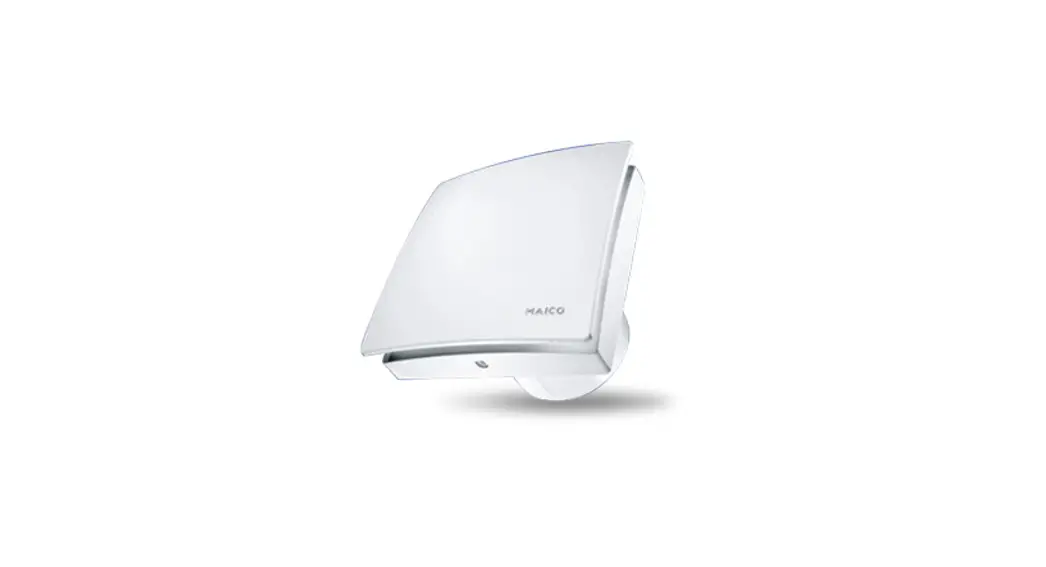
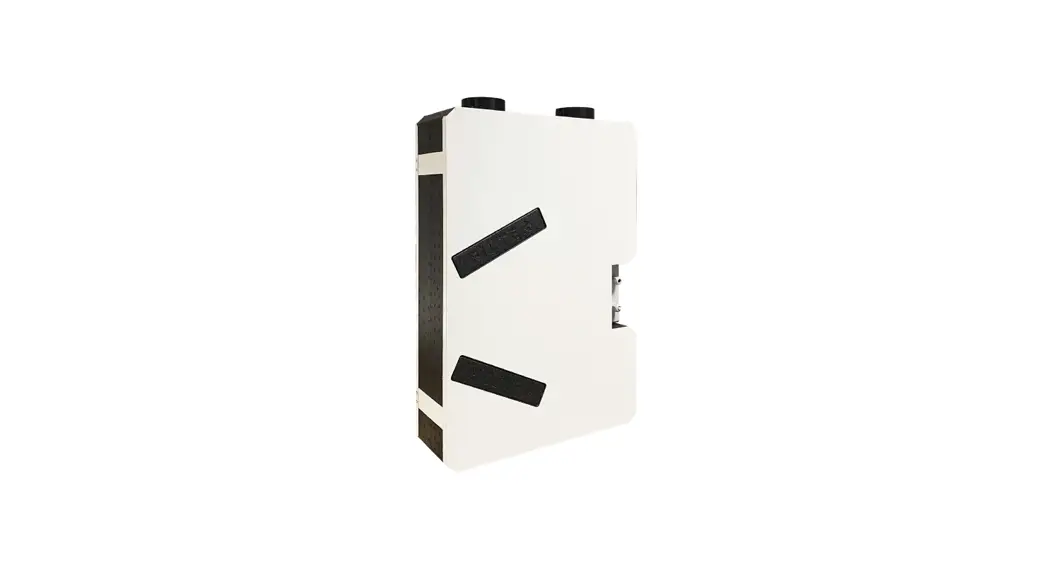
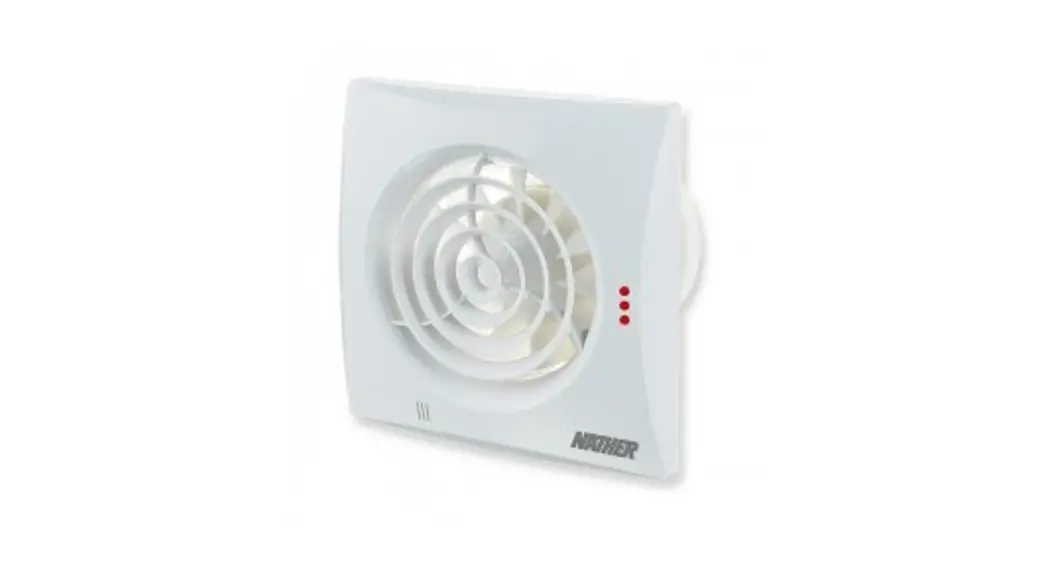
ZENITAIR – MONO is a single alternate flow decentralized (single point) residential heat recovery unit, Ø150mm also called a «push&pull» unit, designed to ensure adequate ventilation in enclosed environments without energy losses. It is recommended that two units are installed in a pair: when one unit is pulling, the other is pushing. The pair of units can be installed in the same room or in different rooms (i.e. living room and bedroom). The unit is suitable for installation on an outside wall.
Attention: The unit should operate continuously, and only stop for maintenance or service. When heat exchange is not useful (for example in mid-seasons when indoor and outdoor temperatures are similar), or when heat exchange is not recommended (for example with the option “summer free cooling”), it is recommended to set the unit in “extract-only” or “intake-only” mode and NOT to switch it off.
TECHNICAL SPECIFICATIONS
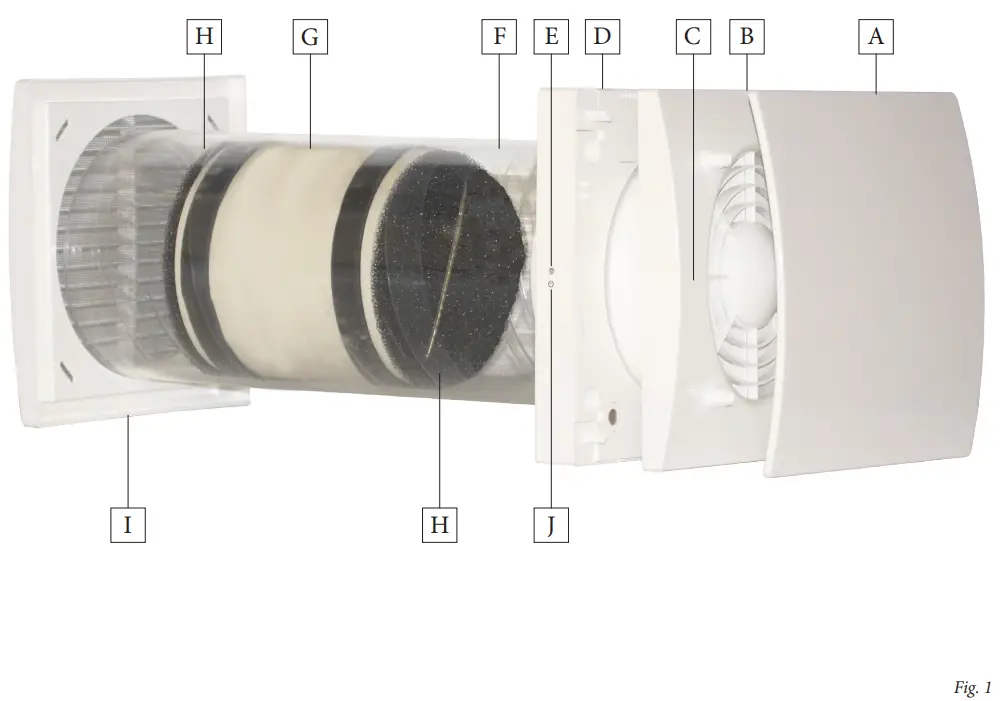
- Design front cover (A) removable for cleaning without the use of tools.
- Inner ventilation unit (B) and wall support base (D) made of high quality, impact, and UV-resistant ABS, color RAL 9010.
- Integrated multi-color led (C ) to obtain visual feedback on the unit status.
- Smart humidity control.
- Integral temperature sensor for the automatic management of the inversion time (comfort mode).
- Automatic anti-frost protection to prevent frost from building up on the heat exchanger.
- The wall support base (D) is provided with a magnet “coupling/ uncoupling” system which allows the ventilation unit to be removed from its base during maintenance.
- Back-up touch button (J) at the side of the ventilation unit.
- Unique design winglet-type impeller, providing enhanced aerodynamic properties, low noise, and increased efficiency.
- High efficient reversible EC motor with integral thermal protection, mounted on sealed for life high-quality ball bearings. Designed for continuous reversible running
- Telescopic pipe (F) is adaptable to the wall thickness.
- Antimortar cap designed to be used also as a template during the installation of the wall support base.
- Regenerative heat exchanger with ceramic core (G) with high thermal efficiency, equipped with washable anti-dust filters (H)
- External grille (I) made of high quality, impact and UVresistant ABS, color RAL 9010, with anti-insect net and water drip guard.
- Infra-red remote controller with touch technology, LCD display, and wall base supplied as standard. Made from ABS, RAL 9010.
- The unit is double insulated: no earth connection is required
- No need for a condensation drainage system
- IPX4 degree of protection.
- Power supply 220-240V~ 50Hz.
OPERATION
Remote Controller 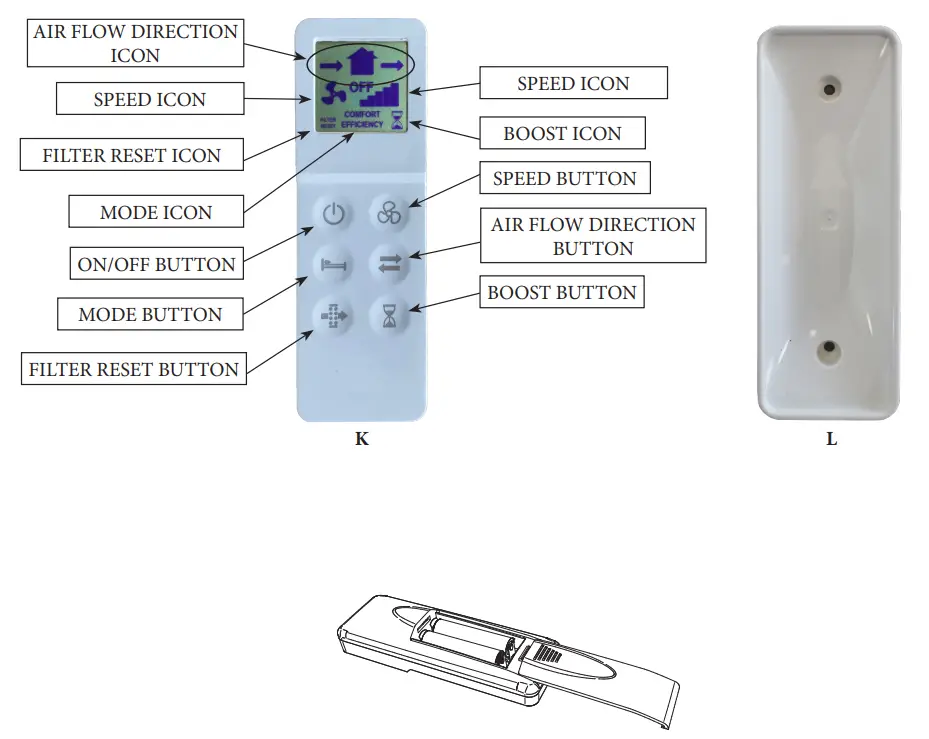
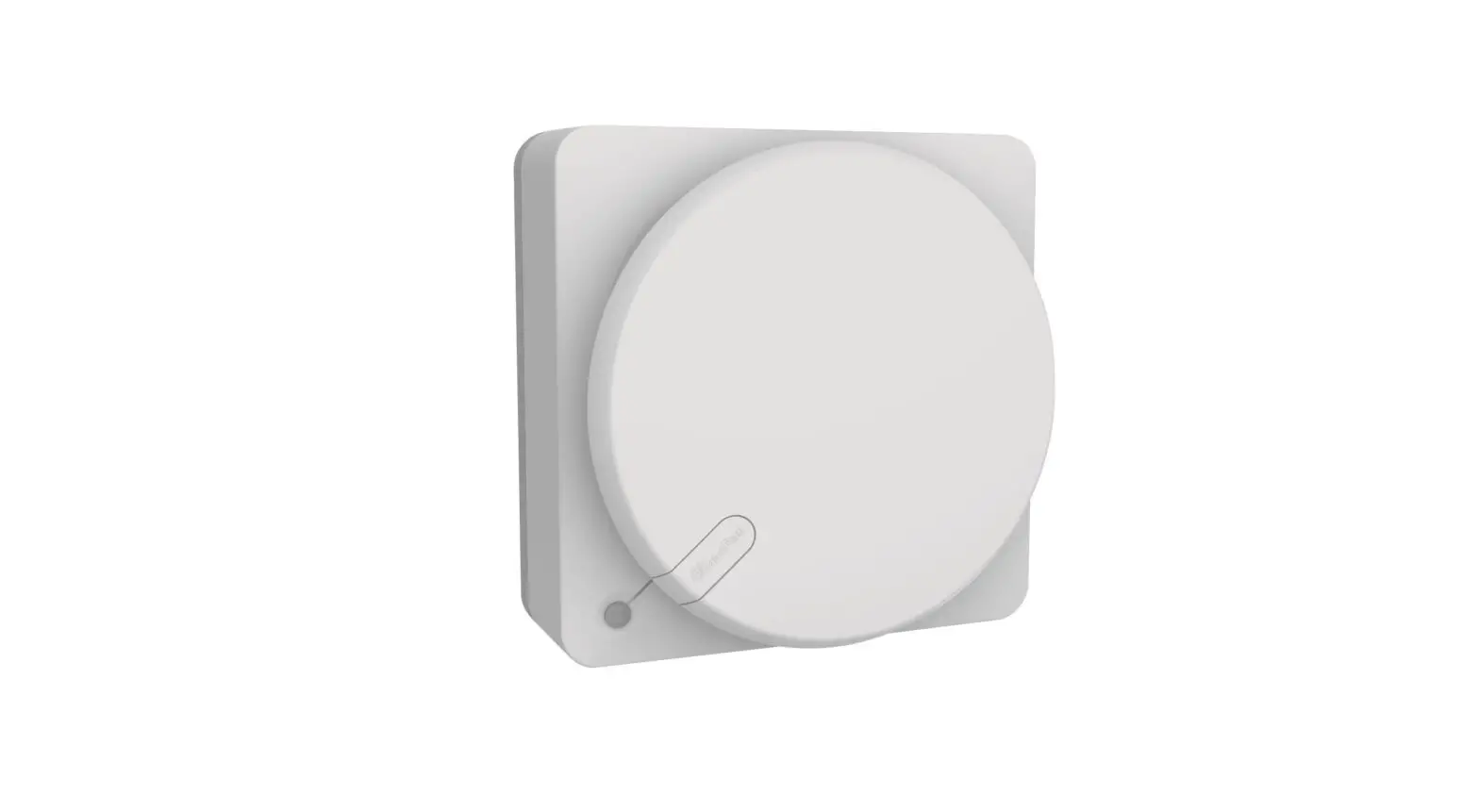
The unit is supplied with an infrared remote controller (K) as standard, as well as its support base (L) which can be wall mounted. A magnet keeps the controller attached to the base. The controller is equipped with an LCD display to visualize the setting to be transferred to the unit; anytime a touch button is pressed, the setting shown on the LCD display is transferred to the unit. The IR receiver is placed on the left side of the ventilation unit (E): it is recommended to point the controller towards the receiver when any setting needs to be transferred. One remote controller can control more units. To activate the remote controller it is necessary to insert two AAA-type batteries (not supplied).
Ventilation Unit
When switched on the unit emits a long acoustic signal.
Through the IR controller, the following functionalities can be activated/deactivated. When one set is transferred to the unit, a short acoustic signal is emitted and green led flashes.
| FUNCTION- NALITY | DESCRIPTION | CONTROLLER BUTTON | ICON | LED | ACOU-STIC SIGNAL |
Airflow direction | |||||
| Alternate | The unit runs in extract/intake at the selected speed: the inversion time is automatically defined thanks to the integral temperature sensor (comfort mode) |  | 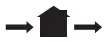 | Green | Short |
| Extract | The unit runs in extract only at the selected speed |
|  | Green | Short |
| Intake | The unit runs in intake only at the selected speed | |  | Green | Short |
Mode (active only if the airflow direction is set on an alternate) | |||||
| Comfort | Optimisation of the acoustic and thermal comfort. The inversion time varies automatically from 40÷120 seconds, thanks to the integral temperature sensor. The first time cycle is of 70 seconds, then it varies automatically according to the detected temperature conditions. | 
| COMFORT | Green | Short |
| Efficiency | Optimisation of the thermal efficiency. The inversion time is fixed at about 70 seconds. | | EFFICIENCY | Green | Short |
Continuous running speed | |||||
| Speed 1: 20m3/h |  |  | Green | Short | |
| Speed 2: 30m3/h | |  | Green | Short | |
| Speed 3: 40m3/h | |  | Green | Short | |
| Speed 4: 50m3/h | |  | Green | Short | |
| Speed 5: 60m3/h | |  | Green | Short | |
| ON/OFF | |||||
| Unit can be switched on or off |  | OFF | Red | Long | |
| LCD ON | Green | Short | |||
BOOST speed | |||||
| The unit runs at speed 5 (maximum) for 15 minutes, in extract only, then it returns to the previously selected mode/speed. The boost speed cannot be activated if the controller is off. |  |  | Fixed Blue | Short | |
Free cooling | |||||
| The unit runs in “extract only” or “intake only” to avoide heat recovery when not needed | | 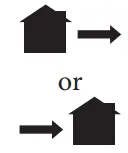 | Green | Short | |
| FUNCTION-NALITY | DESCRIPTION | CONTROLLER BUTTON | ICON | LED | ACOU- STIC SIGNAL |
Filter reset | |||||
| Every 3 months a yellow warning led switches on (fixed light) to indicate that the filters have to be maintained. Press the dedicated button for 5 seconds to reset the timing. |  | FILTER RESET | Yellow | Short | |
Smart humidity control | |||||
| When the humidity sensor detects a quick variation of the Relative Humidity level, the running speed automatically increases to the next higher speed. After 10 minutes from the last quick RH variation, the unit returns running at the selected speed. The smart humidity control is active if the airflow di- rection is set on alternate or extract only: if speed 5 has been selected, no speed increase happens. To disable this functionality, press the button for 5 seconds: on the top side of the LCD display, the symbol is shown. | Flashing Blue | ||||
Antifrost | |||||
| This functionality prevents frost from building up on the heat exchanger due to extremely cold air. When it is activated, the unit runs in extract only at speed 1, for 30 minutes. | Fixed Red | ||||
Acoustic signal | |||||
| Any time a setting is transferred from the controller to the unit, a short acoustic signal is emitted. This can be deactivated by pressing the button for 7 seconds, after which a green led flashes to indicate that the acoustic signal is off. To reactivate the acoustic signal repeat the same operation for 7 seconds until the led becomes green and an acoustic signal is emitted. | | Green | Short | ||
Back-Up Button
In case the remote controller gets lost or the batteries are dead, ON and OFF positions can be selected from the onboard touch button (J), pressing the button for at least 3 seconds.
| LED COLOUR | ACOUSTIC SIGNAL | |
| ON | Green | Short |
| OFF | Red | Long |
Synchronization of a number of units
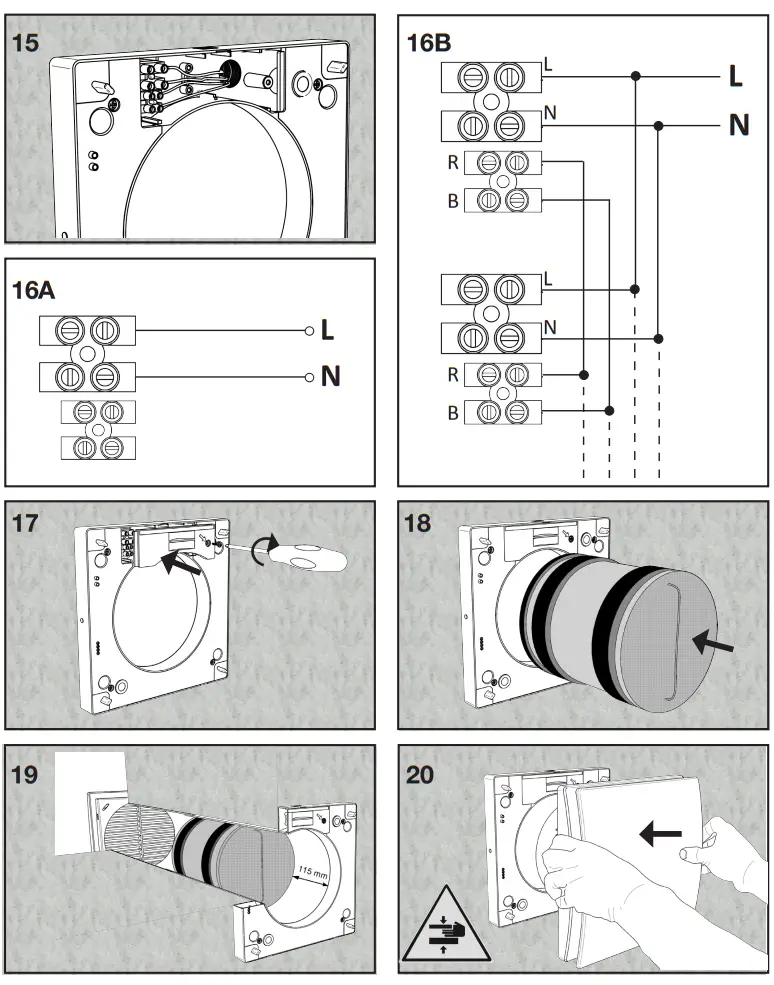
It is possible to synchronize up to 10 units contemporaneously, through the wire (2 poles twisted pair type, max 30m length) so to have mode and inversion time synchronized. When the unit is switched on for the first time, the rotation direction of each unit (clockwise or anti-clockwise) is automatically established. Other functionalities like speed, smart humidity control, and boost, continue to be controlled independently on every single unit. Wiring diagram as per fig. 16B.
MAINTENANCE AND ANOMALIES
4.1 MAINTENANCE
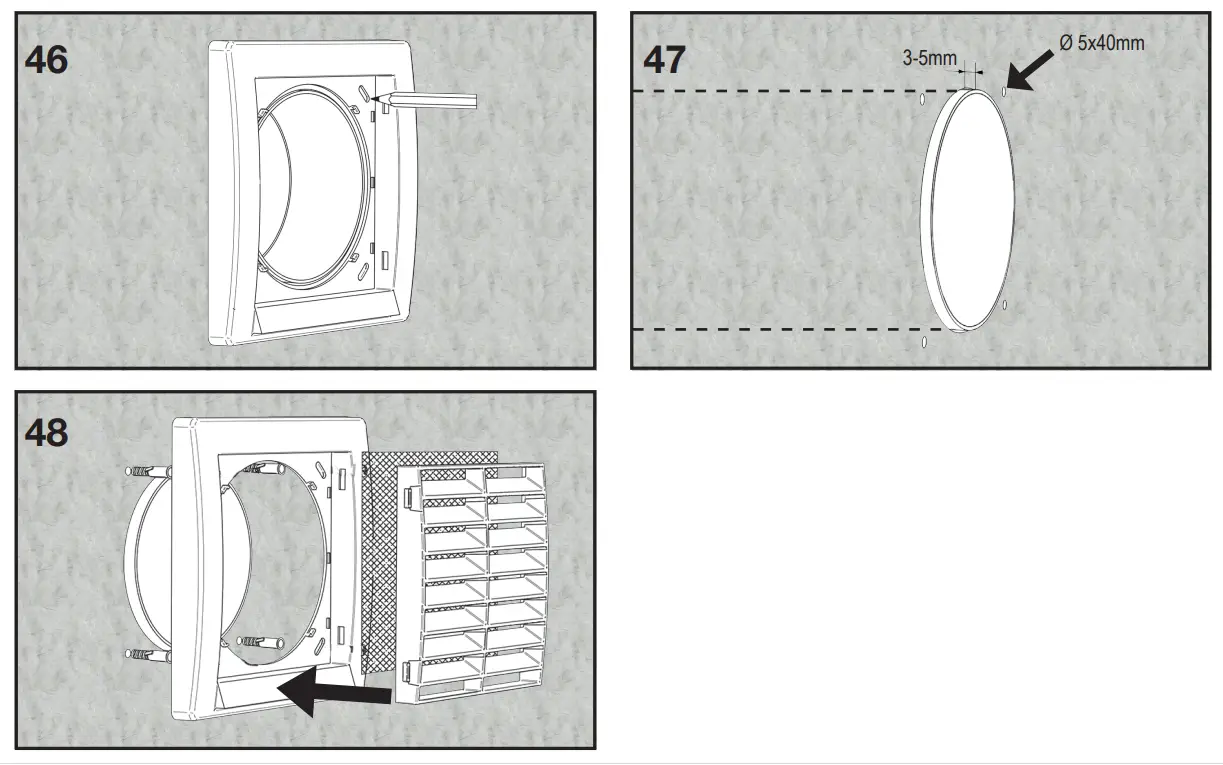
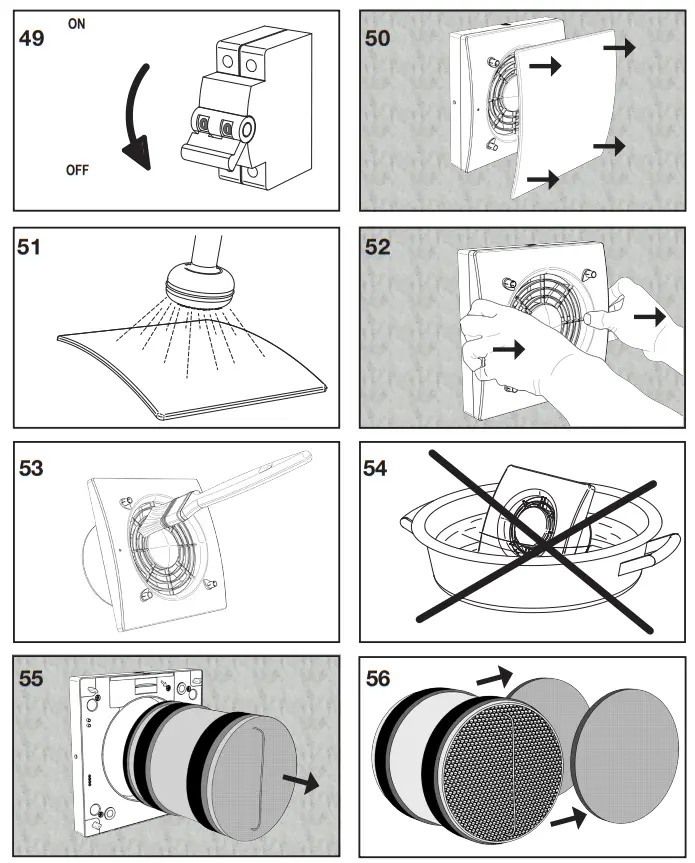
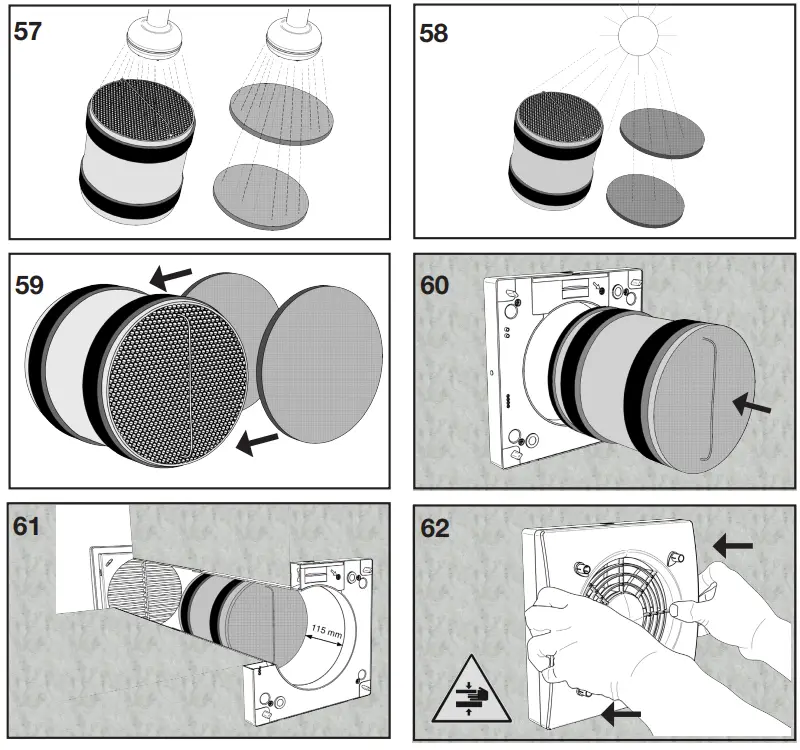
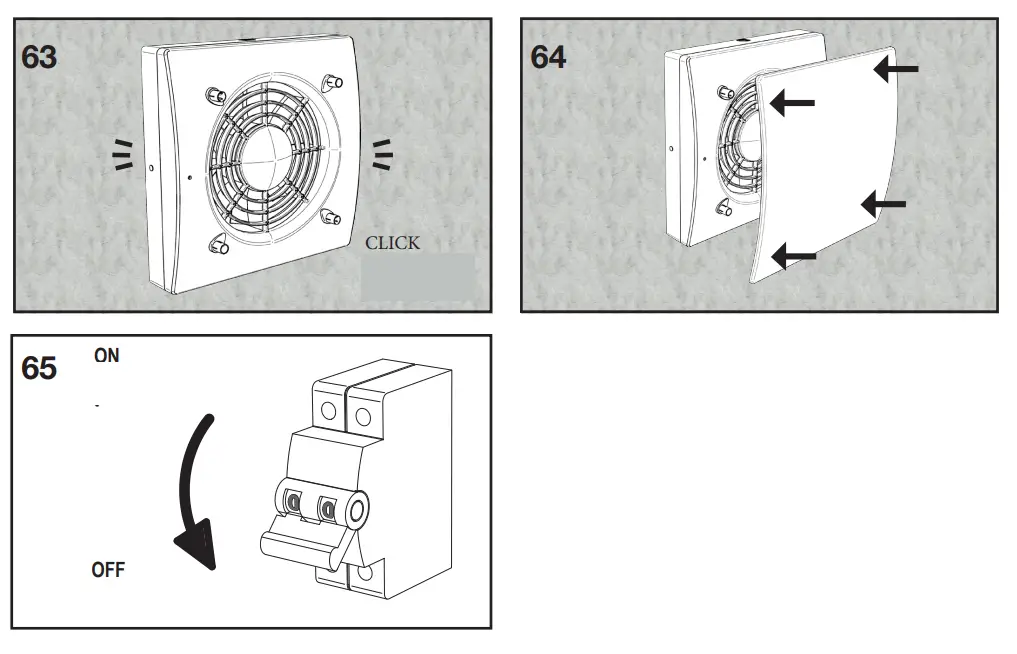
Maintenance can be carried out by the user as shown in figures 49-65.
4.2 TROUBLESHOOTING
| ANOMALY | POSSIBLE CAUSE | SOLUTION |
| No icon is shown on the controller LCD display | Batteries are dead | Change the batteries |
| Batteries are not present | Check that battery are in there | |
| Batteries are wrongly positioned | Position the batteries correctly | |
 icon flashes on the controller LCD display icon flashes on the controller LCD display | Batteries are dead | Change the batteries |
| The unit does not execute the command sent from the remote control | Lack of communication between the unit and the remote controller | Go closer to the unit, pointing the controller to the receiver on the left side of the unit |
| The unit does not operate | There is no voltage | Check that the unit is correctly wired to the main supply |
| The ventilation unit does not couple correctly with the support base | Check that the coupling is properly done | |
| The unit operates at the maximum speed | The Boost functionality is activated, and on the display, the icon is shown | Wait until the boost timing ends (15 minutes) or deactivate the boost function by pressing the button. |
| Unit speed suddenly increases | The smart humidity control is activated | Wait until the smart humidity control phase ends (10 minutes) or deactivate the humidity control function by pressing the button for 5 seconds. |
| Fixed yellow led | Dirty filters | Filters maintenance/replacement is needed: reset filter operation has to be done |
| Fixed red led | Antifrost protection is activated | Wait until the antifrost phase ends (30 minutes) |
| Fixed blue led | Boost is activated | Wait until the boost timing ends (15 minutes) or deactivate the boost function by pressing the button. |
| Flashing blue led | Smart humidity control is activated | Wait until the humidity control phase ends (10 minutes) |
| Fixed purple led | The ventilation unit does not couple correctly with the support base | Check that the coupling is properly done |
| Acoustic signal to disable | – | Press the button for 7 seconds: a green led flashes. |
CONFORMITY AND DISPOSAL
5.1 STANDARD CONFORMITY
- 2014/35/UE Low Voltage Directive (LVD) and 2014/30/UE
Electromagnetic Compatibility (EMC), in conformity with the following standards: - Electrical Safety EN60335-1(2012)+A11+A13; EN 60335-280(2003)+A1+A2.
- Electromagnetic Compatibility EN 55014-1(2017); EN 550142(2015); EN 61000-3-2(2014); EN 61000-3-3(2013).
5.2 DISPOSAL AND RECYCLING
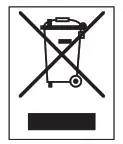
Information on disposal of units at the end of life. This product complies with EU Directive 2002/96/EC. The symbol of the crossed-out dustbin indicates that this product must be collected separately from other waste at the end of its life. The user must, therefore, dispose of the product in question at suitable electronic and electro-technical waste disposal collection centers, or else send the product back to the retailer when purchasing a new, equivalent type device. Separate collection of decommissioned equipment for recycling, treatment, and environmentally compatible disposal helps to prevent negative effects on the environment and on health and promotes the recycling of the materials that make up the equipment. Improper disposal of the product by the user may result in administrative sanctions as provided by law.
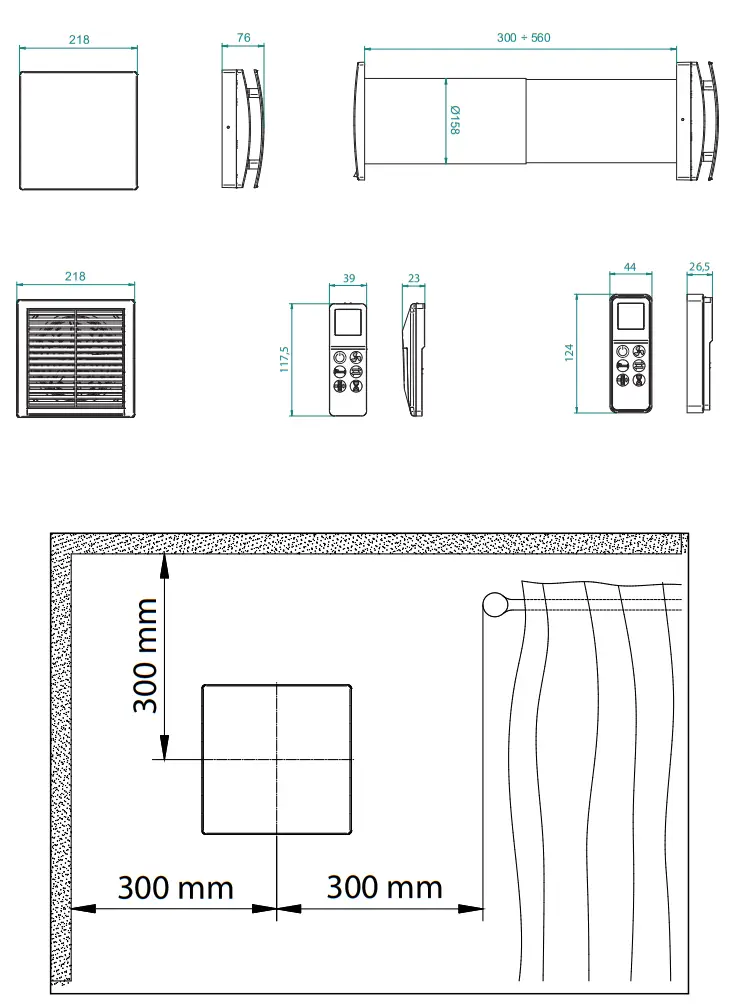
DIMENSIONS
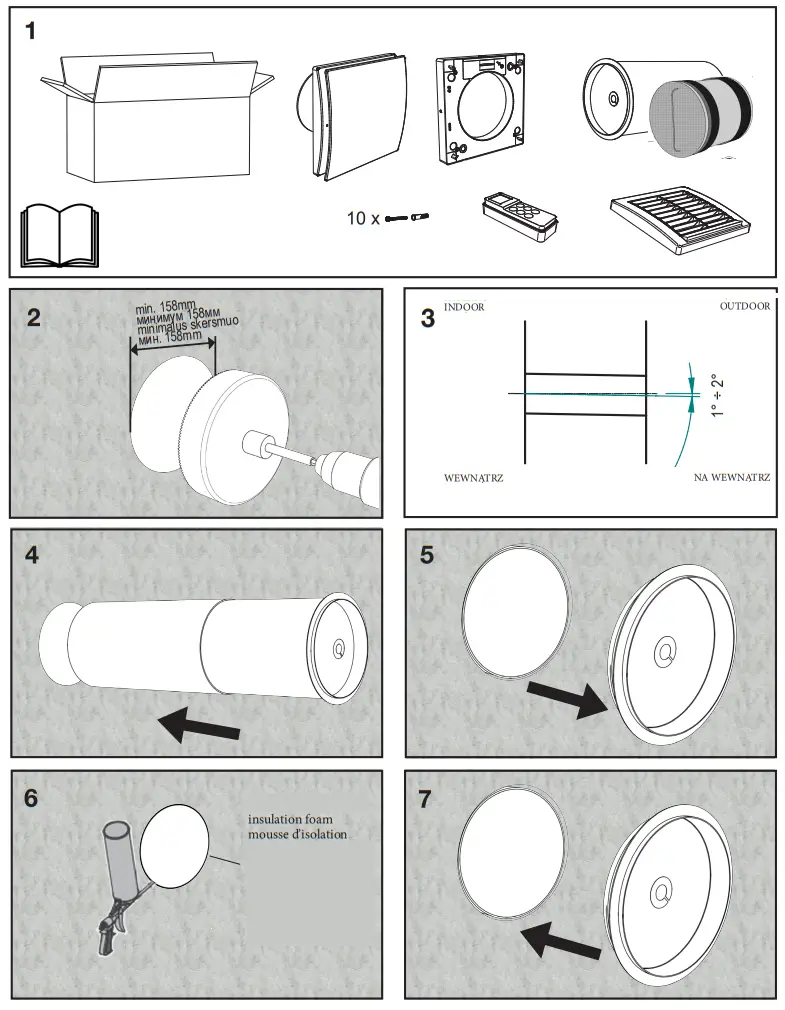
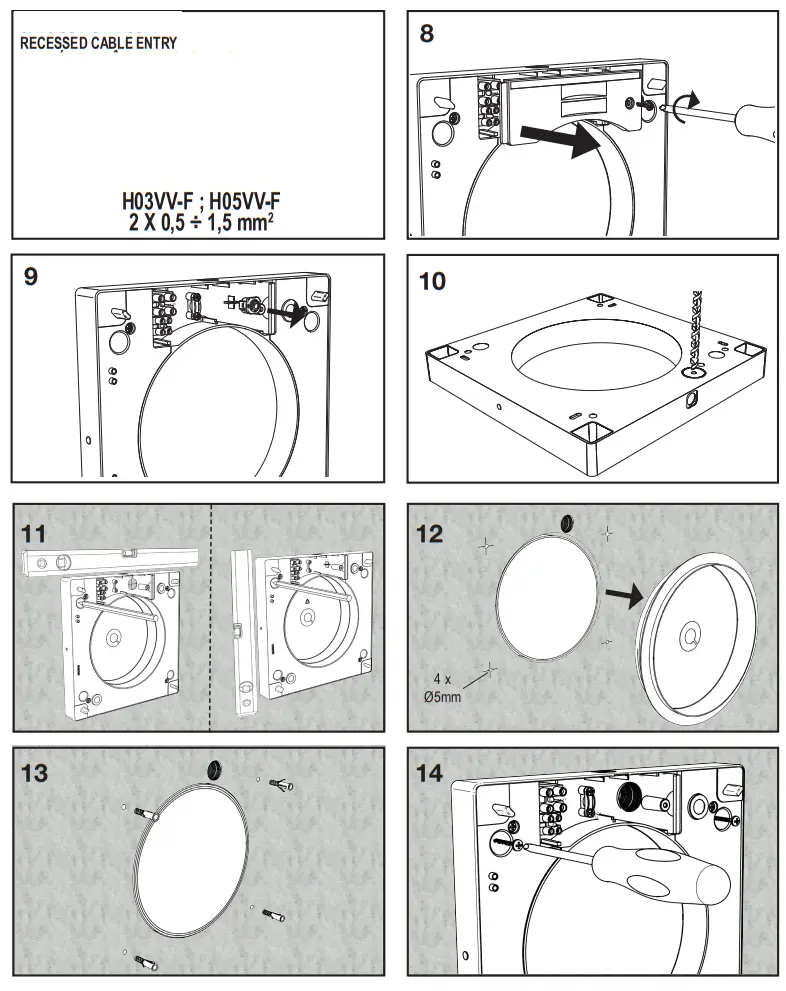
INSTALLATION
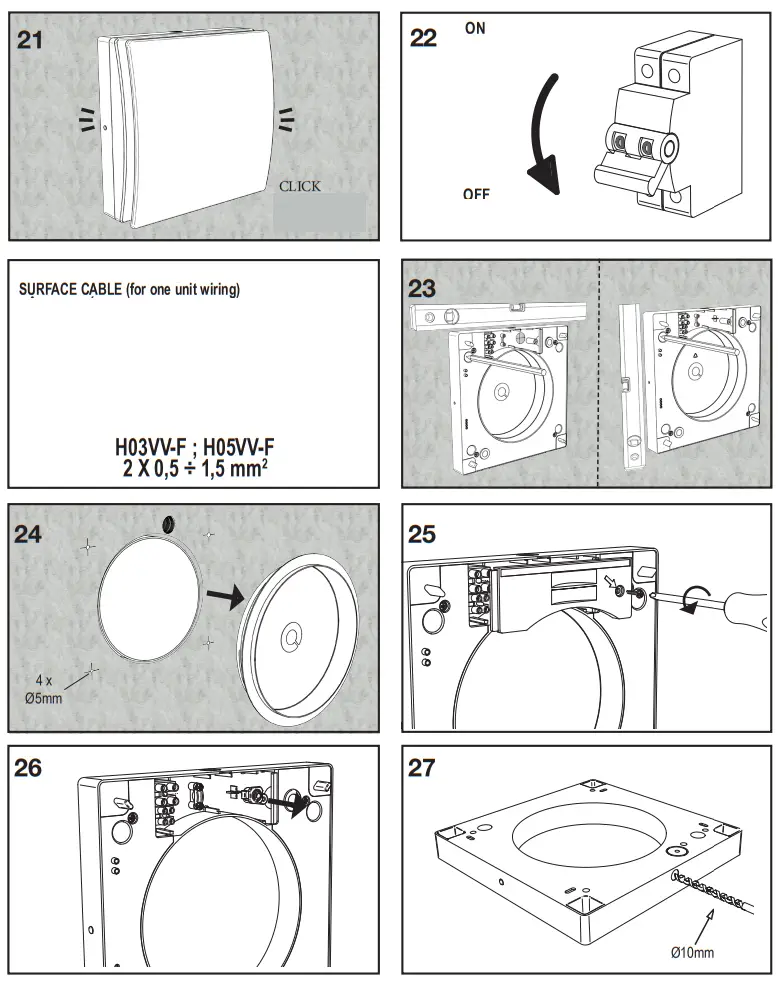
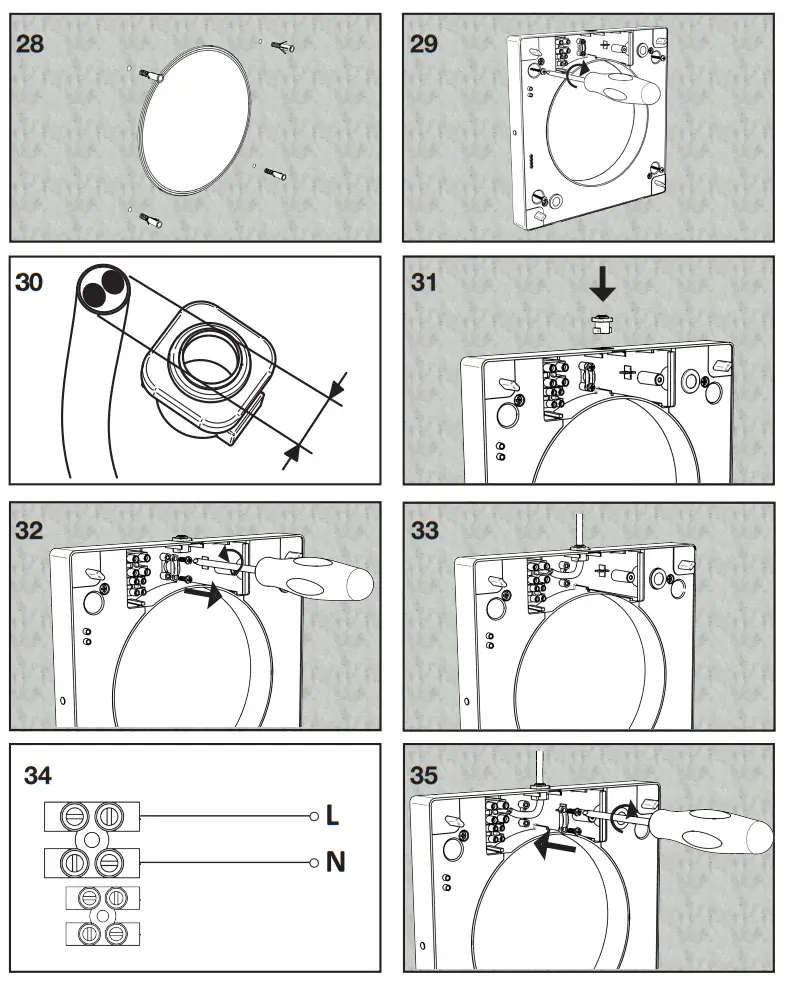
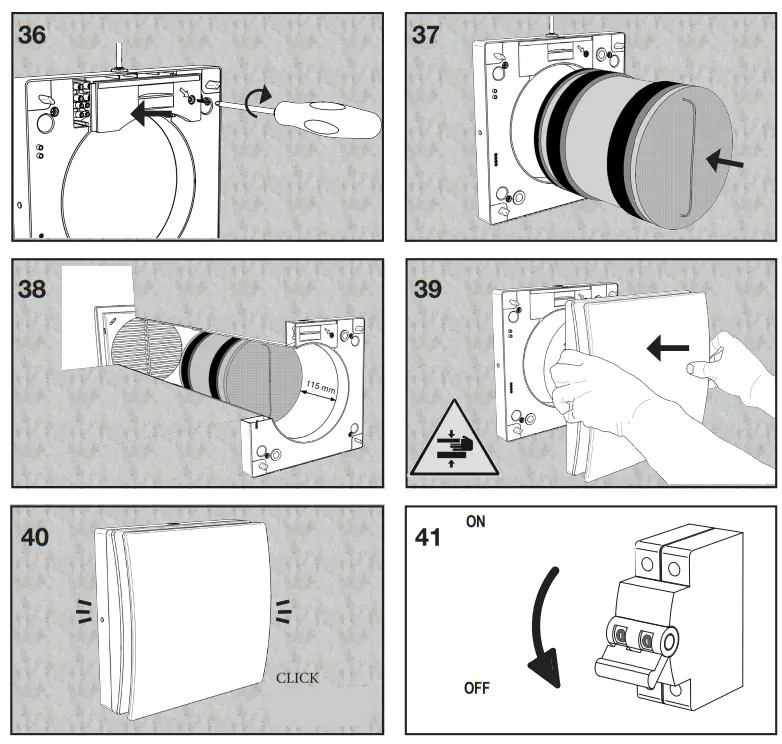
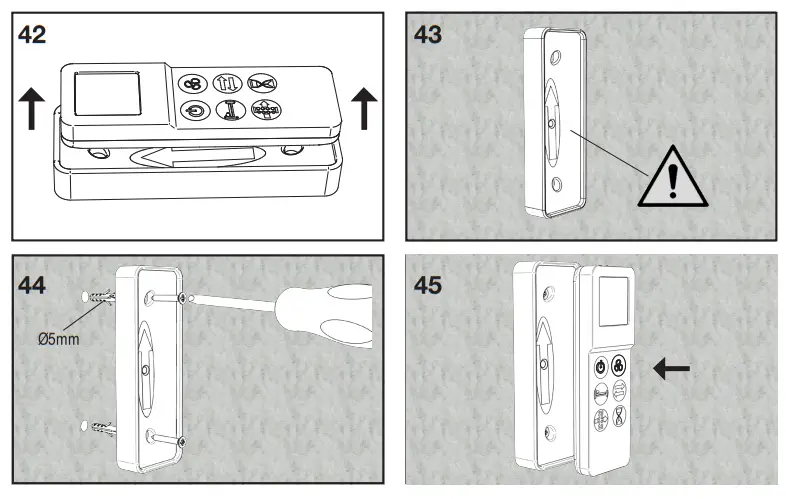
REMOTE CONTROLLER WALL MOUNTING
EXTERNAL GRILLE
MAINTENANCE
MAINTENANCE/CLEANING REGISTER
| Filter cleaning | Filter replacement | Heat exchanger cleaning | ||
| Date | ||||
| Date | ||||
| Date | ||||
| Date | ||||
| Date | ||||
| Date | ||||
| Date | ||||
| Date | ||||
Regulations 1253/2014 – 1254/2014 — Directive Erp
| a) | Mark – Marque | – | IMMERGAS |
| b) | Model | – | ZENITAIR – MONO |
| c) | SEC class | – | A |
| c1) | SEC warm climates – SEC climat chaud | kWh/m2.a | -18,1 |
| c2) | SEC average climates – SEC climat moyen | kWh/m2.a | -41,7 |
| c3) | SEC cold climates | kWh/m2.a | -83 |
| 1 | Energy label | – | Tak |
| d) | Unit typology | – | Residential |
| e) | Type of drive | – | Multi-speed drive; Focntionnement |
| f) | Type of Heat Recovery System – Type | – | Heat recovery |
| g) | a – Thermal efficiency of heat recovery – R | % | 74 |
| h) | Maximum flow rate | m3/h | 60 |
| i) | Electric power input at maximum flow rate | W | 6 |
| j) | Sound power level (LWA ) | dBA | 40 |
| k) | Reference flow rate – | m3/h | 41 |
| l) | Reference pressure diffe | Pa | 10 |
| m) | I) – Specific power input | W/m3/h | 0,08 |
| n1) | Control factor | – | 0,65 |
| n2) | Control typology | – | Local demand control |
| o1) | Maximum internal leakage rate | Maximum external leakage rate | N/A |
| o2) | Maximum external leakage rate | % | 1 |
| p1) | Internal mixing rate | % | N/A |
| p2) | External mixing rate | % | N/A |
| q) | Visual filter warning | – | N/A |
| r) | Instructions to install regulated grilles | – | N/A |
| s) | Internet address for pre/disassembly instructions | – | www.immergas.com |
| t) | Airflow sensitivity to pressure variations | % | N/A |
| u) | Indoor/outdoor air tightness | m3/h | 50 |
| v1) | AEC – Annual electricity consumption – warm climates | kWh | 0,6 |
| v2) | AEC – Annual electricity consumption – average climates | kWh | 0,6 |
| v3) | AEC – Annual electricity consumption – cold climates | kWh | 0,6 |
| w1) | AHS – Annual heating saved – warm climates | kWh | 19,5 |
| w2) | AHS – Annual heating saved – average climates | kWh | 43,2 |
| w3) | AHS Annual heating saved – cold climates | kWh | 84,4 |
During the useful life of the products, performance is affected by external factors, e.g. the hardness of the DHW, atmospheric agents, deposits in the system, and so on. The data declared to refer to new products that are correctly installed and used with respect to the Standards in force.
N.B.: correct periodic maintenance is highly recommended. This instruction booklet is made of ecological paper.

Immergas TOOLBOX
The App designed by Immergas for professionals
immergas.com
[email protected]
To request further specific details, sector Professionals can also use the following
e-mail address: [email protected]
Immergas S.p.A. 42041 Brescello (RE) – Italy
Tel. 0522.689011
Fax 0522.680617
 Home - Immergas
 Home - Immergas