
SAM D21
SAM D21 Curiosity Nano Evaluation Kit User’s Guide
Preface
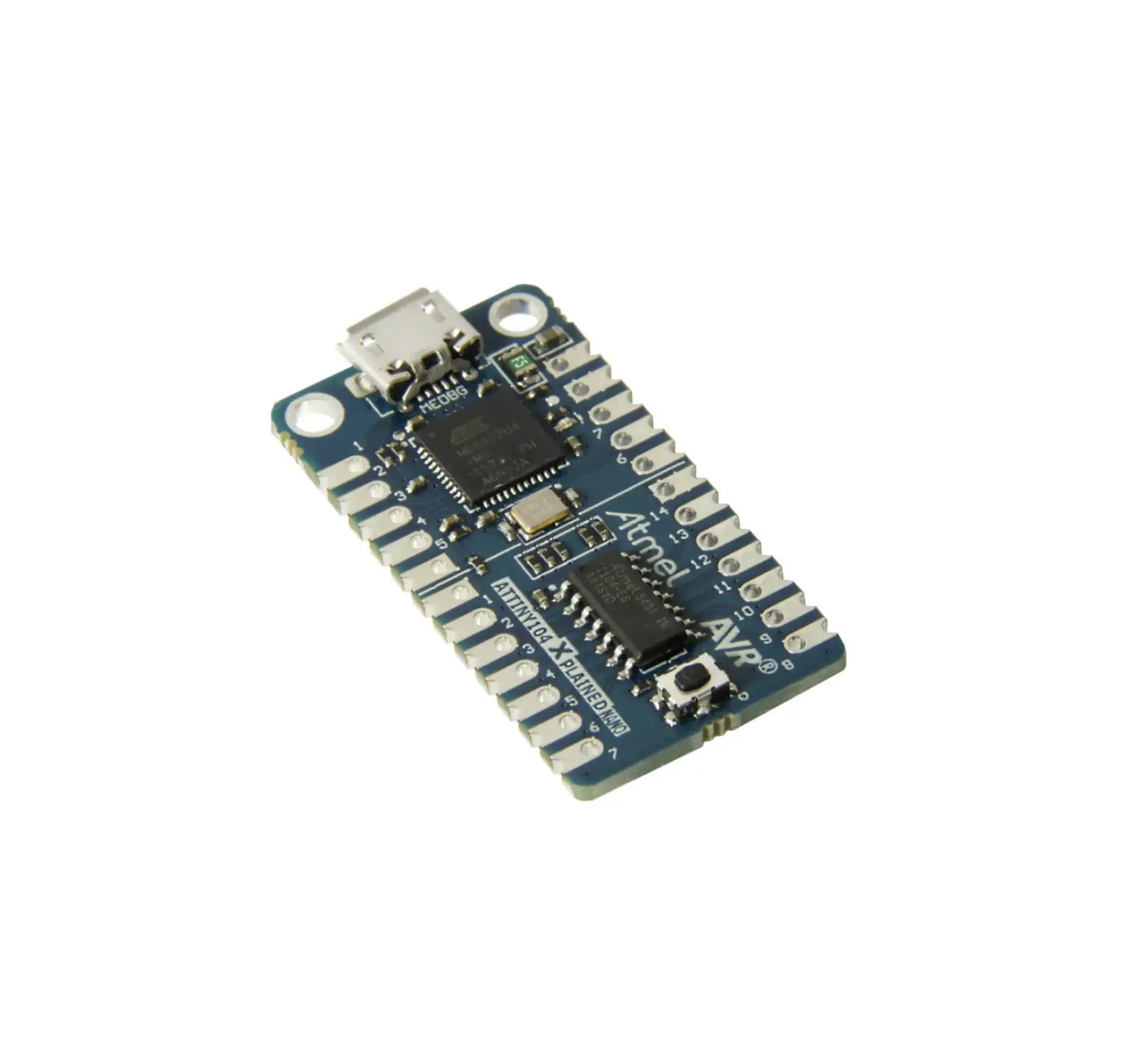
The SAM D21 Curiosity Nano Evaluation Kit (DM320119) is a hardware platform to evaluate the SAMD21G17D microcontroller (MCU), and it is supported by the MPLAB
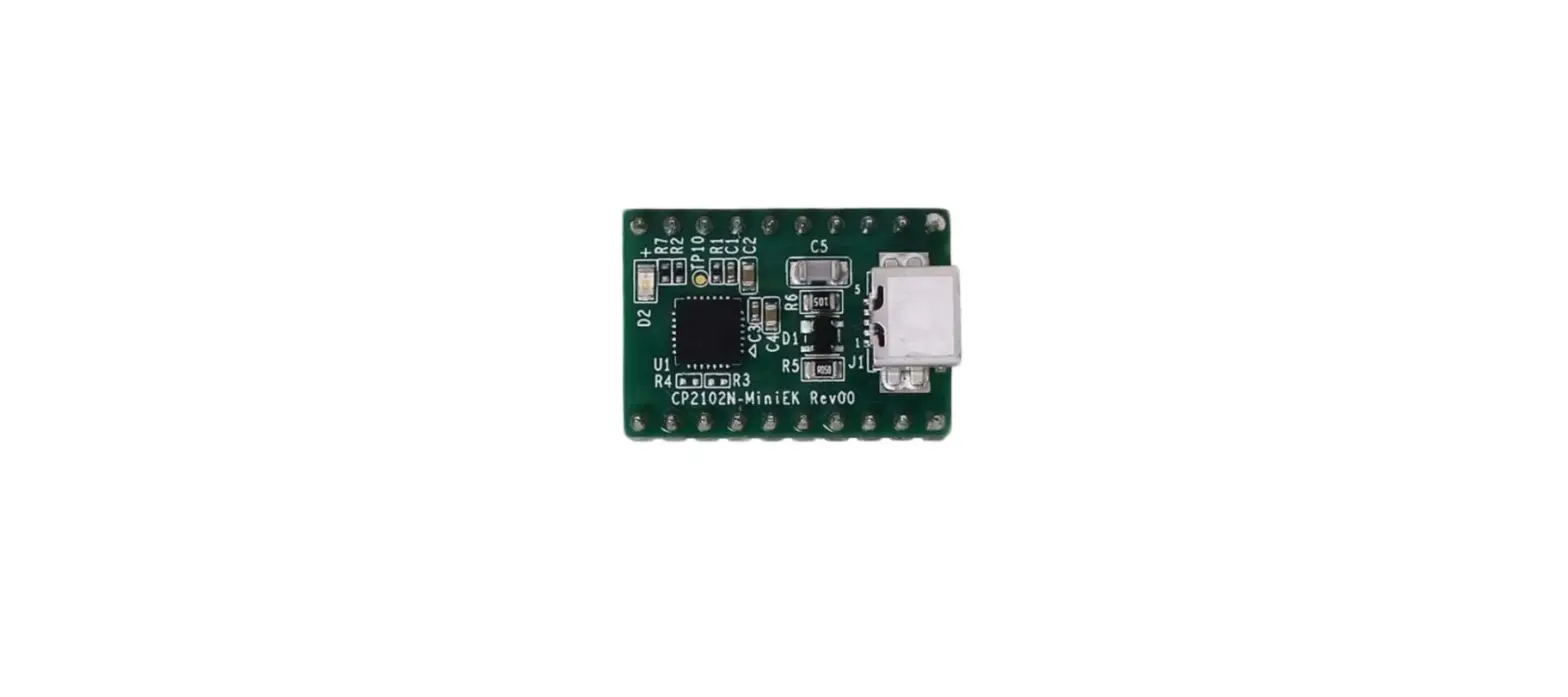
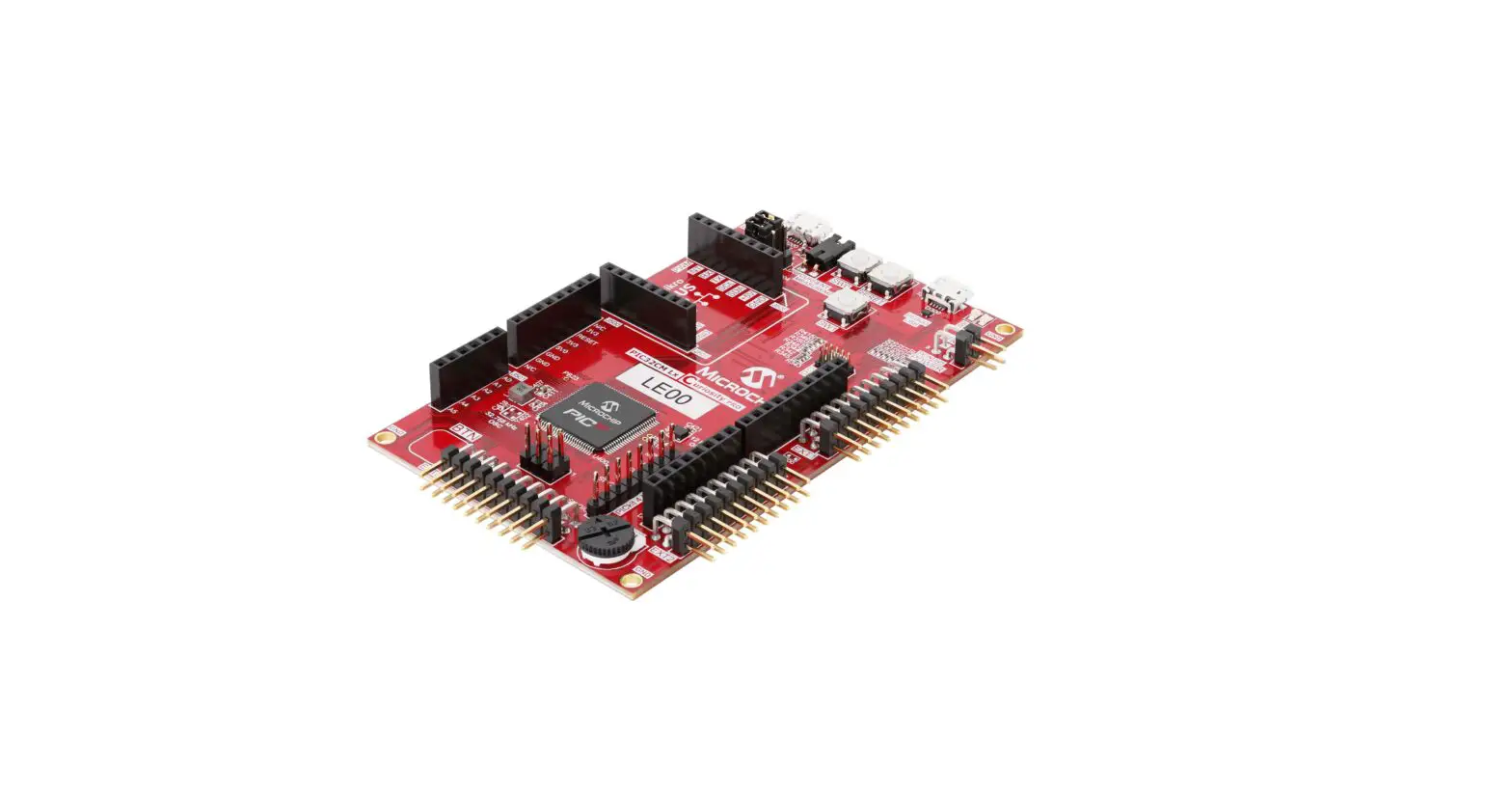
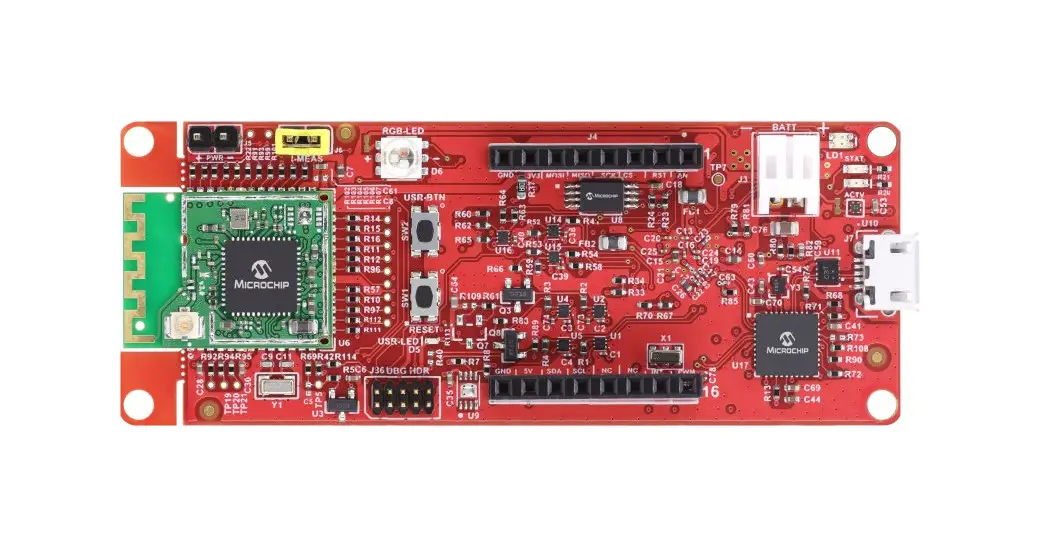
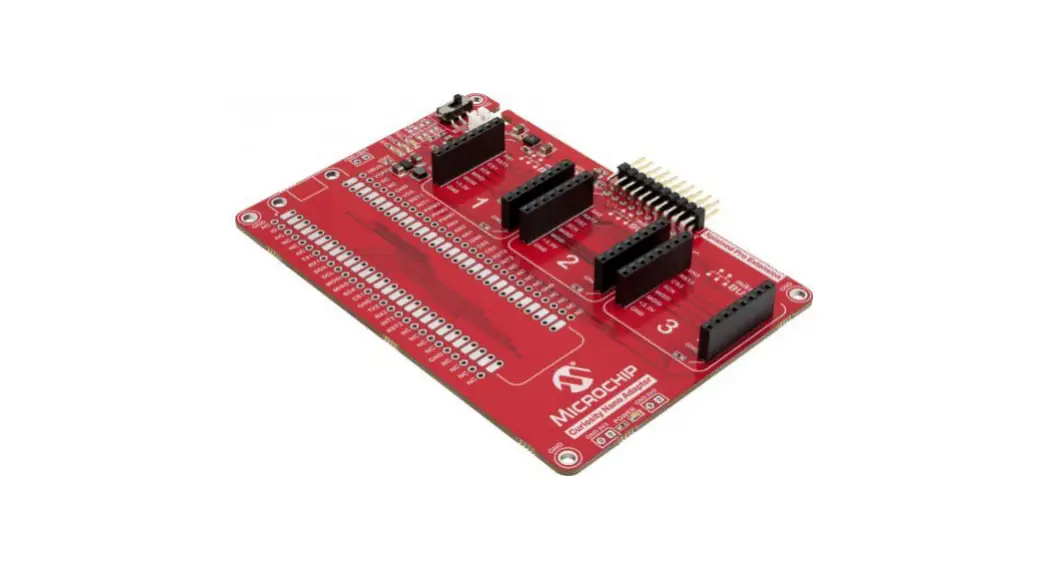
X Integrated Development Environment (IDE). The evaluation kit provides easy access to the features of the SAMD21G17D to integrate the device into a custom design. The Curiosity Nano series of evaluation kits include an On-Board Nano Debugger, hence external tools are not required to program the SAMD21G17D device. The SAM D21 Curiosity Nano Evaluation Kit is shown below.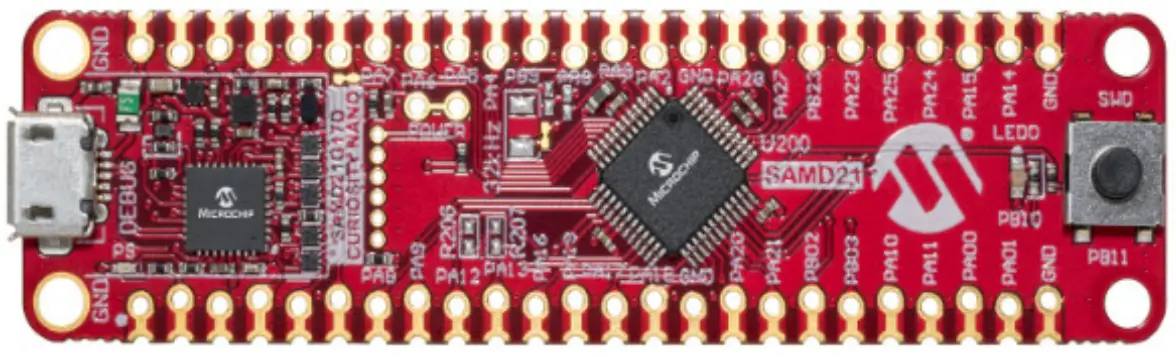
Introduction
Kit Overview
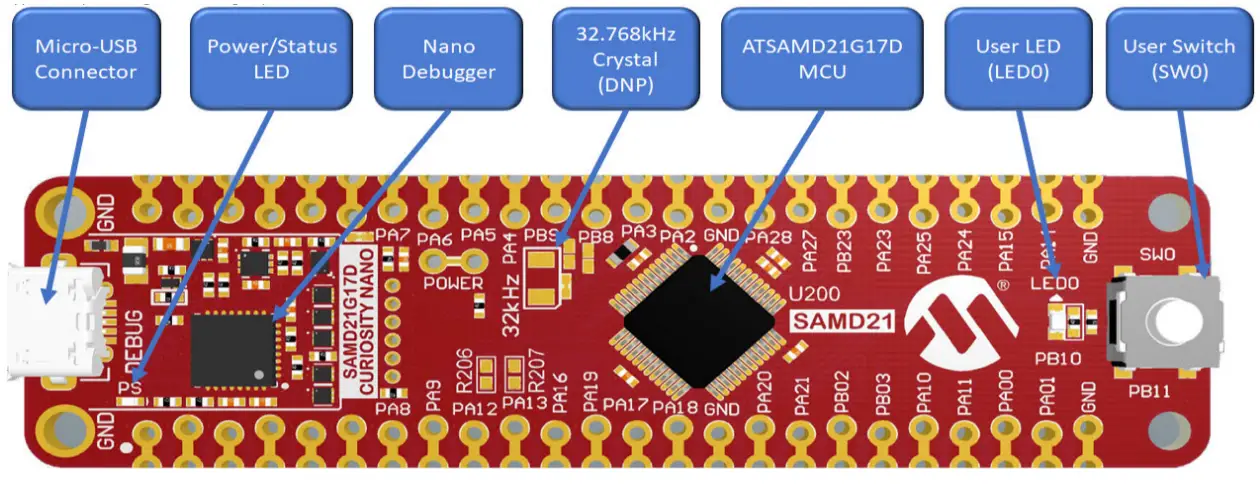
The SAM D21 Curiosity Nano evaluation kit is a hardware platform used to evaluate the SAMD21G17D MCU.
Figure 1-1. Kit Overview
1.1 Features
The following are features of the SAM D21 Curiosity Nano evaluation kit:
- SAMD21G17D microcontroller
- One yellow user LED
- One mechanical user switch
- On-Board Nano Debugger
– Board identification in MPLAB X IDE
– One green power/status LED
– Programming and debugging
– Virtual COM port (CDC)
– One logic analyzer (DGI GPIO) - USB powered
- Adjustable target voltage
– MIC5353 LDO regulator controlled by the On-Board Nano Debugger
– 1.7V to 3.6V output voltage
– 500 mA maximum output current (limited by ambient temperature and output voltage)
Getting Started
2.1 Curiosity Nano Quick Start
Follow these steps to explore the Curiosity Nano platform:
- Download MPLAB X IDE.
- Launch MPLAB X IDE.
- Connect a USB cable (Standard-A to Micro-B or Micro-AB) between the PC and the debug USB port on the kit.
When the Curiosity Nano kit is connected to the computer for the first time, the operating system will perform a driver software installation. The driver file supports both 32-bit and 64-bit versions of Microsoft XP, Windows Vista ® ® Windows ®, Windows7, Windows 8, and Windows 10. The drivers for the kit are included with MPLAB X IDE.
After the Curiosity Nano board is powered, the green status LED will be lit and MPLAB X IDE will auto-detect which Curiosity Nano board is connected. MPLAB X IDE will populate relevant information like data sheets and kit documentation in the kit window. The SAMD21G17D device is programmed and debugged by the On-Board Nano Debugger, hence external programmer or debugger tool is not required.
Curiosity Nano
Curiosity Nano is an evaluation platform that provides a set of small boards with access to most of the microcontroller I/Os. The platform consists of a series of low pin-count microcontroller (MCU) boards, which are integrated with MPLAB X IDE to present relevant user guides, application notes, datasheets, and example codes. The platform features a Virtual COM port (CDC) for serial communication to a host PC and a Data Gateway Interface (DGI) GPIO.
3.1 On-Board Nano Debugger
The SAM D21 Curiosity Nano contains an On-Board Nano Debugger for programming and debugging. The On-Board Nano Debugger is a complex USB device consisting of several interfaces, such as a debugger, a mass storage device, a data gateway, and a Virtual COM port (CDC). Together with MPLAB X IDE, the On-Board Nano Debugger interface can program and debug SAMD21G17D. A DGI is available for use with the logic analyzer channels for code instrumentation to visualize program flow. DGI GPIOs can be graphed using the Data Visualizer. The Virtual COM port is connected to a UART on the SAMD21G17D and it provides an easy way to communicate with the target
application through terminal software. The On-Board Nano Debugger controls one Power/Status LED (marked PS) on the SAM D21 Curiosity Nano evaluation board. The following table describes how the LED is controlled in different operation modes.
Table 3-1. On-Board Nano Debugger LED Control
| Operation Mode | Status LED |
| Boot-Loader mode | LED blink at 1 Hz during power-up. |
| Power-up | LED is lit, constant. |
| Normal operation | LED is lit, constant. |
| Programming | Activity indicator, the LED flashes slowly during programming or debugging. |
| Fault | The LED flashes fast if a power fault is detected. |
| Sleep/Off | LED is OFF. The On-Board Nano Debugger is either in Sleep mode or Power-Down mode. This will occur only if the kit is externally powered |
3.1.1 Virtual COM Port
A general-purpose USB serial bridge between a host PC and a target device.
3.1.1.1 Overview
The debugger implements a complex USB device that includes a standard Communications Device Class (CDC) interface, which appears on the host as a Virtual COM Port. The CDC can be used to stream arbitrary data in both directions between the host and the target. Characters sent from the host will appear in UART form on the CDC TX pin, and UART characters sent into the CDC RX pin will be sent back to the host. On Windows machines, the CDC will enumerate as the Curiosity Virtual COM Port and appear in the ports section of the device manager. The COM port number is usually shown here.
Note: On the older version of Windows systems a USB driver is required for CDC. This driver has been included in Atmel ® Studio and MPLAB X IDE installations. On Linux machines, the CDC will enumerate and appear as /dev/ttyACM#.
On MAC machines, the CDC will enumerate and appear as/dev/tty.usbmodem#. Depending on which terminal program is used, it will appear in the available list of modems as usbmodem#.
3.1.1.2 Limitations
Not all UART features are implemented in the debugger CDC, and the constraints are outlined below:
- Baud rate: Must be in the range of 1200 bps to 500 kbps. Values outside this range will be capped to these values, without warning. Baud rate can be changed on-the-fly.
- Character format: Only 8-bit characters are supported.
- Parity: Can be odd, even, or none.
- Hardware flow control: Not supported.
- Stop bits: One or two bits are supported.
3.1.1.3 Signaling
During USB enumeration, the host OS will start both communication and data pipes of the CDC interface. At this point, it is possible to set and read the baud rate and other UART parameters of the CDC, but data sending and receiving will not be enabled. When a terminal connects to the host, it must assert the DTR signal. This is a virtual control signal that is implemented on the USB interface but not in hardware on the debugger. Asserting DTR from the host will indicate to the debugger that a CDC session is active, and it will enable its level shifters (if available), and start the CDC data send and receive mechanisms. Deasserting the DTR signal will not disable the level shifters, but it will disable the receiver, hence no further data will be streamed to the host. Data packets that are already queued up for sending to the target will continue to be sent out, but no further data will be accepted.
3.1.1.4 Advanced Use
When the CDC Override mode is in normal operation, the On-Board Nano Debugger is a true UART bridge between the host and the device. However, under certain use cases, the debugger can override the Basic Operating mode and use the CDC pins for other purposes. Dropping a text file (with extension .txt) into the debugger’s mass storage drive can be used to send characters out of the CDC TX pin. The text file must start with the characters: CMD: SEND_UART=. The maximum message length is 50 characters, and all remaining data in the frame is ignored. The default baud rate used in this mode is 9600 bps, but if the CDC is already active or has been configured, the recently used baud rate still applies.
USB-Level Framing Considerations
Sending data from the host to the CDC can be done byte-wise or in blocks, which will be chunked into 64-byte USB frames. Each frame will be queued up for sending to the CDC TX pin. Sending a small amount of data per frame can be inefficient, particularly at low-baud rates, because the debugger buffers frames, not bytes. A maximum of 4 x 64byte frames can be active at any time, the debugger will throttle the incoming frames accordingly. Sending full 64byte frames containing data is the most efficient. When receiving data from the target, the debugger will queue up incoming bytes into 64-byte frames, which are sent to the USB queue for transmission to the host when they are full.
Incomplete frames are also pushed to the USB queue at approximately 100 ms intervals, triggered by USB start-of-frame tokens. Up to 8 x, 64-byte frames can be active at any time. If the host or software running on it, fails to receive data fast enough, an overrun will occur. When this happens the last-filled buffer frame will be recycled instead of being sent to the USB queue, and a full-frame of data will be lost. To prevent this occurrence, the user must ensure that the CDC data pipe is being read continuously, or the incoming data rate must be reduced.
Note: Mass storage disk is not supported during this release.
3.1.2 Mass Storage Disk
Not supported at this time.
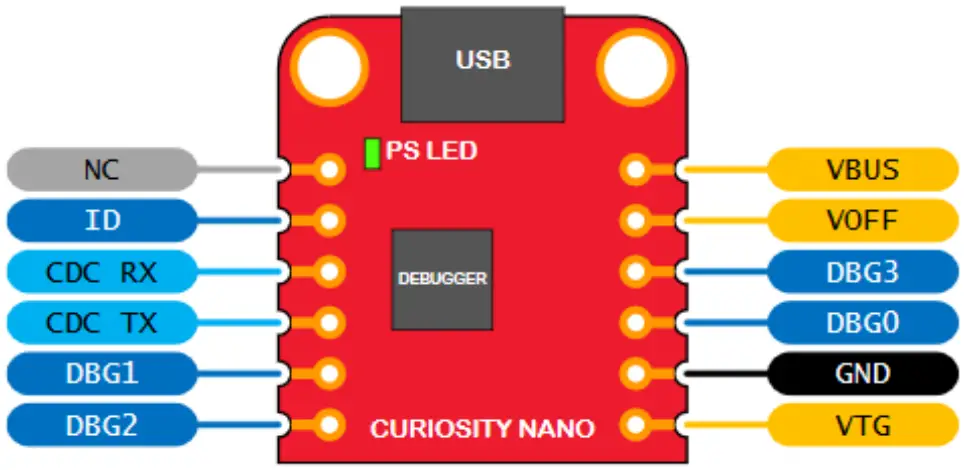
3.2 Curiosity Nano Standard Pinout
The twelve edge connections closest to the USB connector on Curiosity Nano kits have a standardized pinout. The program and debug pins have different functions depending on the target programming interface as shown in the following table and figure.
Table 3-2. Curiosity Nano Standard Pinout
| Debugger Signal | ICSP Target | Description |
| NC | – | No, connect. |
| ID | – | ID line for extensions. |
| CDC RX | UART TX | USB CDC RX line. |
| CDC TX | UART RX | USB CDC TX line. |
| DBG1 | SWCLK | Debug clock line |
| DBG2 | GPIO | DGI GPIO |
| VTG | – | Target voltage |
| GND | – | Common ground. |
| DBG0 | SWETA | Debug data line. |
| DBG3 | nRESET | Reset line |
| VOFF | – | Voltage Off input. |
| VBUS | – | VBUS voltage for external use. |
Figure 3-1. Curiosity Nano Standard Pinout
3.3 Power Supply
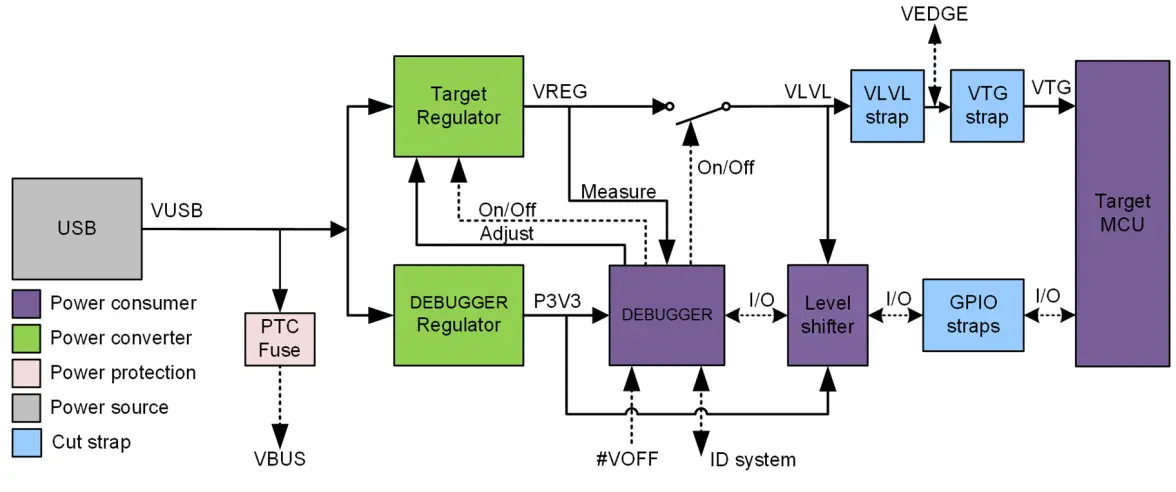
The evaluation kit is powered through the USB port and contains two regulators for generating 3.3V for the debugger and an adjustable regulator for the target. The voltage from the USB connector can vary between 4.4V-5.25V (according to the USB specification) and will limit the maximum voltage to the target. The following figure shows the entire power supply system on the SAM D21 Curiosity Nano.
Figure 3-2. Power Supply Block Diagram
3.3.1 Target Voltage Regulator
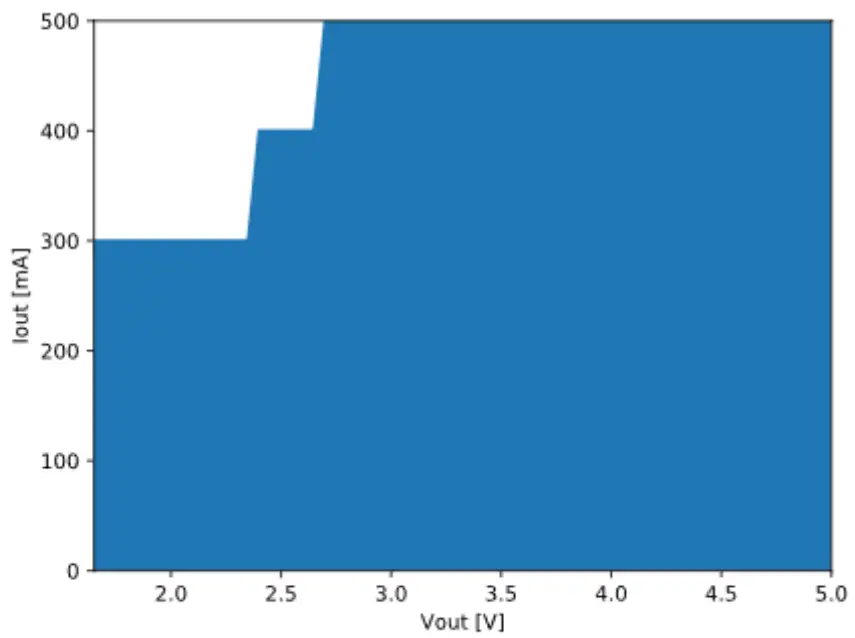
The target voltage regulator is a MIC5353 variable output LDO. The On-Board Nano Debugger can adjust the voltage output that is supplied to the kit target section by manipulating the MIC5353’s feedback voltage. The hardware implementation is limited to an approximate voltage range from 1.7V-5.1V. Additional output voltage limits are configured in the debugger firmware to ensure that the output voltage never exceeds the hardware limits of the SAMD21G17D microcontroller. The voltage limits configured in the On-Board Nano Debugger on the SAM D21 Curiosity Nano are 1.7V-3.6 V. The target voltage is set to 3.3V in production and can be changed through Atmel Studio. Any change to the target voltage done in Atmel Studio is persistent, even though a power toggles. The MIC5353 supports a maximum current load of 500 mA. It is an LDO regulator in a small package, placed on a small PCB, and the thermal shutdown condition can be reached at lower loads than 500 mA. The maximum current load depends on the input voltage, set output voltage, and ambient temperature. The following figure shows the safe operating area for the regulator with an input voltage of 5.1V and an ambient temperature of 23°C.
Figure 3-3. Target Regulator Safe Operation Area
3.3.2 External Supply
The SAM D21 Curiosity Nano evaluation kit can be powered by an external voltage instead of the onboard target regulator. When the Voltage Off (VOFF) pin is shorted to ground (GND), the On-Board Nano Debugger firmware disables the target regulator and it is safe to apply an external voltage to the VTG pin.
 WARNING WARNING | Applying an external voltage to the VTG pin without shorting VOFF to GND may cause permanent damage to the kit. |
| WARNING | The absolute maximum external voltage is 5.5V for the level shifters on board. Applying a higher voltage may cause permanent damage to the kit. |
Programming, debugging, and data streaming are still possible while using external power. The debugger and signal level shifters will be powered by a USB cable. Both regulators, the debugger, and the level shifters are powered down when the USB cable is removed.
3.4 Disconnecting the On-Board Nano Debugger
The following block diagram shows connections between the debugger and the SAMD21G17D microcontroller. The round boxes represent connections to the board edge on the SAM D21 Curiosity Nano. The signal names are shown in Figure 3-1 and printed in silkscreen on the bottom side of the board.
Figure 3-4. On-Board Nano Debugger Connections
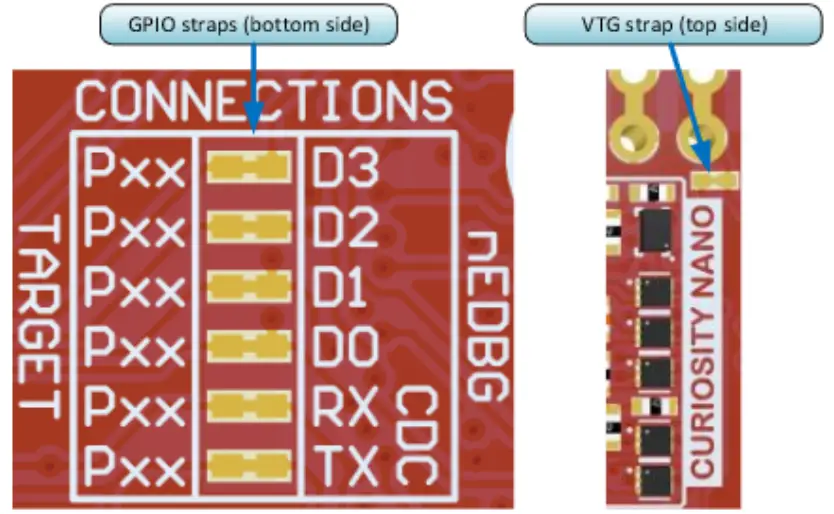
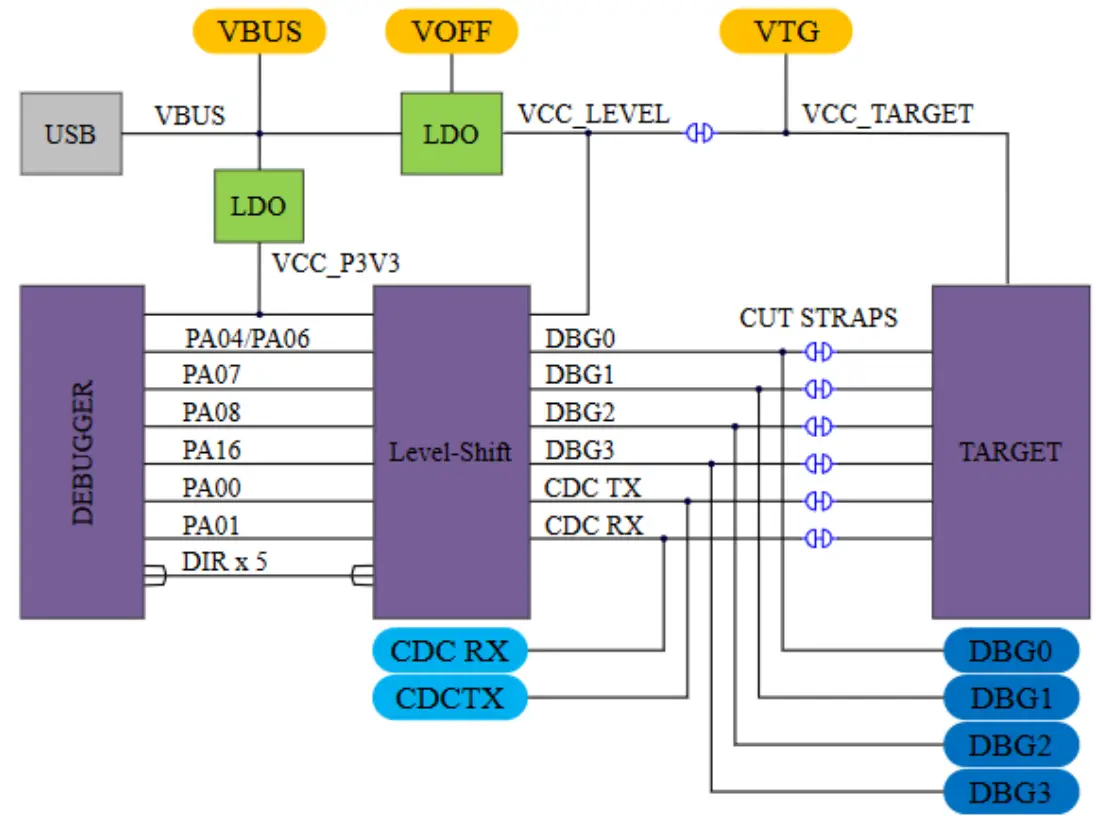 By cutting the GPIO straps with a sharp tool, as shown in the following figure, all I/Os connected between the debugger and the SAMD21G17D can be disconnected. To disconnect the target regulator, cut the VTG strap.
Notes:
- Cutting the connections to the debugger will disable programming, debugging, data streaming, and the target power supply. The signals will also be disconnected from the board edge next to the On-Board Nano Debugger section.
- Solder in 0Ω resistors across the footprints or short-circuit them with tin solder to reconnect any cut signals.
3.5 Current Measurement
The power to the SAMD21G17D is connected from the onboard power supply to the target voltage supply (VTG) with a cut strap as shown in Disconnecting the On-Board Debugger. To measure the power consumption of the SAMD21G17D and other peripherals connected to the board, cut the strap and connect an ammeter over the strap.
The ammeter can be connected between the target VTG pad edge connector and an external power supply for easy measurement. Alternatively, an external power supply can be used as described in External Supply.
 | Tip: The onboard level shifters will draw a small amount of current even when they are not in use. Disconnect the On-Board Nano Debugger and level shifters as described in Disconnecting the On-Board Debugger to prevent any current leakage. |
Hardware
4.1 Connectors
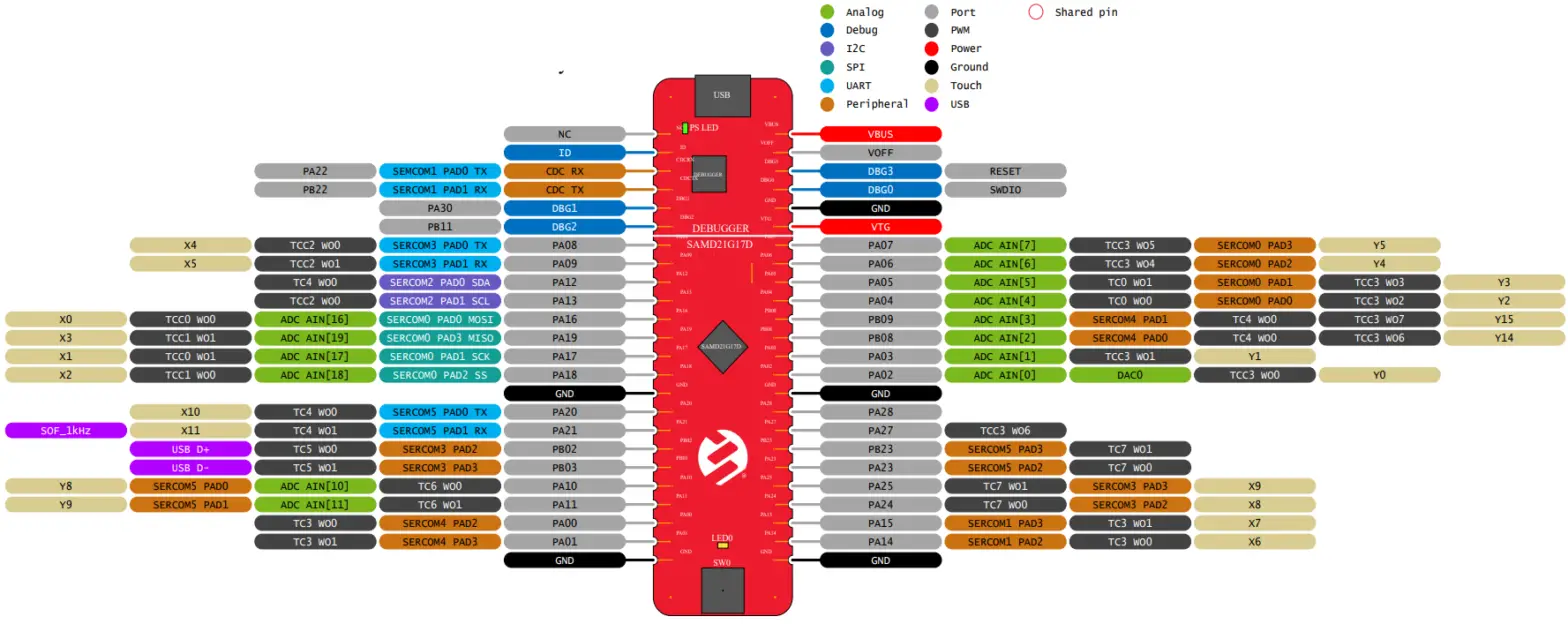
4.1.1 SAM D21 Curiosity Nano Pinout
All of the SAM D21G17D I/O pins are accessible at the edge connectors on the SAM D21 Curiosity Nano, except the button and LED (PB10, PB11). The following figure shows the evaluation kit pinout. RA30 and RA31 are only available at the edge connector in the debugger section as long as the cut straps on the bottom are not cut.
SAMD21G17D
Curiosity Nano
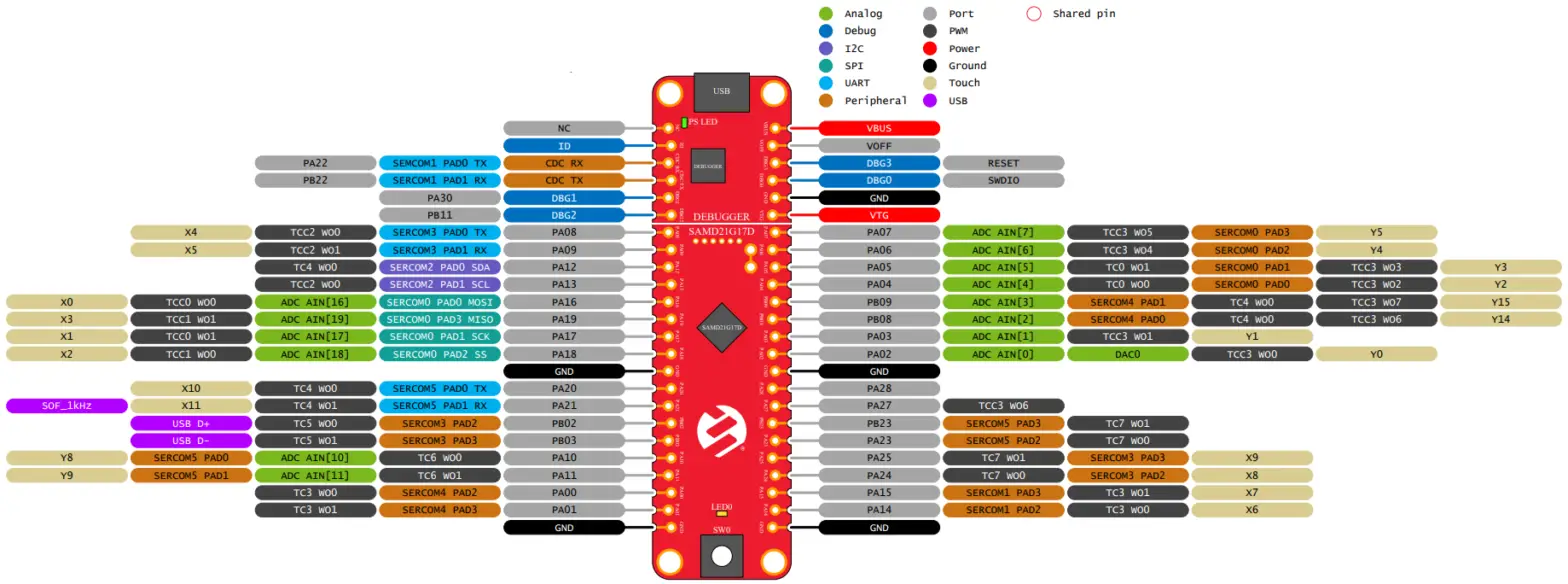 Note: Not all pin functions are listed in the diagram. Additional functions are available on these pins, for a list of additional functions, refer to the datasheet available at www.microchip.com.
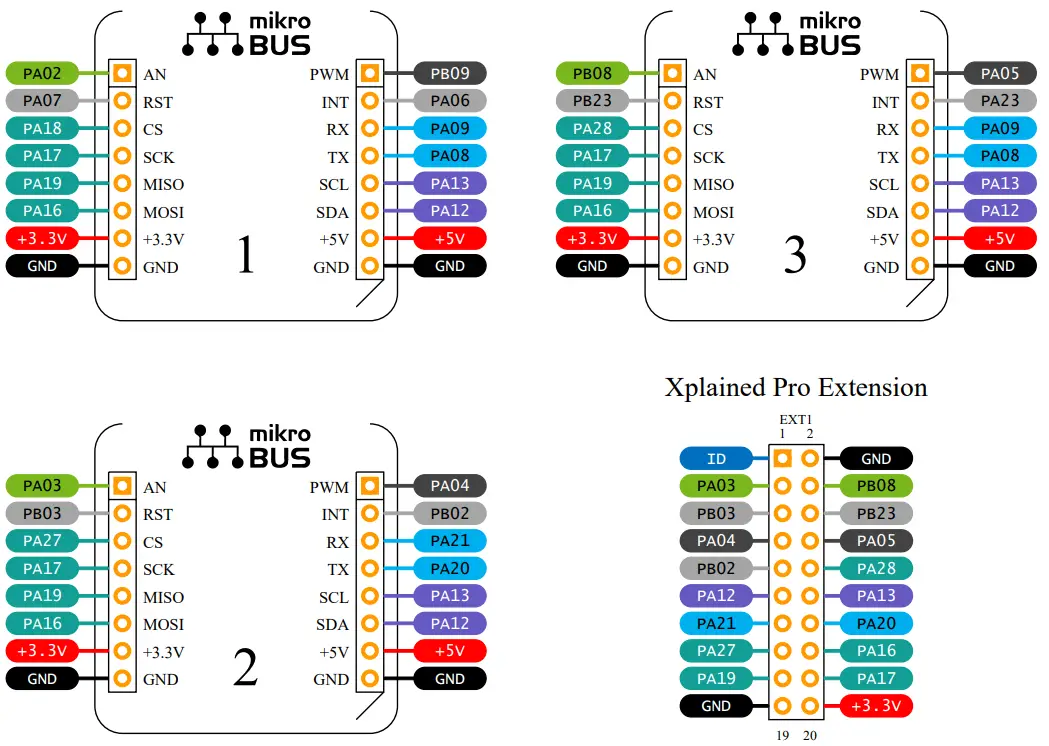
4.1.2 SAM D21 Curiosity Nano Base Quick Reference
The SAM D21G17D is compatible with the Curiosity Nano Base for click boards™ (AC164162). The following figure shows a simplified reference to enable quicker development.
For additional information, visit: https://www.microchip.com/developmenttools/ProductDetails/AC164162.
Curiosity Nano Base for click boards™
4.2 Peripherals
4.2.1 LED
One yellow LED is available on the SAM D21 Curiosity Nano evaluation kit, which can be controlled either with a GPIO or PWM. The LED can be activated by driving the connected I/O line to the GND.
Table 4-1. LED Connection
| SAMD21G17D | Function | Shared Functionality |
| PB10 | Yellow LED0 | None |
4.2.2 Mechanical Switch
The SAM D21 Curiosity Nano has one mechanical switch, a generic user-configurable switch. When this switch is pressed, it will drive the I/O line to the ground (GND).
Note: No pull-up resistor is connected to the generic user switch. Ensure that the internal pull-up is enabled in the SAMD21G17D to use the switch.
Table 4-2. Mechanical Switch
SAMD21G17D | Function | Shared Functionality |
| PB11 | User switch SW0 | DBG2 and Edge connector |
4.2.3 Crystal
The SAM D21 Curiosity Nano board has the option for a 32.768 kHz crystal, and by default, this crystal is not connected to the SAMD21G17D, as GPIOs are routed out to the edge connector. To use the crystal, some hardware modifications are required. The two I/O lines routed to the edge connector must be disconnected to reduce the chance of contention to the crystal, and to remove excessive capacitance on the lines.
Table 4-3. Crystal Connections
| SAMD21G17D pin | Function | Shared Functionality |
| PA00 | XIN32 | Edge connector |
| PA01 | XOUT32 | Edge connector |
4.3 On-Board Nano Debugger Implementation
The SAM D21 Curiosity Nano features an On-Board Nano Debugger that can be used to program and debug the SAMD21G17D using a Serial wire debug (SWD). The On-Board Nano Debugger also includes a Virtual Com port interface over UART and DGI GPIO. MPLAB X IDE can be used as a front-end for the On-Board Nano Debugger for programming and debugging. Data Visualizer can be used as a front-end for the CDC and DGI GPIO.
4.3.1 On-Board Nano Debugger Connections
The following table provides the connection details between the target and the debugger section. All connections between the target and the debugger are tri-stated as long as the debugger is not actively using the interface, therefore little contamination of the signals and the pins can be configured to the application requirements. For additional information on how to use the capabilities of the On-Board Nano Debugger, see Curiosity Nano.
Table 4-4. Connection Details between the Target and Debugger Section
| SAMD21G17D pin | Debugger pin | Function | Shared Functionality |
| PB22 | CDC TX | UART TX (SAMD21G17D RX line) | Edge Connector |
| PA22 | CDC RX | UART RX (SAMD21G17D TX line | Edge Connector |
| PA31 | DBG0 | SWETA | Edge Connector |
| PA30 | DBG1 | SWCLK | Edge Connector |
| PB11 | DBG2 | GPIO | Edge Connector and SW0 |
| reset | DBG3 | reset | Edge Connector |
| VCC_TARGET | VCC_LEVEL | 1.7V-3.6V supply voltage | Edge Connector |
| GND | GND | Common ground | Edge Connector |
Hardware Revision History
This user guide provides the latest available revision of the kit. This chapter contains information about known issues, a revision history of older revisions, and how older revisions differ from the latest revision.
5.1 Identifying Product ID and Revision
The revision and product identifier of Curiosity Nano boards can be found in two ways; either through the MPLAB X IDE or by looking at the sticker on the bottom of the PCB. By connecting a Curiosity Nano board to a computer with MPLAB X IDE running, an information window will pop up. The first six digits of the serial number, which is listed under kit details, contain the product identifier and revision. The same information can be found on the sticker on the bottom of the PCB. Most kits will print the identifier and revision in plain text as A09-nnnn\rr, where nnnn is the identifier and RR is the revision. Boards with limited space have a sticker with only a QR code, which contains a serial number string. The serial number string has the following format:
“nnnnrrssssssssss”
n = product identifier
r = revision
s = serial number.
Schematics
Figure 6-1. Target Microcontroller (SAMD21G17D)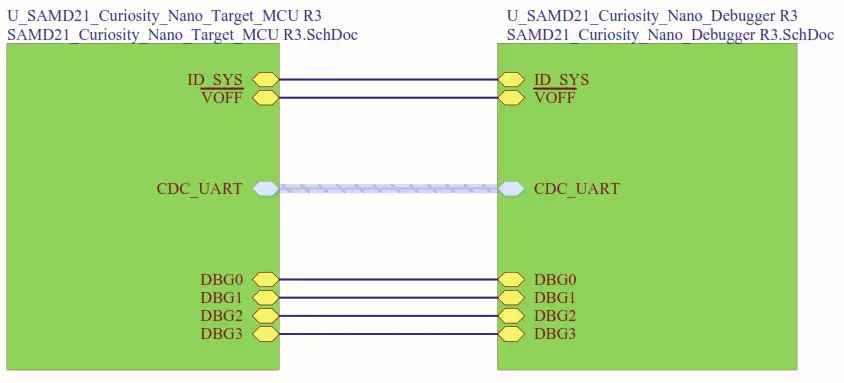 Figure 6-2. Debugger
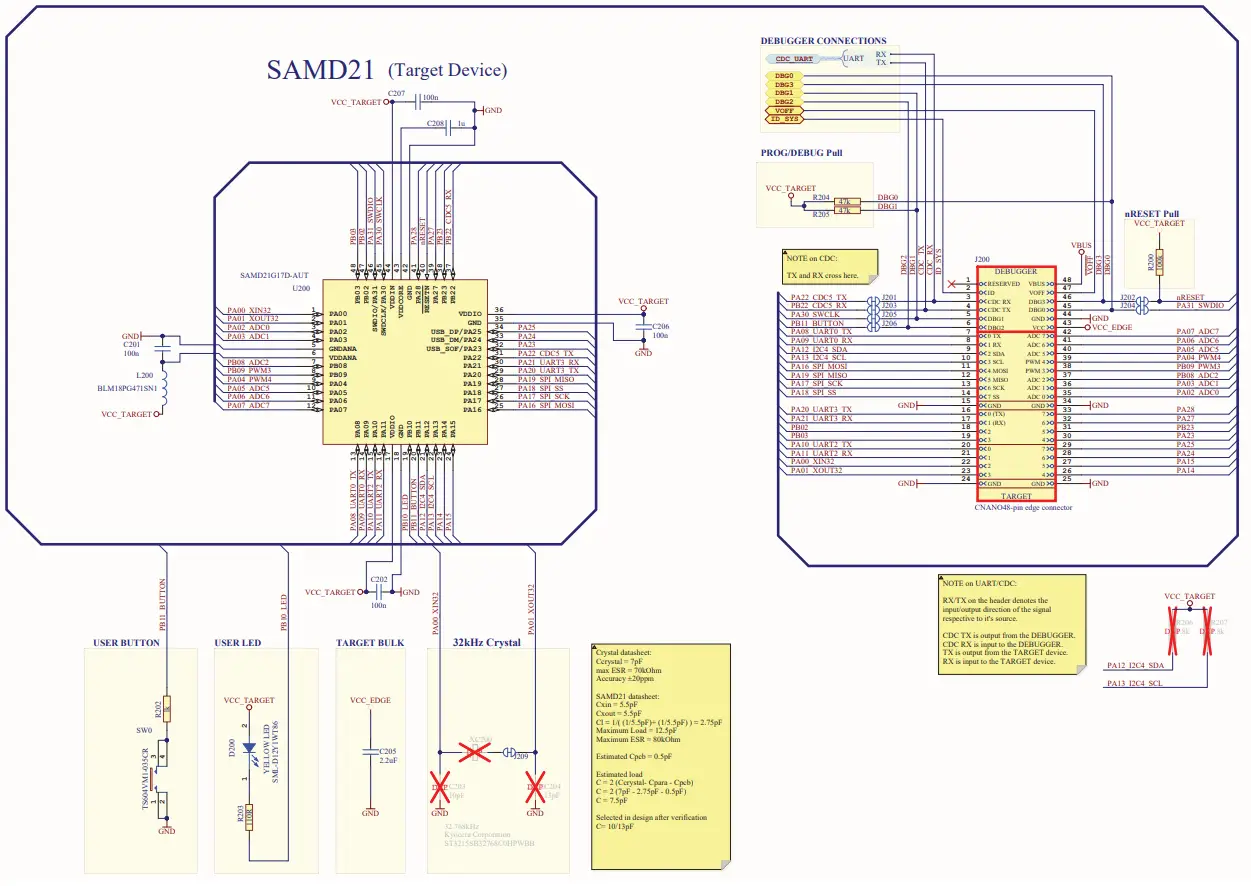
Figure 6-3. Debugger
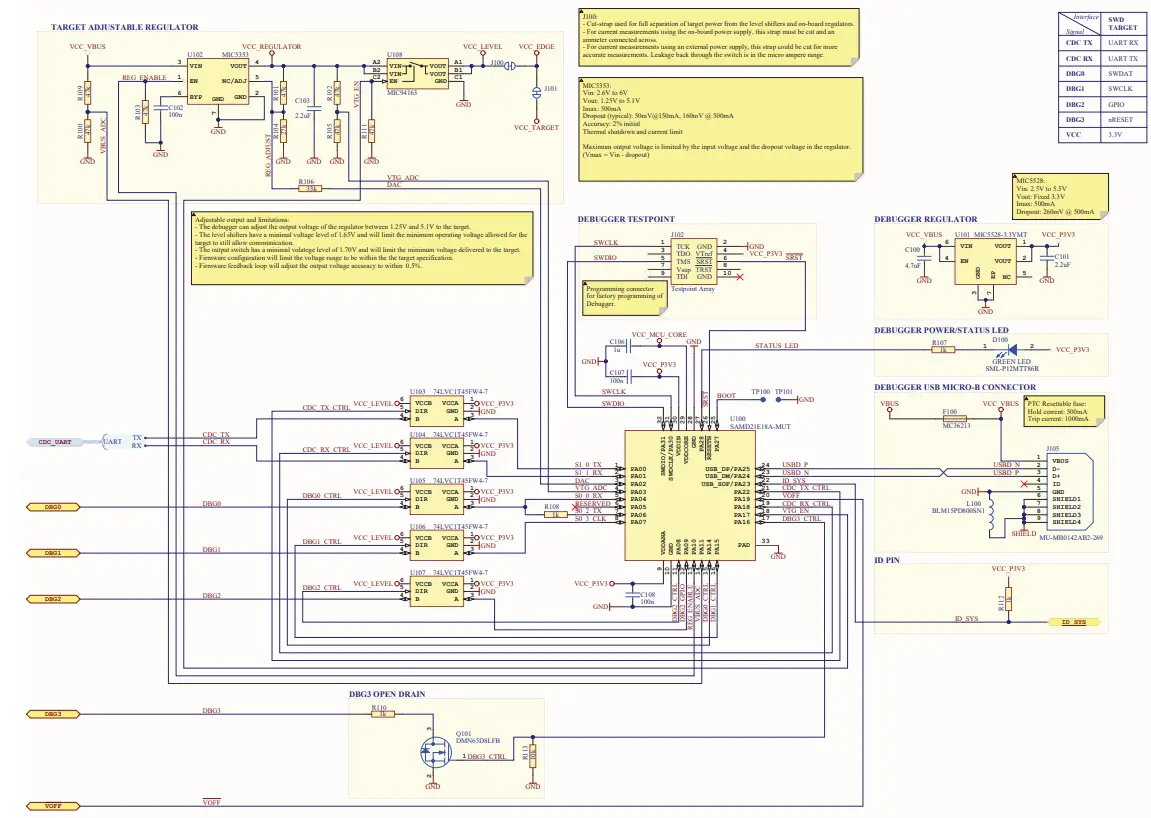
Document Revision History
Rev C – 07/2020
Updated the figures in the following section, and added a note:
- SAMD21G17D Curiosity Nano Pinout
Added a new section:
- SAMD21G17D Curiosity Nano Base Quick Reference
Rev B – 04/2020
Updated the pin names for the SAMD21G17D in the Connection Details between the Target and Debugger Section Table.
Rev A – 12/2019
This is the initially released version of this document.
The Microchip Website
Microchip provides online support via our website at www.microchip.com/. This website is used to make files and information easily available to customers. Some of the content available includes:
- Product Support – Datasheets and errata, application notes and sample programs, design resources, user’s guides, hardware support documents, latest software releases, and archived software.
- General Technical Support – Frequently Asked Questions (FAQs), technical support requests, online discussion groups, Microchip design partner program member listing.
- Business of Microchip – Product selector and ordering guides, latest Microchip press releases, a listing of seminars and events, and listings of Microchip sales offices, distributors, and factory representatives.
Product Change Notification Service
Microchip’s product change notification service helps keep customers current on Microchip products. Subscribers will receive email notifications whenever there are changes, updates, revisions, or errata related to a specified product family or development tool of interest.
To register, go to www.microchip.com/pcn and follow the registration instructions.
Customer Support
Users of Microchip products can receive assistance through several channels:
- Distributor or Representative
- Local Sales Office
- Embedded Solutions Engineer (ESE)
- Technical Support
Customers should contact their distributor, representative, or ESE for support. Local sales offices are also available to help customers. A listing of sales offices and locations is included in this document.
Technical support is available through the website at: www.microchip.com/support
Microchip devises Code Protection Feature
Note the following details of the code protection feature on Microchip devices:
- Microchip products meet the specification contained in their particular Microchip Data Sheet.
- Microchip believes that its family of products is one of the most secure families of its kind on the market today when used in an intended manner and under normal conditions.
- There are dishonest and possibly illegal methods used to breach the code protection feature. All of these methods, to our knowledge, require using the Microchip products in a manner outside the operating specifications contained in Microchip’s Data Sheets. Most likely, the person doing so is engaged in the theft of intellectual property.
- A microchip is willing to work with the customer who is concerned about the integrity of their code.
- Neither Microchip nor any other semiconductor manufacturer can guarantee the security of their code. Code protection does not mean that we are guaranteeing the product is “unbreakable.”
Code protection is constantly evolving. We at Microchip are committed to continuously improving the code protection features of our products. Attempts to break Microchip’s code protection feature may be a violation of the Digital Millennium Copyright Act. If such acts allow unauthorized access to your software or other copyrighted work, you may have a right to sue for relief under that Act.
Legal Notice
Information contained in this publication regarding device applications and the like is provided only for your convenience and may be superseded by updates. It is your responsibility to ensure that your application meets your specifications. MICROCHIP MAKES NO REPRESENTATIONS OR WARRANTIES OF ANY KIND WHETHER
EXPRESS OR IMPLIED, WRITTEN OR ORAL, STATUTORY OR OTHERWISE, RELATED TO THE INFORMATION, INCLUDING BUT NOT LIMITED TO ITS CONDITION, QUALITY, PERFORMANCE, MERCHANTABILITY, OR FITNESS FOR PURPOSE. Microchip disclaims all liability arising from this information and its use. Use of Microchip devices in life support and/or safety applications is entirely at the buyer’s risk, and the buyer agrees to defend, indemnify and hold harmless Microchip from any and all damages, claims, suits, or expenses resulting from such use. No licenses are conveyed, implicitly or otherwise, under any Microchip intellectual property rights unless otherwise stated.
Trademarks
The Microchip name and logo, the Microchip logo, Adaptec, AnyRate, AVR, AVR logo, AVR Freaks, BesTime, BitCloud, chipKIT, chipKIT logo, CryptoMemory, CryptoRF, dsPIC, FlashFlex, flex WR, HELDO, IGLOO, JukeBlox, KeeLoq, Kleer, LANCheck, LinkMD, max styles, maXTouch, MediaLB, megaAVR, Microsemi, Microsemi logo, MOST, MOST logo, MPLAB, OptoLyzer, PackeTime, PIC, picoPower, PICSTART, PIC32 logo, PolarFire, Prochip Designer, QTouch, SAM-BA, SenGenuity, SpyNIC, SST, SST Logo, SuperFlash, Symmetricom, SyncServer, Tachyon, TempTrackr, TimeSource, tinyAVR, UNI/O, Vectron, and XMEGA are registered trademarks of Microchip Technology Incorporated in the U.S.A. and other countries.
APT, ClockWorks, The Embedded Control Solutions Company, EtherSynch, FlashTec, Hyper Speed Control, HyperLight Load, IntelliMOS, Libero, motor bench, mTouch, Powermite 3, Precision Edge, ProASIC, ProASIC Plus, ProASIC Plus logo, Quiet-Wire, SmartFusion, SyncWorld, Temux, TimeCesium, TimeHub, TimePictra, TimeProvider, Vite, WinPath, and ZL are registered trademarks of Microchip Technology Incorporated in the U.S.A.
Adjacent Key Suppression, AKS, Analog-for-the-Digital Age, Any Capacitor, AnyIn, AnyOut, BlueSky, BodyCom, CodeGuard, CryptoAuthentication, CryptoAutomotive, CryptoCompanion, CryptoController, dsPICDEM, dsPICDEM.net, Dynamic Average Matching, DAM, ECAN, evergreen, In-Circuit Serial Programming, ICSP, INICnet, Inter-Chip Connectivity, JitterBlocker, KleerNet, KleerNet logo, membrane, Mindi, MiWi, MPASM, MPF, MPLAB Certified logo, MPLIB, MP LINK, MultiTRAK, NetDetach, Omniscient Code Generation, PICDEM, PICDEM.net, PICkit, PICtail, PowerSmart, PureSilicon, QMatrix, REAL ICE, Ripple Blocker, SAM-ICE, Serial Quad I/O, SMART-I.S., SQI, SuperSwitcher, SuperSwitcher II, Total Endurance, TSHARC, USBCheck, VariSense, ViewSpan, WiperLock, Wireless DNA, and ZENA are trademarks of Microchip Technology Incorporated in the U.S.A. and other countries.
SQTP is a service mark of Microchip Technology Incorporated in the U.S.A.
The Adaptec logo, Frequency on Demand, Silicon Storage Technology, and Symmcom are registered trademarks of Microchip Technology Inc. in other countries.
GestIC is a registered trademark of Microchip Technology Germany II GmbH & Co. KG, a subsidiary of Microchip Technology Inc., in other countries.
All other trademarks mentioned herein are property of their respective companies.
©2019, Microchip Technology Incorporated, Printed in the U.S.A., All Rights Reserved.
ISBN: 978-1-5224-6487-7
Quality Management System
For information regarding Microchip’s Quality Management Systems, please visit www.microchip.com/quality.
Worldwide Sales and Service
| AMERICAS | ASIA/PACIFIC | ASIA/PACIFIC | EUROPE |
| Corporate Office 2355 West Chandler Blvd. Chandler, AZ 85224-6199 Tel: 480-792-7200 Fax: 480-792-7277 Technical Support: www.microchip.com/support Web Address: www.microchip.com Atlanta Duluth, GA Tel: 678-957-9614 Fax: 678-957-1455 Austin, TX Tel: 512-257-3370 Boston Westborough, MA Tel: 774-760-0087 Fax: 774-760-0088 Chicago Itasca, IL Tel: 630-285-0071 Fax: 630-285-0075 Dallas Addison, TX Tel: 972-818-7423 Fax: 972-818-2924 Detroit Novi, MI Tel: 248-848-4000 Houston, TX Tel: 281-894-5983 Indianapolis Noblesville, IN Tel: 317-773-8323 Fax: 317-773-5453 Tel: 317-536-2380 Los Angeles Mission Viejo, CA Tel: 949-462-9523 Fax: 949-462-9608 Tel: 951-273-7800 Raleigh, NC Tel: 919-844-7510 New York, NY Tel: 631-435-6000 San Jose, CA Tel: 408-735-9110 Tel: 408-436-4270 Canada – Toronto Tel: 905-695-1980 Fax: 905-695-2078 | Australia – Sydney Tel: 61-2-9868-6733 China – Beijing Tel: 86-10-8569-7000 China – Chengdu Tel: 86-28-8665-5511 China – Chongqing Tel: 86-23-8980-9588 China – Dongguan Tel: 86-769-8702-9880 China – Guangzhou Tel: 86-20-8755-8029 China – Hangzhou Tel: 86-571-8792-8115 China – Hong Kong SAR Tel: 852-2943-5100 China – Nanjing Tel: 86-25-8473-2460 China – Qingdao Tel: 86-532-8502-7355 China – Shanghai Tel: 86-21-3326-8000 China – Shenyang Tel: 86-24-2334-2829 China – Shenzhen Tel: 86-755-8864-2200 China – Suzhou Tel: 86-186-6233-1526 China – Wuhan Tel: 86-27-5980-5300 China – Xian Tel: 86-29-8833-7252 China – Xiamen Tel: 86-592-2388138 China – Zhuhai Tel: 86-756-3210040 | India – Bangalore Tel: 91-80-3090-4444 India – New Delhi Tel: 91-11-4160-8631 India – Pune Tel: 91-20-4121-0141 Japan – Osaka Tel: 81-6-6152-7160 Japan – Tokyo Tel: 81-3-6880- 3770 Korea – Daegu Tel: 82-53-744-4301 Korea – Seoul Tel: 82-2-554-7200 Malaysia – Kuala Lumpur Tel: 60-3-7651-7906 Malaysia – Penang Tel: 60-4-227-8870 The Philippines – Manila Tel: 63-2-634-9065 Singapore Tel: 65-6334-8870 Taiwan – Hsin Chu Tel: 886-3-577-8366 Taiwan – Kaohsiung Tel: 886-7-213-7830 Taiwan – Taipei Tel: 886-2-2508-8600 Thailand – Bangkok Tel: 66-2-694-1351 Vietnam – Ho Chi Minh Tel: 84-28-5448-2100 | Austria – Wels Tel: 43-7242-2244-39 Fax: 43-7242-2244-393 Denmark – Copenhagen Tel: 45-4450-2828 Fax: 45-4485-2829 Finland – Espoo Tel: 358-9-4520-820 France – Paris Tel: 33-1-69-53-63-20 Fax: 33-1-69-30-90-79 Germany – Garching Tel: 49-8931-9700 Germany – Haan Tel: 49-2129-3766400 Germany – Heilbronn Tel: 49-7131-72400 Germany – Karlsruhe Tel: 49-721-625370 Germany – Munich Tel: 49-89-627-144-0 Fax: 49-89-627-144-44 Germany – Rosenheim Tel: 49-8031-354-560 Israel – Ra’anana Tel: 972-9-744-7705 Italy – Milan Tel: 39-0331-742611 Fax: 39-0331-466781 Italy – Padova Tel: 39-049-7625286 The Netherlands – Drunen Tel: 31-416-690399 Fax: 31-416-690340 Norway – Trondheim Tel: 47-72884388 Poland – Warsaw Tel: 48-22-3325737 Romania – Bucharest Tel: 40-21-407-87-50 Spain – Madrid Tel: 34-91-708-08-90 Fax: 34-91-708-08-91 Sweden – Gothenberg Tel: 46-31-704-60-40 Sweden – Stockholm Tel: 46-8-5090-4654 The UK – Wokingham Tel: 44-118-921-5800 Fax: 44-118-921-5820 |
References
 青娱乐极品盛宴_午夜羞羞影院男女爽爽爽_白丝小舞被啪到娇喘不停_狠狠综合久久久综合网大蛇
 Empowering Innovation | Microchip Technology
-
Empowering Innovation | Microchip Technology
-
Product Change Notification | Microchip Technology
-
Quality | Microchip Technology
-
Microchip Lightning Support
-
Microchip Lightning Support
-
Dynamic Dev Tool Page | Microchip Technology
 青娱乐极品盛宴_午夜羞羞影院男女爽爽爽_白丝小舞被啪到娇喘不停_狠狠综合久久久综合网大蛇
 Empowering Innovation | Microchip Technology