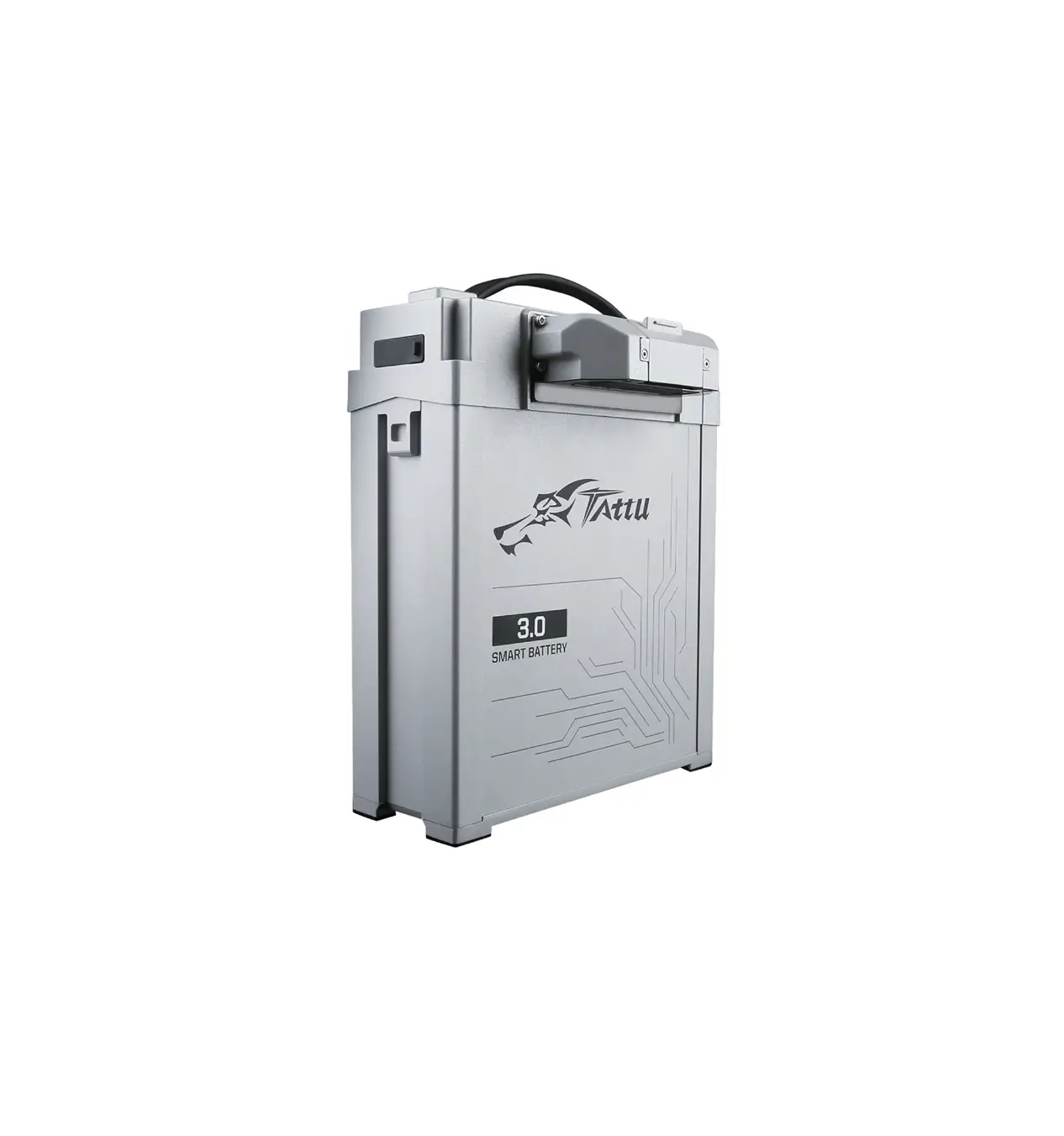
Tattu TA3TAS19K1425X 51.8V 25C 14S1P Lipo Smart Battery Pack
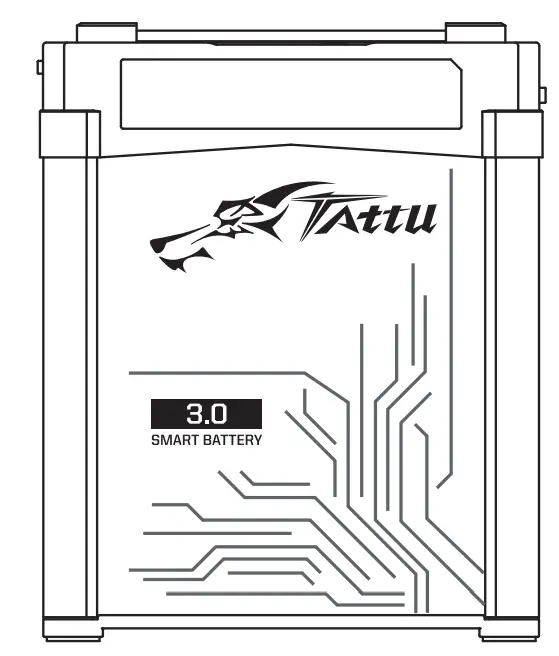 Tattu 3.0
Thank you for purchasing this product, please carefully follow all instructions in this manual.
SHENZHEN GREPOW BATTERY CO.,LTD
- Lithium polymer batteries contain active substances that can easily cause fires without proper usage. TATTU manufacturer, distributors and dealers will not be held responsible or liable for any personal injury or property damage caused from improper usage of TATTU products without reading the instructions.
Product Description
Introduction:
The TATTU 3.0 is suitable for multiple drone systems. There are many smart features, which include data collection, safety reminder, power calculation, automatic balancing, charging reminder, abnormal-status alarm, data transmission, history check and more.
Product Parameters
| Battery Type | Rechargeable lithium ion polymer battery pack | ||
| Model | TA3TAS19K1425X | TA3TAS22K1425X | TA3TAS25K1425X |
| Nominal Capacity | 19Ah | 22Ah | 25Ah |
| Battery Configuration | 14S1P | ||
| Typical Voltage | 51.8V | ||
| Size(L*W*H) | 238* 174*117mm | ||
| Battery Weight (±100g) | 8000g | 8900g | 9700g |
| Power(Wh) | 984.2Wh | 1139.6Wh | 1295Wh |
| Discharge Current | 100A | 130A | 150A |
| Peak Discharge Current | 150A(<3S) | 180A(<3S) | 200A(<3S) |
| Recommended Charging Temperature | +10℃~+45℃ | ||
| Recommended Discharging Temperature | +10℃~+60℃ | ||
| Max. Charging Voltage | 58.8V(4.2V/cell) | ||
| Recommended Landing Voltage | 50.4V(3.6V/cell) | ||
| Recommended Forced Landing Voltage | 49.7V(3.55V/cell) | ||
Product List
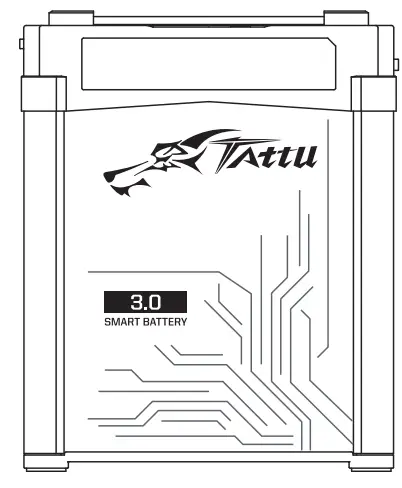
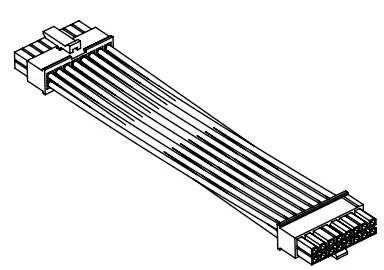
| Battery Pack (1 PC) | Molex Charging Balance Converter (1 PC) | User Manual (1 PC) |
 |  |  |
3D Diagram
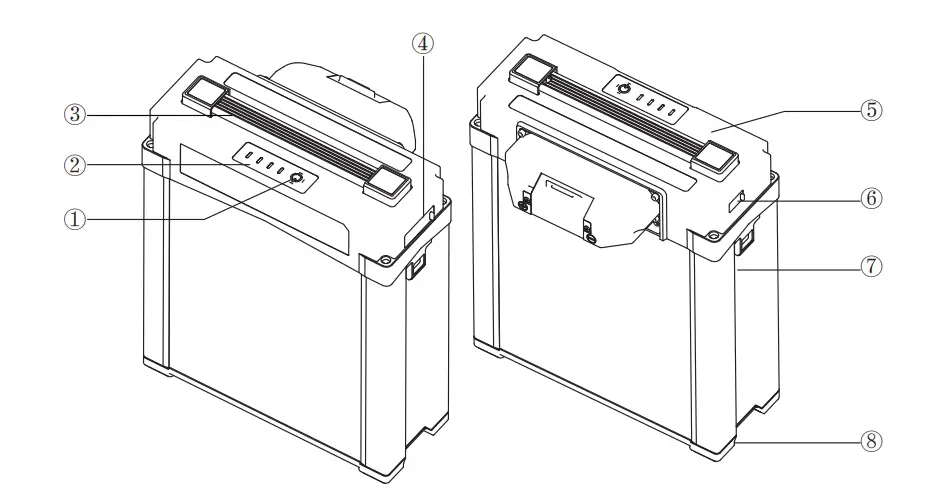
①Button
②Capacity Indicator
③Handle
④Equalizing port dust plug
⑤ Top case
⑥ USB Port
⑦ Aluminum frame
⑧Bottom Shell
Product Operational Guide
Overview
Top View
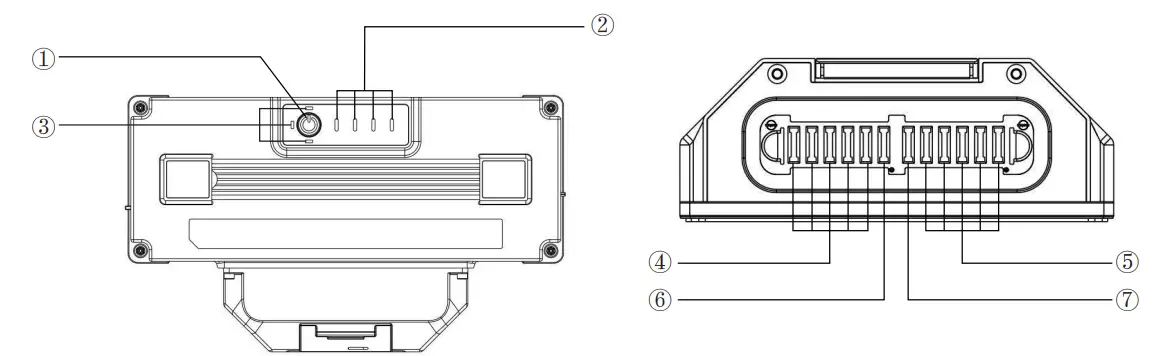
① Battery-Power Indicator
② LED 1~4 White Button
③LED 5~7 Button with different colors
④Discharge Positive
⑤Discharge Negative
⑥CAN_H
⑦CAN_L
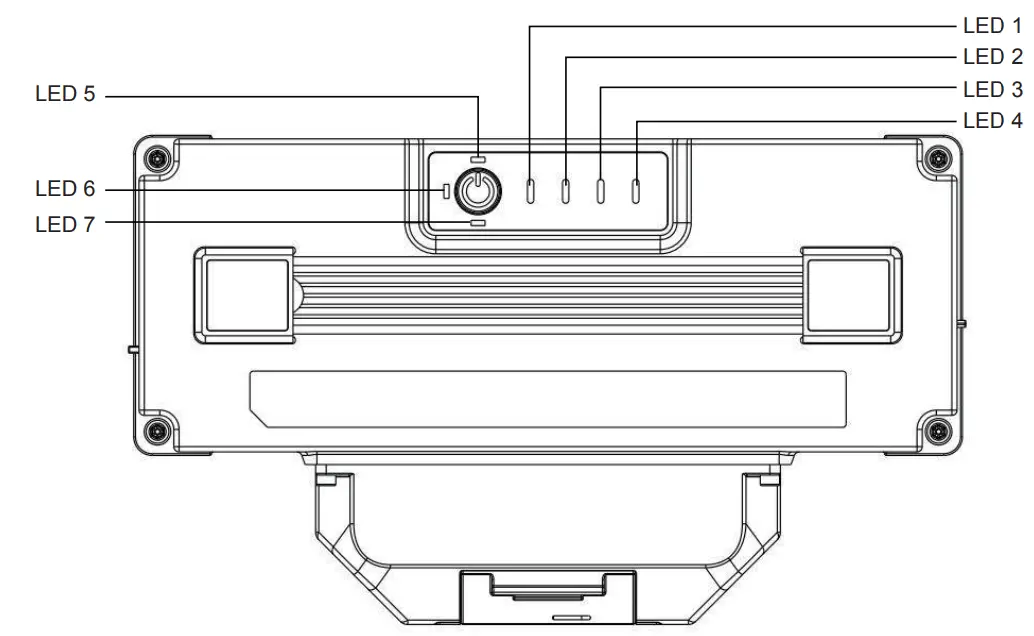
①LED1, LED2, LED3, LED4 are white lights and show the battery SOC and lifespan
②LED5, LED6, LED7 are red, orange, and white lights respectively and show the status of the battery’s health.
③Description of Button Function
| Battery Status | Button Operation | Function |
| Power Off | Short press | Check remaining power |
| Power Off | Short press + long press(≥2s) | LED on, LED shows the remaining power |
| Power On | Short press+long press(≥2s) | LED off |
| Power Off | long press(≥5s) | Shows battery lifetime |
④Definition of Balancing Port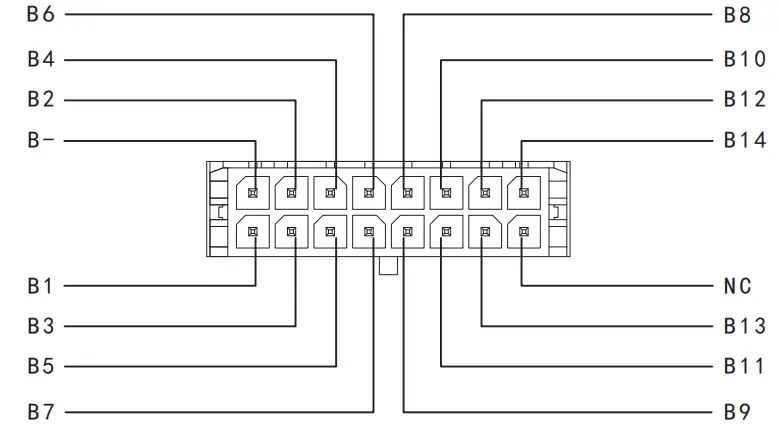
Operation Guide
①Check Battery’s Remaining Power
- The LED lights will indicate the battery’s remaining power
| Remaining Power | LED1 | LED2 | LED3 | LED4 |
| 0%~12% | Blink | Off | Off | Off |
| 13%~24% | On | Off | Off | Off |
| 25%~37% | On | Blink | Off | Off |
| 38%~49% | On | On | Off | Off |
| 50%~62% | On | On | Blink | Off |
| 63%~74% | On | On | On | Off |
| 75%~94% | On | On | On | Blink |
| 95%~100% | On | On | On | On |
Check Battery’s Lifespan
①Sleeping mode reduces self-consumption and starts when the battery is inactive for 10 minutes after powering on. The battery can be activated again by charging and discharging.
②When any cell voltage is lower than 3.65V, the BMS will enter a second-class low-power consumption mode to ensure battery safety. If this ever occurs, you must charge the battery immediately in order to avoid irreversible damage
Self-balancing Function
The self-balancing function is activated when the battery is left alone for more than 6 hours. In this mode, the voltage difference of each cell will meet the preset value.
Smart Storage Mode
The battery can be stored if the SOC LEDs show the modes below.
| Remaining Power | White LED1 | White LED2 | White LED3 | White LED4 |
| 50%~62% | On | On | Blink | Off |
| 63%~74% | On | On | On | Off |
The smart storage mode starts if the battery is left alone >6 days and/or if any cell voltages are >3.95V and the temperature is <60℃ (It’s the normal if the temperature rises during discharge). The smart storage mode stops once any cell voltages are ≤3.95V, the temperature is ≥60℃, or with any charge and discharge action. Store the battery in a battery box, and do not store the battery for a long period of time after it has been completely discharged. This is to prevent the battery from an over-discharged state, which will cause cell damage. If the battery is left alone for more than 5 days, discharge the battery to 40-70% capacity for storage
Common Failures And Troubleshooting Methods
| Warnings | Description | Solution |
| Charging Over-current | When the battery charging current exceeds the design value | Check if the charger current setting is correct. Disconnect the connector between the charger and the battery, and the warning should disappear |
| Charging Over-current | Overcharge alarm will be triggered when the battery is fully charged, but charging will continue | The alarm will stop when the connector between the charger and battery is disconnected and the battery voltage drops to 4.18V/cell |
| Low temperature | The battery temperature is too low for charging | When the battery temperature rises above 15 °C, the alarm will stop |
| Battery High Temperature | The battery temperature is too high for charging | The alarm will stop when the battery is cooled below 45 °C |
②Check Battery’s Lifespan
- Press and hold the button for 5 seconds when the battery is powered of
| Remaining Lifetime | LED1 | LED2 | LED3 | LED4 |
| 88%~100% | On | On | On | On |
| 75%~87% | On | On | On | Blink |
| 63%~74% | On | On | On | Off |
| 50%~62% | On | On | Blink | Off |
| 38%~49% | On | On | Off | Off |
| 25%~37% | On | Blink | Off | Off |
| 13%~24% | On | Off | Off | Off |
| Below 12% | Blink | Off | Off | Off |
③ Charging
- Charging when power is on: the battery indicator will turn off 10 minutes after the battery is fully charged.
- Charging when power is off: the battery indicator will turn off after the battery is fully charged.
| Remaining Power | LED1 | LED2 | LED3 | LED4 |
| 0%~12% | Blink | Blink | Blink | Blink |
| 13% ~ 37% | On | Blink | Blink | Blink |
| 38%~62% | On | On | Blink | Blink |
| 63%~94% | On | On | On | Blink |
| 95%~100% | On | On | On | On |
④ Status LED Indicator
- Red LED: Indicates that the battery is currently in storage mode.
- Orange LED: Error Warning indicating that battery needs to be maintained. If LED lights are still on after maintenance, don’t use the battery any further and contact the Tattu team.
| Red LED5 | White LED7 | Description |
| Blink | Over Temperature warning Level 2, please stop charge or discharge till the temperature down to safe value. | |
| Blink | Over temperature warning Level 1, please stop charge or discharge till the temperature down to safe value. | |
| On | On | Voltage difference warning Level 2, balance charging is required. |
| Voltage difference warning Level 1, Balance charging is required. | ||
| On | On | False warning, please charge the battery by maintenance mode |
Cautions
① The battery protection board is not equipped with anti-sparking function. If anti-sparking function is required, please use a connector with anti-spark function;
② When using the charger to charge the battery, the balancing current shall not be above 1A;
③ The battery does not have the overcharge or over discharge protection function, and it is necessary to set the charge/discharge limit voltage on the charger or the device;
④ Do not short-circuit the connector, otherwise there is a safety risk;
⑤ The discharge cables shall be soldered well with connector, otherwise the power supply may be poor, and causing the aircraft to crash during the flight;
⑥ Do not pull on the battery cables under any circumstances.
※ Please read the following instructions carefully before use;
※ Lithium polymer batteries are active substances and it is easy to cause fire without proper use. If improper use without reading the instructions and cause personal injury or property damage, TATTU manufacturers, distributors and dealers will not be responsible for any liability.
※ To purchase TATTU related products, the buyer must bear all risks related to the product;
※ If you do not agree to this clause, please return the battery to us immediately before use.
- Before using
① Before using the battery, please check the battery’s power and health status (see content No.3, Operation Guide 1)
② Please check if the battery is damaged, bulging or leaking. If any of the above, do not use it;
③ Do not let the battery contact metal and carbon fiber products to prevent short circuit;
④ Do not short or reverse the positive and negative electrode;
⑤ Do not pull the battery charge / discharge cables;
⑥ Do not assemble the battery by your own, Reassemble the old battery cell or reorganize one of the disassembled cells to another pack is dangerous (It’s easy to cause short-circuit and cause fire);
⑦ In the low temperature environment (below 5 °C), it is recommended to preheat the battery by charging or discharging the battery with small current to above 5 °C before use, 20 °C is best, do not do heavy duty operations when first starting use of a cold pack. Allow the battery to reach normal operating temperatures before hard use.
⑧ Do not over-discharge the battery (single-cell voltage should not be lower than 3.3V), over-discharge will damage the battery easily, such as puffing, etc;
⑨ Do not splash the electrolyte on your eyes or skin. If this occurs flush with water and seek medical advice immediately. - Charging
① ONLY use a Li-Po battery type smart charger to charge
② It is recommended to charge in the temperature range of 10 °C to 45 °C;
③ When charging, only use a table or platform that is heat-resistant. It is recommended to use an explosion- proof LIPO battery bag.
④ Do not leave LiPo batteries unattended while charging - Storage
① Do not keep battery near liquid as well as store them in a humid place;
② Do not place the battery near heat sources such as open flames or heaters;
③ Please Keep the battery out of the reach of children;
④ Store the battery in a temperature controlled environment of approximately 25°C;
⑤ Make sure that the battery has enough storage space (do not stack batteries in storage)
⑥ If the battery is not used for a long time, it is recommended to do a charge cycle. Charge and discharge the battery to storage level(3.6-3.9v for single cell ) every 3 months. This will ensure the best service life of the Battery.
Telephone: Official E-mail:
CN: +86 0755-88376372 [email protected]
DE: +49 (0)211 93670190 [email protected]
USA: +1 (925) 364-7166 [email protected]