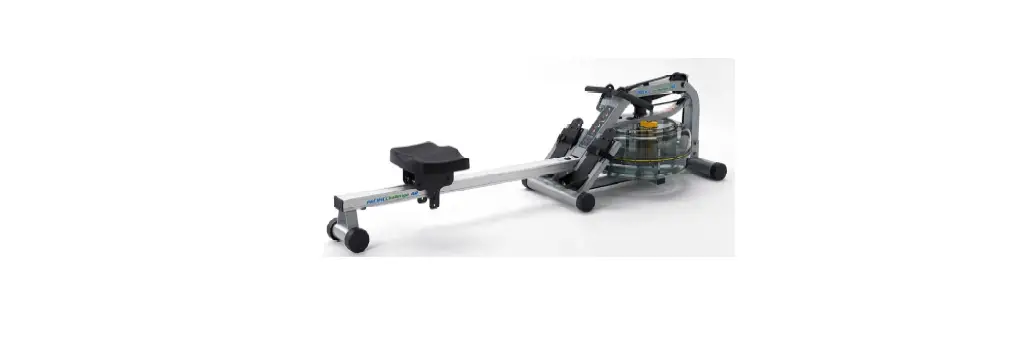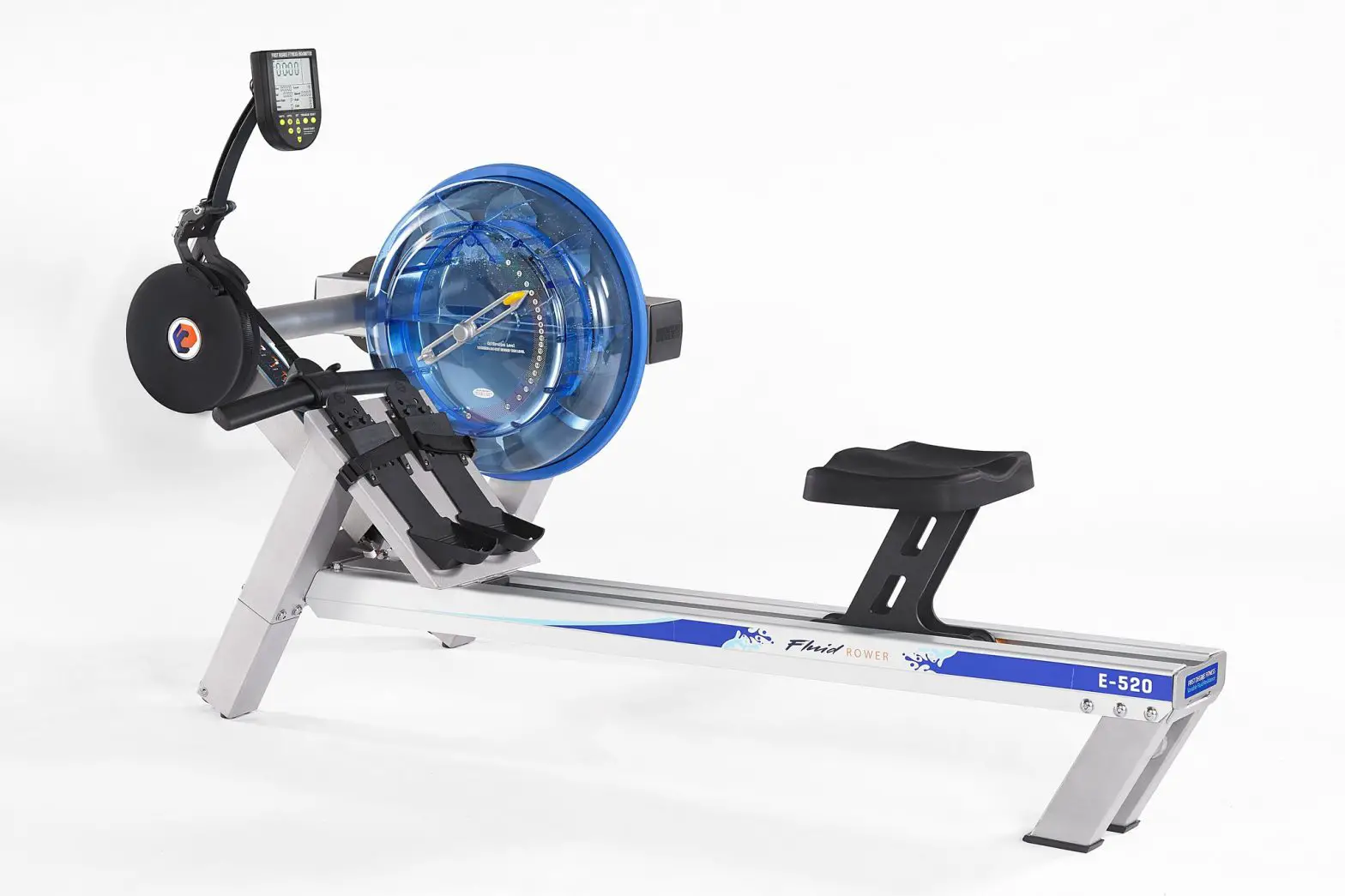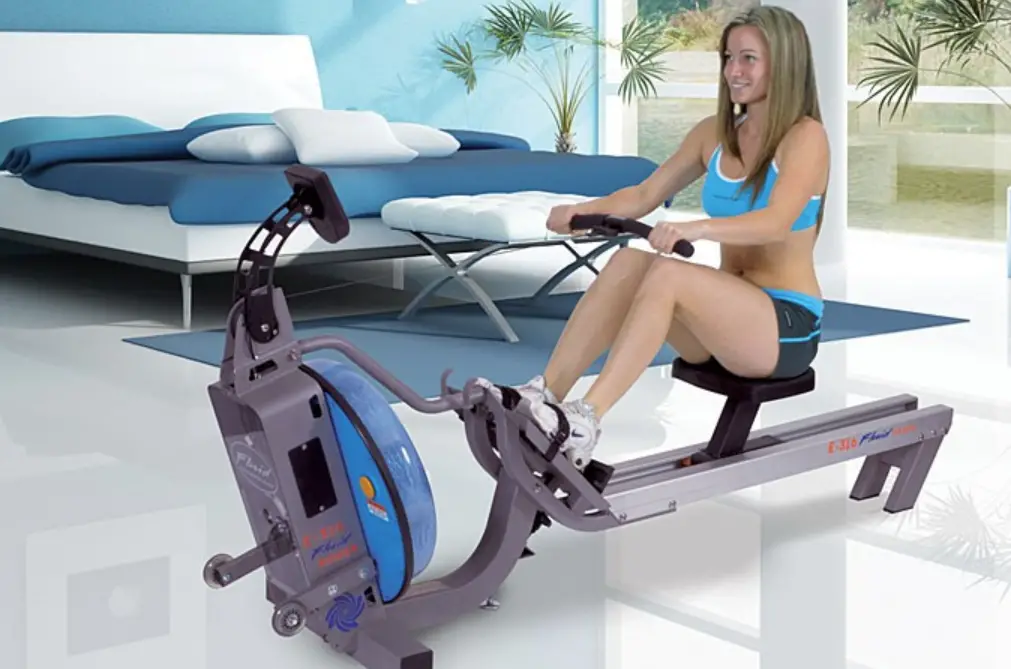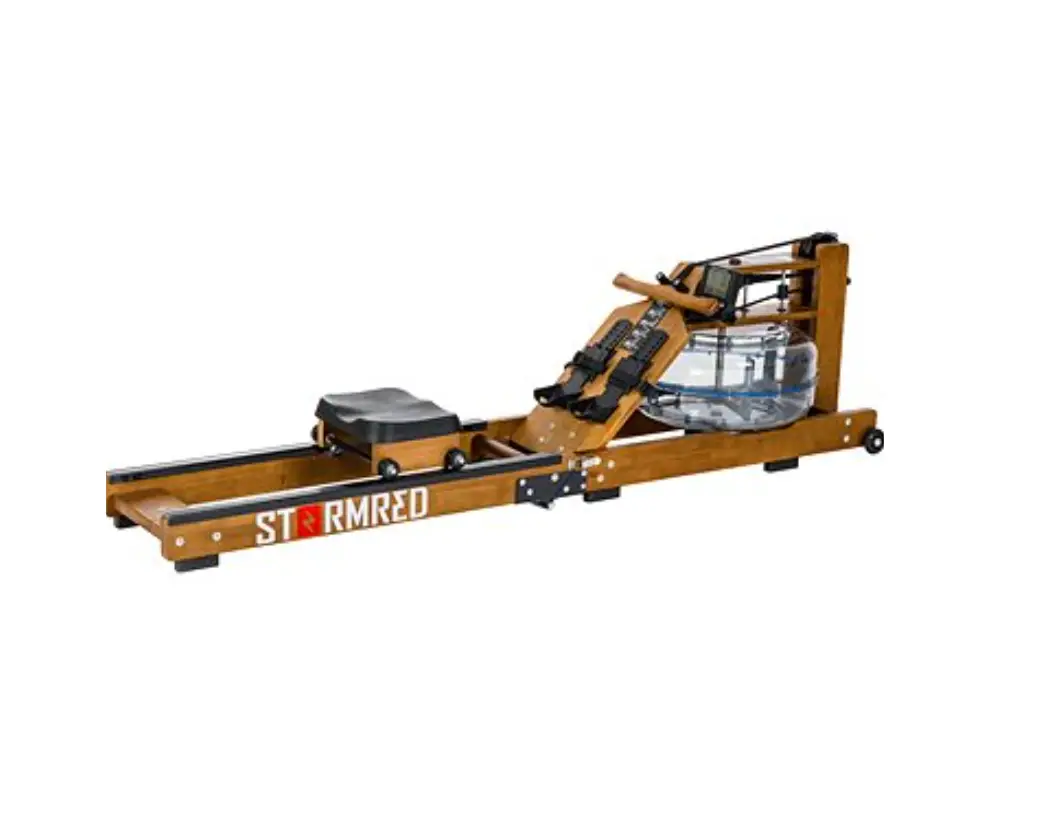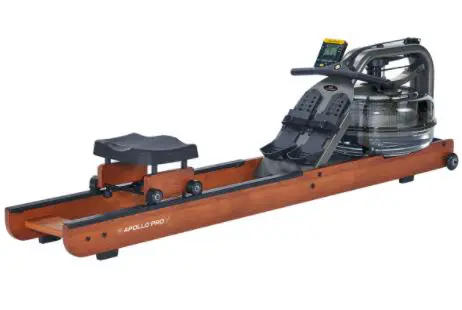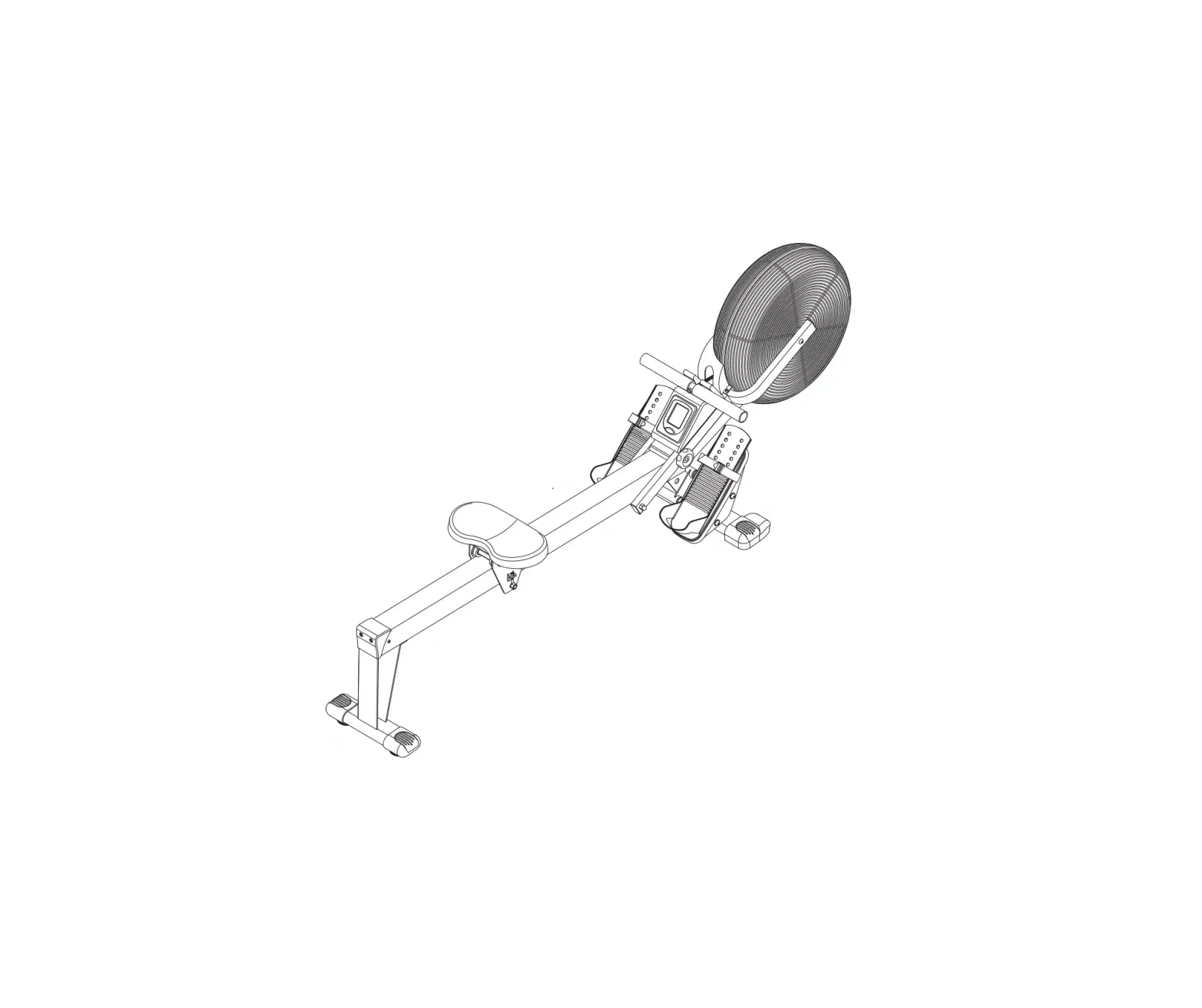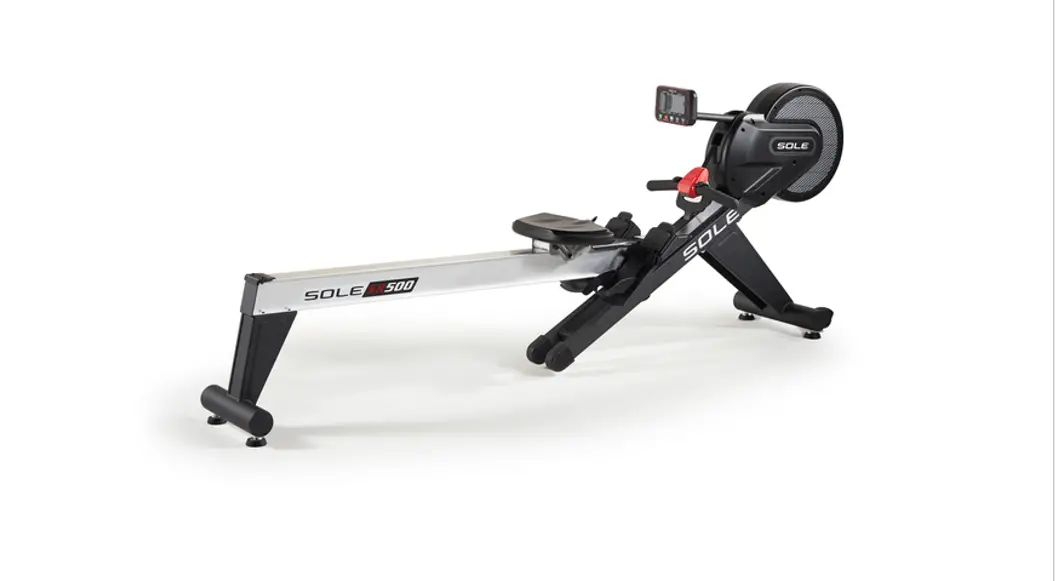

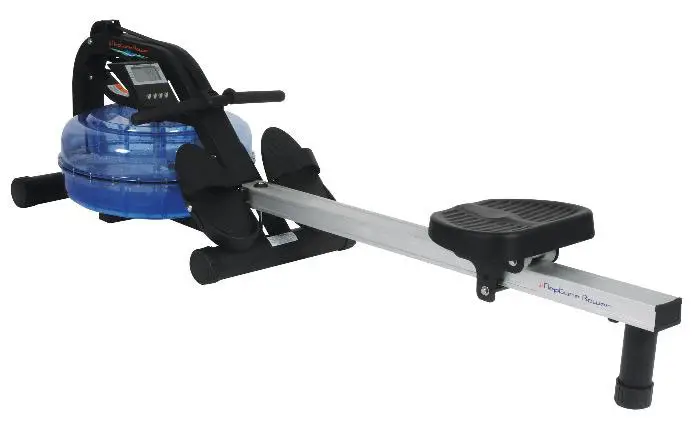
Neptune Challenge Rower
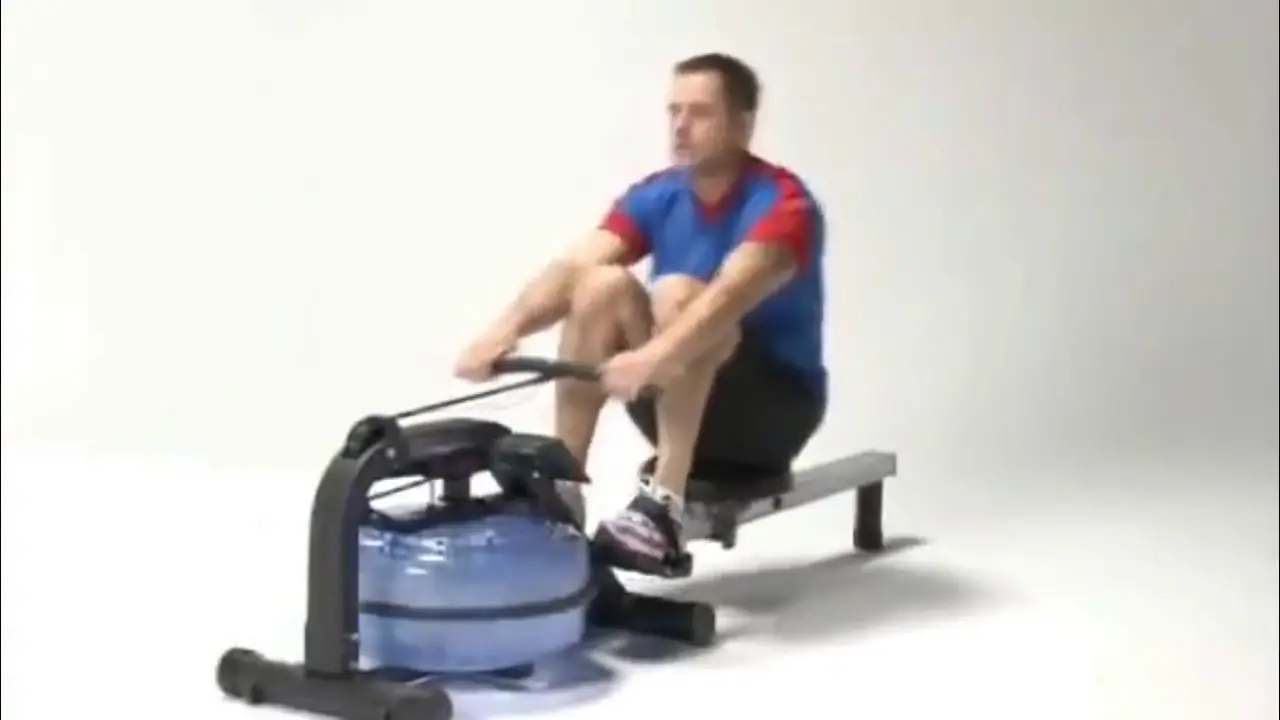
Training with the Neptune Challenge Rower
1. As with any piece of fitness equipment, consult a physician before beginning your Neptune Challenge Rower exercise program.
2. Follow instructions provided in this manual for correct foot position and basic rowing techniques.
CAUTION
1. The Neptune Challenge Rower can stand vertically for storage.
Make sure a secure location is chosen, such as the corner of a room or against a wall.
2. Keep hands and fingers away from moving parts, as indicated by the warning sticker on the mainframe of your machine.
Contents
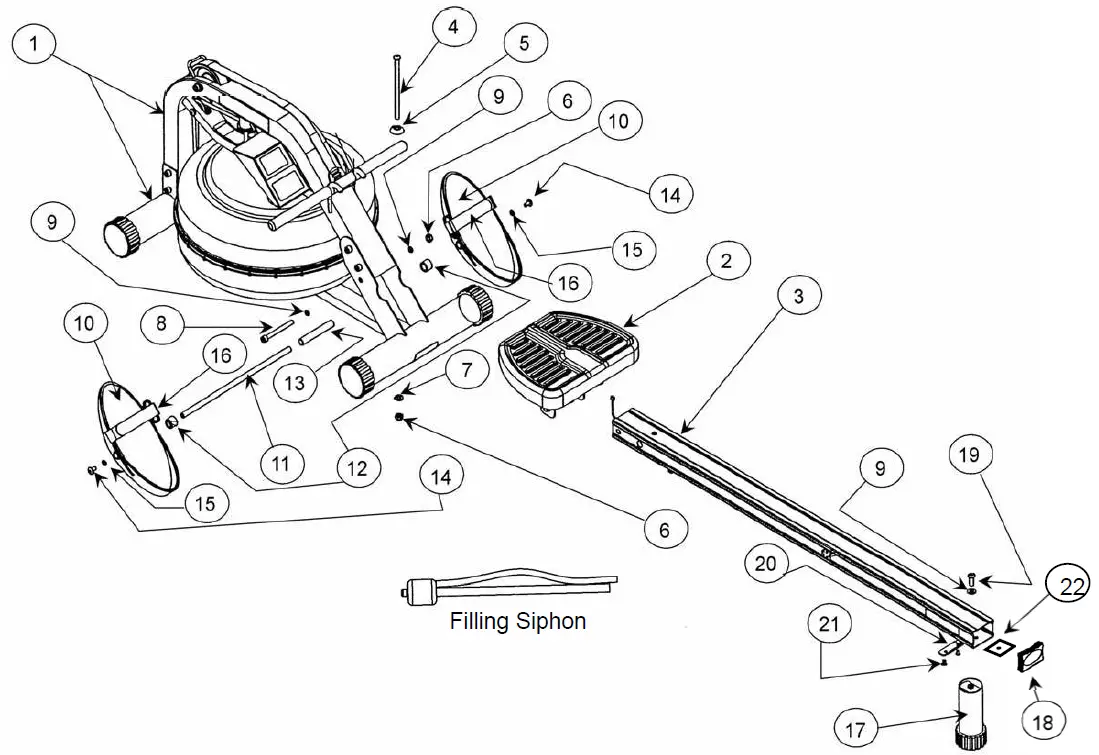
The Main box, seat rail box and parts kit will contain the following items
1. Main Frame.
2. Rower Seat
3. Seat Rail (boxed separately)
4. M10x180mm Bolt (1).
5. M10 Plastic Dome Washer (1).
6. M10 Nylock Nut (2).
7. M10 Washer (1).
8. M10x95mm Bolt (1).
9. 11x21x2T Washer (3)
10. Footplate (2)
11. 12mmx388mm Footplate Shaft (1)
12. Nylon Footplate Spacer (2)
13. 17mmx1.5Tx110 Internal Spacer(1)
14. M8x15mm Bolt (2)
15. M8 Washer (2)
16. Footstrap (2)
17. Rear Leg (1)
18. 75×50 Rubber End Cap (1)
19. M10x25 Rear Leg Bolt (1)
20. Rear Rubber Bumpstop (1)
21. M6x10mm Bumpstop Screws (2)
22. Seat Rail Internal Support Bracket (1)
Tool Kit and Water Treatment (Not pictured) which includes:
1. Multi-Tool (1)
2. 6mm Allen Key (2)
3. 8mm Allen Key (1)
4. 4x Chlorine Treatment Tablets
5. Owners Manual
6. 2x AA Batteries
Assembly Instructions
STEPS
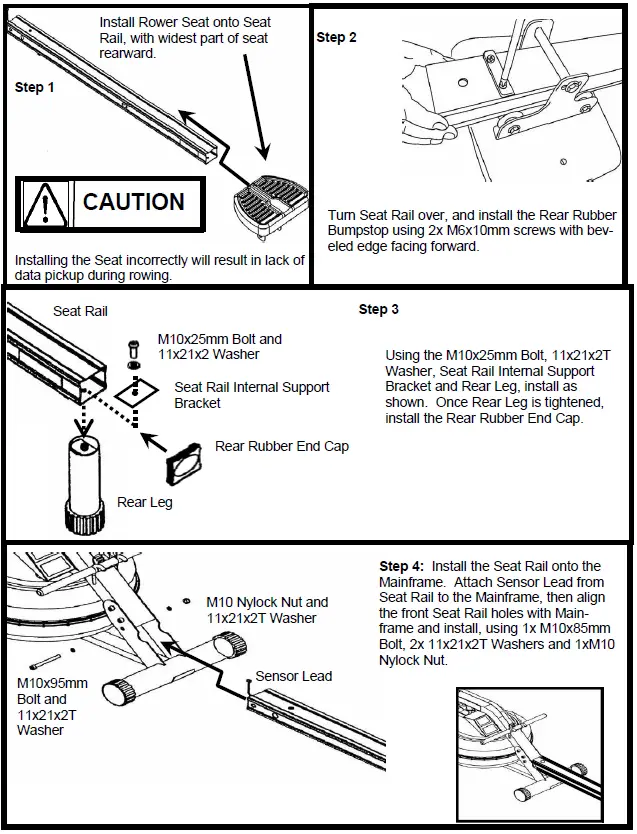
- Install Rower Seat onto Seat Rail, with widest part of seat rearward.
CAUTION: Installing the Seat incorrectly will result in lack of data pickup during rowing. - Turn Seat Rail over, and install the Rear Rubber Bumpstop using 2x M6x10mm screws with bev-eled edge facing forward.
- Using the M10x25mm Bolt, 11x21x2T Washer, Seat Rail Internal Support Bracket and Rear Leg, install as shown. Once Rear Leg is tightened, install the Rear Rubber End Cap.
- Install the Seat Rail onto the Mainframe. Attach Sensor Lead from Seat Rail to the Mainframe, then align the front Seat Rail holes with Main-frame and install, using 1x M10x85mm Bolt, 2x 11x21x2T Washers and 1xM10 Nylock Nut.
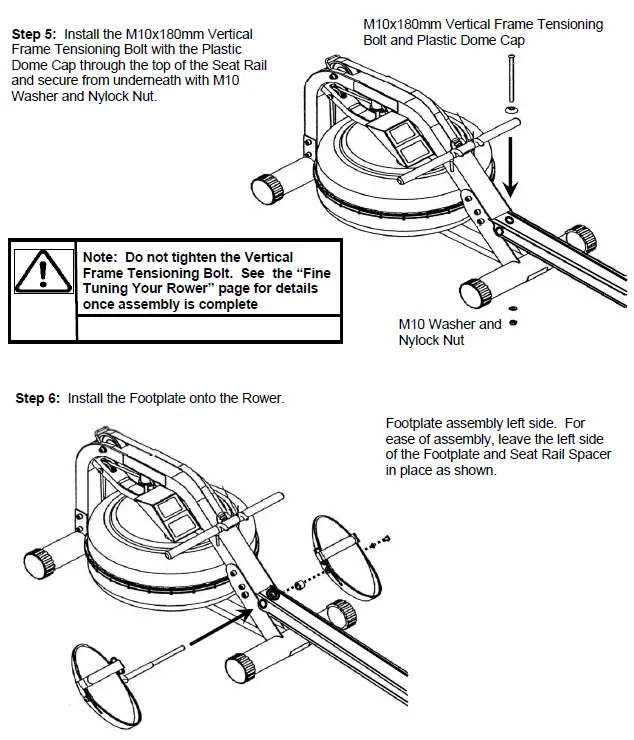
- Install the M10x180mm Vertical Frame Tensioning Bolt with the Plastic Dome Cap through the top of the Seat Rail and secure from underneath with M10 Washer and Nylock Nut.
Note: Do not tighten the Vertical Frame Tensioning Bolt. See the “Fine Tuning Your Rower” page for details once assembly is complete - Install the Footplate onto the Rower.
Tip: When mounting the Footplate assembly onto the rower, it is only necessary to remove one side, and leave the other intact as shown here.
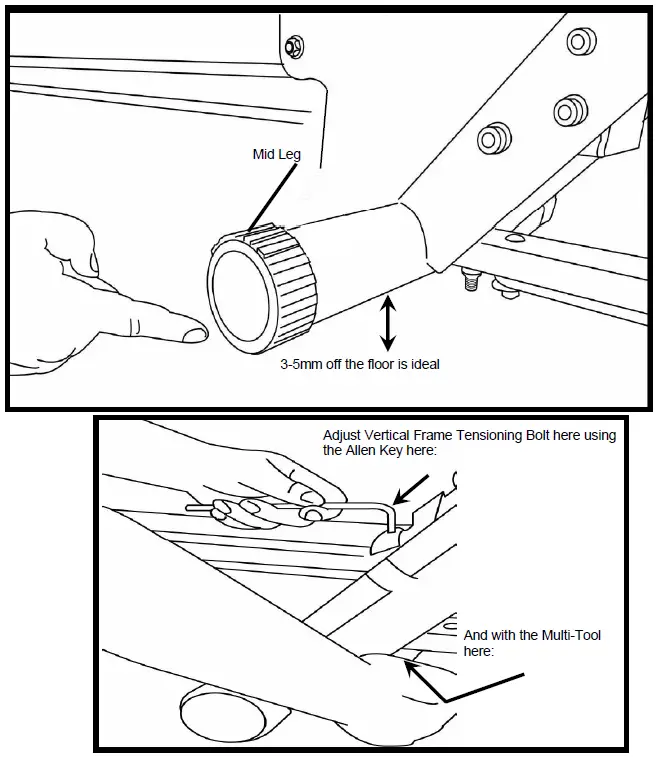
Note: 2 Allen keys of the same size are provided for this portion of the assembly.
Fine Tuning the Neptune Challenge: The Neptune Challenge is designed to function as a pre-stressed frame . Using the Mid Leg as your guideline, tighten the Vertical Frame Tensioning Bolt until the Mid Leg rises approximately 3-5mm off the floor. The Mid Leg should just touch the ground during a rowing stroke.
Tank Filling and Water Treatment:
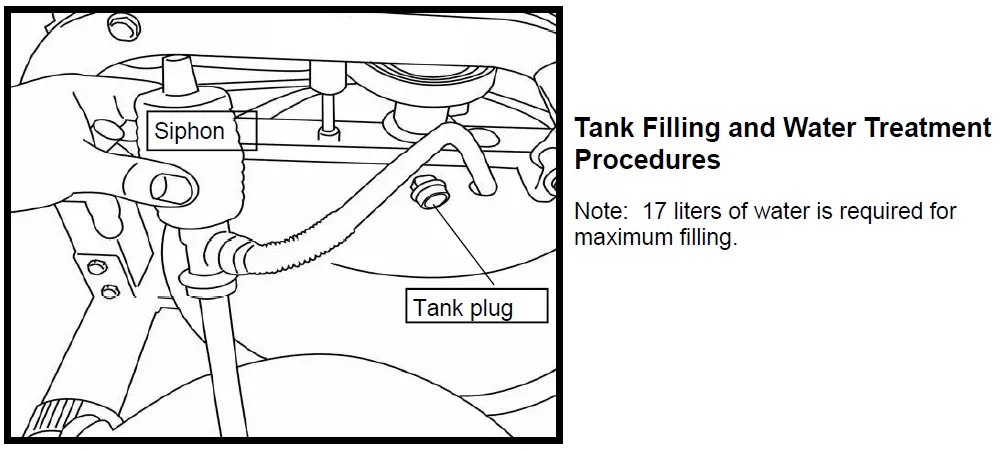
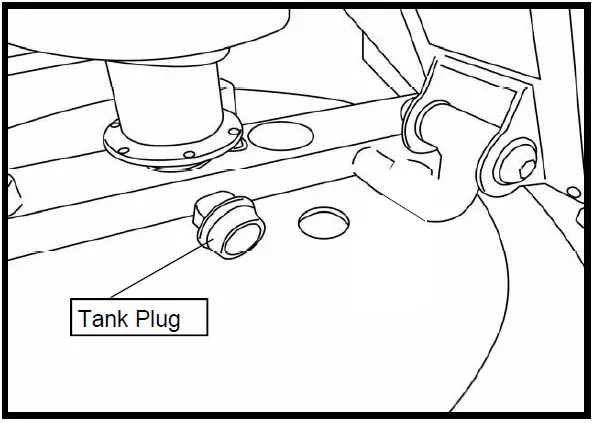
- Remove rubber fill plug from the top of the tank.
- Place a large bucket of water next to the Neptune Challenge and position siphon with the rigid hose in the bucket and the flexible hose into the tank as shown. Note: Make sure small breather valve on the top of the siphon is closed before filling.
Note: Where water quality is known to be poor, FDF recommends the use of distilled water. - Begin filling tank by squeezing siphon. Use Level Gauge decal on side of tank to measure volume of water in tank. Note: The amount of resistance is dictated by the amount of water in the tank; for example, 9 liters of water provides light resistance, 17 liters of water provides heaviest resistance. Important: Do not overfill tank!
- After filling tank to the desired water level, open the valve on the top of the siphon to allow excess water to escape.
- Ensure that tank plug is replaced once filling and water treatment procedures are complete.
Tips on Siphon use: Putting the fill bucket higher than the tank will allow the siphon to “self-pump” when adding water to the tank.
Water Treatment Procedures:
1. Add Chlorine tablet.
2. Enough Chlorine Tablets are supplied for many years of Water treatment. Add a chlorine Tablet whenever the Water appears dirty or cloudy.
WARNING: Only use First Degree Fitness Supplied Water treatment tablets.
Caution: Use a drop cloth under the tank both when filling the tank to avoid staining floor or carpet
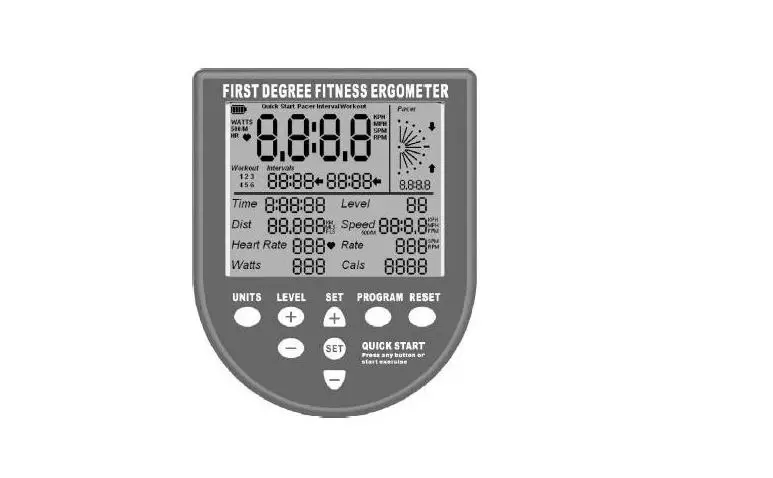
Computer Instructions
Basic Function
1. Time: Working range from 0:00-99:59
2. Count: Working Range from 0-9999
3. SPM: 15SPM-3000.
4. Calories: 0-9999
5. Total Count: 0-9999 Note: Computer must be turned off and restarted to reset total count.
6. Tempo: Working range from 0-180 beeps per minute.
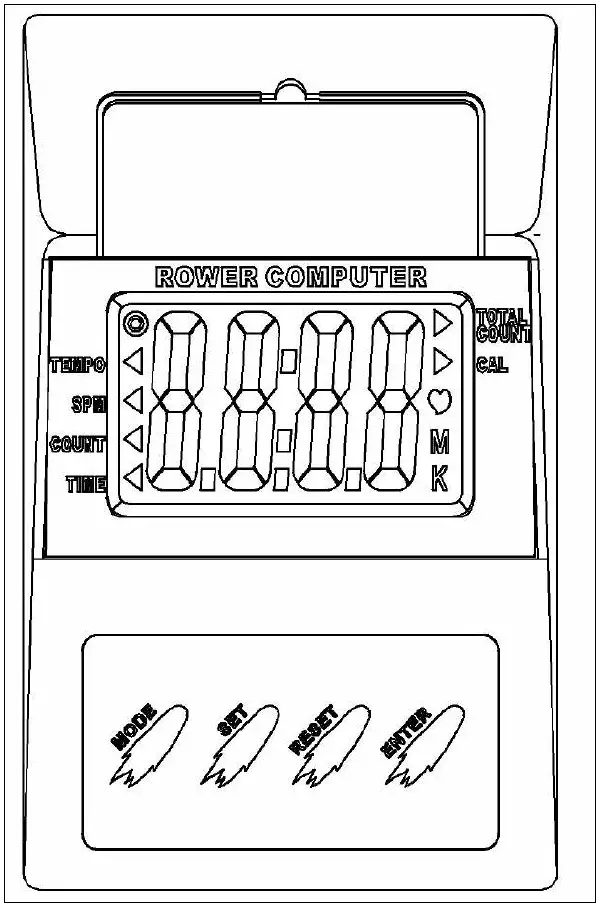
Instructions for use:
Install the batteries, and the LCD panel will display with an audible buzz.
Mode: Allows access to various settings:
Enter: Press to set values. Numbers will flash. Press “Set” to fix settings.
Set: Press when digits are flashing to set values upward. Can be applied for all settings with the exception of “Total Count” and “SPM”. Once values are set, press “Enter” to move into the following mode.
Reset: Press this key to reset values. Note: Total count can only be reset by taking out and reinstalling batteries.
Once values are decided, the computer will scroll through the various settings every six seconds. The settings can be fixed into a set value (SPM for example) by pressing the “Mode” button. Values such as time will accumulate toward zero and an audible alarm will sound once zero is reached. Press any key to stop the alarm.
The Computer will enter sleep mode if not used for over 4minutes, 30 seconds.
How to Row?
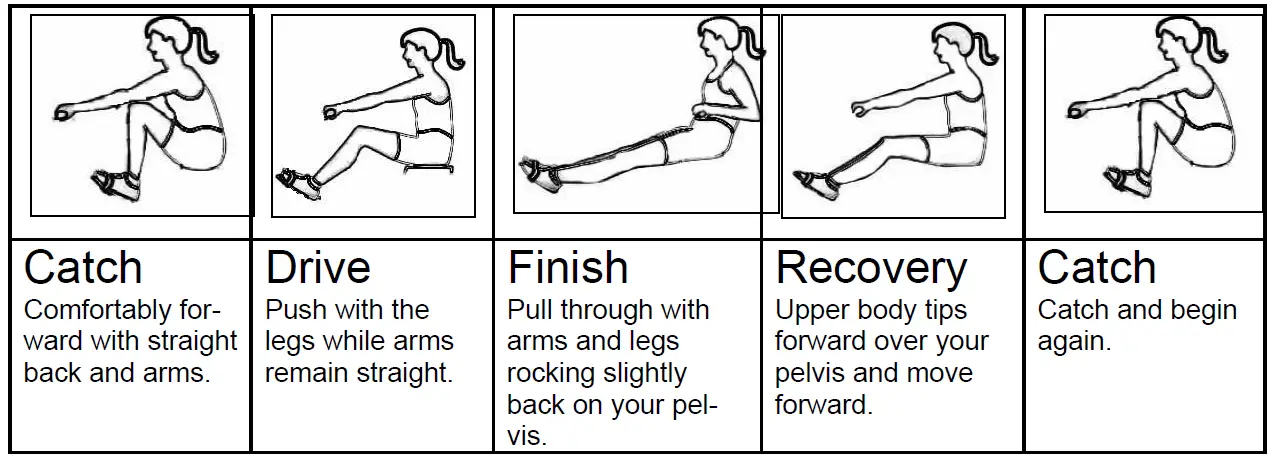
1. Begin the stroke comfortably forward and push strongly back with your legs while keeping your arms and back straight.
2. Begin to pull your arms back as they pass over your knees and continue the stroke through to completion rocking slightly back over your pelvis.
3. Return to the starting position and repeat.
How Often?
Begin with 5 minute training sessions once a day and aim for around 2:30 to 2:45 for 500m time. Row at a pace that keeps the water circulating continuously between strokes.
Progress a few minutes more each day until you are comfortable with 30-45 minutes training time 3 or 4 times a week.
This will provide aerobic endurance benefits, muscle toning and sufficient calorie burning to form part of a weight loss program.
CAUTION: Always consult a doctor before beginning an exercise program. Stop immediately if you feel faint or dizzy.
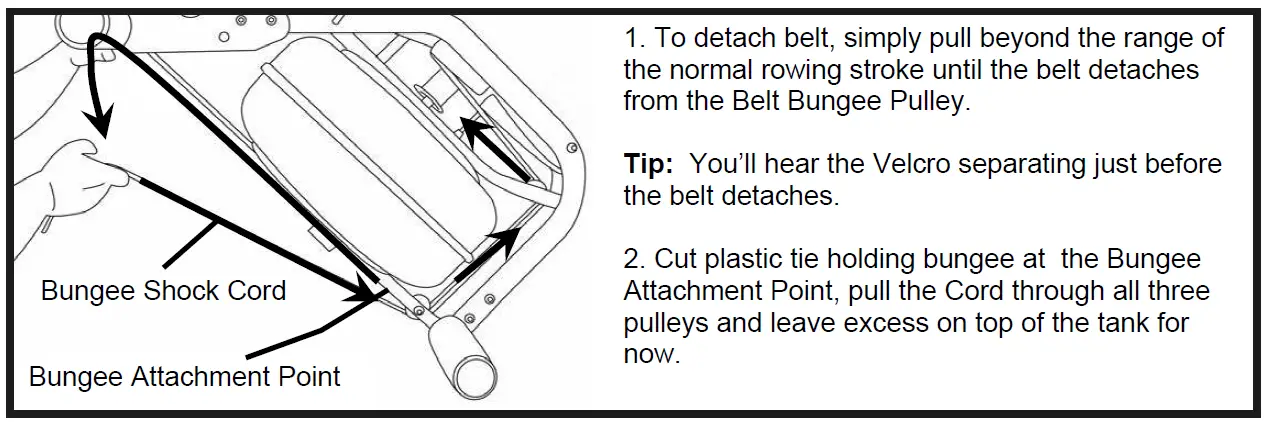
Detaching the Rower Belt:
1. To detach belt, simply pull beyond the range of the normal rowing stroke until the belt detaches from the Belt Bungee Pulley.
Tip: You’ll hear the Velcro separating just before the belt detaches.
2. Cut plastic tie holding bungee at the Bungee Attachment Point, pull the Cord through all three pulleys and leave excess on top of the tank for now.
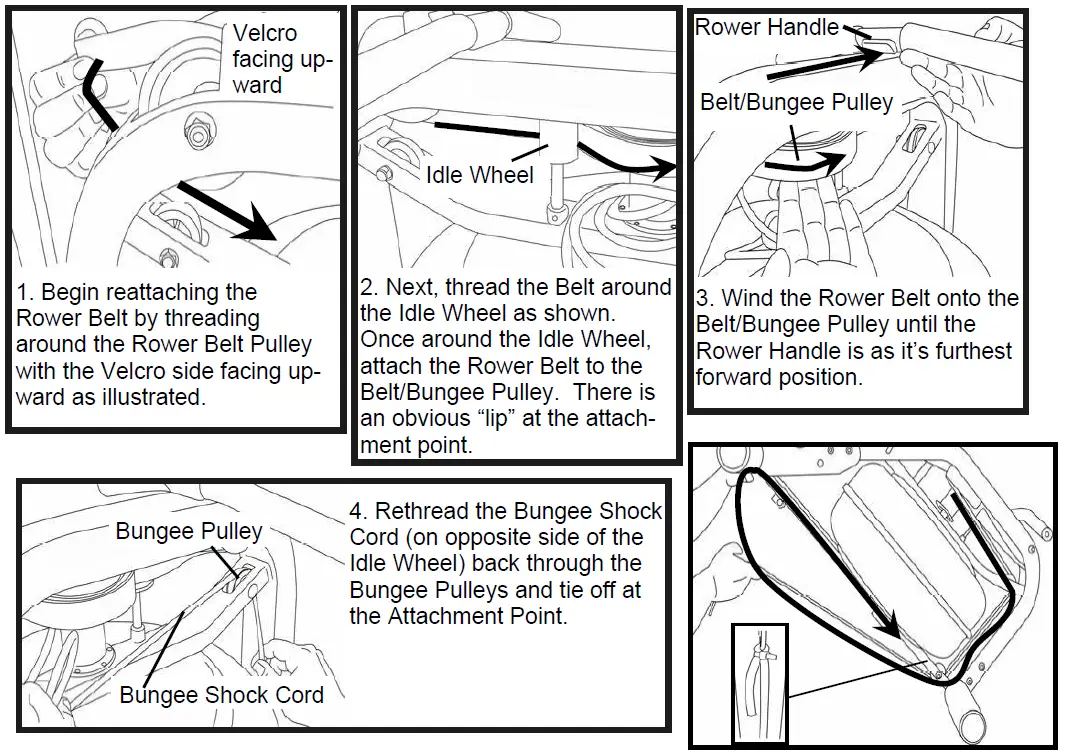
Reattaching the Rower Belt:
1. Begin reattaching the Rower Belt by threading around the Rower Belt Pulley with the Velcro side facing up-ward as illustrated.
2. Next, thread the Belt around the Idle Wheel as shown. Once around the Idle Wheel, attach the Rower Belt to the Belt/Bungee Pulley. There is an obvious “lip” at the attach-ment point.
3. Wind the Rower Belt onto the Belt/Bungee Pulley until the Rower Handle is as it’s furthest forward position.
4. Rethread the Bungee Shock Cord (on opposite side of the Idle Wheel) back through the Bungee Pulleys and tie off at the Attachment Point.
Hint: If Bungee Shock Cords previous tension seemed correct (a good way to judge is if the Rower Handle can make it to the furthest point forward on the top of the Mainframe under bungee tension alone) then simply tie off at previous position. If the return is too slack, experiment by tightening the tension in small increments and testing until the correct tension is achieved. If the Rower Handle cannot reach the end of the seat rail during a rowing stroke, then the Bungee Shock Cord is over-tensioned.
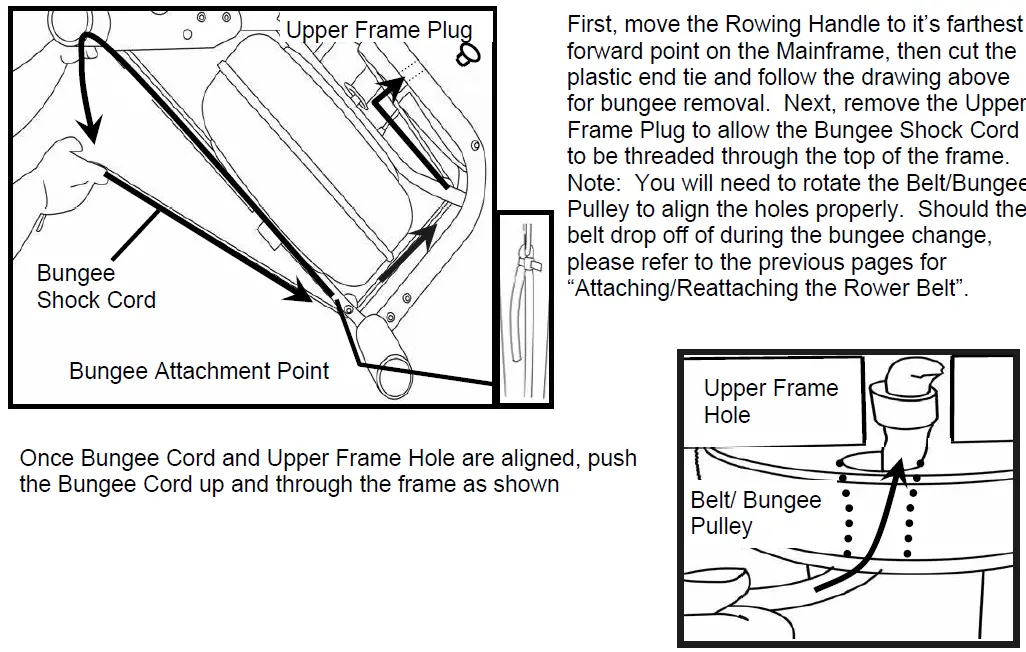
Removing the Bungee Shock Cord:
- First, move the Rowing Handle to it’s farthest forward point on the Mainframe, then cut the plastic end tie and follow the drawing above for bungee removal. Next, remove the Upper Frame Plug to allow the Bungee Shock Cord to be threaded through the top of the frame. Note: You will need to rotate the Belt/Bungee Pulley to align the holes properly. Should the belt drop off of during the bungee change, please refer to the previous pages for
“Attaching/Reattaching the Rower Belt”. - Once Bungee Cord and Upper Frame Hole are aligned, push the Bungee Cord up and through the frame as shown
Replacing the Bungee Shock Cord:
Reinstall the Shock Cord through the Upper Frame, along the opposite side of Idle Wheel, through the Mid Frame and Lower Bungee Pulleys and then tie off with plastic tie wrap to correct tension. Replace Frame Plug
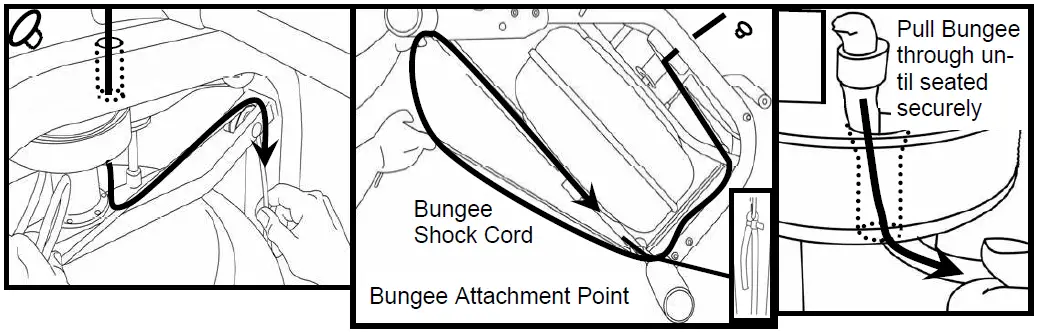
Tip: Correct bungee tension is achieved when enough recoil is present for the Rowing Handle to easily reach the front of the Rower Pulley Belt Bracket at the far front of the frame. If the Rowing Handle will not reach rearward to the end of the Seat Rail, the Bungee Cord is over-tightened and will require adjustment.
Troubleshooting
| Fault | Probable Cause | Solution |
| Water changes color or becomes cloudy. | Rower is in direct sunlight or has not had water treatment. | Change rower location to reduce direct exposure to sunlight. Add water treatment or change tank water as directed in the water treatment section of this manual. |
| Rower belt slipping off belt/ bungee pulley. | Bungee not under enough tension. | Tighten bungee cord following the instructions given in the change bungee section of this manual. |
| Front leg rises slightly during vigorous rowing | M10X180mm Vertical Frame Tensioning Bolt is slightly too loose. | Tighten bolt 1/2 turn and try again. Tighten as needed until problem stops. Note: Over tight- ening this bolt can damage the seat rail. Only tighten bolt until mid-leg begins to lift slightly from the ground. Refer to “Fine Tuning the Neptune Challenge” for details. |
| The Neptune Challenge computer does not illuminate after battery installation. | Batteries installed incorrectly or need replacing. | Reinstall batteries in correct position and try again. If the LCD screen fails to illuminate, replace batteries. If this fails, contact your local service center. |
| Neptune Challenge Computer screen illuminates, but does not register when rowing. | Loose or failed connection. | Check that the computer lead is connected properly. If it is connected then contact your local service center. |
Parts Illustration
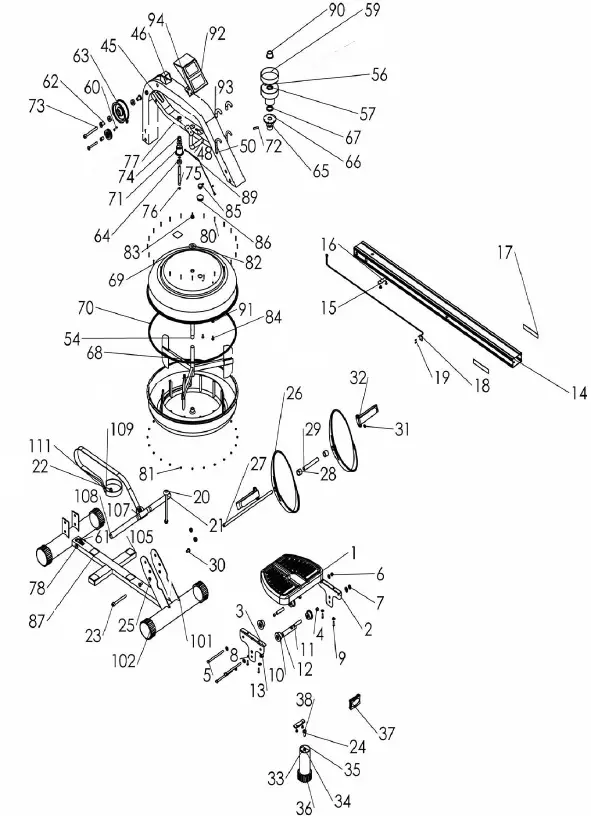
Parts List
| KEY | QTY | P/N | DESCRIPTION | KEY | QTY | P/N | DESCRIPTION |
| 1 | 1 | 90701 | Seat – LS-E22 | 56 | 1 | 60902 | Belt Bungee Pulley Inc. 90136 Bear- ing |
| 2 | 1 | 65121 | Seat Frame Left | 57 | 2 | 90136 | One Way Bearing INA-HFL2016 |
| 3 | 1 | 65121 | Seat Frame right | 59 | 1 | 60903 | Velcro Strip |
| 4 | 4 | 90705 | Inner Axle Bushing (Short) | 60 | 4 | 60108 | Bungee Pulley Spacer |
| 5 | 3 | 60707 | Bolt M8x120 | 61 | 2 | 60109 | Bungee Pulley |
| 6 | 6 | 60708 | Washer M8 | 62 | 2 | 60110 | Belt Pulley Spacer |
| 7 | 5 | 60709 | Nut Nylock M8 | 63 | 1 | 60111 | Belt Pulley 100mm (inc. 2×60112 Bearing) |
| 8 | 4 | 60710 | Washer M6x11 | 64 | 4 | 60112 | Ball Bearing 6000ZZ |
| 9 | 4 | 60711 | Screw M6x20 | 65 | 1 | 60113 | Main Shaft Oil Bushing – Lower |
| 10 | 4 | 65702 | Seat Wheel | 66 | 1 | 60114 | Magnet Ring (inc. 6×60124 Magnet) |
| 11 | 2 | 90706 | Inner axle Bushing (Long) | 67 | 1 | 60115 | Flywheel Shaft Spacer |
| 12 | 1 | 90707 | Lower Seat Wheel Axle Spacer | 68 | 1 | 60116 | Tank Lower |
| 13 | 1 | 90708 | Round Magnet | 69 | 1 | 60117 | Tank Upper |
| 14 | 1 | 90801 | Rail | 70 | 1 | 60118 | Tank Large Ring Seal |
| 15 | 2 | 60803 | Rubber Bump Stop – Seat | 71 | 1 | 60119 | Idle wheel inc. 2×60112 Bearing |
| 16 | 4 | 60807 | Rubber Bump Stop Screw M6x10 | 72 | 1 | 60120 | Roll Pin 6mm |
| 17 | 2 | 90812 | Rail Decal | 73 | 1 | 60121 | Bolt (M10x90) |
| 18 | 1 | 90803 | Sensor With Lead | 74 | 1 | 60123 | Idle Shaft Upper Frame Mount 10mm |
| 19 | 2 | 90804 | Sensor Mounting Screw M3x8 | 75 | 1 | 60125 | Idler Pulley Shaft |
| 20 | 1 | 60806 | Footplate Bolt M10x180 | 76 | 2 | 60126 | C Clip 10mm |
| 21 | 1 | 60809 | Plastic Dome Cap For Vertical Seat Rail Bolt 10mm | 77 | 1 | 60127 | Grub Screw M4x6 |
| 22 | 7 | 60810 | Nut Nylock (M10) | 78 | 2 | 60128 | Bolt (M8x65) |
| 23 | 5 | 60135 | Bolt (M10x95) | 79 | 2 | 60130 | Frame Rubber Bumper |
| 24 | 2 | 60134 | Washer (M10) | 80 | 24 | 60132 | Screw (M3x20) |
| 25 | 10 | 60149 | Spring Washer M10 | 81 | 24 | 60133 | Nut Nylock (M3) |
| 26 | 2 | 90901 | Plastic Footplate | 82 | 1 | 60137 | Tank/Main Frame Spacer |
| 27 | 1 | 90902 | Footplate Axle 12mmx388 | 83 | 1 | 60138 | Impeller End Cap |
| 28 | 2 | 90903 | Footplate Spacer Nylon D25xD17x19L | 84 | 2 | 60139 | Tank Internal Screw S/Steel M6x15 |
| 29 | 1 | 90904 | Internal Footplate Spacer 17mmx1.5Tx110L | 85 | 3 | 90144 | End Cap – round PVC 25.4mm |
| 30 | 2 | 90905 | Footplate Bolt M8x15 | 86 | 1 | 60145 | Frame Plug 38.1mm |
| 31 | 2 | 90906 | Spring Washer M8x10mm | 87 | 5 | 61001 | Tank Bonding Strip 3M-VHB |
| 32 | 2 | 90907 | Foot Strap Velcro | 88 | 2 | 60147 | Washer O Ring |
| 33 | 1 | 90402 | Rear Leg Internal Mounting Bracket | 89 | 1 | 60148 | Computer Lead |
| 34 | 1 | 20029 | Nylock nut M10 | 90 | 1 | 60150 | Nylon Main Shaft Bushing – Upper |
| 35 | 1 | 90401 | Rear Leg | 91 | 2 | 60606 | Heel Adjuster Plastic Spacer |
| 36 | 1 | 90802 | Rear Leg End Cap 60mm | 92 | 1 | 90103 | Computer |
| 37 | 1 | 60804 | Seat Rail End Cap 75×75 | 93 | 2 | 90104 | Hook |
| 38 | 1 | 71025 | Main shaft Rear Bracket Bolt M10x25mm | 94 | 1 | 90107 | Computer Plastic Spacer |
| 39 | 1 | 61007 | Tank Level Decal | 101 | 2 | 90206 | Lower Main Frame Mounting Bracket – Rear |
| 40 | 2 | 91003 | Main Frame Logo Decal | 102 | 4 | 60209 | End Cap 76.2mm Round |
| 41 | 1 | 61004 | Main Frame Upper Warning Decal | 103 | 4 | 60210 | Transport Wheel Fasterner |
| 42 | 1 | 61006 | Main Frame Lower Warning Decal | 104 | 2 | 60211 | Transport Wheel 76.2 |
| 43 | 1 | 60615 | Bungee Cord 8mmx1250 with Clip 60617 & Tie 61008 | 105 | 2 | 60212 | End Cap 25x50mm |
| 45 | 1 | 60102 | Upper Mid Frame | 106 | 1 | 90502 | Rower Handle |
| 46 | 1 | 60104 | Roller Belt Pulley Bracket | 107 | 1 | 90503 | Rower Handle Belt Bracket |
| 48 | 1 | 90106 | Computer mount | 108 | 2 | 90506 | Handle Grip |
| 50 | 2 | 90102 | Rower Handle Bar Catch | 109 | 1 | 60507 | Rower Handle Complete |
| 54 | 1 | 60304 | Flywheel Upper Shaft | 111 | 1 | 60508 | Velcro Strip for Belt (Note: Combined with 60903) |
NEPTUNE Challenge Rower INTERNATIONAL WARRANTY – HOME USE
First Degree Fitness Limited warrants that the Neptune Challenge (model NEPCH), purchased from an authorised agent and in its undamaged original packaging, is free from defects in materials and workman-ship. First Degree Fitness Limited or its agent will, at their discretion, repair or replace parts that become defective within the warranty period, subject to the specific inclusions and exclusions below.
Metal Frame – 5 Year Limited Warranty
First Degree Fitness will repair or replace the metal Main Frame of the Rower should it fail due to any defect in materials or workmanship within 5 years of the original purchase. Warranty does not apply to frame coat-ing.
Polycarbonate Tank & Seals – 3 Year Limited Warranty
First Degree Fitness will repair or replace the polycarbonate tank or seals should they fail due to any defect in materials or workmanship within 3 years of the original purchase.
Mechanical Components (of a non-wearing nature) – 2 Year Limited Warranty
First Degree Fitness will repair or replace any mechanical component should it fail due to any defect in mate-rials or workmanship within 2 years of the original purchase.
Specific Inclusions
Aluminum Seat Rail
Stainless Steel Impeller Assembly
All Other Components (of a wearing nature) – 1 Year Limited Warranty
First Degree Fitness will repair or replace any component should it fail due to any defect in materials or work-manship within 1 year of the original purchase.
Specific Inclusions
- Bungee recoil cord
- Hand grips & foot straps
- Polyester rowing belt
- Seat
- All pulleys, rollers & bearings
- All rubber components
- Computer & speed sensor (excluding replaceable batteries) Footplates (pivoting & sliding)
General Exclusions
- Damage to the finish of any part of the machine
- Damage due to neglect, abuse, incorrect assembly or use of the machine
- Any charges for freight or customs clearance associated with the return or dispatch of parts Any damage to or loss of goods during transport of any kind
- Any labour cost associated with a warranty claim
General Conditions
- The serial number of the machine must be correctly registered with First Degree Fitness Limited or one of its appointed distributors
- First Degree Fitness Limited reserve the right to examine any part where replacement is claimed under warranty
- Warranty period applies only to the original purchaser from the date of purchase and is not transferable
- The product must be returned to your place of purchase in original packaging with transportation, insur-ance and associated charges paid for by you and risk of loss or damage assumed by you
- First Degree Fitness makes no other warranties except as stated here and expressly disclaims all war-ranties not stated in this warranty. Neither First Degree Fitness nor its associates shall be responsible for incidental or consequential damages
- Manufacturer’s warranty automatically commences upon sale of the product to end user or upon the expiration of one (1) year from month of manufacture, whichever occurs first