
L720/L720D Series
Projector RS232 Command Control
Installation Guide

Table of Contents
Introduction …………………………………………………. 3
Wire arrangement …………………………….. 3
RS232 pin assignment ………………………. 3
Connections and communication settings .. 4
RS232 serial port with a crossover cable ……….. 4
Settings ……………………………………. 4
RS232 via LAN ……………………….. 6
Settings ……………………………………. 6
RS232 via HDBaseT………………… 6
Settings ……………………………………. 6
Command table ………………………………………….. 8
2
Introduction
The document describes how to control your BenQ projector via RS232 from a computer. Follow the procedures to complete the connection and settings first, and refer to the command table for RS232 commands.
 Available functions and commands vary by model. Check the specifications and user manual of the purchased projector for product functions.
Wire arrangement
Wire Arrangement | ||
PI | Color | P2 |
1 | Black | 1 |
2 | Brown | 3 |
3 | Red | 2 |
4 | Orange | 4 |
5 | Yellow | 5 |
6 | Green | 6 |
7 | Blue | 7 |
8 | Purple | 8 |
9 | Gray | 9 |
| Case | Drain wire | Case |
RS232 pin assignment
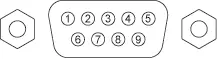
Pin Description
1 NC
2 RXD
3 TXD
4 NC
5 GND
6 NC
7 RTS
8 CTS
9 NC
3
Connections and communication settings
Choose one of the connections and set up properly before RS232 control.
RS232 serial port with a crossover cable
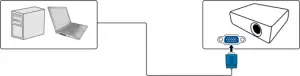
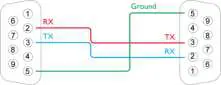
Settings
 On-screen images in this document are for reference only. The screens may vary depending on your Operating System, I/O ports used for connection, and the specifications of the connected projector.
1. Determine the COM Port name used for the RS232 communications in Device Manager.
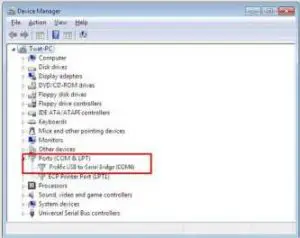
4
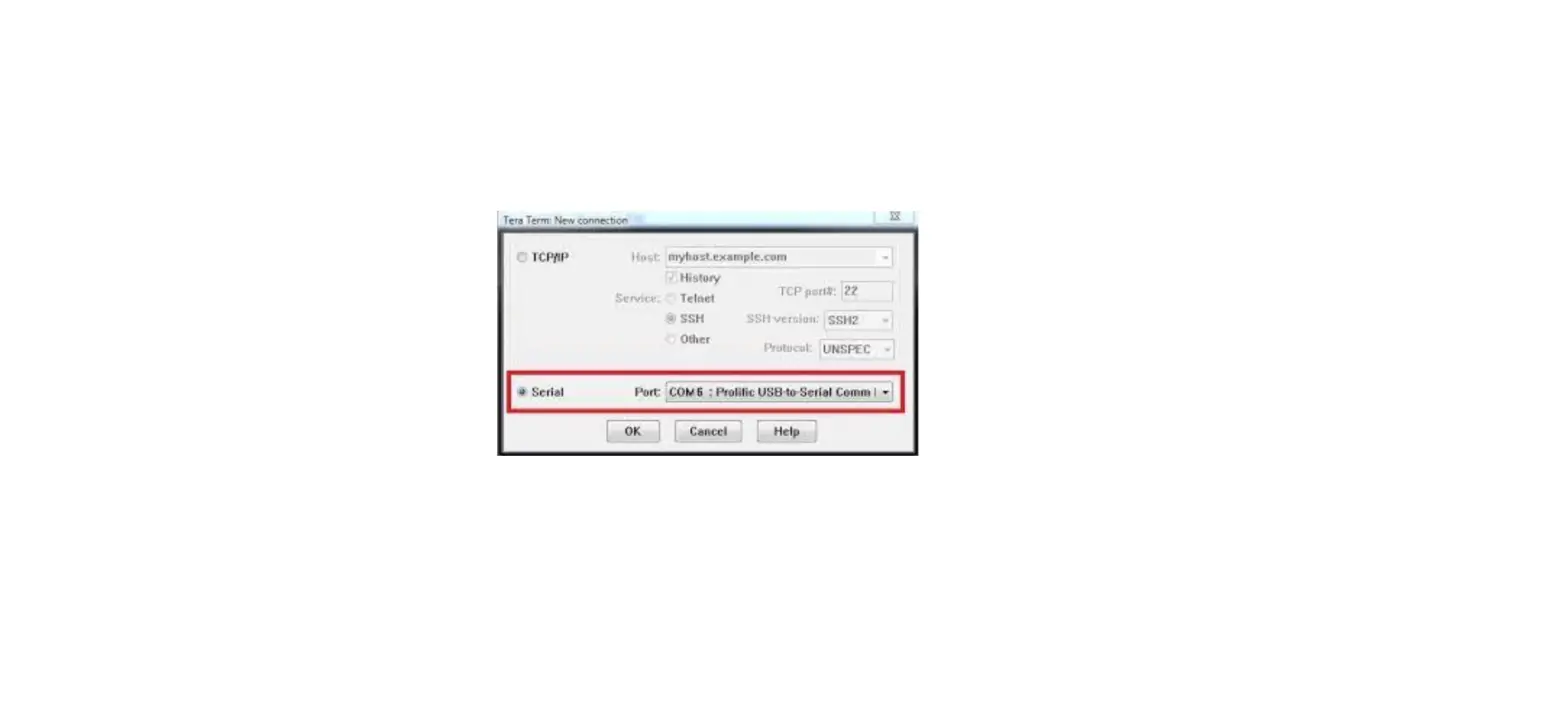
2. Choose Serial and the corresponding COM port as the communication port. In this given example, COM6 is selected.
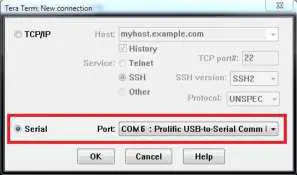
3. Finish Serial port setup.
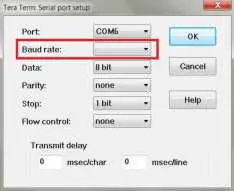
| Baud rate | 9600 / 14400 / 19200 / 38400 / 57600 / 115200 bps
|
| Data length | 8 bit |
| Parity check | None |
| Stop bit | 1 bit |
| Flow control | None |
5
RS232 via LAN
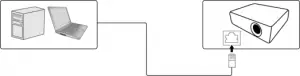
Settings
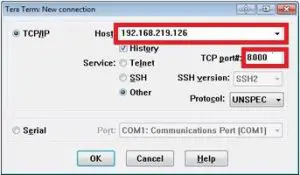
- Find the Wired LAN IP address of the connected projector from the OSD menu and make sure the projector and the computer are within the same network.
- Input 8000 in the TCP port # field.
RS232 via HDBaseT
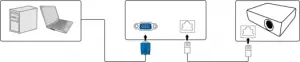
Settings
- Determine the COM Port name used for the RS232 communications in Device Manager.
- Choose Serial and the corresponding COM port as the communication port. In this given example, COM6 is selected.
6
3. Finish Serial port setup.
| Baud rate | 9600 / 14400 / 19200 / 38400 / 57600 / 115200 bps
|
| Data length | 8 bit |
| Parity check | None |
| Stop bit | 1 bit |
| Flow control | None |
7
Command table
- Available features differ by projector specification, input sources, settings, etc..
- Commands are working if the standby power is 0.5W or a supported baud rate of the projector is set.
- Uppercase, lowercase, and a mixture of both types of characters are accepted for a command.
- If a command format is illegal, it will echo Illegal format.
- If a command with correct format is not valid for the projector model, it will echo Unsupported item.
- If a command with correct format cannot be executed under certain condition, it will echo Block item.
- If RS232 control is performed via LAN, a command works whether it starts and ends with <CR>. All the commands and behaviours are identical with the control through a serial port.
| Function | Type | Operation | ASCII | Support |
| Power | Write | Power On | <CR>*pow=on#<CR> | Yes |
| Write | Power off | <CR>*pow=off#<CR> | Yes | |
| Read | Power Status | <CR>*pow=?#<CR> | Yes | |
| Source Selection | Write | COMPUTER/YPbPr | <CR>*sour=RGB#<CR> | Yes |
| Write | COMPUTER 2/YPbPr2 | <CR>*sour=RGB2#<CR> | Yes | |
| Write | COMPUTER 3/YPbPr3 | <CR>*sour=RGB3#<CR> | No | |
| Write | Component | <CR>*sour=ypbr#<CR> | No | |
| Write | Component2 | <CR>*sour=ypbr2#<CR> | No | |
| Write | DVI-A | <CR>*sour=dviA#<CR> | No | |
| Write | DVI-D | <CR>*sour=dvid#<CR> | No | |
| Write | HDMI(MHL) | <CR>*sour=hdmi#<CR> | Yes | |
| Write | HDMI 2(MHL2) | <CR>*sour=hdmi2#<CR> | Yes | |
| Write | Composite | <CR>*sour=vid#<CR> | Yes | |
| Write | S-Video | <CR>*sour=svid#<CR> | Yes | |
| Write | Network | <CR>*sour=network#<CR> | No | |
| Write | USB Display | <CR>*sour=usbdisplay#<CR> | No | |
| Write | USB Reader | <CR>*sour=usbreader#<CR> | No | |
| Write | HDbaseT | <CR>*sour=hdbaset#<CR> | No | |
| Write | DisplayPort | <CR>*sour=dp#<CR> | No | |
| Write | 3G-SDI | <CR>*sour=sdi#<CR> | No | |
| Read | Current source | <CR>*sour=?#<CR> | Yes | |
| Audio Control | Write | Mute On | <CR>*mute=on#<CR> | Yes |
| Write | Mute Off | <CR>*mute=off#<CR> | Yes | |
| Read | Mute Status | <CR>*mute=?#<CR> | Yes | |
| Write | Volume + | <CR>*vol=+#<CR> | Yes | |
| Write | Volume – | <CR>*vol=-#<CR> | Yes | |
| Write | Volume level for customer | <CR>*vol=value#<CR> | Yes | |
| Read | Volume Status | <CR>*vol=?#<CR> | Yes |
8
| Write | Mic. Volume + | <CR>*micvol=+#<CR> | Yes | |
| Write | Mic. Volume – | <CR>*micvol=-#<CR> | Yes | |
| Read | Mic. Volume Status | <CR>*micvol=?#<CR> | Yes | |
| Audio source select | Write | Audio pass Through off | <CR>*audiosour=off#<CR> | Yes |
| Write | Audio-Computer1 | <CR>*audiosour=RGB#<CR> | Yes | |
| Write | Audio-Computer2 | <CR>*audiosour=RGB2#<CR> | Yes | |
| Write | Audio-Video/S-Video | <CR>*audiosour=vid#<CR> | Yes | |
| Write | Audio-Component | <CR>*audiosour=ypbr#<CR> | No | |
| Write | Audio-HDMI | <CR>*audiosour=hdmi#<CR> | Yes | |
| Write | Audio-HDMI2 | <CR>*audiosour=hdmi2#<CR> | Yes | |
| Read | Audio pass Status | <CR>*audiosour=?#<CR> | Yes | |
| Picture Mode | Write | Dynamic | <CR>*appmod=dynamic#<CR> | No |
| Write | Presentation | <CR>*appmod=preset#<CR> | Yes | |
| Write | sRGB | <CR>*appmod=srgb#<CR> | Yes | |
| Write | Bright | <CR>*appmod=bright#<CR> | Yes | |
| Write | Living Room | <CR>*appmod=livingroom#<CR> | No | |
| Write | Game | <CR>*appmod=game#<CR> | No | |
| Write | Cinema | <CR>*appmod=cine#<CR> | No | |
| Write | Standard/Vivid | <CR>*appmod=std#<CR> | No | |
| Write | Football | <CR>*appmod=football#<CR> | No | |
| Write | Football Bright | <CR>*appmod=footballbt#<CR> | No | |
| Write | DICOM | <CR>*appmod=dicom#<CR> | No | |
| Write | THX | <CR>*appmod=thx#<CR> | No | |
| Write | Silence mode | <CR>*appmod=silence#<CR> | No | |
| Write | DCI-P3 mode | <CR>*appmod=dci-p3#<CR> | No | |
| Write | Vivid | <CR>*appmod=vivid#<CR> | Yes | |
| Write | Infographic | <CR>*appmod=infographic#<CR> | Yes | |
| Write | User1 | <CR>*appmod=user1#<CR> | Yes | |
| Write | User2 | <CR>*appmod=user2#<CR> | Yes | |
| Write | User3 | <CR>*appmod=user3#<CR> | No | |
| Write | ISF Day | <CR>*appmod=isfday#<CR> | No | |
| Write | ISF Night | <CR>*appmod=isfnight#<CR> | No | |
| Write | 3D | <CR>*appmod=threed#<CR> | Yes | |
| Read | Picture Mode | <CR>*appmod=?#<CR> | Yes | |
| Picture Setting | Write | Contrast + | <CR>*con=+#<CR> | Yes |
| Write | Contrast – | <CR>*con=-#<CR> | Yes | |
| Read | Contrast value | <CR>*con=?#<CR> | Yes | |
| Write | Brightness + | <CR>*bri=+#<CR> | Yes |
9
| Write | Brightness – | <CR>*bri=-#<CR> | Yes | |
| Read | Brightness value | <CR>*bri=?#<CR> | Yes | |
| Write | Color + | <CR>*color=+#<CR> | Yes | |
| Write | Color – | <CR>*color=-#<CR> | Yes | |
| Read | Color value | <CR>*color=?#<CR> | Yes | |
| Write | Sharpness + | <CR>*sharp=+#<CR> | Yes | |
| Write | Sharpness – | <CR>*sharp=-#<CR> | Yes | |
| Read | Sharpness value | <CR>*sharp=?#<CR> | Yes | |
| Write | Flesh Tone + | <CR>*fleshtone=+#<CR> | No | |
| Write | Flesh Tone – | <CR>*fleshtone=-#<CR> | No | |
| Read | Flesh Tone value | <CR>*fleshtone=?#<CR> | No | |
| Write | Color Temperature-Warmer | <CR>*ct=warmer#<CR> | Yes | |
| Write | Color Temperature-Warm | <CR>*ct=warm#<CR> | Yes | |
| Write | Color Temperature-Normal | <CR>*ct=normal#<CR> | Yes | |
| Write | Color Temperature-Cool | <CR>*ct=cool#<CR> | Yes | |
| Write | Color Temperature-Cooler | <CR>*ct=cooler#<CR> | Yes | |
| Write | Color Temperature-lamp native | <CR>*ct=native#<CR> | No | |
| Read | Color Temperature Status | <CR>*ct=?#<CR> | Yes | |
| Write | Aspect 4:3 | <CR>*asp=4:3#<CR> | Yes | |
| Write | Aspect 16:6 | <CR>*asp=16:6#<CR> | No | |
| Write | Aspect 16:9 | <CR>*asp=16:9#<CR> | Yes | |
| Write | Aspect 16:10 | <CR>*asp=16:10#<CR> | Yes | |
| Write | Aspect Auto | <CR>*asp=AUTO#<CR> | Yes | |
| Write | Aspect Real | <CR>*asp=REAL#<CR> | Yes | |
| Write | Aspect Letterbox | <CR>*asp=LBOX#<CR> | No | |
| Write | Aspect Wide | <CR>*asp=WIDE#<CR> | No | |
| Write | Aspect Anamorphic | <CR>*asp=ANAM#<CR> | No | |
| Write | Aspect Anamorphic 2.35 | <CR>*asp=ANAM2.35#<CR> | No | |
| Write | Aspect Anamorphic 16:9 | <CR>*asp=ANAM16:9#<CR> | No | |
| Read | Aspect Status | <CR>*asp=?#<CR> | Yes | |
| Write | Digital Zoom In | <CR>*zoomI#<CR> | Yes | |
| Write | Digital Zoom out | <CR>*zoomO#<CR> | Yes | |
| Write | Auto | <CR>*auto#<CR> | Yes | |
| Write | Brilliant color on | <CR>*BC=on#<CR> | Yes |
10
| Write | Brilliant color off | <CR>*BC=off#<CR> | Yes | |
| Read | Brilliant color status | <CR>*BC=?#<CR> | Yes | |
| Operation Settings | Write | Projector Position-Front Table | <CR>*pp=FT#<CR> | Yes |
| Write | Projector Position-Rear Table | <CR>*pp=RE#<CR> | Yes | |
| Write | Projector Position-Rear Ceiling | <CR>*pp=RC#<CR> | Yes | |
| Write | Projector Position-Front Ceiling | <CR>*pp=FC#<CR> | Yes | |
| Write | Quick cooling on | <CR>*qcool=on<CR> | No | |
| Write | Quick cooling off | <CR>*qcool=off<CR> | No | |
| Read | Quick cooling status | <CR>*qcool=?<CR> | No | |
| Write | Quick auto search | <CR>*QAS=on#<CR> | Yes | |
| Write | Quick auto search | <CR>*QAS=off#<CR> | Yes | |
| Read | Quick auto search status | <CR>*QAS=?#<CR> | Yes | |
| Read | Projector Position Status | <CR>*pp=?#<CR> | Yes | |
| Write | Direct Power On-on | <CR>*directpower=on#<CR> | Yes | |
| Write | Direct Power On-off | <CR>*directpower=off#<CR> | Yes | |
| Read | Direct Power On-Status | <CR>*directpower=?#<CR> | Yes | |
| Write | Signal Power On-on | <CR>*autopower=on#<CR> | Yes | |
| Write | Signal Power On-off | <CR>*autopower=off#<CR> | Yes | |
| Read | Signal Power On-Status | <CR>*autopower=?#<CR> | Yes | |
| Write | Standby Settings-Network on | <CR>*standbynet=on#<CR> | Yes | |
| Write | Standby Settings-Network off | <CR>*standbynet=off#<CR> | Yes | |
| Read | Standby Settings-Network Status | <CR>*standbynet=?#<CR> | Yes | |
| Write | Standby Settings-Microphone on | <CR>*standbymic=on#<CR> | Yes | |
| Write | Standby Settings-Microphone off | <CR>*standbymic=off#<CR> | Yes | |
| Read | Standby Settings-Microphone Status | <CR>*standbymic=?#<CR> | Yes | |
| Write | Standby Settings-Monitor Out on | <CR>*standbymnt=on#<CR> | Yes |
11
| Write | Standby Settings-Monitor Out off | <CR>*standbymnt=off#<CR> | Yes | |
| Read | Standby Settings-Monitor Out Status | <CR>*standbymnt=?#<CR> | Yes | |
| Baud Rate | Write | 2400 | <CR>*baud=2400#<CR> | Yes |
| Write | 4800 | <CR>*baud=4800#<CR> | Yes | |
| Write | 9600 | <CR>*baud=9600#<CR> | Yes | |
| Write | 14400 | <CR>*baud=14400#<CR> | Yes | |
| Write | 19200 | <CR>*baud=19200#<CR> | Yes | |
| Write | 38400 | <CR>*baud=38400#<CR> | Yes | |
| Write | 57600 | <CR>*baud=57600#<CR> | Yes | |
| Write | 115200 | <CR>*baud=115200#<CR> | Yes | |
| Read | Current Baud Rate | <CR>*baud=?#<CR> | Yes | |
| Lamp Control | Read | Lamp | <CR>*ltim=?#<CR> | Yes |
| Read | Lamp2 Hour | <CR>*ltim2=?#<CR> | No | |
| Write | Normal mode | <CR>*lampm=lnor#<CR> | Yes | |
| Write | Eco mode | <CR>*lampm=eco#<CR> | Yes | |
| Write | SmartEco mode | <CR>*lampm=seco#<CR> | No | |
| Write | SmartEco mode 2 | <CR>*lampm= seco2#<CR> | No | |
| Write | SmartEco mode 3 | <CR>*lampm= seco3#<CR> | No | |
| Write | Dimming mode | <CR>*lampm=dimming#<CR> | Yes | |
| Write | Custom mode | <CR>*lampm=custom#<CR> | Yes | |
| Write | Light level for custom mode | <CR>*lampcustom=value#<CR> | Yes | |
| Read | Light level status for custom mode | <CR>*lampcustom=?#<CR> | Yes | |
| Write (dual lamp) | Dual Brightest | <CR>* lampm =dualbr#<CR> | No | |
| Write (dual lamp) | Dual Reliable | <CR>* lampm =dualre#<CR> | No | |
| Write (dual lamp) | Single Alternative | <CR>* lampm =single#<CR> | No | |
| Write (dual lamp) | Single Alternative Eco | <CR>* lampm =singleeco#<CR> | No |
12
| Read | Lamp Mode Status | <CR>*lampm=?#<CR> | Yes | |
| Miscellaneous | Read | Model Name | <CR>*modelname=?#<CR> | Yes |
| Write | Blank On | <CR>*blank=on#<CR> | Yes | |
| Write | Blank Off | <CR>*blank=off#<CR> | Yes | |
| Read | Blank Status | <CR>*blank=?#<CR> | Yes | |
| Write | Freeze On | <CR>*freeze=on#<CR> | Yes | |
| Write | Freeze Off | <CR>*freeze=off#<CR> | Yes | |
| Read | Freeze Status | <CR>*freeze=?#<CR> | Yes | |
| Write | Menu On | <CR>*menu=on#<CR> | Yes | |
| Write | Menu Off | <CR>*menu=off#<CR> | Yes | |
| Write | Up | <CR>*up#<CR> | Yes | |
| Write | Down | <CR>*down#<CR> | Yes | |
| Write | Right | <CR>*right#<CR> | Yes | |
| Write | Left | <CR>*left#<CR> | Yes | |
| Write | Enter | <CR>*enter#<CR> | Yes | |
| Write | 3D Sync Off | <CR>*3d=off#<CR> | Yes | |
| Write | 3D Auto | <CR>*3d=auto#<CR> | Yes | |
| Write | 3D Sync Top Bottom | <CR>*3d=tb#<CR> | Yes | |
| Write | 3D Sync Frame Sequential | <CR>*3d=fs#<CR> | Yes | |
| Write | 3D Frame packing | <CR>*3d=fp#<CR> | Yes | |
| Write | 3D Side by side | <CR>*3d=sbs#<CR> | Yes | |
| Write | 3D inverter disable | <CR>*3d=da#<CR> | Yes | |
| Write | 3D inverter | <CR>*3d=iv#<CR> | Yes | |
| Write | 2D to 3D | <CR>*3d=2d3d#<CR> | No | |
| Write | 3D nVIDIA | <CR>*3d=nvidia#<CR> | Yes | |
| Read | 3D Sync Status | <CR>*3d=?#<CR> | Yes | |
| Write | Remote Receiver-front+rear | <CR>*rr=fr#<CR> | No | |
| Write | Remote Receiver-front | <CR>*rr=f#<CR> | Yes | |
| Write | Remote Receiver-rear | <CR>*rr=r#<CR> | No | |
| Write | Remote Receiver-top | <CR>*rr=t#<CR> | Yes | |
| Write | Remote Receiver-top+front | <CR>*rr=tf#<CR> | Yes | |
| Write | Remote Receiver-top+rear | <CR>*rr=tr#<CR> | No | |
| Read | Remote Receiver Status | <CR>*rr=?#<CR> | Yes | |
| Write | Instant On-on | <CR>*ins=on#<CR> | No | |
| Write | Instant On-off | <CR>*ins=off#<CR> | No | |
| Read | Instant On Status | <CR>*ins=?#<CR> | No |
13
| Write | Lamp Saver Mode-on | <CR>*lpsaver=on#<CR> | Yes | |
| Write | Lamp Saver Mode-off | <CR>*lpsaver=off#<CR> | Yes | |
| Read | Lamp Saver Mode Status | <CR>*lpsaver=?#<CR> | Yes | |
| Write | Projection Log In Code on | <CR>*prjlogincode=on#<CR> | No | |
| Write | Projection Log In Code off | <CR>*prjlogincode=off#<CR> | No | |
| Read | Projection Log In Code Status | <CR>*prjlogincode=?#<CR> | No | |
| Write | Broadcasting on | <CR>*broadcasting=on#<CR> | No | |
| Write | Broadcasting off | <CR>*broadcasting=off#<CR> | No | |
| Read | Broadcasting Status | <CR>*broadcasting=?<CR> | No | |
| Write | AMX Device Discovery-on | <CR>*amxdd=on#<CR> | Yes | |
| Write | AMX Device Discovery-off | <CR>*amxdd=off#<CR> | Yes | |
| Read | AMX Device Discovery Status | <CR>*amxdd=?#<CR> | Yes | |
| Read | Mac Address | <CR>*macaddr=?#<CR> | Yes | |
| Write | High Altitude mode on | <CR>*Highaltitude=on#<CR> | Yes | |
| Write | High Altitude mode off | <CR>*Highaltitude=off#<CR> | Yes | |
| Read | High Altitude mode status | <CR>*Highaltitude=?#<CR> | Yes | |
| Installation | Write | Load Lens memory 1 | <CR>*lensload=m1#<CR> | No |
| Write | Load Lens memory 2 | <CR>*lensload=m2#<CR> | No | |
| Write | Load Lens memory 3 | <CR>*lensload=m3#<CR> | No | |
| Write | Load Lens memory 4 | <CR>*lensload=m4#<CR> | No | |
| Write | Load Lens memory 5 | <CR>*lensload=m5#<CR> | No | |
| Write | Load Lens memory 6 | <CR>*lensload=m6#<CR> | No | |
| Write | Load Lens memory 7 | <CR>*lensload=m7#<CR> | No | |
| Write | Load Lens memory 8 | <CR>*lensload=m8#<CR> | No | |
| Write | Load Lens memory 9 | <CR>*lensload=m9#<CR> | No | |
| Write | Load Lens memory 10 | <CR>*lensload=m10#<CR> | No | |
| Read | Read Lens memory status | <CR>*lensload=?#<CR> | No | |
| Write | save Lens memory 1 | <CR>*lenssave=m1#<CR> | No | |
| Write | save Lens memory 2 | <CR>*lenssave=m2#<CR> | No | |
| Write | save Lens memory 3 | <CR>*lenssave=m3#<CR> | No | |
| Write | save Lens memory 4 | <CR>*lenssave=m4#<CR> | No | |
| Write | save Lens memory 5 | <CR>*lenssave=m5#<CR> | No | |
| Write | save Lens memory 6 | <CR>*lenssave=m6#<CR> | No | |
| Write | save Lens memory 7 | <CR>*lenssave=m7#<CR> | No | |
| Write | save Lens memory 8 | <CR>*lenssave=m8#<CR> | No |
14
| Write | save Lens memory 9 | <CR>*lenssave=m9#<CR> | No | |
| Write | save Lens memory 10 | <CR>*lenssave=m10#<CR> | No | |
| Write | Reset Lens to center | <CR>*lensreset=center#<CR> | No |
BenQ.com
© 2018 BenQ Corporation
All rights reserved. Rights of modification reserved.
Version: 1.01-C 15
 BenQ.com