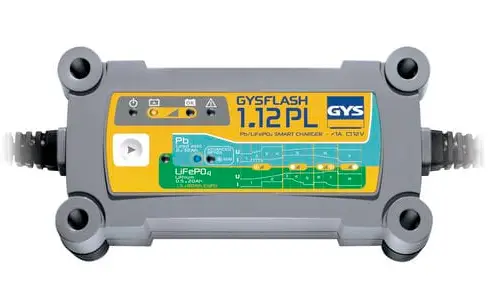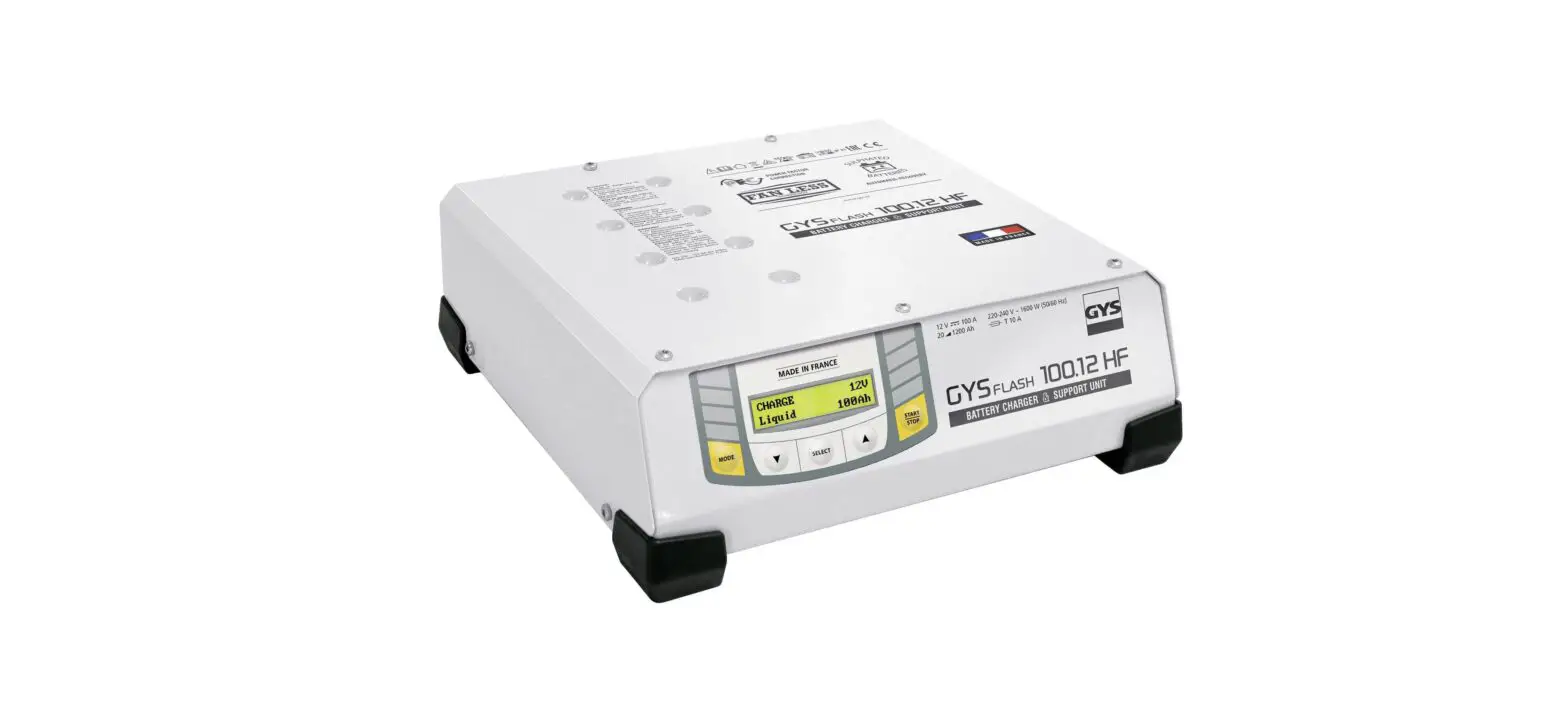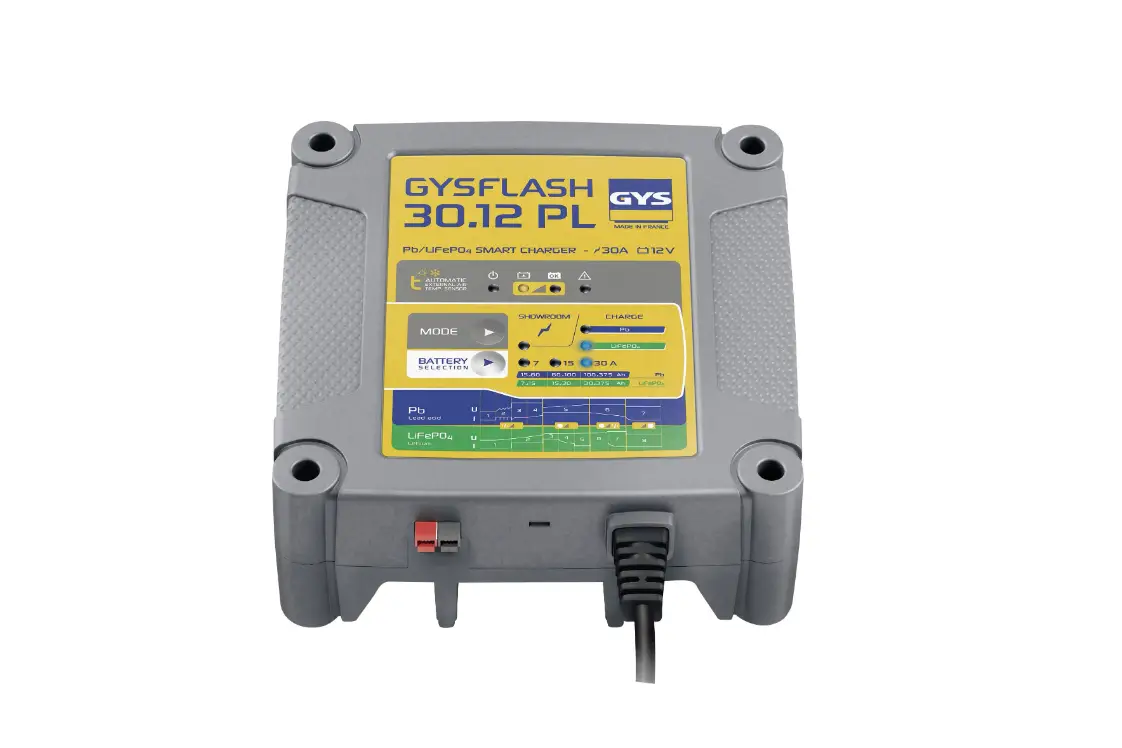
GYSFLASH 30.12 PL Automatic Charger Battery Monitor User Manual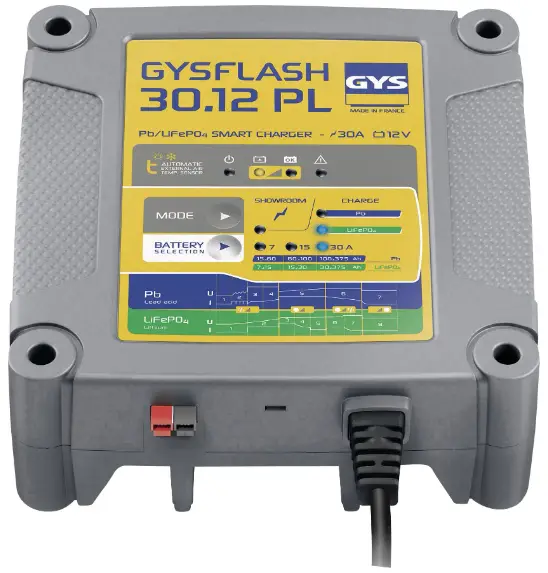
SAFETY INSTRUCTIONS
 This manual contains safety and operating instructions, to be followed for your safety. Please read it carefully before using the device for the first time and keep it for future reference.
 This machine should only be used for charging or power supply operations comprised within the limits indicated on the machine and in the instructions manual. The operator must observe the safety precautions. In case of improper or unsafe use, the manufacturer cannot be held liable.
 The device is destined to be used indoors. Must not be exposed to the rain.
This unit can be used by children aged 8 or over and by people with reduced physical, sensory or mental capabilities or lack of experience or knowledge, if they are properly monitored or if instructions for using the equipment have safely been read and risks made aware of. Children must not play with the product. Cleaning and maintenance should not be performed by an unsupervised child.
Do not use to charge domestic batteries or non rechargeable batteries.
Do not operate the device with a damaged power supply cord or a damaged mains plug.
Do not use the device if the charging cable appears to be damaged or assembled incorrectly in order to avoid any risk of short circuiting the battery.
Never use on a frozen or damaged battery.
Do not cover the device.
Do not place the device near a fire or subject it to heat or to long term temperatures exceeding 50°C
Do not obstruct the machine’s air intake, which facilitates air circulation.
The operating mode of the automatic charger and the restrictions applicable to its use are explained later in this manual.
 Fire and explosion risks
- A charging battery can emit explosive gases.
 During the charge, the battery must be placed in a well ventilated area.
- Avoid flames and sparks. Do not smoke near the device.
 Protect the battery’s electrical contact surfaces against short-circuits.
 During the charge, the battery must be placed in a well ventilated area.
 Protect the battery’s electrical contact surfaces against short-circuits.
 Acid projection hazard.
 Wear safety goggles and protective gloves
 If your eyes or skin come into contact with battery acid, rinse the affected part of the body with plenty of water and seek immediate medical assistance
 Wear safety goggles and protective gloves
 If your eyes or skin come into contact with battery acid, rinse the affected part of the body with plenty of water and seek immediate medical assistance
 Connection / disconnection:
- Ensure that the charger’s power supply is disconnected before connecting or disconnecting to the battery terminals.
- Always ensure the Red clamp is connected to the “”+”” battery terminal first. If it is necessary to connect the black clamp to the vehicle chassis, make sure it is a safe distance from the battery and the fuel/exhaust pipe. The charger must be connected to the mains.
- After charging, disconnect the charger from the mains, then disconnect the negative clamp from the car body and then disconnect the positive clamp from the battery, in this order.
 Connection:
- Class I device
- This device must be connected to an earthed power supply
- The connection to the power supply must be carried out in compliance with national standards.
Maintenance:
- If the power cable is damaged, it must be replaced by the manufacturer, its after sales or by an equally qualified person to prevent any accidents.
- Service should be performed by a qualified person
- Warning: Always remove the power plug from the wall socket before carrying out any work on the device.
 Under no circumstances should solvents or other aggressive cleaning agents be used.
- Clean the device’s surfaces with a soft, dry cloth.
 Under no circumstances should solvents or other aggressive cleaning agents be used.
Regulations :
 The Machine is compliant with European directives.
- The declaration of conformity is available on our website.
 EAEC Conformity marking (Eurasian Economic Community).
 Equipment in compliance with British requirements. The British
Declaration of Conformity is available on our website (see home page). Equipment in conformity with Moroccan standards.
- The declaration Cم) CMIM) of conformity is available on our website (see cover page).
 The Machine is compliant with European directives.
 EAEC Conformity marking (Eurasian Economic Community).
 Equipment in compliance with British requirements. The British
 Equipment in conformity with Moroccan standards.
 Waste management:
- This product should be disposed of at an appropriate recycling facility. Do not throw away in a household bin.
GENERAL DESCRIPTION
The GYSFLASH 30.12 PL is designed to charge lead-acid batteries (Gel, AGM, Liquid, …) and lithium of the Lithium Iron Phosphate (LFP / LiFePO4).
This charger is suited for the charge of:
- Lead-acid batteries 12 V (6 elements in series) from 15 Ah to 375 Ah.
- LFP batteries 12V (4 elements in series) from 7 Ah to 375 Ah.
The Gysflash 30.12 PL is equipped with a function that:
- when charging a lead-acid battery, adjusts the output voltage automatically according to the ambient air temperature. This adjustment allows for a very accurate lead-acid battery charge adapted to the temperature.
- When charging a lithium battery, the charge is prevented if the ambient temperature is below 3°C.
In both cases, the adjustment can take between 1 and 10 minutes before the charge starts or stops.
CALIBRATION CABLE
Procedure for the calibration of the charging leads in order for the charger to compensate any voltage drop due to the length or condition of the cables. It is strongly recommended to perform this procedure each time the cables are modified or changed.
- Before undertaking the procedure, make sure that the charger is disconnected from the mains socket.
- Short-circuit the ends of the charging leads.
- Press buttons
 and
and  simultaneously.
 - Plug in the mains plug while holding down the two buttons until the indicator light or lights up. Results :
- Indicator is on: the calibration was successful.
- Indicator is on: the calibration failed, disconnect the mains plug and restart the procedure.
- Unplug the mains plug until the charger switches of
 simultaneously.
START UP
- Connect the charger to the battery.
- Plug the charger to the mains (single phase 220-240Vac 50-60Hz).
- Select the mode by pressing button , and the charging current by pressing button . After roughly five seconds, the charge starts automatically. By default, the charger starts on the last mode used, except when in Supply mode.
- During the charge, the device indicates the charge progress. When indicator
 blinks, the battery is ready to start the vehicle.
Once indicator stays on, the battery is fully charged. - The charge can be interrupted at any time by unplugging the mains plug or pressing the button.
- After the charge, disconnect the charger from the mains, then disconnect the charger’s connections from the battery.
CHARGE MODES
Description of charging modes and currents :
 Lead-acid CHARGE mode (14.6 V/30 A max.) :
Mode designed for the recharge of 12V lead-acid batteries from 15 Ah to 375 Ah. Automatic seven step charge cycle. Lithium CHARGE mode (14.4 V/30 A max.) :
Mode designed for the recharge of 12 V lithium batteries from 7 Ah to 375 Ah. Automatic eight step charge cycle.
 Some Lithium batteries incorporate a UVP protection (Under Voltage Protection) which disconnect the battery in case of deep discharge. This protection prevents the charger from detecting the battery. In order for the Gysflash 30.12 PL to be able to charge the battery, it is necessary to deactivate the UVP protection. To do this, select the Lithium charging mode and press the button for
 10 seconds. The charger will then deactivate the UVP protection and automatically start charging.
 Charging current 7 / 15 / 30 A:
Selection designed to choose the most suited charging current based on the type and size of the battery (lead-acid or lithium).
| Charging current | 7 A | 15 A | 30 A | |
| Battery capacity | Pb | 15  60 Ah 60 Ah | 60 100 Ah | 100 375 Ah |
| LFP | 7 15 Ah (21 45 Ah EqPb*) ( | 15 30 Ah(45 90 Ah EqPb*) | 30 375 Ah(90 1100 Ah EqPb*) |
Lead battery corresponding : A lithium battery has a better starting performance (CCA) than a lead battery. That’s why some lithium battery manufacturers indicate the battery lead equivalent (EqPb) which corresponds to the capacity of a lead-acid battery with the same starting performance. For instance, a LFP battery of 10 Ah will have the same starting performance as a lead-acid battery of about 30 Ah.
 SHOWROOM/DIAG mode (13.7 V / 30 A max.) :
Option Supply (13.7 V / 30 A max.):
Feature designed to turn the charger into a stabilized power source with a regulated voltage of 13.7 V and a supply of current up to 30 A. This mode can be used without a battery.
To select this option, place the charger in Showroom mode and press the button
until the  indicator flashes.
When the indicator  is on, the voltage is correctly regulated. If indicator
  flashed, this means that the current absorbed by the battery is higher than the charger maximum current (30 A) and that the battery might end up being discharged.
The current supplied by the charger is indicated using the LED indicator. 
Lead-acid charging curve:
The GYSflash 30.12 PL features a 7 step charging curve designed to ensure optimal charging of lead-acid batteries.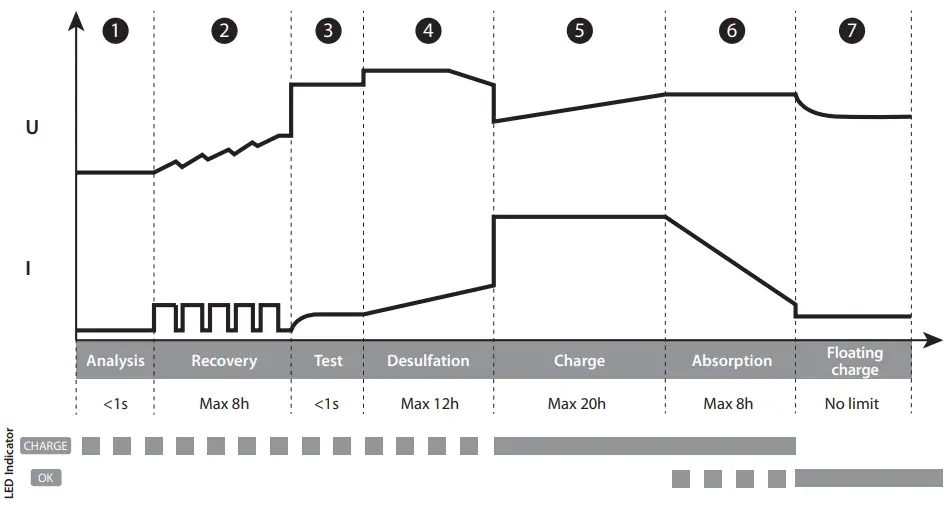
- Step 1: Analysis
Analyses the battery state (charge level, polarity inversion, wrong battery…) - Step 2: Recovery (
 – 3 A /
  – 5 A /
 – 10 A)
Recovering damaged elements due to a prolonged deep discharge. - Step 3 : Test
Sulfated battery test - Step 4 : Desulfation
(15.8 V) Battery desulfation algorithm. - Step 5: Charge ( – 7 A / – 15 A / – 30 A)
Maximum current fast charge to reach 80% charge level.
 – 3 A /
  – 5 A /
 – 10 A)
Lithium charging curve:
The GYSflash 30.12 PL uses a 8 steps charging curve which guarantees optimal performance for your LFP battery.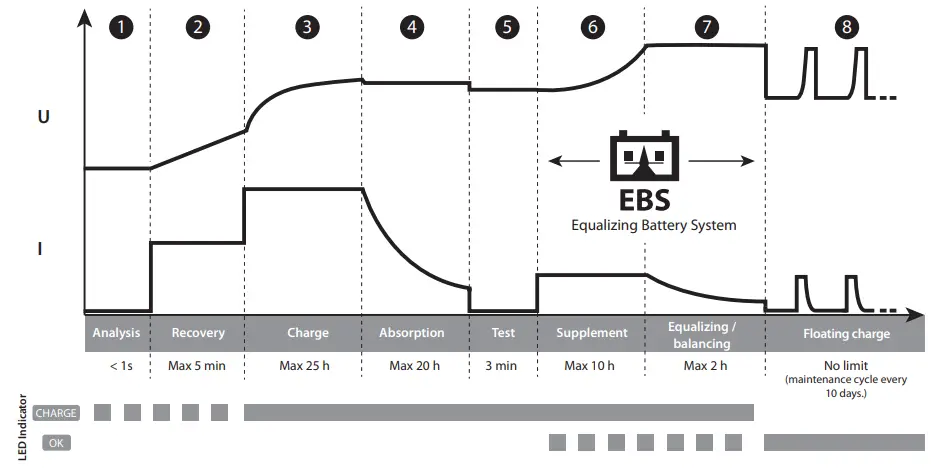
- Step 1: Analysis
Analyses the battery state (charge level, polarity inversion, wrong battery…) - Step 2 : Recovery ( – 0.5 A / – 1 A / – 2 A)
Recovering damaged elements due to a prolonged deep discharge. - Step 3: Charge ( – 7 A / – 15 A / – 30 A)
Maximum current fast charge to reach 90% charge level. - Step 4: Absorption (13.8 V)
Constant voltage charge to reach 98% charge level. - Step 5: Test
Charge conservation test. - Step 6: Supplement
Reduce current charge to reach 100% charge level - Step 7: Equalizing / balancing (14.4 V)
Balancing of battery cells. - Step 8: Floating charge (13.8 V)
Maintains battery charge level at its maximum and goes through charge maintenance cycle every 10 days. - Estimated charge time:

- Protections:
 The GYSFLASH 30.12 PL has comprehensive safety features to protect it against short-circuits and polarity reversals.
It has an anti-spark feature which prevents sparks whilst connecting the device to the battery. This charger has double insulation and is safe to use with the battery in situ as it will protect the vehicle’s on-board electronics.
The GYSFLASH 30.12 PL is fitted with an integrated temperature sensor that ensures that the charging current is adapted to the ambient temperature to prevent internal the electronics from overheating.

 The GYSFLASH 30.12 PL has comprehensive safety features to protect it against short-circuits and polarity reversals.
TROUBLESHOOTING
| Troubleshooting | Causes | Solutions | |
| 1 | 1 The indicator flashed |
|
|
| 2 | The indicator is on |
|
|
| 3 | Indicator stays on even after pressing button | Thermal protection | Ambient temperature is too high (>50°C), cool the room and let the charger cool down. |
| 4 | Indicator  flashes. flashes. | Charger in sleep mode | Press button or connect a battery to the charger to exit sleep mode. |
| 5 | Indicator stays on. | Charge interrupted by pressing. | Press again to restart the charge |
WARRANTY
The warranty covers faulty workmanship for 2 years from the date of purchase (parts and labour).
The warranty does not cover:
- Transit damage.
- Normal wear of parts (eg. : cables, clamps, etc..).
- Damages due to misuse (power supply error, dropping of equipment, disassembling).
- Environment related failures (pollution, rust, dust).
In case of failure, return the unit to your distributor together with:- The proof of purchase (receipt etc …)
- A description of the fault reported
TECHNICAL TABLE
| Reference | 029668 026070 (UK) |
| Rated power supply voltage | ~ 220-240 VAC 50 / 60 Hz |
| Rated power | 500 W |
| Rated output voltage | 12 VDC |
| Rated output current | 7 A / 15 A / 30 A |
| Rated battery capacity | 7 – 375 Ah |
| Battery consumption when idle | < 0.5 mA |
| Ripple | < 150 mV rms |
| Charging curve | IUOU |
| Operating temperature | -20°C – +40°C |
| Storage temperature | -20°C – +80°C |
| Protection rating | IP 32 IP 31 |
| Protection class | Class I |
| Noise level | < 55 dB |
| Weight | 1.85 Kg |
| Dimensions (L x H x D) | 190 x 190 x 73 mm |
| Standards | 60335-2-29 |
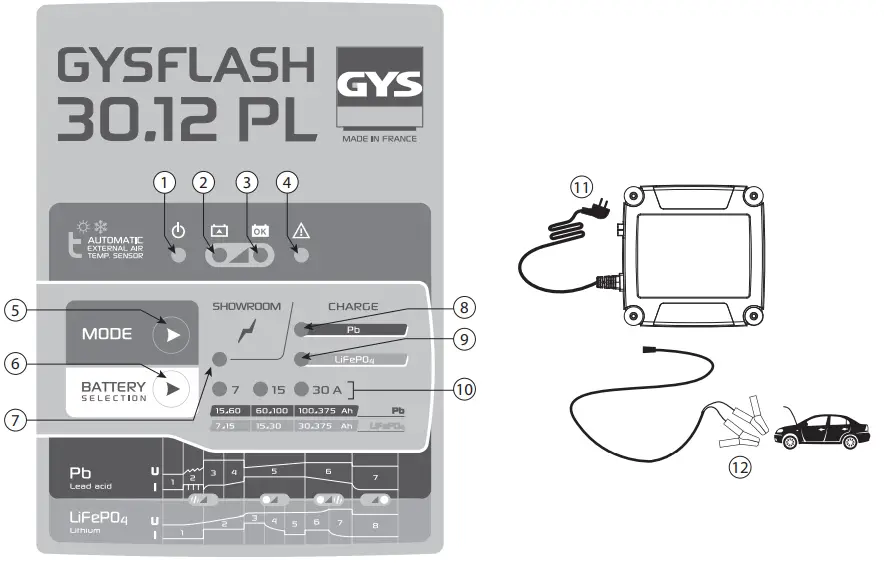
Control Panel Sticker
- Sleep mode
- Charge in progress
- Charge complete
- Fault
- Mode selection
- Charging currents selection
- Mode Showroom Option supply
- Mode charge Lead-acid
- Mode charge Lithium
- Charging currents
- Mains plug
- Charge clamps

 Arc Welding, Battery Chargers & Body Repair | GYS