 Control Your Video
MP-4KHDM-V2 HDMI 4K Digital Signage Player
User Manual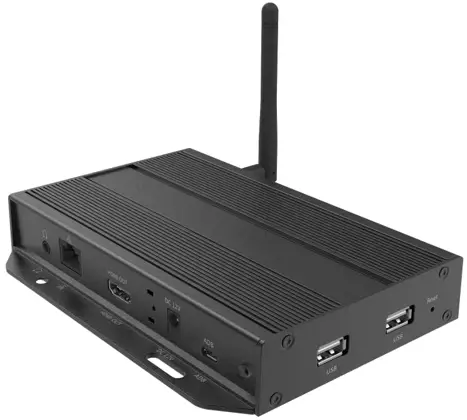
Avenview MP-4KHDM-V2 HDMI 4K Digital Signage Player
VIDEO WALLS VIDEO PROCESSORS VIDEO MATRIX SWITCHES EXTENDERS SPLITTERS WIRELESS CABLES & ACCESSORIES © 2016 Avenview Inc. All rights reserved.
The contents of this document are provided in connection with Avenview Inc. (“Avenview”) products. Avenview makes no representations or warranties with respect to the accuracy or completeness of the contents of this publication and reserves the right to make changes to specifications and product descriptions at any time without notice. No license, whether express, implied, or otherwise, to any intellectual property rights is granted by this publication. Except as set forth in Avenview Standard Terms and Conditions of Sale, Avenview assumes no liability whatsoever, and disclaims any express or implied warranty, relating to its products of Avenview Inc. is strictly prohibited.
Product Application & Market Sectors
 | Corporate |  | House Of Worship |
 | Military |  | Residential |
 | Education |  | Industrial |
 | Medical |  | Aviation |
SECTION 1: GETTING STARTED
1.1 IMpORTANT SAfEGuARDS
Please read all of these instructions carefully before you use the device. Save this manual for future reference.
What the warranty does not cover
- Any product, on which the serial number has been defaced, modified or removed.
- Damage, deterioration or malfunction resulting from:
- Accident, misuse, neglect, fire, water, lightning, or other acts of nature, unauthorized product modification, or failure to follow instructions supplied with the product.
- Repair or attempted repair by anyone not authorized by us.
- Any damage of the product due to shipment.
- Removal or installation of the product.
- Causes external to the product, such as electric power fluctuation or failure.
- use of supplies or parts not meeting our specifications.
- Normal wear and tear.
- Any other causes which does not relate to a product defect.
- Removal, installation, and set-up service charges.
1.2 SAFETY INSTRUCTIONS
The Avenview MP-4KHDM-V2 Digital Signage Player has been tested for conformity to safety regulations and requirements, and has been certified for international use. However, like all electronic equipment’s, the MP-4KHDM-V2 should be used with care.
Read the following safety instructions to protect yourself from possible injury and to minimize the risk of damage to the unit. Do not dismantle the housing or modify the module. Dismantling the housing or modifying the module may result in electrical shock or burn. Refer all servicing to qualified service personnel. Do not attempt to service this product yourself as opening or removing housing may expose you to dangerous voltage or other hazards Keep the module away from liquids. Spillage into the housing may result in fire, electrical shock, or equipment damage. If an object or liquid falls or spills on to the housing, unplug the module immediately. Have the module checked by a qualified service engineer before using it again. Do not use liquid or aerosol cleaners to clean this unit. Always unplug the power to the device before cleaning.
1.3 REGULATORy NOTICES FEDERAl COMMuNICATIONS COMMISSION (FCC)
This equipment has been tested and found to comply with part 15 of the fCC rules. These limits are designed to provide reasonable protection against harmful interference in a residential installation.
Any changes or modifications made to this equipment may void the user’s authority to operate this equipment.
| Warning symbols | Description |
| ONLY USE THE PROVIDED POWER CABLE OR POWER ADAPTER SUPPLIED. DO NOT TAMPER WITH THE ELECTRICAL PARTS. THIS MAY RESULT IN ELECTRICAL SHOCK OR BURN. |
 | DO NOT TAMPER WITH THE UNIT. DOING SO WILL VOID THE WARRANTY AND CONTINUED USE OF THE PRODUCT. |
 | THE VIDEO BOARDS ARE VERY SENSITIVE TO STATIC. PLEASE ENSURE IF RACK MOUNTED OR INSTALLED ON A SURFACE, IT SHOULD BE IN A GROUNDED ENVIROMENT. |
 WARNING
Read & understand user guide before using this device.
Failure to follow the proper installation instructions could result in damage to the product and preventing expected results.
INTRODUCTION
Printed signs are something from the past. Avenview HDMI Digital Signage Player delivers hardware HD video playback for smooth 4K and 1080p video with an advanced onboard processing power for stunning HTML5 content playback. MP-4KHDM-V2 is a plug and play device with no setup required, Plug in power, network and HDMI, and its ready to play contents on any display. The MP-4KHDMV2 is fanless, with its specially designed casing and smart ventillation architecture it says cool 24/7. Avenview igital signage player features a built-in self-recovery function (SRF) that keep things running regardless of conditions (sudden reboots or power outage). It includes a micro-SD slot expandable up to 128GB for longer presentations.
The MP-4KHDM-V2 has a unique features which does not lock user to a specific software to create contents, we partnered with the most prominent digital signage content management software developers such as Scala, SignageLive, PosterDigital and much more which are all fully compatibe with the MP-4KHDM-V2. So, users are free to use any software they prefer with the MP-4KHDM-V2.
The MP-4KHDM-V2 is great for any application from menu boards, hospitality screens, campus signage, and corporate communications. It handles any Full HD application with ease. It’s great for retail applications as well, driving digital posters and other screens.
FEATURES:
- Always On with App Lock feature to prevent unauthorized access
- HTML5 technologies including CSS and Javascript
- Widgets for calendar, clock, news, weather, and web page integration with the ability to add custom created widgets
- Multi-zone screen layout, transparent PNG overlay, and graphical scrolling ticker
- Auto-play starts playing scheduled contents automatically when powered on
- Fanless (zero noise) with built-in 16GB EMMC storage
- Automatic error recovery with built-in WDT
- Real-time clock with backup clock battery
- SignApps Express Utility to create media content with the ability to use third party solutions (optional license)
- Micro SD card slot (support up to 128GB storage)
- Strong Cache for continued playback even when network is not available
- Built-in wall mount bracket
- 1 year limited warranty
2.1 PACKAGE CONTENTS
Before starting the installation of MP-4KHDM, please check the package contents.
| 1 | MP-4KHDM-V2 | x 1 | 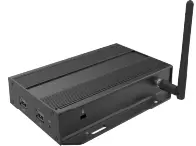 |
| 2 | HDMI CORD (3 ft) | x 1 | 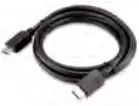 |
| 3 | WIFI ANTENNA | x 1 | 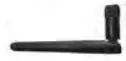 |
| 4 | VELCRO STRIP | x 1 |  |
| 5 | pOWER ADApTER (12V/1.5A DC) | x 1 | 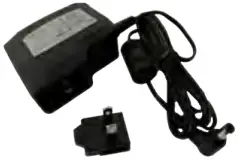 |
| 6 | MOUNTING BRACKET | x 2 | 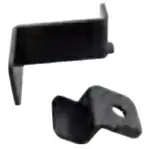 |
| 7 | USER’S MANuAl | x1 |
2.2 BEfORE INSTAllATION
- Put the product in an even and stable location. If the product falls down or drops, it may cause an injury or malfunction.
- Don’t place the product in too high temperature (over 50°C), too low temperature (under -20°C) or high humidity.
- Use the DC power adapter with correct specifications. If inappropriate power supply is used then it may cause a fire.
2.3 APPLICATION DIAGRAM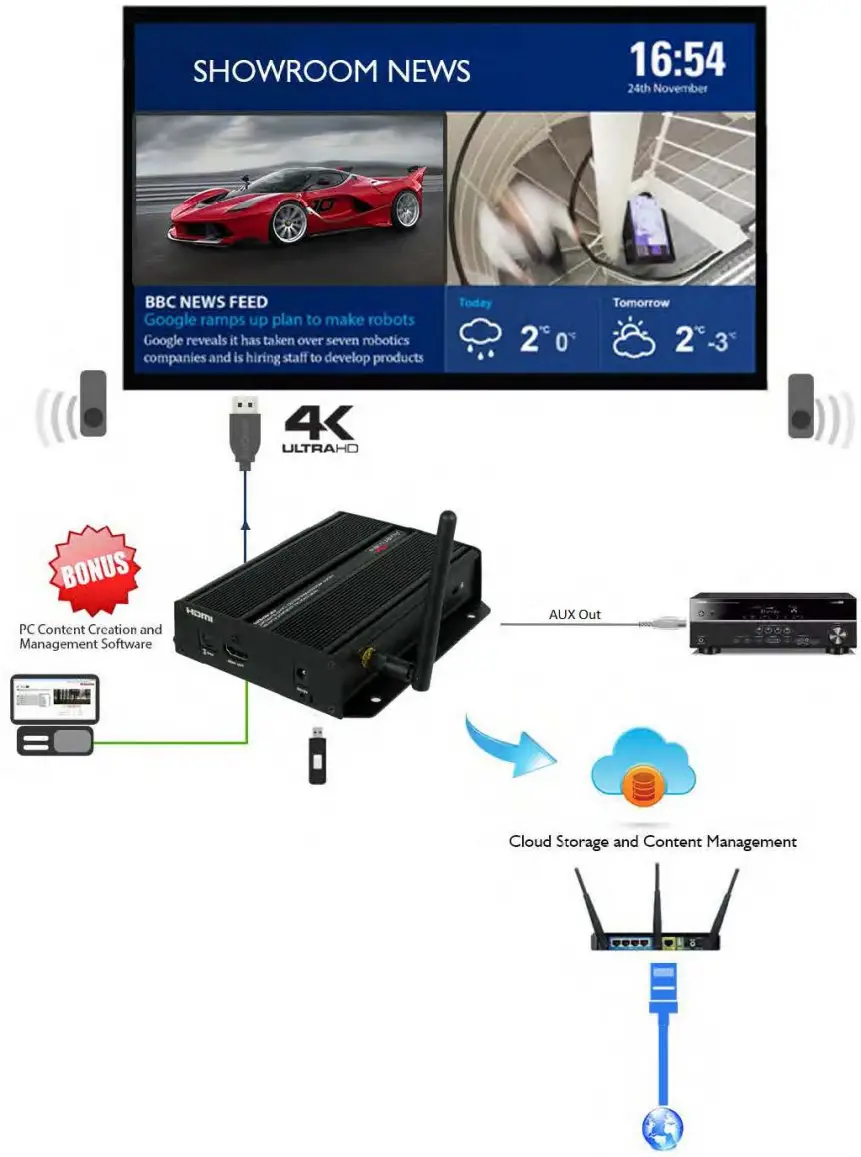 2.4 PANEL DESCRIPTION
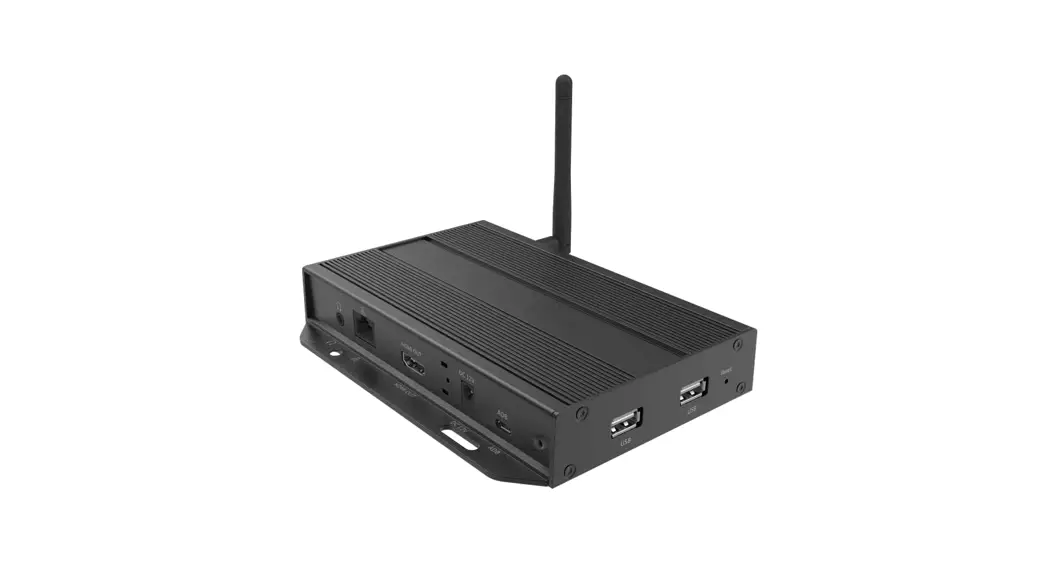
2.4.1 Right Side Panel
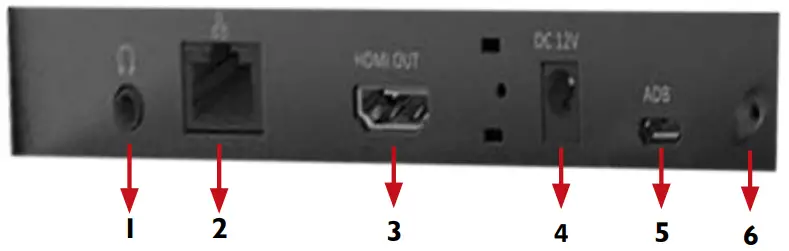
- AUDIO OUT: 3.5mm Audio out to connect to Audio/Video Receiver or Soundbar
- LAN: Connect to local netwrok for media transfer or internet access
- HDMI OUT: Connect to a TV or Display using an HDMI cable
- POWER JACK: Plug in the provided 12V power adapter
- ADB: Android Debug Bridge for device control over USB.
- POWER LED: Power ON LED indicator
2.4.2 Left & Front Panel 6. SMB JACK: Attach WiFi antenna to expand wifi signal coverage
 - LOCK PORT: Kensington lock for protection against theft
- USB PORTS: Used to Connect a mouse or a keyboard for menu control or to transfer media content created using PC software on a flash drive
- RESET : Reset device to factory default
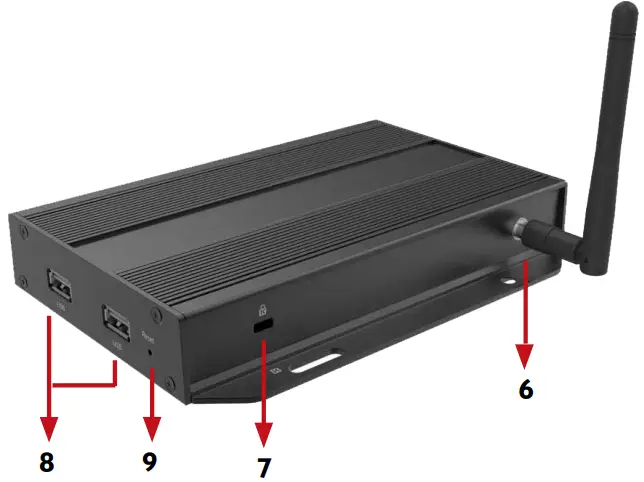 6. SMB JACK: Attach WiFi antenna to expand wifi signal coverage
2.4.3 Rear Panel 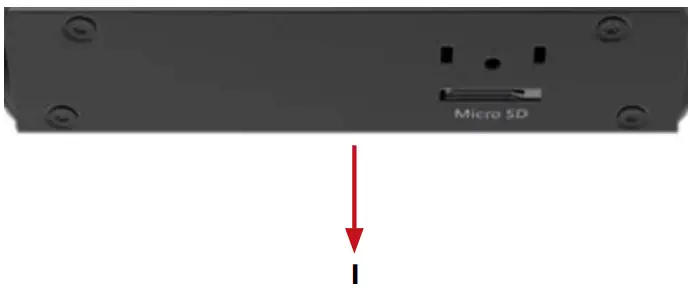 1. MICRO SD CARD SLOT: Expand storage up to 128 GB
INSTALLATION GUIDE
To setup Avenview MP-4KHDM-V2 follow below steps:
- Power OFF all devices.
- Connect an HDMI display or TV to the MP-4KHDM-V2 using HDMI cable
- Connect a CAT-5e/6 to the MP-4KHDM to connect to local network
- plug in 12v DC power cord to the power jack of the MP-4KHDM-V2
- Power on all devices
- Download AV SignPRO Software and start uploading media conents
GENERAl TROUBlESHOOTING
| PROBLEM | POSSIBLE SOLUTION |
| NO IMAGE | Check if connection to the source and the display are correct. Ensure that display device supports 1080p and 4K resolutions |
| SCREEN DEFECTS APPEAR | Make sure a premium quality H DMI cord is used and no adapters/converters connected |
| NO PLAYER FOUND | Check if player is connected to the network Ensure that player is on the same netwrok as the PC Software Reboot the player Close and restart the AV SignPRO software |
| SLOW OR NO MEDIA EXPORTING | Ensure player is connected over CatS/6 cable not Wifi |
| PLAYER SHOWING BLACK IMAGE | Check playlist schedule |
MP-4KHDM-V2 STARTUP
NOTE:
It is necessary to have a wireless mouse conected to the player for the setup process. It would be more convenient to have a wireless keyboard & mouse conected to the player for ease of setup.
When MP-4KHDM-V2 is powered on it will log into the ‘Basic Settings’ screen allowing 15 seconds before it starts autoplaying the last uploaded playlist.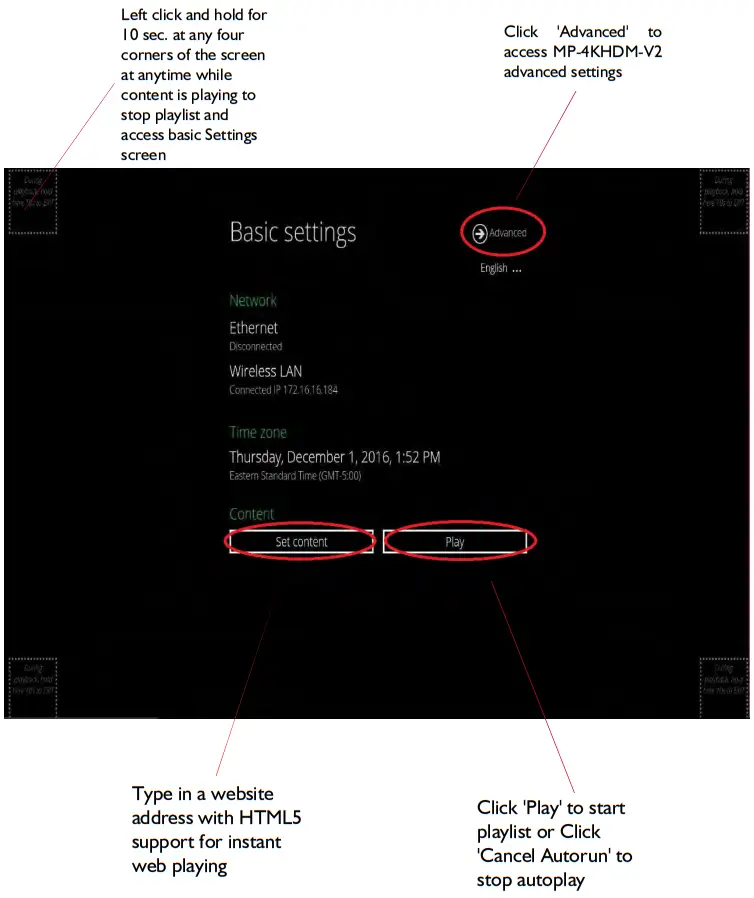
SOFTWARE
6.1 Software Download
Download and install AV SignPro software from the product page on our website, find the product page by searching for the model number, select produce and scroll down to downloads Double click software icon to launch the application, AV SignPRO will start with the main screen to create a playlist.
6.2 Create a Playlist
Start by typing a playlist name then click on ‘Create Playlist’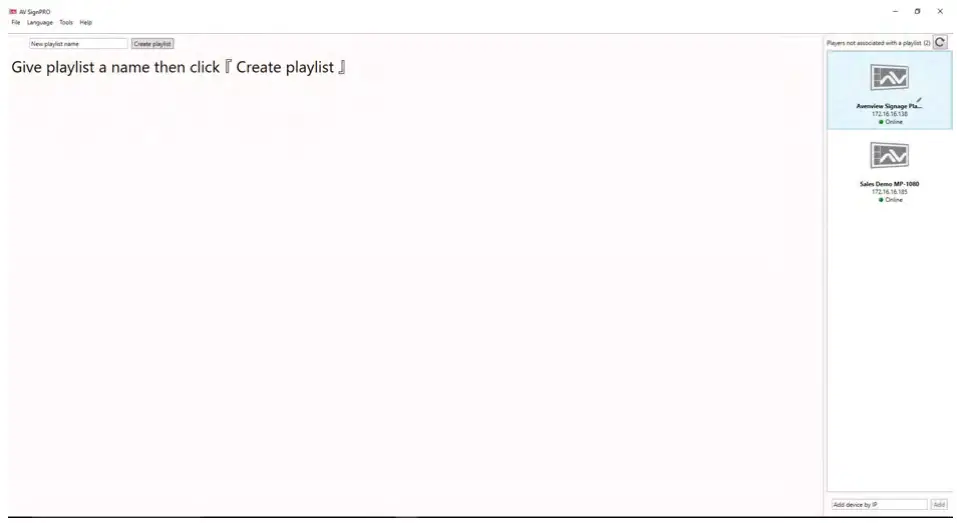 – List of active “online” players will be showing instantly on the right side panel of the software (click refresh to update the list and search for new devices)
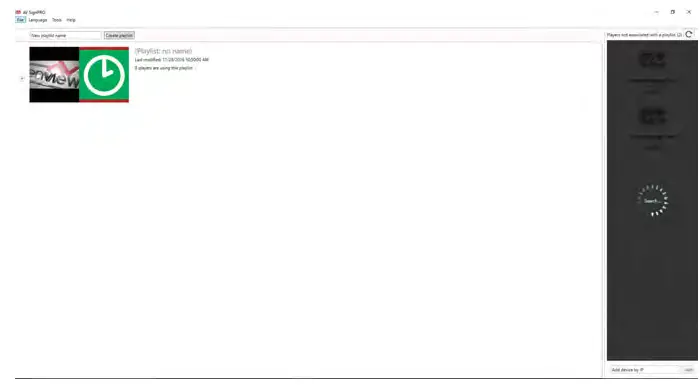 6.3 Select a Player
Click ‘Create Playlist’ to create a new playlist to be uploaded to a player.
Select Player Model:
– Select the player model. If not sure of the player model ‘All models / Legacy models’ can be selected for a universal format content.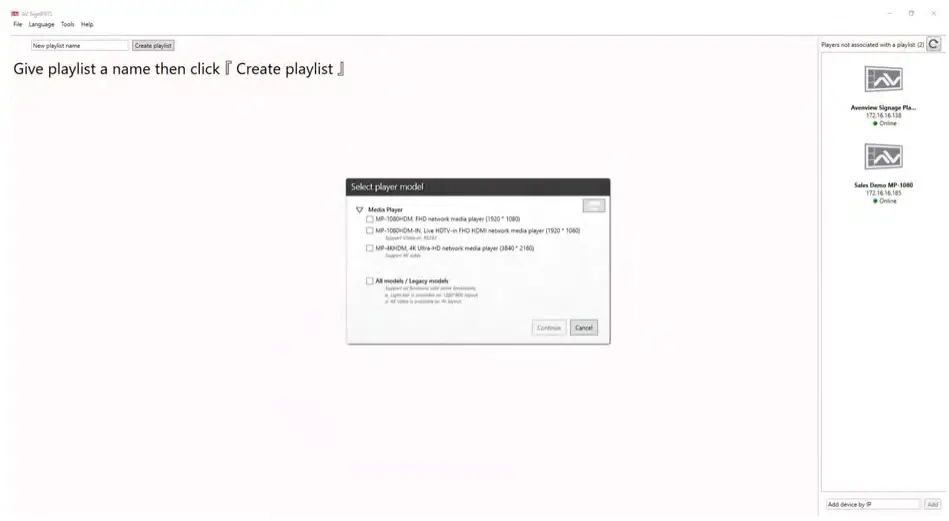 6.4 Select a Template
After selecting the player model a preset layouts/templates will be displayed to choose from. Select the desired template. Other properties can be selected from the left panel such as resolution required, orientation, etc..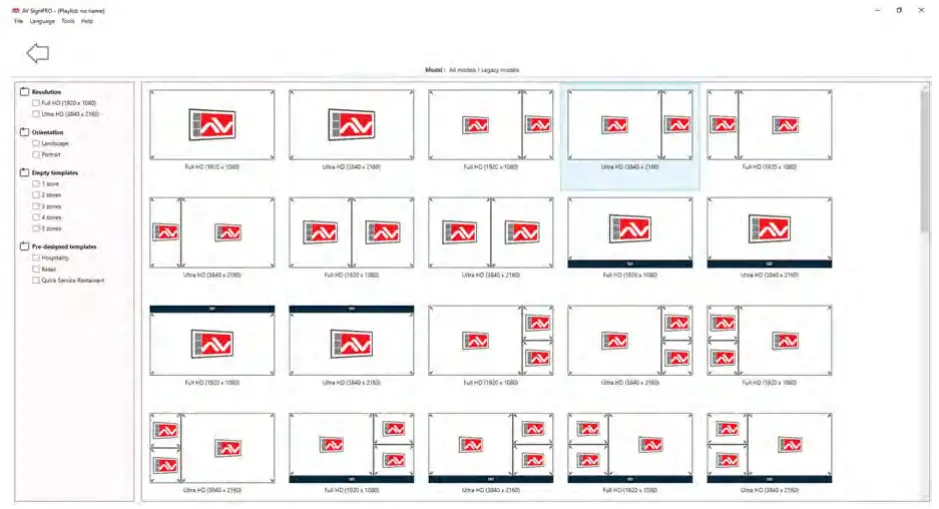 6.5 Edit Template
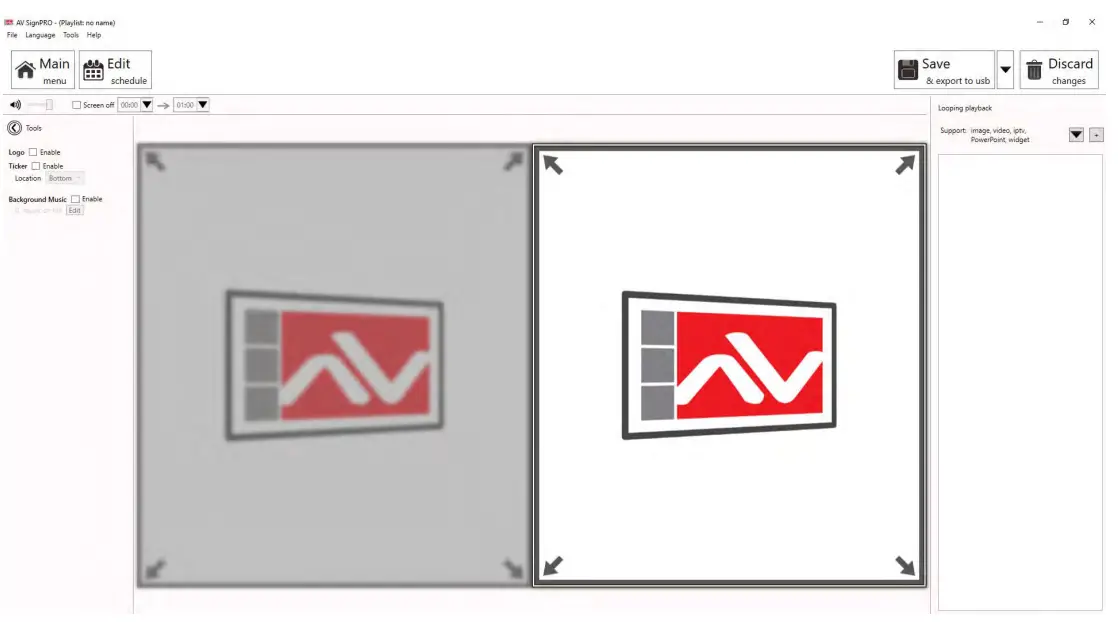
Click on template empty zones. Media uploading panel will appear on the right side of software main screen. Contents can be uploaded by selecting  or
or .
.
6.6 Uploading Contents
Click to upload a video, image or a document.
Click to upload a widget or link an IPTV (live cable box).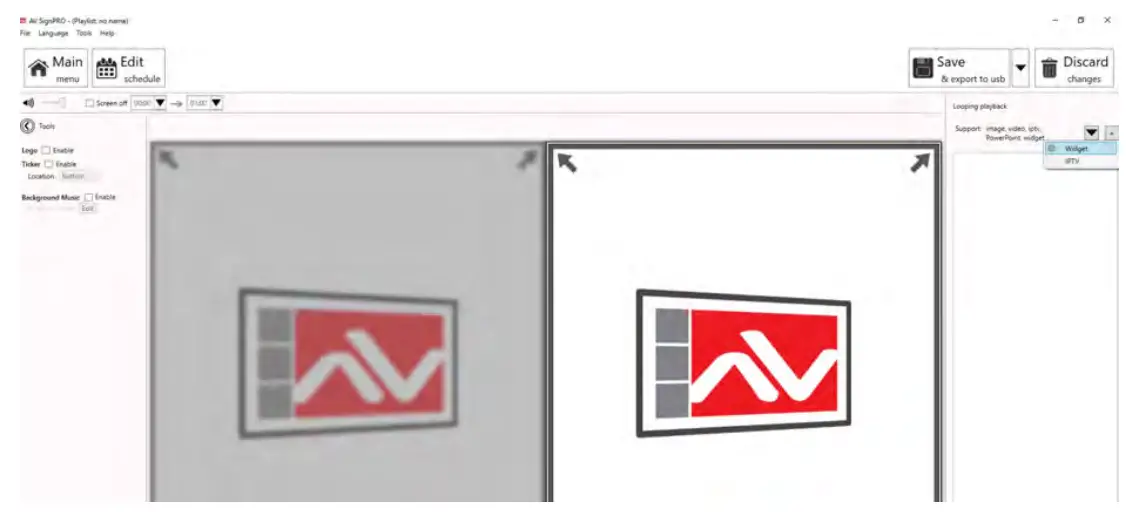 6.7 Widget Selection
Five preloaded widgets can be uploaded. More can be added by saving Widget files in Widget folder.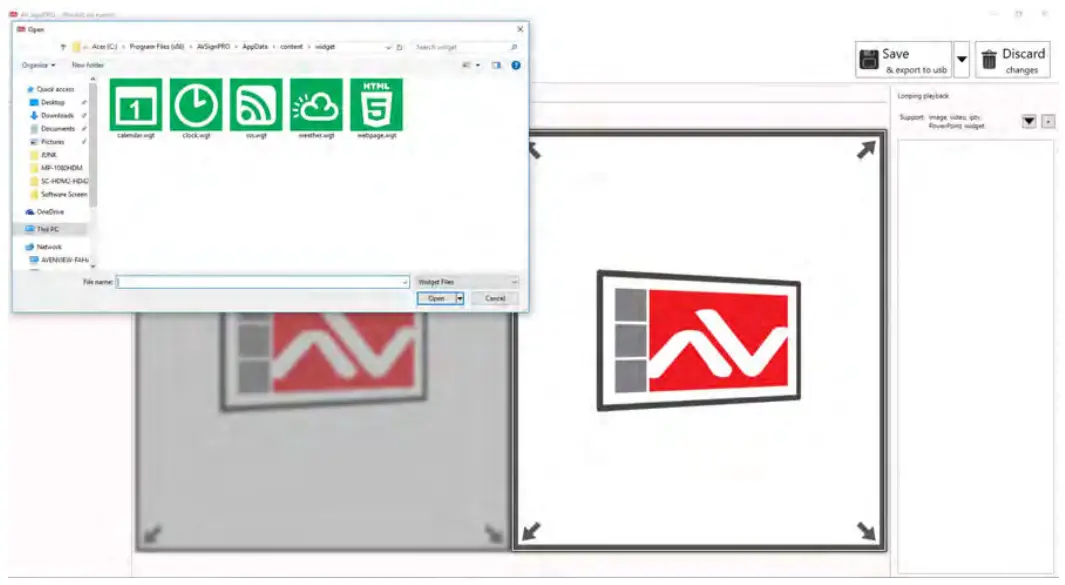 6.8 Set a Schedule
Click ‘Edit Schedule’ from top left menu to set a schedule for all created playlist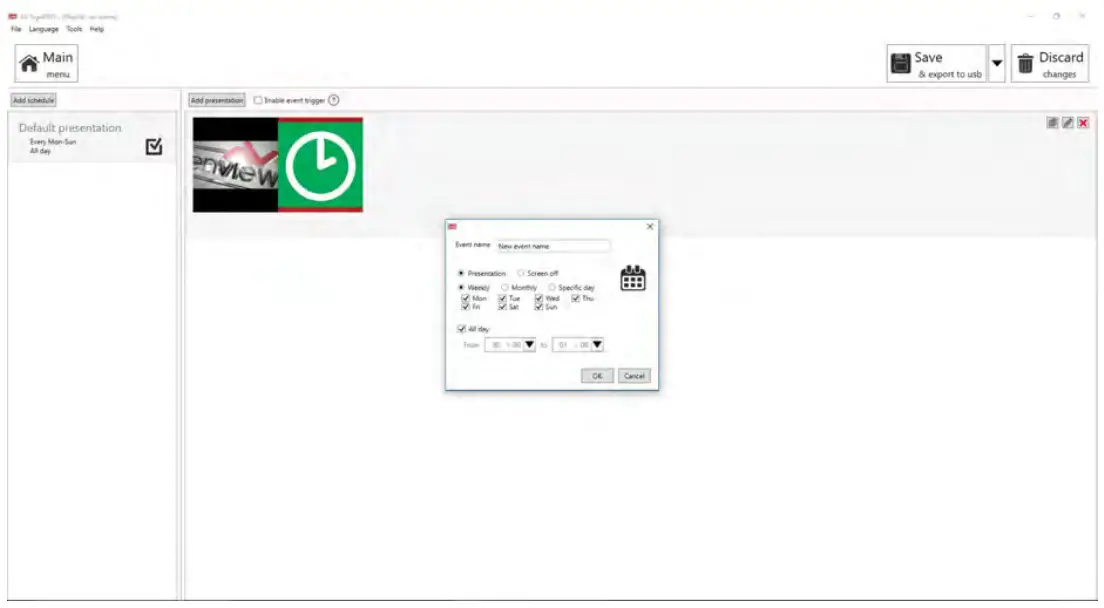 6.9 Save/Load Playlists to PC
Click ‘File’ then select ‘Save’ to save the created playlist to a destination.
Click ‘File’ then select ‘Load’ to load a saved playlist.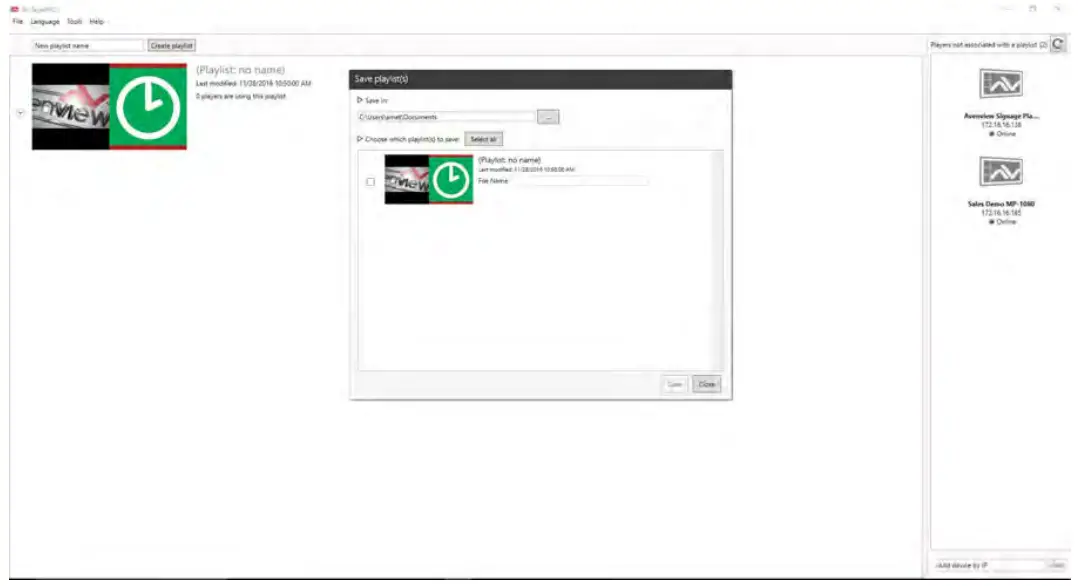 6.10 Save/Export Playlist to Player/USB
Click  from top right menu to either export created media content to a player or transfer content to a USB flash drive
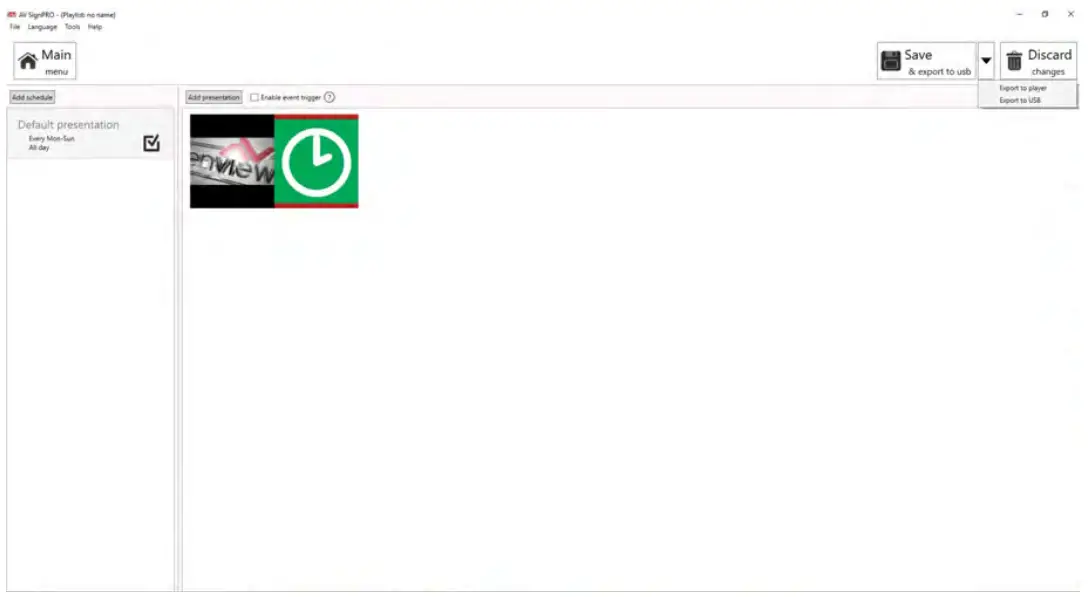 6.11 Send to Player
Click from top right menu and select ‘Export to Player’. A list of online players will show up. Select a single player or multiple players to send content to.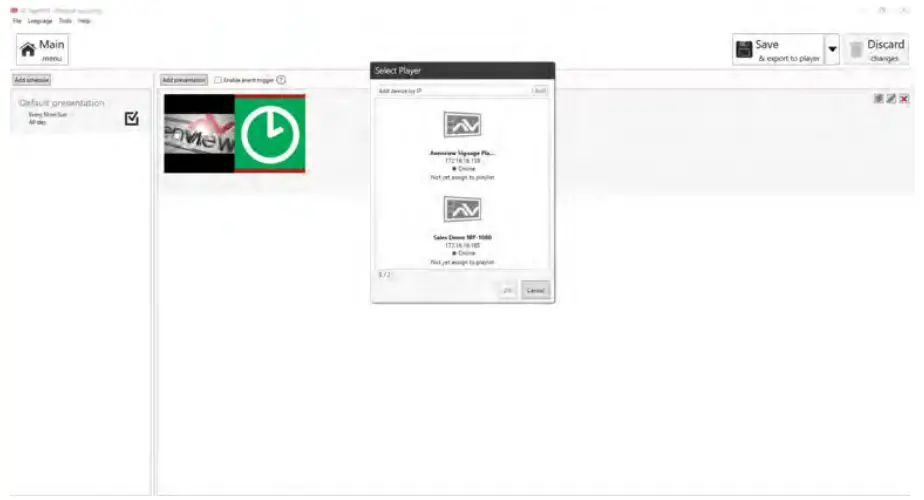 6.12 Delete/Reset Contents
– To delete player contnets upload a new playlist or an empty template that will overwrite the exisitng playlist on the player.
– If no playlist to be uploaded to the player, factory reset the digital media player to delete all playlist previously created.
– From Player ‘Basic Settings’ page click ‘Advanced’ – ‘System’ and Select ‘Factory Default’
Note: ‘Factory default’ will delete all playlists created and media saved and will restore MP-4KHDM-V2 to its factory default state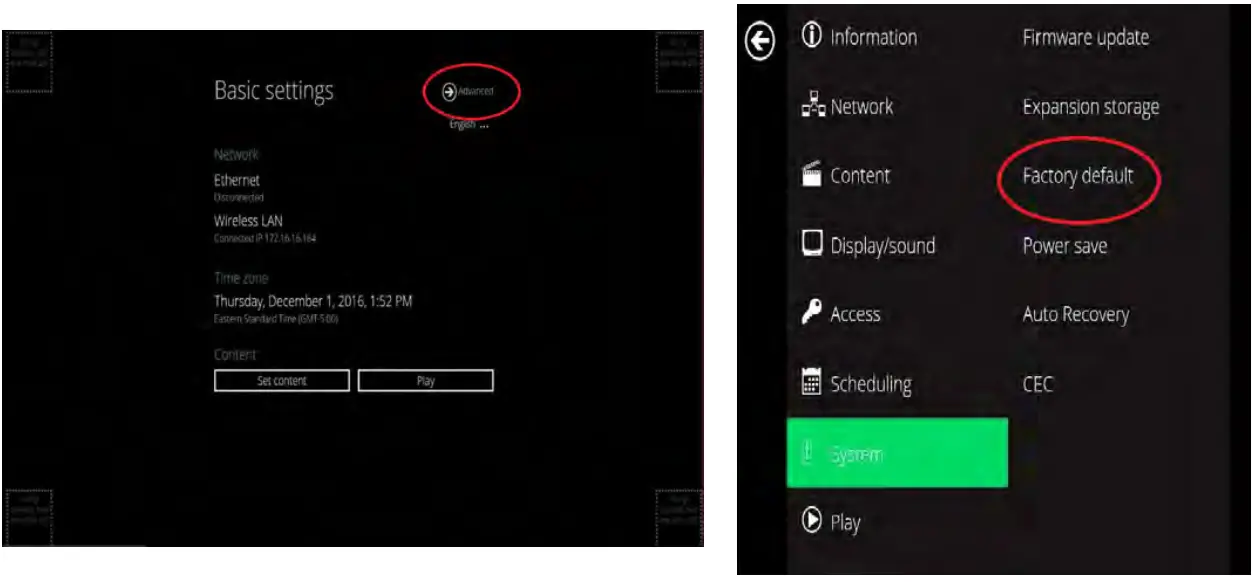 6.13 Password Protection
MP-4KHDM-V2 can be protected from any access or content changing using a password that can be set from ‘Advanced menu’ and selecting ‘Access’.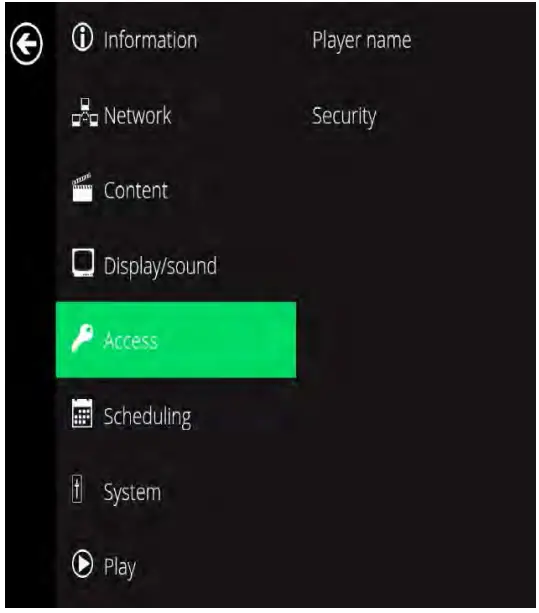
PARTENERED SOFTWARE
Avenview MP-4KHDM-V2 users can use a selected number of third party content management softwares -from the list below- other than the free AV SignPro Software provided with their purchase of any Avenview Digital Signage Player for added convinience and flexibility in media creation.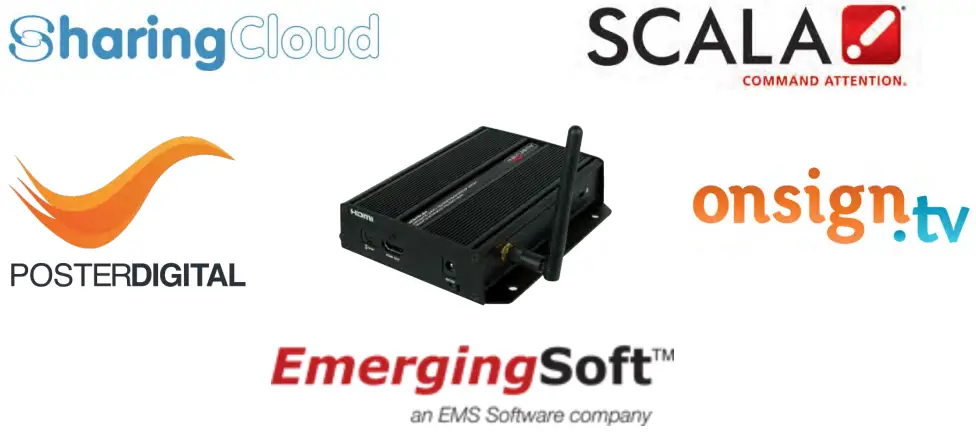
SPECIFICATIONS
| ITEM | DESCRIPTION |
| UNITS | MP-4KHDM-V2 |
| UNIT DESCRIPTION | Digital Signage |
| HDMI COMPLIANCE | Player 2.0 |
| PRIVACY AND SECURITY | Password Protected |
| VIDEO FORMAT SUPPORTED | H.265/HEVC up to 4K (3840x2I60), H.264/AVC up to 1080p (I 920x 1080), MPEG-4 up to 1080p ( I 920×1080), MPEG-2 up to 1080p (1920x 1080), POPAI Screen Media Standards : S6 to SI2, E4,E7,E8, VC-I up to 1080p ( I 920×1080) |
| CONNECTIVITY | Gigabit Ethernet, Wireless: 802.11 b/g/n (2.4 GHz), HDMI 2.0 (3840x2I60 @60fps), Micro USB for ADB, USB 2.0 x 2, 3.5mm analog stereo audio out |
| AUDIO SUPPORT | MP3 up to 320Kbps POPAI Screen Media Standards : S4, S5 |
| CONTENT MANAGEMENT | AVSignPRO Software, 3rd party solution (optional license) |
| CONTROL | PC Software and OSD |
| INPUT | Ix RJ45, 2x USB 2.0, lx Micro SD Slot |
| OUTPUT | Ix HDMI, 1 x 3.5mm Audio Out |
| HDMI CONNECTOR | Type A (19 pin female) |
| LOCAL STORAGE | 16 GB eMMC built-in exapandable with Micro SD Card |
| POWER ADAPTER | 100-240V, 50-60 Hz, 0.5A Max. I 2V/1 .5A DC |
| POWER CONSUMPTION | 7W Max |
| DIMENSION LXWXH | 6.54″ x 4.92″ x 0.98″ |
| WEIGHT | 0.98 lbs |
Environmental
| PERFORMANCE RATING | TYPE OF CATEGORY CABLE | ||
| WIRING SHIELDING | CATS | CATSE ……………………………………….CAT6 | |
| SOLID UNSHIELDED (UTP) SHIELDED (STP) |  | | |
| | | |
| STRANDED UNSHIELDED (UTP) SHIELDED (STP) | | | |
| | | |
| TERMINATION | PLEASE USE EIA/TIA-568-B TERMINATION (T568B) AT ANY TIME | ||
PIN & WIRING STANDARD DEfINITION
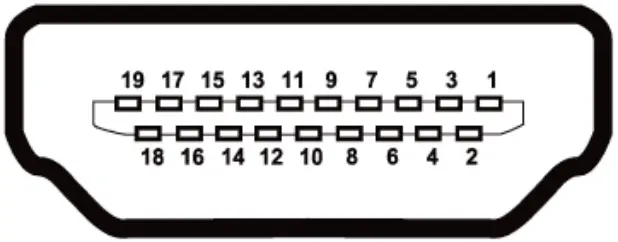 TYPE A (RECEPTACLE) HDMI
| pin 1 | TMDS Data2+ |
| pin 2 | TMDS Data2 Shield |
| pin 3 | TMDS Data2– |
| pin 4 | TMDS Data1+ |
| pin 5 | TMDS Data1 Shield |
| pin 6 | TMDS Data1– |
| pin 7 | TMDS Data0+ |
| pin 8 | TMDS Data0 Shield |
| pin 9 | TMDS Data0– |
| pin 10 | TMDS Clock+ |
| pin 11 | TMDS Clock Shield |
| pin 12 | TMDS Clock– |
| pin 13 | CEC |
| pin 14 | Reserved (N.C. on device) |
| pin 15 | SCl |
| pin 16 | SDA |
| pin 17 | DDC/CEC Ground |
| pin 18 | +5v power |
| pin 19 | Hot plug Detect |
CAT5E/6 WIRING STANDARD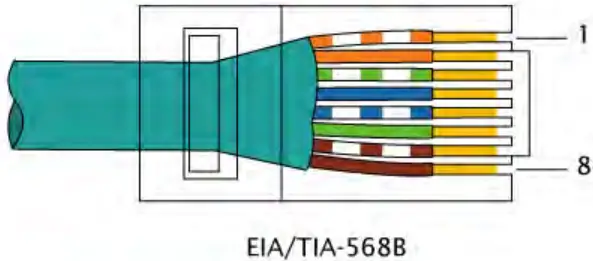
Avenview Warranty Certificate
AVENVIEW CORP. (“Avenview”) warrants Avenview-branded product(s) contained in the original packaging against defects in materials and workmanship when used normally in accordance with Avenview’s enclosed manual guidelines for a period of ONE (1) YEAR from the date of original retail purchase – Warranty Period. Avenview’s published guidelines include but are not limited to information contained in technical specifications, user manuals and service communications.
LABOR: During the Warranty Period of ONE (1) YEAR, Avenview will repair or replace the product(s) at no cost using new or used parts equivalent to novel performance and reliability if the product(s) is determined to have abide by Avenview’s published guidelines. Cost of Labor applicable to product(s) after Warranty Period. For labor costs, please contact [email protected].
PARTS: During the Warranty Period of of ONE (1) YEAR, Avenview will supply new or rebuilt replacements in exchange for defective parts of the product(s) at no cost if the product(s) is determined to have abide by Avenview’s published guidelines. Cost of Parts applicable to product(s) after Warranty Period. For part(s) costs, please contact [email protected].
To obtain Warranty: (a) proof of purchase in the form of a bill of sale or receipted invoice reflecting that the registered product(s) is within warranty period must be presented
to obtain warranty service; (b) product(s) must be registered at time of purchase. Failure to do so will result in applicable parts and labor charges. Returning product(s) must be shipped in Avenview’s original packaging or in packaging pertaining equal degree of protection to Avenview’s. Both Avenview and purchaser are responsible for freight charges and brokerages when shipping the product(s) to the receiver.
NOT COVERED BY THIS WARRANTY
This warranty does not apply to any non-Avenview branded product(s); non-registered Avenview product(s). This warranty does not apply: (a) to cosmetic damage, including but not limited to scratches, dents and broken cords; (b) to damage caused by use with another product; (c) to damage caused by accident, abuse, misuse, liquid contact, fire, earthquake or other external cause; (d) to damage caused by operating the Avenview product(s) outside Avenview’s manuals or guidelines; (e) to damage caused by service performed by anyone who is not a representative of Avenview or an Avenview authorized personnel; (f) to defects caused by normal wear and tear or otherwise due to the normal aging of the Avenview product(s), or (g) if any serial number has been removed or defaced from the Avenview product(s).
AVENVIEW IS NOT LIABLE FOR DIRECT, SPECIAL, INCIDENTAL OR CONSEQUENTIAL DAMAGES RESULTING FROM ANY BREACH OF WARRANTY OR CONDITION, OR UNDER ANY OTHER LEGAL THEORY, INCLUDING BUT NOT LIMITED TO LOSS OF USE; LOSS OF REVENUE; LOSS OF ACTUAL OR ANTICIPATED PROFITS (INCLUDING LOSS OF PROFITS ON CONTRACTS); LOSS OF THE USE OF MONEY; LOSS OF ANTICIPATED SAVINGS; LOSS OF BUSINESS; LOSS OF OPPORTUNITY; LOSS OF GOODWILL; LOSS OF REPUTATION; LOSS OF, DAMAGE TO, COMPROMISE OR CORRUPTION OF DATA; OR ANY INDIRECT OR CONSEQUENTIAL LOSS OR DAMAGE REPAIR OR REPLACEMENT AS PROVIDED UNDER THIS WARRANTY IS THE EXCLUSIVE REMEDY OF THE CONSUMER.
Some states do not allow the inclusion or limitation of incidental or consequential damages, or allow limitations on duration implements of the Warranty Period; therefore the above limitations or exclusions may not be applicable to you. This warranty gives you specific legal rights, and you may have other rights which vary from state to state.
1100 Military Road, Kenmore, NY 14217
1.866.508.0269
TECHNICAl SUPPORT
CONTACT US Phone: I (866)508 0269
 Email: [email protected]
USA Head Office Avenview Corp 275
Woodward Avenue Kenmore. NY 14217
| USA Head Office Office Avenview Corp. 1100 Military Road Kenmore, Ny 14217 phone: +1.716.218.4100 ext223 fax: +1.866.387-8764 Email: [email protected] | Canada Sales Avenview 151 Esna park Drive, unit 11 & 12 Markham, Ontario, l3R 3B1 phone: 1.905.907.0525 fax: 1.866.387.8764 Email: [email protected] |
| Avenview Europe Avenview Europe Demkaweg 11 3555 HW utrecht Netherlands phone: +31 (0)85 2100- 613 Email: [email protected] | Avenview Hong Kong unit 8, 6/f., Kwai Cheong Centre, 50 Kwai Cheong Road, Kwai Chung, N.T. Hong Kong phone: 852-3575 9585 Email: [email protected] |
Disclaimer
While every precaution has been taken in the preparation of this document, Avenview Inc. assumes no liability with respect to the operation or use of Avenview hardware, software or other products and documentation described herein, for any act or omission of Avenview concerning such products or this documentation, for any interruption of service, loss or interruption of business, loss of anticipatory profits, or for punitive, incidental or consequential damages in connection with the furnishing, performance, or use of the Avenview hardware, software, or other products and documentation provided herein.
Avenview Inc. reserves the right to make changes without further notice to a product or system described herein to improve reliability, function or design. With respect to Avenview products which this document relates, Avenview disclaims all express or implied warranties regarding such products, including but not limited to, the implied warranties of merchantability, fitness for a particular purpose, and non-infringement.
 Avenview - AV Connectivity, Distribution And Beyond