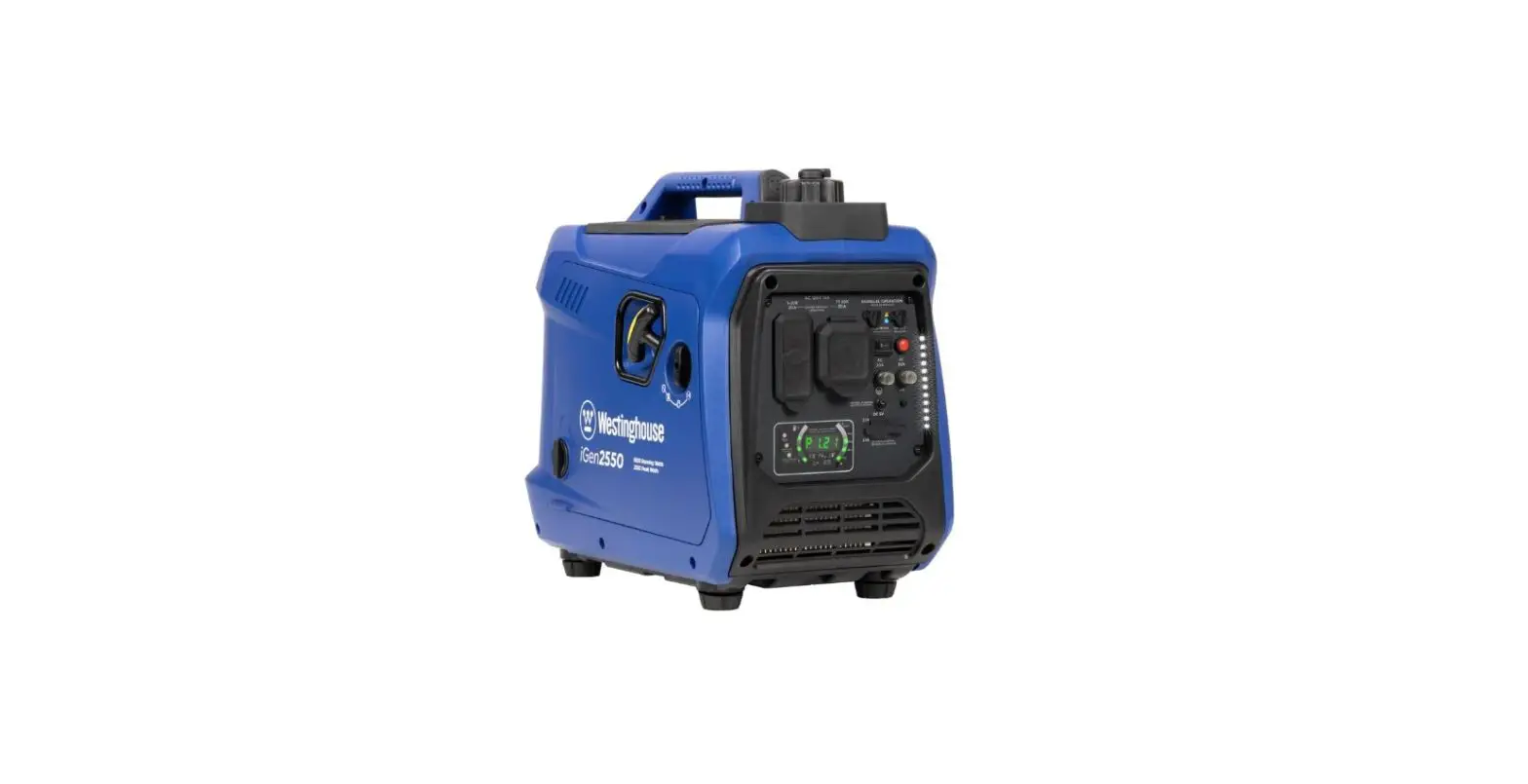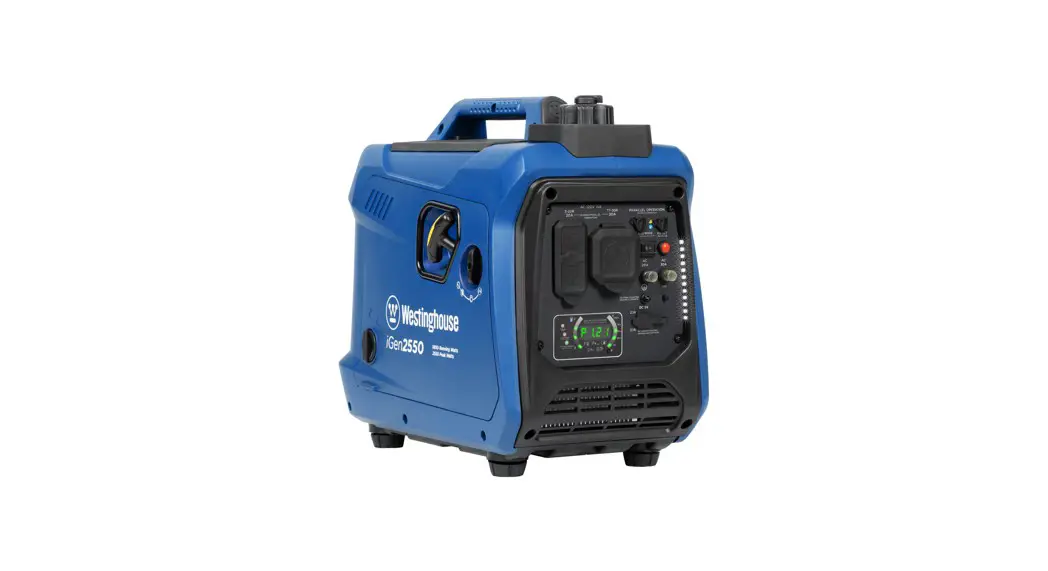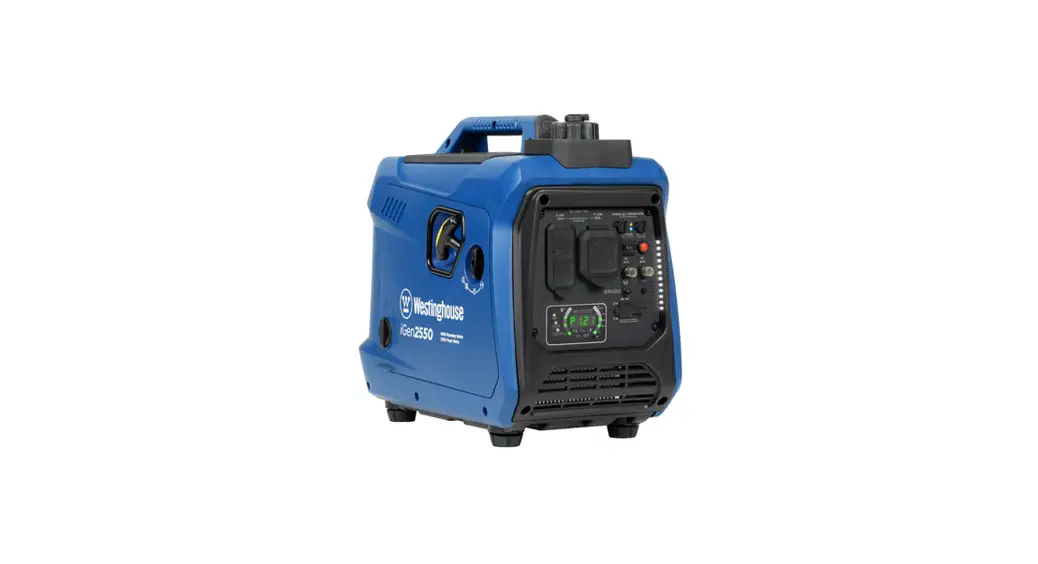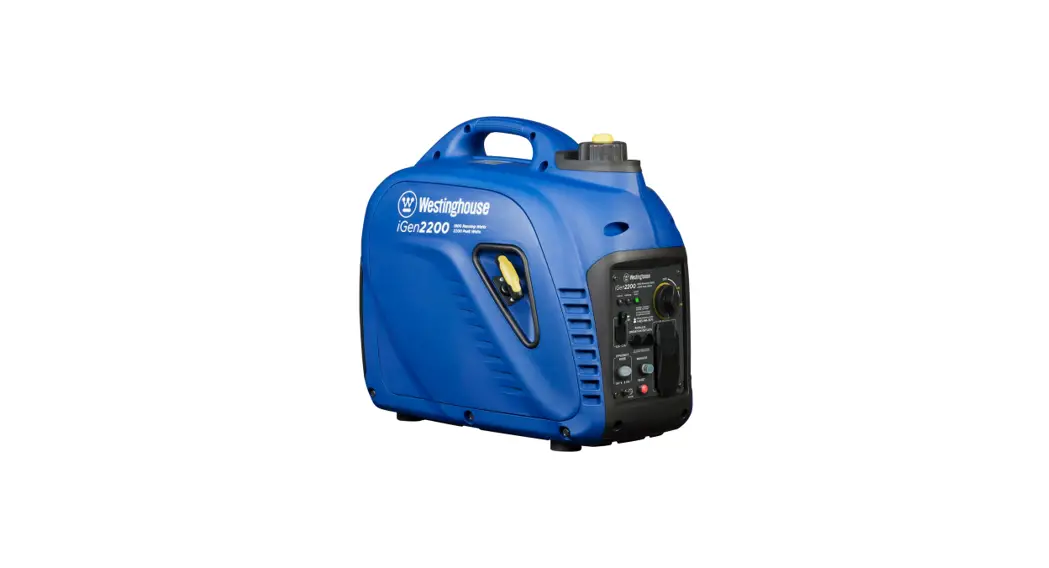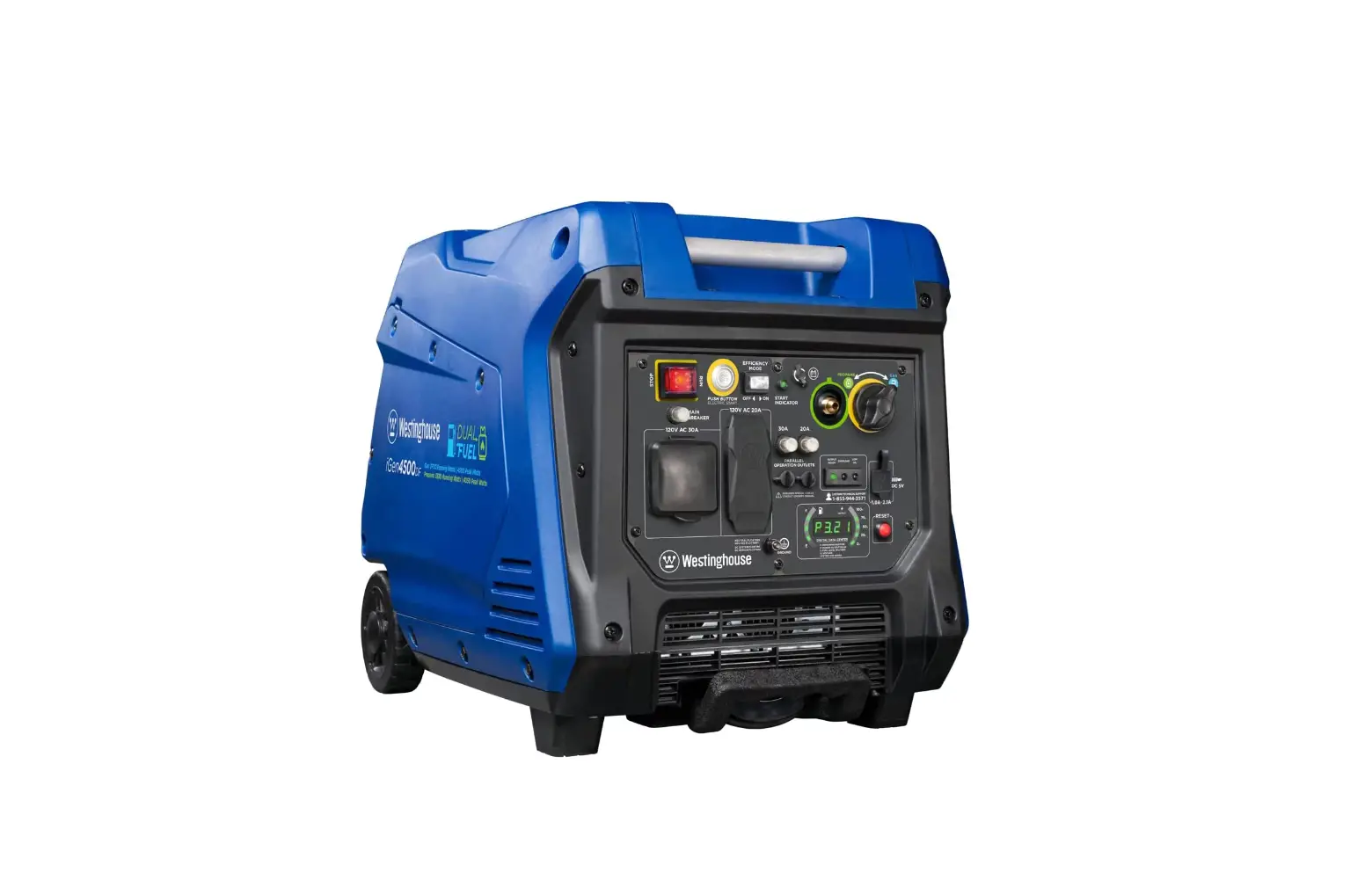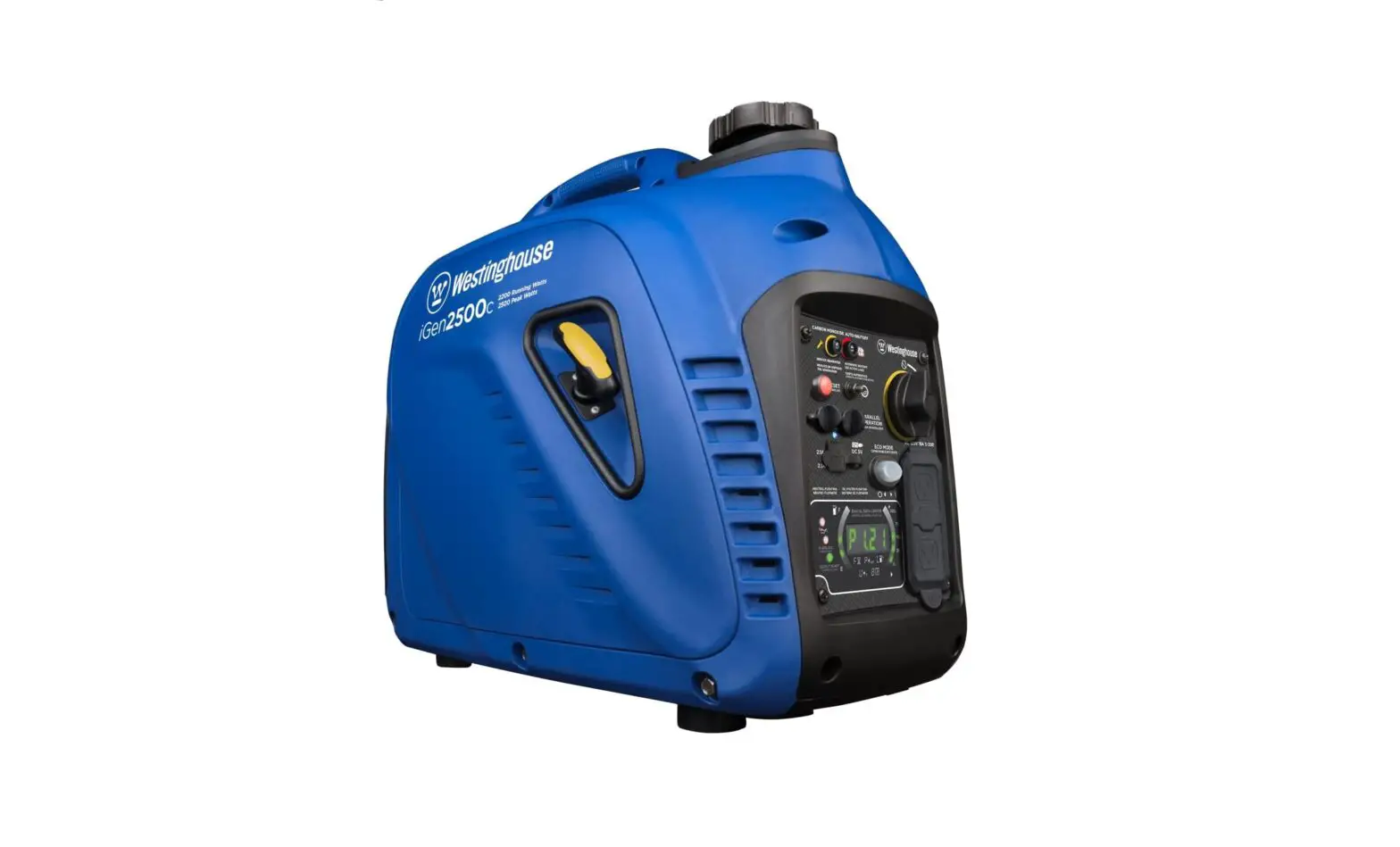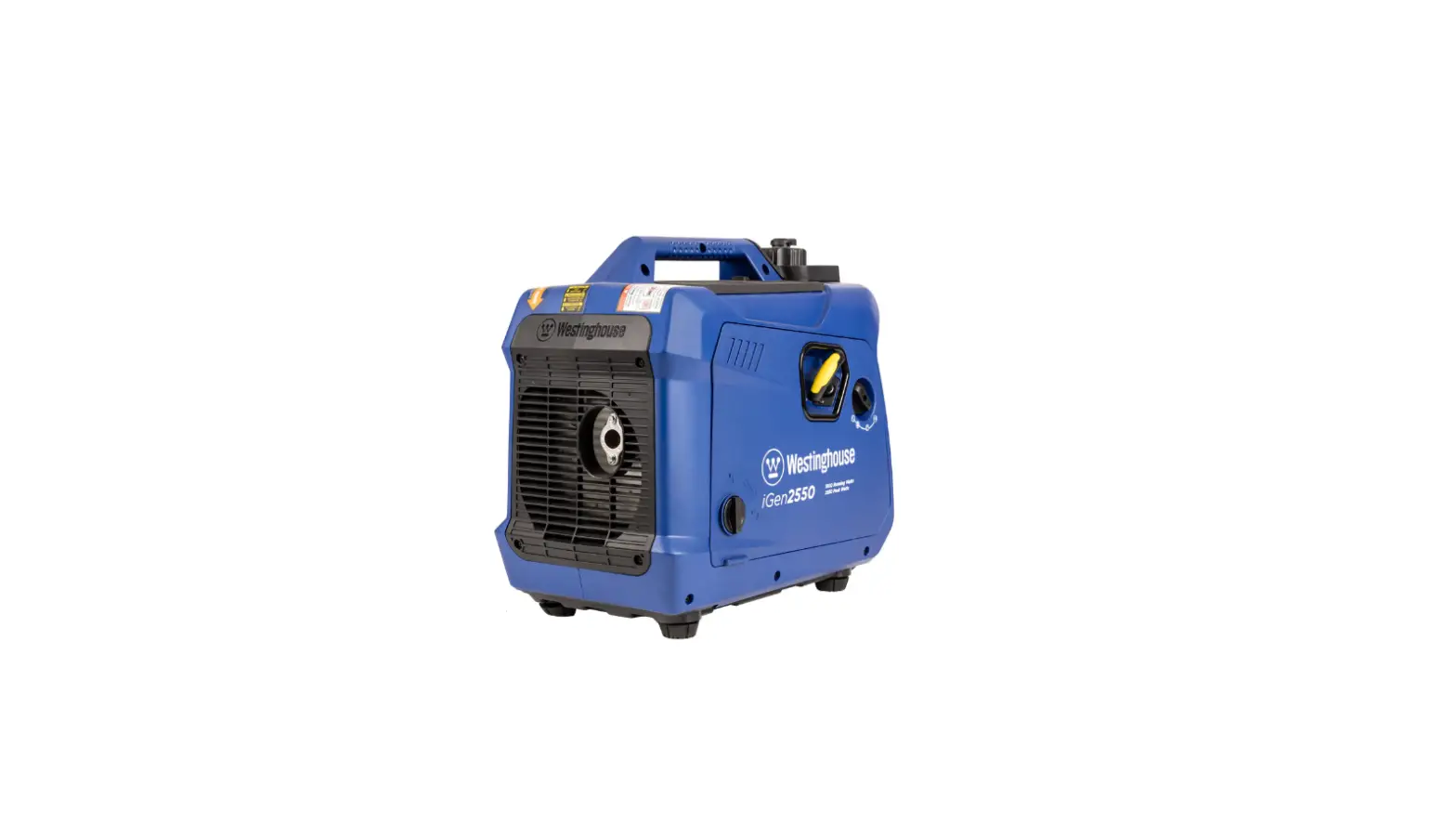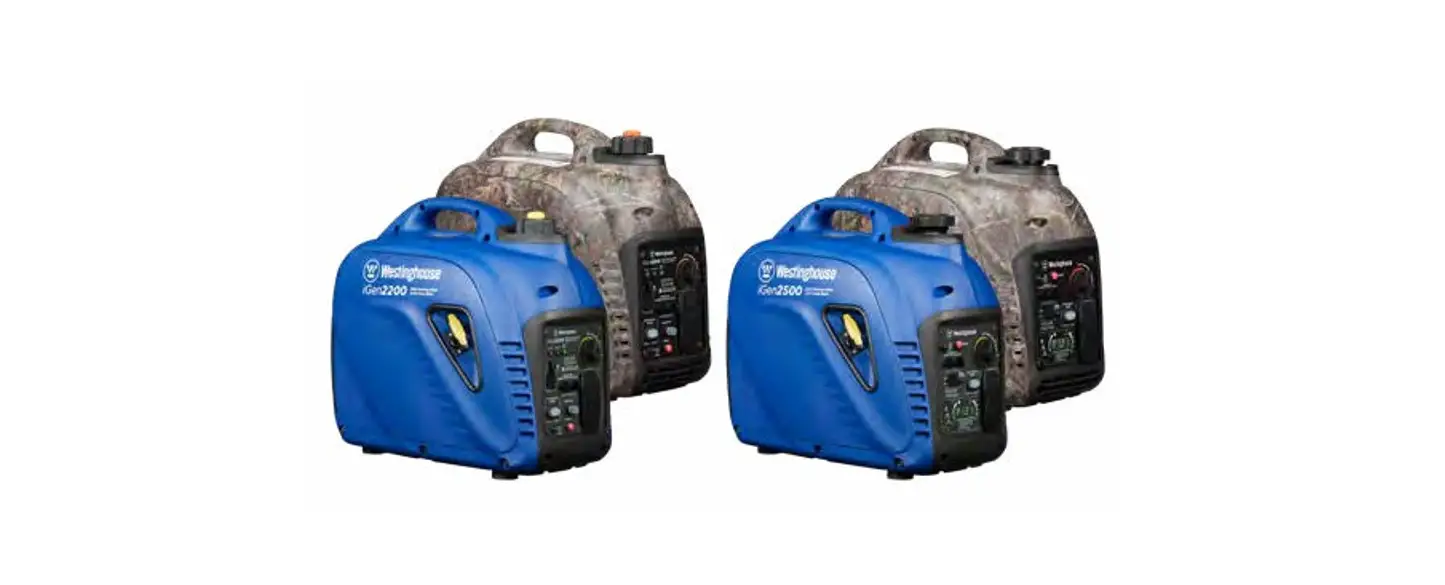
 iGen2200 Digital Inverter Generator
User Manual
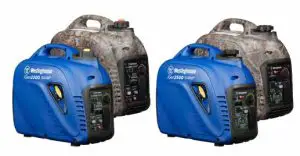
DO NOT RETURN THIS PRODUCT TO THE STORE
If you have questions or need assistance, please call customer service at 855-944-3571.
 WARNING: Operating, servicing, and maintaining this equipment can expose you to chemicals including engine exhaust, carbon monoxide, phthalates, and lead, which are known to the State of California to cause cancer and birth defects or other reproductive harm. To minimize exposure, avoid breathing exhaust, and wear gloves or wash your hands frequently when servicing this equipment. For more information go to www.P65warnings.ca.gov.
DISCLAIMERS
All information, illustrations, and specifications in this manual were in effect at the time of publishing. The illustrations used in this manual are intended as representative reference views only. We reserve the right to make any specification or design change without notice.
ALL RIGHTS RESERVED
All rights reserved. No reproduction is allowed in any form without written permission from Westinghouse Outdoor Power Equipment, LLC.
| DANGER | |
 | Read this manual before using or performing maintenance on this product. Failure to follow the instructions and safety precautions in this manual can result in serious injury or death. |
SAVE THESE INSTRUCTIONS
SPECIFICATIONS
| Specifications | iGen2200 | iGen2500 |
| Running Watts: | 1800 | 2200 |
| Peak Watts: | 2200 | 2500 |
| Rated Voltage: | 120V | 120V |
| Rated frequency: | 60 Hz | 60 Hz |
| Phase: | Single-phase | Single-phase |
| Total Harmonic Distortion: | s 3% | s 3% |
| Engine Displacement: | 80 cc | 98 cc |
| Starting Type: | Recoil | Recoil |
| Fuel Capacity: | 1.14 Gallon (4.3 L) | 0.98 Gallon (3.7 L) |
| Fuel Type: | 87-93 octane• | 87-93 octane* |
| Oil Capacity: | 0.37 US qt (0.35 L) | 0.37 US qt (0.35 L) |
| Oil Type: | 10W30 | 10W30 |
| Spark Plug: | E6RTC | E6RTC |
| Spark Plug Gap: | 0.024 — 0.032 in. (0.60 — 0.80 mm) | 0.024 — 0.032 in. (0.60 — 0.80 mm) |
| Valve Intake Clearance: | 0.0031 — 0.0047 in. (0.08 — 0.12 mm) | 0.0031 — 0.0047 in. (0.08 — 0.12 mm) |
| Valve Exhaust Clearance: | 0.0051 — 0.0067 in. (0.13 — 0.17 mm) | 0.0051 — 0.0067 in. (0.13 — 0.17 mm) |
| AC Grounding System: | Floating neutral | Floating neutral |
| Voltage Regulator: | Digital | Digital |
| Alternator Type: | Permanent magnet | Permanent magnet |
| Maximum Ambient Temperature: | 104T (40°C) | 104°F (40°C) |
| Certifications: | •EPA •CARB •CSA Group | •EPA •GARB |
*Ethanol content of 10% or less. DO NOT use E15 or E85.
NOTICE
This product is designed and rated for continuous operation at ambient temperatures up to 104°F (40°C). If needed, this product can be operated at temperatures ranging from 5°F (15°C)–122°F (50°C) for short periods. If the product is exposed to temperatures outside of this range during storage, it should be brought back within this range before
operation. This product must always be operated outdoors in a well-ventilated area and away from doors, windows, and other vents.
Maximum wattage and current are subject to and limited by such factors as fuel BTU content, ambient temperature, altitude, engine conditions, etc. Maximum power decreases about 3.5% for every 1,000 feet above sea level, and will also decrease about 1% for each 10°F (6°C) above 60°F (16°C) ambient temperature.
PRODUCT REGISTRATION
For trouble-free warranty coverage, it is important to register your Westinghouse generator.
You can register by:
- Completing and mailing the product registration card included in the carton.
- Registering your product online at:
https://westinghouseoutdoorpower.com/pages/warranty-registration
• Sending the following product information to:
Westinghouse Outdoor Power
Warranty registration
777 Manor Park Drive
Columbus, OH 43228
For Your Records
Date of Purchase:_________________________
Model Number:__________________________
Serial Number:___________________________
Place of Purchase:_________________________
IMPORTANT: Keep your purchase receipt for trouble-free warranty coverage.
SAFETY
SAFETY DEFINITIONS
The words DANGER, WARNING, CAUTION, and NOTICE are used throughout this manual to highlight important information. Make sure that the meanings of this safety
information is known to all who operate, perform maintenance on, or are near the generator.
This safety alert symbol appears with most safety statements. It means attention, become alert, your safety is involved! Please read and follow the message that follows the safety alerts symbol.DANGER
Indicates a hazardous situation that, if not avoided, will result in death or serious injury.WARNING
Indicates a hazardous situation that, if not avoided, could result in death or serious injury.CAUTION
Indicates a hazardous situation that, if not avoided, could result in minor or moderate injury.NOTICE
Indicates a situation that can cause damage to the generator, personal property, and/or the environment, or cause the equipment to operate improperly.
Note: Indicates a procedure, practice or condition that should be followed for the generator to function in the manner intended.
SAFETY SYMBOLS
Follow all safety information contained in this manual and on the generator.
| Symbol | Description |
| Safety Alert Symbol |
 | Electrocution Hazard |
 | Asphyxiation Hazard |
 | Burn Hazard. Do not touch hot surfaces. |
 | Electrical Shock Hazard |
 | Fire Hazard |
 | Maintain Safe Distance |
 | Lifting Hazard |
| Read Manufacturer’s Instructions |
 | Do Not Operate in Wet Conditions |
SAFETY INSTRUCTIONS
CORRECT USAGE
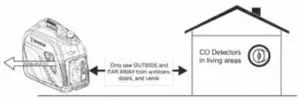
Example location to reduce risk of carbon monoxide poisoning
- ONLY use outside and downwind, far away from windows, doors, and vents.
- Direct exhaust away from occupied spaces
INCORRECT USAGE
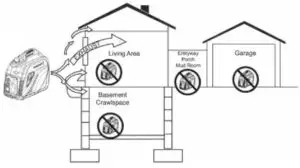
Do not operate in any of the following locations:
| • Near any door, window, or vent | • Attic |
| • Garage | • Entry Way |
| • Basement | • Porch |
| • Crawl Space | • Mudroom |
| • Living Area |
 NOTICE
Install battery-powered carbon monoxide detectors or plug-in carbon monoxide detectors with battery back-up in living areas.
| DANGER | |
| Using a generator indoors CAN KILL YOU IN MINUTES. The generator exhaust contains carbon monoxide. This is a poison you cannot see or smell. | |
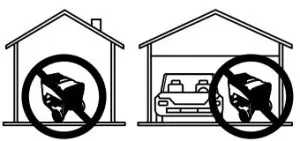 NEVER use inside a home or garage, EVEN IF doors and windows are open. | 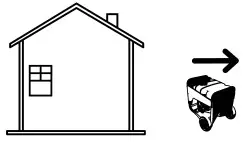 Only use OUTSIDE and far away from windows, doors, and vents. |
DANGER
Fire and electrocution hazard. Do not connect to a building’s electrical system unless the generator and transfer switch have been properly installed and the electrical output has been verified by a qualified electrician. The connection must isolate the generator power from utility power and must comply with all applicable laws and electrical codes.
DANGER
Electrocution hazard. Never use the generator in a location that is wet or damp. Never expose the generator to rain, snow, water spray, or standing water while in use. Protect the generator from all hazardous weather conditions. Moisture or ice can cause a short circuit or other malfunction in the electrical circuit.
GENERAL SAFETY PRECAUTIONS
- Never use the generator to power medical support
- Do not operate the generator when you are tired or
under the influence of drugs, alcohol, or medication. - Do not use generators with electrical cords which are worn, frayed, bare, or otherwise damaged.
- All electrical tools and appliances operated from this generator must be properly grounded by use of a third wire or be double-insulated.
- When this generator is used to supply a building wiring system the generator must be installed by a qualified electrician and connected to a transfer switch as a separately derived system in accordance with NFPA 70, National Electrical Code.
- If you begin to feel sick, dizzy, or weak while using the generator, move to fresh air See a doctor, as you can have carbon monoxide poisoning.
- Only use OUTSIDE and far away from windows, doors, and vents as recommended by the US Department of Health and Human Services Centers for Disease Control and Prevention. Your specific home and/or wind conditions may require additional distance.
- While operating and storing, keep at least five feet of clearance on all sides of the generator, including Allowing the generator to cool a minimum of 30 minutes before storage. The heat created by the muffler and exhaust gases could be hot enough to cause serious burns and/or ignite combustible objects.
- Do not touch the muffler or engine. They are very HOT and will cause severe burns. Do not put body parts or any flammable or combustible materials in the direct path of the exhaust.
- Always remove any tools or other service equipment used during maintenance away from the generator before operating.
- Avoid skin contact with engine oil or gasoline. Wear protective clothing and equipment. Wash all exposed skin with soap and water.
FUEL SAFETY
- Store fuel in a container approved for gasoline.
- Do not smoke when filling the generator with gasoline.
- Do not allow the generator’s gas tank to overflow when filling.
- Shut down the engine and allow it to cool for five minutes before adding gasoline or oil to the generator.
- Never remove the fuel cap when the generator is running. Shut off the engine and allow the unit to cool for at least five minutes. Remove the fuel cap slowly to release pressure, keep fuel from escaping around the cap, and avoid the heat from the muffler igniting fuel vapors. Tighten the fuel cap securely after refueling.
- Wipe spilled fuel from the unit.
- Never attempt to burn off spilled fuel.
- Never overfill the fuel tank. Leave room for fuel to expand. Overfilling the fuel tank can result in a sudden overflow of gasoline and result in spilled gasoline coming in contact with HOT surfaces.
- Spilled fuel can ignite. If fuel is spilled on the generator, wipe up any spills immediately. Dispose of rag properly. Allow the area of spilled fuel to dry before operating the generator.
- Wear eye protection while refueling.
- Never use gasoline as a cleaning agent.
- Store any containers containing gasoline in a well-ventilated area, away from any combustibles or source of ignition.
GASOLINE AND GASOLINE VAPOR (GAS)
DANGER
Fire and explosion hazards. Gasoline is highly explosive and flammable and can cause severe burns or death.
- In case of a gas fire, do not attempt to extinguish the flame if the fuel valve is in the gas position. Introducing an extinguisher to a generator with an open fuel valve could create an explosion hazard.
- Gas has a distinctive odor, this will help detect potential leaks quickly.
- Gas vapors can cause a fire if ignited.
- Gasoline is a skin irritant and needs to be cleaned up immediately if it comes in contact with the skin.
When starting the generator:
- Make sure that the fuel cap, air filter, spark plug, fuel lines, and exhaust system are properly in place.
- If you spill any gasoline on the tank, allow it to fully evaporate before operating.
- Make sure the generator is on a flat surface before operating.
When transporting or servicing the generator:
- Disconnect the spark plug wire to prevent accidental starting.
When storing the generator:
- Store away from sparks, open flames, pilot lights, heat, and other sources of ignition.
- Do not store gas near furnaces, water heaters, or any other appliances that produce heat or have automatic ignitions.
SAFETY LABELS AND DECALS
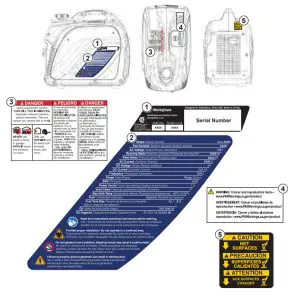
FEATURES
CONTROL PANEL COMPONENTS
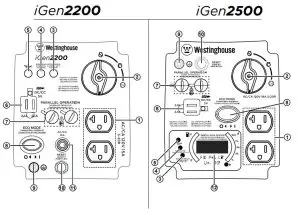
- 120 Volt AC, 20 Amp Duplex NEMA 5-20R Receptacle: Receptacle can supply a maximum of 20 Amps.
- Fuel Switch: Used to turn the fuel valve to the run, choke, or OFF position.
- Output Ready LED: Illuminates when the generator is operating normally. This indicates the generator is producing electrical power at the receptacles.
- Overload LED: This indicates that the generator is overloaded.
- Low Oil LED: Indicates low oil level. When the oil level in the crankcase falls below the safe operating limit, the low oil level indicator will illuminate and the generator will automatically shut off the engine.
- USB Ports: Two-port 5V/2.1A USB outlet. Accepts Type A USB plugs.
- Parallel Operation Outlets: A compatible Westinghouse Inverter Generator can be connected for additional power output.
- Eco Mode: Eco mode minimizes fuel consumption and noise by adjusting the engine RPM to the minimum required for the current load.
- Ground Terminal: The ground terminal is used to externally ground the generator.
- Overload Reset: The generator inverter will automatically switch OFF all AC output to protect the generator if overloaded or if there is a short circuit in a connected appliance.
- 15 Amp AC Circuit Breaker (iGen2200): The circuit breaker limits the current that can be delivered through the NEMA 5-20R receptacle to 15 Amps.
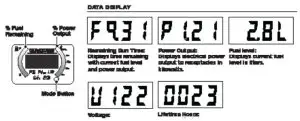
- LED Data Center (iGen2500): Displays remaining run time (F), power output in kW (P), fuel level in liters (L), voltage output (V), and lifetime hours.
GENERATOR COMPONENTS
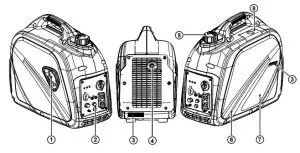
- Recoil Handle: Pull the recoil handle to manually start the engine.
- Control Panel: The control panel contains the outlets and operational controls.
- Serial Number: The model serial number required for product registration can be located in one of two locations.
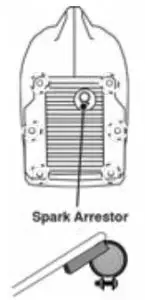
- Muffler and Spark Arrestor: The spark arrestor prevents sparks from exiting the muffler.
- Fuel Cap: Add unleaded fuel here.
- Engine Service Cover: The cover provides access to the engine, air cleaner, and carburetor.
- Model Information Label: Provides voltage/amps, and power rating information.
- Spark Plug Access Cover: The cover provides access to the spark plug.
DIGITAL DATA CENTER (IGEN2500)
Fuel remaining and power output percentage LEDs are continuously displayed. Push the Mode button to cycle through the data display modes.
ASSEMBLY
CARTON CONTENTS
- Carefully open the carton.
- Remove and save the instruction manual, oil bottle, oil funnel, spark plug socket wrench, and screwdriver.
- Remove and discard the packing materials.
- Unfold the top of the plastic bag enclosing the generator.
- Carefully cut the vertical corners of the carton to access the generator.
- Recycle or dispose of the packaging materials properly.
CARTON CONTENTS
- User manual
- Quick Start Guide/Maintenance Schedule
- 0.37 Quart (0.35 Liter) bottle of SAE 10W-30 Oil
- Screwdriver
- Spark plug socket wrench
- Oil Funnel
If any parts are missing, contact our service team at [email protected] or call 1-855-944-3571.
INITIAL OIL FILL
NOTICE
THIS GENERATOR HAS BEEN SHIPPED WITHOUT
OIL. Do not attempt to crank or start engine before it has been properly serviced with recommended oil. Failure to add engine oil before starting will result in serious engine damage.
NOTICE
Use of 2-stroke/cycle oil or other unapproved oil types can cause severe engine damage that is not covered under warranty.
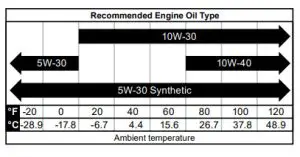
The included, recommended oil type for typical use is 10W-30 engine oil. If running the generator in extreme temperatures, refer to the following chart.
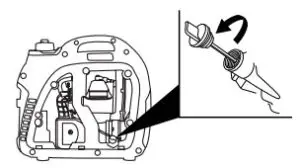
- On a level surface, remove the engine service cover and oil dipstick.

- Using the supplied funnel and oil, add oil into the engine.
Note: As residual oil from the factory may remain in the engine, add the oil incrementally near the end of the bottle to prevent overfilling the engine. See Engine Oil Level Check in the Maintenance section. - Replace the oil dipstick and hand-tighten.
- Replace the engine service cover.
FUELWARNING
Fire and explosion hazards. Never use a gasoline container, gasoline tank, or any other fuel item that is broken, cut, torn or damaged.
DANGER
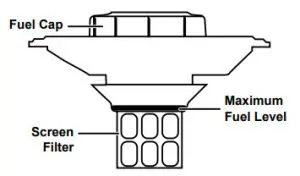
Fire and explosion hazards. Do not overfill the fuel tank. Fill only to the red fill ring located in the in-tank fuel screen filter. Overfilling may cause fuel to spill onto the engine causing a fire or explosion hazard.
DANGER
Fire and explosion hazards. Never refuel the generator while the engine is running. Always turn the engine off and allow the generator to cool for two minutes before refueling. 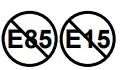 NOTICE
Do not use E15 or E85 fuel in this product. Engine or equipment damage caused by stale fuel or the use of unapproved fuels (such as E15 or E85 ethanol blends) is not covered by warranty. Only use unleaded gasoline containing up to 10% ethanol.
FUEL REQUIREMENTS
- CLEAN, FRESH, unleaded gasoline, 87–93 octane.
- Up to 10% ethanol (gasohol) is acceptable (where available; non-ethanol fuel is recommended).
- DO NOT use E85 or E15.
- DO NOT use a gas oil mix.
- DO NOT modify the engine to run on alternate fuels.
- DO NOT fuel indoors.
- DO NOT create a spark or flame while fueling.
USING FUEL STABILIZER
Adding a fuel stabilizer (not included) extends the usable life of fuel and helps prevent deposits from forming that can clog the fuel system. Follow the manufacturer’s instructions for use.
Always mix the correct amount of fuel stabilizer to gasoline in an approved gasoline container before fueling the generator. Run the generator for five minutes to allow the stabilizer to treat the entire fuel system.
FILLING THE FUEL TANK
- Turn the generator OFF and allow it to cool for a minimum of two minutes before fueling.
- Place the generator on level ground in a well-ventilated area.
- Clean the area around the fuel cap and remove the cap slowly.
NOTICE
Only fill the tank from an approved gasoline container.
Make sure the gasoline container is internally clean and in good condition to prevent fuel system contamination. - Slowly add the recommended fuel. Do not overfill. Fill only to the red maximum fill ring on the fuel screen filter visible in the filler neck.

- Install the fuel cap. Tighten until a click is heard (iGen2500 only).
NOTICE
Fuel can damage paint and plastic. Use caution when filling the fuel tank. Damage caused by spilled fuel is not covered under warranty.
NOTICE
Clean the fuel screen filter of the debris before and after each fueling. Remove the fuel screen filter by slightly compressing it while removing it from the fuel tank.
OPERATION
GENERATOR LOCATION
Read and understand all safety information before starting the generator.
| DANGER | |
| Using a generator indoors CAN KILL YOU IN MINUTES. The generator exhaust contains carbon monoxide. This is a poison you cannot see or smell. | |
NEVER use inside a home or garage, EVEN IF doors and windows are open. | Only use OUTSIDE and far away from windows, doors, and vents. |
NEVER operate the generator inside any building, including garages, basements, crawlspaces, sheds, enclosures, or compartments, including the generator compartment of a recreational vehicle.
DANGER
Electrocution hazard. Never use the generator in a location that is wet or damp. Never expose the generator to rain, snow, water spray, or standing water while in use. Protect the generator from all hazardous weather conditions. Moisture or ice can cause a short circuit or other malfunction in the electrical circuit. Using a generator or electrical appliance in wet conditions, such as rain or snow, or near a pool or sprinkler system, or when your hands are wet, could result in electrocution
WARNING
Fire hazard. Only operate the generator on a solid, level surface. Operating the generator on a surface with loose material such as sand or grass clippings can cause debris to be ingested by the generator that could block cooling vents or the air intake system. Allow the generator to cool for 30 minutes before transport or storage.
The generator should be on a flat, level surface at all times (even while not in operation). The generator must have at least 5 ft. (1.5 m) of clearance from all combustible material.
Do not operate the generator in the back of an SUV, camper, trailer, truck bed (regular, flat, or otherwise), under stairs, next to walls or buildings, or in any other location that will not allow for adequate cooling of the generator and/or the muffler. DO NOT contain generators during operation.
DANGER
Asphyxiation hazard. Place the generator in a well ventilated area. DO NOT place the generator near vents or intakes where exhaust fumes could be drawn into occupied or confined spaces. Carefully consider wind and air currents when positioning the generator.
GROUNDING
WARNING
Shock hazard. Failure to properly ground the generator can result in electric shock.
The generator neutral is floating. The generator ground terminal is connected to the frame of the generator, the metal non-current-carrying parts of the generator, and the ground terminals of each receptacle. The generator (stator winding) is isolated from the frame and from the AC receptacle ground pin. Electrical devices that require
a grounded receptacle pin connection may not function properly.
If this generator will be used only with cord and plug equipment connected to the receptacles mounted on the generator, National Electric Code does not require that the unit be grounded. However, other methods of using the generator may require grounding to reduce the risk of shock or electrocution.
NOTICE
Only use grounded 3-prong extension cords, tools, and appliances, or double-insulated tools and appliances.
Before using the ground terminal, consult a qualified electrician, electrical inspector, or local agency having jurisdiction for local codes or ordinances that apply to the intended use of the generator.
HIGH ALTITUDE OPERATION
Engine power is reduced the higher you operate above sea level. The output will be reduced by approximately 3.5% for every 1000 feet of increased altitude from sea level.
High altitude adjustment is required for operation at altitudes over 5,000 ft. (1524 m). Operation without this adjustment will cause decreased performance, increased fuel consumption, and increased emissions. Operation of the engine at altitudes below 2,000 ft. (762 m) with the high altitude kit is not recommended.
High Altitude Carburetor Kit, iGen2200: Part# 518900
High Altitude Carburetor Kit, iGen2500: Part# 518922-1
BREAK-IN PERIOD
For proper break-in, do not exceed 50% of the rated running watts (iGen2200: 900 watts / iGen2500: 1100 watts) during the first five hours of operation.
Vary the load occasionally to allow stator windings to heat and cool and help seat the piston rings.
FREQUENCY OF USE
If the generator will be used on an infrequent or intermittent basis (more than one month before next use), refer to The storage section of this manual for information regarding fuel deterioration.
BEFORE STARTING THE GENERATOR
Verify that:
- The generator is placed in a safe, appropriate location.
- The generator is on a dry, flat, and level surface.
- The engine is filled with oil.
- Gasoline is in the fuel tank.
- All loads are disconnected.
- The ECO switch is in the OFF position.
DANGER
Fire and explosion hazards. DO NOT move or tip the generator during operation.
STARTING THE ENGINE
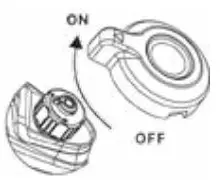
- Turn the fuel cap vent to the ON position (iGen2200 only).

- Turn the fuel switch to the choke position.
 Note: The generator can be started from the Run position if warm from operation.
 - Firmly grasp and pull the recoil handle slowly until you feel increased resistance, then pull rapidly.

- After the engine starts, turn the fuel switch to the RUN position.
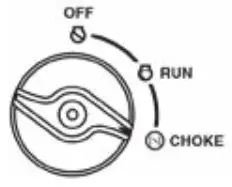 Note: The generator can be started from the Run position if warm from operation.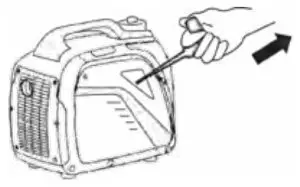
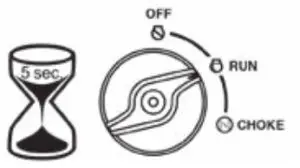
STOPPING THE ENGINE
- Turn off and unplug all connected electrical loads.
Never start or stop the generator with electrical devices plugged in or turned on. - Let the generator run with no load for several minutes to stabilize the internal temperatures of the engine and generator.
- Turn the fuel switch to the OFF position.
- Allow the engine to cool, then turn the fuel cap vent to the OFF position (iGen2200 only).
Note: If there is an emergency and the inverter must be stopped quickly, immediately move the fuel switch to the OFF position.
ECO MODE
NOTICE
Always start the generator with ECO MODE OFF. Allow the engine speed to stabilize and the OUTPUT READY LED to illuminate before switching ECO MODE ON. 
Note: Do not use ECO MODE when in parallel operation with another Westinghouse generator.
ECO MODE minimizes fuel consumption and noise by adjusting the engine RPM to the minimum required for the current load.
Turn ECO MODE ON when powering small appliances with continuous loads such as a computer or electric light.
Turn ECO MODE OFF when powering large surge loads such as an air conditioner or electric pump.
To turn on ECO MODE, verify that the OUTPUT READY LED is illuminated green, then push the switch to the ON position. If no load is present, the generator RPM will drop to idle speed. The generator will detect loads as they are applied and increase engine RPM.
To run the generator at maximum power and RPM, push the ECO MODE switch to the OFF position.
AC CIRCUIT BREAKER
The circuit breaker will automatically switch OFF if there is a short circuit, a significant overload of the generator at the receptacle, or if the combined load exceeds 15 Amps.
If the AC circuit breaker switches OFF automatically, check that the appliance is working correctly and it does not exceed the rated load capacity of the circuit before resetting the circuit breaker. 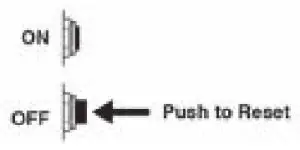
OVERLOAD RESET
The generator will automatically switch OFF all AC output to protect the generator if overloaded or if there is a short circuit in a connected appliance. However, the engine will continue to run. Marginal overloading that temporarily illuminates the OVERLOAD LED may shorten the service life of the generator.
OVERLOAD on the control panel will illuminate red and the green OUTPUT READY will be OFF. 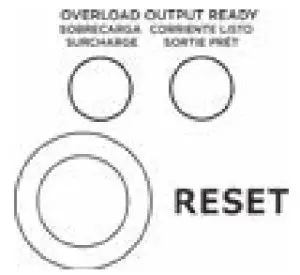
To restore AC output:
- Turn off and unplug all connected electrical loads.
- Push the RESET button on the control panel until the OVERLOAD LED goes OFF and the OUTPUT READY LED is illuminated.
- Reset the circuit breaker if OFF.
- Verify that the intended running and surge loads do not exceed the generator’s capacity.
- Reconnect electrical loads sequentially, allowing the generator to stabilize after each load is connected.
GENERATOR CAPACITY
NOTICE
Do not overload the generator’s capacity. Exceeding the generator’s wattage/amperage capacity can damage the generator and/or electrical devices connected to it.
Example:
| Tool or Appliance | Running Watts* | Starting Watts* |
| TV (Tube Type) | 300 | 0 |
| RV Refrigerator | 180 | 600 |
| Radio | 200 | 0 |
| Light (75 Watts) | 300 | 0 |
| Coffee Maker | 600 | 0 |
| 1580 Total Running Watts* | 600 Highest Starting Watts* |
Total Running Watts 1580
Highest Starting Watts + 600
Total Starting Watts Needed 2180
*Wattages listed are approximate. Verify actual wattage.
POWER MANAGEMENT
To prolong the life of the generator and attached devices, use care when adding electrical loads to the generator. There should be nothing connected to the generator outlets before starting the engine. The correct and safe way to manage generator power is to sequentially add loads as follows:
- With nothing connected to the generator, start the engine as described in this manual.
- Plugin and turn on the first load, preferably the largest load you have.
- Permit the generator output to stabilize (the engine runs smoothly and the attached device operates properly).
- Plugin and turn on the next load.
- Again, permit the generator to stabilize.
- Repeat steps 4 and 5 for each additional load.
Wattage Reference
| Tool or Appliance | Estimated Running Watts* | Estimated Starting Watts* |
| Incandescent Lights (4 Quantity x 75 Watts) | 300 | 0 |
| TV (Tube Type) | 300 | 0 |
| Sump Pump (1/3 hp) | 800 | 1300 |
| Refrigerator or Freezer | 700 | 2200 |
| Well Pump (1/3 hp) | 1000 | 2000 |
| Radio | 200 | 0 |
| Drill (3/8”, 4 amps) | 440 | 600 |
| Circular Saw (Heavy Duty, 7-1/4”) | 1400 | 2300 |
| Miter Saw (10”) | 1800 | 1800 |
| Table Saw (10”) | 2000 | 2000 |
*Wattages listed are approximate. Verify actual wattage.
EXTENSION CORDSWARNING
Asphyxiation hazard. Extension cords running directly into the home increase the risk of carbon monoxide poisoning through any openings. If an extension cord running directly into your home is used to power indoor items, there is a risk of carbon monoxide poisoning to people inside the home. Always use battery-powered carbon monoxide detector (s) that meet current UL 2034 safety standards when running the generator. Regularly check the detector (s) battery.
WARNING
Asphyxiation hazard. When operating the generator with extension cords, make sure the generator is located in an open, outdoor area, at least 20 ft. (6 m.) from occupied spaces with exhaust pointed away.
WARNING
Fire and electrocution hazard. Never use worn or damaged extension cords. Damaged or overloaded extension cords could overheat, arc, and burn to result in death or serious injury.
Before connecting an AC appliance or power cord to the generator:
- Use grounded 3-prong extension cords, tools, and appliances, or double-insulated tools and appliances.
- Make sure the tool or appliance is in good working order. Faulty appliances or power cords can create a potential for electric shock.
- Make sure the electrical rating of the tool or appliance does not exceed the rated power of the generator or the receptacle being used.
EXTENSION CORD SIZING
Only use grounded 3-prong extension cords marked for outdoor use that is rated for the electrical load. 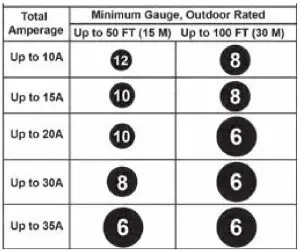
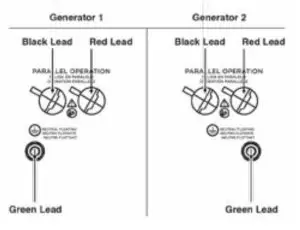
PARALLEL OPERATION
WARNING
Fire and electrocution hazard. Never connect or disconnect the parallel cord leads when a generator is running.
NOTICE
Connecting to a generator that is not compatible can cause a low voltage output that can damage tools and appliances powered by the generator.
Parallel operation gives you the ability to link the iGen2200 or iGen2500 to a compatible Westinghouse Inverter Generator for combined running and peak power output.
A Westinghouse parallel cord (purchased separately) is required for parallel operation. This cord can be purchased from an authorized Westinghouse Generator dealer.
Note: Do not use ECO MODE when in parallel operation with another Westinghouse generator.
Parallel cord: Part# 507PC
Note: Compatible Westinghouse generators without parallel ports can be operated in parallel with the receptacle-mounted parallel cable, Part# 260041.
The iGen2200 and iGen2500 are parallel-operation compatible with the following Westinghouse inverter generators:
| • iGen2200 | • IGen2600 |
| • iGen2300 | • IGen4500 |
| • iGen2500 | |
- On both generators, make sure the fuel switch and the ECO MODE switch are in the OFF position.
- Connect a black and red parallel cable lead to each generator. Connect the black lead to the left port, the red lead to the right port.
Note: DO NOT connect two red leads or two black leads into the same generator.
- Connect the green ground lead to the ground terminal on each generator and tighten the nut.
- Start one of the generators and wait until the OUTPUT READY LED illuminates.
- Start the second generator and wait until the OUTPUT READY LED illuminates before connecting a load.
- Connect additional loads as described in the Power Management section.
- Unplug all loads before stopping the generators.
TRANSPORTING
- Allow the generator to cool a minimum of 30 minutes before transporting.
- Replace all protective covers on the generator control panel.
- Only use the generator’s fixed handle to lift the unit or attach any load restraints such as ropes or tie-down straps. Do not attempt to lift or secure the generator by holding onto any of its other components.
- Keep the unit level during transport to minimize the possibility of fuel leakage or, if possible, drain the fuel or run the engine until the fuel tank is empty before transport.
MAINTENANCE
MAINTENANCE SCHEDULE
Regular maintenance will improve performance and extend the service life of the generator. Follow the hourly or calendar intervals, whichever occurs first. More frequent service is required when operating in adverse conditions as noted below.
| Before Each Use |
| Check engine oil |
| After First 25 Hours or First Month |
| Change engine oil |
| After 50 Hours or Every 6 Months |
| Change engine oil1 Clean air filter2 |
| After 100 Hours or Every 6 Months |
| Inspect/clean spark arrestor Inspect/clean spark plug Replace fuel filter3 Inspect/adjust valve clearance3 |
| After 300 Hours or Every Year |
| Replace spark plug Replace air filter |
- Change oil every month when operating under heavy load or in high temperatures.
- Clean more often under dirty or dusty conditions.
Replace the air filter if it cannot be adequately cleaned. - Recommend service to be performed by an authorized Westinghouse service dealer.
MAINTENANCE REPLACEMENT PARTS
| Description | Part Number |
| Air filter | 5291 |
| Spark arrestor | 6789 |
| Fuel filter | 516401 |
| Spark plug | • Torch – E6RTC • NGK – BPR6HS • Bosch – WR7BC • Autolite – 284 |
ENGINE SERVICE COVER
Remove the engine service cover to access the air filter, carburetor, oil fill/drain, and oil dipstick. Remove the two cover screws then carefully pull the cover out with both hands to prevent damage to the grommet posts on the cover.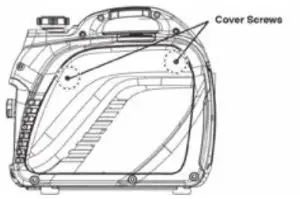
AIR FILTER MAINTENANCEWARNING
Fire hazard. Never use gasoline or other flammable solvents to clean the air filter. Use only household detergent soap to clean the air filter.
The air filter must be cleaned after every 50 hours of use or six months (frequency should be increased if the generator is operated in a dusty environment).
- Place the generator on a level surface and allow the engine to cool for several minutes.
- Remove the engine service cover.
- Remove the screw securing the air cleaner cover. Tip the cover down to remove.
 Note: The air filter element is oil-soaked. Use an appropriate cleaning container.
NOTICE
Avoid skin contact with engine oil. Wear protective clothing and equipment. Wash all exposed skin with soap and water - Remove the foam air filter from the air cleaner housing and wash it by submerging the element in a solution of household detergent soap and warm water. Slowly squeeze the foam to thoroughly clean.
NOTICE
DO NOT twist or tear the foam air filter element during cleaning or drying. Only apply slow but firm squeezing action. - Rinse the air filter element by submerging it in fresh water and applying a slow squeezing action. Allow the filter to dry thoroughly.
 Do not pollute. Follow the guidelines of the EPA or other governmental agencies for proper disposal of hazardous materials. Consult local authorities or reclamation facilities.
 - Dip the foam air filter in clean engine oil then squeeze out all excess oil. The engine will smoke when started if too much oil is left in the filter.
- Install the foam air filter in the housing and reinstall the air cleaner cover.
- Install the engine service panel.
Air Filter: Part# 5291
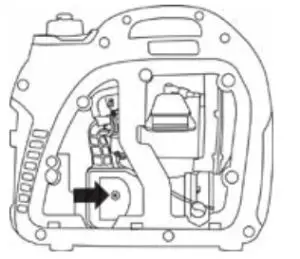 Note: The air filter element is oil-soaked. Use an appropriate cleaning container.
 Do not pollute. Follow the guidelines of the EPA or other governmental agencies for proper disposal of hazardous materials. Consult local authorities or reclamation facilities.
ENGINE OIL LEVEL CHECK
CAUTION
Avoid skin contact with engine oil. Wear protective clothing and equipment. Wash all exposed skin with soap and water.
NOTICE
Always use the specified engine oil. Failure to use the specified engine oil can cause accelerated wear and/or shorten the life of the engine.
When using the generator under extreme, dirty, dusty conditions or in extremely hot weather, change the oil more frequently.
Ambient air temperature will affect engine oil performance.
Change the type of engine oil used based on weather conditions.
Check the engine oil level before each use or every 8 hours of operation.
- Place the generator on a level surface and allow the engine to cool for several minutes.
- Remove the engine service cover.
- With a damp rag, clean around the oil dipstick.
- Remove the oil dipstick and wipe the dipstick clean.

- Screw the dipstick fully into the filler neck. Remove the dipstick and verify that the oil level is within safe operating range.

- If low, add recommended engine oil incrementally and recheck until the level is between the L and H marks on the dipstick. DO NOT overfill. If over the full mark on the dipstick, drain the oil to reduce the oil level to the full mark on the dipstick.
- Replace the oil dipstick and hand-tighten.
- Install the engine service cover.
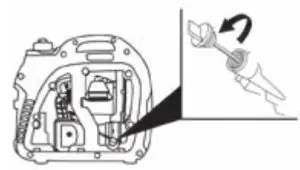
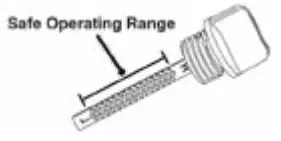
ENGINE OIL CHANGEWARNING
Accidental start-up. Remove the spark plug boot from the spark plug when working on the generator.
When using the generator under extreme, dirty, dusty conditions or in extremely hot weather, change the oil more frequently. Change the oil while the engine is still warm from operation.
- Place the generator on a level surface and allow the engine to cool for several minutes.
Note: Placing the generator on a raised surface slightly above the oil pan will facilitate draining. - Remove the engine service cover and spark plug cover.
Disconnect the spark plug wire from the spark plug and place the wire where it cannot contact the spark plug. - With a damp rag, clean around the oil dipstick. Remove the dipstick and wipe clean.
- Place an oil pan (or suitable container) under the oil fill/drain hole.
- Tilt the generator to drain the oil.

- Slowly pour oil into the oil fill opening until oil the level is between the L and H marks on the dipstick. Stop frequently to check the oil level. DO NOT overfill.
Maximum oil capacity: 0.37 US qt (0.35 L) - Replace the dipstick and hand-tighten.
- Connect the spark plug wire and install the engine service cover.
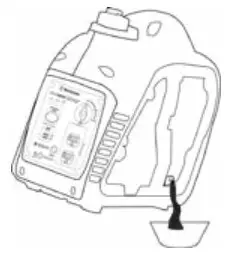
NOTICE
Do not pollute. Follow the guidelines of the EPA or other governmental agencies for proper disposal of hazardous materials. Consult local authorities or reclamation facilities.
SPARK PLUG MAINTENANCE
Inspect and clean the spark plug after every 100 hours of use or six months. Replace the spark plug after 300 hours of use or every year.
- Place the generator on a level surface and allow the engine to cool.
- Remove the spark plug cover on top of the generator.
- Remove the spark plug boot by firmly pulling the spark boot directly away from the engine.
- Clean the area around the spark plug.
- Remove the spark plug with the included spark plug socket wrench.
NOTICE
Never apply any side load or move the spark plug laterally when removing the spark plug. - Inspect the spark plug. Replace if electrodes are pitted, burned, or the insulator is cracked. Only use a recommended replacement plug.
Recommended Spark Plug ReplacementWestinghouse
Model NumberTorch NGK Bosch Autolite iGen2200/2500 E6RTC BPR6HS WR7BC 284 - Measure the spark plug electrode gap with a wire-type feeler gauge. If necessary, correct the gap by carefully bending the side electrode.
Spark plug gap: 0.024 – 0.032 in. (0.60 – 0.80 mm)
- Carefully install the spark plug finger tight, then tighten
an additional 3/8 to 1/2 turn with the spark plug wrench. - Install the spark plug boot and engine service cover.
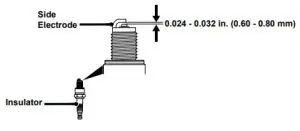
SPARK ARRESTOR SERVICE
Check and clean the spark arrestor after every 100 hours of use or six months. Failure to clean the spark arrestor will result in degraded engine performance.
- Place the generator on a level surface and allow the muffler to cool before servicing the spark arrestor.
- Remove the cover screws and the muffler cover. Use a screwdriver to remove the spark arrestor.

- Carefully remove the carbon deposits from the spark arrestor screen with a wire brush. The spark arrestor must be free of breaks and tears. Replace the spark arrestor if damaged.
Spark Arrestor, iGen2200/2500: Part# 6789 - Reinstall the spark arrestor and muffler cover.
STORAGE
Proper storage preparation is required for trouble-free operation and generator longevity.
NOTICE
Gasoline stored for as little as 30 days can deteriorate, causing gum, varnish, and corrosive buildup in fuel lines, fuel passages, and the engine. This corrosive buildup restricts the flow of fuel, which can prevent the engine from starting after a prolonged storage period. The use of fuel stabilizers significantly increases the storage life of gasoline. Full-time use of a fuel stabilizer is recommended.
Follow the manufacturer’s instructions for use.
| STORAGE TIME | RECOMMENDED PROCEDURE |
| Less than 1 month | No service is required. |
| 2 to 6 months | Fill with fresh gasoline and add a gasoline stabilizer. Drain the carburetor float bowl. |
| 6 months or longer | Drain the fuel tank and carburetor float bowl. |
SHORT TERM STORAGE
- Allow the generator to cool a minimum of 30 minutes before storage.
- Replace all protective covers on the generator control panel.
- Wipe the generator with a moist cloth. Clean any debris from the air inlets on the front of the unit and muffler cooling vents.
- Store the generator in a well-ventilated, dry location away from sparks, open flames, pilot lights, heat, and other sources of ignition such as areas with a spark-producing electric motor or where power tools are operated.
- Do not store the generator or gasoline near furnaces, water heaters, or any other appliances that produce heat or have automatic ignitions.
- With the engine and exhaust system cool and all surfaces dry, cover the generator to keep out dust. Do not use a plastic sheet as a dust cover. Non-porous materials trap moisture and promote rust and corrosion.
LONG TERM STORAGE
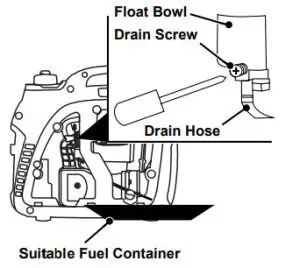
Even properly stabilized fuel can leave residue and cause corrosion if left long term. If storing the generator for two to six months, drain the float bowl to prevent gum and varnish buildup in the carburetor.
DRAINING THE FLOAT BOWL
- Remove the engine service cover.
- Locate the drain hose extending from the bottom of the carburetor float bowl.

- Place the loose end of the hose outside the generator into an approved gasoline container to catch the drained fuel.
- Loosen the float bowl drain screw and allow the fuel to drain. Tighten the float bowl drain screw.
- Route the drain hose between the air cleaner housing and the engine service cover. Install the engine service cover.
DRAINING THE FUEL TANK
If storing the generator for longer than six months, drain the fuel tank to prevent fuel separation, deterioration, and deposits in the fuel system.
- Unscrew the fuel tank cap. Remove the fuel screen filter.
- Using a commercially available gasoline hand pump (not included), siphon the gasoline from the fuel tank into an approved gasoline container. DO NOT use an electric pump.
- Reinstall the fuel screen filter and the fuel tank cap.
- Start the generator and allow it to run until the generator engine stops.
- Remove the spark plug.
- Put a teaspoon of engine oil into the cylinder and pull the recoil handle until resistance is felt. At this position, the piston is coming up on its compression stroke and both valves are closed. Storing the engine in this position will help prevent internal corrosion.
Return the recoil handle gently. - Reinstall the spark plug. Leave the spark plug boot disconnected to prevent accidental starting.
- Install the engine service cover.
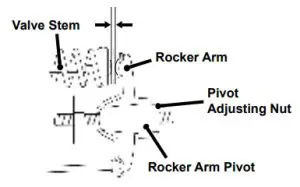
VALVE CLEARANCE
NOTICE
Checking and adjusting valve clearance must be done when the engine is cold.
- Remove the rocker arm cover and carefully remove the gasket. If the gasket is torn or damaged, it must be replaced.
- Remove the spark plug so the engine can be rotated more easily.
- Rotate the engine to top dead center (TDC) by pulling the recoil handle slowly. Looking through the spark plug hole, the piston should be at the top (both valves are closed).
- Both the rocker arms should be loose at TDC on the compression stroke. If they are not, rotate the engine 360°.
- Insert a feeler gauge between the rocker arm and the valve stem to measure valve clearance.
Intake Valve Exhaust Valve Valve Clearance 0.0031 – 0.0047 in.
(0.08 – 0.12 mm)0.0051 – 0.0067 in.
(0.13 – 0.17 mm)Torque 8–12 N•m 8–12 N•m - If an adjustment is necessary, hold the rocker arm pivot and loosen the pivot adjusting nut.
- Turn the rocker arm pivot to obtain the specified clearance. Hold the rocker arm pivot and re-tighten the pivot adjusting nut to the specified torque.
Torque: 106 inch-pound (12 N•m) - Perform this procedure for the other valve.
- Install the gasket, rocker arm cover, and spark plug.
TROUBLESHOOTING
| PROBLEM | POSSIBLE CAUSE | CORRECTION |
| Engine will not start | Out of fuel. | Refuel. |
| Bad fuel, generator stored without treating or draining gasoline or refused with bad gasoline. | Drain the fuel tank. Refuel with fresh gasoline. | |
| Dirty air filter. | Clean the air filter. | |
| Low engine oil level stopped generator. | If low oil LED illuminated, turn battery switch to the OFF position. Add engine oil. | |
| Spark plug wet with fuel (flooded engine). | Wait five minutes. Turn the battery switch to the OFF position. Pull recoil handle rapidly several times. If the generator does not start, remove the spark plug and dry. | |
| Spark plug faulty, touted or improperly gapped. | Gap or replace the spark plug. Reinstall. | |
| Fuel filter restricted, fuel system malfunction, fuel pump failure. ignition malfunction, valves stuck. etc. | Contact Westinghouse customer service toll-free at 1 (855) 9443571. | |
| Choke partially open or closed due to weak or disconnected battery. | Manually set the choke. See Maintenance section. | |
| Engine starts then shut down | Out of fuel. | Refuel. |
| Incorrect engine oil level. | Check engine oil level. | |
| Dirty air filter. | Clean the air filter. | |
| Contaminated fuel. | Drain the fuel tank. Refuel with fresh gasoline. | |
| Defective low oil level switch. | Contact Westinghouse customer service toll-free at 1 (855) 944-3571. | |
| Engine lacks power | Air filter restricted. | Clean or replace air filter. |
| Bad fuel, generator stored without treating or draining gasoline or refueled with bad gasoline. | Drain the fuel tank. Refuel with fresh gasoline. | |
| Fuel filter restricted, fuel system malfunction. fuel pump failure. ignition malfunction, valves stuck. etc. | Contact Westinghouse customer service toll-free at 1 (855) 944-3571. | |
| Engine runs rough or bogs when the load applied | Dirty air filter. | Clean the air filter. |
| Generator overloaded. | Unplug some devices. | |
| Faulty power tool or appliance. | Replace or repair tool or appliance. Stop and restart the engine. | |
| Fuel filter restricted, fuel system malfunction. fuel pump failure, ignition malfunction, valves stuck, etc. | Contact Westinghouse customer service toll-free at 1 (855) 944-3571. | |
| No power at AC receptacles | OUTPUT READY LED is OFF and OVERLOAD LED is ON. | Check AC load. Stop and restart the engine. |
| Check the air inlet. Stop and restart the engine. | ||
| AC circuit breakers tripped. | Check AC loads and reset circuit breaker/s. | |
| Faulty power tool or appliance. | Replace or repair tool or appliance. Stop and restart the engine. | |
| Faulty generator. | Contact Westinghouse customer service toll-free at 1 (855) 944-3571. |
EXPLODED VIEW
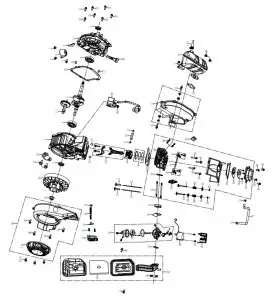
NO. | PART# | DESCRIPTION |
| 1 | 200204 | CRANKCASE |
| 2 | 205101 | OIL SENSOR |
| 3 | 91325 | BOLT M6X12 |
| 4 | 209903 | WIRE CLIP |
| 5 | 93501 | CRANKCASE OIL SEAL |
| 6 | 93008 | AXLE BEARING |
| 7 | 200301 | CRANKSHAFT |
| 8 | 201201 | PISTON |
| 9 | 201601 | PISTON RING ASSEMBLY |
| 10 | 205501 | PISTON PIN |
| 11 | 201301 | PISTON PIN RING |
| 12 | 201503 | CONNECTING ROD ASSEMBLY |
| 13 | 206101 | VALVE LIFTER |
| 14 | 202001 | CAMSHAFT ASSEMBLY |
| 15 | 240904 | CRANKCASE LOCATING PIN |
| 16 | 96004 | CRANKCASE SEAL WASHER |
| 17 | 200101 | CRANKCASE COVER |
| 18 | 205601- 160 | DIPSTICK |
| 19 | 96005 | CYLINDER HEAD GASKET |
| 20 | 201001 | CYLINDER HEAD |
| 21 | 97101 | SPARK PLUG |
| 22 | 202101 | INTAKE ROCKER ARM ASSEMBLY |
| 23 | 202102 | EXHAUST ROCKER ARM ASSEMBLY |
| 24 | 202103 | ROCKER ARM SHAFT |
| 25 | 201802 | AIR INTAKE SPRING LOWER SEAT |
| 26 | 201701 | INTAKE VALVE |
| 27 | 205901 | EXHAUST VALVE |
| 28 | 206001 | VALVE SPRING |
| 29 | 201801 | INTAKE VALVE SPRING SEAT |
| 30 | 200801 | VALVE LOCK CLIP |
| 31 | 91023 | DOUBLE-END BOLT M6X92 |
| 32 | 91002 | DOUBLE-END BOLT M6X32 |
| 33 | 201901 | PUSH ROD |
| 34 | 91339 | BOLT M6X50 |
| 35 | 96006 | HEADCOVER SEAL WASHER |
| 36 | 201101 | CYLINDER HEADCOVER |
| 37 | 200501 | COVER |
| 38 | 97502 | MAGNETO IGNITER |
| 39 | 209901 | SEALING RUBBER |
| 40 | 91330 | BOLT M6X20 |
| 41 | 200401 | FLYWHEEL ASSEMBLY |
| 42 | 90014 | NUT M12 |
| 43 | 204701 | STARTER ASSEMBLY |
| 43.1 | 5323 | START PULL PLATE |
| 44 | 91805 | CROSS GROOVED DISC HEAD BOLTS M3X8 |
| 45 | 91329 | BOLTS M6X16 |
| 46 | 96007 | JOINT BLOCK GASKET |
| 47 | 202301 | CARBURETOR CONNECTION BLOCK |
| 48 | 96121 | CARBURETOR GASKET |
| 49 | 202801 | CARBURETOR ASSEMBLY |
| 50 | 92239 | BOLTS M3*8 |
| 51 | 201104 | BREATHING BOARD GASKET |
| 52 | 209906 | STEPPING MOTOR COVER |
| 53 | 96009 | AIR FILTER GASKET |
| 54 | 202901 | AIR CLEANER ASSEMBLY |
| 54.1 | 5291 | AIR FILTER ELEMENT |
| 55 | 90016 | NUT M6 |
| 56 | 752007 | STEPPER MOTOR |
| 57 | 95614 | CYLINDER HEAD BREATHER TUBE |
| 58 | 202502 | MUFFLER ENCLOSURE |
| 59 | 209902 | COVER RETAINING CARD |
| 60 | 203704 | MUFFLER ASSEMBLY |
| 60.1 | 6789 | SPARK ARRESTER |
| 61 | 97501 | IGNITION COIL ASSEMBLY |
| 62 | 96008 | EXHAUST SEAL WASHER |
| 63 | 94407 | FUEL LINE CLAMP |
| 64 | 201103 | CYLINDER HEAD BREATHING PLATE |
IGEN2200 EXPLODED VIEW B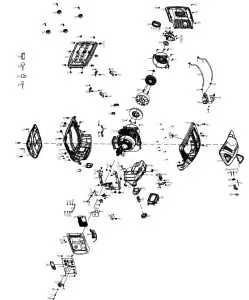
NO. | PART# | DESCRIPTION |
| 1 | 500384 | MUFFLER BAFFLE |
| 2 | 202501 | MUFFLER SHIELD |
| 3 | 92014 | SCREW 4.2X13 |
| 4 | 91334 | BOLT M6X30 |
| 5 | 500036 | MOTOR COVER |
| 6 | 90014 | NUT M12 |
| 7 | 500816 | MOTOR STATOR ASSEMBLY |
| 8 | 91325 | BOLT M6X12 |
| 9 | 752008 | MOTOR ROTOR ASSEMBLY |
| 10 | 500037 | MOTOR FAN |
| 11 | 500045 | LOCK CLIP M5 |
| 12 | 1100080 10084VN | ENGINE |
| 13 | 92032 | SCREW M4X16 |
| 14 | 500009 | FUEL TANK SHOCK ABSORBER PAD C |
| 15 | 500020 | INVERTER BRACKET |
| 16 | 500043 | DC VOLTAGE REGULATOR |
| 17 | 500011 | OIL SWITCH FRAME |
| 18 | 500818 | INVERTER |
| 19 | 500018 | RECOIL HANDLE |
| 20 | 500042 | PANEL BACK COVER |
| 21 | 713265 | PANEL ASSEMBLY |
| 21.1 | 34226-001 | ENGINE OIL ALARM LAMP |
| 21.2 | 34226-001 | TROUBLE ALARM LAMP |
| 21.3 | 9067 | RUNNING INDICATOR LIGHT |
| 21.4 | 9141 | USB |
| 21.5 | 9013 | PARALLEL PORTS |
| 21.6 | 9122 | WATERPROOF COVER |
| 21.7 | 9021 | VOLTAGE RESET SWITCH |
| 21.8 | 9061 | ECO SWITCH |
| 21.9 | 9080 | WATERPROOF CAP |
| 21.10 | D2000I- 31089-A | GROUNDING BOLT |
| 22 | 500016 | KNOB |
| 23 | 92012 | STOP BOLT M5X18 |
| 24 | 500296-332B | LEFT PANEL |
| 25 | 500028-332 | LEFT SKELETON |
| 26 | 92003 | SCREW M6X16 |
| 27 | 500008 | FUEL TANK SHOCK ABSORBER PAD B |
| 28 | 500027 | STOP BLOCK |
| 29 | 500031-332 | SPARK PLUG COVER |
| 30 | 500007 | FUEL TANK SHOCK ABSORBER PAD A |
| 31 | 91330 | BOLT M6X20 |
| 32 | 500034 | FRAME SHOCK ABSORBER PAD |
| 33 | 90027 | NUT 16X16X5_M6 |
| 34 | 500002 | BOTTOM PLATE |
| 35 | 500317 | SHOCK ABSORPTION BEARING |
| 36 | 500040 | MOTOR VIBRATION DAMPING PAD |
| 37 | 500035 | ENGINE VIBRATION DAMPING PADS |
| 38 | 700210L | FUEL TANK |
| 39 | 500032 | OIL CHANNEL |
| 40 | 500010 | FILTER |
| 41 | 500304 | FUEL TANK CAP |
| 42 | 99519 | FLAT PAD |
| 43 | 500029-332 | RIGHT FRAME |
| 44 | 500297-332B | RIGHT PANEL |
| 45 | 500019-052 | PULL ROPE GUIDE PLATE |
| 46 | 90016 | NUT M6 |
| 47 | 500298 | HANDLE DECORATION BLOCK |
| 48 | 500017-231 | HANDLE COVER |
| 49 | 503062 | FUEL SWITCH |
| 50 | 500015 | CABLE TRAY |
| 51 | 500012 | SPRING |
| 52 | 500003 | STEEL BALL |
| 53 | 240904 | DOWEL PIN, CASE COVER |
| 54 | 92013 | CROSS RECESSED PAN HEAD SCREW + GASKET COMBINATION M5X35 |
| 55 | 500044 | SHORT-CIRCUITING CONNECTION |
| 56 | 500026 | GROUND WIRE |
| 57 | 95431L | FUEL LINE |
| 58 | 94411 | FUEL HOSE CLAMP |
| 59 | 95430L | FUEL LINE |
| 60 | 94410 | FUEL HOSE CLAMP |
| 61 | 516401 | FILTER |
| 62 | 94408 | FUEL HOSE CLAMP |
| 63 | 95470L | FUEL LINE |
| 64 | 202601 | MUFFLER COVER SEAL |
| 65 | 500039 | AIR INLET COVER |
| 66 | 500303 | WIRING HARNESS |
| 67 | 91825 | CROSS GROOVED DISC HEAD SCREW M5X12 |
| 68 | 92001 | OPEN TYPE OVAL HEAD BLIND RIVETS 3X15 |
| 69 | 94003 | TOOTH WASHER |
| 70 | 92108 | TAPPING SCREW 4.8*16 |
| 71 | 94219 | FLAT WASHER |
| 72 | 500014 | CABLE |
| 73 | 94006 | SPLIT WASHER |
| 74 | 9055 | DUST COVER |
| 75 | 94018 | SPLIT WASHER |
| 76 | 500038 | MOTOR INLET COVER |
| 77 | 503108 | USB DUST COVER |
| 78 | 94218 | FLAT WASHER |
| 79 | 500456 | PLUG |
| 80 | 94217 | FLAT WASHER |
| 81 | 99506 | DUAL-PURPOSE SCREWDRIVER |
| 82 | 99012 | SPARK PLUG WRENCH |
| 83 | 500942 | FUNNEL |
| 84 | 99550 | OIL BOTTLE |
IGEN2500 EXPLODED VIEW A
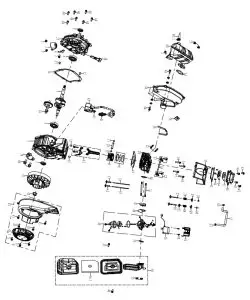
| NO. | PART# | DESCRIPTION |
| 1 | 200203 | CRANKCASE |
| 2 | 205101 | OIL SENSOR |
| 3 | 91325 | BOLT M6X12 |
| 4 | 209903 | WIRE CLIP |
| 5 | 93501 | CRANKCASE OIL SEAL |
| 6 | 93008 | AXLE BEARING |
| 7 | 200304 | CRANKSHAFT |
| 8 | 211203 | PISTON |
| 9 | 211603 | PISTON RING ASSEMBLY |
| 10 | 205501 | PISTON PIN |
| 11 | 201301 | PISTON PIN RING |
| 12 | 201503 | CONNECTING ROD ASSEMBLY |
| 13 | 206101 | VALVE LIFTER |
| 14 | 202002 | CAMSHAFT ASSEMBLY |
| 15 | 240904 | CRANKCASE LOCATING PIN |
| 16 | 96004 | CRANKCASE SEAL WASHER |
| 17 | 200101 | CRANKCASE COVER |
| 18 | 205601- 160 | DIPSTICK |
| 19 | 96814 | CYLINDER HEAD GASKET |
| 20 | 201003 | CYLINDER HEAD |
| 21 | 94407 | FUEL LINE CLAMP |
| 22 | 201902 | PUSH ROD |
| 23 | 97502 | MAGNETO IGNITER |
| 24 | 96007 | JOINT BLOCK GASKET |
| 25 | 91330 | BOLT M6X20 |
| 26 | 200401 | FLYWHEEL ASSEMBLY |
| 27 | 90014 | NUT M12 |
| 28 | 204710 | STARTER ASSEMBLY |
| 28.1 | 5998 | RECOIL STARTER |
| 29 | 91805 | CROSS GROOVED DISC HEAD BOLTS |
| 30 | 91329 | BOLTS M6X16 |
| 31 | 202301 | CARBURETOR CONNECTION BLOCK |
| 32 | 96121 | CARBURETOR PAPER PAD |
| 33 | 202805 | CARBURETOR ASSEMBLY |
| 34 | 92239 | BOLTS M3*8 |
| 35 | 91023 | DOUBLE-END BOLT M6X92 |
| 36 | 209906 | STEPPING MOTOR COVER |
| 37 | 96009 | AIR FILTER GASKET |
| 38 | 202902 | AIR CLEANER ASSEMBLY |
| 38.1 | 5291 | AIR FILTER ELEMENT |
| 39 | 90016 | NUT M6 |
| 40 | 752007 | STEPPER MOTOR |
| 41 | 95614 | CYLINDER HEAD BREATHING TUBE |
| 42 | 202511 | MUFFLER ENCLOSURE(REAR PANEL) |
| 43 | 209902 | COVER RETAINING CARD |
| 44 | 203712 | MUFFLER ASSEMBLY |
| 44.1 | 6789 | SPARK ARRESTER |
| 45 | 97609 | IGNITION COIL ASSEMBLY |
| 46 | 96008 | EXHAUST SEAL WASHER |
| 47 | 545901 | AIR PUMP CHECK VALVE |
| 48 | 229902 | FLANGE |
| 49 | 91322 | BOLT M5X12 |
| 50 | 95028 | BOLTS M3*8 |
| 51 | 94412 | FUEL LINE CLAMP |
| 52 | 97101 | SPARK PLUG |
| 53 | 202102 | EXHAUST ROCKER ARM ASSEMBLY |
| 54 | 202103 | ROCKER ARM SHAFT |
| 55 | 202101 | INLET ROCKER ARM ASSEMBLY |
| 56 | 91339 | BOLT M6X50 |
| 57 | 205901 | EXHAUST VALVE |
| 58 | 201702 | INTAKE VALVE |
| 59 | 201802 | AIR INLET SPRING LOWER SEAT |
| 60 | 206001 | VALVE SPRING |
| 61 | 201801 | INTAKE VALVE SPRING SEAT |
| 62 | 200801 | VALVE LOCK CLIP |
| 63 | 200503 | COVER |
| 64 | 96006 | HEADCOVER SEAL WASHER |
| 65 | 201103 | CYLINDER HEAD BREATHING PLATE |
| 66 | 201104 | BREATHING BOARD GASKET |
| 67 | 201101 | CYLINDER HEADCOVER |
| 68 | 91002 | DOUBLE-END BOLT M6X32 |
IGEN2500 EXPLODED VIEW B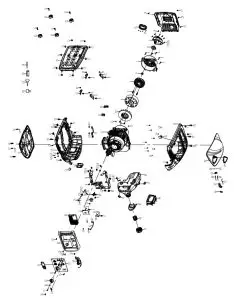
| NO. | PART# | DESCRIPTION |
| 1 | 500384 | MUFFLER BAFFLE |
| 2 | 202515 | MUFFLER ENCLOSURE2 |
| 3 | 92014 | SCREW ST4.2X13 |
| 4 | 91334 | BOLT M6X30 |
| 5 | 500127 | MOTOR FIXING COVER |
| 6 | 90014 | NUT M12 |
| 7 | 500817 | MOTOR STATOR ASSEMBLY |
| 8 | 91325 | BOLT M6X12 |
| 9 | 500129 | MOTOR ROTOR ASSEMBLY |
| 10 | 500037 | MOTOR FAN |
| 11 | 500045 | LOCK CLIP M5 |
| 12 | 1100098 30058VN | ENGINE |
| 13 | 92032 | SCREW M4X16 |
| 14 | 500009 | FUEL TANK SHOCK ABSORBER PAD C |
| 15 | 500020 | INVERTER BRACKET |
| 16 | 95132 | CARBON CANISTER AND AIR FILTER CONNECTING PIPE |
| 17 | 500011 | OIL SWITCH FRAME |
| 18 | 500819 | INVERTER |
| 19 | 500018 | RECOIL HANDLE |
| 20 | 500128 | PANEL BACK COVER |
| 21 | 713266 | PANEL COMPONENT |
| 21.1 | D2000I-31089-A | GROUNDING BOLT |
| 21.2 | 9021 | VOLTAGE RESET SWITCH |
| 21.3 | 9013 | PARALLEL PORTS |
| 21.4 | 9122 | WATERPROOF COVER |
| 21.5 | 9141 | USB |
| 21.6 | 9061 | ECO SWITCH |
| 21.7 | 9080 | WATERPROOF CAP |
| 21.8 | 9020 | LED |
| 22 | 500016 | KNOB |
| 23 | 92012 | STOP BOLT M5X18 |
| 24 | 500296-332C | LEFT PANEL |
| 25 | 500028-332 | LEFT SKELETON |
| 26 | 92003 | SCREW M6X16 |
| 27 | 500008 | FUEL TANK SHOCK ABSORBER PAD B |
| 28 | 500027 | STOP |
| 29 | 500031-332 | SPARK PLUG COVER |
| 30 | 500007 | FUEL TANK SHOCK ABSORBER PAD A |
| 31 | 91330 | BOLT M6X20 |
| 32 | 500034 | FRAME SHOCK ABSORBER PAD |
| 33 | 90027 | NUT 16X16X5_M6 |
| 34 | 500002 | BASEBOARD |
| 35 | 500317 | ISOLATOR |
| 36 | 500040 | MOTOR VIBRATION DAMPING PAD |
| 37 | 500035 | ENGINE VIBRATION DAMPING PADS |
| 38 | 500323L | FUEL TANK |
| 39 | 500032 | OIL CHANNEL |
| 40 | 500314 | FILTER |
| 41 | 500308 | FUEL TANK CAP |
| 42 | 99519 | FLAT PAD |
| 43 | 500029-332 | RIGHT FRAME |
| 44 | 500297-332C | RIGHT PANEL |
| 45 | 500019-052 | PULL ROPE GUIDE PLATE |
| 46 | 90016 | NUT M6 |
| 47 | 500298 | HANDLE TRIM |
| 48 | 500017- 231 | HANDLE COVER |
| 49 | 503062 | FUEL SWITCH |
| 50 | 500015 | CABLE TRAY |
| 51 | 500012 | SPRING |
| 52 | 500003 | STEEL BALL |
| 53 | 240904 | DOWEL PIN,CASE COVER |
| 54 | 92013 | CROSS RECESSED PAN HEAD SCREW + GASKET COMBINATION M5X35 |
| 55 | 500044 | SHORT-CIRCUITING CONNECTION |
| 56 | 500026 | GROUND WIRE |
| 57 | 95431L | FUEL LINE |
| 58 | 94411 | FUEL LINE CLAMP |
| 59 | 95430L | FUEL LINE |
| 60 | 94410 | FUEL LINE CLAMP |
| 61 | 516401 | FILTER |
| 62 | 94408 | FUEL LINE CLAMP |
| 63 | 95470L | FUEL LINE |
| 64 | 202601 | MUFFLER COVER SEAL RUBBER |
| 65 | 500039 | AIR INLET COVER |
| 66 | 500303 | WIRING HARNESS |
| 67 | 91825 | CROSS GROOVED DISC HEAD SCREW M5X12 |
| 68 | 92001 | OPEN TYPE OVAL HEAD BLIND RIVETS 3X15 |
| 69 | 94003 | TOOTH WASHER |
| 70 | 94204 | SPRING WASHER |
| 71 | 94219 | FLAT WASHER |
| 72 | 500014 | CABLE |
| 73 | 95131 | CARBON CANISTER AND FUEL CANISTER CONNECTING PIPE |
| 74 | 500700 | DC VOLTAGE REGULATOR |
| 75 | 500247 | GASOLINE SENSOR |
| 76 | 500324 | SEAL RING |
| 77 | 500244 | HOLDER |
| 78 | 94018 | SPLIT WASHER |
| 79 | 94006 | SPLIT WASHER |
| 80 | 500038 | MOTOR INTAKE HOOD |
| 81 | 503034 | FUEL LINE CLAMP |
| 82 | 500425L | CARBON CANISTER |
| 83 | 500365 | CARBON CANISTER BRACKET |
| 84 | 91335 | BOLT M6X35 |
| 85 | 503108 | DUST COVER |
| 86 | 94218 | FLAT WASHER |
| 87 | 500456 | PLUG |
| 88 | 92108 | TAPPING SCREW 4.8*16 |
| 89 | 9055 | DUST COVER |
| 90 | 94217 | FLAT WASHER |
| 91 | 500252 | SEAL WASHER |
| 92 | 99012 | SPARK PLUG WRENCH |
| 93 | 500942 | FUNNEL |
| 94 | 99550 | OIL BOTTLE |
| 95 | 99506 | DUAL-PURPOSE SCREWDRIVER |
| 96 | 91322 | BOLT M5*12 |
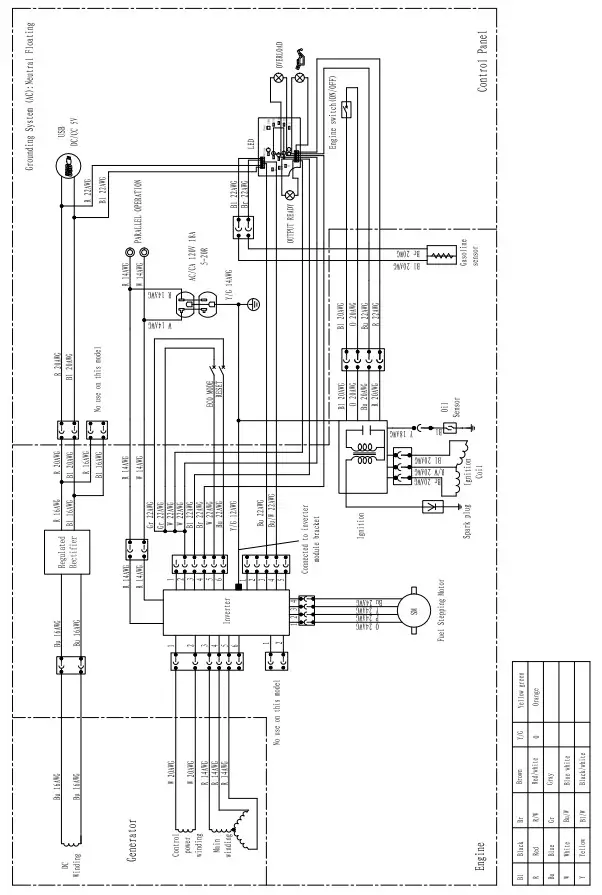
SCHEMATICS
IGEN2200 SCHEMATICS
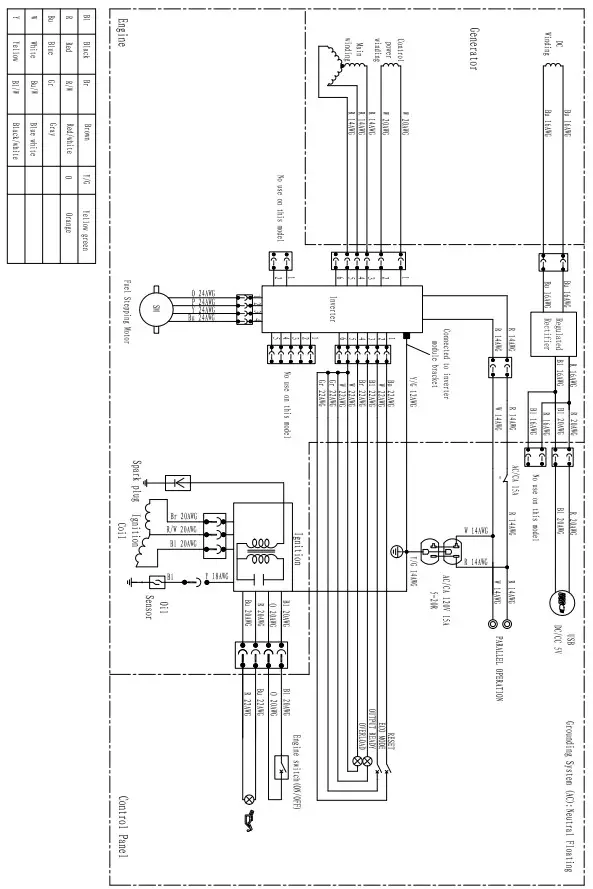
IGEN2500 SCHEMATICS
32 | Westinghouse Outdoor Power Equipment, LLC
Westinghouse Outdoor Power Equipment, LLC | 33