 Ahead of the curve
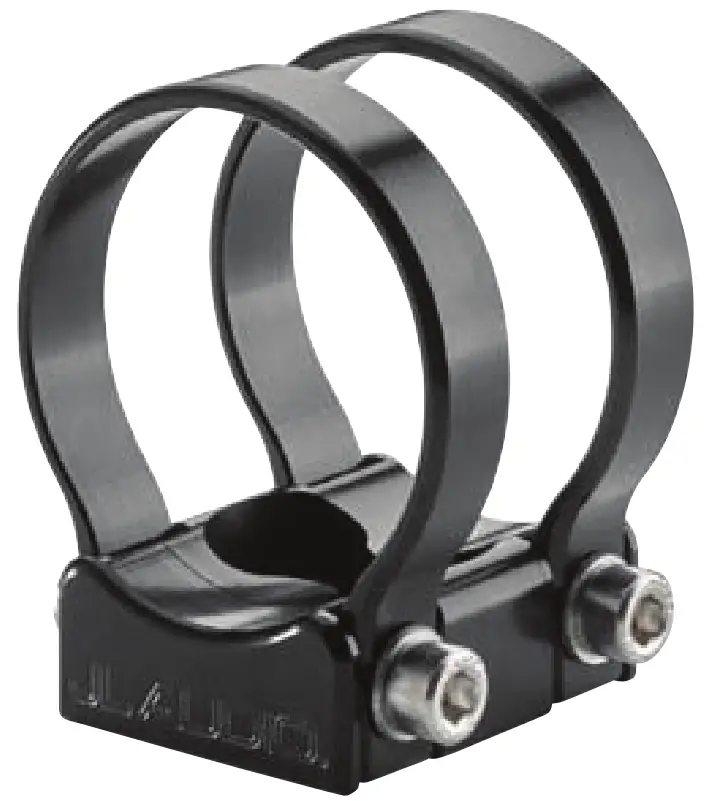 Installation Instructions for all
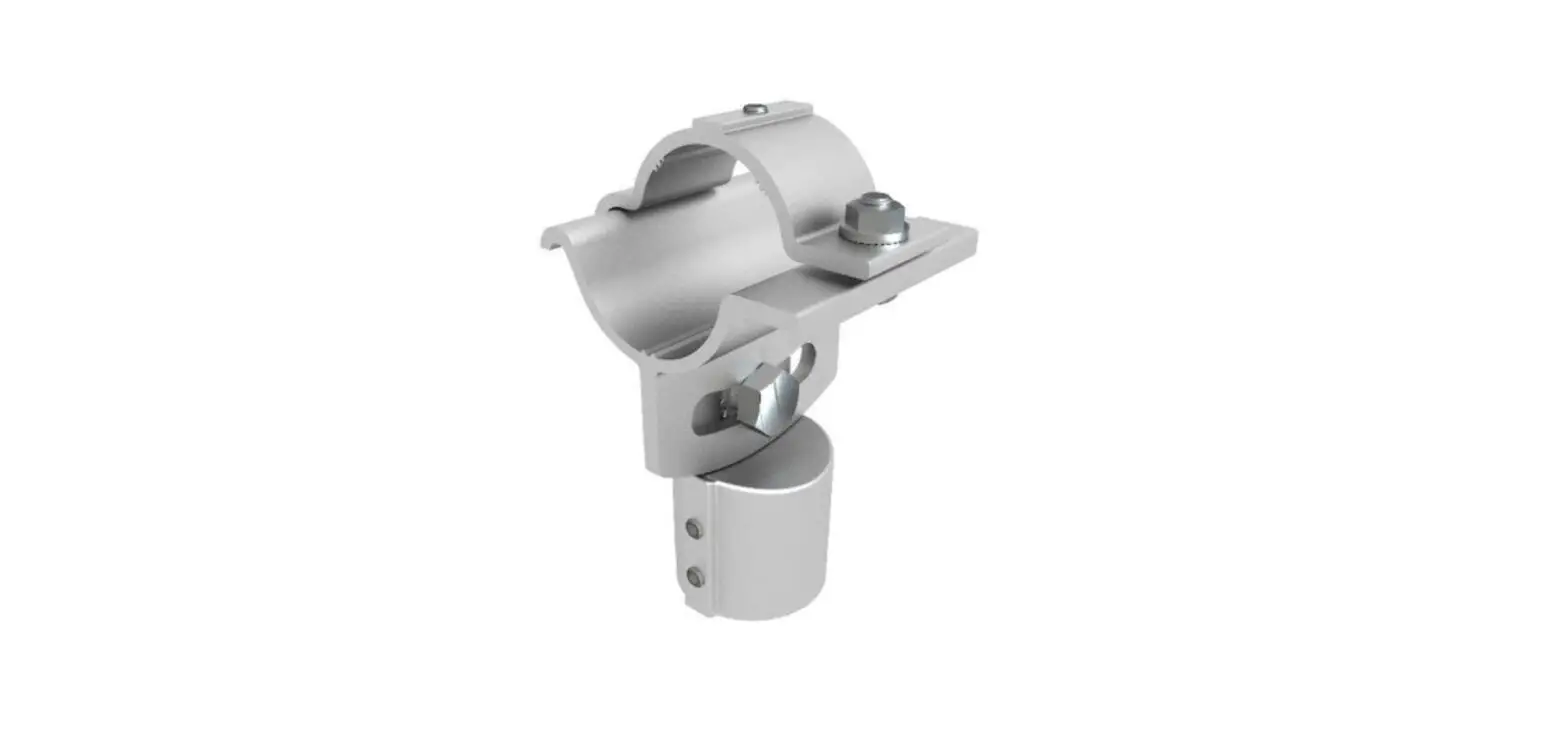
PS-SWMCP
swivel fixtures for round pipes
PIPE MOUNTING FIXTURES (SWIVEL)
FOR PS650-VE X™ ENCLOSED SPEAKER SYSTEMS
Included Hardware: (hardware pictured for one)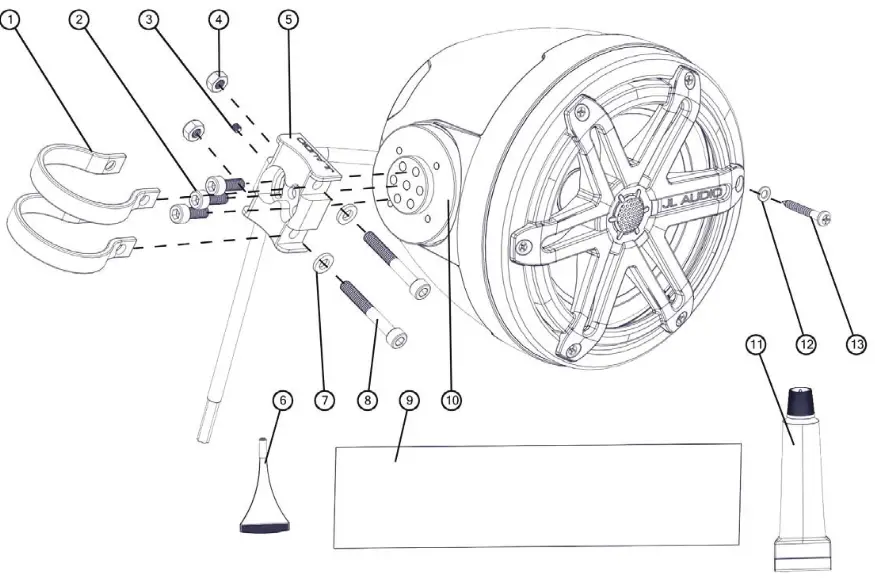
Mounting Fixture is made in the USA by Axia Alloys Protected by US Patents #8,136,771 & #8,398,035
NOTE: The PS-SWMCP-B-2.000 Fixture and PS650-VeX-SG-TMB Enclosed Speaker System are used in this manual for illustrative purposes only. The fixture installation
steps are the same for all PS650-VeX Enclosed Speaker Systems and all PS-SWMCP swivel fixtures for round pipes.
| BOM ID | Quantity | Description |
| 1 | 4 | Axia Alloys Strap Clamp |
| 2 | 6 | M6 x 16 mm Socket Cap Machine Screw |
| 3 | 2 | M4 x 4 mm Set Screw (pre-installed) |
| 4 | 4 | M6 Nylon Insert Locknut |
| 5 | 2 | Clamp Receiver |
| 6 | 1 | Loctite° Red Thread-Locking Compound |
| 7 | 4 | M6 Flat Washer |
| 8 | 4 | M6 x 45 mm Socket Cap Machine Screw |
| 9 | 1 | Plastic Strip |
| 10* | 2 | Fixture Base |
| 11* | 1 | Silicone Adhesive |
| 12* | 12 | #8 Flat Washer |
| 13* | 12 | #8 x 1-1/4″ Pan Head Screw |
* Included with VeX™ speaker enclosures.
For Standard Models:
| Wire Size | Wire Label | Use |
| 16 AWG | “+” | Speaker Positive (+) |
| N/A | Speaker Negative (-) |
| Wire Size | Wire Color | Use |
| 16 AWG | Red/Stripe | Speaker Positive (+) |
| Black/Stripe | Speaker Negative (-) | |
| 20 AWG | Red | Not Used |
| Green | Not Used | |
| Blue | LED Positive (+) | |
| Yellow | LED Negative (-) |
Note: Not all wires may be used in normal applications.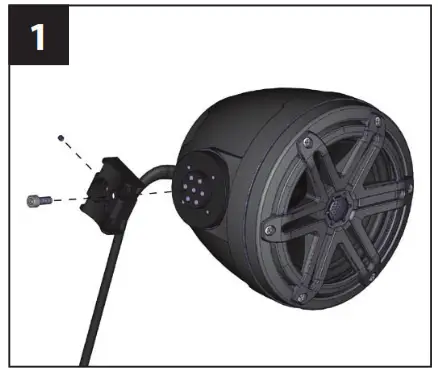 Loosen the pre-installed M4 x 4 mm Set Screw in the clamp receiver. Slide an M6 x 16 mm Machine Screw through the center hole of the clamp receiver, into the center hole in the fixture base, and hand tighten.
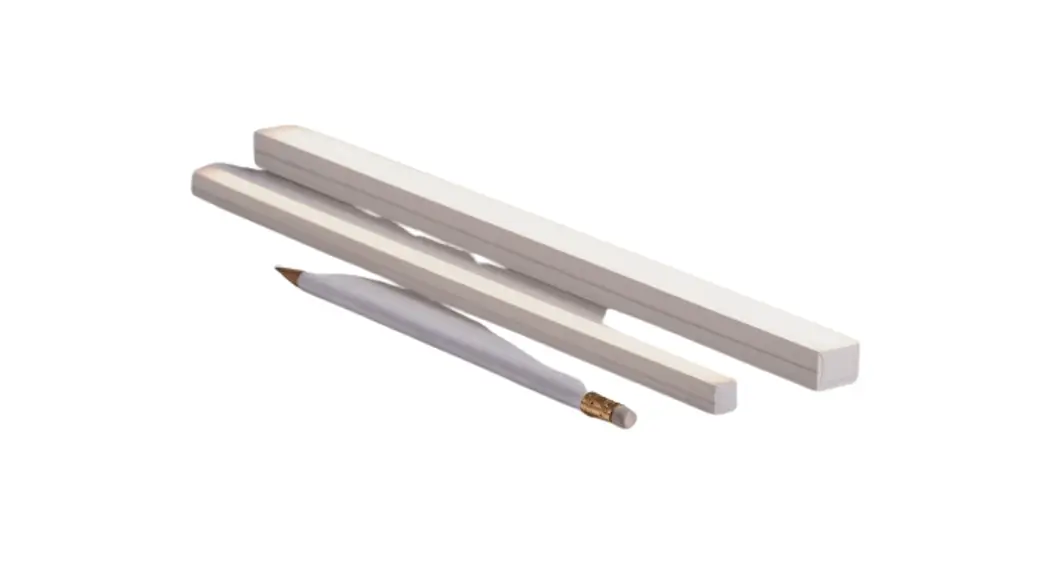
 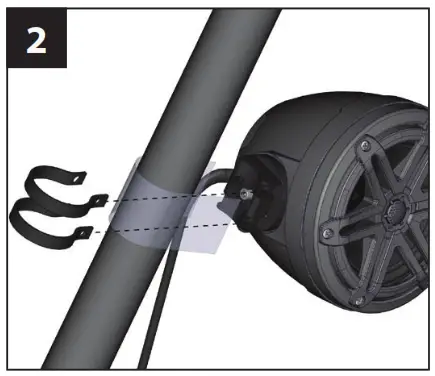 Place the supplied plastic strip around the pipe to prevent scratching. Push the clamps over the pipe (remove the plastic strip). Align the clamps with the clamp receiver on the enclosure.
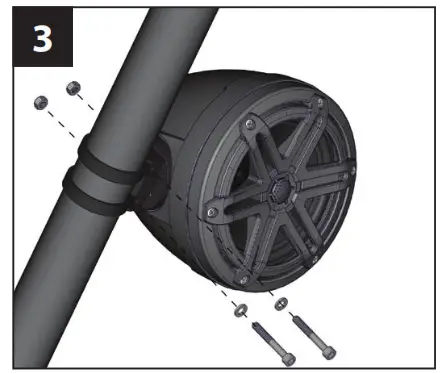 Secure the clamps to the clamp receiver using a pair of M6 x 45 mm Machine Screws, M6 Flat Washers, and M6 Locknuts as illustrated. The locknut should be installed into the hex-shaped recess on one end of each clamp. Hand-tighten, allowing just enough freedom to rotate the enclosure around the pipe.
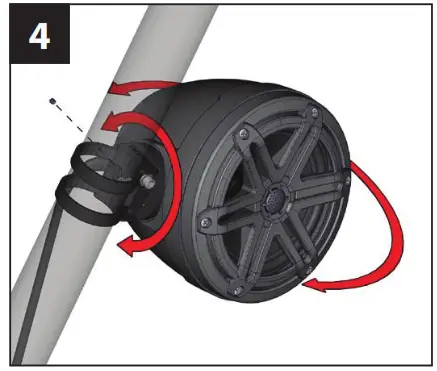 Position the enclosure at the desired location, tightening the M6 x 45 mm Machine Screws as necessary. Fully tighten the pre-installed M4 x 4 mm Set Screw in the clamp receiver to hold its position. Mark the location of the clamps on the pipe, then remove the enclosure from the pipe.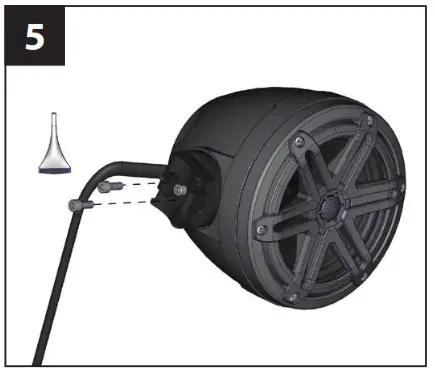
Apply Loctite® red thread-locking compound to two M6 x 16 mm Machine Screws, slide them through the slots in the clamp receiver, into the appropriate holes in the fixture base, and fully tighten.
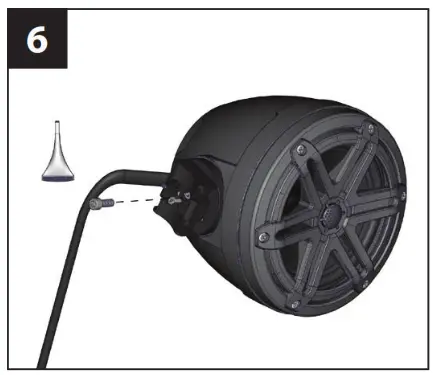 Remove the center M6 x 16 mm Machine Screw from the clamp receiver, apply Loctite® red thread-locking compound, reinstall, and fully tighten.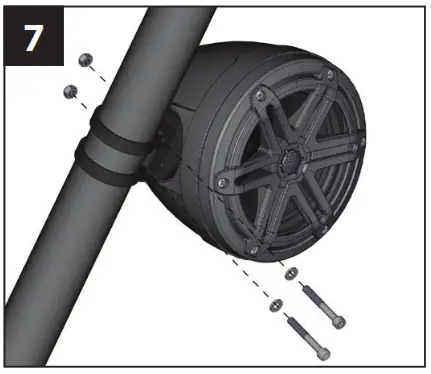
Realign the clamps with the clamp receiver on the enclosure, and secure them to the clamp receiver using a pair of M6 x 45 mm Machine Screws, M6 Flat Washers, and M6 Locknuts as illustrated, and fully tighten. Note: The locknut should be installed into the hex-shaped recess on one end of each clamp.
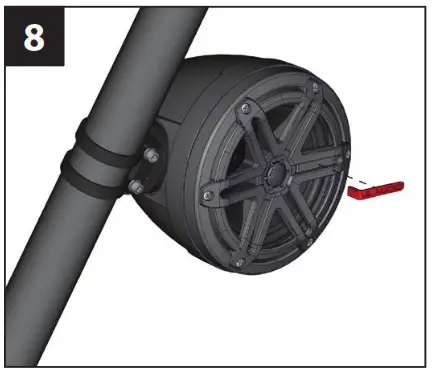 Remove adhesive backing and install the JL Audio logo badge.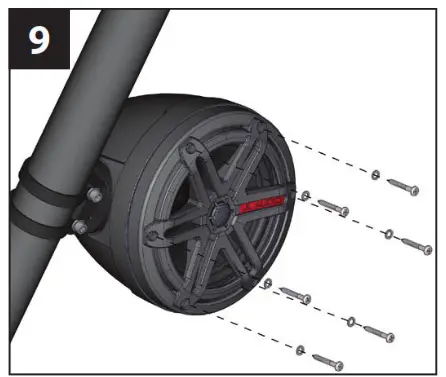
If you wish to rotate the speaker’s grille/logo badge alignment, remove the six #8 x 1-1/4” speaker mounting screws and #8 Flat Washers.
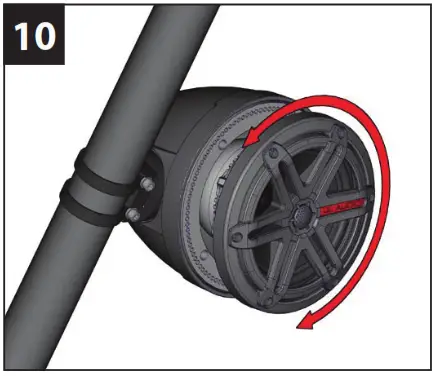 Rotate the speaker to the desired angle. Reinstall the speaker and speaker mounting screws and washers. Hand-tighten in a criss-cross pattern.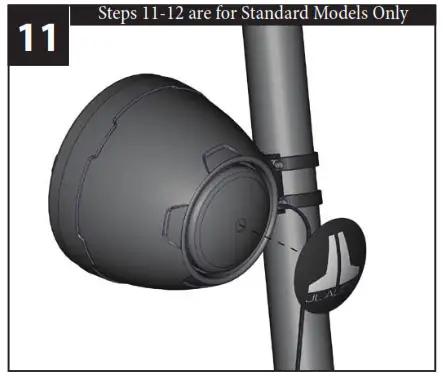
Remove the backing from the rear logo appliqué. With the logo positioned at the desired angle, attach the appliqué to the back of the enclosure.
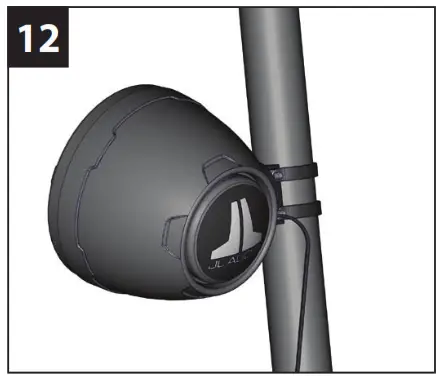 Gently press on the appliqué from the center out to remove any air pockets.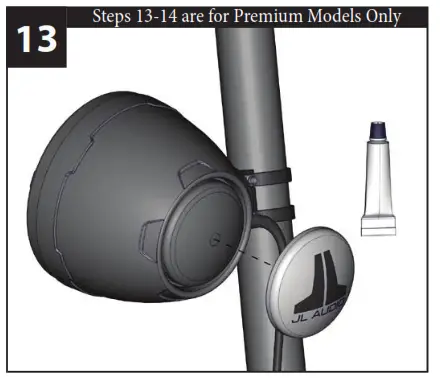
Clean the inside of the aluminum cap with acetone (not included) prior to attaching it to the enclosure. Apply a circular bead of silicone adhesive to the inside of the aluminum logo cap, 1/2-inch (13 mm) from the outer edge. 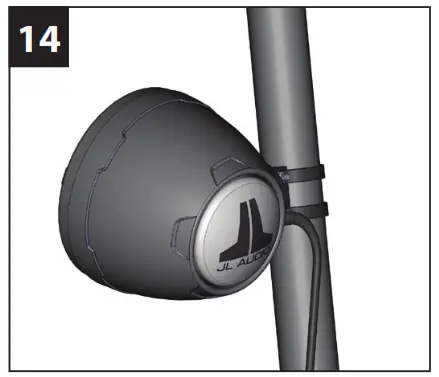
Align the aluminum logo cap to the desired angle of rotation, and press it onto the back of the enclosure. Apply masking tape (not included) to hold the cap in place until the silicone cures (at least 24 hours).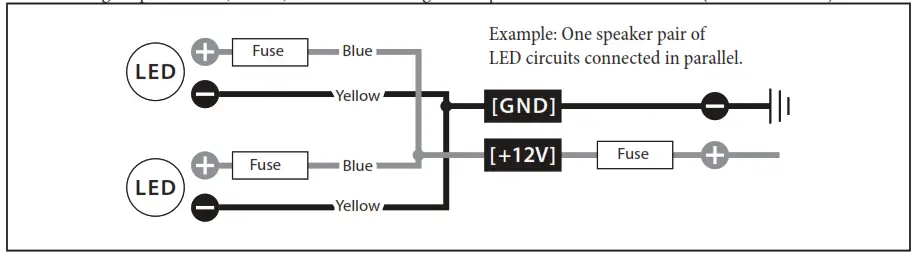
- For marine installations, do not connect the speaker’s LED lights to the vessel’s navigational lighting circuits.
- For short-circuit protection, install a supplied fuse holder onto EACH speaker’s BLUE (+12V) LED power connection lead.
- Connect all BLUE (+12V) leads together (parallel) and connect to a switched +12V supply. Connect all YELLOW (GND) leads together and connect to a negative ground or to the NEGATIVE battery post.
- We recommend activating the speakers’ LEDs thru a lighting circuit that supplies +12V via an existing switch. If an existing switched circuit is not available, you may install a dedicated toggle/rocker style switch that will supply positive (+12V) power. Fuse this connection according to how many LED circuits you have (LED circuits x 150 mA).
LIMITED WARRANTY
– MARINE PRODUCTS (USA)
JL AUDIO warrants this product to be free of defects in materials and workmanship for a period of two (2) years from the original date of purchase.
This warranty is not transferable and applies only to the original purchaser from an authorized JL AUDIO dealer. Should service be necessary under this warranty for any reason due to manufacturing defect or malfunction, JL AUDIO will (at its discretion), repair or replace the defective product with new or remanufactured product at no charge. Damage caused by the following is not covered under warranty: accident, misuse, abuse, product modification or neglect, failure to follow installation instructions, unauthorized repair attempts, or misrepresentations by the seller. This warranty does not cover incidental or consequential damages and does not cover the cost of removing or reinstalling the unit(s). Cosmetic damage due to accident or normal wear and tear is not covered under warranty.
Any applicable implied warranties are limited in duration to the period of the express warranty as provided herein beginning with the date of the original purchase at retail, and no warranties, whether express or implied, shall apply to this product thereafter. Some states do not allow limitations on implied warranties, therefore these exclusions may not apply to you. This warranty gives you specific legal rights, and you may also have other rights which vary from state to state.
For Service Information in the U.S.A. please call
JL Audio Customer Service: (954) 443-1100
9:00 AM – 5:30 PM (Eastern Time Zone)
JL Audio, Inc
10369 North Commerce Pkwy.
Miramar, FL 33025, USA
International Warranties:
Products purchased outside the United States of America are covered only by that country’s distributor and not by JL Audio, Inc.
 www.jlaudio.com

 CUSTOM ELECTRONIC DESIGN & INSTALLATION ASSOCIATION Member
JL Audio® and the JL Audio logo are registered trademarks of JL Audio, Inc. “Ahead of the Curve” and its respective logo is a trademark of JL Audio, Inc.
©2016 JL Audio, Inc. • For more detailed information please visit us online at www.jlaudio.com. Due to our policy of continuous product development, all specifications are subject to change without notice.SKU# 011498
Printed in U.S.A. • 092817
 JL Audio: Car Stereo, Speakers, Subs, Amps, Home Theater