 025974 Arc Welding, Battery Chargers & Body Repair
Owner’s Manual
 www.gys.fr
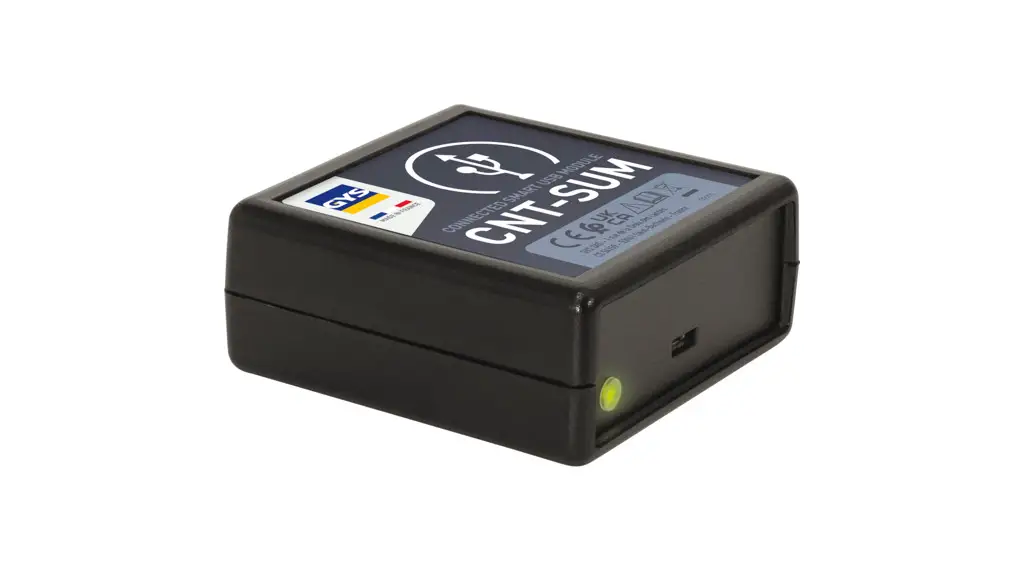
SMART USB MODULE
FIG I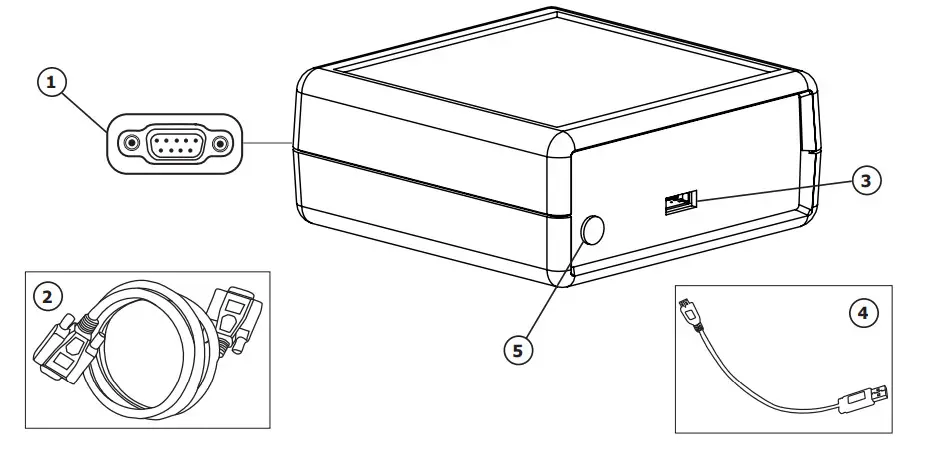
SAFETY INSTRUCTIONS
 This manual includes guidelines on the operation of your device and the precautions to follow for your own safety. Ensure it is read carefully before first use and keep it handy for future reference. This device should only be used for data transmission within the limits indicated on the device and in the manual.
The safety instructions must be followed. In case of improper or unsafe use, the manufacturer cannot be held responsible. The device is suitable for indoor use only. Do not expose to rain or excessive moisture.
 Maintenance:

- Service should be performed by a qualified person.
- The device is maintenance-free
- Under no circumstances should solvents or other aggressive cleaning agents be used.
- Clean the device’s surfaces with a soft, dry cloth.
 Regulations:
- The device complies with European Directive.
- The certificate of compliance is available on our website.
 Equipment in compliance with British requirements. The British Declaration of Conformity is available on our website (see home page).
 Equipment in conformity with Moroccan standards.
- The declaration C (CMIM) of conformity is available on our website (see cover page).
 Equipment in compliance with British requirements. The British Declaration of Conformity is available on our website (see home page).
 Equipment in conformity with Moroccan standards.
 Disposal:
- This product should be disposed of at an appropriate recycling facility. Do not dispose of in the domestic waste.
EQUIPMENT DESCRIPTION (FIG-1)
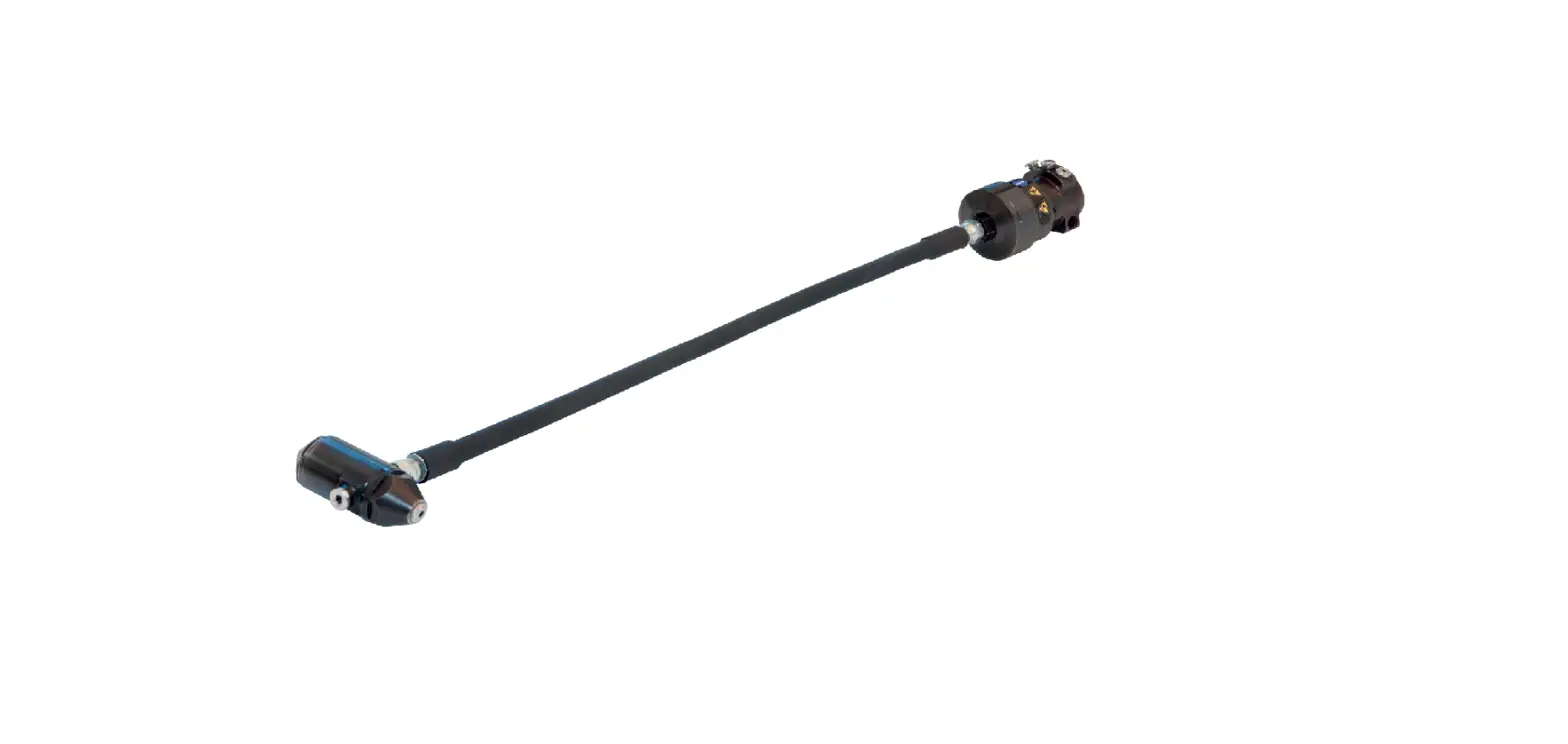
The Smart USB Module is an accessory for controlling a GYS device equipped with an SMC port via USB communication.
| 1 | SMC connector |
| 2 | SMC cord |
| 3 | USB connector |
| 4 | USB cord |
| 5 | LED Indicator |
EQUIPMENT INSTALLATION
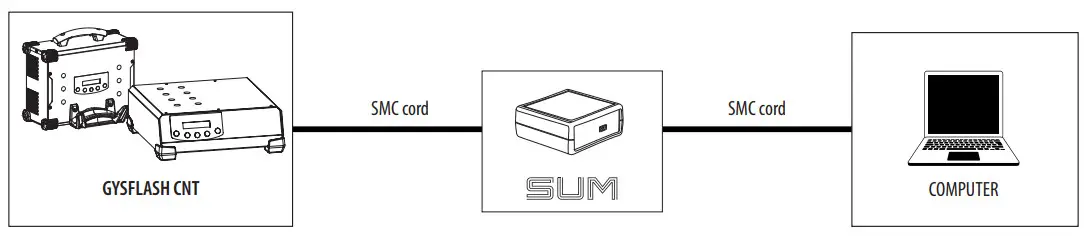
- Connect the SUM to the GYS device to be controlled (e.g. GYSFLASH CNT) via the SMC cord.
- Connect the SUM to the computer using the USB cable.

- Switch on the device to be controlled and the computer.
- Check the status of the indicator (5):
| Status of light | Meaning |
| Green | SUM OK, ready to communicate |
| Fast flashing orange | SUM in the initialization or update phase. This phase usually stops after 5 seconds. |
| Fixed orange | No power or no communication on the SMC port 4 Check the SMC connection cord. |
| Out | No power supply on the USB port 4 Checks the USB connection cable. |
| Slowly flashing orange | Internal error. |
GENERAL OPERATION
The Smart USB Module or SUM makes it possible to communicate with a GYS product by USB connection.
The SUM is recognized as a serial port on the computer (COM on Windows, /dev/tty under Linux).
The SUM instantiates a virtual serial port (VCP). It does not require any special configuration regarding the Baud rate, the number of bits in the byte, parity and stop bits.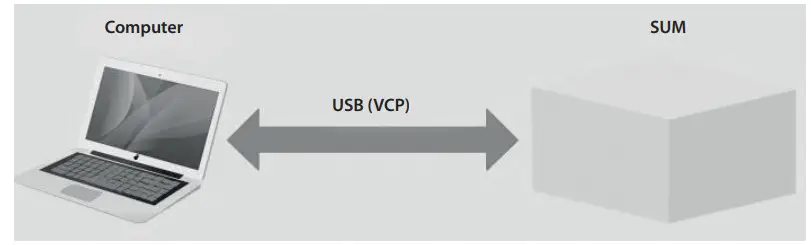
PILOT INSTALLATION
The Smart USB module requires the installation of a virtual serial port (VCP) driver.
For Windows 7 or higher operating systems connected to the Internet, the driver will be installed automatically.
Otherwise, the installation executable can be downloaded from the ST website via the following link:
https://www.st.com/en/development-tools/stsw-stm32102.html
PROTOCOL
The computer always initiates commands with queries, and the SUM always responds to them. If the SUM does not respond within 500 ms, it is no longer operational.
The SUM supports 2 types of request-answer: the Setter and the Getter. The Setter applies a value to the product. The Getter allows reading the value of the product.
A command has at least one associated data (argument). For the Setter, the data is sent with the order in the request.
For a Getter, the data is received by the response with the associated command.
The SUM returns status in its reply indicates that the order has been properly processed. The Setter answer always contains the order and status. For the Getter, the answer contains the order and the data if everything goes well.
Otherwise, the answer contains the order and status.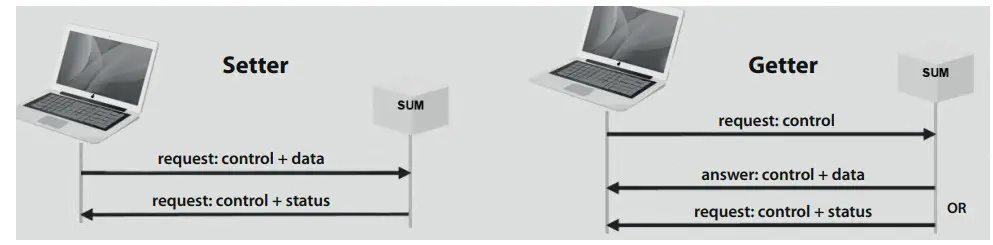
SYNTAX
The exchanges between the computer and the SUM are done in ASCII characters.
Each request and response ends with <CR><LF>(or 0x0D0A or «\r\n»).
The command name contains no spaces.
The name of the command is followed by an equal «=».
In a Setter request and a Getter response, the data follows the equal sign «=». They are separated by a semicolon «;». For decimal data, the decimal separator is «.». The data are shown without units.
For a Getter request, a question mark «?» follows the equal sign «=».
The status has 2 values: «OK» or «KO».
Example of exchanges between the computer and the SUM :
«Process_state=run<CR><LF>,» the computer asks to start the load.
«Process_state=OK<CR><LF>» the SUM returns the correct acknowledgment of the order.
«Process_state=?<CR><LF>,» asks for the status of the current process.
«Process_state=idle<CR><LF>» returns the value requested here IDLE (stopping process).
«Process_sta=?<CR><LF>» request for Getter is badly formed, the command name does not exist.
«Process_sta=KO<CR><LF>» returns an error response.
«Date=2020;13;31;08;53;10<CR><LF>» updates the product date with a wrong value (MM=13).
«Date=KO<CR><LF>» returns an error status.
LIST OF GETTERS FOR GYSFLASH CNT
| Typical Getter request | Gysflash CNT answer | Arguments | ||
| Names | Possible values | Description | ||
| Version=? | Version= Produitl;HW_versionl;SW_versionl; Produit2; HW_version2;SW_version2 | Product Produit2 | e.g.: GYSFLASH 121.12 CNT Smart USB module | Name(s) of the product(s) present on the SMC network |
| HW_versionl HW_version2 | e.g.: HW 1-2 HW E0046IND1-0 | Associated hardware version | ||
| SW_versionl SW_version2 | e.g.: SW V06.01 | Associated software version | ||
| Serial=? | Serial= Produitl;SN1;Produit2;SN2… | Produiti Produit2 | e.g.: GYSFLASH 121.12 CNT Smart USB module | Name(s) of the product(s) present on the SMC network |
| SN1 SN2 | e.g.: 20.02.026971.000001 | Associated serial number | ||
| Product info=? | Product info=U;I | U | 0 to 48 -> in V | Charger voltage |
| I | 0 to 120 -> in A | Current charger | ||
| Product name=? | Product name=product_name | product_name | e.g.: GYSFLASH 121.12 CNT | Charger’s name |
| MMI state=? | MMI_state=MMI_state | MMI_state | lock + Locked unlock + Unlocked | LOCK a : Locking the charger interface buttons. In this configuration, only the SUM can manage the charger. |
| Mode=? | Mode-mode | mode | uinit charge B5U VoLtag e_test CCA_test Altemator_test settings | Type of mode in use |
| Process_state=? | Process_state=process_state | process_state | idle + On standby run + Current load error 4 Error | Status of the process: mode) in progress |
| Error=? | Error=error_code;error_data | error code _ | 0 to 99 | Current error code |
| error_data | 0 to 1000000 | Data associated with the error | ||
| Charge=? | Charge=group;curve;Unom,Qbat | group | e.g.: Pb-CHARGE | Name of the selected group |
| curve | e.g.: Normal | Name of the selected curve | ||
| Unom | 0.0 to 100.0 4 in V | Selected nominal voltage | ||
| Qbat | 0.0 to 10000.0 4 in Ah | Selected battery capacity | ||
| BSU=? | BSU=bsu_name;Unom;Ubsu;Ibsu | bsu name _ | e.g.: DIAG+ | Name of the selected 3SU mode |
| Unom | 0 to 100 + in V or in S | Selected rated voltage in V or Number of cells in S depending on the selected BSU mode. | ||
| Ubsu | 0.000 to 100.000 4. in V | Selected BSU voltage | ||
| Ibsu | 0.000 to 999.999 + in A | BSU current selected | ||
| Output voltage=? | Output voltage=Uout | Uout | 0.000 to 100.000 4. in V | Charger output voltage |
| Output_current=? | Output_current=Iout | Iout | 0.000 to 999.999 + in A | Charger output current |
| Ah_charge=? | Ah_charge=Qchrg | Qchrg | 0.0 to 10000.0 4 in Ah | Ah injected during charging |
| Ah_total=? | Ah_total-Qtot | Qtot | 0.0 to 10000.0 4 in Ah | Ah injected in total |
| Charging_tirne=? | Charging_time=Tchrg | Tchrg | 0 to 10000 4 in seconds | Duration of charge |
| Total time=? | Total titne=Ttot | ‘not | 0 to 10000 4 in seconds | Total duration |
| Process_step=? | Process_step=step | step | idle unknown uvp wake-up recovery desulfation, charge absorption u1 absorption u2 verification refresh supplement equalization floating maintenance rest maintenance charge end absorption complement equalization supply | Loading stage in process |
| Date=? | Date=AAAA;MM;DD;hh;mm;ss | AAAA | 1998 to 2999 | Years |
| MM | 1 to 12 | Months | ||
| DD | 1 to 31 | Days | ||
| hh | 0 to 23 | Hours | ||
| mm | 0 to 59 | Minutes | ||
| ss | 0 to 59 | Seconds | ||
| Sound=? | Sound-sound | sound | on / off | Status of the sound option |
| Autodetect=? | Autodetect=autodetect | autodetect | on / off | Auto-detect option status |
| Autorestart=? | Autorestart=autorestart | auto restart | on / off | Auto-restart option status |
LIST OF SETTER FOR GYSFLASH CNT
| Setter type request | Arguments | Gysflash answer | ||
| Names | Possible values | Description | ||
| Res’, restart | restart | all – Tous, SUM Indus link 3 Uniquement le SUM app 3 Tous sauf le SUM | Redemarrage des apparel’s connectes sur le reseau SMC | Rastatt-OK (ou KO) |
| MM1 state=MM l_state | MMI state | 4 loch Locked unlock + Unlocked reboot ->Reset | Lock: locking the char- ger interface buttons. In this configuration, only the SUM can manage the charger. Reboot: Resetting the charger interface | MMI state=0K (ou KO) |
| Process_state=process_state | process_ state | idle Stop run 3 Start-up | Starting or stopping the charging process | Process state=0K (ou KO) |
| Mode=mode | mode | charge BSU | Selecting the type of mode | ModetOK (ou KO) |
| Charge-group curve Unom Qbat | group | e.g.: Pb-CHARGE | Group selection | Charge-0K (Cu KO) |
| curve | e.g.: Normal | Curve selection | ||
| Unom | 0.0 to 100.0 + in V | Rated voltage selection | ||
| Qbat | 0.0 to 10000.0 + in Ah | Capacity selection | ||
| BSU=bsu_name Unom Ubsu Ibsu | bsu_name | e.g.: DIAG+ | BSU mode selection | EGU=OK (ou KO) |
| Unom | 0 to 100+ in V (or in S) | Selection of Rated Voltage in V (or Number of cells in S depending on the BSU mode selected) | ||
| Ubsu | 0.000 to 100.000 4 in V | Selecting the BSU Voltage | ||
| Ibsu | 0.000 to 999.999 + in A | Selecting the BSU current | ||
| Date=AAAA;MM;DD;hh;mm;ss | AAAA | 1998 to 2999 | Years | DATE=OK (ou KO) |
| MM | 1 to 12 | Months | ||
| DD | 1 to 31 | Da | ||
| hh | 0 to 23 | Hourys s | ||
| mm | 0 to 59 | Minutes | ||
| ss | 0 to 59 | Seconds | ||
| Sound=sound | sound | on / off | Status ci the sound option | Sound=0K (ou KO) |
| Autodetect=autodetect | autodetect | on / off | Auto-detect option status | Autodetect-OK (ou KO) |
| Autorestart=autorestart | auto restart | on / off | Auto-restart option status | Autorestart=OK (ou KO) |
| Ret_ertor=0K | Exits the error state | Reset_error=0K (ou KO) | ||
GUYS SAS
1, rue de la Croix des Landes
CS 54159
53941 SAINT-BERTHEVIN Cedex
FRANCE
 Arc Welding, Battery Chargers & Body Repair | GYS
 STSW-STM32102 - STM32 Virtual COM Port Driver - STMicroelectronics