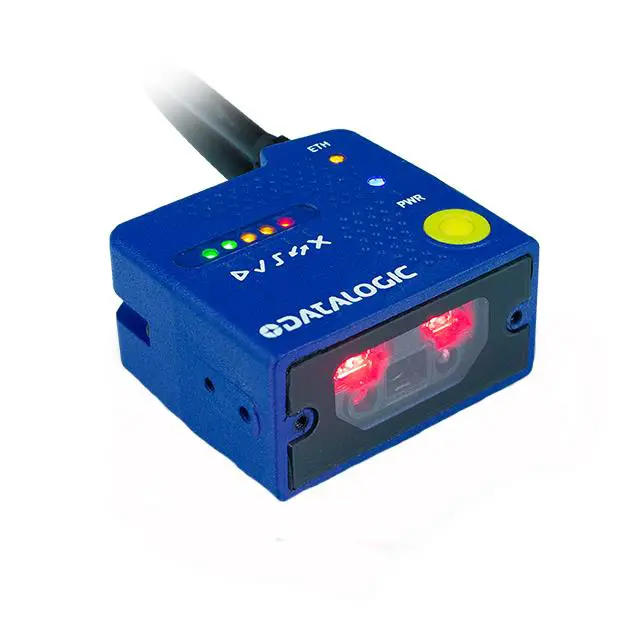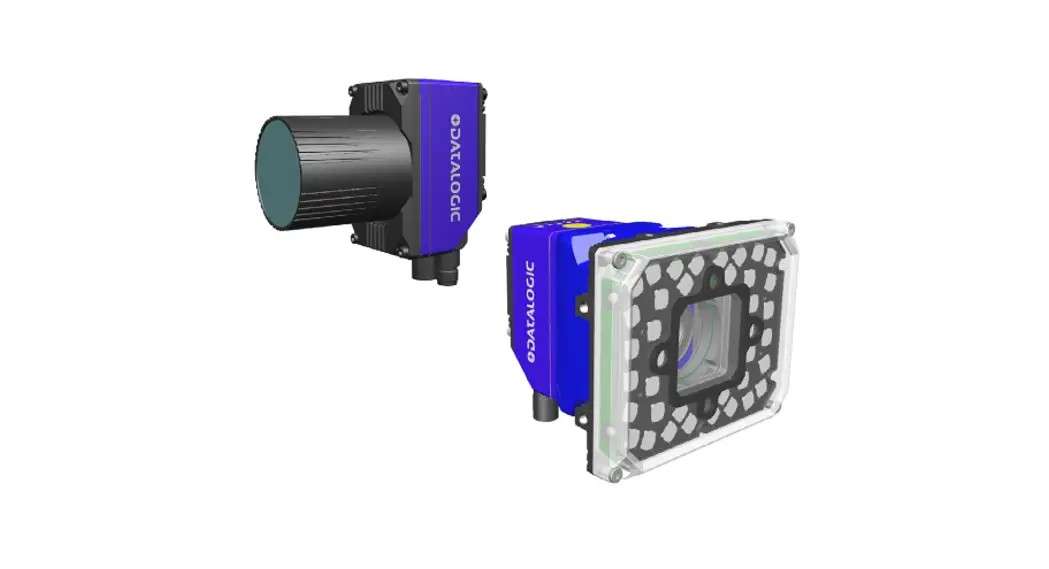
 MATRIX 320™
C-MOUNT
QUICK REFERENCE GUIDE
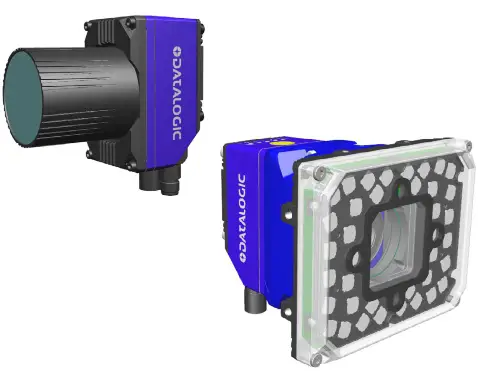
Matrix 320 C-Mount without illuminator
Image Based Industrial Reader
©2021 Datalogic S.p.A. and/or its affiliates
- All rights reserved
- Without limiting the rights under copyright, no part of this documentation may be reproduced, stored in, or introduced into a retrieval system, or transmitted in any form or by any means, or for any purpose, without the express written permission of Datalogic S.p.A. and/or its affiliates
- Datalogic and the Datalogic logo are registered trademarks of Datalogic S.p.A. in many countries, including the U.S. and the E.U.
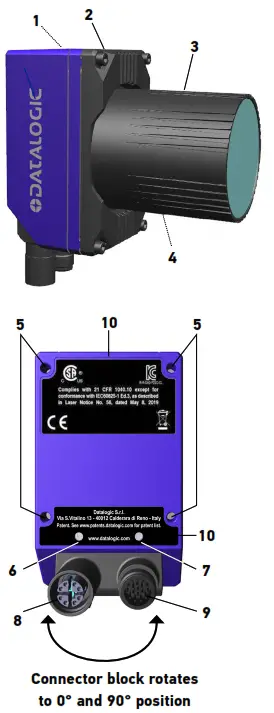
| 1 | HMI X-PRESS Interface |
| 2 | Base Cover |
| 3 | Lens Cover |
| 4 | Lens |
| 5 | Bracket Mounting Holes (4) |
| 6 | Power On LED |
| 7 | Ethernet Connection LED |
| 8 | Ethernet Connector |
| 9 | Power – COM – I/O Connector |
| 10 | Compliance Label |
Matrix 320 C-Mount with 36 LEDs illuminator
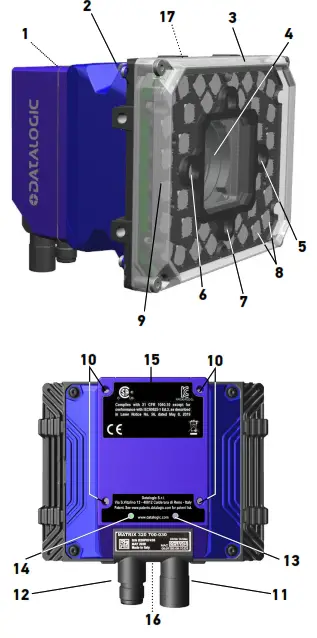
| 1 | HMI X-PRESS Interface |
| 2 | Adapter |
| 3 | Lens Cover |
| 4 | Lens |
| 5 | Red Spot |
| 6 | Green Spot |
| 7 | Aiming System Laser Pointers |
| 8 | Internal Illuminator |
| 9 | 360° Feedback |
| 10 | Bracket Mounting Holes (4) |
| 11 | Ethernet Connector |
| 12 | Power – COM – I/O Connector |
| 13 | Ethernet Connection LED |
| 14 | Power On LED |
| 15 | Compliance Label |
| 16 | Avoid Laser Exit Point Label |
| 17 | Device Class and Warning Labels |
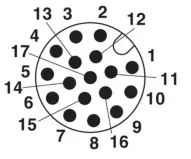
M12 17-pole male Power, COM, and I/O connector
| Pin | Name | Description | |
| 1 | Vdc | Power supply input voltage + | |
| 2 | GND | Power supply input voltage – | |
| Connector case | CHASSIS | The connector case provides an electrical connection to the chassis | |
| 6 | I1A | External Trigger A (polarity insensitive) | |
| 5 | I1B | External Trigger B (polarity insensitive) | |
| 13 | I2A | Input 2 A (polarity insensitive) | |
| 3 | I2B | Input 2 B (polarity insensitive) | |
| 9 | O1 | Output 1 * | (NPN, PNP, or PP short circuit protected and software programmable) |
| 8 | O2 | Output 2 * | |
| 16 | O3 | Output 3 | |
| 14 | RX | Auxiliary RS232 RX | |
| 4 | TX | Auxiliary RS232 TX | |
| 7 | ID+ | ID-NET network data + | |
| 15 | ID- | ID-NET network data – | |
| RS232 | RS422 Full-Duplex | ||
| 17 | Main Interface (SW selectable) | TX | TX+ |
| 11 | RX | RX+ ** | |
| 12 | – TX- | ||
| 10 | – RX- ** | ||
* Output 1 and Output 2 are optocouplers when using a CBX.
** Do not leave floating. See Product Reference Guide for connection details.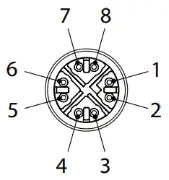 M12 X-Coded female Ethernet Network connector
| Pin | Name | Description |
| 1 | DA+ | Bidirectional data DA+ |
| 2 | DA- | Bidirectional data DA- |
| 3 | DB+ | Bidirectional data DB+ |
| 4 | DB- | Bidirectional data DB- |
| 5 | DD+ | Bidirectional data DD+ |
| 6 | DD- | Bidirectional data DD- |
| 7 | DC- | Bidirectional data DC- |
| 8 | DC+ | Bidirectional data DC+ |
INSTALLATION PROCEDURE
- Physically mount the Matrix 320 reader. Refer to Matrix 320 C-Mount Mounting Instructions.
- Make the necessary electrical connections.
- Configure the reader using the X-PRESS interface (simple configuration) or the DL.CODE software configuration program (complete configuration).
HMI X-PRESS™ INTERFACE
In normal operating mode the colors and meaning of the five LEDs are illustrated in the following table:
| READY (green) | indicates the device is ready to operate. |
| GOOD (green) | confirms successful reading. |
| TRIGGER (yellow) | indicates the status of the reading phase. |
| COM (yellow) | indicates active communication on the main serial port. |
| STATUS (red) | indicates NO READ result. |
During the reader startup (reset or restart phase), all the LEDs blink for one second.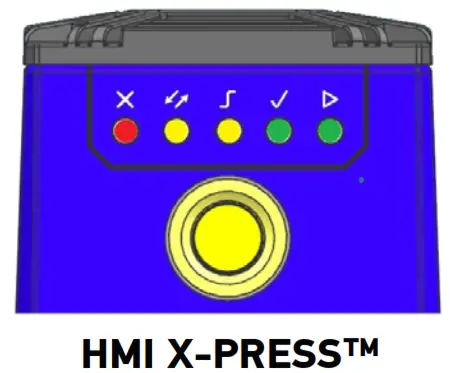 The single push button gives immediate access to the following relevant functions:
- Test Mode with bar graph visualization to check static reading performance.
- Aim/Autofocus turns on the laser LED to aim the reader at the target. The target should be placed 16 mm (14 LEDs model) or 30 mm (36 LEDs model) upwards and centered horizontally with respect to the aiming pattern (cross).
- Set up to self-optimize and auto-configure photometry parameters.
- Learn to self-detect and auto-configure for reading an unknown barcode (by type and length). Only one symbology can be saved using this method. Performing Autolearn on a second symbology will overwrite the first one.
TECHNICAL SPECIFICATIONS
Electrical Features
Power
| Supply Voltage | 24 Vdc ± 10% |
| Peak Supply Current | Without illuminator: 250 mA max. With white illuminator: 850 mA max. |
| Average Supply Current | Without illuminator: 150 mA With white illuminator: 520 mA |
Communication interfaces
| Main: RS232, RS422 Full-Duplex | 2400 to 115200 bit/s |
| Auxiliary: RS232 | 2400 to 115200 bit/s |
ID-NET
| Main: RS232, RS422 Full-Duplex | 2400 to 115200 bit/s |
| Auxiliary: RS232 | 2400 to 115200 bit/s |
Inputs
| Ethernet (Built-in) supported application protocols | 10/100/1000 Mbit/s TCP/IP, UDP, FTP, EtherNet/IP, Modbus TCP, PROFINET-IO |
| Inputs Input 1 (External Trigger) and Input 2 | Opto-coupled and polarity insensitive |
| Max. Voltage | 30 Vdc |
| Max. Input Current | 10 mA |
| Outputs 1 Output 1, 2 and 3 | NPN, PNP, or PP short circuit protected |
| VOUT (ILOAD = 0 mA) max. | 24 Vdc |
| VOUT (ILOAD = 100 mA) max. | 3 Vdc |
| ILOAD max. | 100mA |
1 When connected to the CBX connection boxes, the electrical features for Outputs 1 and 2 become the following:
Opto-coupled, VCE = 30 Vdc max.; ICE = 40 mA continuous max.; 130 mA pulsed max.;
VCE saturation = 1 Vdc max. @ 10 mA; PD = 90 mW max. @ 50 °C ambient temperature.
Environmental Features
| Operating temperature 2 | -100 to 50 °C (14 to 122 °F) |
| Storage temperature | -20 to 70 °C (-4 to 158 °F) |
| Max. humidity | 90% noncondensing |
| Vibration resistance EN 60068-2-6 | 14 mm @ 2 to 10 Hz; 1.5 mm @ 13 to 55 Hz; 2 g @ 70 to 500 Hz; 2 hours on each axis |
| Bump resistance EN 60068-2-29 | 30 g; 6 ms; 5000 shocks on each axis |
| Shock resistance EN 60068-2-27 | 30 g; 11 ms; 3 shocks on each axis |
| Protection class 3 EN 60529 | IP65 and IP67 |
Physical Features
| Matrix 320 C-Mount without illuminator | Matrix 320 C-Mount with 36 LEDs illuminator | |
| Dimensions (with lens cover, connectors at 0°) | H x W x L 108.7 x 54 x 54.3 mm (4.3 x 2.1 x 2.14 in) | H x W x L1 15.5 x 126 x 124.8 mm (4.6 x 4.9 x 4.91 in) |
| Weight | 300 g (10.6 oz) | 900 g (31.7 oz) |
| Material | Aluminum |
Software Features
Readable Code Symbologies
| 1D and Stacked | 2D | Postal |
| • PDF417 Standard and Micro PDF417 • Code 128 (GS1-128) • Code 39 (Standard and Full ASCII) • Code 32 • MSI • Standard 2 of 5 • Codabar • Code 93 • Pharmacode • EAN-8/13 – UPC-A/E (including Addon 2 and Addon 5) • GS1 DataBar Family • Composite Symbologies | • Data Matrix ECC 200 (Standard, GS1 and Direct Marking) • QR Code (Standard and Direct Marking) • Micro QR Code • MAXICODE • Aztec Code • DotCode | • Australia Post • Royal Mail 4 State Customer • Kix Code • Japan Post • PLANET • POSTNET • POSTNET (+BB) • Intelligent Mail • Swedish Post |
| Operating Mode | Continuous, One Shot, Phase Mode, PackTrack | |
| Configuration Methods | X-PRESS Human Machine Interface. Windows-based DL.CODE (Ethernet / Serial interface). Serial Host Mode Programming sequences. | |
| Parameter Storage | Permanent memory (Flash) | |
Code Quality Metrics
| Standard | Supported Symbologies |
| ISO/IEC 16022 (always enabled) | Data Matrix ECC 200 |
| ISO/IEC 18004 (always enabled) | QR Code |
| AIM DPM | Data Matrix ECC 200, QR Code |
| ISO/IEC 15416 | Code 128, Code 39, Interleaved 2 of 5, Codabar, Code 93, EAN-8-13, UPC-A/E |
2 High ambient temperature applications should use metal mounting brackets and the heat sink provided in the package for heat dissipation.
3 When correctly connected to IP67 cables with seals and the Lens Cover is correctly mounted.
Optical Features
| Image Sensor | CMOS |
| Image Format | 2.0 Mpixel (1920 x 1080) |
| Frame Rate | 60 frames/s |
| Pitch | ± 35° |
| Tilt | 0° – 360° |
| LED Safety | according to EN 62471 |
| Lenses | C-Mount 4mm, 6mm, 8mm, 12mm, 16mm, 25mm, 35mm |
| Aperture Angle | 68°, 48°, 37°, 25°, 19°, 12°, 9° |
| Lighting System | External or internal illuminator (36 LEDs) |
| Reading Range (considering the lens front) | 4mm: 0mm – ∞ 6mm, 8mm: 50mm – ∞ 12mm: 100mm – ∞ 16mm, 25mm, 35mm: 200mm – ∞ |
| Illumination | Internal illuminators with blue, white, IR, and UV lights |
| Aiming System | Laser cross red projection aiming |
| Polarizing Filter | Polarizing cover accessory |
User Interface
| LED indicators | Power, Ready, Good; Trigger; Com, Sta- tus, (Ethernet Network); Good Read (Green Spot) |
| Keypad button | Configurable via DL.CODE |
COMPLIANCE
General
For installation, use and maintenance it is not necessary to open the reader. Only connect Ethernet and data port connections to a network that has routing only within the plant or building and no routing outside the plant or building.
Power Supply
ATTENTION: READ THIS INFORMATION BEFORE INSTALLING THE PRODUCT The unit is intended to be powered by an external power supply ES1, PS2 according to IEC 62368-1:2014.
EMC Compliance
In order to meet the EMC requirements:
- connect reader chassis to the plant earth ground by means of a flat copper braid shorter than 100 mm;
- for CBX connections, connect pin “Earth” to a good Earth Ground;
- for direct connections, connect your cable shield to the locking ring nut of the connector.
CE Compliance
CE marking states the compliance of the product with essential requirements listed in the applicable European directive. Since the directives and applicable standards are subject to continuous updates, and since Datalogic promptly adopts these updates, therefore the EU declaration of conformity is a living document. The EU declaration of conformity is available for competent authorities and customers through Datalogic commercial reference contacts. Since April 20th, 2016 the main European directives applicable to Datalogic products require the inclusion of adequate analysis and assessment of the risk(s). This evaluation was carried out in relation to the applicable points of the standards listed in the Declaration of Conformity. Datalogic products are mainly designed for integration purposes into more complex systems. For this reason, it is the responsibility of the system integrator to do a new risk assessment regarding the final installation.
Warning: this is a Class A product. In a domestic environment, this product may cause radio interference in which case the user may be required to take adequate measures.
LED Safety
According to EN 62471:2010, for all Datalogic Matrix 320 compatible internal illuminators, LED emission is classified into Risk Group 1, except Matrix 320 with UV illuminator which is Risk Group 3.
Laser Safety using a 36 LED illuminator
This product conforms to the applicable requirements of IEC 60825-1 and complies with 21 CFR 1040.10 except for deviations pursuant to Laser Notice N° 56, date May 8, 2019. This product is classified as a Class 2 laser product according to IEC 60825-1 regulation. CAUTION: Use of controls or adjustments or performance of procedures other than those specified herein may result in exposure to hazardous visible laser light.
Disconnect the power supply when opening the device during maintenance or installation to avoid exposure to hazardous laser light. The laser beam can be switched on or off through a software command.
The following warning label content is applied to the laser-equipped products indicated on the opposite page.

WARRANTY
Datalogic warrants that the Products shall be free from defects in materials and workmanship under normal and proper use during the Warranty Period. Products are sold on the basis of specifications applicable at the time of manufacture and Datalogic has no obligation to modify or update Products once sold. The Warranty Period shall be two years from the date of shipment by Datalogic unless otherwise agreed in applicable writing by Datalogic. Datalogic will not be liable under the warranty if the Product has been exposed or subjected to any:
- maintenance, repair, installation, handling, packaging, transportation, storage, operation, or use that is improper or otherwise not in compliance with Datalogic’s instruction;
- Product alteration, modification, or repair by anyone other than Datalogic or those specifically authorized by Datalogic;
- accident, contamination, foreign object damage, abuse, neglect, or negligence after shipment to Buyer;
- damage caused by failure of a Datalogic-supplied product not under warranty or by any hardware or software not supplied by Datalogic;
- )any device on which the warranty void seal has been altered, tampered with, or is missing;
- any defect or damage caused by a natural or man-made disaster such as but not limited to fire, water damage, floods, other natural disasters, vandalism, or abusive events that would cause internal and external component damage or destruction of the whole unit, consumable items;
- use of counterfeit or replacement parts that are neither manufactured nor approved by Datalogic for use in Datalogic-manufactured Products;
- any damage or malfunctioning caused by non-restoring action as for example firmware or software upgrades, software or hardware reconfigurations, etc.;
- loss of data;
- any consumable or equivalent (e.g. cables, power supply, batteries, etc.); or
- any device on which the serial number is missing or not recognizable.
THE DATA LOGIC WARRANTIES ARE EXCLUSIVE AND IN LIEU OF ALL OTHER WARRANTIES, WHETHER WRITTEN, EXPRESS, IMPLIED, STATUTORY, OR OTHERWISE, INCLUDING, BUT NOT LIMITED TO, THE IMPLIED WARRANTIES OF MERCHANTABILITY AND FITNESS FOR A PARTICULAR PURPOSE. DATALOGIC SHALL NOT BE LIABLE FOR ANY DAMAGES SUSTAINED BY THE BUYER ARISING FROM DELAYS IN THE REPLACEMENT OR REPAIR OF PRODUCTS UNDER THE ABOVE. THE REMEDY SET FORTH IN THE WARRANTY STATEMENT IS THE BUYER’S SOLE AND EXCLUSIVE REMEDY FOR WARRANTY CLAIMS. NO EXTENSION OF THIS WARRANTY WILL BE BINDING UPON DATALOGIC UNLESS SET FORTH IN WRITING AND SIGNED BY DATALOGIC’S AUTHORIZED REPRESENTATIVE. DATALOGIC’S LIABILITY FOR DAMAGES ON ACCOUNT OF A CLAIMED DEFECT IN ANY PRODUCT DELIVERED BY DATALOGIC SHALL IN NO EVENT EXCEED THE PURCHASE PRICE OF THE PRODUCT ON WHICH THE CLAIM IS BASED. DATALOGIC SHALL NOT BE LIABLE FOR DAMAGES RELATING TO ANY INSTRUMENT, EQUIPMENT, OR APPARATUS WITH WHICH THE PRODUCT SOLD UNDER THIS AGREEMENT IS USED. Further details on warranty coverage, rights, and conditions are addressed under and regulated by the Terms and Conditions of Sales of Datalogic available at https://www.datalogic.com/terms_conditions_sales.
©2021 Datalogic S.p.A. and/or its affiliates
All rights reserved. Without limiting the rights under copyright, no part of this documentation may be reproduced, stored in or introduced into a retrieval system, or transmitted in any form or by any means, or for any purpose, without the express written permission of Datalogic S.p.A. and/ or its affiliates.
Owners of Datalogic products are hereby granted a non-exclusive, revocable license to reproduce and transmit this documentation for the purchaser’s own internal business purposes. Purchaser shall not remove or alter any proprietary notices, including copyright notices, contained in this documentation and shall ensure that all notices appear on any reproductions of the documentation. Electronic versions of this document may be downloaded from the Datalogic website (www.datalogic.com). If you visit our website and would like to make comments or suggestions about this or other Datalogic publications, please let us know via the “Contact” page.
Disclaimer
Datalogic has taken reasonable measures to provide information in this manual that is complete and accurate, however, Datalogic shall not be liable for technical or editorial errors or omissions contained herein, nor for incidental or consequential damages resulting from the use of this material. Datalogic reserves the right to change any specification at any time without prior notice.
Trademarks
Datalogic and the Datalogic logo are registered trademarks of Datalogic S.p.A. in many countries, including the U.S.A. and the E.U. Matrix 320, ID-NET, DL.CODE and X-PRESS are trademarks of Datalogic S.p.A. and/or its affiliates. All other brand and product names may be trademarks of their respective owners.
Download the Matrix 320 Product Reference Guide by reading the QR code here or see the paragraph below.
 http://www.datalogic.com/upload/res/manuals/ia/matrix_320_product_reference_guide_eng.pdf
SUPPORT THROUGH THE WEBSITE
Datalogic provides several services as well as technical support through its website.
Log on to www.datalogic.com.
For quick access, from the home page click on the search icon, and type in the name of the product you’re looking for. This allows you access to download Data Sheets, Manuals, Software & Utilities, and Drawings. Hover over the Support & Service menu for access to Services and
Technical Support.
PATENTS
See www.patents.datalogic.com for the patent list.
This product is covered by one or more of the following patents:
Utility patents: EP1172756B1, EP2517148B1, EP2616988B1,
EP2649555B1, EP3016028B1, EP3092597B1, IT1404187,
JP5947819B2, US10229301, US6808114, US6877664, US6997385,
US7387246, US7433590, US7433590, US8245926, US8888003,
US8915443, US9122939, US9349047, US9361503, US9798948,
US10133895, US10229301, US10540532, ZL200980163411.X,
ZL201080071124.9, ZL201180044793.1, ZL201280010789.8
Datalogic S.r.l.
Via San Vitalino 13
40012 Calderara di Reno (BO) Italy
Tel. +39 051 3147011
Fax +39 051 3147205
www.datalogic.co
 Datalogic | Automatic Data Capture and Process Automation - Datalogic
 Patents - Datalogic