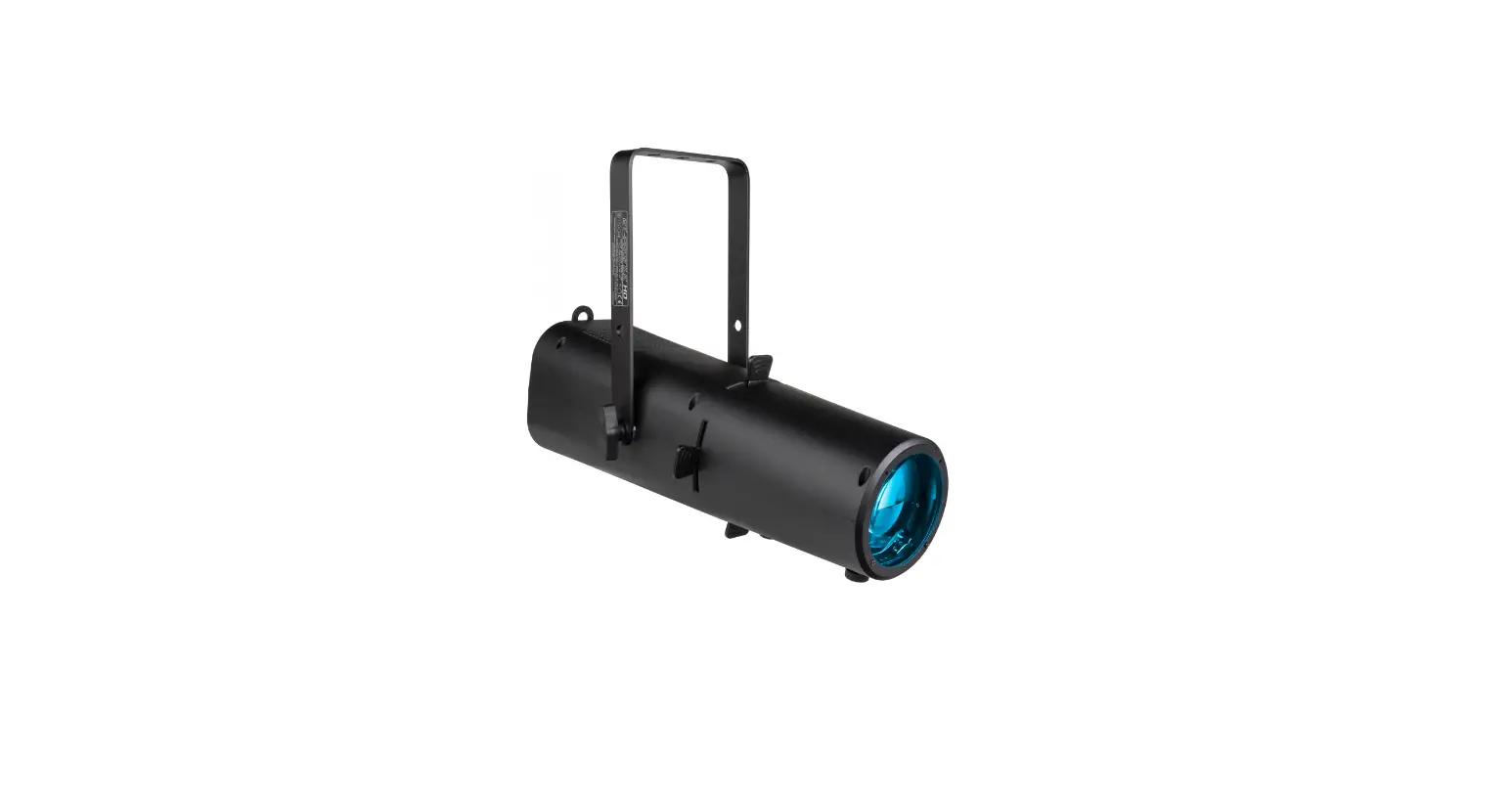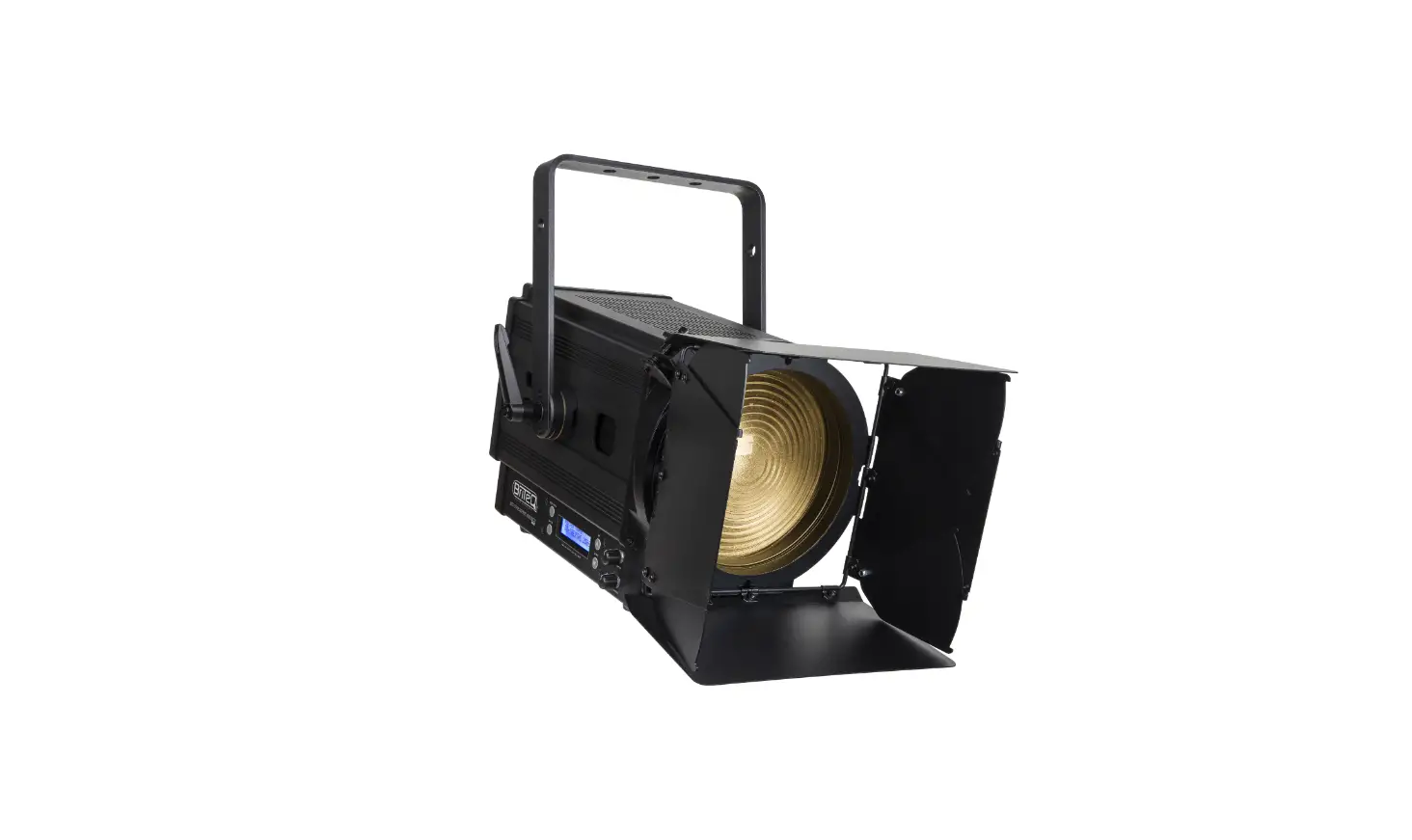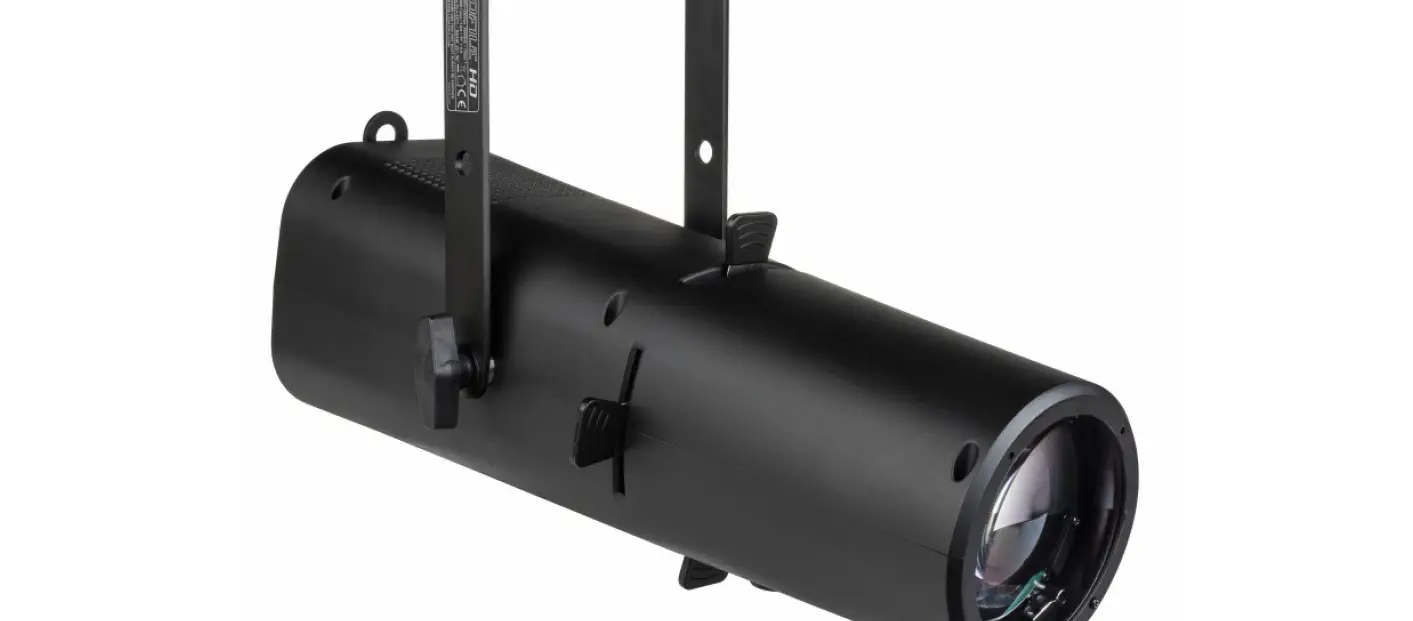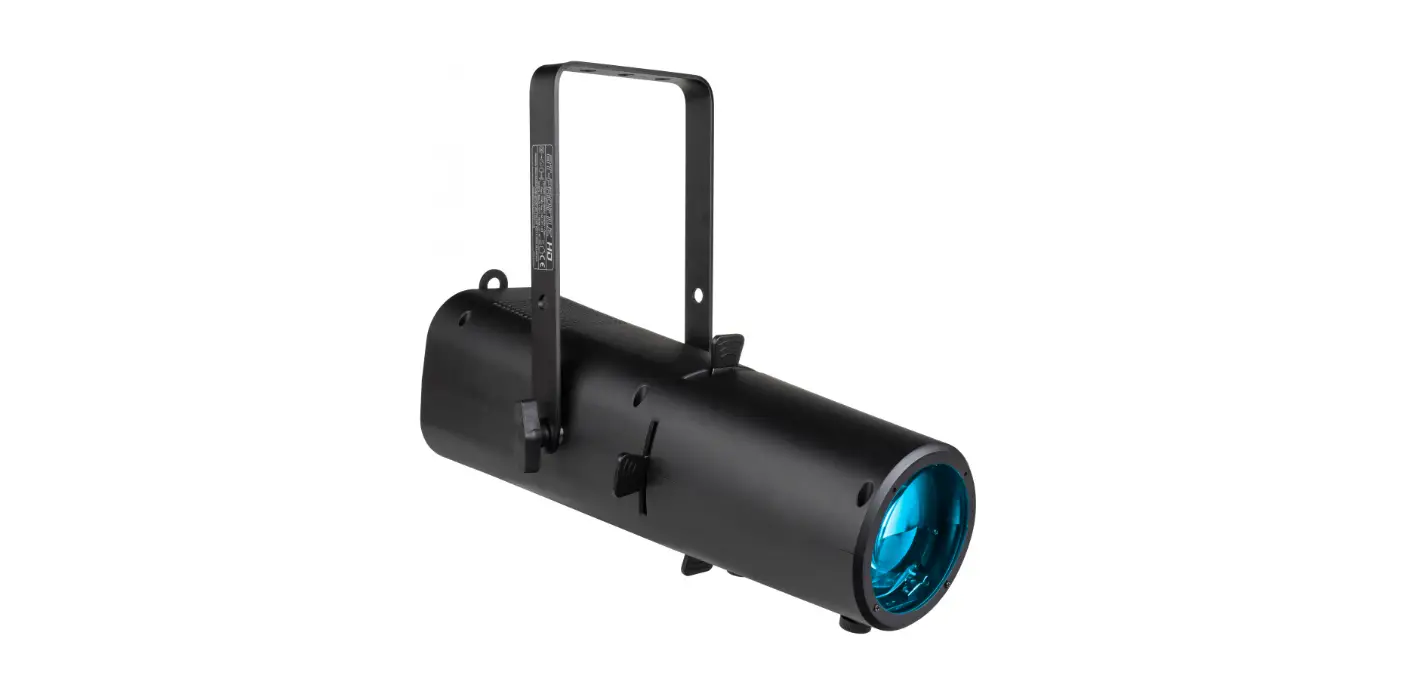

Briteq Lighting BT-PROFILE HD Profil 15W RGBAL LED 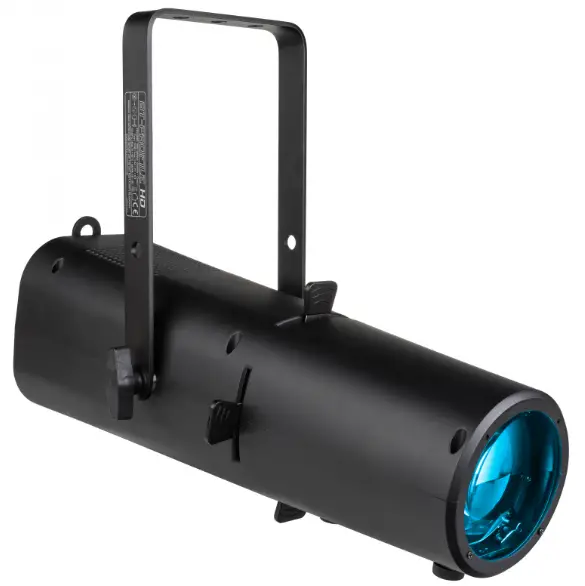
Thank you for buying this Briteq® product. To take full advantage of all possibilities and for your own safety, please read these operating instructions very carefully before you start using this unit.
FEATURES
- A very compact but powerful “ALL-IN-1” full color LED profile with:
- Integrated manual 25° ~ 50° zoom.
- 4 blade shutter framing system to make sharp beam cuts.
- No more need for separate white and color projectors, BT-PROFILE HD does it all:
- Perfect WHITE with high CRI > 90Ra and CCT presets
- Rich COLOR selection with color presets!
- Thanks to the CCS Color Calibration System the color differences between different batches is a problem of the past, while this profile also works perfectly together with our existing BT-THEATRE HD2:
- The same CCT presets for white, ranging from 1800K to 10000K !
- The same 48 calibrated color presets (according to LEE® / ROSCO® numbering)
- Based on a 150watt 5-color RGBAL LED cluster (Red, Green, Blue, Amber, Lime)
- Very silent operation with low noise cooling fan and different presets (live, studio, …)
- DMX-controlled: 6 different channel modes for maximum flexibility
- RDM-functionality for easy remote setup: DMX addressing, channel mode, …
- Flicker-free TV recordings thanks to the adjustable high LED-refresh rate!
- Four dimmer settings with different behavior & speed.
- Manual control for dimming, colors, CCT & zoom.
- OLED display to navigate easily through the setup menu!
- In case of DMX failure, you can choose between blackout and freeze mode.
- Lock function to avoid unwanted altering of the settings.
- Lightweight but rugged housing.
- 5pin DMX in/outputs + PowerCON TRUE1 in/outputs for easy daisy chaining.
BEFORE USE
- Before you start using this unit, please check if there’s no transportation damage. Should there be any, do not use the device and consult your dealer first.
- Important: This device left our factory in perfect condition and well packaged. It is absolutely necessary for the user to strictly follow the safety instructions and warnings in this user manual. Any damage caused by mishandling is not subject to warranty. The dealer will not accept responsibility for any resulting defects or problems caused by disregarding this user manual.
- Keep this booklet in a safe place for future consultation. If you sell the fixture, be sure to add this user manual.
Check the contents:
Check that the carton contains the following items:
- BT-PROFILE HD
- Power cable
- Safety cable
- English operating instructions, other languages can be downloaded from our website.
SAFETY INSTRUCTIONS
 CAUTION: To reduce the risk of electric shock, do not remove the top cover. No user-serviceable parts inside. Refer servicing to qualified service personnel only.
The lightning flash with arrowhead symbol within the equilateral triangle is intended to alert the use or the presence of un-insulated “dangerous voltage” within the product’s enclosure that may be of sufficient magnitude to constitute a risk of electric shock. The exclamation point within the equilateral triangle is intended to alert the user to the presence of important operation and maintenance (servicing) instructions in the literature accompanying this appliance.
 This symbol means: indoor use only
 This symbol means: Read instructions
 This symbol determines: the minimum distance from lighted objects. The minimum distance between light-output and the illuminated surface must be more than 1 meters
CAUTION: Do not stare at operating lamp. May be harmful to the eyes.
- To protect the environment, please try to recycle the packing material as much as possible.
- To prevent fire or shock hazard, do not expose this appliance to rain or moisture.
- To avoid condensation to be formed inside, allow the unit to adapt to the surrounding temperatures when bringing it into a warm room after transport. Condense sometimes prevents the unit from working at full performance or may even cause damages.
- This unit is for indoor use only.
- Don’t place metal objects or spill liquid inside the unit. Electric shock or malfunction may result. If a foreign object enters the unit, immediately disconnect the mains power.
- Locate the fixture in a well-ventilated spot, away from any flammable materials and/or liquids. The fixture must be fixed at least 50cm from surrounding walls.
- Don’t cover any ventilation openings as this may result in overheating.
- Prevent use in dusty environments and clean the unit regularly.
- Keep the unit away from children.
- Inexperienced persons should not operate this device.
- Maximum safe ambient temperature is 40°C. Don’t use this unit at higher ambient temperatures.
- Make sure the area below the installation place is free from unwanted persons during rigging, de-rigging and servicing.
- Allow the device about 10 minutes to cool down before to start servicing.
- Always unplug the unit when it is not used for a longer time or before to start servicing.
- The electrical installation should be carried out by qualified personal only, according to the regulations for electrical and mechanical safety in your country.
- Check that the available voltage is not higher than the one stated on the unit.
- The power cord should always be in perfect condition. Switch the unit immediately off when the power cord is squashed or damaged. It must be replaced by the manufacturer, its service agent or similarly qualified persons in order to avoid a hazard.
- Never let the power-cord come into contact with other cables!
- This fixture must be earthed in order to comply with safety regulations.
- Don’t connect the unit to any dimmer pack.
- Always use an appropriate and certified safety cable when installing the unit.
- In order to prevent electric shock, do not open the cover. Apart from the mains fuse there are no user serviceable parts inside.
- Never repair a fuse or bypass the fuse holder. Always replace a damaged fuse with a fuse of the same type and electrical specifications!
- In the event of serious operating problems, stop using the fixture and contact your dealer immediately.
- The housing and the lenses must be replaced if they are visibly damaged.
- Please use the original packing when the device is to be transported.
- Due to safety reasons it is prohibited to make unauthorized modifications to the unit.
Important: Never look directly into the light source! Don’t use the effect in the presence of persons suffering from epilepsy.
OVERHEAD RIGGING
Important: The installation must be carried out by qualified service personal only. Improper installation can result in serious injuries and/or damage to property. Overhead rigging requires extensive experience! Working load limits should be respected, certified installation materials should be used, the installed device should be inspected regularly for safety.
- Make sure the area below the installation place is free from unwanted persons during rigging, de-rigging and servicing.
- Locate the fixture in a well-ventilated spot, far away from any flammable materials and/or liquids. The fixture must be fixed at least 50cm from surrounding walls.
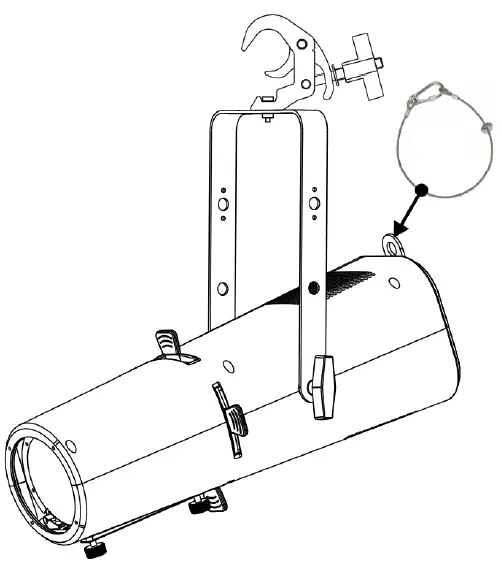
- The device should be installed out of reach of people and outside areas where persons may walk by or be seated.
- Before rigging make sure that the installation area can hold a minimum point load of 10times the device’s weight.
- Always use a certified safety cable that can hold 12times the weight of the device when installing the unit. This
secondary safety attachment should be installed in a way that no part of the installation can drop more than 20cm if the main attachment fails. - The device should be well fixed; a free-swinging mounting is dangerous and may not be considered!
- Don’t cover any ventilation openings as this may result in overheating.
- The operator has to make sure that the safety-relating and machine-technical installations are approved by an expert before using them for the first time. The installations should be inspected every year by a skilled person to be sure that safety is still optimal.
With the setup menu you can fully configure the projector. All settings are preserved when the unit is disconnected from the mains.
■ [MENU] button: press to enter / leave the setup menu.
► [ENTER] button: press to select / confirm or store the current menu option or value.
▲/▼ [UP/DOWN] button: press to navigate the setup menu or change a value.
|
STATIC | RED | 0-255 | Combine [RED] [GREEN] [BLUE] [LIME] [AMBER] [CYAN] to create an infinite range of colors (0-255).
Set the value of the [STROBE] (0- 25Hz). | ||
| GREEN | 0-255 | ||||
| BLUE | 0-255 | ||||
| AMBER | 0-255 | ||||
| LIME | 0-255 | ||||
| STROBE | 0-25 | ||||
| ADDRESS | 001-512 (default 001) | Set the DMX ADDRESS | |||
| RUN MODE | DMX (default) | [DMX] Using the DMX 512 controller to control. [SLAVE] for Master/Slave operation. | |||
| SLAVE | |||||
|
PERSONALITY | BASIC |
Use the menu to select desired channel mode | |||
| SSP | |||||
| TOUR (default) | |||||
| TR16 | |||||
| HSIC | |||||
| CMY | |||||
|
AUTO PROGRAM | AUTO 1 | 0-255 | Selects automatic AUTO program and AUTO program speed. Programs [CUSTOM 1] to [CUSTOM 2] are fully pre-programmed and can be edited in [EDIT] mode. | ||
| AUTO 2 | 0-255 | ||||
| … | 0-2 55 | ||||
| AUTO 10 | 0-255 | ||||
| PR 1 | |||||
| PR 2 | |||||
|
EDIT |
PROGRAM 1-2 |
SCENE 01-10 | RED | 0-255 | Enter the [EDIT] mode to edit the custom programs [PROGRAM01] to [PROGRAM2]. Each custom program has 30 scenes that can be edited. Fade transition time: time 0-255 unit in seconds, fade time setting should be less than time setting.
After editing the program, Play in AUTO. |
| GREEN | 0-255 | ||||
| BLUE | 0-255 | ||||
| AMBER | 0-255 | ||||
| LIME | 0-255 | ||||
| STROBE | 0-25 | ||||
| TIME | 0-255 | ||||
| FADE | 0-255 | ||||
| UPLOAD | **** | SEND | Select [UPLOAD] to upload the custom programs | ||
|
SETTING |
**** | RESET | **** | RESET | Restore factory settings |
| DIMMER | DIM4 (default) | Dimming speed DIM1 (fast) to DIM4 (slow); | |||
| OFF | |||||
| DMX | SAVE (default) | Hold after loss of DMX signal | |||
| ERROR | BLACK | Blackout after loss of DMX signal | |||
|
LED PWM | 1200Hz (default) |
Sets the PWM frequency | |||
| 2400Hz | |||||
| 4000Hz | |||||
| 6000Hz | |||||
| 25000Hz | |||||
| PERFORM | LIVE (default) | Fan mode low speed | |||
| POWER | Fast rotation of fan,all power | ||||
| STUDIO | Automatic rotation of fan | ||||
| DISP KEY | ON (default) | Locks display (passcode is <UP>, <DOWN >,<UP>, <DOWN>, <ENTER>) | |||
| OFF | |||||
| DISP TIME | ON | Display backlight always on | ||
| 10s | Turns off display backlight after 10s / 30s / 2min of inactivity | |||
| 30s (default) | ||||
| 2min | ||||
| FIXTURE HOURS | Hours of fixture use | |||
| VERSION | Software versions | |||
| INFO | RDM | UID | 0x21220xxxxxxx | Check fixture’s ID |
| LABEL | BT-PROFILE HD | Check fixture’s LABEL | ||
|
CCT | 1800K |
Preset color temperatures | ||
| 2200K | ||||
| 2700K | ||||
| 3000K | ||||
| 3200K | ||||
| 4000K | ||||
| 4500K | ||||
| 5000K | ||||
| 5600K | ||||
| 6000K | ||||
| 6500K | ||||
| 7000K | ||||
| 8000K | ||||
| 10000K | ||||
| PRESET COLOR | COLOR 1 | Preset color (See Annex I for details) | ||
| COLOR 2 | ||||
| … | ||||
| COLOR 48 | ||||
| All passwords of this product are <UP>, <DOWN>, <UP>, <DOWN>, <ENTER>) | ||||
ELECTRICAL INSTALLATION
Important: The electrical installation should be carried out by qualified personal only, according to the regulations for electrical and mechanical safety in your country.
Electrical installation for two or more units in DMX-mode:
- The DMX-protocol is a widely used high speed signal to control intelligent light equipment. You need to “daisy chain” your DMX controller and all the connected units.
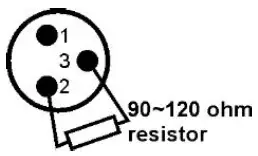
- Pin layout XLR-3pin: Pin1 = GND ~ Pin2 = Negative signal (-) ~ Pin3 = Positive signal (+)
- To prevent strange behavior of the light effects, due to interferences, you must use a 90Ω to 120Ω terminator at the end of the chain. Never use Y-splitter cables, this simply won’t work!
- Make sure that all units are connected to the mains.
- Each unit in the chain needs to have its proper starting address so it knows which commands from the controller it has to decode.
RDM FUNCTIONS / REMOTE SETUP
RDM means “Remote Device Management”. This projector works with a brief set of RDM-functions which means that it can setup a bi-directional communication with an RDM-compatible DMX-controller. Some of these functions are briefly explained below, others will be added in the future.
- The DMX-controller sends out a “discovery command”, all RDM devices respond and send their unique device ID.
- The DMX-controller asks each RDM device for some basic data so it knows which devices are connected. The projector will respond:
- Device name: BT-PROFILE HD
- Manufacturer: Briteq®
- Category: LED Dimmer
- Firmware: x.x.x.x (firmware version of the projector)
- DMX address: xxx (current DMX start address of the projector)
- DMX footprint: xx (number of DMX-channels used by the projector)
- Personality: xx (current personality [or DMX-working mode] used by the projectors)
- The DMX-controller can send certain commands to each RDM device which allow remote setup of the units. Thanks to this the projector can be setup remotely.
The following functions can be managed remotely:
No more need to take a ladder and set all units one by one!
- DMX START ADDRESS: The start address can be set remotely from 001 to xxx.
- PERSONALITY: The DMX working mode (DMX-chart) can be set remotely.
These 2 functions make it possible to prepare a complete DMX-patch of all projectors on the DMX-controller and send these data to all projectors at once. More functions will be added later.
DMX CHARTS
Personalities: Basic (3CH) + SSP (7CH) + HSIC (8 CH) + CMY (10CH) + TOUR (12CH) + TR16 (18CH)
| BASIC (3CH) | SSP (7CH) | TOUR (12CH) | TR16 (18CH) | HSIC (7CH) | CMY (10CH) | Function | Values | |
| 1 | 1 | 1 | 1 | 1 | 1 | Dimmer | 0-255 | Intensity 0 to 100% |
| –– | –– | –– | 2 | –– | –– | Dimmer fine | 0-255 | Dimmer intensity fine |
| –– | 2 | 2 | 3 | –– | –– | Red | 0-255 | 0 to 100% |
| –– | –– | –– | 4 | –– | –– | Red fine | 0-255 | Red fine |
| –– | 3 | 3 | 5 | –– | –– | Green | 0-255 | 0 to 100% |
| –– | –– | –– | 6 | –– | –– | Green fine | 0-255 | Green fine |
| –– | 4 | 4 | 7 | –– | –– | Blue | 0-255 | 0 to 100% |
| –– | –– | –– | 8 | –– | –– | Blue fine | 0-255 | Blue fine |
| –– | 5 | 5 | 9 | –– | –– | Amber | 0-255 | 0 to 100% |
| –– | –– | –– | 10 | –– | –– | Amber fine | 0-255 | Amber fine |
| –– | 6 | 6 | 11 | –– | –– | Lime | 0-255 | 0 to 100% |
| –– | –– | –– | 12 | –– | –– | Lime fine | 0-255 | Lime fine |
| –– | –– | –– | –– | 2 | –– | Hue | 0-255 | Hue 0 to 360° |
| –– | –– | –– | –– | 3 | –– | Hue fine | 0-255 | Hue fine |
| –– | –– | –– | –– | 4 | –– | Saturation | 0-255 | Saturation 0 to 100% |
| –– | –– | –– | –– | –– | 2 | Cyan | 0-255 | 0 to 100% |
| –– | –– | –– | –– | –– | 3 | Magenta | 0-255 | 0 to 100% |
| –– | –– | –– | –– | –– | 4 | Yellow | 0-255 | 0 to 100% |
| 2 | –– | 7 | 13 | –– | 5 | Color presets | 0-010 | Disabled |
| 011-255 | Preset colors (annex 1 for details) | |||||||
|
3 |
–– |
8 |
14 |
5 |
6 |
Linear CCT | 0-9 | Disabled |
| 010 | 1800K | |||||||
| 025 | 2200K | |||||||
| 040 | 2700K | |||||||
| 055 | 3000K | |||||||
| 070 | 3200K | |||||||
| 085 | 4000K | |||||||
| 100 | 4500K | |||||||
| 115 | 5000K | |||||||
| 130 | 5600K | |||||||
| 145 | 6000K | |||||||
| 160 | 6500K | |||||||
| 175 | 7000K | |||||||
| 190 | 8000K | |||||||
| 205 | 10000K | |||||||
| 255 | 10000K | |||||||
| –– | –– | 9 | 15 | –– | 7 | Auto programs | 0-040 | Disabled |
| 41-50 | AUTO 1 | |||||||
| 51-60 | AUTO 2 | |||||||
| 61-70 | AUTO 3 | |||||||
| 71-80 | AUTO 4 | |||||||
| 81-90 | AUTO 5 | |||||||
| 91-100 | AUTO 6 | |||||||
| 101-110 | AUTO 7 | |||||||
| 111-120 | AUTO 8 | |||||||
| 121-130 | AUTO 9 | |||||||
| 131-140 | AUTO 10 | |||||||
| 141-150 | PROGRAM 1 | |||||||
| 151-160 | PROGRAM 2 | |||||||
| 161-255 | No function | |||||||
| –– | –– | 10 | 16 | 8 | Auto speed | 0-255 | Slow to fast | |
|
–– |
7 |
11 |
17 |
6 |
9 |
Shutter | 000-009 | Open |
| 010-099 | Strobe (0-25Hz) | |||||||
| 100-109 | Open | |||||||
| 110-179 | THUNDER STROBE | |||||||
| 180-189 | Open | |||||||
| 190-255 | Random Strobe | |||||||
|
–– |
–– |
12 |
18 |
7 |
10 |
Control | 000-060 | No function |
| 061-070 | Fan mode = Live * | |||||||
| 071-080 | Fan mode = Studio * | |||||||
| 081-090 | Fan mode = Power * | |||||||
| 091-100 | Reserved | |||||||
| 101-110 | Dimmer speed off * | |||||||
| 111-120 | Dimmer speed Dim4 * | |||||||
| 121-150 | Reserved | |||||||
| 151-160 | PWM = 1200Hz * | |||||||
| 161-170 | PWM = 2400Hz * | |||||||
| 171-180 | PWM = 4000Hz * | |||||||
| 181-190 | PWM = 6000Hz * | |||||||
| 191-200 | PWM = 25000Hz * | |||||||
| 201-210 | All reset * | |||||||
| 211-255 | Reserved |
MAINTENANCE
- Make sure the area below the installation place is free from unwanted persons during servicing.
- Switch off the unit, unplug the mains cable and wait until the unit has been cooled down.
During inspection the following points should be checked: - All screws used for installing the device and any of its parts should be tightly fastened and may not be corroded.
- Housings, fixations and installations spots (ceiling, truss, suspensions) should be totally free from any deformation.
- When an optical lens is visibly damaged due to cracks or deep scratches, it must be replaced.
- The mains cables must be in impeccable condition and should be replaced immediately when even a small problem is detected.
- In order to protect the device from overheat the cooling fans (if any) and ventilation openings should be cleaned monthly.
- The interior of the device should be cleaned annually using a vacuum cleaner or air-jet.
- The cleaning of internal and external optical lenses and/or mirrors must be carried out periodically to optimize light output. Cleaning frequency depends on the environment in which the fixture operates: damp, smoky or particularly dirty surroundings can cause greater accumulation of dirt on the unit’s optics.
- Clean with a soft cloth using normal glass cleaning products.
- Always dry the parts carefully.
Attention: We strongly recommend internal cleaning to be carried out by qualified personnel!
SPECIFICATIONS
This unit is radio-interference suppressed. This product meets the requirements of the current European and national guidelines. Conformity has been established and the relevant statements and documents have been deposited by the manufacturer.
- Mains Input: AC 100 – 240V, 50/60Hz
- Fuse: T3.15A / 250V (20x5mm)
- Power consumption (max): 170 Watts
- Power connections: Lockable IP Power connector, input / output
- Power Linking capacity: 6A @ 240V
- DMX connections: 5 pin-XLR male / female inputs + outputs
- Lamp: RGBAL LED 170W
- CRI: >90
- Beam Angle: manual zoom 25° ~ 50°
- IP-Rating: IP20
- Operating Temperature: 0°C – 45°C
- Size: See drawing
- Weight: 6,2 kg
DIMENSIONS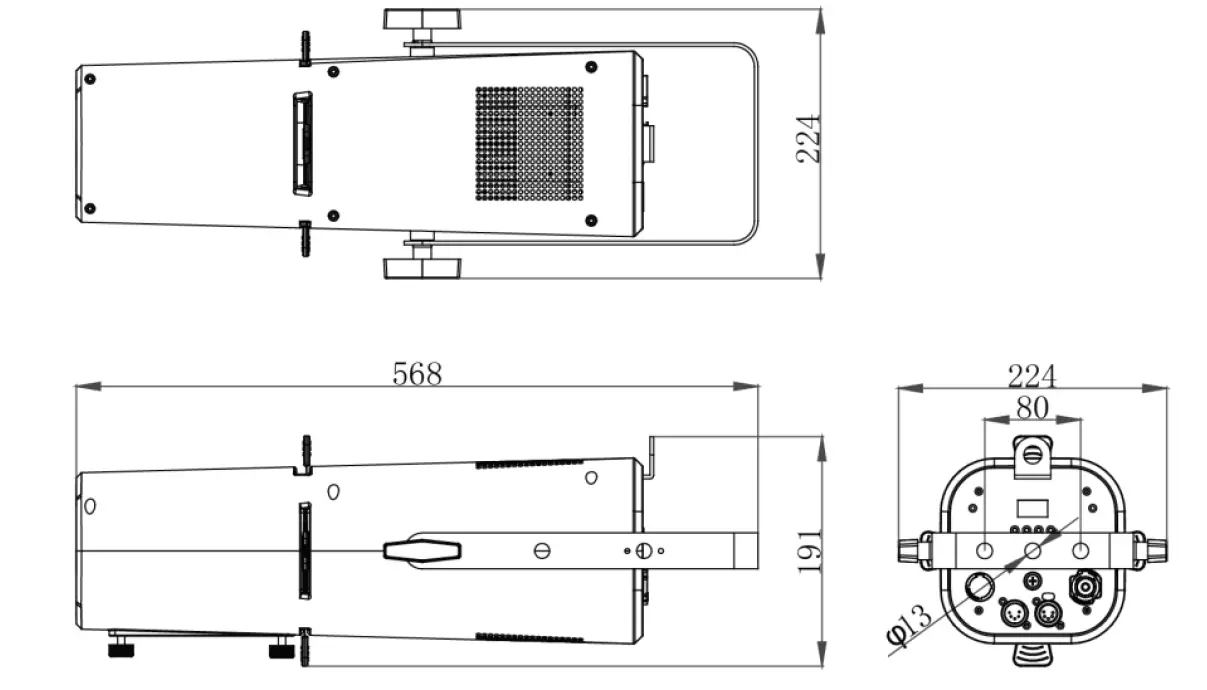
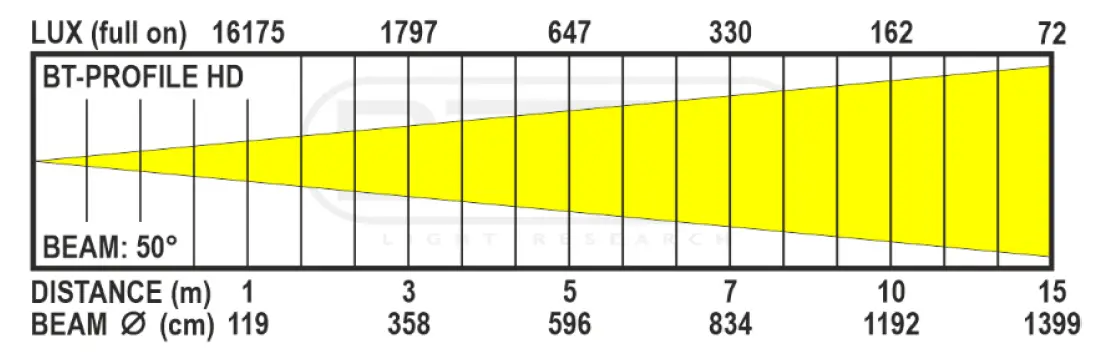
LUX CHARTS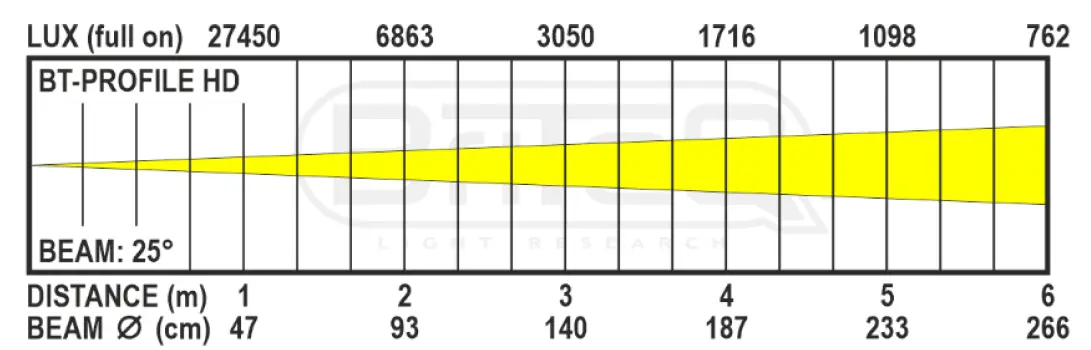
ANNEX 1 ➔ COLOR PRESETS + LEE / ROSCO FILTER NAMES + CIE 1931 X/aY coordinates
| PRESET | VALUE | COLOR NAME | X | Y | |
| 000-010 | NO FUNCTION | ||||
| COLOR 1 | 011-015 | L176 | Loving Amber | 0.407 | 0.321 |
| COLOR 2 | 016-020 | R40 | Light Salmon | 0.499 | 0.321 |
| COLOR 3 | 021-025 | L24 | Scarlet | 0.561 | 0.296 |
| COLOR 4 | 026-030 | L164 | Flame Red | 0.659 | 0.302 |
| COLOR 5 | 031-035 | L747 | Easy White | 0.389 | 0.344 |
| COLOR 6 | 036-040 | R303 | Warm Peach | 0.448 | 0.353 |
| COLOR 7 | 041-045 | L08 | Dark Salmon | 0.498 | 0.347 |
| COLOR 8 | 046-050 | L25 | Sunset Red | 0.566 | 0.359 |
| COLOR 9 | 051-055 | L04 | Medium Bastard Amber | 0.37 | 0.335 |
| COLOR 10 | 056-060 | L237 | C.I.D. (To Tungsten) | 0.43 | 0.365 |
| COLOR 11 | 061-065 | R321 | Soft Golden Amber | 0.477 | 0.406 |
| COLOR 12 | 066-070 | L652 | Urban Sodium | 0.535 | 0.399 |
| COLOR 13 | 071-075 | L212 | L.C.T. Yellow (Y1) | 0.34 | 0.363 |
| COLOR 14 | 076-080 | L765 | LEE Yellow | 0.389 | 0.412 |
| COLOR 15 | 081-085 | L513 | Ice and a Slice | 0.38 | 0.447 |
| COLOR 16 | 086-090 | L100 | Spring Yellow | 0.41 | 0.502 |
| COLOR 17 | 091-095 | L244 | LEE Plus Green | 0.324 | 0.388 |
| COLOR 18 | 096-100 | R4430 | Cal Color 30 Green | 0.318 | 0.44 |
| COLOR 19 | 101-105 | L122 | Fern Green | 0.234 | 0.543 |
| COLOR 20 | 106-110 | L90 | Dark Yellow Green | 0.184 | 0.641 |
| COLOR 21 | 111-115 | L243 | LEE Fluorescent 3600K | 0.286 | 0.37 |
| COLOR 22 | 116-120 | R92 | Turquoise | 0.235 | 0.36 |
| COLOR 23 | 121-125 | R94 | Kelly Green | 0.185 | 0.459 |
| COLOR 24 | 126-130 | L327 | Forest Green | 0.162 | 0.496 |
| COLOR 25 | 131-135 | L191 | Cosmetic Aqua Blue | 0.3 | 0.318 |
| COLOR 26 | 136-140 | L728 | Steel Green | 0.256 | 0.302 |
| COLOR 27 | 141-145 | L117 | Steel Blue | 0.223 | 0.278 |
| COLOR 28 | 146-150 | L354 | Special Steel Blue | 0.173 | 0.265 |
| COLOR 29 | 151-155 | L53 | Paler Lavender | 0.284 | 0.284 |
| COLOR 30 | 156-160 | L501 | New Color Blue | 0.246 | 0.249 |
| COLOR 31 | 161-165 | L174 | Dark Steel Blue | 0.204 | 0.205 |
| COLOR 32 | 166-170 | L165 | Daylight Blue | 0.159 | 0.158 |
| COLOR 33 | 171-175 | L136 | Pale Lavender | 0.288 | 0.254 |
| COLOR 34 | 176-180 | L194 | Surprise Pink | 0.24 | 0.183 |
| COLOR 35 | 181-185 | L142 | Pale Violet | 0.209 | 0.148 |
| COLOR 36 | 186-190 | L700 | Perfect Lavender | 0.177 | 0.07 |
| COLOR 37 | 191-195 | L35 | Light Pink | 0.335 | 0.289 |
| COLOR 38 | 196-200 | L794 | Pretty ‘n Pink | 0.335 | 0.251 |
| COLOR 39 | 201-205 | L328 | Follies Pink | 0.335 | 0.18 |
| COLOR 40 | 206-210 | L795 | Magical Magenta | 0.327 | 0.138 |
| COLOR 41 | 211-215 | L154 | Pale Rose | 0.35 | 0.318 |
| COLOR 42 | 216-220 | L127 | Smokey Pink | 0.397 | 0.265 |
| COLOR 43 | 221-225 | L192 | Flesh Pink | 0.41 | 0.237 |
| COLOR 44 | 226-230 | L332 | Special Rose Pink | 0.465 | 0.193 |
| COLOR 45 | 231-235 | L790 | Moroccan Pink | 0.378 | 0.324 |
| COLOR 46 | 236-240 | L157 | Pink | 0.457 | 0.272 |
| COLOR 47 | 241-245 | R332 | Cherry Rose | 0.489 | 0.295 |
| COLOR 48 | 246-250 | L128 | Cool LED Bright Pink | 0.57 | 0.263 |
| 251-255 | NO FUNCTION | ||||
The information might be modified without prior notice
You can download the latest version of this user manual on our website: www.briteq-lighting.com
MAILING LIST
Subscribe today to our mailing list for the latest product news!