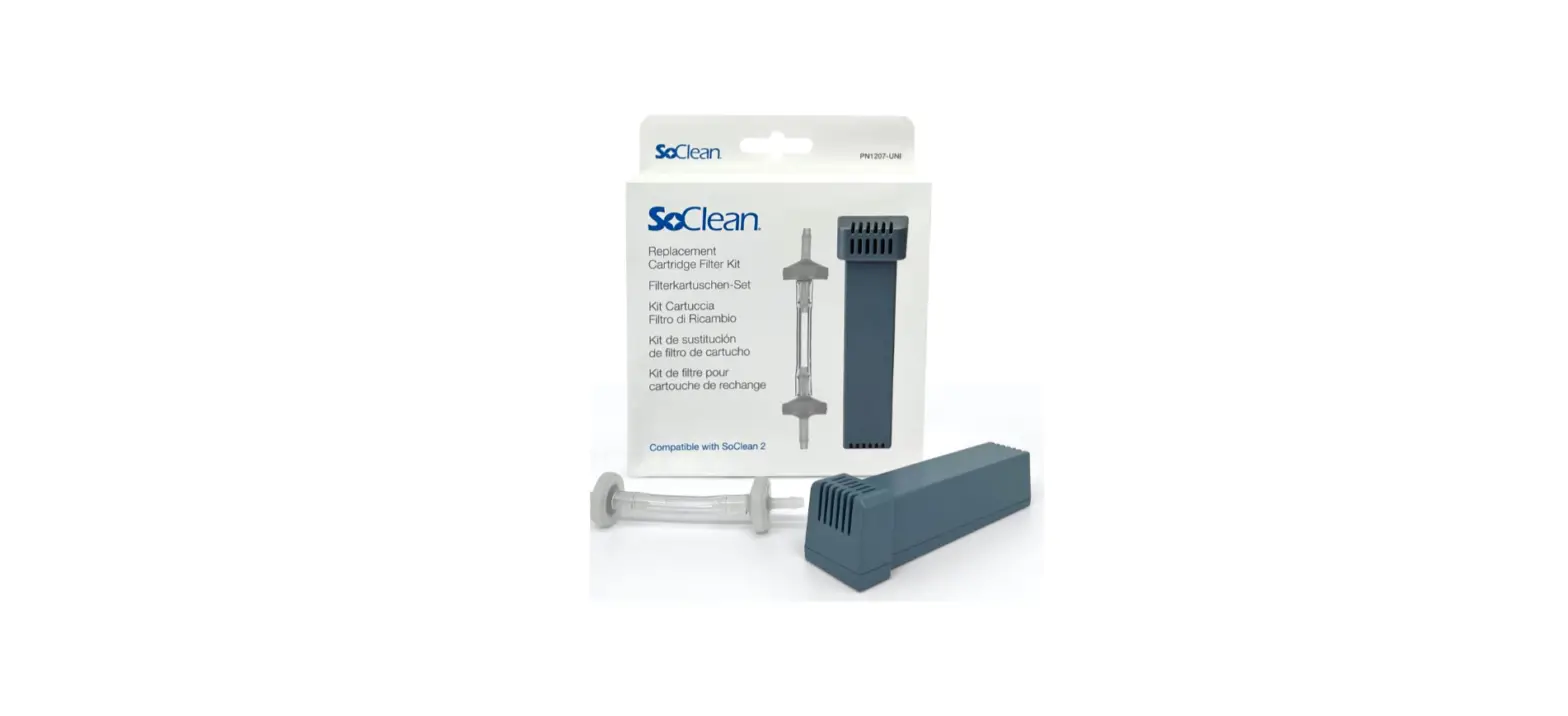

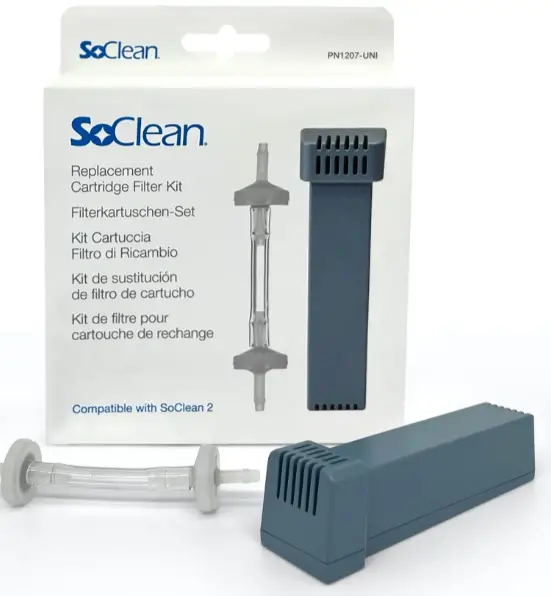
SoClean PN1207UNI Replacement Cartridge Filter Kit
Indications for Use:
The SoClean 2 is a general sleep equipment maintenance device and is intended to be used in the home. An individual who uses sleep equipment can use the SoClean 2 for fast and easy sleep equipment maintenance. The SoClean 2 attaches to sleep equipment and runs daily while the mask is inside the SoClean Chamber. The SoClean 2 does not need to be disconnected before using your sleep equipment. Contraindications for Use: Persons with underlying lung diseases, such as asthma and chronic obstructive pulmonary disease (also known as COPD, which includes emphysema and chronic bronchitis) and those with cardiovascular disease may be sensitive to ozone and should consult with their physician before using this product.
Specifications
Electrical Characteristics:
- AC Adapter input: AC 100~240V, 50/60HZ, 0.5A
- AC Adapter output: DC 12V, 1.5A Max
- Power Consumption: 18W Max
Environmental Characteristics:
- Operating: 10°C to 38°C (50°F to 100°F),
- 15% to 70% humidity
- Storage and Transport Conditions:
- -20°C to +55°C (-4°F to 131°F),
- 15% to 70% humidity
Ozone Concentration:
- When operated in a 125 square foot room
- with 8-foot ceilings, the average ambient
- ozone concentration in the room over the
- operating cycle is < 0.05 parts per million
- (PPM).
Physical Characteristics:
- Dimensions: 7.875” x 7.25” x 8.875”
- Weight: 5.6 lbs
- Cord Length: 4’ 8”
WARNING:
- Do not use a fragrant essence in the water reservoir or highly fragrant soaps to wash the sleep equipment when using the SoClean 2.
- Discontinue use if acne or rash develops along mask contact line and call SoClean customer care.
- Ensure the correct Clock time and Daily Start Time are set on the SoClean 2 before using your sleep equipment.
- Pay particular attention to the AM/PM setting if using 12-hr mode.
- Failure to do so may result in the SoClean 2 operating at an unexpected time.
- In the event of loss of power to your home or the SoClean 2, ensure the correct Clock time and Daily Start Time are set on the SoClean 2 before using your sleep equipment. Failure to do so may result in the SoClean 2 operating at an unexpected time.
- Do not physically alter the Hose Detect Switches on the SoClean 2. Inspect the Hose Detect Switches regularly for damage or inability to move up/ down.
- Failure of the Hose Detect Switches on the SoClean 2 may result in the SoClean 2 operating at an unexpected time.
- Keep away from water sources including rain, bathtubs, sinks, and pools. To clean your SoClean 2, wipe with a damp cloth.
- Do not submerge the SoClean 2 in liquid or use chemical cleaners.
- Keep away from children. Do not place any living thing inside the SoClean Chamber during use.
- Do not inhale from the Injection Hose or the Injection Hose outlet on the back of the SoClean 2
- Only rest the flexible section of the sleep equipment hose not the rigid connector in the Hose Detect Slot
- Do not breathe through your mask if the SoClean 2 is operating a Cycle.
- Do not use in explosive air environments, near gas vapors, or other flammables, etc. Do not place any flammable or ignitable items on top of the SoClean 2.
- Keep the SoClean Lid closed until the green status light illuminates (approximately 2 hours after completion of the Cycle).
- Do not remove gasket from Hose Detect Switch slot.
- The Lid Gasket is removable. Ensure that the Lid Gasket is properly installed before operating a Cycle.
- Do not dismantle the SoClean 2.
- Do not place Neutralizing Pre-Wash in the SoClean Chamber or reservoir. Neutralizing Pre-Wash is for cleaning your sleep equipment only.
- Please be sure the black Injection Hose from the back of the SoClean 2 is connected to your equipment before operating the SoClean 2.
- If a strong ozone odor is detected when the SoClean 2 is operating turn the SoClean 2 off by disconnecting the AC power adapter and contact customer care.
- Do not route your sleep equipment hose through both Hose Detect Slots while or after using your equipment.
- This may result in the SoClean 2 running at an unexpected time.
- Remove clear outer wrapper and blue tape from Cartridge Filter.
YOUR HEALTH & OZONE SAFETY
- Ozone, the triatomic form of oxygen (O3), is known as activated oxygen.
- The SoClean 2 uses ozone to maintain sleep equipment; ozone contacts the equipment only, not the user.
- The SoClean 2 is designed to produce only enough ozone for effective maintenance of your sleep equipment.
- While breathing large amounts of ozone can irritate breathing passages of humans, following the instructions for use ensures that SoClean 2 users will not breath large amounts of ozone.
Contraindications for Use:
Persons with underlying lung diseases, such as asthma and chronic obstructive pulmonary disease (also known as COPD, which includes emphysema and chronic bronchitis) and those with cardiovascular disease may be sensitive to ozone and should consult with their physician before using this product.
WARNING:
- If a strong ozone odor is detected when the SoClean 2 is operating turn the SoClean 2 off by disconnecting the AC power adapter and contact customer care.
- Discontinue use if acne or rash develops along mask contact line and call SoClean customer care.
- Ozone quickly dissipates in the atmosphere. If you accidentally interrupt a Cycle and release ozone by opening the SoClean Chamber before the end of a
- Cycle, simply step away from the SoClean 2 to avoid unintended exposure.
- The smell of ozone is detectable at low concentrations by some people. The scent of ozone has the characteristic of a sweet chlorine-like smell.
- If you smell ozone and believe the SoClean 2 is not operating correctly, disconnect the power to the device, step away from the SoClean 2 and contact SoClean customer care.
MANUFACTURER, SYMBOLS & FCC NOTICE
- Designed by and Manufactured for:
- SoClean, Inc., 12 Vose Farm Road, Peterborough, New Hampshire 03458 USA
- Produced by: JDI Electronics Factory, China
Symbols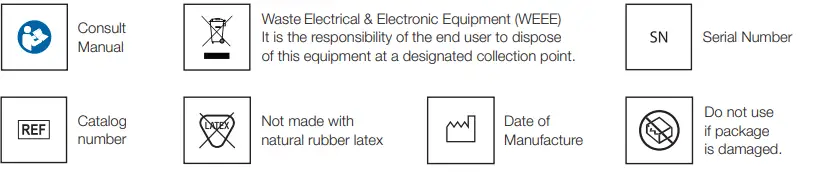
FCC Notice
Please note that changes or modifications not expressly approved by the party responsible for compliance could void the user’s authority to operate the equipment. NOTE: This equipment has been tested and found to comply with the limits for a Class B digital device, pursuant to Part 18 of the FCC Rules. These limits are designed to provide reasonable protection against harmful interference in a residential installation. This equipment generates, uses and can radiate radio frequency energy and, if not installed and used in accordance with the instructions, may cause harmful interference to radio communications. However, there is no guarantee that interference will not occur in a particular installation. If this equipment does cause harmful interference to radio or television reception, which can be determined by turning the equipment off and on, the user is encouraged to try to correct the interference by one or more of the following measures:
- Reorient or relocate the receiving antenna.
- Increase the separation between the equipment and receiver.
- Connect equipment into an outlet on a circuit different from that to which the receiver is connected.
- Consult the dealer or an experienced radio/TV technician for help.
INCLUDED WITH YOUR SOCLEAN 2
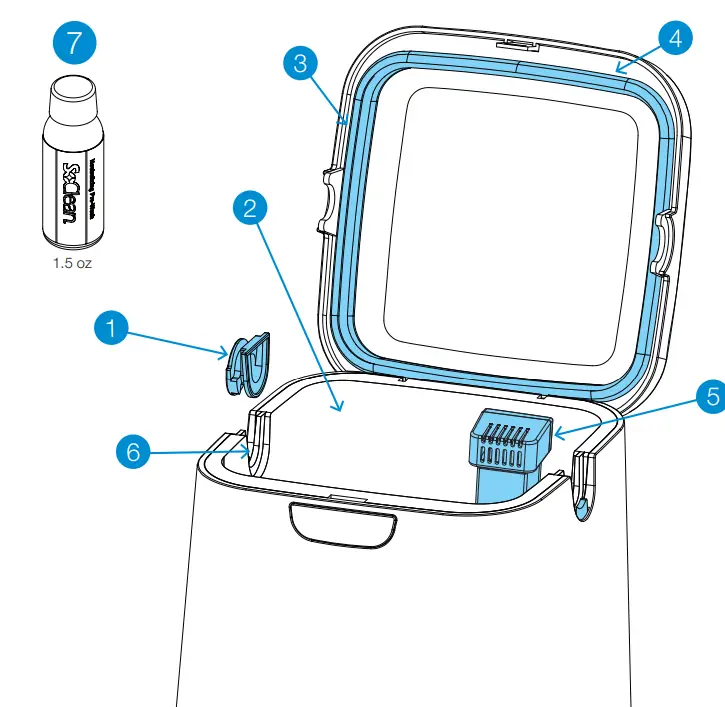
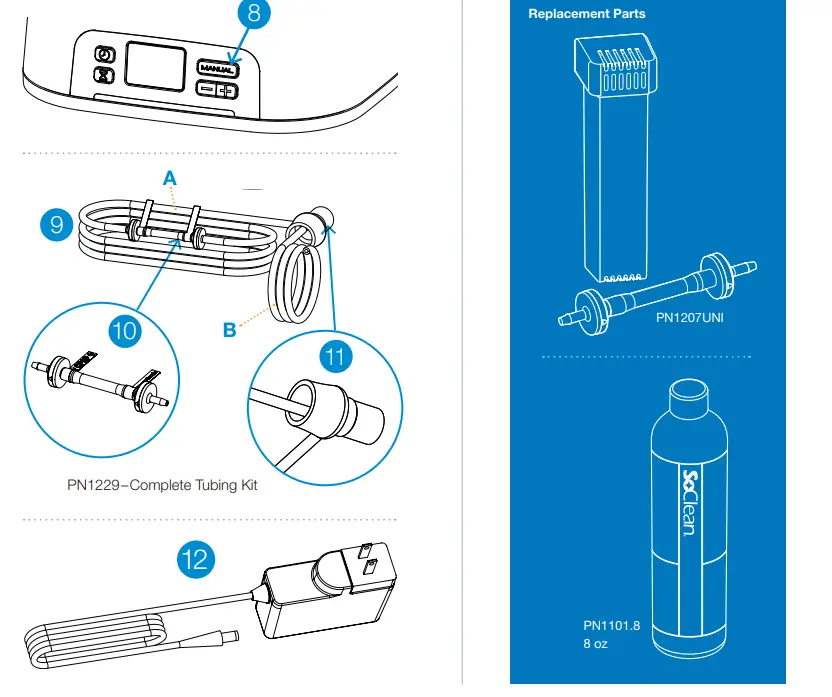
| Number | Part Name | SKU | Description |
|
1 |
Removable Hose Slot Plug |
PN1214 | This allows you to set up the SoClean 2 on either the right or left side of your sleep equipment. Place this plug in the hose slot that you don’t use. |
|
2 | SoClean Chamber |
N/A | Place your mask in here when you wake up. Close the Lid to ensure that the Cycle runs. |
|
3 |
Lid Gasket |
PN1215 | Ensures tight seal around the SoClean Chamber when the SoClean Lid is closed. Do not close the Lid without this part in place. |
|
4 |
SoClean Lid |
N/A | Close the Lid after you place your mask in the SoClean Chamber to ensure that the Cycle runs. |
|
5 |
Cartridge Filter |
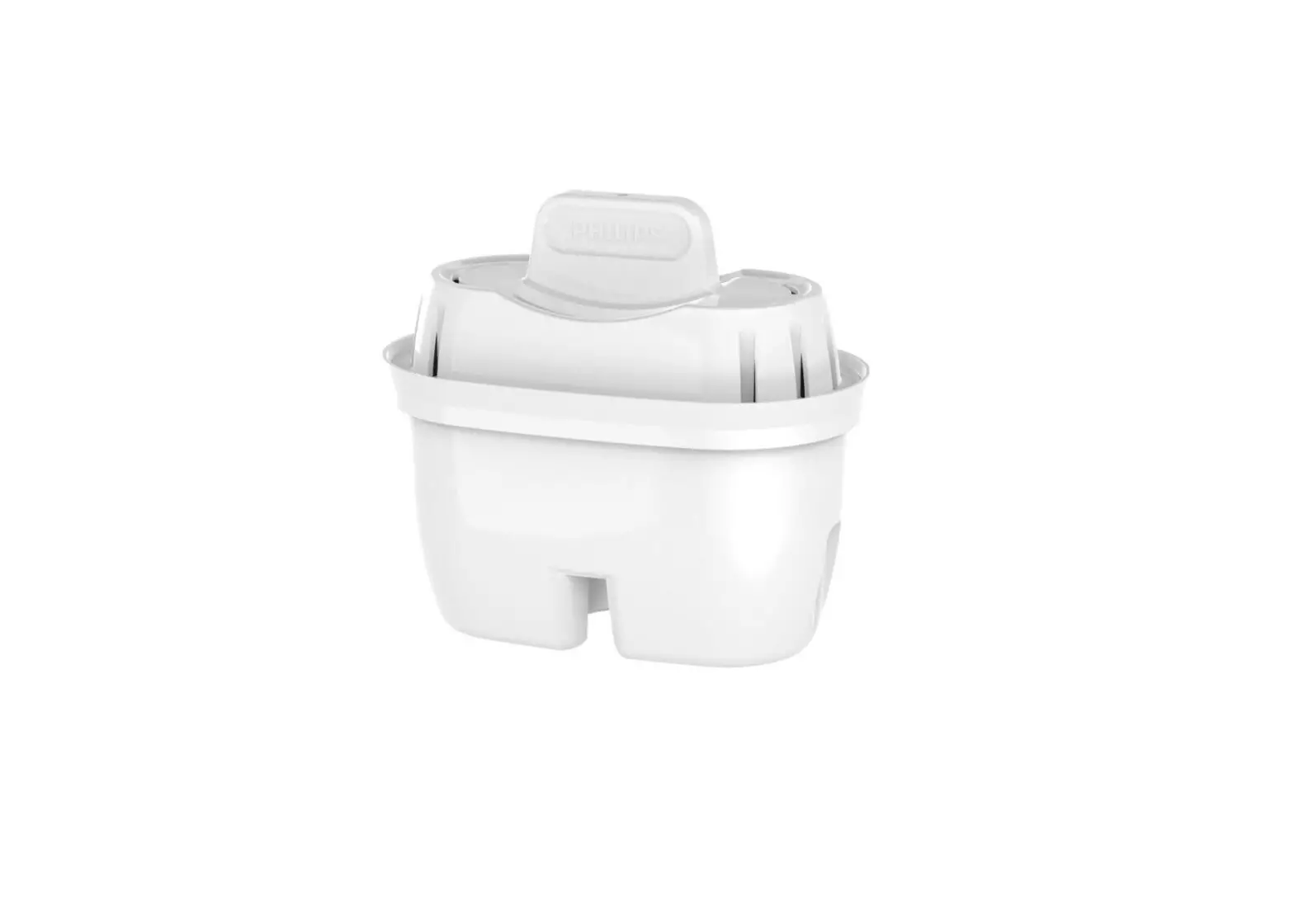
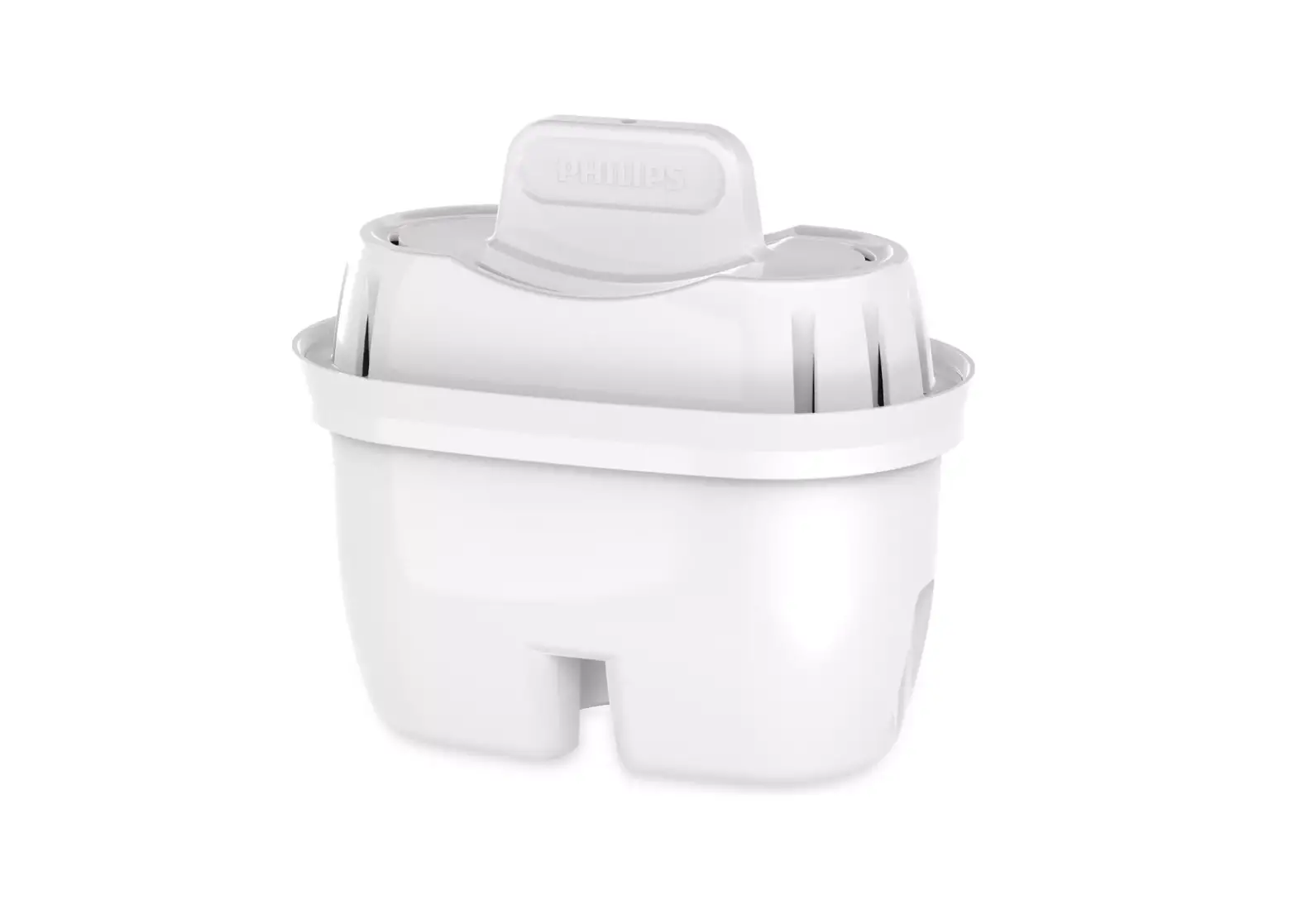
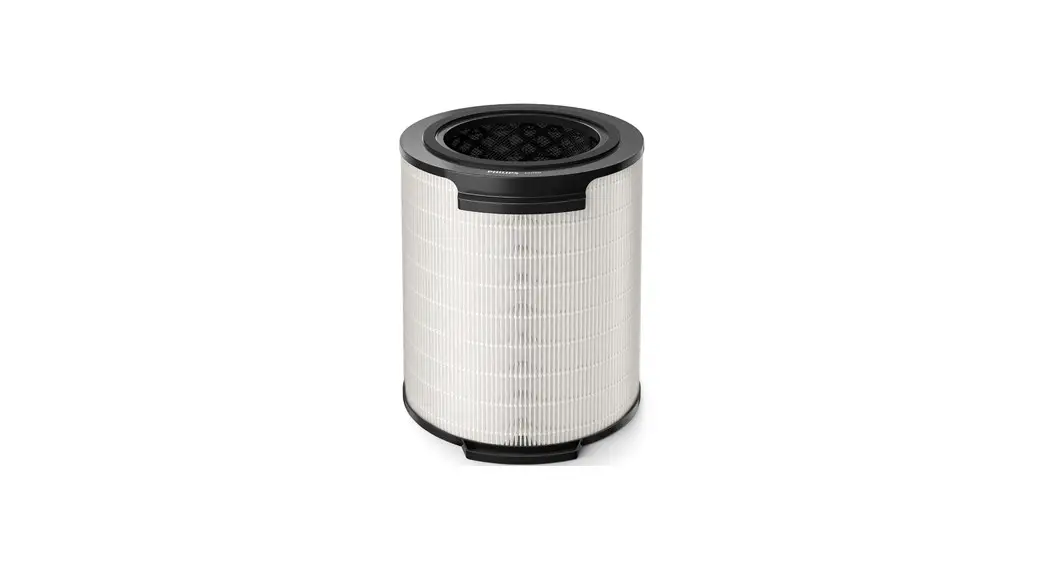
PN1207UNI | This Cartridge Filter converts ozone back into normal oxygen. Remove outer plastic wrapping and blue tape prior to installation. You can repurchase the Filter along with the Check Valve as part of the Cartridge Filter Kit. |
|
6 |
Hose Detect Switch |
N/A | The Hose Detect Switch detects when the SoClean 2 is configured for operation by detecting the presence of the hose in the hose slot when the Lid is closed. If no hose is detected, the SoClean 2 will not run a Cycle. Hose Detect Switch operation can be inspected by gently pushing down and releasing the gray plastic switch and
hearing an audible click. The switch should move freely down and up when gently pressed. |
|
7 |
Neutralizing Pre-Wash |
PN1101 (1.5 oz) | The Neutralizing Pre-Wash removes any material or odor that could react with ozone. Wash your sleep equipment following the sleep equipment manufacturers instructions before connecting the SoClean 2, or when you receive new sleep equipment parts. |
| Number | Part Name | SKU | Description |
|
8 |
Control Panel |
N/A | Buttons, display, and Cycle light indicator for SoClean 2 functions. See page 10 for details. |
|
9 | Injection Hose A & B |
PN1104.12 | The Injection Hose A & B carries ozone from the SoClean 2 to the sleep equipment. See page 16. |
|
10 |
Check Valve |
PN1102A | This item comes pre-installed into the Injection Hose. It is a one-way Check Valve that prevents water in your humidifier reservoir from backing up into entering your SoClean 2. If you can see water in this clear tube, replace the Check Valve assembly immediately. You can repurchase it along
with the Cartridge Filter as part of the Cartridge Filter Kit. |
|
11 |
Injection Fitting | PN1106 (with humidifier reservoir)
PN1116 (without humidifier reservoir- not included) |
Connects the Injection Hose A & B to your sleep equipment. See page 15. |
| 12 | AC Adapter | PN1222 | Supplies power to your SoClean 2. See page 16. |
Replacement Parts
You will replace some SoClean 2 parts regularly due to normal wear and usage. A message appears on your SoClean 2 after a certain amount of use (typically around six months) as a reminder to replace the Cartridge Filter and Check Valve. These two parts are ordered as a set called the Cartridge Filter Kit (PN1207UNI The Neutralizing Pre-Wash (PN1101.8) is also available for purchase if you run out. Follow your sleep equipment manufacturer’s instructions for cleaning your sleep equipment. To reorder supplies, contact your authorized reseller or visit SoClean.com and search for the desired part
WARNING:
Please purchase your Cartridge Filter Kits from SoClean® only. Authentic Cartridge Filter Kits can be purchased from SoClean via multiple online marketplaces, such as Amazon® and eBay® in addition to SoClean.com, however please confirm that the seller of your Cartridge Filter Kit is SoClean, and not any other seller, to ensure the authenticity of your Cartridge Filter Kit. SoClean has discovered counterfeit Cartridge Filter Kits being sold, particularly on Amazon® and eBay®, with check valves and filters, that leak and can cause damage to your SoClean machine or to your property due to water leakage from the counterfeit check valves. Please contact SoClean immediately if you have had any issues with your Cartridge Filter Kit. Amazon® is a registered trademark owned by Amazon Technologies, Inc. eBay® is a registered trademark owned by eBay, Inc. SoClean® is a registered trademark owned by SoClean, Inc.
CONTROL PANEL
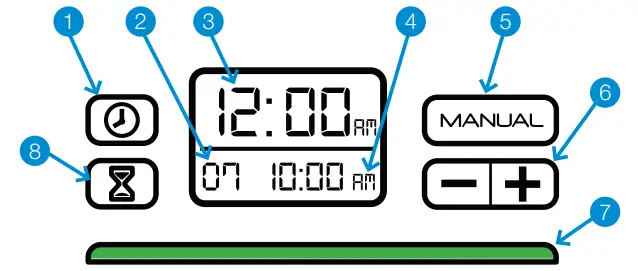
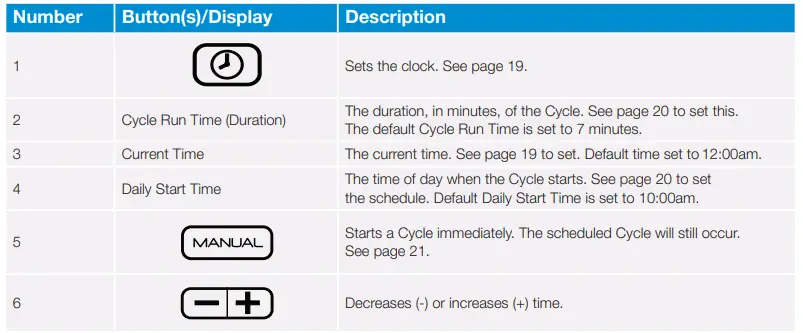
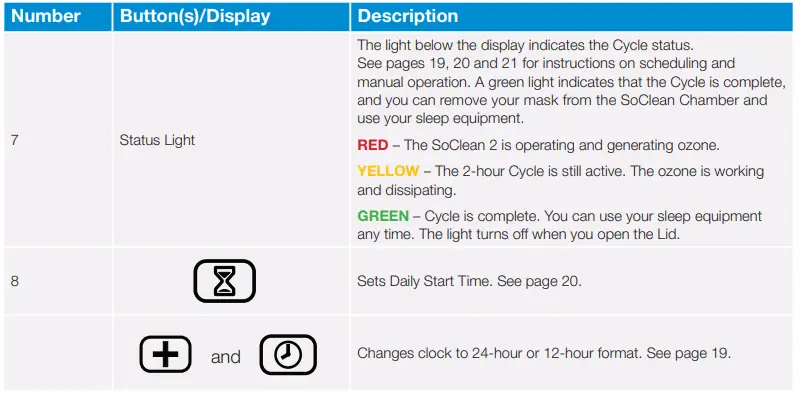
Messages
- The SoClean 2 display panel shows messages that can require action.
- This list shows the messages and how to correct them
| Message | What to Do |
|
Hose not present. Cycle will not run. | Ensure that the hose is seated securely in the hose slot. Check that the Removable Hose Slot Plug is seated correctly on the other side. See page 22. |
| Order Filter Kit. | Your Cartridge Filter has reached the end of its life based on your use. See page 25. |
|
Cycle in process. Do not open the lid! | Ozone present. The SoClean 2 is performing a Cycle. This takes approximately 2 hours. The green Cycle indicator light means it is complete. You can now open the Lid, and use your sleep equipment. |
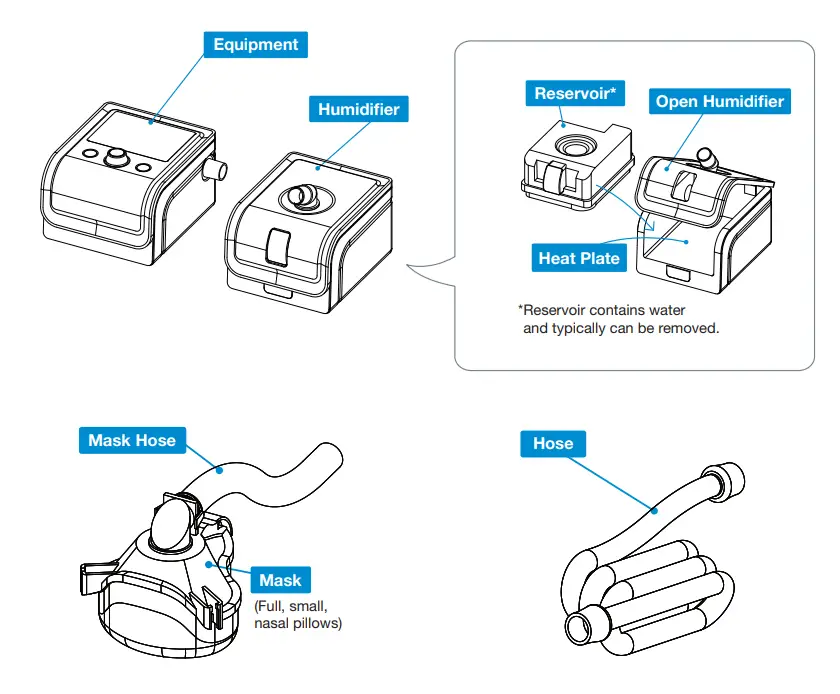
KEY SLEEP EQUIPMENT PARTS
The SoClean 2 is designed to connect permanently to your sleep equipment and allow operation of either product. The SoClean 2 connects to most sleep equipment using the standard included parts. This section describes key parts of your sleep equipment in the connection procedure. Some sleep equipment has features that require additional steps or parts. Adapters required for SoClean 2 to function with your sleep equipment contain appropriate instructions. See page 17 for a list of available adapters for specific sleep equipment See SoClean.com for additional instructions for specific sleep equipment. The figure on the next page shows a generic representation of these key parts that are referenced in the SoClean 2 connection procedures. These are only representations— your actual sleep equipment can look different than these drawings. Review the documentation that came with your sleep equipment for a better idea of what these parts look like or call customer care.
CONNECTION STEPS
After following these steps, your SoClean 2 will maintain your sleep equipment daily without disconnecting. Before you disconnect your sleep equipment to wash the parts, look at where the hose is connected. You will reconnect the SoClean Injection Fitting to the same location. 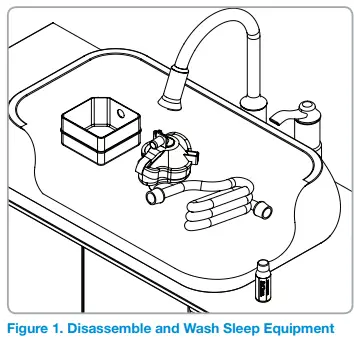 Please note, SoClean 2 does not replace proper cleaning and maintenance of the sleep equipment according to the manufacturer’s instructions.
- Pre-wash Sleep Equipment
- Disassemble all sleep equipment parts.
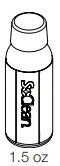
- Use two capfuls of the included Neutralizing
- Pre-Wash with a gallon (4L) of water to wash your sleep equipment according to manufacturer instructions (figure 1).
- Rinse thoroughly with clean water.
- Reinsert the reservoir (if used) into the sleep equipment.
- Do not reattach the hose or mask yet.

- Using an Adapter
- If your sleep equipment requires an adapter, see adapter instructions for set-up and proceed to Step 5.

- If your sleep equipment requires an adapter, see adapter instructions for set-up and proceed to Step 5.
- Connect the Injection Fitting
- The Injection Fitting connects the SoClean 2 to your sleep equipment.
- Once installed, you do not need to disconnect the Injection Fitting to use your sleep equipment.
- The SoClean 2 is intended to stay continuously connected to your sleep equipment.
Note: Your reservoir model may require additional configuration procedures or an adapter. If you have difficulty with the steps in this guide, contact SoClean customer care.
With humidifier: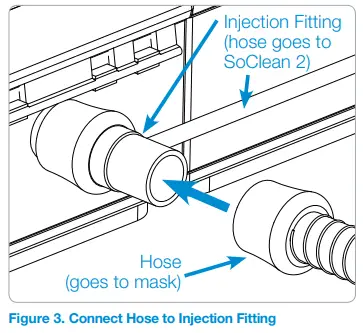
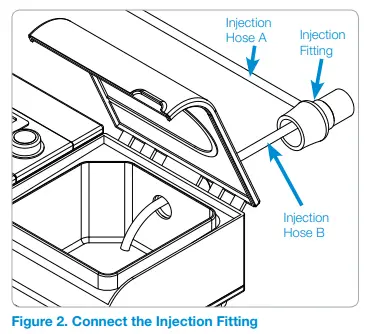
- Position the Injection Fitting onto the port of your humidifier (where your hose was connected), allowing the smaller Injection Hose B to enter into the reservoir (figure 2). The end of the tubing should be positioned over the heat plate.
- If necessary, carefully trim the Injection Hose B in increments until it is the correct length, and over the heat plate.
Without humidifier:
- Pull off the small Injection Hose B from the inside of the Injection Fitting.
- Note: If you are having difficulty disconnecting Injection Hose B, you may cut the tubing as close to the Injection Fitting as possible.
- Attach the Injection Fitting directly to your sleep equipment.
- Reconnect your hose to the end of the Injection Fitting.
CAUTION: Please be sure the black Injection Hose from the back of the SoClean 2 is connected to your sleep equipment before operating the SoClean 2.
Note: If you are having difficulty connecting to your sleep equipment, an additional part may be necessary. Contact SoClean.com
Connect the Hose
Regardless of your humidifier, you can now connect your hose to the end of the Injection Fitting, which is connected to your sleep equipment (figure 3).
Connect Power
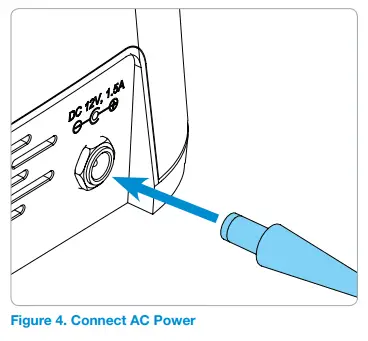
Plug the AC Adapter into the connector marked DC 12V, 1.5A on the back of the SoClean 2. The AC Adapter should be plugged into a wall outlet that is easy to access and observe. (Figure 4)
WARNING: In the event of loss of power to your home or the SoClean 2, ensure the correct Clock time and Daily Start Time are set on the SoClean 2 before using your sleep equipment. Failure to do so may result in the SoClean 2 operating at an unexpected time.
Reconnect Sleep Equipment
You can now reattach the mask to the end of the hose.
SUPPORTED SLEEP EQUIPMENT
The following sleep equipment have adapters available from SoClean. To order, go to: Your authorized reseller or call SoClean.
| Manufacturer | Model | Adapter Part Number |
| Fisher & Paykel | ICON | PNA1100i |
| SleepStyle 600 Series | PNA110i-600 | |
| SleepStyle | PNA1411 | |
| Philips Respironics | DreamStation | PNA1410 |
| PR System One REMstar 60 Series | PNA1410 | |
| PR Systems One REMstar | PNA1410 | |
| DreamStation Go | PNA1214 | |
| ResMed | S9 | PNA1109 |
| AirSense10 | PNA1210 | |
| AirMini | PNA1214 | |
| Transcend & Z1 | Works with most models | PNA1213 |
SET LANGUAGE
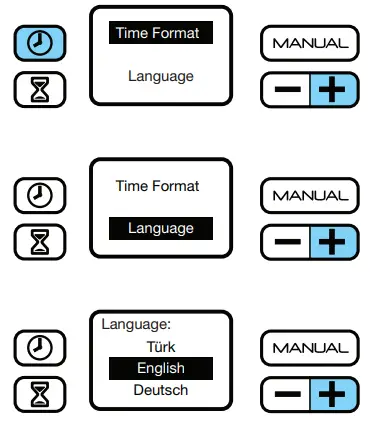
Language
To choose correct language:
- Press the
 and
and buttons simultaneously.
 - Choose ‘Language’ by using the button.
- With ‘Language’ selected, press the
 button
 - Scroll through language options by using the button.
- Press the button to select language of choice.
- Press the button to save
 and
and buttons simultaneously.
 button
SET CLOCK & CYCLE SCHEDULE
Your SoClean 2 timer allows you to completely automate your daily maintenance after connecting to your sleep equipment. The SoClean 2 comes preset to start a 7 minute Cycle at 10:00am daily. However, you must set the clock to your current time. The following procedures describe how to set the clock, schedule and start the Cycle immediately
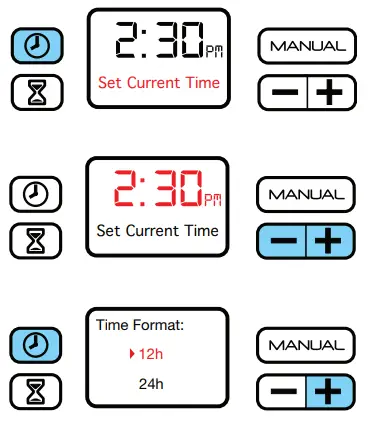
Set the Clock/Current Time
- Press the button.
- Change the time by pushing either the +or- button until your current time is reached. By holding down the button the time moves faster. Press the button once more to store your time and return to the home screen.
Set Time Format
- The default is 12 hour format.
- To display in 24-hour format (military time):
- Press the and buttons simultaneously.
- With ‘Time Format’ selected, press the button
- Choose either the 12 or 24-hour format by using the button.
- Press the button to select preferred setting.
- Press the button to save.

Cycle Settings
Set Cycle Run Time (duration) and Schedule the Daily Start Time
- These two processes follow each other in this setup.
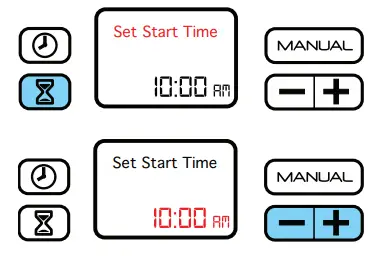
- Press and release the
 button to display the menu pictured on the left.
 - Press and release the +or- button to decrease or increase the number of minutes of your Cycle Run Time.
 button to display the menu pictured on the left.
Note: The default Cycle Run Time of 7 minutes is recommended.
- Press and release the button again to save your Cycle Run Time and schedule the Daily Start Time. To skip the Daily Start Time setup, press the button again when you reach this step.
Note: The default Daily Start Time is 10:00am.
- Press and release the +or- buttons to reach the desired Daily Start Time. Press the button again to save and return to the home screen.
Note: Schedule a Daily Start Time at least two hours before you need to use the sleep equipment. The entire process requires two hours plus the Cycle Run Time to complete. A green indicator light means that the Cycle has completed. Remove the Removable Slot Plug and place inside the SoClean Chamber. Run your sleep equipment for 1-2 minutes before putting your mask on.
Manual Mode
- The Cycle will still occur if your sleep equipment is stored in the SoClean Chamber.
- Ensure that your sleep equipment is in place and the SoClean Lid is closed.
- Press and release the button to begin the Cycle.

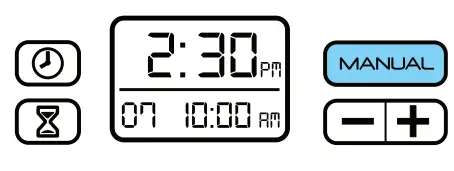
The Cycle starts immediately and runs for the set Cycle Run Time (duration). As usual, wait for the green light before removing your mask. It’s not necessary to remove your mask immediately after observing the green light.
USING YOUR SOCLEAN 2
After setup, using your SoClean 2 is extremely easy. After following the connection procedure on page 14, your SoClean 2 maintains your sleep equipment daily.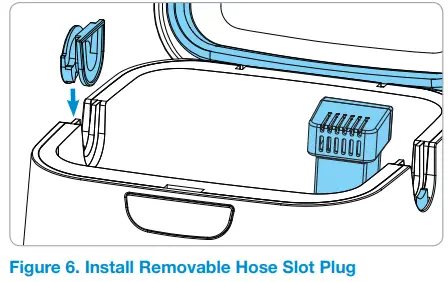
- Open the lid.
- Install the Removable Hose Slot Plug into one open slot
- Orient the Removable Hose Slot Plug The round face of the Removable Hose Slot Plug is outside of the SoClean 2.
- Remove outer plastic wrapping and blue tape from the Cartridge Filter and fully seat it in the Cartridge
 Filter Slot at the back-right corner of the SoClean Chamber. Ensure proper installation by orienting the Cartridge Filter vents to face the front of the machine
- Insert your mask into the SoClean Chamber allowing its attached hose to rest in the open hose slot, opposite the Removable Hose Slot Plug
- Close the Lid with the hose placed in the open slot (figure 8). The SoClean 2 will now automatically operate according to its preset time and duration

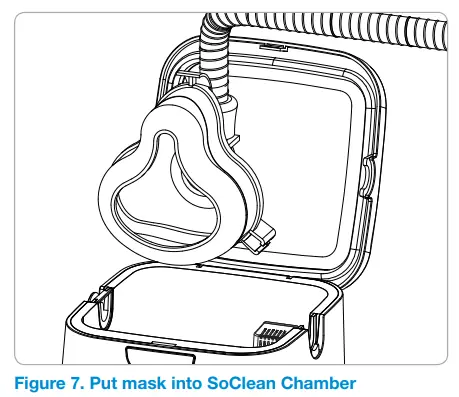 Filter Slot at the back-right corner of the SoClean Chamber. Ensure proper installation by orienting the Cartridge Filter vents to face the front of the machine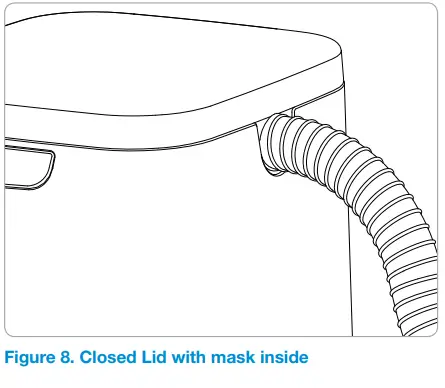
WARNING:
- It is necessary to let the mask remain in the closed SoClean Chamber for at least 2 hours to ensure that the ozone performs its function and dissipates appropriately. After that period, the status light shines green and the mask is ready to be removed from the SoClean Chamber.
- Ozone quickly dissipates in the atmosphere. If you accidentally interrupt the Cycle and release ozone by opening the Lid, simply step away from the SoClean 2 for 5 minutes to avoid unintended exposure. Note: Your sleep equipment will not be fully maintained if you interrupt the Cycle; therefore, it i recommended that you restart the Cycle.
- Once the Cycle has completed (status light will be green), open the Lid and remove the mask.
- Remove the Removable Slot Plug and place inside the SoClean Chamber. Run your sleep equipment for 1-2 minutes before putting your mask on.
Tip: Placing the Removable Slot Plug into the SoClean Chamber helps prevent accidental loss of the Removable Slot Plug.
WARNING:
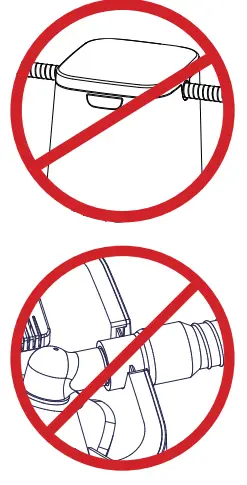
- Do not route your sleep equipment hose through both Hose
- Detect Slots while or after using your equipment.
- This may result in the SoClean 2 running at an unexpected time.
- Only rest the flexible section of the sleep equipment hose not the rigid connector in the Hose Detect Slot

CARE & MAINTENANCE OF YOUR SOCLEAN 2
Wipe down the SoClean 2 with a damp cloth. The Neutralizing Pre-Wash should only be used to clean your sleep equipment following the manufacturers instructions.
WARNING: Do not submerge or fill the SoClean 2 with water!
The SoClean Check Valve and Cartridge Filter should be replaced every 6 months. A reminder message on the display will appear after approximately six months, depending on usage. To reorder supplies (Cartridge Filter, Check Valve, or Neutralizing Pre-Wash), contact your authorized reseller or visit SoClean.com and search for the desired part or contact customer care.
INFORMATION
Please remember to reset your SoClean 2 after installing the new Cartridge Filter as described in the instructions that come with the replacement Please purchase your Cartridge Filter Kits from SoClean® only. Authentic Cartridge Filter Kits can be purchased from SoClean via multiple online marketplaces, such as Amazon® and eBay® in addition to SoClean.com, however, please confirm that the seller of your Cartridge Filter Kit is SoClean, and not any other seller, to ensure the authenticity of your Cartridge Filter Kit. SoClean has discovered counterfeit Cartridge Filter Kits being sold, particularly on Amazon® and eBay®, with check valves and filters, that leak and can cause damage to your SoClean 2 machine or to your property due to water leakage from the counterfeit check valves. Please contact SoClean immediately if you have had any issues with your Cartridge Filter Kit.
Warranty
For warranty information visit SoClean.com/warranty. For further questions or concerns, or for more information about SoClean 2 or our other innovative products, please visit: SoClean.com
866-501-3705
Copyright © 2011-2019
SoClean® is a registered trademark of SoClean, Inc. 12 Vose Farm Road, Peterborough, NH U.S.A. 03458 Patent: SoClean.com/patents
FAQ
1. Will my sleep equipment be wet from the SoClean 2?
No. No fluids or water are used in this process. If you observe water, please contact customer care at 866-501-3705.
2. Is the SoClean 2 harmful to me or the environment?
No. SoClean 2 produces ozone in a closed system and includes a Cartridge Filter which helps convert ozone back to regular oxygen. When used properly, SoClean 2 runs its Cycle and all the ozone has broken back down to oxygen within the two hour rest period.
3. How do I know that my SoClean 2 is operating properly?
After the Cycle has successfully completed, the status indicator light will illuminate green. Your sleep equipment will have a light, clean scent. If you have questions about the operation of your SoClean 2 please contact customer care at 866-501-3705.
4. What if the scent the SoClean 2 leaves is too strong for me?
If you smell ozone or any other strong odor, air out the mask and hose by:
- Taking the mask out of the SoClean Chamber as soon as possible once green lights comes on
- Running your sleep equipment for 1-2 minutes before putting your mask on If the device still produces a strong odor, try the following:
- Wash your sleep equipment with the Neutralizing Pre- Wash. Do not use scented or dyed soap as they can react with the ozone and produce undesirable odors.
- Use a mask wipe to clean your mask before putting it on.
- Make sure the Cartridge Filter is present, the clear plastic wrapping and blue sticker have been removed from the Cartridge Filter and that the black gasket is rolled up under the lip. Finally, make sure the Cartridge Filter is oriented correctly in the slot.
- If you use a reservoir, make sure you follow the manufacturers cleaning instructions for how often to change the water.
5. What if my indicator light is shining red or yellow?
This means that the Cycle is not yet complete. Do not open the Lid until the light turns green at which point you can remove your sleep equipment from the SoClean Chamber. This should be approximately 2 hours from when the Cycle begins (See page 11)
6. It has been more than two hours since the SoClean 2 completed a Cycle, but the status light is still yellow. Why?
Some types of indoor lighting make it difficult to distinguish the yellow and green lights on the SoClean 2. Confirm that the green light is visible before opening your SoClean 2 to ensure that the Cycle is complete, and your sleep equipment is ready for use. This should be approximately 2 hours from when the Cycle begins.
7. What if the indicator light is off after a scheduled Cycle?
The SoClean 2 light is green when a Cycle completes successfully. If there is no light, the Cycle did not start. Common reasons for this are that the SoClean 2 is not powered, the Lid was not securely closed, there was no sleep equipment in the SoClean Chamber at the scheduled Daily Start Time or the Removable Hose Slot Plug is missing or not properly seated (see page 22). If everything looks good, then close the Lid and press the button to test. Any error message will appear on-screen, (see page 11 for error messages). Please call customer care if you need further assistance.
8. What if I missed my scheduled Daily Start Time, but still wish to run it?
You can use the Manual function to run a Cycle as long as you still have 2 hours remaining before you go to sleep. (See page 21).
9. Why does my display say Order Filter Kit?
This message appears approximately every 6 months, depending upon usage, as a reminder to regularly replace the Cartridge Filter and Check Valve. These parts wear out due to regular use. You can purchase the Cartridge Filter and Check Valve together in a Cartridge Filter Kit (PN1207UNI). To reorder, contact your authorized reseller or visit SoClean.com. When you’re ready to replace the Cartridge Filter and Check Valve follow the instructions that come with it and ensure you do the following
- Make sure you remove the clear plastic wrapper and blue tape from the Cartridge Filter
- Confirm Check Valve arrows are facing the correct direction
- Reset the Filter countdown by pressing the manual and hourglass buttons at the same time for about 3-5 seconds. You will see a smiley face on the display once it has reset which confirms that process is complete
10. Are there materials that I should avoid putting into the SoClean 2?
The SoClean 2 is designed to maintain your sleep equipment. Nylon, natural rubber and memory foam may break down when exposed to ozone over time. If you have questions, contact your sleep equipment manufacturer or supplier.
11. My mask feels oily, what should I do?
Skin can leave oil behind on your sleep equipment so you should always hand-wash your equipment as recommended by the manufacturer. You may use the provided Neutralizing Pre-Wash or wipe your mask with SoClean’s Mask Wipes.
12. How often should I wash my sleep equipment?
As environmental conditions vary (age of equipment, humidity levels, etc), there is no single answer that applies to all cases. Most manufacturers recommend daily maintenance which is how SoClean 2 helps. When it comes to hand washing your sleep equipment you should still do so as residue becomes visible (which is typically weekly). You can use our Neutralizing Pre-wash or a dye-free, fragrance-free dish soap. Always follow your manufacturers instructions.
13. If I lose power, do I need to reset my SoClean 2?
In the event of loss of power to your home or the SoClean 2, ensure the correct Clock time and Daily Start Time are set on your SoClean 2 before using your sleep equipment. Failure to do so may result in the SoClean 2 operating at an unexpected time. See page 19 for instructions on how to set your Clock and Daily Start Time. If you need assistance with the reset, please call customer care at 866-501-3705.
The Cartridge Filter contains a porous, foam-like material coated with carbon that acts as a catalyst to convert Activated Oxygen (ozone) back into oxygen.
We recommend handwashing your CPAP equipment using a dye-free and fragrance-free soap.