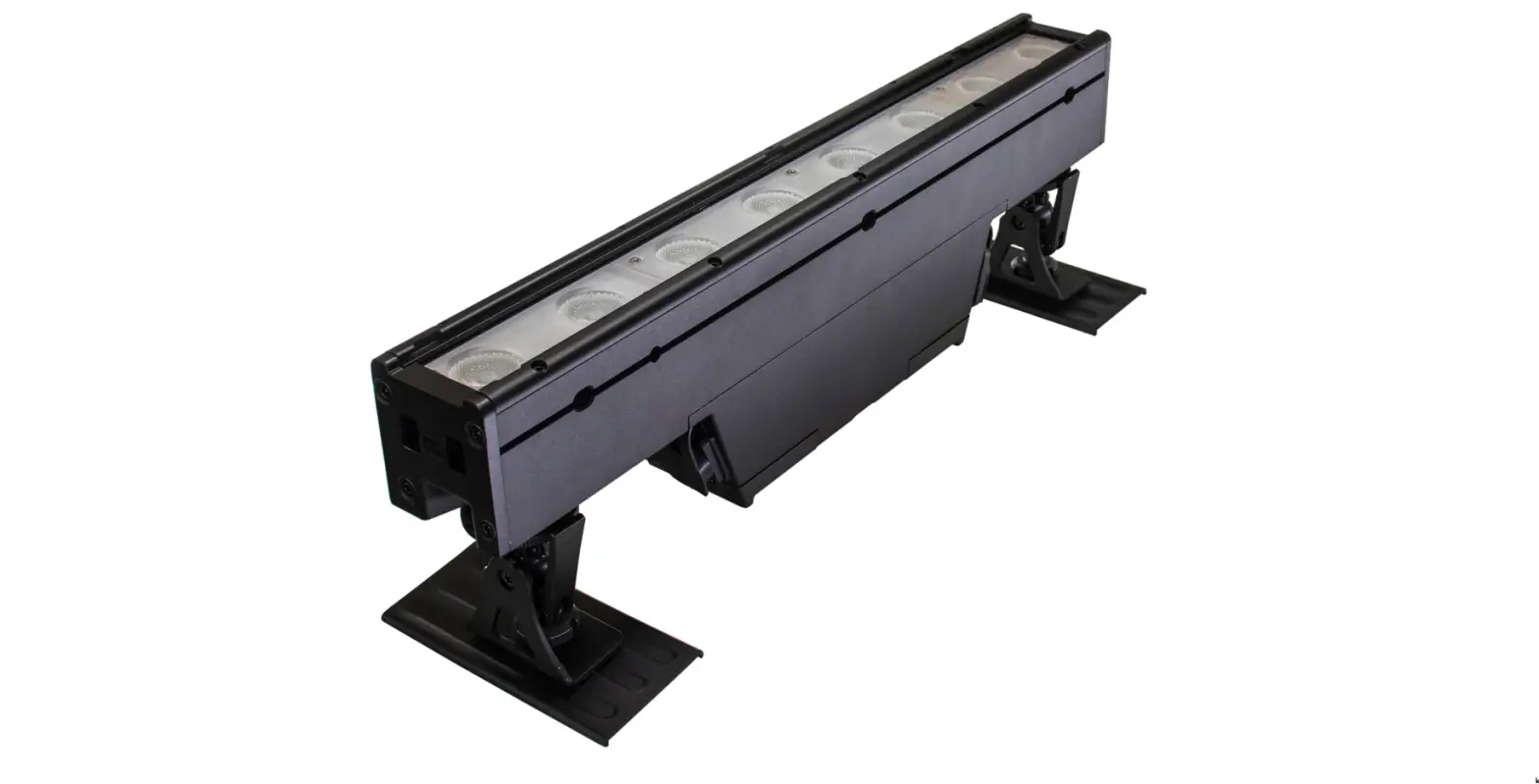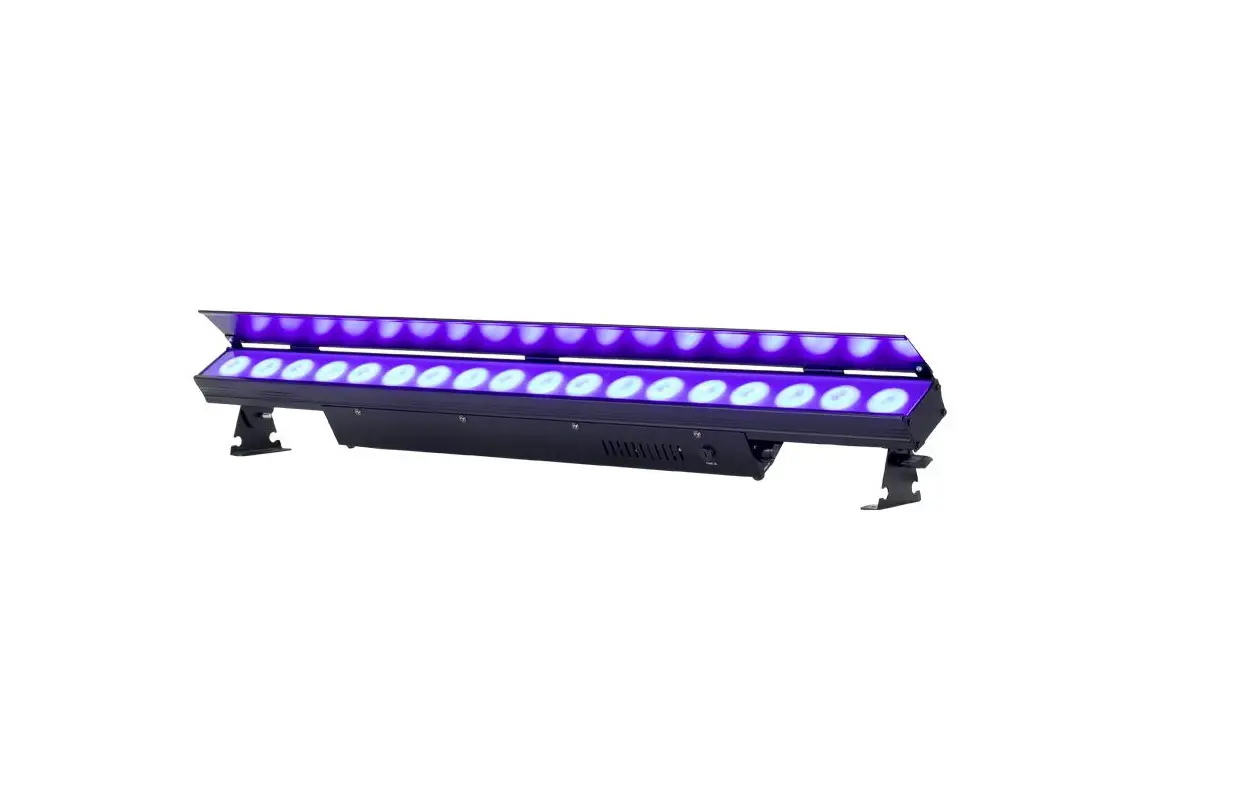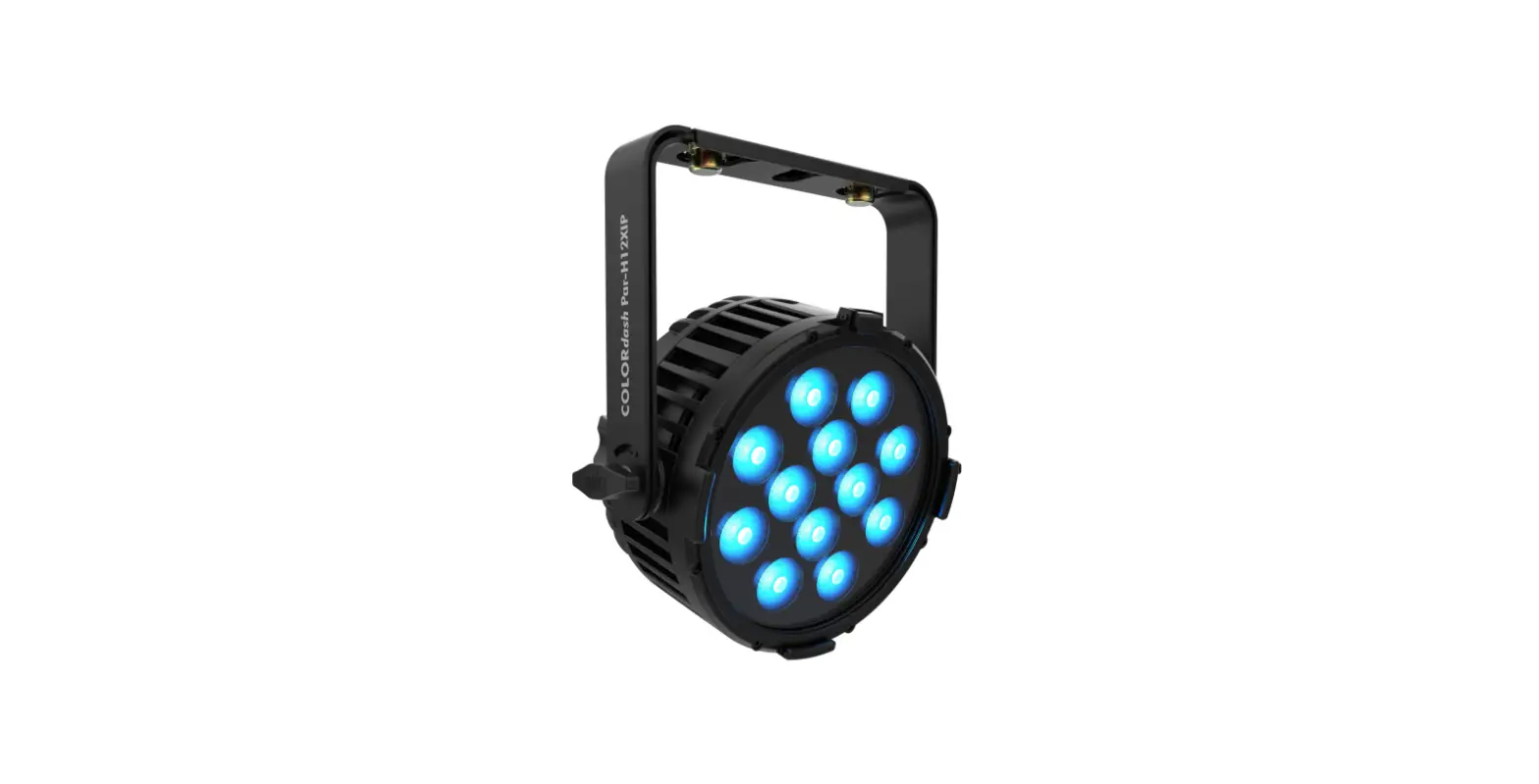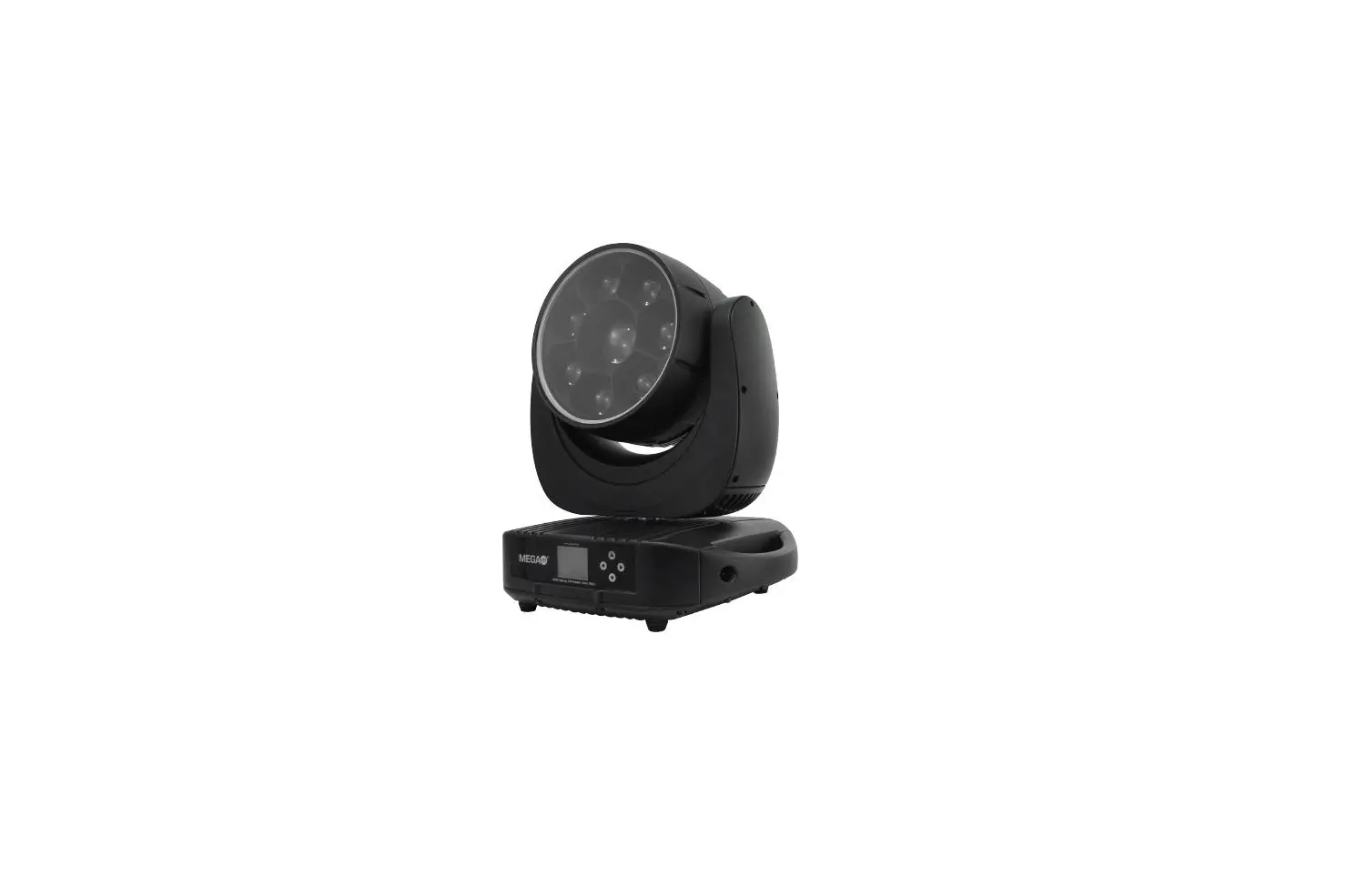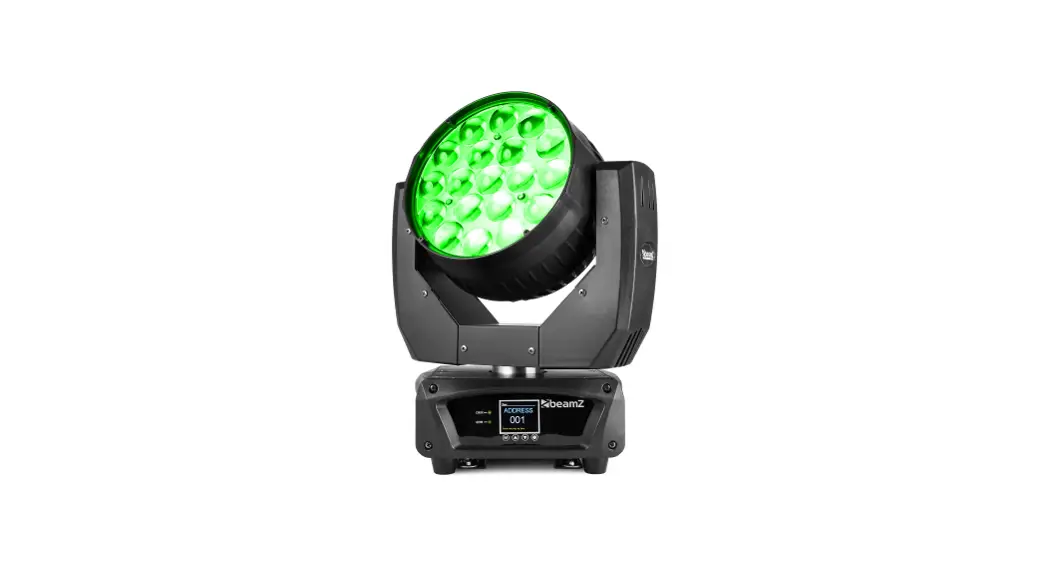

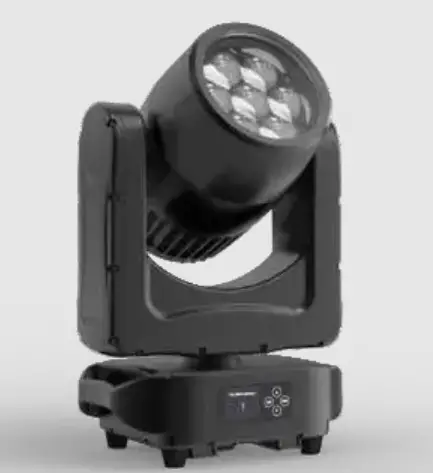
GUANGZHOU beam 7 Pixel Dimmable Wash Effect
Dimensions
All dimensions are in millimeters 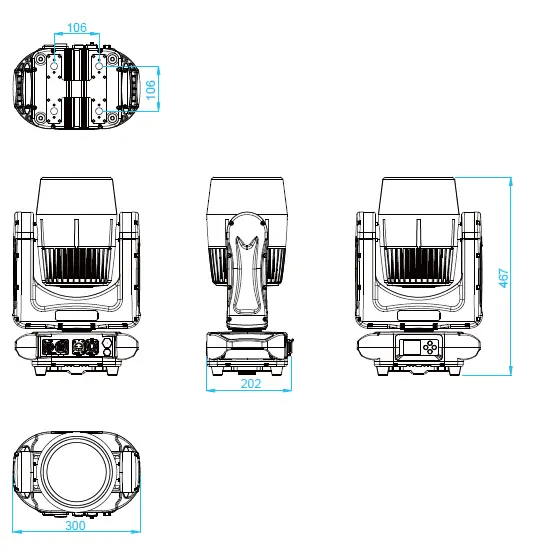
Safety Instruction
WARNING!
Read the safety precautions in this section before installing, powering, operating or servicing this product
The following symbols are used to identify important safety information on the product and in this manual: 
Warning! Risk Group 1 @ 40° (Low Risk) and Risk Group 2 @ 4° (Moderate-Risk) LED product according to EN 62471. Do not look into the beam at short distance of the of the product..
Do not view the light output with optical instruments or any device that may concentrate the beam.
This product is for professional use only. It is not for household use.
This product presents risks of severe injury or death due to fire and burn hazards, electric shock and falls.
Read this manual before installing, powering or servicing the fixture, follow the safety precautions listed below and observe all warnings in this manual and printed on the fixture. If you have questions about how to operate the fixture safely, please contact your supplier.
PROTECTION FROM ELECTRIC SHOCK
- Disconnect the fixture from AC power before removing or installing any cover or part and when not in use.
- Always ground (earth) the fixture electrically.
- Use only a source of AC power that complies with local building and electrical codes and has both overload and ground-fault (earth-fault) protection.
- Before using the fixture, check that all power distribution equipment and cables are in perfect condition and rated for the current requirements of all connected devices.
- Power input and throughput cables must be rated 20 A minimum, have three conductors 1.5 mm² (16 AWG) minimum conductor size and an outer cable diameter of 5 – 15 mm. Cables must be hard usage type (SJT or equivalent) and heat-resistant to 90° C minimum.
- Use only Power CON TRUE 1 ® cable connectors to connect to power input sockets. Use only Power CON TRUE 1 ® cable connectors to connect to power through put sockets.
- Isolate the fixture from power immediately if the power plug or any seal, cover, cable, or other component is damaged, defective, deformed, wet or showing signs of overheating. Do not reapply power until repairs have been completed.
- Refer any service operation not described in this manual to a qualified technician.
- Socket outlets used to supply fixture fixtures with power or external power switches must be located near the fixtures and easily accessible so that the fixtures can easily be disconnected from power.
PROTECTION FROM BURNS AND FIRE
- The exterior of the fixture becomes hot during use. Avoid contact by persons and materials.
Allow the fixture to cool for at least 5 minutes before handling. - Keep all combustible materials (e.g. fabric, wood, paper) at least 100 mm away from the fixture.
- Keep flammable materials well away from the fixture.
- Ensure that there is free and unobstructed airflow around the fixture.
- Do not illuminate surfaces within 200 mm of the fixture.
- Do not attempt to bypass thermostatic switches or fuses.
- If you relay power from one fixture to another using power throughput sockets, do not connect more than ten fixture fixtures in total to each other in an interconnected chain.
- Connect only other fixture fixtures to fixture power throughput sockets.
- Do not connect any other type of device to these sockets.
- Do not stick filters, masks or other materials onto any optical component.
- Do not modify the fixture in any way not described in this manual.
PROTECTION FROM INJURY
- Do not look directly into the product’s light output.
- Do not look at operating lamp. Eye injury may result.
- Do not look at the light output with magnifiers, telescopes, binoculars or similar optical instruments that may concentrate the light output.
- Ensure that persons are not looking directly into the front of the fixture when the product lights up suddenly. This can happen when power is applied, when the product receives a DMX signal, or when certain control menu items are selected.
- To minimize the risk of eye irritation or injury, disconnect the fixture from power at all times when the fixture is not in use and provide well-lit conditions to reduce the pupil diameter of anyone working on or near the fixture.
- Fasten the fixture securely to a fixed surface or structure when in use. The fixture is not portable when installed.
- Ensure that any supporting structure and/or hardware used can hold at least 10 times the weight of all the devices they support.
- Allow enough clearance around the head to ensure that it cannot collide with an object or another fixture when it moves.
- Check that all external covers and rigging hardware are securely fastened.
- Block access below the work area and work from a stable platform whenever installing, servicing or moving the fixture.
- Do not operate the fixture with missing or damaged covers, shields or any optical component.
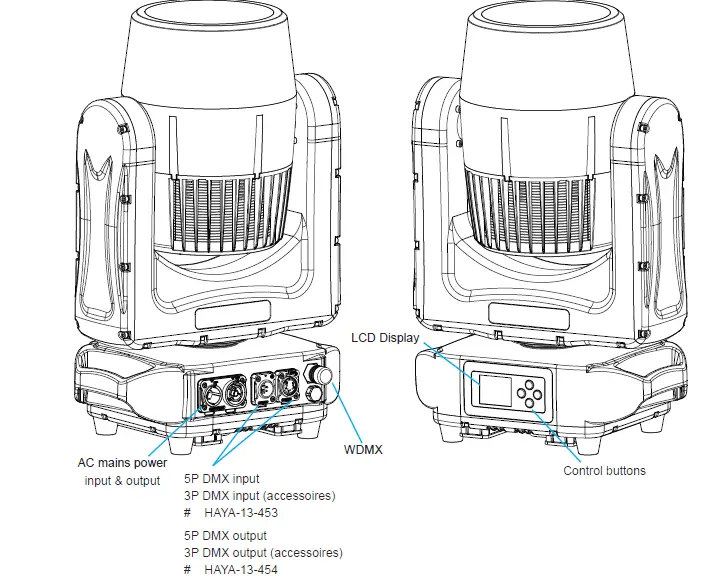
Fixture overview
Introduction
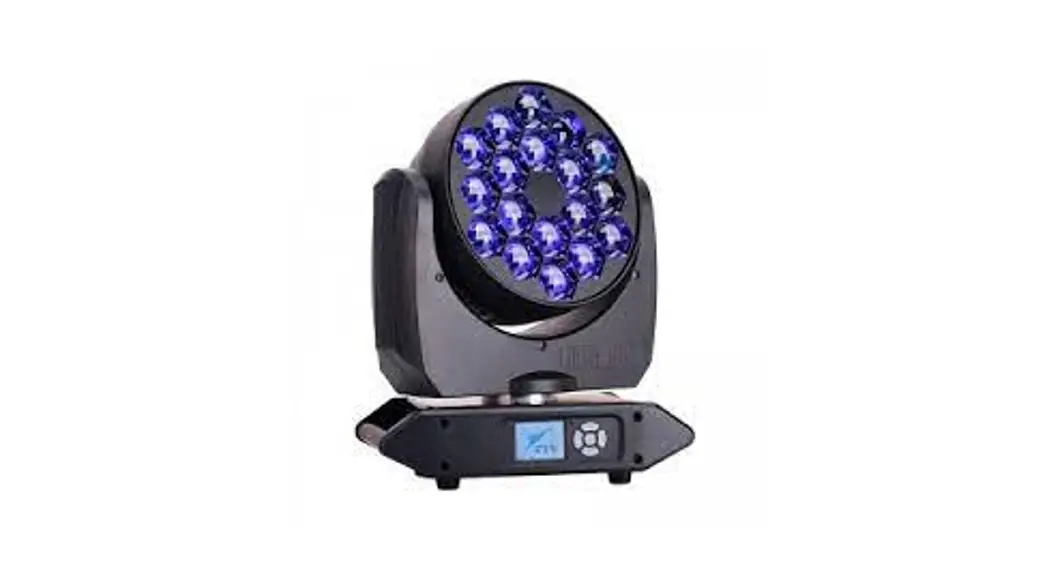
POWERFUL AND VERSATILE OUTDOOR LED WASH
- OUTDOOR LIGHTING ESSENTIAL
- TOURING – READY, COMPACT HOUSING
- 7 RGBL HIGH POWER LEDS
- 4° – 40° ZOOM ANGLE
- IP65 RATING
Using for the first time
Warning! Read “Safety Information” before installing, powering, operating or servicing the fixture.
Before applying power to the fixture:
Check that the local AC mains power source is within the fixture’s power voltage and frequency ranges.
See “Power cables and power plug” on page 6. Install a PowerCON TRUE 1 ® power input connector power cable.
AC Power
Warning! Read “Safety Information” starting on before connecting the fixtures to AC mains power.
Warning! For protection from electric shock, the fixture must be grounded (earthed). The power distribution circuit must be equipped with a fuse or circuit breaker and ground-fault (earth-fault) protection.
Warning! Socket outlets or external power switches used to supply the fixture with power must be located near the fixture and easily accessible so that the fixtures can easily be disconnected from power.
Important! Do not insert or remove PowerCON TRUE 1 ® connectors to apply or cut power, as this may cause
arcing at the terminals that will damage the connectors.
Important! Do not use an external dimming system to supply power to the fixture, as this may cause damage to the fixture that is not covered by the product warranty.
The fixture can be hard-wired to a electrical installation if you want to install it permanently, or a power plug that is suitable for the local power outlets can be installed on the power cable.
Power voltage
Warning! Check that the voltage range specified on the fixtures serial number label matches the local AC mains power voltage before applying power to the fixture.
The fixtures accepts AC mains power at 100-240 V nominal, 50/60 Hz. Do not apply AC mains power to the fixture at any other voltage than specified.
Power cables
Power input and throughput cables must be rated 16A minimum, have three conductors 1.5 mm² (16 AWG) minimum conductor size and an outer cable diameter of 5 – 15 mm. Cables must be hard usage type (SJT or equivalent) and heat- resistant to 90°C minimum. In the EU the cable must be HAR approved or equivalent.
If you install a power plug on the power cable, install a grounding-type (earthed) plug that is rated 16A minimum. Follow the plug manufacturer’s instructions. Table 1 shows standard wire color-coding schemes and some possible pin identification schemes; if pins are not clearly identified.
| Wire Color (EU models) | Wire Color (US models) | Conductor | Symbol |
| Brown | Black | Live | L |
| Blue | White | Neutral | N |
| Yellow/Green | Green | Ground (earth) | or |
Table 1: Wire color-coding and power connections
Relaying power to other devices
Warning! Do not connect more than seven fixtures in total to AC mains power in one interconnected chain. Power can be relayed to another device via the PowerCON TRUE 1 ® throughput socket.
If you daisy chain the fixtures in a chain so that they all draw AC mains power via the first fixture, certain points must be respected:
- A heavy duty, three-conductor, 16 AWG or 1.5 mm2 cable with SJT or equivalent cable jacket must be used to connect the first fixture to AC mains power.
- PowerCON TRUE 1 ® connectors must be used to draw AC mains power from the fixtures power throughput sockets and yellow PowerCON TRUE 1 ® connectors must be used to supply power at the fixture’s power input sockets.
- No matter what the AC mains power voltage is, do not connect more than ten the fixture in total ( including the first fixture) to AC mains power in one interconnected daisy chain using power input and through out connectors.
Data link
A DMX 512 data link is required in order to control a fixture via DMX. The fixture has 5-pin XLR connectors for DMX data input and output. The pin-out on all connectors is pin 1 = shield, pin 2 = cold (-), and pin 3 = hot (+) Pins 4 and 5 in the 5-pin XLR connectors are not used.
Tips for reliable data transmission
To connect the fixture to data:
- Connect the DMX data output from the controller to the 5-pin XLR connector of the nearest fixture.
- Connect the DMX output of the fixture closest to the controller to the DMX input of the next fixture and continue connecting fixtures output to input.
Physical installation
Warning! The fixture must be either fastened to a flat surface such as a stage or wall, or clamped to a truss or similar structure in any orientation using a rigging clamp.
Warning! If the fixture can cause injury or damage if it falls, attach an approved safety cable to one of the safety cable attachment points on the base (see “Fixture overview”).
Check that all surfaces to be illuminated are minimum 200 mm. from the fixture, that combustible materials (wood, fabric, paper, etc.) are minimum 100 mm. from the fixture, that there is free airflow around the fixture and that there are no flammable materials nearby.
Fastening the fixture to a flat surface
The fixture can be fastened to a fixed flat surface that is oriented at any angle. Check that the surface can support at least 10 times the weight of all fixtures and equipment to be installed on it.
Warning! The supporting surface must be hard and flat or cooling may be blocked, which will cause overheating. Fasten the fixture securely. Do not stand it on a surface or leave it where it can be moved or can fall over. Attach a securely anchored safety cable to the safety cable attachment point (see “Fixture overview”) if the fixture is to be installed in any location where it may fall and cause injury or damage if the primary attachment fails.
- Block access under the work area. Working from a stable platform, hang the fixture on the truss with the arrow on the base towards the area to be illuminated. Tighten the rigging clamp.
- Secure the fixture against clamp failure with a secondary attachment such as an approved safety cable that is rated for the weight of the fixture using one of the attachment points at the edges of the base (see “Fixture overview”). Do not use any other part of the fixture as a safety cable attachment point.
The installation of the fixture has to be built and constructed in a way that it can hold 10 times the weight for 1 hour without any harming deformation.
The installation must always be secured with a secondary safety attachment, e.g. an appropriate catch net. This secondary safety attachment must be constructed in a way that no part of the installation can fall down if the main
attachment fails.
When rigging, derigging or servicing the fixture staying in the area below the installation place, on bridges, under high working places and other endangered areas is forbidden.
The operator has to make sure that safety-relating and machine-technical installations are approved by an expert before taking into operation for the first time and after changes before taking into operation another time.
The operator has to make sure that safety-relating and machine-technical installations are approved by an expert after every four year in the course of an acceptance test.
The operator has to make sure that safety-relating and machine-technical installations are approved by a skilled person
once a year.
The fixture should be installed outside areas where persons may walk by or be seated.
IMPORTANT! OVERHEAD RIGGING REQUIRES EXTENSIVE EXPERIENCE, including (but not limited to) calculating working load limits, installation material being used, and periodic safety inspection of all installation material and the projector. If you lack these qualifications, do not attempt the installation yourself, but instead use a professional structural rigger. Improper installation can result in bodily injury or damage to property. The fixture has to be installed out of the
reach of people.
If the fixture shall be lowered from the ceiling or high joists, professional trussing systems have to be used. The fixture must never be fixed swinging freely in the room.
Caution: Fixture may cause severe injuries when crashing down! If you have doubts concerning the safety of a possible installation, do not install the moving head!
Before rigging make sure that the installation area can hold a minimum point load of 10 times the fixture’s weight.
When installing the device, make sure there is no highly inflammable material (decoration articles, etc.) in a distance of min. 0.5 m.
Use an appropriate clamp to rig the fixture on the truss.
Follow the instructions mentioned at the bottom of the base.
Make sure that the device is fixed properly! Ensure that the structure (truss) to which you are attaching the fixtures is secure.
The fixture can be placed directly on the stage floor or rigged on a truss without altering its operation characteristics .
For securing the fixture to the truss, install a safety wire which can hold at least 10 times the weight of the fixture. Use only the safety wire with a snap hook with screw lock gate. Fasten the safety cable in the attachment point and around the truss as shown on the picture below.
Rigging via omega bracket: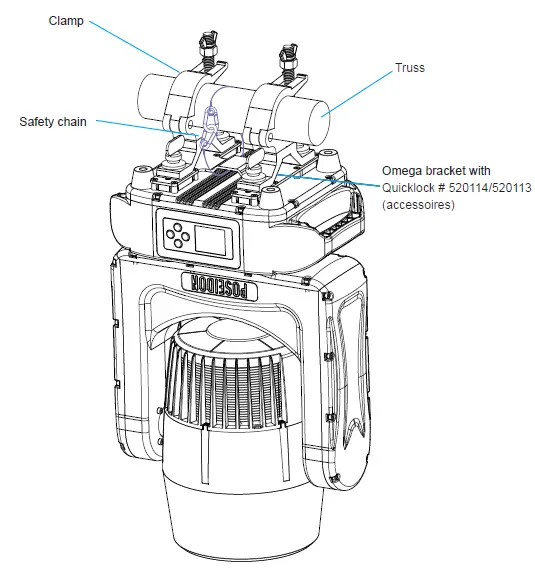
Outdoor IP-rated fixtures
HAYA products are applied to official classified IP norm levels. For this product the IP rate is IP65 when using the covers for the chassis parts. IP65 means according classified norm: shielded against dust and pressurized water from any side. Typical use for outdoor rated stage events with normal weather acceptance. So no heavy rain, because then the water pressure over exceeds the IP norm. 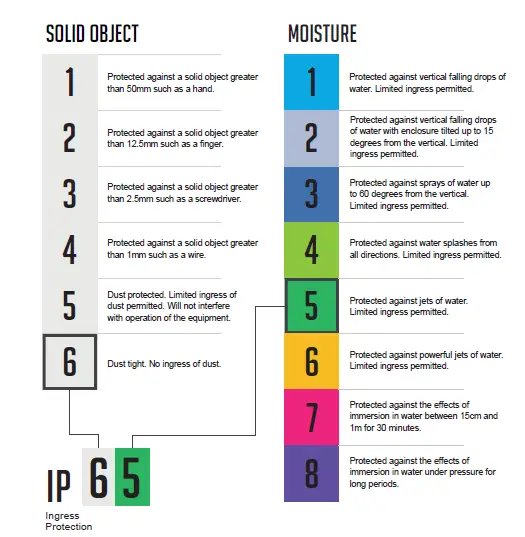
Condensation/moisture inside housing
Because of high humidity levels during production condensation can occur inside the housing. This is mostly visible on the coldest parts of the fixture, like the front glass or display. To prevent this problem we work with special conditioned areas for outdoor fixtures. Because of the breathing air valves it is still possible to get humidity inside the fixture. This will evaporate slowly. Do not put wet fixtures in a flight case, this will help humidity enter the fixture.
Fixtures temperature specification
Make sure the fixture is used within its working temperature range. Outside this range we cannot guarantee correct operation.
Temporary usage:
Stage event equipment is designed with temporary use in mind. Our product purpose is for theatre, festival, (disco) clubs and indoor & outdoor concerts. Long term use is possible but keep in mind that it can bring damage to aging materials and affect the coated surface. stainless steel). Rubber sealings will be negatively affected after long-term UV exposure and should be checked by qualified service
Tighten screws too hard will also affect the IP-rating.
Setup
Warning! Read “Safety Information” before installing, powering or operating the fixture.
Control panel and menu navigation
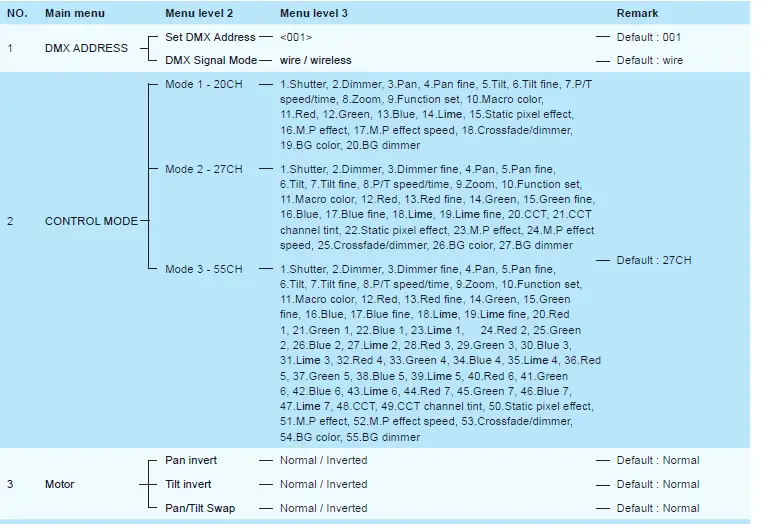
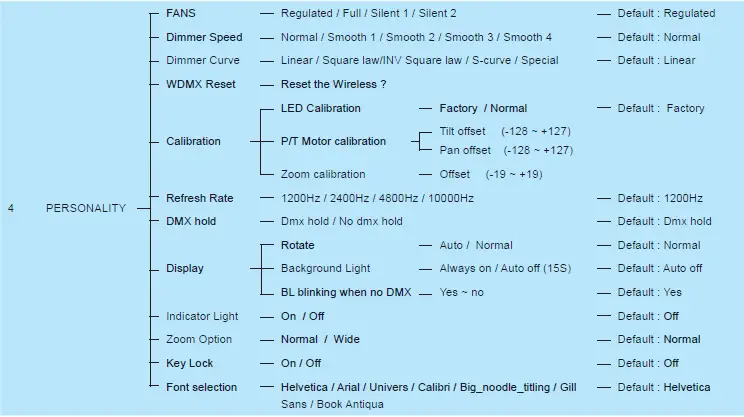
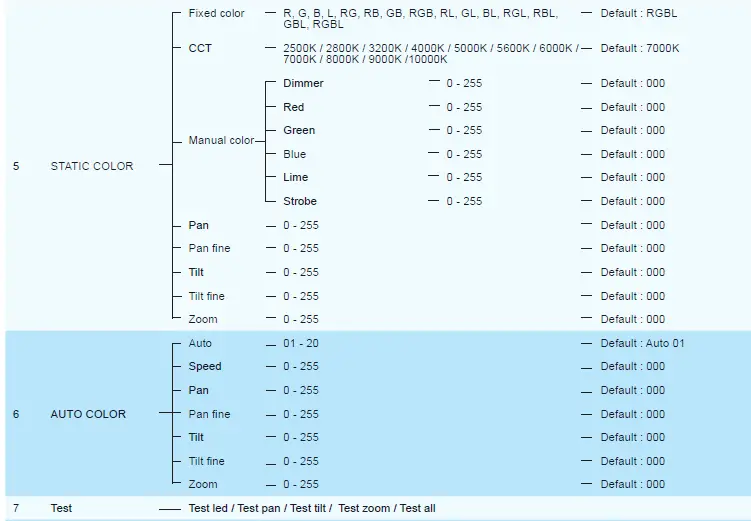
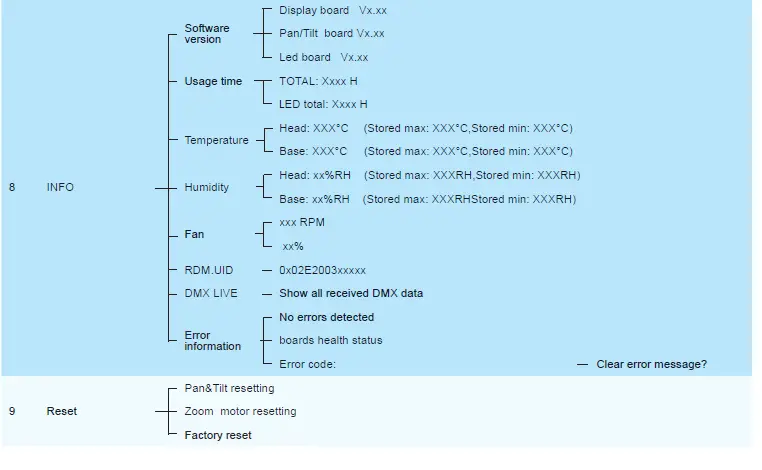
The onboard control panel and backlit graphic display are used to set the fixture’s DMX address, configure individual fixture settings (personality), read out data and execute service utilities. See “Onboard control menus” for a complete list of menus and commands.
Using the control buttons
- To enter the menu select [MODE].
- Press [UP] and [DOWN] to scroll within a menu or adjust values.
- To enter a menu, select a function or apply a selection, press [ENTER].
- To escape a function or move back one level in the menu structure, press [MODE].
- Hold [MENU] = highlight for 15 seconds
- Press [UP] and [DOWN] together to rotate display
DMX address setting
The DMX address, also known as the start channel, is the first channel used to receive instructions from the controller. For independent control, each fixture must be assigned its to a separate channel. The DMX address can be configured as by using the DMX ADDRESS menu in the control panel. For setting the DMX address press [ENTER] before you can change the address.
- The main screen will show a ‘dot’ and the backlight will be switched off when a DMX signal is detected.
- The fixture is fully RDM ready. So when you are using a RDM ready console you can address the unit and read out its complete status. For RDM functions please refer to the ANSI/ESTA E1.20-2006 standard
W-DMX control
Go to the W-DMX section in the main menu, press the button “UP” to switch off Wireless DMX or disconnect with all connected Transmitters.
Press the button “DOWN’ to set the unit in the ”ready to connect with all not connected transmitters’ mode. If you press the mode button on the Wireless sollution transmitter all the units in this mode will be connected.
If the unit is successfully connected in the home display the sign “ : V ” appears. If the unit is not connected to a transmitter in the home display the sign “ : X ”. If the unit is switched off in the home display the sign “ : OFF ”.
- Holding the MENU and ENTER button for more than 3 seconds, the wireless board will reset.
- Do not use Wireless DMX and Wired DMX at the same time because it will give unwanted interference
Control mode
DMX control mode is selected in the CONTROL MODE menu. The fixture can be controlled with 3 DMX control modes: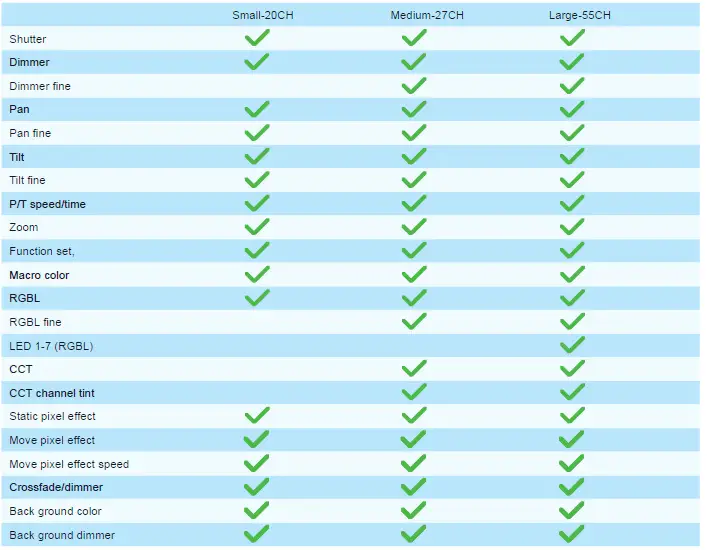
Control panel
Here you can set all functions for the fixture.
Personality
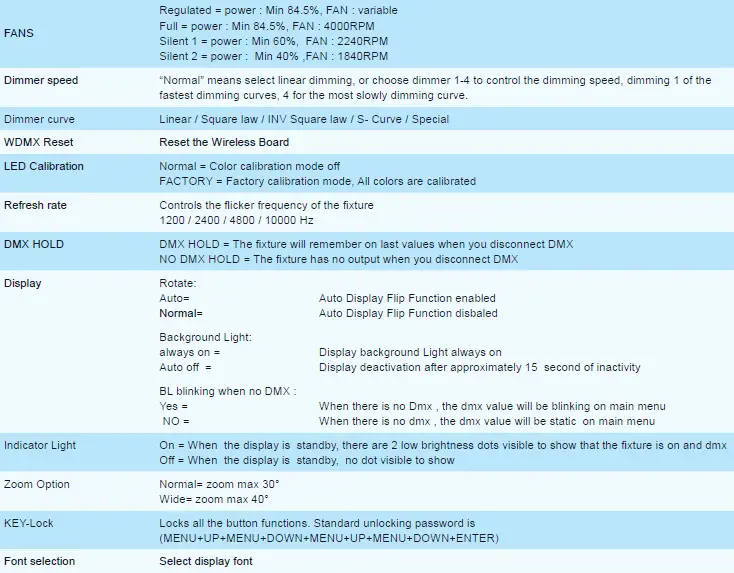
Dimmer mode
provides five dimming options (see picture below):
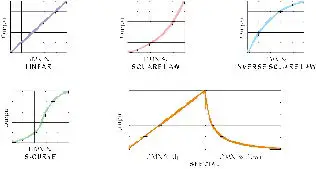
- LINEAR – the increase in light intensity appears to be linear as DMX value is increased.
- SQUARE LAW – light intensity control is finer at low levels and coarser at high levels.
- INV Square law – light intensity control is coarser at low levels and finer at high levels.
- S-CURVE – light intensity control is finer at low levels and high levels and coarser at medium levels.
- Special – the light intensity was linear increase with DMX value , and light intensity control is finer at low level with DMX values decrease , the dimmer speed will also has effect on it.
Whichever DIMMER CURVE option you select, you can choose between NORMAL or SMOOTH 1 / 2 / 3 / 4 dimming settings:
- NORMAL is the default setting. It gives a virtually instantaneous reaction when you dim from one intensity to another, but dimming slowly from one intensity to another may appear slightly uneven.
- The MOOTH 1 / 2 / 3 / 4 setting gives smoother dimming during slow changes in intensity, but it limits the speed of dimming changes slightly. This makes it ideal for slow, smooth dimming, but a short time-lag may be noticeable if you try to dim quickly from one intensity to another.
DMX protocols
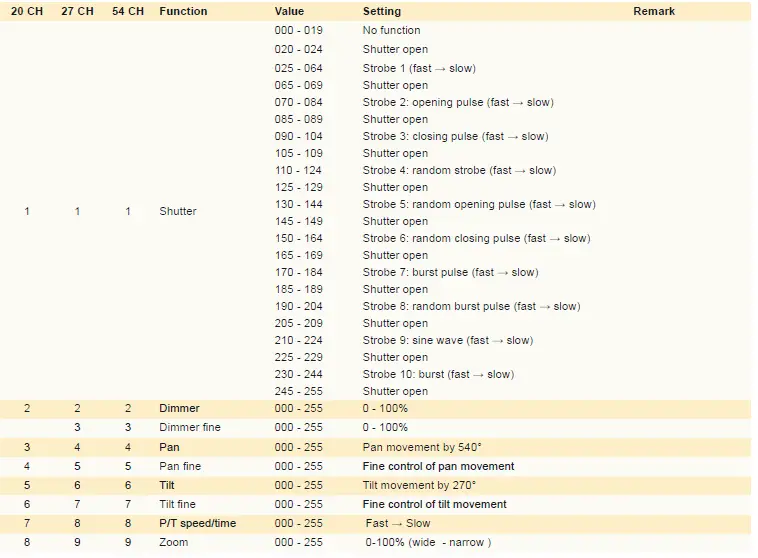
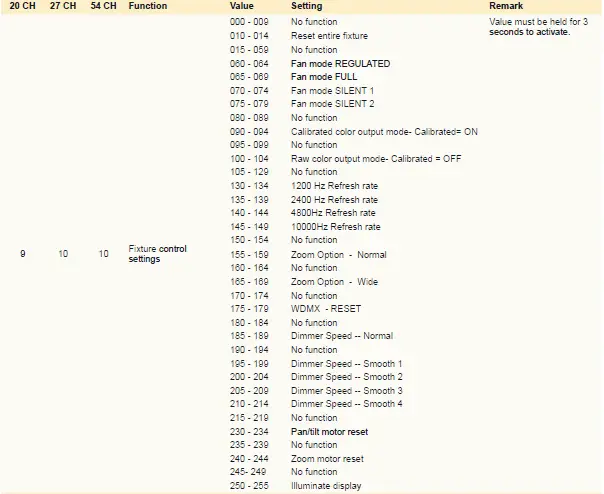
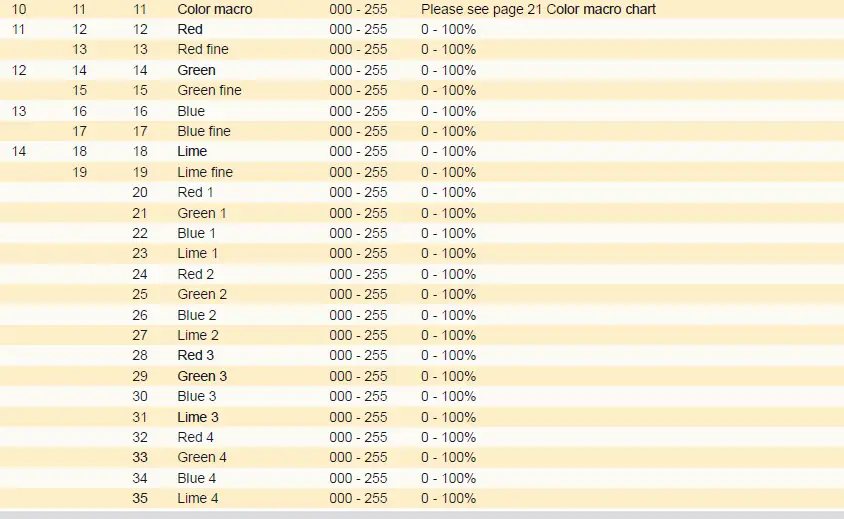
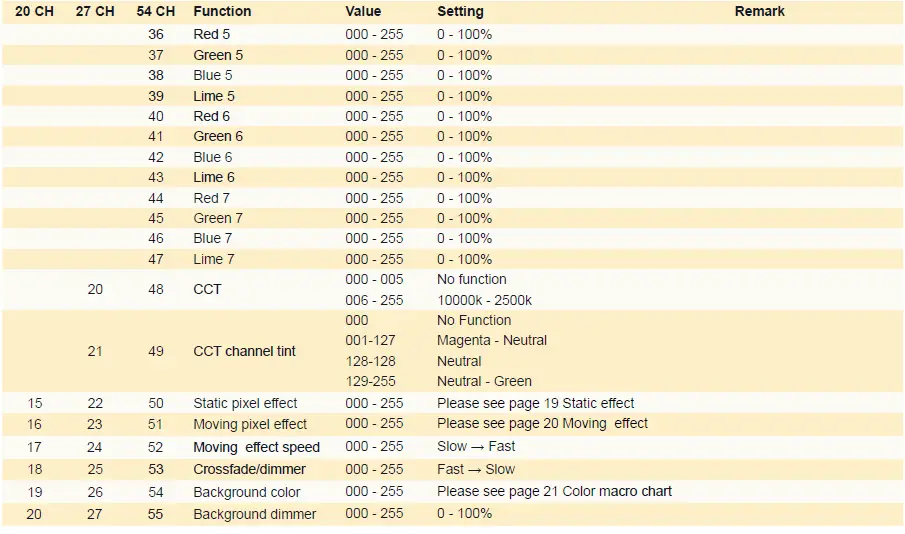
Arrangement of the LED groups 1-7
The Pan/Tilt values are at 128/35. The display is facing towards you. 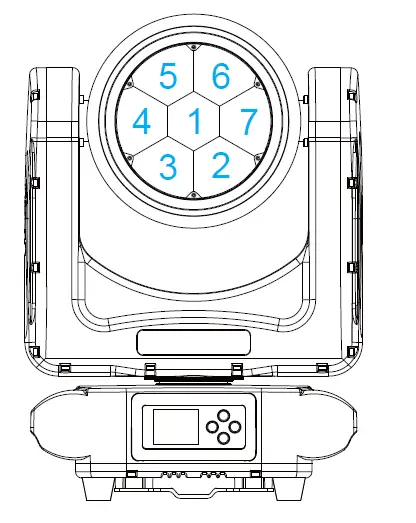
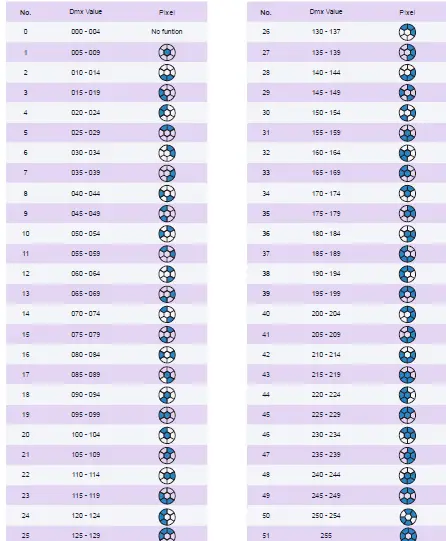
Static pixel effect chart 
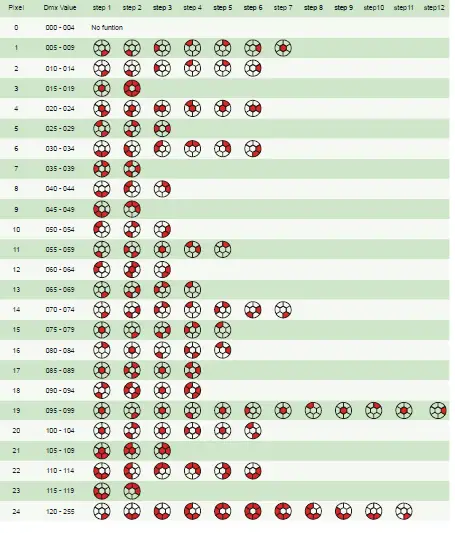
Moving pixel effect chart

Color Macro Chart
| DMX | value | Gel Name Color Number | |
| 0-4 | no function | ||
| 5 | Rose Pink | LEE 002 | |
| 6 | Medium Bastard Amber | LEE 004 | |
| 7 | Pale Yellow | LEE 007 | |
| 8 | Dark Salmon | LEE 008 | |
| 9 | Pale Amber Gold | LEE 009 | |
| 10 | Medium Yellow | LEE 010 | |
| 11 | Straw Tint | LEE 013 | |
| 12 | Deep Straw | LEE 015 | |
| 13 | Surprise Peach | LEE 017 | |
| 14 | Medium Amber | LEE 020 | |
| 15 | Dark Amber | LEE 022 | |
| 16 | Sunset Red | LEE 025 | |
| 17 | Bright Red | LEE 026 | |
| 18 | Medium Pink | LEE 036 | |
| 19 | Rose Purple | LEE 048 | |
| 20 | Lavender | LEE 058 | |
| 21 | Pale Blue | LEE 063 | |
| 22 | Sky Blue | LEE 068 | |
| 23 | Tokyo Blue | LEE 071 | |
| 24 | Evening Blue | LEE 075 | |
| 25 | Lime Green | LEE 088 | |
| 26 | Moss Green | LEE 089 | |
| 27 | Dark Yellow Green | LEE 090 | |
| 28 | Yellow | LEE 101 | |
| 29 | Straw | LEE 103 | |
| 30 | Deep Amber | LEE 104 | |
| 31 | Orange | LEE 105 | |
| 32 | Primary Red | LEE 106 | |
| 33 | Light Rose | LEE 107 | |
| 34 | English Rose | LEE 108 | |
| 35 | Light Salmon | LEE 109 | |
| 36 | Middle Rose | LEE 110 | |
| 37 | Dark Pink | LEE 111 | |
| 38 | Magenta | LEE 113 | |
| 39 | Peacock Blue | LEE 115 | |
| 40 | Steel Blue | LEE 117 | |
| 41 | Light Blue | LEE 118 | |
| 42 | Dark Blue | LEE 119 | |
| 43 | LEE Green | LEE 121 | |
| DMX | value | Gel Name | Color Number |
| 44 | Fern Green | LEE 122 | |
| 45 | Dark Green | LEE 124 | |
| 46 | Mauve | LEE 126 | |
| 47 | Smokey Pink | LEE 127 | |
| 48 | Bright Pink | LEE 128 | |
| 49 | Marine Blue | LEE 131 | |
| 50 | Medium Blue | LEE 132 | |
| 51 | Golden Amber | LEE 134 | |
| 52 | Deep Golden Amber | LEE 135 | |
| 53 | Special Lavender | LEE 137 | |
| 54 | Pale Green | LEE 138 | |
| 55 | Primary Green | LEE 139 | |
| 56 | Summer Blue | LEE 140 | |
| 57 | Bright Blue | LEE 141 | |
| 58 | Pale Violet | LEE 142 | |
| 59 | Pale Navy Blue | LEE 143 | |
| 60 | No Colour Blue | LEE 144 | |
| 61 | Apricot | LEE 147 | |
| 62 | Bright Rose | LEE 148 | |
| 63 | Gold Tint | LEE 151 | |
| 64 | Pale Gold | LEE 152 | |
| 65 | Pale Salmon | LEE 153 | |
| 66 | Pale Rose | LEE 154 | |
| 67 | Chocolate | LEE 156 | |
| 68 | Pink | LEE 157 | |
| 69 | Deep Orange | LEE 158 | |
| 70 | Slate Blue | LEE 161 | |
| 71 | Bastard Amber | LEE 162 | |
| 72 | Flame Red | LEE 164 | |
| 73 | Daylight Blue | LEE 165 | |
| 74 | Deep Lavender | LEE 170 | |
| 75 | Lagoon Blue | LEE 172 | |
| 76 | Dark Steel Blue | LEE 174 | |
| 77 | Loving Amber | LEE 176 | |
| 78 | Chrome Orange | LEE 179 | |
| 79 | Dark Lavender | LEE 180 | |
| 80 | Congo Blue | LEE 181 | |
| 81 | Moonlight Blue | LEE 183 | |
| 82 | Flesh Pink | LEE 192 | |
| 83 | Surprise Pink | LEE 194 | |
| DMX value | Gel Name | Color Number |
| 84 | Zenith Blue | LEE 195 |
| 85 | True Blue | LEE 196 |
| 86 | Alice Blue | LEE 197 |
| 87 | Palace Blue | LEE 198 |
| 88 | Regal Blue | LEE 199 |
| 89 | Double CTB | LEE 200 |
| 90 | Full CTB | LEE 201 |
| 91 | Half CTB | LEE 202 |
| 92 | Quarter CTB | LEE 203 |
| 93 | Full CTO | LEE 204 |
| 94 | Half CTO | LEE 205 |
| 95 | Quarter CTO | LEE 206 |
| 96 | Full CTO + .3 ND | LEE 207 |
| 97 | Full CTO + .6 ND | LEE 208 |
| 98 | LCT Yellow (Y1) | LEE 212 |
| 99 | White Flame Green | LEE 213 |
| 100 | LEE Fluorescent Green | LEE 219 |
| 101 | Super Correction LCT Yellow | LEE 230 |
| 102 | Super Correction W.F. Green | LEE 232 |
| 103 | HMI (to Tungsten) | LEE 236 |
| 104 | CID (to Tungsten) | LEE 237 |
| 105 | CSI (to Tungsten) | LEE 238 |
| 106 | LEE Fluorescent 5700 Kelvin | LEE 241 |
| 107 | LEE Fluorescent 4300 Kelvin | LEE 242 |
| 108 | LEE Fluorescent 3600 Kelvin | LEE 243 |
| 109 | LEE Plus Green | LEE 244 |
| 110 | Half Plus Green | LEE 245 |
| 111 | LEE Minus Green | LEE 247 |
| 112 | Half Minus Green | LEE 248 |
| 113 | Quarter Minus Green | LEE 249 |
| 114 | Three Quarter CTB | LEE 281 |
| 115 | One and a Half CTB | LEE 283 |
| 116 | Three Quarter CTO | LEE 285 |
| 117 | One and a Half CTO | LEE 286 |
| 118 | Double CTO | LEE 287 |
| 119 | Soft Green | LEE 322 |
| 120 | Jade | LEE 323 |
| 121 | Forest Green | LEE 327 |
| 122 | Follies Pink | LEE 328 |
| 123 | Special Rose Pink | LEE 332 |
| DMX value | Gel Name | Color Number |
| 124 | Special Medium Lavender | LEE 343 |
| 125 | Fuchsia Pink | LEE 345 |
| 126 | Glacier Blue | LEE 352 |
| 127 | Lighter Blue | LEE 353 |
| 128 | Special Steel Blue | LEE 354 |
| 129 | Special Medium Blue | LEE 363 |
| 130 | Cornflower | LEE 366 |
| 131 | Full CT Straw | LEE 441 |
| 132 | Half CT Straw | LEE 442 |
| 133 | Eighth CT Straw | LEE 444 |
| 134 | Double New Colour Blue | LEE 500 |
| 135 | New Colour Blue (Robertson Blue) | LEE 501 |
| 136 | Half New Colour Blue | LEE 502 |
| 137 | Waterfront Green | LEE 504 |
| 138 | Sally Green | LEE 505 |
| 139 | Marlene | LEE 506 |
| 140 | Madge | LEE 507 |
| 141 | Midnight Maya | LEE 508 |
| 142 | Argent Blue | LEE 525 |
| 143 | ALD Gold | LEE 550 |
| 144 | Full CT Eight Five | LEE 604 |
| 145 | Industry Sodium | LEE 650 |
| 146 | HI Sodium | LEE 651 |
| 147 | Urban Sodium | LEE 652 |
| 148 | Perfect Lavender | LEE 700 |
| 149 | Provence | LEE 701 |
| 150 | Special Pale Lavender | LEE 702 |
| 151 | Cold Lavender | LEE 703 |
| 152 | Lily | LEE 704 |
| 153 | King Fals Lavender | LEE 706 |
| 154 | Cool Lavender | LEE 708 |
| 155 | Electric Lilac | LEE 709 |
| 156 | Spir Special Blue | LEE 710 |
| 157 | Cold Blue | LEE 711 |
| 158 | Bedford Blue | LEE 712 |
| 159 | Elysian Blue | LEE 714 |
| 160 | Cabana Blue | LEE 715 |
| 161 | Mikkel Blue | LEE 716 |
| 162 | Colour Wash Blue | LEE 719 |
| 163 | Berry Blue | LEE 721 |
| DMX value | Gel Name | Color Number |
| 164 | Bray Blue | LEE 722 |
| 165 | Virgin Blue | LEE 723 |
| 166 | Ocean Blue | LEE 724 |
| 167 | Old Steel Blue | LEE 725 |
| 168 | QFD Blue | LEE 727 |
| 169 | Steel Green | LEE 728 |
| 170 | Scuba Blue | LEE 729 |
| 171 | Twickenham Green | LEE 736 |
| 172 | JAS Green | LEE 738 |
| 173 | Bram Brown | LEE 742 |
| 174 | Dirty White | LEE 744 |
| 175 | Easy White | LEE 747 |
| 176 | Seedy Pink | LEE 748 |
| 177 | Wheat | LEE 763 |
| 178 | Sun Colour Straw | LEE 764 |
| 179 | LEE Yellow | LEE 765 |
| 180 | Oklahoma Yellow | LEE 767 |
| 181 | Egg Yolk Yellow | LEE 768 |
| 182 | Burnt Yellow | LEE 770 |
| 183 | Rust | LEE 777 |
| 184 | Millennium Gold | LEE 778 |
| 185 | Bastard Pink | LEE 779 |
| 186 | AS Golden Amber | LEE 780 |
| 187 | Terry Red | LEE 781 |
| 188 | Moroccan Pink | LEE 790 |
| 189 | Vanity Fair | LEE 793 |
| 190 | Pretty ‘n Pink | LEE 794 |
| 191 | Magical Magenta | LEE 795 |
| 192 | Special KH Lavender | LEE 799 |
| 193 | Color Effect | 2500K |
| 194 | CCT 1 | 2800K |
| 195 | CCT 2 | 3200K |
| 196 | CCT 3 | 4000K |
| 197 | CCT 4 | 5000K |
| 198 | CCT 5 | 5600K |
| 199 | CCT 6 | 6000K |
| 200 | CCT 7 | 7000K |
| 201 | CCT 8 | 8000K |
| 202 | CCT 9 | 9000K |
| 203 | CCT 10 | 10,000K |
| DMX value | Function | setting |
| 204 – 205 | no function | |
| 206 – 215 | colour rainbow 1 | slow – fast |
| 216 – 225 | colour rainbow 2 | slow – fast |
| 226 – 235 | colour rainbow 3 | slow – fast |
| 236 – 245 | colour rainbow 4 | slow – fast |
| 246 – 255 | colour rainbow 5 | slow – fast |
Specifications
Power
- Input voltage & rate 100-240V, 50/60Hz
- Standby power 30W
- Nominal total power consumption (at nominal voltage 230V) 350W
- Typical current (at nominal voltage 230V) 1.56A
- Cos φ 0,974
- Power plug type Seetronic PowerCon True
Configuration
- LED color RGBL
- LED color temperature 2500 K – 10000 K
- Quantity of LED 7 pcs
- Dimming frequency 1200/2400/4800/10000 Hz
- Dimmer resolution 8bit / 16bit
Optical
- Beam angle 4° – 40°
- Photometric
- Output @1M 295602 lux
- Output @5M 11824 lux
Heat management
- Cooling type: Passive cooling
- MAX. Ambient temp (Ta max) 40, °C
- MIN. Ambient temp (Ta min) 25, °C
- MAX housing temp.(ta=25°C) 50, °C
- MAX housing temp.(ta=40°C) 65, °C
Menu
- Auto program yes
- Static color yes
- Manual calibration yes
- Factory calibration yes
- Strobe speed 0 – 20Hz
- Random strobe yes
Control
- * PF = power factor. Measurements made at nominal voltage with all LEDs at full intensity. Allow for a deviation of +/- 10%. 25
- Control protocol USITT DMX512/1990
- DMX channel range 20 / 27 / 55
- RDM yes
- RDM compliance ANSI/ESTA E.120
- WDMX Standard
- ACN None
- DMX input connection DMX 5P in & out (3 pin possible with optional chassis part)
- Data input (artnet, SACN) None
Hardware
- Interface Backlite LCD display
- Software upload method XLR & RJ45
Installation
- IP rating IP65
Housing
- Safety attachment point Yes
Physical
- Net product weight 12.7 kg
- Machine dimensions – Length 300 mm
- Machine dimensions – Width 205 mm
- Machine dimensions – Height 467 mm
Accessories
- Included items Power cable , manual
Approvals
- Approved certifications CE / ROHS
FCC Statement
This equipment has been tested and found to comply with the limits for a Class B digital device, pursuant to part 15 of the FCC rules. These limits are designed to provide reasonable protection against harmful interference in a residential installation. This equipment generates, uses and can radiate radio frequency energy and, if not installed and used in accordance with the instructions, may cause harmful interference to radio communications.
However, there is no guarantee that interference will not occur in a particular installation. If this equipment does cause harmful interference to radio or television reception, which can be determined by turning the equipment off and on, the user is encouraged to try to correct the interference by one or more of the following measures:
- Reorient or relocate the receiving antenna.
- Increase the separation between the equipment and receiver.
- Connect the equipment into an outlet on a circuit different from that to which the receiver is connected.
- Consult the dealer or an experienced radio/TV technician for help.
To assure continued compliance, any changes or modifications not expressly approved by the party. Responsible for compliance could void the user’s authority to operate this equipment.
This equipment complies with Part 15 of the FCC Rules.
Operation is subject to the following two conditions:
- This device may not cause harmful interference, and
- This device must accept any interference received, including interference that may cause undesired operation.
FCC Radiation Exposure Statement:
The device has been evaluated to meet general RF exposure requirement.
The device can ben used in the portable exposure condition with restriction.
FCC Radiation Exposure Statement:
The equipment complies with FCC Radiation exposure limits set forth for uncontrolled environment. This equipment should be installed and operated with minimum distance 20cm between the radiator and your body.