
 the serviced apartyment company
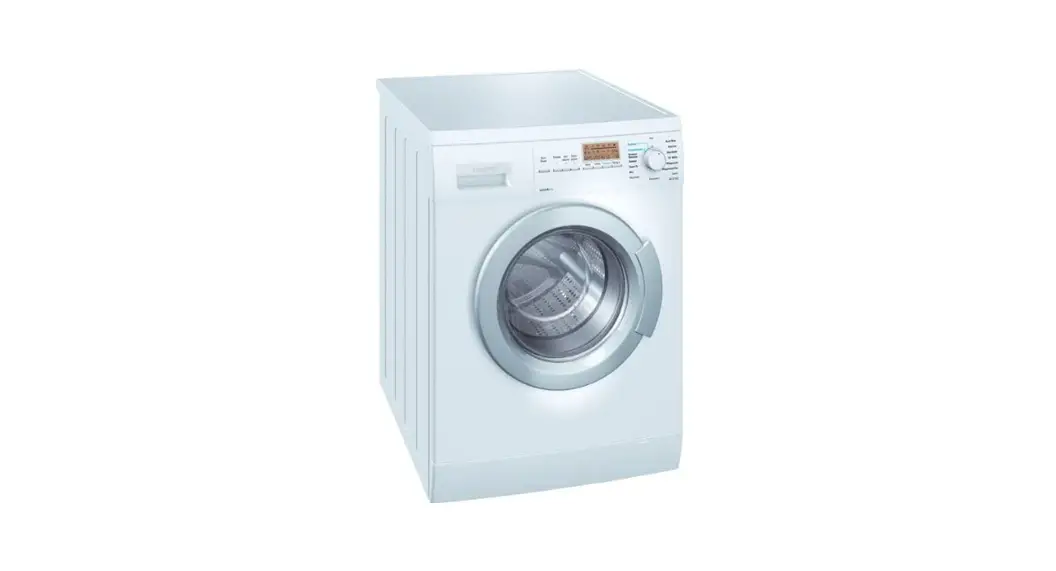
Operating Instructions – Washer dryer Siemens D12-52
Control Panel
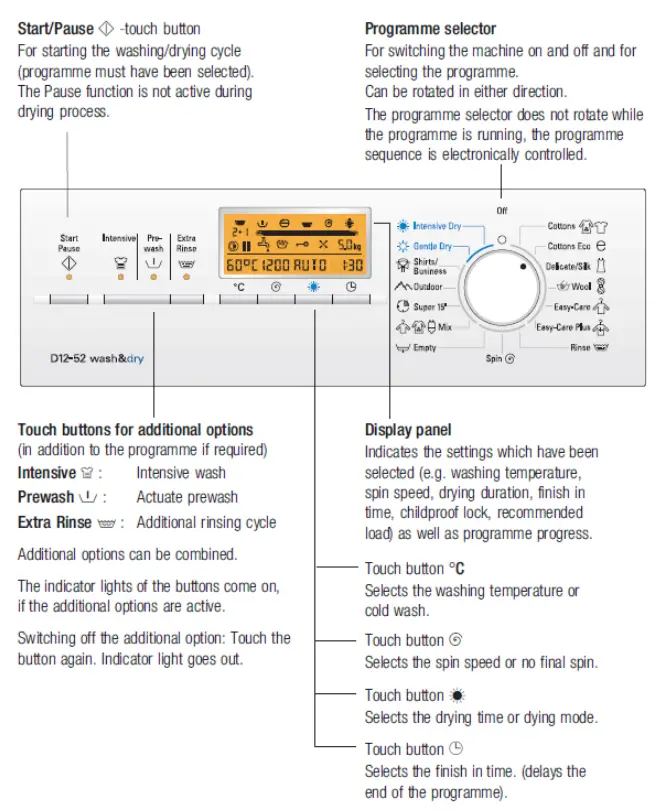
Display panel
| Display | Notes | |
 | Prewash | On if selected |
 | Washing | Not on if Rinse raff  Spin (. The empty or Drying programme was selected Spin (. The empty or Drying programme was selected |
| Rinse | Not on if Spin ray. Empty or The drying programme was selected |
 | Final spin / Empty | Not on if a programme with the a —‘ setting (without final spin) or drying programme is running |
 | Dry | On if the drying programmes or drying time/mode was selected |
| Progress bar | For the programme status | |
 | Low water pressure | On if the water pressure is too low. |
 | Overdosage | If too much detergent dispensed |
 | Childproof lock | On if selected |
 | Fan | On if the drying programmes and drying time was selected |
5,okg∗ | Recommended load | Not on if Rinse r-r: Spin ._,, or Empty ‘t-rd additional programme was selected |
60°C* | Washing temperature or Cold wash. | ‘ Expected washing temperature |
1200* | Spin speed or without final spin | Default spin speed of the programme or selected speed |
2:00* | Drying duration or Drying mode | Expected drying programme duration or auto drying. |
1:30* | Programme duration | Expected programme duration |
| 24h* -0- — PAUS Opel F:16* | Other displays at this location: Finish in time End of programme or End of the programme without final spin or Pause The door can be opened Fault displays | Selected finish in time See page 48 |
 | Rinse cycle | Not on if there is no Rinse cycle and additional rinse cycle was not selected |
 | Door open | On if the door can be opened during the “Pause” period |
 | Pause | On if the programme in pause. |
Wash cycle
- Sort and load the laundry
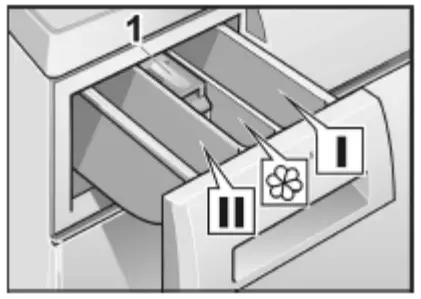
- Add detergent
Use Dispenser 1 for prewash or starch, Dispenser 11 for main wash, water softener, pre-soaking agent, bleach and stain removal product. Dispenser for cleaning product e.g. fabric softener or conditioner.
- Select the desired programme using the programme selector.
- Select the desired drying programme – Intensive dry, gentle dry or automatic drying
Guide values for drying times
| Cottons / coloureds (cotton, linen) | |||||
| Dry weight in kg | 0.5 | I 1.0 | I 1.5 | I 2.5 | |
| Recommended drying times (min) | Programme | ||||
| cupboard dry | 50-60 | 60-70 | 70-80 | 90 | Intensive Dry it |
| Iron dry | 40-50 | 50-60 | 60-70 | /0-80 | |
| Easy-Care / Synthetics | ||||
| Dry weight in kg | 0.5 | I 1.0 | I 1.5 | |
| Recommended drying times (min) | Programme | |||
| Easy-Care | 30-35 | 40-45 | 50-55 | Gentle Dry 01 : |
| Acrylics | 25 | 25-30 | ||
Washing/drying with standard settings
Your washer-dryer can be used in three ways:
- Washing only
- Drying only
- Washing and drying without a break in between
Washing only
- Turn the programme selector to the desired programme. The Start/Pause indicator light flashes
- The progress bar, default rinse cycle, maximum load, default washing temperature, default spin speed, drying duration and programme duration are displayed for the selected programme.
- Select any additional options required e.g. Intensive, Pre-wash or extra rinse.
- Touch the Start/Pause button. The programme starts and the indicator light remains lit for the entire duration of the programme.
Drying only
- Turn the programme selector to Intensive Dry or Gentle Dry
- Touch the button to set the desired drying time or automatic drying.
- The progress bar, maximum drying load, drying time and programme duration are displayed.
- Touch the Start/Pause button and the drying programme starts.
Washing and drying without interruption
- Select the desired washing programme
- Select desired additional functions
- Touch the button to set the desired drying time or automatic drying, the programme will be washing and drying without interruption.
- Do not interrupt the drying process, if it is necessary please select 15 minutes cooling programme before opening the door.
- The following is displayed for the selected programme: Progress bar, default rinse cycle, maximum load, default spin speed, default washing temperature, drying time or automatic drying symbol and programme duration.
- Touch the Start/Pause button and the programme starts.
Changing the washing temperature
Keep touching the temperature button at °C until the desired temperature displays.
Changing the default spin speed
Touch the button until the desired spin speed is displayed. If setting – – – (without final spin) has been selected, the washing remains in the final rinsing water. Before the laundry can be uploaded, the Empty or Spin programme must be performed. Touch the button to select the desired spin speed or touch the “Start/Pause” button directly to start a subsequent spin cycle with the default spin speed.
The speed can be changed at any time by touching the button until the new speed is displayed.
Changing the programme
If you have accidentally selected the wrong programme, turn the programme selector to a newly selected programme. If required, change other settings. Touch the Start/Pause button and the programme will start.
Cancelling the programme
- If you would like to terminate a programme and remove the laundry turn the programme selector to Empty, Spin or Rinse. If a programme is interrupted at a high temperature, Rinse should be selected to cool down the laundry.
- For drying programmes, select a time-dry 15 min cooling programme to cool down the laundry.
- Touch the Start/Pause button
- Wait until the programme ends and turn the programme selector to Off. You can then open the washer-dryer door and remove the laundry.
Pausing the programme
- If you would like to pause a running programme without changing the sequence, touch the Start/Pause button during the washing cycle, the display shows the pause symbol and “Paus”, if the door open symbol flashes at this moment it means the door can be opened after 1 minute later when the door open symbol and “open” come on, open the door if required, add/remove the laundry, close the door.
- To continue the programme, touch the Start/Pause button again.