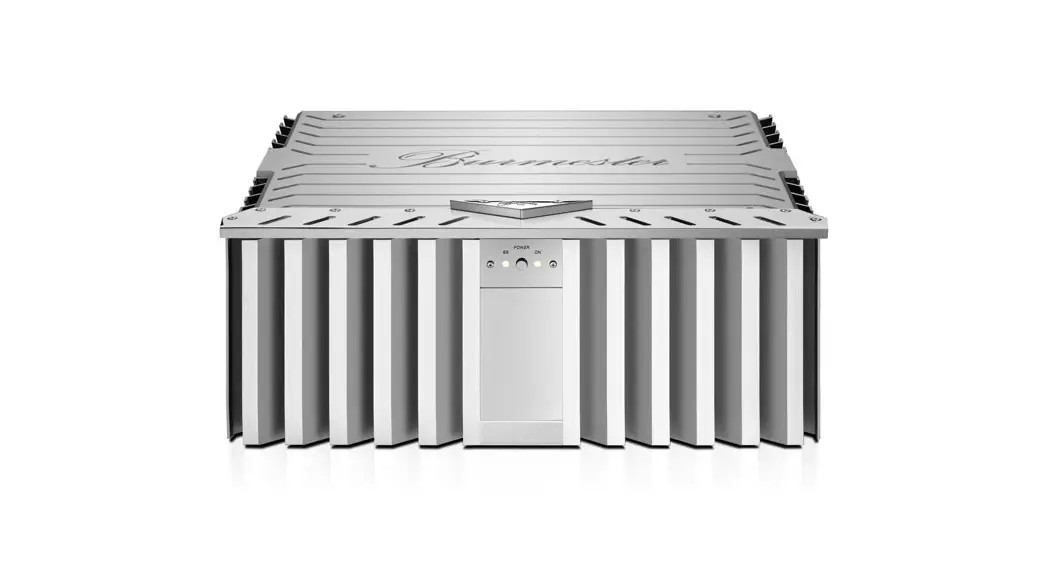
159 Mono Power Amplifier
Product Information
| Device Name | 159 Mono Power Amplifier |
|---|---|
| Highlights | Variable damping factor for adapting to your loudspeaker, Fully symmetrical design, DC-coupled signal path without sound-distorting capacitors, Generously dimensioned power supply for high current delivery, Remote on/off via Burmester preamplifier, Analogue fault detection and processor-controlled fault diagnostics |
| Intended Use | This device is intended for use in home music systems. |
| Permissible Operating Conditions | Maximum altitude, Humidity, Temperature range (details not provided) |
Product Usage Instructions
Unpacking and Setting Up the Device
Follow the below steps to unpack and set up the power
amplifier:
- Unpack the power amplifier (refer to page 16 in the
manual). - Set up the power amplifier (refer to page 17 in the
manual).
Connecting the Power Amplifier
The power amplifier can be connected using two methods:
- Classic Connection (refer to page 29 in the manual).
- Bi-amping (refer to page 29 in the manual).
Additionally, connect the power cable (refer to page 31 in the
manual).
Operating the Power Amplifier
Follow the below steps to operate the power amplifier:
- Access the control panel (refer to page 35 in the manual).
- Switch the device on and off (refer to page 36 in the
manual). - Configure auto power down (refer to page 37 in the
manual). - Adjust the damping factor (refer to page 38 in the
manual). - Troubleshoot any issues that may arise (refer to page 40 in the
manual). - Maintain, repair, and care for the device (refer to page 43 in
the manual).
Specifications
Refer to page 45 in the manual for detailed specifications of
the device.
OPERATION MANUAL
Table of Contents
INTRODUCTION
About this Device
6
Intended Use
7
About this Operation Manual
7
INSTRUCTIONS
Instructions for Skilled Persons
10
Meanings of Warning Symbols and Words
11
Important Safety Instructions
12
UNPACKING AND SETTING UP THE DEVICE
Unpacking the Power Amplifier
16
Setting Up the Power Amplifier
17
OVERVIEW OF THE 159
19
Connecting the Power Amplifier
24
Classic Connection
29
Bi-amping
29
Connecting the Power Cable
31
OPERATING THE POWER AMPLIFIER
33
Accessing the Control Panel
35
Switching the Device On and Off
36
Configuring Auto Power Down
37
Adjusting the Damping Factor
38
Troubleshooting
40
Maintenance, Repair, Care
43
SPECIFICATIONS
45
2|46
Introduction
OPERATION MANUAL 4|46
159 MONO POWER AMPLIFIER
Congratulations on your purchase and thank you for choosing Burmester.
Dear music lover, Congratulations on your purchase and thank you for choosing Burmester. You have chosen a product that combines absolute fidelity and uncompromising quality with technical innovation and maximum versatility. Before using the device for the first time, we recommend that you read through the entire manual at least once so that you can make full use of the capabilities of this exceptional audio device. Should you still have questions, please speak to your dealer or contact us directly. We’re always happy to discuss any special requests you may have, no matter how unusual. We love a good technical challenge. We wish you an exceptional listening experience. The Burmester Team
5|46
OPERATION MANUAL
About this Device
Burmester proudly presents this series model of its superlative mono power amplifiers because exceptional sound is in our DNA. With a design inspired by the renowned amplifiers in our portfolio, we’ve updated the look of the 159 mono power amplifier to match the most modern design concepts and to highlight the technological advances contained within. After seven years of development, we’ve improved and harmonised the performance and control to unprecedented levels. The 159 is the happy result of Burmester’s wealth of experience in power amplifiers and the latest innovations in analogue amplifier technology: a device with ground-breaking design and technology, while still remaining a “typical Burmester”.
THE HIGHLIGHTS:
$ Variable damping factor for adapting to your loudspeaker $ Fully symmetrical design $ DC-coupled signal path without sound-distorting capacitors $ Generously dimensioned power supply for high current delivery $ Remote on/off via Burmester preamplifier $ Analogue fault detection and processor-controlled fault diagnostics
6|46
159 MONO POWER AMPLIFIER
Intended Use
This device is intended for use in home music systems.
PERMISSIBLE OPERATING CONDITIONS Please take care to only ever use your Burmester device under the following conditions:
Maximum altitude Humidity Temperature range
2000 m < 50 % 2030° C
About this Operation Manual
This operation manual describes to the user how to operate the 159 mono power amplifier. It also provides information for skilled persons within the meaning of the EN 62368-1 standard. Sections that concern skilled persons only are labelled accordingly:
ARRANGE FOR A SKILLED PERSON TO CARRY OUT THIS STEP!
7|46
8|46
Instructions
9|46
OPERATION MANUAL
Instructions for Skilled Persons
Certain steps in this operation manual may only be performed by skilled persons. The work steps in question are presented in this manual with a blue background and marked with the following notice:
ARRANGE FOR A SKILLED PERSON TO CARRY OUT THIS STEP! If you require help at a later point during your use of the device or when moving home, please contact your dealer.
10|46
159 MONO POWER AMPLIFIER
Meaning of warning symbols and words
The following warnings, symbols and warning words are used in this document: The general hazard symbol, in conjunction with the warning words CAUTION, WARNING or DANGER warns of the risk of serious injury. Follow all of the subsequent instructions to avoid injury or death. The lightning symbol, in conjunction with the warning word DANGER, warns of potentially fatal electrical voltage. This warning symbol warns of high surface temperatures. You may get burned by touching these parts.
This warning symbol warns of bruising hazards.
ATTENTION: indicates a hazard that could damage or destroy the device.
s CAUTION: indicates a hazard that poses a low or moderate risk of injury.
s WARNING: indicates a hazard that could cause serious injury or death.
s DANGER: indicates a hazard that will lead directly to death or serious injury.
Please observe the following instructions:
$ Read and follow the instructions in this manual, particularly the warnings and safety
instructions.
$ Keep this operation manual.
11|46
OPERATION MANUAL
Important Safety Instructions
Please read the operation manual for your power amplifier in its entirety.
KEEP THIS OPERATION MANUAL IN A SAFE PLACE.
s WARNING: SUFFOCATION HAZARD DURING UNPACKING Your Burmester device is shipped in plastic bags to protect the surfaces. $ Keep these bags out of reach of children in order to prevent suffocation.
ATTENTION: RISK OF INJURY TO CHILDREN If used improperly, this device poses various injury risks to children. It is not intended for use by children. $ Never leave your children unattended with the device.
ATTENTION: DANGER DUE TO IMPROPER INSTALLATION Please observe the instructions on how to properly install the device on page 17
s WARNING: HIGH DEVICE WEIGHT Your Burmester device is very heavy and can cause serious injury if it tips over or falls. $ The Burmester 159 may only be unpacked and installed by skilled persons with appropriate training.
12|46
159 MONO POWER AMPLIFIER
ATTENTION: HAZARDOUS VOLTAGE To fully disconnect the device from the mains, you have to unplug the mains plug.
ATTENTION: WHEN STARTING THE DEVICE
$ Switch off all devices in your hi-fi system before installation. Do not switch
these devices on again until you are sure that all devices are completely and correctly connected.
$ Do not attempt to operate the device if it is obviously damaged or if liquid has
gotten in it. CAUTION: HEAT GENERATION
During operation, the housing of the 159 can heat up to 70° C at the places marked.
$ Be careful when touching the device.
ATTENTION: OPERATING THE DEVICE DURING THUNDERSTORMS It is not sufficient to switch off the mains switch on the back of the device.
$ During thunderstorms or when there is a risk of lightning strikes, disconnect
the device from the power supply by unplugging the power cable from the device or the mains socket. To be safe, also unplug all connected components from the power supply. DANGER: OPENING THE DEVICE There are dangerous voltages inside the housing, regardless of whether the power cable is connected or disconnected!
$ Do not open the device.
REPLACING FAULTY FUSES If you cannot switch on the device even though the mains voltage is connected, the reason might be a faulty fuse. This can have various causes.
$ Have the device checked by your dealer. Only authorized personnel are
permitted to change the fuses.
13|46
14|46
Unpacking and Setting Up the Device
15|46
OPERATION MANUAL
Unpacking the Power Amplifier
ARRANGE FOR A SKILLED PERSON TO CARRY OUT THIS STEP!
To avoid damaging the housing, do not use any pointed or sharp objects to open the packaging. Please check the delivery for completeness and damage.
SCOPE OF DELIVERY
The following is included with delivery:
2
Flight case with the 159 power amplifier
2
Protective covers for the 159
1
Lifting equipment for lifting the 159
1
Set-up instructions for using the lifting equipment
2
Mains cable, 2 m in length
2
Remote cable, 2 m
1
BurSync cable, 7.45 m in length
1
Operation manual
1
Set of warranty documents
1
Care kit
PLEASE CHECK THE DELIVERY FOR COMPLETENESS AND DAMAGE.
$ If parts of the delivery are missing or if you notice any damage when unpacking the
device, please do not connect them and consult an authorised dealer instead.
WE RECOMMEND KEEPING THE ORIGINAL PACKAGING FOR FUTURE TRANSPORT, MOVING, ETC. 16|46
159 MONO POWER AMPLIFIER
Setting Up the Power Amplifier
ARRANGE FOR A SKILLED PERSON TO CARRY OUT THIS STEP!
s WARNING: HIGH POWER AMPLIFIER WEIGHT
The 159 is very heavy and can cause serious injury if it falls.
$ The power amplifier should only be unpacked and set up by skilled persons
who are experienced in handling heavy loads.
$ Be sure to follow the separate installation manual for the 159! $ Because of the power amplifier’s high weight, we recommend consulting
a structural engineer before setting it up.
ATTENTION: HIGH OR LOW TEMPERATURES CAN CAUSE DEVICE MALFUNCTIONS
$ After unpacking the device, leave it to sit in the room for a time before
connecting and switching it on.
$ Carefully remove the device from the packaging and place it in a suitable
location.
ATTENTION: IMPROPER INSTALLATION Consider the following points when choosing where to position the device:
$ Avoid exposure to direct sunlight as well as excessive heat, cold, moisture
and dust.
$ Ensure adequate ventilation. Never place the power amplifier on an enclosed
shelf.
$ Do not cover the slots or openings on the device, as they are needed for
ventilation.
$ Only place the device on level and load-bearing surfaces. $ The device requires ventilation from below. This is ensured by the height of
the adjustable feet. Place it only on firm surfaces, not on high-pile carpet.
$ Do not operate the 159 in the bottom half of the flight case it was transported
in.
NOTE
The IR receiver receives the signals from the transmitter in the remote control and must not be covered by objects.
17|46
OPERATION MANUAL 18|46
159 MONO POWER AMPLIFIER
Overview of the 159
OPERATION MANUAL 2
1
FRONT SIDE
1
LED (operation/standby) and infrared receiver
(LED off)
The power amplifier is switched off.
(LED steady orange) Initiating start-up
(LED flashing green) The power amplifier is starting up.
(LED steady green) The power amplifier is in operation.
(LED flashing red)
The power amplifier is switching to standby mode.
(LED steady red)
The power amplifier is in standby mode.
(LED flashing orange) An error has occurred (see page 41).
2
Control panel (under the movable cover)
20|46
3 45
159 MONO POWER AMPLIFIER
6
7
8 9 10 11 12
13
REAR SIDE
3
Balanced output
4
Damping factor adjustment knob
5
Balanced input
6
Remote control output
7
BurSync output
8
Loudspeaker output, positive
9
Power socket
10
Mains switch
11
Loudspeaker output, negative
12
BurSync input
13
Remote control input
21|46
OPERATION MANUAL
14
15
16
17
18
19
20
CONTROL PANEL
14 15 16 17 18 19 20
22|46
Damping factor display BurSync display Toggle the damping factor Status display On/off switch Auto power down indicator Auto power down button
159 MONO POWER AMPLIFIER 21
23
22
THE BURMESTER REMOTE CONTROL (OPTIONAL)
21
Switch the device on or to standby mode.
22
Toggle the damping factor between FIXED / VARIABLE
Toggle through the different modes of the auto power down function:
OFF
Switched off
SHORT
30 minutes
MID
60 minutes
LONG
120 minutes
23
CHOOSING THE COLOURS OF THE FRONT LED
You can use the remote control to adjust the colour scheme of the front LED (1) to your liking. You have 2 options:
1. Standby = red, ON = green 2. Standby = orange, ON = red
To change the colour scheme, the device must be switched on. To change the colours, press the number combination “2 6 2 4” and then “OK” on the remote control.
23|46
OPERATION MANUAL
Connecting the Power Amplifier
ARRANGE FOR A SKILLED PERSON TO CARRY OUT THIS STEP!
The connections are located on the rear of the 159. Before connecting the device, please also read the operation manuals for the signal source.
$ Switch off all devices in your hi-fi system before installation. $ Do not switch these devices on again until you are sure that all devices are
completely and correctly connected.
CONNECTING THE SIGNAL SOURCE
Connecting the signal source 1. Switch off all devices that you want to connect. 2. Connect the desired channel of the signal source to the input (5). 3. Repeat the process for any additional power amplifiers.
s CAUTION: HIGH-INTENSITY SOUND
Loud output signals can damage your hearing.
$ Only connect source components with volume control to this input.
24|46
CONNECTING AN ADDITIONAL POWER AMPLIFIER (BI-AMPING)
Connecting another 159 for bi-amping 1. Switch off all devices that you want to connect. 2. Connect the output (3) of the first power amplifier to the input (5) of the second
power amplifier.
SYNCHRONIZING MULTIPLE POWER AMPLIFIERS (BURSYNC)
The BurSync function enables you to couple as many 159 power amplifiers as you like. The coupled devices automatically synchronise and exchange information with each other: — Operation status (on/off) — Auto power down status — Information about damping factor
NOTE:
The order in which you connect the power amplifiers does not affect the sound. The first amplifier in the series automatically becomes the BurSync master.
159 MONO POWER AMPLIFIER
COUPLING THE POWER AMPLIFIERS
1. Make sure that all power amplifiers to be connected are switched off. 2. Connect the BurSync cable to the BurSync output (7) on the first power amplifier
and the BurSync input (12) on the second power amplifier. 3. Repeat the process for any additional power amplifiers.
$ Once you have connected all the desired power amplifiers, the devices will
synchronise at the next start-up.
CONNECTING THE REMOTE CONTROL INPUTS
By connecting the remote control output (5) on the power amplifier to the remote control input on another Burmester device, you can switch this device on and off in parallel with the power amplifier. Accordingly, if you connect the remote control input (13) to the remote control output on another Burmester device, this device will be switched on/off when the connected device is switched on/off.
NOTE:
If you are operating multiple 159 devices connected via BurSync, you need only connect one of the power amplifiers (via the remote control input (13)) to another Burmester device that you want to start together with the power amplifiers. All other power amplifiers are switched on/off via the BurSync connection.
CONNECTING THE LOUDSPEAKERS
WARNING: HAZARDOUS VOLTAGE AT THE BINDING POSTS Hazardous voltages may be present at the binding posts during operation.
$ Before connecting the loudspeakers, switch off all components of your
music system and do not switch them on until you have made all the connections properly.
$ Never operate the power amplifier without the binding post covers in place. $ No live parts should be exposed once you have connected the loudspeaker.
25|46
OPERATION MANUAL
SPEAKER CABLES
Burmester recommends using cables with a large cross-section to connect the loudspeakers to the power amplifier. A large cross-section ensures that you can maintain the power amplifier’s damping factor for optimal control of the loudspeakers. The best results are achieved by using original Burmester speaker cables, which have the same electrical and tonal characteristics as the internal wiring of Burmester loudspeakers and amplifiers.
ATTENTION:
$ The insulation on your selected speaker cable must match that of the
original Burmester loudspeaker cable and must have a flame rating of at least VW-1. If in doubt, contact your dealer.
$ The cables are connected with spade lugs, which requires you to use
fully assembled cables.
CORRECT POLARITY
$ When connecting the loudspeakers, make sure that the connections have the
correct polarity. It is important that you make all connections in phase: — Positive output on power amplifier (+) = positive input on loudspeaker — Negative output on power amplifier () = negative input on loudspeaker
NOTE:
Connecting the two channels out of phase causes poor bass and diffuse playback.
26|46
159 MONO POWER AMPLIFIER
SHORT-CIRCUITING THE SPEAKER OUTPUTS
Connecting the positive and negative terminals of the speaker’s binding posts while the amplifier is on will cause a short circuit. In this event, the speaker outputs will automatically switch off to prevent damage to the device. The front LED (1) will flash orange. On the control panel, LED 1 in the status display (17) will light up orange. To reset the protective function after a short circuit: 1. Switch off the power amplifier. 2. Check the connections to the loudspeakers. 3. Switch the power amplifier on again.
$ If the error persists, please contact your dealer.
Even though the protection circuit will prevent damage to the power amplifier, you should observe the following instructions to avoid a short circuit:
$ Switch off the power amplifier before connecting the speaker cables. $ Connect the speaker cables to the loudspeakers first, then to the power amplifier. $ Never connect the positive and negative terminals of the speaker’s binding posts
to each other or to other conductive parts, e.g. the housing of the power amplifier.
27|46
OPERATION MANUAL
STEP 3
Rotate anticlockwise
STEP 4
Remove binding post cover
STEP 5
Place spade lug on binding post
STEP 6
Rotate clockwise
Then replace binding post cover
28|46
159 MONO POWER AMPLIFIER
Classic Connection
ARRANGE FOR A SKILLED PERSON TO CARRY OUT THIS STEP!
This is the most common connection method. With this method, each channel on the power amplifier is connected to a loudspeaker via a 2-pole cable. Two mono power amplifiers are therefore required for stereo playback.
CONNECT THE LOUDSPEAKERS AS FOLLOWS:
1. Switch off the power amplifier, if necessary. 2. Connect one end of the speaker cable to the negative terminal on the loudspeaker. 3. Completely loosen the negative binding post (blue) by turning it anticlockwise. 4. Remove the binding post cover. 5. Place the spade lug on the binding post and slip the post cover over the spade lug. 6. Fasten the negative binding post (blue) to the negative terminal () by turning it
clockwise. 7. Connect the speaker cable to the positive terminal on the loudspeaker. 8. Completely loosen the positive binding post (red) by turning it anticlockwise. 9. Remove the binding post cover. 10. Place the spade lug on the binding post and slip the post cover over the post. 11. Fasten the positive binding post (red) to the positive terminal (+) by turning it
clockwise.
Bi-amping
In bi-amping, woofers, mid-range drivers and tweeters are connected to separate power amplifier channels. Four mono power amplifiers are therefore required for this type of connection. Please check with your dealer whether your loudspeakers are suitable for bi-amping and refer to the operation manual for your speakers.
29|46
OPERATION MANUAL
30|46
9
10
159 MONO POWER AMPLIFIER
Connecting the power cable
$ Before connecting the loudspeakers, please also read the operation manuals for the
components you plan to connect. WARNING: MISSING OR FAULTY PROTECTIVE EARTH CONTACT A missing or incorrectly connected protective earth contact poses a risk to life.
$ Before connecting the device, make sure that the protective earth contact in
your mains socket is in operation.
$ Contact a professional if you are in any doubt.
TO CONNECT THE POWER CABLE:
1. Make sure that the mains switch (10) is in the 0 position. 2. Connect the power cable to the power socket (9). 3. Check that the voltage provided by your mains matches the voltage specifications.
NOTE:
You can find information about the required mains voltage under the power socket (9). 4. Insert the mains plug into the mains socket. 5. Switch the mains switch (10) to ON.
31|46
32|46
Operating the Power Amplifier
OPERATION MANUAL
Push the cover backwards to change the settings
34|46
159 MONO POWER AMPLIFIER
Accessing the Control Panel
WARNING: BRUISING CAUSED BY THE COVER. The cover can cause hand injuries when closing.
$ Make sure that your hands or other limbs are not in the opening when closing
the cover. The control panel is hidden under the movable cover. Slide the cover back to adjust settings or to turn the device on or off.
35|46
OPERATION MANUAL
Switching the Device On and Off
THE DEVICE HAS TWO CONTROLS FOR SWITCHING IT ON AND OFF:
— The mains switch (10) is located on the rear of the device. Toggling the mains switch connects or disconnects the standby power supply to/from the mains.
— The on/off switch (18) is located on the control panel on top of the device. Toggling the on/off switch switches the device between standby mode and operational mode.
WARNING: HIGH-INTENSITY SOUND Loud output signals can damage your hearing.
$ Before switching on the power amplifier, reduce the volume on your
preamplifier to a low level and only increase the volume after switching on the power amplifier.
$ To prevent hearing loss, avoid listening at high volumes for long periods
of time.
TO SWITCH THE DEVICE FROM OFF TO STANDBY:
$ Move the mains switch (10) on the rear of the device to the I position. $ The device switches to standby mode. The LED (1) lights up red.
TO SWITCH THE DEVICE ON FROM STANDBY MODE:
$ Pull the on/off switch (18) on the control panel towards you or press the POWER
button (21) on the remote control.
$ The LED (1) flashes green while the device is starting up. $ Once start-up is complete, the LED (1)remains steadily green. $ The power amplifier is now ready for operation.
TO SWITCH THE DEVICE FROM OPERATIONAL TO STANDBY MODE:
Pull the on/off switch (18) on the control panel towards you or press the POWER button (21) on the remote control.
$ The LED (1) flashes red while the power amplifier is switching to standby mode. $ Once this process is complete, the LED (1)remains steadily red. $ The power amplifier is now in standby mode.
36|46
159 MONO POWER AMPLIFIER
The mains switch (10) can remain in the I position. This allows you to conveniently switch on the device using the on/off switch (18) or the remote control. Very little power is consumed in standby mode because only the standby power supply is active.
TO DISCONNECT THE DEVICE FROM THE MAINS:
1. Switch off the device using the on/off switch (18). 2. Switch the mains switch (10) to O.
NOTE: Always switch the device off using the on/off switch before switching the mains switch to O.
Configuring Auto Power Down
The device has an auto power down function. When this function is activated, the device automatically goes into standby mode if there is no signal for a configured amount of time. If your power amplifiers are connected via BurSync, all connected power amplifiers follow the settings of the BurSync master, which is the first 159 in the network.
CONFIGURING AUTO POWER DOWN
Press the auto power down button (20).
$ This switches the auto power down function to the next value:
Off > Short > Mid > Long > Off >…
Off Short
Mid
Long
Auto power down is deactivated. The device switches to standby mode after 30 minutes of inactivity. The device switches to standby mode after 60 minutes of inactivity. The device switches to standby mode after 120 minutes of inactivity.
37|46
OPERATION MANUAL
Adjusting the Damping Factor
The variable damping factor enables you to adjust the sound of the 159 to your preferences. Changing the damping factor affects the bass response of the 159 in particular. The higher the damping, the more precisely your speakers will be controlled by the amplifier. Take the time to find the setting that works best with your speakers. You can switch between your chosen value and the fixed maximum damping factor of 4,006 at any time from the control panel (16) or with the optional remote control (22).
DAMPING FACTOR DISPLAY
You can check the configured value on the damping factor display (14) on the control panel: — The power amplifier’s damping factor is indicated by a green LED. — If multiple power amplifiers are connected via BurSync and their configured values
differ, these values are indicated by one or more orange LEDs, as necessary. This enables you to check if all power amplifiers are set to the same value by looking at the control panel of any power amplifier.
38|46
159 MONO POWER AMPLIFIER
ACTIVATING THE VARIABLE DAMPING FACTOR:
The damping factor display (14) shows the value FIXED.
$ Press the damping factor toggle (16).
or Press the RESUME button (22) on the remote control. — The damping factor display (14) changes to the configured value.
ACTIVATING THE FIXED DAMPING FACTOR:
The damping factor display (14) shows a value other than FIXED.
$ Press the damping factor toggle (16).
or Press the RESUME button (22) on the remote control. — The damping factor display (14) changes to FIXED.
ADJUSTING THE DAMPING FACTOR:
Set the damping factor control knob (4) to the desired value.
NOTE
You can see the set value through the opening.
USING THE REMOTE CONTROL
The Burmester remote control toggles the settings for auto power down and the damping factor for all 159 devices within range. The devices’ settings are only synchronised if you are using BurSync. If you want to control your 159 device with the remote control but do not want to connect it with BurSync, first set the same values for the auto power down function and the damping factor status directly on all 159 devices.
39|46
OPERATION MANUAL
Troubleshooting
The 159 is equipped with extensive protection circuits that protect it and the connected speakers from damage in the event of a fault. If an error occurs, this is indicated by the LED (1) on the front of the 159. It flashes orange in the event of an error.
MORE DETAILS ABOUT THE ERROR WILL BE FOUND ON THE CONTROL PANEL.
BURSYNC ERROR
Status Input Output Master Slave BurSync
Description: The BurSync output on the last power amplifier was connected to the BurSync input on the first power amplifier. This results in a ring connection. Troubleshooting: 1. Switch off all power amplifiers. 2. Remove the BurSync cable connecting the last power amplifier to the first.
40|46
SHORT CIRCUIT ERROR OR TEMPORARY OVERLOAD
Sequence
1
2
3
4
5
On
Status
Description: There is a short circuit in the cables, or the power amplifier was temporarily overloaded.
Troubleshooting: 1. Switch off the power amplifier. 2. Check the cables between the power amplifier and the speakers. 3. Correct any faults in the cables. 4. Switch the power amplifier on again.
If the error is still displayed, contact your dealer.
159 MONO POWER AMPLIFIER
TEMPERATURE WARNING
Sequence
1
2
3
4
5
On
Description: The power amplifier has reached a critical temperature.
Troubleshooting: 1. Reduce the volume until the LED switches off. 2. Lower the room temperature.
Status
TEMPERATURE ERROR
or
Sequence
1
2
3
4
5
On
or
Sequence
1
2
3
4
5
On
Description: The temperature is too high.
Troubleshooting: 1. Switch off the power amplifier. 2. Wait 30 minutes. 3. Switch the power amplifier on again. 4. If the error is still displayed, contact your dealer.
Status Status
41|46
OPERATION MANUAL
SERVICE ERROR
If one of the following errors occurs, you cannot correct it yourself. It requires attention from Burmester service. In this event, please switch off the power amplifier and disconnect it from the mains by unplugging the power cable from the mains socket. Contact your dealer for further steps.
Sequence
1
2
3
4
5
On
or
Sequence
1
2
3
4
5
On
or
Sequence
1
2
3
4
5
On
or
Sequence
1
2
3
4
5
On
or
Status Status Status Status
42|46
or
Sequence
1
2
3
4
5
On
DESCRIPTION:
An error has occurred that requires Burmester service.
Status
159 MONO POWER AMPLIFIER
MAINTENANCE, REPAIR AND CARE
ATTENTION: DAMAGE TO THE SURFACE Liquids and chemical agents can damage the surface of the housing.
$ Use the enclosed care kit to clean the 159. $ Ensure that no liquids get into the device. $ Do not use chemical agents when cleaning.
ATTENTION: REMOTE CONTROL (OPTIONAL) The optional remote control contains button cells.
$ These batteries can only be replaced by your dealer.
WARRANTY
We provide a two-year warranty on this device. If you send in the completed warranty certificate papers within four weeks of purchase, the warranty will be extended to three years. For the warranty to be valid, the device must have been correctly connected without overloading and retain its mechanical integrity. The warranty expires if the device has been tampered with in any way or if parts of the housing, connections or terminals have been dismantled.
DISPOSAL
German law stipulates that this device and its accessories must not be disposed of with household waste (grey bin, yellow bin, compost bin, paper or glass). Instead, they must be handed in at municipal collection points or to voluntary recycling programmes.
43|46
OPERATION MANUAL 44|46
159 MONO POWER AMPLIFIER
Specifications
Technology Width Height Depth Weight
Power output Pulse power Power consumption when ON Power consumption when OFF Power consumption in standby Continuous current Voltage range (Model 159-120) Voltage range (Model 159-240) Damping factor Fixed damping factor (100 Hz at 4) Unweighted signal-to-noise ratio for 1 kHz at 1,200 W with 4 Input sensitivity Power bandwidth Slew rate THD+N at 1 kHz (50 W / 4 / 22 kHz) Amplification
Subject to technical changes without notice
Mono amplifier / full bridge, Class A/B
523 mm 415 mm 660 mm approx. 180 kg 1,400 W (4) according to IEC 62368 2,600 W (4) according to CEA Max. 2.5 kW
0 W < 0.5 W
6.6 A 100 120 V ~, 50/60 Hz 220 240 V ~, 50/60 Hz 102 3,895 in 23 steps
> 4,000 > 116
750 mV 410 kHz (-3 dB)
160 V/µs 0.0008%
39.4 dB
45|46
OPERATION MANUAL VERSION: BA_159_EN_1-1_2109
46|46
BURMESTER HOME AUDIO GMBH
Wilhelm-Kabus-Straße 47 10829 Berlin Germany
www.burmester.de
 Burmester -