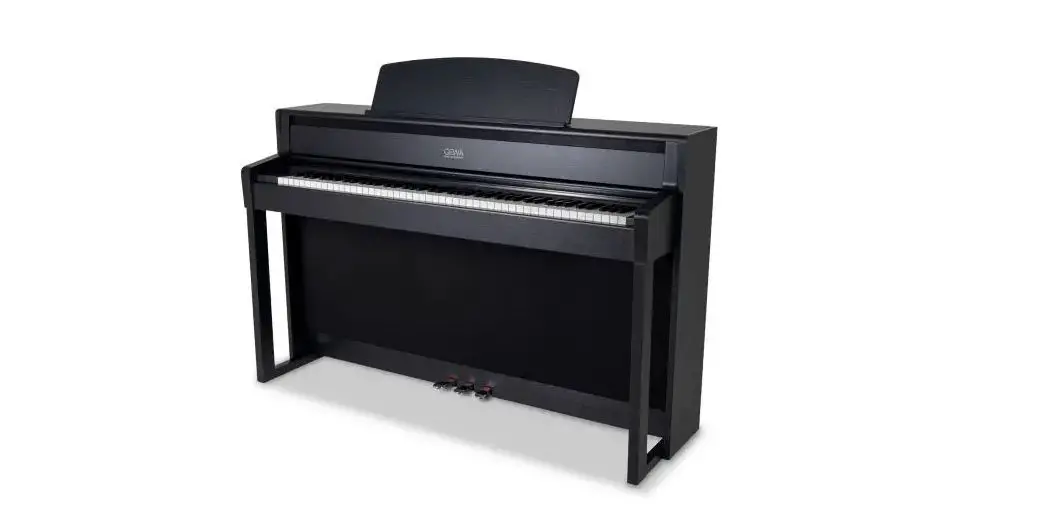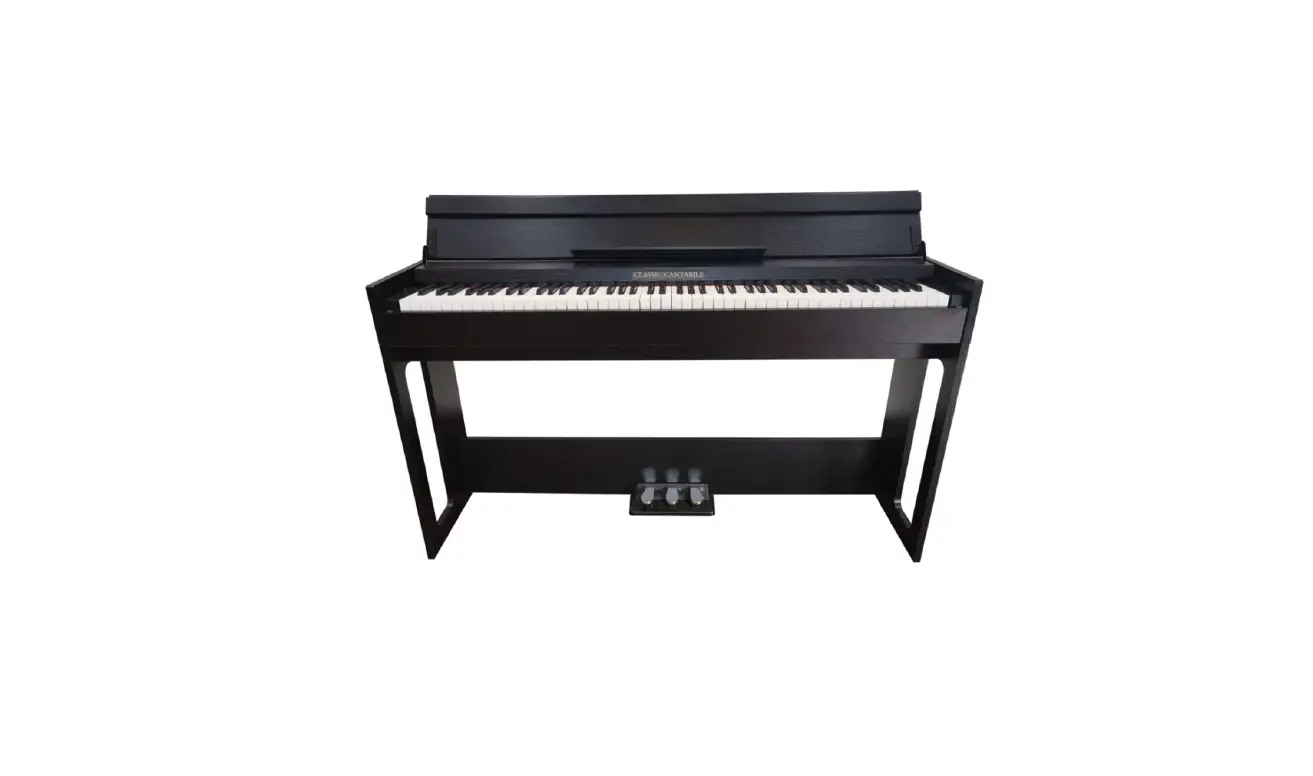

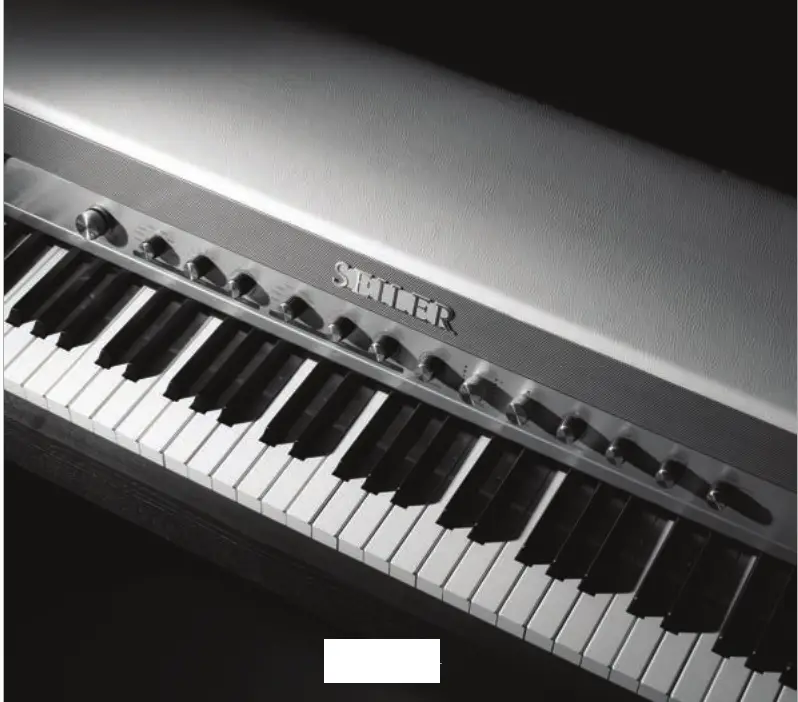
VP-7
URBAN VINTAGE PIANO
Manual BOOK
VP-7 Urban Vintage Piano
CAUTION
Power supply and Cautions
For safety in use, be sure to read and be familiar with the warnings and precautions in the manual. Power supply
– “his product must be used an 16V 5A, decicated adapter. Warnings
Always follow the basic precautions below to avoid the risk of physical injury or death caused by electrical shock, short circuit, damage, fire, etc.. This warning includes the following.
- There is a risk of fire or electric shack, so de not leave the product ina rainy ac humid place.
- Make sure to use tie cated voltage indicated an the product.
- When using with other power sources, consult 4 Sarrick iistrument salesgerson and use é Suitable trans‘ormer,
- Be sure to use arated fuse when exchanging fuses.
Cautions
- A strong impact might cause failure, so avoid severe shacks.
- Please be careful of the keyboard and switch parts when transporting.
- The main volume is set as the defauhk value. Adjust the volume after turning it an.
- Do net apen the cabinet. Since the plana cansists cf precise parts, unnecessary aperation can case failure ar accident.
- Turn off the sower after us ng it,
- When itis not in-use for along ume, please unplug the power adapter.
Cairmhane far niaca ta incall and etnarana

For safety in use, be sure to read and be familiar with the warnings and precautions in the manual.
- Avoid direct sunlight.
- Avoid places where there is a sudden temperature change.
- Avoid dusty places.
- Avoid machines where soot and heat can occur, such as heating or cooking machines.
- Do not put objects such as vases, water cups, or coffee cups on the piano. If liquid flows into the piano, it can cause electric shock and fatal failure.
- Be careful not to put metal or foreign substances inside the piano. It can cause noise and affect the smooth operation of the keyboard.
- Do not disassemble or dismantle the piano directly because there is a risk of electric shock.
- If you think repair is necessary, please contact our customer service.
- Wipe the piano exterior and keyboard with a soft cloth. Never use chernicals such as alcohol, benzene, or acetone.
- Please note that due to the nature of wood, music stand can be bent during painting work
- The part cannects the table and the cabinet may be sharp, so be careful when assembling it.
- Please note that due to the nature of wood, node might be found on the cabinet.
PRODUCT SETTING GUIDE
Product installation guide
Thank you for purchasing Samick digital piano. 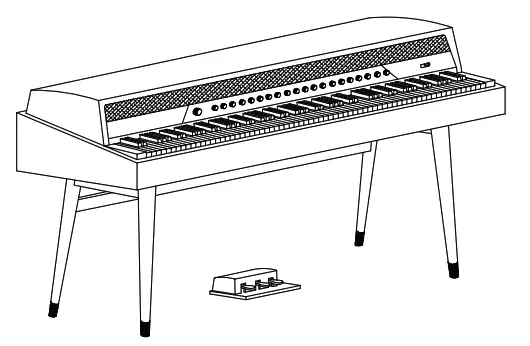
Power connection
If you don’t use it fora long time after connecting the power, please unplug it.
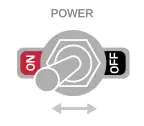
- The power is on when you Switch the power knob on the right to ON.
- The power is off when you Switch the power knob on the right to OFF.
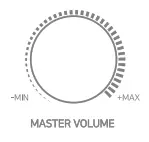
 Volume control
Turn the knob of [MASTER VOLUME] or turn the VOICE 1 group’s VOLUME knob to adjust the sound. You can increase the volume by turning the volume control knob in clockwise, and decrease the volume by turning it counterclockwise.
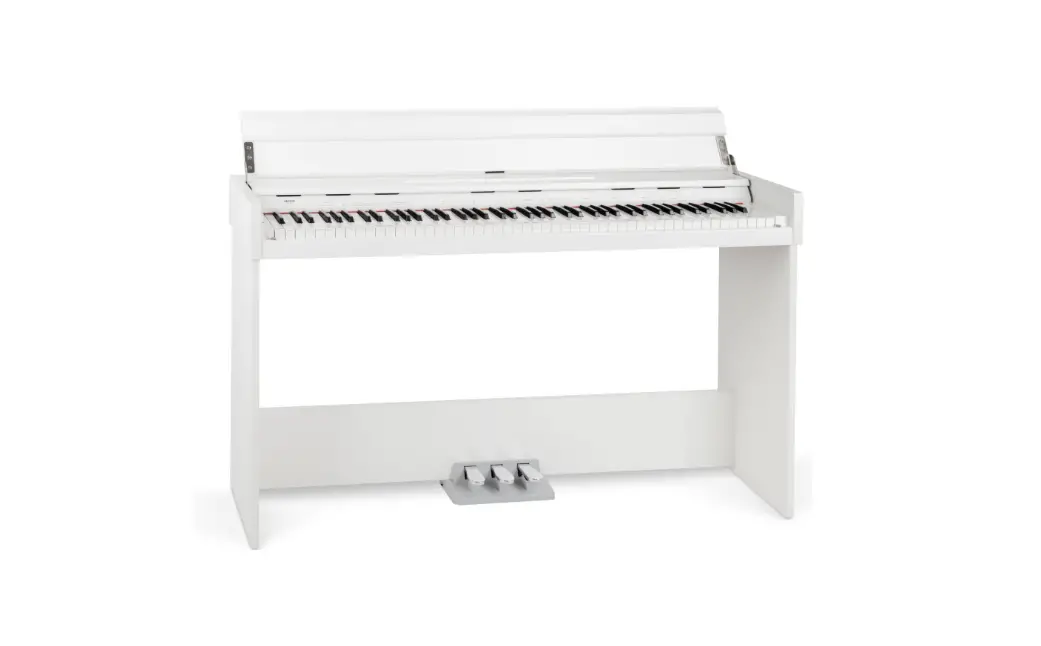
ComponentsAfter receiving the product, please check components below.
- Cabinet
- Pedal Box
- Bench
- Adapter
- Manual
- Muscstand
- Headphone
MAIN FEATURES
Main features of product
Thank you for purchasing Samick digital piano.
- SGHA-W (Samick Graded Hammer Action- Wood) Hammer action keyboard
- 256 polyphony
- Sound Layering, Split mode, Transpose, Reverb, Chorus
- 64 Voices, 44 Demo songs
- 3 Half Pedals
- SGSE V4{Seiler Grand Sound Engine Ver4) Sound Source.
- Wireless Audio
External connection socket
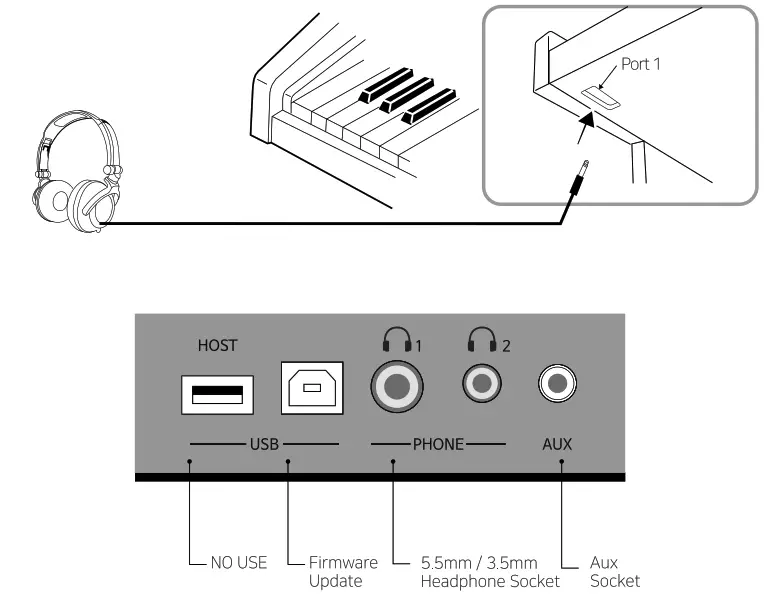
Main features of product
Pedal box connection
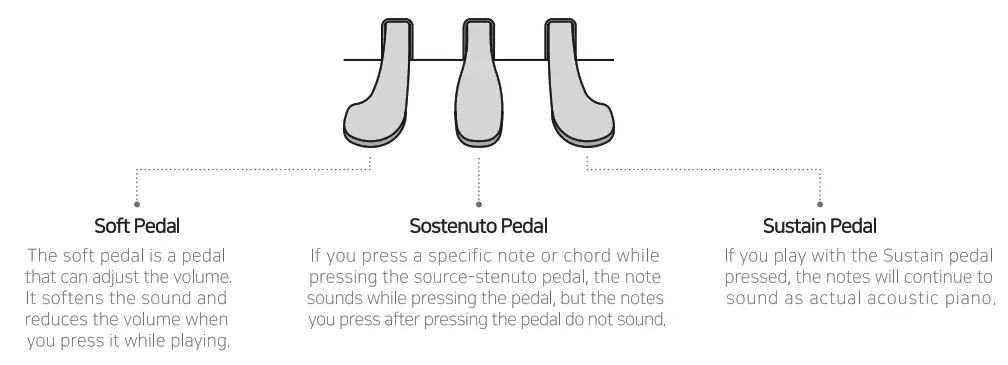
It consists of Sustain, Sostenuto, and soft pedals, the same a5 a acoustee grand piano,
Please connect the pedal cord to the main cabinet af the piano when assembling the product.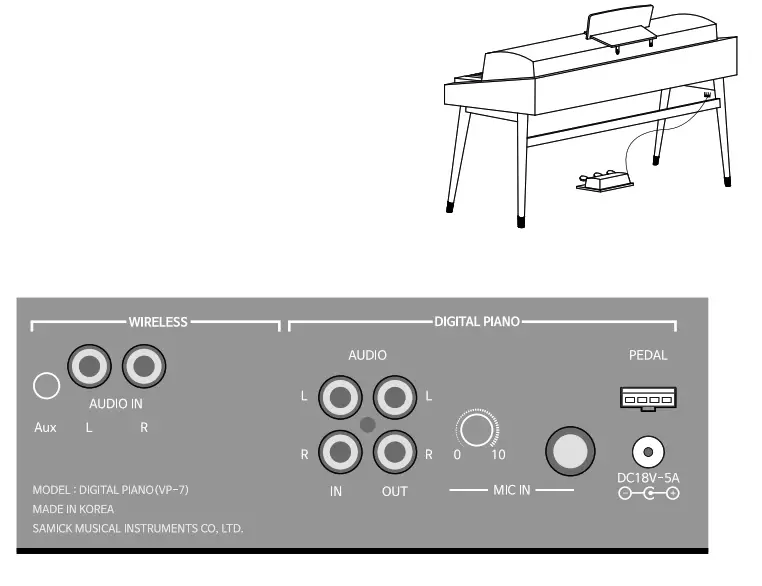
BASIC OPERATION
Operation
Voice selection
SEILER-7 has 64 built-in sounds, so you can play in various sounds. You can change your sound with a button while the piano is powered on. Below it the selection method.
 – You can set a sound by operating the front VOICE 1 and NUMBER knob.
– VOICE2 group is a knob that is activated when using the Layer function.
– Please refer to p.09 for the Layer Function.
~ Please refer to p.14 for the Voice list.
Metronome
Metronome On/Off
When the front Function knob is pressed, the LED light on the Function knob flashes, whichis actwated.
– When the LED light flashes, press the C#2 keyboard to turn on the metronome function(The defauk value is 4/4 beat)
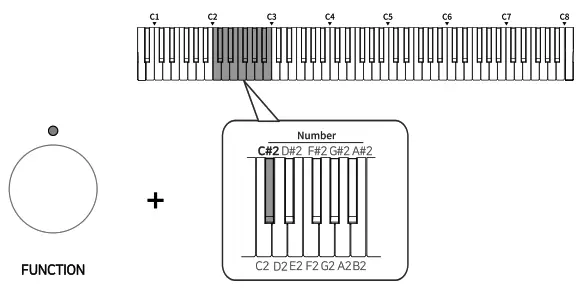 – After setting the beat and speed, press the front Function knob to turn off the LED light. After that, you can play by the metronome function. (Please refer to IL Beat and Speed setting)
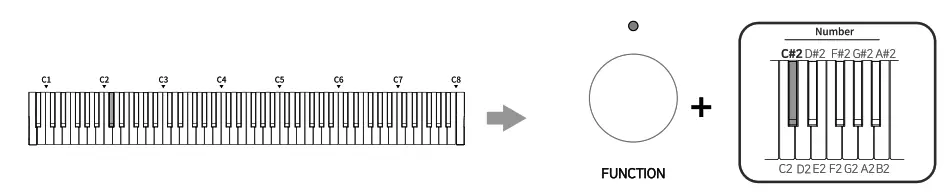 – Turn off: When the metronome is played, press the front Function knob to turn on the LED light.
After that, you can turn off the metronome function by pressing the C#2 keyboard.
Il. Beat and Speed settings
– Beat: When the metronome function is on and the LED light is flashing, you can set the beat with a black keyboard between D#2 and A#2.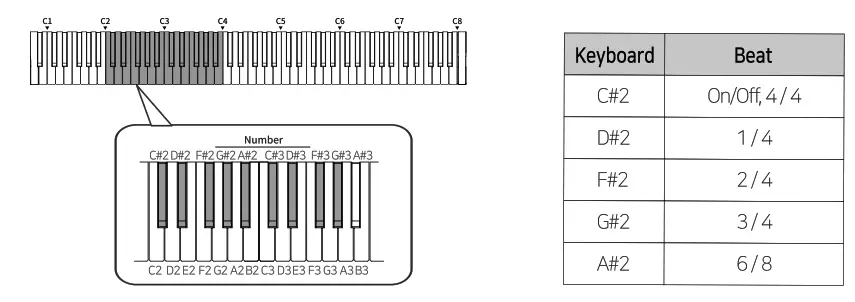 – Speed: You can set it in the following two ways while the Function knob is actived
* You can change activated. from 40 to 240 BPM and it does not respond when it is set to be outside of the range.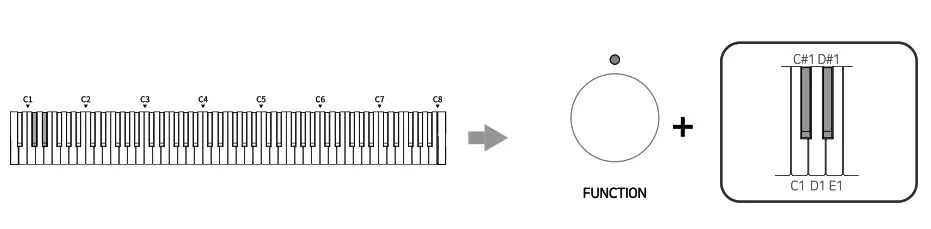
- You can adjust the metronome speed by pressing the C#1 and D#1 keys while the LED light on the front function knob is on.

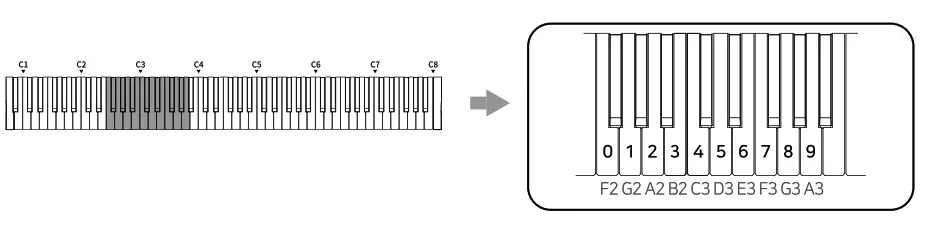
- Since each keyboard from F2 to A3 refers to 0 to 9, after pressing the front Function knob and press three keyboards to combine 3 digits number to set the speed you want. (Ex.120BPM : G2, A2, F2)
Record
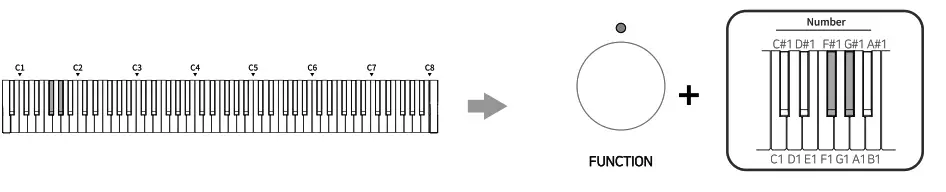
- If you press the front Function knob and press the F#1 keyboard make the LED light of Function flicker, you are ready to record.
- When the LED light flickers, the preset speed of the metronome will be played as fast as four beats, and if the metronome is not set, it will be played as a quarter beat. At this time, the metronome sound will not be recorded.
- Press the keyboard or pedal to start recording. After the performance, press the front Function knob to turn off the LED light, then Function will stop recording.
- After the recording, the LED light will flash when you press the frant Function knob. Then you can play the recorded oerformance bv oressina G#1.
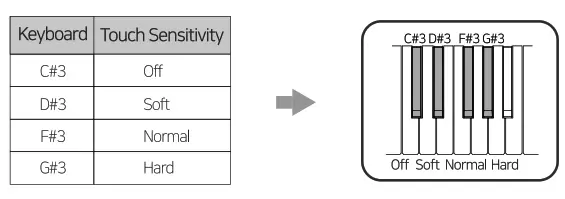
 Touch sensitivity
- After pressing the front Function knob, you can adjust the keyboard touch sensitivity by pressing keyboards from C#3 to G#3.
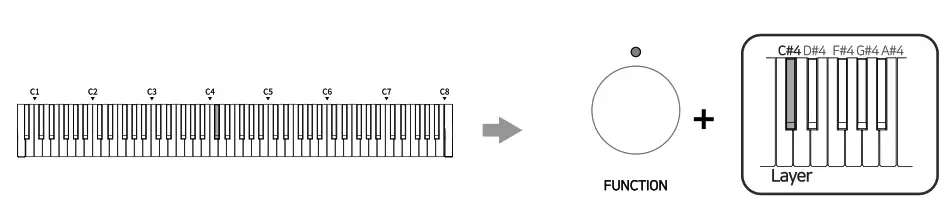
 Dual Voice
- With this function, you can play two sounds at the same time.
- When the LED light flashes after pressing the front function knob, press C#4 keyboard to activates the function.
- You can change the sound with group VOICE1 and VOICE2 in the front, and the sound that comes out will be set to VOICE2.
- Turn off :After pressing the front Function knob and when the LED light flashes, you can turn it off by pressing the C#4 keyboard.
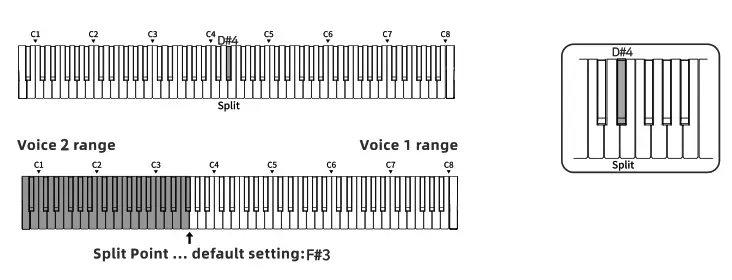
Split mode
- When the LEO light is on, press 0#4 keys to activate split mode after pressing the front Function knob.
- The upper keyboards from G3, including G3, output the sound of Voicel, and lower keyboards from F#3, it outputs the sound of Voice2. Each sound and volume can be changed by adjusting group VOICE1 and VOICE2.

Transpose 1)You can turn the front TRANSPOSE knob to transpose
2) When you tum the knob to the left, it will transpose one note down, and can be down by 6 notes.
3)When you turn the knob to the right, it will transpose one note up, and can be up by 6 notes
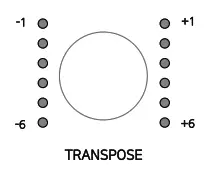 1)You can turn the front TRANSPOSE knob to transpose
Reverb / Chorus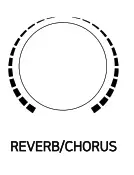
- Reverb and chorus functions can be used by turning the front REVERB/CHORUS knob.
- You can activate the reverb function by turning the knob to the left and activate the chorus function by turning it to the right.
- you can turn the reverb and chorus functions off by positioning the knob to the 12 o’clock direction.
Demo songs
Demo songs can be used in two ways.
- Play the onginal demo songs
– You can play the Demo Songs by pressing the Function knob and press the keyboard from C1 to E2.
At this time, the LED light of Function will flash. - Play the demo songs using numbers of the keyboards.
– After pressing the Function knob, you can combine three digits numbers using F2 to 43 from 001 to 044,
and press G41 keyboard to play demo songs. At this time, the LED light of Function will flash.
* If you enter a number which is higher than 044, it wall only play 44th demo song.
And as for the numbers of the keyboards, please refer to “Metronome-Il. Beat and Speed setting.”
1} When you press the Function knob while a demo song is being played, the song will be stopped and the Function knob will flash. Then you can play other demo songs.
2) After stopping the song, press the Function knob one more time to end the demo song function. You can connect the microphone to the MIC socket on the back of the piano to output the microphone saund to a digital piano speaker. Microphone Echo & Delay setting
– After pressing the front Function knob, you can adjust the microphone Echo & Delay by pressing the keyooard when the LED light flashes.
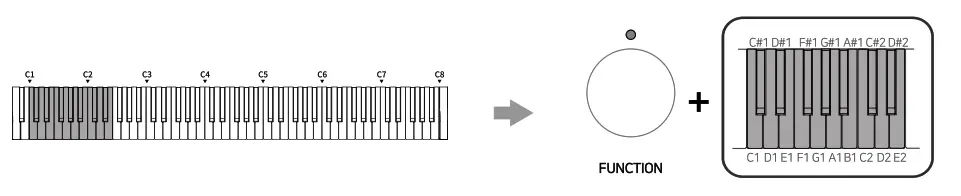 You can connect the microphone to the MIC socket on the back of the piano to output the microphone saund to a digital piano speaker. Microphone Echo & Delay setting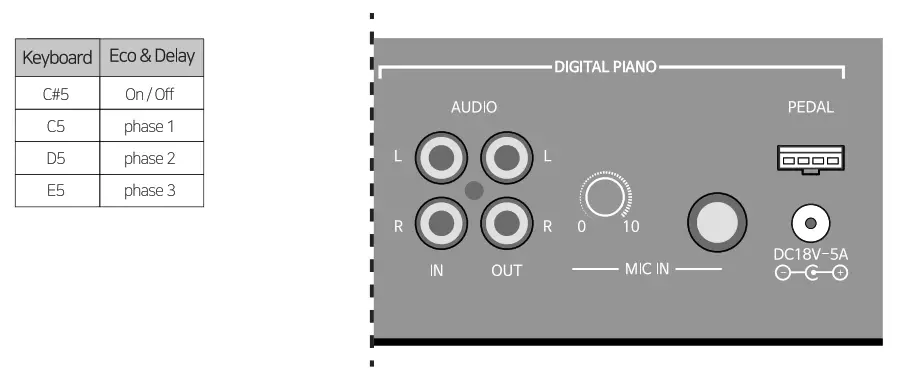
Audio Manual
Wireless Connection
- Haw to connect
 -When you press the front Wireless Volume knob for 1 second, the LED light will flash with a sound effect.
~ When the LED light is flashing, tum on the Bluetooth of the portable equipment to connect SEILER VP-7’.
– There will a sound effect When it gets connected, and the LED light on the wireless volume knob wil start to flash.
- Volume control and pause
-You can adjust the volume by turnang the frant Wireless Volume knob left and right.
(Clockwise: Volume up, Counterclockwise: Volume down}
– After the volume reaches its maximum, if you turn it clockwise further, you will hear a warning sound, and the volume will no longer increase.
– After being connected, it will be linked to the media volume of the cell phone.
– Pause: You can pause or replay the music being played by pressing the front Wireless Volume knob. - Bluetooth speaker off
~Press and hold the front Wireless Volume knob for 3 seconds
~The Bluetooth speaker turns off as the LED light on the Wireless Volume knob tums off with the sound effect.
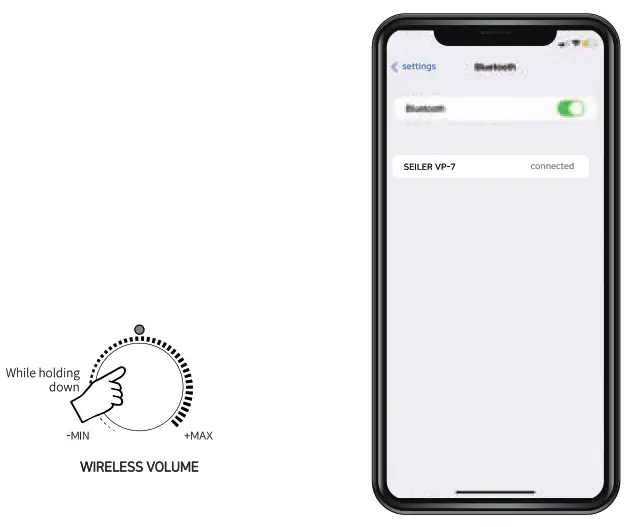 -When you press the front Wireless Volume knob for 1 second, the LED light will flash with a sound effect.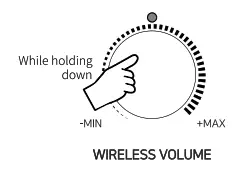
External audio connection
- Connecting external devices
-Press and hold the front Wireless Volume knob for 2 seconds.
~ After a short sound effect, connect the 3.5 mm Aux input jack or RCA Cable to the Aux, Audio input terminals located in the Wireless area of the power terminal at the bottom of the digital piano.
-You can play music by external devices through a digital piano.
-Disconnection : Press and hold the front Wireless Volume knob for 2 seconds to disconnect, and unplug the cable,
Range adjustment and sound mode setting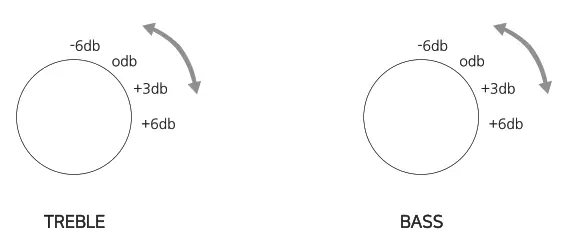
- Adjusting the range
VP-7 can adjust volume of the high and law pitch separately according to the user’s taste.
The notes go from -6db to +6db.
– High pitch : You can contral the high pitch range by turning the TREBLE knab on the front.
– Low pitch ; You can control the low pitch range by turning the TREBLE knob on the front.
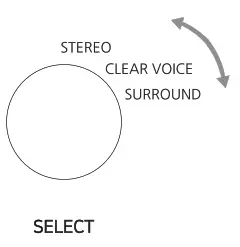
- Sound mode settings
Using the front SELECT knob, you can set the sound mode that suits STEREO, SURROUND or CLEAR VOICE.
– STEREO : By the phcement of sound bar type speakers, realize the real sound.
– CLEAR VOICE : Range that optimizes the volume of the human voice makes the sound more clearly.
– SURROUND : Emphasizes the three-damensional effect with multi-channel speakers to make it feellike you ave bstening the sound from vanous directions.
DEMO SONG & RHYTHM LIST
Voice List
| Voice category | No. | Voice |
| Piano | col | Grand Piano 1 |
| 2 | Concert Karl | |
| 3 | Bight Rano 1 | |
| 4 | Bright Rano 2 | |
| 5 | Mellow Fier* 1 | |
| 6 | Mellow Rano 2 | |
| 7 | Pop Rano | |
| 8 | Jazz Rano |
| E. Piano | 001 | ECrard Rano |
| 002 | Sec Paso i | |
| 003 | Wurly ERano | |
| 004 | FM E.RanO | |
| 5 | Elec Peno 2 | |
| 6 | DetE.Rano | |
| 7 | RE.Rano | |
| 8 | l-bnky-To* |
| Organ | 001 | H.Organ |
| 002 | Pop Organ | |
| 0O3 | PerC.ON813 | |
| 0O4 | RodcOrgan | |
| 005 | Church Organ | |
| 006 | Reed Organ | |
| 7 | Accerdon | |
| 6 | Harmonica |
| String | 001 | Sting Ensemble |
| 002 | Sbw String | |
| 003 | Synth String | |
| 004 | Contrdoase | |
| oo5 | Violin | |
| 006 | TremdoStrirg | |
| 0O7 | Fizzi:ato Sliing | |
| 008 | Harp |
| Voice category | No. | Voice |
| Brass | 1 | Tairripet |
| 002 | Trombone | |
| 003 | Abe | |
| co4 | Muted Trurrpet | |
| oos | kends Hom | |
| 005 | Brass Section | |
| 007 | Synth Brass1 | |
| 008 | Synth Brass2 |
| Guitar | 001 | Nylcn °Aar |
| 002 | Steel Guitar | |
| 003 | Jazz Gitar | |
| 004 | Clean EG.itar | |
| oo5 | Mated Eailtar | |
| 006 | Oyer.Guitar | |
| 7 | CUL &Altar | |
| 8 | Ctitar HornonICS |
| Bass | 001 | Acoustic Bass |
| 002 | Angered Bass | |
| 003 | Pcied Bass | |
| 004 | Fretless Bass | |
| 005 | Skit Bass | |
| 006 | SIXI2 Bass | |
| 0O7 | Synth2 Bass | |
| Synto Bass | ||
| 008 | Synth2 Bass |
| Other | 001 | Over Aths |
| 002 | voteoohs | |
| 003 | Warm Pad | |
| 004 | Heaven Pad | |
| 005 | New Age | |
| 006 | Oboe | |
| 007 | Rule | |
| 008 | Drum |
Demo List
| No. | Composer | Title |
| con | SonatineCia20 No.1 1st movement | |
| 2 | F.Kuhlau | Sonatne Op20 No.1 2nd movement |
| 3 | SOnahle0A20143.1 3rd movement | |
| 1 | Sonatine Cp.20 N32 1st movement | |
| 5 | %Mine Op20 Not 2nd movement | |
| 6 | Sonatine0p20 Na.2 3rd movement | |
| 7 | SonatheCp.20 No3 1st maement | |
| 8 | Sonatine Cp20 No3 2rd movement | |
| 9 | SonatineOp.20 No3 3ni movement | |
| out. | Sonatine Crt55 No.1 1st maement | |
| on | Sonatinego55 No.1 2nd movement | |
| 12 | Sonatne Op.55 No.2 1st movement | |
| 13 | Sonatine0d55 Not 2nd movement | |
| 14 | SonatneOp.55 Not 3rd movement | |
| on | Sonatine OA% 143..3 1st movement | |
| 16 | SonatineCp55 No3 2nd movement | |
| 17 | M.Clementi | Somme Cp36 N3.1 1St matment |
| 18 | 901157060A36 NO.1 2nd movement | |
| 19 | Sonatne OA 36 N3.1 3rd movement | |
| 20 | Soretne Cp 36 No.2 1st movement | |
| 21 | SonatneCp36 No.2 2nd movement | |
| 22 | Son:tune Cp36 No.2 3rd movement |
| No. | Composer | Title |
| 23 | M.Clementi | Sonatme0p36 NO3 1st movement |
| 24 | Sonatine0p36 No.3 2nd maement | |
| 25 | SonahneCp26 No3 3rd maement | |
| 26 | Sonatine Op36 No.4 1st movement | |
| 27 | Sonatine C336 No.4 2nd movement | |
| 28 | SonatineCp36 No.4 3rd rnaement | |
| 28 | SonatineOp,36 No.5 1st movement | |
| 30 | Sonatine0p36 No.5 2nd maement | |
| 31 | Sonatine0p36 No.5 3rd movement | |
| 32 | Sonatine0p,36 No.6 1st movement | |
| 33 | Sonatine Op36 No.6 2nd movement | |
| 34 | J.Haydn | Sonata Hot00.4 No35 1st movement |
| 35 | Sonata HotN1 No.35 2nd movement | |
| 36 | Sonata HotN1 M335 3rd movement | |
| 37 | w.A.mozart | Sonata K545 1st movement |
| 38 | Sonata K.545 2nd movement | |
| 39 | Sonata K545 3rd movement | |
| on | LV.Beethoven | Sonata 02.49 No.2 1st movement |
| 41 | Sonata Op.49 Nat 2nd movement | |
| 42 | Sonata Op.49 Nal 1st rrovement | |
| 43 | Sonata Op.49 Nat 2nd movement | |
| 44 | J.L.Dussek | SonatineCp20 Nal 1st movement |
PRODUCT SPECIFICATION
| Keyboard | SGHA-W (Samick Graded Hammer Action-Wood) |
| Color | Body Ash Wooden / Top White Skin |
| Polyphony | 256 polyphony |
| Voice | 64 Voices |
| Demo | 44 Demo songs |
| Petal | 3 Half Pedals |
| Sound Source | SGSE V4 (Seiler Grand Sound Engine Ver4) |
| Sampling | DMLS (Dynamic Multi Layered Sampling) |
| Size | 1350 x 500 x 855 (mm) |
| Main Features | Layer, Split mode, Metronome, Transpose, Reverb,Chorus |
| Touch sensitivity setting | 4 Phase |
| Sockets | VVireless : Audio L/R IN / Aux IN DP : Audio in,Out / Mic In / Aux In USB Host,Midi / Headphone 2ea(3.5/5.5) |
| Wireless Audio | 2″ X 4 + 5.5″ Subwoofer 60W (4.1 CH) BT 5.0 / Hi Performance 24Bit Stereo Audio (DAC 96kHz) AptX(HD), SBC, and MC Audio codec support Frequency Response 50Hz — 20kHz High&Low EQ Sound option (Stereo, Surround, Clear Voice) |

NOTE ………….