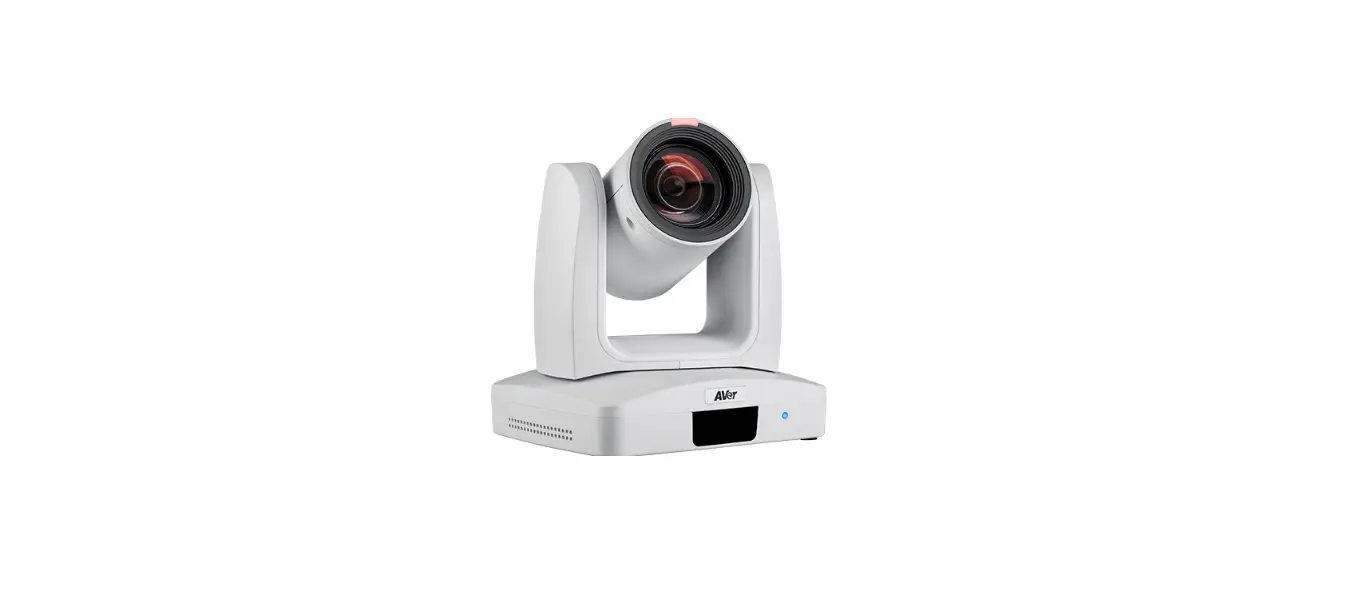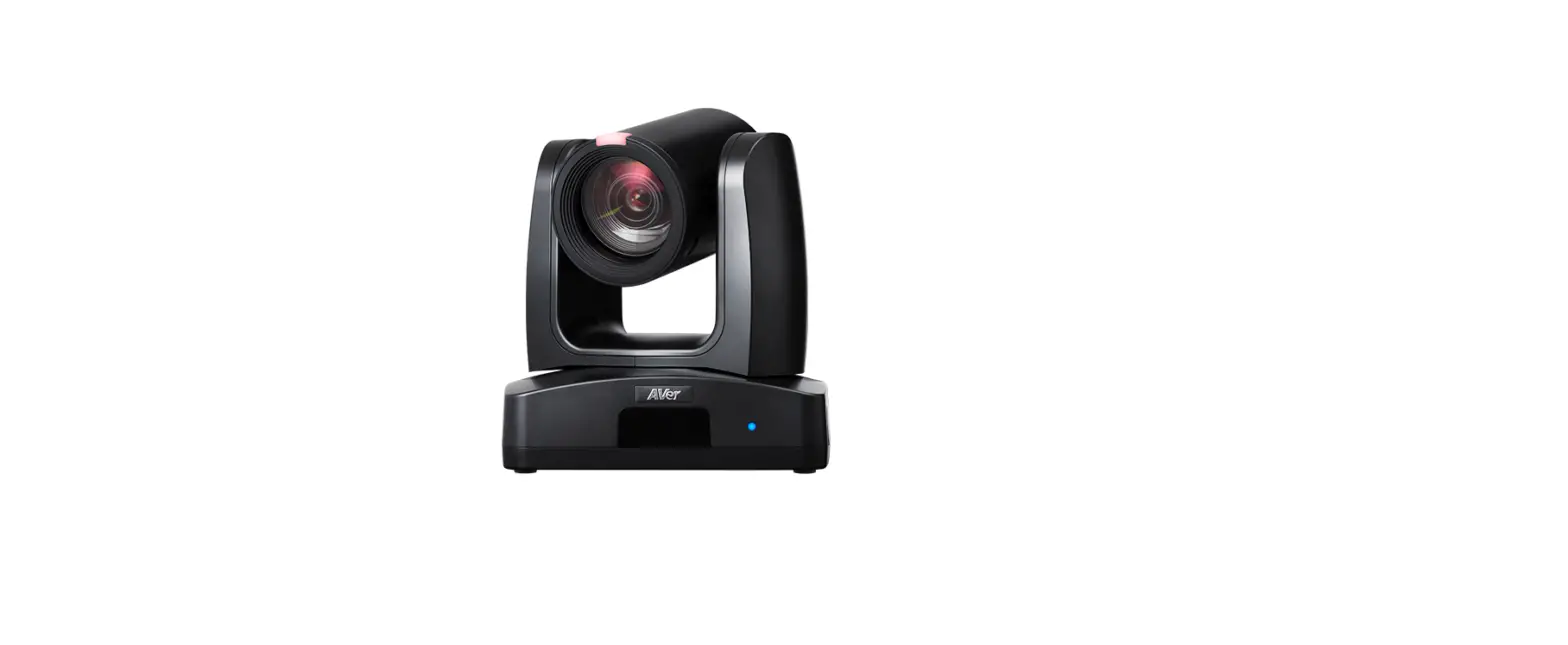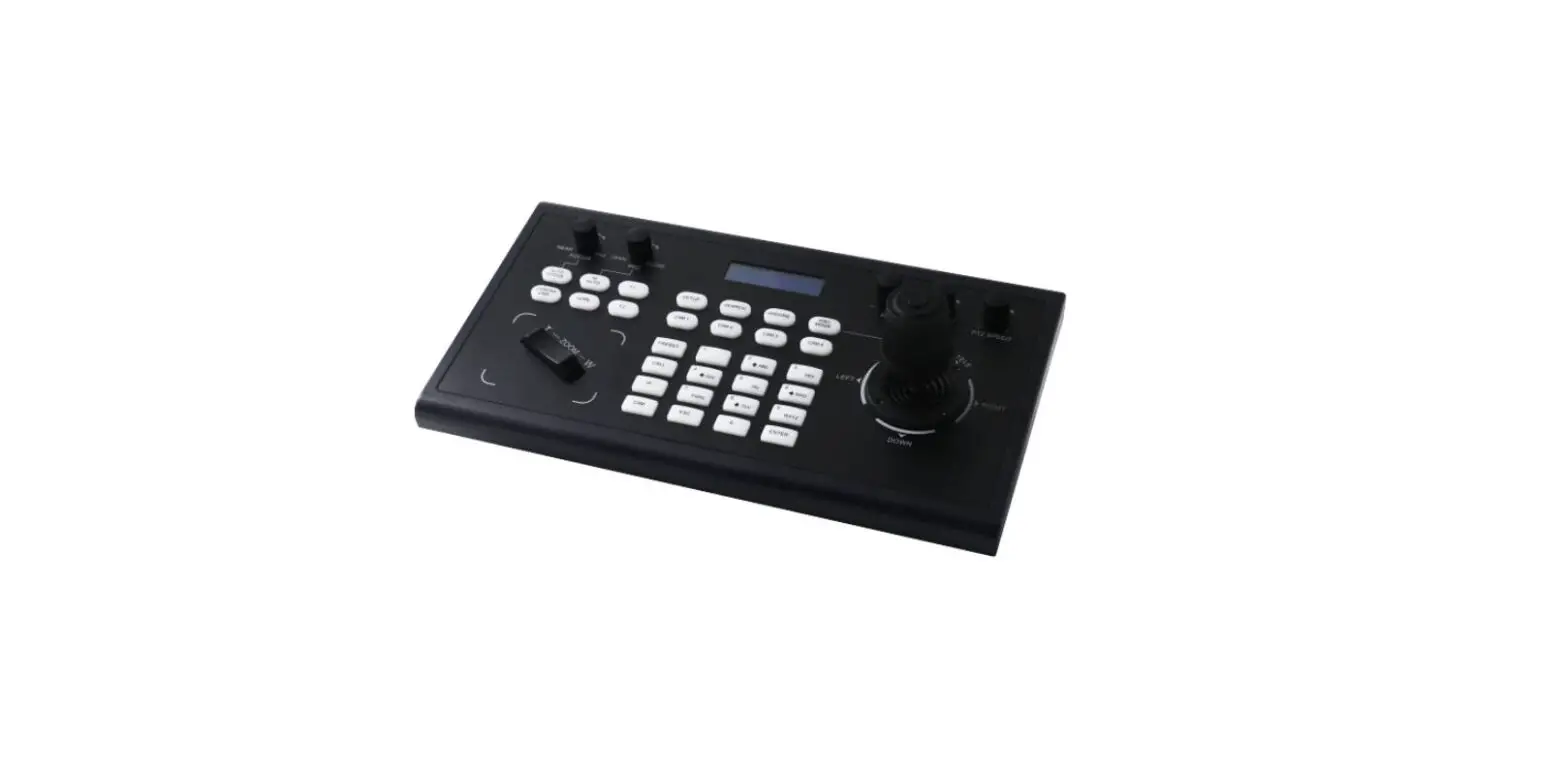

KARCHER WD 1 vacuum cleaner Compact Battery
Product Introduction
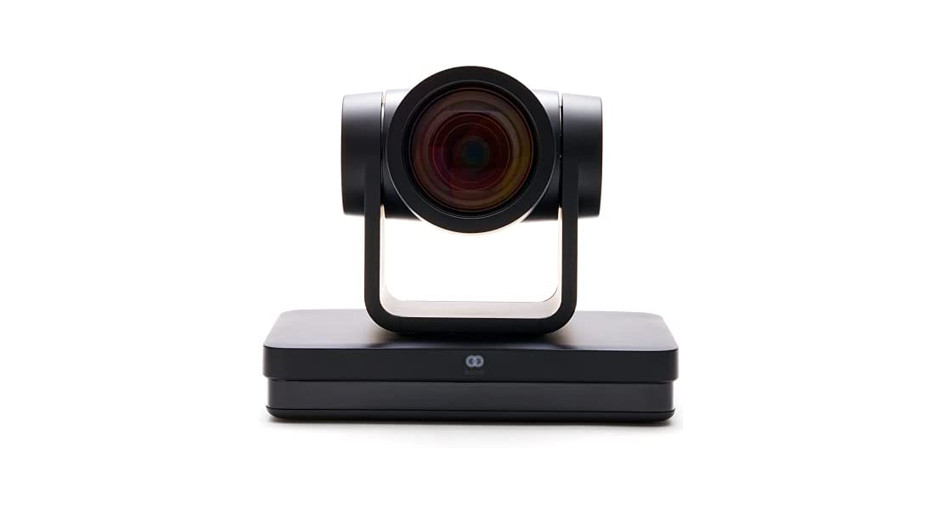
Overview
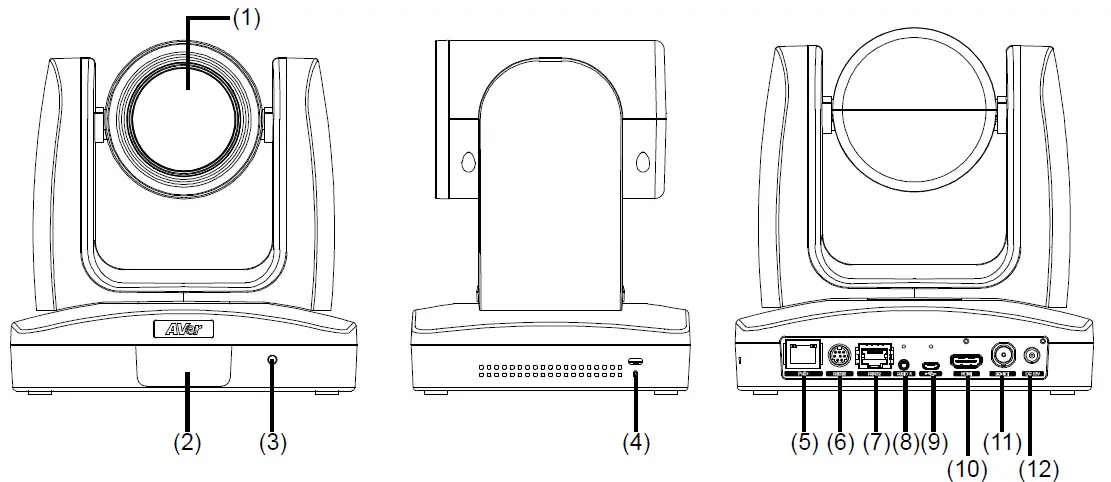
| (1) Camera lens | (5) PoE+ port | (9) mini-USB port |
| (2) IR sensor | (6) RS232 port | (10) HDMI port |
| (3) LED indicator | (7) RS422 port | (11) 3G-SDI port |
| (4) Kensington lock | (8) Audio in* | (12) DC Power jack |
- Line input level: 1Vrms (max.).
- Mic input level: 50mVrms (max.); Supplied voltage:2.5V
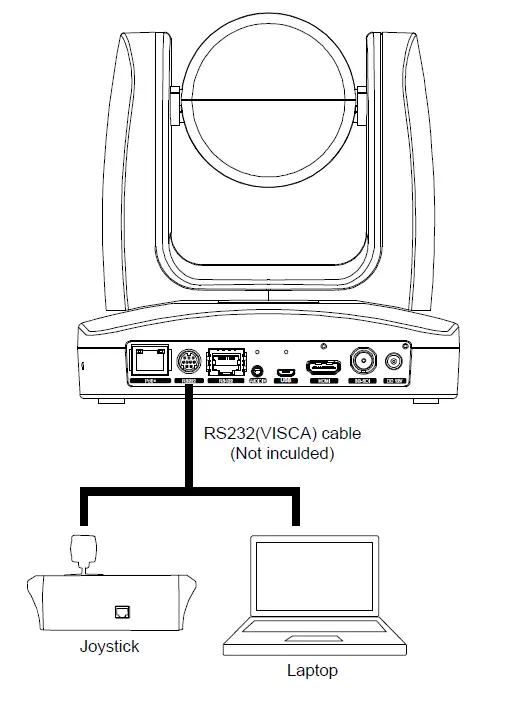
RS232 and RS422 Connection
Connect through the RS232 or RS422 for camera control.
RS232
RS232 Port Pin Definition
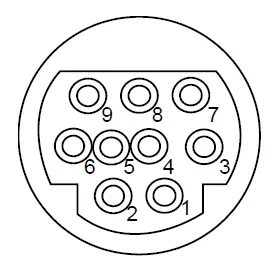
| Function | Mini DIN9 PIN # | I/O Type | Signal | Description |
|
VISCA IN | 1 | Output | DTR | Data Terminal Ready |
| 2 | Input | DSR | Data Set Ready | |
| 3 | Output | TXD | Transmit Data | |
| 6 | Input | RXD | Receiver Data | |
|
VISCA OUT | 7 | Output | DTR | Data Terminal Ready |
| 4 | Input | DSR | Data Set Ready | |
| 8 | Output | TXD | Transmit Data | |
| 9 | Input | RXD | Receiver Data | |
| 5 | — | — | Not connect |
RS232 mini DIN9 to mini DIN8 Cable Pin Definition
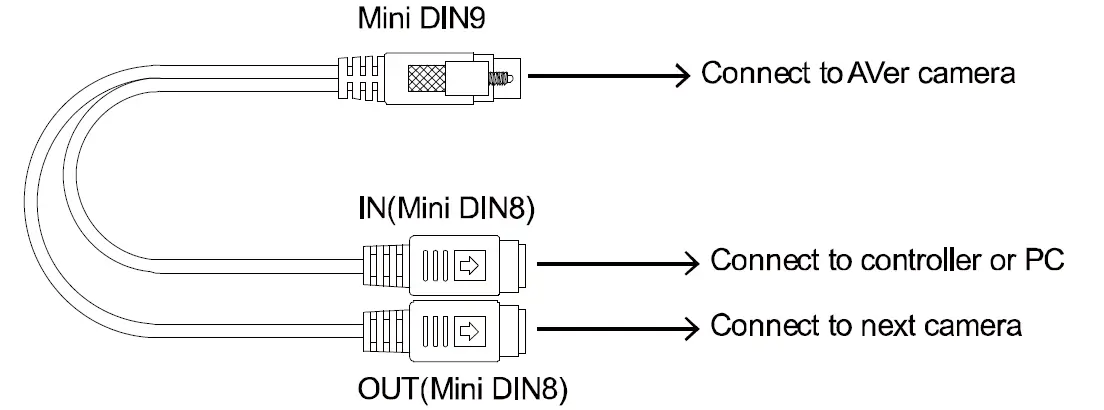
Mini DIN8 Cable Pin Definition
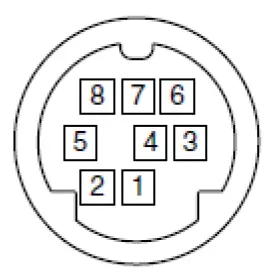
| No. | Signal |
| 1 | DTR |
| 2 | DSR |
| 3 | TXD |
| 4 | GND |
| 5 | RXD |
| 6 | GND |
| 7 | NC |
| 8 | NC |
Din8 to D-Sub9 Cable Pin Definition
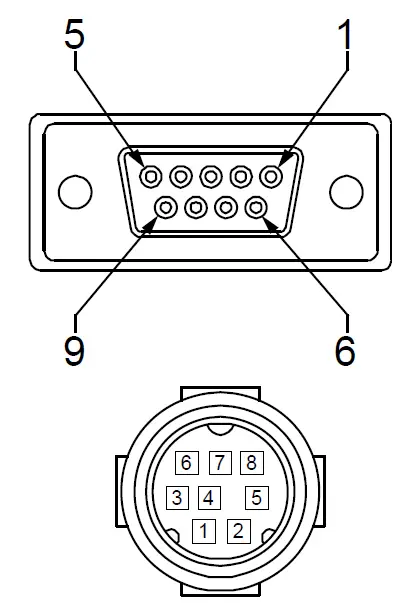
RS422
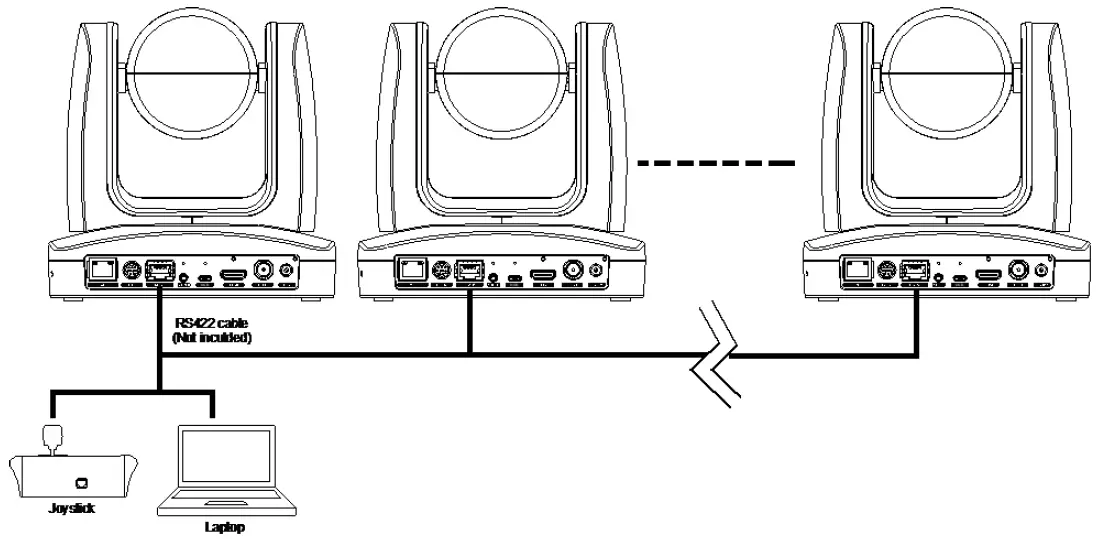
[Note] Use cat5e splitter for multi-camera connection.
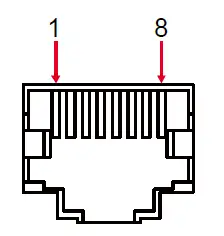
| RS422 Pin | |||
| No. | Pin | No. | Pin |
| 1 | TX- | 5 | TX+ |
| 2 | TX+ | 6 | RX+ |
| 3 | RX- | 7 | RX- |
| 4 | TX- | 8 | RX+ |
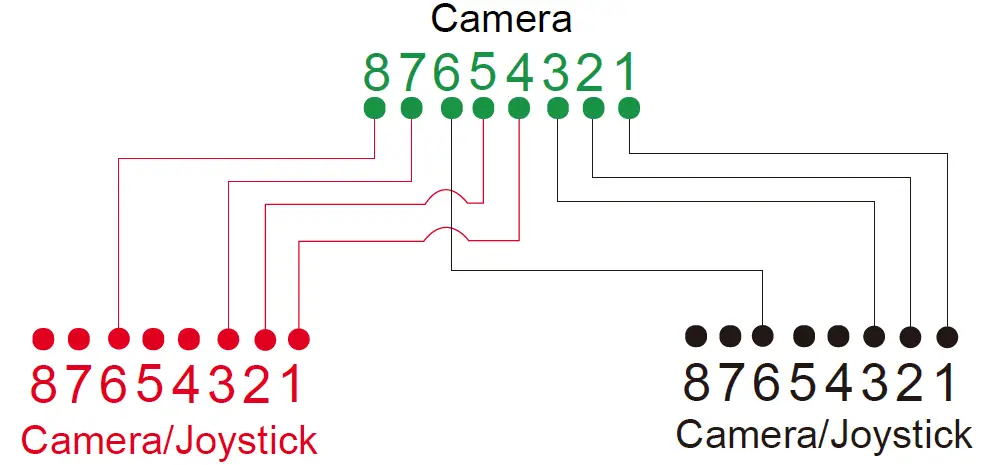
Cat5e splitter pin assignment:
OSD Tree
Camera
Go to Advanced Setting -> Control. Make sure the Camera Address, Baud Rate setting is correct.
Advanced Setting
| Advanced Setting | Audio | |||
| Input Type | Mic in/Line in | |||
| Auto Gain Control | Off/On | |||
| Noise Suppression | Off/On | |||
| Audio Volume | 0 ~ 10 | |||
| Control | ||||
| Protocol | VISCA/Pelco D/Pelco-P/AW | |||
| Camera Address | 1~7 | |||
| Baud Rate | 2400/4800/9600/38400 | |||
| Smart Framing | Off/On | |||
| Smart Shoot | Off/On | |||
| Number of block | 2/3/4 | |||
| Initial Position | Preset 6/Preset 7/Preset 8/Preset 9 | |||
| Time to back initial position | 5s/10s/15s/20s/25s/30s/35s/40s | |||
RS232/422 Visca Command Table
| Command Set | Command | Command Packet | Comments |
| IF_Clear | Broadcast | 88 01 00 01 FF | I/F Clear (Clear Visca connection) |
| CAM_Power | On | 8x 01 04 00 02 FF | Power ON/OFF (Power On supported in Standby mode only) |
| Off | 8x 01 04 00 03 FF | ||
|
CAM_Zoom | Stop | 8x 01 04 07 00 FF | |
| Tele (Standard) | 8x 01 04 07 02 FF | ||
| Wide (Standard) | 8x 01 04 07 03 FF | ||
| Tele(Variable) | 8x 01 04 07 2p FF | p=0 (Low) to 7 (High) | |
| Wide(Variable) | 8x 01 04 07 3p FF | ||
| CAM_Zoom | Direct | 8x 01 04 47 0p 0q 0r 0s FF | pqrs: Zoom Position, PTZ310: 0x0000~0x6f20 PTZ330: 0x0110~0x5490 |
| CAM_DZoom | On | 8x 01 04 06 02 FF | Digital zoom ON/OFF |
| CAM_DZoom | Off | 8x 01 04 06 03 FF | |
|
CAM_Focus | Stop | 8x 01 04 08 00 FF | |
| Far(Variable) | 8x 01 04 08 2P FF | p=0 (Low) to 7 (High) | |
| Near(Variable) | 8x 01 04 08 3P FF | ||
| Far (Standard) | 8x 01 04 08 02 FF | ||
| Near (Standard) | 8x 01 04 08 03 FF | ||
| Direct | 8x 01 04 48 0p 0q 0r 0s FF | pqrs: Focus Position,0x0000(wide) ~ 0x4000(tele), | |
| Auto Focus | 8x 01 04 38 02 FF | ||
| Manual Focus | 8x 01 04 38 03 FF | ||
| One Push | 8x 01 04 18 01 FF | ||
| CAM_Focus | Auto/Manual | 8x 01 04 38 10 FF | |
| AF_Sensitivity | Normal | 8x 01 04 58 02 FF | AF Sensitivity Normal/Low |
| AF_Sensitivity | Low | 8x 01 04 58 03 FF | |
| CAM_AFMode | Normal AF | 8x 01 04 57 00 FF | Continous AF ON |
| CAM_AFMode | Zoom Trigger AF | 8x 01 04 57 02 FF | Continous AF OFF, only trigger AF after zoom in/out |
| CAM_ZoomFocus | Direct | 8x 01 04 47 0p 0q 0r 0s 0t 0u 0v 0w FF | pqrs: Zoom Position tuvw: Focus Position |
|
CAM_WB | Auto | 8x 01 04 35 00 FF | Normal Auto |
| Indoor | 8x 01 04 35 01 FF | Indoor mode | |
| Outdoor | 8x 01 04 35 02 FF | Out door mode | |
| One Push WB | 8x 01 04 35 03 FF | One Push WB mode | |
| Manual | 8x 01 04 35 05 FF | Manual Control mode | |
| One Push | 8x 01 04 10 05 FF | One Push WB Trigger | |
| CAM_RGain | Up | 8x 01 04 03 02 FF | Manual Control of R Gain |
| Down | 8x 01 04 03 03 FF | ||
| CAM_Bgain | Up | 8x 01 04 04 02 FF | Manual Control of B Gain |
| Down | 8x 01 04 04 03 FF | ||
| CAM_AE | Full Auto | 8x 01 04 39 00 FF | Automatic Exposure mode |
| Manual | 8x 01 04 39 03 FF | Manual Control mode | |
| Shutter Priority | 8x 01 04 39 0A FF | Shutter Priority Automatic Exposure mode | |
| Iris Priority | 8x 01 04 39 0B FF | Iris Priority Automatic Exposure mode | |
| CAM_SlowShutter | Auto | 8x 01 04 5A 02 FF | Auto Slow Shutter ON |
| Manual | 8x 01 04 5A 03 FF | Auto Slow Shutter OFF | |
| CAM_Shutter | Down | 8x 01 04 0A 02 FF | Shutter Setting |
| Up | 8x 01 04 0A 03 FF | ||
| CAM_Shutter | Reset | 8x 01 04 0A 00 FF | |
| CAM_Shutter | Direct | 8x 01 04 4A 00 00 0p 0q FF | pq: Shutter Position |
| CAM_Iris | Reset | 8x 01 04 0B 00 FF | |
| CAM_Iris | Up | 8x 01 04 0B 02 FF | Iris Setting |
| Down | 8x 01 04 0B 03 FF | ||
| CAM_Iris | Direct | 8x 01 04 4B 00 00 0p 0q FF | pq: Iris Position, |
| CAM_Gain | Reset | 8x 01 04 0C 00 FF | |
| CAM_Gain | Up | 8x 01 04 0C 02 FF | Gain Setting |
| Down | 8x 01 04 0C 03 FF | ||
| CAM_Gain | Direct | 8x 01 04 4C 00 00 0p 0q FF | pq: Gain Position, |
| CAM_Gain | AE Gain Limit (Direct) | 8x 01 04 2C 0p FF | p: Gain Position (4 to F), |
| CAM_ExpComp | Reset | 8x 01 04 0E 00 FF | |
| CAM_ExpComp | Up | 8x 01 04 0E 02 FF | Exposure Compensation Amount Setting |
| Down | 8x 01 04 0E 03 FF | ||
| CAM_ExpComp | Direct | 8x 01 04 4E 00 00 0p 0q FF | pq: ExpComp (pq: 0x01~0x09 , Value: -4~ +4 , Each value = 0.3EV) |
| CAM_Backlight | On | 8x 01 04 33 02 FF | Back Light Compensation ON/OFF, only supported in Auto Mode |
| Off | 8x 01 04 33 03 FF | ||
| CAM_LR_Reverse | On | 8x 01 04 61 02 FF | Mirror Image ON/OFF |
| CAM_LR_Reverse | Off | 8x 01 04 61 03 FF | |
|
CAM_Memory | Reset | 8x 01 04 3F 00 pp FF | |
| Set | 8x 01 04 3F 01 pp FF | pp: 0x00 To 0xFF pp: 0x5A => SmartFrame Enable pp: 0x5B => SmartFrame Disable pp: 0x5C => SmartFrame Trigger pp: 0x5D => SmartShoot Enable pp: 0x5E => SmartShoot Disable pp: 0x5F => Trun on OSD menu | |
| Recall | 8x 01 04 3F 02 pp FF | ||
| SYS_Menu | On | 8x 01 06 06 02 FF | turn on the menu screen |
| SYS_Menu | Off | 8x 01 06 06 03 FF | Erasing menu display(turn off the menu screen/VC-A70H) |
| CAM_Menu | On/Off | 8x 01 06 06 10 FF | Display ON/OFF |
| SYS_Menu | Menu Enter | 8x 01 7E 01 02 00 01 FF | menu enter |
|
Pan-tilt Drive | Up | 8x 01 06 01 VV WW 03 01 FF |
VV: Pan speed setting 0x01 (low speed) to 0x18 (high speed) WW: Tilt speed setting 0x01 (low speed) to 0x18 (high speed) |
| Down | 8x 01 06 01 VV WW 03 02 FF | ||
| Left | 8x 01 06 01 VV WW 01 03 FF | ||
| Right | 8x 01 06 01 VV WW 02 03 FF | ||
| UpLeft | 8x 01 06 01 VV WW 01 01 FF | ||
| UpRight | 8x 01 06 01 VV WW 02 01 FF | ||
| DownLeft | 8x 01 06 01 VV WW 01 02 FF | ||
| DownRight | 8x 01 06 01 VV WW 02 02 FF | ||
| Stop | 8x 01 06 01 VV WW 03 03 FF | ||
| Home | 8x 01 06 04 FF | ||
| Reset | 8x 01 06 05 FF | ||
| Absolute Position | 8x 01 06 02 VV WW 0Y 0Y 0Y 0Y 0Z 0Z 0Z 0Z FF | VV: Pan speed setting 0x01 (low speed) to 0x18 (high speed) WW: Tilt speed setting 0x01 (low speed) to 0x18 (high speed) YYYY: Pan Position 8A14 to 762C (CENTER 0000) ZZZZ: Tilt Position 468B to E898 (Image Flip: OFF) (CENTER 0000) | |
| Pan-tiltSet SlowPanTilt | On | 8x 01 06 44 02 FF | Pan/Tilt Slow Mode On/Off |
| Pan-tiltSet SlowPanTilt | Off | 8x 01 06 44 03 FF | |
| Firmware | Firmware version | 8x 01 02 03 FF | |
| Factory Reset | System Factroy Reset | 8x 01 04 3F 03 00 FF | |
| Preset Speed | Set Preset Speed | 8x 01 06 20 0p FF | p:1 to 6 |
| CAM_Power_ON | Power On | 8x 01 04 00 02 FF | |
| CAM_Power_OFF | Power Off | 8x 01 04 00 03 FF |
| Inquiry Command | Command | Command Packet | Comments |
| PT_Pos_Inq | Inquiry | 8x 09 06 12 FF | |
| zoom_Pos_Inq | Zoom Position Inquiry | 8x 09 04 47 FF | |
| CAM_PowerInq | 8x 09 04 00 FF | y0 50 02 FF | On |
| y0 50 03 FF | Off (not for Hardware version C) | ||
| CAM_WBModeInq | 8x 09 04 35 FF | y0 50 00 FF | Auto |
| y0 50 05 FF | Manual | ||
| CAM_AEModeInq | 8x 09 04 39 FF | y0 50 00 FF | Full Auto |
| y0 50 03 FF | Manual | ||
| y0 50 0A FF | Shutter Priority | ||
| y0 50 0B FF | Iris Priority | ||
| CAM_AutoFocusInq | 8x 09 04 38 FF | y0 50 02 FF | On |
| y0 50 03 FF | Off |
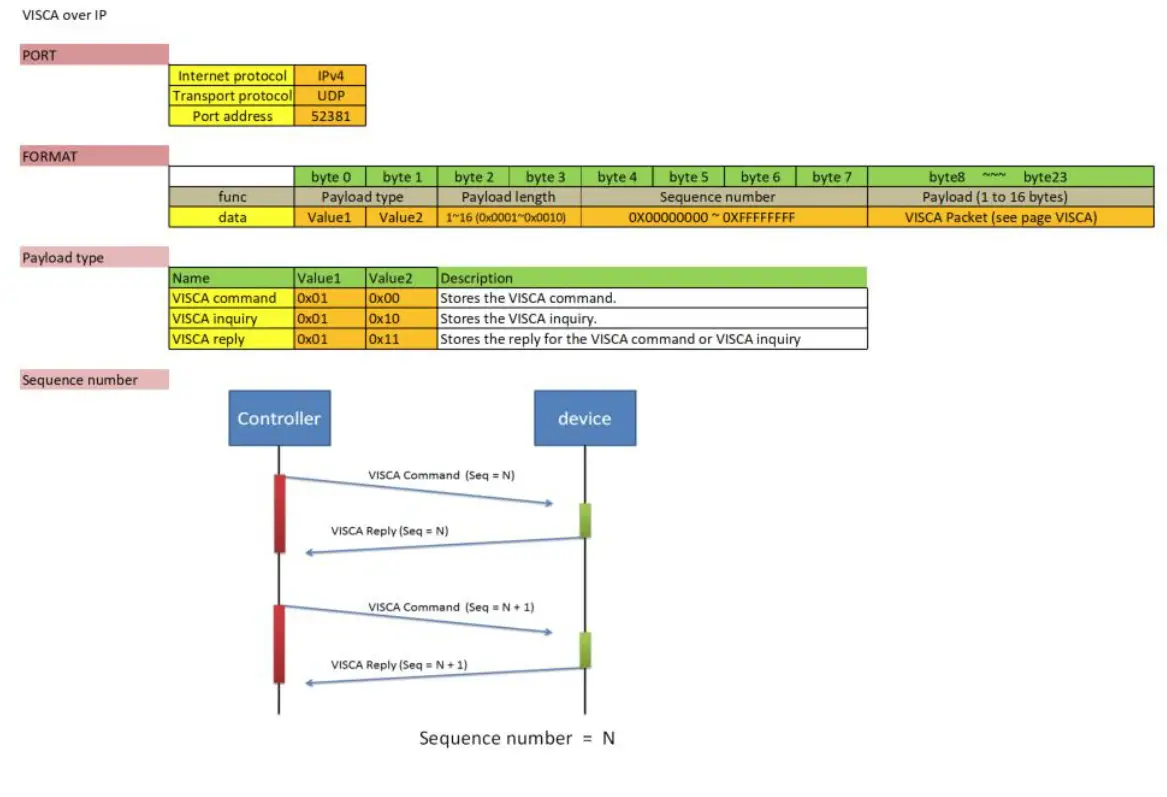
Visca-over-IP Settings