
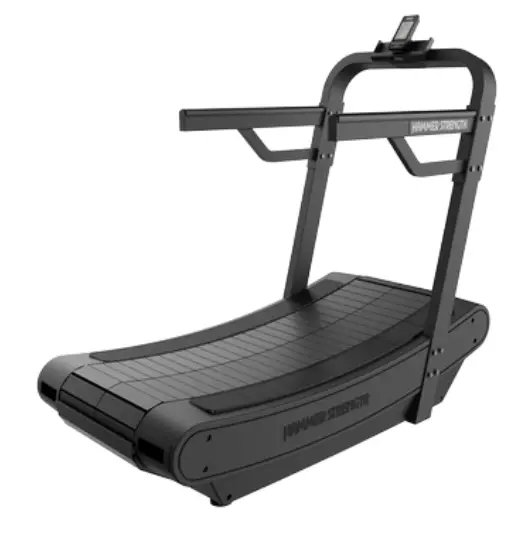
HAMMER STRENGTH HD Tread PT-ST
User and Service Documents Link
https://lifefitness9512.zendesk.com/hc/en-us
https://www.lftechsupport.com/web/document-library/documents
Additional information is available online using the links above.
Life Fitness® is a registered trademark.
Gym Wipes® is a registered trademark of the 2XL Corporation. PureGreen 24 is a trademark of Pure Green. Polar® is a registered trademark of Polar Electro Inc.
© Copyright 2021, Life Fitness, LLC. All Rights Reserved. Life Fitness, Hammer Strength, Cybex, ICG and SCIFIT are registered trademarks of Life Fitness, LLC and its affiliated companies and subsidiaries. Brunswick and related trademarks used under license from Brunswick Corporation. Disclaimer: Images and specifications are current as of the date of publication and are subject to change.
10601 W Belmont Ave, Franklin Park, IL 60131 • 847-288-3300
www.lifefitness.com • 1018935-0001 AA • 2021
FCC Compliance Information
Before using this product, it is essential to read this ENTIRE operation manual and ALL assembly instructions. It describes equipment setup and instructs members on how to use it correctly and safely.
FCC Warning – Possible Radio / Television Interference
EN ISO 20957 Class S: Professional and / or commercial use.
NOTE: This equipment has been tested and found to comply with the limits for a Class A digital device, pursuant to part 15 of the FCC rules. These limits are designed to provide reasonable protection against harmful interference when the equipment is operated in a commercial environment. This equipment generates, uses and can radiate radio frequency energy, and if not installed and used in accordance with the instruction manual, may cause harmful interference to radio communications. Operation of this equipment in a residential area is likely to cause harmful interference in which case the user will be required to correct the interference at his own expense.
CAUTION: Any changes or modifications to this equipment could void the product warranty.
ATTENTION : tout changement ou toute modification de ce matériel peut annuler la garantie du produit.
EU Declaration of Conformity
Electronic components satisfy the EMC directive 2014/30/EU, LVD directive 2014/35/EU, GPS directive 2001/95/EC, ROHS directive 2015/863/EU, and EN 60335-1:2012/A14:2019.
The Declaration of Conformity can be viewed at http://www.lifefitness.com
Any service, other than cleaning or user maintenance, must be performed by an authorized service representative.
Safety Instructions
Read all instructions before use.
- CAUTION: Any changes or modifications to this equipment could void the product warranty.
- CAUTION: Risk of injury to persons – to avoid injury, use extreme caution when stepping onto or off of a moving belt. Read assembly instruction manual before using.
- WARNING: Health-related injuries may result from incorrect or excessive use of exercise equipment. Life Fitness Family of Brands STRONGLY recommends seeing a physician for a complete medical exam before undertaking an exercise program, particularly if the user has a family history of high blood pressure or heart disease, is over the age of 45, smokes, has high cholesterol, is obese, or has not exercised regularly in the past year. If, at any time while exercising, the user experiences faintness, dizziness, pain, or shortness of breath, he or she must stop immediately.
- WARNING: Heart rate monitoring systems may be inaccurate. Over exercising may result in serious injury or death. If you feel faint, stop exercising immediately.
- WARNING: Do not use for stretching and do not attach straps or other devices.
- WARNING: Keep batteries out of reach of children. Some chest straps may contain a removable battery.
- Swallowing may lead to serious injury in as little as 2 hours or death, due to chemical burns and potential perforation of the esophagus.
- If you suspect your child has swallowed a battery, immediately call your local poison control for fast, expert advice.
- Examine devices and make sure the battery compartment is correctly secured, e.g. that the screw or other mechanical fastener is tightened. Do not use if compartment is not secure.
- Dispose of used button batteries immediately and safely. Flat batteries can still be dangerous.
- Tell others about the risk associated with button batteries and how to keep their children safe.
- WARNING: Batteries may not be exploited to fire or get into contact with other metal objects. If you don´t use the equipment for a longer period of time, remove batteries to avoid any damage by leaking or corroding batteries. If battery is depleted, insert new batteries into the equipment. If battery has leaked, remove all residue immediately. Avoid contact with eyes and if you come in contact with residue, wash thoroughly. WARNING: If rechargeable batteries are in use, they must be removed from the equipment for recharging. The charged battery must deliver 1.5 V output.
- Never use batteries other than D-Cell (LR-20) batteries. Do not use different battery types or depleted and new batteries together.
- Always insert batteries with correct polarity.
- Do not attempt to recharge non rechargeable batteries.
- Never short circuit battery connection terminals.
- Children shall not play with the training equipment.
- Cleaning and user maintenance shall not be made by children without supervision.
- Always follow the console instructions for proper operation.
- This appliance is not intended for use by persons (including children) with reduced physical, sensory, or mental capabilities, or lack of experience or knowledge unless they have supervision or been given instruction concerning the use of the appliance by a person responsible for their safety.
- Do not use this product outdoors, near swimming pools or in areas of high humidity.
- Never place liquids of any type directly on the unit, except in an accessory tray or holder. Containers with lids are recommended.
- Do not use these products in bare feet. Always wear shoes. Wear shoes with rubber or high-traction soles. Do not use shoes with heels, leather soles, cleats or spikes. Make sure no stones are embedded in the soles.
- Keep all loose clothing, shoelaces, and towels away from moving parts.
- Do not reach into, or underneath, the unit or tip it on its side during operation.
- This equipment is not intended for use by children. Keep children under the age of 14 away from the machine.
- Do not allow other people to interfere in any way with the user or equipment during a workout.
- Handrails may be held to enhance stability as needed, but are not for continuous use.
- Never walk or jog backwards on the treadmill.
- Use these products for their intended use as described in this manual. Do not use attachments that have not been recommended by the manufacturer.
- In conformity with the European Union Machinery Directive 2006/42/EC, this equipment unloaded runs at sound pressure levels below 70 dB (A) at the average operating speed of 12 km/hr (commercial units) and 8 km/hr (home units). Noise emission under load is higher than without load.
- Free standing equipment shall be installed on a stable and leveled surface.
- Read all warnings on each product prior to starting a workout.
- If warnings are missing or damaged, please contact Customer Support Services immediately for replacement warning labels. Warning labels are shipped with every product and should be installed before product is used. Life Fitness Family of Brands is not responsible for missing or damaged warning labels.
Immobilization Method, Home use
The purpose of immobilizing the treadmill is to prevent unauthorized use by children when installed in a home. The belt lock is included with treadmill.
Hold belt lock as shown and insert tab into striding belt slats. Rotate forward to install belt lock onto striding belt slats.
NOTE: Make sure the tab on belt lock is facing down.
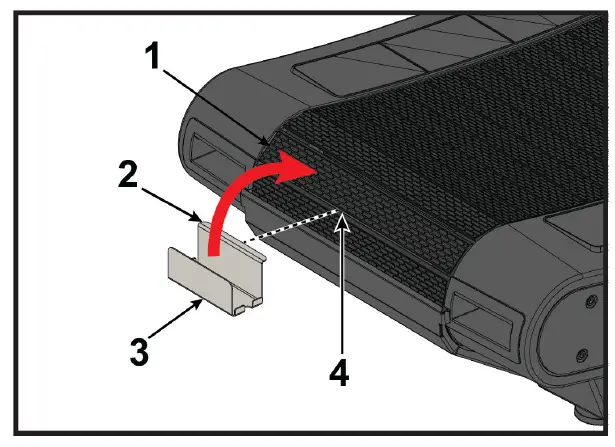
| Item | Description | Qty |
| 1 | Striding belt slats | 1 |
| 2 | Tab on belt lock | 1 |
| 3 | Belt lock | 1 |
| 4 | Insert belt lock here | 1 |
Rotate striding belt back until belt lock contacts rear guard.
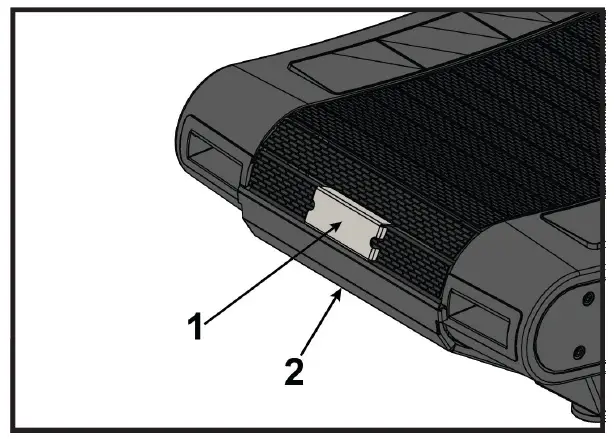
| Item | Description | Qty |
| 1 | Belt lock | 1 |
| 2 | Rear guard | 1 |
Remove belt lock by rotating striding belt forward. Then rotate top of belt lock backward and remove tab from striding belt slats.
Biomechanical Positioning
The user shall be positioned on the striding belt facing the console. Handrails are used for mounting, dismounting, and balance.
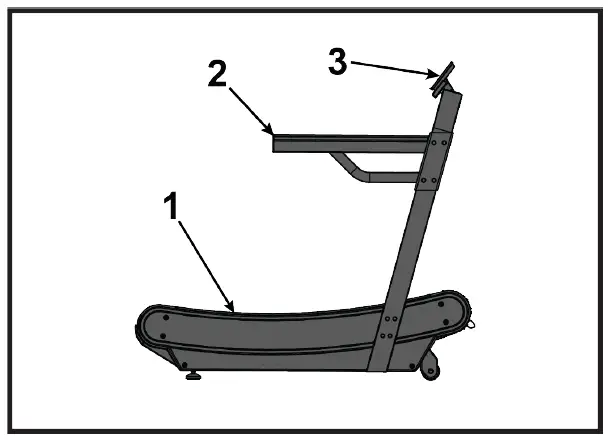
| Item | Description | Qty |
| 1 | Striding belt | 1 |
| 2 | Handrails | 2 |
| 3 | Console | 1 |
This product is designed to exercise the major muscle groups in the upper and lower body.
WARNING: Injuries to health may result from incorrect or excessive training.
Operation
Console Overview
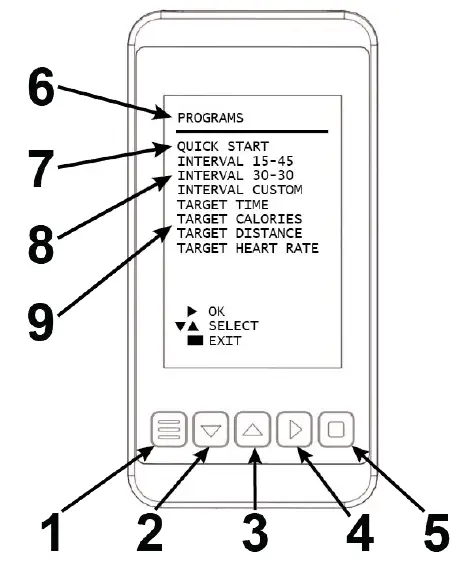
| ITEM | DATA READOUTS / BUTTONS | DESCRIPTION |
| 1 | Menu / Back Button | Menu / Back button. |
| 2 | Down Arrow | Push to move cursor down in the menus. |
| 3 | Up Arrow | Push to move cursor up in the menus. |
| 4 | Right Arrow | Confirmation button. |
| 5 | Square Button | Push to pause and stop workout. |
| 6 | Training Programs | Overview |
| 7 | Quick Start | The Quick Start mode allows training without entering additional data. |
| 8 | Interval Training | Training mode for predefined or custom time oriented interval training. |
| Custom Interval Training | Interval 15 – 45: 15 seconds running and 45 seconds recovery (10 Rounds) | |
| Interval 30 – 30: 30 seconds running and 30 seconds recovery (10 Rounds) | ||
| Interval custom: User defined number of rounds, running and recovery duration. | ||
| 9 | Target | Train according to user defined workout targets. • Time • Calories • Distance • Heart Rate |
Settings Menu Access
- Turn the console on by walking or running on striding belt.
- Press the MENU button on the console to access the PROGRAMS screen.
- Press the MENU button and the UP ARROW button simultaneously for 3 seconds to enter the SETTINGS menu.
| Item | Description | Qty |
| 1 | MENU | 1 |
| 2 | UP ARROW | 1 |
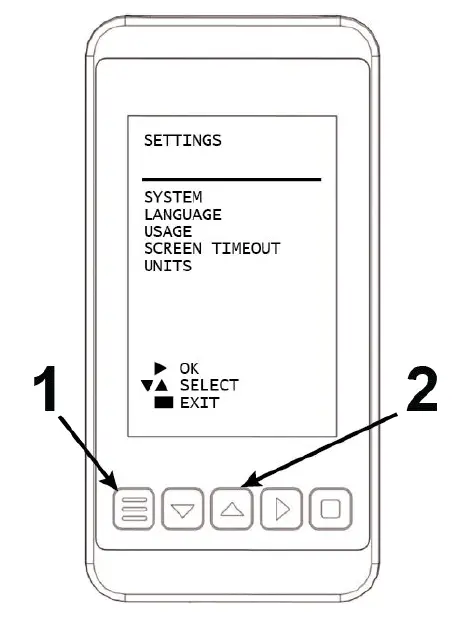
| SETTINGS | DESCRIPTION |
| System | Displays firmware information, firmware update, touch sensitivity, and LED backlight. |
| Language | Language selection: • English • Spanish • German • Italian • French • Dutch • Portuguese |
| Usage | Displays total time, total distance in Kilometers and Miles, and battery voltage. |
| Screen Timeout | Set the duration until the console stays on after the user stops walking or running. • 30 seconds • 1 minute • 2 minutes |
| Units | Select KM or MI for display units. |
Workout Screen Overview
The workout screens consist of 4 – 8 multiple tiles which provide various metrics during your workout.
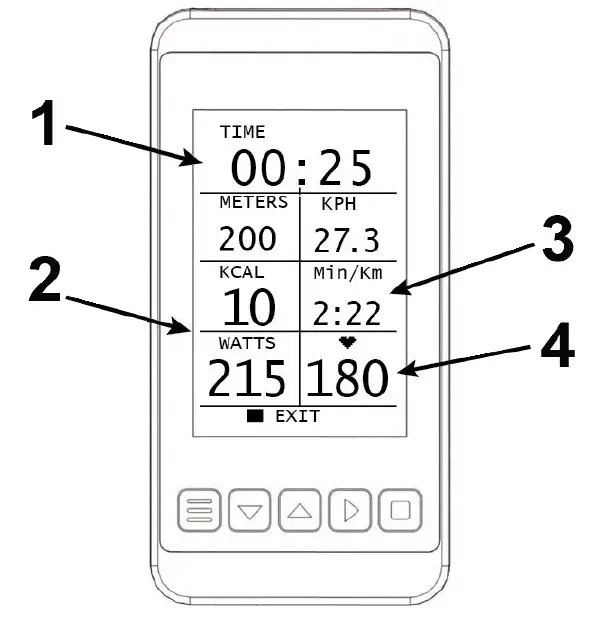
| ITEM | DATA | DESCRIPTION |
| 1 | Workout time | Indicates the accumulated workout time. |
| 2 | Tiles | Tiles provide specific metrics. See below for an overview of the available metrics. |
| 3 | Pace | The value indicates pace, Minutes per Mile or Minutes per Kilometer. |
| 4 | Heart rate | The value indicates the current BPM. |
Training Mode Tiles
| TILE NAME | DESCRIPTION |
| Distance | Total Kilometers or Miles |
| Speed | Speed in KPH or MPH |
| kCal | Calorie Consumption |
| Pace | Minutes per Kilometer or Minutes per Mile |
| Watts | Current Power |
| BPM | Heart Rate (beats per minute) |
| Average and Max Speed | Average and Max Speed in KPH or MPH |
| Average and Max Pace | Average and Max Pace in Minutes per Kilometer or Minutes per Mile |
| Average and Max BPM | Average and Max Heart Rate (beats per minute) |
Water Bottle Holder (optional)
A standard bicycle water bottle holder can be installed on the mounting bolts on right upright. Water bottle holders are not available through Hammer Strength.
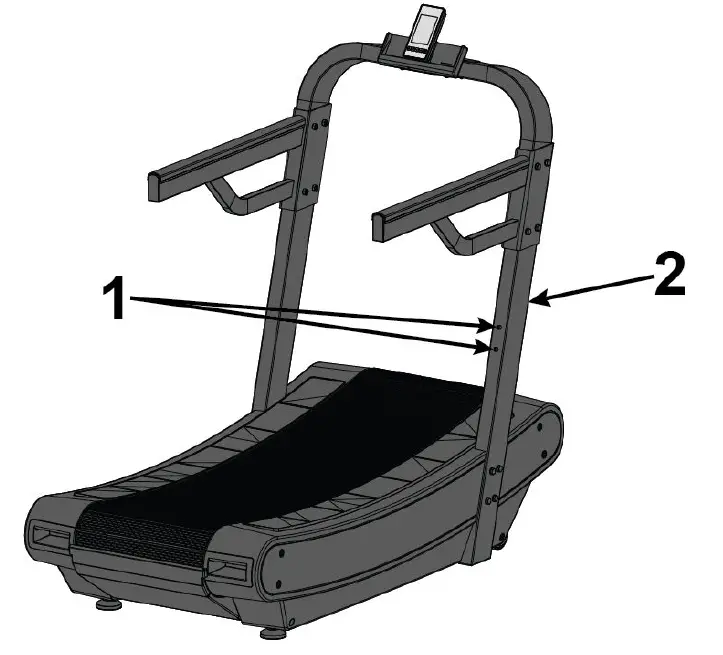
| Item | Description | Qty |
| 1 | Mounting bolt | 2 |
| 2 | Right upright | 1 |
Service and Technical Data
Preventive Maintenance Schedule
| Item | Weekly | Monthly | Biannually |
| Console Overlays | Clean | Inspect | |
| Bottle Holders / Accessory Trays | Clean | Inspect | |
| Console Mounting Bolts | Inspect | ||
| Hardware | Inspect | ||
| Frame | Clean | Inspect | |
| Plastic Covers | Clean | Inspect | |
| Striding Belt Centered | Inspect | ||
| Drive Belt | Inspect | ||
| Leg Levelers | Inspect / Adjust | ||
| Front and Rear Rollers | Inspect | ||
| Side Step Area | Clean | Inspect | |
| Side Hand Rails | Clean | Inspect |
Preventive Maintenance Tips
NOTE: Safety of the equipment can be maintained only if the equipment is examined regularly for damage or wear. Keep the equipment out of use until defective parts are repaired or replaced. Pay special attention to parts that are subject to wear, as outlined below.
The following preventive maintenance tips will keep the product operating at peak performance:
- Locate the product in a cool, dry place.
- Clean the display console and all exterior surfaces with an approved or compatible cleaner (see Approved and Compatible Cleaners) and a microfiber cloth.
- Long fingernails may damage or scratch the surface of the console; use the pad of the finger to press the selection buttons on the console.
Approved and Compatible Cleaners
Two preferred cleaners have been approved by reliability experts: PureGreen 24 and Gym Wipes. Both cleaners will safely and effectively remove dirt, grime and sweat from equipment. PureGreen 24 and the Antibacterial Force formula of Gym Wipes are both disinfectants that are effective against MRSA and H1N1.
PureGreen 24 is available in a spray which is convenient for gym staff to use. Apply the spray to a microfiber cloth and wipe down the equipment. Use PureGreen 24 on the equipment for at least 2 minutes for general disinfection purposes and at least 10 minutes for fungus and viral control.
Gym Wipes are large, durable pre-moistened wipes to use on the equipment before and after workouts. Use Gym Wipes on the equipment for at least 2 minutes for general disinfection purposes.
Contact Customer Support Services to order these cleaners (1-800-351-3737 or email: [email protected]).
Mild soap and water or a mild non-abrasive household cleaner can also be used to clean the display and all exterior surfaces. Use a soft microfiber cloth only. Apply the cleaner to the microfiber cloth before cleaning. DO NOT use ammonia or acid based cleaners. DO NOT use abrasive cleaners. DO NOT use paper towels. DO NOT apply cleaners directly to the equipment surfaces.
Troubleshooting the Polar Heart Rate Chest Strap®
Heart rate reading is erratic or absent entirely
| Probable Cause | Corrective Action |
| Belt transmitter electrodes are not wet enough to pick up accurate heart rate readings. | Wet the belt transmitter electrodes. |
| Belt transmitter electrodes are not laying flat against the skin. | Ensure the belt transmitter electrodes are laying flat against the skin. |
| Belt transmitter needs cleaning. | Wash the belt transmitter with mild soap and water. |
| Belt transmitter not properly set up. | Setup of the belt transmitter is accomplished by initially bringing it with in 1 foot of the receiver. The receiver is in the console. After the heart rate is displayed on the console the range is extended to 3 feet. |
| This LCD console only supports an Analog signal. | |
| Chest strap battery is depleted. | Contact Customer Support Services for instructions on how to have the chest strap replaced. |
Abnormally elevated heart rate readings
| Probable Cause | Corrective Action |
| Electromagnetic interference from television sets and/or antennas. | Move the exercise equipment a few inches away from the probable cause, or move the probable cause a few inches away from the exercise equipment, until the heart rate readings are accurate. |
| Electromagnetic interference from cell phones. | |
| Electromagnetic interference from computers. | |
| Electromagnetic interference from cars. | |
| Electromagnetic interference from high voltage power lines. | |
| Electromagnetic interference from motor driven exercise equipment. |
Low Battery Signal
When the battery charge is low, an icon will appear in the lower right corner of the screen. Replace batteries.
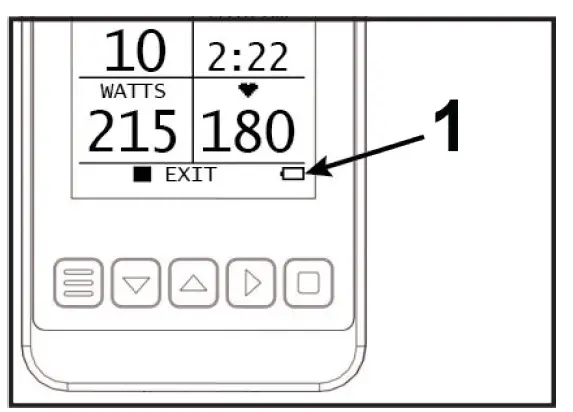
| Item | Description | Qty |
| 1 | Low battery icon | 1 |
How to Obtain Product Service
- Verify the symptom and review the operating instructions. The problem may be unfamiliarity with the product and its features and workouts.
- Locate and write down the serial number of the unit which is located on the wheel bracket at front of machine.
- Contact Customer Support Services at http://www.lifefitness.com
Warranty
What is Covered
This Life Fitness Family of Brands commercial exercise equipment product is warranted to be free of all defects in material and workmanship.
Who is Covered
The original purchaser or any person receiving the product as a gift from the original purchaser. Warranty will be voided on subsequent transfers.
How Long It is Covered
All coverage is provided by specific Product according to the guidelines listed in Warranty Information.
Who Pays Transportation and Insurance For Service
If the Product or any covered part must be returned to a service facility for repairs, We, Life Fitness Family of Brands, will pay all transportation and insurance charges for the first year. You are responsible for transportation and insurance charge after the first year.
What We Will Do To Correct Covered Defects
We will ship to you any new or rebuilt replacement part or component, or at our option, replace the Product. Such replacement parts are warranted for the remaining portion of the original warranty period.
What is Not Covered
Any failures or damage caused by unauthorized service, misuse, accident, negligence, improper assembly or installation, debris resulting from any construction activities in the Product’s environment, rust or corrosion as a result of the Product’s location, alterations or modifications without our written authorization, or by failure on your part to use, operate and maintain the Product as set out in your Operation Manual.
All terms of this warranty are void if this product is moved beyond the continental borders of the United States of America (excluding Alaska, Hawaii and Canada) and are then subject to the terms provided by that country’s local authorized Life Fitness Family of Brands representative.
What You Must Do
Retain proof of purchase. use, operate and maintain the Product as specified in the Manual; notify the place of purchase of any defect within 10 days after discovery of the defect; if instructed, return any defective part for replacement or, if necessary, the entire Product for repair. Life Fitness reserves the right to decide whether or not a product is to be returned for repair.
How to Get Parts and Service
Refer to the Corporate Headquarters section of this manual for your local service contact information. Reference your name, address and the serial number of your Product (consoles and frames may have different serial numbers). They will tell you how to get a replacement part, or, if necessary, arrange for service where your Product is located.
Exclusive Warranty
THIS LIMITED WARRANTY IS IN LIEU OF ALL OTHER WARRANTIES OF ANY KIND EITHER EXPRESSED OR IMPLIED, INCLUDING BUT NOT LIMITED TO THE IMPLIED WARRANTIES OF MERCHANTABILITY AND FITNESS FOR A PARTICULAR PURPOSE, AND ALL OTHER OBLIGATIONS OR LIABILITIES ON OUR PART. We neither assume nor authorize any person to assume for us any other obligation or liability concerning the sale of this Product. Under no circumstances shall we be liable under this warranty, or otherwise, of any damage to any person or property, including any lost profits or lost savings, for any special, indirect, secondary, incidental or consequential damages of any nature arising out of the use of or inability to use this Product. Some states do not allow the exclusion or limitation of implied warranties or of liability for incidental or consequential damages, so the above limitations or exclusions may not apply to you.
Changes in Warranty Not Authorized
No one is authorized to change, modify or extend the terms of this limited warranty.
Effects of State Laws
This warranty gives you specific legal rights, and you may have other rights which vary from state to state and country by country.
Warranty Information
| 3 years | 1 Year | 6 months |
| Electrical and Mechanical Parts | Console | Wear items |
Specifications
| Designed Use | EN 957-6, Product Class S |
| Maximum User Weight | 350 lbs. / 159 kg |
| Drive Type | Belt |
| Power Requirements | Battery power console. Two D cell batteries. |
| Heart Rate | Wireless heart rate using an Analog signal. |
| Operation Frequency | 2402 ~ 2480 Mhz |
| RF Output Power | 0.22 Mw |
| Physical Dimensions | Shipped Dimensions | |
| Length | 67.5 in. / 171.5 cm | 69.5 in. / 176.5 cm |
| Width | 34.5 in. / 87.6 cm | 37 in. / 94 cm |
| Height | 64 in. / 162.5 cm | 24 in. / 61 cm |
| Weight | 368 lbs. / 167 kg | 440 lbs. / 200 kg |
Corporate Headquarters
AMERICAS
North America Life Fitness, LLC
10601 W Belmont Ave Franklin Park, IL 60131 U.S.A. Telephone: (847) 288 3300 Service Email: [email protected]
Sales/Marketing Email: [email protected]
Brazil
Life Fitness Brasil
Av. Rebouças, 2315 Pinheiros
São Paulo, SP 05401-300 BRAZIL
SAC: 0800 773 8282 option 2
Telephone: +55 (11) 3095 5200 option 2 Service Email: [email protected]
Sales/Marketing Email: [email protected]
Latin America and Caribbean* Life Fitness, LLC
10601 W Belmont Ave Franklin Park, IL 60131 U.S.A. Telephone: (847) 288 3300 Service Email: [email protected]
Sales/Marketing Email: [email protected]
EUROPE, MIDDLE EAST, and AFRICA (EMEA)
Netherlands and Luxemburg Life Fitness Atlantic BV
Bijdorpplein 25-31
2992 LB Barendrecht THE NETHERLANDS
Telephone: (+31) 180 646 666 Service Email: [email protected]
Sales/Marketing Email: [email protected]
United Kingdom Life Fitness UK LTD
Queen Adelaide
Ely, Cambs, CB7 4UB Telephone: General Office (+44) 1353.666017
Customer Support (+44) 1353.665507 Service Email: [email protected] Sales/Marketing Email: [email protected]
Germany, Austria, and Switzerland Life Fitness Europe GMBH
Neuhofweg 9
85716 Unterschleißheim GERMANY
Telephone:
+49 (0) 89 / 31775166 Germany
+43 (0) 1 / 6157198 Austria
+41 (0) 848 / 000901 Switzerland Service Email: [email protected]
Sales/Marketing Email: [email protected]
Spain
Life Fitness IBERIA
C/Frederic Mompou 5,1º1ª
08960 Sant Just Desvern Barcelona SPAIN
Telephone: (+34) 93.672.4660 Service Email: [email protected]
Sales/Marketing Email: [email protected]
Belgium
Life Fitness Benelux NV
Parc Industrial de Petit-Rechain 4800 Verviers
BELGIUM
Telephone: (+32) 87 300 942 Service Email: [email protected]
Sales/Marketing Email: [email protected]
All Other EMEA Countries and Distributor Business EMEA*
Life Fitness Atlantic BV
Bijdorpplein 25-31
2992 LB Barendrecht THE NETHERLANDS
Telephone: (+31) 180 646 644 Service Email: [email protected]
ASIA PACIFIC (AP)
Japan
Life Fitness Japan, Ltd
4-17-33 Minami Aoyama 1F/B1F Minato-ku – Tokyo 107-0062 Japan
Telephone: (+81) 0120.114.482
Fax: (+81) 03-5770-5059
Service Email: [email protected] Sales/Marketing Email: [email protected]
Hong Kong
Life Fitness Asia Pacific LTD
32/F, Global Trade Square 21 Wong Chuk Hang Road Hong Kong
Telephone: (+852) 2575.6262
Service Email: [email protected] Sales/Marketing Email: [email protected]
All Other Asia Pacific countries and distributor business Asia Pacific*
Life Fitness Asia Pacific LTD
|32/F, Global Trade Square 21 Wong Chuk Hang Road Hong Kong
Telephone: (+852) 2575.6262
Fax: (+852) 2575.6894
Service Email: [email protected] Sales/Marketing Email: [email protected]
10601 W Belmont Ave, Franklin Park, IL 60131 • U.S.A.
847.288.3300 • FAX: 847.288.3703
Service phone number: 800.351.3737 (toll-free within U.S.A., Canada)
Global Website: www.lifefitness.com
 Fitness & Exercise Equipment for Your Facility or Home | Life Fitness
 Life Fitness Technical Support - Documents & Software