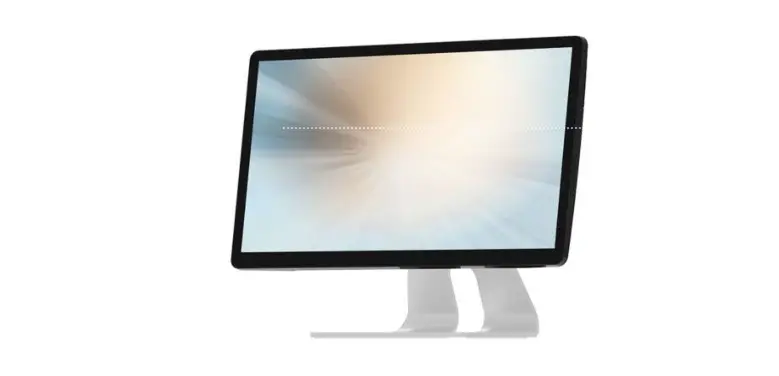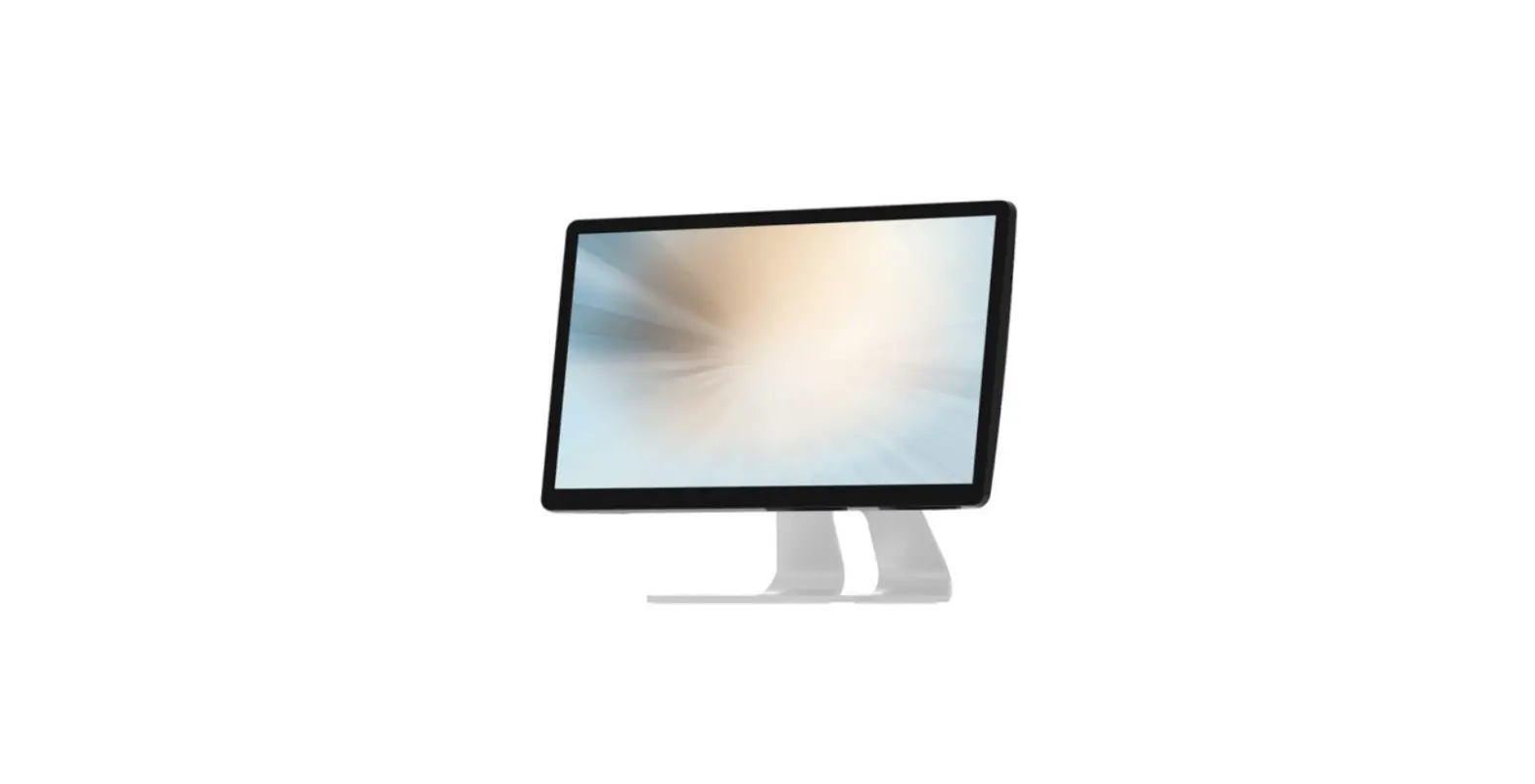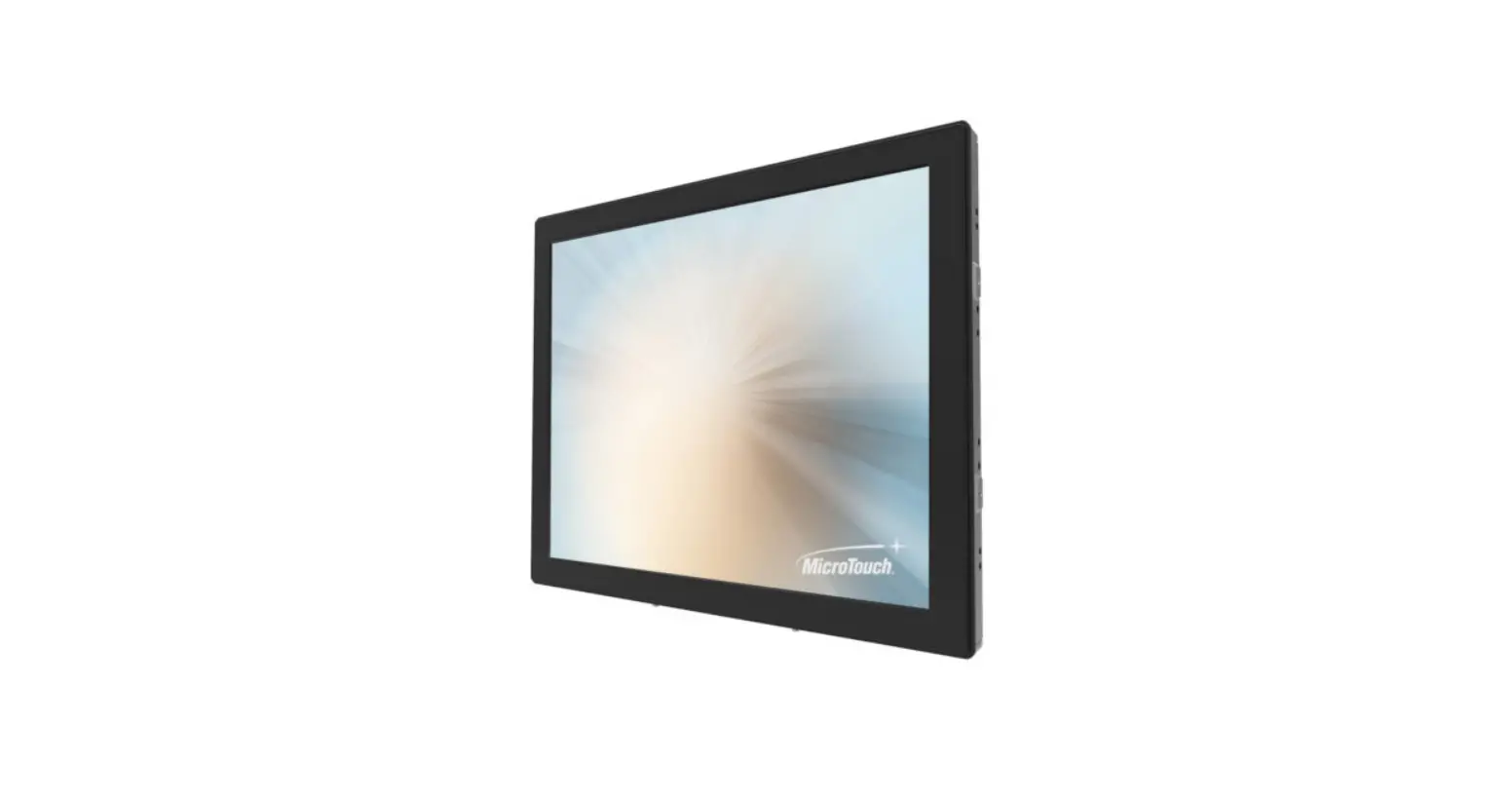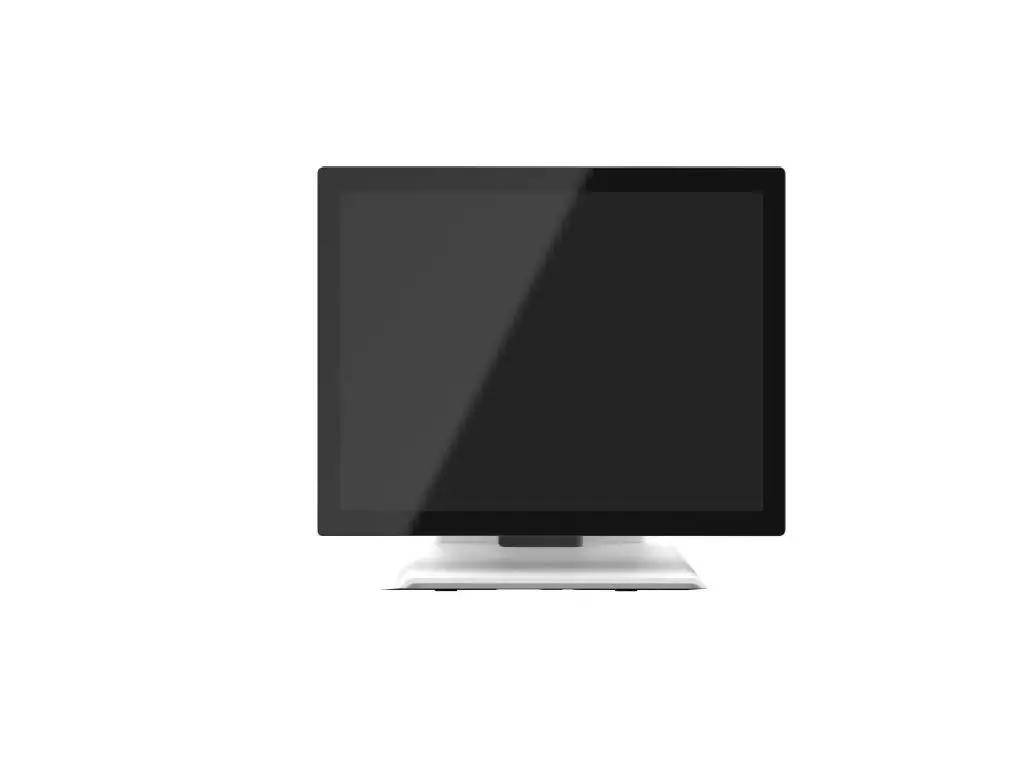

MicroTouch IC-156P-AW3 All -In-One Touch Computer
About This Document
No part of this publication may be reproduced, transmitted, transcribed, stored in a retrieval system, or translated into any language or computer language, in any form or by any means, including, but not limited to, electronic, magnetic, optical, chemical, manual, or otherwise without prior written permission of MICRO TOUCH. The information in this document is subject to change without notice. MICRO TOUCH makes no representations or warranties with respect to the contents herein, and specifically disclaims any implied warranties of merchantability or fitness for a particular purpose. MICRO TOUCH reserves the right to revise this publication and to make changes from time to time in the content hereof without the obligation of MICRO TOUCH to notify any person of such revisions or changes. Windows is a registered trademark of Microsoft, Inc. Other brand or product names are trademarks of their respective holders.
Compliance Information
For FCC (USA)
This equipment has been tested and fund to comply with the limits for a Class A digital device, pursuant to part 15 of the FCC Rules. There limits are designed to provide reasonable protection against harmful interference when the equipment is operated in a commercial environment. This equipment generates, uses, and can radiate radio frequency energy and, if not installed and used in accordance with the instruction manual, may cause harmful interference to radio communications. Operation of this equipment in a residential area is likely to cause harmful interference in which case the user will be required to correct the interference at his own expense.
This device complies with part 15 of the FCC Rules. Operation is subject to the following two conditions: (1) this device may not cause harmful interference, and (2) this device must accept any interference received, including interference that may cause undesired operation.
For IC (Canada)
CAN ICES-3(A)/NMB-3(A)
For CE (EU)
The device complies with the EMC Directive 2014/30/EU and Low Voltage Directive
2014/35/EU
Disposal Information
Waste Electrical and Electronic Equipment This symbol on the product indicates that, under the European Directive 2012/19/EU governing waste from electrical and electronic equipment, this product must not be disposed of with other municipal waste. Please dispose of your waste equipment by handing it over to a designated collection point for the recycling of waste electrical and electronic equipment. To prevent possible harm to the environment or human health from uncontrolled waste disposal, please separate these items from other types of waste and recycle them responsibly to promote the sustainable reuse of material resources. For more information about recycling of this product, please contact your local city office or your municipal waste disposal service.
- Warning – To prevent the risk of fire or shock hazards, and do not expose the product to moisture.
- Warning – Please do not open or disassemble the product as this may cause electric shock.
- Warning – Power cord shall be connected to a socket-outlet with earth connection.
- Warning – The cable cover cannot be removed under normal use conditions.
- Warning – Stability Hazard. The touch monitor may fall, causing serious personal injury or death. To prevent injury, this touch monitor must be securely attached to the wall in accordance with the installation instructions.
Precautions
Please follow all warnings, precautions and maintenance as recommended in this user’s manual to maximize the life of your unit.
Do:
- Turn off the product before cleaning.
- Use a soft cloth moistened with mild detergent to clean the product housing.
- Use only the qualified power adapter that comes with your device.
- Disconnect the power plug from AC outlet if the product is not going to be used for an extended period of time.
Don’t:
- Do not use abrasive cleaners, waxes or solvents for your cleaning.
- Do not operate the product under the following conditions:
- Extremely hot, cold or humid environment.
- Areas are susceptible to excessive dust and dirt.
- Near any appliance generating a strong magnetic field.
Caution
Risk of explosion if battery is replaced by an incorrect type. Dispose of used batteries according to the instructions.
Overview
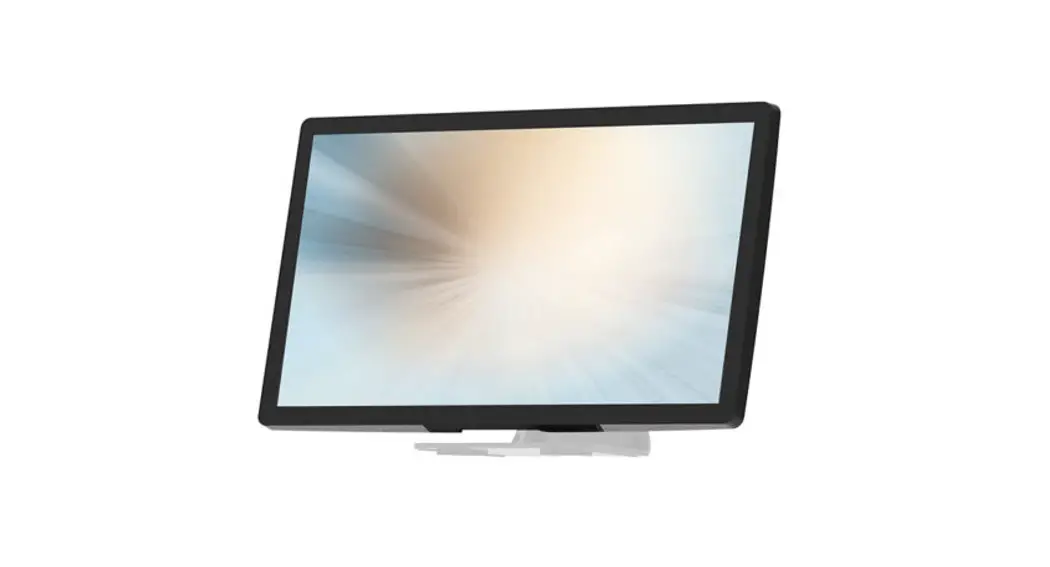
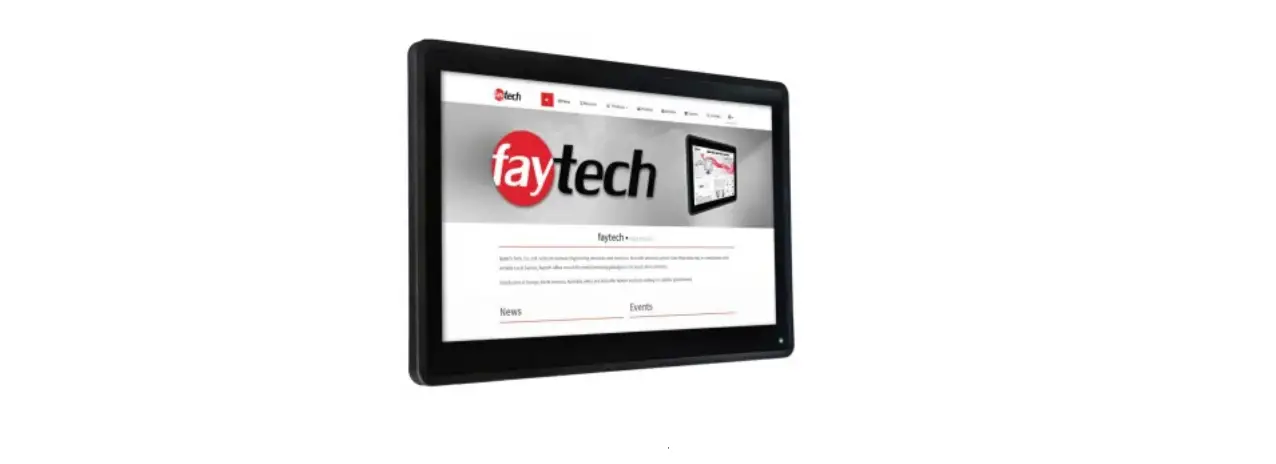
The IC-156P-AW3 is a thin 15.6” touch computer that offers a unique design with expandability and flexibility, making expansion and accessory installation easy. The versatility of IC-156P-AW3 is an exceptional choice for applications in all business sectors, especially in the retail market.
Feature
- Intel I3-7100U processor.
- Sleek design for a better user experience.
- Patented I/O design for better wiring management while implementation.
Specifications
| System | |
| CPU | Intel I3-7100U Processor, 3MB Cache, up to 2.4 GHz |
| GPU | Intel HD Graphics 620 |
| DDR | 2 x SO-DIMM, DDR4, Support up to 32GB/64bits, 2133MT/s |
| Storage | 1 x M.2 2280 (SATA III & NVME) |
| Input Power | DC in 24V/5A 4PIN |
| Display | Dual channel LVDS, resolution up to 1920x1080P60 |
| Touch | ZCC (EETI 80W60 controller) /TPK (EETI 80H84 controller) 15.6-inch P-Cap touch sensor, supports 10 fingers touch function. |
| Audio | 2 x speaker (2W x 2) |
| Network | Gigabit Ethernet (Intel i219LM) Optional m.2 2230 module: Intel AC 3168, Wi-Fi 802.11a/b/g/n/ac 1T1R, Bluetooth 4.2 (Support BLE) |
|
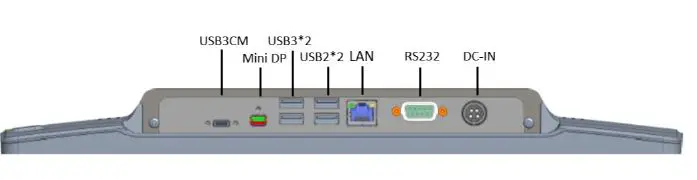
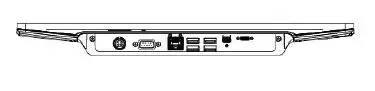
External IO Ports | 1 x Power button 1 x USB Type-C (USB3CM:1x USB 3.1 gen1 with Display ALT Mode and PD2.0, support 5V@3A / [email protected] output, Maximum 30W.) 1 x MiniDP (4K@60HZ) 2 x USB2.0 Type-A, 2 x USB3.0 Type-A 1 x LAN (Support 10/100/1000Mbps) 1 x DB9 (RS232, pin9 with NA/5V/12V support that select by BIOS) 1 x 24V DC In |
| Internal IO Ports (inside plastic cover) | 3 x connector (5V/0.5A) |
| OS version | Windows 10 |
| Operation temp. | 0°C~40°C |
| Storage temp. | -20°C to 60°C |
| Operation humidity | 20~80%, Non-Condensing |
| Storage humidity | 10~90%, Non-Condensing |
| LCD Touch Panel | |
| Size | 15.6” TFT LCD |
| Brightness (non-touch screen) | Typical 450 cd/m2; Min. 360 cd/m2 |
| Brightness (P-CAP with ZCC) | Typical 382 cd/m2; Min. 306 cd/m2 |
| Brightness (P-CAP with TPK) | Typical 387 cd/m2; Min. 313 cd/m2 |
| Number of Pixels | 1920 (H) × 1080 (V)/ 60Hz |
| Tilt Angle | 8°~68° |
| Environment | |
| Certificate | CE、FCC、LVD、UKCA |
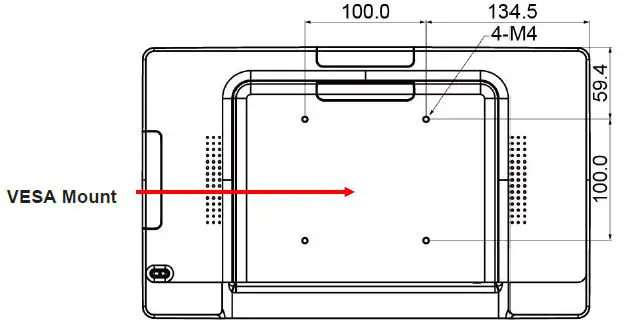
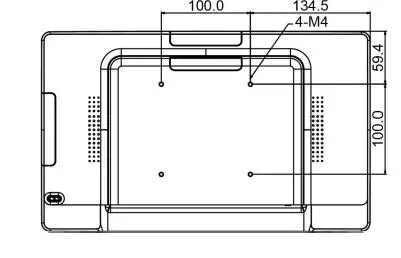
| Mounting | VESA 100 mm x 100 mm |
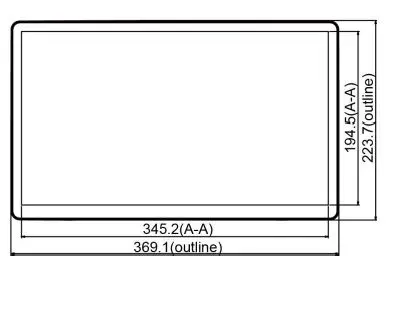
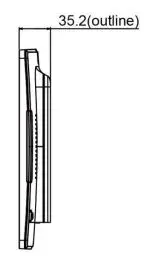
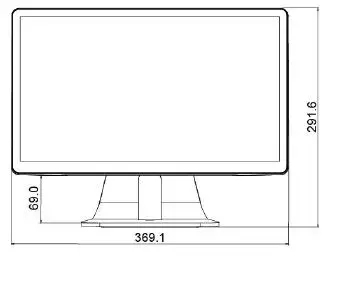
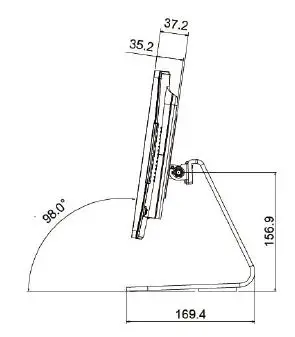
| Dimension (W x H x D) | System Only:369.1 mm x 223.7 mm x 35.2 mm System with Stand Module:369.1 mm x 291.6 mm x 169.4 mm |
| Net Weight | System Only:2.01 Kg System with Stand Module:4.01 Kg |
| Gross Weight | System Only:3.01 Kg System with Stand Module:6.01 Kg |
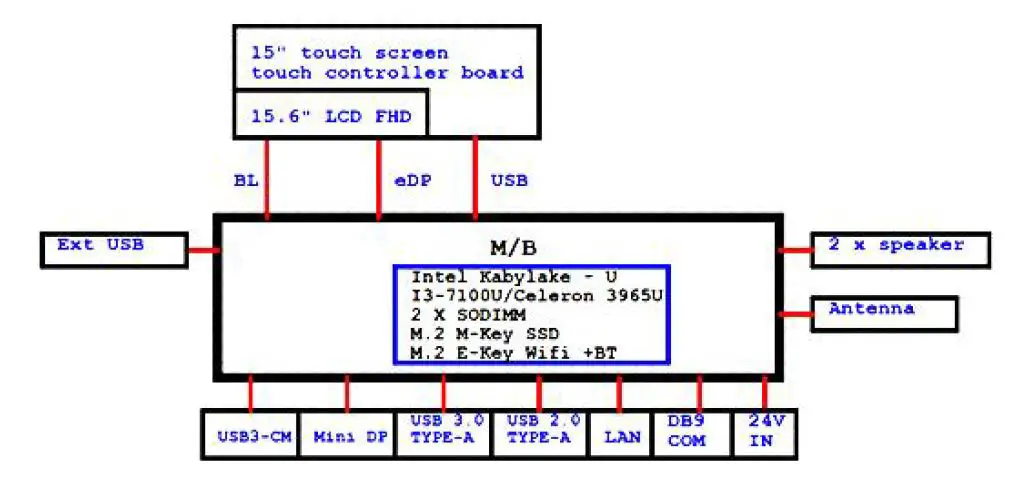
Block Diagram
Interface Connectors
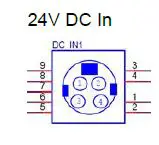
| Pin # | Signal Name | Pin # | Signal Name | |
| 1 | GND | 2 | GND | |
| 3 | 24V | 4 | 24V | |
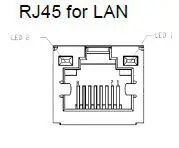
| Pin # | Signal Name | Pin # | Signal Name | |
| 1 | TP1+ | 2 | TP1- | |
| 3 | TP2+ | 4 | TP3- | |
| 5 | TP3+ | 6 | TP2- | |
| 7 | TP4+ | 8 | TP4- | |
| LED | Function | Color | ||
| LED1 | Speed | 1000 | Orange | |
| 100 | Green | |||
| 10 | Non | |||
| LED2 | Active | Yellow | ||
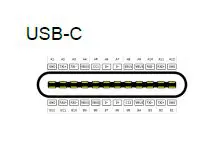
| Pin # | Signal Name | Pin # | Signal Name |
| A1 | GND | B12 | GND |
| A2 | SSTXp1 | B11 | SSRXp1 |
| A3 | SSTXn1 | B10 | SSRXn1 |
| A4 | VBUS | B9 | VBUS |
| A5 | CC1 | B8 | SBU2 |
| A6 | Dp1 | B7 | Dn2 | |
| A7 | Dn1 | B6 | Dp2 | |
| A8 | SBU1 | B5 | CC2 | |
| A9 | VBUS | B4 | VBUS | |
| A10 | SSRXn2 | B3 | SSTXn2 | |
| A11 | SSRXp2 | B2 | SSTXp2 | |
| A12 | GND | B1 | GND | |
| Note | ||||
| USB3CM: Support DP ALT mode and 5V@3A / 12V@3A output; | ||||
USB 3.0 Dual
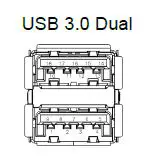
| USB 3.0 Dual | Pin # | Signal Name | Pin # | Signal Name |
| 1 | USB5V | 10 | USB5V | |
| 2 | D- | 11 | D- | |
| 3 | D+ | 12 | D+ | |
| 4 | GND | 13 | GND | |
| 5 | StdA_SSRX- | 14 | StdA_SSRX- | |
| 6 | StdA_SSRX+ | 15 | StdA_SSRX+ | |
| 7 | GND_DRAIN | 16 | GND_DRAIN | |
| 8 | StdA_SSTX- | 17 | StdA_SSTX- | |
| 9 | StdA_SSTX+ | 18 | StdA_SSTX+ | |
| Note | ||||
| Every on USB3.0 Power current provide 0.9A (Regular) | ||||
USB 2.0 Dual
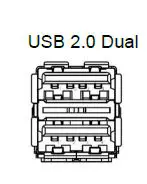
| USB 2.0 Dual | Pin # | Signal Name | Pin # | Signal Name |
| 1 | USB5V | 1 | USB5V | |
| 2 | D- | 2 | D- | |
| 3 | D+ | 3 | D+ | |
| 4 | GND | 4 | GND | |
| Note | ||||
| Every on USB2.0 Power current provide 0.5A (Regular) | ||||
Mini DP
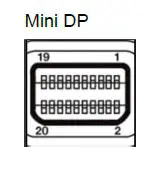
| i
| Pin # | Signal Name | Pin # | Signal Name |
| 1 | GND | 2 | Hot Plug Detect | |
| 3 | ML_Lane 0 (p) | 4 | CONFIG1 | |
| 5 | ML_Lane 0 (n) | 6 | CONFIG2 | |
| 7 | GND | 8 | GND | |
| 9 | ML_Lane 1 (p) | 10 | ML_Lane 3 (p) | |
| 11 | ML_Lane 1 (n) | 12 | ML_Lane 3 (n) | |
| 13 | GND | 14 | GND | |
| 15 | ML_Lane 2 (p) | 16 | AUX_CH (p) | |
| 17 | ML_Lane 2 (n) | 18 | AUX_CH (n) | |
| 19 | GND | 20 | DP_PWR | |
DB9 for RS232
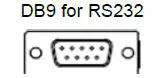
| DB9 for RS232 | Pin # | Signal Name | Pin # | Signal Name |
| 1 | DCD | 2 | SIN | |
| 3 | SOUT | 4 | DTR | |
| 5 | GND | 6 | DSR | |
| 7 | RTS | 8 | CTS | |
| 9 | 0V / 5V/ 12V Max. current=1A |
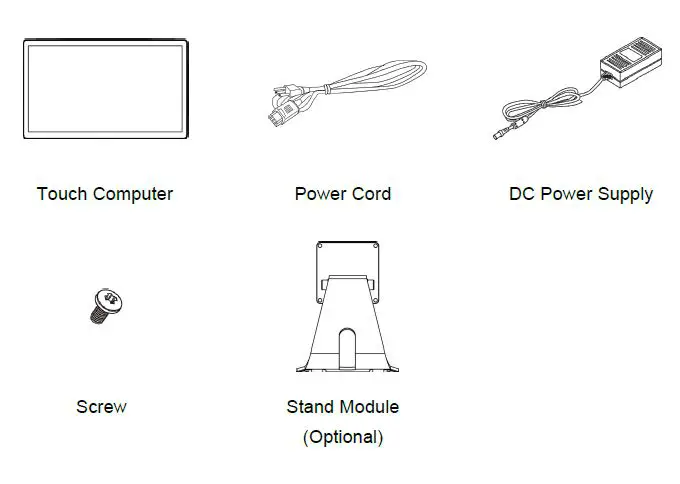
Package Overview
Warning!
This product is intended to be supplied by a UL Listed Power Adapter, rated 24Vdc, 5A minimum. (complied with LPS or PS2) Tma = 40 degrees C minimum, and the altitude of operation = 3048m minimum. If it needs further assistance with purchasing the power source, please contact to TES for further information.
About VESA Mount
The IC-156P-AW3 conform to the “VESA Flat Display Mounting Interface Standard” which defines a physical mounting interface for touch computer and corresponding with the standards of touch computer mounting devices, such as wall-mounted. The VESA mount is located on the back of this unit. The IC-156P-AW2 may be wall-mounted in the horizontal position (output connector facing down) or vertical position (output connector facing left or right).
Warning!
Please select the TES original screws! The distance between the back cover surface and the bottom of the screw hole is 8 mm. Please use four M4 / 8 mm screws diameter with the proper length to mount your monitor.
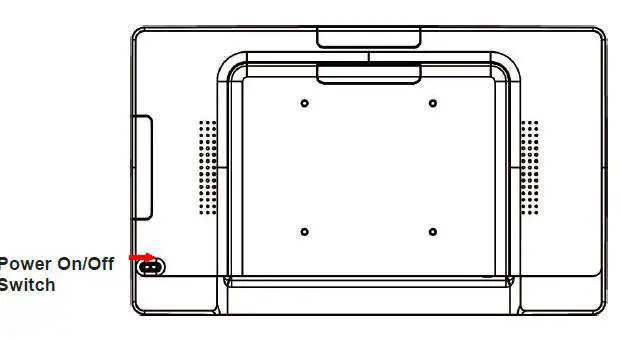
Power On / Off Switch
| Function | Description |
| Power on | Press the power button. |
| Sleep | With OS settings, sleep or shut down choose one. |
| Power off | |
| Force power off | Press the power button 4 sec. |
Dimension
System Only Front View
Side View
Rear View
Bottom View
System with Stand
Front View
Side View
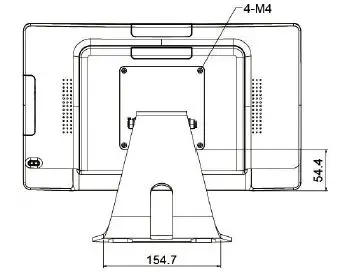
Rear View
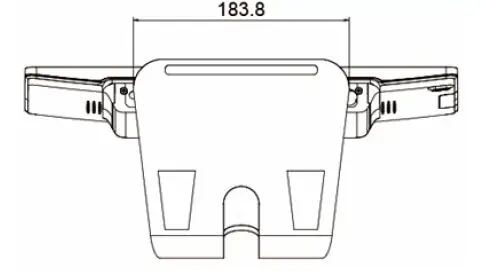
Bottom View
Optional Accessory Installation
Note: Please install the accessories when the touch computer is in a powered-off state
Install the Stand
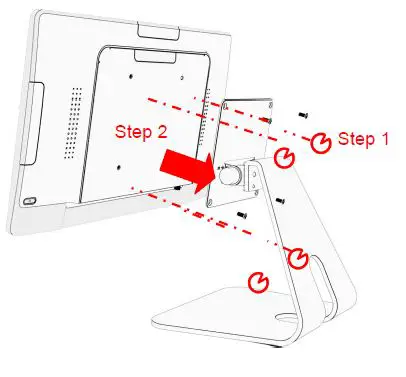
Place stand module on back of touch computer and align the screw holes. Install the four M4 screws to fasten the stand module.
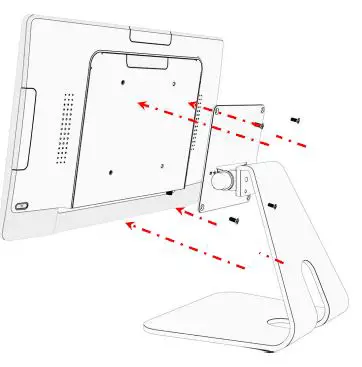
Dismantle the Stand
Step 1: Loosen the screws
Step 2: Pull it out from touch computer and remove the stand module.
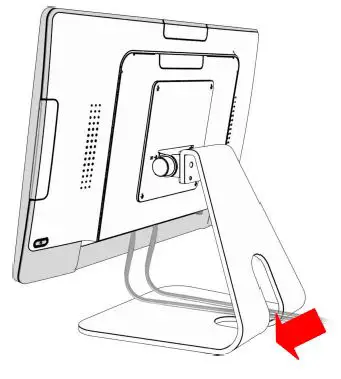
Install the Cables
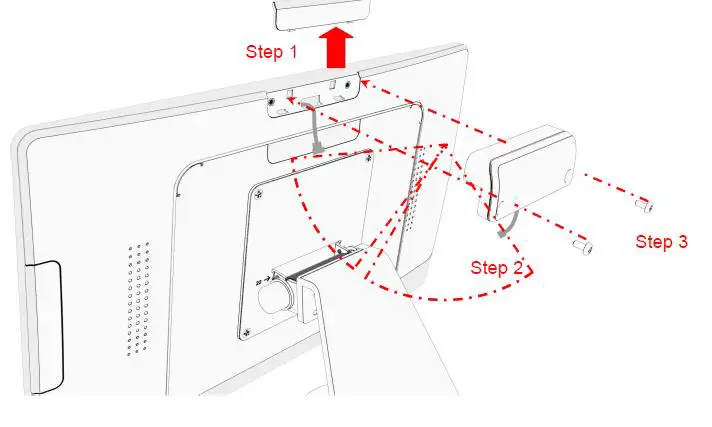
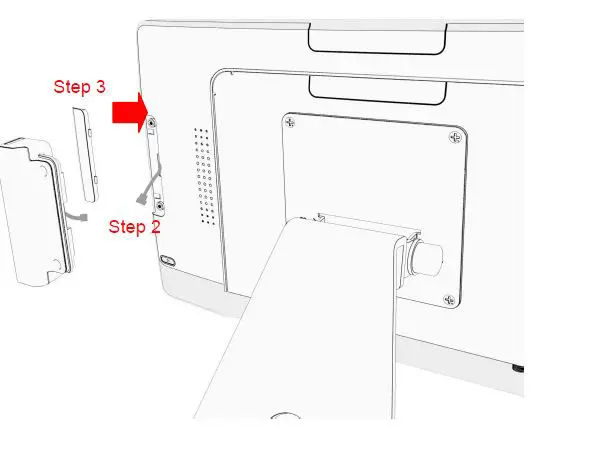
Install the Camera Module
Camera Module weight 19g
- Step 1: Remove the side cover.
- Step 2: Connect the camera module cable to the touch computer.
- Step 3: Install the two M3 screws to fasten the camera module.
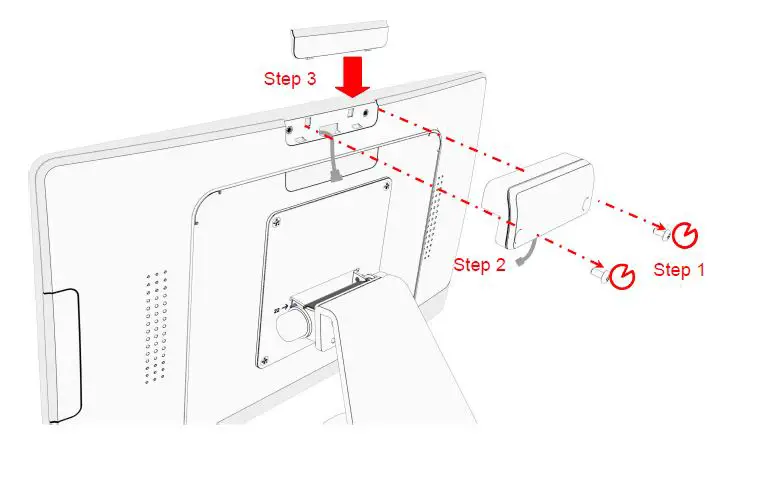
Remove the Camera
- Step 1: Loosen the screws.
- Step 2: Remove the camera module cable from the touch computer.
- Step 3: Replace the side cover.
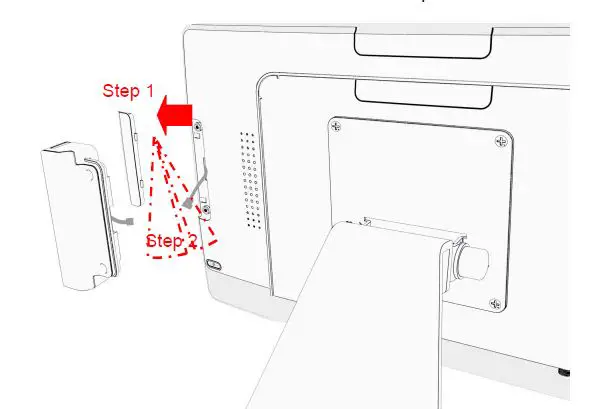
Install the MSR Module
MSR Module weight 62g.
- Step 1: Remove the side cover.
- Step 2: Connect the MSR module cable to the touch computer.

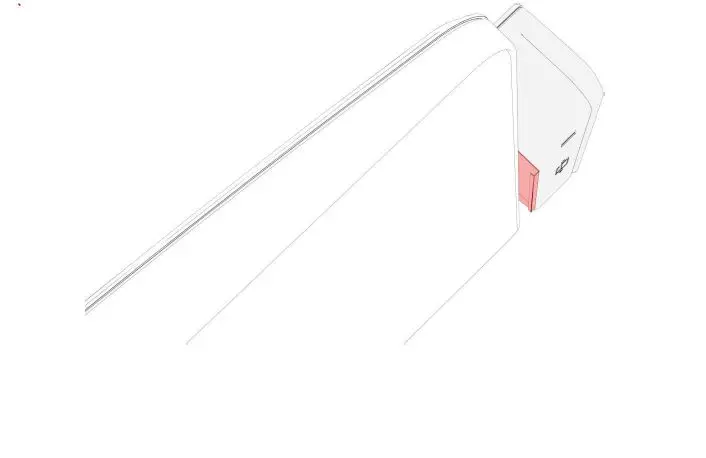
- Step 3: The metal bracket hook into the gap between cover glass and bezel

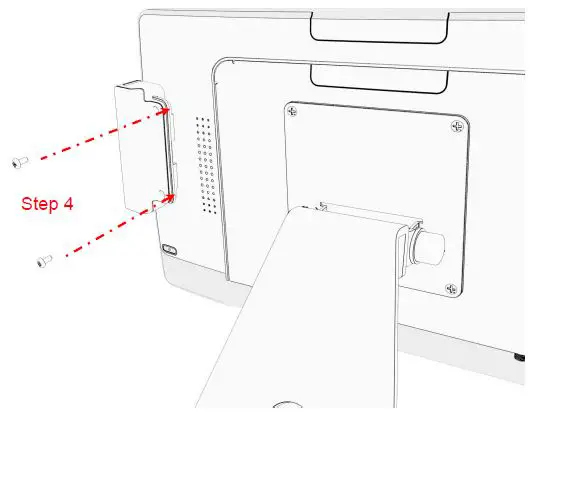
- Step 4: Install the two M3 screws to fasten the MSR module.
Remove the MSR Module
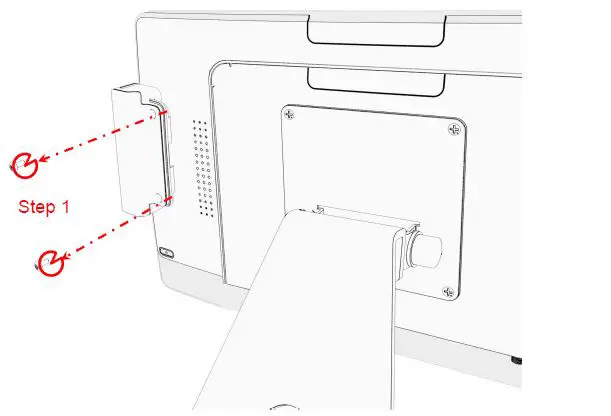
- Step 1: Loosen the screws.

- Step 2: Remove the MSR module cable from the touch computer.
- Step 3: To assemble the side cover.
Declaration of the Presence Condition of the Restricted Substances Marking \
| : IC-156P-AW3 Equipment name: Touch Computer Type designation (Type): IC-156P-AW3 | ||||||
| Lead (Pb) | Mercury (Hg) | Cadmium (Cd) | Hexavalent chromium (Cr+6) | Polybrominated biphenyls (PBB) | Polybrominated diphenyl ethers (PBDE) | |
| Plastic Parts | ○ | ○ | ○ | ○ | ○ | ○ |
| Metal Parts | - | ○ | ○ | ○ | ○ | ○ |
| Cable component | - | ○ | ○ | ○ | ○ | ○ |
| LCD Panel | - | ○ | ○ | ○ | ○ | ○ |
| Touch Panel | - | ○ | ○ | ○ | ○ | ○ |
| PCBA | - | ○ | ○ | ○ | ○ | ○ |
| Software | ○ | ○ | ○ | ○ | ○ | ○ |
| Note 1:〝Exceeding 0.1 wt %〞and〝exceeding 0.01 wt %〞indicate that the percentage content of the restricted substance exceeds the reference percentage value of presence condition.
Note 2:〝○〞indicates that the percentage content of the restricted substance does not exceed the percentage of reference value of presence.
Note 3:The〝−〞indicates that the restricted substance corresponds to the exemption. | ||||||